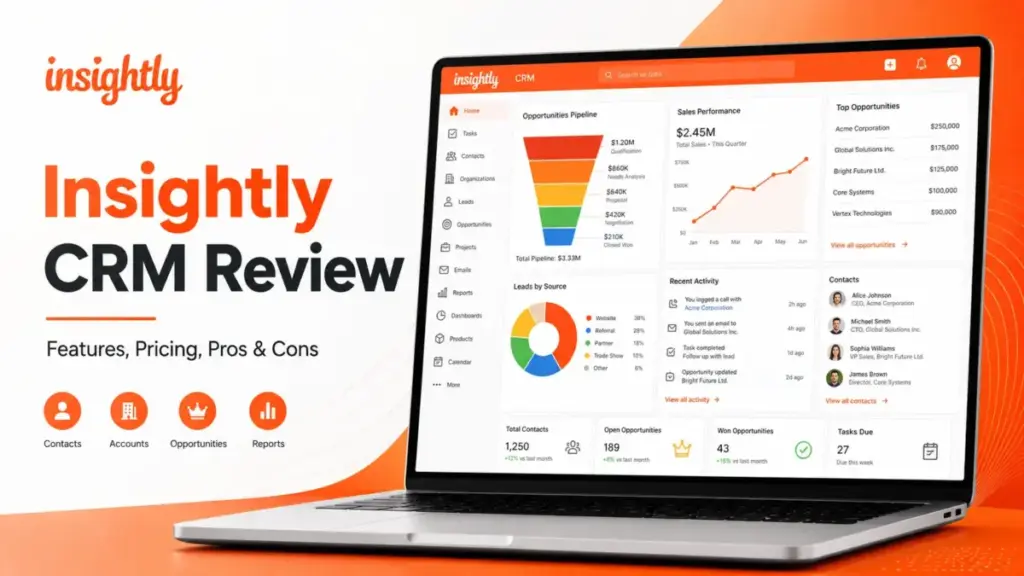
Most buyers find Insightly through its $29/user/month Plus plan and assume they are getting automation at that price. They are not. This Insightly CRM Review exists because the real buying decision starts at Professional ($49/user/month), and even that number hides the cost of onboarding, support upgrades, and AppConnect. Insightly is CRM software built around a specific idea: sales work does not end at the closed deal.
The platform connects pipeline management, project delivery, service, marketing automation, and AI Copilot under one customer record. That architecture is genuinely useful for teams where revenue depends on post-sale delivery. But the bill changes fast once you need the automation layer. If you are still evaluating your CRM options for a team that sells and delivers, this review breaks down the real cost, the plan gates, and the buyer profiles where Insightly fits or fails
This review is based on an editorial evaluation of Insightly’s official documentation, pricing data, workflow simulations, verified user review patterns, and competitor pricing checks. I did not score Insightly based on brand popularity alone. For more on how we evaluate products, see the SaaS Zap review methodology.
| Category | Verdict |
|---|---|
| Score | 8.1/10 |
| Best For | 10-50 person service teams that need CRM plus project delivery |
| Not For | Solo sellers, tiny teams needing only follow-up reminders, teams needing low-cost email sequencing |
| Pricing Entry | Plus $29/user/month, Professional $49/user/month, Enterprise $99/user/month (billed annually) |
| Biggest Cost Trap | Automation starts at Professional; AppConnect and Premier Support can raise first-year cost by thousands |
| Free Trial | 14-day trial available |
| Standout Feature | CRM-to-project handoff on a single customer record |
The 60-Second Version
Insightly is worth testing if your team sells a service and then delivers it, and you want one record connecting both workflows. Here is the short version:
- Worth it? Yes, for 10-50 person teams combining sales pipeline tracking with project delivery. Not worth it for solo users or teams that only need contact management.
- Who should buy? Consulting firms, agencies, and service companies where won deals convert into tracked projects. Teams already paying for a separate CRM and a separate project tool should run the cost comparison.
- Who should skip? Solo sellers paying $29/month for features designed for teams. Anyone who needs built-in email sequences or low-cost outbound automation. Teams under 5 people with no delivery workflow.
- Biggest pricing trap? The Plus plan looks affordable but lacks workflow automation and AI Copilot. The moment you need those, you jump to Professional ($49/user/month) and the per-seat math changes.
- Best alternative? Pipedrive for pure pipeline selling. HubSpot for inbound-led teams. Zoho CRM for budget-sensitive automation.
TL;DR by Team Size
The right Insightly plan depends more on your team size and delivery model than on any feature checklist. Here is where each buyer type lands after factoring in real costs.
| Buyer Type | Recommendation | Why | Better Alternative |
|---|---|---|---|
| Solo consultant, under 100 contacts | Skip | Paying $29-49/month for team features you will not use | Less Annoying CRM at $15/user/month |
| Freelancer with project delivery | Try (Plus only) | Project tracking built into CRM is useful, but $29/month is steep for one seat | Pipedrive at $14/user/month if delivery tracking is not critical |
| 5-person agency with client delivery | Try (Professional) | Automation and project handoff start paying off at this size | HubSpot free CRM if marketing matters more than delivery |
| 10-user consulting or services team | Buy (Professional) | CRM plus project handoff on one record saves a second tool cost | Zoho CRM if budget is the top constraint |
| 25-50 person sales and delivery org | Buy (Professional or Enterprise) | Unified customer record across sales, delivery, and support reduces tool sprawl | Salesforce if deep customization and admin resources exist |
| Enterprise RevOps team, 100+ users | Evaluate carefully | Costs scale; AppConnect and Premier Support add budget pressure | Salesforce Sales Cloud with dedicated admin |
Platform Architecture: CRM Plus Delivery
Insightly is not a contact database with a pipeline bolted on. It is an architecture where CRM, project management, service, marketing, integrations, and AI sit on top of a shared customer record. Understanding the architecture matters because it explains both the platform’s strength and its cost structure.
The core idea is this: a contact or organization in Insightly is linked across every module. When a sales rep closes an opportunity, that record can convert directly into a project with tasks, milestones, and delivery tracking. The service team can see the same customer history. Marketing automation (sold separately) can target based on CRM data. AppConnect provides no-code integrations to external tools. The API (REST-based, third generation) opens access for custom workflows.
Here is how the pieces connect:
| Product Name | Who It Is For | Data Access | Pricing Model | Main Limitation |
|---|---|---|---|---|
| Insightly CRM | Sales and account management teams | Shared customer record | $29-99/user/month billed annually | Automation locked behind Professional |
| Insightly Marketing | Marketing teams running campaigns from CRM data | Reads CRM contacts and organizations | $99-999/account/month | Separate cost from CRM, starts at $99/month |
| Insightly Service | Support teams handling post-sale tickets | Shared customer record | Priced separately | Adds another module cost |
| Insightly AppConnect | Teams needing cross-app automation | Connects CRM to external tools | $249-1,899/account/month plus $3,000 setup | Separate budget line, task-based pricing |
| Insightly All-in-One | Teams wanting CRM plus Marketing plus Service bundled | Unified access | Starting at $349-2,599/month | Minimum monthly commitment is high |
| Insightly AI Copilot | Sales reps wanting AI summaries and email replies | Works within CRM records | Included with Professional and above | Not available on Plus plan |
This architecture is the reason Insightly works well for service businesses. A consulting firm that tracks the sales pipeline from lead to close and then manages the engagement as a project, all in one system, gets real value. A team that only needs pipeline tracking and never touches project delivery is paying for structure it will not use.
For Solo Users and Freelancers
Solo sellers should skip Insightly in almost every scenario. The Plus plan at $29/user/month costs $348/year. Professional costs $588/year. Both prices put Insightly above simpler CRM tools built for individual users.
The core problem is not the interface. Insightly’s contact management, organization linking, and project tracking work fine for one person. The problem is cost relative to need. A solo consultant managing 50-100 client relationships does not need team-based pipeline management, role-based permissions, or multi-user dashboards. Those features exist because Insightly is built for teams.
As one Capterra reviewer put it: “As a solopreneur, I did not like that a lot of the features available didn’t seem designed for me and I felt like I was paying for features I did not need.” (Alex M., Media Coordinator, Publishing, via Capterra)
If you are a solo user who wants simple contact tracking with follow-up reminders, Less Annoying CRM at $15/user/month gives you exactly that without the team overhead. If you need pipeline selling in a clean interface, Pipedrive starts at $14/user/month.
Verdict: Trial Insightly only if you are a solo consultant who genuinely needs CRM-to-project conversion on a single record. Otherwise, your money works harder elsewhere.
For 5-15 Person Teams
This is where Insightly starts making financial sense, but only if post-sale delivery is part of your sales workflow. A 5-person agency paying for Insightly Plus spends $145/month ($1,740/year). At Professional, that jumps to $245/month ($2,940/year).
The gap between Plus and Professional matters here. A 5-person team on Plus gets contact management, pipeline tracking, project management, and reporting. That is enough if your team tracks deals and converts them to projects manually. The moment you need automated lead assignment, workflow triggers, or AI Copilot, you need Professional, and the annual bill jumps by $1,200 for five seats.
For a 10-person team, the math sharpens:
- Plus: $290/month, $3,480/year
- Professional: $490/month, $5,880/year
- Professional plus Guided Onboarding: $7,380 first year
A 10-user team on Professional paying for Guided Onboarding spends $7,380 in year one. If that team also needs Premier Support (20% of investment, $3,000 minimum), the first-year cost reaches $10,380. That is real money, and it is the number most pricing pages do not surface.
Verdict: Try Insightly Professional if your 5-15 person team sells a service, delivers it as a project, and wants both workflows on one platform. If your team only sells products with no delivery phase, Pipedrive or HubSpot will cost less and do the pipeline job well.
For 25-50 Person Sales and Delivery Teams
At 25-50 users, Insightly becomes a platform decision, not just a CRM purchase. The per-seat cost is predictable, but the add-ons, support tier, and integration layer change the total bill.
For a 50-user team:
- Plus: $1,450/month, $17,400/year
- Professional: $2,450/month, $29,400/year
- Professional plus Guided Onboarding: $30,900 first year
- Professional plus Premier Support and Guided Onboarding: $33,900 first year
- Add AppConnect 100K tasks: add $799/month ($9,588/year) plus $3,000 technical setup
A 50-user team on Professional with onboarding, Premier Support, and AppConnect could spend over $46,000 in year one. Compare that to maintaining a separate CRM and project management tool. If your team uses the shared customer record daily across sales, delivery, and support, Insightly can reduce tool sprawl. If teams work in silos regardless of the CRM, you are paying for integration you will not use.
One Gartner Peer Insights reviewer noted: “Insightly CRM has ptovided me with a solid platform for managing customer relationships, as well as project tracking, workflow automation, etc.” (Validated Gartner Peer Insights reviewer, via Gartner Peer Insights)
Verdict: Buy Insightly for a 25-50 person team only if the CRM-to-project handoff and unified customer record reduce your tool count. If your sales and delivery teams will not share the same system daily, the premium over simpler CRMs is not justified.
What This Actually Costs
The Insightly pricing page shows plan prices, but the real bill depends on team size, plan choice, and add-ons. Here is the full picture.
CRM Plan Pricing
| Plan | Starting Price | Key Features | Best For | Main Limitation | Verified Source |
|---|---|---|---|---|---|
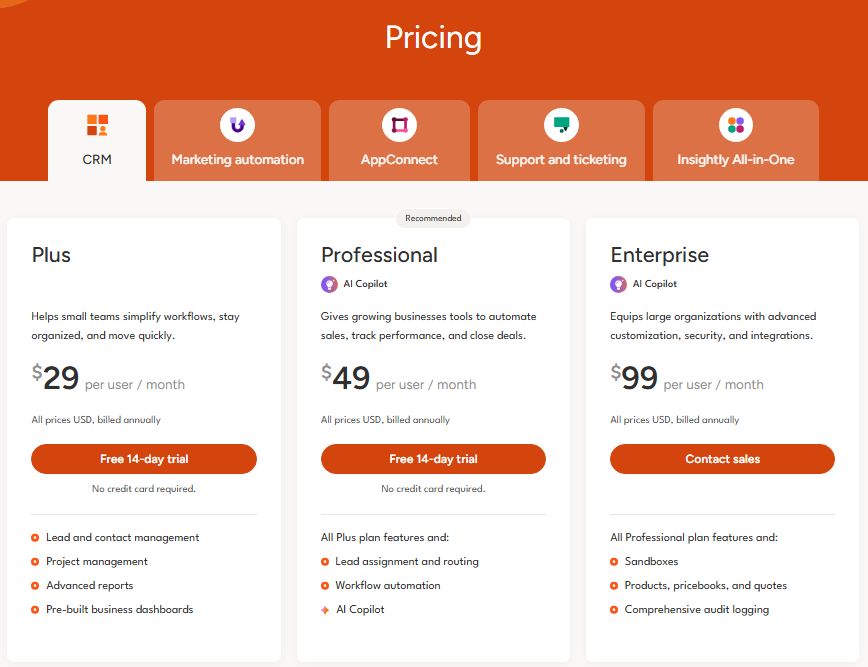
| Plus | $29/user/month (billed annually) | Lead and contact management, project management, advanced reports, dashboards | Small teams needing CRM plus project tracking | No workflow automation, no AI Copilot | Insightly pricing page |
| Professional | $49/user/month (billed annually) | Everything in Plus, lead assignment and routing, workflow automation, AI Copilot | Teams needing automation and AI | Higher per-seat cost, no sandboxes or quotes | Insightly pricing page |
| Enterprise | $99/user/month (billed annually) | Everything in Professional, sandboxes, products, pricebooks, quotes, audit logging | Large teams needing governance and quoting | Highest per-seat cost | Insightly pricing page |
Pricing verified on May 11, 2026 from Insightly’s official pricing page.
Real Cost Scenarios
Scenario 1: Solo user
| Item | Plus | Professional |
|---|---|---|
| Monthly cost | $29 | $49 |
| Annual cost | $348 | $588 |
Verdict: Skip Insightly if you only need follow-up reminders and basic contact tracking. Less Annoying CRM or Pipedrive cost less for solo use.
Scenario 2: 10-user sales and delivery team
| Item | Plus | Professional |
|---|---|---|
| Monthly seat cost | $290 | $490 |
| Annual seat cost | $3,480 | $5,880 |
| Plus Guided Onboarding | $4,980 | $7,380 |
| Plus Premier Support min. and Onboarding | $7,980 | $10,380 |
Verdict: Worth testing only if automation and project handoff matter. If you need only pipeline tracking, Professional’s premium over simpler CRMs is hard to justify.
Scenario 3: 50-user team
| Item | Plus | Professional |
|---|---|---|
| Monthly seat cost | $1,450 | $2,450 |
| Annual seat cost | $17,400 | $29,400 |
| Plus Guided Onboarding | $18,900 | $30,900 |
| Plus Premier Support min. and Onboarding | $21,900 | $33,900 |
| Add AppConnect 100K tasks (annual plus setup) | +$12,588 | +$12,588 |
Verdict: Better than a separate CRM plus project handoff stack only if the team uses the shared customer record daily. A 50-user Professional team with onboarding, Premier Support, and AppConnect can exceed $46,000 in year one.
Add-On Pricing
| Add-On | Price | Notes |
|---|---|---|
| Guided Onboarding | $1,500 one-time | Recommended for first implementation |
| Premier Support and Success | 20% of Insightly investment, $3,000 annual minimum | Faster response times (8 business hours vs 24 for Basic) |
| AppConnect 25K tasks/month | $249/account/month | Plus $3,000 required technical setup |
| AppConnect 100K tasks/month | $799/account/month | Plus $3,000 required technical setup |
| AppConnect 250K tasks/month | $1,899/account/month | Plus $3,000 required technical setup |
| Marketing Plus | $99/account/month | Separate from CRM seat pricing |
| Marketing Professional | $499/account/month | Separate from CRM seat pricing |
| Marketing Enterprise | $999/account/month | Separate from CRM seat pricing |
All pricing verified on May 11, 2026 from Insightly’s official pricing and product pages.
The Automation Cost Problem
The real Insightly buying decision starts at Professional, not Plus, because workflow automation and AI Copilot are not included in Plus. This is the single most important pricing fact in this review.
Plus at $29/user/month gives you lead management, contact management, project management, reports, and dashboards. That is a capable CRM for manual work. But the moment your team needs automated lead routing, trigger-based workflows, or AI-generated email replies, you must upgrade to Professional at $49/user/month. That is a 69% price increase per seat.
Here is the upgrade pressure map:
| Need | Required Plan or Add-On | Cost Signal | Buyer Warning |
|---|---|---|---|
| Lead assignment and routing | Professional ($49/user/month) | 69% jump from Plus | Cannot automate lead distribution on Plus |
| Workflow automation | Professional ($49/user/month) | 69% jump from Plus | No trigger-based rules on Plus |
| AI Copilot, AI email replies, AI summaries | Professional ($49/user/month) | 69% jump from Plus | AI features are plan-gated |
| Sandboxes | Enterprise ($99/user/month) | 102% jump from Professional | Testing environment locked to highest tier |
| Products, pricebooks, quotes | Enterprise ($99/user/month) | 102% jump from Professional | Quoting requires Enterprise |
| Audit logging | Enterprise ($99/user/month) | 102% jump from Professional | Compliance teams need Enterprise |
| Cross-app automation (non-native) | AppConnect ($249-1,899/month) | Separate account cost | $3,000 technical setup required |
| Faster support response | Premier Support (20% of investment) | $3,000 annual minimum | Basic support is 24 business hour first response |
The pattern is clear. Insightly’s Plus plan is a capable manual CRM with project tracking. But the features that make a CRM save time (automation, AI, lead routing) sit behind a plan gate. For teams evaluating Insightly CRM automation, the honest comparison starts at $49/user/month, not $29.
A Capterra reviewer described the friction: “Since Insightly is so streamlined, it is hard to make in-depth automations, especially when it comes to actions between different objects.” (Chrisarn M., Marketing Officer, Marketing and Advertising, via Capterra)
AppConnect is not required for every customer. It is an add-on risk for teams that need cross-app automation beyond native CRM workflows. If your integrations are limited to Gmail, Slack, or calendar sync, AppConnect may not be necessary. If you need to push CRM data into QuickBooks, Shopify, or Jira with conditional logic, AppConnect becomes a budget line.
Insightly CRM Features That Matter
Insightly’s feature set is wide, but value depends on which plan you buy and whether your team uses delivery tracking. Below are the features that actually influence a buying decision.
Contact and Organization Management
Insightly links contacts to organizations, opportunities, projects, and emails. Every interaction with a customer is visible from one record. Relationship linking lets you map connections between contacts and organizations (partner, vendor, contractor), which is useful for consulting firms tracking stakeholder networks. Custom fields and custom objects extend the data model. One Capterra reviewer noted: “Very user friendly, custom views for all users is great, reporting is excellent. Custom modules have their limitations but have worked very well for our business so far.” (Parker A., Digital Marketing Manager, Food Production, via Capterra)
Pipeline and Opportunity Management
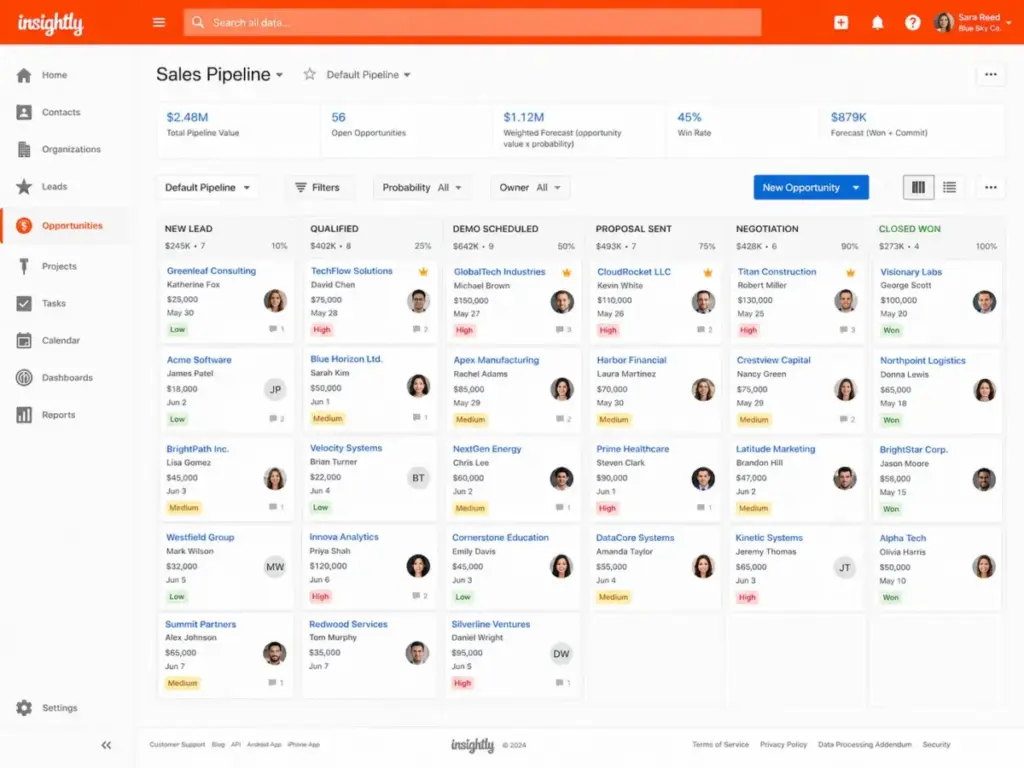
Pipelines use a Kanban view with drag-and-drop stage movement. You can build multiple pipelines for different sales motions (new business, renewals, upsells). Opportunity records connect to contacts, organizations, and products. Forecasting data pulls from pipeline stages and expected close dates.
The pipeline interface is functional but not flashy. Teams used to Pipedrive’s visual polish may find Insightly’s Kanban view more utilitarian. It works, but it does not feel designed for speed selling.
Project Handoff
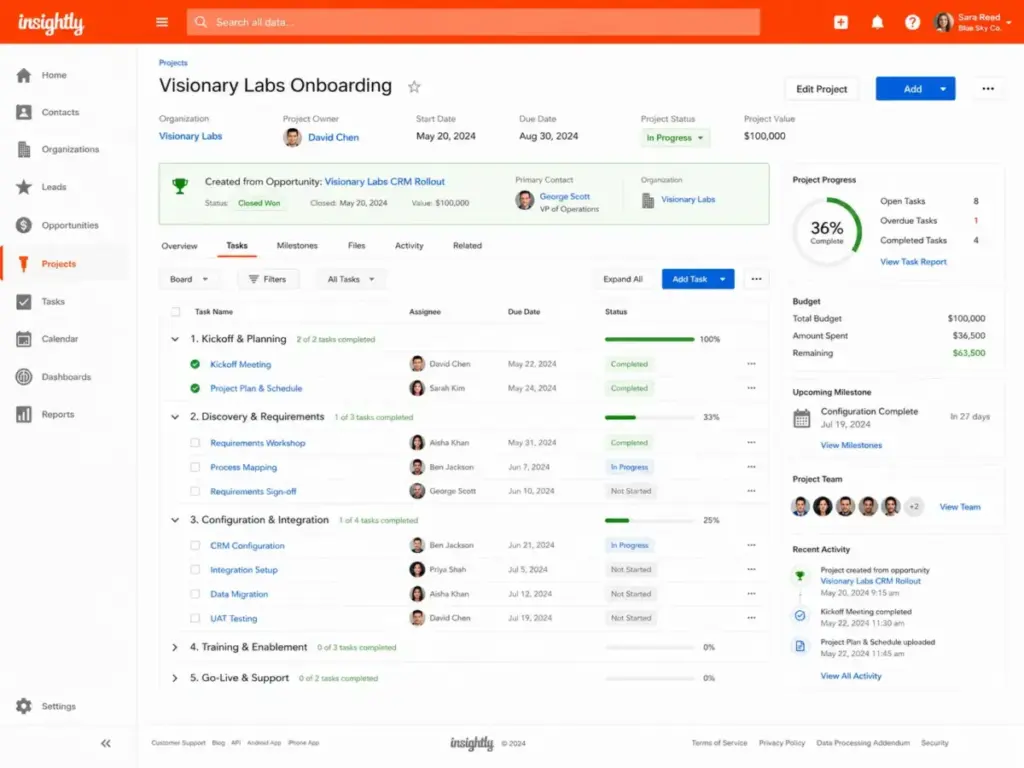
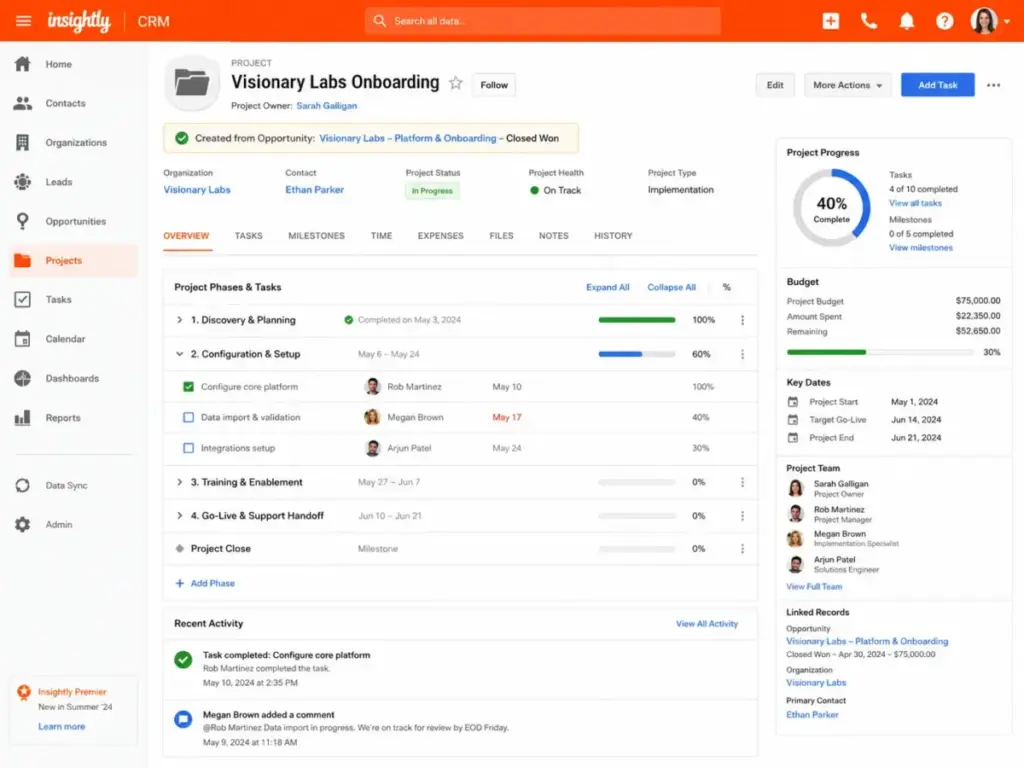
This is Insightly’s differentiator. When an opportunity is won, you can convert it into a project with tasks, milestones, and pipelines. The customer record carries over. The sales rep’s context transfers to the delivery team without a separate handoff document or a copy-paste between tools.
For service businesses (consulting, agencies, professional services), this feature alone can justify the platform. For product companies with no delivery phase, it adds complexity without value.
Workflow Automation
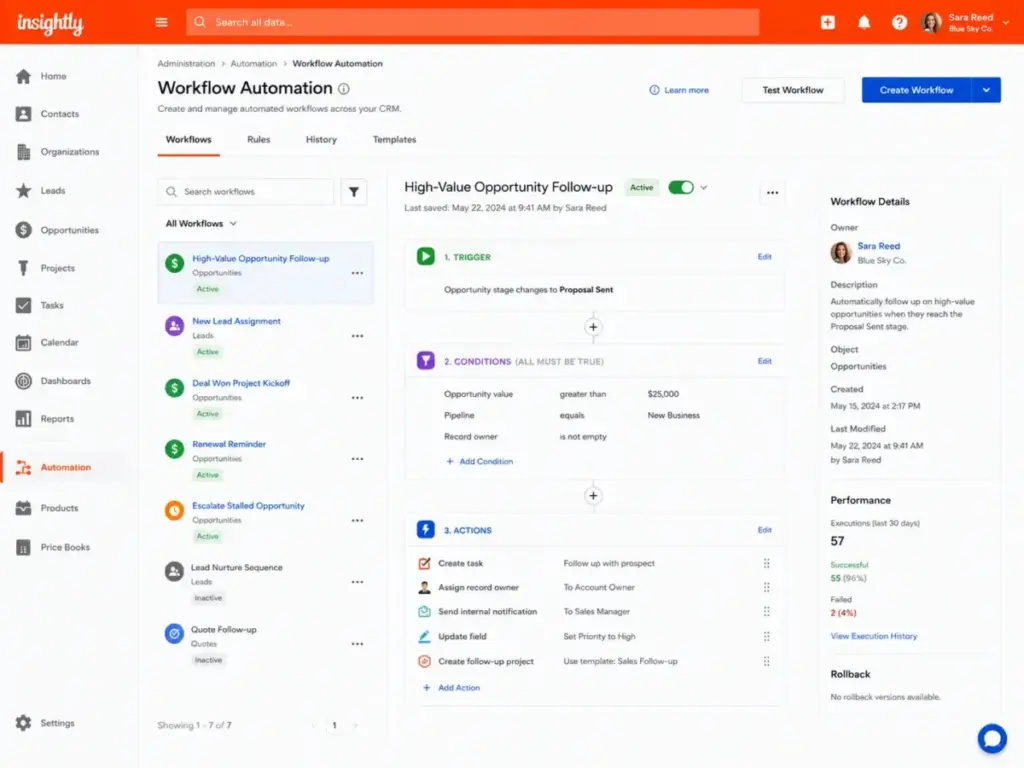
Available on Professional and Enterprise only. Workflow automation lets you set trigger-based rules: when a lead reaches a certain stage, assign it to a rep; when a deal closes, create a project; when a task is overdue, send a notification. The builder uses a visual interface with conditions and actions.
The automation is functional for CRM-centric workflows. It is not a full marketing automation engine or a complex multi-branch workflow tool. Teams needing advanced conditional branching across multiple objects may hit limits.
Reporting and Dashboards
All plans include advanced reports and pre-built business dashboards. You can build custom reports on contacts, opportunities, projects, and tasks. Professional and Enterprise add more report types and scheduling.
The reporting is good for operational CRM data. It is not a replacement for Power BI or Looker. Teams needing deep cross-platform analytics will likely export data via API or AppConnect.
AppConnect and API
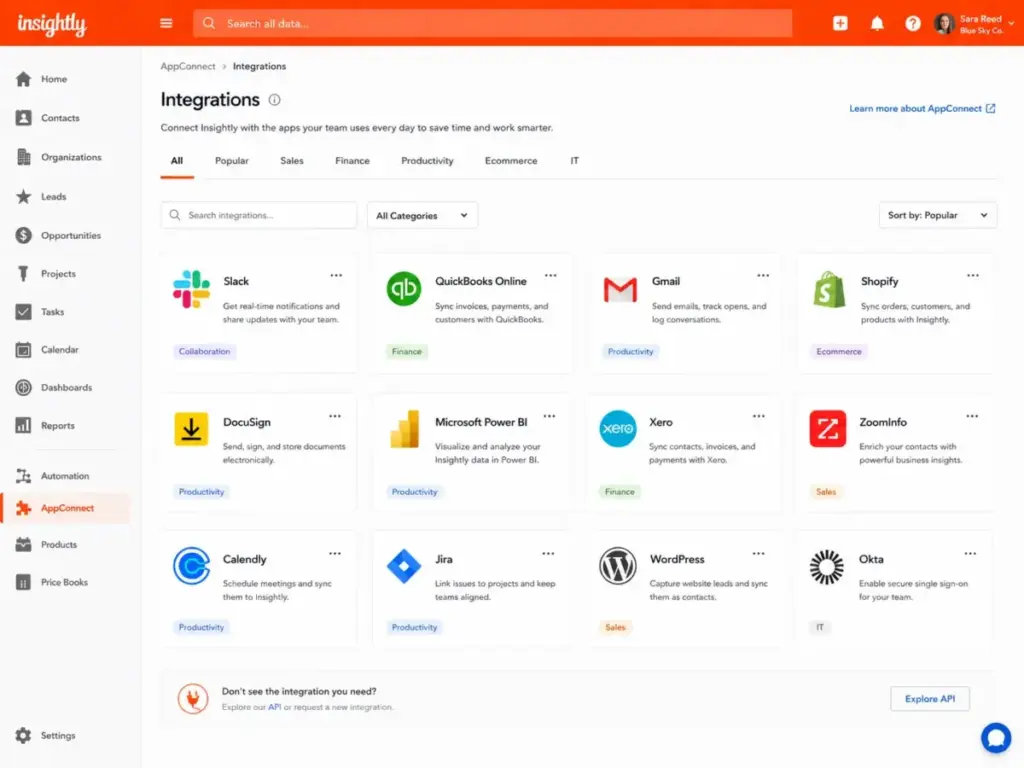
Insightly AppConnect provides no-code, drag-and-drop integrations with hundreds of connectors. Categories cover AI/Machine Learning, Collaboration, Customer Service, Finance, HR, Operations, and more. Example integrations include Apollo, QuickBooks Online, Slack, Jira, Shopify, Xero, Gong, Asana, Calendly, Gmail, DocuSign, and Microsoft Power BI.
The Insightly API is REST-based, in its third generation, supports JSON conventions, includes a web-based sandbox, offers Java/.NET/Python client libraries, and supports Swagger. For teams with developer resources, the API provides more flexibility than AppConnect at lower ongoing cost.
AppConnect pricing (starting at $249/account/month with $3,000 technical setup) means it is a cost center, not a free feature. Use it when native integrations and the API do not cover your needs.
AI Copilot
Insightly’s AI features include Copilot, AI email replies, and AI email summaries. Available on Professional and Enterprise plans only.
Copilot surfaces contact summaries, suggests next actions, and generates email drafts based on CRM context. AI email summaries condense long threads into quick reads. These features save time for reps managing high-volume communication, but they are not a standalone AI sales assistant. Do not expect the depth of a dedicated AI sales tool like Gong or Clari.
Who should not rely on AI Copilot: teams on Plus (it is not available), teams expecting advanced conversation intelligence, or teams needing AI-driven forecasting beyond what CRM data provides.
Security and Compliance
Insightly’s security page lists SOC 2 Type II certification, GDPR compliance, CCPA compliance, HIPAA support, encryption, SSO, two-factor authentication (2FA), and data portability. The platform states 99.95% continuous uptime every year.
Audit logging is available on Enterprise only. Teams in regulated industries needing audit trails must factor in the Enterprise plan cost ($99/user/month).
The First 30 Minutes With Insightly
The initial setup experience tells you a lot about how Insightly handles complexity. Here is what I found during an editorial evaluation of the onboarding flow.
Trial signup: Insightly offers a 14-day free trial. The signup process asks for company size, role, and use case. You land in a workspace with sample data and a guided setup checklist.
Import: Contact and organization import supports CSV files. The mapping interface is functional. Expect to spend 10-15 minutes mapping custom fields if your data has non-standard columns. For teams migrating from Salesforce or HubSpot, Insightly provides import documentation, but complex migrations (with opportunity history and activity logs) may need the $1,500 Guided Onboarding.
Pipeline setup: Creating a pipeline takes a few clicks. You define stages, set probability percentages, and start adding opportunities. The Kanban view appears immediately. For teams familiar with any visual CRM, this step is straightforward.
Contact records: The record layout shows linked organizations, opportunities, projects, emails, and activities. Relationship linking is visible from the contact record. The depth of the record is useful for account-based teams but can feel busy for teams managing simple follow-ups.
Project handoff: Converting a won opportunity to a project is the moment Insightly’s architecture clicks. The customer data, deal context, and linked contacts carry into the project view. This is the feature that separates Insightly from pipeline-only CRMs.
First automation wall: If you are on Plus, the workflow automation menu is visible but gated. You can see the builder, but you cannot save rules. This is where the upgrade pressure starts. Professional unlocks automation, and the decision to upgrade becomes a question of how much manual work your team tolerates.
Where documentation matters: Insightly’s help center covers core features well. Some advanced configurations (custom objects, AppConnect setup, API integration) require reading documentation carefully. Teams without a CRM admin may find the initial learning curve steeper than Pipedrive or Less Annoying CRM, though lighter than Salesforce.
Insightly Pros and Cons
Insightly’s strengths center on its CRM-to-delivery architecture, and its weaknesses center on cost and automation limits. Here are specifics with context.
- CRM-to-project handoff on one record. No other mid-market CRM at this price point connects pipeline management to project delivery this directly. For a 10-user consulting team on Professional ($5,880/year), eliminating a separate project tool could save $1,000-3,000/year in tool costs.
- AppConnect provides broad integration coverage. Hundreds of connectors covering finance, HR, operations, and sales tools. A team connecting Insightly to QuickBooks, Slack, and Jira gets a connected workflow. The API adds developer flexibility.
- Relationship linking maps real business networks. Linking contacts across organizations with role labels (partner, vendor, decision-maker) gives account-based teams visibility that flat contact lists miss.
- Security and compliance at a mid-market price. SOC 2 Type II, GDPR, CCPA, HIPAA support, SSO, and 2FA on a platform starting at $29/user/month. Competitors often gate SSO behind higher tiers.
- AI Copilot on Professional saves rep time. AI email replies and summaries reduce manual effort for reps managing 50+ active contacts. The feature is included in Professional, not sold as a separate AI add-on.
- Plus plan lacks workflow automation and AI Copilot. The $29/user/month plan has no trigger-based rules and no AI assistance. For a 10-user team, upgrading from Plus to Professional to get automation costs an extra $2,400/year.
- AppConnect adds a separate monthly account cost and technical setup. Starting at $249/account/month with a required $3,000 technical setup, AppConnect can add $6,000+ to the first year. This cost is not obvious from the CRM pricing page.
- Premier Support has a $3,000 annual minimum. Basic support offers a 24 business hour email first response and phone support from 9AM-4PM PT. Premier Support drops email response to 8 business hours and extends phone hours (6AM-6PM PT), but costs 20% of your Insightly investment with a $3,000 floor.
- Email sequencing is weak or absent compared with sales engagement CRMs. Teams needing multi-step outbound email sequences will find Insightly lacks the built-in sequencing of Freshsales or HubSpot Sales Hub. You would need a separate tool or AppConnect integration.
- Reporting can feel limited for teams needing deep BI. The built-in reports work for CRM operational data. Teams needing cross-platform dashboards, cohort analysis, or advanced visualizations will need API export to Power BI or a similar tool.
- Search and interface complexity increase with many objects. As custom objects, fields, and relationships multiply, the interface can feel cluttered. Teams with hundreds of custom fields report slower navigation.
- Support ratings are mixed on review platforms. User reviews on Capterra and G2 show mixed sentiment about response times and resolution quality, especially on Basic support.
- Not ideal for solo sellers. A solo user paying $29-49/month is overpaying for team features. The platform is designed for collaborative sales and delivery workflows.
Insightly Alternatives Compared
No CRM is the right choice for every team. Below are the scenarios where a competitor beats Insightly, and where Insightly beats them back.
For deeper comparisons, see the HubSpot CRM review, Pipedrive CRM review, Zoho CRM review, Freshsales review, and Salesforce CRM review. You can also compare HubSpot vs Salesforce or Pipedrive vs Zoho CRM for more context.
| Scenario | Best Choice | Why | Avoid If |
|---|---|---|---|
| Inbound-led team needing free CRM entry | HubSpot CRM | Free tier for small teams, strong marketing integration | You need CRM-to-project handoff |
| Pure pipeline selling, no delivery phase | Pipedrive | Cleanest visual pipeline at $14/user/month, fast setup | You need built-in project management |
| Budget-sensitive team needing automation | Zoho CRM | Lower per-seat cost with automation on mid-tier plans | You need strong AppConnect-level integrations |
| Built-in calling and AI sales assistance | Freshsales | Phone, email, and AI baked into the CRM | You need post-sale project tracking |
| Enterprise customization with admin resources | Salesforce Sales Cloud | Deepest customization, largest ecosystem | You lack a dedicated Salesforce admin |
| Solo user needing simple contact tracking | Less Annoying CRM | $15/user/month, minimal complexity | You need pipeline automation or project delivery |
Competitor verdicts:
- Insightly vs HubSpot: Choose HubSpot if inbound marketing and a free CRM entry point matter more than delivery tracking. Choose Insightly if your team sells services and needs project handoff. HubSpot’s Sales Hub at scale ($90-150/user/month for Professional and Enterprise) can exceed Insightly’s cost.
- Insightly vs Pipedrive: Choose Pipedrive if pipeline simplicity matters more than project handoff. Pipedrive starts at $14/user/month and excels at visual deal management. It does not have built-in project tracking.
- Insightly vs Zoho CRM: Choose Zoho CRM if low-cost automation and suite depth matter more than Insightly’s project handoff. Zoho’s CRM starts lower and offers automation on mid-tier plans. Insightly’s edge is the CRM-to-project workflow.
- Insightly vs Freshsales: Choose Freshsales if built-in calling and AI sales assistance matter more than AppConnect and project delivery. Freshsales embeds phone and AI into the CRM natively.
- Insightly vs Salesforce: Choose Salesforce if your organization has admin resources and needs deep customization. Salesforce is more powerful but significantly more complex and expensive to implement.
Final Verdict: Who Should Use Insightly?
Insightly CRM earns 8.1/10. It is a strong platform for teams where sales work continues into delivery, and where a shared customer record across CRM, projects, and service reduces tool sprawl. Teams that like the CRM-to-project architecture but cannot justify the automation gates, AppConnect setup fees, or support minimums should compare Insightly alternatives against the same delivery-handoff requirements before renewing.
Best fit: 10-50 person service companies (consulting firms, agencies, professional services) that need pipeline management connected to project delivery. Teams already maintaining a separate CRM and project tool should calculate whether Insightly Professional consolidates both at lower total cost.
Who should not buy Insightly: Solo sellers paying for team features they will not use. Teams under 5 people with no delivery workflow. Organizations that need low-cost email sequencing or outbound automation as a primary CRM function. Budget-constrained teams that need automation but cannot absorb the Plus-to-Professional jump.
Best alternative by scenario:
- Pure pipeline: Pipedrive
- Inbound marketing plus CRM: HubSpot
- Budget automation: Zoho CRM
- Built-in calling: Freshsales
- Enterprise customization: Salesforce
Pricing warning: Start your comparison at Professional ($49/user/month), not Plus. Factor in Guided Onboarding ($1,500), Premier Support ($3,000 annual minimum), and AppConnect (starting at $249/account/month plus $3,000 setup) before committing. The $29/user/month Plus price is real, but it is not the price most automation-needing teams will pay.
This Insightly CRM review reflects editorial evaluation as of May 2026. Pricing and features may change; verify current data on Insightly’s official CRM page before purchasing.
FAQ
Is Insightly CRM worth it in 2026?
Yes, for teams of 10-50 people that need CRM connected to project delivery. The platform’s CRM-to-project handoff is genuinely useful for consulting firms and agencies. It is not worth it for solo users or teams that only need basic contact tracking, where simpler and cheaper alternatives exist.
How much does Insightly CRM cost?
Insightly CRM costs $29/user/month (Plus), $49/user/month (Professional), or $99/user/month (Enterprise), all billed annually. A 10-user team on Professional pays $5,880/year before onboarding, support upgrades, or AppConnect. Pricing verified May 11, 2026.
Does Insightly CRM have a free plan?
Insightly offers a 14-day free trial. A free CRM plan is not currently verified as available. If budget is a constraint, HubSpot offers a free CRM tier with basic features.
What are the main pros and cons of Insightly CRM?
The main pros are CRM-to-project handoff, broad integrations via AppConnect, relationship linking, and included AI Copilot on Professional. The main cons are automation locked behind Professional ($49/user/month), AppConnect as a separate cost center, $3,000 annual minimum for Premier Support, and weak email sequencing.
Who should use Insightly CRM?
Service-based teams of 10-50 people where sales leads to delivery. Consulting firms, agencies, and professional services companies that want pipeline management and project tracking on one customer record. Teams already paying for a separate CRM and project tool should compare total costs.
Who should avoid Insightly CRM?
Solo sellers, freelancers who do not need project delivery tracking, teams under 5 people with simple follow-up needs, and organizations that need built-in email sequences or low-cost outbound automation. Less Annoying CRM or Pipedrive serve these buyers better.
What is the best Insightly CRM alternative?
It depends on the need. Pipedrive for pure pipeline selling ($14/user/month). HubSpot for inbound marketing plus CRM with a free entry tier. Zoho CRM for budget-sensitive teams needing automation. Freshsales for built-in calling and AI. Salesforce for enterprise customization with admin resources.
Is Insightly better than HubSpot?
Insightly is better than HubSpot for teams needing CRM-to-project handoff and post-sale delivery tracking. HubSpot is better for inbound-led teams, marketing-heavy workflows, and organizations that want a free CRM entry point. At scale, HubSpot Sales Hub Professional can cost more per seat than Insightly Professional.
Is Insightly better than Pipedrive?
Insightly is better for teams that need project management built into the CRM. Pipedrive is better for teams focused on pure pipeline selling with a clean, fast interface at a lower entry price ($14/user/month vs $29). Pipedrive does not include project tracking.
Does Insightly include workflow automation?
Yes, but only on Professional ($49/user/month) and Enterprise ($99/user/month) plans. The Plus plan at $29/user/month does not include workflow automation or AI Copilot. This is the most common pricing misconception for Insightly buyers.
What is Insightly AppConnect?
Insightly AppConnect is a no-code integration platform with drag-and-drop workflows and hundreds of connectors. It connects Insightly CRM to tools like QuickBooks, Slack, Jira, Shopify, and Gmail. Pricing starts at $249/account/month for 25,000 tasks with a required $3,000 technical setup fee.
Does Insightly have AI features?
Yes. Insightly AI Copilot, AI email replies, and AI email summaries are available on Professional and Enterprise plans. These features summarize contact records, suggest actions, and draft emails. They are not available on the Plus plan.