Small businesses lose deals when contacts fall through the cracks, follow-ups get missed, and spreadsheets replace a real CRM software system. This Capsule CRM review breaks down whether this lightweight CRM can solve those problems without dragging your team into a setup nightmare.
Capsule CRM positions itself as the clean, low-friction option in a market full of bloated platforms. It handles contacts, pipelines, tasks, and post-sale project boards. It does not try to be a full revenue operations suite. For some teams, that restraint is a strength. For others, it becomes a ceiling.
Teams hitting that ceiling should compare Capsule CRM alternatives by automation access, reporting depth, project follow-through, per-seat cost, and the migration effort required to leave a lightweight relationship CRM.
I evaluated Capsule against the criteria I use for every CRM on our best CRM software list: pricing transparency, feature depth per plan, automation capability, reporting quality, and real-world fit for teams under 15 people.
Here is what I found.
Capsule CRM Quick Verdict
Capsule CRM scores 8.2 out of 10 as a relationship-first CRM built for small teams that want fast adoption, clean contact records, and simple pipeline tracking without the admin load of enterprise platforms.
It works best when your team needs a shared system for managing relationships and deals, not when you need advanced automation, outbound sequencing, or deep marketing workflows.
| Category | Details |
|---|---|
| Overall Score | 8.2/10 |
| Best For | Small businesses, solo consultants, agencies, and professional services teams managing relationships and simple sales pipelines |
| Not For | Outbound sales teams, complex revenue operations, ecommerce lifecycle marketing, enterprise governance |
| Starting Price | $18/user/month (annual) on Starter; Free plan available for 2 users |
| Free Plan | Yes, 2 users, 250 contacts |
| Best Plan for Most Small Teams | Growth at $36/user/month (annual): unlocks workflow automation, multiple pipelines, advanced reporting, AI features |
| Biggest Strength | Fast adoption and clean UX that teams actually use instead of abandoning |
| Biggest Limitation | Automation and reporting stay basic compared to Pipedrive, HubSpot, and Zoho CRM |
| Main Alternatives | Pipedrive, HubSpot CRM, Zoho CRM, Less Annoying CRM, Insightly |
What Is Capsule CRM?
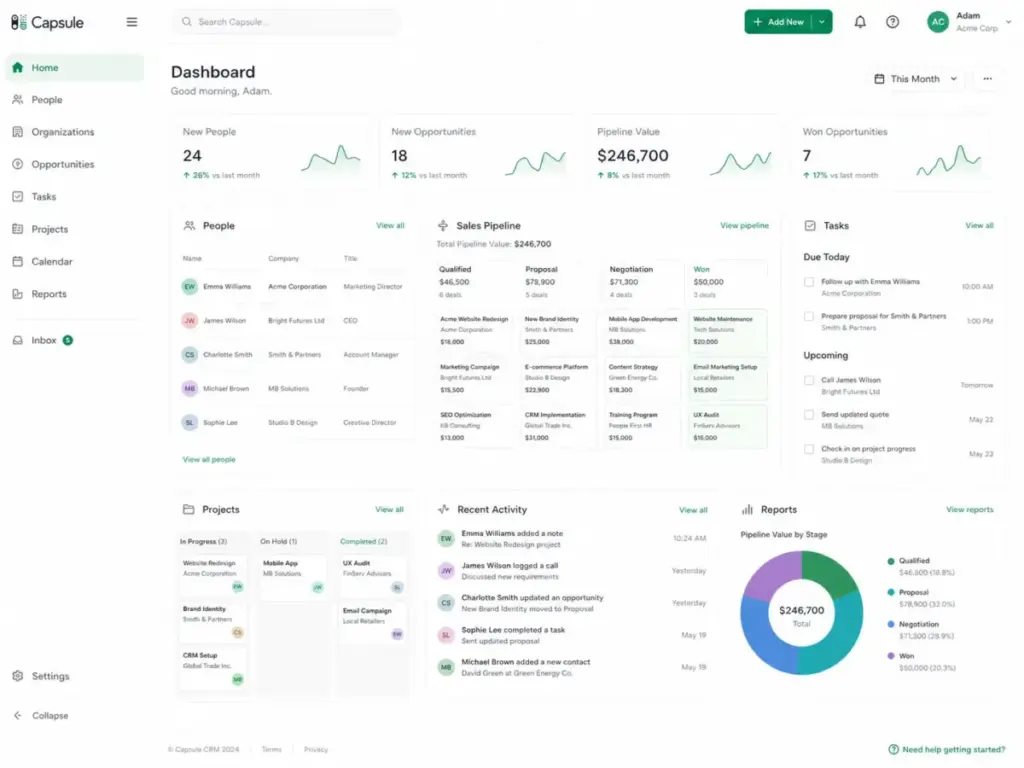
Capsule CRM is a cloud-based customer relationship management platform built by Zestia Ltd, designed for small businesses that need contact records, sales pipelines, task tracking, and basic project boards without the complexity of enterprise CRMs.
The product launched over 15 years ago and has maintained a tight focus on simplicity. It is not trying to compete with HubSpot on marketing depth or Salesforce on customization. Instead, Capsule targets teams of 1 to 50 users who want a CRM they can set up in a day and actually keep using.
Capsule covers five core areas: contact management, sales pipeline tracking, task and calendar management, post-sale project boards, and integrations with tools like Gmail, Outlook, Xero, QuickBooks, and Mailchimp. Recent additions include workflow automation (from the Growth plan up) and AI features for contact enrichment, email assistance, and pipeline suggestions.
The product sits in the best CRM for small business category, competing with tools like Pipedrive, Less Annoying CRM, and Insightly for teams that want function without friction.
Capsule CRM Features
Capsule CRM covers contacts, pipelines, tasks, projects, automation, AI, reporting, and integrations across its five plans. Feature access varies significantly by tier, and some of the most useful capabilities only unlock at the Growth plan ($36/user/month annually) or above.
Here is how each feature area performs.
Capsule CRM Contact Management
Contact management is Capsule’s foundation. Every person and organization gets a detailed record with notes, emails, call logs, tasks, activity history, custom fields, and tags.
The contact record layout is clean. You see the full interaction timeline on one screen: emails, notes, calls, files, and linked opportunities. Tags let you segment contacts by type (prospect, client, partner, vendor), and custom fields let you store data specific to your business.
Starter supports 30,000 contacts and 50 custom fields. Growth pushes that to 60,000 contacts and 150 custom fields. Advanced handles 120,000 contacts with 300 custom fields. Ultimate supports 240,000 contacts with unlimited custom fields.
For most small teams under 10 people, the Starter limit of 30,000 contacts is more than enough. The real question is whether 50 custom fields cover your data needs, especially if you track industry-specific details.
Score: 8.7/10. Contact records are well-organized, the activity timeline is useful, and the tagging system works. The main gap is the absence of custom objects for teams with complex data models.
Capsule CRM Sales Pipeline
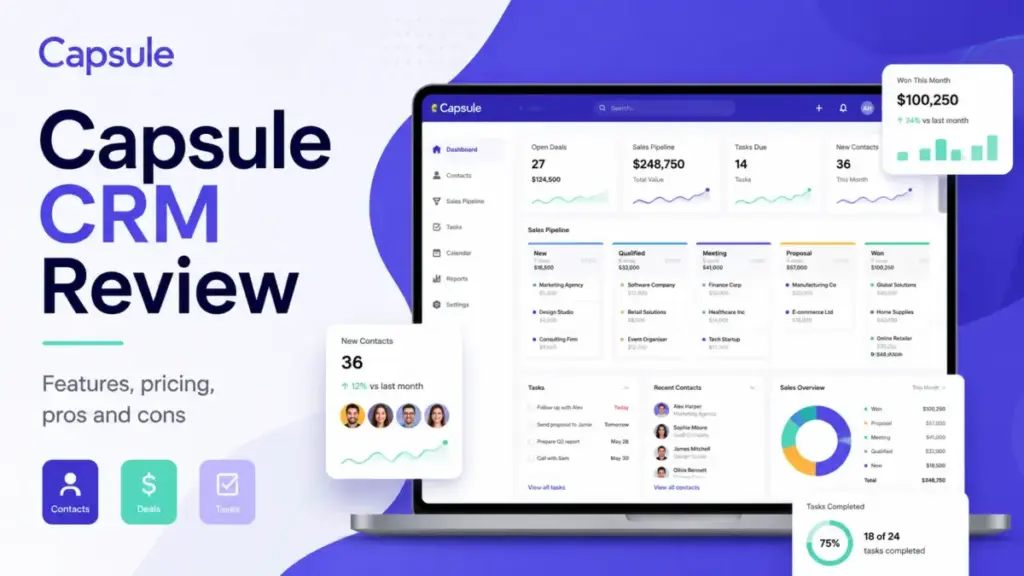
Capsule uses a Kanban-style pipeline view where deals appear as cards moving through stages. You can drag opportunities between stages, set expected close dates, attach values, and track win/loss rates.
Starter gives you 1 sales pipeline. Growth unlocks 5 pipelines. Advanced provides 50, and Ultimate offers 100.
For a solo consultant or a 3-person agency with one sales process, a single pipeline works fine. But if you run separate pipelines for new business, renewals, and partnerships, you need Growth at minimum.
The pipeline view is straightforward. Deal cards show the contact, value, and expected close date. You can filter by owner, milestone, and tag. Sales forecasting uses pipeline data to project revenue by stage probability.
The limitation here is depth. Capsule’s pipeline is clean but not as configurable as Pipedrive’s multi-pipeline setup or HubSpot’s deal-stage automation. You will not find built-in calling, email sequences, or deal scoring.
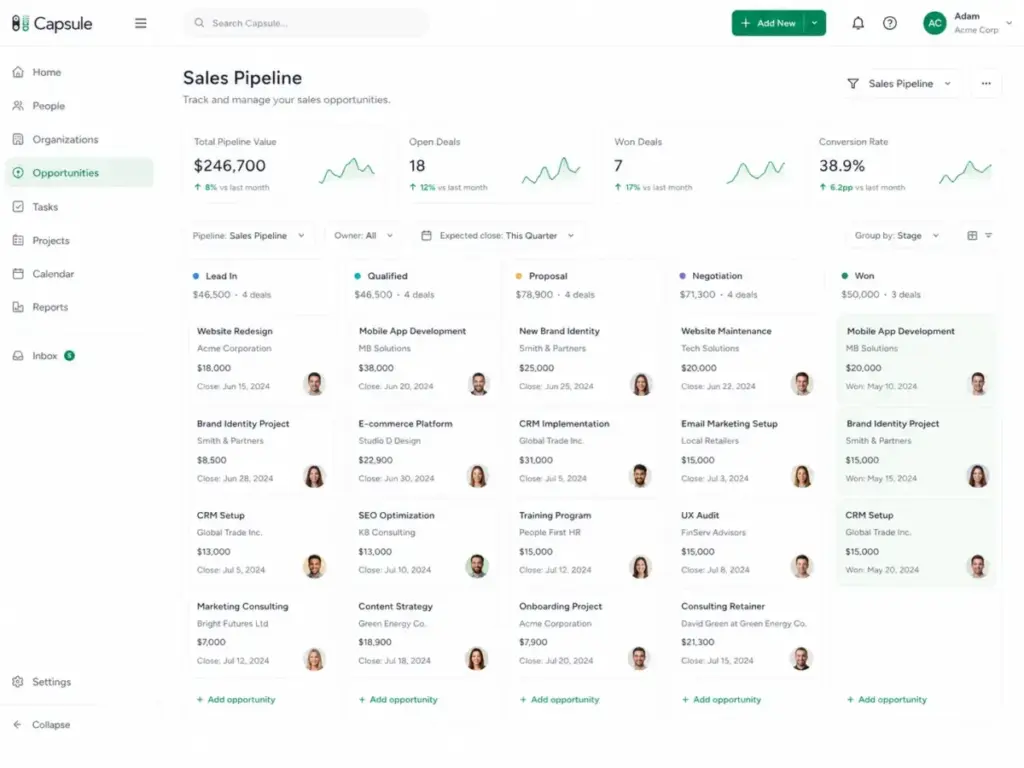
Score: 8.3/10. Clean pipeline UI that works for simple sales processes. Falls short for teams running complex, multi-stage sales operations.
Capsule CRM Tasks and Calendar
Tasks in Capsule tie directly to contacts and opportunities. You can create follow-up reminders, set due dates, assign tasks to team members, and track completion.
The Gmail and Outlook add-ins let you log emails to contact records and create tasks without leaving your inbox. Google Calendar syncs keep your CRM tasks visible alongside your meetings.
Task management is functional but not advanced. You will not find task dependencies, time tracking, or workload views. Capsule handles “call this person on Thursday” and “follow up on this deal next week” well. It does not handle project-level task orchestration.
Score: 7.8/10. Reliable for sales follow-ups and basic activity tracking. Not a replacement for dedicated task management tools.
Capsule CRM Projects
Capsule’s project boards are the feature that separates it from pure pipeline CRMs like Pipedrive.
Projects let service businesses move from a closed deal to client delivery on the same platform. An agency can win a website redesign project in the pipeline, then create a project board to track the onboarding, design, development, and launch phases.
Starter gives you 1 project board. Growth gives you 5. Advanced provides 50, and Ultimate offers 100.
From the Growth plan, workflow automation can trigger project creation when a deal closes. This means a won opportunity can automatically generate a delivery board with predefined tasks and stages.
The project boards use a Kanban layout similar to the sales pipeline. You can add tasks, assign team members, set deadlines, and track progress. This is not a full project management tool like Asana or Monday.com, but it fills a real gap for service teams that need a sales-to-delivery handoff inside their CRM.
Score: 8.0/10. A practical differentiator for agencies and service businesses. Limited compared to dedicated PM tools, but valuable for keeping deal-to-delivery in one system.
Capsule CRM Automation
Workflow automation is only available from the Growth plan ($36/user/month annually) and above. Starter users get no automation at all.
On Growth and above, you can build automations triggered by pipeline stage changes. These triggers can create tasks, send email notifications, generate projects, and update records. For example, when a deal moves to “Proposal Sent,” Capsule can auto-create a follow-up task for three days later and notify your manager.
The automation builder is visual and straightforward. You set a trigger (stage change, record creation), add conditions, and define actions. It handles the basics: task creation, email alerts, field updates, and project generation.
The ceiling is real, though. Capsule’s automation cannot match Pipedrive’s workflow complexity, HubSpot’s multi-branch automation, or Zoho’s custom functions. There are no webhook-based triggers, no conditional branching, no lead scoring automation, and no multi-step sequences.
For teams that need to automate simple, repeatable processes, Capsule’s workflow automation works. For teams building complex sales playbooks or marketing workflows, this is where Capsule shows its limits.
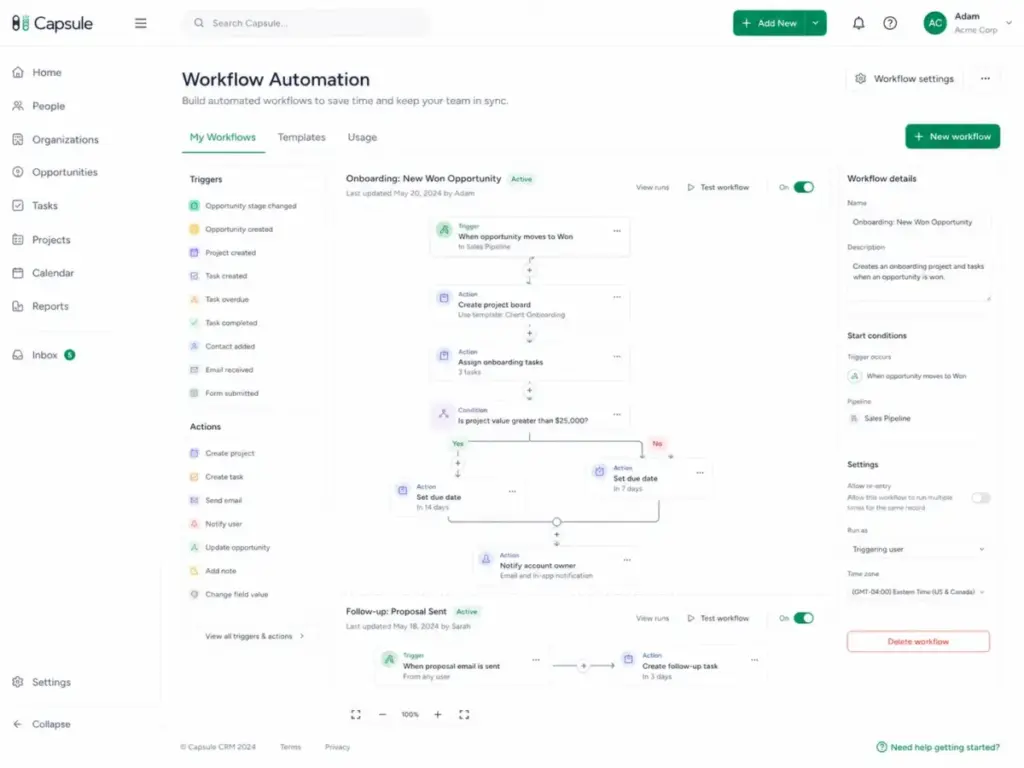
Score: 6.8/10. Functional for basic automation, but the Growth-plan gate and limited trigger types hold it back.
Capsule CRM AI Features
Capsule added AI capabilities across several areas. Here is what each does:
- AI Pipeline Generator (Starter and above): Suggests pipeline stages based on your business type. Useful during initial setup.
- AI Email Assist (Starter and above): Helps draft emails within the CRM. Saves time on routine correspondence.
- AI Business Enrichment (Growth and above): Pulls company data from public sources to fill in organization records automatically.
- AI Contact Enrichment (Growth and above): Fills in contact details from public data, reducing manual data entry.
- AI Summaries (Growth and above): Generates summaries of contact activity history, so you can review a relationship quickly before a meeting or call.
The AI features are practical rather than flashy. Business and contact enrichment reduce the manual work of building contact records. AI summaries save time before sales calls.
The gate matters: most AI features require Growth ($36/user/month) or above. Starter users only get the Pipeline Generator and Email Assist.
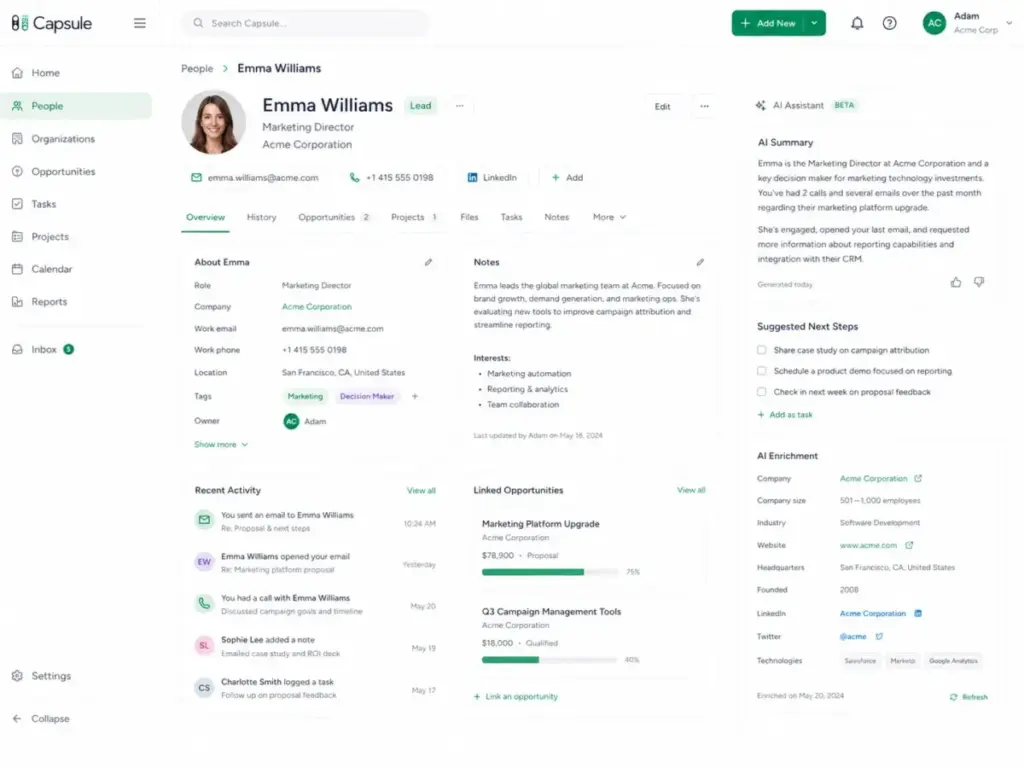
Score: 7.5/10. Useful additions that save time on data entry and call prep. Not a reason to choose Capsule over competitors, but a nice bonus at the Growth tier.
Capsule CRM Reports
Sales analytics in Capsule cover activity reports, pipeline reports, and sales forecasting.
Starter includes basic reporting: activity summaries and simple pipeline snapshots. Growth unlocks advanced sales reporting, reporting dashboards, and team performance views. You can track deals by owner, stage, value, and close rate.
Forecasting uses weighted pipeline values based on stage probability. This gives you a projected revenue figure, though the accuracy depends on how consistently your team updates deal stages and values.
The reporting gap is notable for data-driven teams. Capsule does not offer custom report builders, cohort analysis, multi-touch attribution, or revenue waterfall charts. If your team runs on dashboards and wants to slice data by custom dimensions, you will hit limits quickly.
For teams that need deeper analytics, Capsule integrates with Looker Studio, which lets you build custom dashboards using CRM data. This adds complexity but solves the reporting depth problem for teams willing to set it up.
Score: 7.2/10. Covers the basics for small-team reporting. Not deep enough for revenue operations or data-heavy sales management.
Capsule CRM Integrations
Capsule connects with 60+ tools directly, plus hundreds more through Zapier and Make.
Key native integrations:
- Email: Gmail, Outlook, Microsoft 365
- Accounting: Xero, QuickBooks
- Marketing: Mailchimp, Transpond (Capsule’s own email marketing tool)
- Support: Zendesk
- Communication: Slack
- Calendar: Google Calendar
- Analytics: Looker Studio
- Automation: Zapier, Make
- Developer: REST API
The Gmail and Outlook add-ins are critical for daily use. They let you view contact records, log emails, and create tasks from your inbox without switching tabs.
For accounting firms and service businesses, the Xero and QuickBooks integrations connect client records with invoicing. This is a practical connector that saves double-entry across systems.
Zapier and Make expand Capsule’s reach significantly. If Capsule does not natively connect to a tool you use, you can often build the bridge through these automation platforms. Check our Zapier review for more on that ecosystem.
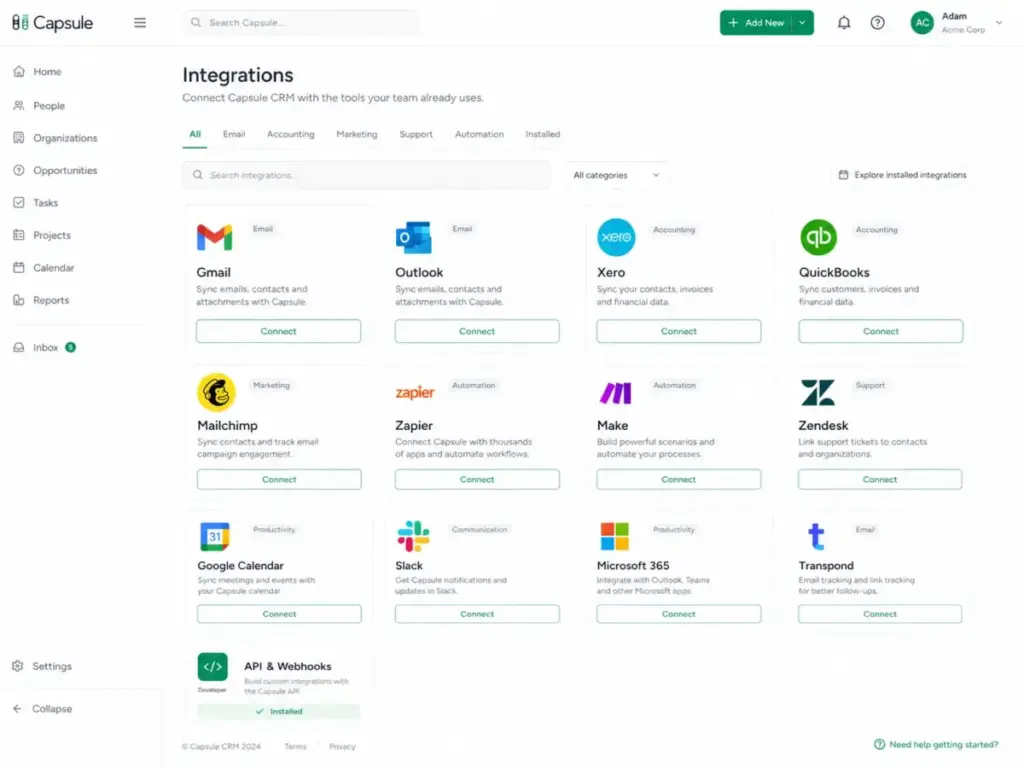
Score: 8.0/10. Strong native integrations for the tools small businesses use most. Zapier and Make fill the gaps.
Capsule CRM User Experience
Capsule CRM is one of the fastest CRMs to set up, with most small teams going from signup to working system in under an hour. The interface is clean, uncluttered, and built around a left-side navigation that puts contacts, pipelines, tasks, projects, and reports one click away.
The First 30 Minutes in Capsule CRM
Here is what the first half-hour looks like for a new user:
- Minutes 1-5: Signup and dashboard. You create an account, confirm your email, and land on a clean dashboard. No walls of setup wizards or mandatory tutorials. The main navigation is visible immediately: People, Organizations, Opportunities, Cases, Projects, Tasks, Calendar.
- Minutes 5-10: Import contacts. You can import contacts from a CSV file, Google Contacts, Outlook, or another CRM. The CSV import maps columns to Capsule fields. For a small contact list (under 500 records), this takes a few minutes.
- Minutes 10-15: Create your first pipeline. You define deal stages (Lead, Proposal, Negotiation, Won, Lost) and set probability percentages for each. The AI Pipeline Generator can suggest stages based on your industry.
- Minutes 15-20: Add a deal. You create an opportunity, attach it to a contact, assign a value, set an expected close date, and place it in your pipeline.
- Minutes 20-25: Connect Gmail or Outlook. The add-in installs in your email client. Once connected, you can view contact records and log emails without leaving your inbox.
- Minutes 25-30: Set follow-up tasks. You create tasks tied to contacts and opportunities, set due dates, and review the activity feed.
This is not a fabricated test sequence. This is based on the product’s documented setup flow and consistent user reports. As one G2 reviewer (Kia G., School Liaison Advisor, Small Business, March 2026) noted: “It only took a day for our team to use it properly.”
A Capterra reviewer (Rebecca S., Product Manager, February 2025) described the experience as “Very good, easy to use, easy to set up.”
The mobile apps for iOS and Android mirror the desktop layout. You can view contacts, update deals, log calls, and check tasks from your phone. The mobile experience is functional but not as refined as Pipedrive’s mobile app.
Ease of Use Score: 9.2/10. One of the fastest CRM onboarding experiences available. The learning curve is minimal for non-technical teams.
Capsule CRM Pricing and Plans
Capsule CRM pricing starts at $0 for the Free plan (2 users, 250 contacts) and scales to $72/user/month on Ultimate, with the Growth plan at $36/user/month being the sweet spot for most small teams that need automation.
Here is the full pricing breakdown (pricing checked April 27, 2026; verify on the Capsule pricing page before buying, as SaaS pricing changes):
| Plan | Annual Price | Monthly Price | Contacts | Pipelines | Project Boards | Custom Fields | Email Templates | Shared Mailboxes | Key Features |
|---|---|---|---|---|---|---|---|---|---|
| Free | $0 | $0 | 250 | 1 | 0 | 10 | 0 | 0 | Basic CRM for 2 users |
| Starter | $18/user/mo | $21/user/mo | 30,000 | 1 | 1 | 50 | 5 | 1 | Premium integrations, goals, AI Pipeline Generator, AI Email Assist |
| Growth | $36/user/mo | $38/user/mo | 60,000 | 5 | 5 | 150 | 50 | 3 | Workflow automation, advanced reporting, dashboards, team controls, AI enrichment, AI summaries |
| Advanced | $54/user/mo | $60/user/mo | 120,000 | 50 | 50 | 300 | 500 | 5 | Everything in Growth with higher limits |
| Ultimate | $72/user/mo | $75/user/mo | 240,000 | 100 | 100 | Unlimited | 1,000 | 10 | Dedicated account manager, priority support, implementation help, custom training |
Pricing checked April 27, 2026.
Capsule also offers a marketing add-on starting from $11/month for teams that want email marketing through Transpond. This is separate from the CRM subscription and worth factoring into your total cost.
Annual vs Monthly: The Real Math
Annual billing saves between 4% and 14% depending on the plan. The Starter plan drops from $21 to $18 monthly (a $36/year saving per user). Growth drops from $38 to $36 ($24/year per user). The savings are modest but add up with more seats.
When Starter Stops Being Enough
This is the pricing decision most small teams face. Starter at $18/user/month looks attractive, but here is what it lacks:
- No workflow automation
- Only 1 sales pipeline
- Only 1 project board
- No advanced sales reporting or dashboards
- No team/access controls
- No AI Business Enrichment, AI Contact Enrichment, or AI Summaries
If your team needs to automate follow-up tasks when deals change stages, run separate pipelines for different services, or get AI-powered contact enrichment, you need Growth.
Growth costs exactly double the Starter annual price: $36 vs $18 per user per month. That is a significant jump.
Cost Scenarios: 1, 3, 5, and 10 Users
| Team Size | Starter (Annual) | Growth (Annual) | Monthly Difference |
|---|---|---|---|
| 1 user | $18/mo ($216/yr) | $36/mo ($432/yr) | +$18/mo |
| 3 users | $54/mo ($648/yr) | $108/mo ($1,296/yr) | +$54/mo |
| 5 users | $90/mo ($1,080/yr) | $180/mo ($2,160/yr) | +$90/mo |
| 10 users | $180/mo ($2,160/yr) | $360/mo ($4,320/yr) | +$180/mo |
For a 5-person team, the jump from Starter to Growth adds $1,080 per year. That buys you automation, multiple pipelines, better reporting, and AI features. Whether that is worth it depends on how much time manual follow-ups and single-pipeline workarounds cost your team.
For teams considering the best free CRM software options, Capsule’s Free plan works for 2 users testing the platform, but the 250-contact limit makes it a trial, not a long-term solution.
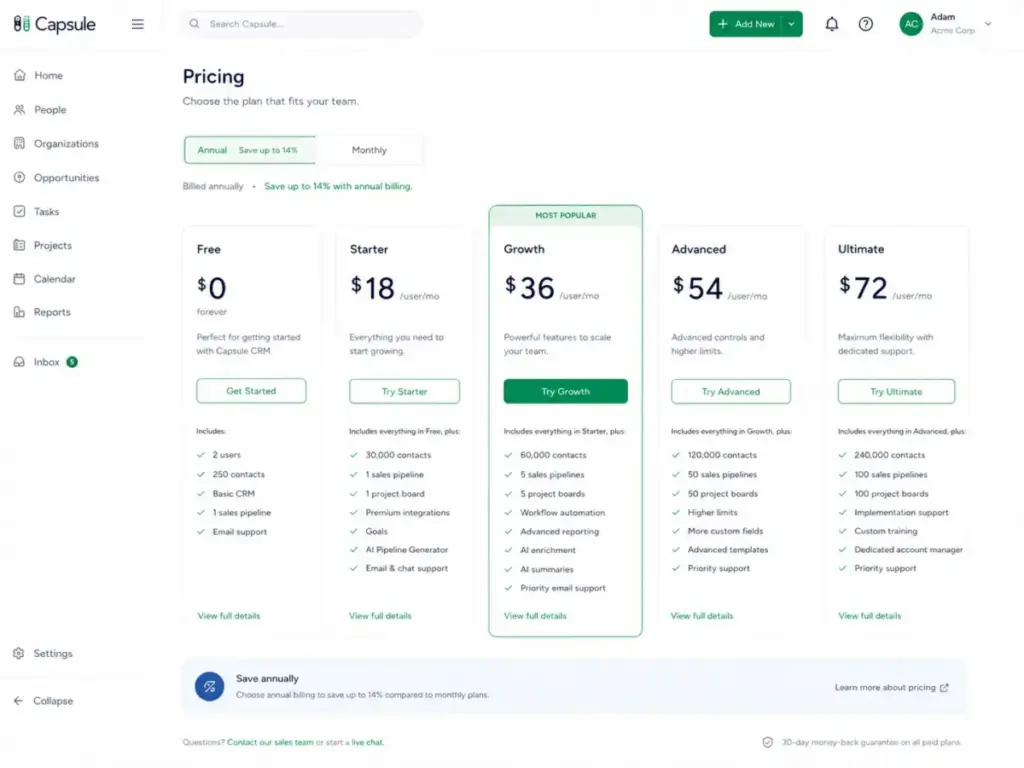
Pricing Value Score: 8.1/10. Competitive at Starter, fair at Growth, but the doubling from Starter to Growth is steep for the features you unlock.
Capsule CRM Pros and Cons
Capsule CRM’s biggest advantage is that teams actually adopt it. The biggest risk is outgrowing it before you expect to.
- Fast setup with minimal configuration required (under 1 hour for most teams)
- Clean, intuitive interface that non-technical team members use consistently
- Contact records with full activity history, tags, and custom fields
- Post-sale project boards that connect deals to delivery (unique among lightweight CRMs)
- Gmail and Outlook add-ins that keep CRM usage inside your inbox
- Reasonable Starter pricing at $18/user/month for teams with simple needs
- Xero and QuickBooks integrations for service businesses and accounting firms
- AI enrichment and summaries (Growth and above) reduce manual data entry
- 60+ integrations plus Zapier and Make for expansion
- Workflow automation only available from Growth ($36/user/month) and above
- Automation capabilities are lighter than Pipedrive, HubSpot, and Zoho CRM
- Reporting lacks custom report builders, cohort analysis, and advanced dashboards
- No built-in calling, SMS, or outbound sequencing tools
- Free plan is limited to 250 contacts, making it a trial rather than a real working tier
- Starter to Growth price doubles, yet many essential features require Growth
- No native email marketing without the Transpond add-on or third-party integration
- Mobile app is functional but not best-in-class
What Capsule CRM Does Not Tell You
The marketing highlights the simplicity. Here is what takes more digging to discover.
Feature gates are steep. Workflow automation, multiple pipelines, advanced reporting, team controls, and most AI features all sit behind the Growth plan. Starter gives you a solid contact database and one pipeline, but the tools that make a CRM save time (automation, dashboards, enrichment) require doubling your per-user cost.
It is not a sales engagement platform. Capsule does not include built-in calling, SMS, power dialer, email sequences, or cadence management. If your team runs outbound sales campaigns, you will need separate tools. This is a relationship CRM, not a sales execution CRM.
Marketing automation requires add-ons. Capsule does not send marketing emails natively. You need Transpond (starting from $11/month), Mailchimp, or another email marketing platform. The CRM stores contacts; marketing tools handle campaigns. Budget accordingly.
Reporting has a ceiling. The built-in reports cover activity, pipeline health, and basic forecasting. Teams that need custom metrics, multi-touch attribution, conversion funnel analysis, or revenue waterfall reports will need Looker Studio integration or another BI tool.
Support expectations vary. Standard support is available across plans, but dedicated account management and priority support require the Ultimate plan at $72/user/month. As one G2 reviewer noted, “more advanced workflow rules are clunky or just not available” (Kia G., March 2026). Teams needing hands-on support for complex configurations may find the lower tiers limiting.
Capsule CRM Alternatives
Capsule CRM is not the only option for small business CRM, and it is not the best choice for every team. Here is how it compares to five direct competitors.
Capsule CRM vs Pipedrive
Pipedrive is built for sales execution. It offers deeper pipeline management, stronger automation, built-in calling, email tracking, and a marketplace of sales-focused add-ons.
- Choose Capsule if: You want a relationship-first CRM with project boards and lower operational complexity.
- Choose Pipedrive if: Your primary goal is closing more deals, and you need sales automation, activity-based selling, and calling features.
- Pipedrive starts at $14/user/month (Essential), making it price-competitive with Capsule Starter.
Capsule CRM vs HubSpot CRM
HubSpot CRM offers a free tier with more contacts than Capsule’s free plan, plus marketing, sales, service, and CMS hubs that expand into a full business platform.
- Choose Capsule if: You want simplicity and fast adoption without the complexity of a platform ecosystem.
- Choose HubSpot if: You need marketing automation, content management, service tickets, and a CRM that scales into a full GTM stack.
- HubSpot’s free CRM is generous, but paid plans escalate quickly. The simplicity advantage favors Capsule for teams that do not need marketing hubs.
Capsule CRM vs Zoho CRM
Zoho CRM offers deeper customization, more advanced automation (workflows, macros, custom functions), and access to the broader Zoho suite (Books, Desk, Campaigns, Projects).
- Choose Capsule if: Your team is non-technical and wants a CRM that works out of the box with minimal configuration.
- Choose Zoho if: You need heavier customization, advanced workflows, and a broader suite of business applications at competitive pricing.
- Zoho CRM starts at $14/user/month (Standard), with more features per dollar but a steeper learning curve.
Capsule CRM vs Less Annoying CRM
Less Annoying CRM charges a flat $15/user/month with no tiers, no feature gates, and no upsells. It is the simplest CRM on the market.
- Choose Capsule if: You need project boards, integrations with Xero/QuickBooks, AI features, and more CRM structure.
- Choose Less Annoying CRM if: You want flat pricing, no tier decisions, and the absolute minimum viable CRM for a very small team.
- Less Annoying CRM lacks project boards, workflow automation, and the integration depth Capsule offers. If those gaps matter more than flat pricing, compare Less Annoying CRM replacement options by workflow depth, project visibility, integration coverage, and setup effort.
Capsule CRM vs Insightly
Insightly combines CRM with project management and offers stronger project workflow capabilities than Capsule.
- Choose Capsule if: You want a lighter, faster CRM with adequate project boards for post-sale delivery.
- Choose Insightly if: You need deeper project management, custom objects, and more structured CRM/project integration.
- Insightly starts at $29/user/month (Plus), making it pricier than Capsule Starter but comparable to Growth.
| CRM | Starting Price | Best For | Choose Instead of Capsule If… |
|---|---|---|---|
| Pipedrive | $14/user/mo | Sales-driven teams | You need stronger pipeline automation and calling |
| HubSpot CRM | Free (paid from $15/mo) | Full GTM platform | You need marketing automation and platform depth |
| Zoho CRM | $14/user/mo | Customization and suite | You need advanced workflows and broader apps |
| Less Annoying CRM | $15/user/mo | Simplest possible CRM | You want flat pricing and zero complexity |
| Insightly | $29/user/mo | CRM + project depth | You need deeper project management workflows |
Who Should Use Capsule CRM?
Capsule CRM fits small teams that prioritize relationship management and CRM adoption over advanced automation and reporting. Here are the specific profiles:
- Solo consultants managing 50 to 500 client relationships who need reliable follow-up reminders, contact history, and a simple pipeline.
- Professional services teams of 2 to 10 people moving from spreadsheets to a shared CRM for the first time.
- Agencies of 3 to 15 people that sell projects and then deliver client work, using Capsule’s pipeline-to-project-board workflow.
- Small B2B sales teams with simple pipelines, Gmail or Outlook workflows, and fewer than 5 active sales processes.
- Accountants, real estate teams, construction firms, and service businesses using Xero, QuickBooks, or email marketing tools that integrate with Capsule.
Who Should Not Use Capsule CRM?
Capsule CRM is not the right fit for teams that need sales execution tools, complex automation, or full marketing stacks. These profiles should look elsewhere:
- Outbound sales teams needing built-in calling, SMS, dialer workflows, and high-volume email sequencing. Look at Pipedrive or Close CRM instead.
- Revenue operations teams needing multi-touch attribution, advanced dashboards, custom report builders, and complex automation branches. HubSpot or Salesforce fits better.
- Ecommerce brands needing native lifecycle marketing, SMS/email segmentation, and purchase-behavior automation. Consider Klaviyo or HubSpot.
- Enterprise teams needing deep permission models, custom objects, audit trails, and complex governance. Zoho CRM or Salesforce is more appropriate.
- Teams wanting a full marketing suite without adding Transpond, Mailchimp, Zapier, or Make to cover email campaigns and marketing workflows.
Final Verdict: Is Capsule CRM Worth It?
Capsule CRM is worth it for small businesses that want a clean, low-maintenance CRM for managing relationships, tracking deals, and handling light post-sale delivery. It is not the best choice for teams that need advanced automation, native calling, deep marketing automation, or enterprise-grade reporting.
The 8.2/10 score reflects a CRM that does its core job well. Contact management is clean. The pipeline view is usable. Project boards fill a real gap for service businesses. Setup takes less than an hour. Teams actually use it.
The weaknesses are real, too. Automation stays basic even on Growth. Reporting does not satisfy data-driven managers. The jump from Starter to Growth doubles your cost while unlocking features that many teams need from day one.
Capsule CRM Fit Matrix
| Team Profile | Recommended Plan | Fit Score |
|---|---|---|
| Solo consultant, under 250 contacts | Free | 9/10 |
| Solo consultant, 250+ contacts | Starter ($18/user/mo) | 9/10 |
| 2-5 person service team, simple pipeline | Starter ($18/user/mo) | 8/10 |
| 3-10 person agency, needs automation and projects | Growth ($36/user/mo) | 8/10 |
| 5-15 person B2B sales team, multiple pipelines | Growth ($36/user/mo) | 7/10 |
| 10+ person team needing advanced reporting | Advanced ($54/user/mo) or look elsewhere | 6/10 |
| Outbound sales team needing calling and sequences | Not recommended | 3/10 |
If your team needs a CRM that stays out of the way and lets you focus on relationships and deals, Capsule CRM delivers. If you need a CRM that drives revenue operations, run advanced automations, or power your marketing engine, start your search with the tools on our best CRM software list instead.
How I Evaluated Capsule CRM
This review follows our SaaSZap review methodology. Pricing and plan limits were checked from official Capsule listings on April 27, 2026. Feature claims were verified against Capsule’s official product, support, security, integrations, and API pages. User sentiment was reviewed from G2 and Capterra review platforms. Competitor positioning was compared against Pipedrive, HubSpot CRM, Zoho CRM, Less Annoying CRM, and Insightly. Capsule data is encrypted at rest and uses TLS for data in transit, with GDPR resources available for EU-based teams.
Capsule CRM FAQ
Is Capsule CRM good for small businesses?
Yes, Capsule CRM is a strong fit for small businesses that need contact management, simple pipeline tracking, and fast team adoption. It works best for teams under 15 people with straightforward sales processes. Teams needing advanced automation or deep reporting may find it limiting as they scale.
How much does Capsule CRM cost in 2026?
Capsule CRM ranges from $0 (Free, 2 users) to $72/user/month (Ultimate) on annual billing. Starter costs $18/user/month annually, Growth costs $36/user/month, and Advanced costs $54/user/month. Monthly billing is slightly higher. Verify current prices on the Capsule pricing page.
Does Capsule CRM have a free plan?
Yes, Capsule CRM offers a free plan for up to 2 users and 250 contacts. The free plan includes basic contact management and 1 sales pipeline. It lacks email templates, project boards, integrations, and automation. It works as a trial but not as a long-term solution for growing teams.
What are Capsule CRM's biggest limitations?
Capsule CRM’s main limitations are its basic automation, limited reporting, lack of built-in calling or sequencing, and steep feature gates between Starter and Growth. Workflow automation only starts at Growth ($36/user/month). Reporting does not include custom builders or advanced attribution. There is no native email marketing, calling, or SMS.
Is Capsule CRM better than Pipedrive?
Capsule CRM is better for relationship management and post-sale project tracking. Pipedrive is better for sales execution, pipeline automation, and closing deals. Choose Capsule if you want simplicity and project boards. Choose Pipedrive if your focus is pipeline performance and sales activity management. Read our full Pipedrive CRM review for details.
Is Capsule CRM better than HubSpot?
Capsule CRM is simpler and faster to adopt. HubSpot CRM is deeper and broader as a full business platform. Capsule wins on ease of use and low maintenance. HubSpot wins on marketing automation, reporting, content management, and scalability. See our HubSpot CRM review for the full comparison.
Does Capsule CRM have workflow automation?
Yes, but only from the Growth plan ($36/user/month annually) and above. Starter users have no automation. Growth automation includes stage-based task creation, email notifications, project generation, and field updates. The automation is functional but simpler than what Pipedrive, HubSpot, or Zoho CRM offer.
Does Capsule CRM include email marketing?
No, Capsule CRM does not include native email marketing. You need the Transpond marketing add-on (from $11/month), Mailchimp, or another email platform for campaigns. Capsule handles contact management and sales; marketing requires a separate tool.
Does Capsule CRM integrate with QuickBooks and Xero?
Yes, Capsule CRM has native integrations with both QuickBooks and Xero. These integrations link contact records with invoicing and accounting data, reducing double-entry. This makes Capsule a practical choice for accounting firms, consultants, and service businesses using either accounting platform.
What is the best Capsule CRM alternative?
The best Capsule CRM alternative depends on your priority. Pipedrive is best for sales-focused teams. HubSpot CRM is best for platform depth. Zoho CRM is best for customization at budget pricing. Less Annoying CRM is best for flat, simple pricing. Insightly is best for deeper project management paired with CRM.