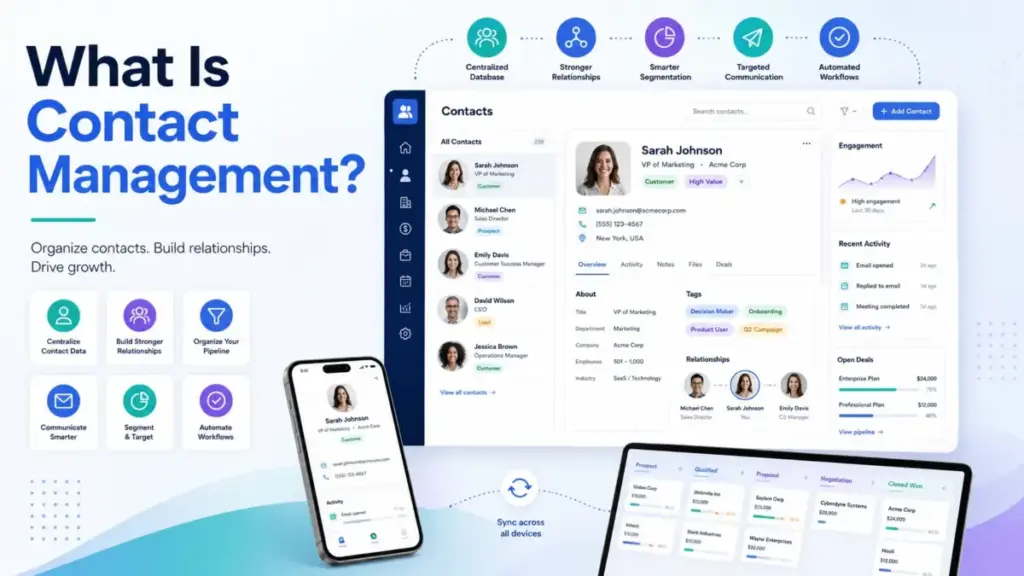
Contact chaos does not feel like a CRM problem at first. It feels like missed follow-ups, duplicate spreadsheets, old job titles, and nobody knowing who last spoke to the buyer. What is contact management? It is the process of storing, organizing, updating, and tracking every business contact so teams can act on accurate customer context.
A good CRM software system builds on contact management, but the two are not identical. Bad contact records break sales pipelines, service handoffs, and marketing segmentation before anyone notices the root cause. This guide explains the difference, the real workflows, and the point where a spreadsheet stops being safe. If you are evaluating tools, our best CRM software guide covers the full market.
What Is Contact Management?
Contact management is the system of recording, organizing, and maintaining every person your business interacts with. It covers customers, leads, partners, vendors, and internal contacts. It is not a tool category. It is the operating discipline behind customer context.
Salesforce defines it clearly:
“Contact management is the process of recording contacts’ details and tracking their interactions with a business.”
That definition is accurate, but incomplete. Recording details is the minimum. Real contact management includes ownership (who is responsible for the relationship), interaction history (what happened last), and next actions (what happens next). Without those three layers, a contact database is a phone book with extra columns.
The 60-Second Explainer
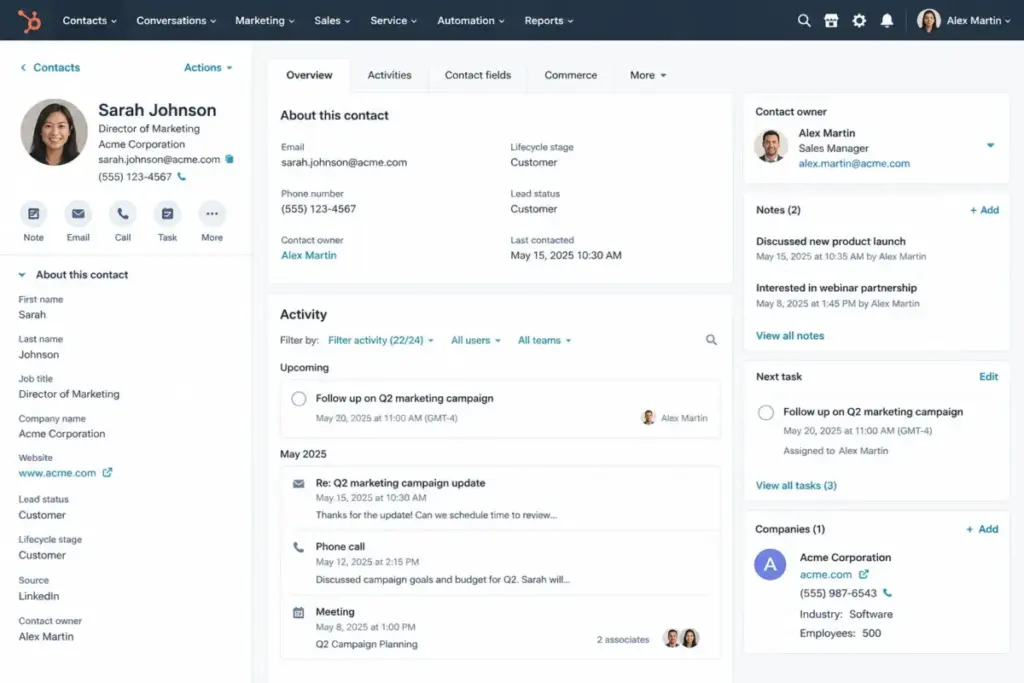
A contact record answers four questions for any team member:
- Who is this person? Name, email, company, role.
- What is our relationship? Lead, customer, partner, vendor.
- What happened last? Last email, call, meeting, or note.
- What happens next? Follow-up task, date, and owner.
If your current system answers all four, your contact management works. If it answers only the first two, you have an address book, not a contact management system.
How Is Contact Management Different from an Address Book?
An address book stores identity: name, phone, email. Contact management adds context: relationship status, interaction history, ownership, and next actions. The difference is the gap between knowing someone’s phone number and knowing that your colleague called them last Tuesday about a renewal, and nobody followed up.
How Does Contact Management Work?
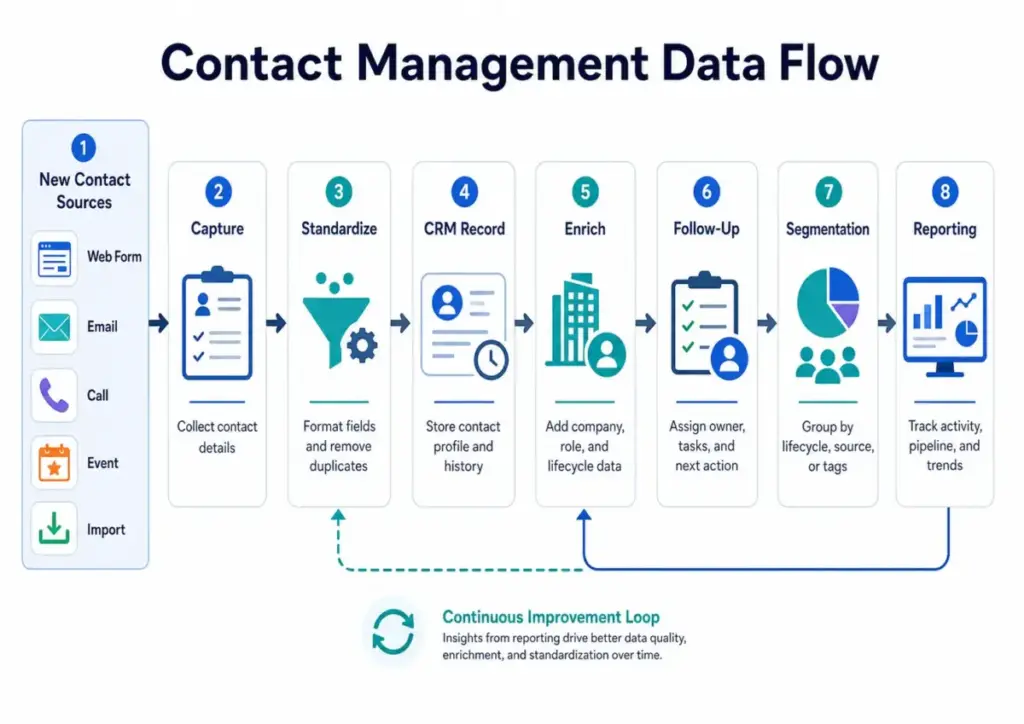
Contact management follows a six-step cycle: capture, standardize, store, enrich, act, and audit. Every step has an owner. Every step has a common failure mode. When one step breaks, the damage compounds downstream.
B2B contact data decays at 2.1% per month, or 22.5% per year, according to MarketingSherpa research cited by HubSpot. That means roughly 1 in 5 records in your database becomes inaccurate within 12 months. Job titles change. People switch companies. Email addresses bounce. Phone numbers go dead.
The table below maps each step, the responsible role, and where teams fail most often.
| Contact Management Step | What Happens | Who Owns It | Common Failure |
|---|---|---|---|
| Capture | New contact enters from form, email, call, event, or import | Sales, marketing, service | Missing source field |
| Standardize | Fields follow one naming and format rule | RevOps or admin | Duplicate records with name variations |
| Store | Record lives in CRM or contact database | System owner | Shadow spreadsheets outside the system |
| Enrich | Job title, company, lifecycle stage, notes are updated | Contact owner or enrichment workflow | Stale roles and outdated companies |
| Act | Team logs tasks, emails, calls, and next steps | Contact owner | No next action assigned after last touch |
| Audit | Duplicates and inactive records are reviewed | Admin or RevOps | Bad data compounds for months unnoticed |
Data decay is the silent killer. A sales rep sends a proposal to an email that bounced three months ago. A marketing team segments 10,000 contacts by job title, but 2,000 titles are outdated. A service rep opens a ticket and sees no prior history because the contact was duplicated under a misspelled name.
Contact management works only when the cycle runs continuously, not once during CRM setup.
What Data Belongs in a Contact Record?
A contact record is a structured profile that combines identity, relationship context, activity history, and next actions. The fields you choose determine what your team sees when they open a record. Too few fields create guesswork. Too many fields create entry fatigue and empty columns.
I recommend 8 to 12 required fields for most small and mid-size teams. Add custom fields only when a workflow depends on them.
| Field Type | Example Fields | Why It Matters |
|---|---|---|
| Identity | Full name, email, phone, LinkedIn URL | Prevents duplicate records and enables outreach |
| Company context | Company name, job title, department | Shows buying influence and account structure |
| Relationship status | Lead, customer, partner, vendor, churned | Controls which workflows apply to the contact |
| Ownership | Contact owner, team, region | Prevents follow-up gaps and double outreach |
| Activity history | Calls, emails, meetings, notes, form submissions | Gives any team member immediate context |
| Next action | Task description, due date, follow-up reason | Keeps pipeline and service work moving forward |
| Compliance | Email consent status, opt-out flag, data source | Reduces outreach risk and supports GDPR/CAN-SPAM |
What Fields Create the Most Problems?
Three fields cause the most trouble when left optional:
- Contact owner. If nobody owns the record, nobody follows up. Orphaned contacts are invisible contacts.
- Lifecycle stage. Without it, marketing emails go to closed customers and sales calls go to disqualified leads.
- Last activity date. Without it, nobody knows if the contact is active or abandoned.
Make these three fields required at record creation.
Contact Management vs CRM: What Is the Actual Difference?
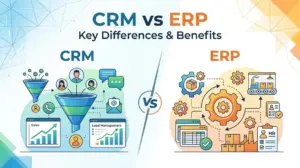
Contact management is the record layer. CRM is the relationship and workflow layer built on top of it. Every CRM includes contact management. Not every contact management system is a CRM. The confusion costs teams money when they buy a full CRM to solve a basic data hygiene problem, or when they stay in spreadsheets long past the point where shared ownership matters.
The Slack contact management guide puts it well:
“The most useful contact management systems also include notes and a history of interactions.”
That describes the minimum viable version. A CRM adds deal tracking, pipeline stages, automation, forecasting, and reporting on top of contact records.
| System | Main Purpose | Best For | Limitation |
|---|---|---|---|
| Contact management | Store and organize people records | Simple relationship tracking | No pipeline, deal, or reporting context |
| CRM | Manage contacts, deals, tasks, reporting | Sales and service teams with repeating workflows | Requires adoption discipline and field hygiene |
| Lead management | Track prospects before qualification | Marketing-to-sales handoff | Narrower scope than full CRM |
| CDP (Customer Data Platform) | Unify behavioral customer data across channels | Enterprise marketing data teams | Too heavy and expensive for most SMBs |
| Spreadsheet | Manual list creation and filtering | Solo users with simple, static lists | Breaks with shared ownership and follow-up needs |
When Does Contact Management Become CRM?
Contact management becomes CRM when your team needs three things: deal stages attached to contacts, automated follow-up sequences, and reporting on conversion or revenue. If you are tracking people but not tracking deals, contact management is enough. If you are tracking deals, you need CRM.
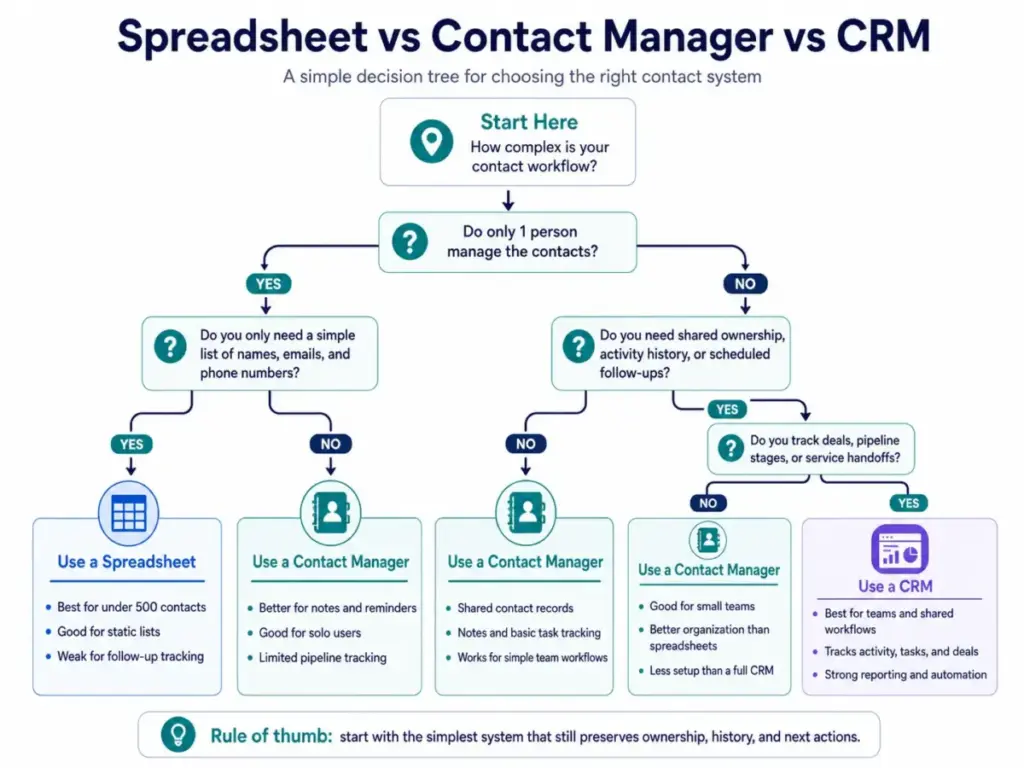
When Does a Spreadsheet Stop Working?
A spreadsheet stops working when contacts need shared ownership, follow-up history, or lifecycle tracking. For a solo consultant with 200 contacts who never hands off relationships, a spreadsheet is fine. It becomes risky the moment a second person needs to edit records, follow-ups repeat on a schedule, or anyone asks “who last contacted this person?”
| Situation | Spreadsheet Is Enough | Contact Manager Fits | CRM Fits Better |
|---|---|---|---|
| Under 500 contacts, 1 owner | Yes | Optional | Usually not needed |
| 500 to 5,000 contacts, 1 owner | Risky if follow-ups repeat | Yes | Yes if pipeline tracking matters |
| 10,000+ contacts | No | Limited | Yes |
| 2+ people editing contact records | Risky (version conflicts, no audit trail) | Yes | Yes |
| Active sales pipeline | No | No | Yes |
| Service handoff between team members | No | Only if basic | Yes |
| Marketing segmentation by lifecycle | No | Limited | Yes |
Buying CRM too early creates admin debt. Staying in spreadsheets too long creates customer memory loss. The tipping point is not a contact count. It is the moment when someone asks a question about a contact that the spreadsheet cannot answer.
Is Excel Good Enough for Contact Management?
Excel works for static lists owned by one person. It does not track who changed what, when someone last called a contact, or whether a follow-up is overdue. Google Sheets adds collaboration, but still lacks activity logging, ownership assignment, and duplicate detection. If your contact list is a reference document, Excel is fine. If it is a working tool for sales or service, it is not.
Types of Contact Management
Contact management takes different forms depending on the owner, record volume, and workflow complexity. A freelancer managing 50 referral contacts has different needs than a 20-person sales team managing 15,000 leads. The categories below map the most common types.
Personal Contact Management
Owner: Individual. Volume: under 500. Workflow: reminders and notes. Tool fit: Google Contacts, Apple Contacts, Outlook. Failure mode: contacts scattered across phone, email, and social accounts with no single view.
Small Business Contact Management
Owner: Business owner or office manager. Volume: 500 to 5,000. Workflow: follow-ups, customer records, vendor lists. Tool fit: Google Sheets, Less Annoying CRM, HubSpot Free. Failure mode: the spreadsheet becomes a shared file with conflicting edits and no ownership field.
Sales Contact Management
Owner: Sales reps and managers. Volume: 1,000 to 50,000+. Workflow: pipeline stages, follow-up cadences, deal tracking. Tool fit: Pipedrive, HubSpot CRM, Salesforce Starter Suite. Failure mode: reps track contacts in private notebooks or personal spreadsheets outside the CRM.
Customer Service Contact Management
Owner: Support and success teams. Volume: varies by customer base. Workflow: ticket history, renewal dates, escalation paths. Tool fit: HubSpot Service Hub, Freshsales, Zoho CRM. Failure mode: support agents reopen conversations without prior context because activity history is missing.
Enterprise Contact Management
Owner: RevOps, IT, or data governance teams. Volume: 100,000+. Workflow: identity resolution, cross-system deduplication, compliance. Tool fit: Salesforce, Microsoft Dynamics, dedicated CDP. Failure mode: the same contact exists in 4 systems with 4 different job titles and no master record.
CRM Contact Management
Owner: CRM administrator. Volume: all company contacts. Workflow: the full cycle from capture to audit. Tool fit: any CRM with contact record, ownership, and activity tracking. Failure mode: the CRM is purchased but contact fields are never standardized, so data quality stays at spreadsheet level.
Benefits of Contact Management
Contact management reduces information gaps between team members and customers. The benefits are real, but conditional. A contact database with no ownership field does not fix follow-up gaps. A CRM with 50 custom fields does not help if reps skip data entry. Each benefit below includes the condition that makes it work.
- Faster follow-up. The next task is visible on the contact record. Condition: the team assigns a next action after every interaction.
- Cleaner handoffs. Ownership is explicit, so service reps see who sold the deal and what was promised. Condition: the contact owner field is required and updated.
- Better segmentation. Lifecycle stage and tags are structured, so marketing sends relevant messages. Condition: lifecycle stages are defined and applied consistently.
- Lower duplicate work. Contact history is shared, so two reps do not call the same prospect on the same day. Condition: the system has duplicate detection rules.
- More reliable reporting. Contact source and owner fields are standardized, so attribution data is trustworthy. Condition: source is captured at record creation.
- Less revenue leakage. Follow-up gaps are visible because overdue tasks surface in dashboards. Condition: tasks are logged, not just discussed.
- Better customer experience. Teams see prior context before reaching out. Condition: notes and activity history are logged after calls and meetings.
Nucleus Research found CRM returned $8.71 for every dollar spent in its ROI case analysis. Treat that as a mature CRM benchmark for teams with clean data and strong adoption, not a guarantee for a messy contact list.
Challenges and Limitations
Contact management fails when nobody owns the record after import. Buying a tool does not solve the underlying discipline problem. These are the most common failure points.
Data Decay Is Constant
B2B data loses accuracy at 2.1% per month. Contacts change jobs, companies rebrand, phone numbers rotate. Without a quarterly audit cycle, your database degrades faster than your team realizes.
Duplicates Multiply Quietly
One contact submits a form with a work email, then replies to a sales email from a personal address. Without deduplication rules, the system creates two records. Activity splits across both. Neither record tells the full story.
Over-Customized Fields Reduce Adoption
Adding 30 custom fields feels productive during setup. In practice, reps skip optional fields. Within 60 days, half the custom fields are empty. Start with 8 to 12 required fields. Add more only when a workflow depends on the data.
Low Team Adoption Kills the System
The best contact management system is the one your team uses. If reps log calls in a personal notebook instead of the CRM, the system is empty. Adoption depends on simplicity, not features.
Unclear Ownership Creates Gaps
If a contact has no owner, nobody is responsible for the next action. If a contact has two owners, both assume the other will follow up. One owner per record is the rule.
Privacy and Consent Add Complexity
GDPR, CAN-SPAM, and regional privacy rules require consent tracking. A contact record without a consent field creates compliance risk for every outbound email and call.
CRM Bloat Replaces One Problem with Another
Buying an enterprise CRM to fix a 500-contact spreadsheet is like renting a warehouse for a closet. The tool becomes the problem when setup, training, and maintenance cost more than the contact management improvement delivers.
How to Set Up Contact Management in 30 Days
A working contact management system takes 30 days to set up properly. Rushing the import without cleaning and standardizing data first is the most common mistake. Follow this sequence.
Days 1 to 7: Clean the Existing List
Export every contact source: spreadsheets, email accounts, phone contacts, event lists. Merge them into one master file. Remove obvious duplicates (same email, different name spelling). Delete contacts with no email and no phone. Flag bounced email addresses. The goal is a single, deduplicated list before touching any tool.
Days 8 to 14: Design the Contact Fields
Pick 8 to 12 required fields. Map them to your workflow. Define lifecycle stages (3 to 5 are enough for most teams: lead, qualified, customer, partner, inactive). Write a one-line description for each field so the team knows what goes where. This prevents “what does this field mean?” questions on day 30.
Days 15 to 21: Import and Assign Ownership
Import the cleaned list into your contact management tool or CRM. Set duplicate detection rules before import, not after. Assign one owner per record. If your team is small, assign by account or territory. If solo, you are the owner of every record, and that is fine.
Days 22 to 30: Build Reports and Hygiene Rules
Create three baseline reports: contacts by lifecycle stage, contacts with no owner, and contacts with no activity in 90 days. Set a monthly bounce check for email addresses. Set a quarterly review for inactive contacts. These reports become your early warning system for data decay.
Best Practices for Contact Management
Best practices depend on team size and workflow complexity. A solo consultant and a 15-person sales team need different rules. Here are the practices that matter most for each cohort.
Solo Consultant
Use tags for contact types (client, referral, vendor, prospect). Add a “next action date” field to every contact. Review your full list monthly. Tool fit: Google Contacts or a free CRM like HubSpot (up to 2 users and 1,000 contact records on the free plan).
2 to 5 Person Sales Team
Require four fields on every record: owner, lifecycle stage, last activity date, and next task. Log every call and email in the system, not in personal inboxes. Run a weekly pipeline review using contact activity data. Tool fit: Pipedrive, HubSpot CRM, or Zoho CRM (free for up to 3 users).
10+ Rep Sales Team
Add a lead source field and enforce it at capture. Use automation to reassign contacts when reps change territories. Build a dashboard showing contacts with overdue follow-ups. Conduct quarterly data audits. Tool fit: Salesforce Starter Suite ($25/user/month), HubSpot Sales Hub, or Pipedrive.
Customer Success Team
Track renewal date, contract value, and last check-in on every customer contact. Flag contacts with no activity in 60 days. Ownership transfers from sales to success must include a handoff note.
B2B Marketing Operations Team
Track consent status, email validity, lead source, and segment tags. Clean bounced emails monthly. Remove contacts who have not engaged in 12 months from active email lists. This protects sender reputation and email deliverability.
Best Tools for Contact Management in 2026
The right tool depends on team size, workflow complexity, and budget. This is not a ranking. It is a map of which tools fit which contact management needs. For detailed evaluations, our product reviews cover each tool individually.
| Tool | Best Fit | Why It Fits Contact Management |
|---|---|---|
| HubSpot CRM | Free CRM starter for small teams | Contact records, task logging, email tracking, up to 1,000 free records |
| Zoho CRM | Budget-conscious small teams | Free edition for 3 users with contact and deal management |
| Pipedrive | Sales-led teams with active pipelines | Strong follow-up visibility and pipeline-centered contact tracking |
| Salesforce Starter Suite | Small teams planning to scale | Full CRM suite starting at $25/user/month |
| Streak | Gmail-heavy solo users | Contact tracking built directly inside Gmail |
| Less Annoying CRM | Simple SMB contact tracking | Lower complexity and flat pricing for teams that do not need enterprise features |
HubSpot CRM is the most common starting point for teams with no budget. Our HubSpot CRM review covers the free tier limits and paid upgrade path in detail. For sales-focused teams, Pipedrive CRM review explains how pipeline visibility works at each pricing tier. Budget-conscious teams with up to 3 users can start with Zoho CRM’s free edition, which our Zoho CRM review breaks down. Teams planning for growth often evaluate Salesforce Starter Suite, and our Salesforce CRM review covers what the $25/user/month tier includes.
For teams that want guidance by company size, our best CRM for small business guide matches tools to specific team structures.
Contact Management Mistakes to Avoid
Most contact management failures are process failures, not tool failures. These are the seven mistakes I see most often.
- Importing contacts before defining fields. If you import 5,000 records without standardized fields, you spend the next month cleaning data that should have been structured before upload.
- Allowing multiple owners without rules. Two owners per contact means zero accountability. One owner per record. Transfer ownership with a logged note when responsibilities shift.
- Using tags as a dumping ground. Tags like “important,” “follow up,” and “check later” mean nothing after 30 days. Use specific, descriptive tags: “Q2-2026-renewal,” “webinar-attendee-april,” “referral-source-partner.”
- Ignoring bounced emails. Every bounced email hurts sender reputation. Monthly bounce reviews are not optional for teams sending outbound email.
- Treating every contact as a lead. Customers, vendors, partners, and leads are different relationships. Lifecycle stage separates them. Without it, marketing emails go to people who already bought.
- Tracking activity in private inboxes. If calls and emails live in a rep’s personal inbox, the team has no visibility. Log interactions in the shared system or accept that context dies when a team member leaves.
- Buying enterprise CRM to solve a basic hygiene problem. A $150/user/month platform does not fix duplicate records or empty fields. Fix the data model first. Pick the tool second.
Alex Morrison’s Quick Take
Contact management is worth solving before CRM selection. A clean contact model makes average CRM software usable. A messy contact model makes even Salesforce feel broken.
I have seen 10-person sales teams outperform 50-person teams because every contact record had an owner, a lifecycle stage, a last activity date, and a next task. The tool was secondary. The discipline was the difference.
If you are reading this with 500 contacts in a spreadsheet and no follow-up system, start with three changes: add an owner column, add a next action date, and review the list monthly. That is contact management. Everything else is an upgrade.
Our review methodology explains how we evaluate CRM tools against these contact management fundamentals.
FAQ
What is contact management?
Contact management is the process of storing, organizing, updating, and tracking business contact records. It includes identity data (name, email, company), relationship status (lead, customer, partner), interaction history (calls, emails, meetings), and next actions (tasks and follow-up dates). It is the foundation that CRM systems build on.
What is contact management in CRM?
Contact management in CRM refers to the contact record layer inside a customer relationship management platform. CRM contact management includes fields, ownership, activity logging, and lifecycle tracking. The CRM adds deal stages, automation, reporting, and pipeline management on top of the contact record.
What is the difference between contact management and CRM?
Contact management stores and organizes people records. CRM manages the full relationship workflow: deals, tasks, automation, forecasting, and reporting. Every CRM includes contact management. Not every contact management system is a CRM. A solo consultant with 200 contacts in Google Contacts has contact management. A 10-person sales team tracking deals in Pipedrive has CRM.
Is contact management the same as an address book?
No. An address book stores identity: name, phone, email. Contact management adds relationship status, interaction history, ownership, and next actions. The difference is knowing someone’s phone number versus knowing that your colleague called them last week about a renewal and nobody has followed up yet.
What is contact management software?
Contact management software is a tool that stores, organizes, and tracks contact records with features like duplicate detection, activity logging, ownership assignment, and search. Examples range from simple tools like Google Contacts and Streak to full CRM platforms like HubSpot, Zoho, and Salesforce. The right choice depends on team size and workflow needs. If Streak is the current contact workflow but sales process requirements are expanding, compare Streak CRM alternatives by contact ownership, pipeline structure, automation depth, and the cost of moving from Gmail-only records to a full CRM.
Can I use Excel for contact management?
Excel works for static lists owned by one person with under 500 contacts and no shared follow-up needs. It does not track activity history, assign ownership, detect duplicates, or log interactions. Google Sheets adds collaboration but still lacks these features. If more than one person edits your contact list, or follow-ups repeat on a schedule, a dedicated tool is safer.
When should a small business move from spreadsheet to CRM?
Move when any of these become true: 2 or more people edit the contact list, follow-ups repeat on a schedule, someone asks “who last contacted this person?” and the spreadsheet cannot answer, or you track deals with stages. The trigger is not contact count. It is shared ownership and follow-up complexity.
What fields should a contact record include?
Start with 8 to 12 required fields: full name, email, phone, company, job title, lifecycle stage (lead, customer, partner), contact owner, lead source, last activity date, next action, and consent status. Add custom fields only when a specific workflow depends on them.
How often should contact data be cleaned?
Review bounced emails monthly. Audit inactive contacts (no activity in 90 days) quarterly. Run duplicate scans quarterly. B2B data decays at 2.1% per month according to MarketingSherpa research, so a database that is not maintained loses roughly 22.5% accuracy per year.
What is the best contact management tool?
The best tool depends on your team size and workflow. HubSpot CRM is the most common free starting point (up to 1,000 free contact records). Zoho CRM Free works for up to 3 users. Pipedrive fits sales teams that need pipeline visibility. Salesforce Starter Suite ($25/user/month) fits teams planning to scale. Our best CRM software guide on SaaSZap compares these tools in detail.
How does contact management help sales?
Contact management gives sales reps immediate context before every call: who the person is, what company they work for, what was discussed last, and what needs to happen next. It eliminates the “let me check my notes” delay. Structured contact records with owner fields also prevent two reps from calling the same prospect on the same day.
How does contact management help customer service?
Contact management gives service agents the full interaction history before they respond. They see prior tickets, account status, renewal dates, and who handled previous issues. Without this context, every support conversation starts from zero, and customers repeat themselves. That erodes trust faster than a slow response time.
Key Takeaways
- Contact management is the foundation of CRM. It is the record layer that stores identity, relationship context, activity history, and next actions for every business contact.
- Spreadsheets work only for simple, single-owner contact lists. Once shared ownership, recurring follow-ups, or lifecycle tracking matter, a dedicated tool is safer.
- Data decay makes maintenance mandatory. B2B data loses 22.5% accuracy annually without regular audits and cleanup.
- CRM becomes useful when contacts need ownership, history, next actions, and reporting. Before that point, a simpler contact management system is enough.
- Tool choice matters less than field discipline and adoption. A free CRM with 10 well-maintained fields outperforms an enterprise platform with 50 empty fields.
- Start with three changes today. Add an owner field, add a next action date, and review your contact list monthly. That is contact management working.