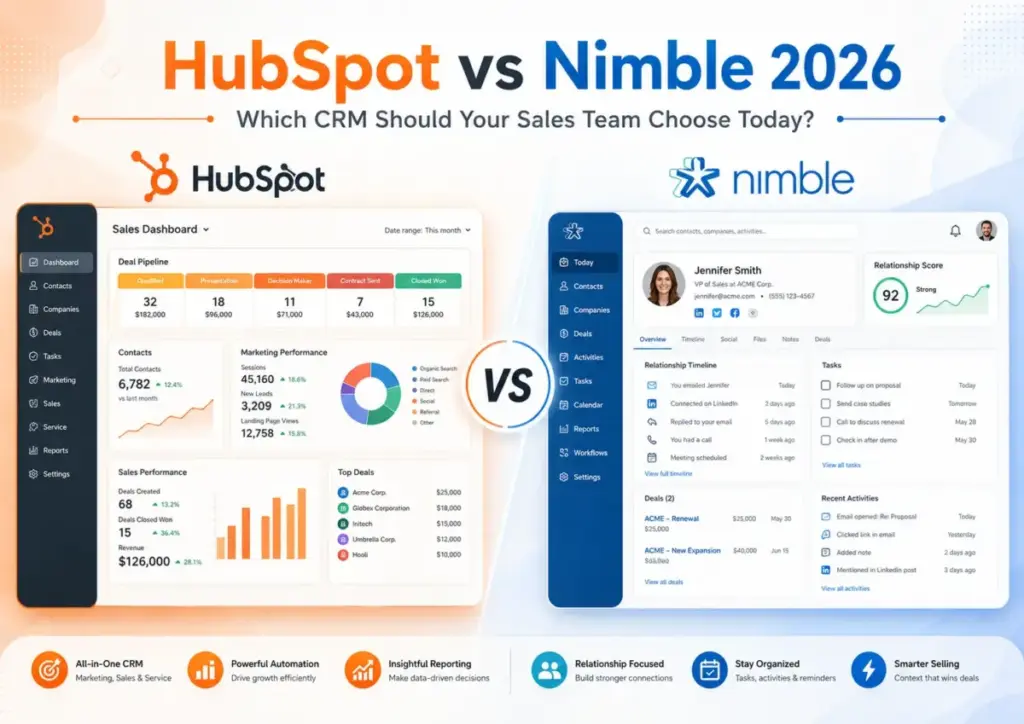
HubSpot advertises a free CRM. Nimble charges $24.90/seat/month. On paper, this comparison ends before it starts. It does not. A 10-person sales team on HubSpot Sales Hub Professional pays $1,000/month before adding a single marketing contact or AI credit. The same team on Nimble pays $249/month, then hits a 25,000-contact ceiling and a 2 GB storage cap that trigger paid upgrades.
Choose HubSpot if you need one platform for sales, marketing, service, reporting, and RevOps governance across a growing go-to-market team. Choose Nimble if you need a relationship-first CRM with inbox sync, contact enrichment, prospecting workflows, and transparent per-seat pricing for a team under 25.
This comparison breaks down each CRM by the workflows that matter most to US sales teams: pipeline and deal management, outreach and follow-up, forecasting and reporting, contact enrichment and prospecting, and total cost of ownership at 5, 10, 25, and 50 seats. Among the best CRM software options, both tools earn a spot, but they serve different buyers.
Quick Verdict: HubSpot vs Nimble
| Category | Winner | Why |
|---|---|---|
| Pricing at scale (5-50 users) | Nimble | 124.50/movs500/mo at 5 users on annual plans (Nimble Business vs HubSpot Sales Hub Professional) |
| CRM platform depth | HubSpot | Covers sales, marketing, service, content, data, commerce, and AI on one database |
| Ease of setup for small teams | Nimble | One plan, inbox-native workflows, lower admin overhead |
| Automation and AI depth | HubSpot | Broader sales automation, forecasting, AI tools, and platform-wide AI functionality |
| Relationship intelligence | Nimble | Purpose-built around relationship records, social context, Prospector, and enrichment |
| Support access | HubSpot | Phone support on Professional and Enterprise; Nimble has no dedicated inbound phone number |
| Enterprise readiness | HubSpot | Custom objects, advanced permissions, governance, AI credit controls at Enterprise tier |
What this means: Nimble wins on cost and setup speed. HubSpot wins on platform depth and enterprise readiness. Neither is the right pick for every team, and the answer depends on your team size, sales motion, and how much platform complexity you can absorb.
How We Compared HubSpot and Nimble
Testing level: Official research only. I did not test either product hands-on for this comparison. All claims are sourced from official product pages, pricing catalogs, documentation, and verified third-party review platforms.
Methodology: After evaluating 40+ CRM platforms, I compared HubSpot and Nimble across 7 dimensions: pricing at scale, CRM platform depth, ease of setup, automation and AI, relationship intelligence, support access, and enterprise readiness. Each dimension has a declared winner backed by official evidence.
Pricing sources:
- HubSpot: Official pricing page (verified June 12, 2026)
- Nimble: Official pricing page (verified June 12, 2026)
Review limitation: This comparison uses official documentation and public pricing. I did not run live pipeline tests, API stress tests, or side-by-side workflow benchmarks. Where user sentiment is referenced, it is attributed to named sources or platform-verified reviewers.
Understanding what CRM software does is the starting point. The real decision is which CRM architecture matches your sales motion.
Workflow 1: Pipeline and Deal Management
Winner: HubSpot for structured pipeline management at scale. Nimble for relationship-driven deals without pipeline complexity.
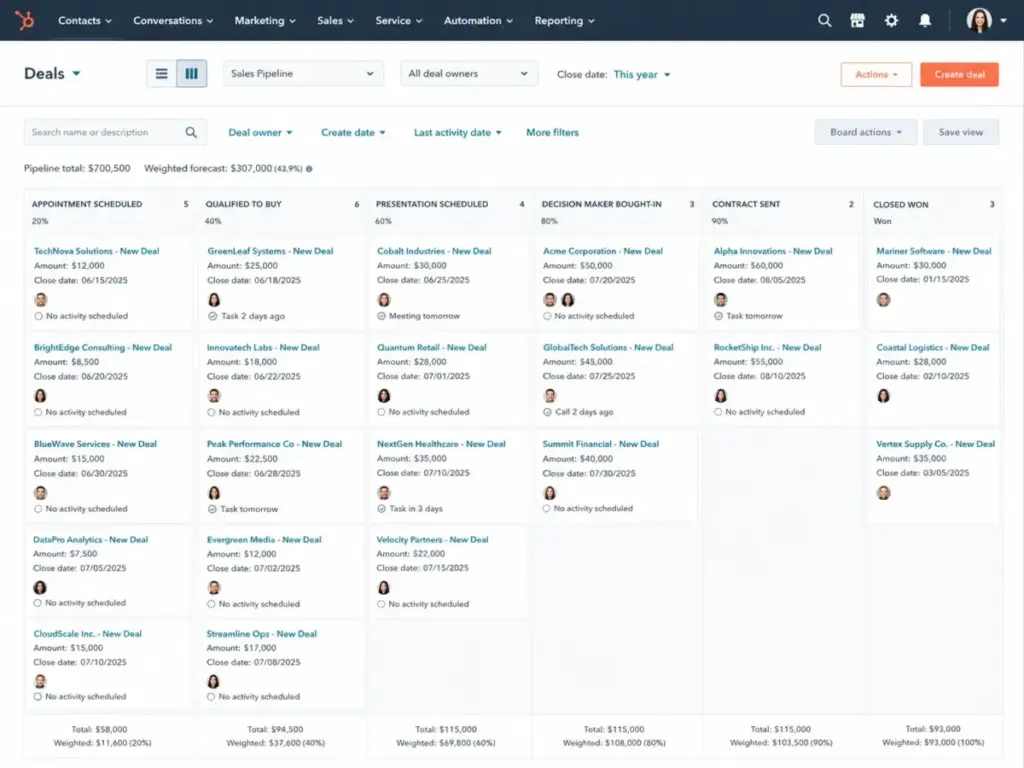
HubSpot Sales Hub gives teams configurable deal pipelines, deal stages, required properties per stage, automated deal rotation, weighted deal scoring, and (on Enterprise) custom objects that let you model business data beyond contacts and companies. Forecasting ties directly into deal stages, so managers can filter by pipeline, team, time period, and weighted probability.
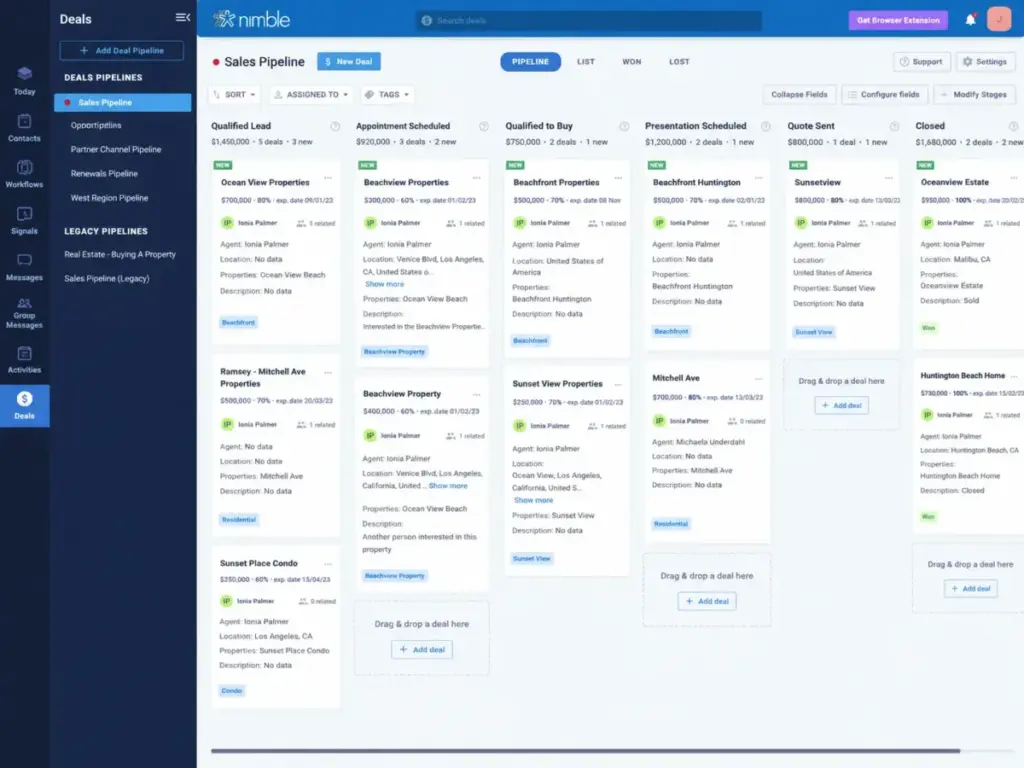
Nimble offers unlimited pipelines with customizable deal stages and drag-and-drop management. It is lighter by design. There are no custom objects, no weighted forecasting, and no required-field enforcement per stage. That is a feature, not a flaw, for teams that manage deals through relationships rather than process controls.
The difference shows up at 10+ reps. A 10-person outbound team with multiple pipelines, deal handoffs, and sales manager oversight needs the governance that HubSpot Professional provides: required fields, automated stage transitions, custom reports per rep, and forecast categories. A 5-person consulting team closing deals through personal introductions and follow-ups needs the simplicity that Nimble provides without configuring a single workflow rule.
Workflow 2: Outreach, Sequences, and Follow-Up
Winner: HubSpot for multi-step automated sequences with A/B testing. Nimble for inbox-native follow-up with enrichment context.
HubSpot Sales Hub Professional includes email sequences with enrollment triggers, automated follow-ups, A/B subject line testing, and task creation between steps. Sequences connect to the broader HubSpot workflow engine, so a sequence can trigger a Slack notification, update a deal stage, or assign a task to a different rep. The Breeze AI tools add suggested send times and email drafting assistance, though AI credits reset monthly and do not roll over.
Nimble’s approach is different. Email sequences, group messaging (capped at 1,000 messages per license/month), and follow-up reminders work from within your Gmail or Outlook inbox through the Nimble Prospector browser extension. The enrichment layer pulls social profiles, company data, and contact context into every email interaction. For a consultant who lives in Gmail and wants to send 20 personalized follow-ups per day with full contact context, Nimble’s workflow is faster to execute because the CRM meets you inside the inbox.
The caveat for Nimble: Email marketing is a paid add-on at 15/company/month.Webformscost12/company/month. Group messaging packages start at $15/month for higher volume. A 10-person team doing serious outbound will stack add-ons quickly.
The caveat for HubSpot: Sequences require Sales Hub Professional at $100/seat/month. Starter does not include them. That is the feature wall most buyers discover after starting on the free CRM.
Workflow 3: Contact Enrichment and Prospecting
Winner: Nimble for built-in enrichment and browser-based prospecting. HubSpot covers this through Breeze Intelligence and third-party marketplace apps, but the feature set is gated behind paid credits.
Nimble includes the Prospector browser extension across Chrome, Firefox, Safari, and Edge. Hover over a LinkedIn profile, a company website, or an email, and Nimble pulls contact data, social profiles, company context, and enrichment details directly into your CRM record. Each user gets 25 enrichment credits/month included. Additional credits cost $10/month per 100 credits.
HubSpot’s enrichment story is broader but more fragmented. Breeze Intelligence provides data enrichment, buyer intent, and form shortening, but it runs on HubSpot Credits that are allocated per subscription tier, reset monthly, and cannot roll over. Exceeding your credit allocation can trigger automatic upgrades if overages are enabled in your billing settings. Third-party enrichment tools like Clearbit (now part of HubSpot) and ZoomInfo connect through the HubSpot Marketplace, adding another cost layer.
For a relationship seller who prospects from LinkedIn and email: Nimble’s workflow is tighter. One extension, one CRM, one contact record with social context. No additional tool subscriptions needed for basic enrichment.
For a team that needs buyer intent signals, firmographic scoring, and enrichment at scale across thousands of records: HubSpot’s platform and marketplace depth supports it, but budget for the credits and integrations.
Workflow 4: Forecasting, Reporting, and Revenue Operations
Winner: HubSpot, and it is not close for teams above 10 reps.
HubSpot Sales Hub Professional includes deal-based forecasting with weighted pipelines, custom report builders, sales analytics dashboards, goal tracking per rep and team, and activity-based reporting. Enterprise adds predictive lead scoring, conversation intelligence, revenue attribution, and custom objects for modeling complex data structures. The Breeze AI layer provides AI-generated deal insights and forecasting assistance.
Nimble does not position itself as a forecasting platform. Pipeline reports show deal value by stage, but there is no weighted forecasting, no custom report builder in the HubSpot sense, and no multi-team analytics layer. Activity tracking covers tasks, events, and follow-ups. For a solopreneur or a 5-person team that tracks deals in a Kanban board and reviews progress weekly, this is enough.
The gap shows up when you need to answer questions like: “Which rep is behind on quarterly quota?” “What is our weighted pipeline value for Q3?” “Which lead source converts at the highest rate?” HubSpot answers these. Nimble does not try to.
Pricing and Value Per Dollar
Base Price Comparison
| Plan | Monthly Per-Seat Cost | Annual Billing |
|---|---|---|
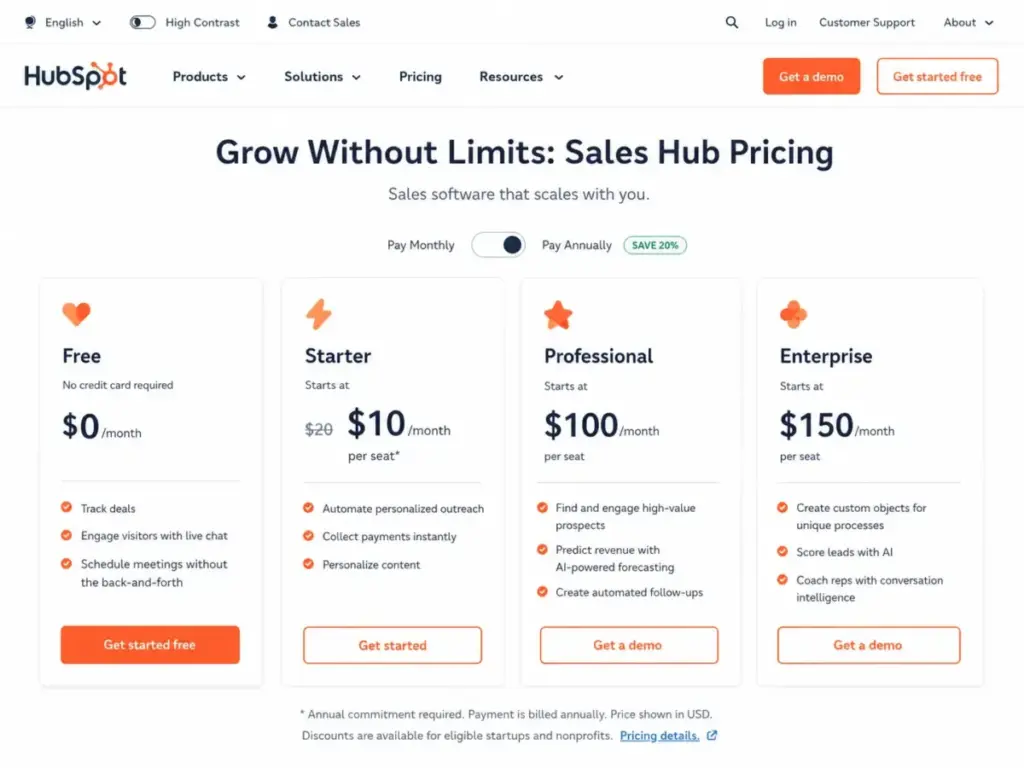
| HubSpot Free CRM | $0/month | Free (up to 2 users, 1,000 contacts) |
| HubSpot Sales Hub Starter | $20/seat/month (list price) | Promotional annual pricing may show $10/seat for eligible new customers |
| HubSpot Sales Hub Professional | $100/seat/month | Annual commitment (verify at checkout) |
| HubSpot Sales Hub Enterprise | $150/seat/month | Annual billing required, $3,500 one-time onboarding fee |
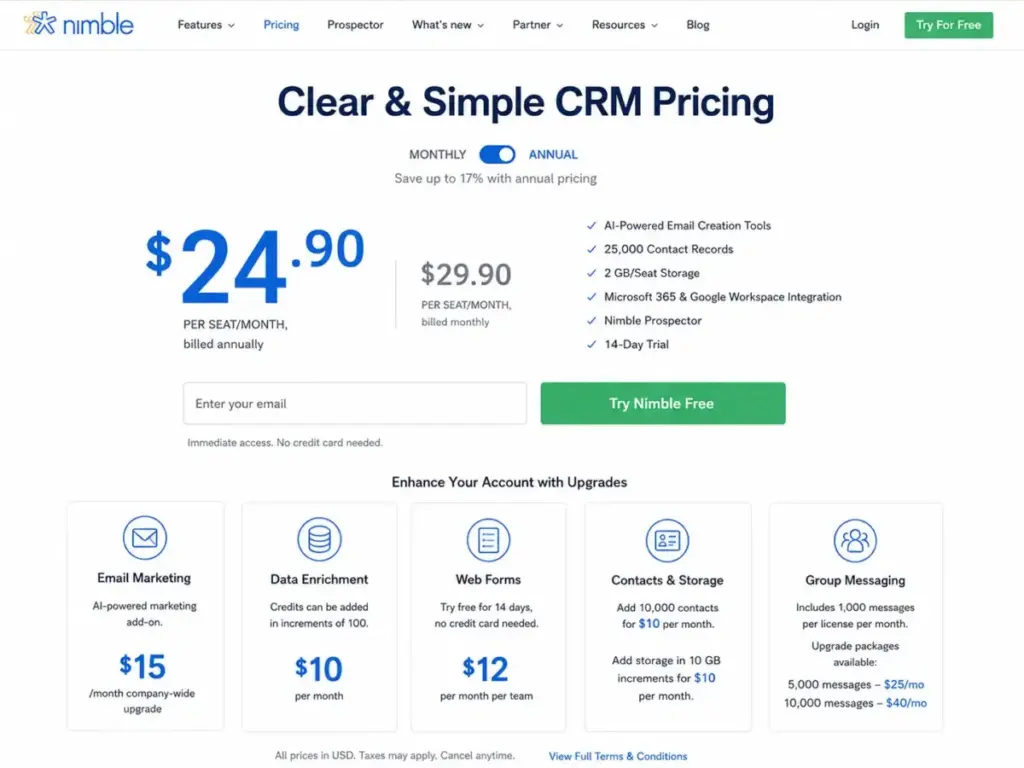
| Nimble Business (annual) | $24.90/seat/month | $298.80/seat/year |
| Nimble Business (monthly) | $29.90/seat/month | No annual commitment |
What this means: Nimble’s pricing is transparent. One plan, two billing options. HubSpot’s pricing is tiered, and the jump from Starter (20/seat)toProfessional(100/seat) is where most teams feel the cost impact. The features that most sales teams actually need (sequences, forecasting, automation) live on Professional, not Starter.
Cost at Scale
| Team Size | HubSpot Sales Hub Professional | Nimble Business (Annual) | Difference | Winner |
|---|---|---|---|---|
| 5 users | $500/mo | $124.50/mo | $375.50/mo | Nimble |
| 10 users | $1,000/mo | $249/mo | $751/mo | Nimble |
| 25 users | $2,500/mo | $622.50/mo | $1,877.50/mo | Nimble |
| 50 users | $5,000/mo | $1,245/mo | $3,755/mo | Nimble |
What this means: Nimble costs 75% less than HubSpot Sales Hub Professional at every team size in this table. But this comparison uses HubSpot Professional because that is the tier where sales teams get the features they actually need (sequences, forecasting, custom reporting). If HubSpot Free or Starter covers your needs, HubSpot wins on price.
Hidden Costs and Usage Triggers
| Cost Trigger | HubSpot | Nimble | What to Check Before Buying |
|---|---|---|---|
| Onboarding fee | $3,500 required for Enterprise only | None | Confirm at checkout whether Professional requires onboarding |
| Contact/storage limits | No hard contact cap on CRM (paid Marketing Hub contacts are separate) | 25,000 contacts at account level; 2 GB/seat storage | Audit your current contact database size |
| Email marketing | Included in Marketing Hub (separate subscription) | $15/company/month add-on | Check if you need email campaigns beyond sequences |
| Enrichment/AI credits | HubSpot Credits reset monthly, no rollover, overage upgrades possible | 25 credits/user/month, $10/100 additional | Estimate monthly enrichment volume |
| Web forms | Included in most HubSpot plans | $12/company/month add-on | Check if you capture leads from web forms |
| Group messaging | Included in sequences (Professional+) | 15to99/month packages | Estimate monthly outbound message volume |
| Unassigned seat billing | Unassigning a seat does not stop billing until seat is removed | Straightforward per-seat billing | Review seat management policy before scaling |
What this means: HubSpot’s hidden costs appear when you scale to Enterprise or add Marketing and Service Hubs. Nimble’s hidden costs appear when you outgrow the base storage, contact limits, and messaging caps. Neither is “cheaper” without context. A 5-person team with 10,000 contacts and no email marketing add-on pays less on Nimble. A 5-person team that already uses HubSpot’s free CRM and does not need Professional features pays $0 on HubSpot.
Setup and Migration Difficulty
| Factor | HubSpot | Nimble |
|---|---|---|
| Setup difficulty | Medium to High (tier-dependent) | Low to Medium |
| Time to first deal | 1-3 days (Free/Starter), 1-3 weeks (Professional/Enterprise) | 1-2 days |
| Admin overhead | Higher: seats, permissions, workflows, hubs, reporting, properties | Lower: one plan, inbox integrations, minimal configuration |
| Migration into | Import tools, Data Sync, Nimble app in HubSpot Marketplace | Exports, CSV import, Zapier, API, Google/Microsoft sync |
| Migration out of | Export contacts, deals, notes; workflows and custom objects do not export | Export contacts, deals, tasks; workflow logic does not export |
| Migration difficulty (A→B) | Medium | N/A |
| Migration difficulty (B→A) | N/A | Medium to High |
What this means: Nimble is faster to set up because there is one plan and the CRM lives inside your inbox. HubSpot takes longer because you must configure pipelines, seat permissions, workflow rules, and reporting dashboards, but the payoff is a more governed system at scale.
Migration note: Moving from HubSpot to Nimble is straightforward if you only use contacts, companies, and deals. It becomes difficult if your team relies on HubSpot workflows, custom objects, Marketing Hub assets, or reporting dashboards. Moving from Nimble to HubSpot requires configuring pipelines, properties, permissions, and possible hub subscriptions. I recommend a CSV field-mapping audit before any migration.
Where HubSpot Wins
- Platform depth across sales, marketing, and service. One login, one customer database, shared reporting. No other CRM in this comparison offers that breadth.
- Forecasting and revenue reporting. Weighted pipelines, custom dashboards, goal tracking, and predictive scoring (Enterprise). Nimble does not compete here.
- Sales automation at scale. Multi-step sequences, workflow triggers, deal rotation, and AI-assisted insights on Professional and Enterprise.
- Enterprise governance. Custom objects, role-based permissions, team hierarchies, and conversation intelligence for organizations with compliance requirements.
- Support tiers. Phone support on Professional and Enterprise. Free and Starter get community and email/chat.
- Integration ecosystem. HubSpot Marketplace has thousands of apps. Nimble lists 100+ integration partners, primarily through Zapier and Make.
Where Nimble Wins
- Predictable per-seat pricing. One plan at $24.90/seat/month (annual). No plan tiers to decode, no feature walls between Starter and Professional.
- Inbox-native CRM experience. Nimble Prospector works inside Gmail, Outlook, and major browsers. The CRM meets you where you already work.
- Built-in contact enrichment. Social profiles, company data, and contact context included with 25 credits/user/month. No separate enrichment subscription needed.
- Fast setup for small teams. One plan, inbox integrations, and minimal admin configuration. A 5-person team can be operational in a day.
- Relationship-driven selling. For consultants, agencies, and relationship sellers who manage deals through personal connections rather than structured pipeline processes, Nimble’s design fits the workflow.
Who Should Choose HubSpot
Choose HubSpot if:
- Your team has 10+ sales reps and needs forecasting, pipeline governance, and activity-based reporting.
- You plan to align sales, marketing, and service teams on one platform with shared customer data.
- You need advanced sales automation: sequences with A/B testing, workflow triggers across hubs, and AI-assisted insights.
- Your organization requires enterprise governance: custom objects, role-based permissions, and conversation intelligence.
- You want a large integration marketplace and native connections to Salesforce, Shopify, Stripe, and QuickBooks.
“It used to consume a lot of my time finding all the relevant data for decision making. Now I can generate reports, access insights quicker, and improve our forecasting capabilities, resulting in considerable time savings.” Mia Negru, Co-Founder, 2030 Builders (via HubSpot)
For a deeper look at HubSpot’s strengths and limitations, read our HubSpot CRM analysis.
Who Should Choose Nimble
Choose Nimble if:
- Your team is under 25 users and prioritizes relationship selling over structured pipeline management.
- You work primarily from Gmail or Outlook and want a CRM that lives inside your inbox.
- Contact enrichment and social context are central to how you prospect and follow up.
- You want transparent per-seat pricing without decoding plan tiers and feature gates.
- You need fast setup with minimal admin overhead and no onboarding fee.
“Nimble combines CRM, email automation, and lead capture in one platform. After trying other CRMs, coming back felt like coming home, only more powerful.” Viveka von Rosen, Founder, Beyond the Dream Board (via Nimble)
For a detailed look at Nimble’s capabilities and caveats, read our Nimble CRM evaluation.
Who Should Avoid Both
Neither HubSpot nor Nimble is the right pick if:
- You only need a simple sales pipeline with no marketing or enrichment layer. Both tools carry features (and costs) that a pipeline-only team does not need. Consider Pipedrive.
- You need an enterprise CRM with deep customization beyond HubSpot’s custom objects. Salesforce is the better fit for complex enterprise data models.
- You need a Google Workspace-native CRM embedded directly in Gmail and Google Calendar. Copper is designed for that workflow.
- You want the cheapest possible CRM for a solo founder or 2-person team. HubSpot Free may work, but if you outgrow it, Less Annoying CRM offers a simpler paid option at a lower entry point.
Alternatives to HubSpot and Nimble
| Alternative | Best For | Why Consider | Starting Price |
|---|---|---|---|
| Pipedrive | Sales-first teams that want pipeline simplicity without broader platform cost | Focused deal management and visual pipeline without marketing-suite complexity | $14/seat/month (Essential) |
| Zoho CRM | Budget-conscious teams that want broad CRM features and suite economics | Often considered when HubSpot is too expensive and Nimble is too lightweight | $14/user/month (Standard) |
| Copper | Google Workspace-centric teams that want CRM embedded in Gmail and Google Calendar | Stronger Google-native integration than either HubSpot or Nimble | $9/seat/month (Starter) |
What this means: If neither HubSpot nor Nimble fits, the decision usually hinges on whether you need pipeline focus (Pipedrive), budget breadth (Zoho CRM), or Google-native CRM (Copper). For teams evaluating these options alongside Nimble, our Nimble alternatives comparison covers the full landscape. For a different angle on HubSpot’s pricing, our HubSpot pricing breakdown details every tier and add-on.
Read the Pipedrive CRM analysis or the Zoho CRM evaluation for deeper comparisons on those alternatives. If Copper fits your Google Workspace workflow, our Copper CRM review covers strengths and limitations.
Final Verdict: HubSpot vs Nimble in 2026
There is no single winner. The right CRM depends on your team size, sales motion, and tolerance for platform complexity.
| Scenario | Best Choice | Why | Watch-Out |
|---|---|---|---|
| 5-person consulting team choosing first CRM | Nimble | Lower cost, relationship focus, inbox integrations, fast setup | Storage and contact limits may trigger upgrades as the client base grows |
| 10-person sales team needing forecasting and automation | HubSpot | Stronger forecasting, automation, reporting, and sales workflow depth | Monthly cost is 4x higher than Nimble at 10 seats |
| 25-person relationship-led agency | Nimble | Cost-effective and designed for relationship data | Budget for storage, contact, messaging, and enrichment add-ons |
| 50-person RevOps-led B2B company | HubSpot | Platform depth across sales, marketing, service, data, and reporting | Enterprise requires annual billing plus $3,500 onboarding fee |
| Small team that only needs free CRM | HubSpot | Free CRM covers up to 2 users and 1,000 contacts | Advanced features require paid Sales Hub upgrades |
My recommendation as a CRM consultant: Most teams in the 5-15 seat range choosing between these two should start by asking one question: “Do we sell through relationships or through process?” If your revenue comes from personal connections, referrals, and follow-up discipline, Nimble’s workflow is a closer fit. If your revenue depends on pipeline governance, forecasting accuracy, and multi-team alignment, HubSpot is worth the higher price.
The decision is not about which CRM is “better.” It is about which CRM architecture matches how your team actually sells.
FAQ
Is Nimble cheaper than HubSpot for a 10-person team?
Yes, at comparable feature tiers. Nimble Business costs 249/monthfor10usersonannualbilling.HubSpotSalesHubProfessionalcosts1,000/month for 10 seats. HubSpot Free is $0 but lacks sequences, forecasting, and custom reporting. The meaningful comparison is Nimble Business vs HubSpot Professional.
Does Nimble have a free plan?
No. Nimble offers a 14-day free trial with no credit card required. The paid Business plan starts at 24.90/seat/month(annual)or29.90/seat/month (monthly).
Does HubSpot have a free CRM?
Yes. HubSpot offers free CRM tools for up to 2 users and 1,000 contacts. The free tier covers basic contact management, deal tracking, meeting scheduling, and live chat. Sales-specific features like sequences and forecasting require paid Sales Hub plans.
Which CRM is better for relationship selling?
Nimble. It is purpose-built around relationship records, social context, inbox integration, and the Prospector browser extension. HubSpot supports relationship selling, but its architecture is optimized for structured pipeline management and multi-hub go-to-market operations.
Which CRM has better support?
HubSpot. Professional and Enterprise users get email, chat, and phone support. Free and Starter users get community support and email/chat. Nimble provides email support, scheduled care appointments, weekly training webinars, and onboarding sessions. Nimble explicitly does not offer a dedicated inbound phone support number.
Can I migrate from HubSpot to Nimble?
Yes, if your data is primarily contacts, companies, and deals. CSV export from HubSpot and import into Nimble is straightforward. Migration becomes harder if you rely on HubSpot workflows, custom objects, Marketing Hub assets, service tickets, or reporting dashboards. I recommend mapping your fields and testing with a small data set before committing.
Can I migrate from Nimble to HubSpot?
Yes. Nimble supports CSV exports, and HubSpot has import tools and a Nimble app in the HubSpot Marketplace. The main work is configuring pipelines, properties, permissions, and seats on the HubSpot side. Budget time for workflow setup and team training.
What are the hidden costs of Nimble?
Storage upgrades (10/monthper10GBbeyondthe2GB/seatbase),contactupgrades(10/month per 10,000 contacts beyond 25,000), email marketing add-on (15/company/month),webforms(12/company/month), enrichment credits (10/monthper100credits),andgroupmessagingpackages(15 to $99/month). These add up for teams that outgrow the base allocation.
What are the hidden costs of HubSpot?
Enterprise onboarding fee ($3,500), Marketing Hub contact tiers, paid HubSpot Credits that reset monthly with no rollover, automatic overage upgrades if enabled, and continued billing for unassigned seats until the seat is removed. Teams that expand beyond the sales CRM into marketing, service, or commerce hubs face additional subscription costs.
Which CRM is better for RevOps teams?
HubSpot. Revenue operations requires cross-functional reporting, forecasting, deal attribution, and shared customer data across sales, marketing, and service. HubSpot’s platform architecture supports this natively. Nimble is a CRM, not a RevOps platform. For teams exploring revenue operations strategy, understanding what revenue operations involves helps frame which CRM aligns with that model.