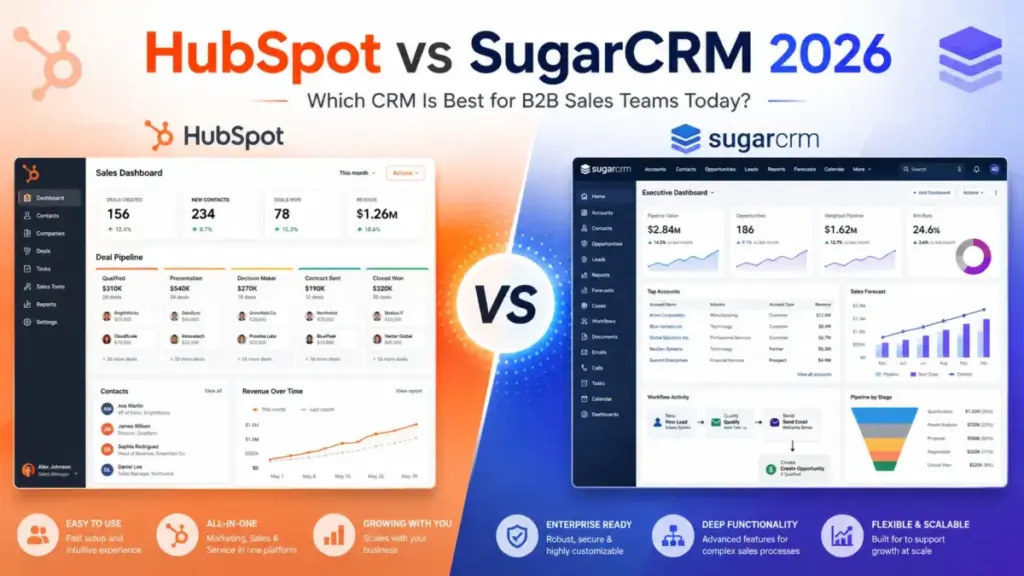
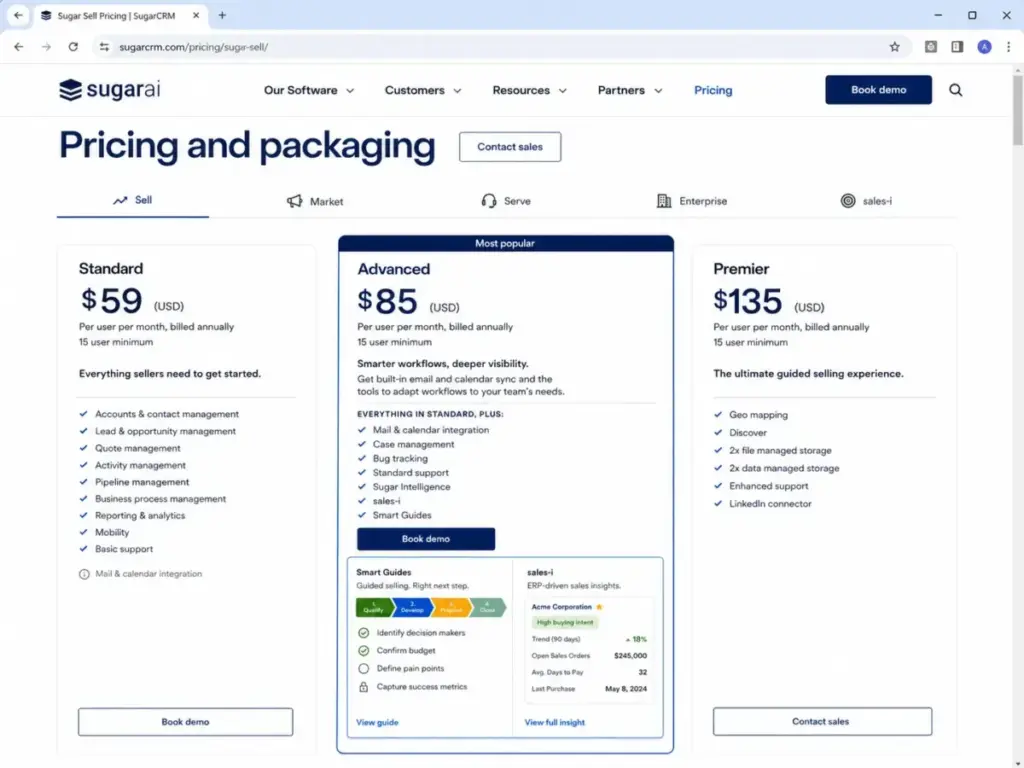
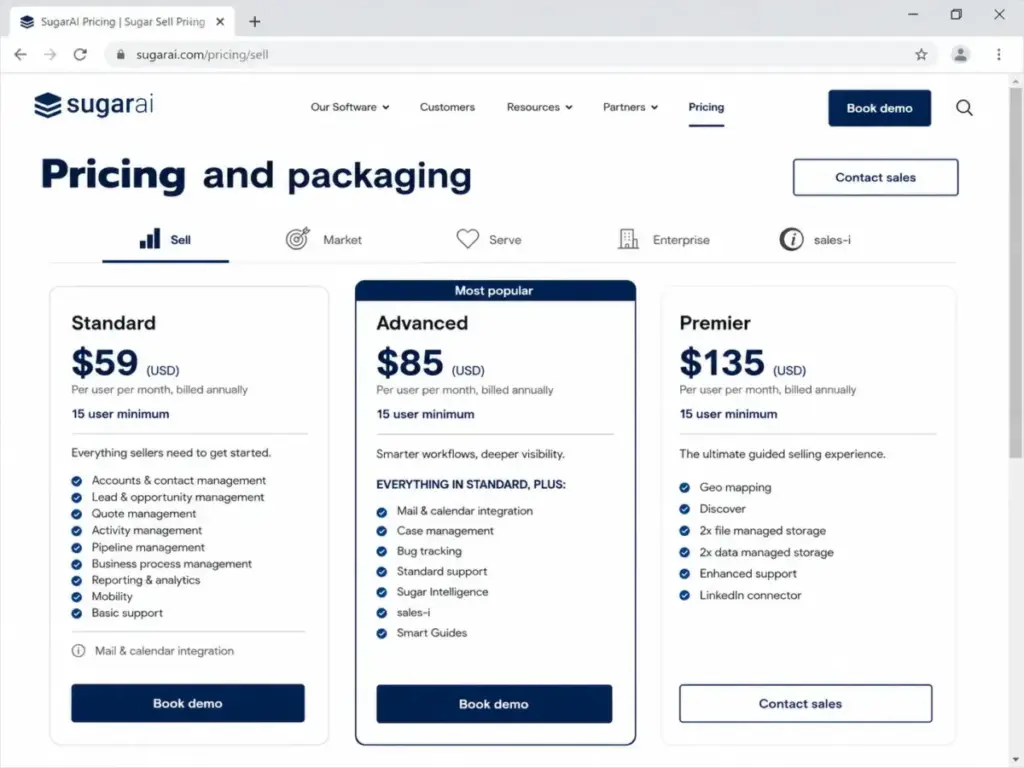
HubSpot Sales Hub starts at $0/month with free tools. Sugar Sell starts at $59/user/month with a 15-user minimum. That minimum is not a detail. It is a $885/month floor before your team configures a single pipeline.
That pricing gap shapes everything about this comparison. HubSpot is the faster path to a working CRM for teams under 15. SugarAI (the company formerly called SugarCRM) is the stronger pick for B2B sales teams with 25+ users, ERP data, and long account relationships.
Choose HubSpot if you want a CRM your team can start using this week, with free training, broad app integrations, and a clear path from Starter to Professional. Choose SugarAI if your team has 15+ users, complex account logic tied to ERP systems, and the technical resources to run a multi-week implementation.
This comparison breaks down how both CRMs perform across the workflows that matter most to US sales teams: pipeline management and deal tracking, sales automation and guided selling, and reporting with cost modeling at scale. Pricing was verified on June 12, 2026 using official sources. If you are evaluating best CRM software options for a mid-market sales team, this is the comparison that shows where the money goes.
Quick Verdict: HubSpot vs SugarCRM
| Category | Winner | Why |
|---|---|---|
| Pricing for teams under 15 | HubSpot | Free tools and Starter at $20/seat/month vs Sugar’s $885/month minimum floor |
| Pricing for teams of 25+ | SugarAI | Sugar Sell Advanced at $85/user/month undercuts HubSpot Professional at $100/seat/month |
| Ease of use and setup speed | HubSpot | Self-serve setup, HubSpot Academy, and faster time-to-pipeline |
| Sales automation and sequences | Depends | HubSpot for mainstream sequences; SugarAI for ERP-connected next-best-action selling |
| Customization and complex B2B fit | SugarAI | Deeper account modeling, business process management, and ERP integration |
| Integration breadth | HubSpot | 2,000+ marketplace integrations vs SugarAI’s focused ERP and API ecosystem |
| ERP integration depth | SugarAI | Native connectors for Epicor, NetSuite, Sage, and SYSPRO |
| Security and compliance | Tie | Both report SOC 2 Type II, ISO 27001, and GDPR resources |
| Support and training | HubSpot | Free Academy, community, and tiered live support across all paid plans |
| Reporting and analytics | Depends | HubSpot for out-of-the-box dashboards; SugarAI for ERP-connected account intelligence |
What this means: HubSpot wins on accessibility, speed, and breadth. SugarAI wins on depth, B2B account complexity, and per-seat economics at scale. Neither is the universal answer. The right choice depends on team size, sales process complexity, and whether your CRM needs to talk to an ERP system.
How We Compared HubSpot and SugarCRM
This comparison is based on official product documentation, public pricing pages, and verified feature specifications from both HubSpot and SugarAI. Testing level for both products: official research only. No hands-on product testing was conducted for this article. All claims are sourced from official vendor pages, verified third-party review platforms, and public documentation.
After evaluating 40+ CRM platforms for SaaSZap, I can tell you the pricing page rarely reflects what a 10-person team pays. This comparison focuses on the practical tier (the plan where most teams land after the first 90 days), the cost at scale (5, 10, 25, and 50 users), and the feature gates that determine what your team can do on each plan.
Alex Morrison covers what CRM software does and how it performs across sales, marketing, and service use cases for SaaSZap’s CRM coverage.
Comparison dimensions: Pipeline management, sales automation, guided selling, reporting, integrations, ease of use, customization, security, support, and total cost of ownership.
Pricing verified: June 12, 2026.
Limitation: This review relies on official documentation. Feature behavior in production environments may vary by configuration, user permissions, and account history.
Workflow 1: Pipeline Management and Deal Tracking
HubSpot wins for teams that want a working pipeline in under an hour.
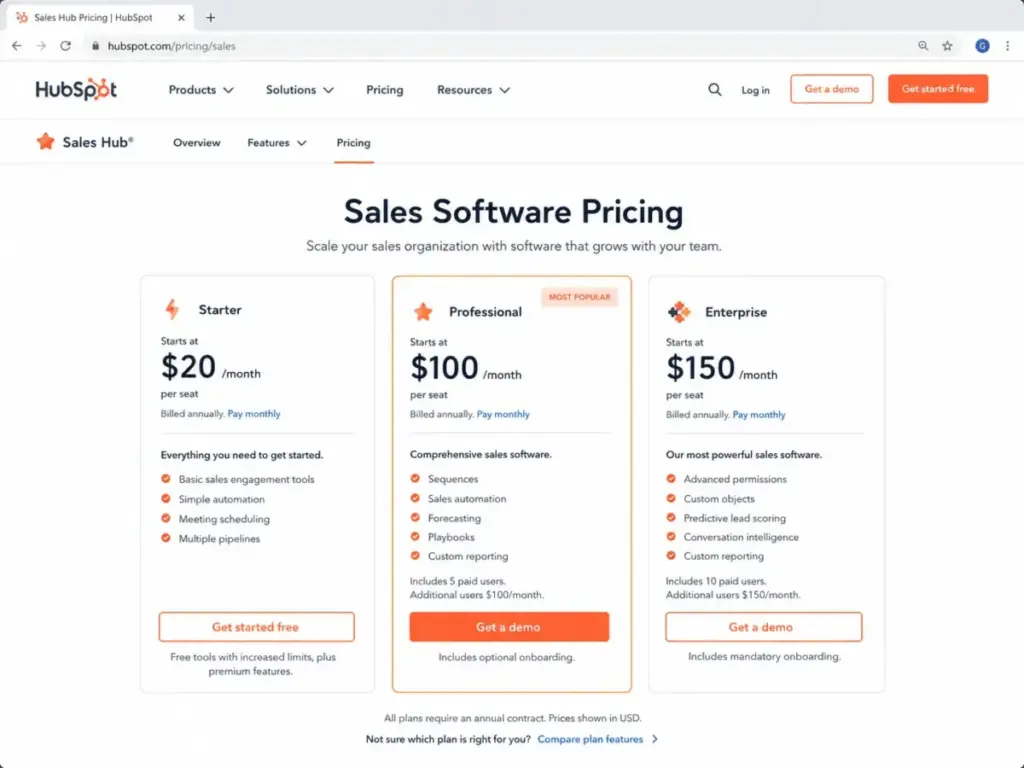
HubSpot Sales Hub gives every user (including free accounts) access to contact, company, deal, and pipeline management. A 5-person sales team can import contacts, build a pipeline, and start tracking deals on the same day. The free tier limits you to one deal pipeline, but Starter ($20/seat/month) adds multiple pipelines, routing, and basic automation.
Sugar Sell Standard ($59/user/month) includes account, contact, lead, opportunity, quote, and activity management with business process management built in. The pipeline tools are strong, but setup takes longer. SugarAI’s own FAQ states implementation timelines range from a couple of weeks to a few months depending on complexity.
Here is the practical split: if your pipeline is straightforward (inbound leads, qualify, demo, close), HubSpot gets you there faster. If your pipeline involves multi-product quotes, long account relationships, and repeat-purchase revenue models, Sugar Sell’s account-centric design is a better fit from day one.
Winner: HubSpot for speed. SugarAI for complex account pipelines.
The gap between entry price and setup time is where most buyers get surprised. HubSpot’s free tools let you test the pipeline before committing budget. Sugar Sell requires a 15-user annual commitment before you see the first dashboard. For a detailed breakdown of HubSpot’s full feature set and limitations, read the HubSpot CRM review on SaaSZap.
Workflow 2: Sales Automation and Guided Selling
This is where plan gates matter more than feature lists.
HubSpot locks sequences, advanced workflows, sales analytics, forecasting, playbooks, and lead scoring behind Sales Hub Professional at $100/seat/month. Starter gives you basic automation, calling, and templates, but a 10-person team that needs email sequences and deal forecasting is paying $1,000/month on Professional before adding any other Hub.
Sugar Sell Advanced ($85/user/month) includes Sugar Intelligence, Smart Guides, and sales-i. These tools guide sellers to accounts, opportunities, and next-best actions based on CRM and ERP context. Smart Guides walk reps through multi-step selling processes. sales-i pulls revenue intelligence from connected ERP data. This is not generic workflow automation. It is precision selling for B2B teams that track account health across multiple touchpoints.
| Feature | HubSpot Plan Gate | SugarAI Plan Gate | Buyer Impact |
|---|---|---|---|
| Email sequences | Professional ($100/seat/month) | Not a direct equivalent; uses Smart Guides on Advanced | HubSpot sequences are more familiar to outbound teams |
| Sales forecasting | Professional ($100/seat/month) | Standard ($59/user/month) | Sugar includes forecasting at a lower entry point |
| Lead scoring | Professional ($100/seat/month) | Sugar Intelligence on Advanced ($85/user/month) | Both gate scoring behind mid-tier plans |
| Playbooks / guided selling | Professional ($100/seat/month) | Smart Guides on Advanced ($85/user/month) | SugarAI’s guided selling is deeper for complex B2B |
| Custom objects | Enterprise ($150/seat/month) | Business process management on Standard | Sugar offers more data modeling flexibility earlier |
| Workflow automation | Professional (advanced) | Business process management on Standard | Sugar includes process automation at the base tier |
| AI-powered tools | Breeze AI (tiered) | Sugar Intelligence on Advanced | Both evolving; different AI focus areas |
What this means: HubSpot’s automation is broader and more accessible for mainstream sales teams. SugarAI’s automation is deeper for teams that sell into complex accounts with ERP-connected data. The practical choice depends on whether your team needs sequences and templates (HubSpot) or account intelligence and guided selling (SugarAI).
Winner: Depends on selling motion. Outbound-heavy teams with standard sales cycles pick HubSpot. Account-heavy B2B teams with ERP data and long relationships pick SugarAI.
Workflow 3: Reporting, Analytics, and Cost at Scale
The pricing math changes at 25 users.
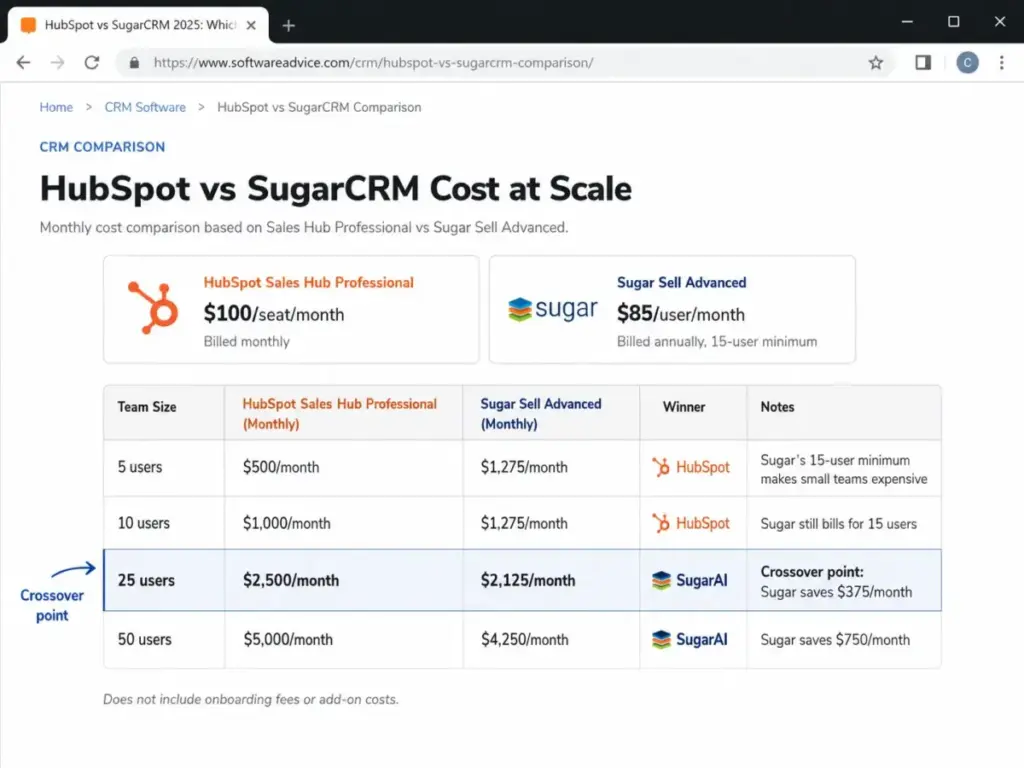
HubSpot Sales Hub Professional costs $100/seat/month ($90 on annual billing). Sugar Sell Advanced costs $85/user/month billed annually with a 15-user minimum. For teams under 15, the math is not close.
| Team Size | HubSpot Sales Hub Professional (Monthly) | Sugar Sell Advanced (Monthly) | Winner | Caveat |
|---|---|---|---|---|
| 5 users | $500/month | $1,275/month (15-user minimum) | HubSpot | Sugar’s minimum inflates the bill by 200% |
| 10 users | $1,000/month | $1,275/month (15-user minimum) | HubSpot | Sugar still charges for 15 seats |
| 25 users | $2,500/month | $2,125/month | SugarAI | Sugar saves $375/month at this scale |
| 50 users | $5,000/month | $4,250/month | SugarAI | Sugar saves $750/month at this scale |
What this means: HubSpot is the cheaper CRM for any team under 15 users when comparing Professional-tier features. At 25 users, Sugar Sell Advanced starts saving $375/month ($4,500/year). At 50 users, the annual savings reach $9,000. That gap widens as you scale.
But the sticker price is not the full cost.
HubSpot hidden costs: Professional onboarding fee ($1,500 one-time). Enterprise onboarding fee ($3,500 one-time). Paid limit increases for workflows, reports, custom properties, records, and calling minutes. LinkedIn Sales Navigator required for LinkedIn sequence actions. Commerce Hub seat required for CPQ. Combining Marketing Hub or Service Hub adds contact-tier pricing on top of seat pricing.
SugarAI hidden costs: 15-user minimum and annual billing. Implementation and migration support (pricing not publicly listed). Partner or developer resources for custom workflows and ERP integration. Enhanced support and doubled storage gated to Premier ($135/user/month).
The gap between entry price and actual bill is where most buyers get surprised. For a full breakdown of SugarCRM’s strengths and limitations, read the SugarCRM platform review on SaaSZap.
Reporting: HubSpot Professional includes sales analytics, custom reports, dashboards, and forecasting. Sugar Sell Standard includes reporting and analytics at the base tier. Sugar Sell Advanced adds Sugar Intelligence and sales-i for account-level revenue intelligence.
HubSpot’s reporting is more visual and easier to configure out of the box. SugarAI’s reporting connects deeper to ERP data for account-level intelligence. If your reports need to pull from inventory, orders, or back-office systems, SugarAI’s architecture supports that connection.
Winner: HubSpot for out-of-the-box reporting. SugarAI for ERP-connected account intelligence.
HubSpot vs SugarCRM at a Glance
| Attribute | HubSpot Sales Hub | Sugar Sell by SugarAI |
|---|---|---|
| Best for | Small to mid-market teams wanting fast CRM adoption and marketing-sales alignment | Mid-market and enterprise B2B teams with 15+ users, ERP data, and complex accounts |
| Starting price | $0/month (free tools); $20/seat/month (Starter) | $59/user/month (Standard), 15-user minimum |
| Practical tier | Professional at $100/seat/month | Advanced at $85/user/month |
| Free plan/trial | Free tools (up to 2 seats, one pipeline) | No free plan |
| Setup difficulty | Low to medium | Medium to high |
| Main strength | Fast adoption, broad integrations, marketing-sales-service alignment | Deep B2B customization, ERP integration, precision selling |
| Main limitation | Advanced automation gated behind Professional/Enterprise; add-on costs add up | 15-user minimum, annual billing, implementation complexity |
| Onboarding fee | $1,500 (Professional), $3,500 (Enterprise) | Implementation pricing not publicly listed |
| Integrations | 2,000+ via HubSpot Marketplace | ERP-focused: Epicor, NetSuite, Sage, SYSPRO, plus REST/SOAP APIs |
| Support | Community (Free); Email, chat (Starter); Phone (Professional+) | Basic, Standard, Enhanced by plan tier; professional services available |
Setup and Migration Difficulty
| Factor | HubSpot Sales Hub | Sugar Sell by SugarAI |
|---|---|---|
| Setup difficulty | Low to medium | Medium to high |
| Time to first pipeline | Same day on free/Starter | Weeks to months per SugarAI FAQ |
| Admin resources needed | Minimal for Starter; dedicated admin recommended for Professional+ | IT, partner, or developer resources recommended |
| Data import | Built-in import tools and CRM APIs | REST APIs, SOAP APIs; migration support available |
| Learning curve | HubSpot Academy (free) covers most workflows | SugarClub community, documentation, professional services |
| Switching from A to B | Medium difficulty | Medium-high difficulty |
| Switching from B to A | Medium difficulty | Requires simplifying custom modules and rebuilding workflows |
What this means: HubSpot is the safer choice if your team lacks dedicated CRM admin resources. SugarAI is the stronger choice if your team has the technical capacity to configure a CRM around your process, not the other way around.
Data portability note: HubSpot Marketplace lists a Sugar-HubSpot sync app for contacts, leads, accounts, and deals. SugarAI states departing customers have access to their data for up to 120 days unless otherwise requested. Both platforms support API-based data export.
Integrations: Breadth vs Depth
HubSpot wins on breadth. SugarAI wins on ERP depth. The right answer depends on your stack.
HubSpot Marketplace offers 2,000+ integrations including Gmail, Outlook, Slack, Shopify, Stripe, LinkedIn Sales Navigator, Salesforce, Google Workspace, Aircall, PandaDoc, and Zapier. If your team uses common SaaS tools, HubSpot probably connects to them out of the box.
SugarAI connects to Dropbox, DocuSign, Office, SharePoint, ZoomInfo, and ERP systems including Epicor, NetSuite, Sage, and SYSPRO. The Sugar Marketplace offers add-ons, and the platform supports REST and SOAP APIs for custom integrations.
If your priority is plugging the CRM into a broad SaaS stack, HubSpot is the better pick. If your priority is connecting the CRM to ERP, back-office systems, and manufacturing or distribution workflows, SugarAI is built for that use case.
Winner: Depends. Breadth: HubSpot. ERP depth: SugarAI.
Security, Compliance, and Admin Controls
Both platforms meet enterprise security requirements. Neither has a clear advantage.
HubSpot reports cloud infrastructure with SOC 2 Type II and ISO 27001 certifications, a trust center, GDPR-related data processing resources, and security documentation. Sensitive Data support is Enterprise-gated.
SugarAI lists ISO/IEC 27001:2022, SOC 2 Type II, GDPR, CCPA, Data Privacy Framework, AWS-backed SugarCloud architecture, data residency options (including the United States), encryption in transit and at rest, SSO through LDAP/SAML/OIDC, RBAC, and MFA.
SugarAI publishes more detailed public security documentation, including data residency and access logging specifics. HubSpot offers Enterprise-gated governance and sensitive data controls. For teams with strict data residency requirements, SugarAI’s public documentation is more specific.
Winner: Tie. Both provide strong security. SugarAI is more detailed in public documentation. HubSpot gates advanced controls to Enterprise.
Where HubSpot Wins
- Teams under 15 users. Free tools and Starter pricing make HubSpot the only viable option when Sugar Sell requires a 15-user minimum.
- Fast CRM adoption. HubSpot’s self-serve setup, Academy training, and visual pipeline builder reduce time-to-value.
- Marketing-sales alignment. HubSpot’s customer platform connects Sales Hub, Marketing Hub, Service Hub, and Commerce Hub under one login.
- Broad integrations. 2,000+ marketplace apps cover most SaaS stacks without custom API work.
- Sequences and outbound automation. HubSpot Professional’s sequences, templates, and calling tools are well-suited to outbound sales teams.
Where SugarAI Wins
- B2B account complexity. Sugar Sell is designed for teams with long customer relationships, multi-product catalogs, and repeat-purchase revenue models.
- ERP-connected selling. Native connectors for Epicor, NetSuite, Sage, and SYSPRO bring back-office data into the CRM.
- Per-seat economics at 25+ users. Sugar Sell Advanced at $85/user/month undercuts HubSpot Professional at $100/seat/month.
- Business process management. Sugar includes process automation and workflow configuration at the Standard tier.
- Precision selling tools. Sugar Intelligence, Smart Guides, sales-i, and geo mapping guide sellers to the right accounts and actions.
Who Should Choose HubSpot?
Choose HubSpot Sales Hub if:
- Your team has fewer than 15 sales users
- You want a CRM you can start using without a sales-led implementation process
- You need sequences, forecasting, and reporting for a 10-person outbound team
- Your stack relies on common SaaS tools (Slack, Gmail, Shopify, Zapier)
- You want free training through HubSpot Academy and community support
If you are comparing HubSpot against other CRM leaders, the HubSpot vs Salesforce comparison covers how the two platforms differ on pricing, feature depth, and ecosystem.
Who Should Choose SugarAI?
Choose Sugar Sell by SugarAI if:
- Your team has 15+ sales users
- Your sales process involves complex accounts, long cycles, and ERP data
- You operate in manufacturing, distribution, wholesale, or account-heavy B2B
- You have IT, admin, or partner resources to support implementation
- You need CRM data connected to inventory, orders, and back-office systems
For teams exploring whether SugarCRM is still the right fit, the full list of SugarCRM alternatives worth considering covers options across different budget and complexity levels.
Who Should Avoid Both?
Avoid HubSpot if your must-have workflows require deep ERP logic and data modeling, but your budget cannot support Professional seats ($100/seat/month) plus onboarding fees ($1,500+).
Avoid SugarAI if you have fewer than 15 users, want a self-serve CRM, or lack admin and IT support for implementation and ongoing configuration.
Consider one of these alternatives if neither CRM fits your team:
| Alternative | Choose If | Starting Price | SaaSZap Coverage |
|---|---|---|---|
| Salesforce Sales Cloud | You need the deepest enterprise ecosystem, governance, and customization beyond both HubSpot and SugarAI | Contact sales | Salesforce CRM review |
| Zoho CRM | You want customization without HubSpot’s hub-based pricing or SugarAI’s 15-user floor | $14/user/month | Zoho CRM review |
| Pipedrive | You mainly need pipeline visibility, deal tracking, and simple rep adoption | $14/seat/month | Pipedrive CRM review |
What this means: Salesforce is the step up when CRM is a full enterprise operating system. Zoho CRM is the middle ground for teams comparing flexibility and cost control. Pipedrive is the simpler option if HubSpot feels too broad and SugarAI feels too implementation-heavy.
If you are still weighing HubSpot against the broader CRM market, the HubSpot CRM alternatives page covers 10+ options sorted by use case and team size.
Final Verdict: HubSpot vs SugarCRM in 2026
There is no single winner here. The right CRM depends on three variables: team size, sales process complexity, and ERP dependency.
| Buyer Profile | Choose HubSpot If | Choose SugarAI If | Avoid If |
|---|---|---|---|
| 5-person startup | You want free tools and fast setup | You need nothing from SugarAI at this scale | You need advanced automation but cannot afford Professional |
| 10-person B2B team | You need sequences, forecasting, and reporting | SugarAI’s 15-user minimum makes it oversized | Your budget cannot support $1,000/month on HubSpot Professional |
| 25-person manufacturing team | You are already on HubSpot and it works | You need ERP-connected account intelligence | You lack IT resources for SugarAI implementation |
| Marketing-led growth team | You want CRM, email, forms, and landing pages under one platform | Your team does not prioritize marketing-sales alignment | You need deep customization without paying for multiple Hubs |
| 50-person enterprise account team | Your team is standardized on HubSpot’s customer platform | You need regional data residency, ERP depth, and long customer lifecycle tools | Neither platform meets your compliance or integration requirements |
What this means: HubSpot is the better CRM for teams that value speed, accessibility, and ecosystem breadth. SugarAI is the better CRM for teams that value precision selling, ERP connectivity, and per-seat economics at scale. The 15-user minimum is the single biggest decision filter. If your team is smaller than 15, SugarAI is not a realistic option. If your team is larger than 25 and sells into complex B2B accounts, SugarAI deserves a serious look.
For teams connected to email automation and lead nurture workflows alongside their CRM, the best email marketing platforms guide covers tools that integrate with both HubSpot and standalone CRM systems.
FAQ
Is SugarCRM now called SugarAI?
Yes. SugarCRM rebranded to SugarAI. The sales CRM product is now called Sugar Sell, available in Standard, Advanced, and Premier tiers. Official branding on sugarai.com reflects this change as of 2026.
Is HubSpot cheaper than SugarCRM for 10 users?
Yes. HubSpot Sales Hub Professional costs $1,000/month for 10 users at $100/seat/month. Sugar Sell Advanced costs $1,275/month because of the 15-user minimum at $85/user/month. HubSpot saves $275/month at this team size.
Does SugarCRM have a 15-user minimum?
Yes. All Sugar Sell plans (Standard, Advanced, Premier) require a minimum of 15 users and annual billing. The lowest entry point is Sugar Sell Standard at $59/user/month, which means a $885/month minimum commitment. Official pricing page
Is HubSpot CRM really free?
HubSpot offers free CRM tools with up to 2 seats, one deal pipeline, limited email tracking, no automation or sequences, and community-only support. It is genuinely free for basic contact and deal tracking. Paid features start on Starter at $20/seat/month. Official pricing page
Which CRM is easier to set up, HubSpot or SugarCRM?
HubSpot. Starter can be set up in a single day. Professional requires more planning for workflows and onboarding. SugarAI’s official FAQ says implementation ranges from weeks to months depending on project complexity and customization needs.
Which CRM is better for manufacturing sales teams?
SugarAI. Sugar Sell is positioned for manufacturing, distribution, and wholesale B2B teams. Native ERP connectors (Epicor, NetSuite, Sage, SYSPRO), sales-i revenue intelligence, and account-centric design make it a stronger fit for complex product catalogs and repeat-purchase cycles.
What are HubSpot's hidden costs?
Professional onboarding fee ($1,500), Enterprise onboarding fee ($3,500), paid limit increases for workflows, reports, custom properties, and calling minutes. LinkedIn Sales Navigator is required for LinkedIn sequence actions. Commerce Hub is a separate product for CPQ. Combining multiple Hubs increases total cost.
Can I migrate from SugarCRM to HubSpot?
Yes, but it requires planning. You need to map Sugar modules, accounts, contacts, leads, opportunities, and custom fields into HubSpot’s data model. HubSpot Marketplace offers a Sugar-HubSpot sync app for contacts, leads, accounts, and deals. SugarAI provides data access for up to 120 days after departure.
Can I migrate from HubSpot to SugarCRM?
Yes, with medium-high effort. HubSpot contacts, companies, deals, pipelines, activities, workflows, sequences, and custom properties need to be mapped into Sugar modules. SugarAI supports REST and SOAP APIs for data import. Partner or developer resources may be needed for complex migrations.
Which CRM has better automation, HubSpot or SugarCRM?
It depends on the type of automation. HubSpot Professional offers broader sales automation: sequences, workflows, playbooks, and lead scoring. SugarAI Advanced offers deeper account-level automation: Smart Guides, Sugar Intelligence, sales-i, and ERP-connected next-best-action selling. Outbound teams pick HubSpot. Account-heavy B2B teams pick SugarAI.
Pricing and feature information verified on June 12, 2026 using official HubSpot and SugarAI documentation. This comparison is based on official research only. SaaSZap did not conduct hands-on product testing for this article. Feature availability and pricing may change. Verify current details on Official pricing page for HubSpot and Official pricing page for SugarAI before making a purchase decision.