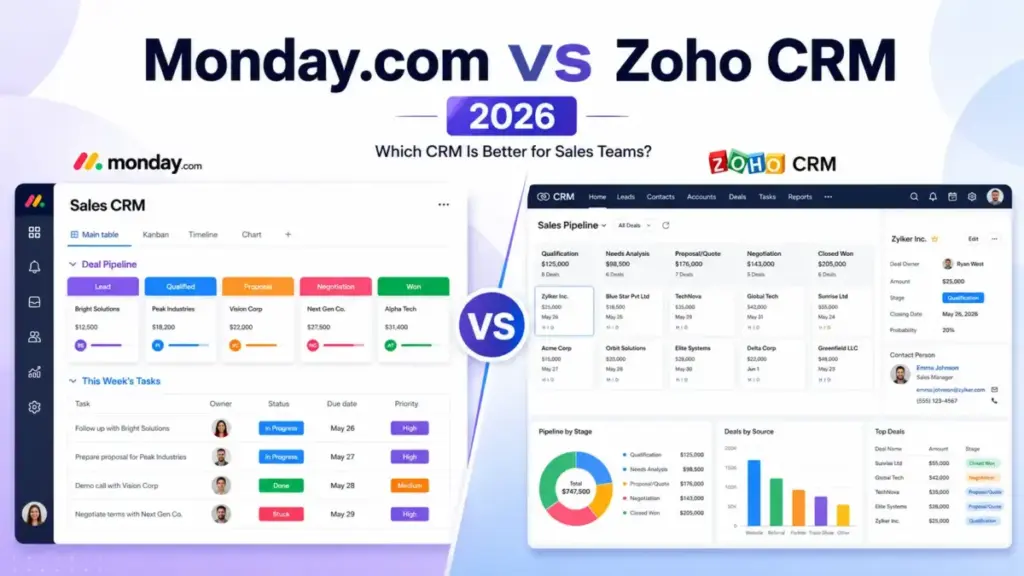
Monday CRM starts at 12/user/monthbilledannually.ZohoCRMstartsat14/user/month on its Standard plan. That 2/usergaplookssmalluntilyoumultiplyitacross25seatsforayear:600 in savings on monday CRM before you even compare features. But the cheaper entry price hides a different question entirely: are you buying a visual revenue workspace or a structured CRM system with deeper sales governance? Both platforms rank among the best CRM software options for US teams, but they solve different problems.
Choose monday CRM if your team wants a fast, visual CRM that connects deals to delivery, marketing, and operations on one platform. Choose Zoho CRM if your team needs deeper pipeline controls, Blueprint process enforcement, territory management, and a broader native business suite.
I spent significant time mapping both platforms plan by plan, feature gate by feature gate, and the conclusion surprised me. The real decision is not CRM versus CRM. It is flexibility versus structure, and I will break down exactly where that line sits for US teams in 2026.
Quick Verdict: Monday CRM vs Zoho CRM
| Category | Winner | Why |
|---|---|---|
| Entry paid price (annual) | monday CRM | 12/user/monthvsZoho′s14/user/month on Standard (as of June 2026) |
| Ease of use and adoption speed | monday CRM | Visual board model and templates support faster rollout |
| CRM depth and sales governance | Zoho CRM | Blueprint, territory management, portals, and custom functions |
| Automation and API scale | Zoho CRM | Edition-based API credit structure and deeper CRM automation options |
| Integrations and ecosystem breadth | Zoho CRM | 1,000+ integrations plus native Zoho business suite |
| Security and compliance | Tie | Both list SOC 2 Type II, ISO 27001, and HIPAA-related controls |
| Cross-functional work management | monday CRM | CRM built on a broader work platform connecting sales to delivery |
What this means: Monday CRM wins on price, speed, and cross-team collaboration. Zoho CRM wins on CRM depth, automation ceilings, and ecosystem breadth. A 10-person sales team that wants to start closing deals within a week leans monday. A 25-person sales org that needs process enforcement and territory controls leans Zoho.
Monday CRM vs Zoho CRM at a Glance
| Dimension | monday CRM | Zoho CRM |
|---|---|---|
| Best for | Visual CRM, fast setup, cross-functional teams | Structured CRM, sales governance, Zoho ecosystem teams |
| Starting price (annual) | $12/user/month | $14/user/month (Standard) |
| Free plan | No (3-user minimum on paid plans) | Yes, up to 3 users |
| Free trial | Yes | Yes |
| Practical sales-ready tier | Standard at $17/user/month | Professional at $23/user/month |
| Setup difficulty | Low to medium | Medium to high |
| AI features | AI Notetaker, deal summaries, email drafting, AI Lead Agent, AI Sales Agent | Zia AI (Enterprise tier and above) |
| Main strength | Visual flexibility, fast adoption, cross-team workflows | CRM process depth, broader feature gates, Zoho suite integration |
| Main weakness | Plan-gated CRM controls, API/automation ceilings on lower tiers | Steeper learning curve, advanced features concentrated in higher tiers |
| Testing level | Third-party validated | Third-party validated |
What this means: Monday CRM is the faster path to a working pipeline. Zoho CRM is the deeper path to a governed sales process. The practical tier gap (monday Standard at 17∗∗vsZohoProfessionalat∗∗23) is where the daily cost math starts to separate.
How We Compared These Two CRMs
Alex Morrison here. I evaluated both platforms by mapping their official pricing pages, feature documentation, plan-gated capabilities, API limits, and user review sentiment from Capterra, G2, and TechRadar. After evaluating 40+ CRM platforms for SaaSZap, I can tell you the pricing page rarely reflects what a growing sales team actually pays.
This comparison uses a multi-dimensional framework across 7 weighted categories: pricing and total cost at scale, ease of use, CRM depth, automation and API headroom, integrations, security, and cross-functional capability. Every price in this article is verified from official sources as of June 2026.
This is not a hands-on test report. Both products were evaluated through official documentation, third-party reviews, and pricing page analysis. I did not run either product through a live sales pipeline, and I will not claim otherwise. Where I reference user sentiment, I cite the platform and paraphrase rather than fabricate direct quotes.
One limitation: monday CRM asks teams above 40 users to request a quote, so cost-at-scale math above that threshold is an estimate based on list-rate pricing, not a confirmed bill. Zoho CRM USD pricing was verified from Zoho’s official USD edition comparison PDF because the HTML pricing page localized currency by visitor region. To understand what CRM software does at a structural level, both platforms approach the same problem from different directions.
Monday CRM layers sales pipeline management onto a work operating system. Zoho CRM builds outward from a dedicated sales force automation core.
Workflow 1: Setting Up and Managing a Sales Pipeline
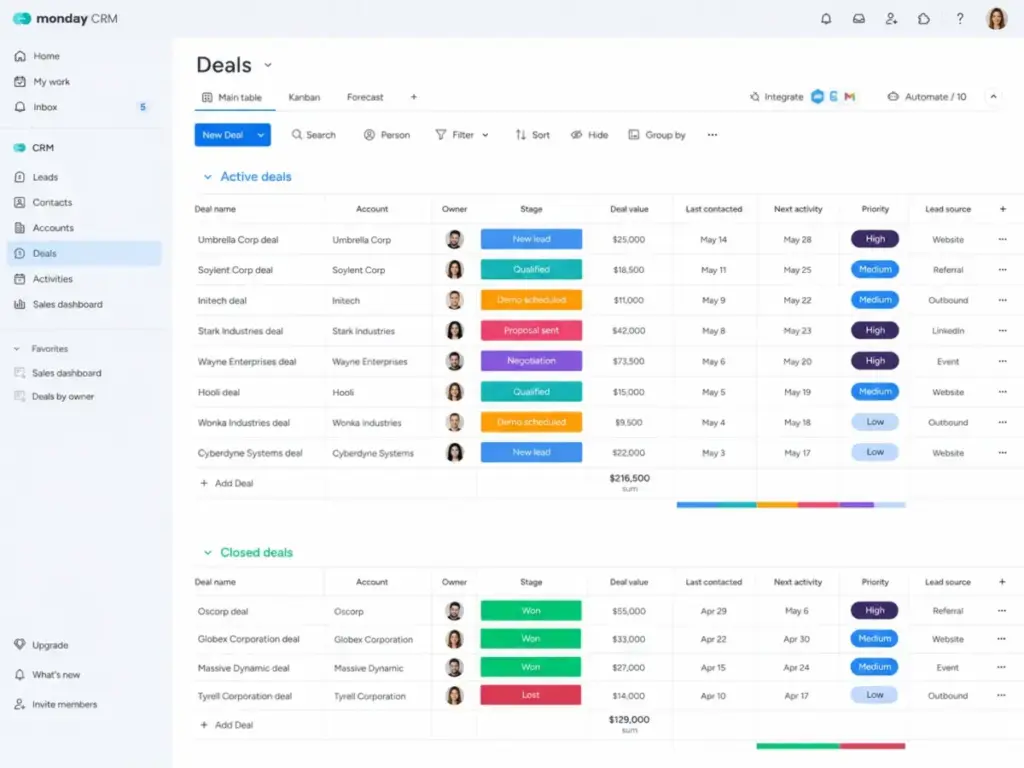
Monday CRM gives a 5-person startup a working pipeline in under an hour. The board-based model means deals are visual items, columns map to deal properties, and groups organize pipeline stages. Templates cover common CRM setups. A sales rep with no CRM experience can drag deals through stages, log activities, and update contact records on the same screen.
Zoho CRM takes a different approach. Modules for leads, contacts, accounts, and deals follow a traditional CRM hierarchy. A sales manager can configure stage probabilities, assignment rules, and mandatory field validations. Canvas lets teams customize the CRM interface. The tradeoff: Zoho CRM requires more upfront planning from an admin who understands CRM architecture.
Feature gates that matter for pipeline setup
| Feature | monday CRM plan gate | Zoho CRM plan gate | Buyer impact |
|---|---|---|---|
| Active contacts and deals | Basic: 1,000; Standard: 10,000; Pro: 100,000 | Standard: entry limits; higher tiers scale | monday caps contacts on lower tiers |
| Dashboards | Basic: 1; Standard: 5; Pro: 50 | Standard: entry dashboards; Enterprise scales | monday Basic dashboard limit constrains reporting |
| Custom automations/month | Standard: 250; Pro: 25,000 | Standard: workflow rules; Enterprise: advanced | monday Standard automation ceiling can matter |
| Conditional status change | Ultimate only | Blueprint available at Professional | monday locks key enforcement behind highest tier |
| Territory management | Not a native CRM feature | Enterprise tier | Zoho wins for multi-territory sales teams |
| Custom functions | Not native | Enterprise tier | Zoho offers deeper code-level customization |
What this means: The pipeline setup question is not about features on paper. It is about who configures the system. If a sales rep doubles as the CRM admin, monday CRM is the easier path. If the team has a dedicated ops person who can design workflows, Zoho CRM delivers stronger long-term controls.
Here is the gap most comparisons miss: monday CRM caps active contacts at 1,000 on Basic and 10,000 on Standard. A 15-person outbound sales team with 8,000 prospects will brush against that Standard ceiling before the team feels large enough to justify a Pro upgrade at $28/user/month. Zoho CRM scales contact limits more gradually across its tiers.
Workflow 2: Automating Sales Processes and Scaling API Usage
Zoho CRM wins on automation depth and API headroom. The gap is structural, not cosmetic.
Monday CRM custom automations are plan-gated: 250/month on Standard, 25,000/month on Pro, and enterprise-scale on Ultimate. API daily call limits are 1,000 on Basic and Standard, 10,000 on Pro (soft limit), and 25,000 on Enterprise (soft limit). Account complexity is capped at 10,000,000 complexity points per minute.
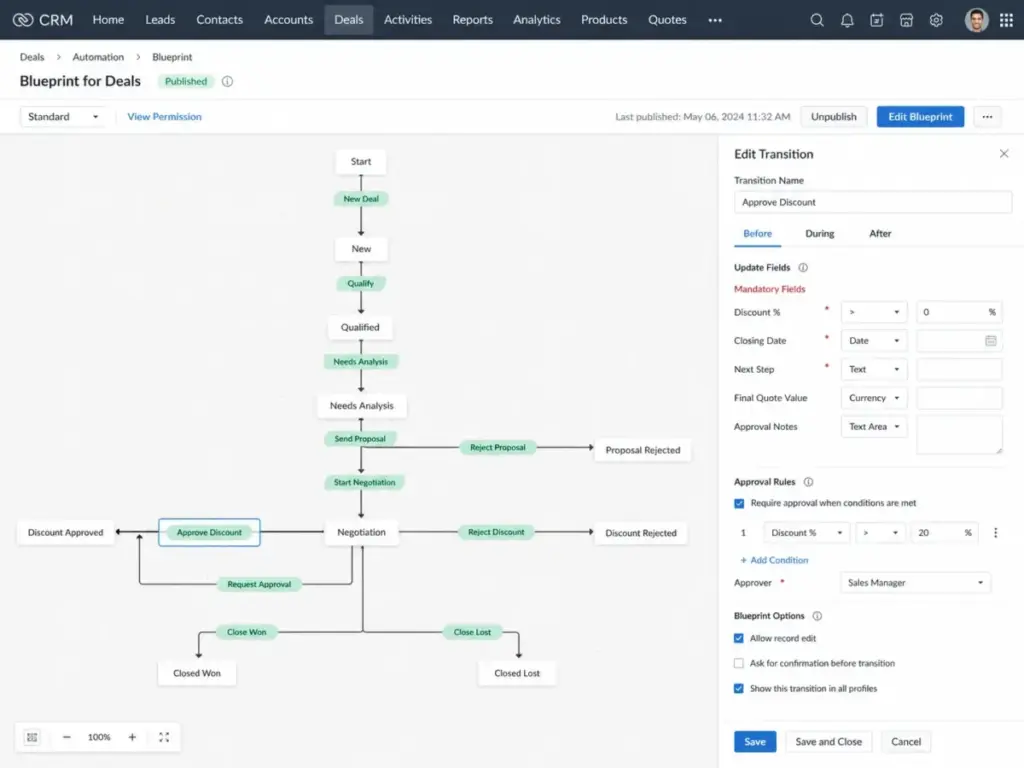
Zoho CRM publishes edition-based API credits: Free at 5,000, Standard at 50,000 plus user-based credits, Professional and Enterprise with larger multipliers, and Ultimate with unlimited maximum credits listed. Zoho also provides Blueprint for process-level automation, workflow rules, assignment rules, and custom functions at Enterprise tier.
Automation and API limits compared
| Limit type | monday CRM | Zoho CRM | Why it matters |
|---|---|---|---|
| Custom automations (entry paid) | 250/month (Standard) | Workflow rules (Standard) | Monday Standard teams hit this ceiling with moderate automation |
| Custom automations (mid-tier) | 25,000/month (Pro) | Deeper automation (Professional+) | Pro tier solves most monday automation needs |
| API daily calls (entry paid) | 1,000 (Basic/Standard) | 50,000+ credits (Standard) | monday’s API ceiling is 50x lower on entry plans |
| API daily calls (mid-tier) | 10,000 soft limit (Pro) | Higher user-multiplied credits (Enterprise) | Zoho scales API access more aggressively |
| Process automation | Board automations | Blueprint (Professional+) | Zoho Blueprint enforces stage-gated rules |
| Custom code | Not native | Custom functions (Enterprise) | Zoho allows server-side scripting |
What this means: A 10-person sales team running 5 Zapier automations, 3 internal workflow triggers, and a custom API integration can consume monday CRM Standard’s 250 monthly automations faster than expected. The same team on Zoho CRM Standard has a higher baseline automation ceiling and more API headroom before needing a tier upgrade.
I calculated the breaking point. If each sales rep triggers an average of 2 automations per deal and the team closes 15 deals per rep per month, a 10-rep team burns through 300 automations/month, exceeding the Standard limit. That pushes the team to Pro at 28/user/month(annual),increasingthe10−usermonthlycostfrom170 to $280.
Workflow 3: Integrations and Ecosystem Connectivity
Zoho CRM wins on ecosystem breadth. Monday CRM wins on visual integration simplicity.
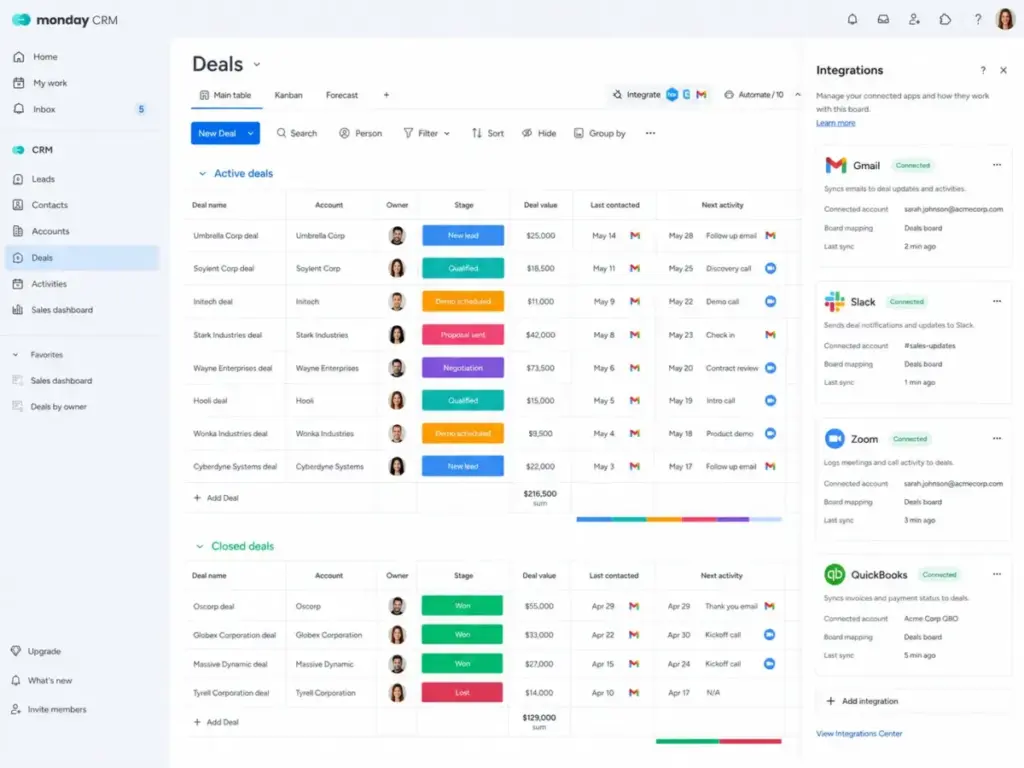
Monday CRM integrates with Gmail, Outlook, Slack, Zoom, QuickBooks, Google Workspace, DocuSign, and offers marketplace apps, Zapier, Make, and API connectivity. For a team that lives in Gmail and Slack, the setup is quick and visual.
Zoho CRM connects to the broader Zoho suite: Zoho Desk, Books, Analytics, WorkDrive, PhoneBridge, and more. Zoho Marketplace lists 1,000+ integrations. The ecosystem also includes Google Workspace, Microsoft 365, Slack, Microsoft Teams, Zoom, Mailchimp, Zendesk, PayPal, QuickBooks, WhatsApp Business, and others.
The caveat Zoho’s marketing does not emphasize: third-party, vendor, and Zoho-family integrations may require paid licenses. Extra file storage is listed at $4.60/month for 5GB. That “1,000+ integrations” number includes connections where the full functionality requires separate subscriptions.
Monday CRM’s ecosystem is smaller but more self-contained. A team standardized on Google Workspace and Slack can connect the core sales stack without leaving the monday.com platform. The integration marketplace is growing, and both Zapier and Make fill gaps.
For a company already using Zoho Books, Zoho Desk, and Zoho Analytics, Zoho CRM fits like a native component. The data flows natively between products. That ecosystem advantage is real, but it comes with a vendor commitment that is harder to reverse.
Pricing and Value per Dollar for Monday CRM vs Zoho CRM
The entry-price winner is monday CRM on paid annual plans. The free-tier winner is Zoho CRM for teams of 3 or fewer.
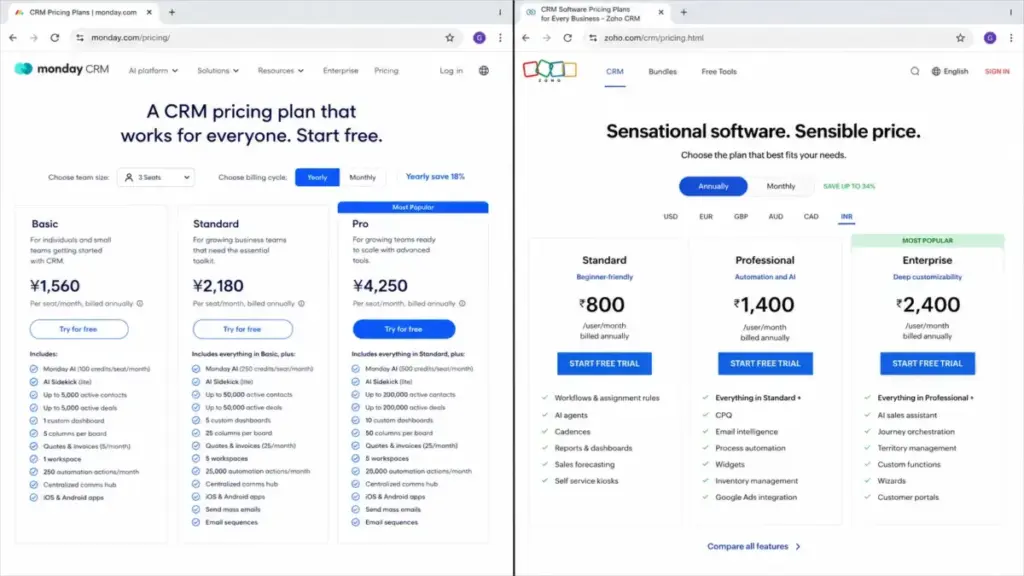
Monday CRM pricing (as of June 2026)
| Plan | Monthly price | Annual price | Key limits |
|---|---|---|---|
| Basic | $18/user/month | $12/user/month | 1,000 contacts/deals, 1 dashboard, 5 columns, 20 quotes/invoices, 1 workspace |
| Standard | $25/user/month | $17/user/month | 10,000 contacts/deals, 5 dashboards, 15 columns, 250 automations/month, 3 workspaces |
| Pro | $41/user/month | $28/user/month | 100,000 contacts/deals, 50 dashboards, 75 columns, 25,000 automations/month, 15 workspaces |
| Ultimate | Custom | Custom | Unlimited, enterprise-grade, HIPAA, multi-level permissions |
Plans start from a 3-user minimum. Teams above 40 users should request a quote.
Zoho CRM pricing (as of June 2026)
| Plan | Monthly price | Annual price | Key limits |
|---|---|---|---|
| Free | Free | Free | Up to 3 users, core CRM features |
| Standard | $20/user/month | $14/user/month | Entry sales automation, reports, dashboards, workflow rules |
| Professional | $35/user/month | $23/user/month | Blueprint, inventory/CPQ, stronger automation |
| Enterprise | $50/user/month | $40/user/month | Zia AI, territory management, custom functions, portals |
| Ultimate | $65/user/month | $52/user/month | Highest limits, expanded storage, advanced capabilities |
Cost at scale: monday CRM vs Zoho CRM on entry paid annual plans
| Team size | monday CRM (Basic annual) | Zoho CRM (Standard annual) | Winner | Caveat |
|---|---|---|---|---|
| 5 users | $60/month | $70/month | monday CRM | — |
| 10 users | $120/month | $140/month | monday CRM | — |
| 25 users | $300/month | $350/month | monday CRM | — |
| 50 users | $600/month (list-rate estimate) | $700/month | monday CRM (caveated) | monday asks 40+ users to request a quote |
What this means: Monday CRM saves 50/monthat10usersand100/month at 25 users on entry annual pricing compared to Zoho CRM Standard. But monday Basic caps at 1,000 active contacts, which means most real sales teams need Standard (17/user/month)orPro(28/user/month). At the practical Standard tier, monday CRM at 10 users costs 170/monthversusZohoCRMStandardat140/month. The cost advantage flips.
That is the hidden math. Monday CRM wins on Basic, but most sales teams cannot operate on Basic’s 1,000-contact limit. At the practical tiers where teams actually work, Zoho CRM Standard is $30/month cheaper for 10 users.
Hidden costs
Monday CRM: Annual plans are paid upfront. Higher automations, contacts, dashboards, quotes, invoices, workspaces, permissions, HIPAA, and enterprise support all require tier upgrades. API daily call limits can force architectural workarounds or plan upgrades.
Zoho CRM: Advanced AI (Zia), custom functions, portals, territory management, and deeper governance require Enterprise or Ultimate tiers. Third-party and Zoho-family integrations may need paid licenses. Extra file storage costs $4.60/month for 5GB. Paid support plans and onboarding services add cost.
For a deeper cost breakdown of each platform, see our monday CRM pricing breakdown.
Zoho CRM’s tier-by-tier cost analysis is covered in our Zoho CRM pricing analysis.
Security, Compliance, and Admin Controls
This dimension is a tie. Both vendors publish strong security and compliance credentials.
Monday CRM lists SOC 2 Type II, ISO 27001, ISO 27018, OWASP Top 10 security posture, and AWS hosting. The Ultimate tier adds HIPAA support and multi-level permissions.
Zoho CRM references SOC 2 Type II, ISO 27001, ISO 27017, ISO 27018, GDPR compliance, field-level encryption, audit trails, and data privacy controls through Zoho Trust. The CRM edition comparison also lists HIPAA compliance-related controls.
For a 20-person US sales team handling health-related data, both platforms offer HIPAA-related controls at their enterprise tiers. The distinction is operational: monday CRM gates multi-level permissions behind Ultimate (custom pricing), while Zoho CRM distributes advanced governance features across Enterprise (40/user/month)andUltimate(52/user/month) with published pricing.
Setup, Onboarding, and Migration Difficulty
| Dimension | monday CRM | Zoho CRM |
|---|---|---|
| Setup difficulty | Low to medium | Medium to high |
| Time to first pipeline | Under 1 hour with templates | 2-4 hours with admin configuration |
| Admin requirement | Sales rep can self-serve on basic setup | Dedicated CRM admin recommended |
| Migration to this platform | Medium: map flexible boards, groups, statuses, custom columns | Medium to high: map modules, fields, layouts, pipelines, Blueprint |
| Migration from this platform | Medium: decide what to export from boards, automations, item relationships | Medium: export modules, Blueprint processes, custom functions, Zoho-suite dependencies |
| Data portability | Excel import, API support | Import, export, deduplication, audit, API |
What this means: Monday CRM has a lower adoption floor. A 5-person team can start tracking deals the same afternoon they sign up. Zoho CRM has a higher adoption ceiling. A 25-person team with territories, approval workflows, and lead assignment rules will find more structure to build on, but it takes longer to configure.
Migration between the two platforms is not trivial in either direction. Moving from monday CRM to Zoho CRM means mapping flexible board structures into rigid CRM modules. Moving from Zoho CRM to monday CRM means deciding which Blueprint processes, custom functions, and Zoho-suite dependencies to recreate, simplify, or retire. Both directions require field mapping, duplicate cleanup, email and calendar reconnection, automation rebuilds, permission reviews, and user training.
Where Monday CRM Wins
Monday CRM is the better pick in these scenarios:
- 5-person startup choosing a first paid CRM. The visual board model, templates, and $12/user/month entry price (annual) make it the fastest path from zero to working pipeline. Zoho’s free plan covers 3 users, but monday’s paid entry is still cheaper per user than Zoho Standard.
- Revenue team connecting sales to delivery. Monday CRM is built on a work platform. Deals can flow into onboarding boards, implementation projects, marketing campaigns, and account management workflows. Zoho CRM connects to Zoho Projects and Zoho suite apps, but the CRM itself is less work-management-native.
- Cross-functional team wanting one platform. Sales, marketing, customer success, and operations can work on the same monday.com workspace. The CRM is one layer of a broader system, not a standalone product.
- Team that prioritizes fast adoption over CRM depth. If the biggest risk is that reps will not use the CRM, monday CRM’s visual, low-code interface reduces that risk. Paraphrased user sentiment from Capterra and TechRadar: monday CRM is often praised for visual usability, customization, and collaboration.
Where Zoho CRM Wins
Zoho CRM is the better pick in these scenarios:
- Sales team with formal pipeline stages, approvals, and territory controls. Blueprint enforces stage transitions and mandatory fields at the Professional tier ($23/user/month annual). Monday CRM locks conditional status change behind Ultimate (custom pricing). For a 20-person team that needs required-field enforcement when deals change stage, Zoho CRM delivers this at a predictable, published price.
- Company already standardized on Zoho apps. If the team uses Zoho Desk, Zoho Books, Zoho Analytics, and Zoho WorkDrive, adding Zoho CRM creates a native data flow. The ecosystem integration is genuine, though paid licenses may apply for some Zoho-family products.
- Team needing deeper CRM-specific customization. Custom functions (Enterprise), portals, Canvas UI customization, and Zia AI provide CRM-native capabilities that go beyond monday CRM’s flexible board model.
- Organizations that need predictable published pricing above 40 seats. Zoho CRM publishes per-user pricing across all tiers. Monday CRM asks teams above 40 users to request a quote. A 50-person team can calculate Zoho CRM costs before the first sales call.
Paraphrased user sentiment from G2 and TechRadar: Zoho CRM is frequently valued for affordability, CRM depth, customization, and broad integrations, while recurring concerns include a steeper learning curve, UI inconsistency, and support friction.
Who Should Choose Monday CRM
Choose monday CRM if:
- Your sales team has 5-25 reps who need a working pipeline within a week, not a month.
- Sales work must connect to implementation, marketing, customer success, or operations workflows on the same platform.
- The team values visual, no-code customization over structured CRM process controls.
- Your CRM admin is a sales manager, not a dedicated ops person.
- You are comfortable with monday CRM’s published pricing structure (3-user minimum, quote-based above 40 users).
Read our full monday CRM review and analysis for a deeper look at the platform’s capabilities and limitations across all tiers.
Who Should Choose Zoho CRM
Choose Zoho CRM if:
- Your sales process requires Blueprint-style stage enforcement, territory management, or approval workflows.
- The team already uses or plans to adopt Zoho Desk, Books, Analytics, or other Zoho suite products.
- You need higher API credit ceilings on entry and mid-tier plans for custom integrations.
- Predictable, publicly listed per-user pricing at any team size is important for budget planning.
- A dedicated CRM administrator can configure modules, layouts, workflow rules, and custom functions.
Read our full Zoho CRM review and evaluation for detailed feature-gate analysis and pricing tier breakdowns.
Who Should Avoid Both Monday CRM and Zoho CRM
Neither platform is the right choice if:
- Your team needs native sales engagement with built-in sequences, cadences, and meeting scheduling. Both platforms offer email features, but teams needing a true sales engagement layer may find purpose-built tools like HubSpot or Salesloft more capable out of the box.
- You need advanced revenue intelligence with AI-powered deal forecasting, conversation analysis, and pipeline risk scoring. Both platforms have AI features (monday AI agents, Zoho Zia), but neither matches the depth of dedicated revenue intelligence platforms.
- You need deep enterprise CRM customization at scale with hundreds of custom objects, complex approval chains, and multi-entity data models. Salesforce Sales Cloud remains the enterprise standard for that level of architectural complexity.
- You have zero admin capacity and zero tolerance for any configuration. Even monday CRM’s visual model requires workspace, board, and permission design for teams beyond 10 users. A truly zero-config need might be better served by a lighter pipeline tool.
Alternatives to Monday CRM and Zoho CRM
If neither platform fits, consider these options:
| Alternative | Best for | Why consider | Starting price (annual) |
|---|---|---|---|
| HubSpot CRM | Teams needing a marketing-sales CRM bundle and large ecosystem | Stronger marketing automation, sales CRM, and service tools in one suite | Free CRM; paid from $20/user/month |
| Pipedrive | Sales teams wanting pipeline simplicity without suite complexity | Dedicated pipeline management, lower per-seat cost, less configuration | $14/user/month |
| Salesforce Sales Cloud | Enterprises needing advanced customization, ecosystem, and governance | Deepest CRM architecture, AppExchange ecosystem, and compliance controls | $25/user/month |
What this means: HubSpot CRM fits teams that need marketing and sales under one roof. Pipedrive fits teams that want a fast, simple pipeline without the broader platform layer. Salesforce fits enterprises that need architectural depth beyond what either monday CRM or Zoho CRM offers. For a detailed side-by-side of two enterprise contenders, see our Salesforce vs Dynamics 365 comparison.
For teams exploring other options in the monday ecosystem, our monday CRM alternatives analysis covers additional candidates.
If you are evaluating Zoho CRM against other platforms specifically, our HubSpot vs Salesforce comparison covers two major enterprise contenders.
Final Verdict: Monday CRM vs Zoho CRM in 2026
The Monday.com vs Zoho CRM decision is not a matter of which CRM is objectively better. It is a matter of what kind of CRM your team actually needs.
Choose monday CRM if you are a 5-to-25-person sales team that wants visual pipelines, fast adoption, low admin overhead, and the ability to connect sales work to delivery and operations on the same platform. Monday CRM is the revenue workspace choice.
Choose Zoho CRM if you need deeper CRM governance, Blueprint process controls, territory management, higher API headroom, Zoho ecosystem integration, and predictable published pricing at any team size. Zoho CRM is the structured sales system choice.
The cost verdict depends on tier. Monday CRM Basic is cheaper per user, but Basic’s 1,000-contact cap pushes most teams to Standard. At the Standard tier, Zoho CRM is $30/month cheaper for 10 users. At the Enterprise tier, Zoho CRM publishes pricing; monday CRM requires a quote.
After comparing these platforms across seven dimensions, my recommendation as Alex Morrison is this: start with the team you have today, not the team you plan to have. If your team is small, fast-moving, and values speed over process control, monday CRM gets you to revenue faster. If your team is process-driven, scaling, and values CRM depth over platform flexibility, Zoho CRM gives you more room to grow.
For a broader view of the CRM category, including tools that may fit edge cases neither platform covers, explore our best CRM for sales teams ranking.
FAQ
Is monday.com a real CRM or just a project board?
Monday CRM is a dedicated CRM product built on monday.com’s work management platform. It includes sales pipelines, contact management, email tracking, quotes, invoices, and AI features. It is not a project board repurposed as a CRM. The CRM product has its own pricing page, feature set, and sales-specific modules. The limitation is that some advanced CRM controls (like conditional status change) require the Ultimate tier.
Which is cheaper for 10 users, monday CRM or Zoho CRM?
On entry annual plans, monday CRM Basic costs 120/monthversusZohoCRMStandardat140/month. But monday Basic caps contacts at 1,000, so most teams need Standard at 170/month.AtthepracticalStandardtier,ZohoCRMis30/month cheaper for 10 users. Zoho also has a free plan for up to 3 users.
Does Zoho CRM have a free plan?
Yes. Zoho CRM offers a free edition for up to 3 users with core leads, deals, workflows, reports, and mobile app access. Monday CRM does not offer a free plan; paid plans start from a 3-user minimum.
Can I migrate from monday CRM to Zoho CRM?
Yes, but migration difficulty is medium to high. You will need to map monday boards, groups, statuses, and custom columns into Zoho CRM modules, fields, layouts, and pipelines. Both platforms support import/export and API paths. Plan for field mapping, duplicate cleanup, email reconnection, automation rebuilds, and user training.
Can I migrate from Zoho CRM to monday CRM?
Yes, with medium difficulty. The main challenge is deciding which Zoho CRM modules, Blueprint processes, custom functions, portals, and Zoho-suite dependencies to recreate, simplify, or retire in monday CRM’s board-based model. Data export and import tools are available on both sides.
Which CRM has better automation, monday CRM or Zoho CRM?
Zoho CRM has deeper CRM-specific automation with Blueprint, workflow rules, assignment rules, and custom functions. Monday CRM has strong no-code board automations but caps custom automations at 250/month on Standard. For teams that need structured sales process automation, Zoho CRM has the edge. For teams that want visual, low-code workflow triggers, monday CRM is faster to set up.
Which CRM is better for sales managers who need forecasting?
Both platforms offer forecasting capabilities, but Zoho CRM provides dedicated forecasting and analytics modules with Zia AI insights at the Enterprise tier. Monday CRM offers funnel and deal-stage widgets plus AI deal summaries. A sales manager who needs territory-based forecasting and advanced analytics leans Zoho CRM. A sales manager who needs a visual deal overview with quick filters leans monday CRM.
Is Zoho CRM too complicated for a startup?
Zoho CRM has a steeper learning curve than monday CRM. A 3-person startup can use Zoho CRM Free with core features. But configuring modules, layouts, Blueprint rules, and advanced customization requires CRM administration capacity. If the startup has no one who can spend time on CRM setup, monday CRM is the simpler entry point.
Does monday CRM have enough CRM depth for enterprise sales?
Monday CRM’s Ultimate tier offers unlimited contacts, dashboards, enterprise-grade automations, multi-level permissions, and HIPAA support. For enterprises that standardize revenue work on the monday.com platform, it can work. The limitation is that Ultimate pricing is custom (contact sales), and some CRM governance features that Zoho CRM provides at published Enterprise pricing are only available at monday CRM’s highest tier.
Which CRM has better integrations with Gmail and Outlook?
Both platforms integrate with Gmail and Outlook for email sync, tracking, and logging. Monday CRM also integrates with Google Workspace and has a visual email and activities layer. Zoho CRM integrates with Google Workspace, Microsoft 365, and includes a broader set of native integrations across the Zoho suite. For Gmail-centric teams, both work well. For teams using the full Microsoft 365 stack, Zoho CRM’s broader Microsoft integration may offer more depth.