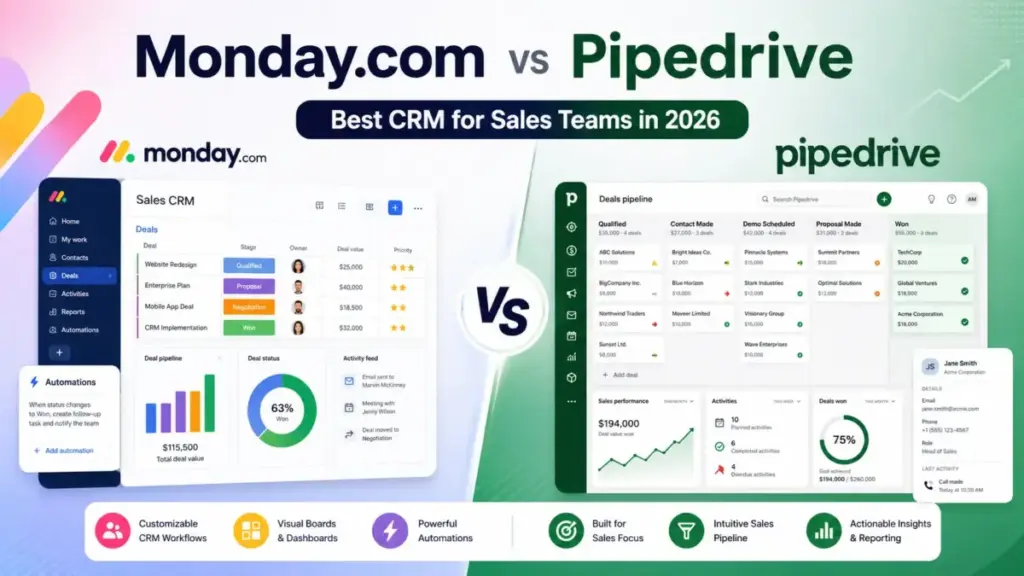
Monday CRM Standard costs 17/seat/monthbilledannually.PipedriveGrowthcosts39/seat/month billed annually. At 10 users, that is 170/monthversus390/month for plans that both include email sync, automations, and pipeline management. The price gap is real, but the products are not doing the same job.
Monday CRM is better for revenue teams that need CRM, onboarding workflows, client delivery, and cross-team dashboards in one customizable workspace. Pipedrive is better for sales teams that want a focused pipeline CRM with fast setup, deal visibility, and native lead generation tools. If your CRM must connect sales to post-sale operations, choose monday CRM. If your team lives in the pipeline view and needs nothing else, choose Pipedrive.
This comparison covers pricing, feature gates, automation limits, API constraints, integrations, support, setup difficulty, migration risk, and buyer fit, based on official pricing pages, documentation, and third-party review data verified as of June 2026. For a broader view of best sales CRM software options, start there if you are evaluating more than two tools.
Quick Verdict: monday CRM vs Pipedrive
| Category | Winner | Why |
|---|---|---|
| Pricing and total cost | monday CRM | Standard (17/seat/moannual)ischeaperthanGrowth(39/seat/mo annual) at 5, 10, and 25 users |
| Sales pipeline focus | Pipedrive | Built specifically around pipeline execution, deal activity, and sales reporting |
| Workflow customization | monday CRM | Customizable boards, dashboards, and cross-functional workflows beyond sales |
| Automation limits | Depends | monday Standard caps at 250 actions/month; Pipedrive offers top-ups but gates automations to Growth |
| Integrations | Pipedrive | 500+ marketplace integrations versus monday’s 200+ apps |
| Security and compliance | monday CRM | Broader public compliance list: SOC 1/2/3, ISO 27001, HIPAA on Ultimate |
| Support availability | monday CRM | 24/7 support documented; Pipedrive gates live chat to Growth, phone to Ultimate |
| Ease of setup | Pipedrive | Narrower pipeline model means less configuration and fewer admin decisions |
| Lead generation tools | Pipedrive | LeadBooster, scoring, enrichment, and AI email tools on Premium |
| Post-sale operations | monday CRM | Onboarding, delivery, account management, and project work built into the platform |
What this means: monday CRM wins on price and flexibility. Pipedrive wins on sales-specific focus and faster setup. Neither is the universal answer. The right pick depends on whether you need a CRM platform or a pipeline tool.
How We Compared monday CRM and Pipedrive
I compared monday CRM and Pipedrive across 10 dimensions: pricing, pipeline management, workflow customization, automation, integrations, reporting, AI features, security, support, and setup difficulty.
Testing level: third-party validated. I did not have hands-on access to either platform for this comparison. All claims are sourced from official pricing pages, official documentation, help center articles, and third-party review platforms including G2 and Gartner Peer Insights.
Pricing verification date: June 10, 2026. monday CRM prices from monday.com/crm/pricing. Pipedrive prices from pipedrive.com/en/pricing.
Limitation: This comparison relies on published pricing and documentation. Actual implementation experience, UI responsiveness, and customer support quality vary by account. monday CRM pricing above 40 seats requires a sales quote. Pipedrive exact month-to-month prices were not safely verified from the official HTML parse, so I use annual pricing throughout.
After evaluating 40+ CRM platforms for SaaSZap, I can tell you that comparison articles in this space regularly get two things wrong: they use outdated Pipedrive plan names (the old Essential/Advanced/Professional/Enterprise structure is gone), and they skip monday CRM’s seat-bucket pricing mechanics. Both mistakes distort the buying decision.
If You Need CRM Plus Post-Sale Operations, Choose monday CRM
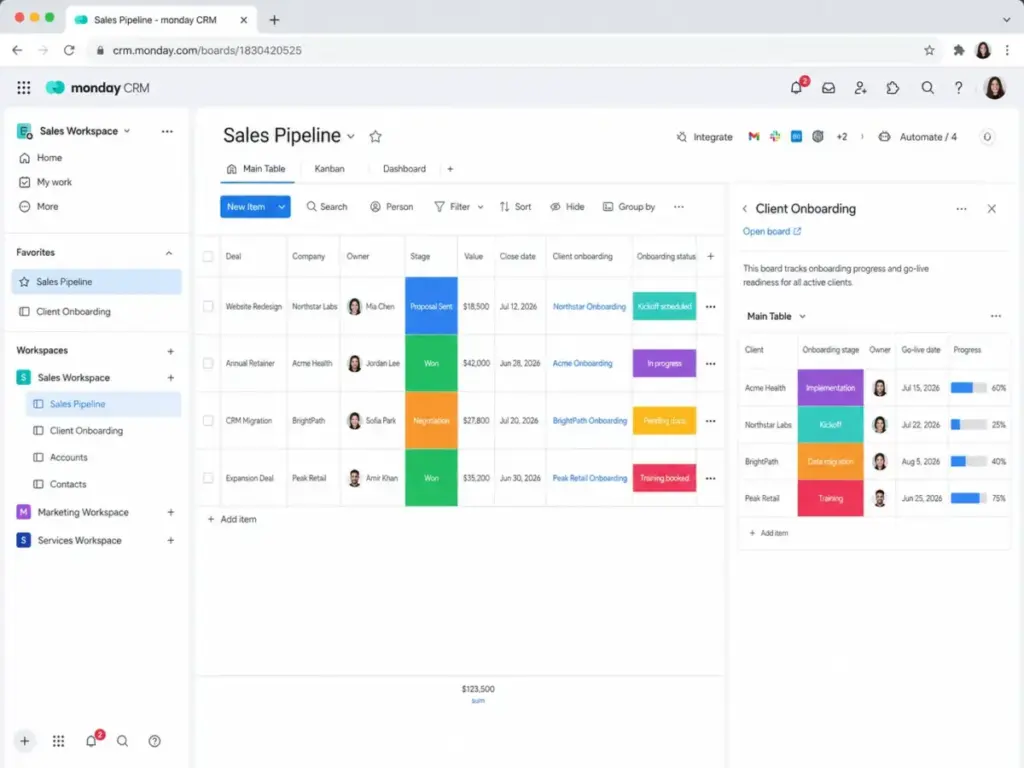
monday CRM is not a standalone sales tool. It is a CRM layer built on top of monday.com’s work operating system. That architecture is the product’s biggest strength and its biggest risk.
The strength: your sales pipeline, client onboarding workflows, delivery boards, and management dashboards share the same data layer. A closed deal can trigger an onboarding project automatically. A client success board can pull data from the deal record without a Zapier bridge. For revenue teams that span sales, account management, and service delivery, this eliminates the tool sprawl that Pipedrive cannot solve alone.
The risk: setup complexity. monday CRM requires decisions about board structure, column types, workspace architecture, automation rules, and permissions before your team runs its first pipeline. A 10-person team needs admin planning. A 50-person team needs project-level governance.
Winner for this scenario: monday CRM. If your CRM must connect to internal workflows beyond the pipeline, Pipedrive does not offer this.
If You Need Fast Sales Pipeline Setup, Choose Pipedrive
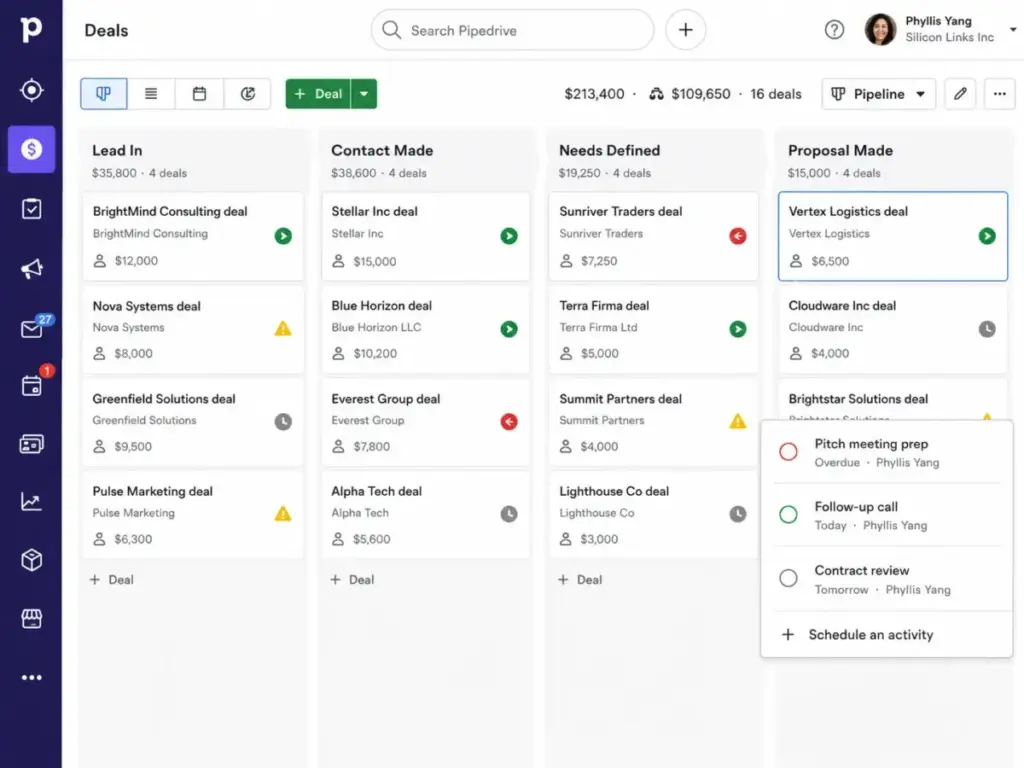
Pipedrive does one thing well: visual pipeline management built around deals, contacts, and activities. The product is opinionated. It expects your sales process to follow a stage-based pipeline model, and it gives you the tools to execute against that model with minimal configuration.
For a 5-person sales team choosing its first paid CRM, Pipedrive’s narrower scope is an advantage. Setup is faster. Onboarding requires less admin overhead. Reps see their deals, activities, and next steps in one view without navigating boards, workspaces, or custom column setups.
The tradeoff: Pipedrive does not handle what happens after the deal closes. If you need onboarding workflows, delivery tracking, or internal collaboration tied to client records, you will need a second tool or an integration.
Winner for this scenario: Pipedrive. The pipeline model is faster to adopt and easier to maintain for sales-only teams.
If Budget Is the Main Constraint at 10+ Users, Choose monday CRM
The cost comparison at comparable plan tiers favors monday CRM at every team size I modeled.
Cost at Scale: monday CRM Standard vs Pipedrive Growth (Annual Billing)
| Team Size | monday CRM Standard (Annual) | Pipedrive Growth (Annual) | Difference | Notes |
|---|---|---|---|---|
| 5 users | $85/month | $195/month | monday saves $110/month | Both include email sync and automations |
| 10 users | $170/month | $390/month | monday saves $220/month | monday 250 automation action cap matters here |
| 25 users | $425/month | $975/month | monday saves $550/month | Price gap widens at scale |
| 50 users | ~$850/month (quote required) | $1,950/month | monday saves ~$1,100/month | monday requires sales quote above 40 seats |
What this means: monday CRM Standard is cheaper than Pipedrive Growth at every team size in this model. But the comparison is not apples-to-apples. monday Standard caps automation and integration actions at 250 each per month. A 10-user team running 5 automations per user per day will exhaust that budget in 5 business days. If you need more automation headroom, monday Pro at 28/seat/monthisstillcheaperthanPipedriveGrowthat39/seat/month, and Pro includes 25,000 automation actions per month.
There is a caveat: monday CRM plans start at a 3-seat minimum, and pricing moves in seat buckets. If you have 4 users, you may pay for 5. That gap adds up for teams that do not align with the seat tiers. For a full breakdown of monday CRM pricing and plan tiers, I cover the seat-bucket mechanics in detail there.
If You Need Lead Generation and Prospecting, Choose Pipedrive
Pipedrive Premium ($59/seat/month annual) bundles LeadBooster, custom scoring, company data enrichment, AI email tools, contracts, and e-signatures. These are sales-specific features that monday CRM does not offer natively at the same depth.
monday CRM has lead and contact management on all plans, but its lead generation approach relies on integrations with external tools like Mailchimp, HubSpot, or Aircall rather than built-in prospecting features. If your team runs outbound campaigns and needs a CRM with native lead capture, scoring, and enrichment, Pipedrive Premium delivers that in one subscription.
The cost trade: Pipedrive Premium at 59/seat/monthismoreexpensivethanmondayCRMProat28/seat/month. But monday Pro plus a separate lead generation tool may equal or exceed Pipedrive Premium’s total cost. Run the math for your stack.
Winner for this scenario: Pipedrive.
If You Need Automation at Scale, Compare the Limits Before Choosing
This is where most comparison articles stop too early. Both platforms have automation, but the limits determine whether automations work at your team size.
Automation and API Limit Comparison
| Limit Type | monday CRM | Pipedrive | Risk at Scale |
|---|---|---|---|
| Automation actions (Standard/Growth) | 250/month | Plan-dependent, top-ups available | monday Standard burns through 250 actions fast for active teams |
| Automation actions (Pro/Premium) | 25,000/month | Higher limits, varies by plan | monday Pro is generous; Pipedrive Premium adds automations |
| Integration actions (Standard) | 250/month | Not separately capped | monday counts integration actions separately from automation |
| API daily calls (Pro) | ~10,000 soft limit | Plan-tiered burst limits | Both constrain heavy API users |
| API burst rate (Growth) | Complexity-based | 40 requests/2 seconds per token | Pipedrive uses burst windows; monday uses complexity scoring |
| Top-up options | Upgrade plan | API token and automation top-ups available | Pipedrive offers granular top-ups; monday requires plan upgrade |
What this means: monday CRM Standard’s 250 automation actions per month is a hard ceiling that catches teams by surprise. If you automate deal stage changes, email notifications, and status updates, 250 actions can be consumed in the first week. monday Pro solves this with 25,000 actions, but it also costs $28/seat/month. Pipedrive offers automation top-ups on eligible plans, giving more flexibility without a full plan upgrade.
monday CRM vs Pipedrive: Feature-to-Plan Gate Comparison
The plan you need depends on which features you require. Here is where each feature unlocks.
| Feature | monday CRM Plan | Pipedrive Plan | Buyer Impact |
|---|---|---|---|
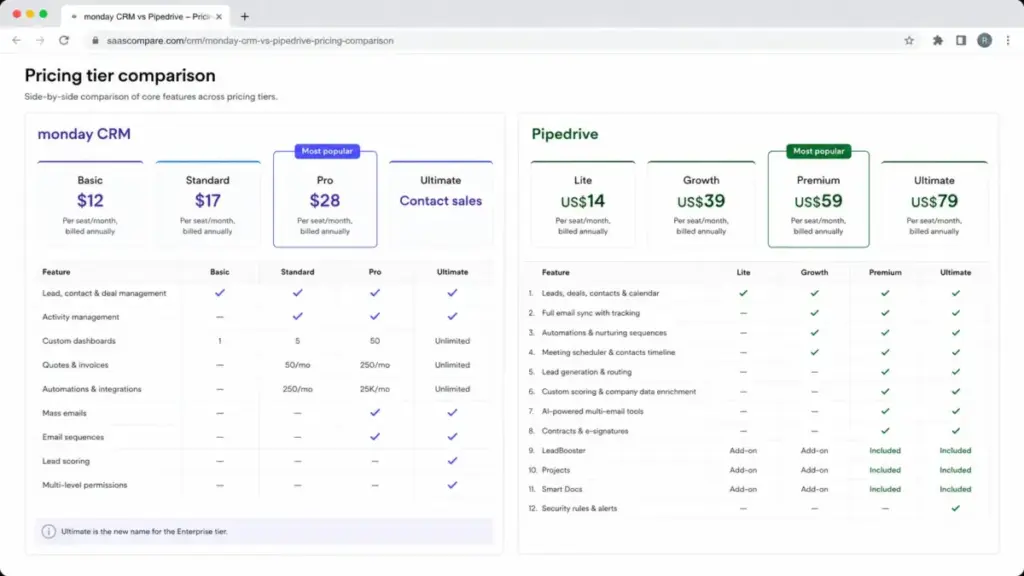
| Pipeline management | Basic ($12/seat/mo) | Lite ($14/seat/mo) | Both available on entry plans |
| Email sync (two-way) | Standard ($17/seat/mo) | Growth ($39/seat/mo) | monday is cheaper for email sync |
| Automations | Standard ($17/seat/mo) | Growth ($39/seat/mo) | monday is cheaper but capped at 250 actions |
| Sales forecasting | Pro ($28/seat/mo) | Growth ($39/seat/mo) | monday gates forecasting higher; Pipedrive includes it on Growth |
| Mass emails / sequences | Pro ($28/seat/mo) | Growth ($39/seat/mo) | Both require mid-tier plans |
| LeadBooster / lead gen tools | Not native | Premium ($59/seat/mo) | Pipedrive advantage for prospecting |
| Custom scoring / enrichment | Not native | Premium ($59/seat/mo) | Pipedrive advantage for data quality |
| HIPAA / advanced governance | Ultimate (contact sales) | Not documented | monday advantage for regulated industries |
| Sandbox testing | Not documented | Ultimate ($79/seat/mo) | Pipedrive advantage for safe testing |
| 24/7 support | All plans (documented) | Ultimate ($79/seat/mo) for phone | monday advantage for support access |
monday CRM vs Pipedrive at a Glance
| Dimension | monday CRM | Pipedrive |
|---|---|---|
| Best for | Revenue teams needing CRM + workflows | Sales teams needing pipeline focus |
| Not best for | Teams wanting narrow sales CRM, minimal setup | Teams needing post-sale operations or work management |
| Starting price | $12/seat/month (Basic, annual) | $14/seat/month (Lite, annual) |
| Practical tier | Standard at 17/seat/monthorProat28/seat/month | Growth at $39/seat/month |
| Free plan | No | No |
| Free trial | Yes (14-day) | Yes (14-day, no credit card) |
| Setup difficulty | Medium | Low to Medium |
| Main strength | Customizable cross-team workflows and dashboards | Focused pipeline management and sales execution |
| Main limitation | Automation caps on Standard; setup complexity | No post-sale operations; add-on costs increase total spend |
| Integrations | 200+ apps and marketplace | 500+ marketplace integrations |
Integrations and Ecosystem
Pipedrive wins on integration count. Pipedrive publicly promotes 500+ integrations. monday CRM comparison materials commonly reference 200+ apps. Both connect to Gmail, Outlook, Google Calendar, Slack, Microsoft Teams, Zapier, Make, PandaDoc, DocuSign, and Aircall.
The difference is depth versus breadth. monday CRM integrates with monday.com’s broader work management ecosystem, meaning your CRM data can flow into project boards, dashboards, and operational workflows without leaving the platform. Pipedrive integrates widely with third-party sales tools but does not offer a native work management layer.
If your stack relies on external tools for lead generation (LeadBooster), accounting (QuickBooks, Xero), or collaboration (Trello, Asana), Pipedrive’s marketplace is broader. If you want fewer external tools by consolidating CRM and operations into one platform, monday’s architecture handles that internally. For a detailed look at Pipedrive’s pricing and add-on costs, I break down the per-add-on math there.
Support, Security, and Admin Controls
Support: monday.com help documentation states 24/7 customer support across plans, with enterprise support on Ultimate. Pipedrive gates live chat to Growth and above, and extended phone support to Ultimate ($79/seat/month). If support availability matters before you commit to a higher plan, monday has the edge.
Security and compliance: monday CRM publishes SOC 1 Type 2, SOC 2 Type 2, SOC 3, ISO/IEC 27001, ISO/IEC 27018, ISO/IEC 27017, ISO/IEC 27032, ISO/IEC 27701, GDPR, CCPA, LGPD, and HIPAA support on eligible plans. Data hosting is available in US, EU, and AUS regions via AWS. Pipedrive states GDPR compliance, trust center coverage, enforced 2FA on relevant plans, and fortified account security on Ultimate. monday’s public compliance documentation is broader.
Admin controls: monday CRM Ultimate includes multi-level permissions and advanced governance. Pipedrive Premium includes flexible permissions, and Ultimate adds fortified account security. For regulated industries or organizations requiring HIPAA, monday CRM is the only option between the two.
Setup and Migration Difficulty
| Dimension | monday CRM | Pipedrive |
|---|---|---|
| Initial setup | Medium: board, column, and workspace planning required | Low to Medium: pipeline stages and deal fields |
| Onboarding time | Longer for large teams due to workspace architecture | Faster for sales-only teams |
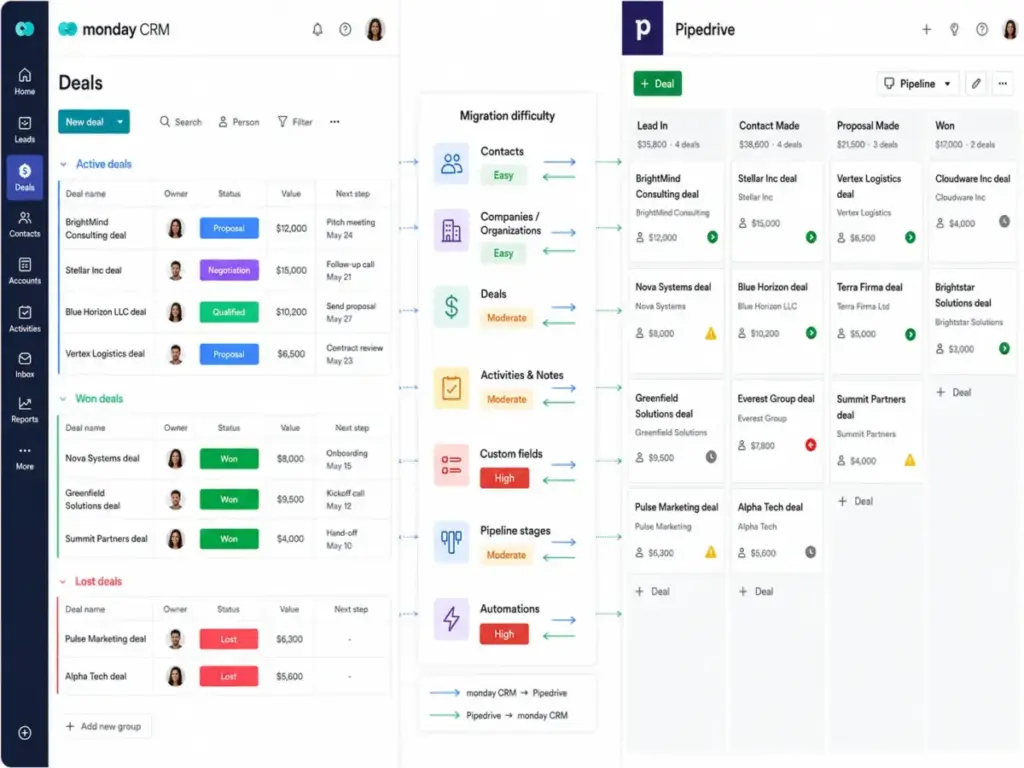
| Migration from the other | Medium: rebuild pipelines, dashboards, automations, permissions | Medium: simplify boards and workflows into pipeline model |
| Data export | Board export to Excel, admin account data export | XLS, XLSX, CSV import with column mapping and duplicate handling |
| Data portability | Admin-controlled; API available | Documented import from monday.com data exports |
| Learning curve | Higher due to customizable flexibility | Lower due to narrower scope |
What this means: If you are switching from monday CRM to Pipedrive, plan to simplify. monday’s boards, columns, custom statuses, and workflow automations need to be compressed into Pipedrive’s pipeline, deal, person, organization, and activity model. If you are switching from Pipedrive to monday CRM, plan to build. You will need to create boards, configure dashboards, set automation rules, define permissions, and architect workspaces from scratch. Both migrations take planning. Neither is a weekend project for a team above 10 users.
For teams evaluating a switch from Pipedrive specifically, the Pipedrive CRM analysis covers its standalone strengths and limitations in more depth.
Where monday CRM Wins
- Price per seat at comparable tiers. monday CRM Standard costs 17/seat/monthversusPipedriveGrowthat39/seat/month, both billed annually. At 10 users, that is a $220/month difference.
- Cross-team workflow integration. Sales, onboarding, delivery, and account management can share one workspace with connected boards and dashboards.
- Automation volume on Pro. 25,000 automation actions and 25,000 integration actions per month on Pro ($28/seat/month) is generous compared to the category.
- Support access. 24/7 support documented across plans, not gated behind higher tiers.
- Compliance breadth. SOC 1/2/3, ISO certifications, HIPAA on Ultimate, and multi-region data hosting.
Where Pipedrive Wins
- Sales-specific pipeline execution. The product is built for deal tracking, activity management, and sales reporting without the overhead of a general-purpose work platform.
- Native lead generation. LeadBooster, custom scoring, enrichment, and AI email tools are built in on Premium.
- Integration marketplace breadth. 500+ integrations versus monday’s 200+ apps.
- Faster setup for sales teams. Less admin planning, fewer configuration decisions, and a narrower onboarding scope.
- Sandbox testing. Available on Ultimate for safe configuration testing before deploying changes to the live environment.
Who Should Choose monday CRM?
- Revenue teams (5-50 users) that need CRM plus onboarding, delivery, and client success workflows in one platform.
- Budget-conscious teams where the per-seat cost difference between monday Standard and Pipedrive Growth materially impacts the annual budget.
- Organizations in regulated industries that need HIPAA support, SOC compliance documentation, and multi-level permissions.
- Operations-heavy teams replacing spreadsheets across sales, account management, and internal project delivery.
For a full evaluation of monday CRM’s standalone capabilities, the monday.com CRM review covers board architecture, feature gates, and practical plan recommendations.
Who Should Choose Pipedrive?
- Sales-led teams (3-25 users) that want a focused pipeline CRM with fast setup and minimal configuration overhead.
- Outbound sales teams that need native lead generation, prospecting tools, email sequences, and data enrichment in one CRM.
- Teams prioritizing integration breadth over internal workflow flexibility, especially teams that rely on 500+ third-party tools.
- Sales managers who want opinionated pipeline reporting without building custom dashboards from scratch.
Who Should Avoid Both?
Not every buyer fits into the monday CRM or Pipedrive bucket. Consider alternatives if:
- You need a free CRM entry point. Neither monday CRM nor Pipedrive offers a free plan. HubSpot CRM provides a free tier with basic pipeline, contacts, and deal management, though automation and reporting are locked behind paid plans. The HubSpot CRM review covers where the free tier ends and the real cost begins.
- You need a deep enterprise CRM ecosystem. If your roadmap includes CPQ, advanced forecasting models, AppExchange apps, or multi-cloud integration, Salesforce Starter offers an entry point into that ecosystem. See our Salesforce CRM evaluation for enterprise-tier details.
- You want a broad business app ecosystem at lower cost. Zoho CRM offers CRM plus office, support, finance, and marketing apps under one vendor ecosystem at price points below Pipedrive Growth. The Zoho CRM review covers the ecosystem depth and plan gates.
Alternatives to monday CRM and Pipedrive
| Alternative | Best For | Starting Price | Why Consider |
|---|---|---|---|
| HubSpot CRM | Free CRM entry point with marketing hub expansion | Free (paid from $20/seat/month) | Better when inbound marketing and CRM ecosystem breadth matter more |
| Zoho CRM | Budget-conscious teams wanting a broad app ecosystem | $14/user/month (Standard, annual) | Useful when you want CRM plus office, support, and marketing apps under one vendor |
| Salesforce Starter | Teams growing into a deep enterprise CRM ecosystem | $25/user/month | Better when long-term enterprise extensibility outweighs simplicity |
For buyers evaluating Pipedrive against other pipeline CRMs, the HubSpot vs Pipedrive comparison covers a common adjacent decision. And for teams exploring beyond monday CRM, monday CRM alternatives maps switching triggers to specific replacements.
The Decision Tree
Here is how to narrow your choice:
- If you need fast setup, simple pipeline management, and low admin overhead, choose Pipedrive.
- If you need CRM plus project delivery, onboarding, account management, and cross-team dashboards, choose monday CRM.
- If budget is the main constraint at 10+ users on annual plans, choose monday CRM, but verify your seat count aligns with seat buckets and expect a quote above 40 users.
- If native lead generation, prospecting, enrichment, and sales-specific add-ons matter more than workflow flexibility, choose Pipedrive.
- If automation usage will be high, compare monday’s action limits (250/month on Standard, 25,000/month on Pro) against Pipedrive’s automation and API limits before committing.
- If neither fits because you need a free CRM hub, enterprise CRM ecosystem, or advanced marketing automation, consider HubSpot, Salesforce, or Zoho CRM.
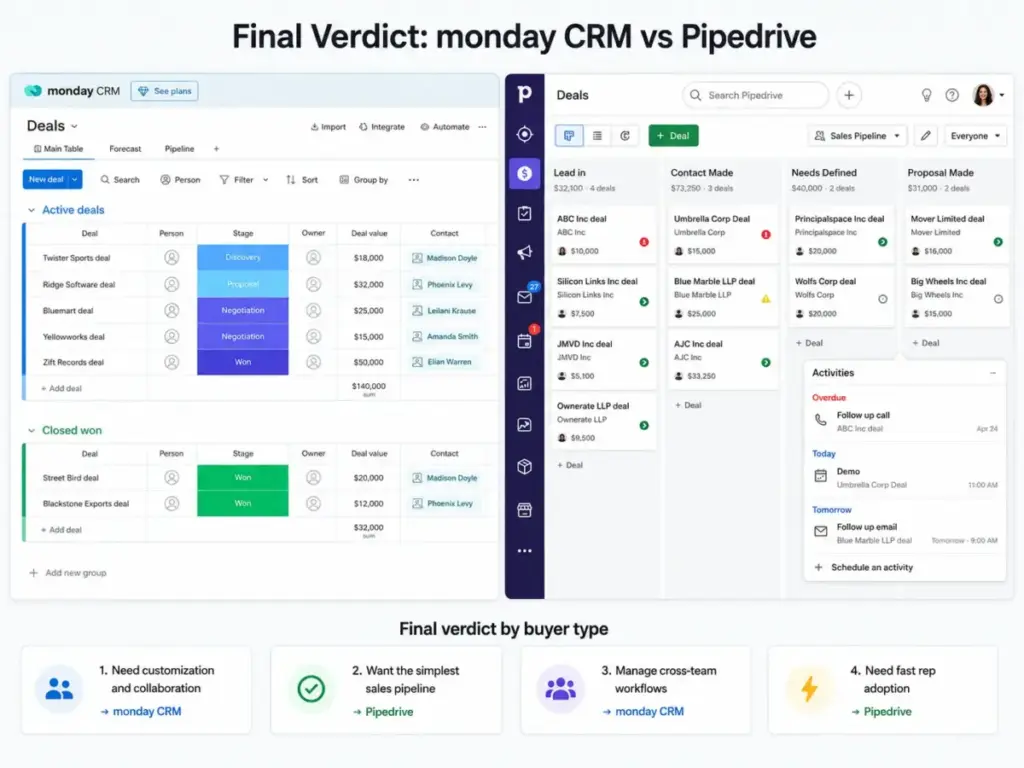
Final Verdict: monday CRM vs Pipedrive
There is no universal winner. The decision maps to your team structure, not a feature count.
Choose monday CRM if your CRM must connect sales, onboarding, delivery, client success, dashboards, and internal collaboration in one customizable workspace. The per-seat cost advantage at Standard (17/seat/month)andPro(28/seat/month) makes it the budget winner for teams of 5-50 users. But plan for setup time, workspace architecture, and automation action limits on Standard.
Choose Pipedrive if your team mainly needs pipeline discipline, fast setup, email sync, deal visibility, and lead generation tools. Pipedrive Growth at 39/seat/monthismoreexpensiveperseatthanmondayStandard,butyouskiptheconfigurationoverheadandgetasales−specificCRMwith500+integrations.IfyouneedLeadBooster,scoring,andenrichment,PipedrivePremiumat59/seat/month bundles what would cost extra on monday CRM plus external tools.
The cost difference at 10 seats: monday CRM Standard costs 170/month.PipedriveGrowthcosts390/month. monday saves 220/month,butPipedriveincludessalesforecastingonGrowthwhilemondaygatesforecastingtoProat280/month total for 10 users. Whether that $110/month gap for forecasting justifies Pipedrive depends on how central sales forecasting is to your workflow.
For teams managing both sales and post-sale delivery, understanding what pipeline management involves helps frame whether you need a pipeline tool (Pipedrive) or a platform that extends beyond the pipeline (monday CRM).
FAQ
Is monday CRM better than Pipedrive?
monday CRM is better for teams that need CRM plus customizable workflows for onboarding, delivery, and cross-team collaboration. Pipedrive is better for sales teams that want a focused pipeline CRM with fast setup and native lead generation tools. Neither is universally better. The right pick depends on whether you need workflow flexibility or sales pipeline focus.
Is monday CRM cheaper than Pipedrive?
Yes, at comparable plan tiers. monday CRM Standard costs 17/seat/month(annual)versusPipedriveGrowthat39/seat/month (annual). At 10 users, monday saves 220/month.ButmondayStandardcapsautomationactionsat250/month,whichmayforceanupgradetoPro(28/seat/month), still cheaper than Pipedrive Growth.
Is Pipedrive good for small business?
Yes, if your small business needs a sales-focused pipeline CRM. Pipedrive Lite starts at 14/seat/month(annual)andincludespipelinemanagement,calendarsync,and500+integrations.ThemainlimitationonLiteisnoemailsync,noautomations,andnolivechatsupport,whichstartonGrowthat39/seat/month.
Does monday CRM have email sync?
Yes, but two-way email sync starts on Standard (17/seat/monthannual).Basic(12/seat/month) does not include email sync. On Standard, you get two-way sync with Gmail and Outlook, plus a communication hub for managing email conversations within deals.
Does Pipedrive have project management?
Pipedrive offers a Projects add-on starting at $6.67/month, but it is not a full project management platform. For teams needing CRM plus project delivery, monday CRM’s work management foundation is a stronger fit because the CRM and project boards share the same data layer and workspace.
Which CRM has better automations?
It depends on the plan. monday CRM Standard includes 250 automation actions per month, which is limited for active teams. monday Pro jumps to 25,000 actions for 28/seat/month.PipedrivegatesautomationstoGrowth(39/seat/month) and offers top-ups for additional automation capacity. At the Pro/Premium tier, monday provides more automation volume per dollar.
Can I migrate from Pipedrive to monday CRM?
Yes. Pipedrive supports data export via XLS, XLSX, and CSV. monday CRM supports import with column mapping. Plan to rebuild pipelines, dashboards, automations, and permissions from scratch. Migration difficulty is medium, and a team above 10 users should budget 2-4 weeks for setup and testing.
Can I migrate from monday CRM to Pipedrive?
Yes. monday supports board export to Excel and account data export. Pipedrive documents importing from monday.com data exports with column mapping, preview, and duplicate handling. Plan to simplify boards, columns, and workflows into Pipedrive’s pipeline model. Migration difficulty is medium.
Which is easier to use, monday CRM or Pipedrive?
Pipedrive is easier for sales-only workflows because the pipeline model is narrower and more opinionated. monday CRM is more flexible but requires more admin decisions about boards, columns, dashboards, and workspace structure. If your team values fast setup and low configuration, Pipedrive is the easier choice.
Does monday CRM have a free plan?
No. monday CRM does not offer a free plan. The lowest tier is Basic at 12/seat/month(annual)witha3−seatminimum.Thatis36/month minimum. Both monday CRM and Pipedrive offer 14-day free trials. If you need a free CRM entry point, HubSpot CRM’s free tier is the standard alternative in this category.