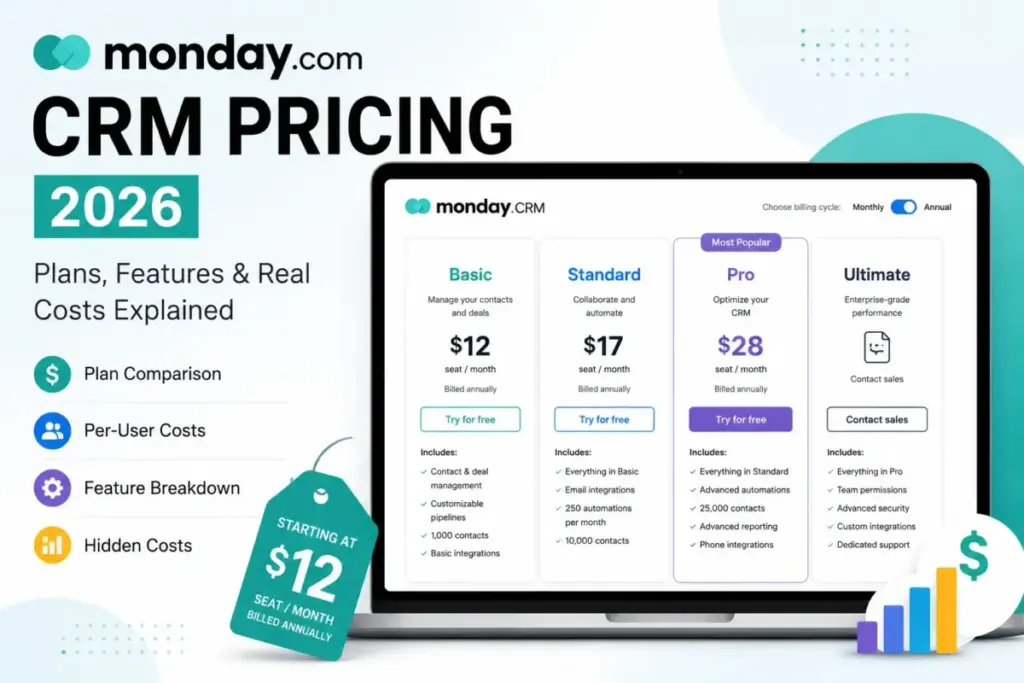
Analyzing monday.com CRM Pricing reveals that advertised starting prices tell only part of the story. Promotional banners advertise a rate of $12/seat/month on annual billing.
Active sales teams face higher costs. A 10-user team needing standard tools spends at least $280/month on annual billing. Per-user sticker rates can obscure the true cost when choosing the best CRM software for a sales team.
The entry-level monday.com CRM imposes a mandatory 3-seat minimum. It restricts workflow automation, forcing upgrades to higher plans. This analysis details total costs, seat bucket mechanics, and hidden fees. It covers feature gates to prevent overpaying.
| Plan | Starting Price (Annual) | Free Trial | Best For | Biggest Hidden Cost | Date Verified |
|---|---|---|---|---|---|
| Basic | $12/seat/month | 14 days | Light contact lists | Seat bucket waste | May 22, 2026 |
| Standard | $17/seat/month | 14 days | Small sales teams | 250 automations/mo | May 22, 2026 |
| Pro | $28/seat/month | 14 days | Active sales teams | Annual commitment | May 22, 2026 |
| Ultimate | Custom pricing | 14 days | Enterprise compliance | Custom contract terms | May 22, 2026 |
If these plans exceed the company budget, Zoho CRM or Pipedrive are viable options. They provide dedicated sales features without seat minimums. Evaluating monday CRM pricing shows that standard self-serve card numbers do not tell the whole story.
Methodology: Evaluating monday.com CRM Pricing
This evaluation is based on independent editorial research, analyzing official product documentation, feature specifications, and verified customer feedback. It does not score products based on brand popularity alone. Instead, the analysis covers the official pricing structure and user forums for hidden cost complaints. It also verifies active feature gates using technical documentation. All pricing figures represent official US dollar rates (as of May 2026). When choosing a CRM, it helps to understand what CRM software actually does behind the dashboard. This knowledge transforms raw contact databases into automated pipelines.
!NOTE
Review limitation: This evaluation relies on independent editorial research, analyzing official product documentation and verified customer feedback. The research excludes a live multi-week team deployment. Team-specific automation efficiency, API limits, and custom Ultimate pricing require verification directly with the vendor.
The Advertised Price vs. The Real Price
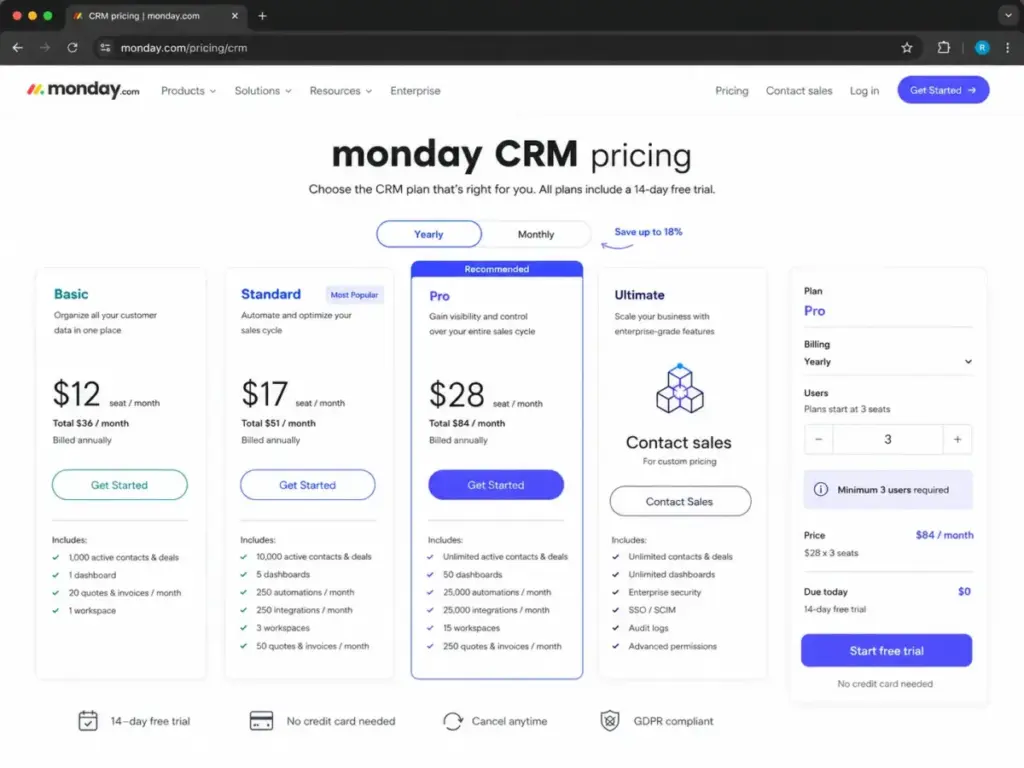
The advertised starting price is $12/seat/month annually. However, this entry-level plan requires a minimum commitment of 3 seats. This means the lowest entry point is actually $36/month (billed annually at $144/seat/year or $432/year total). When evaluating monday sales CRM pricing, buyers must distinguish between advertised individual rates and actual checkout costs. The total monday.com sales CRM cost depends heavily on user count. For instance, the monday CRM 3 user minimum applies to all self-serve paid tiers. If a team selects monthly billing, the rate increases to $18/seat/month, resulting in a minimum monthly invoice of $54/month. According to the official monday.com CRM pricing page, the Pro plan costs $28/seat/month on annual billing. This requires a minimum checkout of $84/month. Comparing monday CRM Basic vs Standard pricing shows a $5/seat/month difference on annual billing. The monday CRM Pro plan cost per month is $41/seat/month on monthly billing. The monday CRM price per seat monthly vs annual rates show savings of up to 33%.
Comparing the four main monday CRM plans reveals how costs scale. Licenses are sold in fixed user buckets: 3, 5, 10, 15, 20, 25, 30, 40, and 50 seats. If a team has 4 users, purchasing the 5-seat bucket is required, which results in paying for 1 unused license. For a team of 6 users, purchasing the 10-seat bucket is required, leaving 4 seats wasted. The hidden markup from monday CRM bucket pricing 6 users pay 10 translates to 4 empty seats on the invoice. A team of 6 users pays $280/month (the 10-user price). They do not pay the individual rate of $168/month for 6 seats.
| Plan Name | Monthly Price (Per Seat) | Annual Price (Per Seat) | Billing Basis | Best For | Key Limits |
|---|---|---|---|---|---|
| Basic | $18/month | $12/month ($144/year) | Per seat, 3-seat minimum | Light pipeline organization | 1,000 active contacts/deals, 1 dashboard, 1 workspace |
| Standard | $25/month | $17/month ($204/year) | Per seat, 3-seat minimum | Small teams with simple email | 10,000 active contacts/deals, 250 automations/mo, 250 integrations/mo |
| Pro | $41/month | $28/month ($336/year) | Per seat, 3-seat minimum | Multi-rep sales teams | Unlimited active contacts/deals, 50 dashboards, 15 workspaces |
| Ultimate | Custom | Custom | Custom quote, 12-month contract | Enterprise sales departments | Unlimited active contacts/deals, unlimited dashboards, 1,000GB storage |
The 7 Hidden Costs of monday.com CRM
The software subscription is only the first line item on the bill. Operational scale reveals additional hidden fees that can inflate the total cost of ownership.
1. Taxes Applied at Checkout
The prices displayed on the official marketing cards do not include local taxes. Billing country, state, or regional regulations affect taxes. Sales tax is applied at the final checkout screen. For a team of 10 users on the Pro annual plan, local tax adds $100 to $300 annually. Finance departments must approve this cost beforehand.
2. Seat Bucket Waste
As analyzed above, seat buckets force companies to pay for empty seats. A team of 21 users must buy a 25-seat bucket, resulting in 4 wasted seats. At Pro rates, this waste adds $112/month or $1,344/year. Companies pay for users who do not exist.
3. The 40-Seat Quote-Required Threshold
Self-serve online checkout ends when teams scale. Once a team reaches the monday CRM 40 users custom quote threshold, contacting the enterprise sales department is required. Self-serve checkout blocks once a team hits the monday CRM quote threshold 40 seats limit, which changes the buying process.
4. Automation and Integration Action Limits
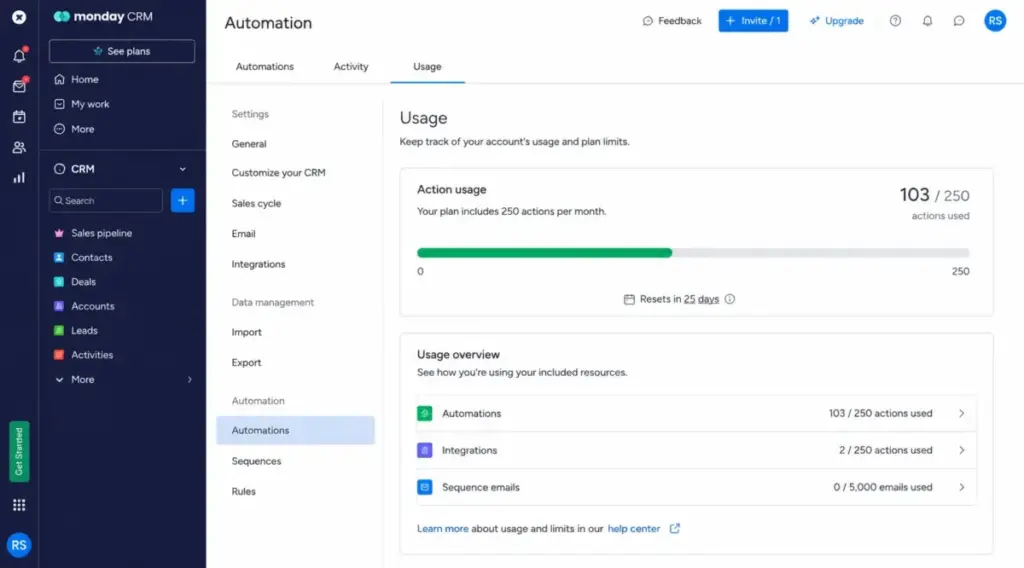
Workflows rely on automation actions (such as sending an email when a deal moves stage). Understanding monday CRM automation limits is critical for operational planning. The Standard plan includes a strict limit of 250 automation actions/month and 250 integration actions/month. The Pro plan increases this limit to 25,000 actions/month each. Reaching the monday CRM Standard automations 250 actions cap will pause automated triggers. There is no public monday CRM automation actions limit pricing for self-serve accounts to buy overages. The monday CRM integration actions limit restricts Standard accounts to 250 integration actions/month.
5. API Call Constraints
The platform restricts the number of daily API calls to prevent system overload. Developers should consult the monday CRM API rate limits by plan documentation to avoid synchronization pauses. Standard and Pro tiers impose daily limits. These caps may prevent custom software from syncing lead data in real time.
6. The Identity and Security Upgrade Gate (SSO/SCIM)
Regulated companies cannot use the self-serve plans. Because single sign-on is gated, monday CRM SSO SCIM pricing requires entering a custom Ultimate contract. SAML single sign-on (SSO) and SCIM user provisioning are locked behind the custom Ultimate tier. This tier also adds IP restrictions, audit logs, and HIPAA compliance. Healthcare companies requiring regulatory compliance must purchase the monday CRM HIPAA plan through an Ultimate quote.
7. Implementation and Onboarding Fees
While the custom Ultimate tier includes tailored onboarding, teams on the lower tiers must configure the workspace themselves. Setting up complex pipelines, importing contact histories, and training sales reps takes substantial internal staff time. Alternatively, hiring a certified third-party consultant to handle the migration can add $2,000 to $10,000 in one-off service fees. Because the monday CRM AI credits add-on price is not publicly disclosed, budget for manual processes or trial limits.
| Hidden Cost | Pricing / Limit Impact | Trigger Condition |
|---|---|---|
| Sales Tax | Applied at checkout based on location | Applied to all self-serve transactions |
| Seat Bucket Overpayment | Up to4 unused seats paid for | Team size does not align with predefined buckets |
| Enterprise Quote Gate | Directed to sales team | Exceeding40 seats |
| Automation Exhaustion | Pauses active automated workflows | Exceeding250 actions/month (Standard) |
| API Limit Blocks | Stops data transfer from external tools | Exceeding daily API call limits |
| Security Gates | Requires custom enterprise contract | Requiring SSO, SCIM, HIPAA compliance |
| Setup Consultation | $2,000 to $10,000 one-time cost | Hiring third-party partners for implementation |
Plan-by-Plan Breakdown of monday.com CRM
Basic Plan: The Bare-Minimum Database
The Basic plan costs $18/seat/month on monthly billing or $12/seat/month annually. It is a highly restricted contact repository. It includes 1,000 active contacts and deals, 1 workspace, and allows only 1 dashboard and 5 columns.
- Best For: Solo operators or tiny teams needing a simple visual list of contacts without any workflow automation.
- Includes: Kanban board views, custom columns, and up to 20 quotes and invoices per month. The monday CRM quotes invoices limit is 20/month on Basic.
- Missing: Automation actions, email integration, calendar views, and advanced search filters.
- Mini Verdict: Basic is a digital address book, not a functional sales CRM. It does not provide sufficient value for active sales teams.
- Avoid If: A team expects to automate follow-up emails, track calendar events, or manage more than 1,000 records.
Standard Plan: The Operational Entry Point
The Standard plan costs $25/seat/month on monthly billing or $17/seat/month annually. It expands limits to 10,000 active contacts and deals, 3 workspaces, and 5 dashboards.
- Best For: Small, growing sales teams that need basic contact organization and email syncing.
- Includes: Two-way Gmail and Outlook email integration, calendar, and Gantt board views. It includes 50 quotes and invoices per month. The monday CRM quotes invoices limit increases to 50/month on Standard.
- Missing: Mass emails, email sequences, sales forecasting, private boards, and advanced permissions.
- Mini Verdict: Standard is affordable. However, the limit of 250 automation/integration actions per month is a severe bottleneck.
- Social Proof: On G2 (Q1 2026), a sales lead reported that their 5 reps quickly exhausted the Standard limit. They used all 250 automation actions in the first 10 days, forcing a premature upgrade to Pro.
- Avoid If: The sales team automates more than 8 tasks per day or requires private records for separate reps.
Pro Plan: The Sales Operations Sweet Spot
The Pro plan costs $41/seat/month on monthly billing or $28/seat/month annually. It removes limits on active contacts, deals, and workspaces while allowing 50 dashboards and 25,000 automation/integration actions per month.
- Best For: Active sales teams that need automated deal management, sequences, and reporting.
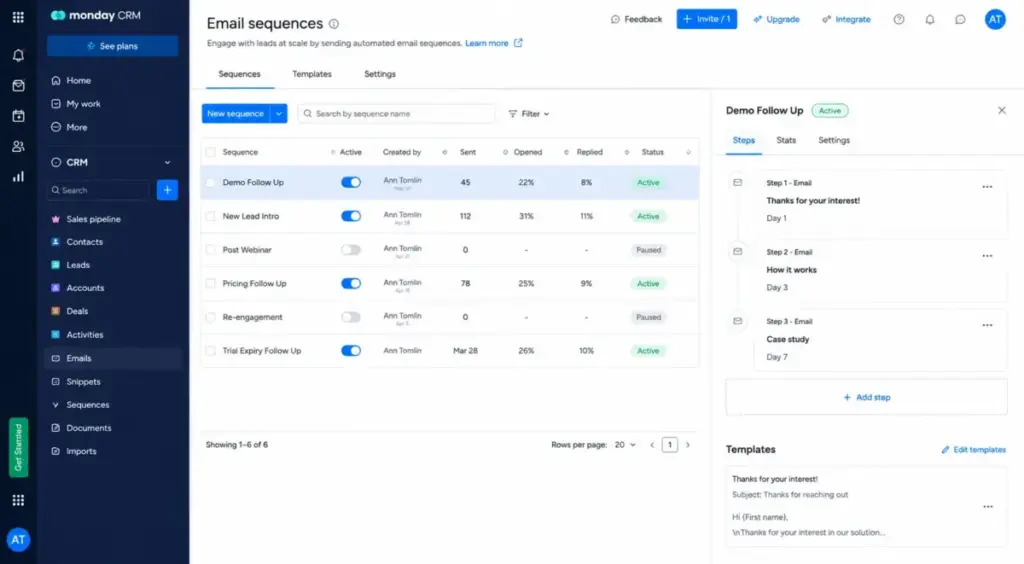
- Includes: Mass emails, email tracking, automated sequences, Google Calendar sync, and what is sales forecasting analytics. It also unlocks private boards and advanced permissions. The monday CRM Pro mass email pricing is bundled within this tier.
- Missing: Lead scoring, mandatory fields, SAML SSO, SCIM provisioning, and HIPAA compliance. For teams using Google workspace, the monday CRM Pro needed for Google Calendar sync represents a critical gate.
- Mini Verdict: Pro is the plan most sales teams actually need. It provides the automation volume and email depth required for scaling sales pipelines.
- Avoid If: The corporate security policy mandates SSO, or the industry requires HIPAA compliance.
Ultimate Plan: The Enterprise Security Gate
The Ultimate plan requires a custom quote from the sales department. It is the renamed version of the former Enterprise tier. It includes unlimited contacts, dashboards, workspaces, and automation capacity. Teams requiring enterprise-grade controls must request a monday CRM Ultimate pricing quote.
- Best For: Mid-market and enterprise organizations with strict IT requirements, compliance needs, or more than 40 users. Organizations needing custom contracts can check monday CRM Enterprise pricing details.
- Includes: what is lead scoring, mandatory fields, team goals, and multi-level permissions. It adds SAML SSO, SCIM provisioning, IP restrictions, and audit logs. The monday CRM lead scoring plan is restricted to this tier. It also provides 1,000GB storage and a trial of 12,000 AI credits.
- Missing: Transparent pricing. Every contract is customized.
- Social Proof: A Capterra review (early 2026) noted that a team of 10 users required the Ultimate plan. Their corporate security policy mandated SAML SSO and SCIM integration, which increased their expected CRM budget.
- Mini Verdict: Ultimate is an IT-driven security package rather than a sales feature upgrade. Buyers pay a premium for compliance and control.
- Avoid If: Advanced security gates are not required and the user count is under 40 seats.
Feature Gates: What Features Are Included by Plan
Feature gates dictate the plan path. For example, standard reports might show basic visual analytics, but advanced forecasting tools require Pro. If a team needs multi-level database permissions to separate regional sales territories, buying Ultimate is required. Below is a detailed mapping of feature accessibility across the plans.
| Feature | Basic | Standard | Pro | Ultimate |
|---|---|---|---|---|
| Active Contacts & Deals | 1,000 | 10,000 | Unlimited | Unlimited |
| Workspaces | 1 | 3 | 15 | Unlimited |
| Storage Capacity | 5GB | 20GB | 100GB | 1,000GB |
| Dashboards | 1 | 5 | 50 | Unlimited |
| Automations (actions/mo) | None | 250 | 25,000 | Enterprise-scale |
| Integrations (actions/mo) | None | 250 | 25,000 | Enterprise-scale |
| Mass Emails / Sequences | No | No | Yes | Yes |
| Sales Forecasting | No | No | Yes | Yes |
| Lead Scoring | No | No | No | Yes |
| SAML SSO / SCIM | No | No | No | Yes |
| HIPAA Compliance | No | No | No | Yes |
When the CRM Free Trial Stops Working
There is no permanent free plan for monday.com CRM. Only the project management tool offers a free tier. This distinction resolves confusion regarding the monday CRM no free plan CRM vs work management options. Regarding the question does monday CRM have a free plan, the answer is no.
monday.com CRM offers a 14-day trial. The official CRM pricing page confirms the trial duration, but credit-card requirement should be verified at signup because public pages may change.
To restore access and continue managing deals, selecting a paid plan is required. If a team decides not to purchase, data remains in the locked account for a limited time before deletion.
Real Cost Scenarios: What Teams Actually Pay
Normalizing subscription prices for an exact head count helps clarify financial commitments. Below is the total cost structure for typical team sizes on self-serve tiers, calculated from public USD rates. For buyers asking how much does monday CRM cost for 10 users, the annual Pro bill is $3,360/year. Evaluating the monday CRM cost at scale 25 users reveals an annual Pro bill of $8,400/year.
| Team Size | Monthly Billing (Basic / Standard / Pro) | Annual Billing (Basic / Standard / Pro) | Recommended Plan | Operational Notes |
|---|---|---|---|---|
| 5 Users | $90 / $125 / $205 per month | $720 / $1,020 / $1,680 per year | Standard (for light sales) | Aligns with the 5-seat bucket. Standard is good for light email sync; Pro is needed for automated sequences. |
| 10 Users | $180 / $250 / $410 per month | $1,440 / $2,040 / $3,360 per year | Pro (for growing teams) | At 10 users, the250 automation limit on Standard is easily exhausted, making Pro the realistic choice. |
| 25 Users | $450 / $625 / $1,025 per month | $3,600 / $5,100 / $8,400 per year | Pro (for scaling pipelines) | Pro offers25,000 automations, private boards, and advanced permissions. Standard is too limited at this scale. |
| 50 Users | Custom Quote (Pro equivalent:$2,050/mo) | Custom Quote (Pro equivalent: $16,800/yr) | Pro or Ultimate | Online checkout is not available for teams above40 seats. Custom quote required. |
| 100 Users | Custom Quote (Pro equivalent:$4,100/mo) | Custom Quote (Pro equivalent: $33,600/yr) | Ultimate (for enterprise) | Aligns with custom enterprise contracts. SSO, SCIM, and HIPAA compliance require Ultimate. |
Note: The pricing figures for 50 and 100 users represent public-rate equivalents. Online checkout directs teams above 40 users to request a custom quote. Therefore, these rates are not confirmed checkout prices.
Where Pricing Starts to Pinch
Scaling past basic limits exposes operational bottlenecks. For a growing team, the financial transition occurs when standard limits or user thresholds are exceeded.
If a team of 4 users grows to 6 users, the bill does not increase by 40%. Licenses are sold in fixed buckets. The team must jump from the 5-seat bucket to the 10-seat bucket. On the Pro plan, this bucket transition raises the monthly cost from $205/month to $410/month (a 100% increase).
Similarly, if automated emails or pipeline stages exceed Standard limits, upgrading to the Pro plan is required. Sales leaders must evaluate if monday CRM Standard 250 actions enough for monthly sales workflows. If not, the monday CRM automations paused 72 hours or until the billing cycle resets. To prevent this, upgrading is necessary. This upgrade increases the rate from $17/seat/month to $28/seat/month on annual billing. This represents a 64.7% cost increase. Regulated companies must factor the monday CRM Ultimate SCIM cost into their IT budget if security compliance is required.
Monthly vs. Annual Billing: Exposing the Discount Conflict
Paying month-to-month provides flexibility, but annual commitments yield substantial savings. Understanding the financial differences of monday CRM annual billing is key. However, there is a conflict in the official documentation. The pricing cards on the website imply about 32% to 33% savings when switching from monthly to annual billing. For instance, the Pro plan drops from $41/seat/month on monthly billing to $28/seat/month on annual billing. This represents a 31.7% discount. Conversely, the official pricing FAQ states that the annual contract offers a standard 18% discount.
Because of this source discrepancy, this evaluation calculates the actual savings based on the price cards displayed at checkout. For a team of 10 users selecting the Pro plan, the monthly billing rate is $410/month, totaling $4,920/year. Choosing the annual plan reduces the cost to $28/seat/month, resulting in a bill of $3,360/year. This choice saves $1,560/year on licensing fees.
However, this saving requires a 12-month commitment. If a team size fluctuates or a company migrates to another CRM mid-year, annual billing causes waste. Refunds are not provided for early termination.
Which monday.com CRM Plan Should a Buyer Choose?
Selecting the right plan requires aligning operational needs with feature locks. Below is the recommendation by buyer type:
- Solo Users: Choose another CRM. The mandatory 3-seat minimum means a solo user pays for 2 empty seats. This drives the entry cost of Basic to $36/month annually.
- Small Teams (3–5 users): Choose Standard if teams only need central contact views and simple Gmail or Outlook sync.
- Growing Teams (5–20 users): Choose Pro. At this scale, teams will quickly hit Standard’s 250 automation action limit or need separate pipeline reporting.
- Enterprise Teams (40+ users): Choose Ultimate. Buyers are forced into a custom quote. This tier unlocks required SAML SSO, SCIM provisioning, and compliance gates.
Which monday.com CRM Plan Should a Buyer Avoid?
Avoid the Basic plan entirely. While its starting price of $12/seat/month is low, it strips out the core capabilities that make a CRM operational. It offers no integrations, no automations, and restricts contacts to 1,000 active records. To avoid the monday CRM 3 seat minimum surprise, solo buyers should choose alternative CRM software.
Without email syncing or activity logs, reps must input data manually. This defeats the purpose of buying CRM software. If that minimum-seat structure is the main buying risk, compare monday.com CRM alternatives by actual checkout cost, automation access, and sales workflow depth before upgrading beyond Basic.
Basic only works if a team needs a contact database and manages all workflows manually. For any team hoping to scale operations, Basic is a bottleneck.
Competitor CRM Pricing Normalized at 10 Users
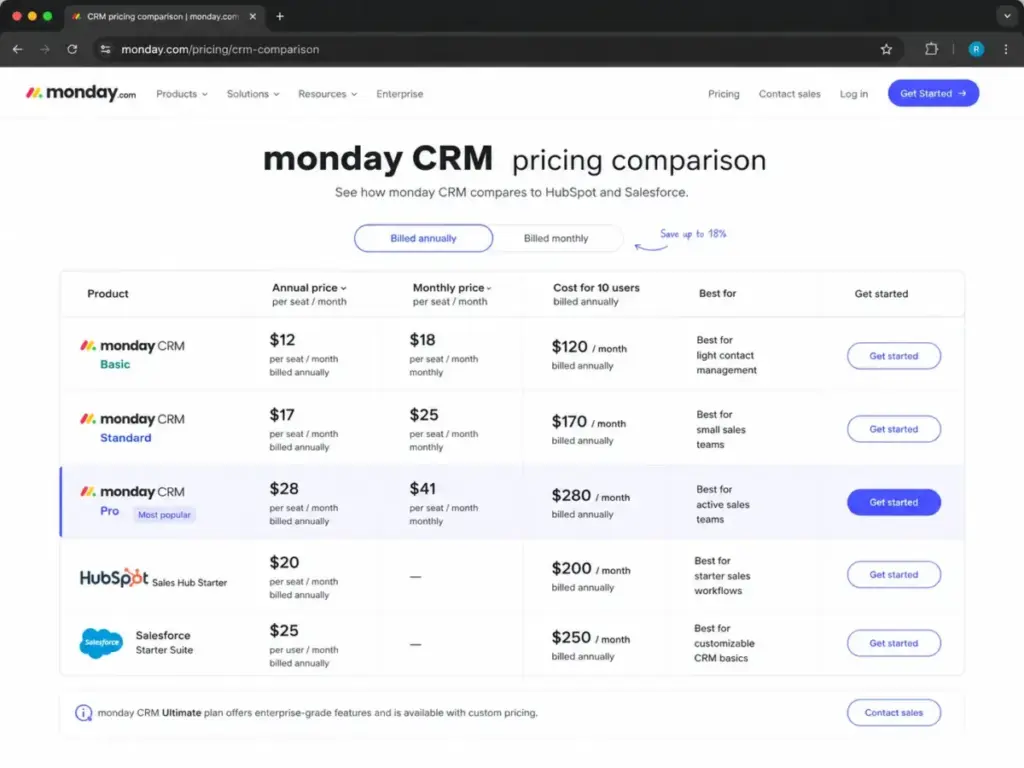
When comparing alternatives, normalizing prices at a standard team size shows the true cost differences. Below is a comparison of monday.com CRM Pro at 10 users next to competitor practical tiers. For a detailed comparison of features and licenses, see monday CRM vs HubSpot pricing.
For a detailed analysis of how the features stack up, read the HubSpot vs Monday CRM comparison. To explore competitor reviews, check out the HubSpot CRM reviews and the Salesforce CRM review. Also read the Pipedrive CRM review and the Freshsales review.
| CRM Tool | Starting Price (USD) | Practical Sales Plan | Cost for 10 Users (USD) | Best For |
|---|---|---|---|---|
| monday.com CRM | $12/seat/month | Pro ($28/seat/month annually) | $280/month | Visual workflows and Work OS flexibility |
| HubSpot Sales Hub | $20/seat/month | Starter ($20/seat/month annually) | $200/month | Contact-based lead management and marketing sync |
| Salesforce Sales Cloud | $25/user/month | Starter Suite ($25/user/month) | $250/month | High customization and enterprise integrations |
| Pipedrive | $14/seat/month | Lite ($14/seat/month annually) | $140/month | Visual pipeline tracking and ease of deal management |
| Zoho CRM | $14/user/month | Standard ($14/user/month annually) | $140/month | Value-conscious teams requiring built-in workflow rules |
| Freshsales | $9/user/month | Growth ($9/user/month annually) | $90/month | Small teams wanting built-in phone and email tools |
Is monday.com CRM Worth the Price?
The value of the platform depends on the existing setup. If teams already use monday.com for project management, adding the CRM module provides good value by consolidating the database. It is cheaper than HubSpot Professional ($1,000/month for 10 users) and Salesforce Professional ($800/month). However, it costs more than dedicated platforms like Zoho CRM or Pipedrive.
Worth it if:
- Teams want to manage sales pipelines and project workflows in a single Work OS.
- Users need visual dashboard builder tools to analyze deal data.
- Organizations want to customize deal card layouts without hiring developers.
Not worth it if:
- The purchaser is a solo user (due to the 3-seat minimum cost trap).
- The team requires advanced sales depth like native lead scoring at a low price.
- Corporate IT policies mandate SAML SSO or SCIM security integration on small user counts.
If the pricing feels too high, buyers can evaluate monday.com CRM alternatives that offer per-user pricing without seat minimums.
Questions to Ask Before Buying
Before selecting a license tier, consult with the sales operations leader and ask these questions to prevent unexpected charges:
- How many custom automations will the team run each month? On the Standard plan, 5 users can exhaust the limit of 250 automation actions/month in under 2 weeks. This volume pressure requires an upgrade to Pro.
- Does the IT policy require SAML SSO or SCIM user provisioning? If yes, standard self-serve plans are unavailable, and teams must contact sales for the custom Ultimate tier.
- What is the expected head count growth in the next 12 months? Licenses are sold in fixed buckets (such as 10, 15, or 20 seats). Adding a single rep to a 10-user team requires purchasing the 15-user bucket. This adds 4 paid empty seats to the invoice.
- Are pipelines managed manually, or are external integrations required? Two-way email sync and Google Calendar integrations are gated to Standard and Pro. Therefore, teams requiring these tools must avoid the Basic plan entirely.
How to Avoid Overpaying for monday.com CRM
Implementing a few tactical adjustments can reduce licensing expenses. Below are 6 tips to prevent budget inflation:
- Calculate for Seat Buckets: Do not estimate costs by multiplying the exact head count by the per-seat price. Use the next seat bucket (3, 5, 10, 15, 20, 25, 30, 40) to model the budget.
- Standardize on Annual Billing: Annual contracts offer savings of 31.7% to 33.3% based on checkout cards. This is true despite the FAQ document referencing a lower 18% discount.
- Audit Workspace Automations: Track the monthly action usage. If limits are approached, simplify redundant triggers to avoid forced upgrades.
- Use Guest Access for Clients: Do not buy full paid seats for external collaborators. Use free guest permissions to share specific boards without adding to the license bill.
- Separate CRM from Work Management: If only some team members manage sales pipelines, purchase CRM licenses only for those users. Other team members can use the standard (cheaper) Work Management plans.
- Ask for Nonprofit Discounts: The platform offers discount programs for qualified nonprofit organizations. Apply for monday CRM pricing for nonprofits to receive discount terms before checkout.
Frequently Asked Questions about monday.com CRM Pricing
Is monday CRM too expensive for a small team?
Yes, for a solo user paying for the mandatory 3-seat minimum. No, for teams with 3 to 5 reps needing central visual tracking. The baseline cost of $36/month on annual billing is competitive. Salesforce Starter Suite costs $75/month for 3 users.
How much does monday CRM cost?
Evaluating monday CRM pricing shows that plans cost $12/seat/month, $17/seat/month, or $28/seat/month billed annually. On monthly billing, rates are $18/seat/month, $25/seat/month, or $41/seat/month.
Does monday CRM have a free plan?
No, there is no permanent free tier for this product. The Work Management tool has a free plan for 2 users. However, the CRM requires a paid plan after the 14-day free trial expires. Only the project management tool offers a free tier. This distinction resolves confusion regarding the monday CRM no free plan CRM vs work management options.
Is a credit card required for the monday CRM 14 day trial?
Yes, registration for the monday CRM 14 day trial credit card is free. No billing details are required. When the 14 days expire, the account is locked until a paid plan is selected.
How should a team choose between Standard and Pro?
Choose Standard for central contact views and simple Gmail or Outlook sync. However, active teams will outgrow Standard’s 250 automation actions/month quickly. These teams require the Pro plan’s 25,000 automation cap.
When do teams outgrow the Standard automation limits?
Yes, if reps send bulk emails or run automated deal stages. The Standard limit of 250 automation actions/month translates to about 8 tasks per day for the entire team. Active operations will exhaust this quickly.
What is the best alternative to monday CRM if it is too costly?
Zoho CRM Standard ($14/user/month) or Pipedrive Lite ($14/user/month) are the best alternatives. They offer dedicated sales tools and per-seat billing without a mandatory 3-seat minimum.
What are the main pros and cons of monday CRM?
The main pro is the flexible visual layout that adapts to any custom workflow. The biggest cons are the 3-seat minimum and seat bucket pricing. These mechanics force small teams to pay for empty seats.
Who should use monday CRM?
Growing teams already using the project management tool should choose this CRM. It consolidates their data under one Work OS.
Who should avoid monday CRM?
Solo users who want to avoid paying for empty seats should avoid it. Regulated companies requiring SSO, SCIM, or HIPAA compliance must purchase the custom Ultimate plan instead.