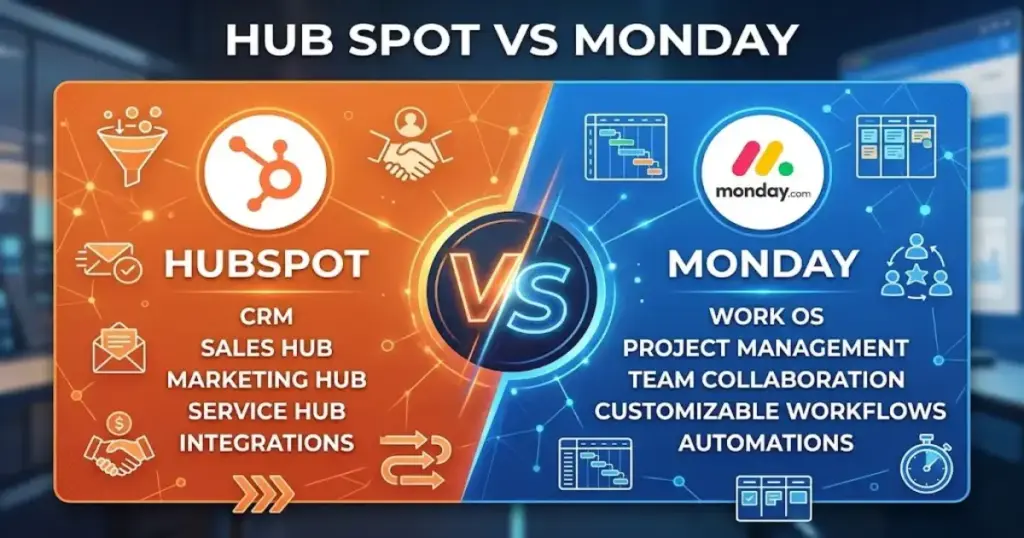
Most teams comparing HubSpot vs monday are not choosing between two identical CRMs. They are choosing between a customer platform built around sales, marketing, and service data and a visual work operating system that added CRM software features on top of project boards. That distinction changes everything about pricing, setup, and long-term fit.
I have spent weeks evaluating both products across official pricing pages, help documentation, public review sentiment, and real buyer scenarios. HubSpot wins when revenue teams need lifecycle reporting, marketing attribution, and a single customer record. monday CRM wins when teams need flexible boards, visual pipelines, and a CRM that connects directly to project delivery. The right pick depends on your team size, your budget, and whether your work ends at the closed deal or continues into fulfillment. If you are building a shortlist, start with the best CRM software options for 2026 and then narrow from there.
TL;DR: Which CRM Wins?
HubSpot wins on CRM depth. monday wins on workflow flexibility and team cost. The table below shows which product fits each buyer profile.
| Buyer Profile | Winner | Why |
|---|---|---|
| Solo user | HubSpot | Free CRM at $0 beats monday’s 3-seat minimum |
| 2-person service team | HubSpot | Free CRM covers 2 users; monday charges for 3 seats |
| 5-person sales team | monday on cost, HubSpot on depth | monday Standard at $85/mo vs HubSpot Starter at $75/mo |
| 10-person agency | monday | CRM plus project delivery in one platform at $170-$280/mo |
| 25-person RevOps team | HubSpot | Lifecycle reporting, attribution, and sales-marketing alignment |
| Sales plus marketing | HubSpot | Native marketing automation, lead scoring, attribution |
| CRM plus project delivery | monday | Boards, dashboards, and automations span sales to fulfillment |
| Lowest year-one cost | HubSpot Free | $0 for up to 2 users and 1,000 contacts |
| Long-term CRM scale | HubSpot | Structured path from startup CRM to mid-market revenue platform |
Find Your Match in 30 Seconds
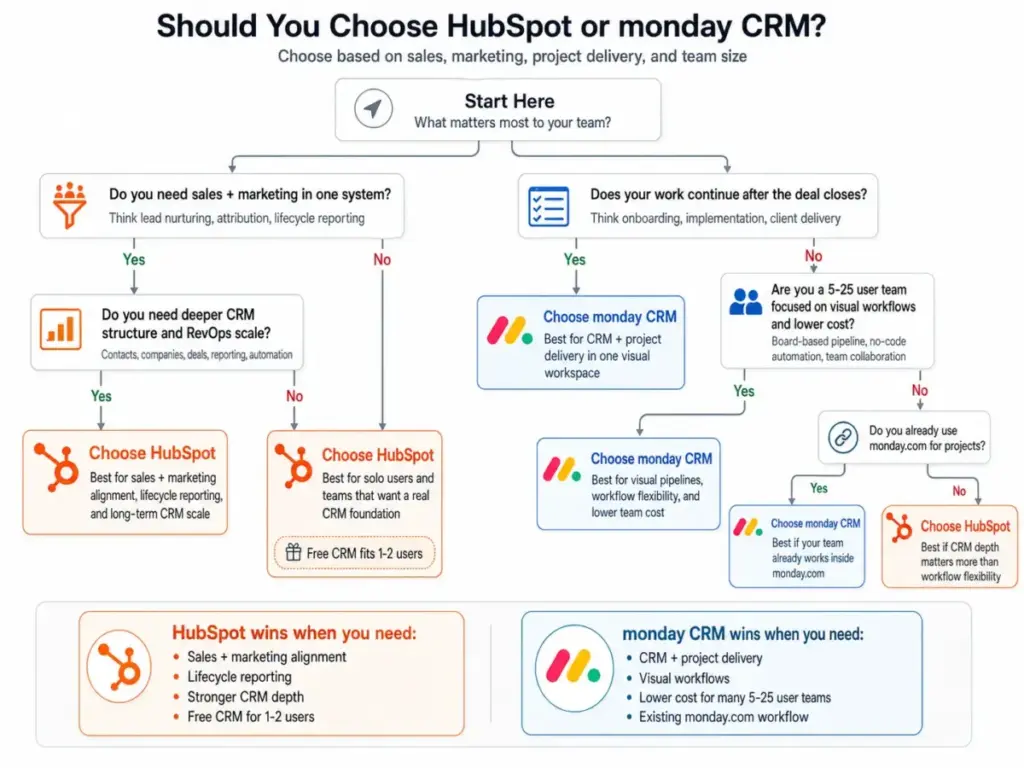
Your CRM choice should take minutes, not months. Use this decision tree to narrow your shortlist before reading the full breakdown.
- Choose HubSpot if:
- You are a solo founder or 2-person team and want a free CRM
- Your sales team needs email sequences, lead scoring, and pipeline forecasting
- Marketing generates inbound leads and you need attribution data
- You plan to add Service Hub or Marketing Hub later
- You need a structured CRM that scales from 5 to 200+ users
- Choose monday if:
- Your team already uses monday.com for project management
- You need CRM plus client delivery, onboarding, or implementation tracking
- You have 5 to 25 users and want lower per-seat costs than HubSpot Professional
- Your sales process is visual and board-based
- You prefer no-code automation over traditional CRM workflow builders
- Avoid both if:
- You need enterprise-grade CRM governance on day one (consider HubSpot vs Salesforce)
- You need a pure pipeline CRM with no extras (consider HubSpot vs Pipedrive)
- You need the cheapest all-in-one suite (consider HubSpot vs Zoho CRM)
HubSpot vs monday at a Glance
HubSpot is CRM-first. monday is workflow-first. That core difference shapes every feature, pricing tier, and scaling decision.
| Dimension | HubSpot | monday CRM | Winner | Why It Matters |
|---|---|---|---|---|
| CRM data model | Contacts, companies, deals, tickets, custom objects | Boards, items, contacts, deals, columns | HubSpot | Deeper CRM architecture for lifecycle tracking |
| Free plan | Yes, up to 2 users | No free CRM plan | HubSpot | Solo users save $36-$84/mo |
| Starter price | $15/seat/mo annual | $12/seat/mo annual (3-seat min) | monday at 5+ users | monday is cheaper per seat but requires 3 seats |
| Marketing automation | Native Marketing Hub | Limited, no attribution | HubSpot | Lead nurturing and campaign tracking built in |
| Visual workflows | Basic task boards | Advanced board customization | monday | Stronger for visual deal and project tracking |
| Project delivery | Limited | Strong, native to Work OS | monday | Deals flow into onboarding and fulfillment |
| Reporting | Revenue reporting, attribution, forecasting | Operational dashboards, visual analytics | HubSpot | Better for pipeline forecasting and lifecycle data |
| Integrations | 1,600+ in App Marketplace | 200+ integrations | HubSpot | Larger ecosystem with deeper CRM connectors |
| AI features | Breeze AI across platform | monday AI for workflows | HubSpot | More CRM-specific AI capabilities |
| Scale path | Startup to mid-market revenue platform | Team CRM to operational work layer | HubSpot | Stronger governance and RevOps tooling |
How We Compared HubSpot and monday
I evaluated both products using official pricing pages, product documentation, help center articles, public review sentiment, and structured buyer scenarios. I did not rely on vendor marketing claims alone. Every pricing figure was checked against HubSpot Sales Hub pricing and monday CRM pricing as of April 2026. Vendor pricing can change without notice.
I compared 10 dimensions: CRM depth, pipeline management, marketing automation, workflow automation, reporting, ease of setup, pricing, integrations, project management, and RevOps scale. Each dimension has a declared winner. You can read more about how I approach these evaluations in the SaaSZap review methodology.
What Is HubSpot Best For?
HubSpot is best for teams that treat customer data as the center of their business. It connects sales, marketing, service, and reporting into a single customer record. That makes it the stronger choice when revenue depends on inbound leads, email sequences, lifecycle stages, and cross-team visibility.
For a deeper look at the platform, read the full HubSpot CRM review.
Key strengths:
- Free CRM for up to 2 users and 1,000 contacts
- Native marketing automation and lead nurturing through Marketing Hub
- Sales sequences, meeting scheduling, and quote generation in Sales Hub
- Lifecycle reporting and attribution across the customer journey
- 1,600+ integrations through the HubSpot App Marketplace
- Breeze AI for content, prospecting, and customer insights
- Structured scaling path from Starter to Professional to Enterprise
As Ethan Halfhide, CEO of Lean Discovery Group, put it in a HubSpot customer story: “If you’re getting lots of leads, that’s great. But if you’re not capitalizing on those leads, that’s wasted money.”
What Is monday CRM Best For?
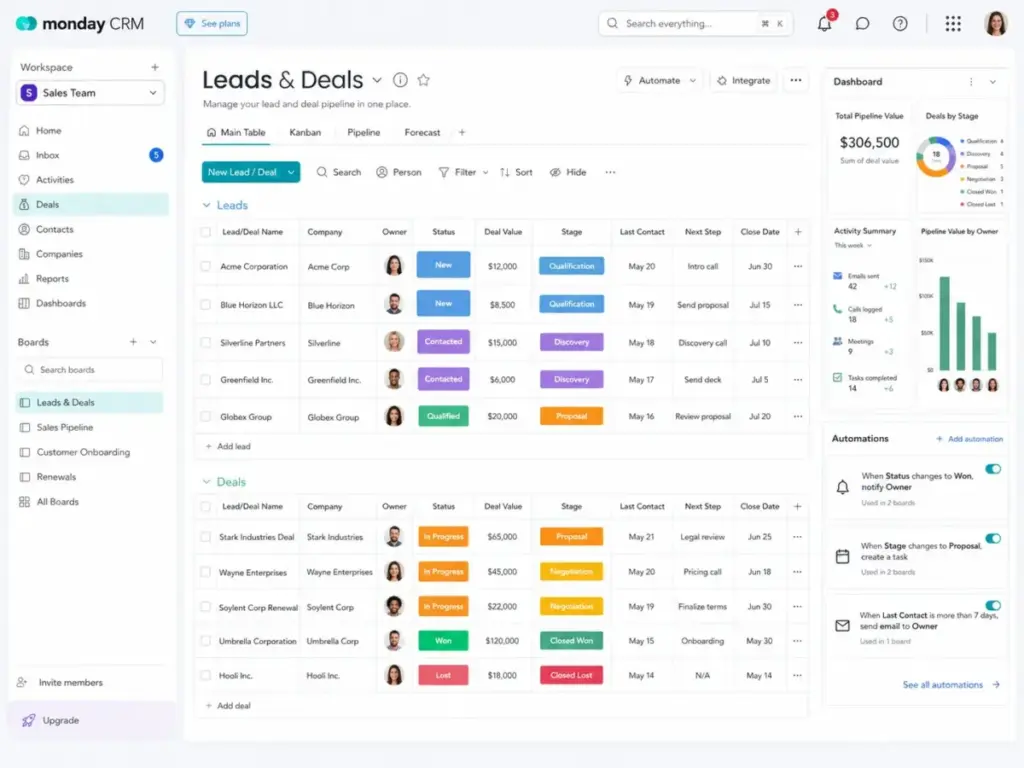
monday CRM is best for teams that need a visual, flexible CRM connected to project execution. It works well when deals do not end at “closed-won” but continue into client onboarding, service delivery, or implementation. The board-based structure makes it fast to customize without developer help.
For more detail on the full platform, see the monday.com review.
Key strengths:
- Visual pipelines with drag-and-drop board customization
- CRM plus project delivery in one workspace
- No-code automations for lead routing, status changes, and notifications
- Dashboards for real-time operational visibility
- 2-way email integration with Gmail and Outlook at Standard tier
- Lower per-seat pricing than HubSpot at 5+ users
- Strong fit for agencies, service teams, and operations-heavy sales workflows
As Jim M., a Real Estate Agent, noted on monday.com’s integrations page: “The integration available with Outlook has also helped ensure that important tasks received via emails are not missed.”
Feature-by-Feature Comparison
I scored HubSpot and monday across 10 dimensions. HubSpot wins 6 outright. monday wins 2 outright. Two dimensions have split winners depending on team type. Here is the full breakdown.
HubSpot vs monday CRM Depth
Winner: HubSpot
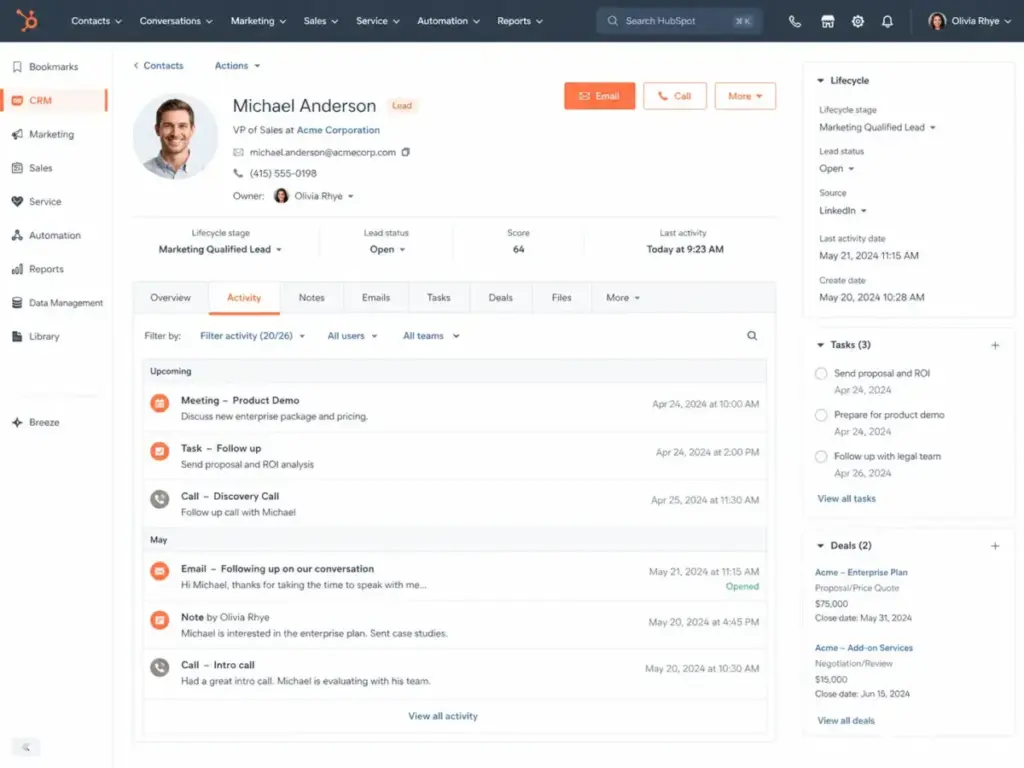
HubSpot treats CRM data as the foundation. Contacts, companies, deals, tickets, and custom objects sit in a structured data model. Every interaction, email, meeting, call, and form submission attaches to the contact record. Lifecycle stages, lead status, and deal stages create a clear customer journey.
monday CRM uses boards and items. Contacts and deals are board items with customizable columns. This is flexible but less structured. You can track deals, contacts, and activities, but you do not get the same object hierarchy. Complex CRM queries, cross-object reporting, and lifecycle segmentation are harder to build in monday.
For teams that need a CRM system of record with deep customer data, HubSpot is the clear pick.
HubSpot vs monday Pipeline Management
Winner: Tie for simple pipelines. HubSpot for structured sales teams. monday for visual workflows.
Both products handle basic sales pipeline management well. HubSpot offers drag-and-drop deal boards, required properties per stage, and pipeline automation. monday offers visual Kanban boards with color-coded status columns and flexible stage definitions.
The split happens at scale. HubSpot Professional adds deal scoring, forecasting, sequences, and required fields that enforce sales process discipline. monday Pro adds sales forecasting and mass emails but lacks the same level of deal governance.
If your sales process needs guardrails, HubSpot wins. If your sales process needs visual flexibility, monday wins.
HubSpot vs monday Marketing Automation
Winner: HubSpot
This is not close. HubSpot Marketing Hub provides email automation, lead scoring, landing pages, forms, ad tracking, social publishing, campaign attribution, and lifecycle-based nurturing. These tools connect directly to the CRM record.
monday CRM has no native marketing automation comparable to HubSpot. You can send mass emails at the Pro tier and use basic automations for follow-ups, but there is no lead scoring, no attribution, and no campaign management. Teams that need marketing and sales alignment should choose HubSpot.
HubSpot vs monday Workflow Automation
Winner: HubSpot for CRM automation. monday for no-code operational workflows.
HubSpot workflows trigger based on CRM data: contact properties, deal stages, form submissions, email engagement, and lifecycle changes. At Professional tier, you get branching logic, enrollment triggers, and multi-step sequences. This is powerful for sales and marketing automation.
monday automations are board-based. When a status changes, assign a person. When a date arrives, send a notification. When a deal moves to “won,” create an item on the onboarding board. These are simpler to build and easier for non-technical teams to manage. monday Standard includes 250 automation actions per month. monday Pro includes 25,000.
HubSpot is better for CRM-triggered automation. monday is better for operational workflows that span teams.
HubSpot vs monday Reporting
Winner: HubSpot for revenue reporting. monday for operational dashboards.
HubSpot reporting covers pipeline velocity, deal forecasting, revenue attribution, marketing ROI, and customer lifecycle metrics. Professional tier unlocks custom report builder and dashboards with up to 20 reports. Enterprise adds advanced analytics.
monday dashboards are strong for operational visibility. You can build widgets showing deal counts, revenue by owner, task progress, and timeline views. These are visually clear and fast to set up. But monday does not match HubSpot for attribution reporting, funnel analysis, or cross-hub revenue metrics.
If your reports feed board meetings and sales standups, monday works. If your reports feed RevOps decisions and investor updates, HubSpot is stronger.
HubSpot vs monday Ease of Setup
Winner: monday for visual workflow setup. HubSpot for free CRM onboarding.
monday CRM is faster to configure. Board templates, drag-and-drop columns, and visual automations let a team set up a working CRM in hours. The learning curve is low for anyone familiar with spreadsheet-style tools.
HubSpot Free CRM is also quick to start. Import contacts, set up a pipeline, connect email. But HubSpot becomes more complex as teams add hubs, workflows, custom properties, and automation rules. Professional and Enterprise setups often need admin training.
For first-day usability, monday wins. For free-tier simplicity, HubSpot holds its own.
HubSpot vs monday Pricing
Winner: HubSpot for solo and free users. monday for 5 to 25-user teams that do not need HubSpot Professional depth.
Pricing is where most buyers start. I break down the full cost comparison in the dedicated pricing section below. The short version: HubSpot Free CRM beats monday for solo users. monday beats HubSpot on per-seat cost at 5+ users.
But HubSpot Starter and monday Standard do not solve the same problems. See the HubSpot pricing and monday CRM pricing guides for tier-by-tier detail. For buyers comparing these two platforms because of seat economics, a shortlist of monday CRM alternatives helps separate true CRM replacement options from cheaper tools that only solve project tracking.
HubSpot vs monday Integrations
Winner: HubSpot
HubSpot’s App Marketplace lists 1,600+ integrations. These include deep connectors for Salesforce, Slack, Zoom, Gmail, Outlook, Shopify, and dozens of marketing, sales, and service tools.
monday.com offers 200+ integrations including Gmail, Outlook, Slack, Zoom, and Salesforce connectors. The ecosystem is growing but smaller. Teams with complex integration needs will find more options in HubSpot.
HubSpot vs monday Project Management
Winner: monday
This is monday’s strongest advantage. monday CRM sits on top of monday.com Work OS. Deals can move from the sales board to an onboarding board, a client delivery board, or an implementation tracker. Dashboards span CRM and project data. Automations connect sales outcomes to operational workflows.
HubSpot has tasks and basic project tools, but it is not a project management platform. Teams that manage client work, event production, agency deliverables, or service fulfillment after the deal closes will find monday far more capable. For a broader view of work management tools, see the best project management software guide and the Asana vs monday.com comparison.
HubSpot vs monday RevOps Scale
Winner: HubSpot
HubSpot provides a structured path from startup CRM to mid-market revenue operations. Enterprise tier adds custom objects, advanced permissions, predictive lead scoring, revenue attribution, and multi-touch reporting. Teams can add Marketing Hub, Service Hub, Content Hub, and Commerce Hub as they grow.
monday CRM can scale to larger teams but lacks the same governance depth. Role-based permissions, audit logs, and advanced compliance features are available at Enterprise tier, but the CRM architecture itself is less rigid. Teams that need strict sales process governance, lifecycle segmentation, and cross-functional revenue reporting will outgrow monday CRM sooner.
| Feature / Dimension | HubSpot | monday CRM | Winner | Why It Matters |
|---|---|---|---|---|
| CRM data model | Structured records for contacts, companies, deals, tickets, and lifecycle stages | Board-based records using items, columns, and custom views | HubSpot | Better for teams that need a true CRM system of record |
| Pipeline management | Strong deal stages, required properties, forecasting, and sales process controls | Visual pipelines with flexible boards, statuses, and drag-and-drop workflows | Tie | HubSpot wins structured sales; monday wins visual flexibility |
| Marketing automation | Native lead nurturing, email automation, lead scoring, forms, and attribution | Basic follow-up workflows and mass email on higher tiers | HubSpot | HubSpot connects marketing activity directly to CRM data |
| Sales automation | Sequences, workflows, task automation, and deal-based triggers on higher tiers | No-code automations for status changes, reminders, owners, and tasks | HubSpot | HubSpot is stronger for sales-specific automation logic |
| No-code workflow setup | More powerful but more complex as workflows scale | Easier visual rules for non-technical teams | monday CRM | monday is faster for teams that want simple operational automation |
| Reporting and dashboards | Revenue reporting, attribution, forecasting, and lifecycle analytics | Visual dashboards for pipeline value, owner activity, and status tracking | HubSpot | HubSpot is stronger for revenue reporting and RevOps decisions |
| Project delivery | Basic tasks and limited project coordination | Native boards for onboarding, implementation, renewals, and client delivery | monday CRM | monday connects sales work to post-sale execution |
| Ease of setup | Easy to start on Free CRM, but complex at Professional and Enterprise tiers | Fast board setup with templates, columns, and visual automations | monday CRM | monday is easier for teams moving from spreadsheets |
| Pricing for solo users | Free CRM supports up to 2 users and 1,000 contacts | Paid plans require a 3-seat minimum | HubSpot | HubSpot is the better low-risk starting point |
| Pricing for 5-25 users | Starter is affordable, but Professional rises sharply with onboarding | Standard and Pro remain cheaper than HubSpot Professional | monday CRM | monday usually wins on subscription cost for growing small teams |
| Integrations ecosystem | Larger marketplace with deeper sales, marketing, service, and CRM integrations | Solid integrations for common work tools, but smaller ecosystem | HubSpot | HubSpot fits more complex go-to-market stacks |
| AI features | Breeze AI across CRM, sales, marketing, and service workflows | monday AI for workflow generation and board productivity | HubSpot | HubSpot AI is more tied to customer platform use cases |
| Long-term RevOps scale | Stronger governance, reporting, lifecycle tracking, and multi-hub expansion | Strong for operational scale, weaker for CRM governance | HubSpot | HubSpot is better for teams building formal revenue operations |
| Best overall fit | Sales, marketing, service, and reporting in one customer platform | CRM plus project management and delivery workflows | Split | HubSpot wins CRM depth; monday wins workflow flexibility |
How Does HubSpot Pricing Compare to monday?
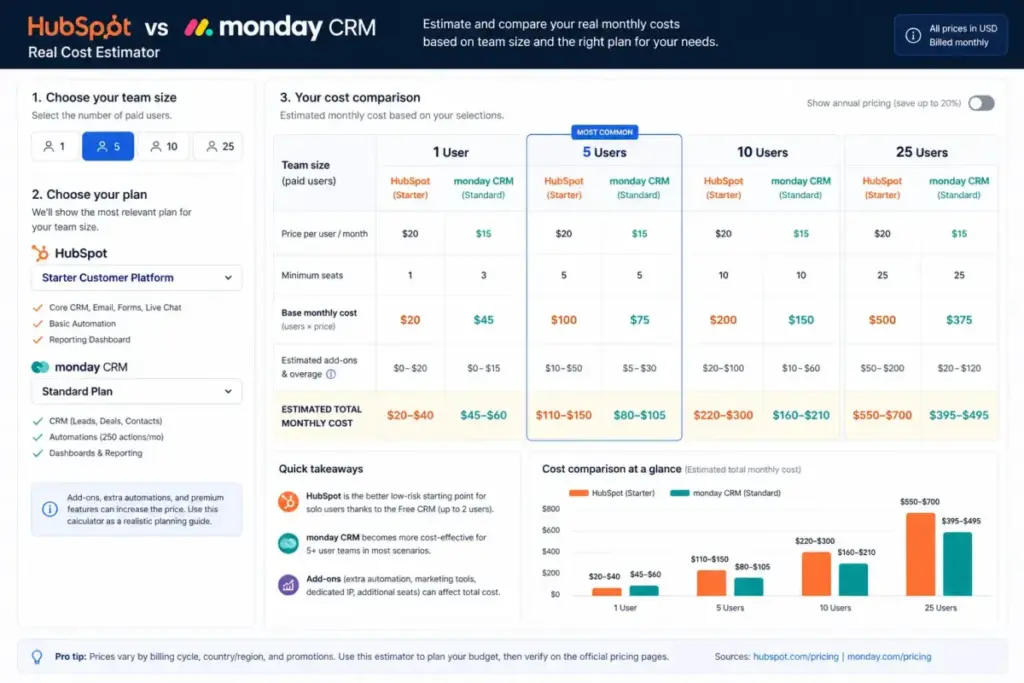
The cost gap between HubSpot and monday depends entirely on team size and feature tier. HubSpot is cheaper for solo users. monday is cheaper for teams of 5 or more, unless those teams need HubSpot Professional-level capabilities.
Pricing checked April 2026. Vendor pricing can change.
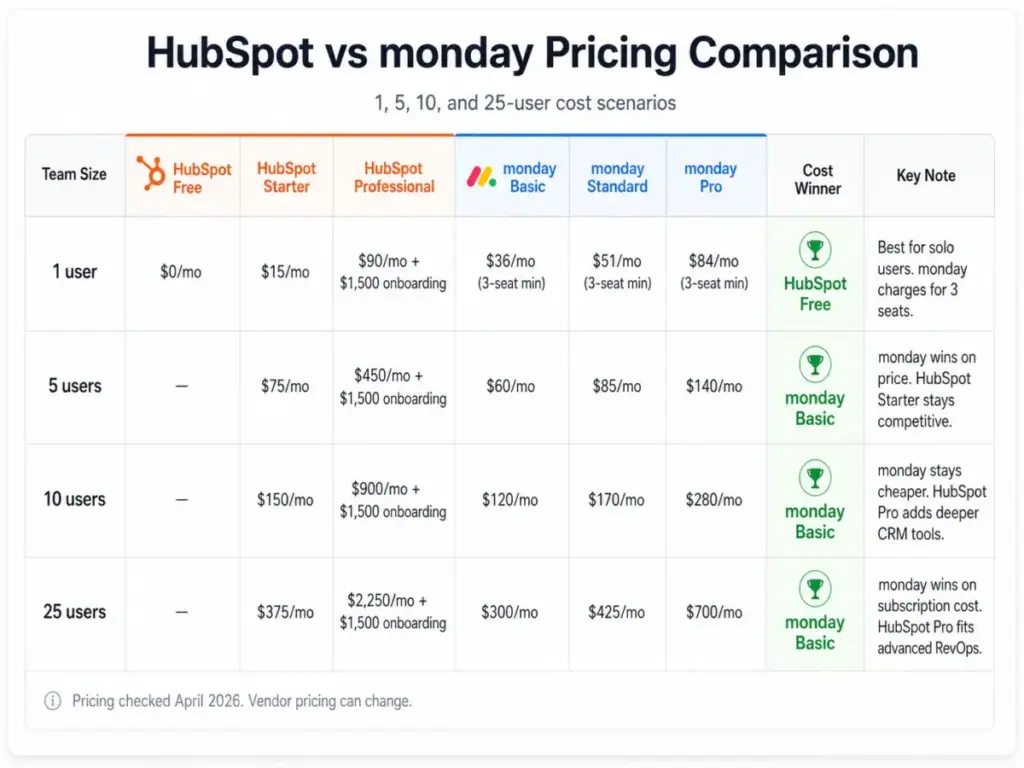
| Team Size | HubSpot Free | HubSpot Starter | HubSpot Professional (Year 1 Monthly + Onboarding) | monday Basic | monday Standard | monday Pro | Cost Winner |
|---|---|---|---|---|---|---|---|
| 1 user | $0/mo | $15/mo | $90/mo + $1,500 onboarding | $36/mo (3-seat min) | $51/mo (3-seat min) | $84/mo (3-seat min) | HubSpot Free |
| 5 users | N/A | $75/mo | $450/mo + $1,500 onboarding | $60/mo | $85/mo | $140/mo | monday Basic |
| 10 users | N/A | $150/mo | $900/mo + $1,500 onboarding | $120/mo | $170/mo | $280/mo | monday Basic |
| 25 users | N/A | $375/mo | $2,250/mo + $1,500 onboarding | $300/mo | $425/mo | $700/mo | monday Basic |
Usability warnings by scenario:
- 1 user: HubSpot Free CRM is the clear winner. monday forces you to pay for 3 seats even if only 1 person uses the CRM.
- 5 users: monday Basic saves money but lacks email integration. monday Standard at $85/mo is the realistic CRM tier. HubSpot Starter at $75/mo offers comparable basic CRM.
- 10 users: monday Standard at $170/mo costs more than HubSpot Starter at $150/mo, but Standard includes 2-way email sync and automations. HubSpot Professional at $900/mo adds a steep jump.
- 25 users: monday Pro at $700/mo is less than one-third of HubSpot Professional at $2,250/mo. But HubSpot Professional includes sales sequences, forecasting, and advanced automation that monday Pro does not match.
Do not compare HubSpot Starter against monday Pro as if they solve the same problem. HubSpot Starter is a basic CRM. monday Pro is a full workflow CRM. The real comparison is HubSpot Professional vs monday Pro, and that gap is where HubSpot’s pricing advantage disappears.
Where HubSpot Gets Expensive
HubSpot’s pricing jump from Starter to Professional is the most misunderstood cost in CRM. Starter is $15/seat/month. Professional is $90/seat/month. That is a 6x increase per seat, and it unlocks the features most growing sales teams actually need: sequences, custom reporting, forecasting, workflow automation, and required fields.
Add to that:
- $1,500 one-time onboarding fee for Sales Hub Professional in year one
- Marketing Hub costs if you add lead scoring, email automation, or campaign attribution
- Contact tier pricing in Marketing Hub as your database grows
- Additional Sales Seats for reps who need full Professional functionality
- Service Hub if you want ticketing and customer support in the same platform
A 10-person team on HubSpot Professional pays $900/month in seat costs alone. Add Marketing Hub Professional, and annual spend can exceed $25,000 before integrations or training.
HubSpot is not overpriced for what it delivers. But teams that start on the free plan often underestimate what Professional actually costs.
Where monday Gets Expensive
monday’s per-seat pricing looks simple until you hit the gates. The 3-seat minimum means a solo user or 2-person team pays for seats they do not use. A solo founder on monday Standard pays $51/month for 3 seats while HubSpot Free costs $0.
Other cost escalators:
- Seat buckets: After 3 seats, buckets jump to 5, 10, 15, 20, 25. A 4-person team pays for 5 seats.
- Automation caps: Standard includes only 250 automation actions per month. Active teams can hit that limit fast.
- Integration caps: Standard includes only 250 integration actions per month. Teams syncing data across tools may need Pro.
- Dashboard limits: Basic includes 1 dashboard. Standard includes 5. Complex reporting needs push teams to Pro.
- Contact limits: Basic allows 1,000 active contacts and deals. Standard allows 10,000. Only Pro offers unlimited.
- Enterprise governance: Advanced permissions, audit logs, and compliance features require Enterprise, which is custom-priced.
monday CRM is cheaper than HubSpot Professional at every team size. But teams should model their actual automation, integration, and dashboard needs before assuming Standard is enough.
Migration Reality Check
Switching CRMs is never free, even when the new tool costs less. Here is what each migration direction involves.
Moving from monday to HubSpot:
- Contact and deal data exports as CSV files
- Deal stage mapping from board columns to HubSpot pipeline stages
- Activity and email history may not transfer cleanly
- Board automations need rebuilding as HubSpot workflows
- Dashboards require recreation in HubSpot’s report builder
- Project boards have no direct HubSpot equivalent
- Training time: 2 to 4 weeks for a 10-person team
Moving from HubSpot to monday:
- Contact, company, and deal exports from HubSpot CRM
- Lifecycle stage data may lose granularity on monday boards
- Marketing Hub data (email history, attribution) does not migrate
- Sales sequences need rebuilding as monday automations
- Custom properties map to monday columns, but CRM object hierarchy flattens
- Reporting logic needs full rebuild
- Training time: 1 to 3 weeks for a 10-person team
Both migrations require data cleanup, field mapping, admin ownership, and a parallel-run period. Budget 30 to 60 days for a clean transition.
What Both Products Lack
No CRM solves every problem. Acknowledging limitations builds a better buying decision.
- HubSpot lacks monday-level work management flexibility. Post-sale project tracking, client delivery boards, and cross-functional task management are not HubSpot’s strength.
- monday lacks HubSpot-level native marketing automation, lead scoring, attribution, and lifecycle segmentation. Teams that need inbound marketing tools will need additional software.
- Both require clean data entry, admin ownership, workflow discipline, and ongoing reporting maintenance. A CRM only works when the team uses it consistently.
- Neither fixes a broken sales process. If your pipeline stages are unclear, your follow-up timing is random, or your team avoids data entry, the tool does not matter.
Who Should Choose HubSpot?
HubSpot is the right CRM when customer data is your most important operational asset. These micro-cohorts get the most value.
- Solo founder using free CRM: HubSpot Free CRM costs $0 for up to 2 users and 1,000 contacts. No other CRM in this comparison matches that entry price.
- Inbound marketing team: Marketing Hub connects lead generation to the CRM record. Attribution reporting shows which channels drive revenue.
- B2B sales team needing lifecycle reporting: Sales Hub Professional provides sequences, forecasting, deal scoring, and pipeline analytics.
- Revenue team needing cross-hub visibility: Sales Hub plus Marketing Hub plus Service Hub creates a single view of the customer from first touch to renewal.
- Scaleup planning sales operations: Enterprise tier adds custom objects, advanced permissions, and predictive lead scoring for teams building RevOps infrastructure.
If you are exploring options beyond HubSpot, see the HubSpot CRM alternatives guide.
Who Should Choose monday CRM?
monday CRM is the right pick when your sales work continues into delivery, onboarding, or client management. These teams benefit most.
- Agency already using monday.com: Adding CRM to an existing Work OS workspace avoids a second platform. Sales, project, and client boards share one environment.
- Service business moving deals into delivery: monday boards let you transition a closed deal into an onboarding checklist, implementation tracker, or service delivery pipeline.
- 5 to 25-person team needing visual CRM: monday Standard or Pro offers a capable CRM at lower cost than HubSpot Professional, with visual boards that non-technical team members adopt quickly.
- Operations-heavy sales team: Teams that manage quotes, invoices, project timelines, and client communications alongside deals benefit from monday’s cross-board structure.
- Team that values flexibility over CRM depth: If custom columns, color-coded statuses, and drag-and-drop boards matter more than CRM object hierarchy, monday fits better.
For teams comparing monday to other work management tools, the best CRM for small business guide covers additional options.
The Feature That Does Not Matter
Templates are less important than data structure. Both HubSpot and monday offer CRM templates. HubSpot has pipeline templates, email templates, and report templates. monday has board templates for sales, real estate, agency, and service CRMs.
Templates help you start faster. They do not help you make better decisions. The real question is whether your central object is the customer record (HubSpot) or the work item (monday). If your business lives and dies by customer lifecycle data, HubSpot’s data model matters more than any template. If your business lives and dies by task completion and delivery milestones, monday’s board structure matters more.
Pick the data model that matches your operating reality. The templates will follow.
Final Verdict: HubSpot or monday?
HubSpot is the better CRM. monday is the better workflow layer. That is the core finding of this comparison.
Overall CRM winner: HubSpot. HubSpot provides deeper CRM architecture, stronger marketing-sales alignment, better lifecycle reporting, a larger integration ecosystem, and a clearer path from startup to mid-market revenue operations.
Cost and workflow winner: monday CRM. monday offers lower per-seat pricing at 5+ users, stronger visual pipeline management, better project delivery tools, and faster no-code setup for operational teams.
My default recommendations:
- Choose HubSpot if sales, marketing, reporting, and customer lifecycle visibility drive your revenue.
- Choose monday if CRM is one part of a broader work delivery system and you want visual flexibility at a lower team cost.
- Start with HubSpot Free if you have 1 to 2 users and want to test CRM without commitment.
- Start with monday Standard if you already use monday.com and want CRM in the same workspace.
FAQ
These are the most common questions buyers ask when comparing HubSpot and monday CRM.
Is HubSpot better than monday CRM?
Yes, for CRM depth. HubSpot offers a stronger customer data model, native marketing automation, lifecycle reporting, and a larger integration ecosystem. monday CRM is better for visual workflows and project delivery, but it is not as deep as a CRM system of record.
Is monday CRM cheaper than HubSpot?
At 5+ users, yes. monday CRM Standard costs $85/month for 5 users. HubSpot Starter costs $75/month for 5 users, but HubSpot Professional jumps to $450/month plus $1,500 onboarding. For solo users, HubSpot Free at $0 is cheaper than monday’s 3-seat minimum.
Is monday CRM a real CRM?
Yes. monday CRM includes contacts, deals, pipelines, email sync, automations, dashboards, and quotes. It is not a project management tool pretending to be a CRM. But its data model is simpler than HubSpot’s, and it lacks native marketing automation and lifecycle segmentation.
Does HubSpot have better marketing automation than monday?
Yes. HubSpot Marketing Hub provides email sequences, lead scoring, landing pages, campaign attribution, and lifecycle-based nurturing. monday CRM has mass email at the Pro tier but no comparable marketing automation stack.
Does monday CRM work for solo users?
It works, but it is not cost-effective. monday CRM paid plans require a minimum of 3 seats. A solo user on monday Standard pays $51/month for 3 seats. HubSpot Free CRM costs $0 for up to 2 users.
Which is better for agencies, HubSpot or monday?
monday CRM is usually better for agencies. Agencies need CRM plus project delivery, client onboarding, and task management in one system. monday’s board structure handles this natively. HubSpot is better if the agency’s revenue depends on inbound marketing and lead generation for its own pipeline.
Which is better for a 5-person sales team?
It depends on what the team needs. A 5-person team that runs inbound sales with email sequences and reporting should pick HubSpot. A 5-person team that tracks deals visually and manages client delivery alongside sales should pick monday. On pure cost, monday Standard at $85/month and HubSpot Starter at $75/month are close.
Which is better for project management?
monday. monday CRM sits on monday.com Work OS, which is a full project management platform. HubSpot has basic task management but is not designed for project execution. If post-sale delivery is part of your CRM workflow, monday is the stronger choice.
Can monday CRM replace HubSpot?
For basic CRM needs, yes. monday CRM handles contacts, deals, pipelines, email sync, and automations. It cannot replace HubSpot’s marketing automation, lifecycle reporting, attribution, or deep sales operations tooling. Teams that use Marketing Hub, Service Hub, or advanced Sales Hub features will lose functionality in a switch.
Can HubSpot replace monday.com?
For CRM, yes. For project management, no. HubSpot is a stronger CRM than monday CRM. But HubSpot cannot replace monday.com’s work management boards, cross-team project tracking, or operational workflow tools. Teams using both CRM and project delivery features in monday will need a separate project management tool if they switch to HubSpot.