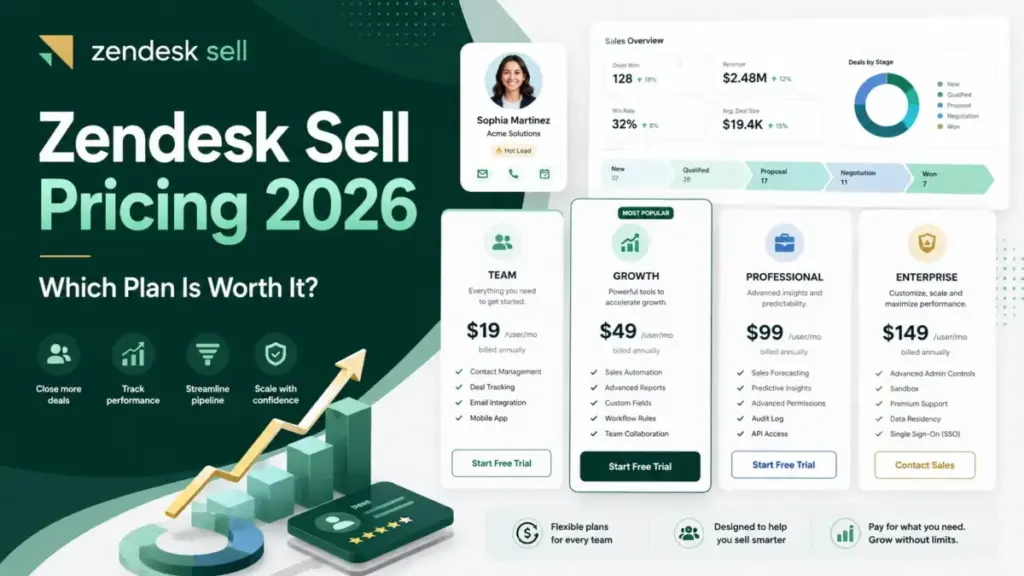
Zendesk Sell pricing starts at $19 per user per month, but the starting price is not the number I would budget around in 2026. The number that should drive the decision is a date.
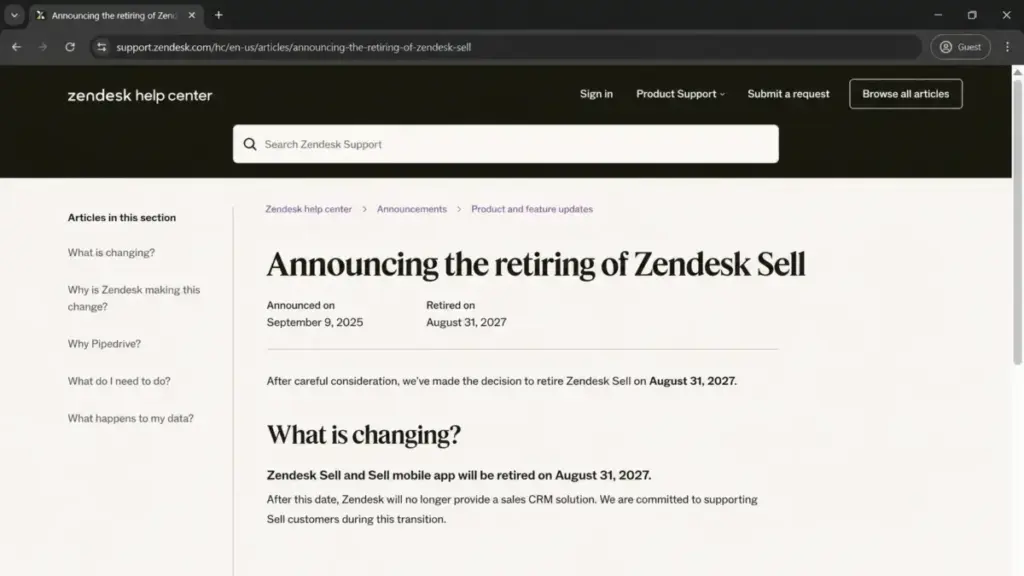
Zendesk Sell and its mobile app retire on August 31, 2027. That single fact reprices every plan, every annual contract, and every migration decision on this page.
This guide reads the four Sell plans the way a sales operations lead has to read them: as a short-runway CRM you are paying to exit, not a platform you are settling into. I cover the real per-seat math at 3, 10, 25, and 50 users, the costs that sit outside the plan price, and the export gaps that decide how expensive your eventual switch will be.
If you are still shortlisting a long-term system, start with the best sales CRM software instead and treat Sell as a transition tool.
Retirement notice (verified July 14, 2026): Zendesk officially announced on September 9, 2025 that Zendesk Sell and the Sell mobile app will retire on August 31, 2027. Every recommendation below assumes that date holds. Confirm your own contract’s end-date treatment directly with Zendesk before signing anything annual.
This SaaSZap pricing analysis is based on official Zendesk product, billing, retirement, and developer documentation checked July 14, 2026, with month-to-month prices corroborated by third-party sources.
Quick Pricing Verdict
| Decision point | The short answer |
|---|---|
| Starting price | $19 per user/month (annual monthly-equivalent) on Sell Team |
| Free plan | None. 14-day trial only; the Reach trial adds just 4 prospecting + 4 enrichment credits |
| Best plan for most existing teams | Sell Growth ($55/user/mo annual) for Reach, forecasting, and more than two pipelines |
| Plan to avoid | Sell Team for any outbound team, because it has no Reach and no automation |
| Biggest hidden cost | Migration labor for data the standard export leaves behind (emails, calls, activity history) |
| Best alternative if you are net-new | Pipedrive (Zendesk’s named migration partner) or a free three-user Zoho CRM tier |
| Pricing verified | July 14, 2026, against the official Sell page and Zendesk billing docs |
The advertised entry price is real, and the official Sell pricing page still shows all four cards. The verdict that matters is different: I would not buy Zendesk Sell as a new long-term CRM in 2026, and if you already run it, the plan choice matters less than the export and migration plan you build around the retirement date.
The 2027 Retirement Reprices Everything
The most expensive mistake with Sell in 2026 is optimizing the wrong decision. Buyers compare Team versus Growth while ignoring that the whole product has a fixed end date.
Zendesk retains customer access to Sell until August 31, 2027, and names Pipedrive as its migration partner. So the real question is not “which tier” but “how many productive months do I have left, and what will it cost to leave cleanly.”
I split buyers into three groups, because the retirement changes the answer for each.
Existing Zendesk Support customers who want one sales-and-service view during the transition can keep Sell on a short leash. The value is real, but it expires, so I would treat every dollar as transition spend and start the CRM migration process planning now rather than at renewal.
Existing Sell field-sales teams that already lean on the mobile app and pipeline workflows have the strongest case to stay through the runway. The catch is that the mobile app retires with the product, so any training or workflow you build has a shelf life of roughly a year.
Net-new buyers with a multi-year horizon should not start here. Paying to implement a CRM that retires in months means you inherit the migration cost before you get the payback.
Here is the decision I would give a sales leader in one line. If your migration is funded and scheduled, Sell is a fine bridge; if it is not, every month you delay is a month of switching cost you are quietly accruing.
Executive Summary: Zendesk Sell TCO at 3, 10, 25, and 50 Users
Per-seat prices hide the real commitment. At team scale, the small tier differences turn into five-figure annual numbers, and the same-plan billing rule removes the option to mix cheaper seats with expensive ones.
The table below models list pricing with every account user on one plan. It excludes tax, Sell Voice usage, any separate Zendesk Support subscription, and migration work, all of which I break out later.
| Team size | Recommended plan | Annual-billing monthly | Annual total | Month-to-month total (12 mo) |
|---|---|---|---|---|
| 3 users | Sell Team | $57/mo | $684/yr | $900/yr |
| 10 users | Sell Growth | $550/mo | $6,600/yr | $8,280/yr |
| 25 users | Sell Professional | $2,875/mo | $34,500/yr | $44,700/yr |
| 50 users | Sell Enterprise | $8,450/mo | $101,400/yr | $131,400/yr |
Month-to-month prices of $25, $69, $149, and $219 per user are corroborated by third-party pricing analyses rather than a transparent official table, so confirm them at checkout. The annual monthly-equivalent rates ($19, $55, $115, $169) come from the live Sell page.
Two numbers should stop a CFO. A 25-person team pays $10,200 more per year on month-to-month billing than on annual ($44,700 versus $34,500), and a 50-seat Enterprise account crosses six figures before you add a single phone call or support seat.
That is the TCO frame I would carry into every section below: the plan price is the floor, not the bill.
Zendesk Sell Pricing Plans Compared
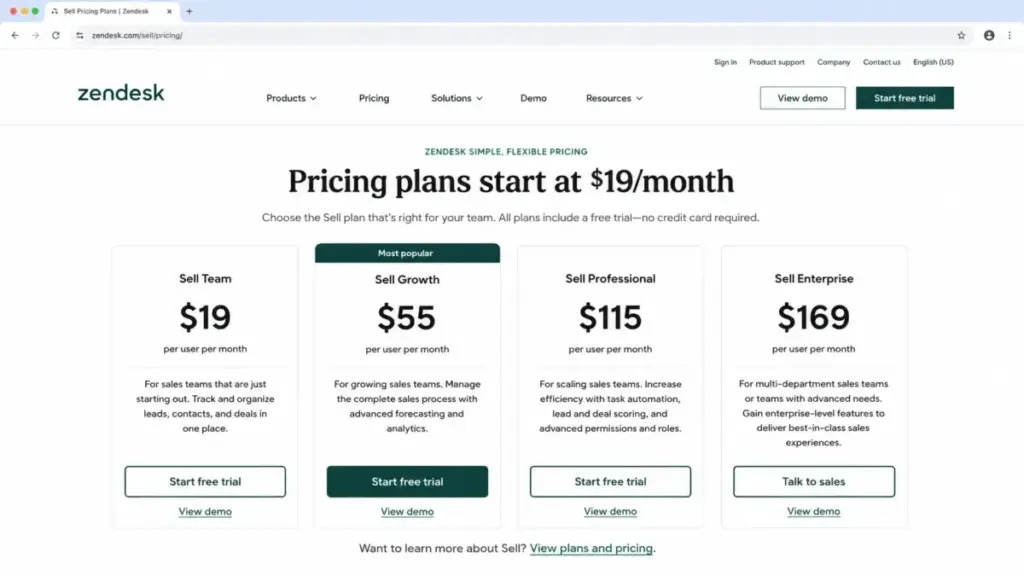
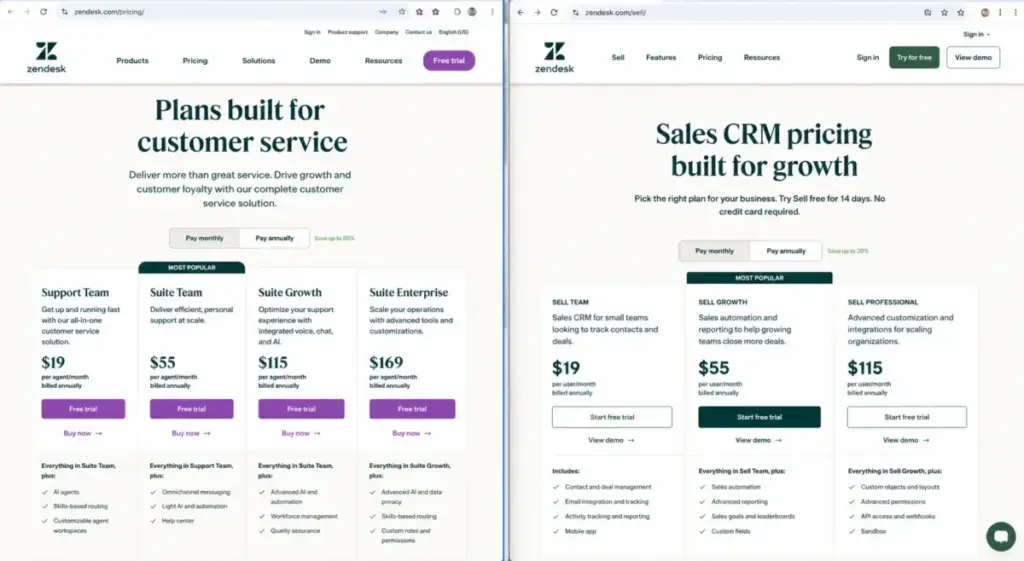
Zendesk Sell sells four per-user tiers: Team, Growth, Professional, and Enterprise. The prices are per user per month, and Zendesk supports both month-to-month and annual contracts.
| Plan | Annual (per user/mo) | Month-to-month* | Billing basis | Best for | Key limits |
|---|---|---|---|---|---|
| Sell Team | $19 ($228/yr) | $25 | Per user/month | Basic pipeline tracking during migration | 2 pipelines; no Reach; no scoring/automation |
| Sell Growth | $55 ($660/yr) | $69 | Per user/month | Small teams needing Reach + forecasting | 10 pipelines; ~25 prospecting credits/seat |
| Sell Professional | $115 ($1,380/yr) | $149 | Per user/month | Teams needing scoring, automation, dialer | 20 pipelines; ~150 prospecting credits/seat |
| Sell Enterprise | $169 ($2,028/yr) | $219 | Per user/month | Large accounts needing highest limits | Highest caps; direct-dial; tech-stack data |
*Month-to-month values are third-party corroborated. Confirm the current quote with Zendesk before purchase.
The annual and month-to-month columns are the interpretation buyers miss. The lower number on the Sell page is the annual monthly-equivalent, so the true month-to-month bill is higher, and the “same plan for everyone” rule means one tier decision applies to every seat.
A warning before you compare prices anywhere else. Zendesk Sell is a distinct product from Zendesk Support and Zendesk Suite, and the default Zendesk Support pricing route is customer-service focused, so any table that mixes those plans is answering a different question.
Some review-marketplace pages, including older Capterra pricing profiles, still show a stale three-tier Sell structure. The current product has four tiers.
What Each Zendesk Sell Plan Includes
Each tier changes what the account can do, not just its price. Below is the plan-by-plan verdict I would give, with what it adds and who should skip it.
Sell Team ($19/user/mo)
Team covers the CRM basics: leads, contacts, deals, tasks, and two sales pipelines. It has no Reach prospecting, no lead or deal scoring, and no advanced automation or custom reporting.
Includes: two pipelines, email integration, mobile access, core records. Missing: Reach, scoring, task automation, forecasting. Avoid if: you run any outbound motion, because Team cannot prospect or automate.
I would only put a team on this tier if it is a small existing account riding out the runway on manual pipeline work.
Sell Growth ($55/user/mo)
Growth is where Sell becomes a working sales tool. It adds Reach (with roughly 25 prospecting and 1,000 enrichment credits per seat per month), a product and price book, bulk and personalized email, sales forecasting, reporting, and premium API access.
Includes: ten pipelines, Reach, forecasting, reports. Missing: scoring, task automation, power dialer, advanced roles. Avoid if: you need lead scoring or automation, since those force the next tier.
For most existing 5-to-20 person teams, Growth is the plan I would budget around.
Sell Professional ($115/user/mo)
Professional adds the operational machinery: lead and deal scoring, task automation, advanced roles and permissions, a power dialer, and call scripts. It also raises record and credit ceilings to roughly 150 prospecting credits per seat.
Includes: scoring, automation, dialer, advanced permissions. Missing: the very top storage and credit caps. Avoid if: only one or two managers need scoring, because the same-plan rule makes every seat pay Professional.
That single rule is where Professional stops being a per-role upgrade and becomes an account-wide one.
Sell Enterprise ($169/user/mo)
Enterprise is the highest public tier: the largest record and storage limits, roughly 300 prospecting credits per seat, direct-dial numbers, and company technology-stack data. Accessible comparisons describe its pipelines as unlimited, which I would confirm in a quote.
Includes: top caps, direct-dial, tech-stack data. Missing: anything past a retiring product’s roadmap. Avoid if: you are net-new, because a 2027 end date does not justify Enterprise onboarding.
For a granular teardown of the day-to-day feature quality behind these tiers, see the full Zendesk Sell review.
Feature Gates by Plan: The Limits That Set Your Tier
The plan you need is usually decided by the first hard limit you hit, not the marketing label. The matrix below maps the gates that change buying decisions.
Detailed record, storage, and credit caps are drawn from public plan comparisons where the live Sell page does not expose them. Confirm them in a Zendesk quote before treating them as contractual.
| Capability | Team | Growth | Professional | Enterprise |
|---|---|---|---|---|
| Sales pipelines | 2 | 10 | 20 | Unlimited* |
| Records (approx.) | 100,000 | 250,000 | 1,000,000 | 25,000,000 |
| Storage per user | 2 GB | 5 GB | 10 GB | 25 GB |
| Reach prospecting credits/seat | None | ~25 | ~150 | ~300 |
| Lead & deal scoring | No | No | Yes | Yes |
| Task automation | No | No | Yes | Yes |
| Forecasting & reports | No | Yes | Yes | Yes |
| Power dialer / call scripts | No | No | Yes | Yes |
| Premium API access | No | Yes | Yes | Yes |
*Third-party corroborated.
Two hard ceilings sit outside the tier chart and disqualify Sell for specific teams. The default sales-email limit is 300 emails per user per 24 hours, and Zendesk can raise it only up to your connected mail server’s cap, per its email-limit documentation.
For integrations, the core Sell API allows 36,000 requests per hour and 10 requests per token per second, returning HTTP 429 when depleted, per Zendesk’s developer rate-limit reference. Firehose, Sync, and Search are separate premium APIs.
If your SDRs routinely send more than 300 emails a day each, Reach credits will not save you, and the email ceiling alone is a reason to look elsewhere.
Hidden Costs, Add-Ons, and Surprise Bills
The seat price is the smallest part of an honest Sell budget. Ranked by how often they surprise teams, here are the costs that live outside the plan card.
| Hidden cost | What triggers it | Rough impact |
|---|---|---|
| Month-to-month premium | Choosing monthly over annual | +$6 to $50 per user/mo |
| Account-wide tier upgrade | One role needs a higher-tier feature | Full tier gap x every seat |
| Reach credit exhaustion | Pooled monthly credits run out | Wait for renewal or upgrade the account |
| Sell Voice usage | Calls, texts, numbers | Usage-based, not publicly quantified |
| Separate Support/Suite license | Using the unified sales-service view | Varies by service plan + seats |
| Migration & archival work | Preserving non-exportable records | Internal labor or third-party service |
| Unused-seat billing | Deleting a user without cutting seats | Full seat charge continues |
Two of these deserve real math, because they scale.
The same-plan multiplier. Zendesk billing documentation says all users on a Sell account must be on the same plan. So if one manager needs Professional scoring, a 10-person Growth account at $550/month becomes a Professional account at $1,150/month, an extra $600/month, or $7,200 a year, to serve one requirement.
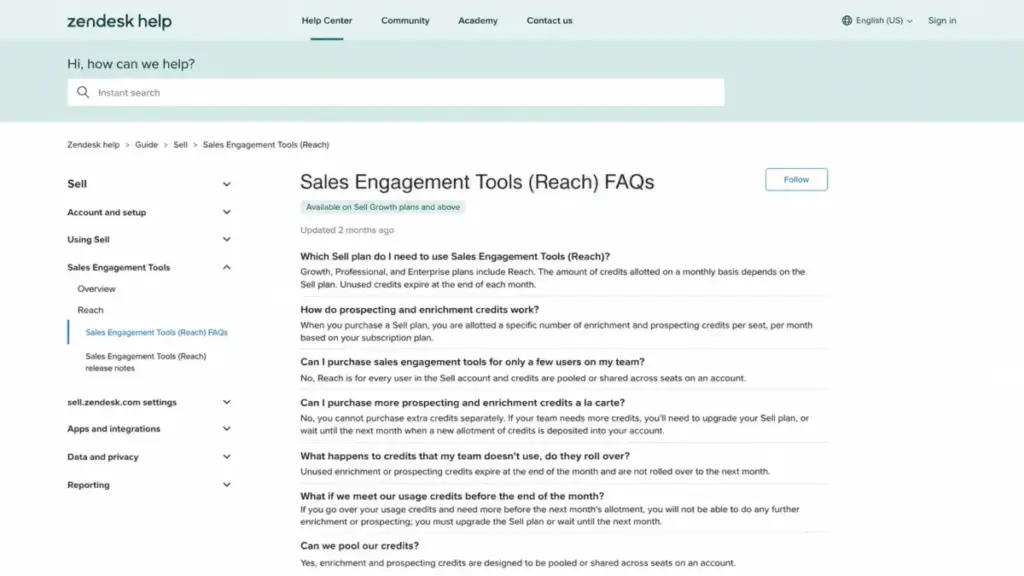
Reach credits do not top up. Reach starts on Growth, credits are allocated per seat and can be pooled or restricted to admins, and unused credits expire monthly. Zendesk’s Reach FAQ states you cannot buy extra credits à la carte when the pool runs dry, so a high-volume month means you wait for renewal or upgrade every seat.
The decision I give teams here is simple. If prospecting volume is spiky, size the plan for your busiest month, because there is no cheap mid-month rescue.
Sell Voice is the cost I would flag hardest. Zendesk’s service-specific terms treat Voice as usage-based, prepaid or billed in arrears, and I could not find a current public Sell Voice rate table, so a call-heavy team should request rates before assuming the seat price covers telephony.
Two billing mechanics also quietly cost money. Upgrades take effect immediately with a prorated charge, downgrades wait until the current period ends, and deleting a user does not reduce your bill until an admin separately lowers the seat count, effective the next cycle.
Annual vs Monthly Billing: The Real Savings Math
Annual billing on Sell saves money, but only if you stay past the break-even point, and the retirement date puts a hard ceiling on how long “past” can be.
| Plan | Monthly rate | Annual rate | Annual saving/user | Break-even |
|---|---|---|---|---|
| Team | $25 | $19 | $72/yr | ~9.1 months |
| Growth | $69 | $55 | $168/yr | ~9.6 months |
| Professional | $149 | $115 | $408/yr | ~9.3 months |
| Enterprise | $219 | $169 | $600/yr | ~9.3 months |
Every plan pays back the annual commitment at roughly nine to ten months. So annual billing is cheaper for any team that expects to keep Sell for a year or more.
The complication is the calendar. An annual contract signed in mid-2026 can run close to or across the August 31, 2027 window, which is fine for savings but risky if it postpones your migration project or overlaps your final cutover.
Before renewing annually, I would map five dates: your renewal date, your intended migration date, your archive-completion date, your user-training window, and the August 31, 2027 cutoff. If those dates do not leave clean space, the annual saving is false economy.
Get written confirmation from Zendesk on how your specific contract is treated at the service end date before you lock in twelve months.
Which Zendesk Sell Plan Should You Choose?
Company size is a weak signal here. Migration readiness and existing Zendesk dependency decide fit better than headcount, so I recommend by cohort.
Existing Zendesk Support customer, 3 to 20 sellers, wants one view during transition. Choose Growth. It gives Reach, forecasting, and enough pipelines without paying for Professional automation you will only run for a year.
Field-sales team already using the Sell mobile app. Growth for most, Professional only if the whole team needs scoring or the power dialer. Remember the mobile app retires with the product.
Current account that needs scoring or automation for everyone. Professional, with eyes open that the same-plan rule applies it to every seat.
Large existing account with heavy record and credit needs and a funded migration. Enterprise, but only because you already depend on its ceilings, not because a retiring product deserves a new Enterprise rollout.
The through-line: pick the lowest tier that clears your real workflow limit, because you are paying for months, not years.
Which Zendesk Sell Plan Should You Avoid?
Avoid Sell Team for any team that prospects. It has no Reach and no automation, so an outbound group will hit its ceiling in week one and be forced up to Growth anyway, making the “cheap” tier a detour rather than a saving.
The exception is narrow. Team is defensible only for a small existing account doing purely manual pipeline tracking while it finishes a migration.
I would also avoid Enterprise for any net-new evaluation. Its onboarding and its highest caps assume a multi-year horizon that a 2027 end date cannot repay.
Data Export and Migration Before Retirement
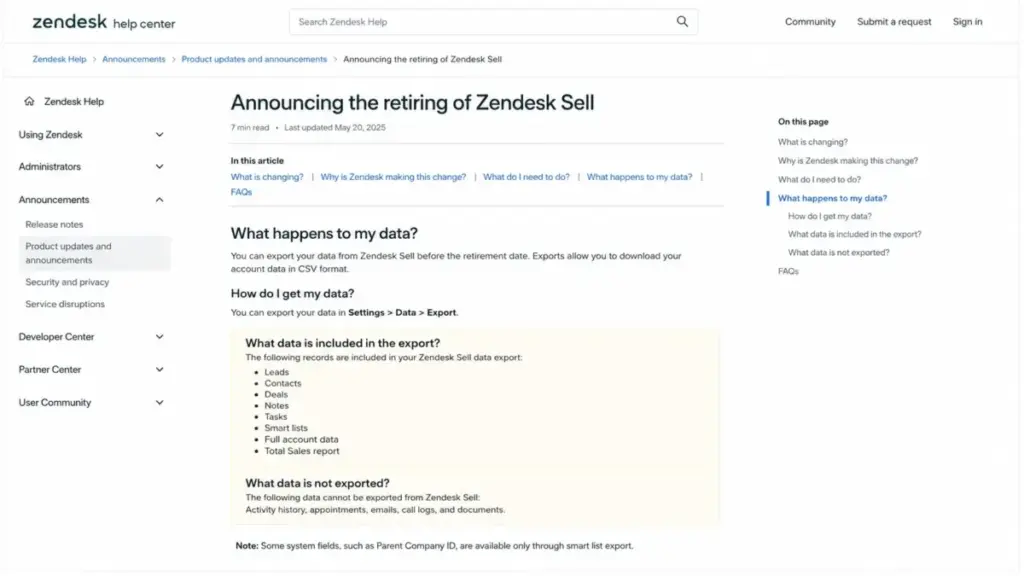
This is the section most pricing pages skip, and it is where the real cost of Sell hides. Zendesk’s standard CSV export is incomplete, so your migration bill depends on what it leaves behind.
| Included in standard export | Not included in standard export |
|---|---|
| Leads | Activity history |
| Contacts | Appointments |
| Deals | Emails |
| Notes | Call logs |
| Tasks | Documents |
| Smart lists | |
| Full account data | |
| Total Sales report |
The excluded column is the expensive one. Emails, call logs, appointments, activity history, and documents are exactly the records an audit-heavy or compliance-bound team needs, and preserving them means manual work or a third-party migration service.
Data becomes permanently unavailable after account termination or retirement, and cancellation is irreversible. So the safe sequence is: export core records, archive the excluded data separately, preserve attachments, inventory your integrations, and validate the migration before the account closes.
Zendesk names Pipedrive as its migration partner, which lowers switching uncertainty for the endorsed path. If Pipedrive does not fit your workflow, weigh the broader set of Zendesk Sell alternatives against the data you need to carry over.
Before you commit to the endorsed path, our Pipedrive CRM review covers whether its pipeline model fits how your team sells.
The recommendation I would put in a board deck: budget migration as a real line item now, because the non-exportable records, not the seat price, set the true cost of leaving.
Zendesk Sell Pricing vs Competitors
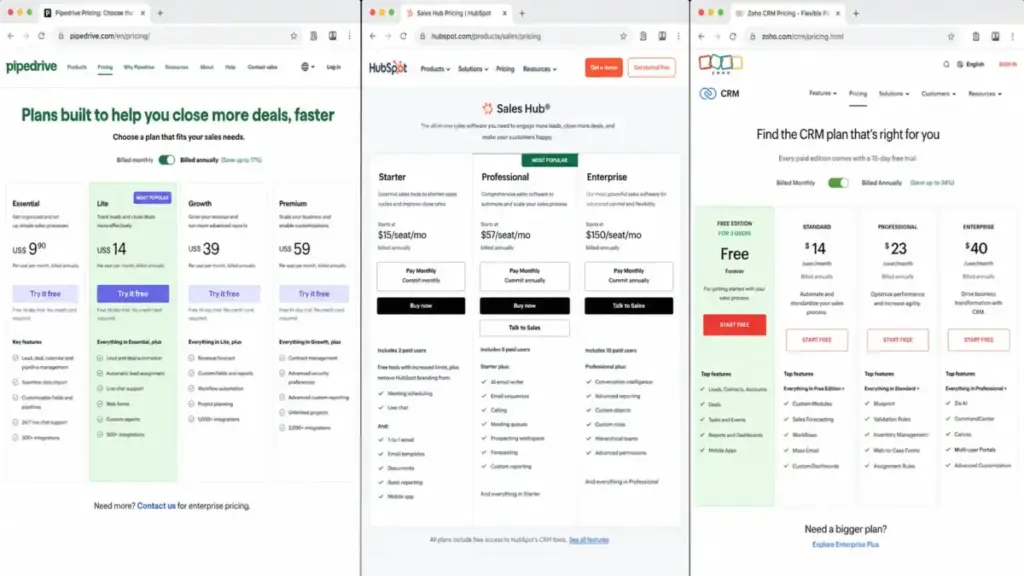
Once you accept the retirement date, the competitor question becomes a replacement question. The table anchors each alternative on price, then I add the context sticker prices hide.
| CRM | Entry price | Practical tier | 10-user annual (practical) | Best for |
|---|---|---|---|---|
| Zendesk Sell | $19/user/mo | Growth $55 | $6,600 | Existing Zendesk teams, short runway |
| Pipedrive | $14/user/mo (annual) | Lite (entry) | $1,680 (Lite) | Zendesk’s named migration path |
| HubSpot Sales Hub | $57/user/mo (promo) | Professional | ~$6,840 (promo) | Teams wanting marketing depth |
| Zoho CRM | $0 (up to 3 users) | Paid tiers scale up | Free to modest | Budget entry and free replacement |
Pipedrive Lite lists at $14 per seat per month billed annually, which makes the Pipedrive pricing plans the cheapest structured replacement and the one Zendesk itself endorses for migration. For a like-for-like sales team, I would shortlist Pipedrive first, not because it wins every feature, but because the endorsed path reduces switching risk.
That $1,680 ten-seat figure is the Lite entry tier. Pipedrive’s Growth, Premium, and Ultimate tiers cost more and were not priced in this research, so treat it as a floor rather than a Growth-equivalent match.
HubSpot is the pick when you need marketing and sales in one system. The displayed HubSpot Sales Hub pricing of $57 per seat billed annually for Professional is a promotional rate for eligible new customers on July 14, 2026, so treat it as conditional rather than permanent.
Zoho is the budget and free-entry option, covered below in the worth-it verdict. Across all three, sticker price alone is misleading here: migration assistance, promotional eligibility, and onboarding effort move the real number more than the headline seat rate.
Is Zendesk Sell Worth the Price?
For existing customers, Zendesk Sell is worth paying for through the runway if your data is exportable or archivable and your migration is scheduled. The Growth tier at $55 per seat is a fair price for a working sales CRM with Reach and forecasting, and the Zendesk Support tie-in has real value while you transition.
It is not worth the price for net-new buyers with a multi-year horizon. Paying to implement a CRM that retires in 2027 means you buy the migration cost before you earn the payback, and no annual discount changes that math.
If Sell is too expensive or too short-lived for you, the cleanest budget alternative is a free three-user tier. The Zoho CRM pricing starts at $0 for up to three users, and for small teams it is one of the stronger entries among free CRM software options that can serve as a permanent replacement rather than a bridge.
The one-line verdict: renew or ride out Sell if you already run it and your exit is planned, and start elsewhere if you are shopping fresh.
How to Avoid Overpaying for Zendesk Sell
- Pay annually only if your contract clears the migration calendar. The ~9-month break-even is easy to hit, but not if the term overlaps your cutover.
- Right-size the tier to your first hard limit. Buy Growth for Reach and forecasting; jump to Professional only when the team needs scoring or automation.
- Model the same-plan rule before upgrading. One manager’s Professional feature costs $600/month across a 10-seat account, so confirm the whole team needs it.
- Size Reach for your busiest month. Credits expire monthly and cannot be topped up à la carte, so plan for peak, not average.
- Cut seats, not just users. Deactivating a user does not stop billing; reduce the subscription seat count, effective next cycle.
- Request Sell Voice rates before you assume calling is free. Voice usage is billed separately and was not publicly quantified in this research.
- Budget migration now. The non-exportable records set your true switching cost, so archive early rather than at the retirement deadline.
FAQ
How much is Zendesk Sell per month?
Zendesk Sell costs $19, $55, $115, or $169 per user per month on annual billing (Team, Growth, Professional, Enterprise). Month-to-month rates are higher, roughly $25, $69, $149, and $219, based on third-party pricing analyses that you should confirm at checkout. All account users must be on the same plan.
Is Zendesk Sell being discontinued?
Yes. Zendesk announced on September 9, 2025 that Zendesk Sell and its mobile app will retire on August 31, 2027. Customers keep access until then, and Zendesk names Pipedrive as its migration partner. Treat any Sell purchase in 2026 as short-runway spend and plan your migration around that fixed date.
Does Zendesk Sell have a free plan?
No. Zendesk Sell has no permanent free plan, only a 14-day trial. The Reach trial adds just four prospecting and four enrichment credits per account, which is enough to test the workflow but not to benchmark realistic monthly volume. For a free CRM, a three-user Zoho tier is a better fit.
Which Zendesk Sell plan includes lead scoring?
Lead and deal scoring start on Sell Professional at $115 per user per month on annual billing. Team and Growth do not include scoring. Because all users on an account share one plan, adding scoring for one role moves every seat to Professional, which is the biggest hidden cost in Sell’s pricing model.
Can Zendesk Sell be paid monthly?
Yes. Zendesk Sell supports both month-to-month and annual contracts. Monthly billing costs roughly $6 to $50 more per user per month depending on tier. Annual billing pays back at about nine to ten months, so monthly makes sense mainly for short transition periods where you want to avoid a twelve-month commitment near the retirement date.
Can I export all my Zendesk Sell data?
Not through the standard export. Zendesk’s CSV export includes Leads, Contacts, Deals, Notes, Tasks, Smart lists, full account data, and the Total Sales report, but it excludes activity history, appointments, emails, call logs, and documents. Preserving those records requires manual work or a third-party migration tool before your account closes.
What is the biggest hidden cost in Zendesk Sell pricing?
Migration is the largest hidden cost, because the standard export leaves out emails, calls, and activity history. Inside the subscription, the same-plan rule is the sharpest surprise: one Professional feature applies to every seat, adding $600 per month to a 10-user Growth account. Sell Voice usage is a separate variable bill.
What CRM will replace Zendesk Sell?
Zendesk names Pipedrive as its official migration partner, and Pipedrive Lite starts at $14 per seat per month billed annually. HubSpot Sales Hub suits teams wanting marketing and sales together, and Zoho CRM offers a free three-user tier. The right replacement depends on whether you need marketing depth, a budget entry, or the endorsed migration path.
Should I sign an annual Zendesk Sell contract in 2026?
Only if the term does not overlap your migration. Annual billing saves $72 to $600 per user per year and breaks even near nine months, so it is worth it for a full transition year. But confirm in writing how Zendesk treats a contract that runs toward the August 31, 2027 retirement, so you are not paying for service you cannot use.
Does Zendesk Sell pricing include Zendesk Support?
No. Zendesk Sell and Zendesk Support are separate products with separate bills. The unified sales-and-service view that reviewers praise requires a separate Zendesk Support or Suite subscription on top of Sell, and an account owner can consume a seat in both. Do not treat the Sell seat price as the total cost of that combined setup.