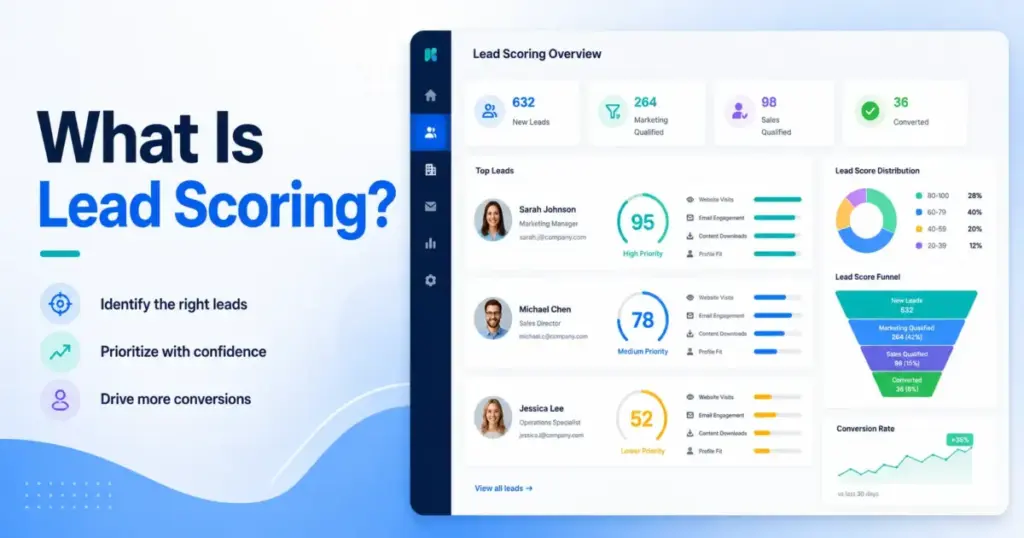
Most sales teams do not have a lead shortage. They have a prioritization problem. Lead scoring is the process of assigning numerical values to prospects based on fit, behavior, and buying intent, so reps know who deserves follow-up first.
A solid CRM software setup turns lead scoring from a marketing experiment into a repeatable sales routing system. This guide explains how scoring works, where most models break, and how to build one your reps will trust and use.
What Is Lead Scoring?
Lead scoring assigns points to a prospect based on how closely they match your ideal customer profile and how clearly their actions signal buying intent. It answers one operational question: which lead deserves sales attention right now?
A score is made up of at least two layers. The first is fit: who the lead is based on job title, company size, industry, and territory. The second is behavior: what the lead has done, such as visiting your pricing page, requesting a demo, or attending a webinar. Fit without behavior means a good target who is not ready. Behavior without fit means engagement that will not convert.
Lead scoring is only useful when it connects to a sales action. A number sitting in a CRM field with no routing rule or handoff threshold is not a scoring system. It is a data point with no job.
How Lead Scoring Works
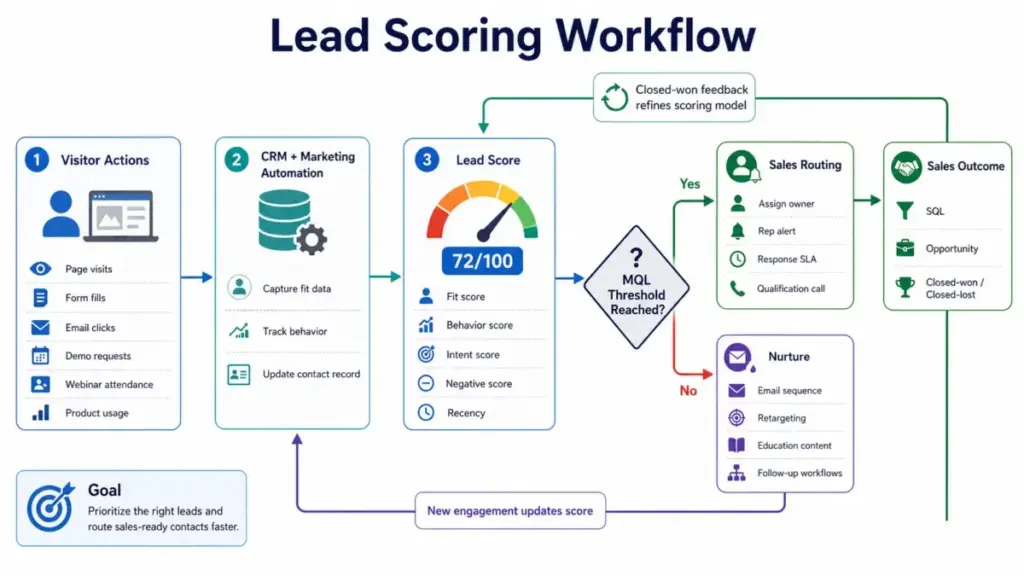
Lead scoring pulls data from your CRM and marketing automation tools, assigns points by rule or algorithm, and updates a running total. When that total crosses a defined threshold, a sales action triggers automatically.
The quality of a score depends entirely on what signals you include and how you weight them. A lead who downloads five ebooks is not always more valuable than a lead who visits the pricing page once and requests a demo. Scoring must weight buying intent higher than passive content consumption.
| Signal Type | Example Signal | Suggested Weight | Why It Matters | Common Mistake |
|---|---|---|---|---|
| ICP fit | Company size matches target range | Up to 15 pts | Confirms the lead can buy | Giving full points to borderline fits |
| Decision-maker fit | Job title is VP or Director | Up to 15 pts | Controls budget and decision | Ignoring seniority entirely |
| Pricing page visit | Viewed /pricing in last 14 days | 10 to 20 pts | High-intent buying signal | Treating all page views equally |
| Demo request | Submitted demo request form | 25 to 30 pts | Strongest single buying signal | Not routing these immediately |
| Webinar attendance | Attended live session | 10 pts | Shows active interest | Treating registrants same as attendees |
| Email click | Clicked product feature link | 3 to 5 pts | Confirms engagement | Overweighting email opens |
| Content download | Downloaded a guide or ebook | 2 to 4 pts | Shows awareness, not intent | Treating downloads as hot signals |
| Unsubscribe | Opted out of email | Subtract 15 to 30 pts | Signals disengagement | Keeping unsubscribers in scoring pool |
| Inactivity | No activity in 60 days | Subtract or decay score | Stale engagement inflates scores | Ignoring score decay entirely |
| Bad-fit profile | Student, competitor, fake email | Subtract 20 to 50 pts | Prevents false positives | No negative scoring rules at all |
This table is a starting framework. Your actual weights should come from your own closed-won data, not a generic template.
Lead Scoring Model Components
A single combined score can hide the reason a lead is hot or cold. When a score is 72 out of 100, that number tells sales nothing about whether the lead is a great fit who has not acted, or a low-fit contact who has been clicking everything. Separating the components fixes that.
Fit Score
The fit score measures how closely a lead matches your ideal customer profile. It draws from firmographic and demographic data: job title, seniority, department, company size, industry, revenue range, geography, and tech stack. HubSpot allows teams to build fit scores separately from engagement data, depending on subscription level.
Behavior Score
The behavior score measures what the lead has done on your owned channels. Page visits, email clicks, form fills, content downloads, trial signups, and product usage all contribute. A contact with a high behavior score and a low fit score is an active visitor who is probably not your buyer.
Intent Score
The intent score weights actions that signal proximity to a purchase decision. Pricing page visits, demo requests, comparison page views, and live chat conversations about product features carry the highest intent. These signals should receive two to three times the weight of general content engagement. As one r/hubspot commenter put it: “If you don’t know this, your score is just a random number in the CRM.”
Recency Score
Recency modifies urgency. A pricing page visit from yesterday carries more weight than the same visit from four months ago. Recency is often handled through score decay rather than a separate component, but either approach works.
Negative Score
Negative scoring subtracts points for signals that lower conversion probability. Unsubscribes, competitor email domains, student profiles, fake emails, and prolonged inactivity all deserve negative weight. Without negative scoring, leads who look engaged on paper but are clearly not buyers will keep surfacing in your sales queue.
Account Score
Account scoring aggregates lead scores across multiple contacts from the same company. In B2B sales, buying decisions involve multiple stakeholders. If a VP of Sales, a Sales Operations Manager, and a RevOps Director from the same company all reach your pricing page within two weeks, that account deserves immediate attention even if no single contact has crossed your MQL threshold.
Lead Scoring Example
The model below uses a 100-point framework. It is a practical sample, not a universal standard. Adjust every weight based on your own conversion data.
Sample 100-Point B2B SaaS Scoring Model
- Fit score (40 pts max): ICP industry match 10 pts, company size match 10 pts, decision-maker title 15 pts, target territory 5 pts
- Intent score (30 pts max): Demo request 30 pts (instant MQL trigger), pricing page visit 15 pts, live chat 10 pts
- Engagement quality (20 pts max): Webinar attendance (live) 10 pts, trial signup or product usage 10 pts, email click on product feature 3 pts per click up to 9 pts
- Recency modifier (10 pts max): Activity in last 7 days 10 pts, activity in last 30 days 5 pts, no activity in 60 days decay score by 20%
| Score Range | Lead Status | Recommended Action |
|---|---|---|
| 80 to 100 | Sales-ready | Route to rep within 1 hour |
| 60 to 79 | Warm lead | Route to rep within 24 hours |
| 40 to 59 | Nurture lead | Add to drip sequence |
| 0 to 39 | Low priority | Hold, monitor for signals |
| Below 0 | Disqualified | Suppress from sales queue |
These thresholds are a sample framework. Set your own based on pipeline data.
Why Lead A beats Lead B:
Lead A is a VP of Sales at a 200-person SaaS company in your target territory. She visited the pricing page twice this week and requested a demo. Score: 88. Route to sales immediately.
Lead B is a marketing coordinator at a 15-person agency outside your ICP. He downloaded three guides over six weeks. Score: 31. Send to nurture sequence.
Lead B has more total activities. Lead A has more buying intent. A scoring model that overweights content downloads would invert this priority.
Types of Lead Scoring
Lead scoring is not one method. The approach you use depends on your data quality, lead volume, and team size.
| Lead Scoring Type | How It Works | Best For | Main Advantage | Main Risk |
|---|---|---|---|---|
| Manual lead scoring | Sales or marketing reviews each lead using a checklist and judgment. | Very small teams with low lead volume. | Simple to start without automation. | Inconsistent scoring across reps. |
| Rule-based lead scoring | CRM rules add or subtract points based on fit, behavior, intent, and recency. | SMB and mid-market teams with repeatable sales signals. | Transparent logic that sales can understand. | Rules become outdated if no one reviews them. |
| Predictive lead scoring | AI or machine learning analyzes historical CRM data to estimate conversion likelihood. | Larger teams with clean closed-won and closed-lost data. | Finds patterns manual rules can miss. | Poor data quality creates misleading scores. |
Manual Lead Scoring
A rep reviews each lead individually using a checklist or judgment. This works for very small teams with under 50 leads per month. It does not scale and introduces inconsistency across reps.
Rule-Based Lead Scoring
Fixed rules assign points automatically based on defined criteria. This is the most common method in CRM tools. Zoho CRM calls these “scoring rules.” HubSpot allows separate fit and engagement rules. Rule-based scoring is predictable and transparent. The downside: rules must be manually updated as your ICP and offer evolve.
Predictive Lead Scoring
Predictive scoring uses machine learning to estimate conversion probability based on historical closed-won data. Salesforce offers predictive features through its AI products. Marketo Engage supports lead scoring programs with behavioral and demographic weighting. Predictive scoring is only reliable when you have at least several hundred closed-won deals in your CRM with complete contact records, including lifecycle stage data that maps where each contact sits in the customer lifecycle.
Product-Led Lead Scoring
Product-led scoring tracks in-product behavior: feature adoption, session frequency, usage depth, and activation milestones. Teams with a free trial or freemium model use this to identify users most likely to upgrade.
Account-Based Lead Scoring
Account-based scoring treats the buying committee, not the individual contact, as the scoring unit. This fits enterprise sales with long deal cycles and multiple decision-makers.
Lead Scoring vs Lead Qualification
Lead scoring and lead qualification are related but not the same. Teams that confuse them waste time chasing scores that have not been verified.
| Term | Definition | Who Does It | Output |
|---|---|---|---|
| Lead scoring | Assigns numerical value based on fit and behavior | System (automated) | A score |
| Lead qualification | Confirms the lead meets sales-ready criteria | Sales rep (manual) | Go/no-go decision |
| Lead grading | Rates profile fit on a letter scale (A to D) | System or rep | A grade |
| MQL | Lead that crossed the marketing-defined score threshold | Marketing automation | Handoff to sales |
| SQL | Lead a rep has confirmed is worth pursuing | Sales rep | Enters pipeline as opportunity |
A lead can score 85 points and still fail qualification if the rep discovers the company has no budget this quarter. Scoring is a prioritization signal. Qualification is a confirmed judgment.
Why Lead Scoring Fails
Lead scoring fails more often than most CRM vendors will admit. The reasons are consistent across companies of every size.
Scores reward activity, not intent. Teams that give equal weight to email opens, ebook downloads, and demo requests end up promoting engaged researchers, not buyers. Content consumption is awareness-stage behavior. It should carry a fraction of the weight of a pricing page visit or a direct product inquiry.
Scores reward activity, not intent. Teams that give equal weight to email opens, ebook downloads, and demo requests end up promoting engaged researchers, not buyers. Content consumption is awareness-stage behavior. It should carry a fraction of the weight of a pricing page visit or a direct product inquiry. When scoring is miscalibrated, the deal pipeline fills with low-quality opportunities that distort sales forecasting — making projected revenue appear higher than what will actually close.
Scores do not decay. A lead who visited your pricing page eight months ago and has not returned is not still a warm lead. Without score decay, your MQL queue fills with stale contacts. ActiveCampaign supports score expiration through automation rules, allowing teams to set decay timers on specific signals. A practical rule: pricing page visits expire after 30 days, webinar attendance expires after 90 days.
Sales does not trust the model. This is the most common failure mode. If reps have been burned by bad MQLs before, they will ignore the score field entirely. Scoring systems that sales does not trust produce no pipeline improvement regardless of how well they are built. Building trust starts with a structured CRM implementation that includes rep training, pilot testing, and adoption KPIs.
No handoff SLA exists. A lead hitting the MQL threshold means nothing if no one picks it up within a defined window. Without a service-level agreement on response time, scoring becomes a routing system with no driver.
Marketing optimizes for MQL count, not pipeline. When the MQL threshold is too low, or when marketing is measured on MQL volume rather than pipeline contribution, the scoring model gets gamed. Sales receives a high volume of low-quality leads and loses trust in the process.
How to Build a Lead Scoring System
Building a scoring system that sales will use requires ten steps done in order. Skipping the early steps produces a model that looks functional but fails in practice.
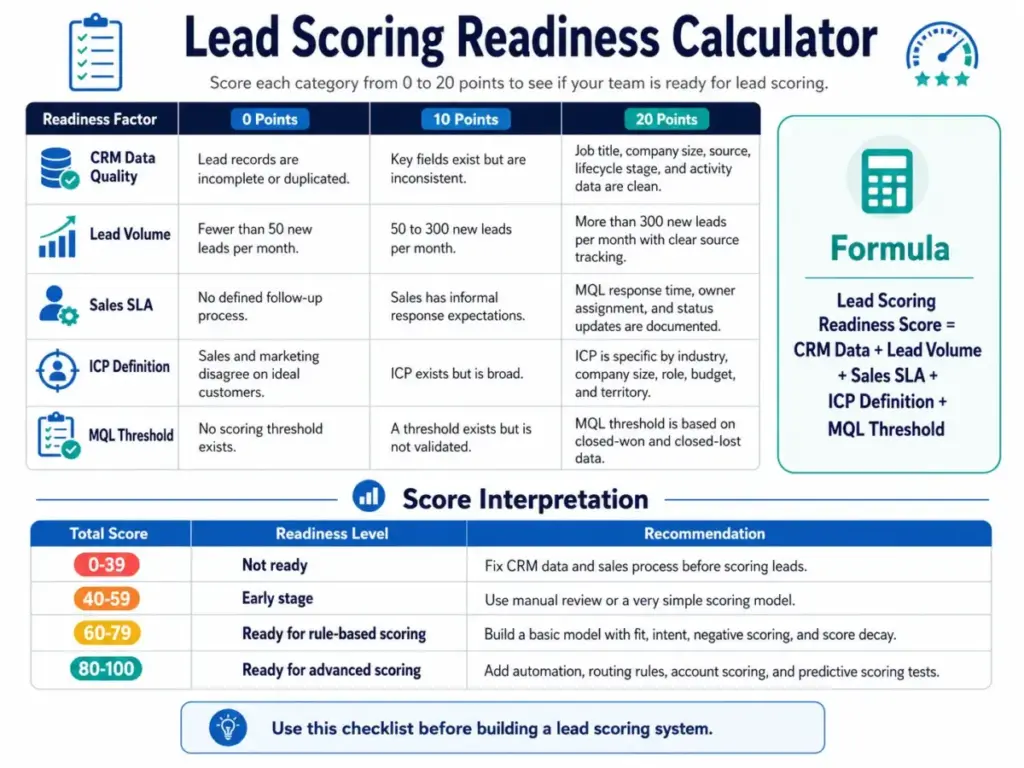
- Define your ICP. Pull your last 50 to 100 closed-won deals. Identify the job titles, company sizes, industries, and territories that appear most often. Your fit score should reflect this data, not assumptions.
- Pull closed-won and closed-lost data. Look at what behaviors appeared in the 30 days before a closed-won deal. Pricing page visits, demo requests, and product usage typically appear. Low-intent content downloads typically do not.
- Separate fit from behavior. Build two distinct scoring components. This gives sales a reason when a lead is hot: “High fit, high intent,” or “Good fit, not yet engaged.”
- Weight high-intent actions first. A demo request should carry more points than any other single behavior. Assign it enough weight that a strong-fit lead who requests a demo crosses your MQL threshold without needing additional signals.
- Add negative scoring. Assign point deductions for unsubscribes, competitor domains, student emails, and inactivity periods. Start with five to ten negative rules.
- Add score decay. Set automation rules that reduce scores when key signals age past a defined window. Most platforms support this through workflow logic.
- Define your MQL threshold. Choose a score that, based on your closed-won analysis, represents a reasonable conversion probability. Do not set it based on lead volume targets.
- Create a sales SLA. Define how quickly a rep must contact an MQL after it is routed. Document the response time expectation and track it.
- Review weekly with sales. For the first 60 days, hold a weekly 20-minute review. Ask: did the leads at or above the threshold convert? Were any leads sent to sales that clearly should not have been? Adjust rules based on the answers.
- Recalibrate every quarter. Your ICP shifts. Your offer changes. Your buyer behavior evolves. A scoring model built once and never reviewed becomes inaccurate within six months.
After step 10, benchmark your model against your pipeline conversion rate and review it using your internal evaluation standard before going live. See the SaaSZap review methodology for an example of how structured frameworks improve decision-making quality.
Lead Scoring for Small Teams
Small teams with three to ten reps need a scoring model that is fast to build, easy to explain, and simple enough to maintain without a dedicated RevOps function.
Start with eight to twelve rules, not fifty. Pick the five highest-intent behavioral signals from your pipeline data. Pick three to five fit attributes that separate your best customers from everyone else. Add two or three negative rules. That is a complete starting model.
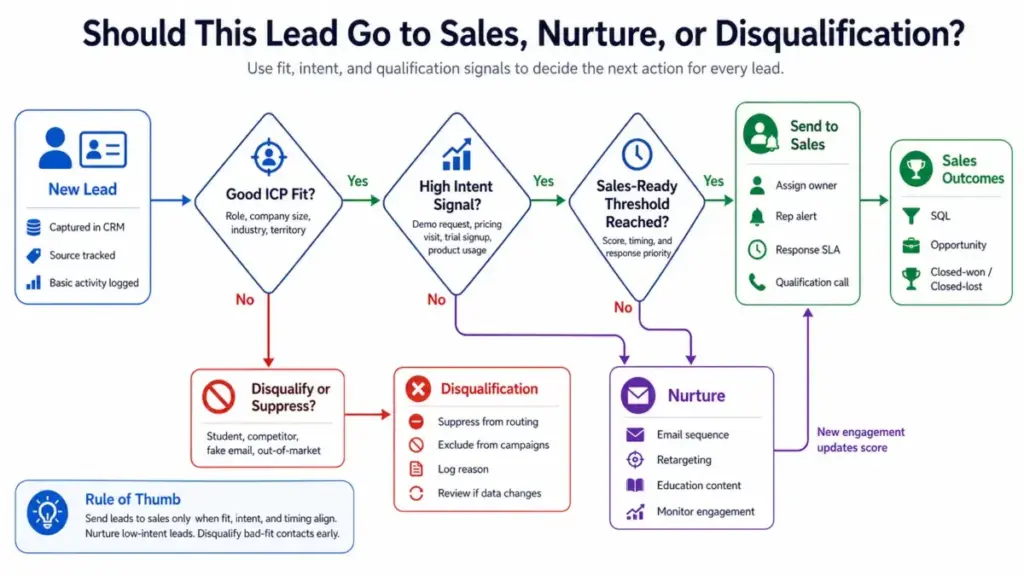
A practical small-team setup: demo request triggers an immediate rep alert regardless of score; pricing page visit plus correct job title equals warm lead routed within 24 hours; any contact with a competitor email domain is suppressed automatically.
One r/hubspot user noted: “One of my favorite ways to use scoring is to create two scores on the same object.” That approach works especially well for small teams. Keep fit and behavior separate from the start, even if your initial model is simple. It makes it far easier to explain to reps why a lead is being prioritized.
Best Tools for Lead Scoring
No single tool is the right fit for every scoring approach. The table below matches tools to scoring style rather than ranking them.
| Tool | Best For | Scoring Style | Watch-Out | SaaSZap Link |
|---|---|---|---|---|
| HubSpot | Fit plus engagement scoring | Separate fit and engagement scores, combined option | Advanced scoring needs higher-tier plan | HubSpot CRM review |
| Salesforce | Enterprise sales workflows, large lead volumes | Rule-based and AI-assisted predictive scoring | Setup complexity and cost at scale | Salesforce CRM review |
| Zoho CRM | Rule-based scoring, mid-market teams | Scoring rules based on behavior, attributes, and insights | Less flexible for advanced decay logic | Zoho CRM review |
| ActiveCampaign | Automation-led scoring with decay and branching logic | Contact scoring with add/subtract rules and expiration | Not a CRM-first tool; better as a marketing layer | ActiveCampaign review |
| Pipedrive | Sales pipeline prioritization for small teams | Basic lead scoring and activity-based priority | Limited native scoring; needs integrations for full model | Pipedrive CRM review |
| Adobe Marketo Engage | Enterprise marketing automation and person scoring | Person-level and account-level scoring programs | High implementation cost, requires dedicated admin | best CRM for marketing automation |
HubSpot’s lead scoring tool supports engagement scores, fit scores, and combined scores for contacts, companies, and deals depending on subscription. Zoho CRM’s scoring rules qualify prospects using behavior, insights, attributes, and persona details. ActiveCampaign’s contact scoring documentation covers both static and dynamic scoring with automation-based expiration.
For teams evaluating CRM tools for the first time, the best CRM software guide covers the full market. For sales-focused tool selection, see the best CRM for sales teams guide.
When Lead Scoring Does Not Work
Lead scoring is not the right investment in every situation. Building a scoring model when the conditions are not right creates false confidence and costs more time than it saves.
Do not build a lead scoring system if any of the following apply:
- Monthly lead volume is under 50. At that volume, a rep can review every lead manually. Scoring infrastructure adds overhead with minimal benefit.
- CRM data is incomplete or inconsistent. Scoring rules that rely on job title or company size fields will produce inaccurate output if those fields are empty or inconsistently populated in more than 20% of records.
- No agreed ICP exists. If sales and marketing disagree on who the ideal customer is, any fit score you build will be contested immediately.
- Sales ignores lead status fields. If reps do not update lead status, you cannot validate whether your MQL threshold is accurate. The feedback loop that makes scoring better over time does not exist.
- Buying committees are large and unpredictable. In deals with eight to twelve stakeholders across multiple departments, individual lead scores have limited predictive value. Account-level signals matter more.
- No one owns scoring governance. A scoring model without a quarterly review owner degrades quickly as your offer, market, and ICP evolve.
- Key pages have no tracking. If your pricing page, demo landing page, or trial signup flow is not firing events to your CRM, you are missing the highest-intent signals entirely.
FAQ
What is lead scoring?
Lead scoring is a method of assigning numerical values to prospects based on how closely they match your ideal customer profile and how clearly their actions indicate buying intent. The score helps sales teams prioritize which leads to contact first. It works best when connected to a defined MQL threshold and a sales handoff rule.
How does lead scoring work?
Lead scoring pulls data from your CRM and marketing automation platform, applies point rules to fit attributes and behavioral signals, and updates a running total for each contact. When that total crosses a predefined threshold, a sales action is triggered: lead routing, rep notification, or status change. The score updates continuously as new behavior is recorded.
What is a lead scoring model?
A lead scoring model is the set of rules, weights, and thresholds that define how points are assigned and what score triggers a sales action. A practical model separates fit score from behavior score, includes negative scoring for disqualifying signals, applies score decay to old activity, and defines a clear MQL threshold tied to real conversion data.
How do you calculate a lead score?
You assign point values to each qualifying signal, sum them for each contact, and apply deductions for disqualifying signals. A 100-point model might allocate 40 points to fit attributes, 30 to intent signals, 20 to engagement quality, and 10 to recency. The total score determines which sales action the lead receives.
What is a good lead score?
There is no universal answer. A good lead score is one that reliably predicts conversion at your specific MQL threshold, validated against your own closed-won data. In a 100-point framework, 80 and above is often treated as sales-ready, but this number should be set based on your pipeline history, not a benchmark from another company.
What is the difference between lead scoring and lead qualification?
Lead scoring is automated: the system assigns a number based on rules. Lead qualification is a human judgment: a sales rep confirms whether a lead genuinely meets the criteria to enter the pipeline. A lead can score 90 points and still fail qualification if the rep discovers a budget freeze, wrong timing, or a deal-breaking requirement.
What is predictive lead scoring?
Predictive lead scoring uses machine learning to estimate a prospect’s conversion probability based on patterns in historical closed-won and closed-lost data. Understanding the basics of machine learning is crucial here, as these algorithms require hundreds of clean data points to generate accurate predictions without human bias.
It can identify signals that manual rules miss. Salesforce offers predictive scoring through its AI features, and Marketo Engage supports predictive elements in its lead scoring programs. Predictive scoring requires a high volume of clean historical data to produce reliable results.
What are examples of lead scoring criteria?
Common criteria include: job title match to ICP (10 to 15 points), company size in target range (10 points), pricing page visit (10 to 20 points), demo request (25 to 30 points), webinar attendance (10 points), email click on product content (3 to 5 points), content download (2 to 4 points), and negative deductions for unsubscribes, competitor emails, and inactivity.
Why is lead scoring important?
Lead scoring replaces manual triage with a repeatable system. Without scoring, reps either follow up on every lead (wasted time) or pick leads by gut feel (inconsistent results). A working scoring model focuses rep effort on the contacts most likely to convert, which shortens response time and improves close rates.
What are the disadvantages of lead scoring?
Lead scoring fails when it overweights content engagement over buying intent, when scores do not decay, when there are no negative rules, when CRM data is incomplete, or when sales does not trust the output. Predictive scoring can also produce misleading results if the historical data set is small or skewed.
Which CRM tools have lead scoring?
HubSpot supports fit scores, engagement scores, and combined scores. Salesforce offers rule-based and AI-assisted predictive scoring. Zoho CRM uses scoring rules based on behavior and attributes. ActiveCampaign supports contact scoring with add/subtract logic and automation-based expiration. Adobe Marketo Engage supports person and lead scoring programs. Pipedrive offers basic lead prioritization with limited native scoring.
What is score decay in lead scoring?
Score decay is the automatic reduction of a contact’s score when their engagement signals age past a defined window. A pricing page visit might carry full weight for 14 days, half weight from day 15 to 30, and zero weight after that. Decay prevents stale activity from keeping a lead artificially high in the sales queue. ActiveCampaign supports score expiration through its automation rules.
Key Takeaways
- Lead scoring assigns points based on fit and behavior to tell sales which leads to contact first.
- A score is only useful when it triggers a specific sales action at a defined threshold.
- Separate fit score from behavior score. A single combined number hides why a lead is hot or cold.
- Weight buying intent signals (demo requests, pricing page visits) two to three times higher than content engagement.
- Add negative scoring and score decay. Without them, your MQL queue fills with bad-fit and stale leads.
- Lead scoring fails most often because sales does not trust the model, not because the rules are wrong.
- If your team already uses CRM software, start by separating fit score from behavior score before adding predictive scoring.