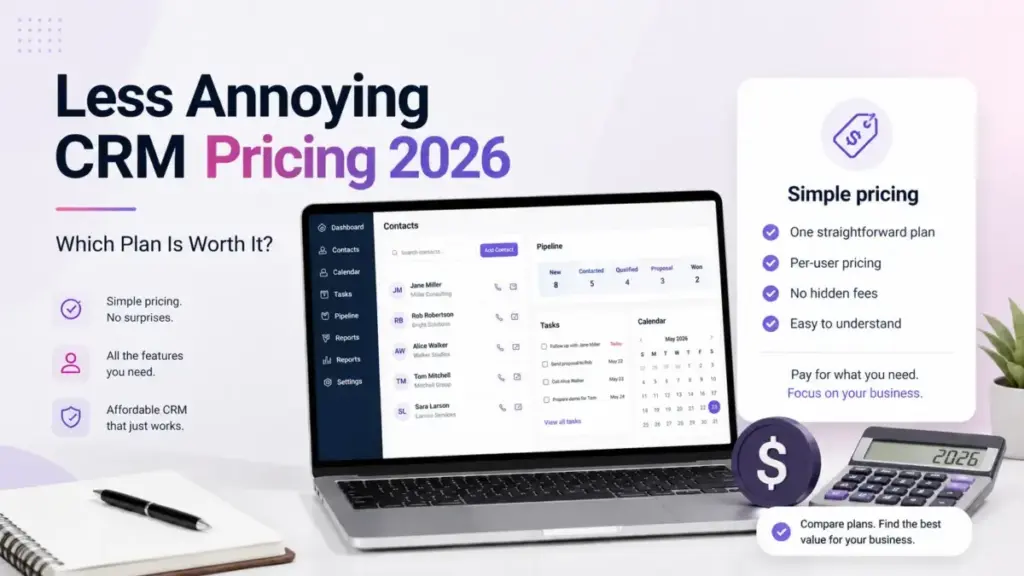
Less Annoying CRM pricing is one number: $15 per user per month, plus applicable tax, on a single plan the vendor calls “Everything included.” Verified on the official pricing page on July 21, 2026, that rate has no tiers, no contract, and no advertised annual discount.
The sticker price is the easy part. The buying decision starts once you account for the $15-per-month storage add-on buried in the help center, the recommended limit of fewer than 50,000 records, mobile apps with no offline mode, and third-party tools the base subscription does not replace.
I write about CRM cost math for a living, and this is a rare case where the advertised price is honest but the operating picture is incomplete on almost every ranking page. If you are still assembling a shortlist, the best CRM software hub is the wider view, and this guide zooms into one option.
This guide treats Less Annoying CRM pricing as a total cost of ownership question for a US buyer, not a one-line quote. I am working from official documentation and pricing pages, not hands-on testing, the way I would size any contact management tool for a client.
Here is the fast answer before the line items.
| Quick pricing verdict | Detail |
|---|---|
| Starting price | $15 per user per month, plus applicable tax |
| Free plan or trial | No permanent free plan; a full 30-day trial with no credit card |
| Best fit for most teams | Solo consultants and 3-to-10-person relationship-driven teams |
| Setup to avoid | Offline field workflows, and accounts headed past 50,000 records |
| Biggest hidden cost | $15 per month for an extra 100GB of file storage |
| Best alternative if it does not fit | Pipedrive for reporting depth; Bigin by Zoho for a lower entry price |
| Pricing verified | July 21, 2026 (official US pricing page) |
Executive Summary: TCO at 1, 5, 10, and 25 Users
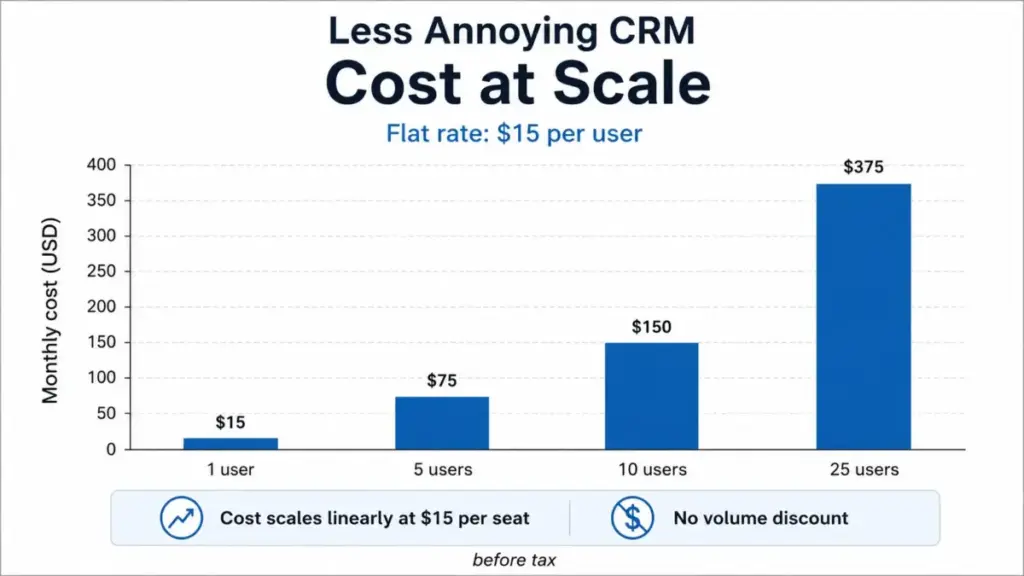
Less Annoying CRM charges a flat $15 per user per month, so account cost scales linearly with seats and nothing else on the base plan. There is no published seat minimum, which means a solo user pays the same per-seat rate as a 25-person team.
The table below is arithmetic on the verified $15 rate. Annual figures are 12 times the monthly seat cost, because paying annually earns no discount.
| Team size | Monthly total | Annual total | Pooled storage included | Notes |
|---|---|---|---|---|
| 1 user | $15 | $180 | 25GB | Same per-seat rate as any larger team |
| 5 users | $75 | $900 | 125GB | No paid storage expansion assumed |
| 10 users | $150 | $1,800 | 250GB | Stable seat count, no external services |
| 25 users | $375 | $4,500 | 625GB | Validate reporting and workflow fit first |
All totals exclude applicable sales tax and any third-party services. For a solo user who needs extra file space, add $15 per month for 100GB, which takes a one-person account to $30 per month, or $360 per year.
The account-level number is what most competing pricing pages skip. A 10-person team is looking at $1,800 a year before tax, and the real budgeting question is not the seat rate but whether the reporting, automation, and integration ceilings force spend somewhere else.
Less Annoying CRM pricing stays this predictable only while your workflow stays inside the native feature set. At 25 users the seat math still holds at $4,500 a year, but I would treat that scenario as a fit review rather than a pricing question, because a team that large usually needs the reporting and automation depth this product does not sell.
For a one-person shop, the same flat rate is the strongest case: no seat minimum, no tier upsell, and no annual lock-in. The cost story only turns against you when file volume, record count, or workflow complexity pushes you into paid storage or an external tool.
The Real Price: One Plan, $15, Plus Tax
Less Annoying CRM sells one paid plan at $15 per user per month, and the official pricing page lists every core feature as included rather than gated behind higher tiers. There is no annual-only plan card and no enterprise tier surfaced in the reviewed public pages.
Applicable sales tax is added on top of the $15 rate and varies by the buyer’s jurisdiction, so the advertised number is a pre-tax figure. You can confirm the plan and tax language on the official pricing page.
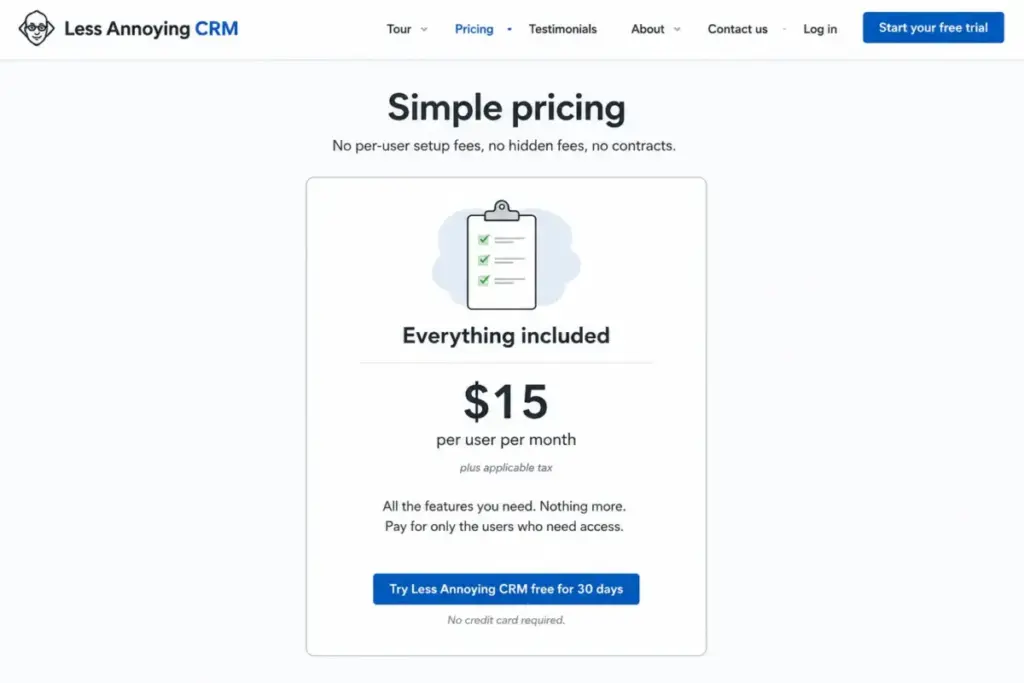
Third-party directories muddy this. Some label the plan “Core,” “Always,” or “All-features,” which invents tier complexity that the official page does not use.
| Plan | Monthly | Annual (calculated) | Billing basis | Best for | Key limits |
|---|---|---|---|---|---|
| Everything included | $15/user | $180/user | Per user, per month | Solo to ~25-person relationship-driven teams | 25GB pooled per user; 50MB per file; under 50,000 records recommended |
Less Annoying CRM, LLC operates the single-plan model on purpose, and for a solo consultant or a small team it removes the usual per-seat tier math. The catch is that “one plan” also means no native way to buy your way up when a workflow outgrows the feature depth.
Line-Item Cost Breakdown: Every Billable Item
A flat rate does not mean a fixed bill. The base subscription is one line, but three other lines can appear depending on how a team uses the product.
| Line item | Cost | When it applies |
|---|---|---|
| Seats | $15 per user per month | Always; billed in advance |
| Applicable sales tax | Varies by jurisdiction | Added where legally applicable |
| Extra file storage | $15 per month per 100GB | Account nears its pooled 25GB-per-user allowance |
| Third-party tools | Set by the external provider | Email sending, advanced reporting, telephony, or Zapier workflows |
Only the first line is guaranteed. Tax is jurisdiction-dependent, storage is usage-dependent, and third-party tools are workflow-dependent, so two 10-person accounts can pay very different real totals on the same seat rate.
The distinction I would flag for a finance reviewer is that Less Annoying CRM does not sell onboarding, premium support, or AI credits as paid add-ons. The cost risk is not the vendor’s upsell menu; it is the external tooling a lean CRM pushes you toward.
Annual vs Monthly Billing: The Savings Math That Is Not There
Annual billing is available, and it saves nothing. The official payment documentation confirms you may pay monthly or annually, with no discount for committing to a year, so $180 per user is simply 12 times the $15 monthly rate rather than a separately advertised annual price.
That matters because SaaS buyers are trained to expect a 15 to 20 percent annual discount, and budgeting for one here would overstate the savings by exactly that amount. You can verify the no-discount policy on the official payment methods page.
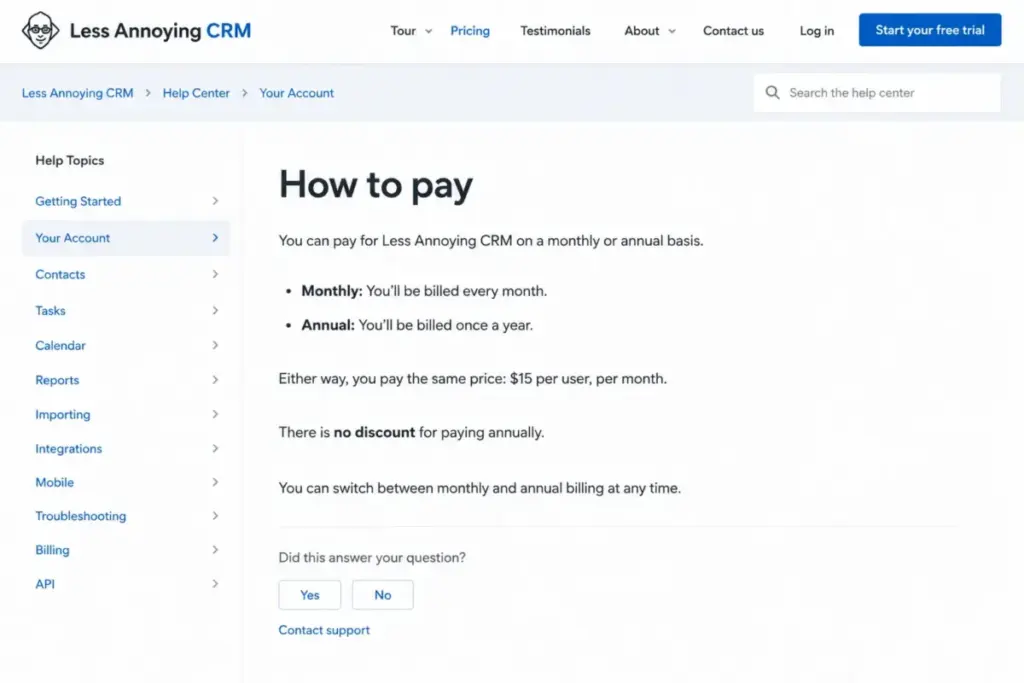
Billing runs in advance, seat additions and removals are prorated under the official terms, and payments are non-refundable. Cancellation takes effect at the end of the paid period, so mid-cycle downgrades do not return unused prepaid time.
For a team whose headcount swings month to month, monthly billing is the safer choice, since paying a year up front locks money you cannot recover if you shrink.
What “Everything Included” Actually Includes
The single plan bundles the features a small sales or service team uses daily: unlimited contacts and companies, unlimited custom pipelines and fields, tasks and calendars, email logging, groups and filtering, forms, basic automations, and native mobile apps. User permissions and free human support come with it.
That inclusion list is genuine, and it is the strongest argument for the product at a solo or small-team scale. There is one wording caveat worth reading closely.
Official pricing help states that core functionality and general upgrades are included, while reserving the possibility that optional non-core functionality could be priced separately in the future. That is not a current fee, and I would not treat it as one, but “everything included” is a promise about core features rather than an unlimited guarantee about every future product.
Feature Gates and the Missing Upgrade Path
There are no paid feature gates on Less Annoying CRM, which is unusual and buyer-friendly. The trade-off is structural: because there is no higher tier, there is also no native upgrade to solve a capability ceiling.
| Capability | Included on the $15 plan | Practical boundary |
|---|---|---|
| Contacts, pipelines, custom fields | Yes, unlimited | Performance guidance under 50,000 records |
| Email logging | Yes | Sending may still rely on your email client |
| Automation | Basic native actions | No advanced branching, sequencing, or AI |
| Reporting | Basic pipeline and activity reports | Reviewers request deeper lead-source and conversion analysis |
| Integrations | Native, partner, Zapier, API | Some connections need external subscriptions |
| Support | Free email, phone, coaching | Weekday Central Time phone hours, English only |
When a team outgrows one of these boundaries, the next step is adding an external tool or migrating, not buying a Professional tier. That is the honest cost of the single-plan model, and it is why headcount alone does not decide fit.
Automation: Basic Actions, No Advanced Workflows
Several 2026 review pages state flatly that Less Annoying CRM has no automation. That is stale.
Official automation documentation shows native automations that assign a user and attach a note, task, group, or pipeline, and that can run when a contact enters a pipeline status. Those are real, and they cover simple follow-up routing.
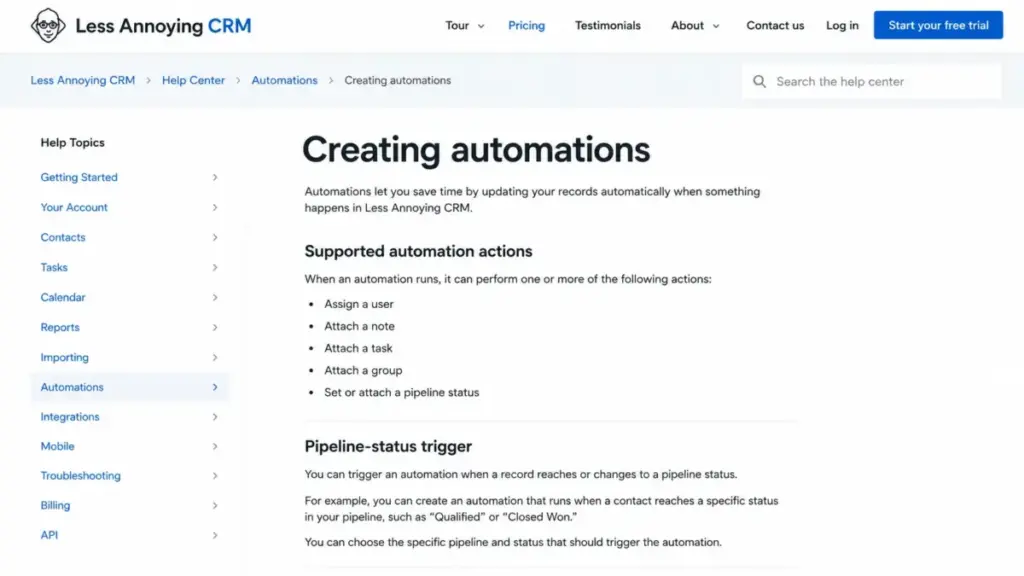
What is not here is advanced workflow orchestration: multi-step branching, timed sequences, and AI scoring. Calling the product automation-free is wrong, and calling its automation advanced would be equally wrong.
Storage Limits and the $15 Add-On Nobody Mentions
Each paid user adds 25GB to a pooled account allowance, and the clearest way the bill grows past the seat total is buying more of it. The official file-storage documentation prices an additional 100GB at $15 per month, which is the single most concrete add-on I found, and none of the ten ranking pages I reviewed surfaces it.
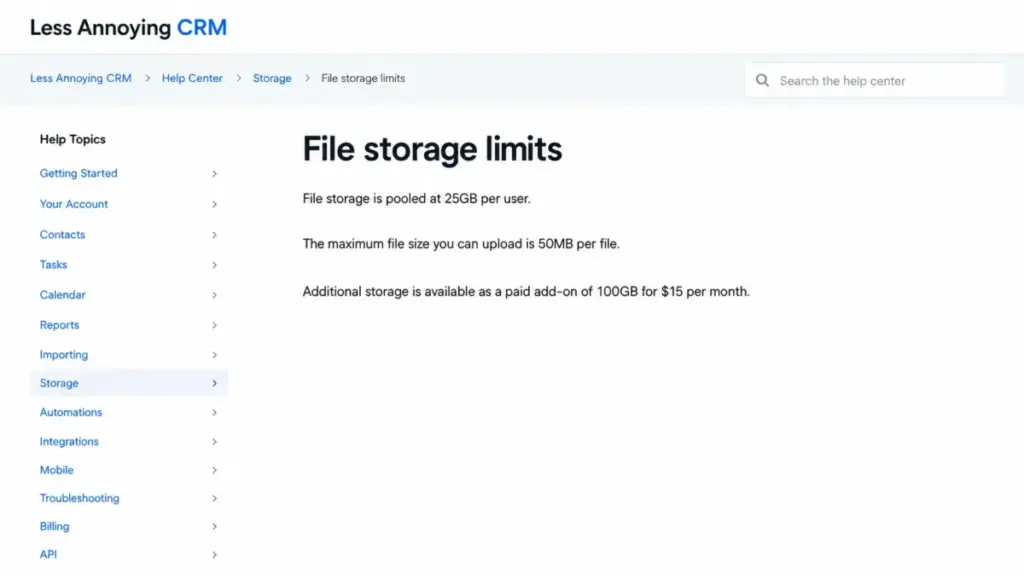
Because the allowance is pooled, storage economics improve as you add seats. One user gets 25GB, but six users share 150GB across the account, so the add-on is far more likely for a document-heavy solo user than for a mid-sized team.
One limit sits below total capacity: each uploaded file is capped at 50MB. A team can have plenty of room in aggregate and still be unable to attach a large proposal, recording, or design file, so large-media workflows should confirm attachments during the trial.
The 50,000-Record Ceiling Behind “Unlimited Contacts”
“Unlimited contacts” is a billing statement, not a performance guarantee. There is no strict record cap on the bill, but the official help center recommends keeping a single account under 50,000 total contacts and companies.
Above that guideline, the official contact-limit documentation warns of slower loading and difficulty with bulk merging, synchronization, and integrations. This is a recommendation rather than an enforced hard limit, which is exactly why it disappears from directory pages that repeat “unlimited.”
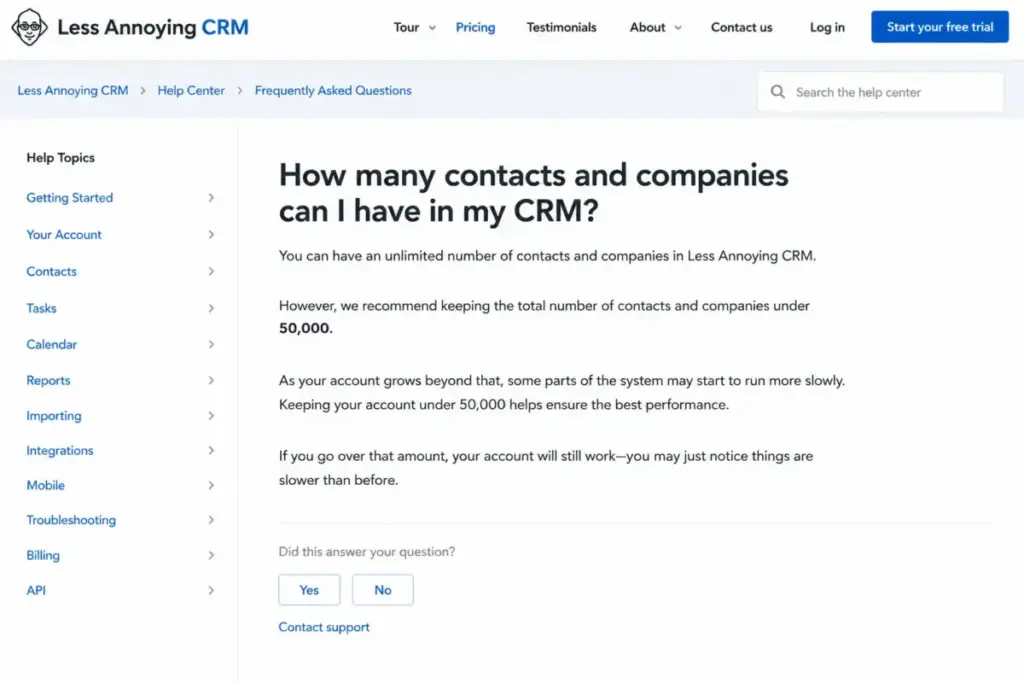
For a team importing a large legacy database, this is the number that decides fit. A CRM database heading toward 50,000 records should validate performance during the trial rather than assume the marketing claim scales.
Integrations, API, and Their Real Cost
The integration count on a pricing page hides the part that costs money: how each tool actually connects. Less Annoying CRM offers native connections, partner apps, a Zapier bridge, and an open API, and those are not the same in effort or price.
| Tool | Connection type | External cost risk |
|---|---|---|
| Google Calendar, Outlook Calendar | Native / first-party | None from this connection |
| Google Contacts | Native / first-party | None from this connection |
| Mailchimp | Native / first-party | Mailchimp’s own plan |
| Zapier (other apps) | Zapier bridge | Zapier subscription |
| iCloud calendar and contacts | No direct connection; Google bridge documented | Setup friction, not a fee |
| Custom or high-volume sync | Open API | Developer time |
Buyers verify email and calendar sync easily, then hit the gaps: iCloud does not connect directly and is documented as a Google-mediated workaround, and anything outside the native list can require a Zapier plan or developer work. You can review the connection types on the official integrations directory.
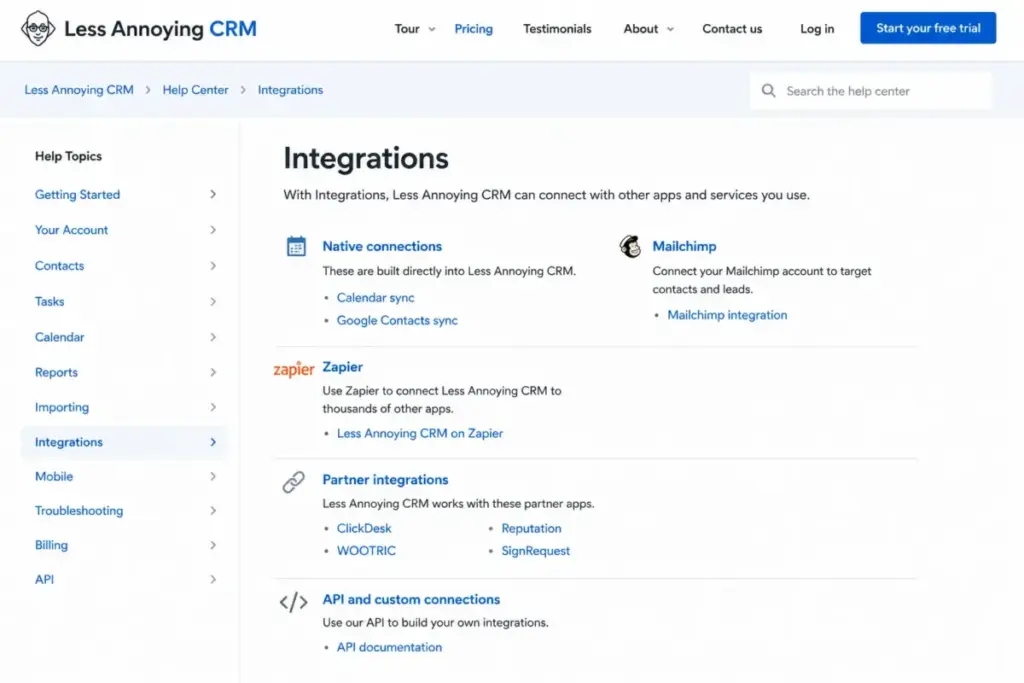
One label to read carefully is email. The product logs and syncs email activity, but that is not the same as a full in-CRM outbound-email or sequence platform, so a team that wants to send campaigns from the CRM should confirm the exact workflow in the trial before assuming it replaces an outreach tool.
On the API, the honest answer is that capacity is discretionary. The open API is aimed at technically capable developers, and the terms permit throttling or termination for abuse or overuse without publishing a numeric rate table, so a high-volume integration should confirm expected workloads with the vendor rather than assume unlimited throughput.
Mobile App and Field Use: No Offline Mode
Native iOS and Android apps exist as of the July 21, 2026 documentation, alongside mobile-browser access. The official mobile documentation states they require an internet connection and have no offline mode, and the vendor describes the apps as a work in progress, with features such as push notifications and biometric login still being built.
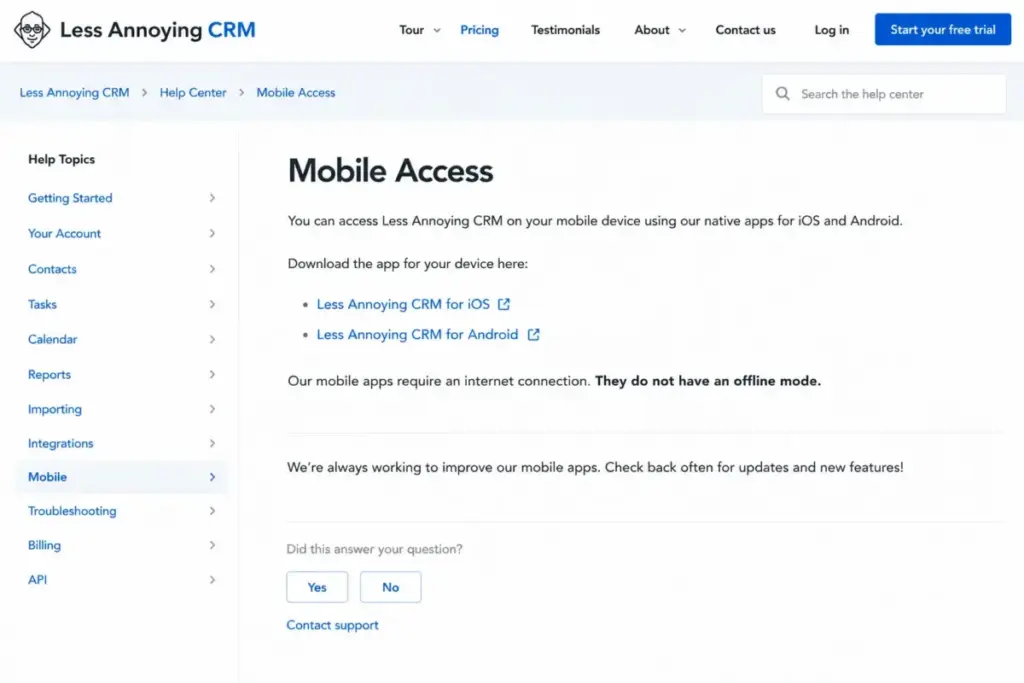
This single fact disqualifies the product for offline-first work. Construction crews, rural sales reps, inspectors, and field-service teams that lose signal will lose CRM access, and no plan price fixes that.
Security and Support: Free Help, With Real Limits
Free human support is a genuine strength here, and it is worth separating what is verified from what a procurement team still has to confirm. The reviewed official pages support the security controls on the left below; they do not publicly verify the items on the right.
| Verified in official docs | Confirm directly with the vendor |
|---|---|
| 256-bit encryption in transit, at rest, and in backups | SOC 2 |
| AWS US-East (Virginia) hosting | HIPAA |
| Two-factor authentication controls, Google sign-in | SCIM provisioning |
| GDPR documentation and data-processing material | Enterprise SSO |
Encryption and GDPR material are documented, but the absence of a public SOC 2 or HIPAA reference is not proof the vendor cannot supply it privately, so regulated buyers should ask before shortlisting.
Support itself is free by email and phone, with a help center, human CRM coaching, and scheduled screen-sharing training. The limits are practical: phone support runs weekday Central Time business hours, weekend help is primarily email, the service is English-only, and no public response-time SLA was located.
A distributed or non-English team should weigh those coverage gaps against the value of free human help.
Add-Ons, Overages, and Surprise Costs
The vendor does not run a paid add-on menu, so the surprise costs come from usage, tax, and external tooling rather than upsells. Ranking pages that say “no hidden fees” are broadly right about the core plan and wrong about the operating total.
| Potential cost | Amount | Trigger |
|---|---|---|
| Applicable sales tax | Varies by jurisdiction | Added where legally applicable |
| Extra 100GB storage | $15 per month | Pooled allowance runs low |
| Zapier or partner app | Set by provider | Workflow not covered natively |
| Custom API development | Contractor or in-house cost | High-volume or custom sync |
| External email, reporting, or telephony | Set by provider | Workflow exceeds native features |
| Non-refundable prepaid time | Remaining paid period | Cancel or downsize after paying ahead |
Storage is the only add-on Less Annoying CRM itself charges for. Everything else on this list is a third-party cost that a lean CRM can push you toward, which is why a team should price its full stack, not just the seat rate.
Which Team Sizes and Roles Should Buy It
Fit here tracks workflow complexity more than headcount, since a five-person revenue-operations team can need more than a twenty-person relationship-based service firm. The grid below maps concrete cohorts to a buy, trial, or skip call.
| Buyer cohort | Recommendation | Why |
|---|---|---|
| Solo consultant | Buy | $15 with no seat minimum, full feature set |
| 3-to-10-person service firm | Buy | Relationship-driven sales fit the simple pipeline |
| Small local service business | Buy | Shared contacts, reminders, simple permissions |
| Lean 5-person outbound team | Trial | Confirm reporting and email workflow first |
| Offline field team | Skip | No offline mobile mode |
| Data-heavy team near 50,000 records | Skip | Performance guidance and bulk-op limits |
For a solo buyer, the absence of a multi-seat minimum is the quiet advantage. Many rivals start billing at three or five seats, so a one-person shortlist should weigh that $15-versus-forced-minimum gap directly against tools on the best CRM for freelancers list.
I would put a relationship-driven small team on this product without hesitation. I would send a metrics-driven sales org to trial it with a specific reporting test in hand.
Who Should Avoid Less Annoying CRM
The clearest disqualifier is offline field work, because no plan restores mobile access without a connection. That is a capability boundary, not a price problem, and it is absolute.
The second is scale. An account importing a large legacy database and heading past 50,000 contacts and companies runs into the vendor’s own performance guidance, and the single-plan model offers no higher tier to buy your way out.
The exception is a team that has plenty of records but light bulk-operation and integration needs. That team may still sit comfortably under the guidance in daily use, so the 50,000 figure is a reason to test, not an automatic veto.
Buyers who need deeper analytics or complex automation should compare against the broader best CRM for small business field before committing.
Less Annoying CRM Pricing vs Competitors
Entry prices only compare fairly once you normalize the billing basis, because a lower headline rate often requires annual commitment. Less Annoying CRM is the only one of these four with no annual-billing requirement and no annual discount.
| CRM | Entry price | Billing basis | Annual per seat |
|---|---|---|---|
| Less Annoying CRM | $15/user/mo | Monthly or annual, no discount | $180 |
| Bigin by Zoho Express | $9/user/mo or $7/user/mo annual | Monthly or annual | $84 annual |
| Pipedrive Lite | $14/seat/mo billed annually | Annual | $168 |
| Capsule CRM Starter | $18/user/mo billed annually | Annual | $216 |
Bigin’s official FAQ lists Express at $9 per user monthly or $7 on annual billing, the lowest anchor in this set.
Bigin by Zoho is the cheaper entry point, especially on annual billing, and it suits buyers who want a tighter sales-pipeline tool at a lower rate; the fuller Zoho CRM pricing ladder is worth a look if you expect to scale into automation and analytics. Pipedrive lands close to Less Annoying CRM on price but only at annual commitment, and its reporting and sales-automation depth is the reason to pay it, which the Pipedrive pricing breakdown covers in detail.
Capsule Starter is the priciest entry here at $18 per user, though it adds structure some teams want. Less Annoying CRM wins on monthly flexibility and free human support, not on being the outright cheapest.
What Other Pricing Pages Get Wrong (2026 Corrections)
Search results for this product carry a few stale or wrong claims, and I would not budget around any of them. Here is what the official sources say, checked July 21, 2026.
One directory still shows a $10 per-user price; the verified rate is $15. Another labels the 30-day trial a permanent free tier and hints at a custom tier; there is a full 30-day trial and no official free plan or custom tier in the reviewed pages.
A few pages claim no native app or no automation; native iOS and Android apps exist, and basic native automation exists. One extraction calls storage unlimited; the allowance is 25GB pooled per user with a paid 100GB expansion.
Reading the official pricing and help pages settles each of these, which is the reason the correction matters: cost planning breaks when the inputs are a year out of date.
Migration, Export, and Cancellation Costs
Switching cost is part of first-year TCO even when the vendor charges no migration fee. Less Annoying CRM supports CSV import and bulk export, and a current TrustRadius reviewer reported a straightforward spreadsheet migration with a minimal learning curve, though a complex multi-system move still needs field mapping and duplicate review.
A practical migration path is: prepare a clean CSV, map fields, review duplicates, run a sample import, then a full import, then validate. Teams moving from a structured CRM rather than a spreadsheet should budget time for that validation, and the CRM migration guide walks through the sequence.
On exit, the official billing hub indicates closed-account data is stored for one calendar year unless you follow the available deletion process. Export before you close the account, since cancellation ends access at the end of the paid period and prepaid time is non-refundable.
Is Less Annoying CRM Worth the Price?
At $15 per user per month with free human support and no seat minimum, Less Annoying CRM is worth it for solo consultants and small relationship-driven teams whose reporting, automation, and integration needs stay simple. For that buyer, the flat rate and included onboarding beat cheaper tools that gate support or force annual billing.
It is not worth it for offline field teams, data-heavy accounts approaching 50,000 records, or organizations that need advanced forecasting, sequences, or verified enterprise compliance. Those teams will spend the savings on external tools or a migration within a year.
If Less Annoying CRM pricing fits the budget but the feature ceiling does not, Pipedrive is the better pick for reporting and sales automation, and Bigin by Zoho is the better pick for a lower entry price. The full Less Annoying CRM review and the Less Annoying CRM alternatives breakdown go deeper on where each option pulls ahead.
How to Avoid Overpaying for Less Annoying CRM
The base rate is fixed, so overpaying here means paying for capacity or tooling you do not need. A few checks keep the real bill honest.
First, pay monthly unless your headcount is stable, because annual billing saves nothing and locks non-refundable money. Second, right-size seats, since prorated additions make it cheap to add users later rather than pre-buying them.
Third, test whether your file workflow fits the pooled 25GB-per-user allowance before assuming the $15 storage add-on, and remember the pool grows with seats. Fourth, confirm which integrations are native before committing to a Zapier or partner subscription you would count as a hidden CRM cost.
Fifth, validate email sending and reporting during the 30-day trial so you do not discover an external-tool cost after signup. Sixth, if you are near 50,000 records, benchmark performance in the trial rather than after import.
FAQ
How much does Less Annoying CRM cost?
Less Annoying CRM costs $15 per user per month, plus applicable tax, on a single “Everything included” plan verified on the official pricing page on July 21, 2026. There are no feature tiers and no contract. A 10-user team pays $150 per month, or $1,800 per year before tax.
Does Less Annoying CRM have a free plan?
No. There is no permanent free plan. Less Annoying CRM offers a full 30-day free trial that requires no credit card and includes the whole product. Some search results mislabel that trial as a free tier, but official documentation describes a time-limited trial followed by the single paid plan at $15 per user per month.
Is there a Less Annoying CRM annual discount?
No. Annual payment is available, but the official payment documentation confirms it carries no discount. Paying for a year costs $180 per user, which is simply 12 times the $15 monthly rate. For a team with changing headcount, monthly billing is safer because prepaid time is non-refundable.
Are there hidden fees with Less Annoying CRM?
The core plan has no hidden vendor fees, but the real bill can grow. Applicable sales tax is added, an extra 100GB of storage costs $15 per month, and workflows beyond native features may need paid Zapier, email, reporting, or telephony tools. Those third-party costs are the ones to plan for.
How many contacts can Less Annoying CRM hold?
Marketing describes unlimited contacts, and there is no strict billing cap. The official help center recommends keeping a single account under 50,000 total contacts and companies, because larger databases may load slowly and complicate bulk merging, syncing, and integrations. It is a performance guideline, not an enforced limit.
Does Less Annoying CRM charge for support?
No. Email support, phone support, the help center, human CRM coaching, and scheduled training are all free. Phone support runs weekday Central Time business hours, weekend help is primarily email, and the service is English-only. No public response-time SLA was located in the reviewed pages.
Does Less Annoying CRM work offline?
No. As documented on July 21, 2026, the native iOS and Android apps require an internet connection and have no offline mode, and the vendor describes the apps as a work in progress. Teams that lose connectivity in the field, such as inspectors or rural sales reps, should treat this as a disqualifier.
Is Less Annoying CRM cheaper than Pipedrive?
On monthly billing, Less Annoying CRM at $15 is close to Pipedrive Lite at $14 per seat, but Pipedrive’s $14 requires annual commitment while Less Annoying CRM does not. Bigin by Zoho is cheaper than both, starting at $9 per user monthly or $7 annually, so cheapest depends on billing terms and reporting needs.
Is Less Annoying CRM good for a growing sales team?
It fits a growing relationship-driven team well until the workflow needs advanced reporting, sequences, or complex automation. Because there is no higher tier, teams that outgrow the basic pipeline and activity reports add external tools or migrate rather than upgrade. If forecasting and attribution matter now, a tool like Pipedrive is the safer long-term pick.