Notion tries to be everything: docs, wikis, databases, projects, forms, sites, and AI. For many teams, that flexibility is the problem. When Notion databases slow down at scale, when project tracking stays buried inside pages, or when your wiki becomes a graveyard of unverified docs, the right Notion alternative is not another all-in-one tool. It is the tool that fixes the specific workflow that broke.
This guide maps 10 Notion alternatives to the exact exit reason that drives the switch. I evaluated each tool on feature parity, migration difficulty, pricing at equivalent feature levels, and team adoption fit. Whether you need stronger project management software, a trustworthy knowledge base software platform, or a real relational database, this article names winners by scenario instead of listing features.
Notion is not one product. It is a bundle of workflows. The right alternative depends on which workflow is failing.
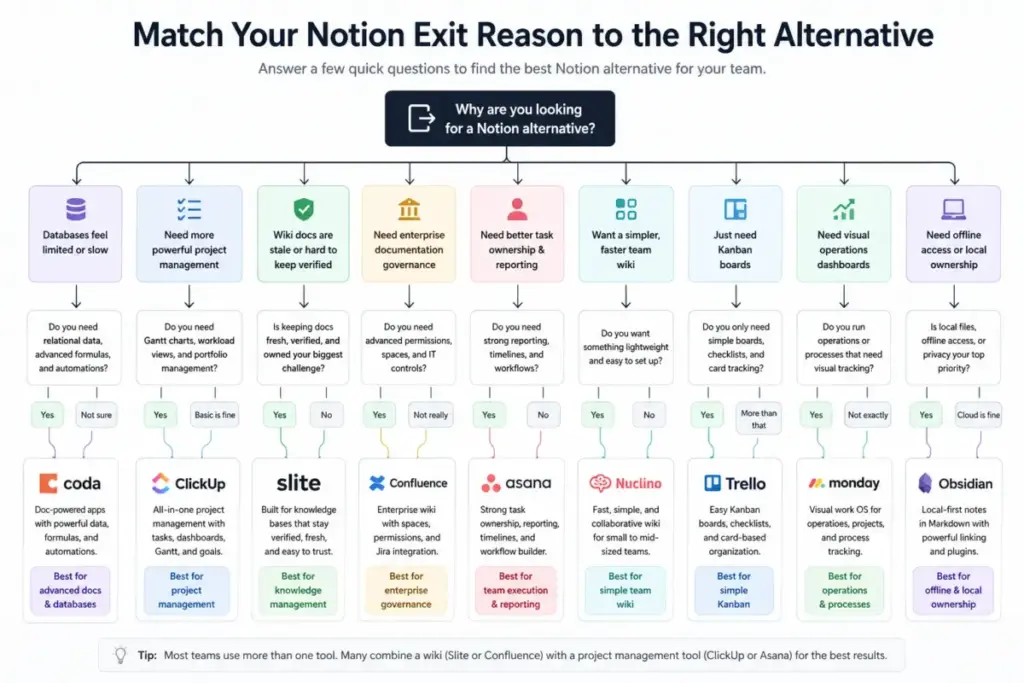
TL;DR: Best Notion Alternatives by Exit Reason
| Exit Reason | Best Alternative | Why |
|---|---|---|
| Databases feel limited | Coda or Airtable | Stronger relational data, formulas, automations |
| Need structured project management | ClickUp | Tasks, dashboards, Gantt, workload, goals |
| Wiki docs are stale and unverified | Slite | Built-in verification, knowledge freshness |
| Enterprise documentation governance | Confluence | Spaces, permissions, Jira integration |
| Need better task ownership and reporting | Asana | Portfolios, timelines, workflow builder |
| Want a simpler team wiki | Nuclino | Fast, lightweight, minimal setup |
| Just need Kanban boards | Trello | Simple cards, boards, checklists |
| Visual operations dashboards | monday.com | Board-first tracking, process templates |
| Offline and local-first notes | Obsidian | Local Markdown files, plugins, no cloud dependency |
Why Are Users Leaving Notion?
Notion works best as a flexible workspace, but teams leave when flexibility turns into maintenance. After reviewing the Notion review data and user feedback across forums and review sites, the exit reasons fall into clear patterns. Most teams do not leave Notion because it is bad. They leave because their use case outgrew what Notion does well.
Cost Scaling
Notion Plus costs $10/member/month. Notion Business costs $20/member/month. Add Notion Sites custom domains at $8/month/domain (annual billing) or $10/month/domain (monthly), plus $10 per 1,000 monthly Notion credits for Custom Agents. A 25-person team on Business pays $500/month before add-ons. That cost compounds when guest access, advanced permissions, and AI features enter the picture.
Slow Large Databases
As one Reddit user in r/Notion put it: “What used to be a fast and responsive platform now takes +30 seconds to load EVERYTHING.” Teams with hundreds of linked views, rollups, formulas, and nested databases report consistent slowdowns. Notion was built for flexible pages, not high-volume relational data.
Project Management Limits
Notion boards and timelines exist, but they lack native Gantt dependencies, workload balancing, portfolio views, and structured reporting. Teams that need accountability, cross-project visibility, and deadline enforcement outgrow Notion task tracking quickly.
Knowledge Governance Gaps
Notion added page verification on Business plans, but teams with 50+ wiki pages still struggle with content freshness, ownership tracking, and audit trails. Documentation governance requires more than a verify badge.
Offline and Data Ownership
Notion is cloud-first. Offline access is limited and inconsistent. Users who want local Markdown files, full offline editing, or data portability without cloud dependency look elsewhere.
Learning Curve and Workspace Sprawl
Notion’s flexibility means every team builds differently. Without a workspace owner, pages multiply, naming breaks down, and new employees cannot find anything. As a verified Capterra reviewer noted in May 2025: “The mobile app is not quite as snappy as the desktop version.” The complexity compounds across devices.
Migration Reality
Notion exports pages, databases, and workspaces as PDF, CSV, or HTML. But relations, formulas, rollups, views, automations, and permissions do not export cleanly. Switching from Notion means rebuilding, not just exporting.
Best Notion Alternatives Ranked
No single tool replaces everything Notion does, because Notion bundles docs, databases, wikis, and projects into one workspace. The best alternative depends on which part of that bundle is failing for your team. I ranked these tools using weighted criteria: exit reason fit (25%), feature parity vs Notion (20%), migration practicality (15%), pricing fairness (15%), team adoption (15%), and governance and scale (10%). Full scoring details are on the SaaSZap review methodology page.
| Rank | Tool | Best For | Starting Price | Migration Difficulty | Score |
|---|---|---|---|---|---|
| 1 | Coda | Doc-powered apps | Free; Pro $10/mo per Doc Maker | Medium | 9.2/10 |
| 2 | ClickUp | All-in-one replacement | Free; Unlimited $7/user/mo | Medium-Hard | 9.0/10 |
| 3 | Slite | Team knowledge base | Standard $8/user/mo | Easy-Medium | 8.8/10 |
| 4 | Confluence | Enterprise wiki | Free (10 users); Standard ~$5.42/user/mo | Medium | 8.7/10 |
| 5 | Airtable | Database workflows | Free; Team $20/user/mo | Hard | 8.6/10 |
| 6 | Asana | Structured project management | Free; Starter $10.99/user/mo | Medium | 8.5/10 |
| 7 | Nuclino | Lightweight wiki | Free; Starter $6/user/mo | Easy | 8.2/10 |
| 8 | Trello | Simple Kanban | Free; Standard $5/user/mo | Easy | 8.0/10 |
| 9 | monday.com | Visual operations | Free (2 seats); Basic $9/seat/mo | Medium | 7.9/10 |
| 10 | Obsidian | Local-first notes | Free; Commercial $50/user/year | Medium | 7.8/10 |
Prices reflect annual billing where available. Verified from official pricing pages as of April 2026.
Coda – Best for Doc-Powered Apps

Score: 9.2/10 – Excellent
Coda is the best Notion alternative for teams that tried to build operational apps inside Notion databases and hit limits with formulas, automations, or connected workflows. It turns documents into functional business tools with buttons, tables, Packs, and cross-doc sync. It is less comfortable for casual notes, but stronger when docs must act like software.
Best for: 5 to 30 person ops, product, or RevOps teams building trackers, request systems, and dashboards.
Pricing: Free tier available. Pro costs $10/month per Doc Maker. Team costs $30/month per Doc Maker. Enterprise is custom. Coda bills only Doc Makers (users who create or edit doc structure), so viewers and editors cost nothing. This makes it cheaper than Notion when 3 people build and 20 people use. It gets expensive if everyone becomes a Doc Maker.
Why it beats Notion for database-heavy workflows: Coda formulas are more expressive than Notion formulas. Buttons trigger multi-step actions. Packs connect to external tools without Zapier. Automations run inside the doc. For teams building approval flows, inventory trackers, or client portals, Coda treats the doc as the app layer that Notion only hints at.
Where Notion is still better: Notion has a larger template library, stronger community, more polished mobile experience, and easier onboarding for non-technical users. Notion’s wiki and page hierarchy are more intuitive for simple documentation.
Critical weakness: Coda has a steeper formula learning curve. Without an internal builder who understands Coda’s logic layer, the workspace becomes another messy tool.
Migration difficulty: Medium. Pages and tables can move from Notion, but formulas, relations, and workflow logic need rebuilding in Coda’s own syntax. Budget 2 to 4 weeks for a 15-person team with moderate database use.
Not for: Teams that only need simple notes, meeting docs, or non-technical employees who dislike formula-driven interfaces.
James Carter’s quick take: Coda rewards a strong internal builder. If your team has someone who pushed Notion databases to their limit and wanted more, Coda is the upgrade. If nobody on your team builds formulas, Coda will collect dust. Read the full Coda review for deeper feature analysis.
ClickUp – Best All-in-One Replacement

Score: 9.0/10 – Excellent
ClickUp is the closest thing to a full Notion replacement because it covers docs, tasks, goals, dashboards, Gantt charts, time tracking, whiteboards, and automations in one workspace. It solves the exit reason of Notion being too document-centric and weak for formal project execution.
Best for: 6 to 50 person teams that need tasks, docs, goals, and reporting in one tool without switching between apps.
Pricing: Free Forever plan available. Unlimited costs $7/user/month billed yearly. Business costs $12/user/month billed yearly. Brain AI add-on starts at $9/user/month. For a 10-person team, ClickUp Unlimited runs $70/month vs Notion Plus at $100/month. But adding AI narrows that gap.
Why it beats Notion for project management: ClickUp gives native Gantt dependencies, workload views, time tracking, goal tracking, portfolios, and custom dashboards. Notion requires workarounds for most of these. ClickUp also has built-in chat and whiteboards, reducing the need for Slack or Miro alongside your workspace.
Where Notion is still better: Notion’s page flexibility, database-backed templates, and clean editing experience are more refined. Notion feels calmer. ClickUp can feel dense and overwhelming during initial setup.
Critical weakness: ClickUp can replace Notion sprawl with configuration sprawl. It needs a workspace owner to set up spaces, folders, lists, and views before the team benefits. Without that structure, ClickUp becomes noisy.
Migration difficulty: Medium to hard. Tasks and docs can move, but Notion’s page hierarchy, database logic, linked views, and workflow conventions need full redesign in ClickUp’s space/folder/list model. Budget 3 to 6 weeks for a 20-person team.
Not for: Teams leaving Notion because they want simplicity. ClickUp adds structure, but it also adds complexity.
James Carter’s quick take: ClickUp solves the “Notion cannot do real project management” problem better than any other tool on this list. But it is a commitment. If your team needs structured execution, dashboards, and reporting, ClickUp delivers. If your team just wants cleaner docs, look at Slite or Nuclino instead. See the ClickUp review for workspace setup guidance.
Slite – Best Team Knowledge Base

Score: 8.8/10 – Excellent
Slite is the best alternative for teams whose Notion wiki became a graveyard of outdated pages nobody trusts. It is built around document verification, AI-powered search, and knowledge freshness tracking. Slite does not try to replace Notion’s databases or project tools. It replaces the wiki layer with something teams actually maintain.
Best for: Remote teams, HR teams, support teams, product teams, and 10 to 100 person companies needing reliable internal docs.
Pricing: Standard costs $8/user/month billed yearly. Knowledge Suite costs $20/user/month billed yearly (starts at 10 users). Enterprise is custom. Slite Standard is $2/user/month cheaper than Notion Plus at listed annual price. Knowledge Suite matches Notion Business-level cost but adds verification workflows and workspace analytics.
Why it beats Notion for knowledge management: Slite tracks document freshness, assigns content owners, and flags stale pages automatically. AI search returns answers from your docs, not just links. The knowledge management panel shows what is verified, what is outdated, and what needs review. Notion has a verify page feature on Business plans, but Slite builds its entire product around this workflow.
Where Notion is still better: Notion has databases, project views, forms, and flexible page templates that Slite does not offer. If your team needs more than a wiki, Notion covers more ground.
Critical weakness: Slite is not a project management or database replacement. Teams switching from Notion who also need task tracking will need a second tool alongside Slite.
Migration difficulty: Easy to medium. Docs move cleanly from Notion. Notion databases need simplification or must move to a different tool. Budget 1 to 2 weeks for a 15-person documentation-focused team.
Not for: Database-heavy teams, teams replacing tasks and docs together, or solo users who do not need verification workflows.
James Carter’s quick take: Slite is what Notion users often wish their wiki would become after a cleanup. If your exit reason is “nobody trusts our docs,” Slite fixes that specific problem better than any tool here.
Confluence – Best Enterprise Wiki

Score: 8.7/10 – Excellent
Confluence is the best Notion alternative for teams already in the Atlassian ecosystem or organizations that need enterprise-grade documentation governance. It connects natively with Jira, has structured spaces and permissions, and scales to hundreds of users with admin controls that Notion Business cannot match.
Best for: 50+ person engineering, product, IT, and regulated teams, especially those already using Jira or other Atlassian tools.
Pricing: Free for up to 10 users. Standard starts around $5.42/user/month. Premium starts around $10.44/user/month. Enterprise is custom. Entry pricing is lower than Notion, but Atlassian Marketplace apps, Atlassian Guard, and ecosystem dependencies can raise the real cost. Check the Confluence pricing page for current tier details.
Why it beats Notion for enterprise documentation: Confluence spaces enforce structure. Permissions are granular at the space and page level. Analytics show page views and engagement. Jira integration means engineering specs, product requirements, and sprint docs live alongside tickets. Rovo adds AI search across the Atlassian stack. For a deeper comparison, see the Notion vs Confluence analysis.
Where Notion is still better: Notion is faster to set up, more visually appealing, and more flexible for small teams. Notion’s database-backed pages and templates are more creative than Confluence’s page tree. Creative teams and startups will find Confluence heavy.
Critical weakness: Confluence can feel formal and rigid. Page creation has more friction than Notion. The editor is improving but still less fluid than Notion’s block-based interface.
Migration difficulty: Medium. Pages can move from Notion, but workspace structure, permissions, and attachments require careful mapping to Confluence spaces. Budget 3 to 5 weeks for a 30-person team migrating a full wiki. Read the full Confluence review for setup details.
Not for: Creative teams, startups that need fast and flexible docs, or teams with no Atlassian investment.
James Carter’s quick take: Confluence works best when documentation is part of a managed operating system, not an open canvas. If your org already uses Jira and needs documentation governance, Confluence is the natural fit. If you are a 10-person startup, it will feel like overhead.
Airtable – Best Database Alternative

Score: 8.6/10 – Excellent
Airtable is the strongest Notion alternative when the exit reason is “Notion databases are not enough.” It offers true relational databases, interfaces for non-technical users, automations, forms, and app-like workflows. Airtable is a better database, but it is not a better Notion, unless database structure is the specific pain point.
Best for: Operations teams, content ops, product ops, and database-heavy workflows in teams of 5 to 50.
Pricing: Free tier available. Team costs $20/collaborator/month billed annually ($24 monthly). Business costs $45/collaborator/month billed annually ($54 monthly). Airtable Team is twice the cost of Notion Plus at the annual starting price. Business is significantly higher than Notion Business. See the Airtable pricing page for current limits and record caps.
Why it beats Notion for structured data: Airtable handles relational data, linked records, automations, and interfaces better than Notion databases. Record limits are higher. The API is stronger. Interfaces let teams build custom views without formulas. For inventory management, content calendars, CRM-lite setups, or operations tracking, Airtable provides structure that Notion databases approximate but do not match.
Where Notion is still better: Notion is better for long-form writing, meeting notes, wiki pages, and flexible documentation. Airtable is not a natural writing environment. Teams that use Notion primarily for docs will not find a replacement here.
Critical weakness: Airtable is expensive at scale. Collaborator-based pricing means every editor pays full price. Record limits on lower tiers can force upgrades. It is also not a wiki or documentation tool.
Migration difficulty: Hard for mixed workspaces. Medium for database-only workspaces. Notion database exports lose relations and rollups, so Airtable schemas must be rebuilt from scratch. Budget 3 to 6 weeks for a team migrating 5+ interconnected databases. Read the Airtable review for migration tips.
Not for: Teams whose main Notion use case is docs, meeting notes, or a wiki. Airtable solves the database problem, not the workspace problem.
James Carter’s quick take: Airtable is the answer when your Notion frustration is specifically about database performance, relational data, and operational workflows. If you are leaving Notion for any other reason, Airtable is probably not the switch.
Asana – Best Structured Project Management

Score: 8.5/10 – Excellent
Asana is the best Notion alternative when tasks are becoming invisible inside docs. It replaces Notion’s loose project tracking with structured task ownership, cross-functional workflows, portfolios, goals, and deadline enforcement. Asana is not a wiki or a database tool, but it is the strongest option for teams that need clearer execution.
Best for: Marketing, operations, product, and PMO teams of 10 to 50 people that need accountability and cross-project visibility.
Pricing: Personal plan is free. Starter costs $10.99/user/month billed annually ($13.49 monthly). Advanced costs $24.99/user/month billed annually ($30.49 monthly). Asana Starter is close to Notion Plus in price. Advanced exceeds Notion Business. See the Asana pricing page for current feature gates.
Why it beats Notion for project management: Asana has native timeline views, workflow builder, portfolios, goals, approvals, and project templates. Tasks have clear owners, due dates, and dependencies. Reporting is built in. Notion can track tasks in databases, but it lacks the structured execution layer that Asana provides out of the box.
Where Notion is still better: Notion is better for flexible documentation, meeting notes, wikis, and database-backed pages. Asana does not replace your docs, only your task management.
Critical weakness: Asana requires a second tool for documentation and knowledge management. Teams switching from Notion will likely pair Asana with Slite, Confluence, or Google Docs.
Migration difficulty: Medium. Tasks can be rebuilt in Asana, but Notion docs and databases need another system. Budget 2 to 4 weeks for a 20-person team to rebuild task workflows. Check the full Asana review for workflow setup guidance.
Not for: Teams looking for a single docs-plus-database replacement. Asana solves execution, not documentation.
James Carter’s quick take: Asana works when your Notion frustration is “nobody knows who owns what” or “tasks disappear inside pages.” It will not replace your wiki, but it will fix your project visibility.
Nuclino – Best Lightweight Wiki

Score: 8.2/10 – Very Good
Nuclino is the best alternative for teams that find Notion too heavy for simple documentation. It strips away database complexity, formula logic, and workspace customization in favor of fast, clean, real-time collaborative docs. Nuclino is best when the goal is removing options, not adding them.
Best for: 3 to 25 person teams that want a simple internal wiki without configuration overhead.
Pricing: Free tier available. Starter costs $6/user/month. Business costs $10/user/month. Annual billing saves up to 25%. Nuclino Starter is cheaper than Notion Plus. Business matches Notion Plus but stays below Notion Business pricing.
Why it beats Notion for simple team docs: Nuclino loads fast, requires minimal setup, and offers list, board, table, and graph views for organizing pages. Sidekick AI handles search and content suggestions. Publishing is available for public docs. For teams that just need a clean place to store and find internal knowledge, Nuclino delivers without the learning curve.
Where Notion is still better: Notion has far deeper database features, a larger template ecosystem, more integrations, and advanced workspace flexibility. Teams that use Notion databases, formulas, or complex page hierarchies will find Nuclino limited.
Critical weakness: Nuclino lacks database depth, advanced automations, and the template gravity that makes Notion attractive for new teams. It is intentionally minimal, which is a strength for some and a ceiling for others.
Migration difficulty: Easy for docs, hard for databases. Notion pages transfer well. Notion databases, relations, and rollups have no equivalent in Nuclino. Budget 1 to 2 weeks for a 10-person docs-only migration.
Not for: Teams that need advanced project management, complex databases, or the full flexibility Notion provides.
James Carter’s quick take: Nuclino is the anti-Notion. If your team’s problem is too many options and too much setup, Nuclino fixes that by giving you less. That is not an insult. Sometimes less is exactly right.
Trello – Best Simple Kanban Switch

Score: 8.0/10 – Very Good
Trello is the best alternative when Notion boards feel like a workaround for simple task tracking. It gives teams clean Kanban boards, cards, checklists, and automations without the overhead of a full workspace tool. Trello wins when Notion was overbuilt for a simple workflow.
Best for: Small teams, editorial boards, client task boards, and lightweight operations teams of 3 to 15 people.
Pricing: Free for up to 10 collaborators per workspace. Standard costs $5/user/month billed annually. Premium costs $10/user/month billed annually. Enterprise starts at $17.50/user/month. Trello Standard is half the cost of Notion Plus. Premium is closer to Notion Plus but adds timeline, dashboard, and calendar views. See the Trello pricing page for current Power-Up limits.
Why it beats Notion for Kanban workflows: Trello is purpose-built for card-based task management. Drag-and-drop is instant. Custom fields, checklists, labels, and due dates are native. Automation (Butler) handles repeating tasks and card moves. Power-Ups extend functionality. For teams that used Notion primarily for board views, Trello does it better and faster.
Where Notion is still better: Notion is better for documentation, databases, wikis, and linked views. Trello is not a writing tool, a database, or a knowledge base.
Critical weakness: Trello is not an all-in-one workspace replacement. Teams that need docs, databases, AI search, or portfolio-level reporting will need additional tools alongside Trello.
Migration difficulty: Easy for board-style tasks. Hard for docs and databases, which have no Trello equivalent. Budget 1 week for simple board migration. Read the Trello review for Power-Up recommendations.
Not for: Teams needing docs, databases, AI search, or enterprise-grade reporting. Trello replaces one Notion feature, not the workspace.
James Carter’s quick take: Trello is the simplest switch on this list. If your team used Notion for Kanban boards and felt overwhelmed by everything else, Trello strips it down to what matters. Do not expect it to replace your wiki.
monday.com – Best Visual Operations Workspace

Score: 7.9/10 – Very Good
monday.com is the best Notion alternative for teams that need visual operational dashboards and repeatable workflow boards. It replaces Notion’s flexible-but-unstructured approach with template-driven boards, automations, and dashboards that non-technical team members can use on day one.
Best for: Operations, client services, campaign planning, and workflow-heavy teams of 10 to 50 people.
Pricing: Free for up to 2 seats. Basic costs $9/seat/month billed annually. Standard costs $12/seat/month billed annually. Pro and Enterprise are higher. Basic is slightly below Notion Plus. Standard exceeds Notion Plus but stays below Notion Business. See the monday.com pricing page for seat minimums and feature gates.
Why it beats Notion for visual operations: monday.com boards are stronger for process visibility, status tracking, and team dashboards. Automations handle status changes, notifications, and integrations. Timeline and Gantt views are native on paid plans. For operations teams that need standardized boards with clear workflows, monday.com is more structured than Notion databases.
Where Notion is still better: Notion is more natural for long-form documentation, knowledge base depth, and flexible database-backed pages. monday.com docs exist but are not as refined as Notion’s editor.
Critical weakness: monday.com is less natural for documentation-first teams. Seat-based pricing with minimums can raise costs for small teams. The tool is board-centric, which limits flexibility for wiki-style use cases.
Migration difficulty: Medium. Boards can replace Notion databases, but doc hierarchy and relations need rebuilding. Budget 2 to 4 weeks for a 15-person team. Check the monday.com review for integration options.
Not for: Solo users, documentation-first teams, or teams that need deep relational databases.
James Carter’s quick take: monday.com works best when the team needs process visibility more than flexible pages. If your exit reason is “nobody can see project status at a glance,” monday.com solves that. If your exit reason is “our docs are a mess,” look elsewhere.
Obsidian – Best Local-First Notes

Score: 7.8/10 – Very Good
Obsidian is the best Notion alternative for users who want offline-first, local-file knowledge storage with full data ownership. It stores notes as plain Markdown files on your device. There is no cloud dependency, no subscription lock-in for core features, and no risk of losing access to your own writing.
Best for: Solo knowledge workers, researchers, writers, developers, and privacy-focused users.
Pricing: Free for all purposes. Commercial support license costs $50/user/year but is not required for commercial use. Catalyst (early access) is $25 one-time. Sync ($4/month) and Publish ($8/month) are optional paid add-ons. For individuals, Obsidian is effectively free. Team use requires process design around file sync and collaboration.
Why it beats Notion for personal knowledge: Obsidian files live on your device. Backlinks and graph view create connections between notes. The plugin ecosystem adds kanban boards, calendars, dataview queries, and more. Offline editing is native, not an afterthought. For researchers and writers who build long-term knowledge bases, Obsidian gives permanence that cloud tools cannot guarantee.
Where Notion is still better: Notion is better for team collaboration, shared databases, real-time editing, forms, approvals, admin controls, and structured project management. Obsidian is a personal knowledge tool, not a team workspace.
Critical weakness: Obsidian is not a native team collaboration or project management replacement. Real-time co-editing requires third-party sync. There are no shared databases, no admin panel, and no built-in permissions.
Migration difficulty: Medium for notes, hard for databases and shared team workflows. Notion pages can export as Markdown, but database views, relations, and rollups have no Obsidian equivalent. Budget 1 to 2 weeks for personal note migration.
Not for: Teams needing real-time collaboration, shared databases, approvals, or admin controls. Obsidian is a Notion alternative only for the knowledge layer, not the workspace layer.
James Carter’s quick take: Obsidian is the exit for Notion users who realized they wanted a second brain, not a team workspace. If your concern is data ownership, offline access, and long-term note portability, Obsidian is the answer. If you need team features, it is not.
Notion vs Top Alternatives: Feature Parity Matrix
The gap between Notion and its alternatives is not about total features, it is about depth in specific workflows. Notion covers more surface area than most tools on this list. But surface area and depth are different things. The matrix below shows where each alternative matches, exceeds, or falls short of Notion across key workflows.
| Feature | Notion | Coda | ClickUp | Slite | Confluence | Airtable | Asana | Nuclino | Trello | monday.com | Obsidian |
|---|---|---|---|---|---|---|---|---|---|---|---|
| Docs | ★★★★★ | ★★★★ | ★★★★ | ★★★★★ | ★★★★ | ★★ | ★★ | ★★★★ | ★ | ★★★ | ★★★★ |
| Wiki Governance | ★★★ | ★★ | ★★★ | ★★★★★ | ★★★★★ | ★ | ★ | ★★★ | ★ | ★★ | ★★ |
| Databases | ★★★★ | ★★★★★ | ★★★ | ★ | ★★ | ★★★★★ | ★★ | ★ | ★ | ★★★ | ★★ |
| Project Management | ★★★ | ★★★ | ★★★★★ | ★ | ★★ | ★★★ | ★★★★★ | ★★ | ★★★★ | ★★★★ | ★ |
| Automations | ★★★ | ★★★★★ | ★★★★ | ★★ | ★★★ | ★★★★ | ★★★★ | ★★ | ★★★ | ★★★★ | ★★ |
| AI Features | ★★★★ | ★★★★ | ★★★★ | ★★★★ | ★★★ | ★★★ | ★★★ | ★★★ | ★★ | ★★★ | ★★ |
| Offline Access | ★★ | ★★ | ★★ | ★★ | ★★ | ★★ | ★★ | ★★ | ★★ | ★★ | ★★★★★ |
| Guest/Client Access | ★★★ | ★★★ | ★★★★ | ★★ | ★★★ | ★★★ | ★★★ | ★★ | ★★★ | ★★★ | ★ |
| Migration Difficulty | n/a | Medium | Medium-Hard | Easy-Medium | Medium | Hard | Medium | Easy | Easy | Medium | Medium |
| Best Switch Reason | Stay here | App-like docs | Full PM | Wiki trust | Enterprise docs | Relational data | Task ownership | Simple wiki | Kanban | Visual ops | Offline notes |
Real Switching Cost: Notion vs Alternatives
Pricing comparisons using starting prices are misleading. Here is what real teams pay at equivalent feature levels:
10-Person Team (Monthly, Annual Billing)
| Tool | Plan | Monthly Cost | Notes |
|---|---|---|---|
| Notion Plus | Plus | $100 | All 10 are members |
| Notion Business | Business | $200 | Full AI, advanced permissions |
| Coda Pro | Pro, 3 Doc Makers | $30 | 7 editors/viewers free |
| ClickUp Unlimited | Unlimited | $70 | All 10 are workspace members |
| Slite Standard | Standard | $80 | All 10 users |
| Trello Standard | Standard | $50 | All 10 users |
| Airtable Team | Team | $200 | All 10 are collaborators with edit access |
| Asana Starter | Starter | $110 | All 10 users |
| Nuclino Starter | Starter | $60 | All 10 users |
| monday.com Basic | Basic | $90 | All 10 seats |
| Obsidian | Free + Sync | ~$40 | Sync $4/user/month for 10 users |
25-Person Team (Monthly, Annual Billing)
| Tool | Plan | Monthly Cost |
|---|---|---|
| Notion Plus | Plus | $250 |
| Notion Business | Business | $500 |
| Coda Pro | Pro, 5 Doc Makers | $50 |
| ClickUp Unlimited | Unlimited | $175 |
| Slite Standard | Standard | $200 |
| Airtable Team | Team | $500 |
| Asana Starter | Starter | $275 |
50-Person Team (Monthly, Annual Billing)
| Tool | Plan | Monthly Cost |
|---|---|---|
| Notion Business | Business | $1,000 |
| ClickUp Unlimited | Unlimited | $350 |
| Slite Knowledge Suite | Knowledge Suite | $1,000 |
| Airtable Team | Team | $1,000 |
| Asana Starter | Starter | $550 |
The cheapest Notion alternative is not always cheaper after you add AI, forms, automations, docs, and guest access. Coda is cheapest when few people build docs. ClickUp is cheapest for full-team workspace access. Airtable matches Notion Business costs for database-heavy teams. Always compare at your real team size and feature level.
For detailed Notion pricing breakdowns, including add-on costs for Sites, Custom Agents, and enterprise features, check the dedicated pricing guide.
Notion Migration Considerations
Leaving Notion is harder than choosing a replacement. The decision to switch tools is the easy part. The actual migration involves exporting content, rebuilding structures, and retraining your team. Here is what to expect.
What Exports Cleanly
Notion exports pages, databases, and full workspaces as PDF, CSV, or HTML. The Notion export documentation explains the process. Text content, page hierarchy, and basic database rows transfer well. CSV exports preserve tabular data for import into spreadsheet-compatible tools.
What Breaks or Needs Rebuilding
- Relations between databases: Notion relations export as plain text, not linked records. Every cross-database connection must be rebuilt manually in the new tool.
- Rollups and formulas: These export as static values, not live calculations. Every formula needs rewriting in the target tool’s syntax.
- Views: Filtered views, sorted views, and calendar/timeline/board layouts do not export. Each view must be recreated.
- Automations: Notion automations are platform-specific and do not export.
- Permissions: Page-level and database-level permissions do not transfer. New permissions must be configured from scratch.
- Embeds and integrations: Embedded content, linked Slack messages, Google Drive files, and Figma frames need reconnection.
- Form view data: Notion does not support form view export.
Migration Difficulty by Tool
| Target Tool | Docs Migration | Database Migration | Relations/Formulas | Permissions | Overall Difficulty |
|---|---|---|---|---|---|
| Coda | Easy | Medium | Rebuild | Rebuild | Medium |
| ClickUp | Easy | Medium | Rebuild | Rebuild | Medium-Hard |
| Slite | Easy | Not supported | N/A | Simple | Easy-Medium |
| Confluence | Medium | Not supported | N/A | Rebuild | Medium |
| Airtable | Not primary use | Medium | Rebuild | Rebuild | Hard |
| Asana | Not primary use | Not supported | N/A | Rebuild | Medium |
| Nuclino | Easy | Not supported | N/A | Simple | Easy |
| Trello | Not primary use | Not supported | N/A | Simple | Easy |
| monday.com | Medium | Medium | Rebuild | Rebuild | Medium |
| Obsidian | Easy (Markdown) | Not supported | N/A | N/A | Medium |
30-Day Notion Switch Plan
Week 1: Audit and Define
- Map every Notion workspace, page, and database
- Identify which databases have active relations, rollups, and formulas
- Define your exit reason and match it to an alternative
- Document current permissions and guest access
- Identify integrations (Slack, Google Drive, Jira, Zapier)
Week 2: Export and Structure
- Export Notion workspace as HTML and CSV
- Choose target tool and set up workspace structure
- Map Notion page hierarchy to the new tool’s organization model
- Import text-based pages first
Week 3: Rebuild and Connect
- Rebuild database schemas in the new tool
- Recreate relations, formulas, and views manually
- Reconnect integrations
- Set up permissions and access controls
- Test critical workflows with 2 to 3 team members
Week 4: Train and Launch
- Run team training sessions (30 to 60 minutes)
- Set Notion workspace to read-only
- Monitor adoption and flag gaps
- Schedule 30-day check-in to evaluate the switch
When to Stay with Notion
Switching tools creates real work, and not every Notion frustration justifies migration. If your team’s pain is workspace messiness rather than a fundamental feature gap, cleanup may be cheaper and faster than a full switch. Before committing to migration, honestly assess whether Notion’s strengths still outweigh its limits.
As Reddit user golden__tuna shared in r/Notion: “I’ve tried all the alternatives, Obsidian, Craft, Logseq, Capacities, Bear, Apple Notes and I’ve returned to Notion.”
Stay with Notion if:
- Your workspace is under control. If one person owns the structure and pages are organized, Notion scales well for teams under 30.
- You need flexible docs plus lightweight databases. No other tool matches Notion’s combination of freeform pages with inline databases, toggles, callouts, and templates.
- You already use Notion AI and Business features. Notion AI search, Q&A, autofill, and writing assistance are deeply integrated. Switching means losing that integration or paying for a separate AI layer.
- Your team is small and already trained. Retraining 5 to 15 people on a new tool costs time and momentum. If Notion works for 80% of your needs, the 20% gap may not justify switching.
- Your use case is personal productivity, team notes, lightweight project tracking, or internal docs without strict governance. Notion excels here and most alternatives trade this flexibility for structure.
- Migration cost exceeds the tool pain. A 25-person team with 500+ pages, 20 databases with relations, and custom automations could spend 4 to 8 weeks rebuilding in a new tool. If the pain is moderate, that time might be better spent cleaning up Notion.
The honest test: If you can describe your Notion frustration in one sentence and that sentence matches an exit reason above, consider switching. If your frustration is “it’s a mess,” try reorganizing first.
FAQ
Here are the most common questions about alternatives to Notion, answered directly.
What is the best alternative to Notion?
ClickUp is the best overall Notion alternative for teams that need structured project management alongside docs. Coda is better for database-heavy builders. Slite is better for knowledge-focused teams. The best fit depends on your exit reason: project management gaps point to ClickUp or Asana, database limits point to Coda or Airtable, and wiki trust issues point to Slite or Confluence.
Is there a free alternative to Notion?
Yes. Trello, ClickUp, Coda, Nuclino, Airtable, and Obsidian all offer free plans. Trello’s free plan supports up to 10 collaborators. ClickUp’s Free Forever plan includes tasks and docs. Obsidian is entirely free for personal use. Free plans vary in feature limits, storage, and user caps, so compare at your actual team size. For a ranked comparison of free project management capabilities specifically, see our best free project management software guide.
Is ClickUp better than Notion?
ClickUp is better than Notion for structured project management, task dependencies, dashboards, and workload tracking. Notion is better for flexible documentation, database-backed pages, and creative workspace design. ClickUp replaces Notion’s project layer. It does not replace Notion’s wiki or database flexibility.
Is Coda better than Notion for databases?
Coda offers more powerful formulas, buttons, automations, and cross-doc sync than Notion databases. Coda treats docs as apps, which is stronger for operational workflows. Notion databases are easier to set up for simple use cases. Coda rewards teams with an internal builder who can design the logic layer.
Which Notion alternative works offline?
Obsidian is the only tool on this list that is fully offline by default. Notes are stored as local Markdown files. No internet connection is required for reading or editing. Other tools like ClickUp and Notion offer limited offline modes, but they are cloud-first. For full offline-first knowledge management, Obsidian is the clear choice.
Can I migrate Notion to Confluence?
Yes, but it requires manual restructuring. Notion pages can export as HTML and be imported into Confluence, but database views, relations, and permissions do not transfer. Confluence uses spaces and page trees instead of Notion’s nested page model. Plan 3 to 5 weeks for a 30-person team migration. See Guru vs Notion for additional knowledge base comparison context.
What are Notion's biggest limitations?
Notion’s biggest limitations are database performance at scale, lack of native project management structure, limited offline access, and documentation governance gaps. Large workspaces with hundreds of linked views and formulas slow down. Project tracking lacks Gantt dependencies, workload views, and portfolio reporting. Offline mode is inconsistent. Wiki verification requires Business tier.
Why are teams leaving Notion?
Teams leave Notion when their use case outgrows flexible pages and needs structured execution, verified documentation, or stronger databases. Cost scaling at Business tier ($20/member/month), slow large databases, and workspace sprawl are the most common triggers. Teams also leave when they join Atlassian or Microsoft ecosystems that have their own documentation and project tools.
What is the best Notion alternative for a company wiki?
Slite is the best Notion alternative for company wikis under 100 people. Confluence is better for enterprise wikis above 50 people. Slite’s verification workflow and AI search focus on knowledge freshness. Confluence’s spaces, permissions, and Jira integration serve larger engineering and product organizations. Nuclino is the lightest option for small teams under 25.
How do I export Notion databases without losing data?
Export Notion databases as CSV to preserve row data, but expect to lose relations, rollups, formulas, and views. The Notion export page supports PDF, CSV, and HTML formats. Relations export as plain text. Formulas export as static values. Views, automations, and permissions do not export at all. Rebuilding these in a new tool is the main migration cost.
Final Verdict
Notion is not failing. It is being outgrown by teams that need more structure, governance, or specialized depth in one workflow. The right switch depends entirely on which workflow is breaking.
- Best overall switch for teams needing more structure: ClickUp. It covers tasks, docs, goals, and dashboards in one workspace and starts at $7/user/month.
- Best switch for database-heavy builders: Coda. It turns docs into apps with formulas, buttons, and automations. Cheap when few people build, powerful when someone owns the logic.
- Best switch for knowledge teams: Slite. It fixes the “nobody trusts our wiki” problem with verification, freshness tracking, and AI search at $8/user/month.
- Best switch for enterprise governance: Confluence. It scales with Jira, provides structured spaces and permissions, and serves regulated or engineering-heavy organizations.
- Best switch for local-first personal knowledge: Obsidian. Free, offline, Markdown-based, and fully owned by the user.
The honest reality: leaving Notion for another all-in-one tool without a workspace owner often recreates the same mess in a different interface. Pick the alternative that solves your specific exit reason, not the one with the longest feature list. And if Notion still works for 80% of your needs, cleaning up your workspace may be the best Notion alternative of all.