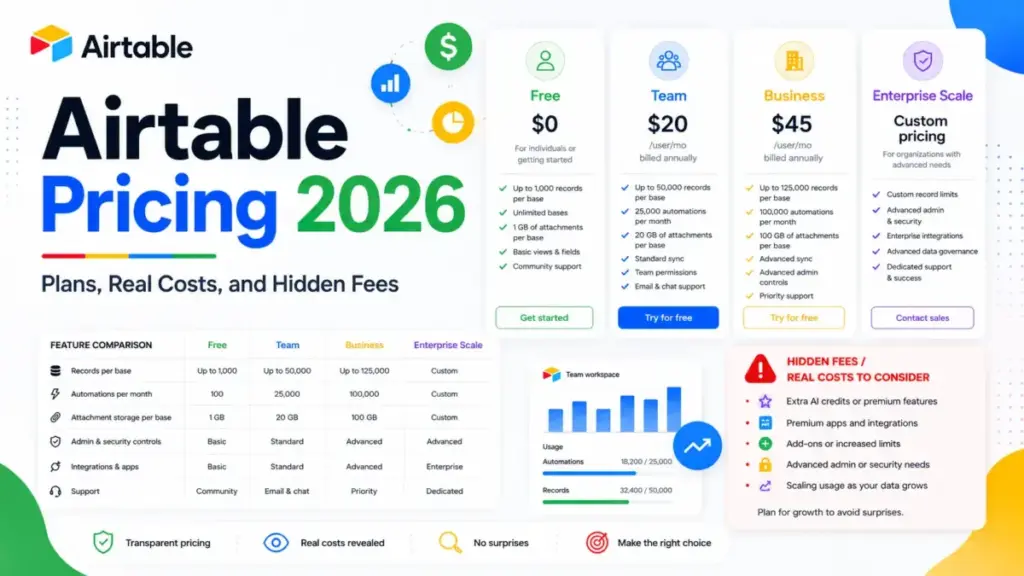
Airtable’s pricing page shows $20 per user per month. Your invoice will disagree the moment a stakeholder gets comment access.
That gap is the whole story of Airtable pricing in 2026. Free is genuinely usable, Team starts at $20 per billable collaborator per month on annual billing, and Business jumps to $45.
The plan you land on depends less on headcount than on permissions. Airtable sits on the same shortlist as the tools in our best project management software roundup, but it bills differently from almost all of them.
I checked every figure below against Airtable’s official pricing page and support documentation on July 10, 2026. There is one arithmetic rule further down that flips the Team-versus-Business decision for review-heavy teams, and almost nobody publishes it.
Quick Pricing Verdict
| Question | Answer (checked July 10, 2026) |
|---|---|
| Starting price | $0 on Free. Paid starts at $20 per billable collaborator/month on annual billing, or $24 month-to-month |
| Free plan or trial | Free plan with 1,000 records per base. A 14-day Team trial applies to your first workspace only |
| Best plan for most teams | Team, billed annually |
| Plan to avoid | Team, once commenters outnumber editors by more than about 1.25 to 1 |
| Biggest hidden cost | Commenter seats on Team, billed at the full editor rate |
| Second biggest hidden cost | Airtable Portals, from $120/month for 15 external seats on Team |
| Best alternative if too expensive | A board-first task tracker such as monday.com, which publishes plans from $9 per user/month |
| Pricing verified | July 10, 2026, against Airtable’s official pricing page and support docs |
Airtable is priced like a database platform, not like a task tracker. If your team only needs the basics of project management, the seat rate is hard to defend.
Prices change. Recheck the official page before you sign anything.
How I Verified These Airtable Prices
No hands-on test was performed for this guide. Every price, cap, and plan gate comes from Airtable’s own pricing page, plan overview, billing docs, AI billing table, Portals docs, automation docs, and API limit docs, all read on July 10, 2026.
Airtable is operated by Formagrid Inc. Where Airtable does not publish a number, this guide says so instead of estimating.
Reviewer sentiment from G2, Capterra, and TrustRadius appears only as pattern evidence, never as a source for a price or a limit. I am James Carter, and SaaSZap publishes the source and the checked date beside every dollar figure.
The Advertised Price vs What Airtable Actually Bills
Airtable pricing is accurate on the sticker. The unit it applies to is where teams get surprised.
| What the plan card implies | What the billing docs actually say |
|---|---|
| $20 per user/month on Team | $20 for every collaborator with Commenter access or higher |
| $45 per user/month on Business | $45 for Owner, Creator, and Editor only, on self-serve Business |
| Per user | Per billable collaborator, per workspace, not per account |
| AI credits included | 15,000 pooled Team credits that reset and expire, then $20 per extra 10,000 |
| Share with clients | Airtable Portals, from $120/month for 15 external seats on Team |
| Unlimited API on Business | No monthly call cap, but per-base rate limiting still applies |
Read that middle row again. Airtable’s plan attaches to a workspace, so two upgraded workspaces inside one company produce two subscriptions and two invoices.
That single detail was missing from all ten of the top-ranking Airtable pricing pages reviewed on July 10, 2026.
How Airtable Seat Billing Works
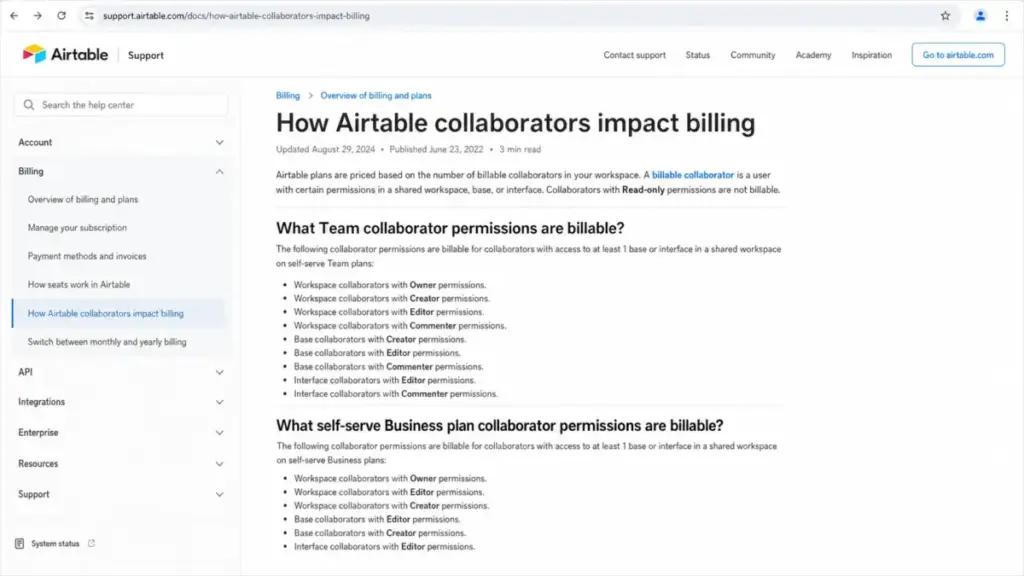
Airtable bills by permission level, not by job title. The permission that turns a free stakeholder into a paid seat is different on Team than on self-serve Business.
| Permission level | Free | Team | Business (self-serve) |
|---|---|---|---|
| Owner | Counts toward the 5-editor cap | Billable | Billable |
| Creator | Counts toward the 5-editor cap | Billable | Billable |
| Editor | Counts toward the 5-editor cap | Billable | Billable |
| Commenter | Free, up to 50 | Billable | Not billable |
| Read-only | Free | Free | Not billable |
Airtable’s collaborator billing documentation confirms the split. On Team, Commenter and above are billable, and on self-serve Business, Commenters and read-only collaborators are not.
Sales-led Business contracts are calculated differently and should be confirmed with the account team.
The workflow test that exposes the cost
Run this scenario before you buy. A content lead builds a campaign base, then invites five marketers to edit, plus twelve managers who only leave approval comments.
On Team, that is seventeen billable collaborators at $20 each. On self-serve Business, it is five billable collaborators at $45 each.
Team: $340 per month. Business: $225 per month.
Business is $115 per month cheaper for the exact same seventeen people.
The billable-seat decision tree
Use editors (E) and commenters (C), both on annual billing.
- Are all seventeen people editing records? Then Team at $20 is cheaper until governance forces the upgrade.
- Do commenters exist at all? Then compare
20 x (E + C)against45 x E. - Those totals meet when
C = 1.25 x E. - Above that ratio, self-serve Business costs less than Team, even though its seat rate is more than double.
At ten editors, the totals cross between the twelfth and thirteenth commenter. From the thirteenth commenter onward, staying on Team costs you money for no extra capability.
That is the friction point in Airtable pricing, and it is a permissions problem, not a budget problem.
The Hidden Costs Nobody Puts in the Plan Table
Every figure here comes from Airtable’s own documentation, checked July 10, 2026. Optional third-party connectors and consultants are excluded, because Airtable does not set those prices.
| Hidden cost | What it costs | What triggers it |
|---|---|---|
| Team commenter seat | $20 annual, $24 monthly, per person | Anyone gets Commenter access in the paid Team workspace |
| Second paid workspace | A full second subscription and a separate invoice | Two workspaces upgraded instead of one consolidated workspace |
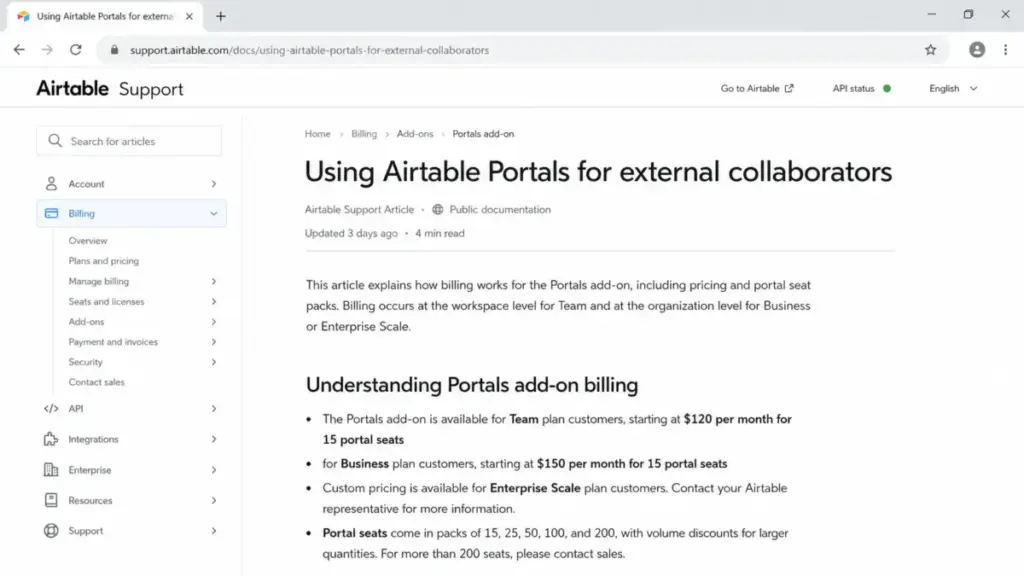
| Portals on Team | From $120/month for 15 external seats | Clients or vendors need a branded portal |
| Portals on Business | From $150/month for 15 external seats | Same need, on a Business workspace |
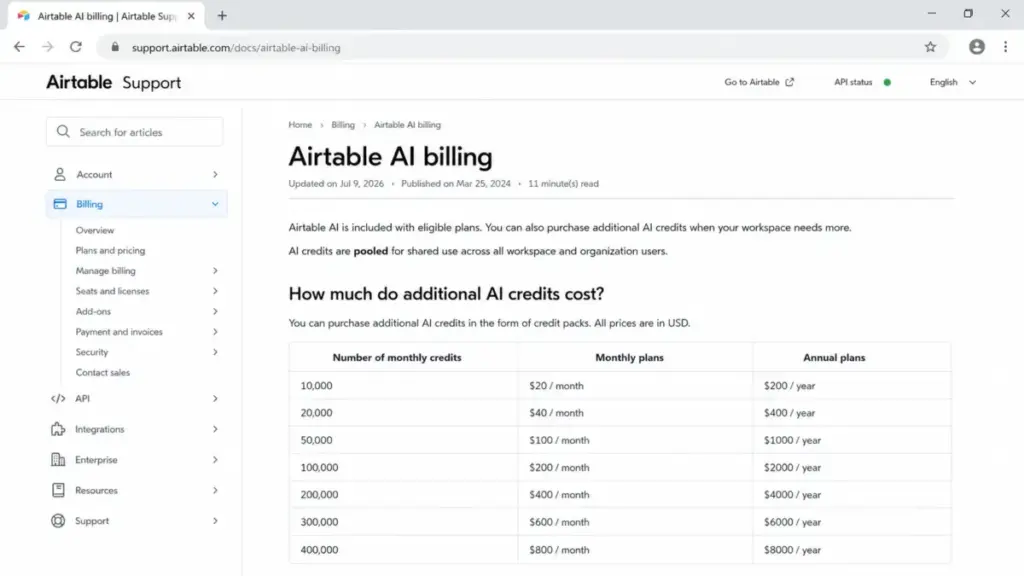
| Extra AI credits | $20/month per 10,000, scaling to $800/month for 400,000 | Pooled included credits run out on a paid plan |
| Monthly billing uplift | $4 per Team seat, $9 per Business seat, every month | Month-to-month billing instead of annual |
A twenty-five-seat Business workspace paying monthly gives up $2,700 a year against the annual rate. At $540 per seat per year, that is five extra Business seats, spent on billing flexibility.
AI credits get their own section below, because the add-on ladder is the single most misreported number in this category.
Hidden cost 1: paid workspaces invoice separately
Airtable’s billing overview states that self-serve Team and Business plans attach to a workspace, not to your account.
An ops lead upgrades the Marketing workspace. Six weeks later, a product manager upgrades the Roadmap workspace.
Finance now receives two Airtable invoices for one company.
Before you upgrade anything, list every workspace, note who owns it, and move the bases you actually pay for into one workspace. That is the single highest-value five minutes in this entire guide.
Hidden cost 2: Airtable Portals for external users
Portals is how Airtable gives clients and vendors a branded view without buying them collaborator seats.
| Portals option | Starting price | Notes |
|---|---|---|
| Team workspace, 15 portal seats | From $120/month | Pack sizes of 15, 25, 50, 100, and 200 exist |
| Business workspace, 15 portal seats | From $150/month | Same pack sizes |
| Enterprise Scale | Custom | Confirm with sales |
| Packs above 15 seats | Not publicly priced | Airtable documents the sizes, not the prices |
An agency running client review on Team pays $120 a month on top of seats, or $1,440 a year, before a single extra editor joins. Larger packs exist, and the Airtable Portals documentation does not publish their prices.
Budget the 15-seat pack, then ask sales for the 25 and 50 figures during the quote.
Hidden cost 3: the forced tier jump
Records, attachments, automation runs, and governance features all move together. Crossing any one of them moves your whole workspace from $20 to $45 per seat.
A ten-editor team crossing 50,000 records per base goes from $2,400 a year to $5,400 a year. Nothing about the team changed except one table.
Hidden cost 4: monthly billing
Team costs $24 monthly against $20 annually. Business costs $54 monthly against $45 annually.
That is $48 per Team seat per year and $108 per Business seat per year, for the privilege of leaving whenever you like.
Hidden cost 5: complexity you have to maintain
Reviewer patterns on G2 and Capterra point at the same place. Basic bases are quick, and production systems with linked tables, interfaces, automations, and permissions demand real architecture.
Airtable does not charge for that. Your team pays it in build time, debugging, and the person who becomes the reluctant in-house Airtable admin.
Airtable AI Credits: The Full Add-On Ladder
Included AI credits are pooled across the workspace, they reset on the plan’s billing schedule, and they expire without rolling over. Internet-grounded AI text also consumes them.
| Extra credits | Monthly price | Annual price | Annual saving |
|---|---|---|---|
| 10,000 | $20 | $200 | $40 |
| 20,000 | $40 | $400 | $80 |
| 50,000 | $100 | $1,000 | $200 |
| 100,000 | $200 | $2,000 | $400 |
| 200,000 | $400 | $4,000 | $800 |
| 300,000 | $600 | $6,000 | $1,200 |
| 400,000 | $800 | $8,000 | $1,600 |
Every annual pack costs ten months of the monthly rate. A team burning 400,000 credits saves $1,600 a year purely by changing the purchase cadence, according to Airtable’s AI billing documentation.
Free-plan workspaces cannot buy extra credits at all. That is an upgrade trigger rather than a soft limit, and sales-led plans must contact their account team.
Pooled credits help uneven teams, because one heavy Omni user can draw from a quiet colleague’s allocation. Expiry punishes the opposite pattern, so buy annual packs only once your monthly burn is stable.
Airtable Pricing Plans Compared
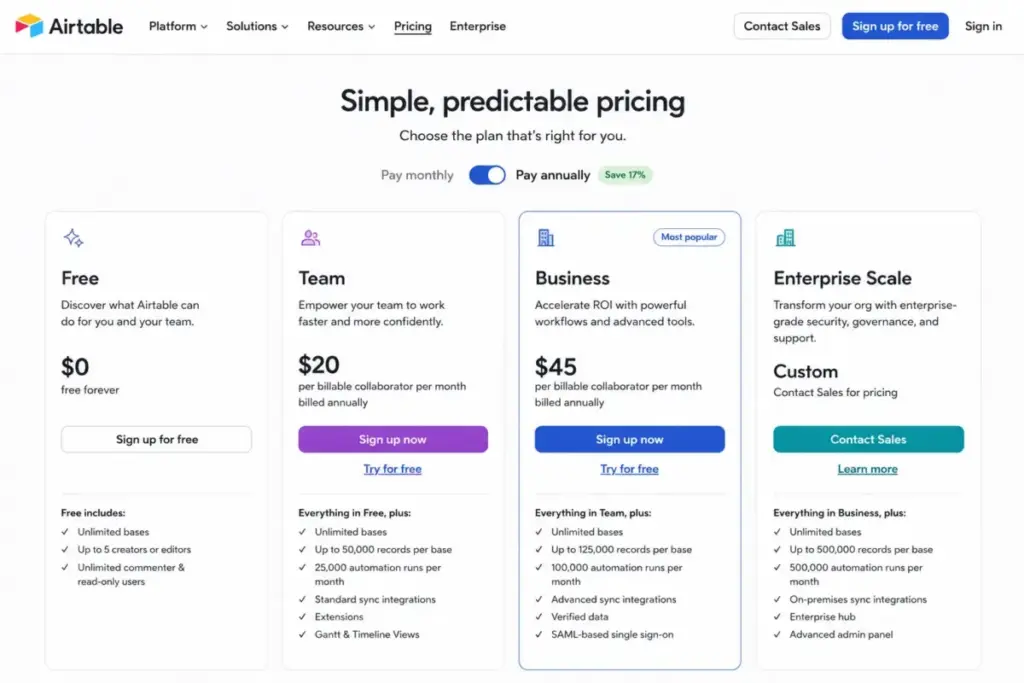
| Plan | Monthly | Annual (per month) | Billing basis | Best for | Key limits |
|---|---|---|---|---|---|
| Free | $0 | $0 | Flat | One builder validating an idea | 1,000 records/base, 1 GB attachments/base, 100 automation runs/workspace/month, 5 editors, 50 commenters |
| Team | $24 | $20 | Per billable collaborator, per workspace | 3 to 15 editor-led operations teams | 50,000 records/base, 20 GB attachments/base, 25,000 automation runs, 100,000 API calls/month |
| Business | $54 | $45 | Per billable collaborator, per workspace | Review-heavy departments and two-way sync | 125,000 records/base, 100 GB attachments/base, 100,000 automation runs, no monthly API cap |
| Enterprise Scale | Custom | Custom | Per user, sales-led | Governance, SCIM, Enterprise Hub | 500,000 automation runs/workspace/month, governance page cites up to 500,000 records per database |
Enterprise Scale pricing is not publicly disclosed. Treat it as a sales-led option and confirm the quote before shortlisting it.
Airtable’s official pricing page was the source for the four public rates on July 10, 2026. Competitor pages that publish an “Enterprise starts at” figure are estimating.
The practical entry point is Team on annual billing, and it stays practical until commenters, two-way sync, or an admin panel enter the conversation.
What Each Airtable Plan Includes
Each plan below gets a mini verdict and an avoid-if condition. If you want the product evaluation rather than the invoice, read our Airtable review alongside this guide.
Free: real, but capped at 1,000 records
Best for: one person building an operational prototype before asking for budget.
Includes unlimited bases, 1,000 records per base, 1 GB of attachments per base, 100 automation runs per workspace per month, two weeks of revision history, and 500 AI credits per editor-and-above collaborator.
Missing: extensions, Gantt and timeline views, advanced form controls, record coloring, and the ability to buy extra AI credits at all.
Your first workspace also receives a 14-day Team trial. Later Free workspaces do not, and the trial excludes the “Run a script” action plus premium form features.
Avoid if: you need more than 1,000 records in a single base, or you plan to evaluate scripting during the trial.
Team: the plan most buyers actually mean
Best for: 3 to 15 person marketing, content, and product-operations teams where nearly everyone edits records.
Includes 50,000 records per base, 20 GB of attachments per base, 25,000 automation runs per workspace per month, 100,000 API calls per workspace per month, one year of revision history, 15,000 pooled AI credits per billable collaborator, extensions, timeline and Gantt views, locked and personal views, and advanced forms.
Missing: two-way sync, the admin panel, and free commenters.
Verdict: at $20 per billable collaborator on annual billing, Team is the correct default for editor-heavy teams.
Avoid if: your approvers only comment, because each of them costs a full seat.
Business: cheaper than it looks for approval-heavy teams
Best for: 10 to 30 person departments where a small build team edits and a large stakeholder group reviews.
Includes 125,000 records per base, 100 GB of attachments per base, 100,000 automation runs, no monthly API call cap, one year of revision history, 20,000 pooled AI credits per paid user, two-way sync, the admin panel with SSO settings, and app sandbox for staging structural changes before they reach production.
Missing: Enterprise Hub, SCIM, and the broader governance scope that sits behind a sales conversation.
There is an eligibility trap. Business and Enterprise Scale require a private email domain, so a consultant running on Gmail cannot self-serve upgrade regardless of budget.
Verdict: Business is the value plan for any team where commenters exceed 1.25 times the editor count.
Avoid if: everyone edits, you do not need two-way sync, and nobody is asking for an admin panel.
Enterprise Scale: custom, and honestly so
Best for: organizations that need Enterprise Hub, SCIM provisioning, SAML administration at scale, and negotiated capacity.
Airtable’s governance material describes 500,000 automation runs per workspace per month, up to 500,000 records per database, and unlimited databases, users, and API calls, subject to contract terms and per-base rate limits.
Pricing is not publicly disclosed. Treat this as a sales-led option and confirm the quote before shortlisting it.
Support response commitments were not published either, so put them in the order form rather than assuming them.
Avoid if: you are a 25-person team hoping Enterprise will be cheaper per seat. Ask for the quote before you build the business case.
Feature Gates: What You Actually Get by Plan
| Capability | Free | Team | Business | Enterprise Scale |
|---|---|---|---|---|
| Records per base | 1,000 | 50,000 | 125,000 | Up to 500,000 per database, contract-dependent |
| Attachments per base | 1 GB | 20 GB | 100 GB | Contract-dependent |
| Automation runs / workspace / month | 100 | 25,000 | 100,000 | 500,000 |
| API calls / workspace / month | 1,000 | 100,000 | No monthly cap | No monthly cap |
| Pooled AI credits | 500 per editor+ | 15,000 per billable collaborator | 20,000 per paid user | 25,000 per paid user at list price |
| Buy extra AI credits | No | Yes | Yes | Contact sales |
| Revision history | 2 weeks | 1 year | 1 year | Contract-dependent |
| Extensions | No | Yes | Yes | Yes |
| Gantt and timeline views | No | Yes | Yes | Yes |
| Two-way sync | No | No | Yes | Yes |
| Admin panel with SSO settings | No | No | Yes | Yes |
| App sandbox | No | No | Yes | Yes |
| Enterprise Hub, SCIM | No | No | No | Yes |
| Billable roles | n/a | Commenter and above | Owner, Creator, Editor | Per contract |
| Private email domain required | No | No | Yes | Yes |
Three rows decide most upgrades. Two-way sync, the admin panel, and app sandbox are the Business features a Team buyer cannot work around with process, and all three are governance purchases rather than capacity purchases.
Compliance context sits above the plan table. Airtable’s trust materials cite SOC 2 Type II, ISO 27001, ISO/IEC 27701, HIPAA support, GDPR and UK GDPR, CCPA and CPRA, TX-RAMP Level 2, encryption in transit and at rest, DPA availability, and optional data-residency controls.
Confirm which of those apply to your specific plan before procurement signs.
What Happens When You Hit an Airtable Limit
Quota numbers are easy to publish. Failure behavior is what actually costs you a Tuesday.
| Limit | Plan value | What happens at the ceiling |
|---|---|---|
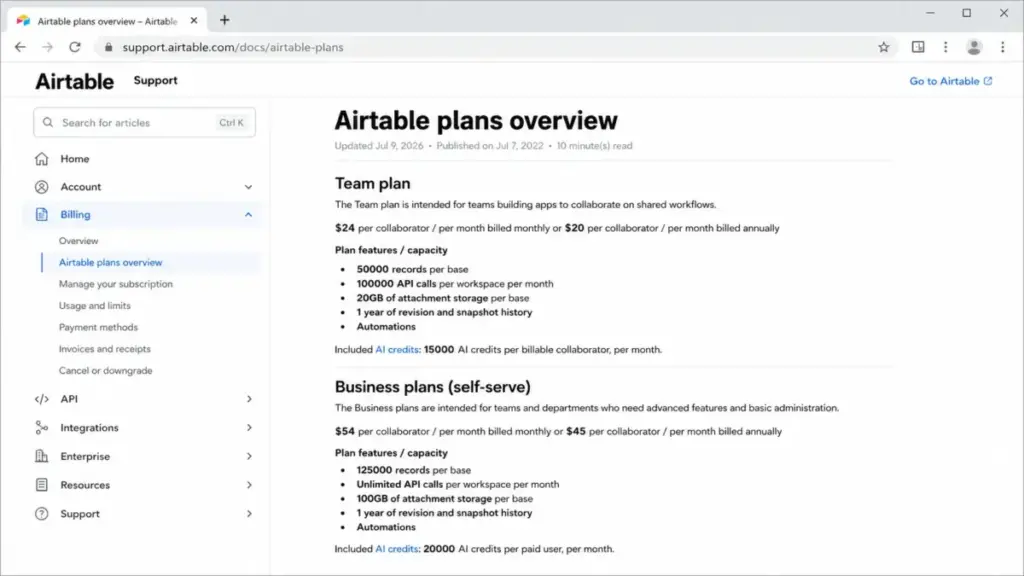
| Records per base | 1,000 / 50,000 / 125,000 | Existing records stay. New records cannot be added until you upgrade |
| Attachment storage per base | 1 GB / 20 GB / 100 GB | Existing files stay. New uploads are blocked |
| Automation runs per workspace | 100 / 25,000 / 100,000 / 500,000 | Runs stop for the remainder of the billing month |
| API calls, Free | 1,000/month | A 30-day grace period applies after you exceed the cap |
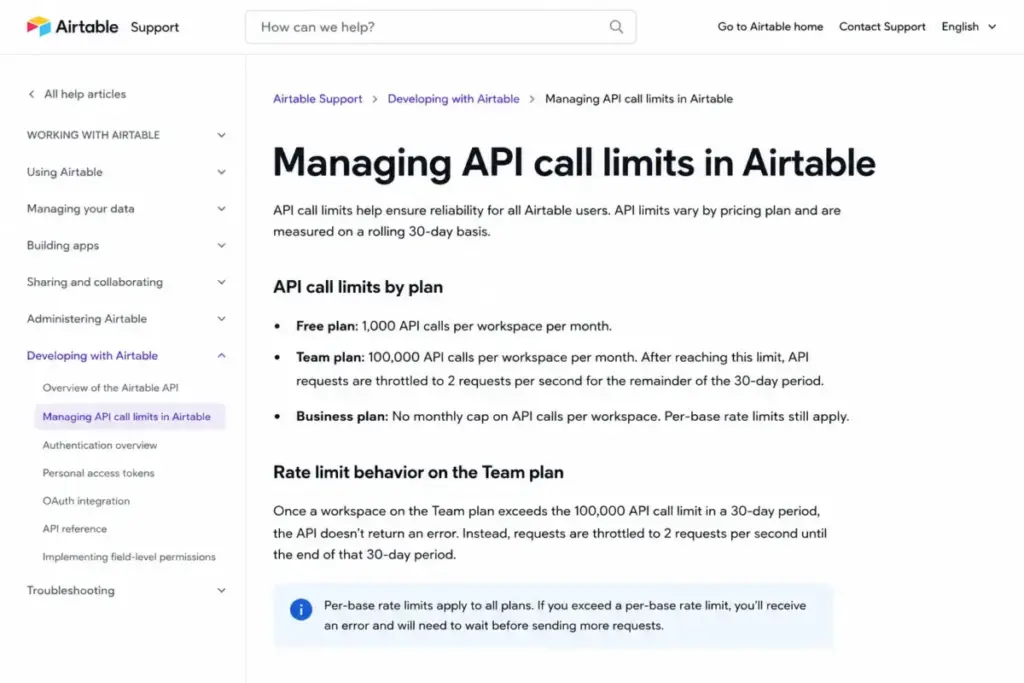
| API calls, Team | 100,000/month | Requests throttle to 2 per second after the cap |
| API calls, Business and Enterprise | No monthly cap | Per-base rate limiting still applies |
Records and attachments fail politely, because your data survives and only growth stops. Automations and API calls fail loudly, because a live workflow simply stops firing mid-month.
“Unlimited API” is not unlimited throughput
Business and Enterprise Scale remove the monthly call cap. They do not remove the per-base request rate limit.
A team upgrading to Business purely to fix an integration bottleneck can still hit the same throttle. Airtable’s API call limit documentation separates the two clearly, and most competing pricing pages collapse them into one word.
Test your integration against the rate limit on Team before you assume $45 per seat solves it.
Automation quotas are not the only automation limit
| Constraint | Documented behavior |
|---|---|
| Monthly run quota | Consumed per workspace, not per base |
| Find records action | Returns at most 1,000 records per run |
| Send email action | Recipient rules vary by plan, with an overall 1,000-recipient ceiling per run |
A nightly sync over 40,000 records cannot be done in one Find records step, no matter how many of your 100,000 runs remain unused. That forces scripts, batching, or a redesign.
When the Free Plan Stops Working
Free breaks on record count long before it breaks on people. One thousand records per base is roughly a year of campaign briefs or a quarter of inbound leads.
The second breaking point is automation. One hundred runs per workspace per month is a status-update automation firing three times a day, and nothing else.
The third is AI. Free workspaces receive 500 credits per editor-and-above collaborator and cannot buy more.
Use the 14-day Team trial on your first workspace to test the plan you will actually buy, not the plan you are on. If Airtable’s relational model is not the point, free project management tools will serve a simple task list better and cost nothing at any headcount.
Real Cost Scenarios: 1, 5, 10, 20, and 50 Users
All figures use list prices in USD, annual billing unless stated, no tax, and no add-ons. Annual totals are monthly equivalents that Airtable may collect up front.
| Team shape | Recommended plan | Monthly equivalent | Annual total |
|---|---|---|---|
| 1 solo builder, under 1,000 records | Free | $0 | $0 |
| 3 editors | Team annual | $60 | $720 |
| 3 editors, month-to-month | Team monthly | $72 | $864 |
| 5 editors | Team annual | $100 | $1,200 |
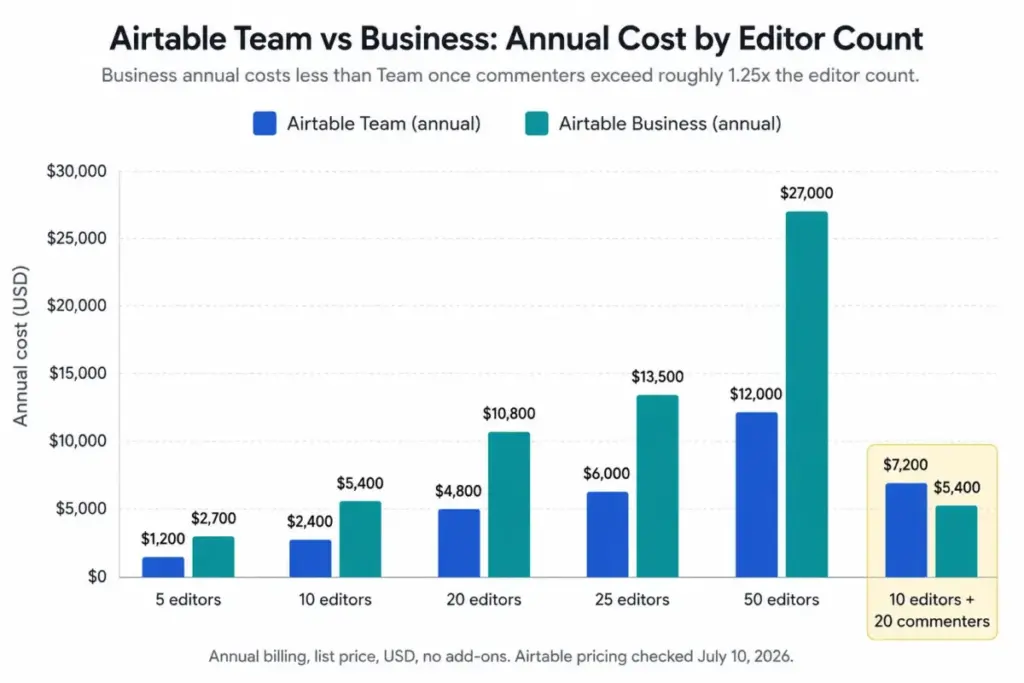
| 10 editors | Team annual | $200 | $2,400 |
| 10 editors | Business annual | $450 | $5,400 |
| 20 editors | Team annual | $400 | $4,800 |
| 20 editors | Business annual | $900 | $10,800 |
| 25 editors | Team annual | $500 | $6,000 |
| 25 editors | Business annual | $1,125 | $13,500 |
| 50 editors | Team annual | $1,000 | $12,000 |
| 50 editors | Business annual | $2,250 | $27,000 |
| 10 editors + 20 commenters | Team annual | $600 | $7,200 |
| 10 editors + 20 commenters | Business annual | $450 | $5,400 |
| 10 editors + 15 portal seats + 20k monthly AI | Team annual plus add-ons | $360 | $4,320 first year |
The two bolded rows are the point of this guide. The same thirty humans cost $1,800 more per year on the cheaper-looking plan.
Notice also the add-on row. Ten Team seats cost $2,400, and the Portals pack plus monthly AI credits add $1,920 on top, which is 80 percent more than the seat line alone.
Buying that AI pack annually instead of monthly drops the AI portion from $480 to $400.
Monthly vs Annual Billing: The Real Savings Math
| Plan | Monthly rate | Annual rate | Saving per seat per year | Saving on 10 seats | Saving on 25 seats |
|---|---|---|---|---|---|
| Team | $24 | $20 | $48 | $480 | $1,200 |
| Business | $54 | $45 | $108 | $1,080 | $2,700 |
Both plans discount by the same 16.7 percent. Airtable does not publish a deeper annual discount, and no page should imply one.
Pay monthly for the first quarter while you are still deciding whether Airtable becomes the system of record. Switch to annual once the base survives a full reporting cycle without a rebuild.
Extra AI credit packs follow the same logic at a better ratio, since every annual pack costs ten months of the monthly rate.
Which Airtable Plan Should You Choose?
| Buyer | Plan | Reason |
|---|---|---|
| Solo builder or freelancer | Free, then Team | Free covers 1,000 records. Team unlocks extensions and timeline views |
| 3 to 10 person operations team, everyone edits | Team annual | $20 per seat, and no commenter penalty because there are no commenters |
| 10 to 25 person department with approvers | Business annual | Commenters and read-only collaborators stop being billable |
| Team that needs two-way sync or an admin panel | Business annual | Both are hard plan gates, not process problems |
| IT-governed organization needing SCIM or Enterprise Hub | Enterprise Scale | Request a quote. No public price exists |
| Qualifying nonprofit or education employee | Team at 50 percent off | Airtable documents the discount, subject to approval |
| Approved student | Free Team workspace, 6 to 24 months | Documented, subject to approval |
Airtable pricing rewards whoever audits permissions before signing. Count permissions before headcount, because that habit is worth more than any negotiation tactic on this page.
Consultants and agencies on public email domains should also check eligibility early, because Business self-serve requires a private domain.
Which Airtable Plan Should You Avoid?
Avoid Team when your commenter count exceeds about 1.25 times your editor count.
The reason is mechanical rather than philosophical. Team bills Commenter and above, self-serve Business does not, and the $45 rate stops being expensive the moment two-thirds of your users are reviewers.
The feature gate makes it worse. Staying on Team to save money also keeps you locked out of two-way sync, the admin panel, and app sandbox, which are the three things a stakeholder-heavy team needs most.
There is one exception. If those commenters can live with read-only access, downgrade them, keep Team, and save the difference.
Also avoid the Free plan for anything a client sees. Free workspaces cannot share paid-plan interfaces, cannot buy AI credits, and hold two weeks of revision history.
Airtable Pricing vs Competitors
Only publish competitor numbers you can point at. Here is what was verifiable on July 10, 2026, and what was not.
| Product | Publicly stated entry price | 10-user math at that rate | Best for |
|---|---|---|---|
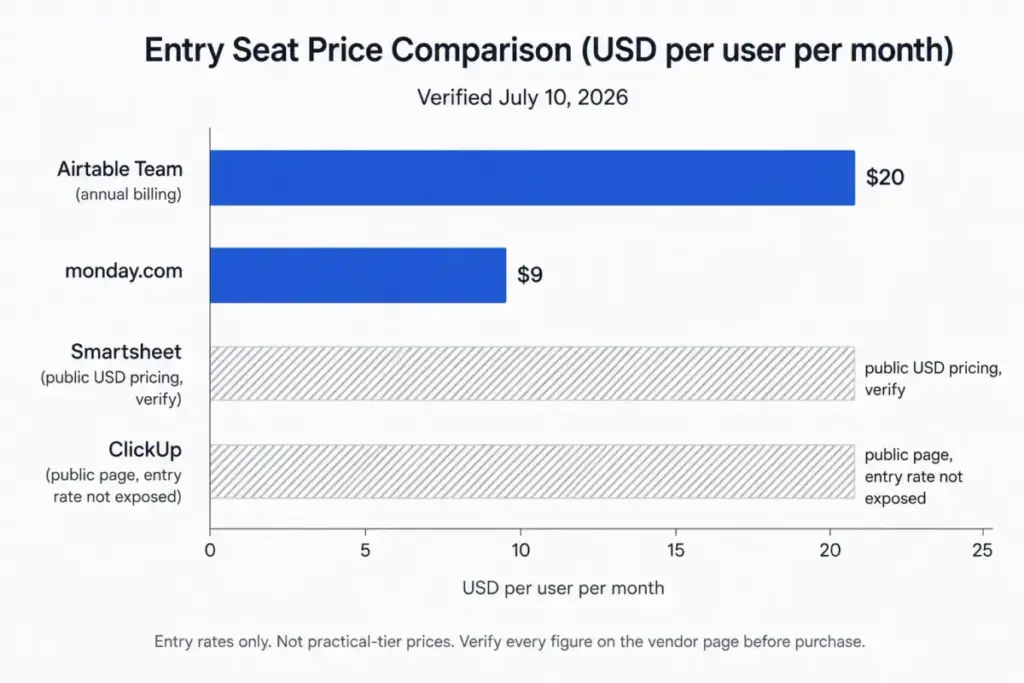
| Airtable | $20 per billable collaborator/month, annual | $2,400/year on Team | Relational data, interfaces, and automations in one internal system |
| monday.com | From $9 per user/month, paid plans start at 3 users | $90/month at the entry rate, before any tier upgrade | Board-first task tracking with lighter data modeling |
| Smartsheet | Public USD plan pricing plus custom Advanced Work Management | Recheck the live page before purchase | Grid and portfolio work with enterprise reporting |
| ClickUp | Public pricing page, but the entry seat rate was not exposed in the July 10, 2026 snapshot | Recheck the live page before purchase | Teams consolidating many tools into one workspace |
Airtable’s $20 entry rate is more than double monday.com’s stated $9 starting rate. Airtable also bills Team commenters at that same $20, which is the comparison that actually changes budgets.
Smartsheet publishes USD plan pricing alongside a custom Advanced Work Management tier, so its practical cost depends on which tier your reporting needs. Check the official page on the day you buy.
ClickUp’s public pricing page did not expose a stable entry seat rate in the July 10, 2026 snapshot. Compare ClickUp pricing against the official page before you commit, because a per-seat figure quoted from memory will be wrong.
Real talk: publishing a precise ten-user cost for a vendor whose page did not expose a stable seat rate would be guessing. Several competing pages publish figures they cannot source.
Is Airtable Worth the Price?
Worth it if you need linked relational tables, Interface Designer views, and Airtable Automations inside one system, and your editor count stays under roughly fifteen.
Worth it if your reviewers outnumber your builders and you move to self-serve Business, where those reviewers cost nothing.
Not worth it if you are tracking tasks. Airtable pricing is built around data structure, and a $20 seat buys you a database you then have to design.
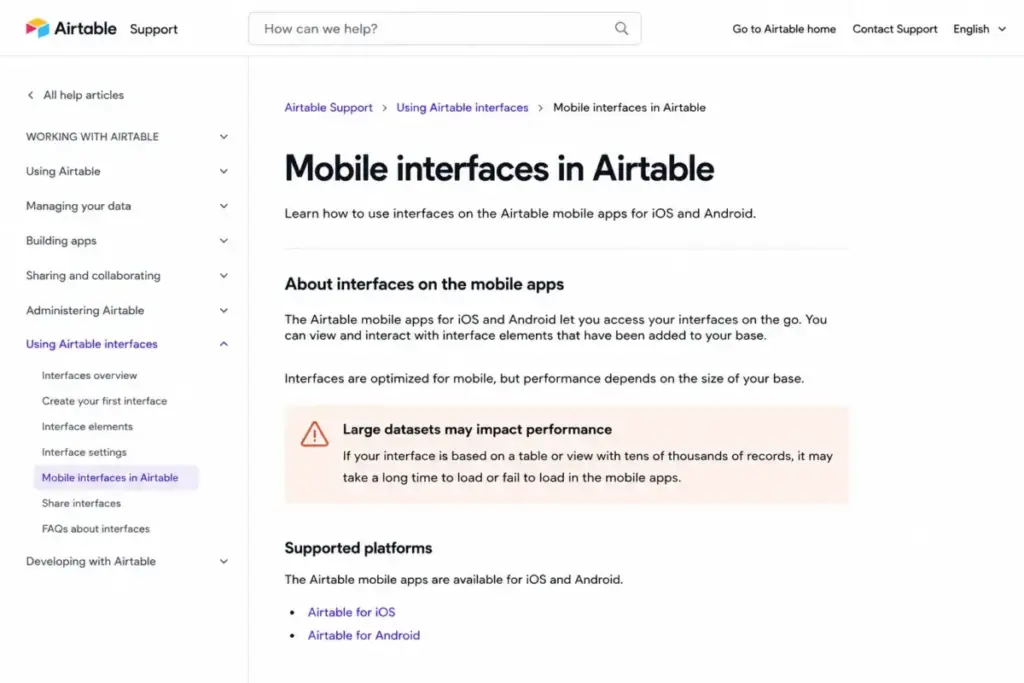
Not worth it if your data lives on phones. Airtable’s own mobile documentation warns that tens of thousands of records can slow or fail to load in the iOS and Android apps.
Not worth it if you want a branded public app, because Portals or a separate frontend becomes a second line item.
A TrustRadius reviewer, William Nutt of Nutt Labs, put the ceiling bluntly: “It’s only for internal use because it supports neither custom domains nor custom code”. That is one practitioner’s view rather than an official limitation, and it matches the pattern across reviewer feedback.
Exit cost belongs in the calculation too. A G2 reviewer, Gary B., described getting data out of Airtable as his biggest issue with the product, and Airtable’s own security documentation describes manual backup as individual-table CSV export or API retrieval.
If any of those disqualifiers land, the shortlist of Airtable alternatives is where the money goes further.
Who Should Skip Airtable Entirely
Field teams with large bases. The mobile apps are documented as slowing or failing to load at tens of thousands of records, and forms cannot be created or viewed in the native app at all.
Validate your exact mobile workflow during the 14-day trial. Paying for 125,000 records on Business does not make 125,000 records usable on a phone.
Integration teams relying on two-way sync. Airtable documents that synced records cannot be created or deleted through the API or through automations, and sync cannot be daisy-chained.
That combination breaks the “Airtable as middleware” pattern that a lot of buyers assume Business unlocks.
Teams that want a simple board. If assigning, moving, and closing tasks is the whole job, a monday.com review will land closer to what you actually need, at a lower stated entry rate.
Teams that want documents with a database attached. That is a different shape of tool, and our Notion review covers where it wins.
What the Competing Pricing Pages Get Wrong
Six specific errors appeared across the pages ranking for this query on July 10, 2026. Each one is corrected against Airtable’s own documentation on the same date.
| Claim seen on competing pages | What Airtable’s own docs said on July 10, 2026 |
|---|---|
| Team includes 10 GB of attachments per base | 20 GB per base |
| Business keeps two years of revision history | One year |
| 10,000 extra AI credits cost far more than $20 | $20 per month, or $200 per year |
| Airtable Enterprise starts at a published per-seat price | Custom. Contact sales. No public figure exists |
| Airtable has no free trial | A 14-day Team trial applies to your first workspace |
| Read-only access is limited or billable | Read-only collaborators are not billable |
Two of those errors move real money. A stale storage figure sends a team to Business a tier early, and a wrong AI-pack price can misstate an annual budget by thousands.
Legacy plan names add a third trap. Airtable still documents older Plus and Pro plans, so an old screenshot or grandfathered invoice can look like current Airtable pricing when it is not.
How to Avoid Overpaying for Airtable
- Consolidate workspaces before you upgrade. Plans attach to workspaces, so two upgraded workspaces mean two invoices. Move paid bases into one workspace first.
- Audit permissions, then decide the plan. Downgrade approvers from Commenter to read-only on Team, or move to Business where Commenters are free.
- Run the 1.25 rule. If commenters exceed 1.25 times your editors, self-serve Business annual costs less than Team annual.
- Pay annually once the base is stable. That saves $48 per Team seat or $108 per Business seat every year.
- Buy AI credits annually, not monthly. Every annual pack costs ten months of the monthly rate, from $40 saved on 10,000 credits to $1,600 saved on 400,000.
- Check discount eligibility. Qualifying nonprofits and education employees can receive 50 percent off Team, and approved students can receive a free Team workspace for six to twenty-four months.
- Price the workflow, not the platform. If the job is triggers and handoffs rather than relational data, AI workflow automation tools can cover it without a per-seat database bill.
One more habit. Ask sales for the Portals pack prices above 15 seats during the quote, because Airtable documents the pack sizes and not their prices.
FAQ
Is Airtable free to use?
Yes. Airtable’s Free plan costs $0 and includes unlimited bases, 1,000 records per base, 1 GB of attachments per base, 100 automation runs per workspace each month, and two weeks of revision history. It supports up to five Editor or Creator collaborators and up to fifty Commenters. Free workspaces cannot buy extra AI credits. Your first workspace also receives a 14-day Team trial.
How much does Airtable cost per user?
Team costs $24 per billable collaborator per month month-to-month, or $20 per month billed annually. Business costs $54 monthly or $45 billed annually. Both rates apply per billable collaborator, per workspace, rather than per account. Enterprise Scale pricing is custom. These figures were checked against Airtable’s official pricing page on July 10, 2026, and prices can change.
Which Airtable plan is best for most teams?
Team on annual billing, at $20 per billable collaborator per month. It unlocks 50,000 records per base, extensions, timeline views, and 25,000 automation runs. The exception is approval-heavy teams. Because Team bills Commenter access and self-serve Business does not, Business at $45 becomes cheaper once your commenters exceed roughly 1.25 times your editor count. Count permissions before you count people.
What are the hidden costs of Airtable?
Six charges sit outside the Airtable pricing card. Commenter seats on Team cost the full $20 to $24 rate. A second upgraded workspace produces a second invoice. Airtable Portals starts at $120 per month for 15 external seats. Extra AI credits start at $20 per 10,000. Monthly billing adds $4 per Team seat and $9 per Business seat. Crossing a capacity limit forces a tier jump.
Are commenters billable in Airtable?
On Team, yes. Anyone with Commenter access or higher in a paid Team workspace becomes a billable collaborator at the full seat rate. On self-serve Business, Commenters and read-only collaborators are not billable. Sales-led Business contracts are calculated differently. Read-only collaborators are never billable on either self-serve plan, which is the cheapest way to give a stakeholder visibility.
Does Airtable charge per workspace or per account?
Per workspace. Airtable’s billing documentation states that self-serve Team and Business plans attach to a workspace rather than to your account. Two upgraded workspaces inside the same company generate two subscriptions and two invoices. Audit every workspace and consolidate paid bases before you upgrade, or one team can end up on two separate bills.
How much does Airtable Portals cost?
Airtable Portals starts at $120 per month for 15 portal seats on a Team workspace, and $150 per month for 15 seats on Business. Enterprise pricing is custom. Airtable documents pack sizes of 15, 25, 50, 100, and 200 seats, but publishes starting prices only for the 15-seat pack. Ask sales for the larger pack prices during the quote.
Does Airtable include AI credits?
Yes, pooled across the workspace. Free includes 500 credits per editor-and-above collaborator, Team includes 15,000 per billable collaborator, and Business includes 20,000 per paid user. Credits reset on the plan schedule and expire without rolling over. Extra credits cost $20 per month or $200 per year for 10,000, scaling to $800 per month or $8,000 per year for 400,000.
Is Airtable cheaper than monday.com?
Not on stated entry rates. Airtable’s Team plan starts at $20 per billable collaborator per month on annual billing, while monday.com publishes plans from $9 per user per month with paid plans starting at three users. Those are entry rates on different plan tiers, not matching feature sets. Compare the plan each tool needs for your workflow, then recheck both official pages.
Is Airtable worth the price for a 10-person team?
If all ten people edit records and need linked tables, interfaces, and automations, Team annual at $2,400 per year is defensible. If four people build and six only approve, self-serve Business at $2,160 per year for four seats costs less and adds two-way sync. If the ten people are tracking tasks, a board-first tool costs less and does the job.
The Verdict on Airtable Pricing in 2026
Airtable pricing is fair for what it is and misleading about how it bills. The advertised $20 seat is real, and so is the invoice line for the approver who only ever leaves comments.
Buy Team annual if your editors outnumber your commenters. Buy self-serve Business annual the moment that ratio inverts past 1.25 to 1, because the $45 seat is cheaper for the same room of people.
Consolidate workspaces first. Budget Portals and AI credits as line items, not afterthoughts.
And if the answer to “what lives in Airtable” is tasks rather than data, keep your $20 and buy a board.