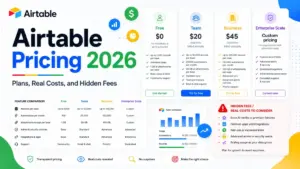
Todoist pricing looks like $5 a month for Pro and $8 per member for Business. Those are annual-billing equivalents, not the price you pay month to month.
Todoist starts at $0 on the free Beginner plan. Pay monthly and Pro is $7 per month, while Business is $10 per paid member per month, checked July 10, 2026.
The trap is not the headline number. It is what happens when one employee joins two paid workspaces, when a guest is promoted to a member mid-cycle, or when you downgrade and find projects locked.
Todoist sits at the light end of the best project management software category, and its price reflects that. This Todoist pricing guide covers every plan, six cost triggers, real budgets from 1 to 100 users, and the plan I would tell you to skip.
Todoist Pricing at a Glance
Todoist has three public plans: Beginner (free), Pro, and Business. The product is made by Doist Inc., which also builds Twist.
Beginner is a usable plan, not a demo. Pro is where most solo buyers land, and Business is the only plan that gives you a paid team workspace.
| Question | Answer |
|---|---|
| Starting price | $0 on Beginner |
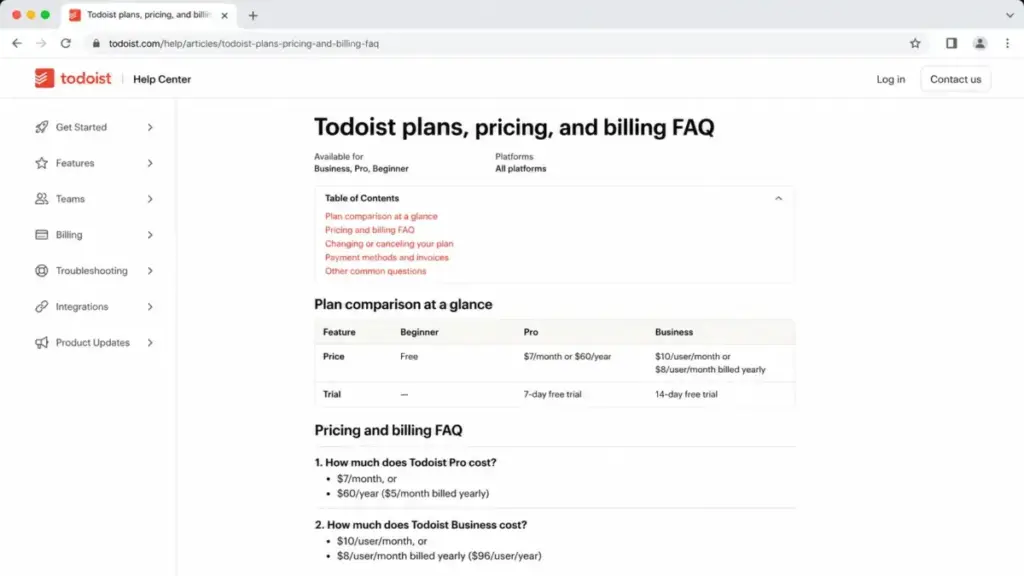
| Pro price | $7 per account monthly, or $60 per account yearly |
| Business price | $10 per paid member monthly, or $96 per paid member yearly |
| Free plan or trial | Both. Free Beginner plan, 7-day Pro trial, 14-day Business trial |
| Best plan for most buyers | Pro, at $60 yearly, for solo users who need custom reminders and calendar layout |
| Plan to avoid | Business bought for a group that only needs shared checklists |
| Biggest hidden cost | Duplicate paid membership when one person sits in two separately billed teams |
| Best alternative if too expensive | TickTick Premium at $35.99 per year for individuals. Microsoft To Do at $0 for basic lists |
| Pricing verified | July 10, 2026 |
Every figure above excludes location-dependent tax, which Todoist calculates at checkout. All three plan prices were verified against Todoist’s official pricing page on July 10, 2026.
If you want the daily-usage verdict rather than the invoice, the full Todoist review covers adoption and workflow.
The Advertised Price vs the Real Price
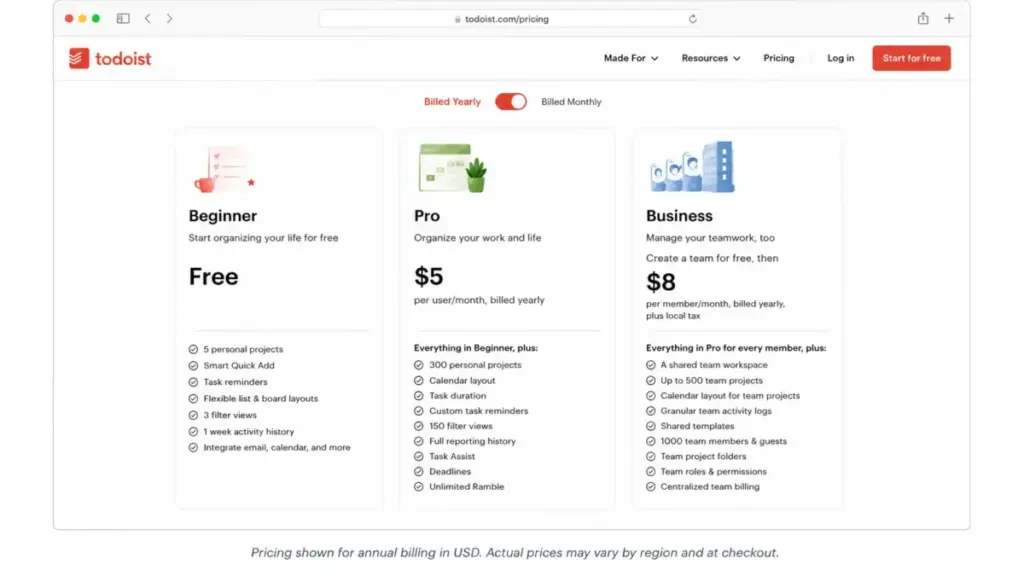
The pricing page defaults to annual billing, so the first number you see is a monthly equivalent that only exists if you prepay twelve months. Switch the toggle and the real month-to-month price appears.
| Plan | Shown with annual billing | Real monthly-billing price | Cash paid on annual | 12 months of monthly billing |
|---|---|---|---|---|
| Beginner | $0 | $0 | $0 | $0 |
| Pro | $5 per month | $7 per month | $60 per account | $84 per account |
| Business | $8 per member per month | $10 per member per month | $96 per member | $120 per member |
Both figures are correct. Only one of them is a monthly commitment, and that gap is where most budget arguments start.
Todoist Business is not “Pro with more people”. It is a separate paid team workspace with folders, roles, permissions, and centralized billing, which is closer to what buyers expect from team collaboration software than from a personal to-do app.
Pro entitlements belong to the account that pays for them. Five people on Pro means five separate $60 subscriptions, not one shared license.
That is the friction point that costs teams money. A five-person group paying five Pro subscriptions spends $300 per year and still has no shared workspace, no folders, and no admin roles.
The same five people on Business annual pay $480 per year and get the workspace. The extra $180 buys administration, not features you were missing on Pro.
Why Other Sites Show a Lower Todoist Price
Search results for Todoist pricing still show $4, $6, $48, and $72. Those figures do not represent the standard rates for a new subscription as of July 10, 2026.
The $5 and $8 you also see are different. Those are today’s annual-equivalent monthly rates, and they apply only when you prepay twelve months.
Todoist’s Pro pricing update notice states that new standard pricing took effect on December 10, 2025, with tax added where applicable.
| Date | What happened |
|---|---|
| Before December 10, 2025 | Lower figures circulated publicly and were copied into directories and trackers |
| December 10, 2025 | New standard rates take effect: Pro $7 monthly or $60 yearly; Business $10 per member monthly or $96 per member yearly |
| December 10, 2025 | The Pro Legacy feature set is frozen for eligible legacy subscribers |
| July 10, 2026 | Rates re-verified against Todoist’s official pricing page and billing FAQ |
Several pages carrying June 2026 update stamps still displayed pre-increase numbers when checked. A recent timestamp proves the page was touched, not that the price was re-checked.
If you find a lower Todoist price somewhere, it is a historical figure, a legacy-account rate, or stale directory data. It is not a public discount, and nothing in Todoist’s official pricing materials offers one.
Todoist Pricing Plans Compared
Every price below comes from Todoist’s official pricing page and its plans, pricing, and billing FAQ, both checked on July 10, 2026.
| Plan | Monthly | Annual | Billing basis | Best for | Key limits |
|---|---|---|---|---|---|
| Beginner | $0 | $0 | Free account | One person testing whether Todoist sticks | 5 active personal projects, 3 filters, 1 week of activity history, 5 MB uploads, 10 Ramble sessions per month |
| Pro | $7 per account | $60 per account ($5/mo equivalent) | Per subscribing account | Solo consultants and knowledge workers running many parallel projects | 300 active personal projects, 150 filters, 25 MB uploads, still capped at 5 people per personal project |
| Business | $10 per paid member | $96 per paid member ($8/mo equivalent) | Per paid member, per paid team | 5 to 25 person teams that need a shared workspace with roles and central billing | Up to 500 active team projects, up to 1,000 team participants, 100 MB team-comment uploads |
Todoist also runs a 7-day Pro trial and a 14-day Business trial, both documented officially. Neither trial changes the list price you convert onto.
Read the billing basis column twice. Pro is billed per account, Business is billed per paid member inside each paid team, and that second detail is what breaks budgets at scale.
The Six Hidden Costs Nobody Mentions
Todoist does not sell add-on modules. Reviewed public pricing materials show no separate add-on catalog as of July 10, 2026, so the cost expansion comes from billing mechanics instead.
Here they are, ranked by how much damage they do to a real budget.
| Rank | Cost trigger | What it costs | When it hits |
|---|---|---|---|
| 1 | Extra paid Business members | $10 per member monthly or $96 per member yearly, before tax | A guest or non-member is promoted to paid member |
| 2 | Duplicate membership across paid teams | One paid membership charge in each paid team | The same person joins two separately billed teams |
| 3 | Mid-cycle seat proration | A prorated amount shown at checkout | A paid member is added during an active billing period |
| 4 | Location-dependent tax | Calculated at checkout, not fixed publicly | Your billing location has applicable tax |
| 5 | Pro-to-Business credit mismatch | Variable. Unused Pro value can sit as restricted account credit | A Pro subscriber moves to Business before the Pro term ends |
| 6 | Third-party connector subscriptions | Set by the provider, not by Todoist | A workflow needs paid Zapier, Make, or similar capacity |
| n/a | Native Todoist paid add-ons | No separate public add-on catalog verified | Not applicable as of July 10, 2026 |
Ranks 1 through 3 are all seat mechanics. If your finance team budgets Todoist as a flat line item, ranks 2 and 3 are the ones that produce a surprise invoice.
Guests Are Free, Members Are Not
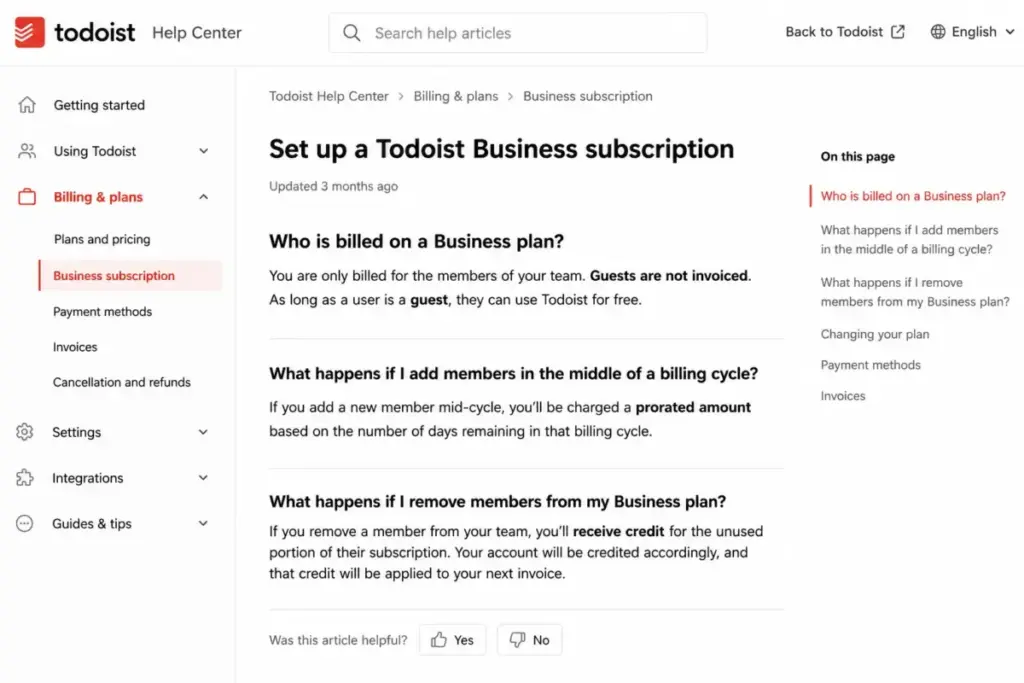
Todoist’s Business subscription documentation states that guests are not invoiced while paid members drive the bill. That single sentence changes how you should design the workspace.
A guest is an external collaborator you bring into specific work. A member is somebody inside the paid team.
Bring your accountant, your freelance designer, and your client in as guests and they cost nothing. Promote the same three people to members and your annual bill rises by $288 at the yearly rate.
The insider move is to decide member status during onboarding, not after. Once someone is a member, removing them produces account credit rather than an immediate cash refund.
The Same Employee Can Be Billed Twice
Todoist’s Teams FAQ documents that paid teams are billed separately, and that one person who belongs to two paid teams is charged in each of them.
Nobody in the top ten search results for Todoist pricing surfaced this. It is the most expensive thing on this page.
Picture a 40-person company that split Marketing and Engineering into two paid Business teams. Six people sit in both teams for cross-functional projects.
Those six generate twelve billed memberships, not six. At the annual rate that is $1,152 instead of $576, a $576 overspend created entirely by workspace architecture.
Every additional paid team compounds this, because each one carries its own Business bill. My recommendation is to run one paid Business team and use folders and projects for departmental separation, unless you have a legal or billing reason to split entities.
That is my inference from the documented billing rule, not an official Todoist mandate.
Mid-Cycle Seats Are Prorated, Not Deferred
Static price tables imply your bill only moves at renewal. Todoist’s Business subscription documentation describes prorated charges for members added during an active billing period.
Add a member in month seven of an annual plan and you are charged for the remainder of that term, at checkout, not next January. Removing a member later creates credit inside the account rather than money back on the card.
For a team hiring through the year, that means your Todoist line item is a moving number. Budget the annual figure plus a proration buffer sized to your expected headcount growth.
Tax Is Added at Checkout
Doist’s terms state that subscription fees can auto-renew and that applicable taxes are calculated according to billing circumstances. There is no single published US amount.
Every number in this Todoist pricing guide excludes tax. Check the total on the checkout screen before you approve the purchase order, because the pricing page total is not the charged total.
Pro Credit Does Not Automatically Pay for Business
This one catches solo users who grow into a team. Todoist’s billing documentation warns that unused value from a Pro subscription is not necessarily applicable to a Business subscription.
Web, Apple App Store, and Google Play subscriptions are handled under different billing rules. If you bought Pro through an app store, the store controls renewal timing and refund behavior, not Todoist.
Before you upgrade, look at the actual credit or refund shown in your own account. Do not assume the remaining months of Pro reduce the Business invoice.
Third-Party Connectors, Not Todoist Add-Ons
Todoist advertises more than 90 integrations. A count is not a cost model.
Some workflows run natively. Others route through Zapier, Make, or a calendar service that bills you separately, and those fees never appear on a Todoist invoice.
No universal connector cost belongs in a Todoist budget. Price the specific automation you plan to build, not the integration directory.
Plan-by-Plan Breakdown: What You Get and What You Give Up
Todoist Beginner ($0)
Beginner is more capable than the search results suggest. It includes automatic reminders, calendar and email integrations, one free team with up to five active team projects, and up to five people per personal project.
What is missing: calendar layout, task duration, time blocking, deadlines, custom reminders, full activity history, and daily backups.
Mini verdict: a real free plan, not a demo. It fails on volume, not on capability.
Avoid Beginner if you run more than 5 active personal projects, need more than 3 filters, or would lose sleep over one week of activity history and no daily backups.
Todoist Pro ($7 monthly, $60 yearly)
Pro is the upgrade that fixes personal volume. You get 300 active personal projects, 150 filters, full activity history, daily backups, deadlines, custom reminders, the native calendar layout with task duration and time blocking, and the Todoist Assist and Email Assist capabilities.
What is missing: the paid team workspace. Pro includes one free team, and that free team keeps the free-team project ceiling of five active team projects.
Mini verdict: at $60 per year Pro is the plan I would buy for a solo consultant juggling client work across many parallel projects.
Avoid Pro if your actual constraint is collaboration. Upgrading does not raise the five-person cap on a personal project, so you will pay $60 and hit the same wall.
Todoist Business ($10 per member monthly, $96 per member yearly)
Business is the only plan that buys administration. Paid members get Pro-level personal limits plus up to 500 active team projects, 150 filters each, full team history, 100 MB team-comment uploads, workspace folders, roles, restricted projects, shared templates, and centralized billing, with documented capacity for up to 1,000 team participants.
What is missing from the reviewed public plan materials: explicitly enumerated SSO, SCIM, data-residency, and audit-log entitlements, plus any published support-response SLA.
Mini verdict: the right buy for a 5 to 25 person team that wants shared task execution without a full project-management platform.
Avoid Business if your purchase requirement list contains dependency mapping, workload planning, or portfolio governance. Those are product-level gaps, and no Todoist tier fills them.
Feature Gates: What Each Todoist Plan Gives You
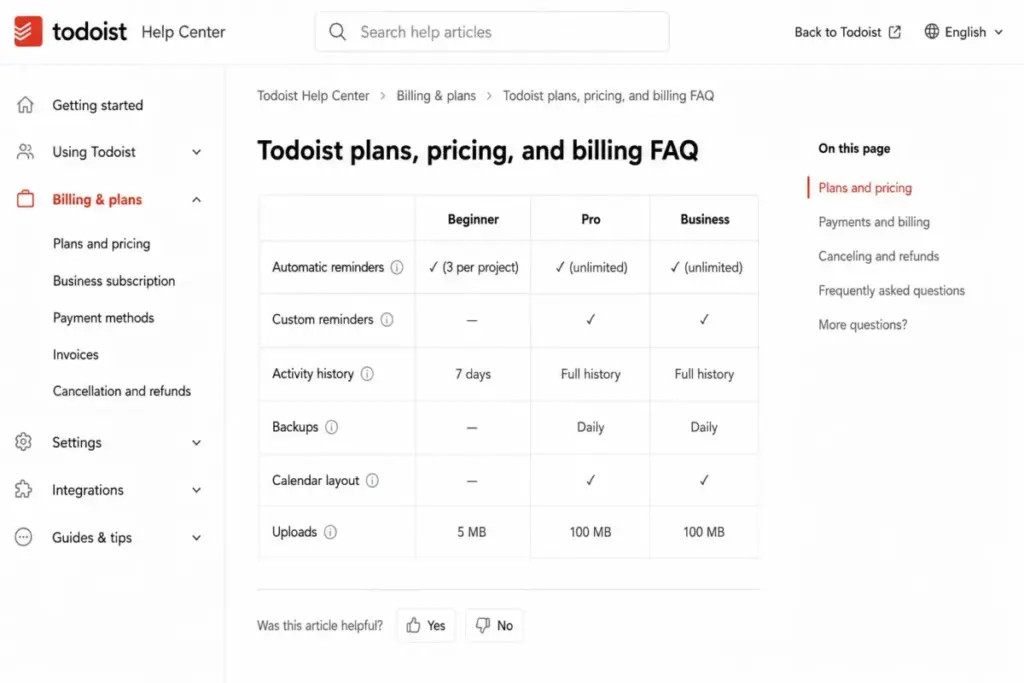
Two words cause more upgrade mistakes here than anything else: reminders and calendar. Both are split across the paid line in ways the plan cards do not spell out.
| Feature | Beginner | Pro | Business |
|---|---|---|---|
| Active personal projects | 5 | 300 | 300 per member |
| Active team projects | 5 (free team) | 5 (free team) | Up to 500 |
| Automatic reminders | Yes | Yes | Yes |
| Custom, location, and recurring reminders | No | Yes | Yes |
| Calendar and email integrations | Yes | Yes | Yes |
| Calendar layout, task duration, time blocking | No | Yes | Yes |
| Deadlines | No | Yes | Yes |
| Activity history | 1 week | Full | Full |
| Daily backups | No | Yes | Yes |
| Filters | 3 | 150 | 150 per member |
| Ramble voice capture | 10 sessions per month | Listed as unlimited, subject to rate limits | Listed as unlimited, subject to rate limits |
| Team workspace, folders, roles, central billing | No | No | Yes |
| File uploads | 5 MB | 25 MB* | 100 MB team comments |
* Todoist’s latest plan FAQ, checked July 10, 2026, lists 25 MB for the documented Pro upload path. An older or differently rendered official pricing comparison has shown 100 MB for Pro in some contexts. File-heavy buyers should confirm the limit displayed inside their own account rather than trusting either published figure.
Two corrections worth stating plainly. Claims that Todoist’s free plan has no reminders are outdated: automatic reminders sit on all three plans, and only custom, location-based, and recurring reminders are gated.
“Calendar” means two different things. Connecting Google Calendar or Outlook works on Beginner, while Todoist’s own calendar layout, task duration, and time blocking require Pro or Business.
If you are upgrading to see your tasks in your existing calendar app, stop. That already works for free.
Todoist Plan Limits That Money Cannot Fix
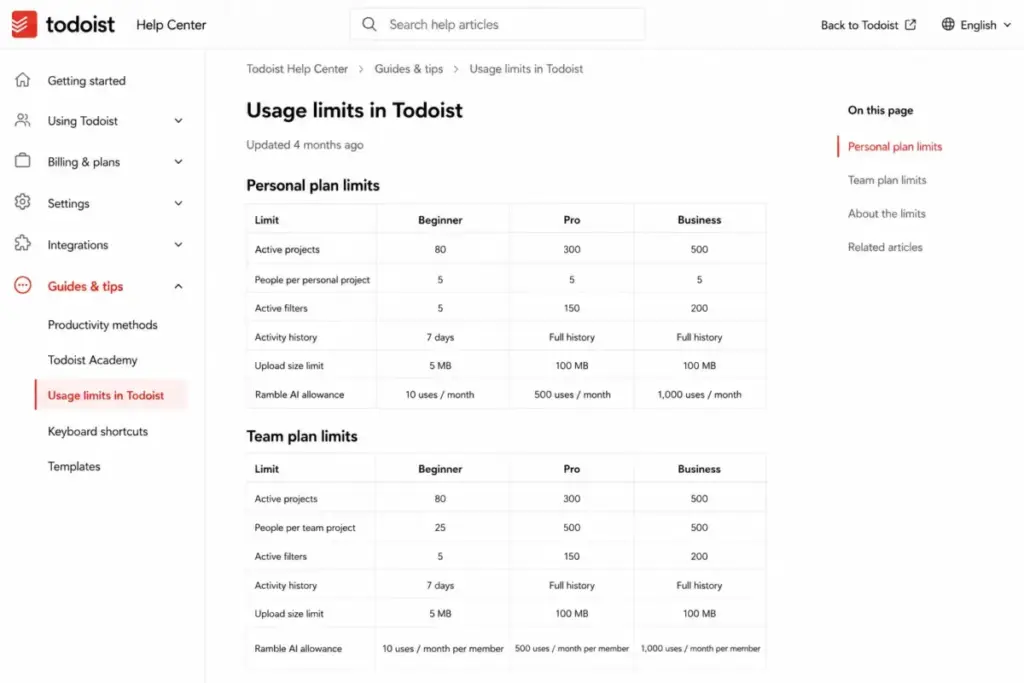
Some ceilings rise when you pay. Others do not move at all, and those are the ones that decide whether Todoist survives contact with your team.
| Limit | Beginner | Pro | Business | Can you buy past it? |
|---|---|---|---|---|
| People per personal project | 5 | 5 | 5 | No |
| Active personal projects | 5 | 300 | 300 per member | Yes, up to 300 |
| Active team projects | 5 | 5 | Up to 500 | Only with Business |
| Filters | 3 | 150 | 150 per member | Yes, with Pro |
| Activity history | 1 week | Full | Full | Yes, with Pro |
| Daily backups | No | Yes | Yes | Yes, with Pro |
| Upload size | 5 MB | 25 MB | 100 MB team comments | Partly |
| Team participants | n/a | n/a | Up to 1,000 | Only with Business |
| Ramble sessions | 10 per month | Unlimited, rate-limited | Unlimited, rate-limited | Partly |
The five-person personal-project cap is the row people miss. Todoist’s usage-limit documentation lists five people per personal project on Beginner and on Pro, so a collaboration-driven upgrade to Pro solves nothing.
Ramble deserves the same skepticism. Paid plans list it as unlimited while the documentation still describes rate limiting, so treat “unlimited” as an allowance rather than a throughput guarantee.
When the Free Plan Stops Working
Beginner breaks in a predictable order, and it is almost never the feature list that breaks first.
Project count goes first. Five active personal projects sounds fine until one client, one side project, and one house move each claim a project.
Filters go second. Three filters cannot cover “today at work”, “waiting on someone”, and “this quarter’s priorities” once your task volume passes a few hundred items.
Activity history goes third, and it goes quietly. One week of history means that when a recurring task disappears in March, you cannot see who completed it in February.
Backups are the one that should worry a team. Daily backups start on Pro, so a free workspace has no automated recovery point if somebody deletes the wrong project.
Free Todoist is a good place to test whether the habit sticks. If you are still choosing between free tools, the best free project management tools roundup compares the ceilings side by side.
Real Cost Scenarios: 1 to 100 Users
All figures use US list prices, assume one paid Business team, no duplicate memberships, no guests billed as members, and exclude location-dependent tax.
| Paid members | Plan | Monthly billing, per month | 12 months of monthly billing | Annual billing, per year | Annual saving |
|---|---|---|---|---|---|
| 1 | Pro | $7 | $84 | $60 | $24 (28.6%) |
| 5 | Business | $50 | $600 | $480 | $120 (20%) |
| 10 | Business | $100 | $1,200 | $960 | $240 (20%) |
| 20 | Business | $200 | $2,400 | $1,920 | $480 (20%) |
| 25 | Business | $250 | $3,000 | $2,400 | $600 (20%) |
| 100 | Business | $1,000 | $12,000 | $9,600 | $2,400 (20%) |
At 25 members you are spending $2,400 per year for a task workspace. That is the point where I would run a serious comparison against a full project-management platform, because the price gap narrows while the capability gap does not.
At 100 members, $9,600 per year buys you a tool with no published support SLA and no phone support. Price that risk before signing.
Guests never appear in this table. Reclassifying five external collaborators from members to guests at a 25-person company saves $480 per year on annual billing and changes nothing about the work they do.
Monthly vs Annual Billing: The Savings Math
The annual discount is real, and it is not the same on both plans.
| Plan | 12 months of monthly billing | Annual billing | Saving | Saving % |
|---|---|---|---|---|
| Pro | $84 per account | $60 per account | $24 | 28.6% |
| Business | $120 per member | $96 per member | $24 per member | 20% |
Both plans save $24 per seat per year. The percentage differs because the monthly base prices differ, and articles that quote 28.6% for both are doing the arithmetic wrong.
For Pro, the break-even is nine months. If you expect to use Todoist past month nine, the yearly plan wins.
For Business, the break-even is ten months at 20% savings. Pay monthly for the first year if your headcount is still moving, because prorated additions and removals on an annual term create credit you cannot spend as cash.
I would put a stable 25-person team on annual billing and a hiring 25-person team on monthly for one cycle.
Free Trials, Refunds, and Account Credits
Todoist’s trial terms differ by plan, and the differences matter more than the lengths.
| Pro trial | Business trial | |
|---|---|---|
| Length | 7 days | 14 days |
| Eligibility | One trial per account | One trial per team |
| Converts to | Paid Pro at the standard rate | Paid Business at the standard rate |
| What to check first | The renewal date shown in your billing settings | Team-level payment and conversion rules before inviting members |
The one-trial-per-team rule on Business is the sharp edge. Burn the 14 days before your workspace is designed and you cannot reset the clock by re-inviting people.
Todoist’s Pro billing documentation describes a 30-day refund path for eligible yearly subscriptions under its stated conditions. Store-billed subscriptions follow Apple or Google rules instead, so check the store account for the amount and renewal date.
Cancel a Business team and members can return to Beginner rather than to a Pro subscription. That is a support ticket waiting to happen if your people assumed their old plan would come back.
Todoist Pro Legacy: Cheaper Price, Frozen Features
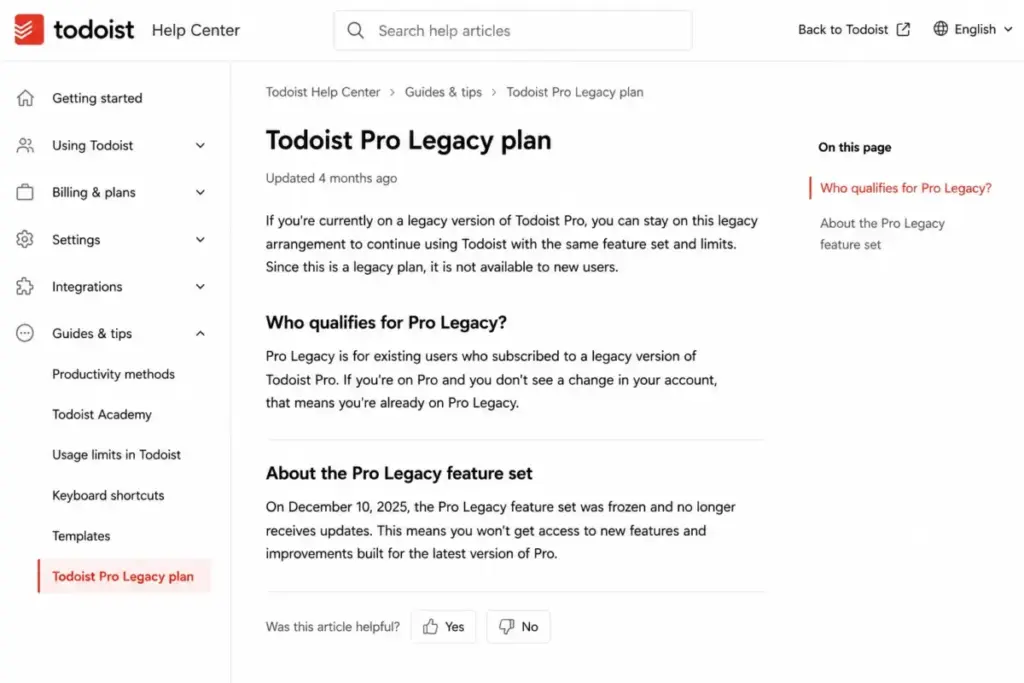
Eligible legacy subscribers can stay on a Pro Legacy arrangement. The catch is documented in the Pro Legacy plan article: the legacy feature set was frozen as of December 10, 2025.
Price retention and product capability are now two separate decisions. Staying costs less and buys you nothing new.
Keep Pro Legacy if the frozen feature set already covers your workflow. Move to standard Pro only when a specific capability added after that date changes how you work, and expect to pay the current standard rate when you do.
Legacy eligibility and historical terms vary by account. Check the price shown in your own billing settings rather than trusting any published legacy figure, including any you find elsewhere.
Cancellation and Downgrade Risks
Downgrading Todoist is not a purely financial event. Todoist’s downgrade documentation states that projects exceeding the destination plan’s limit become frozen or read-only.
Go from Pro back to Beginner with 40 active projects and 35 of them stop accepting edits.
Your data is there. Your workflow is not.
Run this before you downgrade or cancel:
- Count your active projects and compare the number against the destination plan’s ceiling of 5 personal projects on Beginner.
- Archive or consolidate every project above that ceiling while you still have write access.
- Export or back up anything you need outside Todoist, since daily backups stop when Pro ends.
- Confirm project ownership and team access, because leaving a Business team returns a user to Beginner.
- Check whether any remaining subscription value becomes account credit rather than a refund.
Steps 2 through 5 are my recommended preparation. Only the freezing behavior itself is Todoist’s documented rule.
API, Automation, Security, and Support
Todoist’s API is free to access. That is not the same as unlimited.
The developer documentation describes REST and sync endpoints, official JavaScript and Python SDKs, HTTP 429 responses with retry_after guidance, and batching recommendations. No universal numerical request quota appears in the reviewed public documentation.
Some API-exposed capabilities also depend on the account plan. If you are building high-volume automation, validate your expected throughput against a real account before you commit, and read up on workflow automation basics before assuming a free API means a free pipeline.
| Area | What is verified | What you must ask Todoist |
|---|---|---|
| API cost | No separate API subscription price found | Sustained request ceiling for your volume |
| Rate limiting | 429 responses and retry guidance documented | Per-endpoint throughput at your plan |
| Compliance | SOC 2 Type II and GDPR, per Doist’s public trust center | Data residency and audit-log scope |
| Identity | Not enumerated on reviewed public plan pages | SSO and SCIM entitlements on Business |
| Support | Help Center plus ticket submission | Response-time commitment in writing |
| Phone support | Not offered, stated officially | n/a |
Absence from a public pricing page is not proof that a control does not exist. Send the right-hand column to Todoist sales before an enterprise procurement decision rather than assuming either answer.
The support line is the one I would flag to an operations lead. Todoist states plainly that it does not offer phone support, and no public response-time SLA was verified in the reviewed pages.
Which Todoist Plan Should You Choose?
Todoist pricing only makes sense once you know which of two things you are buying: volume or administration.
| Buyer | Plan | Annual cost | Why |
|---|---|---|---|
| Solo user testing the habit | Beginner | $0 | Automatic reminders and calendar integrations are already free |
| Solo consultant with 20+ client projects | Pro | $60 | 300 personal projects, 150 filters, daily backups, calendar layout |
| Freelancer collaborating with 2-4 clients | Beginner or Pro | $0-$60 | Personal projects hold 5 people on both plans, so pay only for volume |
| 5-person team needing shared execution | Business | $480 | Folders, roles, restricted projects, central billing |
| 25-person team | Business | $2,400 | 500 team projects and 1,000 participant capacity, with one paid team |
| 100-person regulated org | Business, conditionally | $9,600 | Verify SSO, SCIM, residency, audit logs, and support terms first |
The dividing line is administration, not features. Buy Pro for volume and buy Business for governance.
If your team is under five people and nobody needs role-based permissions, Pro subscriptions plus the included free team will do the job for $60 per person per year instead of $96.
Which Todoist Plan Should You Avoid?
Avoid Business bought as “Pro for a group”. Teams that only need shared checklists and a couple of collaborators are paying $36 more per person per year for folders, roles, and admin controls they will never open.
The feature gate that justifies Business is the paid team workspace with restricted projects and centralized billing. If nobody in the buying conversation asked for permissions or a single invoice, the workspace is not what you are buying.
Avoid Business too when your requirement list includes dependency management, workload planning, or portfolio reporting. Those are absent from the documented feature set at every tier, so a higher Todoist plan does not fix them, and a platform like the one covered in our Asana review is the honest comparison point.
The exception: a 5 to 10 person team with real access boundaries, such as an agency that must keep client projects invisible to other clients. Restricted projects alone can justify the Business rate there.
Todoist Pricing vs Competitors
Prices below come from each vendor’s official page, checked July 10, 2026. Billing basis is shown explicitly because a per-account price and a per-user price are not comparable.
| Product | Entry price | Billing basis | 10-user annual cost | Best for |
|---|---|---|---|---|
| Todoist Pro | $60 per year ($7 monthly) | Per account | $600 (10 separate subscriptions) | Solo power users with high project volume |
| Todoist Business | $96 per member per year ($10 monthly) | Per paid member, per paid team | $960 | Light shared task workspace with roles |
| TickTick Premium | $35.99 per year | Per account | Not verified (billed per account; TickTick team pricing was not researched) | Cost-first premium task management |
| Microsoft To Do | Free | Free | $0 | Basic personal and shared lists |
| Trello Standard | $5 per user per month billed annually ($6 monthly) | Per user | $600 | Board-first team workflows |
Todoist Pro costs $24.01 more per year than TickTick Premium. That premium buys Todoist’s project and filter ceilings, its calendar layout, and its ecosystem, and it buys nothing if your task list is simple.
Trello Standard at $600 per year for ten users undercuts Todoist Business by $360 annually, though Trello Premium moves to a $10 annual-equivalent per user. The Trello pricing breakdown has the full tier math.
These are price anchors, not feature equivalence. Board-centric work behaves differently from list-centric work, which our Trello review gets into.
Pick Microsoft To Do if the requirement is a free shared list. Pick TickTick if you want premium task management for under $40.
Pick Todoist when its capture speed and filter model are what your day runs on.
Is Todoist Worth the Price?
The Todoist pricing question splits cleanly by plan. Pro earns its $60, and Business earns its $96 only when governance is a real requirement.
SaaSZap editorial pricing-value score: 7.5 / 10. This is our own buyer-value judgment, not a user rating or an aggregate of review-site scores.
| Pros | Cons |
|---|---|
| Pro at $60 per year covers 300 projects, 150 filters, and full history | Personal-project collaboration stays capped at 5 people, even on Pro |
| Automatic reminders are free, so basic nudges need no upgrade | One employee in two paid teams is billed twice |
| Guests are not invoiced on Business, which lowers real team cost | No phone support and no verified public response-time SLA |
| Daily backups from Pro upward on a $60 plan | Pro Legacy keeps the old price but freezes the feature set |
| Apps across Windows, macOS, Linux, iOS, Android, Apple Watch, and Wear OS | Downgrading freezes projects above the destination plan’s limit |
Best for:
- Solo consultants and knowledge workers running 20 or more parallel client projects.
- Teams of 5 to 25 people that need a shared task workspace with folders, roles, and one invoice.
- Existing Todoist-heavy teams where the task syntax is already muscle memory.
Not best for:
- Project offices of 3 to 50 people whose purchase criteria include dependency mapping, portfolio governance, or resource allocation. None of that appears at any tier, and what a Gantt chart does shows the size of the gap.
- Regulated enterprises that cannot proceed without pre-verified SSO, SCIM, residency, and contractual support terms.
- Cost-first users who need only shared lists and can finish the job on Microsoft To Do for $0.
- Automation-heavy teams that require a stated API throughput ceiling before implementation.
Reviewers on G2 and Capterra repeatedly praise the speed of task capture, natural-language entry, and cross-device sync. Critical patterns on TrustRadius cluster around occasional sync problems and weak fit for specialized document and email workflows.
Price sensitivity shows up in community discussion. One anonymous participant in the r/todoist pricing thread put it as “$60/year doesn’t feel worth it for me”, arguing free apps cover the same daily tasks.
That objection is correct for a simple task list and wrong for a filter-driven system. If you have never built a Todoist filter, you are the person that quote is describing, and the Todoist alternatives worth testing start at $0.
How to Avoid Overpaying for Todoist
- Classify collaborators as guests before you invite them. Guests are not invoiced on Business, and five reclassified members save $480 per year at the annual rate.
- Run one paid team, not several. Duplicate membership across two paid teams is billed twice, so use folders for departmental separation unless you need separate billing entities.
- Do not buy Pro to add collaborators. The five-person personal-project cap is identical on Beginner and Pro.
- Check whether your calendar need is already free. Calendar and email integrations work on Beginner, and only the native calendar layout, task duration, and time blocking are gated.
- Stay on monthly billing during a hiring year. Annual terms turn removed seats into account credit rather than cash back, while the discount is only 20% on Business.
- Audit your project count before downgrading. Projects above the destination limit freeze, and cleaning them up afterward is not possible from a read-only state.
- Verify the checkout total, not the pricing page. Tax is calculated at checkout, and app-store subscriptions follow Apple or Google billing rules.
The clean summary of Todoist pricing in 2026: pay $60 a year for Pro if your constraint is project volume, pay $96 per member for Business only when permissions and one invoice are named requirements, and design the workspace before you buy the seats. If Todoist is one of several tools you are weighing, our roundup of best productivity tools puts it in context against the rest of the category.
Skip both if a free plan plus one calendar app already closes your loops.
FAQ
How much does Todoist cost in 2026?
Todoist Beginner is free. Pro costs $7 per month or $60 per year. Business costs $10 per paid member per month or $96 per paid member per year. Prices were verified on Todoist’s official pricing page and billing FAQ on July 10, 2026, and exclude location-dependent tax added at checkout.
Is Todoist free forever?
Yes. The Beginner plan has no time limit and includes automatic reminders, calendar and email integrations, five active personal projects, three filters, one week of activity history, 5 MB uploads, and one free team with up to five active team projects. You lose daily backups, custom reminders, deadlines, and the native calendar layout.
Is Todoist Pro worth $60 per year?
It is worth it if your constraint is volume. Pro raises you from 5 to 300 active personal projects and from 3 to 150 filters, adds full activity history, daily backups, deadlines, custom reminders, and calendar layout. It is not worth it if you wanted more collaborators, because the five-person personal-project cap does not change.
Does Todoist Business charge for guests?
No. Todoist’s Business subscription documentation states that guests are not invoiced while paid members drive billing. Assign external collaborators such as clients and contractors as guests rather than members. Promoting five guests to members adds $480 per year to an annual Business invoice before tax.
Does Todoist offer a free trial?
Yes, two of them. Pro has a 7-day trial, limited to one per account. Business has a 14-day trial, limited to one per team. Both convert to the standard paid rate. Sources claiming Todoist has no trial are outdated. Check the renewal date shown in your billing settings before the trial ends.
Can I get a refund for Todoist?
Todoist’s Pro billing documentation describes a 30-day refund path for eligible yearly subscriptions under its stated conditions. Subscriptions purchased through the Apple App Store or Google Play follow those stores’ billing rules instead. Removing a paid Business member produces account credit rather than an immediate cash refund.
Why did Todoist increase its price?
Todoist has not published a rationale in the pricing materials reviewed on July 10, 2026. Its official notices document the change and the effective date only: new standard rates began on December 10, 2025. Eligible existing subscribers can remain on Pro Legacy, though that legacy feature set was frozen on the same date.
Is Todoist cheaper than Trello or TickTick?
No on both counts at entry level. TickTick Premium is $35.99 per year against Todoist Pro at $60. Trello Standard runs $5 per user monthly on annual billing, or $600 per year for ten users, against $960 for ten Todoist Business members. Microsoft To Do is free.
Can my team share one Todoist Pro subscription?
No. Each account that needs Pro requires its own subscription, and Pro entitlements belong to the paying account. Five people on Pro means five separate $60 subscriptions and still no shared workspace. Todoist Business is the paid team plan with folders, roles, restricted projects, and centralized billing.
What are Todoist's hidden costs?
There is no public Todoist add-on catalog as of July 10, 2026. Real cost expansion comes from six triggers: extra paid Business members, duplicate membership across two paid teams, prorated mid-cycle seat additions, location-dependent tax at checkout, restricted Pro-to-Business account credit, and separately billed third-party connectors such as Zapier.