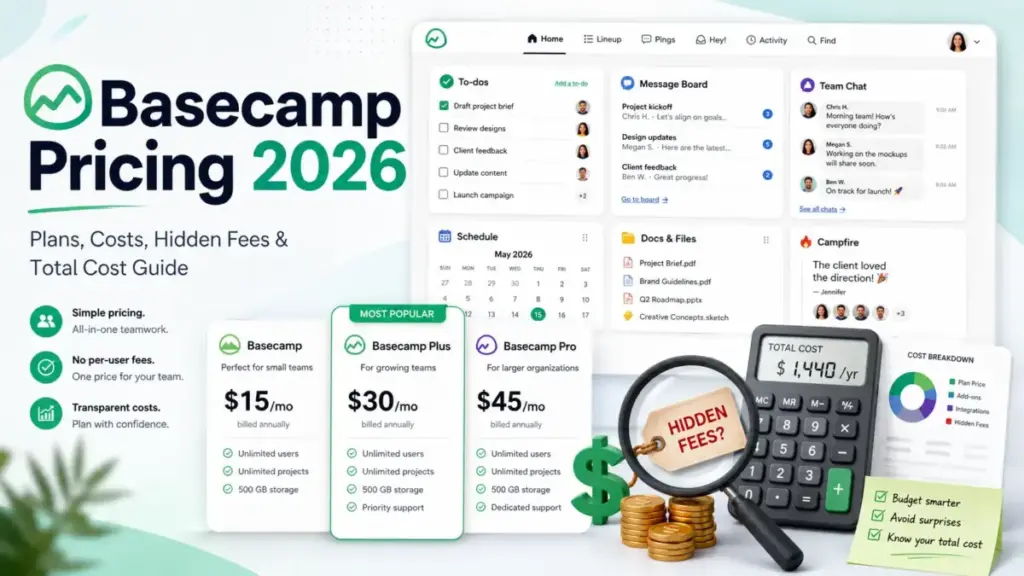
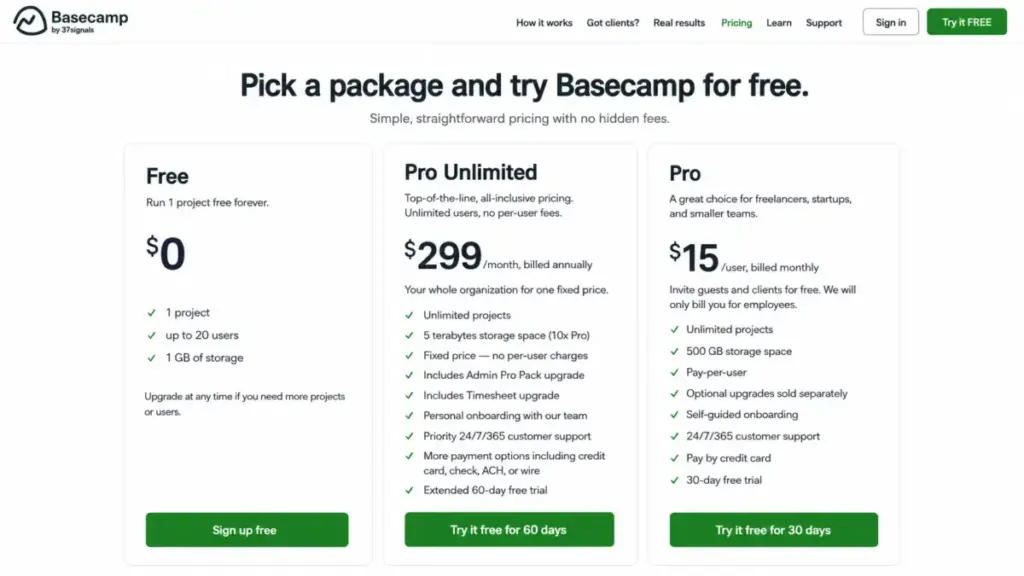
Basecamp pricing looks like one of the simplest deals in project management: a free plan, $15 per user per month, and a flat $299-per-month package for everyone else. The bill your team ends up paying depends on three numbers the plan cards do not add up for you, headcount, add-ons, and how many of your people are clients instead of employees.
That gap is the whole story. On the official pricing page checked July 13, 2026, the flat plan is only shown as an annual commitment, two of Basecamp’s most-wanted features are paid upgrades, and the crossover between the two paid plans lands on an exact team size most ranking pages round off.
This guide runs the total cost at 5, 10, 20, 25, and 50 paid employees, exposes every $50 add-on, corrects the stale plan names floating around Google, and tells you which plan to buy and which to skip. It also shows where Basecamp lands among the best project management software for teams weighing flat-rate against per-seat pricing.
Quick Basecamp Pricing Verdict
| Question | Answer (verified July 13, 2026) |
|---|---|
| Starting price | $0 Free plan; $15 per paid employee/month on Pro |
| Free plan or trial | Free plan (1 project, 20 users, 1 GB); 30-day Pro trial, 60-day Pro Unlimited trial, no card required |
| Best plan for most teams | Pro at $15/user for teams under ~14-20 paid employees; Pro Unlimited above that |
| Plan to avoid | Pro Unlimited for teams under 14 paid employees buying it only for the “unlimited” label |
| Biggest hidden cost | Timesheet and Admin Pro Pack at $50/month each on Pro, plus $50/month per extra 1 TB |
| Annual cash outlay | Pro Unlimited is $3,588 charged annually, not a monthly line item |
| Best alternative if too expensive | ClickUp for per-seat teams that want reporting and automation depth |
Here is the short version.
If your paid headcount is small and you do not need built-in time tracking or advanced admin controls, Basecamp is genuinely cheap. The moment you need either add-on, or your paid team pushes past the high teens, the math flips and the flat plan wins.
Executive Summary: Basecamp TCO at 5, 10, 20, and 50 Employees
The single most useful Basecamp pricing fact is the break-even point. Pro charges $15 per paid employee per month, and Pro Unlimited is a flat $299 per month billed annually, which is $3,588 per year.
Twenty paid employees is the crossover. At that size Pro costs $300 per month before any upgrades, and Pro Unlimited costs the equivalent of $299, so the flat plan wins by $12 a year and throws in two paid features for free.
| Paid employees | Pro monthly | Pro annual | Pro Unlimited annual | Cheaper plan |
|---|---|---|---|---|
| 5 | $75 | $900 | $3,588 | Pro |
| 10 | $150 | $1,800 | $3,588 | Pro |
| 19 | $285 | $3,420 | $3,588 | Pro |
| 20 | $300 | $3,600 | $3,588 | Pro Unlimited (by $12) |
| 25 | $375 | $4,500 | $3,588 | Pro Unlimited (by $912) |
| 50 | $750 | $9,000 | $3,588 | Pro Unlimited (by $5,412) |
Read the table as a slope, not a snapshot. Below 20 paid employees, every seat you remove makes Pro more attractive, and above 20, every seat you add makes Pro Unlimited pull further ahead because its price never moves.
The number that matters for a growing team is 50 employees, where Pro Unlimited saves $5,412 a year. If you expect to cross 20 paid employees within your billing cycle and stay there, the flat plan is the plan to grow into.
There is one wrinkle the raw table hides. Two $50 add-ons can drag the break-even down to roughly 14 paid employees, which I cover in the add-ons section below.
Basecamp Pricing Plans Compared
Basecamp sells three packages built by 37signals, and the core tools are shared across all of them: Message Boards, To-dos, Card Tables, Campfire chat, Pings, Scheduling, Docs and Files, Reports, and Automatic Check-ins. It bundles project management and team collaboration into one workspace, so what separates the plans is storage, billable users, onboarding, support priority, payment methods, and two governance and time-tracking upgrades.
| Plan | Monthly price | Annual price | Billing basis | Best for | Key limits |
|---|---|---|---|---|---|
| Free | $0 | $0 | Flat | One-off projects, classes, volunteer committees | 1 active project, up to 20 users, 1 GB storage |
| Pro | $15 per paid employee | Billed monthly (no separate annual rate shown) | Per paid employee/full user | Client-heavy teams under ~14-20 paid staff | 500 GB storage; Timesheet and Admin Pro Pack are paid extras |
| Pro Unlimited | Not shown on the official page | $299/month equivalent, billed annually ($3,588/year) | Flat, unlimited users | Teams past the break-even that want a capped bill | 5 TB storage; Timesheet and Admin Pro Pack included |
A billing detail trips up a lot of buyers. The public page presents Pro Unlimited only as a $299 monthly equivalent that is billed annually, so the real transaction is a $3,588 charge, not a monthly subscription line.
Several third-party pages still list a $349 month-to-month Pro Unlimited option. That figure did not appear on Basecamp’s public page when I checked it, so treat $349 as unconfirmed and verify inside Basecamp before you build a monthly budget around it.
What Each Basecamp Plan Includes
The plan cards look similar because the shared toolset is genuinely the same. The buying decision lives in the fine print, and our full Basecamp review covers the day-to-day workflow behind these plans, so here is each package interpreted for a real team.
Basecamp Free
Free gives you one active project, up to 20 users, and 1 GB of storage at no cost. The catch is the word “active,” because the project limit is concurrent, not lifetime.
You can delete your current project and start a fresh one in the same slot, so Free works for a single rotating initiative or a class. It does not keep a library of finished projects, and 1 GB disappears fast if anyone uploads video.
Avoid Free if two projects need to run at the same time. That is the exact moment it stops working.
Basecamp Pro
Pro is the $15-per-paid-employee plan with unlimited projects, 500 GB of storage, and free client and contractor seats. It also carries Basecamp’s real upsell surface, because Timesheet and Admin Pro Pack are $50-per-month add-ons here, not included features.
Pro is the right plan for a client-service shop with a small internal team. A 10-person agency serving 50 client contacts pays for 10 seats, not 60.
Avoid Pro if you need built-in time tracking and tighter admin controls at the same time, because two upgrades push you toward the flat plan anyway.
Basecamp Pro Unlimited
Pro Unlimited is the flat plan: unlimited paid users, unlimited projects, 5 TB of storage, plus Timesheet and Admin Pro Pack bundled in. It also adds personal onboarding, priority support, and payment by check, ACH, or wire instead of card-only.
This is the plan for a team past the break-even that wants a predictable annual number. The bundled add-ons and the higher storage ceiling are the reasons it wins beyond the seat math alone.
Avoid Pro Unlimited if you are under 14 paid employees and do not need the add-ons. You would be paying flat-rate money for capacity you will not use.
Feature Gates by Plan
The paid plans are not identical, and the pages claiming “same features on every paid tier” are wrong. Basecamp gates storage, onboarding, support priority, payment methods, time tracking, and advanced admin controls.
| Capability | Free | Pro | Pro Unlimited |
|---|---|---|---|
| Core tools (To-dos, Message Boards, Card Tables, Campfire, Schedules, Docs) | Yes | Yes | Yes |
| Projects | 1 active | Unlimited | Unlimited |
| Users | Up to 20 | Paid employees + free clients | Unlimited |
| Storage | 1 GB | 500 GB | 5 TB |
| Time tracking (Timesheet) | No | $50/month add-on | Included |
| Advanced admin (Admin Pro Pack) | No | $50/month add-on | Included |
| Onboarding | Self-guided | Self-guided | Personal |
| Support | Standard | 24/7/365 | Priority 24/7/365 |
| Payment methods | Card | Card only | Card, check, ACH, wire |
The gate that surprises teams is time tracking. If you bill clients by the hour, Basecamp’s native Timesheet is a paid extra on Pro, which raises a 10-person account from $150 to $200 a month the day you turn it on.
The second gate that matters is payment method. Finance teams that cannot pay by corporate card are quietly pushed toward Pro Unlimited, because ACH, wire, and check only appear on the flat plan.
Annual vs Monthly Billing: The Real Savings Math
Basecamp does not run a traditional annual discount you can compare tier by tier. Pro is billed monthly per paid employee, and Pro Unlimited is the plan that is billed annually at the $299 monthly equivalent.
So the “annual versus monthly” decision is a plan decision. Choosing Pro Unlimited means committing $3,588 up front, and choosing Pro means paying month to month as your headcount moves.
The annual commitment is less risky than it reads, though. Basecamp’s billing FAQ says you can cancel at any time, and the unused difference on an annual package is prorated back to your card.
That proration changes the risk profile of the $3,588 payment. You are not locked into a full year of dead spend if the tool does not stick, which is the fear that keeps teams on monthly plans elsewhere.
There is a cash-flow tradeoff worth naming for finance teams. Pro spreads spend across twelve small monthly charges, while Pro Unlimited asks for the full $3,588 at once, which can trip a single-approval threshold that monthly billing never touches.
That is a real friction point for teams with tight approval rules. A $299 monthly line item sails through, but a $3,588 annual charge often needs a separate sign-off, so the plan you can buy fastest is sometimes the more expensive one.
My recommendation is simple. Pay monthly on Pro while your paid headcount is still moving, and switch to the annual flat plan only once you are confident you will stay above the break-even.
Basecamp Hidden Costs and Add-Ons
Basecamp’s reputation for “no upsells” does not survive contact with the pricing FAQ. Three separate $50 upgrades sit on top of the Pro base price, and none of them are per-user, so they hit small accounts hardest.
| Add-on | Cost | Annual cost | What triggers it |
|---|---|---|---|
| Timesheet | $50/month | $600/year | Native time entry, reporting, and export on Pro |
| Admin Pro Pack | $50/month | $600/year | Advanced permissions, retention, and enforced 2FA on Pro |
| Extra storage | $50/month per 1 TB | $600/year per 1 TB | Exceeding the plan’s 1 GB, 500 GB, or 5 TB allowance |
| Annual Pro Unlimited outlay | $3,588/year | $3,588/year | Selecting the flat plan, billed once annually |
| Third-party integrations | Varies by vendor | Not disclosed by Basecamp | Reporting, Gantt, backup, migration, or external automation tools |
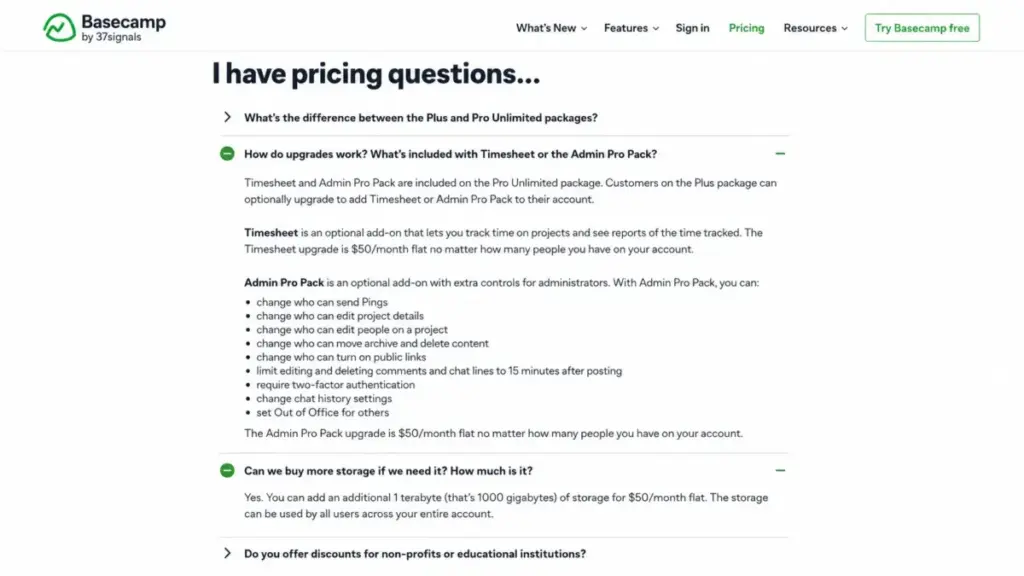
Here is the part that resets the break-even. A Pro account that needs both Timesheet and Admin Pro Pack pays an extra $100 a month, flat, so the crossover with Pro Unlimited drops from 20 paid employees to about 14.
Run it at 14 employees. Pro plus both upgrades is $210 plus $100, which is $310 a month, already past the $299 flat plan.
If your team needs governance and time tracking, the plan decision is driven by those controls, not by seat count.
Storage is the sleeper cost for media-heavy teams. Each additional terabyte is $50 a month, so an extra 3 TB adds $1,800 a year and an extra 5 TB adds $3,000, on top of your plan.
One caution on integrations. Basecamp’s directory links to independent tools for reporting, backups, migration, and external automation, and those carry their own subscriptions that are not part of your Basecamp bill unless the vendor says otherwise.
Who Counts as a Paid User
This is Basecamp’s strongest pricing advantage, and most competitor cost tables miss it. On Pro you pay for employees or full users, while clients and temporary contractors can be added for free.
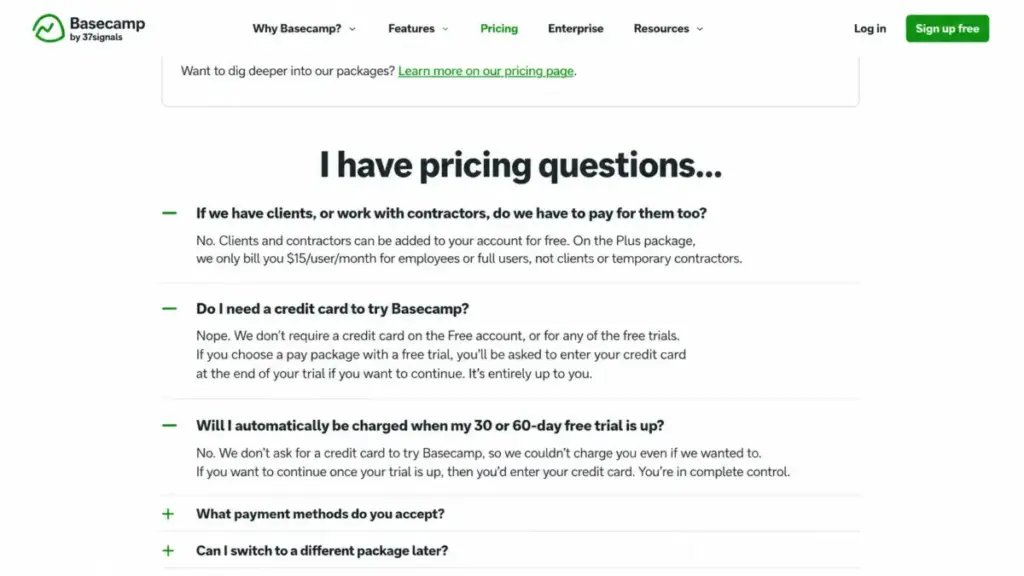
Model an agency to see the size of the win. A 10-person team serving 50 client contacts pays for 10 seats at $150 a month, not 60 seats at $900, as long as those 50 people meet Basecamp’s client or temporary-contractor definition.
That single rule is what makes Basecamp cheap for client-service work and expensive-looking only on paper. It is also the pricing edge that separates it from most team collaboration tools, which bill every participant as a seat.
You still need to be careful, because a mixed-role contributor who does internal work may count as a billable full user.
My tip here: confirm any ambiguous role with Basecamp support before you size the plan. A handful of misclassified contractors can quietly move you from Pro into flat-plan territory.
The trial policy backs up the low-risk framing. Pro has a 30-day trial and Pro Unlimited has a 60-day trial, neither asks for a credit card, and Basecamp says it cannot auto-charge you without one.
When the Free Plan Stops Working
Basecamp Free is real, and several ranking pages are simply wrong about it. Some claim there is no free version, and one popular guide calls the 20-user cap “undisclosed,” but the live page offers one project, up to 20 users, and 1 GB.
Free works for a fixed-scope job: one client engagement, one class, one volunteer committee, one product evaluation. The friction point is the single concurrent project.
The day a second workstream needs its own home, Free breaks. You either delete the first project or move to Pro, and deleting live work to reuse a slot is not a workflow anyone keeps for long.
Free is a trial disguised as a plan. Use it to prove the tool, and if one concurrent project is the dealbreaker, compare it against other free project management tools before you upgrade to Pro.
Outdated Basecamp Pricing Claims to Ignore
The Basecamp SERP is unusually stale, so here is a cleanup pass tied to the live page. These are the claims to stop trusting.
The plan name is the first one. The current pricing card calls the $15 package Pro, while parts of Basecamp’s own FAQ and many third-party pages still say Plus, so treat Plus as the legacy or inconsistent label for the same package.
The “no free plan” claim is the second. It is false as of July 13, 2026, and so is the universal 30-day trial claim, because Pro Unlimited carries a 60-day trial.
The $349 monthly Pro Unlimited price is the third. It is widely syndicated but was not visible on Basecamp’s public page when I checked, so do not put it in a budget until you confirm it inside the product.
Real Cost Scenarios: 5, 10, 20, and Seasonal Teams
Numbers make the plan decision obvious, so here are the scenarios I get asked about most. Every figure below is before applicable taxes.
| Team | Recommended plan | Monthly | Annual | Notes |
|---|---|---|---|---|
| Up to 20 users, 1 project | Free | $0 | $0 | One active project and 1 GB only |
| 5 paid employees | Pro | $75 | $900 | Clients and contractors free |
| 10 paid employees, no add-ons | Pro | $150 | $1,800 | Base collaboration only |
| 10 paid employees + both add-ons | Pro | $250 | $3,000 | Timesheet + Admin Pro Pack |
| 20 paid employees | Pro Unlimited | $299 equiv | $3,588 | Flat plan wins by $12 and bundles add-ons |
| 50 paid employees | Pro Unlimited | $299 equiv | $3,588 | Saves $5,412 vs Pro |
| 10 for 9 months, 25 for 3 months | Pro | Variable | $2,475 | Seasonal peak still cheaper than flat |
The seasonal row is the one competitors never model. A team of 10 for nine months that scales to 25 for three months pays 10 x $15 x 9 plus 25 x $15 x 3, which is $2,475 for the year, well under the $3,588 flat plan.
That flips the usual advice. A short headcount spike does not justify the annual plan, especially if your temporary contributors qualify as free contractors.
Two teams of the same size can land on different plans here, and the deciding factor is whether the peak is permanent. Model your own peak before you commit to annual.
Which Basecamp Plan Should You Choose?
Buyer type decides the plan faster than headcount alone. Here is how I would route the common cases.
Solo operators and tiny committees start on Free and stay there until a second project appears. There is no reason to pay while one rotating project covers the work.
Small client-service teams under about 14 paid employees belong on Pro, because free client seats and monthly billing keep the number low. This is Basecamp’s best-fit buyer, a 5-to-15-person agency or consultancy that treats it as team collaboration software for many external contacts on relatively simple projects.
Governance-heavy or time-billing teams should compare Pro-plus-add-ons against Pro Unlimited directly, since two upgrades erase most of the gap by 14 employees. If you need both controls, buy the flat plan and take the bundled features.
Teams past 20 paid employees choose Pro Unlimited for the capped, predictable bill. Nonprofits coordinating staff and volunteers also fit Basecamp well, and a registered 501(c)(3) gets 10% off after verification.
Which Basecamp Plan Should You Avoid?
Skip Pro Unlimited if you are under 14 paid employees and do not need Timesheet or Admin Pro Pack. At 10 employees the flat plan is $3,588 a year against $1,800 for base Pro, so you would be paying twice as much for an “unlimited” label you cannot use.
The exception is a team that is about to scale. If you will cross 20 paid employees inside the billing year and stay there, buying the flat plan early can be the cheaper move over twelve months.
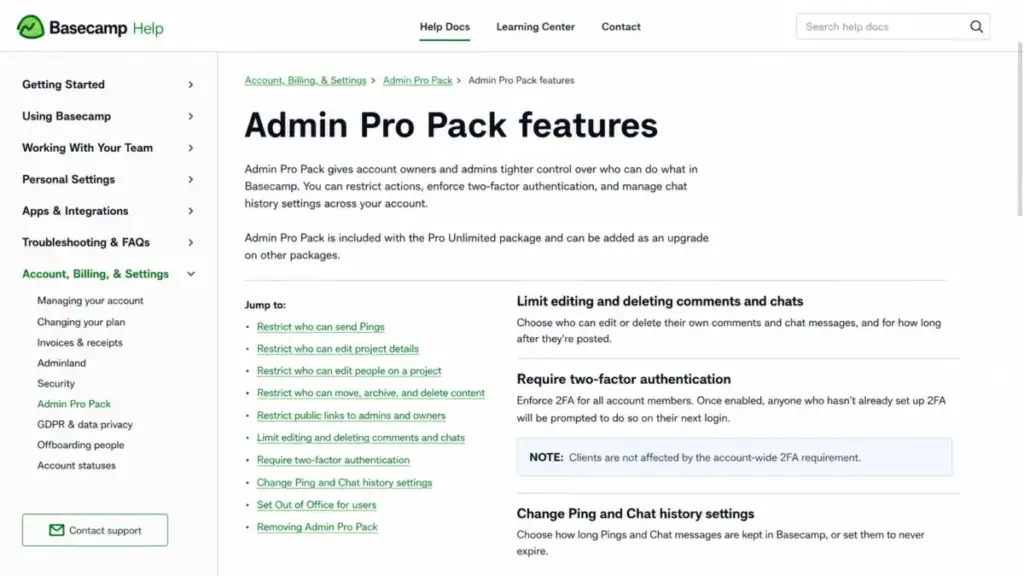
There is a second avoid case tied to a feature gate, not a plan. Do not assume Basecamp can force two-factor authentication on everyone.
Admin Pro Pack can enforce account-wide 2FA for members, but Basecamp’s help page says clients are not covered by that requirement. If your compliance rule demands 2FA for every external collaborator, validate that during the trial before you sign.
Basecamp Security and Data Costs
Security is part of the buying decision for regulated and client-facing teams, and it deserves precise wording rather than a “secure” checkbox. 37signals documents the architecture directly.
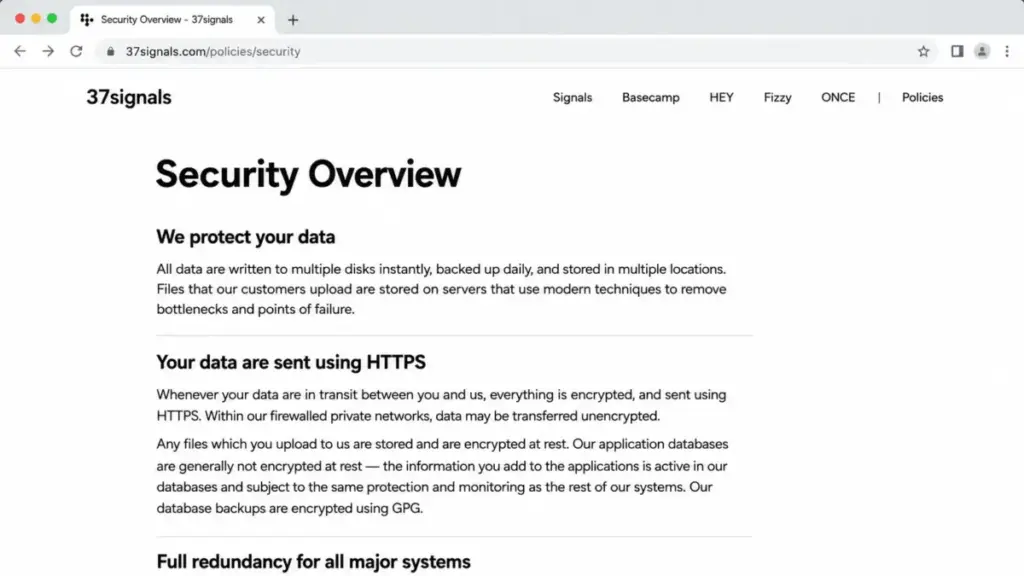
The nuance matters. 37signals states that traffic is encrypted in transit over HTTPS, uploaded files are encrypted at rest, and database backups are encrypted, while application databases are generally not encrypted at rest.
Data location is the second procurement fact. 37signals says its products are primarily housed in the United States and offers a Data Processing Addendum with Standard Contractual Clauses for applicable transfers.
One thing this research could not confirm is a public SOC 2 assertion. The security, privacy, pricing, and DPA pages I reviewed describe controls and a DPA, but they did not publish a specific SOC 2 claim, so request current audit documentation directly if your review requires it.
Offboarding has a defined window too. 37signals says canceled account content becomes inaccessible immediately and should be purged within 60 days, which is useful for switching and data-retention planning.
Basecamp Integrations, API, and Automation Costs
Integration logos can hide separate bills, so it helps to sort them into three buckets: Basecamp-built capabilities, public API and SDK access, and independent third-party services. Only the first two are covered by your Basecamp subscription.
The API is where technical buyers need to plan. Basecamp’s API uses OAuth 2.0 and JSON, and it applies dynamic rate limits rather than a fixed per-plan quota.
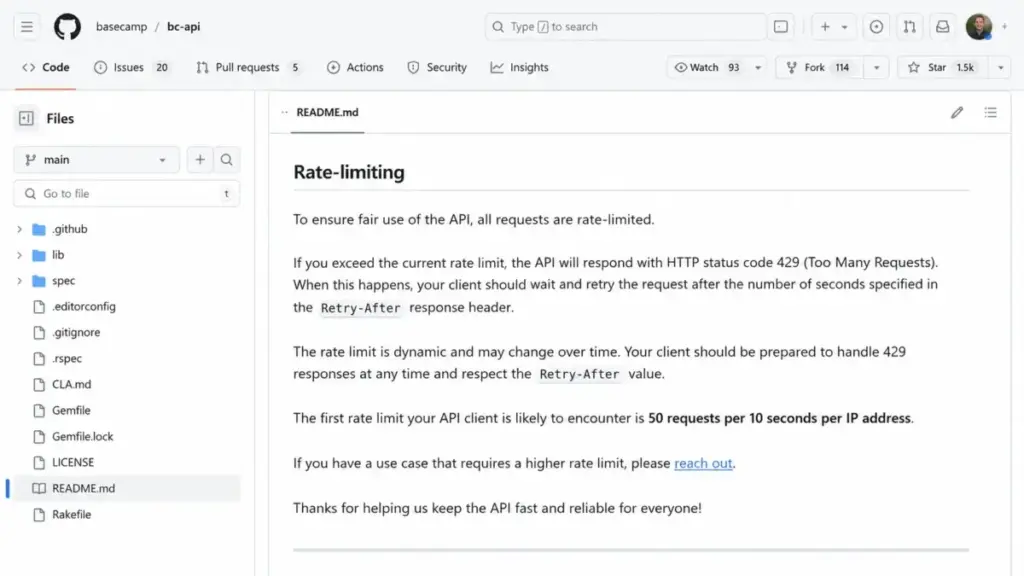
The practical detail is the first limit you will hit. Basecamp’s documentation says the common first threshold is 50 requests per 10 seconds per IP, and clients must honor the Retry-After header after a 429 response.
If you plan high-frequency reporting, backups, migration, or agent workflows, build retry and backoff logic from day one. Treat 50 requests per 10 seconds as a starting constraint, not the only limit or a permanent guaranteed quota.
Basecamp Pricing vs Competitors
Entry prices alone mislead here, because Basecamp’s flat plan improves against per-seat tools as your headcount grows. This is a price-only comparison at list rates checked July 13, 2026, not a feature-equivalence claim.
| Tool | Practical entry tier | Per user/month (annual) | 10-user cost | 50-user cost |
|---|---|---|---|---|
| Basecamp | Pro / Pro Unlimited | $15 (Pro) or flat | $150 | $299 flat |
| ClickUp | Unlimited | $7 | $70 | $350 |
| Asana | Starter | $10.99 | $109.90 | $549.50 |
| monday.com | Basic (work management) | $9 | $90 | $450 |
| Teamwork.com | Basics | $9.99 | $99.90 | $499.50 |
At 10 users, Basecamp Pro is the most expensive option in this group at $150 a month. Per-seat tools are cheaper for small teams, and the entry tiers behind ClickUp pricing and Asana pricing show why small teams should not overpay for the flat plan.
At 50 users, the picture inverts. Basecamp Pro Unlimited holds at $299 while every per-seat tool scales past $350, so a 50-person team pays less on Basecamp than on any of these alternatives.
Price is only half the comparison, though. A per-seat tool that costs more per user often includes automation, dependencies, and reporting that Basecamp gates behind add-ons or does not offer at all, so the cheaper monthly number can still buy less capability.
That is the scale question every buyer should ask. If your team lives in dashboards and dependency chains, a $70 ClickUp bill at 10 users can deliver more usable machinery than a $150 Basecamp bill, and the seat price stops being the deciding factor.
The takeaway is a threshold, not a winner. Below roughly 20 paid users a per-seat tool with deeper reporting and automation is usually the better spend, and above it Basecamp’s flat pricing becomes hard to beat on cost alone.
Is Basecamp Worth the Price in 2026?
Basecamp is worth it when your buying problem is coordination, not complexity. For a client-heavy team under 15 paid employees, or any team past 20 that wants a capped bill, the price is honest and the free client seats are a real edge.
Basecamp pricing is not worth it when your work needs machinery it does not have. Review patterns on G2, Capterra, and Reddit repeatedly flag limited advanced functionality, notification overload, and weak search for complex workflows.
Skip Basecamp if you are an eight-person software-delivery team that needs dependency mapping and sprint analytics, or a portfolio office that needs resource forecasting. A low flat rate does not compensate for capabilities that are simply absent, and that judgment comes from official feature scope and reviewer patterns, not hands-on testing on my part.
If Basecamp is too thin for your workflow, a per-seat tool with reporting and automation depth is the better spend, and our roundup of Basecamp alternatives covers the options for teams that live in dashboards and dependencies.
How to Avoid Overpaying for Basecamp
A few specific moves keep the Basecamp bill honest, and they follow the same logic as our other SaaS pricing guides. None of them require negotiation.
Count paid employees, not collaborators. Confirm which clients and temporary contractors qualify as free before you size the plan, because that classification is the difference between 10 seats and 60.
Do not buy the flat plan early. Stay on monthly Pro until you are confident you will hold above 14-to-20 paid employees, and let proration protect you if you switch and change your mind.
Price the add-ons as a plan decision. If you need both Timesheet and Admin Pro Pack, compare Pro-plus-$100 against Pro Unlimited at your headcount rather than bolting them on by reflex.
Watch storage before it watches you. Media-heavy teams should track usage against the 500 GB or 5 TB ceiling, since every extra terabyte is a recurring $600 a year.
Claim the discount you qualify for. Registered 501(c)(3) nonprofits get 10% after verification, and qualifying classroom use is free, but the discounts are prospective and tied to one account, so apply before you pay rather than after.
FAQ
How much does Basecamp cost per month?
Basecamp costs $0 on the Free plan, $15 per paid employee per month on Pro, and a flat $299 per month equivalent on Pro Unlimited, verified July 13, 2026. Pro Unlimited is billed annually, so the real charge is $3,588 for the year rather than a monthly line item. Clients and contractors are free on Pro.
Is there a free version of Basecamp?
Yes. Basecamp Free is real as of July 13, 2026, despite several ranking pages claiming otherwise. It includes one active project, up to 20 users, and 1 GB of storage at no cost. The main limit is that only one project can exist at a time, though you can delete it and reuse the slot for a new one.
At what team size is Basecamp Pro Unlimited cheaper?
Twenty paid employees is the break-even before any add-ons. At 20, Pro costs $300 a month while Pro Unlimited costs the $299 equivalent, so the flat plan wins by $12 a year and bundles two paid features. If you need both the Timesheet and Admin Pro Pack add-ons, that crossover drops to roughly 14 paid employees.
Does Basecamp charge for clients and contractors?
No, not on Pro. Basecamp bills employees and full users, while clients and temporary contractors can be added for free. That rule makes Basecamp cheap for agencies, since a 10-person team serving 50 clients pays for 10 seats. Confirm any mixed-role contributor with Basecamp, because someone doing internal work may count as a billable full user.
Does Basecamp include time tracking?
Not in the Pro base price. Basecamp’s native Timesheet is a $50-per-month add-on on Pro, and it is included in Pro Unlimited. For a 10-person account that bills by the hour, turning on Timesheet raises the monthly cost from $150 to $200. Budget for it if time tracking is part of how you invoice clients.
Can I cancel Basecamp and get a refund?
Yes. Basecamp’s billing FAQ says you can cancel at any time, and the unused difference on an annual package is prorated back to your credit card. That proration lowers the risk of the $3,588 annual Pro Unlimited commitment. The exact day-count formula is not published, so confirm the settlement figure with Basecamp when you cancel.
Does Basecamp offer nonprofit or education discounts?
Yes, with conditions. Registered 501(c)(3) nonprofits get 10% off after verification, and qualifying classroom use can be free. Both are prospective, require documentation, and apply to one account, so there are no retroactive refunds for past payments. Apply before you pay rather than expecting a discount on prior invoices.
Is Basecamp cheaper than ClickUp or Asana?
It depends on headcount. At 10 users, Basecamp Pro at $150 a month is more expensive than ClickUp at $70 or Asana at about $110. At 50 users, Basecamp Pro Unlimited holds flat at $299 while ClickUp reaches $350 and Asana exceeds $549. Basecamp gets cheaper than per-seat tools as your team grows past roughly 20 paid users.
Does Basecamp still have a plan called Plus?
The current pricing card calls the $15 package Pro. Some of Basecamp’s own FAQ text and many third-party pages still use the older name Plus for the same package. This guide uses Pro to match the live card, and treats Plus as the legacy or inconsistent label. There is no separate Plus plan hiding behind the naming.
Can I pay for Basecamp Pro Unlimited monthly?
The official pricing page checked July 13, 2026 showed only the $299 monthly-equivalent price billed annually, and did not display a month-to-month option. Several third-party pages list $349 per month, but that figure was not confirmed on Basecamp’s public page. Verify a monthly option inside Basecamp before budgeting around it.