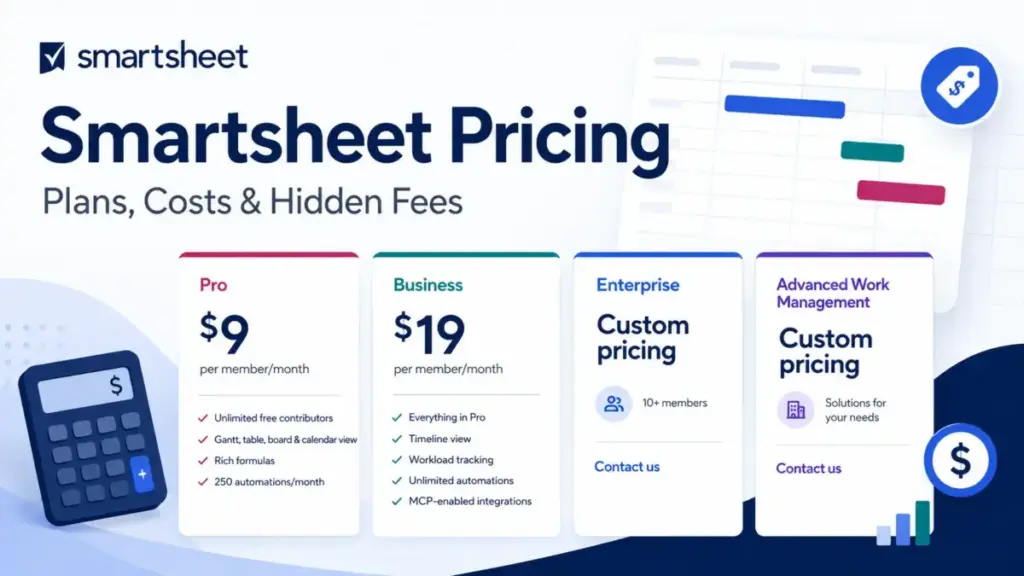
Smartsheet Pro starts at $9 per member per month on annual billing. That number looks competitive next to top project management software like Asana and monday.com. But the moment your team passes 10 members, needs unlimited automations, or requires SAML-based SSO, the pricing conversation changes.
The real buying decision is not Pro versus Business. It is whether your team can stay inside Pro’s limits, or whether the collaboration, security, and automation requirements push you into Business at $19 per member per month, Enterprise at custom pricing, or Advanced Work Management at a quote you will not see until you talk to sales.
I am going to break down every plan, every hidden cost, every upgrade trigger, and the exact dollar amounts at 5, 10, 25, 50, and 100 members. Most pricing pages just repeat the plan table. This one shows you our Smartsheet review and cost analysis at your team size.
| Quick Pricing Verdict | |
|---|---|
| Starting price | $9/member/month (annual) or $12/member/month (monthly) |
| Free plan | No (legacy users only; not available for new signups) |
| Free trial | 30 days, Business plan access, no credit card required |
| Best plan for most teams | Business ($19/member/month annual) |
| Plan to avoid | Pro, if your team will exceed 10 members or needs unlimited automations |
| Biggest hidden cost | Monthly billing premium ($3-$5/member/month more than annual) and add-on fees for Dynamic View ($125/month) and Data Shuttle ($100/month) |
| Best alternative if too expensive | monday.com ($9/seat/month annual, free plan for up to 2 seats) |
| Pricing verified | June 12, 2026 via official pricing page |
What this means: Smartsheet is affordable at small scale. The cost pressure builds when your team outgrows Pro or needs premium capabilities.
The Advertised Price vs the Real Price
Here is the gap nobody talks about.
| What Smartsheet Shows | What You Pay | The Gap |
|---|---|---|
| Pro: $9/member/month | $12/member/month if billed monthly | $3/member/month premium |
| Business: $19/member/month | $24/member/month if billed monthly | $5/member/month premium |
| Pro at 10 members (annual) | $90/month | This is the ceiling. Member 11 forces a Business upgrade. |
| Business at 10 members (annual) | $190/month | $100/month more than Pro for the same headcount |
| Enterprise | Custom | You will not see a number until you call sales. |
| Advanced Work Management | Custom | Same. Bundled premium apps included, but the price is a black box. |
What this means: The pricing page lists $9 and $19. The real monthly bill depends on billing cycle, team size, and which plan threshold you cross. A 10-member team on Pro annual pays $90/month. The same team on Business annual pays $190/month. That is a 111% increase for crossing one plan boundary.
The 7 Hidden Costs Nobody Mentions
1. Monthly Billing Premium
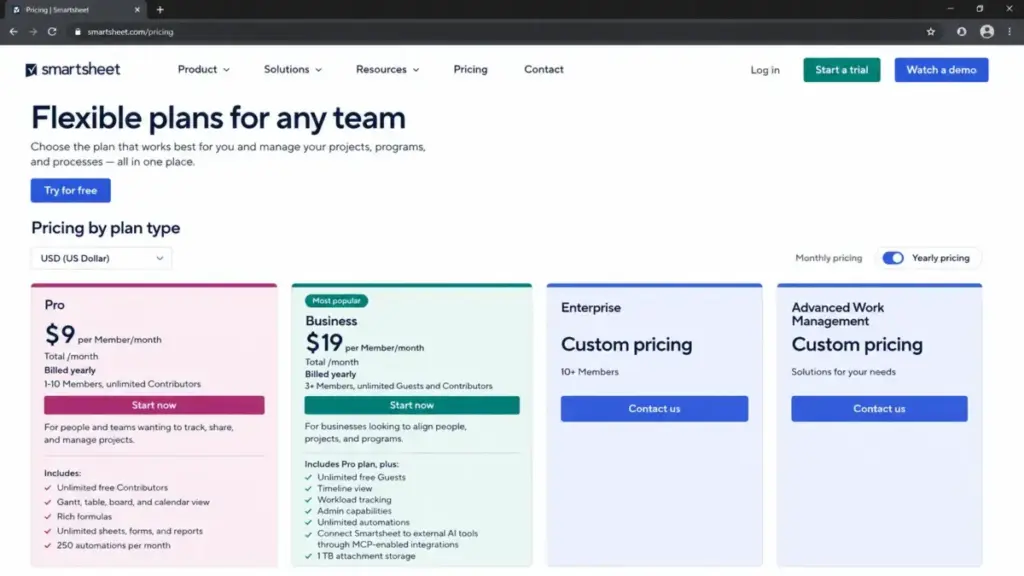
Pro costs $12/member/month on monthly billing versus $9/member/month annually. Business costs $24/member/month monthly versus $19/member/month annually.
At 10 members, the annual savings are real. Pro saves $360 per year. Business saves $600 per year. If you can commit to an annual contract, do it.
2. Business 3-Member Minimum
Business requires at least 3 paid members. Even if only 2 people need Business features, you pay for 3. The minimum annual bill is $57/month equivalent (3 x $19) or $72/month on monthly billing.
3. Pro’s 10-Member Cap
Pro maxes out at 10 members. Member 11 forces a Business upgrade, which more than doubles your per-member cost. Plan for this cliff before you hire.
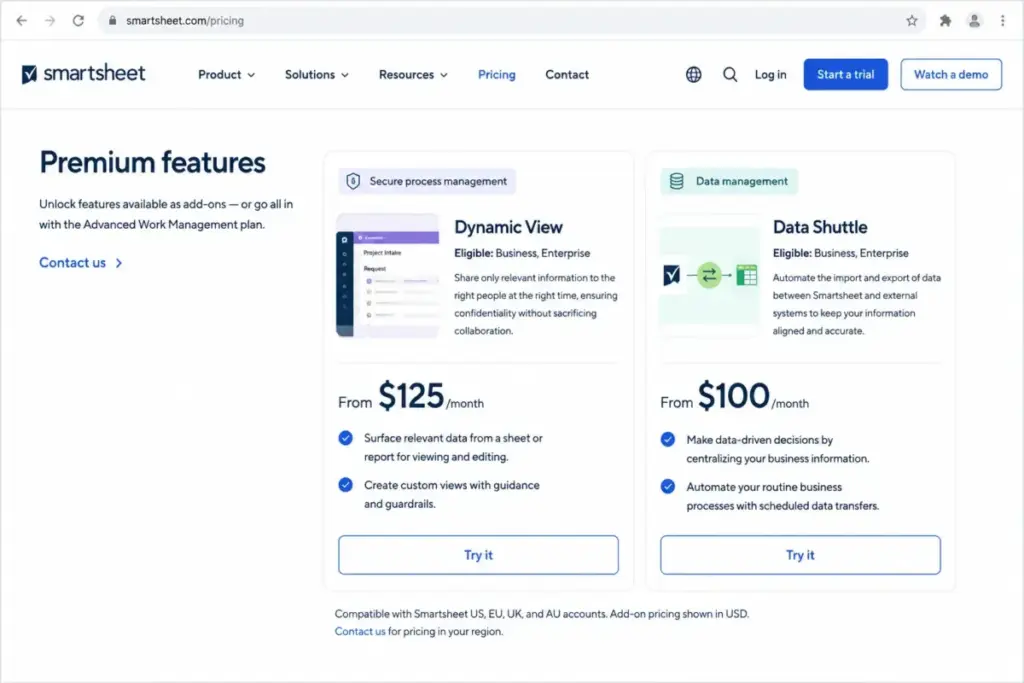
4. Dynamic View Add-On
Starts at $125/month. This is separate from your plan cost. If your team needs selective, process-focused views for internal or external stakeholders, the add-on bill stacks on top.
5. Data Shuttle Add-On
Starts at $100/month. Automated data upload and offload workflows are not included in Pro or Business. They are add-ons with their own price tag.
6. Enterprise Security Gate
Need SAML-based SSO? Directory integrations? User provisioning? Enterprise Plan Manager? Safe sharing? Custom email domains? All of these require Enterprise, which means custom pricing. There is no public number. Smartsheet says custom proposals consider compliance needs, license management, integrations, and support requirements.
7. Provisional Member and True-Up Risk
Smartsheet distinguishes paid members from free collaborators. Members are paid users who can create items. Free collaborators cannot create sheets, reports, or dashboards. If collaboration behavior creates paid member requirements under Smartsheet’s user subscription model, your true-up bill can grow in ways the pricing page does not spell out. Audit seat types and provisional members before every renewal.
Plan-by-Plan Breakdown
Understanding what project management is at the plan level is where the real cost picture forms.
| Plan | Monthly Billing | Annual Billing | Members | Storage | Automations | Best For |
|---|---|---|---|---|---|---|
| Pro | $12/member/month | $9/member/month | 1–10 | 20 GB | 250/month | Small teams with basic project tracking |
| Business | $24/member/month | $19/member/month | 3+ | 1 TB | Unlimited | Teams needing Timeline, workload, admin controls |
| Enterprise | Custom | Custom | 10+ | Unlimited | Unlimited | Organizations requiring SSO, directory integrations |
| Advanced Work Management | Custom | Custom | Custom | Unlimited | Unlimited | PMOs needing Control Center, Dynamic View, Data Shuttle bundled |
Pro: The Entry Plan
Pro gives you Grid, Card, Gantt, and Calendar views, plus 250 automations per month and 20 GB of attachment storage. Unlimited free contributors can view and edit, but only paid members can create and own sheets.
Avoid Pro if: Your team will exceed 10 members within 12 months. The forced upgrade to Business is steep. Also avoid if you need Timeline view, conditional form logic, or unlimited automations. None of these exist on Pro.
Business: The Practical Plan
Business adds Timeline view, Workload tracking, admin capabilities, conditional form logic, unlimited dashboard widgets, and unlimited automations. Storage jumps to 1 TB. Guests are free and unlimited. Integrations expand to include Adobe Creative Cloud, Power BI, Tableau, Anthropic Claude, Gemini Enterprise, Microsoft Copilot, and OpenAI ChatGPT.
This is the plan most teams need. The jump from $9 to $19 per member per month is worth it if your team relies on automations, needs admin controls, or uses Timeline for project planning.
Avoid Business if: You need SAML-based SSO or directory integrations. Those are Enterprise-only. Business also does not include Control Center, Dynamic View, or Data Shuttle, so teams needing those will pay add-on fees or upgrade.
Enterprise: The Security Gate
Enterprise is custom pricing for 10+ members. It adds AI formulas, Scenario Planning, Portfolios, SAML-based SSO, Enterprise Plan Manager, unlimited attachment storage, and directory integrations.
You need Enterprise if your IT or security team requires any of these:
- SAML-based single sign-on
- Directory integrations (Okta, Microsoft Entra ID)
- User provisioning and deprovisioning
- Enterprise Plan Manager for license governance
- Safe sharing and custom email domains
Advanced Work Management: The Full Bundle
Advanced Work Management wraps Enterprise plus Control Center, Dynamic View, Data Shuttle, Connectors, DataMesh, Calendar App, Pivot App, and Premium Support into a custom-priced bundle. This is for PMOs and enterprise workflow teams that would otherwise buy those add-ons separately.
Feature Gates: What You Get by Plan
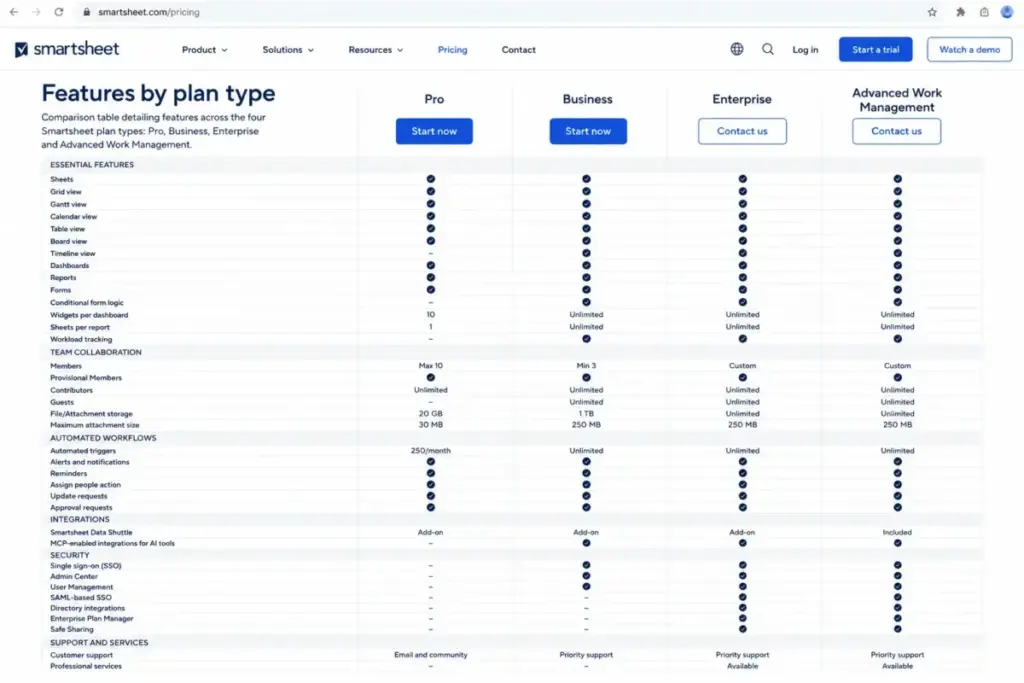
This table shows which features are locked behind which plan. It is the single most important reference when deciding between Pro and Business.
| Feature | Pro | Business | Enterprise | AWM |
|---|---|---|---|---|
| Grid, Card, Gantt, Calendar views | Yes | Yes | Yes | Yes |
| Timeline view | No | Yes | Yes | Yes |
| Workload tracking | No | Yes | Yes | Yes |
| Automations | 250/month | Unlimited | Unlimited | Unlimited |
| Dashboard widgets | Limited | Unlimited | Unlimited | Unlimited |
| Conditional form logic | No | Yes | Yes | Yes |
| Admin controls | No | Yes | Yes | Yes |
| Guest access (free) | Unlimited | Unlimited | Unlimited | Unlimited |
| Attachment storage | 20 GB | 1 TB | Unlimited | Unlimited |
| AI formulas | No | No | Yes | Yes |
| Scenario Planning | No | No | Yes | Yes |
| Portfolios | No | No | Yes | Yes |
| SAML-based SSO | No | No | Yes | Yes |
| Directory integrations | No | No | Yes | Yes |
| Enterprise Plan Manager | No | No | Yes | Yes |
| Control Center | No | No | No | Yes |
| Dynamic View | Add-on | Add-on | Add-on | Included |
| Data Shuttle | Add-on | Add-on | Add-on | Included |
| DataMesh and Connectors | Add-on | Add-on | Add-on | Included |
| Premium Support | No | No | No | Included |
The biggest gate for most teams is automations. Pro caps you at 250 per month. If your team builds more than a handful of automated workflows for approvals, reminders, or status changes, you will hit that ceiling. Business removes the cap entirely.
The second gate is Timeline view. If your team relies on visual project timelines with cross-project dependencies, Pro does not have it. You need Business at minimum.
For security-conscious organizations, the third gate is SSO and directory integrations. These are Enterprise-only. There is no way to get SAML on Pro or Business, regardless of how much you pay.
Monthly vs Annual Billing: The Real Savings Math
Smartsheet offers both monthly and annual billing on Pro and Business. The difference is not trivial.
| Plan | Monthly | Annual | Savings per Member per Year | 10-Member Annual Savings |
|---|---|---|---|---|
| Pro | $12/member/month | $9/member/month | $36 | $360 |
| Business | $24/member/month | $19/member/month | $60 | $600 |
The recommendation: Choose annual billing unless you are running a trial of less than 3 months. At 10 members on Business, annual billing saves $600 per year. That is not a rounding error.
The risk with annual billing is the upfront commitment. Pro locks you into a $1,080/year contract at 10 members. Business locks you into $2,280/year at 10 members. If headcount is uncertain, start with the 30-day trial, evaluate on monthly for 1-2 months, then switch to annual once the team size stabilizes.
One thing worth flagging: Smartsheet does not publicly advertise a percentage discount for annual billing. The discount is built into the per-member price difference. Pro annual is 25% cheaper than Pro monthly. Business annual is approximately 21% cheaper than Business monthly. These are meaningful gaps.
When the Free Plan Stops Working
Short answer: it already did.
Smartsheet’s free plan is no longer available to new signups as of August 28, 2024. Legacy free users may still have access, but new buyers should treat Smartsheet as a 30-day free trial product, not a free-plan product.
The trial gives you Business plan access for 30 days. No credit card required. After the trial ends, you either pick a paid plan or lose access.
If you are comparing Smartsheet alternatives and a permanent free tier matters to your team, Smartsheet is not the answer. monday.com offers a free plan for up to 2 seats. Asana offers a free plan for up to 10 users. Wrike has a free plan as well.
Real Cost Scenarios: 5, 10, 25, 50, and 100 Members
This is the table that changes the buying conversation.
| Team Size | Plan | Annual Billing (per month) | Monthly Billing | Annual Total | Notes |
|---|---|---|---|---|---|
| 5 members | Pro | $45/month | $60/month | $540/year | Best if the team can live without Business features |
| 10 members | Pro | $90/month | $120/month | $1,080/year | Maximum Pro scale. Business at 10 = $190/month annually |
| 25 members | Business | $475/month | $600/month | $5,700/year | Pro unavailable above 10 members |
| 50 members | Business | $950/month | $1,200/month | $11,400/year | Validate add-ons and support needs at this size |
| 100 members | Business or Enterprise | $1,900/month | $2,400/month | $22,800/year | Business public price is the floor; Enterprise is likely if SSO or governance is needed |
What this means: At 5 members, Smartsheet Pro is genuinely affordable at $540/year. At 25 members, you are looking at nearly $6,000/year just for the base plan, before add-ons. At 100 members, the $22,800/year figure assumes Business public pricing. Enterprise custom quotes will likely be higher, depending on what security controls, support, and premium apps you need.
One thing I have learned from reviewing project management tools: teams underestimate how fast they cross plan thresholds. A 7-person team today becomes a 15-person team after two hires. That pushes you from Pro ($63/month annual) to Business ($285/month annual). Budget for the plan you will need in 12 months, not the one you need today.
Which Plan Should You Avoid?
Avoid Pro if your team is growing. The 10-member cap, 250 monthly automations, and missing Business features (Timeline, Workload, admin controls, conditional forms) create friction that forces an early, expensive upgrade. Tools like Wrike project management review show that competitors offer a free plan with no member cap, which makes Pro’s restrictions harder to justify for growing teams.
Pro is only a good fit if:
- Your team is 1–10 members and will stay that size
- You do not need Timeline view or conditional form logic
- 250 automations per month is enough for your workflows
- 20 GB storage is sufficient
Everyone else should start at Business.
Which Plan Should You Choose?
1–10 members with light workflow needs: Pro at $9/member/month (annual). Keep it simple.
3+ members with serious project workflows: Business at $19/member/month (annual). This is where most teams belong.
10+ members needing SSO, compliance, or directory integrations: Enterprise (custom). Talk to sales.
PMO or enterprise portfolio teams: Advanced Work Management (custom). The Control Center, Dynamic View, and Data Shuttle bundle saves you from buying three separate add-ons.
Smartsheet Pricing vs Competitors
How does Smartsheet stack up at a 10-member team?
| Tool | Starting Price (Annual) | 10-User Cost (Annual Equivalent) | Free Plan | Best For |
|---|---|---|---|---|
| Smartsheet Pro | $9/member/month | $90/month | No (trial only) | Spreadsheet-style PM with forms and dashboards |
| monday.com Basic | $9/seat/month | $90/month | Yes (2 seats) | Visual boards and simple workflow automation |
| Wrike Team | $10/user/month | $100/month | Yes | Cross-functional teams with custom workflows |
| Asana Starter | $10.99/user/month | $109.90/month | Yes (up to 10 users) | Task and timeline management |
| Airtable Team | $20/editor/month | $200/month | Yes | Database-first project tracking |
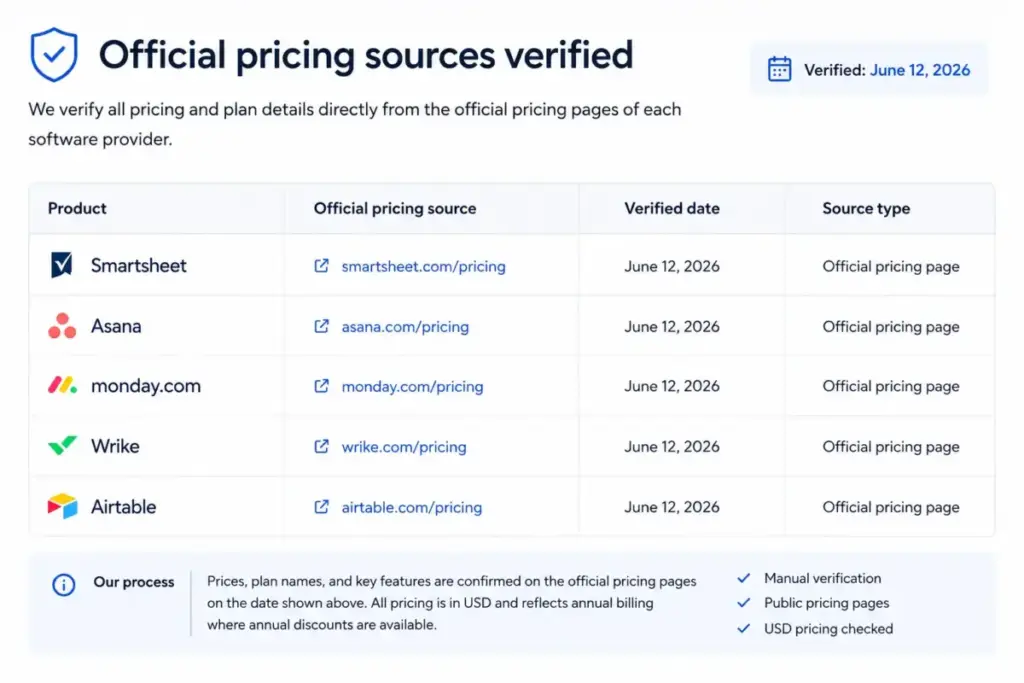
What this means: At the Pro level, Smartsheet matches monday.com’s entry price at 10 users. But the comparison flips at Business. Smartsheet Business at 10 users costs $190/month (annual), while monday.com Standard at 10 users runs $120/month. That is a $70/month gap for the mid-tier plan.
If a permanent free plan matters to your buying decision, Smartsheet does not have one for new signups. monday.com, Asana pricing plans, Wrike, and Airtable all offer free tiers.
For a deeper cost comparison on a close alternative, see the ClickUp pricing breakdown.
Is Smartsheet Worth the Price?
Worth it if:
- Your team needs a spreadsheet-like interface with Gantt charts, dashboards, forms, and automations
- Operations, PMO, marketing ops, or construction teams that need controlled collaboration
- You are on Business and use Timeline, Workload, and admin controls daily
- Your organization has 10+ members and values Smartsheet’s governance and security stack
Not worth it if:
- Your team only needs basic kanban or task tracking (Trello or Asana free tier does this)
- You need SAML-based SSO but cannot justify Enterprise custom pricing
- Your budget is under $500/month and you need advanced automations (monday.com or ClickUp may deliver more at that price)
- You are a spreadsheet-lite user who does not need Smartsheet’s workflow layer. Consider Airtable review and analysis if your work is more database-driven than project-driven.
After reviewing 35+ project management tools, I can tell you that Smartsheet’s value comes from its hybrid identity: part spreadsheet, part workflow engine, part collaboration platform. The pricing reflects that ambition. If your team uses 80% of what Smartsheet offers, the cost makes sense. If you are using it as a fancy spreadsheet, you are overpaying.
How to Avoid Overpaying for Smartsheet
- Commit to annual billing. Pro saves $360/year at 10 members. Business saves $600/year at 10 members. The monthly premium is never worth it unless you are testing for less than 3 months.
- Audit your member count. Only users who need to create and own items should be paid members. Everyone else can be a free contributor or guest.
- Start with the 30-day trial. It gives you Business plan access with no credit card required. Test before you commit.
- Map your automation needs. If 250 automations per month is enough, stay on Pro. If you are close to that limit, budget for Business now instead of scrambling later.
- Check the Enterprise security checklist. If nobody on your team needs SAML, directory integrations, or Enterprise Plan Manager, you do not need Enterprise pricing.
- Price out add-ons separately. Dynamic View ($125/month) and Data Shuttle ($100/month) stack on top of your plan cost. If you need both plus Control Center, Advanced Work Management might be cheaper as a bundle.
- Review provisional members before renewal. Smartsheet’s user subscription model distinguishes paid members from free collaborators. If collaboration behavior has created unplanned paid seats, your renewal quote will reflect that. Audit before the invoice arrives.
For teams exploring other options in this space, best team collaboration tools that include built-in project tracking may reduce the need for a separate PM license.
FAQ
How much does Smartsheet cost per month in 2026?
Smartsheet Pro costs $9/member/month on annual billing or $12/member/month on monthly billing. Business costs $19/member/month annually or $24/member/month monthly. Enterprise and Advanced Work Management use custom pricing.
Does Smartsheet have a free plan?
No. Smartsheet’s free plan is no longer available for new signups as of August 2024. Existing legacy free users may still have access, but new buyers should use the 30-day free trial instead.
Is a credit card required for the Smartsheet free trial?
No. The 30-day trial provides Business plan access and does not require a credit card.
What is the difference between Smartsheet Pro and Business?
Pro supports 1–10 members with 250 automations per month and 20 GB storage. Business supports 3+ members with unlimited automations, 1 TB storage, Timeline view, Workload tracking, admin controls, and conditional form logic.
How many users are included in Smartsheet Pro?
Pro supports 1 to 10 paid members. Member 11 requires an upgrade to Business.
Does Smartsheet charge for guests or contributors?
No. Contributors and guests are free on Smartsheet. Only members who create and own items require a paid license.
Is Dynamic View included in Smartsheet Business?
No. Dynamic View is a paid add-on starting at $125/month. It is included only in the Advanced Work Management bundle.
Does Smartsheet support SAML SSO?
SAML-based SSO requires the Enterprise plan or above. It is not available on Pro or Business.
Is Smartsheet cheaper than monday.com?
At the entry level, both start at $9 per user per month annually. At the mid-tier, Smartsheet Business ($19/member/month) is more expensive than monday.com Standard ($12/seat/month). The cost gap widens at scale.
Can nonprofits get a Smartsheet discount?
Smartsheet’s official pricing page does not list a nonprofit discount program. Contact Smartsheet sales directly to ask about eligibility.