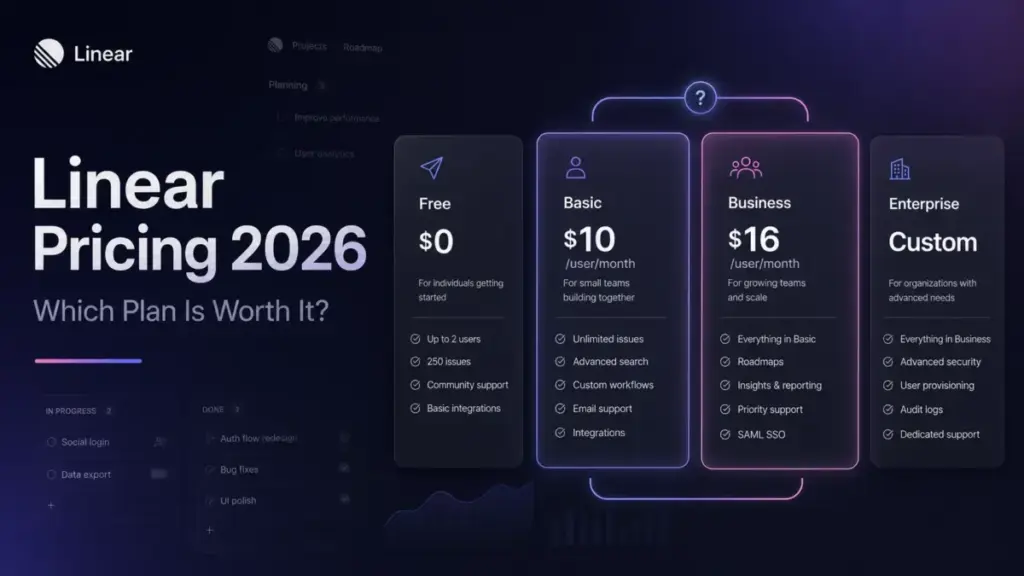
Linear pricing looks simple on the plan cards. Free, then Basic at $10 per user a month billed yearly, then Business at $16 per user a month billed yearly, then a custom Enterprise quote.
The sticker price is not the number your finance team ends up paying. Every unsuspended user is a billable seat, guests cost a full seat, each workspace has its own subscription, and AI Coding Sessions run on prepaid credits that sit outside your plan.
For most small software teams the practical plan is Basic, and it holds up until you cross five teams or need private teams and guests. That single jump, Basic to Business, raises the per-seat rate 60%, so it is the first thing I map before recommending a plan.
This guide treats Linear as a total-cost decision, not a plan-card summary. Every list price here was checked against Linear’s official pages on July 13, 2026, then paired with the seat math, hidden line items, and team-size scenarios that the current top results skip. If you want the wider category context first, see our roundup of the best project management software.
Quick Pricing Verdict
| Question | Answer |
|---|---|
| Starting paid price | $10 per user/month on Basic, billed yearly ($120/user/year) |
| Free plan | Yes: 2 teams, 250 issues, unlimited members, 10MB uploads |
| Best plan for most teams | Basic for single-focus teams under 5 teams, then Business once you need private teams, guests, or unlimited teams |
| Plan to avoid | Monthly billing on a stable headcount, and Free once you pass 250 issues |
| Biggest hidden cost | Guests billed as full paid seats, plus usage-billed AI Coding Sessions |
| Best alternative if too expensive | Plane (from $6/seat/month) or ClickUp (from $7/user/month) |
| Pricing verified | July 13, 2026, against Linear’s official pricing and billing docs |
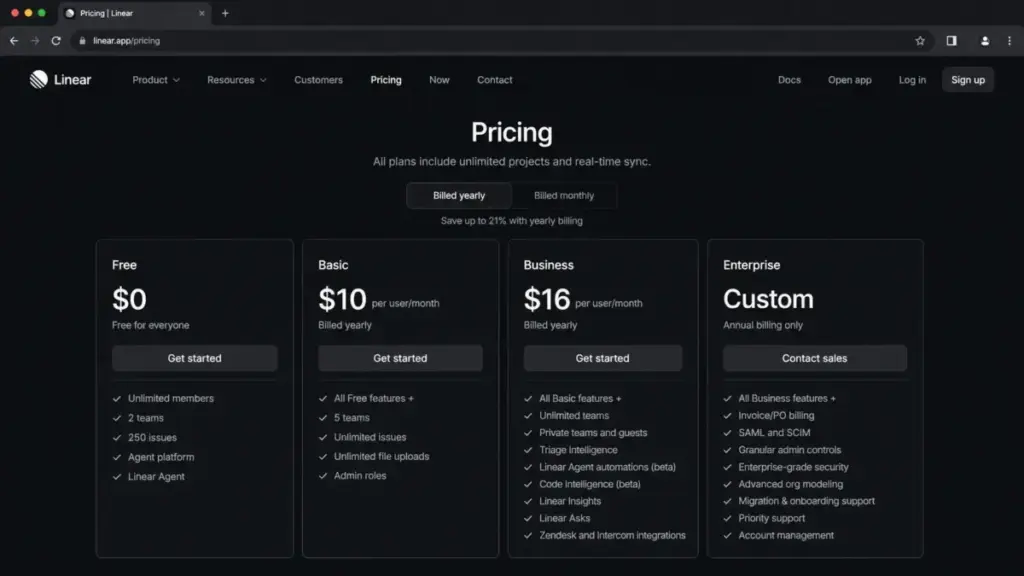
A note on the monthly rates before the tables start. Linear’s billing docs confirm monthly billing exists on paid plans, but the accessible official pricing snapshot showed annual-effective prices only. Current 2026 third-party listings put Basic at $12 per user/month and Business at $18, and I treat those as corroborated rather than official, so verify them at checkout before you sign off a budget.
Executive Summary: Linear’s Real Cost at 5, 15, and 50 Users
Here is the fast version for a budget owner. On annual billing, five Basic seats run $600 a year, fifteen Business seats run $2,880 a year, and fifty Business seats run $9,600 a year, all before tax and before any AI usage.
Those numbers assume one workspace and no guests. The moment you add contractors, a second workspace, or Coding Sessions, the bill moves, and none of that shows on the plan card.
The seat rate itself is not the interesting part. What changes the decision is the billable-seat rule: Linear charges for every unsuspended user in any role, so admins, occasional users, and visibility-only participants all count the same.
That rule is why a “we only have eight real users” team can open an invoice well above the headcount the manager quoted. If you want the workflow and feature view alongside the money, pair this with our full Linear review.
Linear is strong software for product and engineering squads. The pricing risk is not that it is overpriced per seat, it is that the real seat count and the usage add-ons are easy to undercount.
Linear Pricing Plans Compared
Four tiers, verified on Linear’s official pricing page on July 13, 2026. Annual prices are official, monthly rates are corroborated by current 2026 sources and should be confirmed at checkout.
| Plan | Monthly (corroborated) | Annual (official) | Billing basis | Best for | Key limits |
|---|---|---|---|---|---|
| Free | $0 | $0 | Flat | A single squad trying Linear | 2 teams, 250 issues, 10MB uploads, all members are admins |
| Basic | ~$12/user | $10/user ($120/user/yr) | Per unsuspended user | Small teams under 5 teams | 5 teams, no private teams, no guests, no Insights |
| Business | ~$18/user | $16/user ($192/user/yr) | Per unsuspended user | Cross-functional product orgs | Unlimited teams, private teams, guests, but no SAML/SCIM |
| Enterprise | Not offered monthly | Custom, annual only | Per unsuspended user | Regulated or large orgs | Adds SAML, SCIM, audit logs, IP rules, BAA. Salesforce is a separate add-on |
What this means for planning: the only number that scales cleanly is the per-seat annual rate. Everything that makes Business or Enterprise necessary is a limit in that last column, not a line on the price.
What Each Linear Plan Includes
Free
Best for a single team that wants to try Linear’s issue workflow. It gives you 2 teams, unlimited members, and 250 issues, which is enough to run one product squad for a while.
The catch is the 250-issue ceiling and the admin model. Every member on Free is an admin, so there is no permission structure, and once the workspace passes 250 issues on a downgrade you cannot create new issues.
Avoid Free if you need private teams, guest access, or any reporting. My verdict: fine as a trial, not a home for a growing backlog.
Basic
Best for small software teams that live inside a handful of teams. Basic removes the issue cap, adds unlimited uploads, and gives you admin roles, all at $10 per user/month billed yearly.
What it leaves out matters. There are no private teams, no guests, no Insights dashboards, and a hard limit of 5 teams.
Avoid Basic if you already know you will cross five teams this year, because the upgrade to Business is a 60% per-seat jump. My verdict: the right default for a focused 5 to 25 person team that does not need external collaborators.
Business
Best for cross-functional product orgs that mix engineering, design, product, and support. Business adds unlimited teams, private teams, guest accounts, Insights, Linear Asks, Triage Intelligence, and the Zendesk and Intercom support integrations.
The gap here is security and identity. SAML, SCIM, IP restrictions, and audit logs are not on Business, so a compliance requirement pushes you straight to Enterprise.
Avoid Business if your only reason to upgrade from Basic is one extra team, since that is an expensive way to buy a sixth team. My verdict: worth it when private teams, guests, or intake workflows are real needs.
Enterprise
Best for regulated or larger orgs that need identity governance and a contract. Enterprise adds SAML, SCIM, IP restrictions, 90-day audit logs, a HIPAA BAA, granular admin controls, migration and onboarding support, priority support, and an uptime SLA.
Pricing is custom and annual only, so there is no public per-seat number to plan around. Salesforce is a separate add-on with its own licenses, and its price is not disclosed.
Avoid Enterprise if you do not need SAML, SCIM, audit logs, IP restrictions, or a BAA, because those controls are the reason to pay for it. My verdict: necessary for procurement-driven buyers, overkill for a small team that just wants clean issue tracking.
Feature Gates by Plan
The plan card sells the price. The feature gates decide which plan you are forced onto.
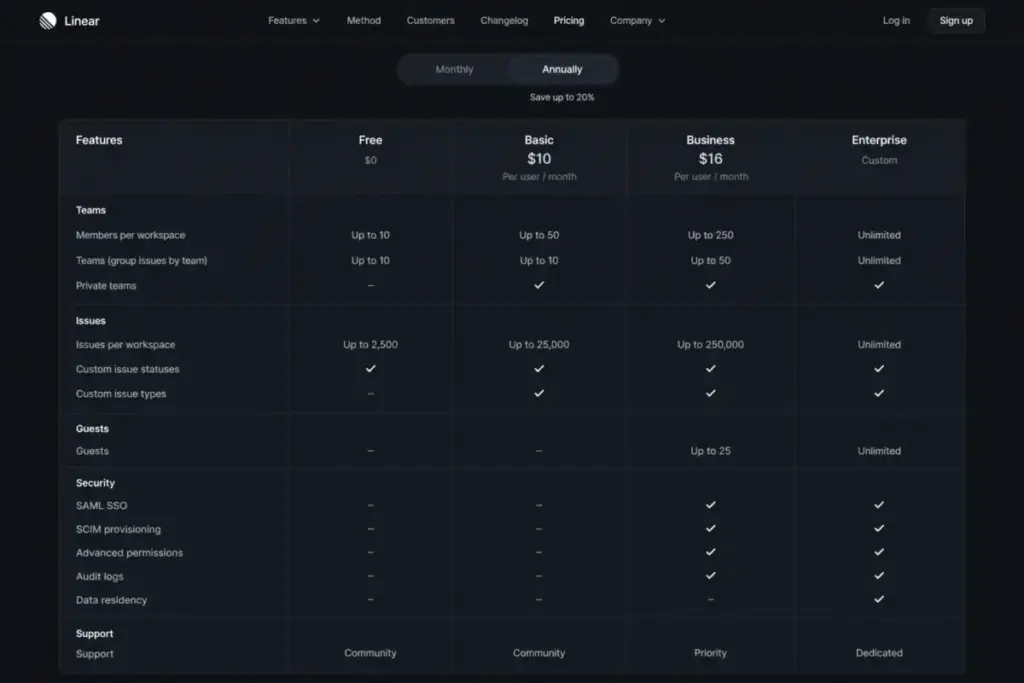
| Capability | Free | Basic | Business | Enterprise |
|---|---|---|---|---|
| Teams | 2 | 5 | Unlimited | Unlimited |
| Issues | 250 | Unlimited | Unlimited | Unlimited |
| Admin roles | All members admin | Yes | Yes | Yes |
| Private teams and guests | No | No | Yes | Yes |
| Insights, Asks, Triage Intelligence | No | No | Yes | Yes |
| Zendesk and Intercom | No | No | Yes | Yes |
| Google SSO / login restrictions | Google SSO | Google SSO | Login restrictions | Login restrictions |
| SAML, SCIM, IP restrictions | No | No | No | Yes |
| Audit logs (90-day) and HIPAA BAA | No | No | No | Yes |
| Salesforce integration | No | No | No | Add-on, separate licenses |
What this means for a buyer: the two expensive triggers are the five-team ceiling on Basic and the security block on Business. If either applies to you, the practical plan is set for you, not chosen by you.
Login restrictions land on Business, but true single sign-on with SAML and SCIM is Enterprise only, a gate several ranking pages get wrong. If SSO is a hard requirement, budget for a custom quote, not the $16 rate.
The Line-Item Costs Nobody Puts on the Plan Card
This is the part of Linear pricing that decides whether your estimate survives the first invoice. Each item below is verified against Linear’s billing, roles, and AI documentation.
Every unsuspended user is a billable seat
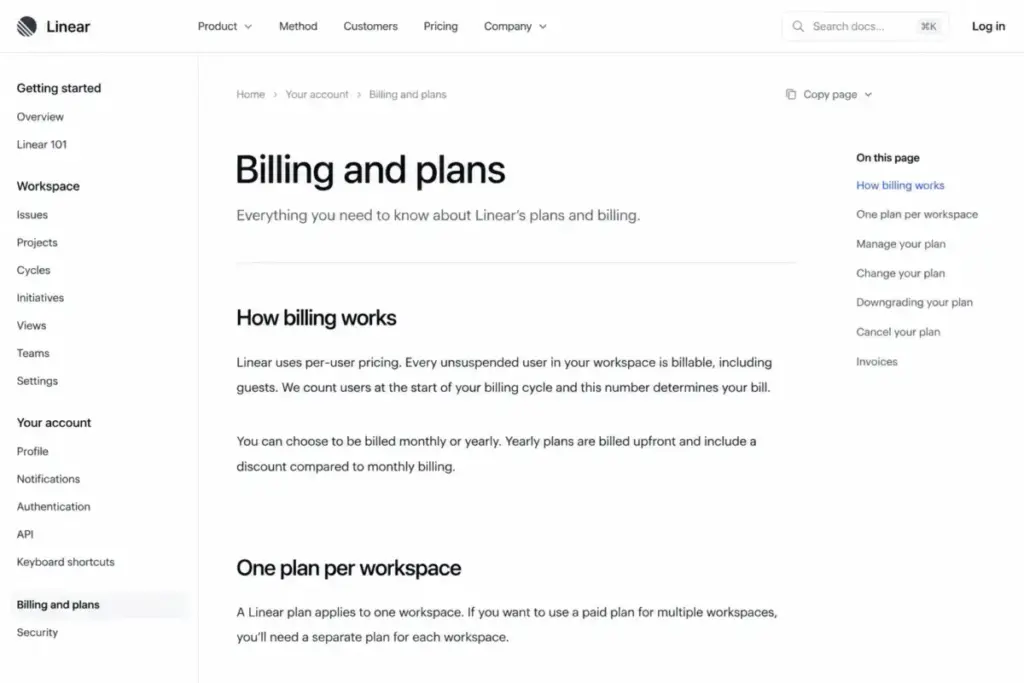
Linear’s billing documentation is direct about this: you pay for every unsuspended user in the workspace, in any role. There is no free viewer or read-only seat to hide occasional users in.
So the billable count is not “active users.” It is everyone you have not suspended, which is usually higher than the number a manager quotes from memory.
The fix is operational. Suspend leavers and dormant accounts promptly, because a forgotten seat keeps billing until you act.
Guests cost a full seat
Guests are a Business and Enterprise feature, and Linear’s roles documentation states they are billed as regular members. A guest is not a discount, it is a full paid seat with narrower access.
Run the math on external collaboration. Fifteen employees plus ten client guests is 25 Business seats, which is $400 a month equivalent and $4,800 a year before tax.
If you invite customers or contractors for visibility, price them as employees. That single assumption is where agency and client-facing budgets go wrong.
Each workspace is its own subscription
A paid plan covers one workspace, not your whole company. Two workspaces means two subscriptions, and seats do not deduplicate across them.
The formula is blunt: total base cost equals the sum, for each paid workspace, of its billable seats times that workspace’s plan rate. A person who exists in two paid workspaces is billed in both.
This hits agencies, holding companies, and teams that spin up a separate client or sandbox workspace. Consolidate into one workspace with private teams before you assume the seat count is stable.
AI Coding Sessions run on prepaid credits
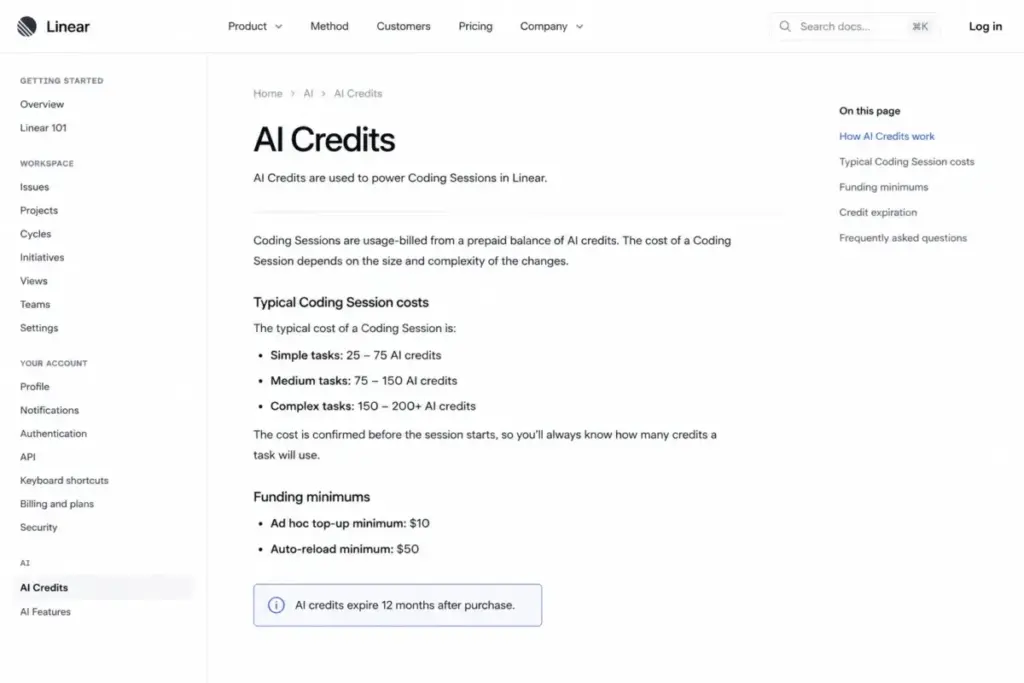
Linear’s AI credits documentation separates included AI from usage-billed Coding Sessions. Features like Linear Agent are part of the plan, but Coding Sessions draw down prepaid credits on Basic, Business, and Enterprise.
Linear’s own rough estimates are $0.50 to $1 for copy or styling changes, $3 to $5 for a small bug fix, and $5 or more for complex tasks. Real spend depends on model, complexity, codebase size, and run time, so treat those as ranges, not tariffs.
Two more rules protect you here. Failed runs, retries, and partial completions can still be billed for the resources they used, though Linear says platform-side failures can be reviewed by support, and admins cannot currently cap AI credit access per individual user.
So a high-retry workflow can spend without producing output, and any eligible person can draw down the shared balance. If finance needs per-person AI budgets, that control does not exist yet.
AI credit funding, tax, and the expired promo
Credits carry cash-management rules that belong in a budget. The minimum ad hoc top-up is $10, automatic reload has a $50 minimum, top-ups bill on a separate Stripe invoice in USD, and purchased balances expire after 12 months and are nonrefundable.
US sales tax may apply based on your billing address, so the invoice can run above the USD total you calculated. And the promotional AI credits that required activation by July 11, 2026 are past their deadline as of this update, so do not budget around them.
Salesforce and Enterprise add-ons
Salesforce is not bundled into Enterprise. Linear lists it as an Enterprise add-on that needs separately purchased licenses, and no public price is disclosed.
External AI agents add a different wrinkle. Agents do not consume a Linear billable seat, but the external provider can charge you separately, so that cost moves to another vendor rather than disappearing.
How Linear Billing Changes During the Year
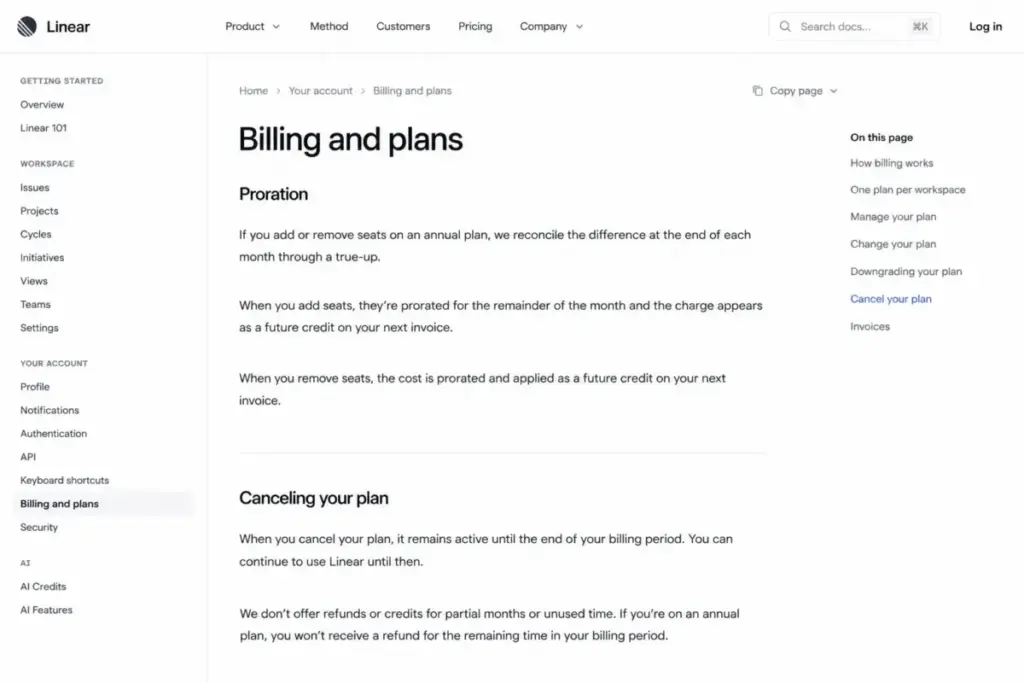
Annual billing is not a single locked prepayment. Linear reconciles seats monthly, so your headcount changes show up on true-up invoices during the term.
Picture three events on an annual plan. You prepay your starting seat count, you add a user in month four and get a prorated charge to the renewal date, then you suspend a user and receive a credit toward a future invoice rather than cash back.
That credit direction matters. Growth creates real mid-year charges, while shrinking your team creates future credits, not refunds, and issued invoices are final.
Annual vs Monthly: The Real Savings Math
The annual discount is a flat $2 per seat per month on both paid plans. That is $24 per seat per year, which works out to a 16.7% saving on Basic and 11.1% on Business against the corroborated monthly rates.
For a 15-seat Business team, annual billing is $2,880 versus roughly $3,240 on monthly, a $360 difference. Real money, but not a reason to over-commit.
Here is the trade-off the savings pages skip. Cancellation takes effect at the end of the billing period and Linear does not issue mid-subscription refunds, so an annual plan locks the spend even if the team shrinks.
My rule: prepay annually only for the seats you are confident you will keep all year. Keep uncertain or seasonal headcount on monthly and accept the small premium as flexibility insurance.
When the Free Plan Stops Working
Free is genuinely useful right up to two limits. You get 2 teams and 250 issues, and for one squad prototyping a workflow, that is plenty.
The 250-issue cap is the wall. It applies to the workspace’s overall issue count, so an active team can reach it quickly, and a workspace that drops back to Free above the cap cannot create new issues until it is under the limit.
There is a governance catch too. Every member on Free is an admin, so there is no way to protect settings or restrict who changes structure. For a shared team, that alone justifies moving to Basic.
If you are still learning the category before committing budget, our primer on project management covers the workflow concepts Linear assumes you already know.
Real Cost Scenarios: 5, 15, 50, and 100 Users
These are annual totals on the practical plan, one workspace, no guests unless stated, before sales tax and before any AI credits.
| Scenario | Recommended plan | Annual (billed yearly) | Monthly-billed annualized | Notes |
|---|---|---|---|---|
| 5 users | Basic annual | $600 | ~$720 | Stays valid only under 5 teams |
| 15 users | Business annual | $2,880 | ~$3,240 | Assumes private teams or guests are needed |
| 15 employees + 10 guests | Business annual | $4,800 | ~$5,400 | Guests billed as full seats (25 total) |
| 50 users | Business annual | $9,600 | ~$10,800 | No Enterprise-only requirement |
| 100 users | Business annual | $19,200 | ~$21,600 | Enterprise becomes custom if SAML/SCIM/BAA needed |
What this means: the guest scenario is the one that surprises people. Adding ten guests to a fifteen-person team raises the annual bill from $2,880 to $4,800, a 67% increase driven entirely by seats you might have assumed were free.
Every figure here excludes tax and AI usage. Add Coding Sessions and applicable sales tax on top, and treat Enterprise as a custom quote once security controls enter the picture.
Security and Compliance: The Enterprise Price Trigger
For a lot of buyers, one compliance line moves them from the public $16 rate to a custom contract. This is where a “we can afford Business” plan quietly becomes an Enterprise conversation.
| Control | Free | Basic | Business | Enterprise |
|---|---|---|---|---|
| Google SSO | Yes | Yes | Yes | Yes |
| Login restrictions | No | No | Yes | Yes |
| SAML single sign-on | No | No | No | Yes |
| SCIM provisioning | No | No | No | Yes |
| IP restrictions | No | No | No | Yes |
| Audit logs (90-day retention) | No | No | No | Yes |
| HIPAA BAA | No | No | No | Yes |
| Data residency options | Confirm with sales | Confirm with sales | Confirm with sales | Confirm with sales |
What this means: if your security review requires SAML, SCIM, IP restrictions, audit logs, or a BAA, the plan decision is made for you. Budget for a quote, not a per-seat rate.
One retention detail that hides behind a checkmark: Linear’s audit log keeps 90 days of history. If your policy needs one year or more of native audit data, plan an export process, because the checkmark does not mean indefinite retention.
Integrations, API, and Reporting Limits
Linear’s integration list is deep, with GitHub, GitLab, Slack, Figma, Sentry, Datadog, and more. The pricing-relevant part is where availability does not equal full coverage.
The Google Sheets analytics integration excludes data held only in private teams, refreshes hourly rather than live, and offers only coarse issue, project, or initiative selection. For a Business org that relies on private teams, a Sheets dashboard can quietly under-report.
The API access is included, but throughput has ceilings. Linear’s developer docs set 5,000 API-key requests per hour, 3,000,000 complexity points per hour, a 10,000 maximum complexity per query, and quotas that are shared across a single user’s API keys.
So automation can be throttled even though “API access” appears on the plan. Size heavy sync or reporting jobs against those limits before you assume they will run at scale.
Which Linear Plan Should You Choose?
Solo developer or a tiny prototype team: start on Free and stay there until the 250-issue cap or the all-admin model gets in the way. There is no reason to pay before that.
Small single-focus team of 5 to 25: Basic at $10 per seat annually is the value pick, as long as you stay under five teams and do not need guests. This is the sweet spot for most product squads.
Cross-functional org that mixes engineering, design, product, and support: Business, because private teams, guests, Insights, and the Zendesk and Intercom integrations are the features that justify the $16 rate. If you compare tiers elsewhere, note that Asana pricing bundles some reporting lower, which matters for non-engineering teams.
Regulated or procurement-driven org: Enterprise, and start the sales conversation early because SAML, SCIM, audit logs, a BAA, and Salesforce all live behind a custom quote.
Which Linear Plan Should You Avoid?
Avoid monthly billing on a stable team. Paying the $2-per-seat premium makes sense only when your headcount is genuinely uncertain, and on a settled 15-person team it just adds $360 a year for no benefit.
Avoid staying on Free once you are a real, growing team. The 250-issue wall and the all-admin model turn into daily friction fast, and the workaround people reach for is deleting issues, which is not a plan.
Avoid jumping to Business for a single extra team. If your only Business trigger is a sixth team, you are paying a 60% per-seat increase to buy one team, and it is worth checking whether you can restructure within five teams first. If cost is the real blocker, weigh cheaper options in our guide to ClickUp pricing.
Linear Pricing vs Competitors
Normalized to annual, entry-paid, per-seat rates, Linear sits at the higher end of this group. These are entry-price anchors, not feature-equivalent plans, so read them as market context.
| Tool | Entry paid plan (annual) | 10-user annual | Best for |
|---|---|---|---|
| Linear | Basic $10/user/mo | $1,200 | Fast issue tracking for product and engineering teams |
| Shortcut | Team $8.50/user/mo | $1,020 | Engineering teams wanting a similar workflow slightly cheaper |
| Plane | Pro $6/seat/mo | $720 | Cost-sensitive or open-source-leaning teams |
| ClickUp | Unlimited $7/user/mo | $840 | Teams needing configurable views beyond issue tracking |
| Jira | See pricing guide | See pricing guide | Enterprises standardized on the Atlassian stack |
What this means: on entry price alone, Plane and ClickUp undercut Linear by a wide margin, and Shortcut edges it out. Linear’s premium is a bet that its speed and product-development workflow are worth roughly $180 more per year at ten seats than Shortcut.
Against the incumbent, the calculus is different. If your org already runs the Atlassian stack, our Jira vs Linear comparison and the dedicated Jira pricing guide will tell you more than a single number here, since Jira’s real cost depends heavily on the products you bolt on.
Discounts That Change First-Year Cost
Linear runs eligibility-based programs that most pricing pages skip. They can move first-year cost well below list.
Eligible full-time students can get 100% off for one year. University staff and qualifying nonprofits can get 75% off Basic or Business, and startups affiliated with partner programs can get up to six months free.
If you fit one of those groups, apply before you prepay, because the discount changes which plan is the value pick. These are eligibility-gated, so treat “up to” and “eligible” as load-bearing words, not marketing.
Is Linear Worth the Price?
Linear is worth it if you are a product or engineering team that values speed and a tight issue-to-code workflow, you can keep the billable seat count honest, and Basic or Business covers your team structure without an Enterprise-only control. At $10 to $16 per real seat, that is a fair price for the workflow.
It is not worth it if you rely on many low-activity or visibility-only users, since every one of them is a full seat. It is also a poor fit if you need deeply configurable reporting, longer native audit retention, or heavy non-engineering process, all of which show up repeatedly in reviewer patterns as friction points.
If the seat model or the premium does not fit, the honest move is to shortlist alternatives rather than force it. Our roundup of Linear alternatives covers the cheaper and more configurable options in one place.
My overall read, as James Carter at SaaSZap: Linear earns its rate for the teams it is built for, and the pricing danger is under-counting seats and usage, not the sticker itself.
How to Avoid Overpaying for Linear
- Count billable seats, not active users. Suspend leavers and dormant accounts on a schedule, because every unsuspended user bills in full.
- Price guests as employees. A Business guest is a full paid seat, so a client-heavy setup can double the seat base you planned.
- Consolidate workspaces. One workspace with private teams usually beats several paid workspaces, which each bill their own seats.
- Only prepay annually for stable seats. Keep uncertain or seasonal headcount on monthly to avoid locking spend you cannot refund.
- Fund AI credits deliberately. Start near the $10 minimum, avoid large auto-reloads, and remember unused credits expire after 12 months.
- Confirm the plan trigger before upgrading. If one extra team or one integration is your only reason to move to Business, check whether restructuring keeps you on Basic.
- Check discount eligibility first. Student, nonprofit, and startup programs can beat any negotiated seat price for the buyers who qualify.
FAQ
Is Linear free?
Yes, Linear has a free plan. It includes unlimited members, 2 teams, and 250 issues, with 10MB file uploads. It works well for one squad trying the workflow, but every Free member is an admin and the 250-issue cap stops new issues once you pass it, so it is a trial tier rather than a long-term home.
How much does Linear cost per user?
On annual billing verified July 13, 2026, Linear Basic is $10 per user/month ($120/user/year) and Business is $16 per user/month ($192/user/year). Enterprise is a custom annual quote. Monthly billing is available and corroborated at about $12 and $18 per user, which you should confirm at checkout before budgeting.
Does Linear charge for guests?
Yes. Guests are available on Business and Enterprise, and Linear’s documentation states they are billed as regular members. A guest is a full paid seat with narrower access, not a free viewer role, so ten guests cost the same as ten employees on the same plan.
What is the difference between Linear Basic and Business?
Basic is capped at 5 teams and has no private teams, guests, or Insights. Business adds unlimited teams, private teams, guest accounts, Insights, Linear Asks, Triage Intelligence, and the Zendesk and Intercom integrations. The jump raises the annual rate from $10 to $16 per seat, a 60% increase, so upgrade only when those features are real needs.
Does Linear offer monthly billing?
Yes, Linear offers monthly or yearly billing on paid plans, while Enterprise is annual only. Monthly costs about $2 more per seat than the annual-effective rate. That premium is worth paying only when your headcount is uncertain, because annual plans lock spend and give no mid-term refund.
How much do Linear AI credits cost?
Linear’s AI Coding Sessions are usage-billed from prepaid credits. Official rough estimates are $0.50 to $1 for copy or styling changes, $3 to $5 for a small bug fix, and $5 or more for complex tasks. The minimum top-up is $10, auto-reload starts at $50, and purchased credits expire after 12 months and are nonrefundable.
What happens after 250 issues on Linear Free?
The 250-issue limit is a hard cap on total issues in the workspace. Once a Free or downgraded workspace passes it, you cannot create new issues until you are back under the limit or you upgrade to a paid plan. It applies to the workspace’s overall issue count, so active teams reach it quickly.
Does Linear support SAML and SCIM?
SAML single sign-on and SCIM provisioning are Enterprise-only, not Business. Business includes Google SSO and login restrictions, but full identity governance, IP restrictions, audit logs, and a HIPAA BAA all require the custom Enterprise plan. Several third-party pages place these on Business incorrectly, so verify before you budget.
Is Linear cheaper than its competitors?
On entry-paid annual pricing, Linear ($10/user/month) is pricier than Plane ($6/seat/month), ClickUp ($7/user/month), and Shortcut ($8.50/user/month). These are entry anchors, not identical plans. Linear’s premium buys its speed and product-development workflow, so it is cheaper only relative to what your team values.
Can I get a refund after cancelling Linear?
No mid-subscription refund is provided. Cancellation takes effect at the end of your current billing period, and issued invoices are final. Removing seats mid-term creates a credit toward future invoices rather than cash back, which is why annual plans should only cover seats you expect to keep.