A two-person studio cannot buy two seats of Teamwork.com. Basics refuses to sell fewer than three.
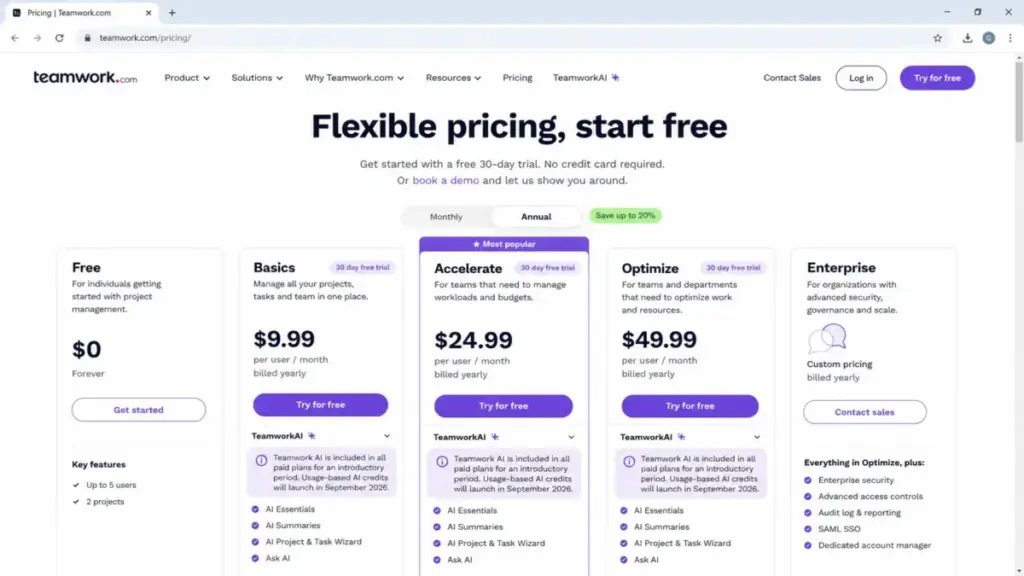
Teamwork pricing starts at $9.99 per user per month on Basics and $24.99 on Accelerate, both billed yearly, checked July 10, 2026 on the official Teamwork.com pricing page. The smallest bill you can hand finance is $359.64 a year, because of that three-seat floor.
Accelerate is the plan most client-service teams land on. Workload planning, smart forms, time budgets, retainers, and invoices generated from logged time all sit behind it.
The trap is not the sticker price. It is what sits underneath: seat minimums, a $2,500 or $7,500 onboarding package, a separately quoted reporting product, and usage-based AI credits scheduled for September 2026.
This guide prices every plan against the totals a 3-, 5-, 10-, 25-, and 50-person team will actually approve, and shows where Teamwork.com sits among the best project management software options I track.
Product check: This article covers Teamwork.com, the client-work and project-management platform. It does not cover Atlassian Teamwork Collection, which bundles Jira, Confluence, Loom, and other Atlassian services under a similar name.
Quick Pricing Verdict
| Question | Answer (verified July 10, 2026) |
|---|---|
| Starting price | $9.99 per user per month, Basics, billed yearly |
| Free plan | Yes. Up to 5 users and 5 projects |
| Free trial | 30 days |
| Minimum payable account | $359.64 per year (Basics, 3-seat floor) |
| Best plan for most client teams | Accelerate, $24.99 per user per month, 5-seat floor |
| Plan to avoid | Basics, if you need forms, workload planning, retainers, or invoicing |
| Biggest hidden cost | Premier onboarding at $7,500, plus AI credits from September 2026 |
| Best alternative if too expensive | ClickUp Unlimited, $7 per user per month billed yearly. Lowest entry price of the four anchors compared here, not feature-equivalent |
| Custom-quote tiers | Optimize and Enterprise. No public price |
Read that table as two different products. Free through Accelerate is a self-serve purchase with published numbers, and Optimize plus Enterprise is a sales conversation where you have no benchmark.
That split is the whole reason this guide exists. Nearly every result ranking for this query stops at a per-user rate, which tells you almost nothing about the invoice.
Executive Summary: Teamwork TCO at 3 to 50 Users
Teamwork pricing scales linearly on licenses and lumpily on services. Every total below uses the published annual-billed rates and the documented seat minimums, and nothing includes tax, AI credits, Teamwork Connect, or Premium Support.
| Team size | Plan modeled | Monthly equivalent | Year-one license | With optional onboarding |
|---|---|---|---|---|
| 1-2 people | Free | $0 | $0 | $0 |
| 3 people | Basics (seat floor) | $29.97 | $359.64 | $359.64 |
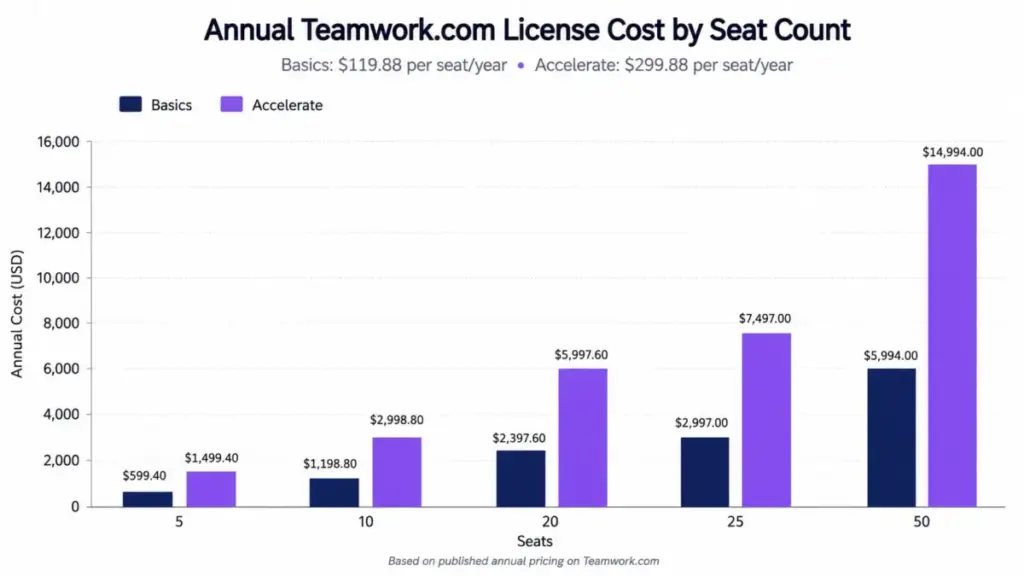
| 5 people | Accelerate (seat floor) | $124.95 | $1,499.40 | $3,999.40 with Success |
| 10 people | Accelerate | $249.90 | $2,998.80 | $5,498.80 with Success |
| 20 people | Accelerate | $499.80 | $5,997.60 | $8,497.60 with Success |
| 25 people | Accelerate | $624.75 | $7,497.00 | $9,997.00 with Success |
| 50 people | Accelerate | $1,249.50 | $14,994.00 | $22,494.00 with Premier |
Onboarding is optional, not mandatory. Teamwork.com publishes Success at $2,500 and Premier at $7,500 on its implementation services page, and at 50 seats the Premier package adds roughly 50% on top of the license.
Notice the shape of that curve. License cost scales linearly, but the implementation line does not, so the onboarding decision bites hardest at small headcounts.
A five-person agency buying Accelerate plus Success pays $3,999.40 in year one, and $1,499.40 in year two. A fifty-person firm buying Accelerate plus Premier pays $22,494.00 in year one, and $14,994.00 after that.
Teamwork Pricing Plans Compared
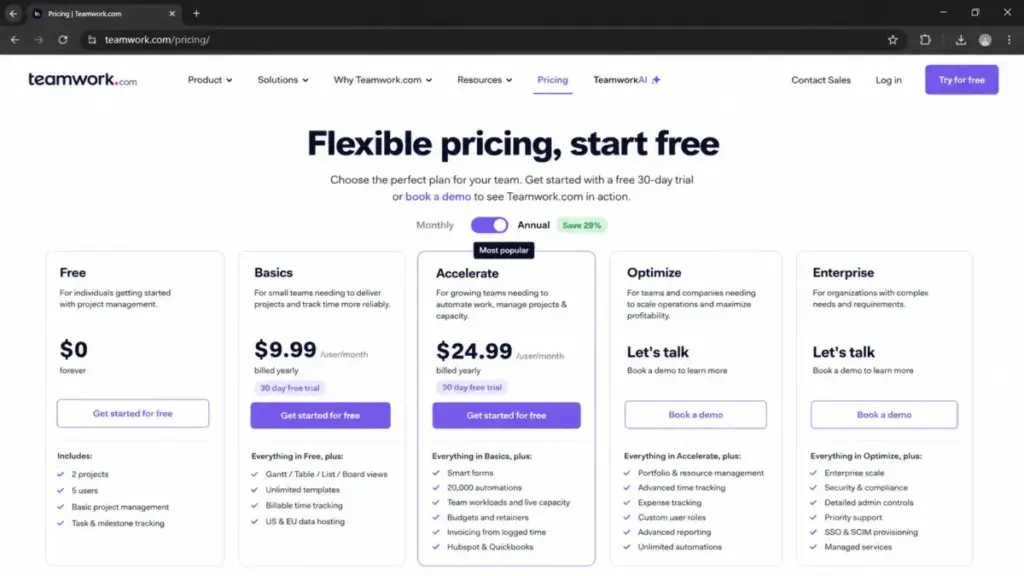
Five plans exist as of July 10, 2026: Free, Basics, Accelerate, Optimize, and Enterprise. Two of them have no public price.
| Plan | Annual price (per user/mo) | Monthly price | Billing basis | Seat rule | Best for |
|---|---|---|---|---|---|
| Free | $0 | $0 | Flat | Max 5 users | Solo operators and pairs running under 5 projects |
| Basics | $9.99 | Available. Current US amount not exposed in the official page state checked 2026-07-10 | Per user, per month | Minimum 3 users | 3-10 person client teams tracking billable time |
| Accelerate | $24.99 | Available. Current US amount not exposed in the official page state checked 2026-07-10 | Per user, per month | Minimum 5 users | 5-50 person services teams needing capacity, retainers, invoicing |
| Optimize | Custom quote | Custom quote | Per user, per month | Contact sales. No public minimum | Multi-currency, profitability-led operations |
| Enterprise | Custom quote | Custom quote | Per user, per month | Contact sales. No public minimum | Firms whose procurement requires SSO and dedicated support |
Those monthly cells are deliberate. Teamwork.com confirms a monthly billing option in its subscription purchase documentation, but the accessible pricing page state rendered only annual figures when I checked it.
Third-party pages fill that hole with $13.99 and $29.99, and I will not repeat those numbers as current. Some trace back to plans Teamwork.com has retired, and one wrong monthly rate invalidates every savings calculation built on top of it.
Ask for the monthly amount in writing before you commit to a monthly plan.
Annual per-seat cost, stated plainly: Basics is $119.88 per seat per year. Accelerate is $299.88 per seat per year. The gap is exactly $180 per seat per year, or $1,800 for a ten-person team.
The Advertised Price vs the Minimum You Can Actually Pay
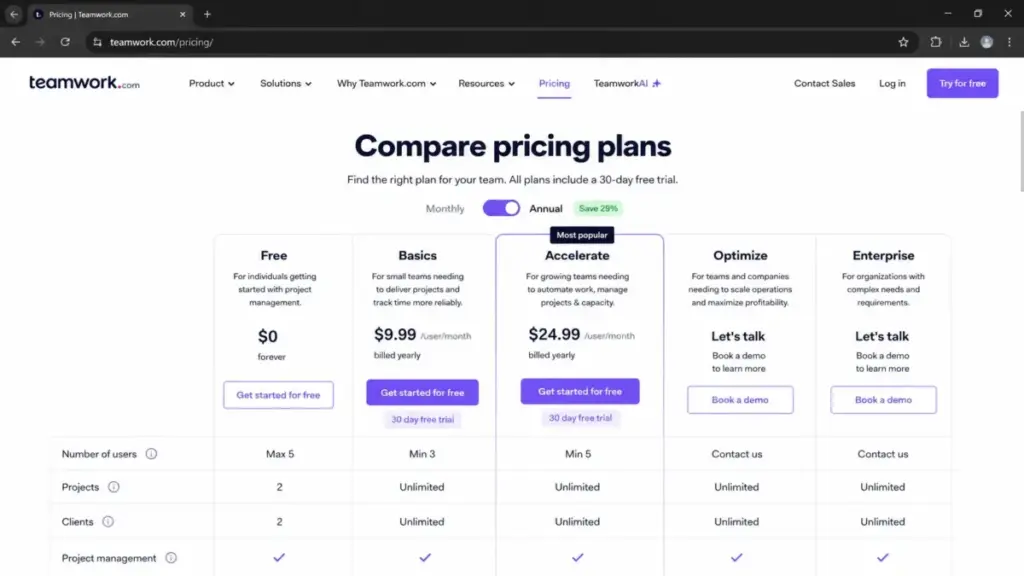
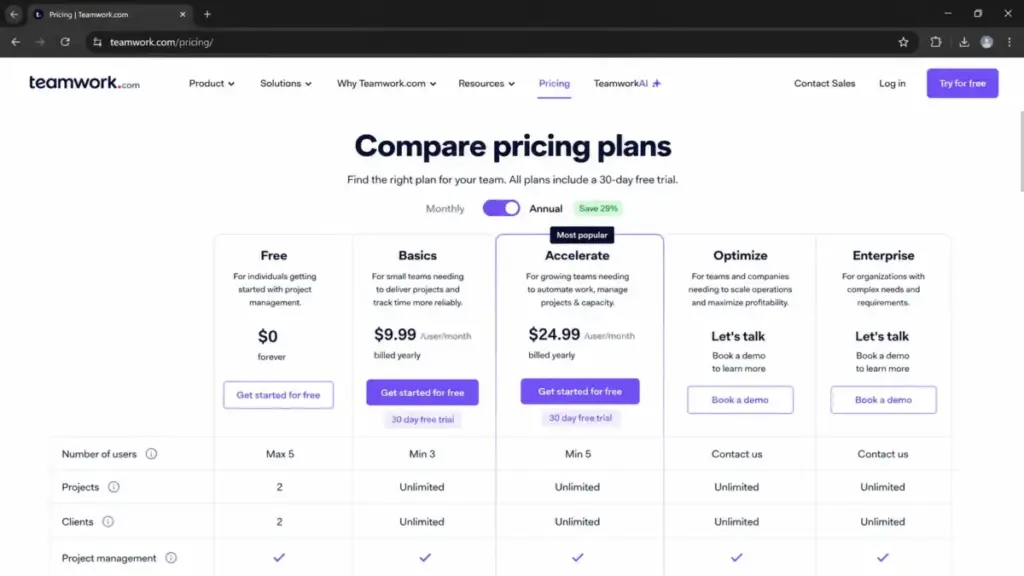
Per-user math breaks at the bottom of the range. Basics requires three paid users and Accelerate requires five, so a two-person shop and a three-person shop pay the same Basics bill.
| Plan | Advertised rate | Seat floor | Minimum monthly equivalent | Minimum annual bill |
|---|---|---|---|---|
| Free | $0 | 0 paid seats (5-user cap) | $0 | $0 |
| Basics | $9.99 per user | 3 users | $29.97 | $359.64 |
| Accelerate | $24.99 per user | 5 users | $124.95 | $1,499.40 |
For a solo consultant, Basics has an effective rate of $29.97 per month, not $9.99. For a three-person team wanting Accelerate, the effective rate is $41.65 per person per month, because you are buying five seats.
That second number is the one that changes decisions. A three-person creative team that needs client Proofs above the Basics cap pays 67% above Accelerate’s advertised $24.99 rate for every head in the room.
Here is the friction point I would flag before any purchase order: the reviewed sources do not publish a universal rule for whether every client, contractor, or guest role consumes a paid seat. Confirm that in writing if you plan to invite a large external population.
What Each Teamwork Plan Includes
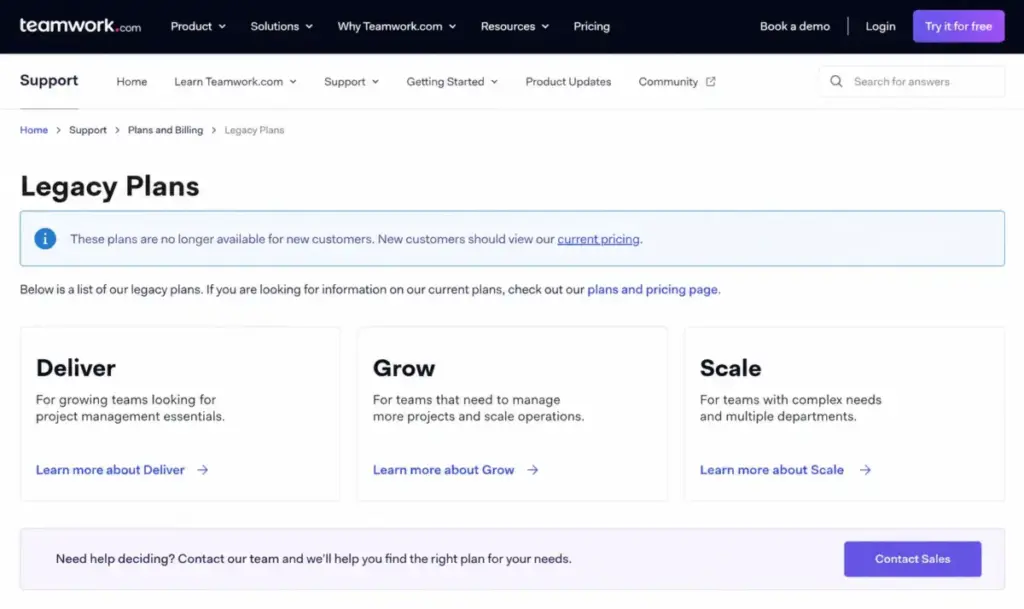
Plan names changed. If you are reading a guide that mentions Deliver, Grow, or Scale, it is describing packaging Teamwork.com now labels legacy.
Free: 5 Projects, 5 Users, 100 MB
Free gives you five projects, five users, and 100 MB of storage. It also carries two project templates, 100 automations per month, and five Proofs per month.
Best for: a solo consultant or a two-person studio running under five concurrent client projects with no file-heavy deliverables.
What is missing: everything past project number six, and any meaningful storage. TeamworkAI is not listed as included on the Free plan.
Avoid if: you handle video, large image sets, or more than a handful of active engagements. You will hit the storage wall long before the project wall.
Several high-ranking pages still say Free supports two projects. The current official pricing page says five, checked July 10, 2026, and that correction alone means some teams do not need to buy anything yet.
If Free stops working, compare it against the other free project management tools before you upgrade on reflex.
New to the category? My primer on project management fundamentals explains the workflows these plans gate.
Basics: $9.99 Per User, 3-Seat Minimum
Basics adds 300 projects, 100 GB storage, and unlimited project templates. Automations rise to 5,000 per month, and Proofs to twenty.
Best for: a 3-10 person agency that organizes work by client, tracks billable time, and reuses project templates.
What is missing: smart forms, workload and capacity planning, time budgets, retainers, and invoices generated from logged time. Those all sit on Accelerate.
Mini verdict: Basics is a competent delivery tool and a weak operations tool.
Avoid if: anyone in the room has said the words “utilization” or “retainer.” You are buying the wrong tier and you will pay the $180-per-seat difference within a year anyway.
Twenty Proofs per month is the sleeper limit. A four-person creative team running two rounds of client review on ten deliverables lands exactly on the cap, with nothing left for a revision.
Accelerate: $24.99 Per User, 5-Seat Minimum
Accelerate is the practical tier and the reason most buyers arrive at this page. It raises capacity to 600 projects, 250 GB storage, 20,000 automations, and unlimited Proofs.
It also turns on the operations layer: smart forms, live capacity planning, time budgets, retainers, invoicing from logged time, plus HubSpot and QuickBooks connections.
Best for: a 5-50 person consultancy or agency that routes intake through forms, plans workloads by person, and bills clients from tracked hours.
What is missing: quotes, CRM-pipeline-to-project conversion, tentative resource planning, multi-currency budgets, and profitability reporting.
Mini verdict: this is the plan Teamwork.com is designed around, and the one I would budget for at any client-service team above four people.
Avoid if: you need multi-currency budgets or client profitability now. Buying Accelerate first and migrating to Optimize later is a second procurement cycle you did not plan for.
Optimize: Custom Quote
Optimize is where Teamwork.com stops being project management and starts being professional services operations. Capacity goes to unlimited projects, 500 GB storage, and 100,000 automations.
The real additions are commercial: quotes, CRM-pipeline conversion into tentative projects, role and skill scheduling, multi-currency budgets, utilization targets, revenue and cost insight, project and client profitability, plus Salesforce and NetSuite.
Best for: a multi-team services organization that plans work before it is won and reports margin per client.
What is missing: a price. Teamwork.com does not publish an Optimize rate, a contract length, or a seat minimum.
Avoid if: you cannot get a written quote with a renewal cap before your fiscal year closes. You have no public benchmark to negotiate against.
The workflow Optimize buys looks like this: quote created, CRM pipeline stage advanced, tentative project spun up with role placeholders, project activated, multi-currency budget applied, profitability reported. Each of those steps is gated above Accelerate.
Enterprise: Custom Quote
Enterprise adds 1,000 GB storage and 500 API requests per minute. On the administration side it adds SSO, advanced access policies, dedicated infrastructure, a dedicated Customer Success Manager, Premium Support, and ten technical-service hours.
Best for: organizations whose security review will not approve a tool without single sign-on.
What is missing: any published price, and any way to buy SSO without moving to a sales-led contract.
Avoid if: SSO is the only thing you want. That is a security checkbox forcing a full-tier jump, and it is worth pricing an identity-provider workaround with your IT team first.
Feature Gates: What You Actually Get by Plan
Every published ceiling in one place. These are the numbers that decide when you upgrade, not the feature names.
| Limit | Free | Basics | Accelerate | Optimize | Enterprise |
|---|---|---|---|---|---|
| Users | Max 5 | Min 3 | Min 5 | Contact sales | Contact sales |
| Projects | 5 | 300 | 600 | Unlimited | Unlimited |
| Storage | 100 MB | 100 GB | 250 GB | 500 GB | 1,000 GB |
| Project templates | 2 | Unlimited | Unlimited | Unlimited | Unlimited |
| Automations per month | 100 | 5,000 | 20,000 | 100,000 | 100,000 |
| Proofs per month | 5 | 20 | Unlimited | Unlimited | Unlimited |
| API requests per minute | 150 | 150 | 150 | 300 | 500 |
| SSO | No | No | No | No | Yes |
| Dedicated CSM | No | No | No | No | Yes |
Storage is the limit that catches creative teams first, and Proofs is the limit that catches them second. Project count is almost never the constraint, which is why competitor pages that publish only project caps leave out the ceiling most teams hit first.
The 250 GB ceiling on Accelerate sounds generous until a video team uploads four months of raw client cuts.
Financial Workflows and the Plan That Turns Them On
“Billing and invoicing” is not one feature. Teamwork.com splits it across three tiers, and buying the wrong one leaves you with time data you cannot bill from.
| Financial workflow | First plan that supports it |
|---|---|
| Log billable and non-billable time | Basics |
| Time budgets and retainers | Accelerate |
| Invoices generated from logged time | Accelerate |
| QuickBooks connection | Accelerate |
| Quotes and CRM pipeline into projects | Optimize |
| Multi-currency budgets | Optimize |
| Revenue, cost, and project or client profit | Optimize |
| AI profitability forecasting | Optimize |
A team that buys Basics because “it has time tracking” cannot invoice from those hours. That is a real procurement failure, and it happens because vendor feature lists collapse eight workflows into one word.
If your finance lead needs client-level margin, the answer is Optimize and the answer is a quote. There is no self-serve path to profitability reporting.
Integrations and API Limits by Plan
API access appears on every plan. API capacity does not.
Free, Basics, and Accelerate all cap at 150 requests per minute. Optimize raises it to 300 and Enterprise to 500.
That flat ceiling across three tiers is unusual and important. Paying 2.5x more for Accelerate buys you zero additional API throughput, so an automation-heavy team on Basics gains nothing by upgrading for integration reasons alone.
Native connections cover Zapier, Slack, Microsoft Teams, Google Drive, Box, Dropbox, OneDrive, SharePoint, Microsoft Project, HubSpot, Salesforce, NetSuite, QuickBooks, Xero, Harvest, and webhooks. Salesforce and NetSuite sit at Optimize.
The reviewed documentation does not describe burst allowances, concurrency, or what happens when you exceed 150 requests per minute. If you sync a large record set nightly, get that behavior confirmed before signing, and pressure-test it the way you would any workflow automation dependency.
Security and Admin: What Enterprise Actually Buys
Teamwork.com includes role-based permissions, two-factor authentication, US or EU hosting, and SOC 2 coverage on every plan, including Free. Its security page reports ISO/IEC 27001:2022 and SOC 2 Type 2 certification, an uptime goal above 99.9%, and database snapshots taken every few seconds.
| Control | Included on all plans | Enterprise only |
|---|---|---|
| Two-factor authentication | Yes | — |
| Role-based permissions | Yes | — |
| US or EU data hosting | Yes | — |
| SOC 2 coverage | Yes | — |
| Single sign-on | No | Yes |
| Advanced access policies | No | Yes |
| Dedicated infrastructure | No | Yes |
Teamwork.com reports those certifications for the platform rather than as plan-specific features. What a paid tier buys you is administration, and administration is where the money is.
A 30-person firm with an SSO mandate cannot solve that with Accelerate at $8,996.40 per year. It moves into a sales conversation with no published anchor, which is the single largest pricing risk in this product.
Hidden Costs, Add-Ons, and Surprise Line Items
Ranked by what they add to a first-year bill.
| Cost | Amount | What triggers it |
|---|---|---|
| Premier onboarding | $7,500 one-time | 6-12 week rollout, bespoke imports, custom API migration scripts |
| Success onboarding | $2,500 one-time | Four CSM milestone sessions, assisted imports of clients, projects, tasks, timelogs |
| Accelerate seat floor | $1,499.40 per year | Buying Accelerate with fewer than 5 intended users |
| Basics seat floor | $359.64 per year | Buying Basics with fewer than 3 intended users |
| Power Sessions | From $250 per hour | Live, use-case-specific training |
| Enterprise uplift | Custom quote | SSO, advanced access policies, dedicated CSM, technical services |
| Teamwork Connect | Not publicly disclosed | Raw SQL access and BI feeds |
| Premium Support | Not publicly disclosed | Dedicated phone line, escalated tickets, one-hour response target |
| TeamworkAI credits | Not announced | AI usage after September 2026 |
| PayPal upgrade limit | No vendor fee | PayPal caps total cost increases at 20%, which can block an upgrade |
Four of those ten lines have no public number. That is the honest state of Teamwork pricing in 2026, and any guide that gives you a figure for Teamwork Connect is guessing.
[SCREENSHOT: Teamwork.com implementation services page showing the Getting Started, Power Sessions, Success, and Premier package cards with the $250 per hour, $2,500, and $7,500 prices visible. Supports the onboarding costs in the hidden-cost table.]
TeamworkAI: Included Now, Metered From September 2026
The official pricing page states that TeamworkAI is included in paid plans for an introductory period, and that usage-based AI credits launch in September 2026.
Teamwork.com had not published the credit allowance, the credit unit, or the overage rate when I checked on July 10, 2026. I have excluded AI from every total in this guide for that reason.
This is a live budget risk, not a hypothetical. A team that signs an annual Accelerate contract in August 2026 has no contractual clarity on what its AI usage costs in month two.
Ask for the credit allowance and the overage price in writing, and ask whether your annual term locks the introductory inclusion.
Teamwork Connect Is Not Your Built-In Reports
Every plan ships reporting. Direct access to raw project data is a different purchase.
Teamwork Connect provides secure SQL access to raw project data and feeds for Tableau, Power BI, Looker, internal dashboards, and custom sources. Its price was not publicly disclosed in the source checked July 10, 2026.
If your analytics team plans to rebuild utilization reporting in Power BI, that is a separate line item and a separate negotiation. Integration logo grids on competitor pages hide this completely.
Premium Support Is an Enterprise Line, Not a Feature
Teamwork.com includes free expert training, Teamwork Academy, and help-center access on every plan. Premium Support advertises a dedicated phone line, escalated tickets, and one-hour response times.
The pricing table places a dedicated CSM, Premium Support, and ten technical-service hours under Enterprise. The standalone Premium Support price was not published on the reviewed services page.
Treat “support is included” and “support has an SLA” as two different statements when you compare vendors.
Real Cost Scenarios: 5, 10, and 20 Users
License-only totals, annual billing, before tax and before any add-on.
| Scenario | Recommended plan | Monthly equivalent | Annual license | Notes |
|---|---|---|---|---|
| Solo consultant | Free | $0 | $0 | Basics costs $29.97/mo because of the 3-seat floor |
| 5-person agency | Accelerate | $124.95 | $1,499.40 | Basics at 5 seats is $599.40, but no forms or invoicing |
| 10-person agency | Accelerate | $249.90 | $2,998.80 | Basics at 10 seats is $1,198.80, a $1,800 annual gap |
| 20-person firm | Accelerate | $499.80 | $5,997.60 | Add $2,500 Success onboarding for a $8,497.60 year one |
| 25-person firm | Accelerate | $624.75 | $7,497.00 | Get an Optimize quote if profitability reporting is required |
| 50-person firm | Accelerate or Optimize | $1,249.50 | $14,994.00 | Premier onboarding brings year one to $22,494.00 |
That $1,800 gap at ten users is the decision. You are paying $1,800 a year for smart forms, workload planning, time budgets, retainers, unlimited Proofs, and invoicing from logged time.
Spread across ten people, that is $15 per person per month. For a billable agency that number is trivial, and for an internal ops team that invoices nobody it is $1,800 of shelfware.
At 50 users, I would not model Accelerate at all. I would put the $14,994 license figure in front of a Teamwork.com rep and ask what Optimize costs against it, because that is the only leverage a buyer has when a tier is unpriced.
Monthly vs Annual Billing: The Real Savings Math
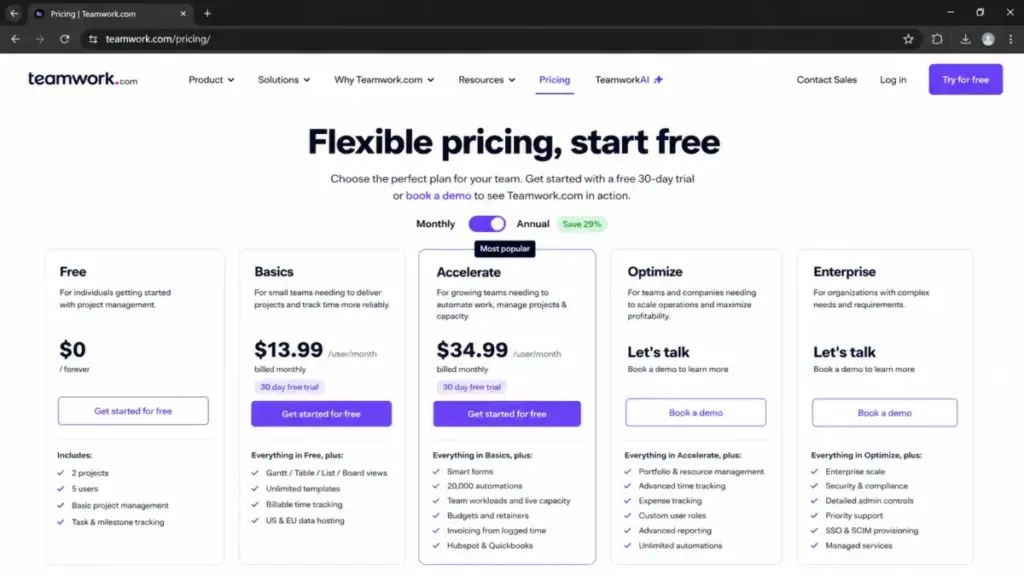
Teamwork.com advertises a 29% saving on annual billing and offers both options at checkout. The annual rates are $9.99 and $24.99 per user per month.
I cannot show you the monthly rates, because the official pricing page state I checked on July 10, 2026 rendered only annual prices. Third-party sites publish $13.99 and $29.99, and at least one of those pages is still describing retired plans.
Running the advertised discount backwards to reconstruct a monthly price would produce a number that looks precise and is unverified. I would rather you open checkout than trust arithmetic on this page.
My recommendation: get the monthly rate quoted, then run the trial hard before you prepay a year. Teamwork.com says there is no cancellation fee, and the reviewed sources do not establish a prorated refund on an annual prepayment, so the annual discount is only a saving if adoption holds.
Billing, Cancellation, and Payment Methods
Three billing facts change how you buy, and none of them appear on the pricing page headline.
Upgrades are instant. Downgrades are not. Teamwork.com documents that you can add users, upgrade plans, and purchase add-ons at any time, while downgrades, seat removals, and moves to a lower plan take effect at the next billing cycle or renewal date.
No cancellation fee is not the same as a refund. Teamwork.com states there is no cancellation fee, and annual billing remains an annual payment choice. The reviewed sources do not establish a prorated refund for unused annual months, so confirm refund treatment before you prepay a year.
Finance has options, with one catch. Online payments accept major cards, and annual subscriptions can also use offline invoicing, wire transfer, check, or PayPal, per the subscription purchase guide.
That catch is PayPal. Teamwork.com warns that PayPal imposes a 20% limit on total cost increases, which complicates upgrades mid-term. It is not a Teamwork fee, but it is a real procurement constraint if your team grows.
Nonprofits and educational institutions are directed to Customer Care rather than a published discount percentage.
Setup and Migration Costs
Three tiers of migration effort exist, and only one is free.
One-click imports cover Wrike, Asana, Basecamp, ClickUp, Trello, and monday.com. If you are leaving one of those six, your data path is solved.
Success onboarding at $2,500 adds four CSM milestone sessions and assisted imports of clients, projects, tasks, and timelogs.
Premier onboarding at $7,500 adds weekly calls across six to twelve weeks, hands-on configuration, role-based enablement, bespoke imports, and custom API migration scripts.
Six to twelve weeks is the number worth sitting with. That is a full quarter of change management, and it exists because Teamwork.com is configuring an operations system, not installing a task list.
Capterra’s recent review pattern helps explain why the packages sell. Reviewers praise the project and task management while a recurring complaint cluster describes hidden features, confusing menus, and difficulty finding things.
Those are reviewer patterns, not universal defects. Run three real workflows during the 30-day trial before you buy training: assign work across two people, hand off a deliverable for client approval, and log time against a budget.
If the team cannot complete all three unaided in one session, the $2,500 is cheaper than six months of low adoption. That is the adoption verdict I would give any operations lead.
Which Teamwork Plan Should You Choose?
Team size alone does not answer this. The workflow you need answers it.
| If you need | Buy | Annual cost at 10 seats |
|---|---|---|
| Five projects and nothing more | Free | $0 |
| Client-organized projects plus billable time | Basics | $1,198.80 |
| Forms, workload planning, retainers, invoicing | Accelerate | $2,998.80 |
| Quotes, multi-currency, client profitability | Optimize | Custom quote |
| SSO, advanced access policies, dedicated CSM | Enterprise | Custom quote |
Solo consultant or freelancer: Free. The five-project cap is generous, and Basics costs $29.97 per month regardless.
3-person creative studio: Basics, unless you exceed twenty Proofs per month. If client review rounds are your daily work, jump to Accelerate and accept the five-seat floor.
10-person agency: Accelerate. You are paying $1,800 a year over Basics for the operations layer, and you will use it within the first quarter. This is the same threshold I apply when I assess the product against the rest of the category, and it runs deeper in my Teamwork.com review.
25-50 person services firm: Accelerate as the baseline, then request an Optimize quote and compare it against your Accelerate license total. If multi-currency budgets or client profitability are in the requirements document, Accelerate is a stopgap.
Any headcount with an SSO mandate: Enterprise. Get the renewal uplift capped in the contract.
Which Teamwork Plan Should You Avoid?
Basics, for any team that bills clients from tracked hours.
The reason is a feature gate, not a price. Basics logs billable time and cannot generate an invoice from it, and it has no time budgets or retainers. You end up exporting hours into a spreadsheet, which is the workflow you bought software to eliminate.
The exception is real. A 3-6 person team that delivers on fixed-fee scopes, invoices from an accounting tool, and never needs capacity planning gets genuine value from Basics at $119.88 per seat per year.
Second avoid: Accelerate at 40+ seats without an Optimize quote in hand. You are spending $11,995.20 a year with no published figure to test the next tier against.
What Changed in 2026: Legacy Plan Names and Stale Prices
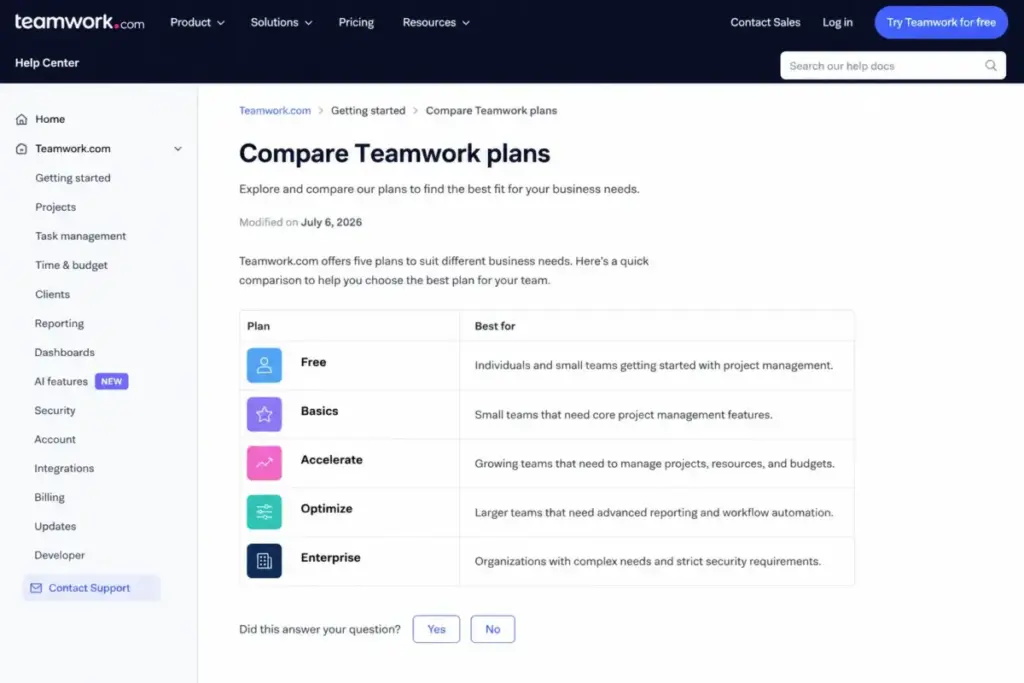
Search results for this query are unusually stale. Teamwork.com’s own legacy plans documentation tells new customers to use current pricing.
| Legacy name (do not buy) | Status | Where it still appears |
|---|---|---|
| Deliver | Legacy | Tech.co ($13.99), The Digital Project Manager ($10.99), TrustRadius |
| Pro | Legacy | Older comparison pages |
| Grow | Legacy | Tech.co ($29.99), The Digital Project Manager ($19.99), TrustRadius |
| Premium | Legacy | Older comparison pages |
| Scale | Legacy | Older pricing databases |
Two corrections matter for buyers right now. The Free plan supports five projects, not the two that Tech.co and several comparison pages still publish, and Deliver and Grow prices are not equivalents for Basics and Accelerate.
I am not claiming a one-to-one mapping between old and new tiers, because Teamwork.com does not publish one. Treat any article using those names as historical.
Teamwork Pricing vs Competitors
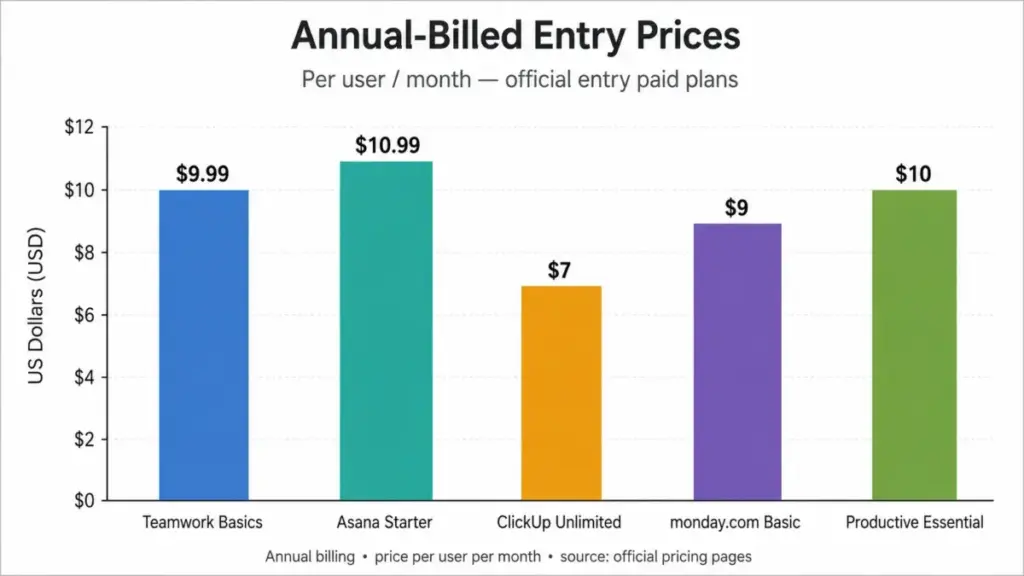
All figures below are annual-billed, per user per month, taken from Asana’s pricing page, ClickUp’s pricing page, monday.com’s pricing page, and Productive’s pricing page, each checked July 10, 2026. These are price anchors, not feature-equivalent plans.
| Product | Entry plan | Entry price | 10-user annual | Practical tier |
|---|---|---|---|---|
| Teamwork.com | Basics | $9.99 | $1,198.80 | Accelerate at $24.99 |
| Asana | Starter | $10.99 | $1,318.80 | Advanced at $24.99 |
| ClickUp | Unlimited | $7.00 | $840.00 | Business at $12.00 |
| monday.com | Basic | $9.00 | $1,080.00 | Standard at $12.00 |
| Productive | Essential | $10.00 | $1,200.00 | Professional at $25.00 |
Teamwork Basics is mid-pack at entry. The more useful comparison sits one row down: Accelerate at $24.99 costs the same per seat as Asana Advanced at $24.99 and within a dollar of Productive Professional at $25.00.
That parity is the story. Teamwork.com is not priced as a task manager, it is priced as a professional services platform, and Productive is its closest structural peer in this table.
ClickUp Unlimited at $7 and monday.com Basic at $9 undercut Teamwork Basics on entry price. I have not verified which financial workflows sit inside those entry plans, so treat every row here as a price anchor and check the feature list yourself. The monday.com review covers that platform’s work-management model in detail.
For a wider shortlist, my Teamwork alternatives guide ranks the closest replacements by workflow rather than by sticker price.
Is Teamwork Worth the Price?
Teamwork pricing earns its premium for a client-service team that bills hours, at Accelerate. For an internal team that invoices nobody, it does not earn it at any tier.
Best for: 5-50 person agencies, consultancies, and professional-services teams that route intake through forms, plan capacity by person, run retainers, and invoice from tracked time.
Not best for: two-person studios that cannot use the Basics three-seat floor, internal marketing or IT teams with no billable workflow, mobile-first field teams, and analytics-led firms that need raw data access without a separate Teamwork Connect quote.
| Pros | Cons |
|---|---|
| Accelerate bundles capacity planning, retainers, and invoicing at $24.99, matching Asana Advanced on price | Basics and Accelerate impose 3- and 5-seat floors that raise the effective rate for small teams |
| Free tier is genuinely usable at five projects and five users | Exact current US monthly prices were not exposed in the official page state checked July 10, 2026 |
| Published onboarding prices at $2,500 and $7,500 are unusually transparent for this category | Optimize and Enterprise have no public price, seat minimum, or contract length |
| Core security, 2FA, and SOC 2 coverage are included on every plan, including Free | API throughput stays at 150 requests per minute from Free through Accelerate |
| One-click migration from six named competitors reduces switching labor | Usage-based AI credits arrive September 2026 with no published allowance or rate |
SaaSZap editorial pricing-value score: 7.5 / 10. This is a judgment about price-to-value, not a product rating and not an aggregate of user reviews. The self-serve tiers price fairly against Asana and Productive, and the score is capped by four undisclosed line items plus a scheduled AI pricing change inside most buyers’ first contract year.
Worth it if: you bill clients, need invoicing from logged hours, and have at least five seats.
Not worth it if: you need SSO on a mid-market budget, or you need predictable AI cost past September 2026.
Alternative if too expensive: ClickUp Unlimited at $7 per user per month is the lowest entry anchor of the four compared here, and the ClickUp pricing tiers show where its own gates sit. Productive Essential at $10 is the closest professional-services price anchor, though I have not verified which financial workflows its entry plan includes.
How to Avoid Overpaying for Teamwork
Seven ways to keep Teamwork pricing from outrunning the budget you approved.
- Count your real seats before choosing a tier. Under three people, Basics costs $29.97 a month no matter what. Under five, Accelerate costs $124.95.
- Do not buy Basics if you invoice from hours. The $180 per seat per year you save disappears the moment finance asks for an invoice built from timelogs.
- Get the monthly rate in writing. Do not trust any third-party monthly figure for Basics or Accelerate, including $13.99 and $29.99. Both trace to packaging Teamwork.com has retired.
- Treat onboarding as optional until the trial says otherwise. Run assignment, client approval, and time-against-budget in the 30-day trial. Buy Success at $2,500 only if the team stalls.
- Price the AI credits before you sign an annual term. Ask for the September 2026 credit allowance, credit unit, and overage rate. Ask whether an annual prepayment locks introductory inclusion.
- Ask for a full quote sheet on Optimize and Enterprise. Request: seat minimum, contract term, renewal uplift cap, AI credit allowance, automation allowance, Teamwork Connect price, Premium Support price, onboarding package included, migration scope, SSO, technical-service hours, sandbox or dedicated infrastructure, and permitted billing methods. Never accept a per-seat number alone.
- Benchmark before you renew. Put your Accelerate total next to the Asana pricing breakdown at the same seat count, and downgrade before renewal rather than after, because seat removals only take effect at the next billing cycle.
How I Verified This Teamwork Pricing Data
I did not test a Teamwork.com workspace, trial, or paid account for this guide. Every price, limit, and feature gate comes from official Teamwork.com pricing, subscription, feature-comparison, security, implementation, reporting, and support pages, all checked on July 10, 2026.
The current-plan documentation I relied on was modified July 6, 2026. Where third-party sources conflicted with official pages, I used the official page and flagged the conflict.
User-sentiment observations come from G2 and Capterra review patterns, attributed as patterns rather than as verified defects. TCO calculations use only the published annual rates and documented seat minimums, and exclude tax, AI credits, Teamwork Connect, and Premium Support.
Prices change. This analysis reflects saaszap.com’s July 10, 2026 verification pass by James Carter, and any plan, limit, or AI credit policy dated after September 2026 requires a fresh check against the vendor’s pricing page.
One naming note: Wikipedia’s company profile reports the legal company as Teamwork Crew Ltd., while the official pages reviewed use the Teamwork.com brand throughout.
FAQ
How much does Teamwork cost per month?
Teamwork.com costs $9.99 per user per month on Basics and $24.99 on Accelerate, both billed yearly and verified July 10, 2026. Monthly billing exists, but the current US monthly amounts were not exposed in the official pricing page state I checked. Optimize and Enterprise require a custom quote with no published rate.
Does Teamwork have a free plan?
Yes. Teamwork.com Free supports up to five users, five projects, 100 MB of storage, two project templates, 100 automations per month, and five Proofs per month. Some search results still show an older two-project limit, which is out of date as of July 10, 2026. TeamworkAI is not listed as included on Free.
Do I have to pay for three users if only two people use it?
Yes. Basics carries a three-user minimum, so the smallest Basics bill is $29.97 per month equivalent, or $359.64 annually. Accelerate carries a five-user minimum, making its floor $124.95 monthly equivalent, or $1,499.40 annually. A two-person team either stays on Free or pays for the unused third seat.
What is the difference between Teamwork Basics and Accelerate?
Basics gives you 300 projects, 100 GB storage, 5,000 automations, and twenty Proofs per month. Accelerate adds smart forms, workload and capacity planning, time budgets, retainers, invoices generated from logged time, unlimited Proofs, 250 GB storage, and 20,000 automations. The price gap is $180 per seat per year.
Which Teamwork plan is best for a 10-person agency?
Accelerate, at $2,998.80 per year for ten seats on annual billing. Basics costs $1,198.80 for the same headcount but cannot generate invoices from logged time or plan workloads. If your agency needs multi-currency budgets or client profitability reporting, request an Optimize quote instead of buying Accelerate first.
Which Teamwork plan includes SSO?
Only Enterprise. Single sign-on, advanced access policies, and dedicated infrastructure sit behind the Enterprise tier, which uses custom pricing. Two-factor authentication, role-based permissions, US or EU hosting, and SOC 2 coverage are included on every plan including Free. An SSO requirement forces a move into a sales-led contract with no published benchmark.
Will Teamwork AI cost extra later this year?
TeamworkAI is included in paid plans for an introductory period, and Teamwork.com states that usage-based AI credits launch in September 2026. The credit allowance, credit unit, and overage price were not published when I checked on July 10, 2026. Ask for those figures in writing before committing to an annual term.
How much does Teamwork onboarding cost?
Getting Started onboarding is free. Power Sessions start at $250 per hour, the Success package costs $2,500, and the Premier package costs $7,500. Premier runs weekly calls across six to twelve weeks and includes bespoke imports plus custom API migration scripts. All packages are optional and none is required to buy a subscription.
Can I cancel Teamwork at any time?
Teamwork.com states there is no cancellation fee. Annual billing remains an annual payment choice, and the reviewed sources do not establish a prorated refund for unused months. Downgrades, seat removals, and moves to a lower plan take effect at the next billing cycle or renewal date, not immediately.
Is Teamwork actually cheaper than Asana or ClickUp?
At entry, Teamwork Basics at $9.99 sits below Asana Starter at $10.99 and above ClickUp Unlimited at $7, all billed annually. At the tier most agencies use, Teamwork Accelerate at $24.99 matches Asana Advanced at $24.99 exactly. These are price anchors, not feature-equivalent plans, so compare workflows before you compare rates.