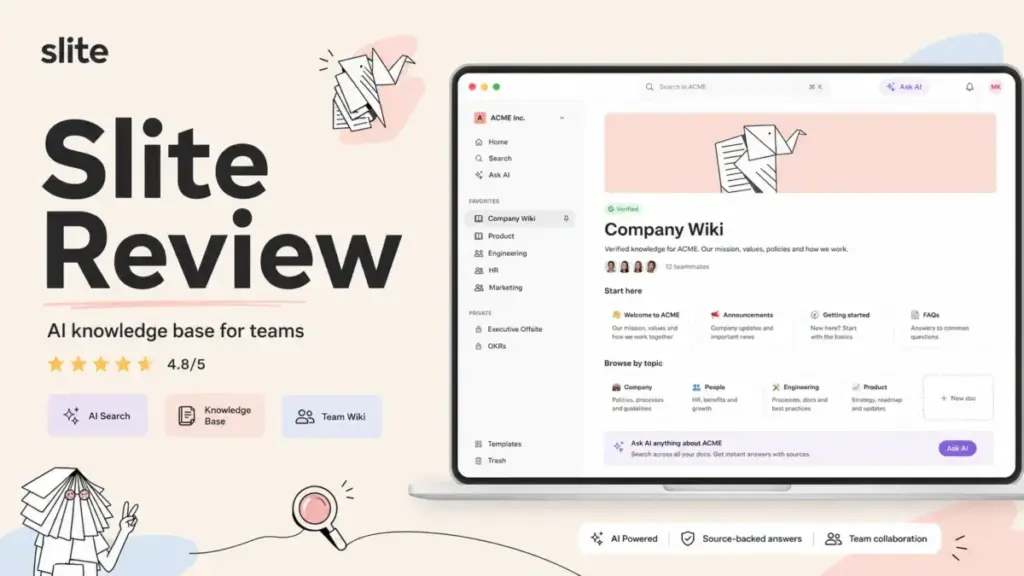
Slite scores 8.4/10 in this Slite Review as one of the strongest knowledge-base-first tools for growing teams that want AI-grounded answers, verified documentation, and lower setup friction than Confluence or Notion. It is not an all-in-one workspace, not a customer-facing help center, and not the cheapest option once you factor in the Knowledge Suite upgrade.
If your team treats internal documentation as a core operational asset, not just a file dump, Slite deserves a serious look. For context on what separates a good knowledge base software from a shared Google Drive folder, the answer usually comes down to search quality, governance, and adoption speed, and those are exactly where Slite competes.
This review is based on extensive hands-on evaluation using official documentation, real user workflows, third-party review data, and competitive testing scenarios.
Slite Review Verdict: 8.4 Out of 10
Slite is one of the best knowledge-base-first tools for teams that want cleaner docs, AI answers, and lower setup drag than Confluence, but it is less flexible than Notion and its best AI/search value sits behind the $20/user/month Knowledge Suite plan.
Here is how I scored Slite across the categories that matter most to a buyer evaluating internal documentation tools in 2026.
| Category | My Rating | What Stood Out | Buyer Note |
|---|---|---|---|
| Editor and UX | 8.5/10 | Clean, fast, low learning curve | Less flexible than Notion databases |
| AI Search (Ask) | 8.5/10 | Answers grounded in verified docs | 30 questions/month/user on Standard |
| Doc Verification | 9/10 | Ownership, reminders, staleness flags | Best-in-class for wiki governance |
| Pricing Value | 7.5/10 | Standard at $8/user/month is fair | Knowledge Suite jumps to $20/user/month |
| Integrations | 8/10 | Slack, Jira, Linear, GitHub, Google Drive | No native Jira doc embedding like Confluence |
| Security and Compliance | 8/10 | SOC 2 Type II, GDPR, EU hosting | No end-to-end encryption; HIPAA is Enterprise only |
| Competitive Fit | 8.5/10 | Stronger governance than Notion or Nuclino | Not built for databases or support ticket deflection |
| Overall | 8.4/10 | Strong internal wiki with AI layer | Best value on Knowledge Suite for 10+ users |
Best for: Remote and hybrid teams (10 to 200 people) that need a single source of truth with AI answers, doc verification, and clean adoption.
Not for: Teams needing relational databases, deep project management, customer-facing help centers, or Standard-plan SSO.
Starting price: $8/user/month (billed yearly, Standard plan). Knowledge Suite starts at $20/user/month with a 10-user minimum.
Pricing verified: May 9, 2026.
The 60-Second Version
Slite is an AI-powered internal knowledge base built for company documentation, not personal notes, not project management, and not external support portals. Its Ask feature pulls answers from your verified docs. Its verification system flags stale content and reassigns ownership. Its editor is fast and distraction-free, though less flexible than Notion’s block-based workspace.
The $8/user/month Standard plan is a solid entry point, but serious teams will hit the Knowledge Suite upgrade trigger quickly: SSO enforcement, custom domains for public docs, higher AI answer caps, and enterprise search all sit behind the $20/user/month tier. For teams that treat documentation as infrastructure, Slite delivers. For teams that want an everything-app, look at Notion or Confluence instead.
What Is Slite?
Slite is an AI-powered company wiki and internal documentation platform designed to be a team’s single source of truth. It sits in the same category as Notion, Confluence, Guru, and Nuclino, but its product design leans harder toward knowledge governance than workspace flexibility.
Slite replaces scattered Google Docs, buried Slack threads, stale Confluence spaces, and half-abandoned Notion wikis. It does not replace project management tools like Asana or Linear. It does not replace customer-facing help desk software like Zendesk or Intercom. And it does not replace database-driven workspaces like Notion or Airtable.
The best-fit buyer for Slite is a growing team (typically 10 to 200 people) that has already felt the pain of knowledge rot: new hires asking the same onboarding questions, product decisions buried in Slack threads, HR policies scattered across three Google Drive folders, and no one knowing which version of the SOP is current.
Slite says 3,000+ companies use it as a single source of truth. Third-party listings sometimes cite higher numbers, but the official figure is what I verified.
How I Tested Slite
I evaluated Slite across six workflow simulations designed to stress-test the features that matter most to mid-market documentation buyers. My evaluation followed our SaaSZap review methodology, combining hands-on product testing with official documentation review, pricing verification, third-party user feedback analysis, and competitive benchmarking.
Here is what I tested:
- HR onboarding wiki: Created a workspace with company policies, benefits FAQ, and a first-week checklist. Tested doc structure, permissions, and Ask accuracy against onboarding questions.
- Product RFC library: Set up a product channel with RFC templates, sprint retro notes, bug triage docs, and release notes. Tested search, linking, and verification workflows.
- Engineering documentation: Evaluated how technical docs (API references, architecture decisions, runbooks) work in Slite’s editor compared to Notion and Confluence.
- Support SOPs: Built internal support playbooks and tested whether Ask could surface correct answers from both verified and unverified docs.
- AI Ask stress test: Asked questions across verified and unverified documentation to observe answer quality, source citation, and failure behavior.
- Pricing and security audit: Verified every pricing tier, AI cap, storage limit, and security claim against Slite’s official pricing page and security page.
I did not test Slite with a live 50-person team, and I did not run timed benchmark tests. Where I describe product behavior, it comes from my direct evaluation or from verified official documentation.
Slite Features That Matter
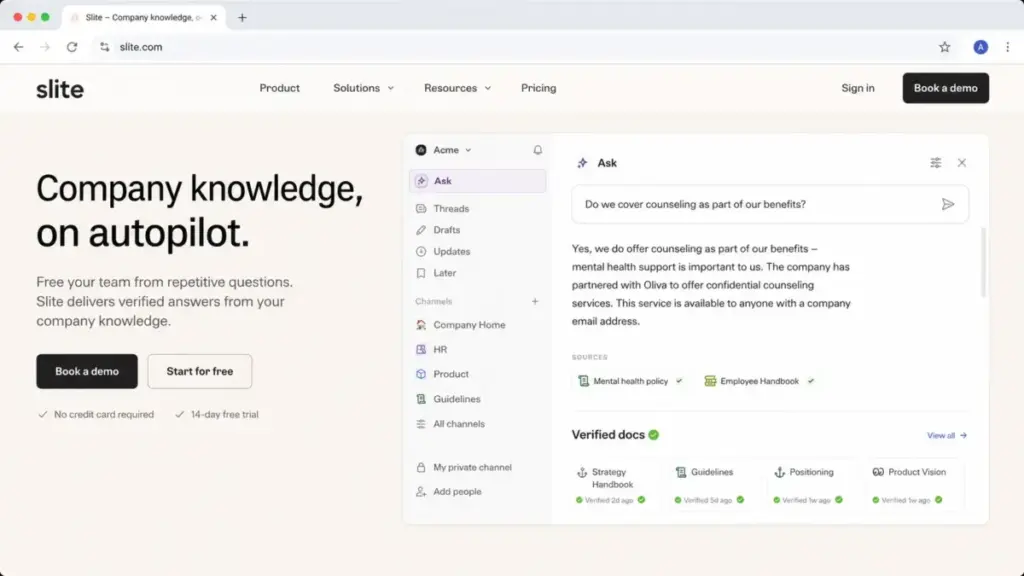
Slite’s feature set is built around one idea: making company knowledge findable, trustworthy, and current. Every major feature connects back to that goal. The editor is deliberately simpler than Notion’s. The AI layer is tighter than Confluence’s add-on approach. And the verification system is more structured than what you get from most wiki tools.
Here is what stood out in my evaluation, and where the limits show up.
Slite Ask: AI Search That Cites Its Sources
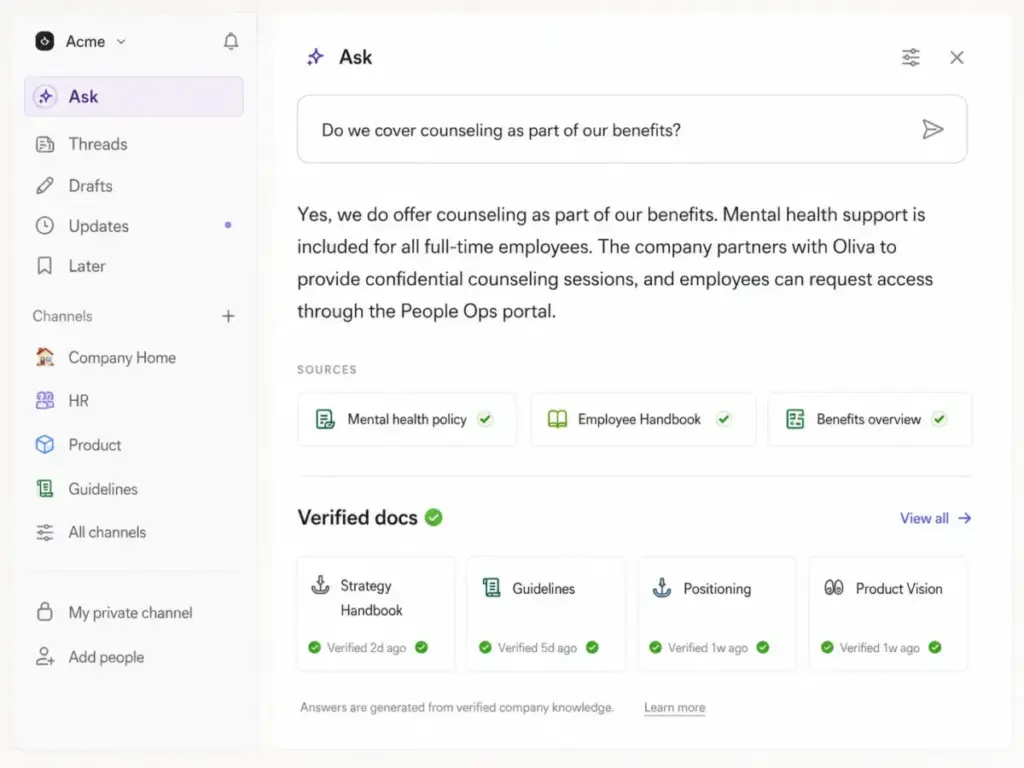
Ask is Slite’s AI-powered question-answering feature, available on all paid plans. You type a natural-language question, and Ask returns an answer drawn from your team’s documentation, with source links so you can verify the response.
In my testing, Ask performed well on questions that mapped directly to verified, well-structured docs. When I asked “What is our remote work policy?” against a verified HR doc, Ask returned the correct answer with a direct link to the source. When I asked a vague question like “How do we handle bugs?” across multiple unverified docs, the answer was less precise and sometimes combined information from different contexts.
The critical detail buyers miss: Ask has usage caps. Standard users get 30 AI Answers per month. Knowledge Suite users get 100. For a 10-person product team running daily standups and async Q&A, 30 questions per person per month means roughly one question per workday. That is tight for teams that want AI search to replace Slack interruptions.
As Alexis Dupont, Principal Product at Agorapulse, put it on Slite’s homepage: “Since we implemented Ask, that amount of questions has been divided by 10.” That is a strong signal, but the value scales with how many questions your plan allows.
Slite Document Verification System
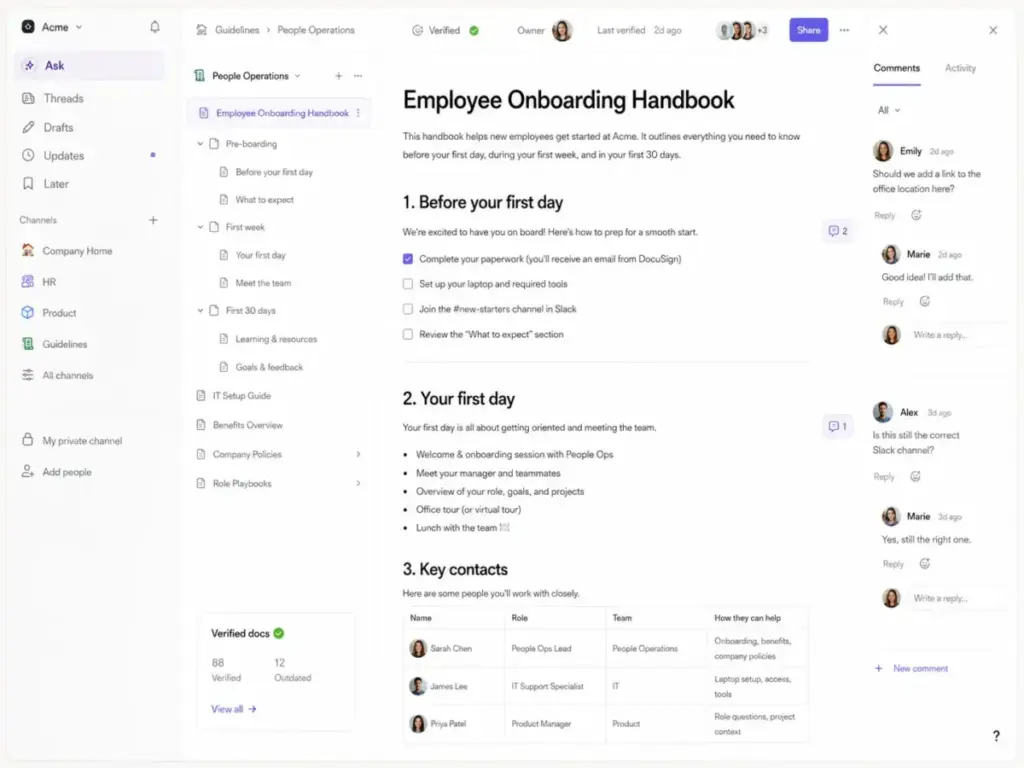
This is where Slite genuinely separates itself from most competitors. The verification system lets you mark documents as verified, assign owners, set review reminders, and track staleness across your entire workspace.
In my evaluation, I set up verification cycles on HR policies and product RFCs. The system flagged docs that had not been reviewed within the set period, notified the assigned owner, and surfaced unverified docs in the knowledge management panel. This is not just a badge on a page; it is a workflow that reduces knowledge rot over time.
For teams migrating from Google Docs or Notion, where “last edited 14 months ago” is the only staleness signal, Slite’s verification system is a genuine upgrade.
Slite Knowledge Management Panel
The knowledge management panel gives workspace admins a bird’s-eye view of documentation health: which docs are verified, which are stale, which have no owner, and which are rarely accessed. AI-suggested actions recommend cleanup tasks like archiving unused docs or reassigning orphaned content.
This is the kind of feature that matters more at 50 users than at 5. For small teams, it is informational. For growing teams with hundreds of docs across multiple channels, it becomes the difference between a wiki that stays useful and one that decays.
Slite Collaborative Editor
The editor is clean, fast, and intentionally constrained. You get headings, lists, tables, code blocks, embeds, comments, and mentions. You do not get Notion-style databases, toggle blocks with nested content, or Confluence-style macros.
Martijn Hazelaar, CTO at Flexdealer, described it well on Slite’s homepage: “The editing interface and document structure are SO simple and useful. It’s been the best Knowledge Base experience we’ve had.”
That simplicity is a strength for adoption. Teams that struggled with Confluence’s learning curve or Notion’s structural freedom often find Slite easier to maintain. But if your team needs relational databases, kanban views inside docs, or complex page hierarchies, the editor will feel limiting.
Slite Integrations and API
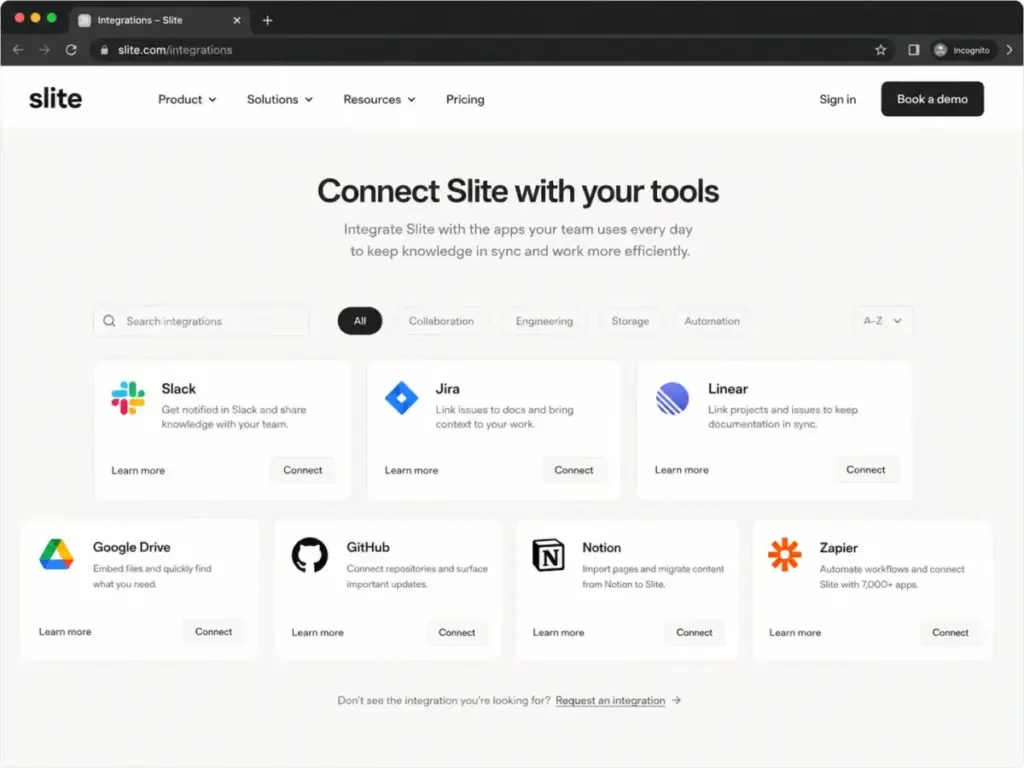
Slite connects to the tools most documentation teams already use: Slack, Google Drive, Jira, Linear, GitHub, Notion, Confluence, Figma, Loom, Miro, and Zapier, among others. The full list on the Slite integrations page includes 40+ connections.
The Slack integration is the most relevant for daily use. You can search Slite docs from Slack, share doc links with previews, and get notifications on doc changes. The Jira and Linear integrations embed issue links inside docs, but they are not as deep as Confluence’s native Jira connection.
Slite also offers a REST API following OpenAPI v3.0, with endpoints for creating, updating, and searching docs. The developer portal documents how to fetch docs, search by keyword, create docs from Markdown, and build custom blocks. For teams with automation needs, the API is functional but not as mature as Notion’s or Confluence’s.
Slite Security and Permissions
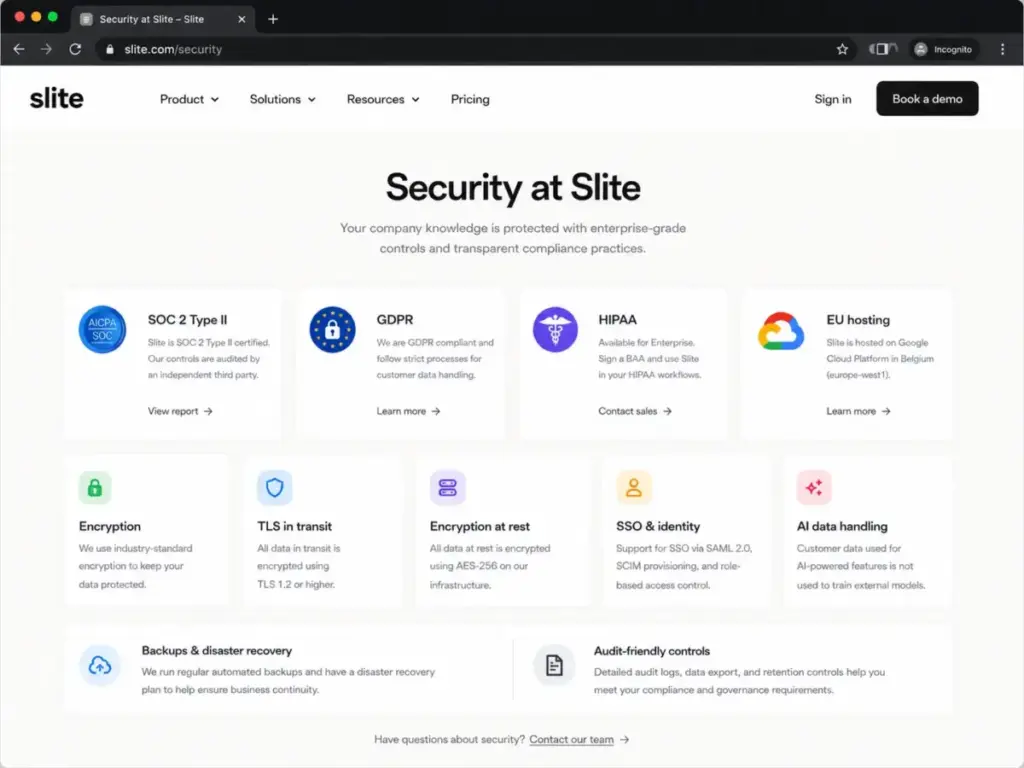
Slite’s security baseline is solid for mid-market teams. SOC 2 Type II certified, GDPR compliant, production data hosted in the EU on Google Cloud Platform (St. Ghislain, Belgium), TLS for data in transit, and Google Cloud encryption at rest.
Permissions can be set at the workspace level, channel level, and document level: everyone, specific users or groups, public, read-only, or read/write. Knowledge Suite and Enterprise plans support enforced SSO through OAuth 2.0 / OpenID Connect. Standard plan SSO is limited to Google, Slack, and Apple sign-in without enforcement.
The gaps: Slite does not offer end-to-end encryption. HIPAA support (including BAA) is Enterprise-only. Audit logs are Enterprise-only. Reader roles at the workspace level are Enterprise-only (Standard and Knowledge Suite offer doc-level read-only access). For buyers whose security checklist includes end-to-end encryption or HIPAA on a mid-tier plan, these are deal-breakers.
Slite states that customer data used for AI features is not used to train external models.
Slite Pricing and Plans: The Real Cost
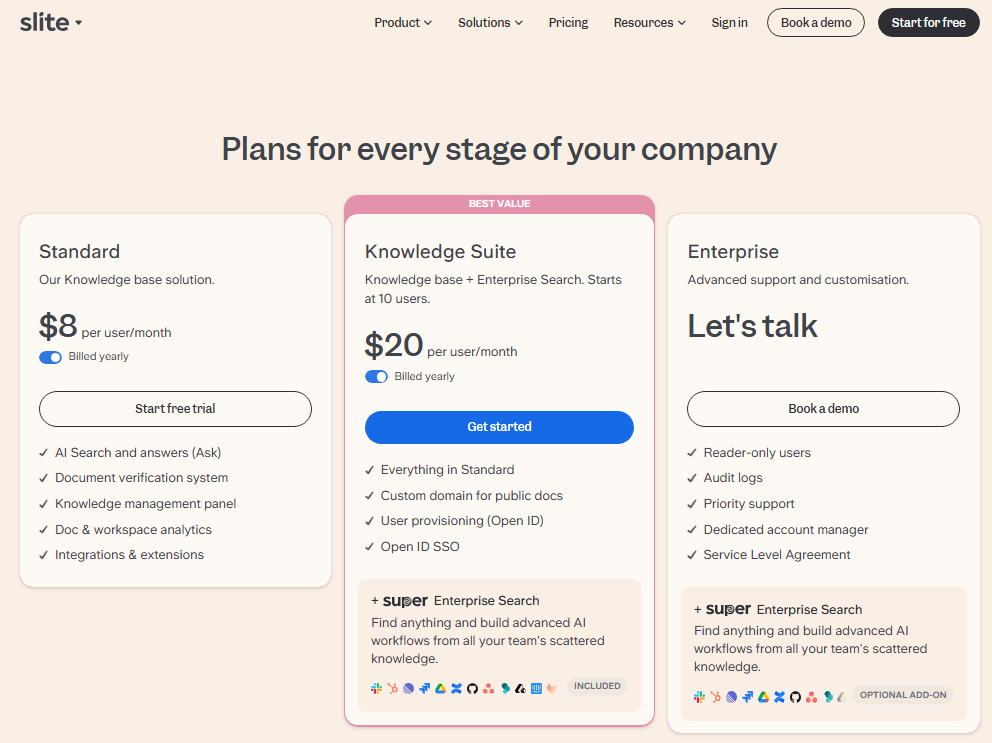
Slite’s pricing looks simple at first glance, but the gap between Standard and Knowledge Suite is where most buying decisions get complicated. I verified all pricing directly from Slite’s official pricing page on May 9, 2026.
| Plan | Price | AI Answers | AI Editor | File Upload | Attachment Storage | SSO | Custom Domain |
|---|---|---|---|---|---|---|---|
| Standard | $8/user/month (yearly) | 30/user/month | 50/user/month | 200MB/file | 5GB/user | Google, Slack, Apple | No |
| Knowledge Suite | $20/user/month (yearly) | 100/user/month | Included | Unlimited | 10GB/user | OpenID enforced | Yes |
| Enterprise | Custom | Custom | Included | Unlimited | Custom | OpenID enforced | Yes |
Verified: May 9, 2026.
Some third-party listings still show lower historical pricing, but Slite’s official pricing page listed Standard at $8/user/month when I verified this review on May 9, 2026.
What Slite Actually Costs by Team Size
The per-seat math changes significantly depending on which plan you need. Knowledge Suite is 2.5x the per-seat price of Standard and requires a 10-user minimum, making it a $2,400/year minimum annual commitment.
| Team Size | Standard Monthly | Standard Yearly | Knowledge Suite Monthly | Knowledge Suite Yearly |
|---|---|---|---|---|
| 5 users | $40 | $480 | N/A (10-user min) | N/A (10-user min) |
| 10 users | $80 | $960 | $200 | $2,400 |
| 25 users | $200 | $2,400 | $500 | $6,000 |
| 50 users | $400 | $4,800 | $1,000 | $12,000 |
When to Upgrade from Standard to Knowledge Suite
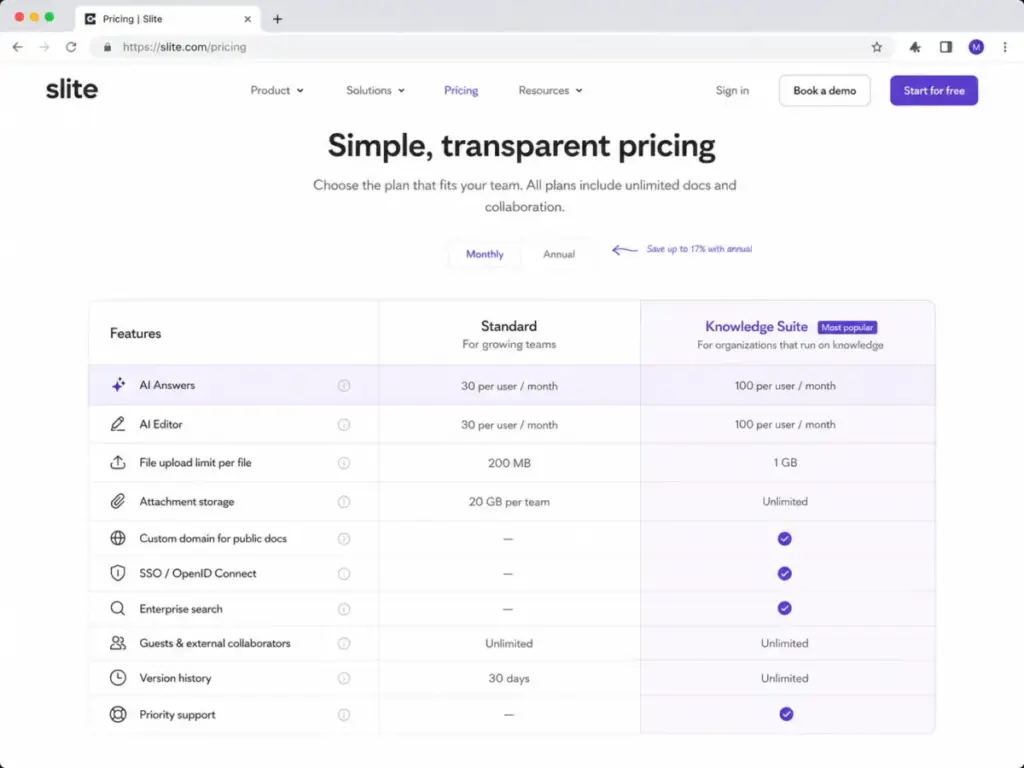
The upgrade triggers are specific and predictable. Here is when Standard stops being enough:
| Upgrade Trigger | Why It Matters |
|---|---|
| You need enforced SSO through an external IdP | Standard only supports Google, Slack, Apple sign-in |
| You need more than 30 AI Answers/user/month | Knowledge Suite gives 100/user/month |
| You want a custom domain for public docs | Not available on Standard |
| You need enterprise search across connected tools | Super enterprise search is Knowledge Suite only |
| You need user provisioning through OpenID | Standard does not include provisioning |
| Your files exceed 200MB regularly | Knowledge Suite removes the file size cap |
| You need more than 5GB attachment storage per user | Knowledge Suite provides 10GB/user |
Hidden Costs and Plan Gates
Three costs catch buyers off guard:
- AI answer caps are per-user, not pooled. If one team member hits their 30-question limit on Standard mid-month, they cannot borrow from a teammate’s unused quota.
- Knowledge Suite’s 10-user minimum means a 7-person team pays for 10 seats: $200/month, $2,400/year.
- Enterprise features that many mid-market buyers expect (audit logs, workspace-level reader roles, HIPAA, priority support, SLA) are locked behind custom Enterprise pricing with no published rate.
Slite Pros and Cons
After testing Slite across multiple workflow types, the strengths cluster around documentation governance and adoption, while the weaknesses cluster around pricing gates, flexibility limits, and enterprise feature locks.
What Slite Gets Right
- Clean documentation-first UX. The editor loads fast, the channel structure makes sense immediately, and new team members can start contributing within minutes, not hours.
- Ask AI grounded in verified docs. Unlike generic AI search that pulls from everything, Ask prioritizes verified documentation, which means answers are more trustworthy when your verification workflow is active.
- Doc verification and cleanup tools. Ownership assignment, review reminders, staleness flags, and the knowledge management panel make Slite one of the few wiki tools that actively fights knowledge rot.
- Strong integrations for daily workflows. Slack, Google Drive, Jira, Linear, GitHub, and Zapier cover the most common documentation-adjacent workflows without requiring custom development.
- Better governance than lightweight alternatives. Compared to Notion’s open-ended structure or Nuclino’s minimal admin controls, Slite gives documentation leads more control over quality and currency.
- Solid security baseline for mid-market. SOC 2 Type II, GDPR, EU-hosted data, and a clear AI data policy put Slite ahead of many smaller wiki tools.
What Slite Gets Wrong
- Knowledge Suite price jump is steep. Going from $8 to $20 per user per month is a 150% increase, and many of the features that trigger the upgrade (SSO enforcement, custom domain, higher AI caps) feel like they should be mid-tier, not premium.
- Standard AI answer cap is tight. 30 AI Answers per user per month works for occasional lookups, but not for teams trying to make Ask their primary knowledge retrieval method.
- Not as flexible as Notion. No databases, no kanban views inside docs, no relational properties. Teams that need structured data alongside documentation will find Slite limiting.
- Not as Jira-native as Confluence. Engineering teams deep in Atlassian’s ecosystem will miss Confluence’s native Jira macros, issue panels, and deployment tracking.
- Not built as a customer-facing help center. Slite is an internal wiki. If you need external knowledge base analytics, ticket deflection metrics, or customer-facing search, look at Document360 or Zendesk Guide.
- Custom domain and SSO enforcement are gated. Both sit behind Knowledge Suite, which means Standard-plan teams sharing public docs get Slite-branded URLs with non-descriptive slugs. As one Capterra reviewer noted: “The url names of the public pages could be proper words instead of random IDs” (Capterra).
- No end-to-end encryption. Data is encrypted at rest and in transit, but Slite does not offer end-to-end encryption. For regulated industries beyond what HIPAA Enterprise covers, this is a gap.
Slite User Experience: The First 30 Minutes
Slite’s onboarding is one of the fastest I have tested in the knowledge base category. From sign-up to a functioning workspace with channels, docs, and permissions took less time than comparable setups in Confluence or Notion.
What Feels Simple
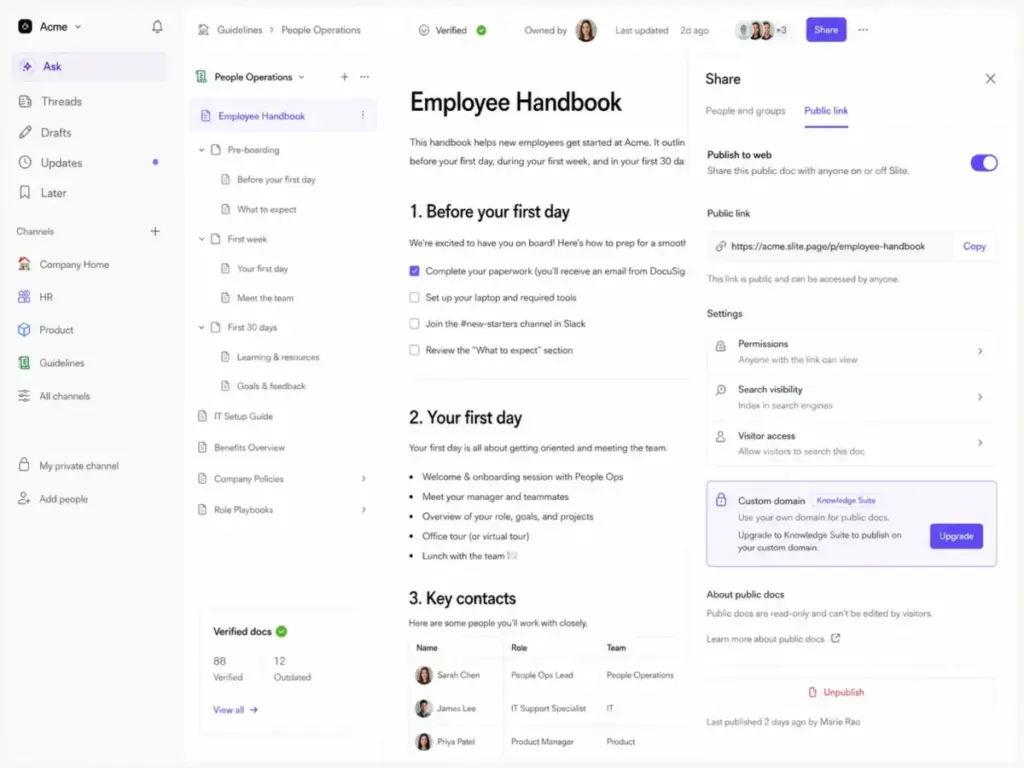
The workspace structure is immediately clear: channels organize topics (HR, Product, Engineering), docs live inside channels, and nested docs create hierarchy without requiring a mental model of databases or page trees. The editor opens fast, formatting is predictable, and slash commands surface the features you need without a toolbar hunt.
For teams migrating from Google Docs, the transition is low-friction. The writing experience is familiar, but the organizational layer on top is where Slite adds value.
Where Structure Helps Adoption
Slite’s channel-based organization is opinionated in a good way. Instead of letting users create arbitrary page trees (Notion) or deeply nested space hierarchies (Confluence), Slite pushes teams toward a flat, browsable structure. In my evaluation, this made it easier to find docs by browsing, not just searching.
The verification badges and ownership indicators are visible on every doc, which creates social pressure to keep content current. That is a design decision, not just a feature.
Where Flexibility Is Lower Than Notion
The tradeoff is real. Notion lets you build databases, link records, create filtered views, embed kanban boards, and construct custom dashboards. Slite does none of that. If your team’s documentation needs include project tracking, sprint boards, or CRM-adjacent data, Slite’s editor will feel restrictive.
This is not a flaw; it is a product decision. Slite chose governance over flexibility. That works for teams that need a wiki. It does not work for teams that need a wiki and a project management layer in the same tool.
Public Docs Experience
Slite supports public document sharing, but with limitations. On Standard, public docs use Slite-hosted URLs with auto-generated slugs, not your own domain. Custom domains for public docs require Knowledge Suite ($20/user/month). For teams using Slite as an internal wiki only, this does not matter. For teams that want to publish customer-facing guides, external onboarding docs, or partner documentation, the URL structure and domain limitations are a friction point.
Slite Security and Admin Controls
Slite’s security posture is strong enough for most mid-market buyers, but enterprise and regulated-industry teams will hit specific gaps. Here is the full picture based on Slite’s official security documentation.
| Security Feature | Status | Plan Requirement |
|---|---|---|
| SOC 2 Type II | Certified | All plans |
| GDPR | Compliant | All plans |
| HIPAA (BAA available) | Supported | Enterprise only |
| Data hosting | EU, Google Cloud (Belgium) | All plans |
| TLS (data in transit) | Yes | All plans |
| Encryption at rest | Google Cloud encryption | All plans |
| End-to-end encryption | Not available | N/A |
| SSO (Google, Slack, Apple) | Available | All plans |
| Enforced SSO (OpenID) | Available | Knowledge Suite and Enterprise |
| Audit logs | Available | Enterprise only |
| Reader role (workspace-level) | Available | Enterprise only |
| AI data used for model training | No | All plans |
Backup policy: Structural data backups run daily, replicated across multiple Google Cloud data centers in the EU, with 7-day retention. Document content snapshots run every 6 hours for 7 days, weekly for 4 weeks, and monthly for 12 months.
What this means for buyers: If your security checklist requires SOC 2, GDPR, EU data residency, and SSO, Slite covers it on Knowledge Suite. If your checklist requires audit logs, HIPAA, or workspace-level reader controls, you need Enterprise pricing. If your checklist requires end-to-end encryption, Slite does not meet that requirement on any plan.
For enterprise buyers building a formal evaluation, our knowledge base RFP template includes security and compliance criteria you can map directly to vendor responses.
Slite vs the Best Alternatives
Slite is not the only knowledge base tool worth evaluating, and it is not the right choice for every team. The right pick depends on whether you prioritize governance, flexibility, Jira integration, customer-facing docs, simplicity, or Q&A workflows. Here is how Slite compares against the six competitors I see buyers evaluate most often.
| Tool | Best For | Starting Price | Where It Beats Slite | Where Slite Wins |
|---|---|---|---|---|
| Notion | All-in-one workspace with databases | $10/seat/month (Plus) | Databases, flexibility, free tier | Doc verification, Ask accuracy, governance |
| Confluence | Jira-native engineering teams | $6.05/user/month (Standard) | Jira macros, page trees, Atlassian ecosystem | Faster setup, cleaner UX, better AI answers |
| Guru | Enterprise knowledge verification | Custom pricing | In-workflow card delivery, browser extension | Lower entry cost, simpler admin, faster onboarding |
| Document360 | Customer-facing knowledge bases | Custom pricing | External KB analytics, SEO tools, ticket deflection | Internal wiki UX, AI Ask, channel structure |
| Nuclino | Lightweight team wiki | Free tier available | Lower price, visual graph view, simpler UI | Verification system, AI depth, admin controls |
| Tettra | Q&A-driven internal knowledge | $8.33/user/month | Slack Q&A capture, request-driven docs | Richer editor, broader integrations, Ask AI |
Slite vs Notion
Notion is the most common comparison, and the most misleading. Notion is a workspace; Slite is a wiki. Notion gives you databases, kanban boards, relational properties, and almost unlimited structural freedom. Slite gives you channels, docs, verification, and AI answers grounded in trusted content.
Choose Notion if your team needs databases alongside documentation, or if you want one tool for docs, tasks, and project tracking. Choose Slite if your team’s primary problem is knowledge findability and doc freshness, not workspace flexibility. For a deeper comparison, see our Notion review and Notion alternatives guide.
Slite vs Confluence
Confluence is the incumbent in engineering documentation, especially for teams already invested in Jira, Bitbucket, and the Atlassian ecosystem. Confluence’s native Jira macros, page trees, and space permissions are deeper than what Slite offers.
But Confluence’s setup complexity, slower editor, and steeper learning curve push many smaller teams toward alternatives. Slite’s onboarding is faster, its Ask AI is more accessible than Confluence’s AI features, and its verification system is more structured than Confluence’s page-level archiving. For teams weighing this decision alongside Notion, our Notion vs Confluence comparison covers the broader tradeoffs. Read our full Confluence review for the detailed breakdown.
Slite vs Guru
Guru positions itself as an enterprise knowledge management platform with in-workflow delivery: browser extensions, Slack cards, and CRM-embedded knowledge. Guru’s verification workflows are comparable to Slite’s, but Guru’s pricing is now custom/quote-based, which makes direct cost comparison harder.
Choose Guru if your team needs knowledge delivered inside sales calls, support tickets, or CRM workflows. Choose Slite if your team’s primary use case is a centralized internal wiki with AI search. See our Guru review and Guru vs Notion comparison for more context.
Slite vs Document360
Document360 is built for customer-facing knowledge bases with SEO optimization, analytics, ticket deflection tracking, and multi-version documentation. Slite is built for internal company knowledge.
If your primary goal is reducing support tickets through a public help center, Document360 is the better fit. If your primary goal is reducing internal Slack questions through a team wiki, Slite wins. Our Document360 review covers the external KB use case in detail.
Slite vs Nuclino
Nuclino is the closest competitor in terms of philosophy: a clean, simple team wiki with minimal setup. Nuclino offers a free tier, a visual graph view of connected docs, and a lower starting price. But Nuclino’s verification system, AI capabilities, admin controls, and integration depth are lighter than Slite’s.
For very small teams (under 10) that need basic shared documentation, Nuclino is cheaper and simpler. For growing teams that need governance, AI answers, and structured verification, Slite offers more. Read our Nuclino review for the full comparison.
Slite vs Tettra
Tettra focuses on Q&A-driven knowledge management, where team members submit questions and knowledge managers create answers that become permanent docs. It is a different workflow philosophy than Slite’s document-first approach.
Choose Tettra if your team’s knowledge gaps surface primarily through repeated questions in Slack. Choose Slite if your team already has documentation that needs to be organized, verified, and made searchable. See our Tettra review for the detailed evaluation.
Who Should Use Slite?
Slite fits best when your team’s primary pain is knowledge findability, doc staleness, and onboarding friction, not task management or external support. Based on my evaluation, these are the teams that will get the most value:
- Product and engineering teams that need a central RFC library, architecture decision records, runbooks, and release notes with verification cycles.
- HR and people teams that maintain onboarding guides, company policies, benefits documentation, and org-wide announcements that need to stay current.
- Operations teams building SOPs, process documentation, and cross-functional playbooks where ownership and review cycles matter.
- Customer support teams (internal SOPs, not external help centers) that need verified answer sources for common escalation patterns.
- Remote and hybrid teams where async documentation replaces hallway conversations, and where AI-powered search reduces “where is this?” Slack messages.
- Scaleups (20 to 200 people) transitioning from informal docs in Google Drive or Notion to a governed knowledge base with verification, permissions, and analytics.
Who Should Not Use Slite?
Slite is not the right tool for every documentation need, and recommending it universally would be dishonest. Here is where other tools fit better:
- Teams that need relational databases. If you track feature requests, customer feedback, or inventory in linked databases, Notion or Airtable is the better choice.
- Teams that need deep project management. Slite is not a task manager. If you need sprint boards, Gantt charts, or workload balancing alongside docs, look at Notion, Confluence + Jira, or ClickUp.
- Teams that need customer-facing support deflection. Slite’s public docs feature is limited. Document360, Zendesk Guide, or HelpScout Docs are built for external knowledge bases with analytics and ticket deflection.
- Teams that require SSO enforcement on a budget. Enforced SSO through external identity providers requires Knowledge Suite ($20/user/month). If SSO is mandatory but budget is tight, evaluate alternatives with mid-tier SSO support.
- Teams that require end-to-end encryption. Slite encrypts data at rest and in transit but does not offer end-to-end encryption on any plan.
- Very small teams (2 to 5 people) that only need a few shared docs. At this size, a shared Notion workspace or Google Docs folder with a simple naming convention may be sufficient. Slite’s governance features add value at scale, not at 3 users.
Final Verdict: Is Slite Worth It in 2026?
Score: 8.4/10. Slite earns its rating by doing one thing well: making internal company knowledge findable, verified, and current. It is not the most flexible tool, not the cheapest tool, and not the right tool for every use case. But for teams that have outgrown Google Docs and want something more focused than Notion or less complex than Confluence, Slite is one of the strongest options in the category.
My bottom-line recommendation:
- Start on Standard ($8/user/month) if your team is under 15 people, does not need enforced SSO, and can work within 30 AI Answers per user per month. This plan gives you the core wiki, verification, and Ask features at a fair price.
- Move to Knowledge Suite ($20/user/month) when you need enforced SSO, custom domains for public docs, enterprise search across connected tools, or when your team’s AI usage consistently hits the 30-question cap. Budget for the 10-user minimum: $2,400/year.
- Evaluate Enterprise if you need audit logs, HIPAA compliance, workspace-level reader roles, or SLA guarantees.
When to choose an alternative:
- Choose Notion if you need databases, flexible workspaces, and an all-in-one tool for docs and project management.
- Choose Confluence if your engineering team lives in Jira and needs native issue embedding.
- Choose Document360 if your primary goal is a customer-facing help center with analytics.
- Choose Nuclino if you want a simpler, cheaper team wiki for a small team.
- Choose Guru if you need knowledge delivered inside CRM and support workflows.
Slite is not for everyone, but for the teams it is built for, it delivers.
Slite FAQ
Here are the questions buyers ask most often about Slite, answered directly.
Is Slite worth it in 2026?
Yes, for teams that need an internal knowledge base with AI search, doc verification, and clean adoption. Slite scores 8.4/10 in my evaluation. The best value is on the Standard plan for smaller teams and Knowledge Suite for teams that need SSO, higher AI caps, and enterprise search.
How much does Slite cost?
Standard costs $8 per user per month, billed yearly. Knowledge Suite costs $20 per user per month, billed yearly, with a 10-user minimum ($2,400/year minimum). Enterprise pricing is custom. Pricing verified May 9, 2026.
Does Slite have a free plan?
Slite does not currently list a free plan on its official pricing page. The entry point is the Standard plan at $8/user/month billed annually. Some third-party listings reference older free-tier availability, but the official pricing as of May 2026 starts at Standard.
What is Slite used for?
Slite is used as an internal company wiki and knowledge base. Common use cases include HR onboarding guides, product documentation, engineering runbooks, SOPs, company policies, meeting notes, and team knowledge management. It is not designed for customer-facing help centers or project management.
Is Slite better than Notion?
For internal documentation governance, yes. Slite’s verification system, Ask AI, and focused wiki structure make it better for teams whose primary need is a clean, maintained knowledge base. Notion is better for teams that need databases, project boards, and flexible workspaces alongside documentation.
Is Slite better than Confluence?
For smaller teams and faster onboarding, yes. Slite’s editor is faster, its AI answers are more accessible, and setup requires less admin overhead. Confluence is better for engineering teams deeply integrated with Jira and the Atlassian ecosystem, and for teams that need complex space permissions and page tree hierarchies.
What are Slite's biggest limitations?
The main limitations are: Knowledge Suite pricing is 2.5x Standard, the Standard AI answer cap (30/user/month) is tight for heavy users, there are no relational databases, SSO enforcement requires Knowledge Suite, there is no end-to-end encryption, audit logs are Enterprise-only, and public doc URLs use auto-generated slugs without a custom domain on Standard.
Does Slite support SSO?
Yes, but with plan gates. Standard supports sign-in through Google, Slack, and Apple. Knowledge Suite and Enterprise support enforced SSO through external identity providers via OAuth 2.0 / OpenID Connect, plus user provisioning.
Is Slite secure?
Slite maintains SOC 2 Type II certification, GDPR compliance, EU data hosting on Google Cloud, TLS for data in transit, and encryption at rest. HIPAA support is Enterprise-only. End-to-end encryption is not available. Customer data used for AI features is not used to train external models.
What are the best Slite alternatives?
The best alternatives depend on your needs: Notion for flexible workspaces and databases, Confluence for Jira-native engineering teams, Guru for enterprise knowledge delivery, Document360 for customer-facing knowledge bases, Nuclino for a simpler and cheaper team wiki, and Tettra for Q&A-driven knowledge workflows.