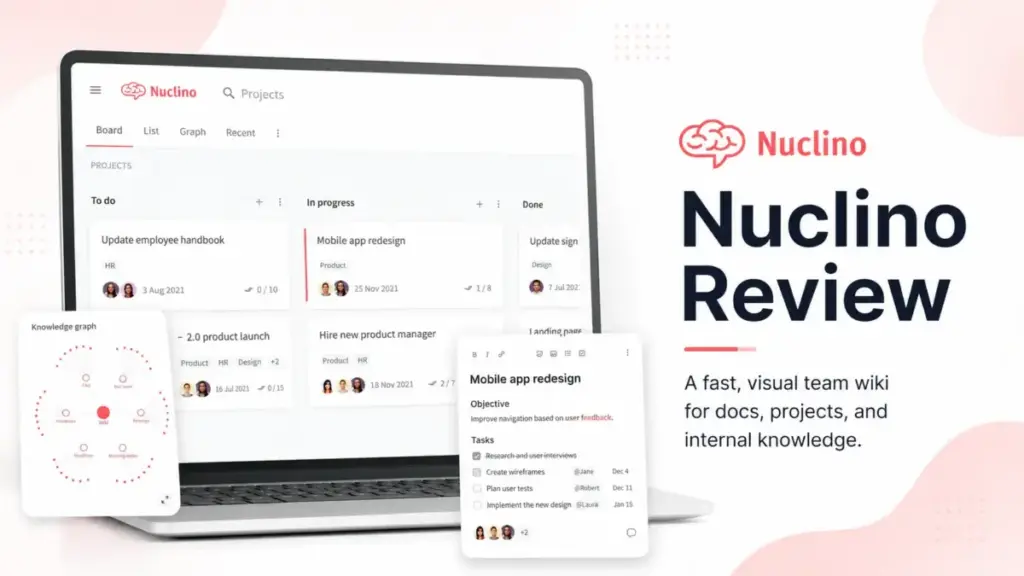
Small teams do not fail at documentation because they lack pages. They fail because nobody wants to maintain the system. This Nuclino Review examines whether Nuclino solves that problem better than heavier knowledge base software.
My verdict after hands-on evaluation: Nuclino earns an 8.2 out of 10 for simple internal wikis, fast adoption, and visual organization. It loses points for search tolerance, table customization, and enterprise governance depth. If your team needs what a knowledge base is supposed to deliver, speed and shared clarity, Nuclino gets you there faster than most alternatives. But it will not satisfy every buyer.
Nuclino Quick Verdict
| Category | Verdict | Evidence |
|---|---|---|
| Score | 8.2/10 | Strong for internal wikis, weaker for enterprise governance |
| Best for | Small and mid-sized teams building an internal wiki | Fast setup, visual views, low learning curve |
| Not for | Regulated enterprises or customer-facing help centers | Lighter governance, no advanced public doc workflows |
| Starting price | $6/user/month billed yearly (Starter) | Unlimited items, canvases, publishing, 30-day history |
| Free plan limit | 50 items, 3 canvases, 2GB total storage | Not enough for a real company wiki |
| Best plan for most teams | Starter | Covers internal wiki needs without AI or SSO cost |
| Main upgrade trigger | Sidekick AI, SAML SSO, audit log, team insights | All gated behind Business at $10/user/month |
| Biggest weakness | Search does not handle typos | G2 user feedback confirms zero results on misspellings |
| Best alternative by use case | Notion for databases, Confluence for Atlassian, Slite for verification | See alternatives section |
Nuclino Review Verdict
Nuclino is a fast, clean internal wiki that earns its place for teams under 100 people who want simplicity over feature depth. It scores 8.2/10 because it does one job well: giving teams a shared knowledge space with minimal setup friction. The graph view, Canvas, and board view add visual flexibility that most wiki tools lack at this price.
Use Nuclino if your team needs a shared wiki, lightweight project docs, and visual planning in one place. Skip it if you need strict content governance, typo-tolerant search, complex project management, or a customer-facing help center.
This review is based on hands-on editorial evaluation using official documentation, real user workflows, verified user reviews, and competitive testing scenarios. Pricing was verified on May 9, 2026.
What Is Nuclino?
Nuclino is a collaborative workspace that combines a team wiki, lightweight project documentation, and visual planning into one product. It positions itself as “your team’s collective brain,” and after testing it, I think that label fits for teams that value speed over depth.
The product organizes content around three layers. Items are individual documents with real-time collaborative editing. Collections group items by topic, department, or project. Workspaces sit at the top level and can represent a team, a department, or an access boundary.
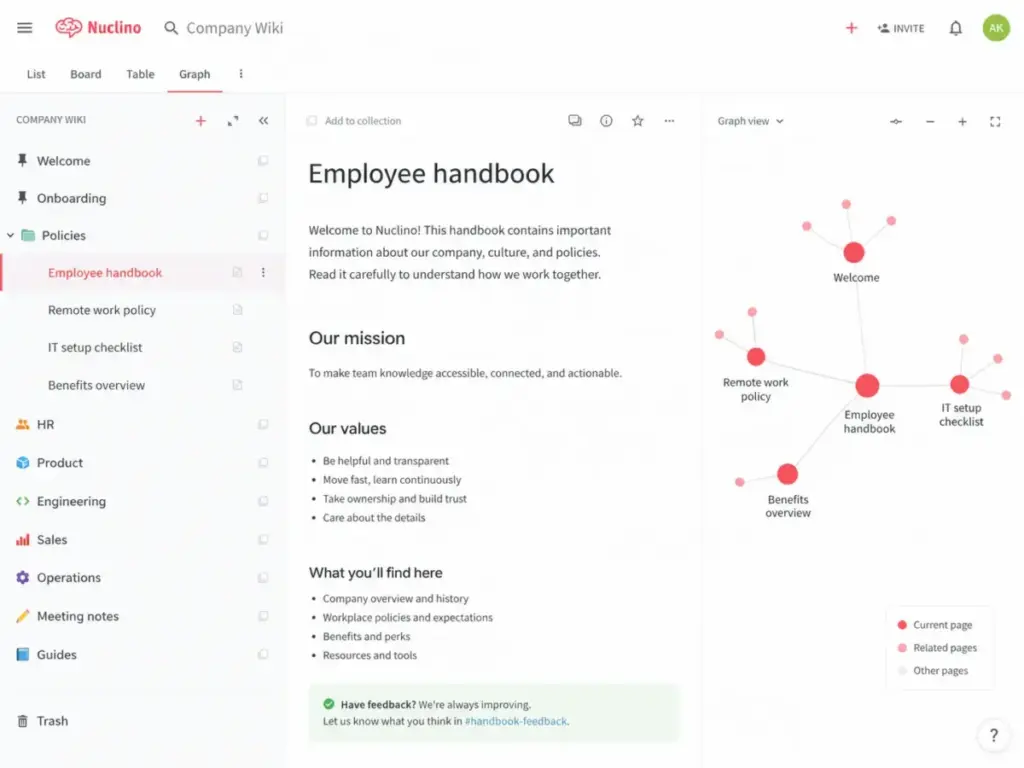
What separates Nuclino from a plain document editor is the view system. Every workspace can switch between list view, board view, table view, and graph view. The graph view shows how items connect visually, which helps teams see relationships between docs instead of just scrolling a folder tree.
Nuclino also includes Canvas for whiteboards and diagrams, Sidekick AI for workspace-aware answers, and a publishing feature that turns any workspace into a public website.
Nuclino Features That Matter
Nuclino keeps its feature set focused on documentation, visual organization, and lightweight collaboration. It does not try to be a project management platform or a full database tool. Here is what matters for buyers evaluating it.
Nuclino Items and Workspaces
Items are Nuclino’s core unit. Each item is a real-time collaborative document that supports Markdown, inline comments, mentions, task lists, file attachments, and embeds. Multiple people can edit the same item simultaneously.
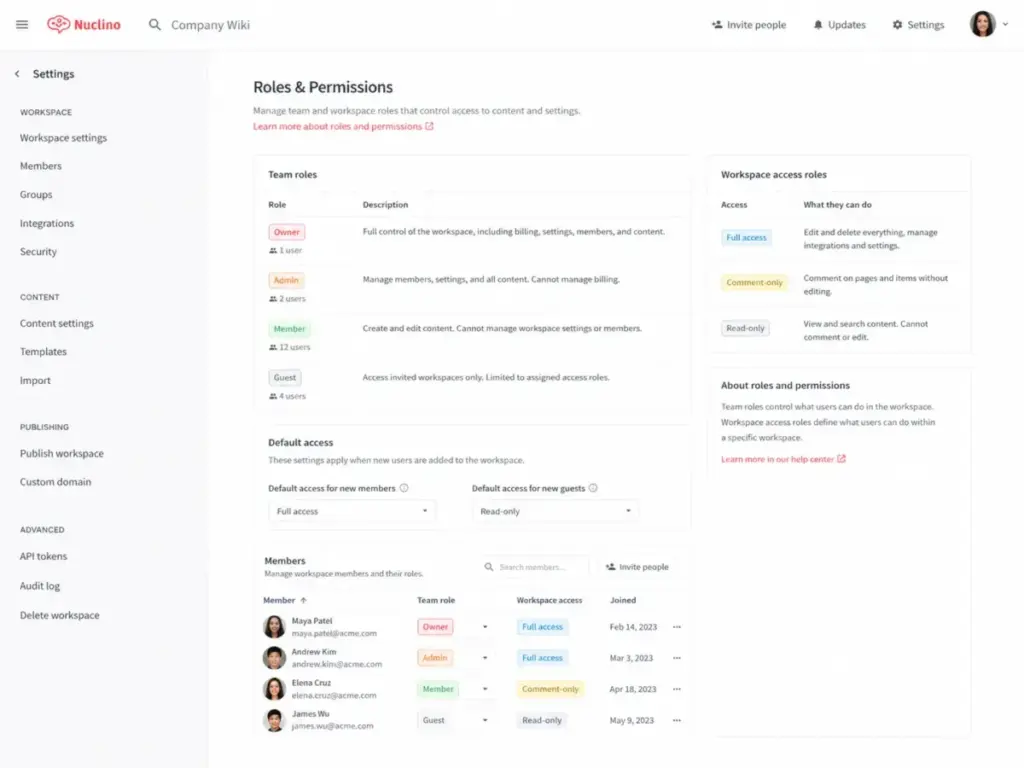
Workspaces contain collections, which contain items. You can set workspace-level access: full access, comment-only, or read-only. This structure works well for separating HR docs from engineering specs from sales playbooks.
In my testing, I created a “Company Wiki” workspace with collections for HR, Product, Engineering, Sales, and Operations. I added sample items for onboarding guides, product specs, meeting notes, SOPs, and policies. A non-technical teammate could understand the structure within minutes.
Nuclino Views
Every workspace supports four views:
- List view shows items in a hierarchical sidebar, similar to a traditional wiki.
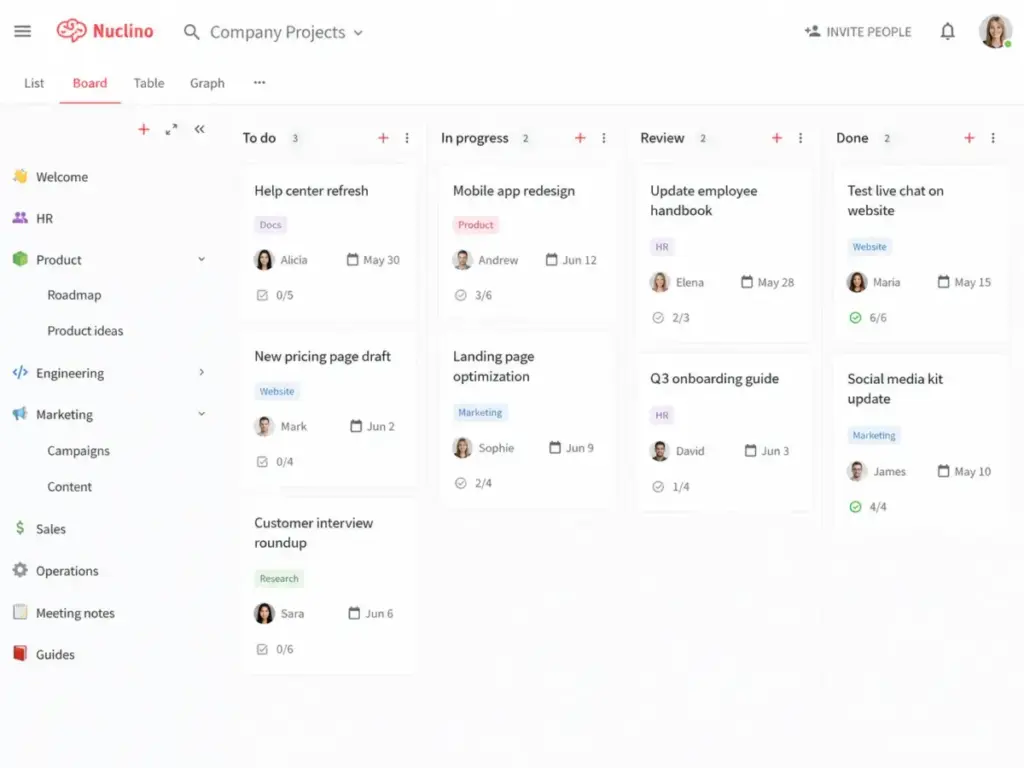
- Board view arranges items in columns, useful for status-based workflows like a product roadmap.
- Table view displays items with custom fields in rows and columns.
- Graph view maps items as connected nodes, showing how documents relate to each other.
The graph view is Nuclino’s most distinctive feature. It turns a flat wiki into a visual knowledge map. For teams that want to see how an onboarding guide connects to a benefits policy connects to an IT setup checklist, the graph makes those links visible.
Nuclino Canvas
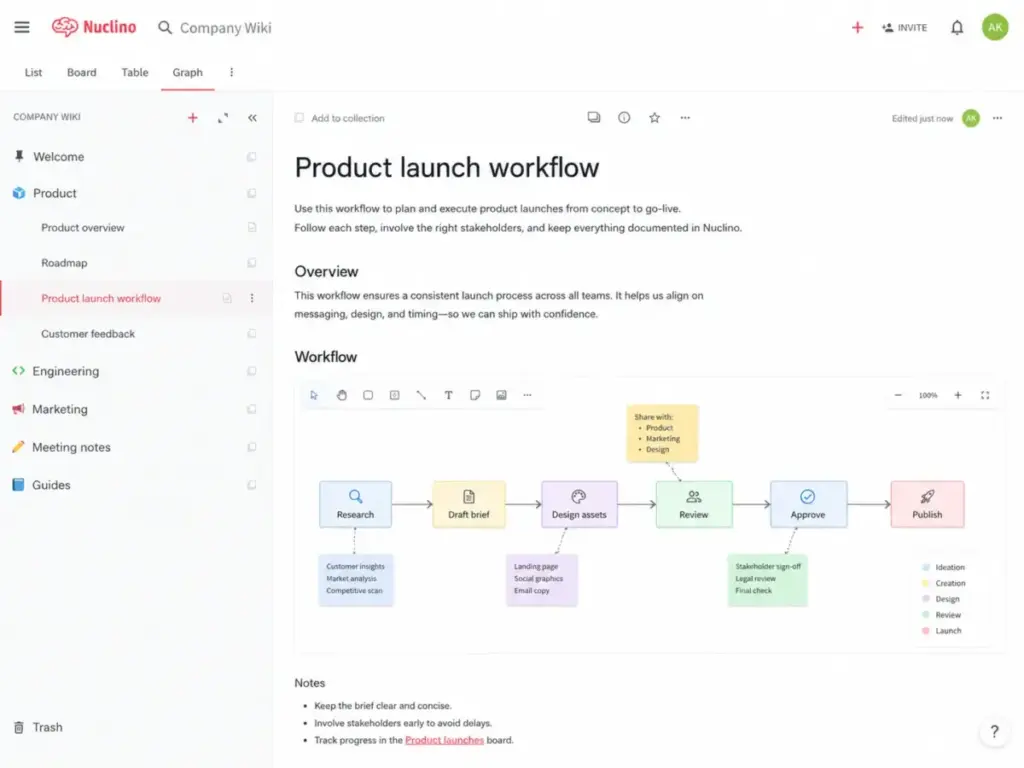
Canvas adds whiteboards and diagrams directly inside Nuclino items. You can draw flowcharts, mind maps, org charts, and sticky-note brainstorms without leaving your wiki.
In my testing, I added a Canvas to a product planning item and built a simple user flow diagram. It worked well for quick visual planning during a documentation session. I did not need to open Miro or Figma for a basic flowchart.
That said, Canvas is not a replacement for best team collaboration tools like Miro for advanced workshop facilitation, complex diagramming, or large-group brainstorming. It covers simple visual work inside your docs. That is its value.
Nuclino Sidekick AI
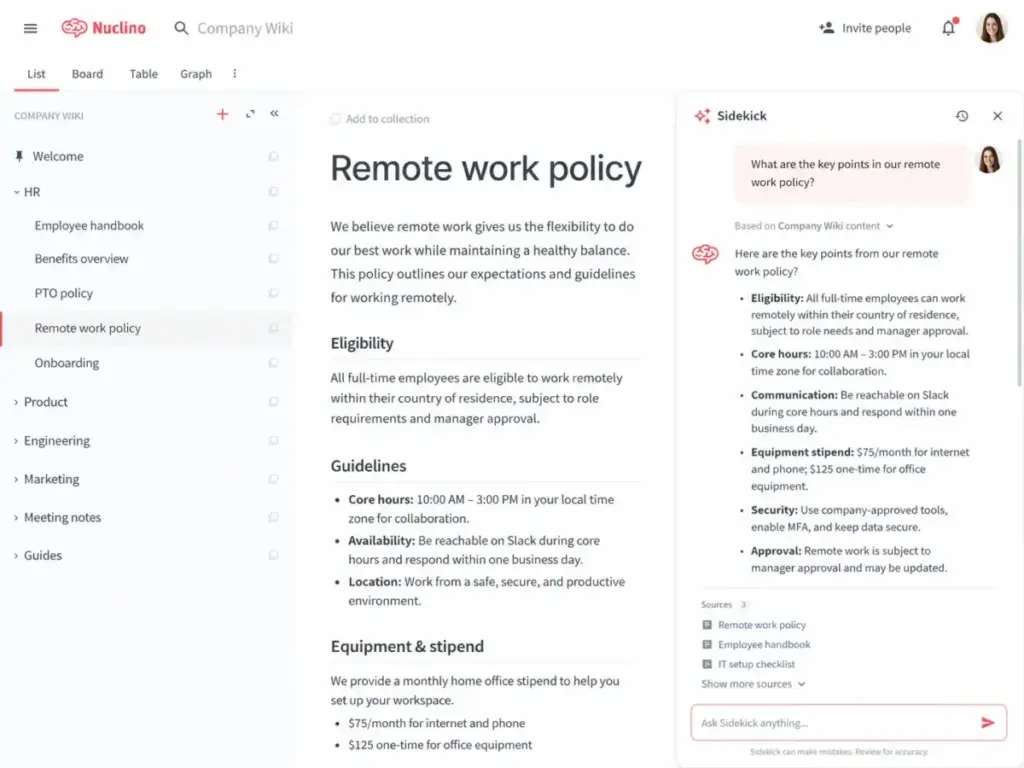
Sidekick is Nuclino’s AI assistant, available only on the Business plan at $10/user/month. It reads your workspace content and answers questions, drafts documents, summarizes meeting notes, extracts action items, translates text, and fixes grammar.
During my evaluation, I asked Sidekick to summarize a set of meeting notes and extract action items. It pulled relevant details from the workspace content. I also asked it to draft a short PTO policy based on existing HR docs, and the output was a reasonable starting point that needed editing but saved time.
Sidekick is useful but not unique. Notion AI, Slite’s AI search, and Guru’s AI answers offer similar capabilities. The difference is that Sidekick lives inside Nuclino’s clean wiki environment and reads from your workspace context.
The Business-only gate matters. If your team is on Starter, you get a good wiki but no AI. That is a real decision point.
Nuclino Publishing
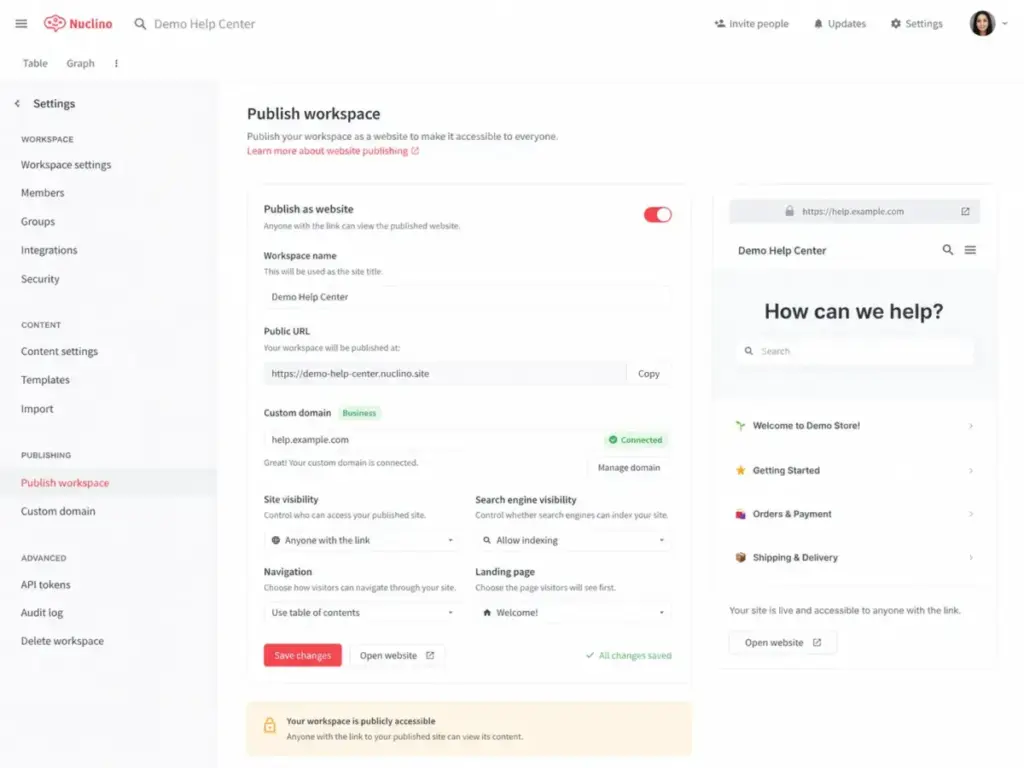
Nuclino can publish any workspace as a public website. Starter users publish to a Nuclino subdomain. Business users can connect a custom domain.
This is useful for lightweight public documentation, a company handbook, or a product FAQ site. In my testing, the published output looked clean and readable.
However, Nuclino’s publishing is not a substitute for dedicated external documentation tools. It lacks advanced features like localization, analytics dashboards, feedback widgets, and structured versioning workflows that tools like Document360 provide. If your primary need is a customer-facing help center, Nuclino is not the right tool.
Nuclino API and Integrations
Nuclino’s API lets you create, update, fetch, and search content programmatically using Markdown. It supports users, teams, workspaces, items, collections, fields, and files. MCP support is also available.
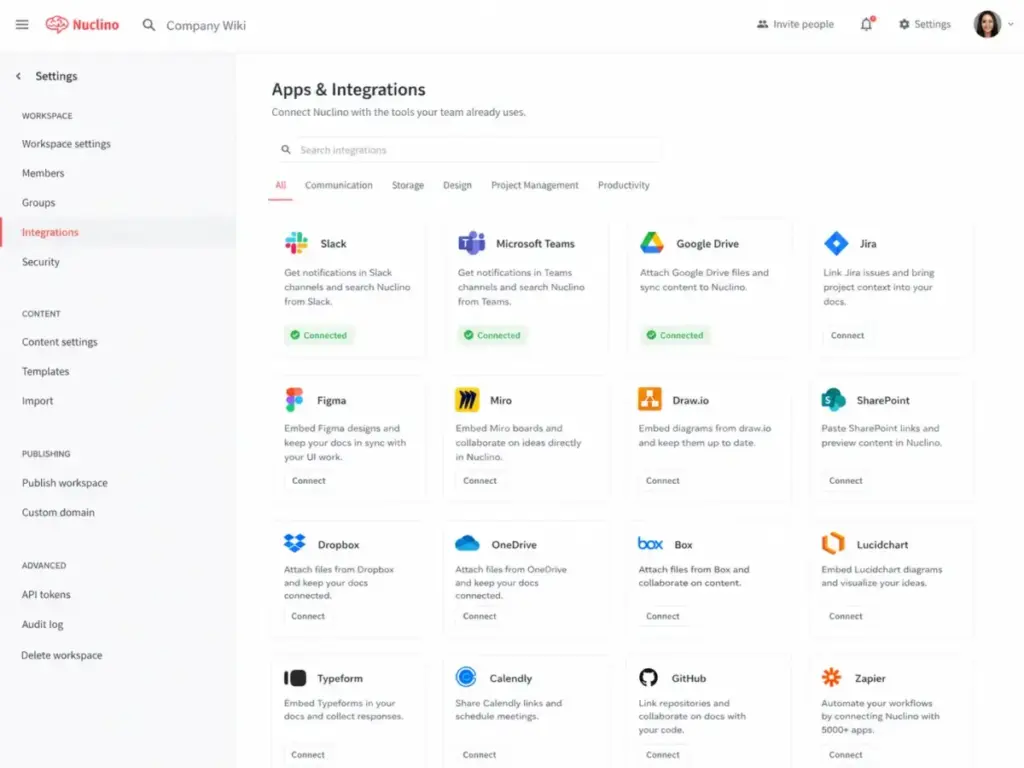
The integration list covers the tools most teams already use: Slack, Microsoft Teams, Discord, Google Drive, Microsoft OneDrive, SharePoint, Dropbox, Box, Jira, Microsoft 365, Airtable, Figma, Miro, Draw.io, Lucidchart, Typeform, and Grammarly.
Import supports Markdown, Microsoft Word, text, HTML, Google Docs, Confluence, and Quip. Export supports Markdown, Word, PDF, full workspace export, and table export as CSV or XLSX.
Nuclino User Experience
Nuclino’s strongest selling point is speed of adoption. In my testing, creating a functional internal wiki took less effort than setting up an equivalent workspace in Notion or Confluence. The interface is minimal, and the learning curve is shallow.
The First 30 Minutes With Nuclino
Here is what the first session looks like. You sign up, create a workspace, and start adding collections. There are no databases to configure, no complex permission trees to design, and no templates you need to understand before writing.
I created five collections, added ten sample items across HR, Product, and Engineering, switched between list and graph view, and embedded a Canvas diagram in a product spec. The experience felt fast and uncluttered.
Board view required adding custom fields for status, owner, and due date, which took a few extra minutes. But compared to setting up a Jira board or a Notion database, the setup cost was noticeably lower.
As one G2 reviewer described it: “A very simple, nice knowledge base.” (Frederico M., Product Manager, Small-Business, G2, April 30, 2026)
Where Nuclino Feels Faster Than Notion
Nuclino is not trying to be Notion. Where Notion gives you databases, formulas, rollups, and template buttons, Nuclino gives you a clean document with views.
For teams that only need a shared wiki, Nuclino removes the cognitive overhead of database design. You do not need to decide whether something should be a page, a database entry, or a linked view. Everything is an item. Items live in collections. Collections live in workspaces.
This simplicity matters for non-technical teams, HR departments, operations groups, and small startups where “just write it down somewhere everyone can find it” is the real requirement.
Where Nuclino Starts To Feel Limited
The simplicity that makes Nuclino fast also creates ceilings. Table customization is limited. One G2 reviewer noted: “There are some limitations when it comes to customization, especially with tables and similar elements.” (Frederico M., Product Manager, Small-Business, G2, April 30, 2026)
As workspaces grow, navigation can become harder. Reviewers on Software Advice have noted difficulty knowing where you are in the folder structure. Without breadcrumbs or nested sidebar indicators, larger wikis can feel disorienting.
Nuclino is best when content stays organized in small, well-scoped collections. When a team dumps hundreds of items into a single workspace without clear structure, the experience degrades.
Nuclino Pricing and Plans
Nuclino offers three plans, and the real upgrade trigger is not storage. It is AI, auditability, SSO, and governance controls. Here is the breakdown, verified on May 9, 2026, from the official pricing page.
| Plan | Annual Starting Price | Main Limits | Best For | Verified Date |
|---|---|---|---|---|
| Free | $0/user/month | 50 items, 3 canvases, 2GB total | Solo testing, proof of concept | May 9, 2026 |
| Starter | $6/user/month | Unlimited items/canvases, 10GB/user, 30-day history | Small teams needing a practical wiki | May 9, 2026 |
| Business | $10/user/month | 20GB/user, unlimited history, Sidekick AI, SSO, audit log | Growing teams needing AI and governance | May 9, 2026 |
What Nuclino Pricing Really Means
Here is what the pricing page does not tell you clearly:
Free is a trial, not a plan. The 50-item cap fills up fast. If your team documents onboarding steps, meeting notes, SOPs, product specs, and policies, you will hit 50 items within weeks. Three canvases is equally restrictive. Use Free to evaluate. Do not plan to run your company wiki on it.
Starter is the value plan. At $6/user/month billed yearly, you get unlimited items, unlimited canvases, admin tools, publishing, and 30-day version history. For most small teams that need a clean internal wiki without AI or SSO, Starter covers the need.
Business is the governance and AI plan. The jump from $6 to $10 per user adds Sidekick AI, SAML SSO, audit log, team insights, advanced security controls, custom publishing domain, and unlimited version history. If your team needs AI-powered answers, compliance visibility, or SSO integration, Business is the tier.
Team-level billing matters. When a team upgrades, the entire team is upgraded, including guests and read-only members. Additional users are billed prorated. Payment accepts credit card and PayPal. Teams above 100 users can contact Nuclino for volume discounts.
Team Cost Examples
| Team Size | Starter Cost (yearly billing) | Business Cost (yearly billing) | Practical Takeaway |
|---|---|---|---|
| 5 users | $30/month | $50/month | Starter covers most small-team wiki needs |
| 20 users | $120/month | $200/month | Business justified if AI and SSO are required |
| 50 users | $300/month | $500/month | Evaluate Confluence at this scale |
At 5 users, Starter costs less than a team lunch. At 50 users on Business, you are spending $6,000/year, which is competitive but worth comparing against Confluence or Notion at that scale.
Nuclino Pros and Cons
Nuclino’s strengths cluster around speed and simplicity. Its weaknesses cluster around depth and scale. Here is the specific breakdown.
- Fast setup with almost no configuration required
- Graph view shows document relationships visually
- Canvas adds lightweight whiteboarding inside docs
- Board, table, and list views cover multiple workflows
- Real-time collaboration works smoothly across team members
- Starter plan at $6/user/month is affordable for small teams
- Clean import from Confluence, Google Docs, Markdown, and Word
- Export to Markdown, Word, PDF, CSV, and XLSX
- 14-day trial with no credit card required
- Search does not tolerate typos, returning zero results on misspellings
- Free plan’s 50-item cap is too low for a real wiki
- Sidekick AI is Business-only at $10/user/month
- SAML SSO and audit log are Business-only
- Table customization has noted limits
- Navigation in larger workspaces can feel disorienting
- Publishing lacks the depth of dedicated external doc tools
- Not a replacement for full project management software
What Are Nuclino’s Biggest Limitations?
Every tool has a ceiling, and Nuclino’s ceiling is lower than enterprise buyers expect. These are the specific limitations I identified during testing and user review analysis.
Nuclino Search Needs Exact Terms
Search in Nuclino works well when you type the exact term. It does not handle typos gracefully. As one G2 reviewer reported: “The search does not handle typos. It will show zero results if you mistype.” (G2 reviewer, Nuclino review page)
For teams where people search quickly and imprecisely, this is a real friction point. Competitors like Slite and Notion offer more forgiving search. If your team relies on search as the primary way to find docs, test this before committing.
Nuclino Tables Have Customization Limits
Nuclino supports table view for items, but the customization options for tables within documents are more limited than what Notion or Confluence offer. You cannot build relational databases, rollup calculations, or complex filtered views.
For teams that need a simple table to track items with a few custom fields, Nuclino works. For teams that want Notion-style linked databases or Airtable-level data manipulation, it will feel constrained.
Nuclino Is Not Full Project Management
Nuclino’s board view, task lists, due dates, reminders, and fields let you track lightweight projects inside your wiki. I tested this by building a product roadmap board with owner, status, priority, and due date fields.
It works for small-scope tracking, like sprint documentation or content calendars. It does not replace Jira, Asana, ClickUp, or Monday.com for complex dependencies, Gantt charts, resource allocation, or multi-project portfolios.
Nuclino Governance Has a Ceiling
Nuclino Business includes SAML SSO, audit log, team insights, and advanced security controls. Security includes TLS encryption in transit, AES-256 encryption at rest, 2FA, automatic encrypted backups stored up to 60 days, and GDPR commitment.
For many mid-sized teams, this is sufficient. For regulated enterprises that need content verification workflows, structured approval chains, granular audit trails, or compliance-specific certifications beyond GDPR, Nuclino is lighter than Confluence, Guru, or Document360.
Nuclino Alternatives
Nuclino competes in a crowded space, and the right alternative depends on your specific use case. No single tool wins everywhere. Here is how Nuclino stacks up against six direct competitors.
Nuclino vs Notion
Notion is a more flexible workspace with relational databases, dashboards, templates, and deeper customization. Nuclino is a cleaner, simpler wiki.
Pick Nuclino if your team wants a fast internal wiki without database complexity. Pick Notion if you need relational data, rich templates, and a workspace that extends beyond documentation. Read our Notion review for the full breakdown. For teams debating wiki platforms in general, our Notion vs Confluence comparison adds context.
Nuclino vs Confluence
Confluence is the enterprise documentation standard for Atlassian-connected teams. It offers deeper admin controls, mature governance, and tight Jira integration.
Pick Nuclino if Confluence feels too heavy for your small team. Pick Confluence if you need enterprise-scale documentation, advanced permissions, and Jira-native workflows. Read our Confluence review for details.
Nuclino vs Slite
Slite focuses on AI-powered knowledge retrieval and document verification. It is built for teams that want trusted, verified answers from their knowledge base.
Pick Nuclino if visual organization and Canvas matter more than verification workflows. Pick Slite if trust scoring, document freshness tracking, and AI answer quality are your top priorities. Read our Slite review for the full analysis.
Nuclino vs Tettra
Tettra is a Slack-first knowledge base with built-in Q&A and verification features. It works best for teams that live in Slack and want to answer questions directly from verified knowledge.
Pick Nuclino if you want a wiki-first experience with visual docs and Canvas. Pick Tettra if your team primarily works in Slack and needs AI-powered Q&A tied to verified content. Read our Tettra review for more.
Nuclino vs Guru
Guru is an enterprise knowledge management platform built for sales, support, and customer-facing teams. It focuses on verified knowledge cards distributed inside workflows like Slack, Teams, Salesforce, and Zendesk.
Pick Nuclino if you need a simpler, cheaper internal wiki. Pick Guru if governed knowledge distribution, verification workflows, and workflow-embedded answers are mandatory. Read our Guru review for the full picture.
Nuclino vs Document360
Document360 is built for external documentation: customer-facing help centers, technical docs, and versioned public knowledge bases. It offers localization, analytics, feedback tools, and structured documentation governance.
Pick Nuclino if internal collaboration is your primary need. Pick Document360 if you are building a public help center, developer docs, or customer support knowledge base. Read our Document360 review for details.
Alternatives Summary
| Tool | Best For | Why Pick It Over Nuclino | Why Stay With Nuclino |
|---|---|---|---|
| Notion | Flexible databases and templates | Relational data, dashboards, customization | Simpler wiki, less setup overhead |
| Confluence | Atlassian enterprise docs | Jira integration, mature governance | Faster adoption, lighter interface |
| Slite | AI verification knowledge base | Trust scoring, verification workflows | Visual views, Canvas, graph view |
| Tettra | Slack-first Q&A knowledge base | Slack bot, verified answers | Wiki-first structure, visual org |
| Guru | Enterprise governed knowledge | Verified cards, workflow distribution | Lower cost, simpler setup |
| Document360 | Customer-facing help centers | Localization, analytics, public docs | Internal wiki focus, lower complexity |
Who Should Use Nuclino?
Nuclino fits best when a team needs a shared wiki that people will actually use. The low friction is its main advantage over heavier tools. Here are the specific personas and scenarios where it makes sense.
| Use Case | Nuclino Fit | Why | Better Alternative If Needed |
|---|---|---|---|
| Internal team wiki | Strong | Fast setup, clean views, low curve | Confluence for enterprise scale |
| Lightweight project docs | Good | Board view, fields, task lists | Jira or Asana for complex PM |
| Visual knowledge mapping | Strong | Graph view connects docs visually | Miro for advanced workshops |
| Small team onboarding docs | Strong | Simple structure, easy for new hires | Guru for verified onboarding cards |
| Remote team collaboration | Good | Real-time editing, comments, mentions | Notion for database-heavy work |
| Public help center | Weak | Publishing exists but lacks depth | Document360 for customer docs |
| Enterprise compliance docs | Weak | Basic audit log and SSO on Business | Confluence or Guru for governance |
| Complex project management | Not recommended | No dependencies or Gantt charts | Jira, Asana, or Monday.com |
Teams of 5 to 50 people in product, engineering, design, HR, operations, or marketing will get the most value. Startups replacing scattered Google Docs will feel the biggest improvement. Remote and hybrid teams benefit from the real-time editing and clean mobile experience.
If you are evaluating knowledge base options systematically, our knowledge base software requirements template can help structure your decision. For teams running a formal vendor selection, the knowledge base RFP template provides a starting framework.
Who Should Not Use Nuclino?
Nuclino is not the right tool if your primary needs fall outside simple internal documentation. Here are the buyer profiles that should look elsewhere.
Regulated enterprises needing strict governance. If you require structured approval workflows, content certification, granular audit trails beyond what Nuclino Business provides, or compliance certifications beyond GDPR, look at Confluence or Guru.
Customer support teams needing a public help center. Nuclino can publish workspaces, but it lacks ticket deflection analytics, localization, feedback widgets, and structured versioning that Document360 and similar tools provide.
Teams that need advanced project management. Nuclino handles lightweight tracking. If you need Gantt charts, dependency mapping, resource planning, or portfolio views, use a dedicated PM tool.
Database-heavy teams. If your workflow depends on relational databases, filtered views, formulas, and rollups, Notion or Airtable will serve you better.
Teams with imprecise search habits. If your team frequently misspells search terms, Nuclino’s search will frustrate them. Test search tolerance before committing.
Final Verdict
Nuclino earns 8.2/10 as an internal wiki and lightweight documentation workspace for small and mid-sized teams. It wins on adoption speed, visual organization, and clean design. It loses on search tolerance, enterprise governance, table customization, and advanced project management.
My recommendation: if your team is under 50 people and you need a shared wiki that people will actually maintain, start with Nuclino Starter at $6/user/month. Upgrade to Business if you need Sidekick AI, SSO, or audit visibility.
If Nuclino does not fit your use case, here are my alternative picks:
- Need flexible databases and templates? Use Notion.
- Need Atlassian-connected enterprise docs? Use Confluence.
- Need AI-verified knowledge retrieval? Use Slite.
- Need Slack-first Q&A knowledge? Use Tettra.
- Need governed sales and support knowledge? Use Guru.
- Need a customer-facing help center? Use Document360.
Nuclino FAQ
Here are direct answers to the most common questions about Nuclino.
What is Nuclino used for?
Nuclino is used as an internal team wiki and collaborative documentation workspace. Teams use it to organize knowledge, write and share documents, manage lightweight projects, and create visual diagrams with Canvas.
Is Nuclino free?
Yes, Nuclino has a free plan. It is limited to 50 items, 3 canvases, and 2GB total storage. This is enough for testing but not for running a real company wiki.
How much does Nuclino cost?
Nuclino Starter costs $6/user/month billed yearly. Nuclino Business costs $10/user/month billed yearly. A 14-day free trial is available with no credit card required. Pricing verified May 9, 2026.
Is Nuclino better than Notion?
Nuclino is better than Notion for teams that only need a simple internal wiki with fast setup. Notion is better for teams that need relational databases, dashboards, and rich templates. The right choice depends on whether you value simplicity or flexibility.
Is Nuclino better than Confluence?
Nuclino is better than Confluence for small teams that find Confluence too heavy. Confluence is better for enterprise documentation, Jira integration, and advanced governance. Small teams often prefer Nuclino’s speed. Large Atlassian shops should stay with Confluence.
Does Nuclino have AI?
Yes. Nuclino Sidekick AI can answer questions from your workspace, draft content, summarize notes, extract action items, and translate text. Sidekick is available only on the Business plan at $10/user/month.
Does Nuclino support SSO?
Yes. SAML 2.0 SSO is available on the Business plan. Starter and Free plans do not include SSO.
Can Nuclino replace project management software?
Not fully. Nuclino supports board views, task lists, due dates, custom fields, and reminders for lightweight project tracking. It does not support Gantt charts, complex dependencies, resource allocation, or multi-project portfolios. Use it for project documentation, not project management.
Is Nuclino secure?
Nuclino supports TLS encryption in transit, AES-256 encryption at rest, 2FA, SAML 2.0 SSO on Business, automatic encrypted backups stored up to 60 days, data export, and GDPR commitment. The Business plan adds audit log and advanced security controls.
Can Nuclino publish a public website?
Yes. Nuclino can publish any workspace as a public website. Starter users publish on a Nuclino subdomain. Business users can connect a custom domain. The publishing feature is functional but not as deep as dedicated external documentation tools.