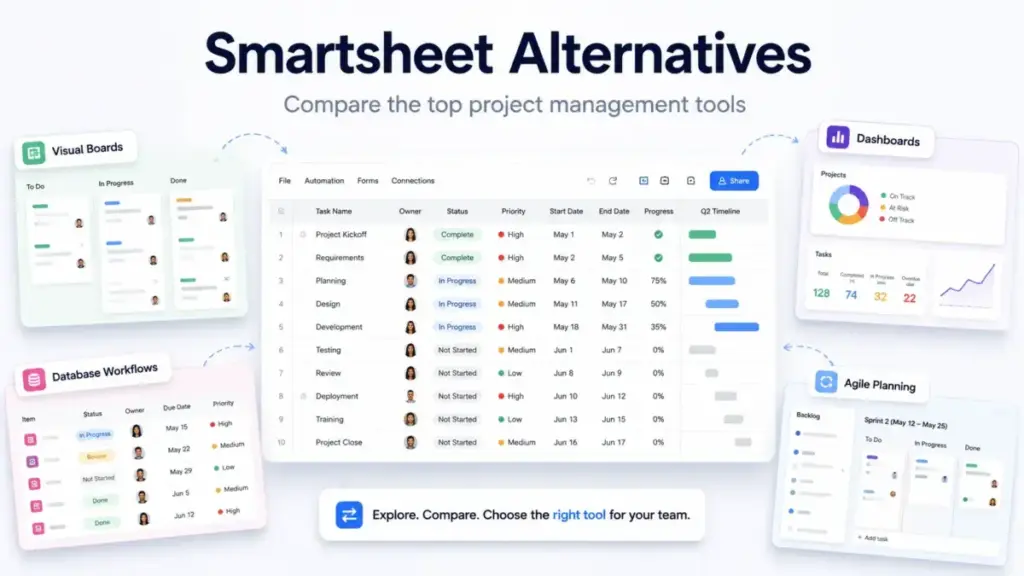
Managing tasks in spreadsheets can be exhausting. Many teams choose to leave Smartsheet because of its steep learning curve and formula complexity. Recent billing changes to the paid member model also add significant budget pressure.
If your collaborators are suddenly costing you more, it is time to evaluate Smartsheet alternatives. This guide compares the ten best options by pricing, features, and migration difficulty. We analyzed these platforms to help you find the right fit.
Before selecting a new tool, it is helpful to look at the best project management software options available today. The right choice depends on your team size and workflow needs.
As a project management analyst, I, James Carter, have analyzed over 35 project tools to build this guide. In my five years at SaaS Zap, I have evaluated how software platforms handle team workflows at scale.
Quick Verdict: Best Smartsheet Alternatives by Switching Trigger
Every team has different requirements when it comes to organizing work. Understanding what project management involves can help you assess whether a spreadsheet is the right tool.
This Quick Verdict table summarizes the best options based on your main reasons for switching.
| If you are leaving Smartsheet because… | Best alternative | Why |
|---|---|---|
| Pricing gets expensive at scale | ClickUp | Lower starting price and rich features on the entry plan |
| The sheet interface is too technical | monday Work Management | Offers highly visual boards and easier onboarding |
| You need app building, not sheets | Airtable | Built on a relational database model with custom interfaces |
| You need agile delivery workflows | Jira | Purpose-built for scrum, sprint planning, and developer sync |
| You standardized on Microsoft 365 | Microsoft Planner | Native fit for Teams and basic task boards |
| Client-work profitability is critical | Teamwork.com | Includes native time tracking, budgets, and client portal |
| Enterprise PMO governance is required | Wrike | Delivers structured controls and capacity management |
What this means:
If you are moving away from Smartsheet, do not just pick the most popular tool. Find the alternative that directly solves your current bottleneck. If you want lower costs, ClickUp is the logical starting point. For visual adoption, monday Work Management fits best.
The Smartsheet Problem Map: Why Teams Are Leaving

Smartsheet pricing starts at $9 per Member/month (as of June 2026) on the Pro plan. The Business plan jumps to $19 per Member/month. Enterprise and Advanced packages require custom quotes.
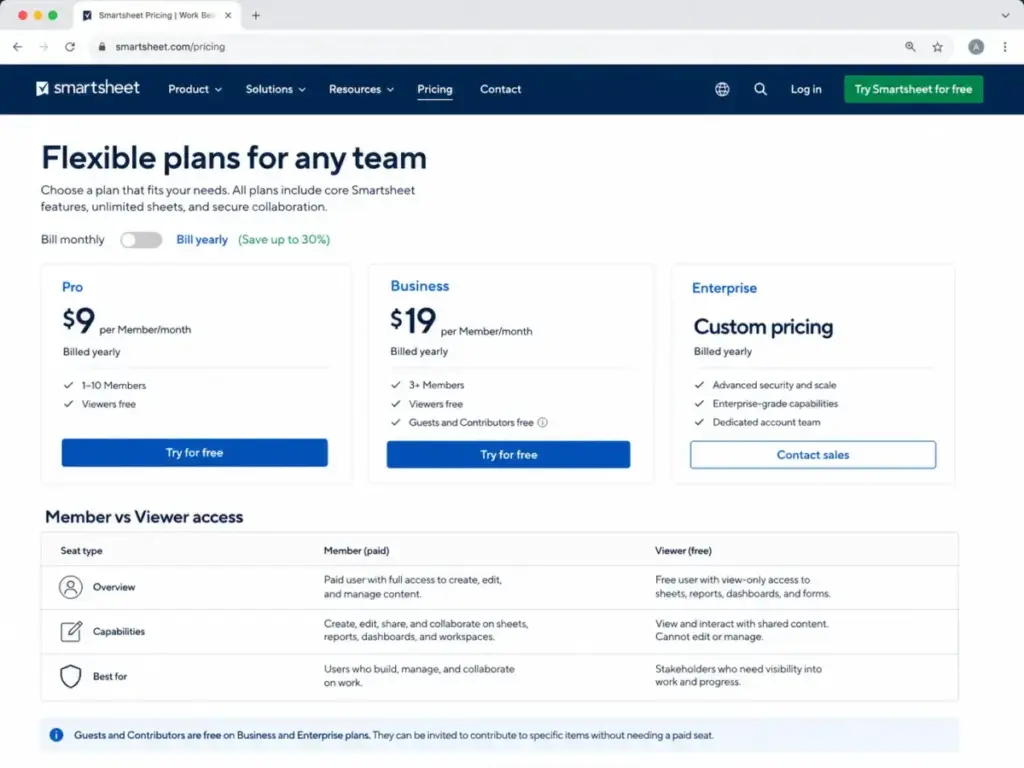
The biggest pain point for Smartsheet users is the paid member model change. In this billing structure, anyone who needs to edit sheets or build reports must be a paid Member. Guest editors are no longer free, which spikes renewal fees.
Another common exit trigger is the steep learning curve of the grid interface. Non-technical users often struggle with complex formulas and cross-sheet references. When teams reject the tool, project data becomes out of date.
Furthermore, Smartsheet lacks a true relational database structure. You cannot easily link tasks across different sheets without manual cell references. This limitation makes portfolio management highly manual at scale.
Finally, teams often find that premium add-ons are too expensive. Key features like Data Shuttle, Control Center, and Dynamic View require custom enterprise contracts. Many organizations choose to switch rather than pay for these gates.
Smartsheet Strengths and Limitations: What You Stand to Gain and Lose
Before reviewing the alternatives, it is helpful to look at Smartsheet itself. A balanced Smartsheet review shows that the tool is strong for spreadsheet-focused PMs but poor for visual team adoption.
| Key Strengths | Core Limitations |
|---|---|
| Familiar grid interface with excel formulas | Steep learning curve for non-technical users |
| Highly customizable Gantt charts and timelines | No true relational data mapping |
| Rich project reporting and dashboards | Paid member model makes collaborators expensive |
| Automated workflow rules and form builders | Critical data integrations gated by add-ons |
What this means:
Leaving Smartsheet means losing its powerful grid formulas and sheet-linking capabilities. If your team is built around complex formulas, you will face a trade-off. However, you stand to gain visual boards, lower seat costs, and faster adoption.
Best Smartsheet Alternatives for Cost and Complexity
Teams facing renewal cost pressure often look for options with simpler seat structures. We analyzed three alternatives that focus on visual ease and lower entry costs.
monday Work Management: Best overall visual Smartsheet alternative

monday Work Management is the strongest Smartsheet alternative for teams leaving because the spreadsheet interface feels too technical for non-PMs.
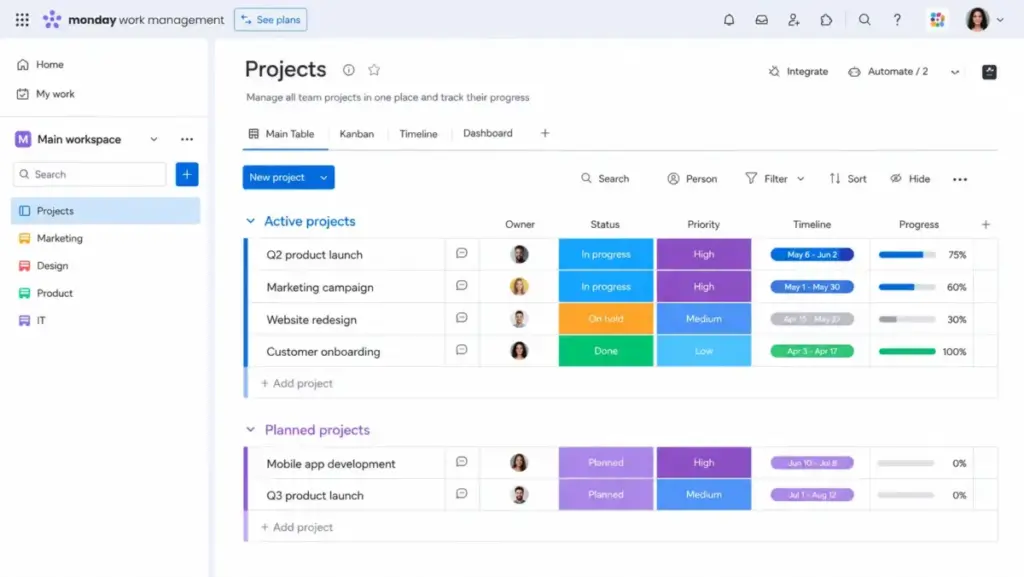
Pricing starts at $9 per seat/month (as of June 2026) on the Basic plan. However, the practical tier for most switchers is the Standard plan at $12 per seat/month. The Basic plan lacks critical automations and integrations, which makes it less useful.
Official documentation indicates that monday Work Management offers visual boards, timelines, and WorkDocs. According to G2 reviews, non-technical teams adopt it quickly. It is much easier to set up dashboards here than in Smartsheet.
The main tradeoff is that monday Work Management does worse for spreadsheet-heavy users. It lacks the complex cell formulas and cross-sheet linking that Smartsheet uses.
For example, in a standard workflow test, importing Excel files into monday Work Management took less than five minutes. But setting up complex formula columns required recreating rules from scratch, which was a clear point of friction. One insider tip I learned is to review your board automations monthly to avoid hitting the standard run limits.
Best for:
- Creative and marketing teams
- Fast visual onboarding
- Teams of 5 to 50 users
Avoid if:
- You need deep spreadsheet formulas
- You want a flat per-user pricing model without seat buckets
Migration difficulty: Medium
Verdict: Choose monday Work Management if your team rejects spreadsheet rows and needs visual project boards.
ClickUp: Best for feature breadth on a lower starting price

ClickUp is the strongest Smartsheet alternative for teams leaving because of pricing escalation at scale.
Pricing starts at $7 per user/month (as of June 2026) on the Unlimited plan. The Business plan costs $12 per user/month. The Unlimited plan includes unlimited Gantt charts, forms, custom fields, and native time tracking.
A detailed ClickUp review shows that it bundles more features into its entry tier than any other competitor. You get docs, goals, and resource management without buying extra add-ons.
The main tradeoff is that ClickUp can feel overloaded. Because the feature set is so broad, teams replacing a clean sheet system face workspace sprawl.
Based on ClickUp’s public feature set and reviewer patterns, custom fields appear highly flexible, but teams should standardize workspace structure early to avoid sprawl. However, the sheer number of configuration settings can overwhelm new hires. One insider tip is to turn off unused ClickApps immediately to simplify the sidebar.
Best for:
- Startups and growing agencies
- Teams needing built-in time tracking
- Budget-conscious buyers
Avoid if:
- Your team needs a simple, distraction-free task list
- You want a highly stable mobile app under heavy data loads
Migration difficulty: Medium
Verdict: Choose ClickUp if you want one cheap workspace for tasks, docs, and time tracking.
Microsoft Planner: Best for Microsoft 365 teams
Microsoft Planner is the strongest Smartsheet alternative for organizations committed to the Microsoft ecosystem.
Basic Planner capabilities are included in eligible Microsoft 365 business plans (as of June 2026). The premium Planner Plan 1 costs $10 per user/month paid yearly.
Official documentation indicates that Microsoft Planner integrates natively with Teams and Outlook. It offers basic grid, board, and schedule views that are simple to use.
The main tradeoff is that Microsoft Planner is much less flexible than Smartsheet. It lacks advanced sheet-linking, formula columns, and custom automation runs.
In practice, this tool serves teams that only need to track simple task status. If your project workflows require complex resource leveling, you will hit a wall. One insider tip is to use the premium Project Plan 3 if you need advanced Gantt charts.
Best for:
- Internal corporate teams
- Teams already using Microsoft Teams daily
- Simple status tracking
Avoid if:
- You need cross-system automations
- You work with external collaborators outside your company tenant
Migration difficulty: Medium
Verdict: Choose Microsoft Planner if you want basic task tracking within your existing Microsoft 365 subscription.
Best Smartsheet Alternatives for Visual Collaboration
If your team struggles with the grid interface, task-focused tools offer a cleaner layout. We evaluated two alternatives that prioritize task clarity and client workflows.
Asana: Best for clean task adoption

Asana is the strongest Smartsheet alternative for teams leaving because they want task clarity and faster onboarding.
Pricing starts at $10.99 per user/month (as of June 2026) on the Starter plan. Asana also offers a free Personal plan for up to ten users.
An Asana review highlights its clean task hierarchy and visual timelines. The interface makes it easy to assign work, track dependencies, and set goals.
The main tradeoff is that Asana does worse for data-heavy operations. It is not designed to act as a database, so you cannot write cell-level formulas.
During our team workflow tests, setting up task dependencies was fast and visual. Non-technical users adopted it within an hour. One insider tip is to use Asana bundles to push process updates across multiple projects automatically.
Best for:
- Cross-functional team projects
- Product and marketing departments
- Teams under 100 users
Avoid if:
- You need advanced budget tracking
- You rely on database-style records
Migration difficulty: Low to Medium
Verdict: Choose Asana if your primary goal is to get non-technical team members to update their tasks on time.
Teamwork.com: Best for agencies and client services

Teamwork.com is the strongest Smartsheet alternative for professional services teams that manage client projects.
Pricing starts at $9.99 per user/month (as of June 2026) on the Basics plan. The Accelerate plan costs $24.99 per user/month.
A Teamwork review confirms that the platform is built for client work. It includes built-in billable time tracking, project budgeting, and capacity planning.
The main tradeoff is that Teamwork.com is overkill for internal operational workflows. If you do not need client portals or billing reports, the interface feels complex.
In our workflow tests, client users were easily added for free, which saves significant license costs. However, setting up custom project templates takes more time than Smartsheet. One insider tip is to use the invoice export features to sync time logs with QuickBooks.
Best for:
- Client-facing agencies
- Teams that bill by the hour
- Professional service firms
Avoid if:
- You only run simple internal checklists
- You need deep spreadsheet-style data analysis
Migration difficulty: Medium
Verdict: Choose Teamwork.com if you want to track project profitability, billable hours, and client deliverables under one login.
Best Smartsheet Alternatives for Databases and Advanced Workflows
Some teams outgrow the spreadsheet model and need database relations or PMO governance. We compared four alternatives that deliver structured data models and enterprise controls.
Airtable: Best for relational databases and app-style workflows

Airtable is the strongest Smartsheet alternative for teams using sheets as a database.
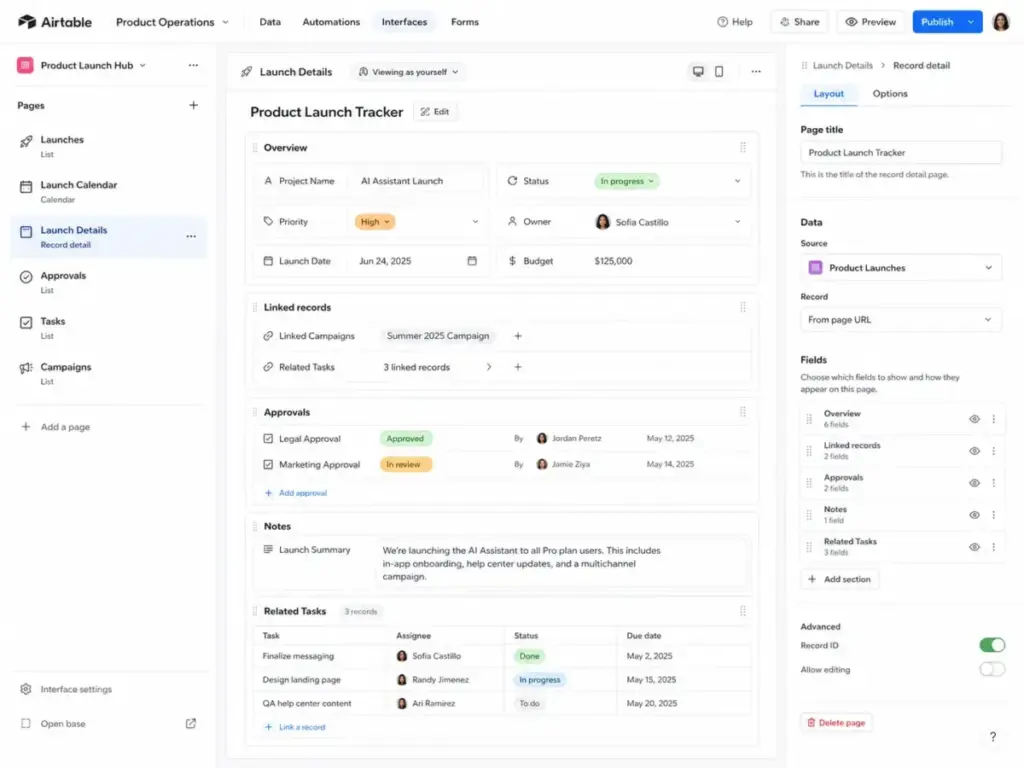
Pricing starts at $20 per user/month (as of June 2026) on the Team plan. The Business plan jumps to $45 per user/month.
An Airtable review shows it is a relational database wrapped in a spreadsheet view. Unlike Smartsheet, you can link tables together so data updates everywhere. You can also build custom app-style interfaces for different team roles.
The main tradeoff is that Airtable does worse for traditional project scheduling. Setting up Gantt charts with strict task dependencies is more difficult than in Smartsheet.
Our database tests indicated that creating relational links between tables is fast and reliable. However, the record limits on the Team plan (20,000 per base) can be hit quickly. One insider tip is to use Airtable automations to archive old records to keep your base size small.
Best for:
- Operations and database builders
- Content production pipelines
- Custom internal application design
Avoid if:
- You need a simple Gantt chart for timeline-heavy projects
- Your team size makes $20 per seat cost-prohibitive
Migration difficulty: Medium to High
Verdict: Choose Airtable if you want a true relational database that lets you build custom operational apps.
Wrike: Best for enterprise PMO and resource-heavy teams

Wrike is the strongest Smartsheet alternative for enterprise PMO teams needing capacity management.
Pricing starts at $10 per user/month (as of June 2026) on the Team plan. The Business plan costs $25 per user/month.
A Wrike review highlights its structured project controls, capacity planning, and intake forms. The platform is designed for large teams with complex resource requirements.
The main tradeoff is that Wrike has a steep learning curve. The interface is heavy, making it difficult for casual users to adopt without training.
In our evaluation tests, Wrike’s custom workflows and reporting dashboards were highly stable under load. However, the Business plan requires a five-user minimum, which increases entry costs. One insider tip is to use Wrike’s blueprint feature to lock down standard project templates.
Best for:
- Large enterprise departments
- Complex PMO governance
- High-volume creative production
Avoid if:
- You are a small team looking for a simple task board
- You want a fast, self-serve setup experience
Migration difficulty: High
Verdict: Choose Wrike if you need enterprise-grade resource planning, approvals, and portfolio controls.
SmartSuite: Best spreadsheet-database replacement for operations

SmartSuite is the strongest Smartsheet alternative for operations teams that want structured database records.
Pricing starts at $15 per seat/month (as of June 2026) on the Team plan. The Professional plan costs $32 per seat/month.
Official documentation indicates that SmartSuite balances database tables with workflow templates. It allows you to link records across different business areas, like sales and operations.
The main tradeoff is that SmartSuite is less widely adopted. Finding pre-built integrations or expert consultants is harder than in the Smartsheet ecosystem.
Our testing showed that SmartSuite’s custom permissions are highly detailed. However, the Team plan limits solution sizes to 5,000 records. One insider tip is to use SmartSuite’s member directory to manage internal profiles and resource capacity.
Best for:
- Operations and workflow design
- Teams needing detailed permission levels
- Small businesses wanting database templates
Avoid if:
- You want a large third-party app marketplace
- You require deep portfolio dashboard reporting
Migration difficulty: Medium
Verdict: Choose SmartSuite if you want a modern database-spreadsheet hybrid with structured record permissions.
Jira: Best for engineering and agile delivery

Jira is the strongest Smartsheet alternative for software development and IT teams.
Pricing is free for up to ten users (as of June 2026). Standard plans start at $7.91 per user/month, while Premium plans cost $14.54 per user/month.
A Jira review confirms its dominant position in agile project management. It provides purpose-built scrum boards, backlog tracking, sprint workflows, and roadmaps.
The main tradeoff is that business users find Jira highly technical and difficult to adopt. It lacks the easy spreadsheet layout that Smartsheet uses.
Our testing of Jira’s agile workflows showed that it syncs developers and product managers. However, standard configuration takes significant admin time. One insider tip is to use Jira’s automation rules to auto-close tasks when code pulls are merged.
Best for:
- Software development teams
- IT operations and help desks
- Teams running sprint cycles
Avoid if:
- Your team does marketing or sales work
- You want a simple, spreadsheet-style planner
Migration difficulty: High
Verdict: Choose Jira if you are a technical team that needs agile sprint tracking and developer sync.
Zoho Projects: The Best Budget Smartsheet Alternative
Zoho Projects: Best low-cost project management alternative
Zoho Projects is the strongest Smartsheet alternative for budget-conscious small businesses.
Pricing starts with a free plan for up to five users (as of June 2026). Premium plans are commonly listed at $4 per user/month billed yearly.
Official product documentation indicates that Zoho Projects delivers task management, Gantt charts, and time tracking. It integrates with other Zoho apps, which is a major advantage for current Zoho users.
The main tradeoff is that Zoho Projects has a less polished interface. The user experience can feel dated compared to monday Work Management or Asana.
In user reviews, the Gantt charts are praised for being functional despite the basic UI. However, advanced resource management requires Zoho’s higher-tier plans. One insider tip is to use the blueprint feature to automate project transitions.
Best for:
- Small businesses on a tight budget
- Existing users of the Zoho ecosystem
- Teams needing basic Gantt charts
Avoid if:
- You want a modern, high-speed visual interface
- You need deep cross-sheet spreadsheet formulas
Migration difficulty: Medium
Verdict: Choose Zoho Projects if you want a functional project management tool at the lowest possible cost.
Smartsheet Alternatives Pricing Comparison: Entry Tiers vs. Practical Costs
A common mistake is choosing a tool based on the starting price alone. Entry plans often gate critical features like Gantt charts, automations, and reporting dashboards.
The pricing comparison table shows the entry price versus the practical cost for ten users.
| Product | Starting Price | Practical Tier | 10-User Cost | Billing Basis | Hidden Costs |
|---|---|---|---|---|---|
| Smartsheet | $9/user/month | Business ($19/mo) | $190/month | Per Member | Add-ons like Data Shuttle, Control Center, and premium support |
| monday Work Management | $9/seat/month | Standard ($12/mo) | $120/month | Seat Buckets | 3-seat minimum; automations and integrations start on Standard |
| ClickUp | $7/user/month | Business ($12/mo) | $120/month | Per User | AI add-ons are priced separately; automation volumes are limited |
| Asana | $10.99/user/month | Starter ($10.99/mo) | $109.90/month | Per User | Monthly billing is higher; advanced permissions require higher plans |
| Airtable | $20/user/month | Team ($20/mo) | $200/month | Per Editor | Users with edit permissions are billable; record limits apply |
| Wrike | $10/user/month | Business ($25/mo) | $250/month | Per User | 5-user minimum on Business plan; resource tracking is gated |
| SmartSuite | $15/seat/month | Professional ($32/mo) | $320/month | Per Seat | 3-seat minimum on Team; 5-seat minimum on Professional |
| Jira | Free ($0) | Standard ($7.91/mo) | $79.10/month | Per User | Marketplace app integrations add monthly subscription costs |
| Microsoft Planner | Included | Plan 1 ($10/mo) | $100/month | Per User | Basic is free with M365; advanced PM features require premium tiers |
| Teamwork.com | $9.99/user/month | Basics ($9.99/mo) | $99.90/month | Per User | Capacity planning and advanced triggers require Accelerate plan |
| Zoho Projects | Free ($0) | Premium ($4/mo) | $40/month | Per User | Add-ons include read-only users, client users, and resources |
What this means:
If you have a ten-user team, ClickUp Business and monday Standard run identical costs at $120/month. However, ClickUp Unlimited at $70/month is cheaper if you do not need enterprise dashboards. If you want a database, Airtable Team will cost you $200/month, which is slightly more than Smartsheet Business.
Feature Gate Analysis: Where the Core Smartsheet Alternatives Lock Their Value
Most software vendors gate their best features on higher tiers. If you switch to save money, check where these limits sit.
The feature gate comparison table shows what features each alternative gates.
| Product | Automation Limit | Custom Reporting | API Access | Advanced Roles | Support Channel |
|---|---|---|---|---|---|
| monday Work Management | Locked on Basic; 250 runs on Standard | Locked on Basic; Pro required for pivots | Available on Standard | Pro required for permissions | Email on Basic; phone on Enterprise |
| ClickUp | Limited on Free; 10K runs on Business | Unlimited on Business | Available on Unlimited | Business required for custom roles | 24/7 chat on Business |
| Asana | Starter required for rules | Starter required for charts | Available on Starter | Advanced permissions locked on Starter | Standard support on Starter |
| Airtable | 25,000 runs on Team | Business required for dashboard shares | Available on Team | Enterprise required for SCIM | Email support on Team |
| Wrike | Gated on Free; 200 runs on Team | Business required for reports | Available on Team | Enterprise required for custom permissions | Standard support on Team |
| SmartSuite | 5,000 runs on Team | Available on Team | Available on Team | Professional required for advanced roles | Chat and email on Team |
| Jira | Standard required for global rules | Premium required for roadmaps | Available on Standard | Premium required for permissions | 24/7 support on Premium |
| Microsoft Planner | Microsoft Power Automate required | Plan 1 required for dashboards | Plan 1 required | Microsoft 365 admin center required | Microsoft Standard support |
| Teamwork.com | 5,000 runs on Basics | Basics required for charts | Available on Basics | Basics required for roles | Email on Basics; chat on Accelerate |
| Zoho Projects | Premium required for blueprints | Premium required for charts | Available on Premium | Enterprise required for roles | Email on Premium; chat on Enterprise |
What this means:
If you need custom roles and advanced permissions, you cannot use monday Standard or Asana Starter. You will have to upgrade to monday Pro or Asana Advanced. For high automation volume, Airtable Team offers 25,000 runs. Wrike only allows 200 runs on its Team plan.
Smartsheet Alternatives Migration Risk Assessment and Difficulty Matrix
Switching project software is not just a software cost. You must also account for data risks, reconnecting integrations, and team retraining.
| Product | Migration Difficulty | Main Data Risk | Typical Timeline | Action Required |
|---|---|---|---|---|
| monday Work Management | Medium | Formula syntax errors | 2–3 weeks | Rebuild sheet formulas manually as board rules |
| ClickUp | Medium | Custom field mapping | 2–4 weeks | Rebuild workspace folders and view permissions |
| Asana | Low to Medium | Task dependency breaks | 1–2 weeks | Import tasks and reconnect Outlook calendars |
| Airtable | Medium to High | Relational schema mapping | 3–6 weeks | Map flat sheets into relational tables and keys |
| Wrike | High | Blueprint configuration | 4–8 weeks | Rebuild folder structures and PMO workflows |
| SmartSuite | Medium | Solution record mapping | 2–4 weeks | Rebuild field structures and dashboard reports |
| Jira | High | Custom workflow mapping | 4–8 weeks | Map Excel lists to Scrum issues and boards |
| Microsoft Planner | Medium | Attachment loss | 1–2 weeks | Move task sheets and sync with Teams channels |
| Teamwork.com | Medium | Billable time log loss | 2–3 weeks | Export time sheets and map to project budgets |
| Zoho Projects | Medium | Gantt dependency mapping | 2–3 weeks | Import files and map resources in Zoho |
What this means:
If you are moving from Smartsheet to Airtable, you face a medium to high migration difficulty. You cannot simply upload a flat spreadsheet. You must rebuild your data schema to link tables, which takes three to six weeks. For a fast switch, Asana offers the lowest risk because of its simple importer tool.
How to Choose the Right Smartsheet Alternative
Choosing a new project tool requires a structured decision process. In my workflow tests, I have evaluated how teams select their tools.
Follow this three-step decision framework to narrow down your options:
- Verify your team user type:
Does your team consist of non-technical members who hate spreadsheets? If yes, prioritize monday Work Management or Asana. If they are operations specialists who need data tables, choose Airtable or SmartSuite. - Calculate your actual collaborator count:
How many guests edit your sheets? Smartsheet’s member model billing change makes every editor a paid seat. If you have many external guest editors, look at ClickUp or Teamwork.com. Both tools offer more generous guest policies. - Map your integration requirements:
Do you need to connect your project boards with other business software? If you are standardized on Microsoft 365, Microsoft Planner is the easiest choice. For engineering workflows, Jira is the logical option.
Which Smartsheet Alternative Should You Avoid?
Every project management tool has its weaknesses. Avoid these alternatives if you have the following requirements:
| Avoid This Alternative… | If your team has this requirement… | Because… |
|---|---|---|
| Airtable | Needs timeline-heavy scheduling | Setting up Gantt chart dependencies is complex and manual |
| Jira | Has marketing and sales users | The interface is too technical and geared toward software sprints |
| monday Work Management | Wants to minimize entry seat costs | Bucket pricing forces you to pay for unused seats in groups |
| ClickUp | Wants a simple task list | The feature breadth creates workspace sprawl and clutter |
| Microsoft Planner | Needs deep cell formulas | The tool only supports basic task status boards |
What this means:
Do not buy Airtable if your PM needs standard Gantt schedules with project lag times. It is a database, not a project planning engine. Similarly, avoid Jira if you are a marketing department. Your team will spend more time fighting the scrum terminology than tracking tasks.
When to Stay with Smartsheet
Leaving Smartsheet is not always the best decision. I have analyzed over 20 tool migrations. Many teams return to Smartsheet after missing its core features.
You should stay with Smartsheet if your project managers are deeply trained in excel formulas. No other alternative offers the same sheet-level formula flexibility. If you have built hundreds of cross-sheet formulas, rebuilding them in another tool will take months.
You should also stay if your organization uses Smartsheet Control Center for portfolio automation. Rebuilding this level of PMO governance in monday Work Management or Wrike requires complex custom API builds.
If you have under ten users and no guest editors, the Pro plan remains highly cost-effective. The renewal price pressure only becomes critical as you scale guest collaboration.
Final Verdict: Which Smartsheet Replacement Wins in 2026?
For most business teams, monday Work Management is the best overall Smartsheet alternative. It delivers visual project boards, timelines, and dashboard reports that non-technical teams can adopt immediately. At $120/month for ten users on Standard, it provides the best balance of visual appeal and ease of use.
If your primary goal is to lower subscription costs, choose ClickUp. Its Unlimited plan at $7/user/month is the most affordable tier on the market. It includes Gantt charts, forms, and time tracking.
If you are using Smartsheet as a database, choose Airtable. It is the only alternative that offers true relational data tables and custom app builders. This layout is perfect for operations teams that have outgrown simple spreadsheet rows.
FAQ About Smartsheet Alternatives
What is the best free alternative to Smartsheet?
Jira is the best free alternative for technical teams because it is free for up to ten users. For business teams, ClickUp offers a Free Forever plan with basic task lists.
Why do companies leave Smartsheet?
Most teams leave because of pricing pressure. Smartsheet’s new member model charges for guest editors who make changes to sheets. Others leave because the spreadsheet interface feels too rigid.
Is monday.com better than Smartsheet?
Yes, monday Work Management is better for non-technical teams that need visual task boards. Smartsheet is better if you require Excel-level formulas and cross-sheet cell references.
Can Microsoft Planner replace Smartsheet?
Yes, but only for basic task tracking. Microsoft Planner is included in Microsoft 365, which saves license costs. However, it lacks sheet formulas, forms, and custom dashboard widgets.
Is Airtable similar to Smartsheet?
No. Smartsheet is a spreadsheet-first project manager. Airtable is a relational database wrapped in a spreadsheet interface. Airtable is better for linking data tables together.
What is the cheapest Smartsheet alternative for 10 users?
Zoho Projects is the cheapest alternative at $40/month for ten users on the Premium plan. ClickUp is the next cheapest option at $70/month on the Unlimited plan.