Your developers are flying through cycles in Linear. They love the keyboard shortcuts, the dark mode, and the speed. But your marketing team is completely lost. They cannot find the product launch roadmap, the design assets are buried, and the product manager is manually copying status updates into Asana.
That is the moment Linear’s engineering-first focus starts to feel like a wall. While Linear excels at issue tracking, it often isolates your developers from the rest of the company. Finding the right Linear Alternatives is critical if you want to connect your development cycles to the rest of your team.
If you are evaluating the best project management software options, you will find that the right choice depends on your team’s specific workflow. Here is how the best Linear competitors stack up for different workflows in 2026.
| If you are leaving Linear because… | Best alternative | Why |
|---|---|---|
| Business teams need shared workspaces | monday dev | Visual boards and roadmap views connect engineering with stakeholders. |
| You need enterprise workflows and custom permissions | Jira | Deeper workflow configuration, security roles, and Atlassian ecosystem depth. |
| You want an all-in-one docs, goals, and time tracker | ClickUp | Unifies tasks, docs, and team dashboards in a single platform. |
| Developers want to plan directly where they write code | GitHub Issues and Projects | Direct repository issues and pull request tracking inside GitHub. |
| You want a Linear-like developer focus with richer roadmaps | Shortcut | Agile stories, epics, and workflows without massive enterprise bloat. |
| You need a free option for a small dev team | YouTrack | Completely free for up to 10 users with JetBrains integration. |
| Non-developers need simple visual task boards | Trello | Simple Kanban card management with minimal setup. |
| You want a docs-first wiki and planning workspace | Notion | Flexible database pages that combine documentation and lightweight boards. |
What this means: Linear is a highly specialized developer tool. If your team is engineering-only, switching will likely slow you down. But if you are managing cross-functional product launches, you must choose an alternative that connects your developers’ tickets to your business team’s roadmaps.
Starting price is rarely the main issue here. The real decision is matching the tool’s vocabulary to your team’s daily workflow.
How We Chose and Reviewed These Alternatives
We analyzed these ten platforms using official documentation, pricing pages, and verified customer feedback (as of June 2026). Our evaluation focuses on developer ergonomics, cross-functional usability, pricing structures, and migration complexity.
Because our evaluation is based on official research, we avoid subjective testing claims. Instead, we map feature capabilities directly to documented plan tiers. Every alternative listed below is evaluated on its practical cost, feature gates, and suitability for different team sizes.
Before comparing tools, it is helpful to understand what project management actually does for software teams. This foundation shapes how we evaluate each platform’s ability to sync developers with business goals.
The Linear Problem Map

Linear is a fast, keyboard-centric issue tracker designed for product and engineering teams. It is built for speed, cycle planning, and backlog management. For a deep dive into the platform’s standalone capabilities, check out our detailed Linear review.
In practice, Linear’s strength is also its greatest limitation. The tool is built specifically for software developers, which means it lacks the features needed by marketing, operations, or sales teams.
The primary reasons teams search for best Linear alternatives include:
- Engineering-only isolation. Non-development teams struggle with Linear’s technical interface.
- Workflow customization ceilings. Linear lacks deep custom fields, validation rules, and complex permission schemes.
- Lighter reporting and portfolio visibility. The platform lacks built-in Gantt charts, resource capacity planning, and custom dashboards.
- Free plan restrictions. The free tier limits active issues, forcing growing startups onto paid plans.
| Linear Strengths | Linear Limitations | What This Means for Teams |
|---|---|---|
| Keyboard-first navigation and sub-second load times | Technical vocabulary isolates non-developer teams | Engineering stays fast but cross-functional updates require manual copying. |
| Streamlined cycles and automated backlog triage | No native Gantt charts, budget tracking, or resource portfolios | Managers must buy separate reporting tools to track timeline progress. |
| Native Git integrations that link code commits to issues | Custom fields and advanced permissions require Business upgrades | Growing teams hit customization limits unless they pay for higher tiers. |
What this means: Linear is excellent if your only goal is helping developers write code faster. However, if your business requires cross-functional collaboration, Linear’s narrow focus creates communication gaps. The right alternative is determined by which of these limitations is slowing your team down the most.
Alternatives That Fix Cross-Functional Team Isolation
When business stakeholders, designers, and marketers need to collaborate on product launches, Linear’s technical backlog becomes a bottleneck. These five alternatives replace engineering-only views with flexible workspaces.
monday dev: Best for cross-functional product teams

monday dev is the strongest Linear alternative for teams leaving because developers need to coordinate with marketing and sales. Pricing starts at $9 per seat/month billed annually (as of June 2026) for the Basic plan, but the practical tier for most switchers is the Standard plan at $12 per seat/month because it enables integrations and automations. monday dev is sold in blocks of seats with a 3-seat minimum.
It does better than Linear in connecting technical workflows to business stakeholders. Marketing teams can easily track launch boards that sync directly with the development sprint.
The tradeoff is that monday dev is less minimal. The visual boards have more noise, which developers who prefer command-line speeds may dislike. If you are worried about the Linear to monday dev migration difficulty, monday dev offers clean Excel and CSV importers to help you move tasks.
Best for:
- Product teams launching customer-facing features.
- Teams that need marketing and development on the same page.
- Teams of 5 to 50 users who need visual status boards.
Avoid if:
- Your team is engineering-only and does not want visual dashboards or sales tracking.
Migration difficulty: Medium. Importing issues is simple, but mapping cycle dates to monday board groups requires manual work.
Verdict: Choose monday dev if you need business stakeholders to see development status without accessing code.
ClickUp: Best all-in-one replacement

ClickUp is the strongest Linear alternative for teams leaving because they want one workspace for tasks, docs, and goals. Pricing starts at $7 per user/month billed yearly (as of June 2026) for the Unlimited plan, with a free forever plan that caps storage at 60MB. The practical tier is the Unlimited plan because it removes custom field and dashboard limitations.
ClickUp is one of the better Linear alternatives if native time tracking is part of your 2026 buying criteria. It does better than Linear in feature breadth, eliminating tool sprawl by replacing documents, wikis, chat, time tracking, and goals under one login. You can read our ClickUp work management review to see how this consolidation works.
The main tradeoff is that ClickUp is broader and busier. The interface has a steeper learning curve than Linear’s clean ticket view.
Best for:
- Startups wanting to consolidate tools.
- Teams of 10 to 50 users who need time tracking and documents.
- Managers wanting high-level dashboards.
Avoid if:
- Developers want a distraction-free issue tracker that loads instantly.
Migration difficulty: Medium. ClickUp provides built-in CSV and Asana importers, but cleaning up custom fields takes time.
Verdict: Choose ClickUp if you want to replace three or four separate tools with a single workspace.
Asana: Best for cross-functional teams

Asana is the strongest Linear alternative for teams leaving because they need to map project dependencies and launch portfolios. Pricing starts at $10.99 per user/month billed annually (as of June 2026) for the Starter plan, with a personal free plan limited to two people. The practical tier is the Starter plan because it enables timeline views and dependencies.
Asana is a strong Linear alternative for non engineering stakeholders. It does better than Linear in timeline planning and cross-project portfolio tracking, allowing product managers to build clean Gantt charts showing launch sequences. Our Asana team planning review covers these dependency mappings in detail.
The tradeoff is that Asana lacks native developer features like cycles or markdown ticket templates.
Best for:
- Hybrid product-marketing teams.
- Teams of 15 to 100 users with complex dependencies.
- Stakeholders wanting timeline-driven roadmaps.
Avoid if:
- Your developers run on strict cycles and want keyboard shortcuts.
Migration difficulty: Medium. Asana importer works well, but rebuilding epic relations as dependencies is manual.
Verdict: Choose Asana if your primary project blocker is coordinating launch dates across multiple departments.
Trello: Best for simple visual boards

Trello is the strongest Linear alternative for teams leaving because they find software cycle management too complex. Pricing starts at $5 per user/month billed annually (as of June 2026) for the Standard plan, with a free plan that allows up to 10 collaborators per workspace. The practical tier is the Standard plan because it removes board limits.
It does better than Linear in simplicity. The kanban boards are easy for anyone to learn in minutes.
The main tradeoff is that Trello lacks developer features like cycle tracking, sub-issues, or native roadmapping.
Best for:
- 3-person to 10-person teams with simple workflows.
- Non-technical teams managing basic task queues.
- Startups needing quick task tracking.
Avoid if:
- You need sprint reporting, developer capacity tracking, or code integrations.
Migration difficulty: Low. Exporting CSV files and importing to Trello takes minutes, though you will lose sub-task hierarchies.
Verdict: Choose Trello if your team only needs basic card-based task boards without agile structure.
Notion: Best docs-first workspace

Notion is the strongest Linear alternative for teams leaving because they want a wiki-first database rather than a strict ticket queue. Pricing starts at $10 per seat/month (as of June 2026) for the Plus plan, with a free plan for personal use. The practical tier is the Plus plan because it allows guest sharing and unlimited blocks.
Notion is one of the few Linear alternatives with private teamspaces for sensitive documentation. It does better than Linear in combining documentation and database tracking, allowing you to write a detailed launch spec and link it to your task board inside the same page.
The main tradeoff is that Notion is slower to load and lacks native software-development cycle tools.
Best for:
- Remote teams who rely heavily on wikis and async documents.
- 5-person to 30-person startups wanting visual databases.
- Teams needing highly customizable layouts.
Avoid if:
- You need a structured issue tracker that enforces strict cycle boundaries.
Migration difficulty: Medium. Database import works, but configuring custom pages takes planning.
Verdict: Choose Notion if you plan projects in documents first and only need a basic database to track tasks.
Alternatives That Fix Enterprise Customization and Reporting Ceilings
As software teams grow past 30 developers, they often outgrow Linear’s lightweight cycles. These alternatives provide the custom validation rules, security gates, and capacity reports needed at scale.
Jira: Best for enterprise software teams

Jira is the strongest Linear alternative for teams leaving because they need custom permissions and Atlassian ecosystem scale. Pricing starts around $8.60 per user/month for the Standard plan (as of June 2026) for seats 1-100, with a free plan for up to 10 users. The practical tier is Jira Standard because it enables advanced project controls.
If you need a formal migration plan, our Linear migration to Jira checklist can help you map custom fields. Jira does better than Linear in workflow customization and permission controls, allowing you to enforce approval gates and limit edit access to specific security groups. Check our Jira project management review for feature details.
View our breakdown of Jira Cloud pricing plans to see how seat costs track at scale.
The main tradeoff is that Jira is heavy to configure. Setup takes weeks, and the interface is slower than Linear’s minimalist canvas.
Best for:
- 50-person to 500-person development teams.
- Teams requiring strict enterprise compliance and audit logs.
- Organizations already using Confluence and Bitbucket.
Avoid if:
- You are a fast-moving, 5-person startup that wants speed and zero admin overhead.
Migration difficulty: High. Exporting from Linear is easy, but mapping fields to Jira’s complex database schemas requires planning.
Verdict: Choose Jira if your organization requires strict workflow validation rules and custom permission schemes.
Wrike: Best for portfolio and resource planning

Wrike is the strongest Linear alternative for teams leaving because they need heavy resource capacity tracking and budget analytics. Pricing starts at $10 per user/month for the Team plan (as of June 2026), with a limited free tier. The practical tier for most switchers is the Business plan at $25 per user/month because it enables custom workflows and resource charts.
It does better than Linear in PMO-level resource planning. Managers can track team capacity, log billable hours, and analyze budget spend.
The main tradeoff is that Wrike is complex and lacks the keyboard-first speed that developer teams love.
Best for:
- Agencies managing client projects.
- 25-person to 200-person teams with strict resource constraints.
- PMO directors tracking multiple portfolios.
Avoid if:
- You want a lightweight developer-first backlog tool.
Migration difficulty: High. Rebuilding custom fields and folder structures in Wrike takes weeks.
Verdict: Choose Wrike if your primary need is balancing staff workloads and tracking project costs.
Alternatives That Fix High Subscription Costs or Tool Sprawl
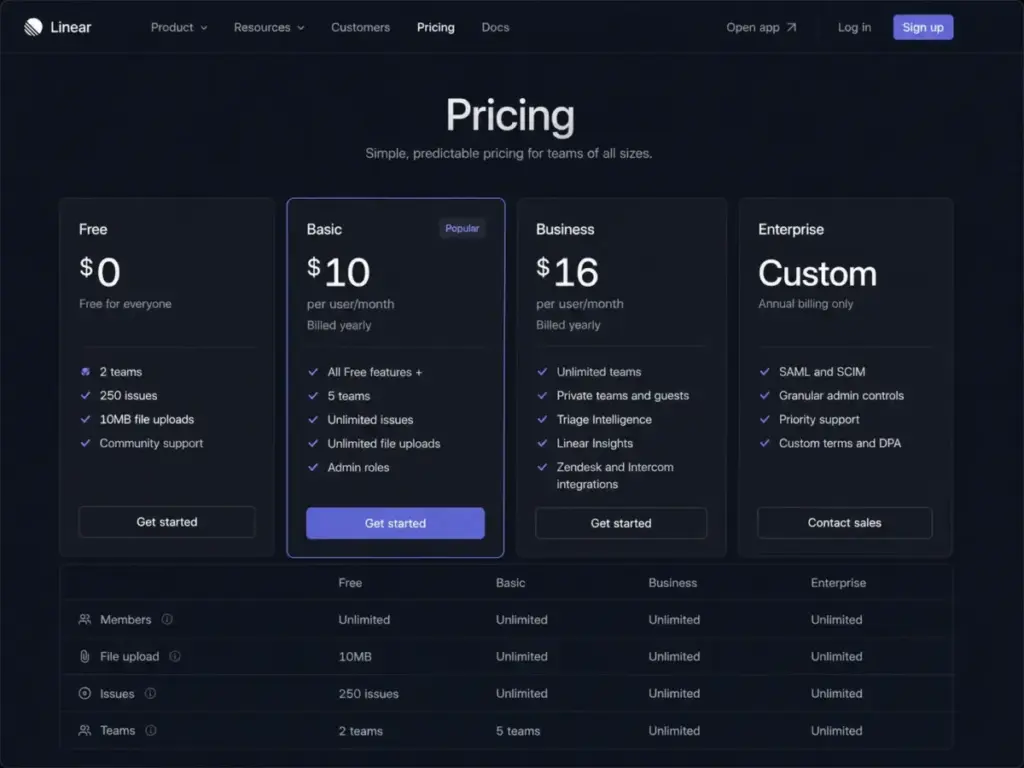
Linear’s Basic plan runs $100/month for a 10-user team. If you are trying to cut costs or keep planning directly adjacent to code, these tools solve those bottlenecks.
Shortcut: Best Linear-like alternative for software teams

Shortcut is the strongest Linear alternative for teams leaving because they want Linear’s software-focused style but need more flexible roadmaps. Pricing starts at $8.50 per user/month billed yearly (as of June 2026) for the Team plan, with a free tier for small teams. The practical tier is the Team plan because it enables unlimited workspaces.
If your main frustration is Linear’s roadmap structure, Shortcut gives product teams a more visual way to manage epics and iterations. It does better than Linear in structuring epics and multi-team roadmaps, keeping a software development vocabulary while offering a more flexible layout.
The main tradeoff is that Shortcut is not as broad for non-technical teams as ClickUp or monday dev.
Best for:
- 10-person to 50-person software startups.
- Teams wanting agile structure without Jira’s complexity.
- Product managers who need clear epic progress bars.
Avoid if:
- You need a general-purpose project tool for marketing or customer support.
Migration difficulty: Medium. Shortcut provides import tools, but mapping teams to workspaces takes effort.
Verdict: Choose Shortcut if you want a developer-first tool that offers better roadmap structure than Linear.
GitHub Issues and Projects: Best for GitHub-native teams

GitHub Projects is the strongest Linear alternative for teams leaving because they want their planning boards directly inside their repositories. Pricing starts at $4 per user/month for the GitHub Team plan (as of June 2026), with a free tier for public repositories. The practical tier is GitHub Team because it allows private repository projects.
Comparing Linear vs GitHub Projects for sub issues reveals that GitHub has closed the gap. It does better than Linear in reducing context switching. Developers can update tasks, link pull requests, and close issues without leaving GitHub.
The tradeoff is that it lacks the visual polish and broader reporting features needed by business teams.
Best for:
- 3-person to 20-person developer-only teams.
- Teams that already manage all code inside GitHub.
- Open-source projects.
Avoid if:
- You need to share progress with non-technical stakeholders who do not use GitHub.
Migration difficulty: Low. Importing Linear issues into GitHub is simple.
Verdict: Choose GitHub Projects if you want to keep your developers focused inside the repository and minimize tool sprawl.
Most Overlooked Linear Alternative: YouTrack
Some of the best Linear issue tracking alternatives are overlooked because they are associated with specific developer ecosystems. This underdog pick offers unmatched value for small technical teams.
YouTrack: Best low-cost developer issue tracker

YouTrack is the strongest Linear alternative for teams leaving because they need a low-cost, developer-first tracker with a built-in knowledge base. Pricing is completely free for up to 10 users (as of June 2026), and starts at $4.50 per user/month billed annually for larger teams. The practical tier for small teams is the Free plan.
YouTrack is a great Linear free plan issue limit alternative because it remains free for small teams. JetBrains offers Linear alternatives with helpdesk projects directly in YouTrack, meaning you can handle customer support tickets inside your issue tracker.
In practice, the helpdesk is free for up to 3 agents. If you are looking at the best help desk software options, YouTrack offers a simple built-in option that saves you from buying a separate ticketing tool.
It does better than Linear in its cost-to-feature ratio. YouTrack includes agile boards, a knowledge base, Gantt charts, and helpdesk projects for free.
The main tradeoff is that YouTrack’s interface is complex and less polished for general business users.
Best for:
- Small software startups under 10 users on a tight budget.
- Teams using JetBrains IDEs who want tight code-to-issue sync.
- Developers wanting built-in wikis.
Avoid if:
- Your team needs a simple, aesthetic interface that marketing or HR will adopt.
Migration difficulty: Medium. JetBrains provides import scripts, but onboarding non-technical users takes time.
Verdict: Choose YouTrack if you want a feature-rich developer issue tracker without monthly licensing fees for your first 10 users.
Pricing Comparison and 10-User Cost
Our Linear 10 user cost comparison shows that starting price alone is misleading. While some tools advertise low entry rates, they require higher tiers to access basic features.
| Product | Starting Price | Practical Tier | 10-User Cost (Monthly) | Free Plan | Trial |
|---|---|---|---|---|---|
| Linear | $0 | Basic ($10/user/mo billed yearly) | $100 | Yes (caps issues) | No |
| Jira | $0 | Standard ($8.60/user/mo) | $86 | Yes (caps users) | Yes |
| Shortcut | $0 | Team ($8.50/user/mo billed yearly) | $85 | Yes (caps features) | Yes |
| ClickUp | $0 | Unlimited ($7/user/mo billed yearly) | $70 | Yes (60MB cap) | Yes |
| monday dev | $9/seat/mo | Standard ($12/seat/mo billed yearly) | $120 | No | Yes |
| GitHub Projects | $0 | Team ($4/user/mo) | $40 | Yes (public repos) | Yes |
| YouTrack | $0 | Free (up to 10 users) | $0 | Yes (10-user cap) | Yes |
| Asana | $0 | Starter ($10.99/user/mo billed yearly) | $109.90 | Yes (2-user cap) | Yes |
| Wrike | $0 | Team ($10/user/mo) | $100 | Yes (caps features) | Yes |
| Trello | $0 | Standard ($5/user/mo billed yearly) | $50 | Yes (10-user cap) | Yes |
| Notion | $0 | Plus ($10/seat/mo) | $100 | Yes (caps blocks) | Yes |
What this means: Pricing calculations must factor in upgrade triggers. For instance, monday dev Basic appears cheap at $90/month for 10 users, but standard sprint tracking and GitHub sync require the Standard upgrade at $120/month. YouTrack and GitHub Projects offer the lowest cost profiles for small development teams, while Asana represents the highest cost.
Feature Gate Comparison
Understanding where features are locked determines the real value of a platform. This table maps where custom fields, permissions, and automations are available.
| Product | Automation | Custom Fields | Reporting & Dashboards | API Access |
|---|---|---|---|---|
| Linear | Basic rules on Basic plan | Business plan required | Cycles and basic roadmap progress | Full API access on all plans |
| Jira | Global rules on Standard | Custom permissions on Standard | Agile metrics and custom dashboards | Full API and Git sync |
| Shortcut | Story automation on Team | Custom fields on Team | Velocity charts and Epic roadmap | Full API and Git sync |
| ClickUp | Custom rules on Unlimited | Unlimited fields on Unlimited | Custom dashboard widgets | Full API and Git sync |
| monday dev | Standard limits on Standard | Custom columns on Basic | Gantt charts on Standard plan | GitHub sync on Standard plan |
| GitHub Projects | Action workflow triggers | Custom text/number fields | Repository insights | GraphQL API on all plans |
| YouTrack | Script workflows on Free plan | Custom field states on Free | Gantt and custom dashboard widgets | Full API access on Free plan |
| Asana | Rules builder on Starter | Custom fields on Starter | Portfolio dashboard tracking | Full API and integrations |
| Wrike | Standard rules on Team plan | Custom fields on Team plan | Gantt charts on Team plan | API access on all plans |
| Trello | Butler rules on Standard | Power-Up required on Free | Basic dashboard widgets on Premium | Power-Ups access on all plans |
| Notion | Database rules on Plus plan | Custom database properties | Rollup fields and formulas | Basic API access on Plus plan |
What this means: If your team requires advanced reporting or custom fields, Linear forces an upgrade to the Business plan. Many alternatives, such as ClickUp and Jira, include these customization features at their lowest paid tiers. Carefully evaluate which feature gate will trigger your next price jump before committing.
Migration Risk Assessment
Migrating your project data can disrupt development cycles. This matrix estimates the complexity and typical timelines for switching from Linear.
| Product | Migration Complexity | Primary Data Risk | Estimated Timeline |
|---|---|---|---|
| Jira | High | Loss of workflow mapping and cycle history | 3 to 4 weeks |
| Shortcut | Medium | Workspaces require manual team mapping | 1 to 2 weeks |
| ClickUp | Medium | Custom field and status list cleanup | 1 to 2 weeks |
| monday dev | Medium | Mapping cycle dates to monday board groups | 1 to 2 weeks |
| GitHub Projects | Low | Connecting closed pull requests to migrated issues | 2 to 3 days |
| YouTrack | Medium | Learning curve for non-technical users | 1 to 2 weeks |
| Asana | Medium | Rebuilding epic relations as task dependencies | 1 to 2 weeks |
| Wrike | High | Restructuring folders and capacity views | 3 to 4 weeks |
| Trello | Low | Loss of sub-task parent-child hierarchies | 2 to 3 days |
| Notion | Medium | Relational database property setup | 1 to 2 weeks |
What this means: Migration difficulty is an editorial estimate based on data model complexity, workflow rebuild effort, integration requirements, and setup depth. Moving to a code-adjacent tool like GitHub Projects is relatively fast. Rebuilding complex permissions and folders in Jira or Wrike requires significant planning and admin time.
Which Alternative Should You Avoid?
Choosing the wrong project tool can trigger team frustration and dashboard clutter. To build trust with your team and your finance department, you must identify which alternatives are wrong for your specific situation.
| Alternative | Avoid If… | Primary Tradeoff |
|---|---|---|
| Jira | You are a 5-person startup that wants speed and zero admin overhead. | Complex setup and slow configuration interface. |
| monday dev | Your developers want command-line speeds and zero visual noise. | Visual boards can feel cluttered and distracting. |
| ClickUp | Your team wants a simple issue tracker and already has dedicated doc tools. | High feature density creates layout complexity. |
| Asana | Your developers run on strict cycles and want keyboard shortcuts. | Lacks native agile developer shortcuts and markdown cycles. |
| Trello | You need sprint reporting, developer capacity tracking, or code integrations. | Extremely basic; lacks parent-child issue relationships. |
| GitHub Projects | You need to share progress with non-technical stakeholders. | Stakeholders must use GitHub repositories. |
| Notion | You need a structured issue tracker that enforces cycle boundaries. | Slow page load times and lack of native sprint enforcement. |
| Shortcut | You need a general-purpose project tool for marketing or customer support. | Narrow developer vocabulary is not suitable for business teams. |
| YouTrack | Your team needs a simple, aesthetic interface that HR/marketing will adopt. | Industrial JetBrains interface is complex for non-devs. |
| Wrike | You want a lightweight backlog tool for a fast-moving startup. | Heavy PMO-level complexity and folder administration. |
What this means: Every project management alternative involves a tradeoff between speed and feature breadth. Do not buy a tool just because it has a long feature checklist. If the system creates administrative work for your developers, they will bypass it and keep tracking tasks in their own private notes.
How to Choose the Right Linear Alternatives
When evaluating Linear Alternatives, you must first identify the primary bottleneck in your current setup. The process of choosing a replacement follows a direct path:
- Identify your primary exit trigger. If it is cross-functional adoption, prioritize Asana or monday dev.
- Calculate your 10-user cost. If budget is your constraint, look at YouTrack or GitHub Team.
- Evaluate your migration capacity. If you cannot afford downtime or weeks of configuration, skip Jira or Wrike.
- Check Git alignment. If you want planning adjacent to the code and developers refuse to context-switch, choose GitHub Projects.
When to Stay with Linear
Switching platforms is expensive. Rebuilding workflows and retraining teams can cost thousands of dollars in lost productivity. You should stay with Linear if:
- Your team is engineering-only and does not need to share roadmap status with business stakeholders.
- You prioritize keyboard speed, cycle metrics, and a minimal developer interface.
- You have already automated your issue creation using Linear’s native Git integrations.
Final Verdict
The choice of a Linear alternative depends on your team size and cross-functional requirements.
| Team Size & Use Case | Recommended Platform | Primary Reason |
|---|---|---|
| 5-user dev startup, tight budget | YouTrack or GitHub Projects | Free or low-cost code-adjacent tracking. |
| 15-user cross-functional team, stakeholder roadmap needs | monday dev or Asana | Clean timeline views and visual status boards. |
| 30-user team wanting to replace wikis and docs | Notion or ClickUp | Consolidates documents, sprint planning, and task boards. |
| 50+ developer team, compliance requirements | Jira | Deep permission schemes, validation rules, and enterprise governance. |
The short version: Shortcut is the closest direct replacement if you want Linear’s software-team focus but need richer roadmaps. For everyone else, define your primary exit trigger before opening your wallet.
Frequently Asked Questions
What is the best alternative to Linear for developer-only teams?
Shortcut is the closest direct alternative for developer-focused teams. It maintains a software development vocabulary with stories, epics, and iterations without Jira’s setup complexity. If your developers want zero context switching, GitHub Projects is another strong choice that links issues directly to repositories.
Is Jira better than Linear for enterprise software development?
Yes, if your team exceeds 50 developers and requires strict permission controls, validation gates, or Atlassian ecosystem integration. Jira offers enterprise-grade compliance and workflow customization that Linear lacks. However, if you are a small startup, Jira’s setup overhead will likely slow you down.
What is the cheapest Linear alternative for a 10-user team?
YouTrack is completely free for up to 10 users, making it the cheapest developer-focused alternative. If you cross 10 users, paid plans start at $4.50 per user/month. GitHub Team is another low-cost option at $40/month for 10 users, compared to Linear’s $100/month.
Can Notion replace Linear for tracking agile cycle sprints?
No, unless your team has simple workflows and wants docs-first planning. Notion can track tasks using databases, but it lacks Linear’s keyboard shortcuts, cycle mechanics, and native git integrations. Most software teams find that Notion works best for documentation rather than issue tracking.
How difficult is it to migrate data from Linear to other platforms?
Migration difficulty is an editorial estimate based on schema complexity. Moving to simple boards like Trello takes two to three days. Rebuilding workflows and custom fields in Jira or Wrike takes three to four weeks. Always export your Linear CSV and map custom fields before switching.
Is monday dev better than Linear for product launches?
Yes, if your product launch involves marketing, sales, and operations teams. Monday dev connects developer tickets to visual stakeholder boards and timelines. For teams looking at other options in this space, our guide to monday.com alternatives provides a detailed breakdown of visual planning tools.