Your software development team is shipping code, but your project managers are complaining about a lack of project visibility. Spreadsheets are multiplying, tasks are slipping through the cracks, and team collaboration is starting to feel like administrative homework.
Jira Software is the standard solution for tracking engineering issues, but its billing structure is anything but standard.
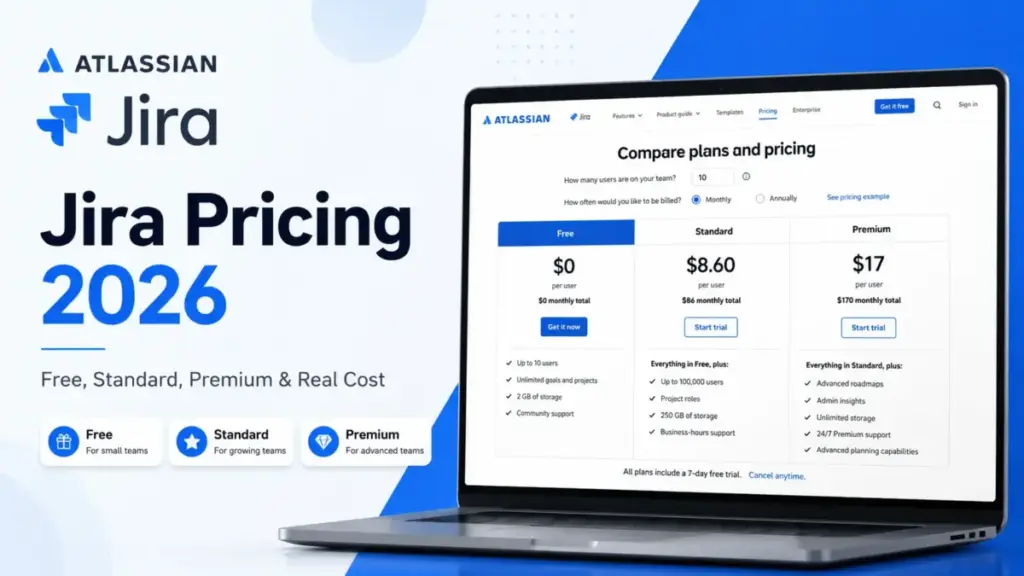
Jira starts at $0/month for small teams. However, scaling past 10 users triggers per-seat pricing. This cost increases with security add-ons.
For most growing teams, the Standard plan represents the best entry point. However, identity requirements and hidden billing rules can double your expected cost.
This evaluation is based on independent editorial research, analyzing official product documentation, feature specifications, and verified customer feedback. I broke down every tier, add-on, and seat scenario so you know exactly what your team will pay.
Before committing, check our guide to the best project management software options to see how Jira compares to other systems.
| Pricing Dimension | Quick Verdict |
|---|---|
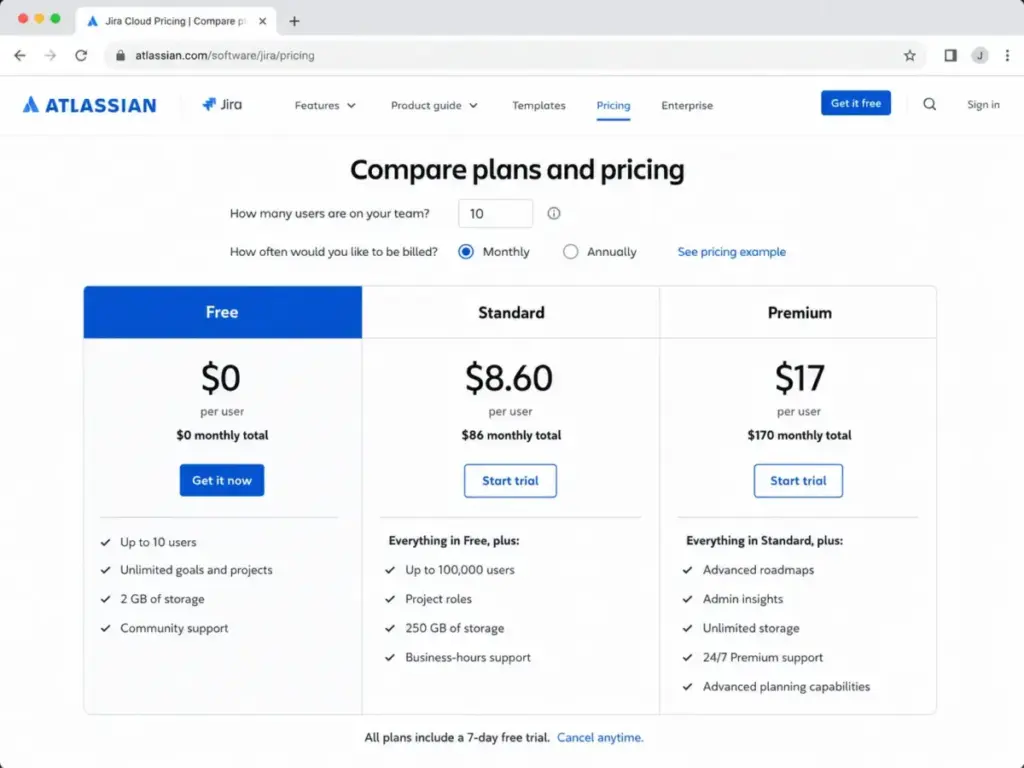
| Pricing Entry Point | $0/month (up to 10 users); paid tiers start at $8.60/user/month (monthly, first 100 users) |
| Free Plan / Trial | Free plan up to 10 users; 14-day Standard trial, 30-day Premium trial |
| Best Plan for Most Teams | Standard plan ($8.60/user/month monthly) |
| Plan to Avoid | Premium plan (unless you need cross-project roadmaps) |
| Biggest Hidden Cost | Atlassian Guard Standard ($4.20/user/month) for SSO and SCIM provisioning |
| Best Alternative | ClickUp (for lower-cost features) or Asana (for non-technical teams) |
| Pricing Verified Date | May 25, 2026 |
What this means: Jira is affordable for basic tracking. However, it becomes expensive once you add security and planning features. Small teams should stay on the Free plan, while larger organizations must budget for identity add-ons. When identity add-ons and planning gates change the real budget, compare Jira alternatives by SSO cost, roadmap access, user-cap timing, automation limits, and the total monthly stack beyond base seats.
The Advertised Price vs The Real Price
On paper, Jira looks like one of the cheapest project tools on the market. The list price of $8.60/user/month for Standard seems competitive compared to general project management software. In practice, that number is only a starting point. Your final invoice depends on security rules, third-party apps, and peak user counts.
The base seat price does not include identity provisioning or custom integrations. If your company enforces single sign-on (SSO), your true base rate rises immediately. You must pay for Atlassian Guard Standard as an extra license. This addition turns Jira into a much more expensive platform for medium-sized teams.
| Billing Item | Advertised Rate | Real-World Gotcha | Real Cost Impact |
|---|---|---|---|
| Jira Standard license | $8.60/user/month | Applies only to the first 100 users on monthly billing | Base software cost |
| Atlassian Guard Standard | $4.20/user/month | Required for SAML SSO and SCIM directory sync | Adds $420/month for a 100-user team |
| Marketplace apps | Varies by app | Priced based on your total Jira user tier, not active app users | Can add 50% or more to your core bill |
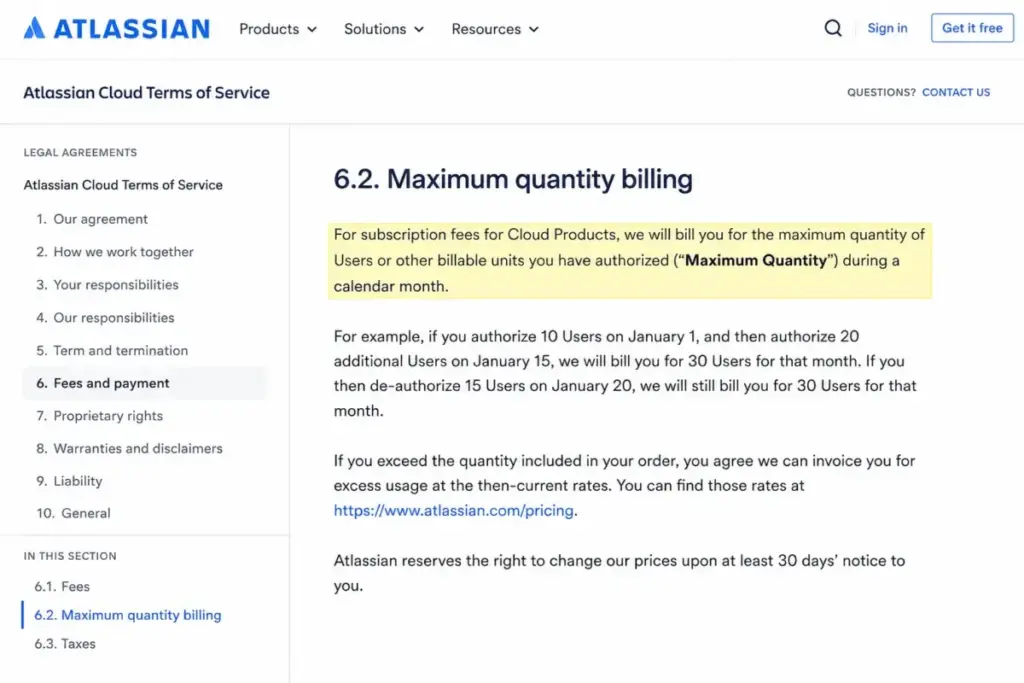
| Maximum Quantity Billing | Per-user rate | Bills based on the highest user count assigned during the cycle | No mid-month refunds for deactivated users |
What this means: Budgeting for Jira requires looking beyond the base seat price. If your company enforces SAML SSO, your true base rate is not $8.60/user, but $12.80/user once you add Guard.
The Hidden Costs Nobody Mentions
Maximum Quantity Billing (MQB) Seat Spikes
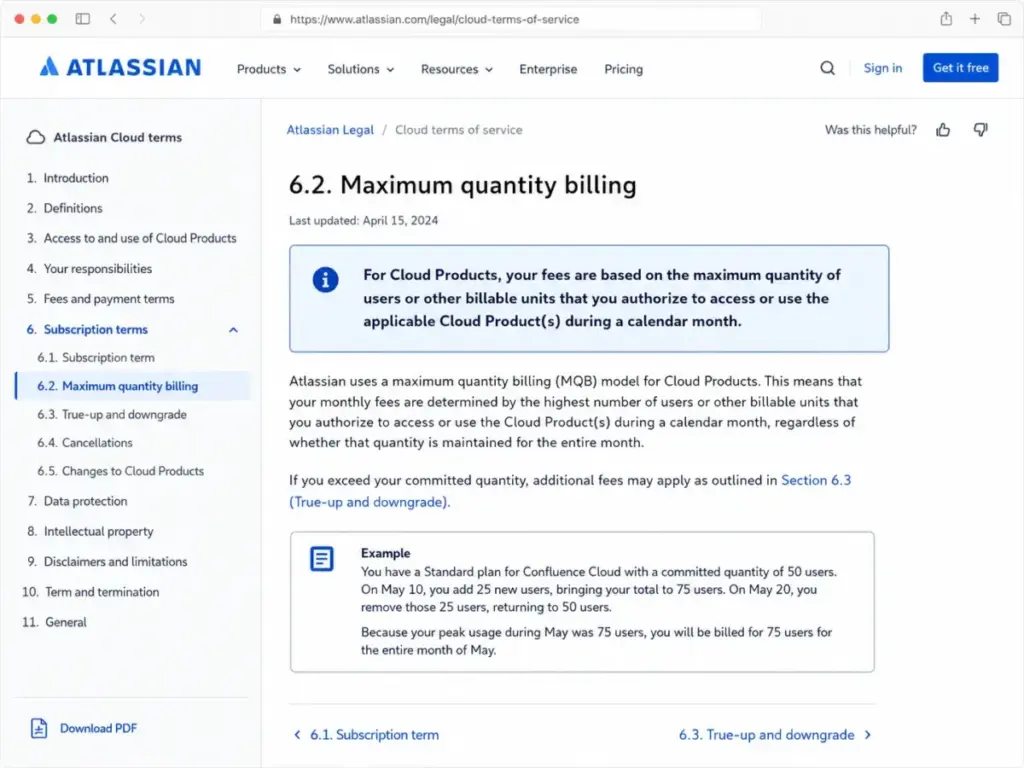
Monthly Jira billing uses the peak user count assigned during the cycle. This is known as Maximum Quantity Billing (MQB). If you add 15 contractors for a sprint and remove them, you still pay for them. Atlassian bills the entire month.
The SAML SSO and SCIM Identity Tax
Standard and Premium subscriptions do not include native SAML SSO or SCIM user provisioning. You must purchase Atlassian Guard Standard for $4.20/user/month to connect Jira to Okta or Microsoft Entra ID. This tax applies to every user in your organization.
The Marketplace App Dependency
Jira is a basic framework. To get time tracking, test management, or scripting, you must buy apps from the Atlassian Marketplace. App costs vary, but they scale by your total user tier. If you have 50 users, you must buy a 50-user license for every app. This applies even for 5 users.
Annual User Tier Rigidity
Annual plans use fixed user brackets instead of exact seat counts. If you have 11 users, you must pay for the 25-user annual tier. You cannot reduce your tier mid-contract if your headcount drops. Adding users requires prorated upgrade quotes from Atlassian.
Future Automation Consumption Charges
Jira automation limits are hard caps. Standard includes 1,700 runs per site, while Premium offers 1,000 runs per user. Atlassian documentation indicates future usage beyond these limits may incur consumption charges. However, unit overage pricing is not verified.
Plan-by-Plan Breakdown
Jira offers four plans designed for different organizational scales. The pricing verified date for all plans is May 25, 2026, based on Atlassian’s official documentation. All plan rates and details listed below can be verified on the official page.
| Plan | Starting Price | Annual Tier Rate | Billing Basis | Best For | Key Limits | Verified Source |
|---|---|---|---|---|---|---|
| Free | $0 | $0 | Per user (up to 10) | Solo developers and small teams | 10 users, 2 GB storage, 100 automation runs/month | Atlassian Pricing |
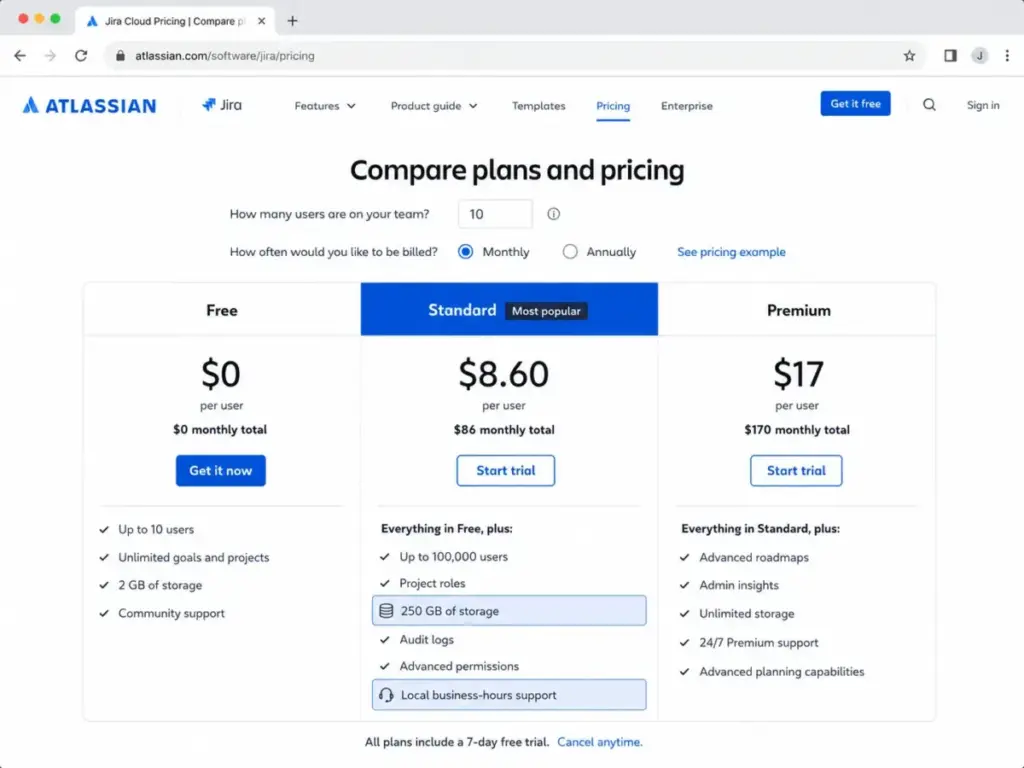
| Standard | $8.60/user/month | $875/year (up to 10 users) | Per user (monthly or tiered annual) | Growing software teams | 100,000 users, 250 GB storage, 1,700 automation runs/month | Atlassian Pricing |
| Premium | $17/user/month | $1,700/year (up to 10 users) | Per user (monthly or tiered annual) | Multi-team departments | Unlimited storage, 99.9% SLA, 1,000 runs/user/month | Atlassian Pricing |
| Enterprise | Custom quote | Custom quote | Annual contract only | Large organizations | Unlimited sites (up to 150), 99.95% SLA, Guard included | Atlassian Pricing |
What this means: The price doubles at each tier. Moving from Standard to Premium increases your base cost by 97%. This is difficult to justify without advanced planning.
Jira Free Plan
The Free plan is a no-cost entry point for very small teams. It supports up to 10 users and provides 2 GB of file storage. However, it lacks advanced permissions, custom roles, and audit logs.
- Includes: Basic boards, roadmaps, and 100 automation runs.
- Missing: Advanced permissions, audit logs, and paid support.
- Avoid-if: Your team exceeds 10 users or requires private spaces.
- Mini Verdict: Perfect for side projects, but too restrictive for commercial teams.
Jira Standard Plan
The Standard plan is the default choice for growing software teams. It costs $8.60/user/month for monthly users and supports up to 100,000 seats. It adds advanced permissions, audit logs, and 250 GB of storage.
For a deeper look at features, see our in-depth Jira review to understand the core product workflow.
- Includes: 250 GB storage, custom roles, audit logs, and local support.
- Missing: Advanced Roadmaps, sandboxes, and a 99.9% SLA.
- Avoid-if: You need cross-project dependency tracking or SCIM user provisioning.
- Mini Verdict: The best balance of cost and functionality for mid-market teams.
Jira Premium Plan
The Premium plan targets larger departments managing multiple projects. It costs $17/user/month and unlocks Advanced Roadmaps, unlimited storage, sandboxes, and 24/7 support.
- Includes: Unlimited storage, Premium support, 99.9% SLA, and Advanced Roadmaps.
- Missing: Central multi-site controls and included Guard Standard.
- Avoid-if: Your teams work in silos and do not need cross-project planning.
- Mini Verdict: Expensive, but necessary if you require testing sandboxes or roadmaps.
Jira Enterprise Plan
The Enterprise plan is a custom, annual-only subscription. It includes Atlassian Guard Standard and supports up to 150 sites. It also provides a 99.95% uptime SLA and Enterprise support.
- Includes: Unlimited sites, Enterprise support, 99.95% SLA, and Guard.
- Missing: Public pricing, as every contract requires negotiation.
- Avoid-if: Your organization has fewer than 800 users.
- Mini Verdict: The governance option for large organizations, but cost-prohibitive for smaller businesses.
When the Free Plan Stops Working
Small engineering teams can use the Free plan for a long time. However, growing teams will eventually hit restrictions that force a paid migration. Understanding these upgrade triggers will help you budget for the transition.
The most common upgrade trigger is the 10-user limit. If you add an eleventh team member, Atlassian automatically prompts you to upgrade to Standard. You cannot keep 10 free users and pay for only 1. The entire site upgrades to the paid tier.
Another major limit is the lack of project-level permissions. On the Free plan, every user is a site administrator. Anyone can create projects, delete issues, or modify workflows. If you need to hide a private project, you must upgrade to Standard.
Finally, you must consider the 2 GB storage limit. If your team attaches screenshots or build logs to issues, you will hit this cap quickly. Standard increases this to 250 GB, which solves storage concerns for most teams.
If you are transitioning to paid agile tools, learn what agile workflows require to align your team processes before upgrading.
Feature Gates: What You Actually Get by Plan
Atlassian uses feature gates to push users toward higher-cost tiers. The most important gates are not user limits, but administrative controls, automation quotas, and support levels.
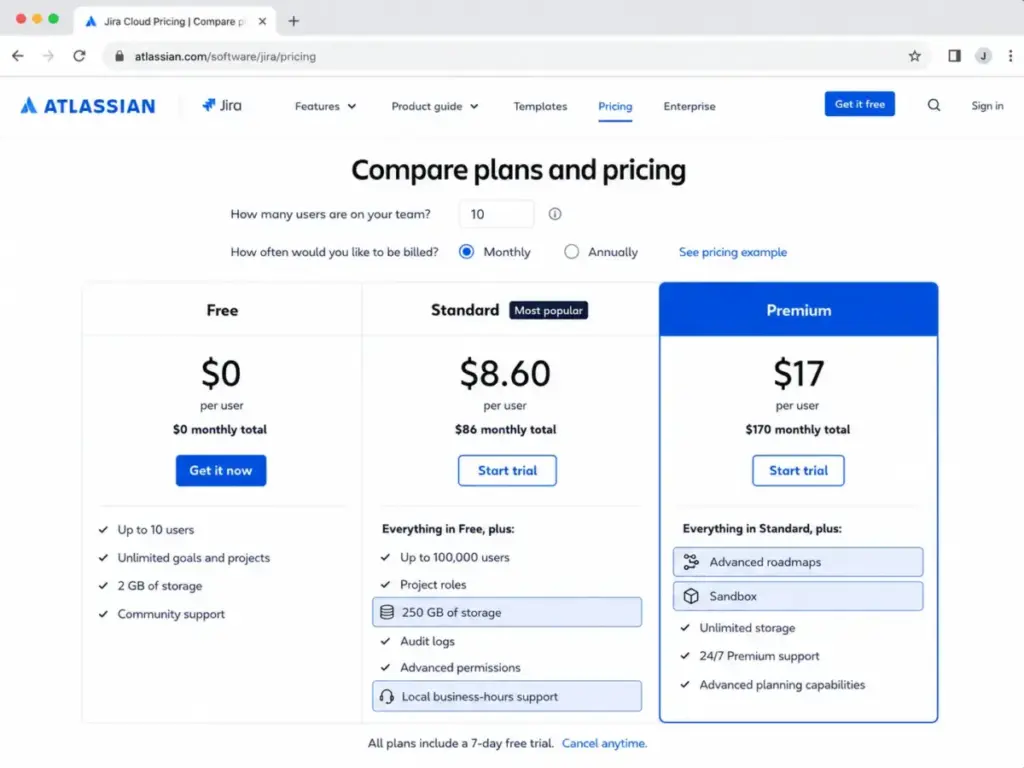
| Feature Gate | Free | Standard | Premium | Enterprise |
|---|---|---|---|---|
| User Cap | 10 users | 100,000 users | 100,000 users | 100,000 users |
| Storage Limit | 2 GB | 250 GB | Unlimited | Unlimited |
| Support Tier | Community | Local business hours | 24/7 Premium | 24/7 Enterprise |
| Uptime SLA | No SLA | No SLA | 99.9% SLA | 99.95% SLA |
| Advanced Roadmaps | Not included | Not included | Included | Included |
| Sandbox & Releases | Not included | Not included | Included | Included |
| Automation runs | 100/site/month | 1,700/site/month | 1,000/user/month | Unlimited |
| Permissions & Logs | Limited/No | Included | Included | Included |
| SSO / SCIM | Requires Guard | Requires Guard | Requires Guard | Included (via Guard) |
| Jira Sites | 1 site | 1 site | 1 site | Up to 150 sites |
What this means: The Premium plan is the entry point for Advanced Roadmaps and sandboxes. If you run multiple testing environments, Standard is not enough.
Real Cost Scenarios
Calculating the total cost of ownership (TCO) for Jira requires looking at headcount. The table below outlines the real cost of Jira at different team sizes.
| Team Size | Recommended Plan | Estimated Monthly Cost | Estimated Annual Cost | Key Notes |
|---|---|---|---|---|
| 5 Users | Free | $0 | $0 | Free tier is sufficient unless you need advanced permission controls |
| 10 Users | Standard | $86 | $875 | Annual plan saves$157 compared to monthly billing |
| 25 Users | Standard | $215 | $2,150 | Base rate; adding Atlassian Guard adds$105/month |
| 50 Users | Standard | $430 | $3,500 | Annual tier savings are substantial; adding Guard adds$210/month |
| 100 Users | Standard | $860 | $7,000 | Premium increases this scenario to$1,700/month or $14,000/year |
What this means: Annual tiers offer substantial savings over monthly rates at specific user counts, but they lack flexibility. A team of exactly 11 users is forced into the 25-user annual tier, which eliminates the discount.
Monthly vs Annual Billing
Atlassian offers two billing cycles. Monthly billing is flexible but expensive. Annual billing offers a discount but requires upfront payment.
According to Atlassian’s pricing calculator, the Standard annual tier for 10 users is $875/year. Monthly billing for 10 users costs $86/month, which equals $1,032/year. Choosing the annual cycle saves you approximately 15.2% annually.
However, the discount decreases if your team size fluctuates. Annual tiers are set at specific user caps (10, 25, 50, 100, etc.). If you have 26 users, you must buy the 50-user annual tier. In this case, monthly billing is often cheaper.
Monthly seat flexibility outweighs the annual discount if your team does not fit a specific bracket. I recommend monthly billing if your team is growing rapidly.
Which Jira Plan Should You Choose?
Your plan choice depends on your team structure and budget.
- Choose Free if: Your team is under 10 people, you work on a single project, and everyone can have full admin access.
- Choose Standard if: You have 10 to 100 users, need to restrict project permissions, and require more than 2 GB of storage.
- Choose Premium if: You manage multiple teams, need cross-project roadmaps, and require testing sandboxes for workflow changes.
- Choose Enterprise if: You have over 800 users, manage multiple Jira sites, and require centralized administration and security controls.
If your team is non-technical and struggles with admin overhead, check our Asana review for a simpler alternative.
Which Jira Plan Should You Avoid?
Avoid Premium if your team only needs basic Kanban or Scrum boards. The Premium plan costs 97% more than Standard, but the core issue tracking features are identical. Unless you use Advanced Roadmaps or need the SLA, you pay a premium for unused features.
Avoid Standard if you manage multiple business units with separate Jira sites. Standard does not support multi-site licensing. Managing multiple sites on Standard forces you to use separate billing. This creates administrative overhead.
Jira Pricing vs Competitors
Jira is cheaper per user than most general project management tools. However, competitors offer different billing models and native features. The table below compares Jira Standard to other platforms.
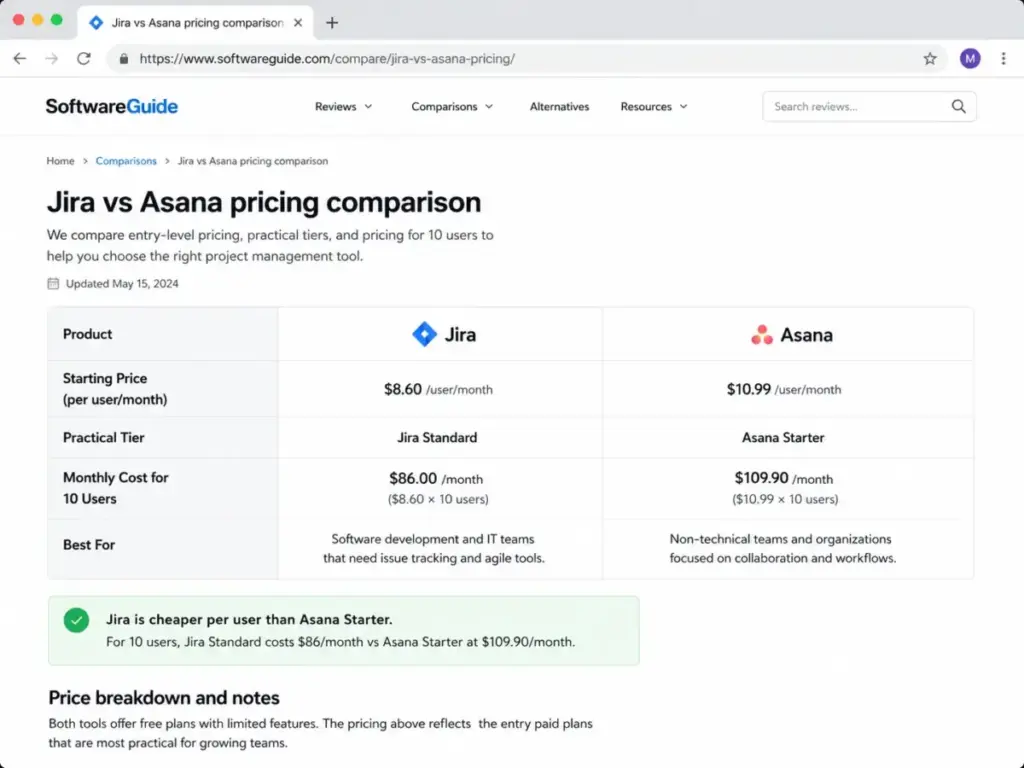
| Competitor | Starting Price | Practical Tier | 10-User Monthly Cost | Best For |
|---|---|---|---|---|
| Jira | $0/month | Standard ($8.60/user/month) | $86/month | Software teams |
| Asana | $0/month | Starter ($10.99/user/month) | $109.90/month | Non-technical collaboration |
| ClickUp | $0/month | Unlimited ($7/user/month) | $70/month | Small teams wanting features |
| monday.com | $0/month | Standard ($12/user/month) | $120/month | Visual project management |
| Wrike | $0/month | Team ($10/user/month) | $100/month | Marketing and agencies |
What this means: Jira is cheaper per user than Asana or Wrike for software teams. ClickUp offers more native features on entry tiers. This makes it a stronger value option for general teams.
To compare plans, check the Asana pricing structure. You should also evaluate the ClickUp pricing plans to see their feature gates.
Is Jira Worth the Price?
Jira scores 8.5/10 for value. It is highly competitive for software development teams, especially if they already use other Atlassian products like Confluence or Bitbucket.
- Worth it if: You run agile software teams, need deep developer integrations, and can manage Jira administration without third-party consultants.
- Not worth it if: You are a non-technical business team or only need simple task lists. The configuration complexity is too high for basic work management.
If you want more features out of the box, read our ClickUp review. This shows how the systems compare.
How to Avoid Overpaying for Jira
- Audit users monthly: Deactivate inactive accounts immediately to lower your peak seat count before the monthly billing cycle closes.
- Stay on monthly billing during hiring spikes: Do not lock yourself into annual tiers if you expect team sizes to drop later in the year.
- Audit your automation rules quarterly: Teams pile up automation runs and forget them, which can push you past your Standard cap.
- Consolidate Marketplace apps: App subscriptions scale by your entire Jira user count, making unused apps extremely expensive.
- Use Trello for task tracking: If some team members only need task lists, check the Trello pricing breakdown to see if a mixed tool strategy works.
- Max out Jira Free: If you have exactly 10 users, stay on Free and manage permissions manually to save $1,032/year.
Questions I Would Ask Before Buying
- Do we require Okta SSO or SCIM?
- How many automated runs do we trigger?
- Which Marketplace apps do we need?
- Do we need cross-team dependency mapping?
FAQ
Is Jira Free enough for a 10-person team?
Yes, if your team has exactly 10 or fewer members and only needs basic Kanban boards. No, if you require custom permission roles, audit logs, or more than 2 GB of file storage. Once you exceed 10 users, you must pay for all seats on a paid plan.
Why did my Jira bill go up after removing users mid-month?
This happens because Atlassian uses Maximum Quantity Billing (MQB) for monthly plans. Your monthly invoice is determined by the highest user count assigned during that cycle. If you briefly add users and deactivate them, you are still billed. Atlassian charges that peak until the next cycle.
Do I need Atlassian Guard for Jira SSO?
Yes, unless you upgrade to the Enterprise plan. Standard and Premium subscriptions do not include native SAML SSO or SCIM user provisioning. You must purchase Atlassian Guard Standard for $4.20 per user each month to connect Jira to your identity provider.
Is Jira Premium worth it just for Advanced Roadmaps?
No, unless you manage complex, cross-team dependencies that require visual portfolio planning. For simple project tracking, the Standard plan is sufficient. If you only need basic timeline views, the Premium upgrade fee is difficult to justify.
Can we downgrade our Jira tier during an annual contract?
No, unless you wait for your renewal date. Annual plans lock you into a specific user tier. If you purchase the 50-user tier and drop to 30, Atlassian will not refund you. The tier remains mid-term. You must wait until renewal to adjust.
How much do Jira Marketplace apps add to the bill?
The cost varies, but paid apps for time tracking or test management scale by your user tier. If you have 50 users, you must buy a 50-user license for every app you install. This can easily double your monthly Atlassian licensing bill.
Is Jira cheaper than Asana or ClickUp?
Yes, if you have 25 to 100 users on the Standard tier. Jira’s Standard plan is cheaper than Asana Starter and ClickUp Business. However, ClickUp includes more advanced features natively, while Jira requires paid add-ons like Guard for security.
What happens if we exceed the Jira automation limits?
Your automated rules will stop running for the remainder of the month once you hit your cap. Standard is limited to 1,700 runs per month, while Premium grants 1,000 runs per user. Atlassian warns that overage charges may apply in the future.