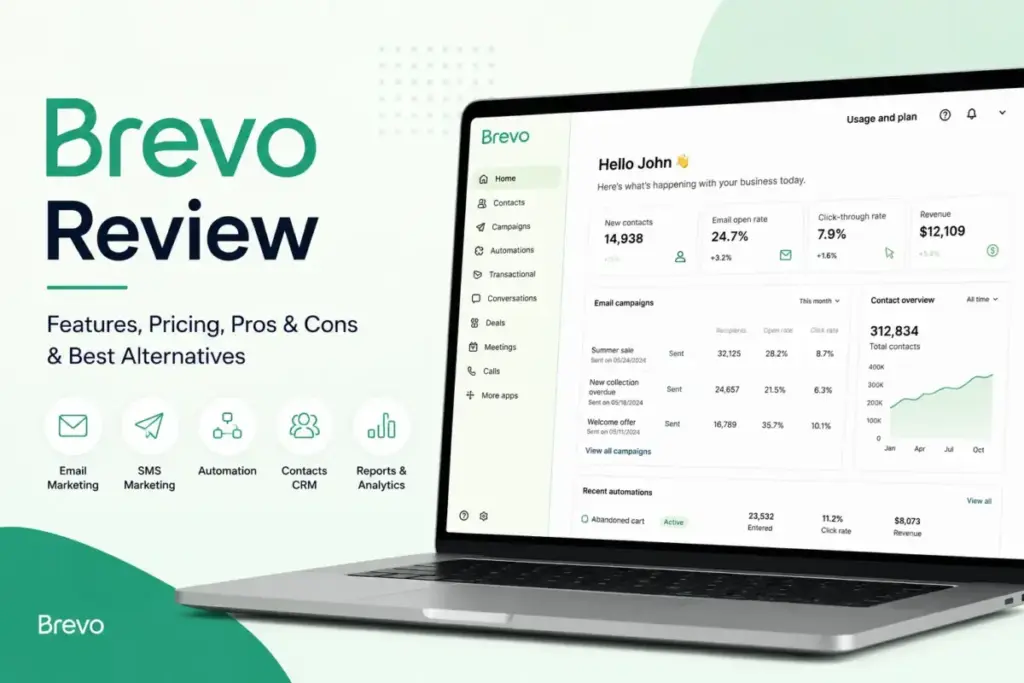
Brevo charges by email volume, not contact count. That single pricing decision shapes everything about who should and should not use this platform. In this Brevo review, I evaluate whether that model, combined with built-in automation, CRM-lite tools, transactional messaging, and multichannel campaigns, actually delivers enough value for SMBs in 2026.
Most reviews praise Brevo for being affordable and leave it there. I go deeper: into the hidden add-on costs buyers miss, the CRM limitations that surface at scale, and the specific scenarios where a competitor is the better pick. If you are comparing email marketing software and want a clear, evidence-based verdict, this is it. Brevo (formerly Sendinblue) is a SaaS customer engagement platform serving over 600,000 customers worldwide.
TL;DR: Brevo Quick Verdict
Brevo Feature Rating
Brevo earns 8.4/10 in my evaluation for SMB email marketing in 2026.
| Category | Detail |
|---|---|
| Score | 8.4/10 |
| Best for | SMBs that want affordable email marketing with unlimited contacts, automation, CRM-lite, and transactional messaging in one account |
| Not for | Teams that need deep CRM forecasting, advanced landing page design, enterprise SSO without add-on cost, or maximum template polish |
| Biggest strength | Send-volume pricing with unlimited contact storage on all plans |
| Biggest weakness | Add-on costs (branding removal, SSO, dedicated IP) reduce the pricing advantage faster than expected |
| Pricing | Free ($0, 300 emails/day), Starter ($9/mo), Standard ($18/mo), Professional ($499/mo), Enterprise (custom) |
| Best alternative: automation | ActiveCampaign |
| Best alternative: ecommerce | Klaviyo |
| Best alternative: newsletters | MailerLite |
| Best alternative: design ecosystem | Mailchimp |
| Pricing verified | April 26, 2026 |
I score every product I review using SaaSZap’s review methodology, which weights pricing transparency, feature depth, limitation honesty, and real-world fit across defined buyer personas.
Sarah Chen’s Brevo Fit Score
Before you read 4,000 words, answer five questions. This framework helps you decide in two minutes whether Brevo deserves a closer look or whether your time is better spent elsewhere.
Rate each statement from 1 (strongly disagree) to 5 (strongly agree):
| # | Statement | Your Score (1–5) |
|---|---|---|
| 1 | My contact list grows faster than my monthly email send volume. | _ / 5 |
| 2 | I need email plus at least one other channel, such as SMS, WhatsApp, or transactional email. | _ / 5 |
| 3 | I need a light CRM for deals and contact tracking, not a full sales command center. | _ / 5 |
| 4 | I need transactional email, such as order confirmations, password resets, and receipts, in the same platform. | _ / 5 |
| 5 | I do not need enterprise SSO, dedicated IP, or advanced landing pages on day one. | _ / 5 |
Your total: _ / 25
Your total:
| Score Range | Verdict |
|---|---|
| 18 to 25 | Strong fit. Brevo is built for your use case. Read the pricing section and sign up. |
| 12 to 17 | Conditional fit. Brevo works, but check the hidden cost table and alternatives section before committing. |
| 0 to 11 | Consider alternatives. ActiveCampaign, Klaviyo, or Mailchimp likely serve you better. Keep reading to confirm. |
What Is Brevo?
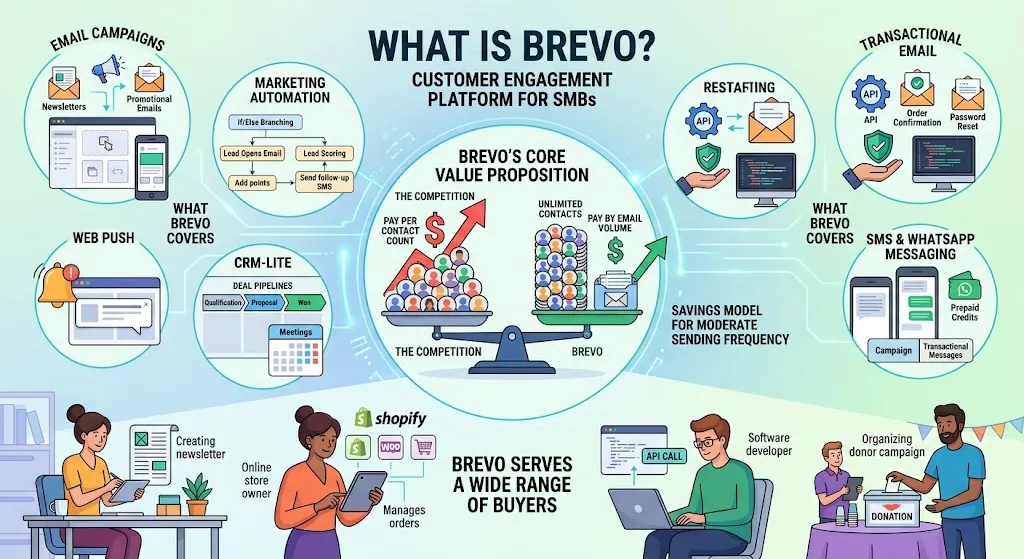
Brevo is a cloud-based customer engagement platform that combines email marketing, SMS campaigns, WhatsApp messaging, marketing automation, transactional email, CRM-lite, live chat, chatbot, push notifications, landing pages, and meetings into a single account. The company was founded in 2012 as Sendinblue and rebranded to Brevo in 2023.
The rebrand was more than cosmetic. Brevo expanded from a pure email marketing tool into a multichannel platform with sales tools, a customer data platform, and AI features under the Aura AI brand. Today, Brevo says it serves 600,000+ customers and connects to more than 150 digital tools through its integrations marketplace.
What separates Brevo from basic newsletter tools is the pricing architecture. Most competitors (Mailchimp, Constant Contact, Klaviyo) charge by contact count. Brevo charges by monthly email volume and gives you unlimited contact storage on every plan, including the free tier.
That distinction matters enormously for businesses with large, segmented lists that send targeted campaigns to subsets rather than blasting every contact every week. Understanding the different types of email marketing – from newsletters and welcome sequences to lifecycle campaigns – clarifies why send-volume pricing benefits some business models more than contact-based billing.
Brevo also includes transactional email infrastructure (SMTP relay and email API) alongside marketing tools. Most competitors treat transactional messaging as a separate product or do not offer it at all. Having both in one account reduces vendor sprawl for teams that need order confirmations, password resets, and marketing campaigns from the same platform.
Brevo Features That Matter
Brevo’s feature set is wide. Not every feature is equally deep. Here is where the platform delivers real value and where it falls short of specialist tools.
Brevo Email Marketing
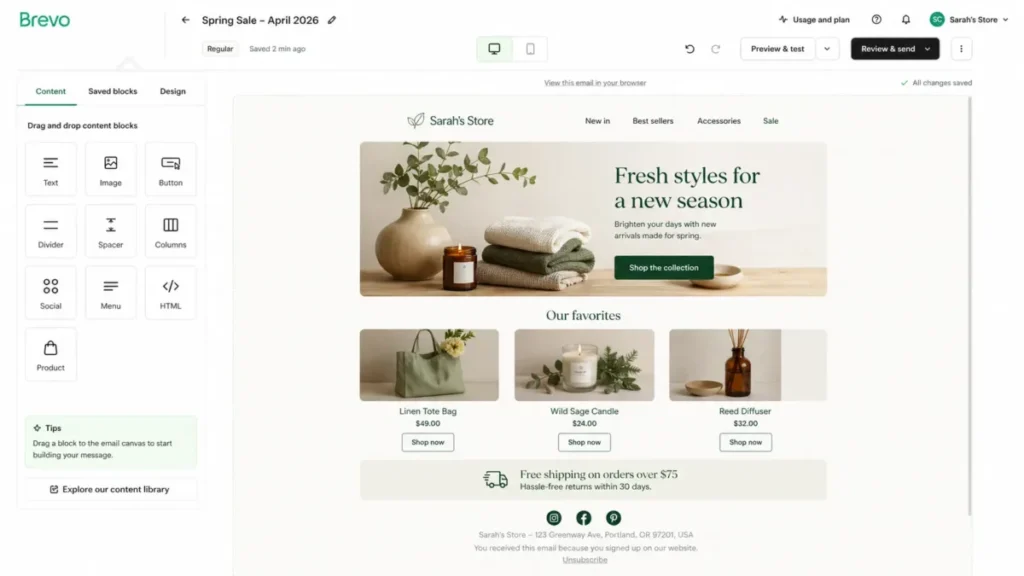
The email campaign builder uses a drag-and-drop editor with pre-built content blocks for text, images, buttons, columns, headers, and footers. You can also switch to a raw HTML editor or use the plain-text editor for transactional-style messages.
Template selection is adequate but not exceptional. As one verified G2 reviewer noted:
“Some of the templates may not be enough, and complex automation may require some time to grasp.” – Verified G2 reviewer, G2
I found the editor functional for standard marketing emails: product announcements, newsletters, promotional campaigns, and onboarding sequences. Teams that prioritize visual design polish or need advanced template customization may find Mailchimp’s design ecosystem stronger. For most SMB campaigns, Brevo’s editor gets the job done.
Segmentation is a genuine strength. You can filter contacts by behavior (email opens, clicks, page visits), purchase data (via ecommerce integrations with Shopify, WooCommerce, and BigCommerce), demographic attributes, and custom fields. The Standard plan and above include advanced segmentation, and the Professional plan adds AI-powered segmentation and contact scoring.
A/B testing is available on Standard and above. You can split-test subject lines, sender names, and email content. Send-time optimization (powered by Aura AI) analyzes historical engagement data to deliver emails when each contact is most likely to open, which is a feature typically reserved for higher-tier plans on competing platforms.
Brevo Automation
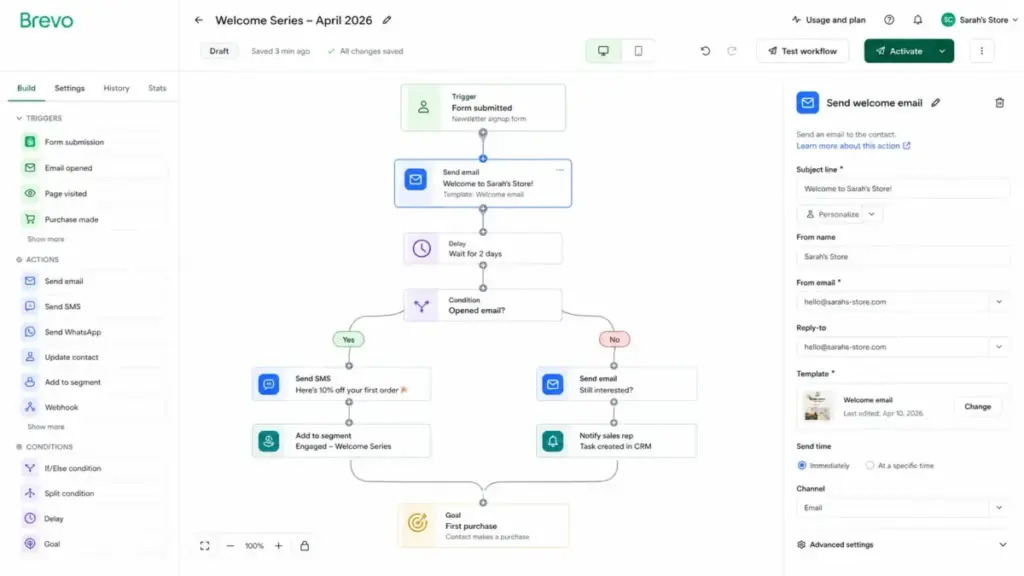
Marketing automation is available on the Standard plan with unlimited contacts in automation workflows. The automation builder uses a visual, flowchart-style interface where you define triggers (form submission, email open, website event, purchase, custom API event), conditions (if/else splits, time delays, attribute filters), and actions (send email, send SMS, update contact, move to list, webhook).
For common workflows like welcome sequences, abandoned cart recovery, anniversary emails, and re-engagement campaigns, the builder is capable and straightforward. Where it reaches its ceiling is in multi-branch, deeply conditional logic. ActiveCampaign’s automation builder supports more granular branching, nested conditions, and CRM-driven triggers that Brevo does not match.
The Professional plan adds marketing pressure management (controlling how many messages a contact receives within a time window), which is a valuable feature for teams running multiple concurrent campaigns across email, SMS, and WhatsApp.
Brevo CRM
Brevo includes CRM tools: deal pipelines, contact records, task management, meetings scheduling, and basic reporting. On the surface, this looks like a full CRM. In practice, it is CRM-lite.
The deal pipeline works for tracking sales stages and assigning owners. The meetings feature lets contacts book time with your team. The live chat and chatbot tools help with real-time engagement. For a small sales team that needs visibility into deals alongside marketing campaigns, this is genuinely useful.
Where Brevo’s CRM breaks down is depth. There is no revenue forecasting, no custom reporting builder comparable to HubSpot or Salesforce, and no deep lead scoring outside of the Professional plan’s contact scoring. Advanced sales features require the Sales Essentials package add-on ($31/month). Teams that rely on CRM as their primary sales management tool will outgrow Brevo’s CRM quickly.
My recommendation: treat Brevo’s CRM as a marketing CRM for tracking contacts and basic deals, not as a sales command center. If your CRM needs go beyond deal tracking and contact management, evaluate a dedicated CRM separately.
Brevo Transactional Email
Transactional email is one of Brevo’s underrated strengths. The platform includes SMTP relay and a REST API for sending order confirmations, shipping notifications, password resets, account alerts, and receipts.
Brevo’s API documentation provides SDKs for Node.js, Python, PHP, and cURL. The API supports email, SMS, WhatsApp, contacts, custom events, ecommerce data sync, and custom objects.
For teams that currently use a separate transactional email provider (like Postmark, Mailgun, or Amazon SES) alongside a marketing email tool, consolidating into Brevo can simplify the stack. The trade-off is that dedicated transactional providers may offer deeper deliverability analytics and higher sending volumes at lower per-message cost for very high-volume senders.
A verified Capterra reviewer highlighted this integration advantage:
“The WordPress integration works perfectly, and the tools are powerful without being complicated.” – Verified Capterra reviewer, Capterra
Brevo SMS and WhatsApp
Brevo supports SMS campaigns and WhatsApp campaigns from the same platform. SMS credits are available as add-ons on all plans, with pricing varying by recipient country. WhatsApp campaigns and transactional messaging are available on Professional and Enterprise plans, also with country-based credit pricing.
The multichannel approach is where Brevo’s positioning makes the most sense. Instead of managing separate vendors for email, SMS, and WhatsApp, teams can build automation workflows that trigger messages across channels based on contact behavior. A welcome sequence might send an email on day one, an SMS on day three, and a WhatsApp message on day seven, all from a single automation flow.
The limitation is that SMS and WhatsApp credits are pay-as-you-go costs on top of your plan subscription. For teams with heavy SMS or WhatsApp volume, these costs add up and should be factored into total cost of ownership.
Brevo Aura AI
Brevo’s AI features operate under the Aura AI brand. The current capabilities include:
- AI content generator: available on Starter and above, helps draft email subject lines and body copy
- AI send-time optimization: available on Standard and above, predicts the best delivery time per contact
- AI segmentation: available on Professional and above, suggests audience segments based on behavioral patterns
- AI product recommendations: available on Professional and above, personalizes product suggestions in email content
The AI features are practical additions rather than breakthrough tools. The content generator saves time on first drafts. Send-time optimization provides measurable lift for engagement rates based on official documentation. AI segmentation and product recommendations are gated behind the Professional plan ($499/month), which prices out most SMBs from accessing them.
Brevo User Experience: First 30 Minutes
The onboarding experience tells you a lot about a platform’s priorities. Here is what I observed during my first session inside Brevo.
Account creation takes under two minutes. Brevo asks for your company name, website, team size, and primary use case. After email verification, you land on the dashboard.
Account review friction is worth mentioning. Brevo reviews new accounts before allowing full sending access. This is a deliverability protection measure (it keeps spammers off shared IPs), but it can delay new users who want to send their first campaign immediately. Based on available review data, approval typically takes a few hours to one business day.
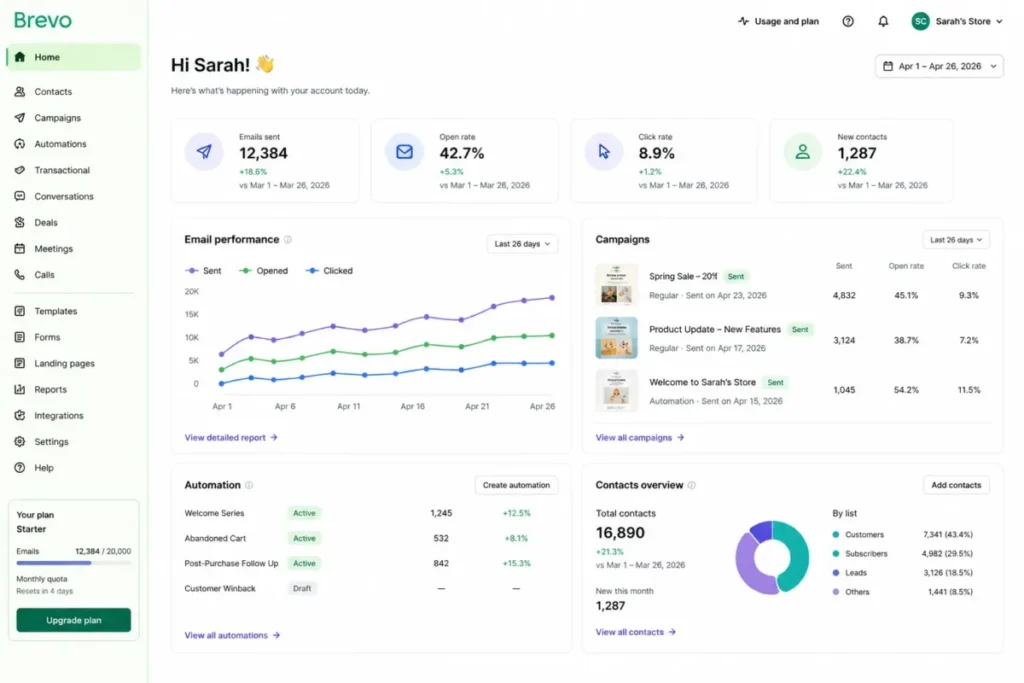
The dashboard shows a summary of recent campaigns, contact growth, and engagement metrics. It is clean but not immediately intuitive for first-time users. The left sidebar navigation groups tools into Marketing, Transactional, Contacts, Automation, and Conversations. Finding the right section takes a few clicks of exploration.
The email editor loads quickly. Drag-and-drop blocks snap into place without lag. The content block library covers standard needs: text, image, button, divider, columns, social links, and HTML blocks. Template previews render accurately in desktop and mobile views.
The automation builder uses a visual canvas. Creating a basic welcome sequence (trigger: form submission, action: send email, delay: 2 days, action: send follow-up) took about 10 minutes on my first try. The interface is logical once you understand the trigger-condition-action pattern.
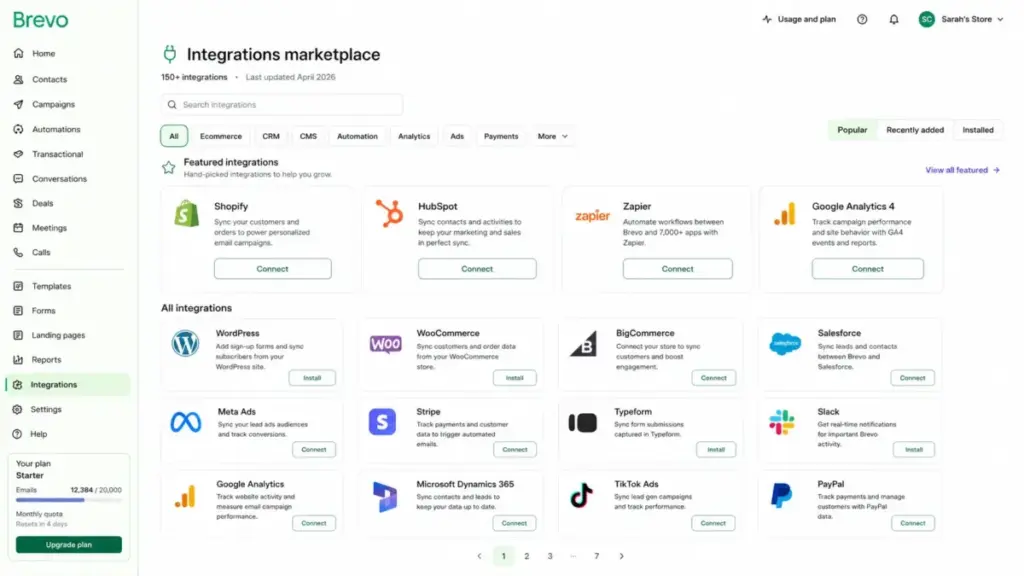
The integrations marketplace lists connections to WordPress, WooCommerce, Shopify, BigCommerce, and over 150 other tools. Setup for common integrations follows standard API key or OAuth flows.
One G2 reviewer captured the experience accurately:
“Brevo is easy to use and rather intuitive to get started with.” – Verified G2 reviewer, G2
The learning curve is gentle for email campaigns and contact management. Automation and CRM features require more time to explore. I estimate a marketing generalist would feel comfortable with core features within one to two hours.
Brevo Pricing and Hidden Costs
Brevo’s pricing is straightforward at first glance. The complexity hides in the add-ons. Here is the full breakdown.
Brevo Plan Comparison
Pricing verified: April 26, 2026. Source: Brevo pricing page and Brevo pricing help center.
| Plan | Monthly Price | Email Sends | Contacts | Key Features |
|---|---|---|---|---|
| Free | $0 | 300/day | Unlimited | Basic email campaigns, forms, core segmentation |
| Starter | From $9/mo | No daily limit | Unlimited | AI content generator, advanced segmentation, basic reporting, email support |
| Standard | From $18/mo | Starts at 5,000/mo | Starts at 500 stored | Up to 3 users, automation (unlimited contacts), A/B testing, AI send-time optimization, advanced reports, 1 landing page, priority email support |
| Professional | From $499/mo | Starts at 150K/mo | Up to 2M stored | 10 users, AI product recommendations, WhatsApp campaigns, marketing pressure management, analytics studio, contact scoring, AI segmentation, 10 landing pages, phone support, deliverability strategist (3 hrs/yr) |
| Enterprise | Custom | Custom | Custom | Unlimited users, sub-org management, 1 dedicated IP included, SAML SSO included, SLA, Enterprise CSM |
Brevo Hidden Costs Buyers Miss
This is where most reviews stop. The add-on layer changes the total cost calculation significantly.
| Add-On | Cost | Available On | Why It Matters |
|---|---|---|---|
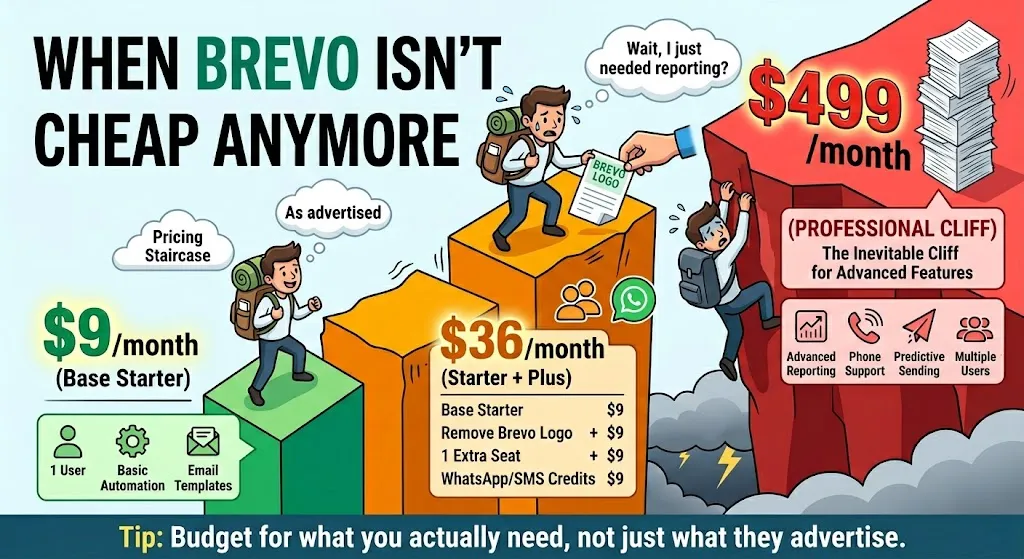
| Remove Brevo logo | $9/month | Starter | Your emails show Brevo branding unless you pay |
| Extra marketing seat | $9/month per seat | Standard+ | Standard includes up to 3 seats via add-on; Professional includes 10 |
| SAML SSO | $324/month | Professional (add-on) | Included with Enterprise, but a steep add-on for Professional plan buyers who need it |
| Dedicated IP | $251/year | Professional, Enterprise (add-on) | One included with Enterprise; everyone else pays extra for sending reputation control |
| Sales Essentials | $31/month | All plans | Required for advanced sales CRM features beyond basic deal tracking |
| SMS credits | Varies by country | All plans | Pay-as-you-go on top of plan cost |
| WhatsApp credits | Varies by country | Professional, Enterprise | Pay-as-you-go on top of plan cost |
| Prepaid email credits | Varies | All plans | Never expire; useful for burst sending beyond plan limits |
Who should pick each plan:
- Free: Solo creators testing email marketing. The 300 emails/day cap limits you to roughly 9,000 emails/month at best, which works for lists under 2,000 contacts sending weekly.
- Starter: Small businesses running regular campaigns who want to remove the daily sending cap. Add $9/month if you need to remove Brevo branding.
- Standard: Growing teams that need automation, A/B testing, and multiple team members. This is Brevo’s value sweet spot for most SMBs.
- Professional: Marketing teams managing data-driven, multichannel campaigns with WhatsApp, advanced analytics, and product recommendations. The $499/month floor makes this a mid-market play.
- Enterprise: Large organizations that need dedicated IP, SAML SSO, sub-org management, and SLA guarantees without add-on cost.
When Brevo Pricing Actually Wins
Brevo’s send-volume pricing is not universally cheaper. It wins in specific scenarios and loses in others. Here are three real-world comparisons.
Scenario 1: Large List, Low Send Volume
Profile: 15,000 contacts, sends 2 campaigns per month to targeted segments of 3,000 contacts each (6,000 emails/month).
- Brevo Standard: From $18/month (covers 5,000 emails/month base, scales modestly with volume tier)
- Mailchimp Standard: Charges by contact count. 15,000 contacts on Mailchimp’s Standard plan costs significantly more per month.
- Verdict: Brevo wins clearly. You store 15,000 contacts for free and pay only for what you send.
Scenario 2: Newsletter With Frequent Sends
Profile: 5,000 contacts, sends 3 campaigns per week to full list (60,000 emails/month).
- Brevo Standard: Requires a higher-volume tier to cover 60,000 monthly sends, pushing the price up.
- MailerLite Growing Business: 5,000 subscribers on MailerLite costs less for unlimited email sends within that contact cap.
- Verdict: MailerLite or Mailchimp may be more cost-effective. Brevo’s send-volume pricing penalizes high-frequency, full-list senders. Check the Mailchimp pricing comparison for exact numbers.
Scenario 3: Ecommerce With Multichannel Needs
Profile: 10,000 contacts, 20,000 emails/month, plus 2,000 SMS messages/month and transactional emails for order confirmations.
- Brevo Standard + SMS credits: One platform for email, SMS, and transactional messaging. Total cost depends on SMS credit pricing for your country.
- Klaviyo + separate transactional provider: Klaviyo charges by contact count and email/SMS volume separately. Adding a transactional email provider (Postmark, SendGrid) adds another vendor.
- Verdict: Brevo wins on simplicity and stack consolidation. Klaviyo wins on ecommerce analytics depth and revenue attribution. Choose based on whether you value stack simplicity or analytics depth.
Bottom line: Brevo pricing wins when your contact list is large relative to your monthly send volume, and when you need multichannel messaging in one platform. It loses when you send high-frequency campaigns to your entire list.
Brevo Pros and Cons
- Unlimited contact storage on all plans, including free. Most competitors charge by contact count, which penalizes list growth. Brevo only charges for emails sent.
- Transactional and marketing email in one platform. Eliminates the need for a separate SMTP relay or transactional email provider for most SMBs.
- Multichannel from one account. Email, SMS, WhatsApp, push notifications, live chat, and chatbot without stitching together separate vendors.
- Affordable entry point. The Standard plan at $18/month includes automation with unlimited contacts in workflows, A/B testing, and AI send-time optimization.
- Strong API and developer tools. SDKs for Node.js, Python, PHP, and cURL. Webhook support. Custom event tracking. Good for teams with technical resources.
- EU-hosted servers with ISO 27001:2022 certification. Relevant for GDPR-conscious European businesses and any team that values data residency clarity.
- Account review process protects shared IP reputation. While it adds onboarding friction, it reduces the risk of landing on a polluted shared IP.
- Template variety is limited compared to Mailchimp. Design-focused teams may find the template library underwhelming.
- SAML SSO costs $324/month on Professional. Enterprise teams that need SSO but are not ready for custom Enterprise pricing face a steep add-on.
- CRM depth does not replace a dedicated sales CRM. No revenue forecasting, limited custom reporting, and advanced sales features require the $31/month Sales Essentials add-on.
- Landing page builder is basic. Standard includes just 1 landing page. Professional includes 10. Neither plan offers the design flexibility of dedicated landing page tools.
- Brevo branding on Starter plan emails unless you pay $9/month extra. The “free” and low-cost plans carry a visible cost in brand presentation.
- AI and product recommendation features are gated behind Professional ($499/month). AI segmentation, contact scoring, and product recommendations are out of reach for most SMB budgets.
- Account approval process can delay first sends. New users may wait hours or longer before gaining full sending access, which frustrates teams on tight launch timelines.
Brevo vs Alternatives: Who Wins Each Scenario
Every comparison tool has a use case where it is the better choice. I am not going to hedge. Here are my verdicts.
Brevo vs Mailchimp
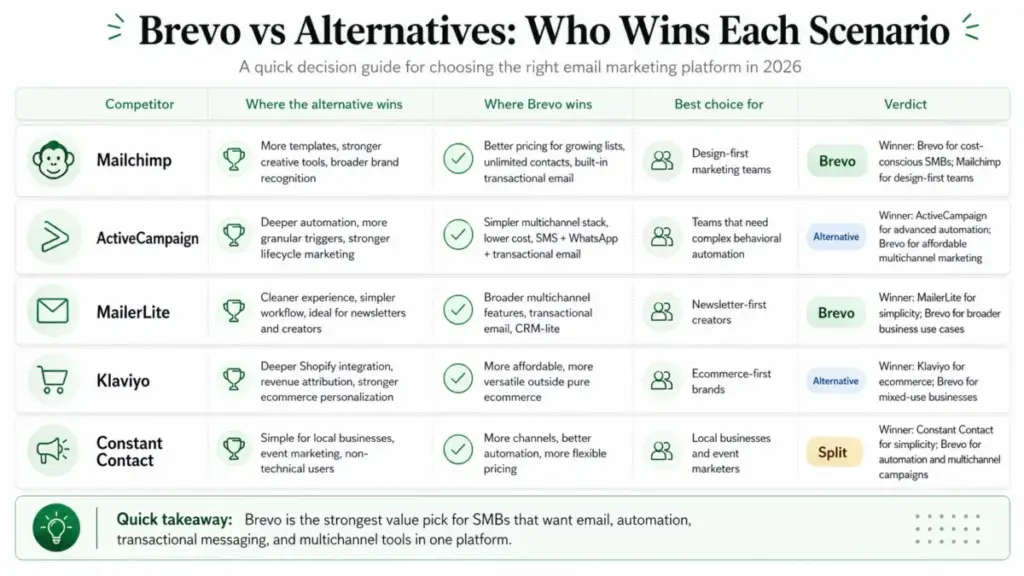
Mailchimp offers a stronger design ecosystem: more templates, better creative tools, and broader brand recognition. Brevo offers better pricing for growing lists (unlimited contacts vs. Mailchimp’s contact-based pricing) and includes transactional email that Mailchimp does not.
Winner: Brevo wins for cost-conscious SMBs with growing lists. Mailchimp wins for design-first marketing teams. Full analysis in my Mailchimp review.
Brevo vs ActiveCampaign
ActiveCampaign is the automation specialist. Its automation builder supports deeper conditional logic, more granular triggers, and CRM-like nurturing sequences. Brevo offers a simpler, more affordable multichannel stack.
Winner: ActiveCampaign wins for teams that need complex behavioral automation and lifecycle marketing. Brevo wins for teams that want adequate automation plus SMS, WhatsApp, and transactional email at a lower price.
Brevo vs MailerLite
MailerLite is cleaner, simpler, and better for creators and newsletter operators who want a focused writing and sending experience. Brevo offers broader multichannel capabilities and transactional messaging.
Winner: MailerLite wins for newsletter-first creators who want minimal complexity. Brevo wins for businesses that need email plus SMS, WhatsApp, transactional, and CRM-lite.
Brevo vs Klaviyo
Klaviyo is built for ecommerce. Its Shopify integration, revenue attribution, product recommendation engine, and behavioral segmentation are deeper than Brevo’s. Brevo is more affordable and more versatile outside pure ecommerce.
Winner: Klaviyo wins for ecommerce-first businesses, especially Shopify stores. Brevo wins for businesses that do ecommerce alongside other use cases (service, content, B2B). See the Klaviyo review for full details.
Brevo vs Constant Contact
Constant Contact is built for non-technical local businesses, event marketers, and simple newsletter senders. Brevo offers more channels, better automation, and more flexible pricing.
Winner: Constant Contact wins for local businesses running event marketing with minimal technical skill. Brevo wins for any team that needs automation or multichannel campaigns.
For a broader comparison of options across this category, see ConvertKit review and Hunter review for adjacent email tool perspectives.
Deliverability and Sending Reputation
Deliverability claims without data are meaningless, and I will not fabricate test results. Here is what I can tell you based on Brevo’s infrastructure and policies.
Brevo uses shared IP pools for most plans. Shared IPs mean your sending reputation is partially influenced by other senders on the same IP. Brevo’s account review process (the approval friction I mentioned earlier) is designed to keep bad actors off shared pools, which helps protect collective reputation.
Dedicated IP is available as an add-on on Professional ($251/year) and Enterprise (one included). A dedicated IP gives you full control over your sending reputation. For teams sending 100,000+ emails per month with consistent volume, a dedicated IP is worth the investment. For smaller senders, the shared pool with Brevo’s filtering is usually sufficient.
The Professional plan also includes 3 hours per year with a deliverability strategist, which is a rare inclusion at this price point. Enterprise gets a dedicated Customer Success Manager.
My guidance: if deliverability is mission-critical for your business (ecommerce with high revenue-per-email, financial services, healthcare communications), budget for the dedicated IP add-on or choose the Enterprise plan. For general marketing campaigns, Brevo’s shared infrastructure is adequate based on the platform’s established reputation and user base of 600,000+ customers.
Security and Compliance
Brevo addresses security and compliance with specific, verifiable measures. Based on Brevo’s security page and GDPR page:
- Server location: EU-based servers
- Data protection: Account data is encrypted before backup
- Certification: ISO 27001:2022 certified
- Regulatory support: GDPR, CASL, and CCPA compliance practices
For practical purposes, the EU server location matters for businesses operating under GDPR that want to minimize data transfer complexity. The ISO 27001:2022 certification is an internationally recognized standard for information security management.
The SSO cost context matters here. SAML SSO is a $324/month add-on on the Professional plan. It is included with Enterprise. For organizations that require SSO for security policy compliance, this add-on significantly increases the total cost of the Professional plan. If SSO is a hard requirement, factor this into your plan comparison. A $499/month Professional plan plus $324/month SSO equals $823/month before any other add-ons, which may push you toward an Enterprise conversation.
Final Verdict: Who Should Use Brevo?
After evaluating Brevo’s features, pricing, limitations, and competitive positioning, here is my final assessment.
Use Brevo if:
- Your contact list is growing faster than your send volume
- You need email, SMS, WhatsApp, and transactional email without managing multiple vendors
- You want marketing automation with unlimited contacts in workflows at $18/month
- You need a light CRM for deal tracking alongside marketing campaigns
- You are an SMB or lean marketing team that values stack simplicity over specialist depth
- You want EU-hosted infrastructure with ISO 27001:2022 certification
Do not use Brevo if:
- You need a deep sales CRM with forecasting, custom reporting, and advanced pipeline analytics
- You need enterprise-grade landing pages with complex design flexibility
- SAML SSO is a day-one requirement and you are not on Enterprise
- Template design polish and creative workflow are your top priorities
- You are a high-frequency, full-list sender (Brevo’s send-volume pricing penalizes this pattern)
- You need advanced ecommerce analytics, revenue attribution, and product personalization (Klaviyo is better)
Final Score
In this Brevo review, I score the platform 8.4 out of 10 for SMB email marketing in 2026. It delivers strong value for teams that fit its pricing model: large contact lists, moderate send volumes, and multichannel needs. The hidden add-on costs and CRM-lite limitations are real, but they do not outweigh the platform’s core strengths for its target audience.
Brevo is good enough for most SMBs. It is not the best choice for every team. That honesty is exactly what you should expect from a review.
If you want to build an automation-first stack, integrate Zapier with Brevo to extend workflows beyond what the native automation builder supports.
Frequently Asked Questions
These answers address the most common questions buyers ask about Brevo in 2026.
Is Brevo worth it in 2026?
Yes, for the right use case. Brevo is worth it for SMBs that need affordable email marketing with unlimited contact storage, built-in automation, and multichannel messaging (SMS, WhatsApp, transactional email). It is not worth it for teams that need deep CRM functionality or advanced landing page design. Score: 8.4/10.
What is Brevo used for?
Brevo is used for email marketing campaigns, marketing automation, transactional email (order confirmations, password resets), SMS and WhatsApp campaigns, CRM-lite (deal tracking, contact management), live chat, chatbot, push notifications, and landing pages. It serves as a multichannel customer engagement platform.
Is Brevo better than Mailchimp?
Brevo is better than Mailchimp for teams with large contact lists and moderate send volumes, because Brevo charges by email volume (unlimited contacts) while Mailchimp charges by contact count. Mailchimp is better for teams that prioritize design templates, creative workflow, and brand ecosystem.
How much does Brevo cost?
Brevo costs $0 on the Free plan (300 emails/day), from $9/month on Starter, from $18/month on Standard, from $499/month on Professional, and custom pricing on Enterprise. Add-ons like branding removal ($9/month), SAML SSO ($324/month), and dedicated IP ($251/year) increase the total cost. Pricing verified April 26, 2026. See the Brevo pricing page for current rates.
Does Brevo have a free plan?
Yes. Brevo’s free plan includes 300 emails per day (approximately 9,000/month), unlimited contact storage, basic email campaigns, forms, and core segmentation. It does not include automation, A/B testing, or daily-limit removal. The free plan carries Brevo branding on emails.
What are the limitations of Brevo?
Brevo’s main limitations include: limited CRM depth (not a full sales CRM replacement), limited template variety compared to Mailchimp, basic landing page builder (1 page on Standard, 10 on Professional), SAML SSO costs $324/month on Professional, AI features gated behind the $499/month Professional plan, and add-on costs (branding removal, dedicated IP, sales tools) that reduce the pricing advantage.
Is Brevo good for small businesses?
Yes. Brevo is designed for small businesses. The unlimited contact storage, affordable Standard plan ($18/month with automation), built-in transactional email, and multichannel messaging make it a strong fit for SMBs that need more than a basic newsletter tool without enterprise-level pricing.
Does Brevo include CRM?
Yes, but it is CRM-lite. Brevo includes deal pipelines, contact management, task management, meetings scheduling, live chat, and chatbot. It does not include deep sales forecasting, advanced custom reporting, or enterprise-grade pipeline analytics. Advanced sales features require the Sales Essentials add-on ($31/month).
Can Brevo send transactional emails?
Yes. Brevo includes SMTP relay and a REST API for transactional emails (order confirmations, password resets, shipping notifications, account alerts). API SDKs are available for Node.js, Python, PHP, and cURL. Transactional email is available on all plans.
Does Brevo support WhatsApp and SMS?
Yes. SMS campaigns are available as add-ons on all plans with country-based credit pricing. WhatsApp campaigns and transactional messaging are available on Professional and Enterprise plans with country-based credit pricing. Both channels can be integrated into automation workflows.
Is Brevo good for ecommerce?
Brevo is adequate for ecommerce with integrations for Shopify, WooCommerce, and BigCommerce. It supports product data sync, purchase-triggered automations, and transactional emails. However, Klaviyo offers deeper ecommerce analytics, revenue attribution, and product recommendations. Brevo is better for ecommerce businesses that also need SMS, WhatsApp, and CRM-lite. Klaviyo is better for pure ecommerce lifecycle marketing.
What are the best Brevo alternatives?
The best Brevo alternatives depend on your use case. Mailchimp for design-first email marketing. ActiveCampaign for advanced automation and lifecycle marketing. MailerLite for simple, affordable newsletters. Klaviyo for ecommerce-first email and SMS marketing. Constant Contact for non-technical local businesses and event marketing.