Most CRM software forces sales reps to juggle a dialer in one tab, an email tool in another, and a pipeline view somewhere else. Close CRM Review discussions tend to start and end with one question: can a single platform actually replace that stack without cutting corners?
A sales engagement CRM should reduce rep admin time, not create more of it. Close promises calls, SMS, email, workflows, and pipeline tracking in one workspace. In this review, I break down whether that promise holds up in 2026, what Close costs after usage fees, and which teams should pick it over competitors like Pipedrive or HubSpot. If you are comparing options, our best CRM software guide covers the broader market.
TL;DR Quick Verdict
Close CRM scores 8.4/10. It is the strongest option I have found for inside sales teams that run high-volume outbound through calls, email, and SMS. Growth ($99/seat/month annually) is the real sales-team plan. Skip Close if you need marketing automation, landing pages, or a cheap pipeline-only CRM.
Best for: SDR/BDR teams, outbound sales teams under 100 reps, founders doing cold outreach, SaaS and agency sales.
Not for: Marketing-led CRM, B2C retail, field sales routing, proposal-heavy workflows, budget pipeline tracking.
Close CRM Review Scorecard
| Category | Weight | Score | Weighted |
|---|---|---|---|
| Sales communication depth | 20% | 9.2 | 1.84 |
| Pipeline and workflow fit | 15% | 8.5 | 1.28 |
| Pricing and value | 15% | 7.5 | 1.13 |
| Ease of adoption | 15% | 8.8 | 1.32 |
| Reporting and management controls | 10% | 8.0 | 0.80 |
| Integrations and API | 10% | 8.2 | 0.82 |
| Security and compliance | 10% | 8.5 | 0.85 |
| Support and buyer risk | 5% | 7.8 | 0.39 |
| Overall | 100% | 8.4/10 |
Methodology note: This score reflects my evaluation of documented feature sets, published pricing, and third-party review evidence from G2, Capterra, and Software Advice. I follow the SaaSZap review methodology for all product assessments. I have not fabricated testing data.
Close CRM Review Verdict
Close earns an 8.4/10 because it solves one problem better than most CRM alternatives: keeping outbound sales reps inside a single tool for calling, texting, emailing, and tracking deals. That focus comes with trade-offs I will cover below.
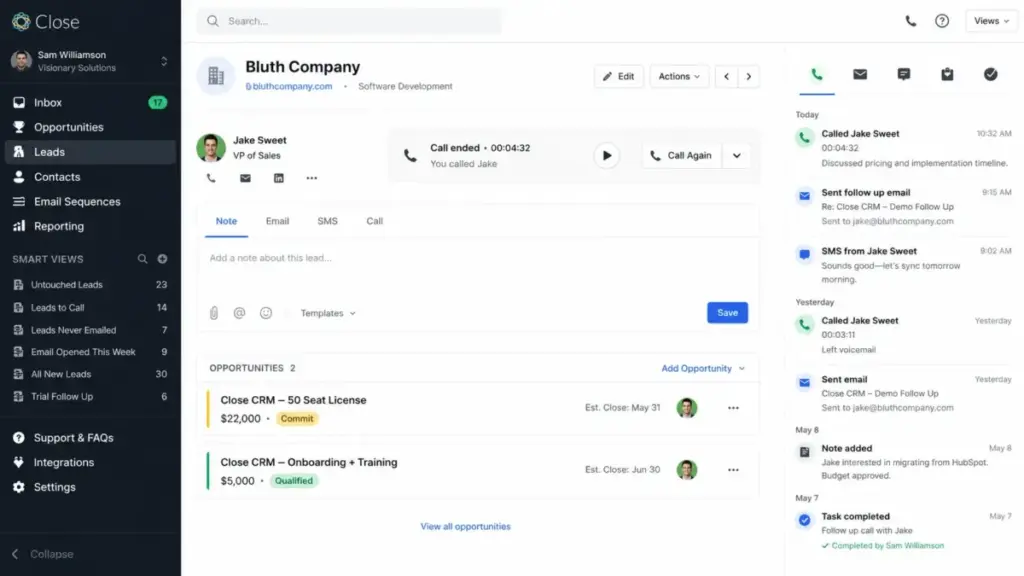
The strongest score comes from sales communication depth. Built-in calling with Power Dialer (Growth plan) and Predictive Dialer (Scale plan) means reps do not need a third-party dialer. Email sync, SMS, and a multi-channel inbox sit next to lead records. For a 5-rep outbound team making 80+ calls per day, that consolidation matters.
The weakest score is pricing and value. Close is not expensive if it replaces your dialer, SMS tool, and CRM. It is expensive if you only need deal tracking. Essentials at $35/seat/month looks affordable until you realize it lacks workflows and Power Dialer. Growth at $99/seat/month is where the real outbound features start, and that is a different budget conversation.
“It has everything, including a good dialer, emailer, SMS…” as one sales professional noted on the Close pricing page. That sums up the core appeal. But Close also has limits: no built-in proposal tools, no marketing landing pages, no field-sales routing, and usage-based costs that can surprise teams who do not read the fine print.
My editorial position: I would choose Close for a team of 3-15 SDRs running outbound calls and email sequences daily. I would not choose it for a marketing-led SaaS company that needs inbound lead capture, landing pages, and nurture campaigns. For that, HubSpot is the better fit.
What Is Close CRM?
Close is a sales engagement CRM built for teams that sell through calls, emails, SMS, and structured follow-ups. It is not a general-purpose business platform. It does not try to be.
Close positions itself as the CRM for speed and productivity. The company says its strengths include sales teams under 100 people, fast onboarding, and qualifying large lead lists. Close also openly states where it is weaker: organizations needing proposal generators, product/inventory management, marketing features like landing pages or forms, and outside-sales mapping or routing.
That honesty is unusual in CRM marketing. Most vendors claim to do everything. Close draws a clear line: this is an inside sales CRM. If your reps spend their day on the phone, writing follow-up emails, and moving leads through a pipeline, Close is built for that motion. If your team needs customer success workflows, e-commerce tracking, or content marketing tools, Close will feel incomplete.
Close serves SMB sales teams, SDR/BDR teams, founders doing outbound, agencies, SaaS teams, and sales-led service businesses. On Capterra, Close holds a 4.7 rating from 163 reviews, with users praising the clean interface and automation tools. Software Advice reviewers highlight the organized layout but cite drawbacks around B2C fit and business-hours call handling.
Close CRM Features
Close packs more sales communication tools into the CRM layer than most competitors at similar price points. Here is what matters for buying decisions, broken down by category.
Lead Management and Smart Views
Leads in Close hold contacts, opportunities, tasks, notes, and full communication history. Smart Views act as saved, dynamic filters. You can build a Smart View for “leads with no activity in 14 days” or “leads in California with open opportunities over $5,000.” This replaces the manual list-building that slows down reps in many CRMs.
Custom fields (250 across all plans) let you track data specific to your sales process. Custom activities (Growth and above) add structured logging for events like demos, site visits, or onboarding calls.
Built-In Calling, SMS, and Email
This is where Close separates from pipeline-only CRMs. Every plan includes built-in calling and SMS. You do not need a Twilio integration, a RingCentral subscription, or a separate texting tool. Calls are made and received inside the CRM. SMS messages sit in the same conversation thread as emails.
Email sync connects your inbox (3 accounts on Solo/Essentials, 10 on Growth/Scale). Emails sent and received appear on the lead record automatically. The multi-channel inbox consolidates calls, texts, and emails into one view per rep.
Call recording is included but retention varies by plan: 30 days on Solo and Essentials, 90 days on Growth, and unlimited on Scale. Teams that need recordings for compliance or coaching should factor this into their plan choice.
Power Dialer and Predictive Dialer
Power Dialer (Growth and above) auto-dials through a list of leads. When a call ends, the next number dials automatically. This removes the dead time between calls that kills SDR productivity.
Predictive Dialer (Scale only) goes further. It dials multiple numbers simultaneously and connects the rep only when someone answers. For high-volume cold-calling teams, this can double or triple connect rates per hour. But it requires Scale at $139/seat/month annually.
Both dialers depend on lead data quality. Bad phone numbers waste dialer time. The wrong data provider can make Close look worse than it is.
Workflows and Automation
Workflows start on the Growth plan. This is a critical gate. Essentials users cannot automate follow-up sequences, drip emails, or task creation based on lead activity. For many sales teams, this makes Essentials a non-starter.
Growth plan workflows support email sequences, SMS workflows, voicemail drop, task triggers, and multi-step automation. You can build a sequence that sends an email on day 1, a text on day 3, and creates a call task on day 5.
Pipeline guidance adds suggested next steps based on deal stage. Workflow performance reports show which sequences convert and which stall.
AI Features
Close has added several AI tools to Growth and Scale plans:
- Chloe AI sales agent (Growth+): An AI assistant for sales task support.
- AI Email Assistant (Growth+): Rewrites and suggests email copy.
- AI lead summaries (Growth+): Generates quick lead overviews from activity history.
- Call Assistant (add-on): Transcribes and summarizes calls. Costs $50/month per organization plus $0.02/minute.
- AI Enrich (add-on): Enriches lead and company fields at $0.05 per field per run.
The AI tools are useful but carry extra costs. I cover these in the hidden-cost section below.
Reporting and Dashboards
Close includes activity reports (calls made, emails sent, SMS sent), opportunity funnel reporting, workflow performance reports, and leaderboards (Scale only). Custom graphs are Scale-only. These reports help managers track rep activity without asking reps to self-report, which is where most CRM adoption breaks down.
Close CRM Pricing in 2026
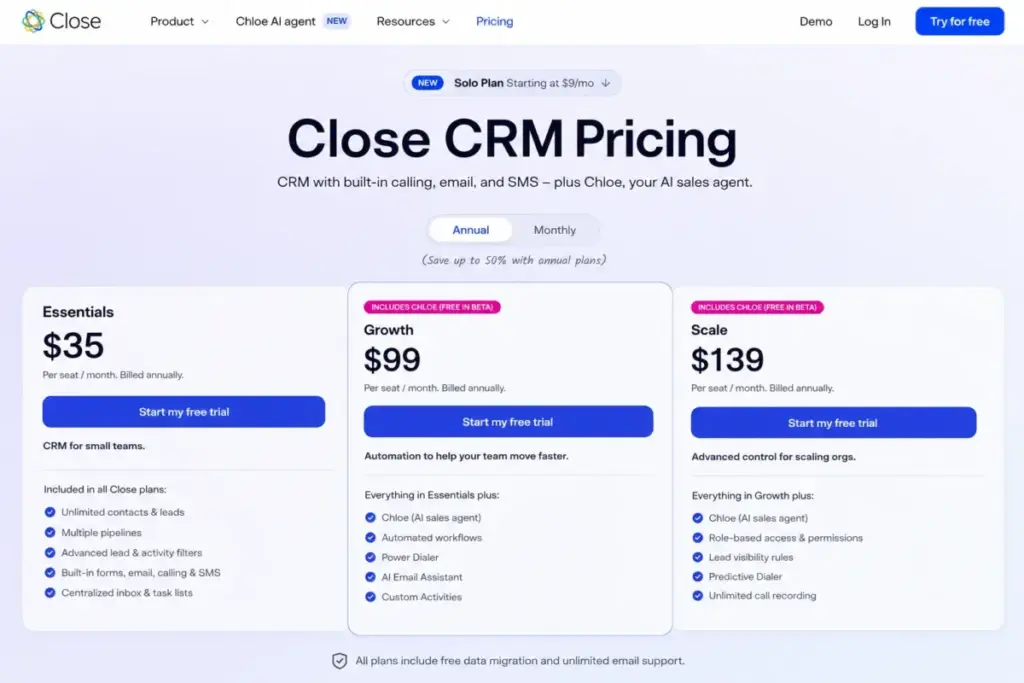
Close pricing is straightforward at the seat level but gets complicated when you add usage costs. Here is the full picture, verified as of April 26, 2026.
Close CRM Pricing Plans
| Plan | Annual Price | Monthly Price | Best For | Key Limitation |
|---|---|---|---|---|
| Solo | $9/seat/month | $19/seat/month | One-person CRM | 1 user, 10k leads, no workflows |
| Essentials | $35/seat/month | $49/seat/month | Small teams | No workflows or Power Dialer |
| Growth | $99/seat/month | $109/seat/month | Active outbound teams | Higher cost, but real sales-team tier |
| Scale | $139/seat/month | $149/seat/month | Larger sales orgs | Expensive unless coaching/control matter |
| Custom | Custom | Custom | 10+ users or complex needs | Sales conversation required |
Verified as of April 26, 2026. All prices from the Close CRM pricing page. 14-day free trial available, no credit card required.
Which Close Plan Should You Pick?
Solo is for a single founder or freelancer who needs basic CRM with calling and SMS. The 10,000-lead cap and 1-user limit make it a starter tool, not a team CRM.
Essentials works for small teams that primarily track deals and communicate through email. But the absence of workflows and Power Dialer is a hard limit. If your team does any outbound calling at volume, Essentials will feel incomplete within weeks.
Growth is the plan I recommend for most sales teams evaluating Close. It unlocks workflows, Power Dialer, Chloe AI, bulk email, email open tracking, AI lead summaries, SMS workflows, voicemail drop, and workflow reports. This is where Close becomes the all-in-one sales engagement CRM it markets itself as.
Scale adds Predictive Dialer, role-based access, lead visibility rules, custom objects, call coaching, leaderboards, and unlimited call recording. Choose Scale when you have 10+ reps and need management controls, coaching tools, or data-access rules.
What Close CRM Really Costs: Total Cost Examples
Seat pricing tells only part of the story. Here are realistic monthly cost scenarios:
3-rep team on Growth (annual billing):
- Seats: 3 x $99 = $297/month
- Calling (estimated 2,000 minutes US): ~$40-60/month
- SMS (estimated 500 messages): ~$10-15/month
- Phone numbers (3 lines): ~$3-9/month
- Estimated total: $350-380/month
5-rep team on Growth with AI Call Assistant:
- Seats: 5 x $99 = $495/month
- Calling (estimated 5,000 minutes): ~$100-150/month
- SMS (estimated 1,000 messages): ~$20-30/month
- Phone numbers (5 lines): ~$5-15/month
- AI Call Assistant: $50 + ~$100/month (5,000 min x $0.02)
- Estimated total: $770-840/month
10-rep team on Scale (annual billing):
- Seats: 10 x $139 = $1,390/month
- Calling (estimated 15,000 minutes): ~$300-450/month
- SMS (estimated 3,000 messages): ~$60-90/month
- Phone numbers (10 lines): ~$10-30/month
- AI Call Assistant: $50 + ~$300/month
- Estimated total: $2,110-2,310/month
These numbers are estimates based on documented calling and SMS usage rates. Actual costs depend on countries called, number types, and message lengths.
The Costs the Pricing Page Does Not Make Obvious
| Cost Item | Price/Rate | Applies When | Buyer Warning |
|---|---|---|---|
| Calling | Usage-based per minute | Reps call through Close | Country and number type affect rates |
| SMS/MMS | Usage-based per unit | Texting from Close | Non-English characters can reduce unit length |
| Premium Phone Numbers | $19/month per line + usage | Need IVR, routing, round-robin | Not included in seat price |
| AI Call Assistant | $50/month + $0.02/minute | Transcribing/summarizing calls | Heavy call volume can add up |
| AI Enrich | $0.05 per enriched field | Enriching lead/company fields | Bulk enrichment can become expensive |
| Additional Organizations | $50/month per org | Multiple teams/entities/sandboxes | Growth and Scale include 1 free extra org |
| A2P 10DLC | Registration + monthly fees | US business SMS | Required for US long-code A2P messaging |
Usage invoices are separate from subscription invoices. This means your finance team will see two charges from Close, not one. Plan accordingly.
Close CRM Pros and Cons
Every CRM has trade-offs. Here are the specific strengths and weaknesses I identified based on documented pricing, features, and review evidence.
- Calling, SMS, and email in one workspace. Reps do not need separate tools for each channel. This cuts tab-switching and reduces the chance of lost follow-ups.
- Built for outbound sales velocity. Power Dialer, voicemail drop, email sequences, and SMS workflows are designed for teams making 50-100+ touches per day.
- Growth plan combines the tools outbound teams actually need. Workflows, Power Dialer, AI email, bulk email, and reporting all unlock at one tier.
- Smart Views make lead prioritization practical. Dynamic filters replace manual list exports and spreadsheet sorting.
- Reporting covers calls, emails, workflows, funnels, and rep performance. Managers can track activity without relying on rep self-reports.
- API, webhooks, and 100+ integrations support sales ops. Zoom, Zapier, Calendly, Gmail, Google Calendar, Microsoft 365, Slack, HubSpot, WhatsApp, Make, Fivetran, and more connect without custom code.
- SOC 2 Type 2, GDPR, CCPA, two-factor authentication, and Google SSO. Security and compliance standards meet enterprise data-handling expectations.
- 14-day free trial, no credit card required. Low-risk evaluation for any team.
- No free plan. Solo starts at $9/seat/month annually, but there is no permanent free tier. Teams wanting free CRM should look at Freshsales or our best free CRM software list.
- Essentials lacks workflows and Power Dialer. Many sales teams expect automation and speed-dialing as baseline CRM features. Having these gated behind the $99/month Growth plan can frustrate buyers who chose Essentials assuming it was “essential.”
- Usage-based calling, SMS, AI, and phone number costs make budgeting harder. Your monthly bill depends on call volume, SMS count, countries dialed, and AI usage. Finance teams that need predictable SaaS spend may find this uncomfortable.
- Predictive Dialer, custom objects, lead visibility, and coaching controls require Scale ($139/seat/month). Teams that need management-level controls pay a premium. This is standard for CRM tiering, but the jump from Growth to Scale is noticeable.
- Not designed for marketing-led CRM workflows. No landing pages, no forms (beyond basic built-in forms on Essentials+), no marketing automation sequences, no content management. If marketing generates most of your leads, Close is the wrong tool.
- B2C and relationship-maintenance workflows feel limited. Review evidence from Software Advice and Capterra confirms that users managing ongoing customer relationships (not deal-closing motions) find Close awkward. “There’s no way to set business hours/voicemail-forward…” as one reviewer noted.
- Data cleanup at scale can be painful. Software Advice reviewers cite challenges with macro-level data management. Close works best when lead data is clean on import.
- Bad lead data reduces dialer ROI. Power Dialer and Predictive Dialer are only as good as the phone numbers in your database. Investing in Close’s dialers without investing in data quality is a mistake I see teams repeat.
Close CRM User Experience
Close is designed for fast adoption. The interface prioritizes the lead record, with calls, emails, SMS, tasks, and opportunities visible without navigating away.
Onboarding is simpler than most CRMs I have evaluated. There is no complex admin setup, no mandatory consulting engagement, and no multi-week implementation. A small team can import leads and start calling within a day. “From the dashboard to communication tools, everything is designed to be accessible and efficient,” as Software Advice’s review summary puts it.
The mobile app (iOS and Android) provides access to leads, calls, and tasks on the go. It is not a full desktop replacement, but it covers the basics for reps who travel or work outside the office.
Where the experience has friction: teams used to visual Kanban pipeline boards may find Close’s pipeline view less polished than Pipedrive’s. And reps who need heavy customization (custom modules, complex approval workflows, territory management) will hit limits faster than they would in Salesforce or HubSpot’s enterprise tiers.
The 14-day trial is the best way to evaluate fit. No credit card required, and the trial includes enough features to test calling, email sync, and workflow setup.
Security, API, and Integrations
For sales ops teams evaluating Close, security and technical capabilities matter as much as feature lists. Here is a concise summary.
Security and Compliance
Close is SOC 2 Type 2 compliant, covering security, availability, processing integrity, confidentiality, and privacy controls. Close supports GDPR and CCPA compliance. Two-factor authentication and Google SSO are available. Role-based access, custom permissions, and lead visibility rules require the Scale plan. Teams handling sensitive customer data should review the Close security page for current audit details.
API and Developer Access
API access is included across all plans. Close supports API keys and OAuth 2.0 authentication. The API handles JSON requests, pagination, webhooks, and an event log covering 30 days of changes. API rate limits are enforced per endpoint group, per organization, and per API key. If your integration hits a 429 response, use the reset and retry headers and implement exponential backoff.
This matters for teams syncing Close with data warehouses, enrichment providers, or custom sales ops tools. Review the Close API documentation and rate limit details before building.
Integrations
Close lists 100+ integrations on the integrations page. Key connections include Zoom, Segment, Zapier, Calendly, Gmail, Google Calendar, Microsoft 365, Slack, HubSpot, WhatsApp, Make, Fivetran, and Fireflies. Zapier and Make extend Close to thousands of additional apps without custom development. For teams already using Zapier or Make, Close fits into existing automation stacks.
Close CRM Alternatives
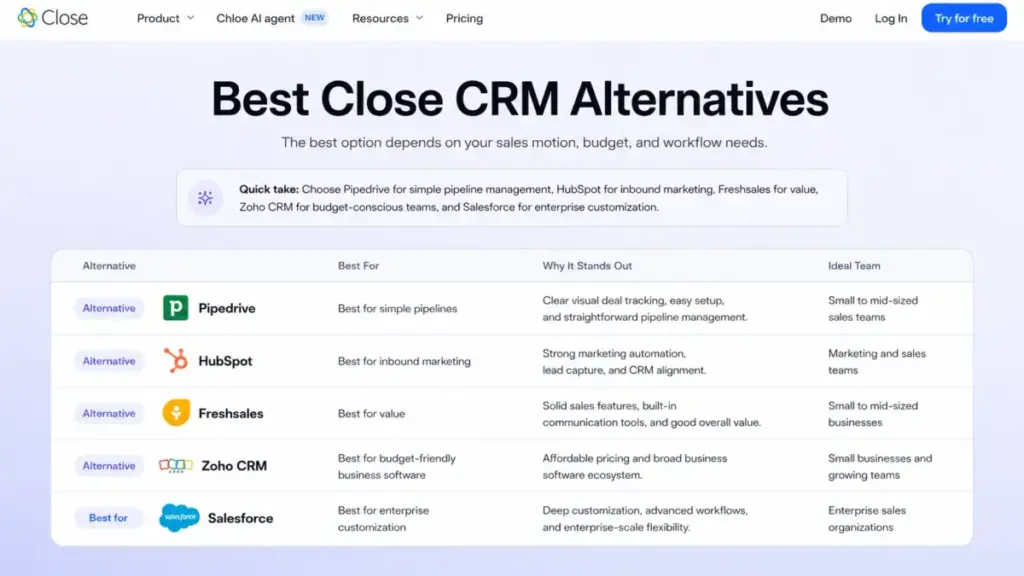
Close is strong for outbound-heavy sales teams, but it is not the right CRM for every buyer. Here is when to consider alternatives, with clear positions on each.
| Alternative | Choose It Over Close If… | Stay With Close If… |
|---|---|---|
| Pipedrive | You want cheaper visual pipeline CRM | Your reps need built-in calling and SMS |
| HubSpot Sales Hub | You need inbound marketing and CRM platform breadth | You want faster outbound call/email execution |
| Freshsales | You want lower-cost CRM with phone, chat, AI, and a free plan | Close’s dialer and workflows are central to your process |
| Zoho CRM | You need a broad business suite and budget pricing | You want simpler sales-team adoption |
| Salesforce Sales Cloud | You need enterprise customization and governance | You do not want admin-heavy CRM setup |
Teams that already understand Close’s outbound-sales strengths should use the Close CRM alternatives comparison to separate true replacement options from CRMs that only solve adjacent pipeline or marketing problems.
Best Close Alternative for Simple Pipeline: Pipedrive
Pipedrive is the better choice when your team primarily needs visual deal tracking at a lower cost. Pipedrive’s drag-and-drop pipeline is more polished than Close’s pipeline view. However, Pipedrive’s calling and SMS capabilities require add-ons, and its automation depth does not match Close’s Growth plan workflows.
Best Close Alternative for Inbound and Marketing: HubSpot
HubSpot Sales Hub wins when your sales process depends on inbound leads from content, landing pages, forms, and marketing nurture campaigns. HubSpot’s free CRM tier gives it an entry point Close cannot match. But for outbound-first teams, HubSpot’s calling and sequencing tools feel slower and more fragmented than Close’s unified workspace. For the full trade-off, read the HubSpot vs Close comparison.
Best Close Alternative for Value: Freshsales
Freshsales offers CRM with built-in phone, chat, AI lead scoring, and sales sequences starting at $9/user/month (Growth plan, annual). Its free plan supports 3 users. For price-sensitive teams that still want calling and basic automation, Freshsales delivers more per dollar. Close’s advantage is dialer depth (Power Dialer, Predictive Dialer) and SMS workflow maturity.
Best Close Alternative for Budget Suite: Zoho CRM
Zoho CRM works for teams that want broad business software (email, invoicing, support, HR) at budget pricing. Zoho’s free edition supports 3 users. The trade-off is setup complexity. Zoho CRM requires more configuration than Close for a sales-only deployment.
Best Close Alternative for Enterprise: Salesforce
Salesforce Sales Cloud is the right choice when you need deep admin control, governance, custom objects, territory management, and a massive app ecosystem. But Salesforce requires admin resources that most SMB teams do not have. If you need quick SDR adoption, Close wins on time-to-value.
For a broader comparison, see our guide to the best CRM for sales teams and best CRM for small business.
Who Should Use Close CRM?
Close fits specific sales motions well. It does not fit every team. Here is where to draw the line.
Use Close If…
- You run outbound sales with 50+ calls or touches per day per rep. The Power Dialer and multi-channel inbox save hours of manual dialing and tab-switching.
- You are a 3-15 rep SDR/BDR team. Close’s sweet spot is small-to-mid sales teams that need CRM, calling, SMS, and email in one tool without an admin team.
- You are a founder or solo seller doing cold outreach. Solo at $9/month is cheap for a CRM with built-in calling.
- You sell SaaS, services, or agency work through inside sales. The workflow and dialer features map directly to B2B outbound motions.
- You want fast CRM adoption without a consulting engagement. Close’s learning curve is shorter than Salesforce, HubSpot Enterprise, or Dynamics 365.
Do NOT Use Close If…
- Your leads come primarily from inbound marketing. Close has no landing pages, no content management, and limited form capabilities. HubSpot is the better fit.
- You need a cheap pipeline-only CRM. If you only track deals and never call from the CRM, Pipedrive or Zoho will cost less and do the job.
- You run B2C retail or e-commerce sales. Close is built for B2B deal-based selling. B2C workflows with high-volume transactions, inventory, and order management do not fit.
- You need proposals, quotes, or CPQ workflows. Close has no built-in proposal or quoting tools.
- You manage field sales with territory routing. Close has no mapping, geolocation, or route-planning features.
- You need deep enterprise customization. Custom objects are Scale-only. Complex approval chains, territory hierarchies, and multi-entity governance are better served by Salesforce.
- You need customer success and relationship-maintenance CRM. Close is optimized for closing deals, not managing ongoing post-sale relationships.
Close CRM FAQ
Here are answers to the most common questions about Close CRM in 2026.
Is Close CRM worth it in 2026?
Yes, for inside sales teams that make calls, send emails, and text leads daily. Close consolidates tools that would otherwise cost $50-150/month separately (dialer, SMS, email sequences). It is not worth it for teams that only need deal tracking or marketing-led CRM.
How much does Close CRM cost?
Close starts at $9/seat/month (Solo, annual) and goes up to $139/seat/month (Scale, annual). Monthly billing adds $10/seat on most plans. Usage-based calling, SMS, and AI costs are additional. A 5-rep team on Growth with moderate call volume should budget $770-840/month total. Pricing verified as of April 26, 2026.
Does Close CRM have a free plan?
No. Close does not offer a free plan. It offers a 14-day free trial with no credit card required. For free CRM options, consider Freshsales (free for 3 users), HubSpot (free CRM), or Zoho CRM (free for 3 users).
What is Close CRM best for?
Close is best for inside sales teams, SDR/BDR teams, and founders running outbound sales through calls, emails, and SMS. It excels when reps make 50+ daily touches and need CRM, dialer, and communication tools in one workspace.
Does Close CRM include calling and SMS?
Yes. Built-in calling and SMS are included on every plan, including Solo. However, calling and SMS are usage-based. You pay per minute for calls and per message unit for SMS, according to Twilio pricing. Phone number rental is also a separate cost.
What are Close CRM’s hidden costs?
The main hidden costs are usage-based calling (per minute), SMS (per unit), phone number rentals, AI Call Assistant ($50/month + $0.02/minute), AI Enrich ($0.05/field), Premium Phone Numbers ($19/month per line), and A2P 10DLC registration fees for US SMS. Usage invoices are billed separately from subscription invoices.
Which Close CRM plan is best?
Growth ($99/seat/month annual) is the best plan for most sales teams. It includes workflows, Power Dialer, AI email tools, bulk email, and reporting. Essentials lacks automation features that most sales teams need. Scale is worth it only when you need Predictive Dialer, coaching tools, or role-based access controls.
Is Close CRM better than Pipedrive?
Close is better for calling-heavy outbound teams that need a built-in dialer and SMS. Pipedrive is better for teams that want visual pipeline management at a lower price without needing built-in calling.
Is Close CRM better than HubSpot?
Close is better for pure outbound sales execution (calls, SMS, email sequences). HubSpot is better when your sales team needs inbound marketing, landing pages, content tools, and a broader customer platform.
What are the best Close CRM alternatives?
The best alternatives depend on your needs. Pipedrive for lower-cost pipeline CRM. HubSpot for inbound marketing and CRM breadth. Freshsales for value-priced CRM with built-in phone and AI. Zoho CRM for budget business suite. Salesforce for enterprise customization.
Final Verdict
Close CRM earns its 8.4/10 for a specific reason: it is the best CRM I have evaluated for inside sales teams that live on the phone and need calls, SMS, email, and pipeline tracking without switching tools. The Growth plan at $99/seat/month is where Close becomes the sales engagement CRM it promises to be.
But Close is not a universal CRM. Teams that need marketing automation, B2C workflows, proposal tools, or cheap deal-tracking should look elsewhere. Usage-based costs require careful budgeting. And Essentials, despite its name, is missing features most sales teams consider essential.
If your team makes 50+ outbound touches per day and wants one tool instead of three, Close belongs on your shortlist. Start with the 14-day trial and test calling, workflows, and Smart Views with your actual lead data. That will tell you more than any review can.