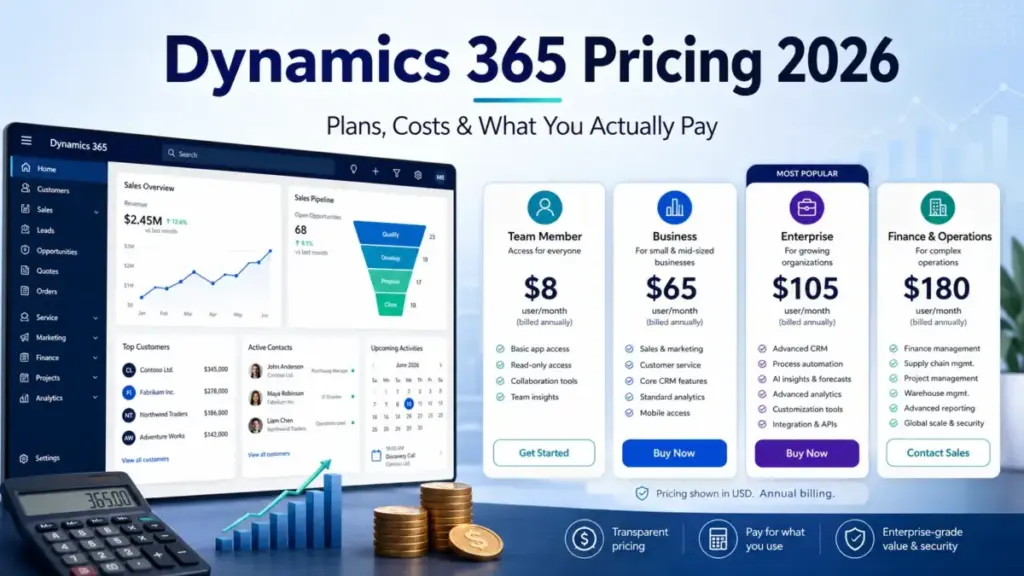
Dynamics 365 pricing starts at $50 per user per month for Customer Service Professional, but that number tells you almost nothing about what a real deployment costs. Microsoft sells Dynamics 365 as more than 20 separately licensed applications, each with its own seat price, plus attach discounts, tenant-based products, capacity packs, AI credits, and implementation fees that never appear on the sticker.
The honest starting point for most CRM buyers is Sales Enterprise at $105 per user per month, paid yearly. The plan I would build a budget around is rarely the cheapest one.
The biggest gotcha is simple: the advertised seat price is a floor, not a budget. Capacity, Copilot agents, storage, and partner implementation routinely add more than the licenses themselves.
This guide breaks down every public US price I verified on July 21, 2026, how base and attach licensing works, the costs Microsoft leaves out of the quote, and what several team structures actually pay. It sits alongside our other SaaS pricing guides but goes deeper on the licensing traps that make Dynamics 365 harder to budget than a single-plan CRM.
Quick Dynamics 365 Pricing Verdict
Here is the short version before the detail.
| Question | Answer |
|---|---|
| Advertised starting price | $50/user/month (Customer Service Professional), paid yearly |
| Lowest full CRM seat | $65/user/month (Sales Professional), paid yearly |
| Practical plan for most CRM teams | $105/user/month (Sales Enterprise), paid yearly |
| Free plan | None. Trials are generally 30 days |
| Plan I would avoid for growing teams | Sales Professional, once custom reporting or processes are needed |
| Biggest hidden cost | Implementation plus capacity add-ons (Copilot, Customer Insights capacity, Dataverse storage) |
| Best alternative if too expensive | Zoho CRM or HubSpot for CRM-only needs |
| Pricing verified | July 21, 2026 (Microsoft US pricing pages) |
Dynamics 365 is not one CRM plan you compare on a single table. It is a family of CRM and ERP applications, so the real decision is which applications each role needs, and which of those applications becomes the discounted attach license.
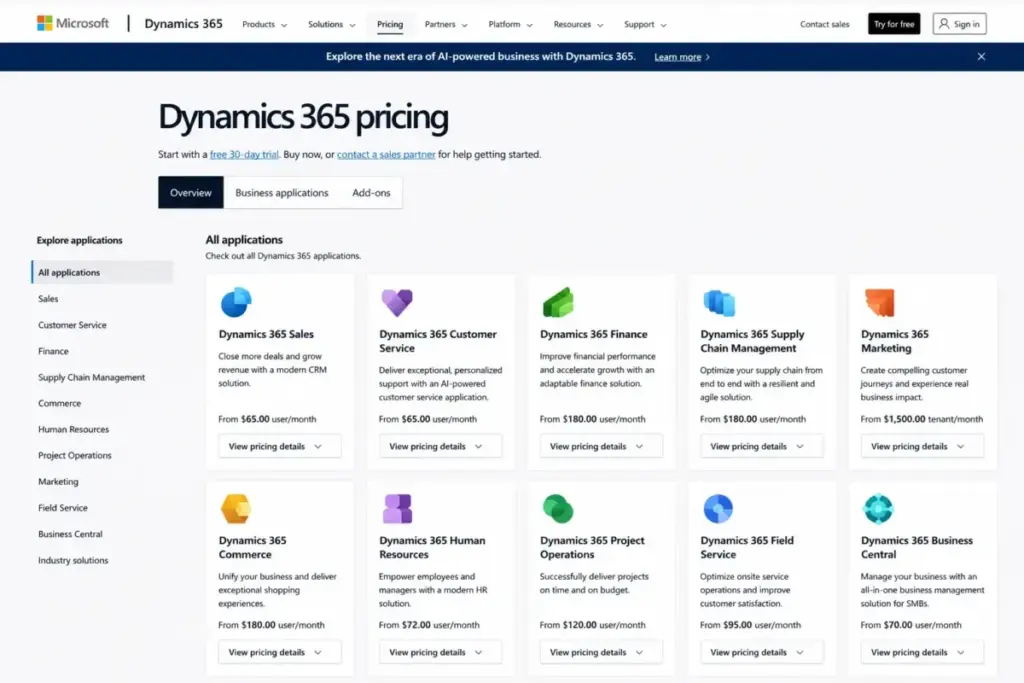
If you only need contacts, deals, and simple reporting, understand the difference between CRM and ERP first. Half of Dynamics 365 is ERP you may never touch, and paying for that platform depth is the fastest way to overspend.
The Advertised Price vs the Real Price
The advertised price is the per-seat rate on a Microsoft product page. The real price is that rate plus the second application a typical team attaches, plus the capacity and services Microsoft does not quote up front.
Here is the gap for three common deployments, using verified July 2026 list prices.
| Deployment | Advertised (per user/month) | Realistic monthly per user with attach + typical add-ons | What moves the number |
|---|---|---|---|
| CRM sales team | $105 (Sales Enterprise) | $125+ (Sales Enterprise + Customer Service Enterprise attach) | Second app attach, Copilot agent usage |
| Service + contact center | $105 (Customer Service Enterprise) | $195 (Customer Service Premium) or Enterprise + Contact Center | Voice and digital channels, IVR minutes |
| Finance + operations | $210 (Finance) | $240 (Finance + Supply Chain attach) | Invoice Capture packs, Dataverse storage, sandboxes |
None of the “realistic” numbers above include implementation, which for a multi-application rollout can exceed the first-year subscription. Microsoft does not publish one universal implementation price, so treat any partner figure as an illustrative estimate, not a Microsoft quote.
The pattern holds across the suite. The seat price is the entry ticket, and the licensing model, capacity packs, and services decide the final bill.
How Dynamics 365 Licensing Actually Works
Dynamics 365 uses base and attach licensing, and this single rule changes most budgets. Each user needs one base license, which is the full-priced qualifying application, and any additional qualifying application is a discounted attach license.
The base is normally the highest-priced qualifying app the user needs. Every other qualifying app that user runs can be added as an attach license, which the March 2026 Dynamics 365 Licensing Guide commonly prices at $20 or $30 per user per month.
That produces real savings, but only when eligibility rules are met. A user cannot buy a $20 attach license without first holding a qualifying base license, and not every combination qualifies.
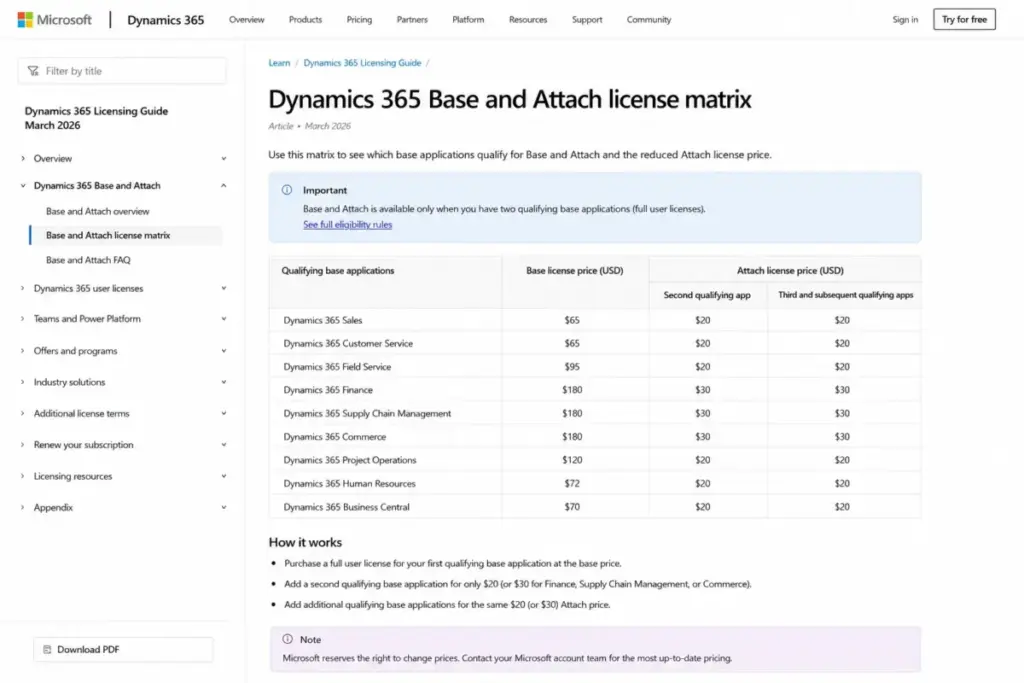
Here are three worked examples I would put in front of a buyer, all built from verified list prices and the March 2026 attach matrix.
| Base + attach combination | Base | Attach | Per user/month | Per user/year |
|---|---|---|---|---|
| Sales Enterprise + Customer Service Enterprise | $105 | $20 | $125 | $1,500 |
| Finance + Supply Chain Management | $210 | $30 | $240 | $2,880 |
| Business Central Premium + Sales Professional | $110 | $20 | $130 | $1,560 |
Confirm each combination against current Product Terms before you budget, because attach eligibility is defined by Microsoft and can change. The takeaway for planning is that a second application rarely doubles the seat cost; it usually adds $20 to $30.
There is a second licensing rule that trips up cost optimizers. Sales Professional and Sales Enterprise users cannot be deployed in the same environment. You cannot give three power users Enterprise and everyone else Professional inside one org and call it done. If you need a lighter license for occasional users, the correct lever is usually a Team Members license or a separately validated architecture, not a Professional-plus-Enterprise mix.
One more billing fact matters before the tables. Every public Dynamics 365 product-page price is a monthly rate paid yearly, not a flexible month-to-month price. Microsoft and partners can quote other subscription lengths, but the public list rate assumes an annual commitment, so read it as a 12-month contract exposure.
Dynamics 365 Pricing at a Glance
This is the complete public US price list for every currently marketed Dynamics 365 application, verified on July 21, 2026. Prices are the annual-commitment monthly rate; the annual column is that rate times 12.
| Application / tier | Monthly (per user, paid yearly) | Annual (per user) | Billing basis | Primary feature gate |
|---|---|---|---|---|
| Business Central Essentials | $80 | $960 | Per user | Manufacturing/service need Premium |
| Business Central Premium | $110 | $1,320 | Per user | Includes manufacturing + service |
| Business Central Team Members | $8 | $96 | Per user | Light use, not a full operational seat |
| Sales Professional | $65 | $780 | Per user | Hard customization caps (see below) |
| Sales Enterprise | $105 | $1,260 | Per user | Sales Insights + Copilot Credits gated to Premium |
| Sales Premium | $150 | $1,800 | Per user | Adds Sales Insights + 1,000 Copilot Credits |
| Microsoft Relationship Sales | Variable (quote) | Custom | Per user | 10-seat minimum, adds LinkedIn Sales Navigator |
| Customer Insights | $1,700 | $20,400 | Per tenant | Includes 100,000 Unified + 10,000 Interacted People |
| Customer Insights Attach | $1,000 | $12,000 | Per tenant | Needs qualifying app + 10 qualifying users |
| Customer Service Professional | $50 | $600 | Per user | Less advanced routing/admin/AI |
| Customer Service Enterprise | $105 | $1,260 | Per user | Contact Center bundle gated to Premium |
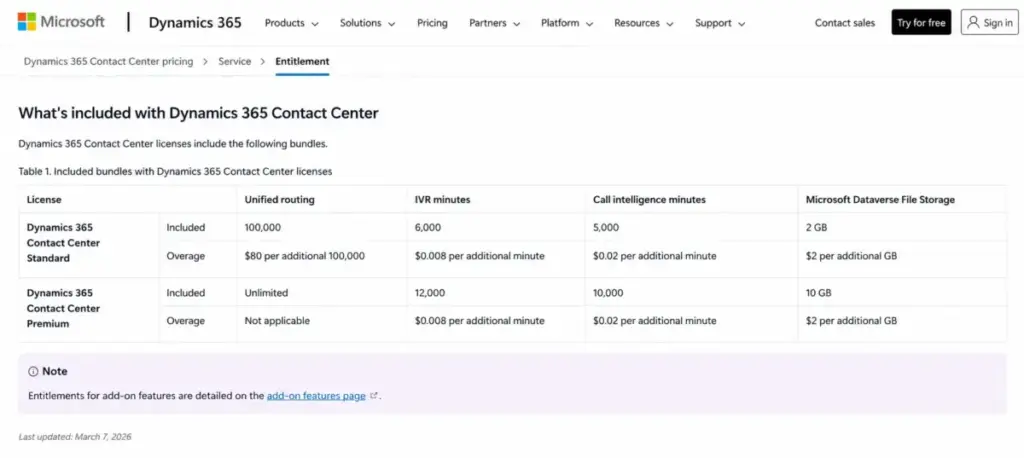
| Customer Service Premium | $195 | $2,340 | Per user | Bundles Enterprise + Contact Center Digital + Voice |
| Contact Center | $110 | $1,320 | Per user | Metered IVR/routing allowances apply |
| Contact Center Digital | $95 | $1,140 | Per user | 50 record routes/user/month, messaging may need Copilot Studio |
| Contact Center Voice | $95 | $1,140 | Per user | 2,000 IVR + 6,000 call-intelligence minutes/user |
| Field Service | $105 | $1,260 | Per user | Full work-order + scheduling |
| Field Service Contractor | $50 | $600 | Per user | Requires an existing full Field Service license |
| Finance | $210 | $2,520 | Per user | Advanced performance mgmt gated to Premium |
| Finance Premium | $300 | $3,600 | Per user | Adds advanced business performance mgmt |
| Supply Chain Management | $210 | $2,520 | Per user | Advanced planning gated to Premium |
| Supply Chain Management Premium | $300 | $3,600 | Per user | Adds advanced planning + analytics |
| Project Operations | $135 | $1,620 | Per user | Light interactions may fit Team Members |
| Human Resources | $135 | $1,620 | Per user | Full HR admin |
| Human Resources Self Service | $4 | $48 | Per user | Employee self-service only |
| Commerce | $210 | $2,520 | Per user | Web commerce needs the e-Commerce add-on |
| Commerce e-Commerce add-on | $4,000 | $48,000 | Flat (confirm unit) | Requires Commerce; confirm billing unit in quote |
Source: Microsoft US product pricing pages and the March 2026 Dynamics 365 Licensing Guide, checked July 21, 2026. The full application directory is on the Dynamics 365 pricing overview.
Two rows deserve a warning. Microsoft Relationship Sales has no fixed public price and carries a 10-seat minimum, so ignore any legacy fixed figure you see elsewhere. The Commerce e-Commerce add-on displays at $4,000 per month, but the public page renders the billing unit inconsistently, so confirm scope and unit in a written quote before you assume $4,000 flat.
The Hidden Costs Nobody Puts in the Quote
The advertised seat price is where Dynamics 365 stops being predictable. These are the costs that turn a clean per-user estimate into a bill that surprises finance.
Copilot Credits and Azure-linked AI charges
Copilot features are included with tiers like Sales Enterprise and Sales Premium, but agent execution is a separate meter. Sales Premium includes 1,000 Copilot Credits, and agents that consume beyond included capacity draw on prepaid credits or Azure pay-as-you-go.
Buying credits upfront requires an Azure subscription, and Microsoft positions prepaid commitments as a way to save relative to pure pay-as-you-go. I would not treat “AI is included” as true for anything beyond the bundled features, because agent workloads are billed by consumption, and consumption cannot be estimated without a real workload.
Customer Insights capacity, not seats
Customer Insights is priced per tenant, not per user, and its cost curve is driven by data volume. The $1,700 base includes 100,000 Unified People and 10,000 Interacted People, and everything above that is a capacity pack.
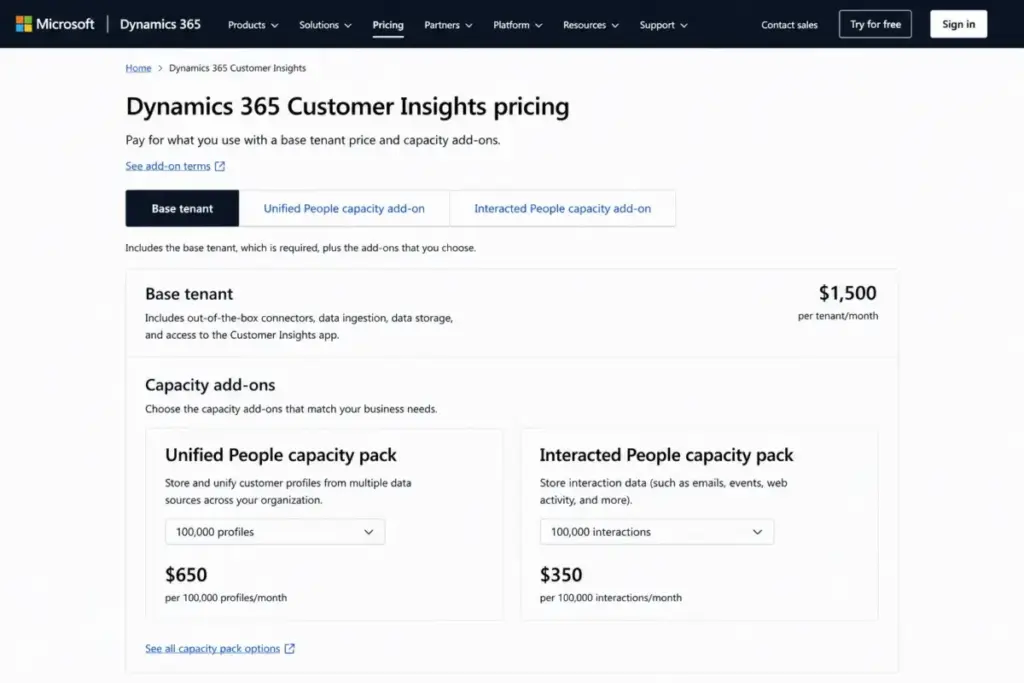
A team with 200,000 profiles and 20,000 interacted people pays $4,200 per month before tax and services: the $1,700 base, one $2,000 Unified People pack for the extra 100,000 profiles, and two $250 Interacted People packs for the extra 10,000. The lower $1,000 Attach rate looks tempting, but it requires a qualifying Dynamics application and at least 10 qualifying licensed users, so a small deployment may not be eligible and would need the $1,700 base instead.
Finance Invoice Capture transactions
Dynamics 365 Finance includes 100 Invoice Capture transactions per tenant per month, and an additional 1,000-transaction pack costs $300 per month. Capacity is purchased for peak need, and unused transactions are not banked.
Even a modest accounts-payable operation can pass 100 automated invoices in a week. Almost no ranking pricing guide surfaces this line, and it is a real, dated Finance cost.
Dataverse storage and extra environments
The seat price does not cover unlimited data or unlimited environments. Dataverse database, file, and log capacity; Operations capacity; Business Central database and extra environments; and Operations sandbox tiers can each require separately purchased capacity.
Data growth and a proper dev/test/train environment set are predictable long-term drivers. Microsoft does not publish one universal price for every capacity item, so treat these as quote-required rather than free.
Power Platform requests and API limits
Heavy automation and integration can throttle even when the app license is valid. Power Platform enforces daily API request allocations, and Dataverse enforces service-protection limits.
Microsoft documents a default reference of 52 or more concurrent requests and a 20-minute aggregate execution-time limit within a five-minute window, though limits vary by environment. A high-volume sync built without batching and retry logic will hit these ceilings, which is a design and capacity cost, not a license upgrade.
Implementation, migration, and premium support
Standard Support is included, but faster advisory support (Professional Direct or Unified Support) is separately positioned, and Business Central is excluded from Professional Direct per the March 2026 guide. Implementation, data migration, cleansing, integrations, customization, testing, training, and change management are partner services, not Microsoft list-price items.
Partner estimates for implementation range widely, from tens of thousands to several hundred thousand dollars for complex, multi-entity rollouts. I would budget implementation as its own line, separate from licenses, and never accept a single universal number as fact.
Here is the hidden-cost ledger in one place.
| Hidden cost | Price | Triggered when |
|---|---|---|
| Qualifying attach license | $20 or $30/user/month | A user needs a second qualifying app after the base |
| Customer Insights Unified People (Tier 1) | $2,000 per 100,000/month | Profiles exceed the included 100,000 |
| Customer Insights Interacted People (Tier 1) | $250 per 5,000/month | Interactions exceed the included 10,000 |
| Commerce e-Commerce add-on | $4,000/month (confirm unit) | Commerce needs web commerce |
| Finance Invoice Capture pack | $300 per 1,000/month | Finance exceeds 100 included transactions/tenant |
| Copilot Credits | Usage-based | Agents exceed included credits |
| Dataverse / Operations / BC capacity | Quote-required | Storage or environments exceed included capacity |
| Customer Voice responses | Additional packs (confirm price) | Survey volume exceeds 2,000 responses/tenant/month |
| Professional Direct / Unified Support | Not publicly disclosed | Faster response or advisory support is needed |
| Implementation and migration | Partner quote | Any real rollout, migration, or integration |
The line items above are why “Dynamics 365 costs $105 a seat” is a misleading sentence. The seat is the smallest part of a serious deployment.
Plan-by-Plan Breakdown With Feature Gates
Each application family has its own tiers and its own upgrade trigger. Here is what each plan includes, what it leaves out, and when I would avoid it.
Dynamics 365 Sales
Sales Professional at $65 is the entry CRM seat, and it is genuinely capable for straightforward pipelines. The catch is customization: the use-rights table caps Professional at five customized business processes, five custom reports/charts/dashboards, two customized forms and views, and 15 queues.
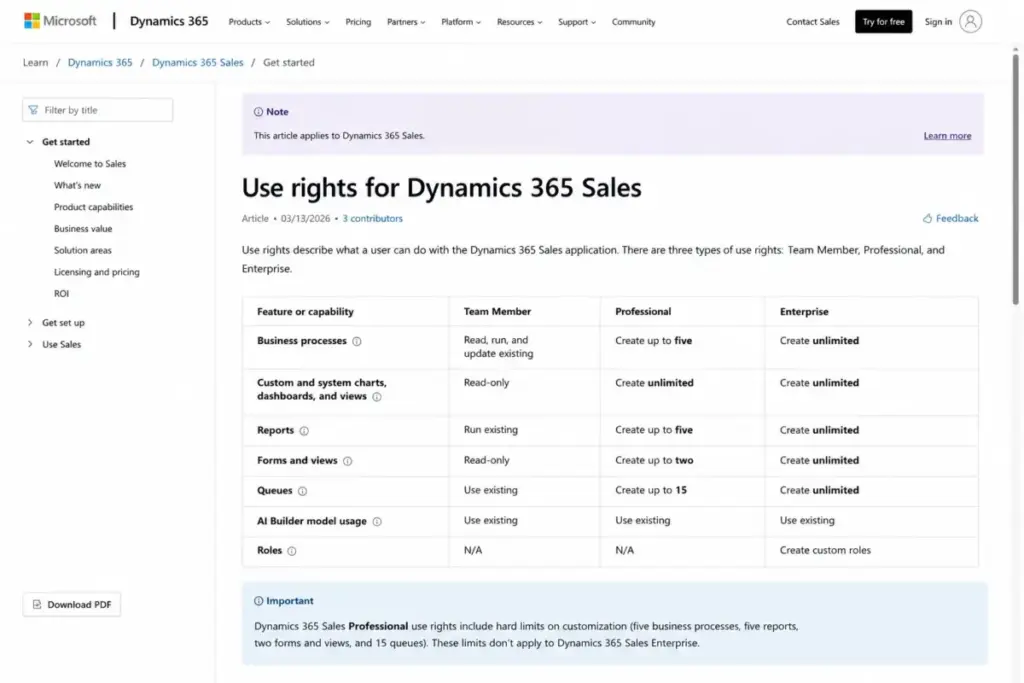
Sales Enterprise at $105 removes those caps and adds contextual insights, Copilot, and agent capabilities. Sales Premium at $150 adds Sales Insights, data enrichment, recommended actions, and 1,000 Copilot Credits. Relationship Sales is a variable-price, 10-seat-minimum edition that bundles LinkedIn Sales Navigator Advanced Plus.
I would put most revenue teams on Sales Enterprise. Professional fits a five-rep team with a simple, stable process, but the moment you need custom reporting or more than a handful of processes, you are buying Enterprise anyway. You can read our full Dynamics 365 Sales review for the workflow detail behind that verdict.
Dynamics 365 Customer Service and Contact Center
Customer Service Professional at $50 covers core case handling. Customer Service Enterprise at $105 adds advanced case management, knowledge, routing, analytics, and AI.
Customer Service Premium at $195 is the tier most tables misread. It is not just an expensive service seat; it bundles Customer Service Enterprise with Contact Center Digital and Voice rights, so evaluate it against buying those products separately rather than by its sticker.
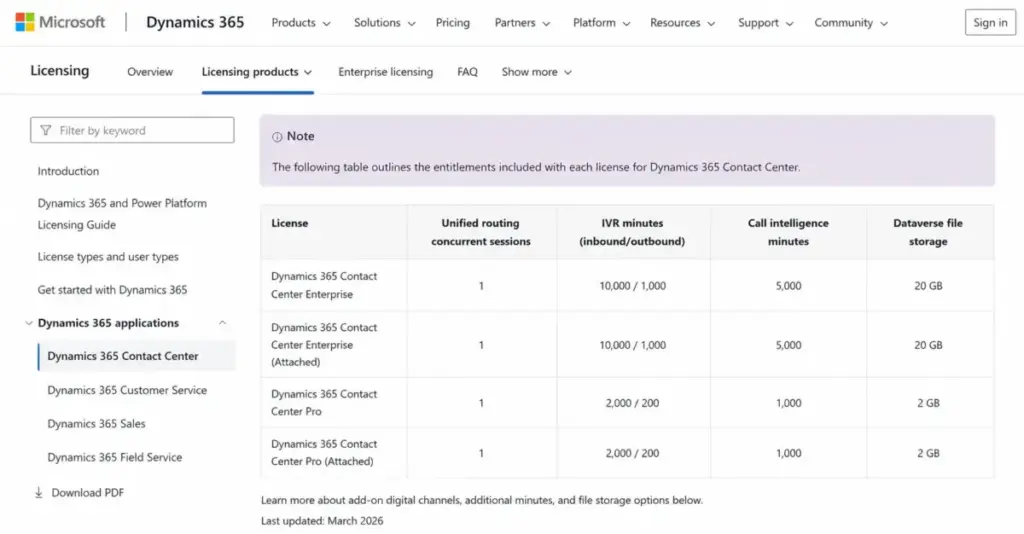
Contact Center Voice includes 2,000 IVR minutes and 6,000 call-intelligence minutes per user per month, plus 35 GB of Dataverse file storage, and Contact Center Digital includes 50 unified-routing record routes per user per month excluding chats, calls, and texts. A high-volume operation should compare projected traffic against those allowances, because overage pricing is not publicly disclosed and needs a quote.
Dynamics 365 Business Central
Business Central is the ERP most small and mid-market companies land on. Essentials at $80 covers finance, sales, purchasing, inventory, projects, and supply chain, while Premium at $110 adds manufacturing and service management.
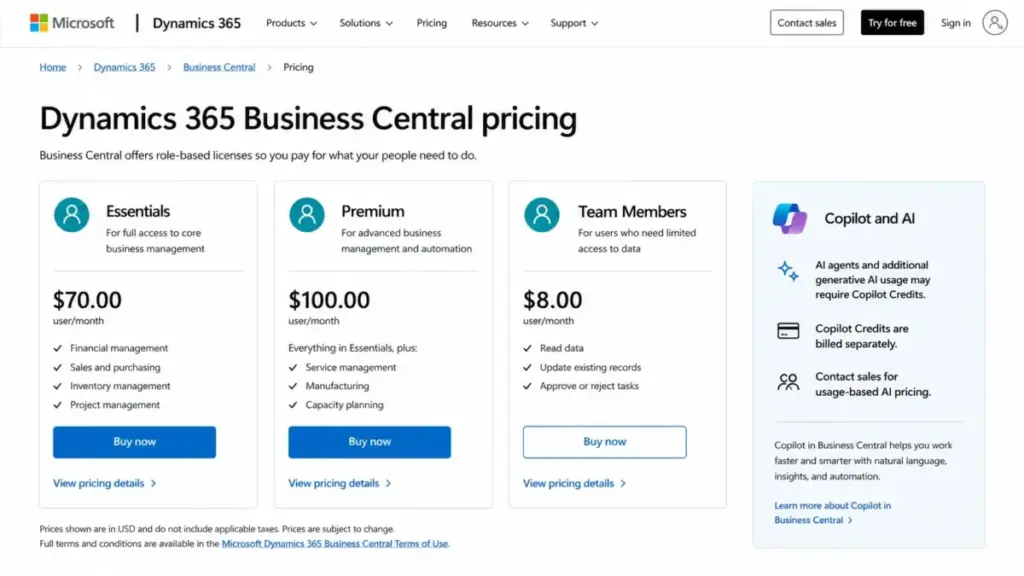
Team Members at $8 is the light-use seat for people who read data, approve, and enter time, but it is not a substitute for a full operational user. Business Central AI agents consume separately licensed Copilot Credits, so the same “AI is included” caveat applies here.
If your global or operational complexity is high, Business Central can eventually hit a ceiling that forces a disruptive move to Finance and Supply Chain. That migration risk belongs in a five-year plan, not a surprise in year three.
Dynamics 365 Finance, Supply Chain, and the rest
Finance and Supply Chain Management both start at $210, with Premium tiers at $300 that add advanced performance management and advanced planning respectively. Project Operations and Human Resources both sit at $135, and Commerce at $210 needs the separate e-Commerce add-on for web selling.
Human Resources has the most useful role split in the suite: full HR at $135 versus Self Service at $4. A company with 10 HR professionals and 90 employees who only need self-service pays for 10 full seats, not 100.
Field Service at $105 covers the full technician workflow, and the $50 Contractor tier looks like a cheap standalone plan but is not one. Contractor requires the organization to already hold a full Field Service license, so you cannot license every technician as a contractor.
Feature Gates That Disqualify a Cheaper Tier
The cheaper tier is only cheaper if it does the job. These are the gates that force an upgrade before headcount alone would.
| Capability | Available on | Gate that forces upgrade |
|---|---|---|
| Custom reporting / >5 processes | Sales Enterprise | Sales Professional caps at 5 processes, 5 reports, 2 forms/views, 15 queues |
| Sales Insights + 1,000 Copilot Credits | Sales Premium | Enterprise includes Copilot but not the 1,000-credit Sales Insights bundle |
| Bundled Contact Center Digital + Voice | Customer Service Premium | Enterprise needs separate Contact Center licenses |
| Manufacturing + service management | Business Central Premium | Essentials excludes both |
| Advanced planning / performance mgmt | Finance/SCM Premium | Standard tiers exclude the advanced modules |
| LinkedIn Sales Navigator | Relationship Sales | Only via the variable, 10-seat-minimum edition |
| Customer Insights Attach $1,000 rate | 10+ qualifying users | Smaller deployments pay the $1,700 base |
A gate is a budget event. If a team needs custom reporting, Sales Professional is not a $65 plan for them; it is a plan they will abandon, so the real cost is Enterprise from day one.
What About Free Trials?
There is no free Dynamics 365 plan. Trials are generally 30 days, which is the window Microsoft documents for evaluation.
That matters for planning because you cannot run a small paid pilot at a token price the way you can with a freemium CRM. Budget for a proper trial-to-implementation path, and expect that a real evaluation of a multi-application suite needs more than 30 days of clicking around.
If you were hoping for a permanently free tier to run a two-person pipeline, Dynamics 365 is the wrong shape. A CRM-only buyer at that size should look at the entry plans in our best sales CRM software shortlist instead.
Real Cost Scenarios: 5, 10, and 20 Users
These are arithmetic models built from verified July 2026 list prices. They exclude tax, implementation, capacity add-ons, AI overages, and support upgrades unless stated.
| Scenario | Plan | Monthly | Annual |
|---|---|---|---|
| 5 users, CRM only | Sales Enterprise ($105) | $525 | $6,300 |
| 10 users, CRM only | Sales Enterprise ($105) | $1,050 | $12,600 |
| 10 users, sales + service | Sales Enterprise + CS Enterprise attach ($125) | $1,250 | $15,000 |
| 20 users, CRM only | Sales Enterprise ($105) | $2,100 | $25,200 |
| 20 users, sales + service | Sales Enterprise + CS Enterprise attach ($125) | $2,500 | $30,000 |
The jump from CRM-only to sales-plus-service is $20 per user, not a second full seat, which is the whole point of attach licensing. That $20 attach is often the difference between a clean $25,200 and a still-reasonable $30,000 at 20 users.
Role-mixed deployments change the math more than headcount does. Here are three the top pricing results never calculate.
| Role-mixed scenario | Plan | Monthly | Annual |
|---|---|---|---|
| 30 seats: 10 BC full + 20 light | 10 Essentials ($80) + 20 Team Members ($8) | $960 | $11,520 |
| 100 seats: 10 HR + 90 self-service | 10 HR ($135) + 90 Self Service ($4) | $1,710 | $20,520 |
| 50 seats: Finance + Supply Chain | 50 × ($210 + $30 attach) | $12,000 | $144,000 |
The 100-seat HR example is the clearest lesson in the suite. Licensing 100 full HR seats would cost $13,500 per month; assigning the right role drops it to $1,710. License rights, not job titles, decide eligibility, so confirm that self-service rights actually cover those 90 employees before you model the saving.
Which Dynamics 365 Plan Should You Avoid?
I would avoid Sales Professional for any team that already knows it needs custom reporting or more than five business processes. The five-process, five-report, two-form cap is a hard ceiling, and hitting it mid-rollout means re-licensing to Enterprise and reworking configuration you already built.
Professional still fits one buyer: a small, stable sales team with a simple pipeline and no custom-reporting ambitions. If that is not you, treat the $65 price as a trap and budget Enterprise.
The second plan to watch is Customer Service Premium bought without checking the bundle math. At $195 it is worth it when you genuinely need Contact Center Digital and Voice; if you only need Enterprise-level service, you are overpaying by $90 per seat for channels you will not use.
Which Dynamics 365 Plan Should You Choose?
Match the plan to the buyer, not the marketing.
Solo operators and micro teams that only need contacts, deals, and email sync should not buy Dynamics 365 at all. The licensing overhead and implementation effort outweigh the value below roughly 10 users.
A 5-to-15-person sales team already inside Microsoft 365 should choose Sales Enterprise at $105, and add a Customer Service Enterprise attach only if reps also handle cases. A service organization should evaluate Customer Service Premium at $195 against Enterprise plus separate Contact Center licenses, using its channel volume as the tiebreaker.
A finance-led mid-market company should model Business Central Essentials or Premium with Team Members for light users, and only step up to Finance and Supply Chain when multi-entity or advanced-planning needs appear. A data-heavy marketing team should price Customer Insights by profile and interaction volume first, because seats are unlimited and capacity is the real cost.
Dynamics 365 Pricing vs Competitors
Dynamics 365 is not expensive in a vacuum; it is expensive if you buy platform depth you do not use. These are entry anchors, not feature-equivalent quotes, because a lightweight CRM seat does not cover Dynamics 365’s CRM-plus-ERP scope.
| Competitor | Entry price | Practical CRM tier | Best for |
|---|---|---|---|
| Dynamics 365 Sales | $65 (Professional) | $105 (Enterprise) | Microsoft-native sales + service + ERP |
| Salesforce | $25 (Starter Suite) | $175 (Enterprise) | Deep CRM ecosystem, heavy customization |
| HubSpot Sales Hub | $20 (Starter) | $100 (Professional) | Marketing-led teams wanting fast setup |
| Zoho CRM | $14 (Standard, annual) | $40 (Enterprise) | Cost-sensitive SMBs |
| SAP Cloud ERP / NetSuite | Sales-led / undisclosed | Quote | Full ERP without Microsoft alignment |
For CRM-only needs, Zoho CRM and HubSpot start far below Dynamics 365, and you can check current figures on our Salesforce pricing, HubSpot pricing, and Zoho CRM pricing breakdowns. Dynamics 365 wins on total value only when you actually use the Microsoft 365, Teams, Power BI, and ERP connections, which is exactly the argument in our Salesforce vs Dynamics 365 comparison.
Is Dynamics 365 Worth the Price?
Dynamics 365 is worth it if you are a 20-to-500-seat organization already standardized on Microsoft 365, Teams, Outlook, Azure, and Power BI, and you have internal admins or a partner to run Dataverse and the Power Platform. In that setup, the integration value and attach discounts justify the higher seat price and the implementation effort.
It is not worth it if you need a simple pipeline for a five-person team, if you require one fixed all-inclusive price with no capacity or AI variables, or if you cannot fund data migration, configuration, and training. In those cases the platform depth becomes a cost you pay for and never use.
If Dynamics 365 is too heavy or too expensive, a focused CRM is the better call, and our Dynamics 365 alternatives guide names the specific swaps by use case.
How to Avoid Overpaying for Dynamics 365
These are the levers I would pull before signing anything.
First, license by role, not by headcount. Map full users, light users, contractors, and self-service employees separately, because Team Members ($8), HR Self Service ($4), and Field Service Contractor ($50) can cut a bill by tens of thousands.
Second, use attach licensing deliberately. A second qualifying app is usually $20 to $30, so confirm eligibility and make the highest-priced app the base.
Third, size capacity to real volume, not fear. Customer Insights packs, Invoice Capture packs, and Dataverse storage are peak-need purchases, and unused capacity is not banked, so do not over-provision.
Fourth, separate implementation from licenses in your budget, and get partner services quoted independently. Fifth, resolve base and attach assignments before license enforcement deadlines, because Finance and Supply Chain can block sign-in for improperly licensed users. Sixth, read the public rate as an annual commitment and ask for monthly or multiyear terms in writing if you need them.
Proper CRM implementation planning is where most of the avoidable cost hides, so treat it as a budget line from the start.
How to Estimate Your Dynamics 365 Cost
Before you ask Microsoft or a partner for a quote, collect these inputs. A structured inventory reduces overlicensing and makes competing quotes comparable.
Count users by role (full, light, contractor, self-service), and list the applications each role needs. Note attach eligibility for every second app.
Record data volumes that drive capacity: customer profile count, interaction volume, monthly invoice volume, and expected API/automation throughput. Add data storage needs, the number of production and sandbox environments, and any AI agents you plan to run.
List the integrations and legacy systems you must migrate, the support level you need, and your preferred contract term. Hand that worksheet to every vendor so the quotes describe the same deployment, not five different assumptions.
Why Other Websites Show Different Prices
If you have searched Dynamics 365 pricing and seen conflicting numbers, the reason is stale content. Several prominent pages still show pre-2026 figures.
| Figure you may see | Verified July 2026 price |
|---|---|
| Business Central Essentials at $70 | $80/user/month |
| Business Central Premium at $100 | $110/user/month |
| Customer Service Enterprise at $95 | $105/user/month |
Some guides also publish a fixed Relationship Sales price, but that edition is variable and quote-based today. When a source and a Microsoft page disagree, use the dated Microsoft page, which is why every price here carries a July 21, 2026 verification date. Regional partner pages that promise “no hidden charges” also conflict with Microsoft’s own documentation of capacity packs, Copilot Credits, storage, and Invoice Capture transactions.
FAQ
How much does Microsoft Dynamics 365 cost per month?
Public prices run from $4 per user per month for Human Resources Self Service to $300 for Finance Premium and Supply Chain Premium, all paid yearly. The most-searched CRM seat, Sales Enterprise, is $105 per user per month. Customer Insights is priced per tenant at $1,700 per month. Every figure was verified against Microsoft’s US pricing pages on July 21, 2026.
Is Dynamics 365 free?
No. Dynamics 365 has no permanently free plan, and every application is a paid subscription. Microsoft offers trials that are generally 30 days for evaluation. If you need a free CRM for a very small team, a freemium product like Zoho CRM or HubSpot is a better fit than a 30-day Dynamics 365 trial that ends with a required purchase decision.
What is the cheapest Dynamics 365 license?
The cheapest license is Human Resources Self Service at $4 per user per month, followed by Business Central Team Members at $8. Both are role-limited light-use seats, not full application access. The cheapest full CRM seat is Sales Professional at $65 per user per month, though its customization caps push most growing teams to Sales Enterprise at $105.
How do Dynamics 365 base and attach licenses work?
Each user needs one base license, normally the highest-priced qualifying application they use. Any additional qualifying application is a discounted attach license, commonly $20 or $30 per user per month per the March 2026 licensing guide. So a Sales Enterprise user ($105) adding Customer Service Enterprise pays about $125 total, not $210. Attach eligibility is defined by Microsoft, so confirm each combination against current Product Terms.
Does Dynamics 365 require an annual commitment?
The public product-page prices are monthly rates paid yearly, which is an annual commitment. Microsoft and partners can quote other subscription lengths, including monthly and multiyear terms, but those rates are not consistently published. Read any advertised per-month figure as a 12-month contract exposure unless a quote explicitly states month-to-month billing.
How much does Dynamics 365 implementation cost?
Microsoft does not publish a universal implementation price, and it is not a list-price item. Partner estimates range from tens of thousands to several hundred thousand dollars, driven by scope, data migration, integrations, customization, and training. For a multi-application rollout, implementation can exceed the first-year subscription, so budget it as a separate line and treat any single number as illustrative, not a Microsoft quote.
Is Business Central included with Dynamics 365 pricing?
No. Business Central is its own separately licensed application within the Dynamics 365 family, priced at $80 (Essentials), $110 (Premium), or $8 (Team Members) per user per month. Buying a Dynamics 365 CRM application like Sales does not include Business Central, and vice versa. Some CRM and ERP combinations qualify for attach discounts, but each application is licensed and paid for on its own.
Are Dynamics 365 storage and API overages extra?
Yes. Dataverse database, file, and log storage can require separately purchased capacity beyond included tenant limits. Automation and integration workloads are also subject to Power Platform request allocations and Dataverse service-protection limits, including a documented 52-plus concurrent-request reference and a 20-minute execution window. Heavy volume can require capacity or a redesigned integration, not just a valid app license.
Is Dynamics 365 cheaper than Salesforce?
At the entry level, Salesforce Starter Suite ($25) undercuts Sales Professional ($65). At the practical tier, Sales Enterprise ($105) sits below Salesforce Enterprise ($175). But neither comparison is feature-equivalent, and Dynamics 365 total cost depends heavily on attach licensing, capacity, and implementation. For a Microsoft-native organization, Dynamics 365 is often cheaper in practice; for a CRM-only buyer, Zoho CRM or HubSpot usually costs less.
Methodology
This guide is based on official documentation and Microsoft’s US pricing pages, not a live Dynamics 365 tenant. Prices were checked against Microsoft’s product pricing pages and the March 2026 Dynamics 365 Licensing Guide on July 21, 2026. Feature gates, attach rules, capacity limits, API constraints, mobile behavior, support options, and compliance claims were checked against Microsoft product pages and Microsoft Learn. TCO scenarios are arithmetic models built from verified public list prices; they exclude taxes and any cost Microsoft does not publicly disclose. Prices and terms can change, and checkout totals vary by region, currency, tax, agreement, and channel.