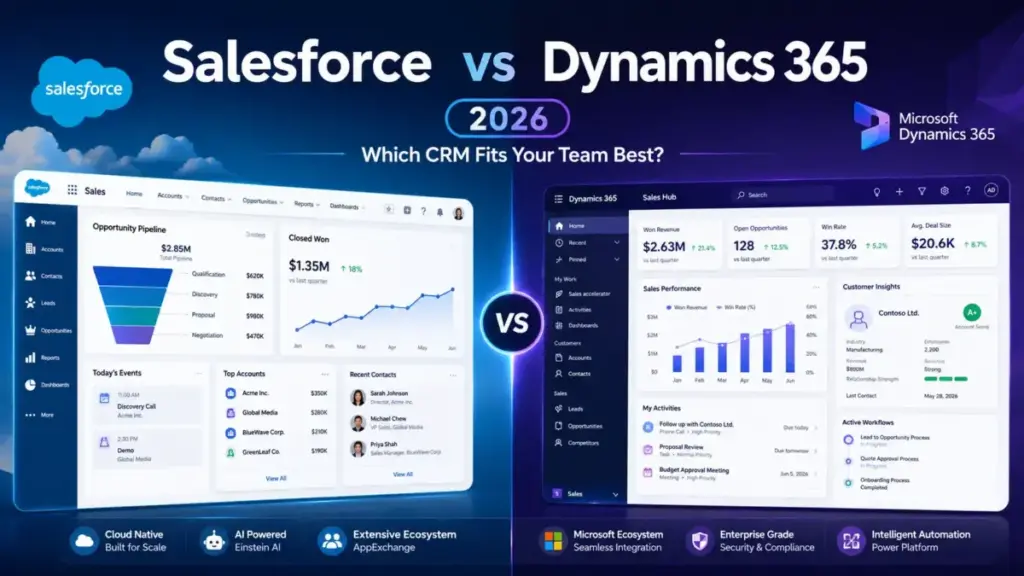
Salesforce Starter Suite costs 25/user/month.Dynamics365SalesProfessionalcosts65/user/month. At five users, Salesforce saves you $200/month before either platform adds a single line of custom code. That entry-price gap is real, and it is the first number most buyers see. It is also the least useful number in this comparison.
The real Salesforce vs Dynamics 365 decision is not which CRM has a lower starting price. It is whether your sales team needs a CRM-first revenue platform with a massive third-party app ecosystem, or a Microsoft-native sales layer that shares data, governance, and daily workflows with Teams, Outlook, SharePoint, and Power Platform.
Choose Salesforce if your team wants the lowest published entry price, deep pipeline tooling, and the broadest CRM marketplace. Choose Dynamics 365 Sales if your company already runs on Microsoft 365, Power BI, LinkedIn Sales Navigator, and Azure. I will show you where each platform wins on cost at scale, where the AI pricing gets complicated, and why migration between the two is harder than most best CRM software options roundups admit.
After evaluating 40+ CRM platforms for SaaSZap, I can tell you the pricing page rarely reflects what a 10-person sales team pays. This comparison uses official pricing verified on June 5, 2026, G2 and Capterra review patterns, and published documentation from both vendors. Alex Morrison covers what CRM software actually does and how these two platforms deliver it at different scales. I did not test either product hands-on for this article. Every claim traces to official pricing pages, product documentation, or third-party review data.
Quick Verdict: Salesforce vs Dynamics 365
| Category | Winner | Why |
|---|---|---|
| Entry pricing | Salesforce | Starter Suite at 25/user/monthvsSalesProfessionalat65/user/month |
| Microsoft ecosystem fit | Dynamics 365 | Native alignment with Teams, Outlook, Exchange, SharePoint, Power Platform |
| Third-party app ecosystem | Salesforce | Broader CRM marketplace through AgentExchange, AppExchange, MuleSoft |
| AI and automation depth | Depends | Salesforce Agentforce is deeper at high tiers; Dynamics Copilot is embedded in Microsoft workflows |
| Ease of use and adoption | Salesforce | Higher G2 scores for ease of use, setup, and support |
| Customization and extensibility | Tie | Salesforce wins CRM-native; Dynamics wins Microsoft-native |
| Security and compliance | Tie | Both offer enterprise-grade compliance (ISO, SOC, FedRAMP) |
| Cost at 50 users (entry tier) | Salesforce | 1,250/monthvs3,250/month at entry plans |
| Implementation complexity | Tie | Both are Medium to High |
What this means: Salesforce wins on more dimensions, but the categories where Dynamics 365 wins (Microsoft ecosystem, governance alignment) are decisive for organizations already standardized on Microsoft. A 50-person sales team running Outlook, Teams, and SharePoint will pay more for Dynamics 365 licenses but may spend less on integration, training, and adoption friction.
How We Compared Salesforce and Dynamics 365
This comparison evaluates Salesforce Agentforce Sales (formerly Sales Cloud) against Microsoft Dynamics 365 Sales across seven dimensions: entry pricing, AI capabilities, third-party integrations, ease of use, customization, security, and buyer fit. Pricing was verified from both official pricing pages on June 5, 2026 (as of June 2026). Testing level for both products is third-party validated. I relied on official documentation, published plan details, G2 and Capterra comparison data, and vendor compliance pages rather than hands-on product testing.
Review limitation: I did not hands-on test either product for this article. All feature claims, pricing data, and user sentiment patterns come from official vendor sources and third-party review platforms. Pricing is subject to change.
Salesforce vs Dynamics 365 at a Glance
| Dimension | Salesforce Agentforce Sales | Microsoft Dynamics 365 Sales |
|---|---|---|
| Best for | CRM-first revenue teams, pipeline depth, broad integrations | Microsoft-standardized organizations, Teams/Outlook-native workflows |
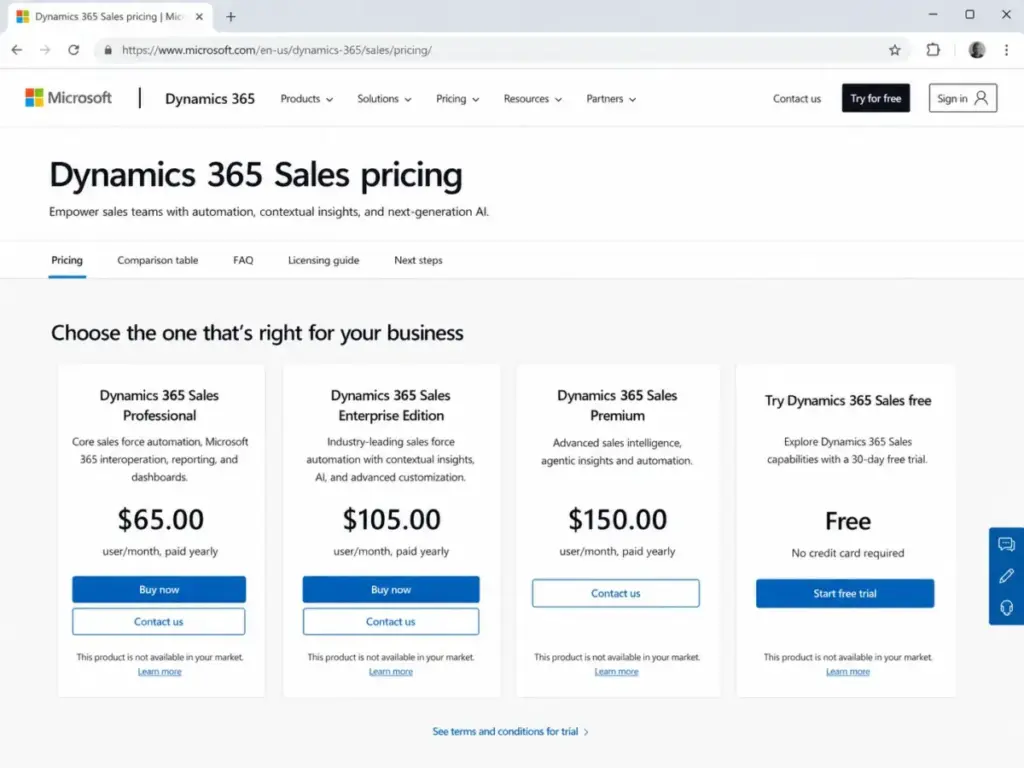
| Starting price | $25/user/month (Starter Suite) | $65/user/month (Sales Professional, paid yearly) |
| Practical sales-ready tier | Enterprise at $175/user/month | Sales Enterprise at $105/user/month |
| Free plan | No | No (free trial available) |
| AI features | Agentforce (Enterprise+), deal insights, conversation intelligence | Copilot in Dynamics 365 (Sales Enterprise+), Sales Close Agent |
| Setup difficulty | Medium to High | Medium to High |
| Main strength | CRM marketplace depth and sales pipeline maturity | Microsoft 365, Teams, Outlook, and Power Platform alignment |
| Main limitation | Add-on costs, API fees on lower plans, admin overhead | Higher entry price, limited digital selling capacity on lower plans |
| Top alternative | HubSpot CRM | Zoho CRM |
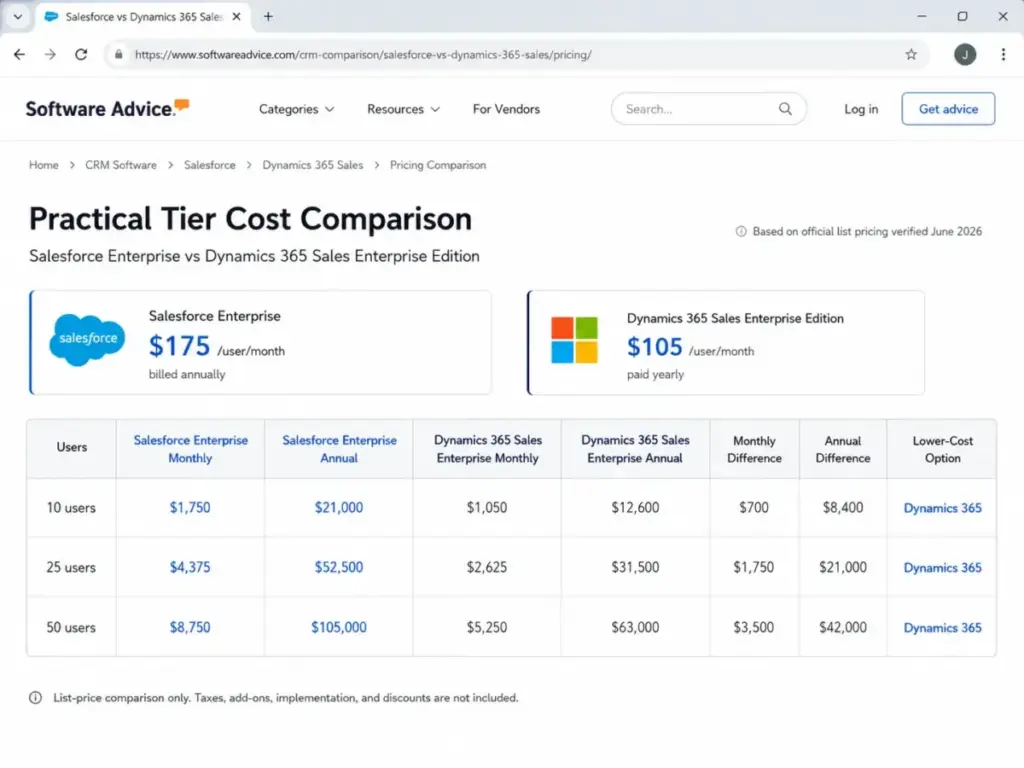
What this means: The practical tier gap is interesting. Salesforce Enterprise costs 175/user/month,whileDynamics365SalesEnterprisecosts105/user/month. At the practical tier where both platforms include AI, advanced customization, and real sales tooling, Dynamics 365 is $70/user/month cheaper. The entry price tells one story. The practical price tells the opposite.
Pipeline and Deal Management: Salesforce vs Dynamics 365
Salesforce Agentforce Sales is the stronger CRM for pipeline management, forecasting, and sales process control. Lead, account, contact, and opportunity management are core to every Salesforce edition. Forecast management, pipeline reports, and dashboards are available starting at Pro Suite (100/user/month).Advancedpipelinemanagement,dealinsights,andconversationintelligencerequireEnterpriseat175/user/month.
Dynamics 365 Sales offers sales force automation, reporting, and dashboards at Sales Professional (65/user/month).SalesEnterpriseat105/user/month adds contextual insights, AI, and advanced customization. Sales Premium at $150/user/month removes listed capacity limits for digital selling features and adds AI-powered recommended actions.
There is a capacity gate that most comparison articles skip. Dynamics 365 Sales Enterprise includes limited monthly capacity for some digital selling features: 1,500 sequence-connected records per month and 1,500 predictive scoring records per month. Sales Premium removes these listed capacity limits. A 25-person outbound team running heavy sequences will hit the Enterprise ceiling quickly. That detail alone can push a buying decision from Enterprise to Premium.
Winner: Salesforce for pipeline depth and CRM-native sales workflows. Dynamics 365 Sales is capable, but Salesforce has deeper out-of-box pipeline tooling and a more mature sales operations ecosystem.
AI Sales Workflows: Agentforce vs Copilot
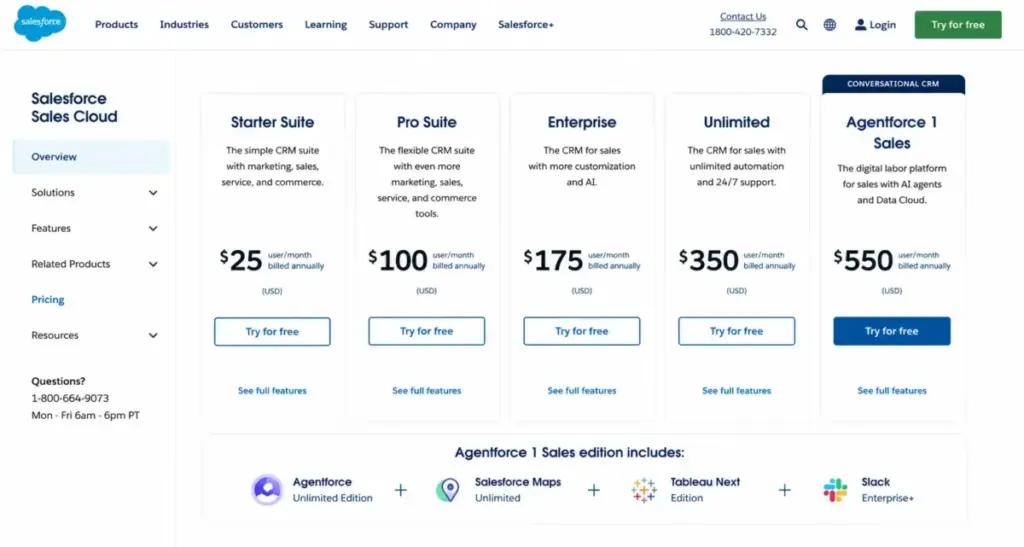
Salesforce embeds Agentforce capabilities starting at Enterprise (175/user/month).Dealinsights,conversationintelligence,andagenticworkflowsareavailableatthistier.Unlimitedat350/user/month adds predictive AI, sales engagement, and a Premier Success Plan. Agentforce 1 Sales at $550/user/month includes unmetered Agentforce usage, Salesforce Maps, Tableau Next, Slack Enterprise+, 1 million Flex Credits, and 2.5 million Data Cloud Credits per org per year.
Dynamics 365 Sales Enterprise at 105/user/monthincludesCopilotinDynamics365,theSalesCloseAgent,naturallanguageinsights,emailandmeetingassistance,andopportunitysummaries.SalesPremiumat150/user/month adds 1,000 Copilot Credits, Sales Insights, and AI-powered data enrichment.
Here is the catch. Salesforce AI pricing has a higher ceiling and a higher floor. A 10-person team wanting full Agentforce capabilities pays 5,500/monthontheAgentforce1Salesplan.ThesameteamonDynamics365SalesPremiumpays1,500/month and gets Copilot, Sales Close Agent, and 1,000 Copilot Credits. The Salesforce AI package is deeper. The Dynamics 365 AI package is more accessible per dollar.
The right pick depends on whether your AI use case demands CRM-native agentic workflows (Salesforce) or AI embedded into the Microsoft daily work surface (Dynamics 365). Neither is a clear winner because they solve different problems.
Winner: Depends. Salesforce offers higher-ceiling AI for CRM-native operations. Dynamics 365 makes AI more accessible inside Microsoft workflows at a lower price point.
Integration and Ecosystem: Mixed Stack vs Microsoft Stack
Salesforce has the broader CRM integration ecosystem. AgentExchange and the legacy AppExchange marketplace give sales teams access to thousands of third-party applications. MuleSoft handles integrations not covered by built-in connectors. Email integration supports Gmail and Outlook. Higher plans add Slack, Tableau, Salesforce Maps, and Data Cloud. For a sales team running a mixed SaaS stack (Slack, Google Workspace, multiple point solutions), Salesforce connects more easily to more tools.
Dynamics 365 Sales is built around the Microsoft stack. Microsoft 365, Teams, Outlook, Exchange Online, SharePoint, LinkedIn Sales Navigator, Power Platform, and Dataverse are native integrations. Azure and Copilot Studio extend the platform. For an organization standardized on Microsoft, Dynamics 365 eliminates the integration layer entirely. The CRM lives inside the tools the team already uses.
G2 comparison data shows Salesforce Agentforce Sales rated higher than Dynamics 365 Sales for overall score, ease of use, ease of setup, support, and product direction. That tracks with what I see across CRM evaluations: Salesforce has a larger user base contributing to review data and a more mature third-party ecosystem. Dynamics 365 reviewers praise Microsoft compatibility, security, and customization while flagging complex pricing and setup time.
Winner: Salesforce for mixed-stack integrations and third-party marketplace depth. Dynamics 365 for Microsoft-native organizations where the integration is already built in.
Pricing and Value per Dollar
Pricing verified from official sources on June 5, 2026 (as of June 2026).
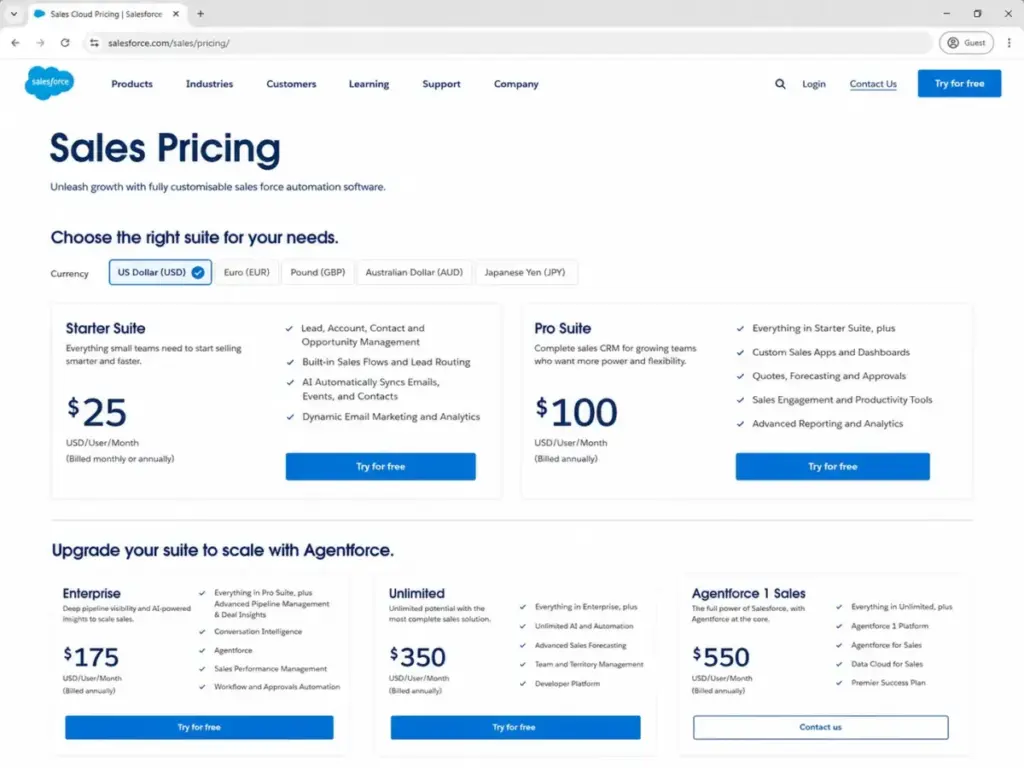
Salesforce Agentforce Sales Plans
| Plan | Price | Billing | What you get |
|---|---|---|---|
| Starter Suite | $25/user/month | Monthly or annual | Core CRM, lead routing, email/event/contact sync, analytics |
| Pro Suite | $100/user/month | Annual | Greater customization, automation, quoting, forecasting |
| Enterprise | $175/user/month | Annual | Advanced pipeline, deal insights, Agentforce, web API |
| Unlimited | $350/user/month | Annual | Predictive AI, sales engagement, Premier Success Plan |
| Agentforce 1 Sales | $550/user/month | Annual | Unmetered Agentforce, Salesforce Maps, Tableau Next, Slack Enterprise+ |
Dynamics 365 Sales Plans
| Plan | Price | Billing | What you get |
|---|---|---|---|
| Free trial | Free | Trial | Official trial |
| Sales Professional | $65/user/month | Annual | Core automation, Microsoft 365 interop, reporting |
| Sales Enterprise | $105/user/month | Annual | Contextual insights, AI, Copilot, Sales Close Agent |
| Sales Premium | $150/user/month | Annual | 1,000 Copilot Credits, Sales Insights, AI data enrichment |
| Microsoft Relationship Sales | Custom | Contact sales | Sales Enterprise + LinkedIn Sales Navigator, 10-seat minimum |
Cost at Scale (Entry Tier Comparison)
| Team size | Salesforce (Starter Suite) | Dynamics 365 (Sales Professional) | Winner |
|---|---|---|---|
| 5 users | $125/month | $325/month | Salesforce |
| 10 users | $250/month | $650/month | Salesforce |
| 25 users | $625/month | $1,625/month | Salesforce |
| 50 users | $1,250/month | $3,250/month | Salesforce |
What this means: The entry-tier math is clear. Salesforce Starter Suite is materially cheaper at every team size compared to Dynamics 365 Sales Professional. A 50-person team saves $2,000/month on license fees alone by choosing Salesforce’s entry plan. But entry-tier pricing is misleading for teams that need API access, AI features, or advanced automation. Those features require higher plans where the gap narrows or reverses.
Cost at Scale (Practical Tier Comparison)
The practical tier is where the comparison shifts. A sales team that needs AI, advanced customization, and real pipeline tools will compare Salesforce Enterprise at 175/user/monthagainstDynamics365SalesEnterpriseat105/user/month.
| Team size | Salesforce (Enterprise) | Dynamics 365 (Sales Enterprise) | Winner |
|---|---|---|---|
| 10 users | $1,750/month | $1,050/month | Dynamics 365 |
| 25 users | $4,375/month | $2,625/month | Dynamics 365 |
| 50 users | $8,750/month | $5,250/month | Dynamics 365 |
What this means: At the practical tier, Dynamics 365 Sales Enterprise is 70/user/monthcheaperthanSalesforceEnterprise.Fora50−userteam,thatis3,500/month or $42,000/year in license savings. The common claim that Salesforce is always more expensive and Dynamics is always cheaper is too simple. Entry pricing favors Salesforce. Practical-tier pricing favors Dynamics 365.
Hidden Costs That Change the Math
Salesforce Hidden Costs
| Cost area | Detail | Who should care |
|---|---|---|
| Web Services API | Additional $25/user/month on lower editions | Teams needing integrations on Starter or Pro Suite |
| Premier Success Plan | 30% of net license fees (unless bundled with Unlimited) | Any team that needs dedicated support |
| Agentforce add-on | From $125/user/month as add-on | Teams wanting AI on plans below Agentforce 1 Sales |
| Revenue Cloud and add-ons | Separate costs for Revenue Intelligence, Sales Programs, Partner Management | Enterprise sales operations teams |
| Annual contracts | Most products require annual billing | Budget planning for cash flow |
| Implementation costs | Can exceed license delta for complex deployments | Teams migrating from another CRM |
Dynamics 365 Hidden Costs
| Cost area | Detail | Who should care |
|---|---|---|
| Microsoft Relationship Sales | Variable pricing, 10-seat minimum, contact sales | Teams needing LinkedIn Sales Navigator integration |
| Digital selling capacity limits | Sales Enterprise has listed monthly limits; Sales Premium removes them | High-volume outbound teams |
| Copilot Studio | Azure subscription required; pre-purchase or pay-as-you-go | Teams building custom AI agents |
| Power Platform request limits | 40,000 requests/user/24 hours for licensed Dynamics 365 users | High-volume automation and integration teams |
| Data migration and implementation | Power Platform, Power BI, LinkedIn Sales Navigator add cost | Complex enterprise deployments |
What this means: Both platforms have cost layers beyond the license price. Salesforce’s hidden costs tend to show up as add-on fees (API access, success plans, AI modules). Dynamics 365’s hidden costs tend to show up as capacity limits and Azure consumption. A 25-person team running heavy Salesforce automations with Premier support and API access could easily add $50-75/user/month to the published license price. A Dynamics 365 team pushing Copilot Studio and Power Platform beyond base allocations faces usage-based costs that are harder to predict upfront.
Setup, Migration, and Switching Risks
Both Salesforce and Dynamics 365 carry Medium to High onboarding complexity. Neither is a plug-and-play CRM for a team with custom sales processes.
Switching between the two is harder than most comparison articles acknowledge. Migration from Salesforce to Dynamics 365 (or the reverse) is not a data import job. It is a business-process rebuild. Key migration work includes cleaning accounts, contacts, leads, opportunities, activities, custom fields, automations, reports, permissions, integrations, and user workflows.
Salesforce exports and Dynamics/Dataverse imports can support data movement. But workflows, Apex logic, Power Platform automations, custom objects, security roles, reports, and integrations need remapping and rebuild work. A realistic CRM migration timeline for a 25-person team with custom processes is 3-6 months, not 3-6 weeks.
| Migration direction | Difficulty | Main risk |
|---|---|---|
| Salesforce → Dynamics 365 | High | Apex and workflow logic has no 1:1 Dynamics equivalent |
| Dynamics 365 → Salesforce | High | Power Platform automations and Dataverse customizations need full rebuild |
What this means: If you are on one platform and considering a switch, factor the migration cost into your total cost of ownership. For a 25-person team, migration consulting, data cleanup, automation rebuild, and retraining can cost more than a full year of license fees on either platform. The switching cost is high enough that platform selection matters more at the start than it does after 18 months of use.
Where Salesforce Wins
Salesforce is the stronger choice in these scenarios:
- Lowest published entry price. Salesforce Starter Suite at 25/user/monthis40/user/month cheaper than Dynamics 365 Sales Professional.
- Broadest third-party app marketplace. AgentExchange, AppExchange, and MuleSoft give Salesforce a larger integration ecosystem for mixed-SaaS environments.
- CRM-first pipeline and forecast tooling. Salesforce was built as a sales CRM. Pipeline management, forecasting, and opportunity workflows are deeper out of the box.
- Ease of use and adoption risk. G2 and Capterra review patterns show higher ease-of-use and setup scores for Salesforce versus Dynamics 365 Sales.
- High-ceiling AI and revenue workflows. Agentforce 1 Sales at $550/user/month includes unmetered AI, Salesforce Maps, Tableau Next, and 2.5M Data Cloud Credits. No Dynamics 365 plan matches that breadth.
Where Dynamics 365 Wins
Dynamics 365 Sales is the stronger choice in these scenarios:
- Microsoft-standardized organizations. If your team lives in Outlook, Teams, SharePoint, Power BI, and Excel, Dynamics 365 removes the integration layer entirely.
- Practical-tier pricing. Dynamics 365 Sales Enterprise at 105/user/monthis70/user/month cheaper than Salesforce Enterprise. At 50 users, that is $42,000/year.
- LinkedIn Sales Navigator alignment. Microsoft Relationship Sales bundles Dynamics 365 with LinkedIn Sales Navigator. No Salesforce plan includes that natively.
- Power Platform extensibility. Dataverse, Power Automate, and Power Apps give Dynamics 365 teams low-code customization tied to their existing Microsoft governance.
- Copilot embedded in daily work. Copilot in Dynamics 365 works inside Teams, Outlook, and the CRM surface. For sales reps who live in Outlook, AI assistance appears where they already work.
Who Should Choose Salesforce
Choose Salesforce Agentforce Sales if:
- Your 5-person startup needs a CRM at the lowest published license cost. Salesforce Starter Suite at $25/user/month covers core CRM, lead routing, and email sync.
- Your sales operations team needs deep pipeline management, forecast control, and a large third-party app marketplace. No CRM matches Salesforce’s ecosystem breadth.
- Your tech stack is mixed (Slack, Google Workspace, multiple SaaS tools) and you need a CRM that connects to everything. AgentExchange and MuleSoft handle this.
- Your organization wants high-ceiling AI and revenue workflows. Agentforce capabilities, deal insights, and conversation intelligence are available from Enterprise upward.
- Your team values a CRM with higher ease-of-use scores and broader community support. G2 data favors Salesforce on adoption metrics.
Who Should Choose Dynamics 365
Choose Microsoft Dynamics 365 Sales if:
- Your company already runs on Microsoft 365, Teams, Outlook, SharePoint, and Azure. The CRM shares the same data layer, governance, and admin surface.
- Your 25-person midmarket team wants enterprise CRM features at a lower practical-tier price. Dynamics 365 Sales Enterprise at $105/user/month delivers AI, customization, and Copilot.
- Your sales reps need LinkedIn Sales Navigator integrated natively with their CRM and email workflows. Microsoft Relationship Sales bundles this.
- Your IT team prefers Power Platform and Dataverse for custom business applications. Extending the CRM with Power Automate and Power Apps is native, not bolted on.
- Your organization values a single vendor for CRM, ERP, collaboration, and business intelligence. Dynamics 365 fits into the broader Microsoft Dynamics and Azure architecture.
Who Should Avoid Both
Avoid both Salesforce and Dynamics 365 if:
- Your team has fewer than 5 people and needs a simple, low-admin CRM. Both platforms carry administration overhead that does not justify the cost for very small teams. Consider a simpler CRM like Pipedrive or Less Annoying CRM.
- You want a CRM with minimal setup, no dedicated admin, and no implementation project. Both Salesforce and Dynamics 365 are Medium to High complexity. A Pipedrive CRM evaluation covers a simpler alternative for pipeline-focused teams.
- Your budget is under $30/user/month and you need more than basic contact management. Neither platform delivers advanced features at that price point. HubSpot’s free CRM or Zoho CRM’s lower tiers may be better fits.
- You need a specialized sales engagement tool (outbound sequencing, dialer, email tracking) more than a full CRM platform. Dedicated tools like Close CRM or Apollo handle that workflow without the overhead of enterprise CRM.
Alternatives to Salesforce and Dynamics 365
| Alternative | Best for | Starting price | Why consider |
|---|---|---|---|
| HubSpot CRM | Small and midmarket teams wanting easier adoption and marketing alignment | Free (Starter at $20/seat/month) | Easier onboarding, built-in marketing tools, strong free tier |
| Zoho CRM | Budget-conscious teams wanting a broad business suite | $14/user/month | Lower cost than both Salesforce and Dynamics 365 with solid CRM features |
| Pipedrive | Sales teams needing pipeline management without enterprise complexity | $14/user/month | Visual pipeline, fast setup, minimal admin overhead |
What this means: If neither Salesforce nor Dynamics 365 fits your team size, budget, or technical capacity, these three alternatives cover the most common exit paths. HubSpot fits the marketing-sales alignment gap. Zoho fits the budget gap. Pipedrive fits the simplicity gap. For a detailed comparison of the most common alternative matchup, see our HubSpot vs Salesforce comparison.
Final Verdict: Salesforce vs Dynamics 365
There is no universal winner. The right pick depends on your existing tech stack, team size, and where you want AI to live in your sales workflow.
Choose Salesforce if your team needs the lowest entry price, the broadest CRM app ecosystem, deep pipeline and forecast tooling, or high-ceiling AI through Agentforce. The total cost rises steeply when you add API access, Premier Support, and premium AI modules, but the CRM depth is hard to match.
Choose Dynamics 365 Sales if your organization already runs on Microsoft 365, Teams, Outlook, SharePoint, Power Platform, and Azure. The practical-tier price is lower, Copilot lives inside the tools your reps already use, and Power Platform extensibility gives IT teams low-code options without leaving the Microsoft governance surface.
Avoid both if your team needs a simple, low-admin CRM. A 3-person sales team does not need Salesforce Enterprise or Dynamics 365 Sales Premium. Start with a tool that fits your current headcount and budget, and plan your migration when you outgrow it. A Zoho CRM analysis covers the budget-friendly alternative in depth.
For a closer look at the CRM most often compared against Dynamics 365, our Salesforce CRM evaluation covers the single-product details this comparison cannot.
Capterra review patterns praise Salesforce’s customization, sales management, and analytics depth, while flagging cost and learning curve. Capterra review patterns praise Dynamics 365 for Microsoft compatibility, security, and CRM management, while flagging complex pricing and setup time. Both platforms serve their ideal buyer well. The question is which buyer you are.
FAQ
Is Salesforce better than Dynamics 365 for small sales teams?
Salesforce has a lower entry price at 25/user/monthversus65/user/month for Dynamics 365 Sales Professional. For a 5-10 person team that needs core CRM without Microsoft 365 dependency, Salesforce Starter Suite is the cheaper and simpler starting point. G2 review patterns also show Salesforce scoring higher on ease of use and setup compared to Dynamics 365 Sales.
Is Dynamics 365 cheaper than Salesforce at the enterprise tier?
Yes, at the practical tier. Dynamics 365 Sales Enterprise costs 105/user/monthversusSalesforceEnterpriseat175/user/month. At 50 users, that is 3,500/monthor42,000/year in license savings for Dynamics 365. Entry-tier pricing tells the opposite story because Salesforce Starter Suite starts lower.
Which CRM has better AI for sales reps in 2026?
It depends on where your reps work. Salesforce Agentforce offers deeper CRM-native AI at Enterprise and above, including deal insights, conversation intelligence, and unmetered agentic usage on the 550/user/monthplan.Dynamics365embedsCopilotintoTeams,Outlook,andtheCRMatSalesEnterprise(105/user/month), making AI more accessible inside Microsoft workflows at a lower price.
Does Dynamics 365 Sales include Copilot?
Yes. Copilot in Dynamics 365, the Sales Close Agent, natural language insights, email assistance, meeting assistance, and opportunity summaries are included in Sales Enterprise at 105/user/month(asofJune2026).SalesPremiumat150/user/month adds 1,000 Copilot Credits and removes listed digital selling capacity limits.
Does Salesforce include Agentforce?
Agentforce capabilities, deal insights, and conversation intelligence are included starting at Salesforce Enterprise at 175/user/month(asofJune2026).UnmeteredAgentforceusagerequiresAgentforce1Salesat550/user/month, which also bundles Salesforce Maps, Tableau Next, and Slack Enterprise+.
Which CRM is better for companies already using Microsoft Teams and Outlook?
Dynamics 365 Sales is built around Microsoft Teams, Outlook, Exchange Online, and SharePoint. Salesforce integrates with Outlook and Gmail, but the integration is an add-on rather than native architecture. If your sales reps live in Outlook and Teams for daily communication, Dynamics 365 eliminates the context-switching cost. Our Dynamics 365 Sales evaluation covers this integration depth in detail.
Can you migrate from Salesforce to Dynamics 365?
Yes, but migration difficulty is High. It requires a business-process rebuild, not a data import. Key work includes cleaning accounts, contacts, leads, opportunities, custom fields, automations, reports, permissions, and integrations. Apex logic has no direct Dynamics equivalent. Plan 3-6 months for a 25-person team with custom workflows.
Can you migrate from Dynamics 365 to Salesforce?
Yes, but migration difficulty is equally High. Power Platform automations, Dataverse customizations, security roles, and custom objects need full rebuild in the Salesforce environment. Data export from Dataverse and import to Salesforce is possible, but workflow logic, report structures, and user permissions need remapping.
Which CRM has better integrations for a mixed SaaS stack?
Salesforce. AgentExchange, AppExchange, and MuleSoft give Salesforce the broadest CRM integration marketplace. For teams using Slack, Google Workspace, and multiple point solutions, Salesforce connects to more third-party tools out of the box. Dynamics 365 integrations are deeper within the Microsoft stack but narrower outside it. For broader CRM ecosystem context, see the best CRM for sales teams roundup.
Which CRM is easier to implement, Salesforce or Dynamics 365?
Both carry Medium to High implementation complexity. Salesforce’s learning curve and admin overhead are well-documented in user reviews. Dynamics 365’s setup time and pricing complexity are flagged in Capterra patterns. For a simple sales pipeline without deep customization, a lighter CRM like Pipedrive’s pricing breakdown may be a faster path to production.
Pricing verified from official Salesforce and Microsoft pricing pages on June 5, 2026. Pricing is subject to change. Check Salesforce pricing and Microsoft Dynamics 365 Sales pricing for current rates.