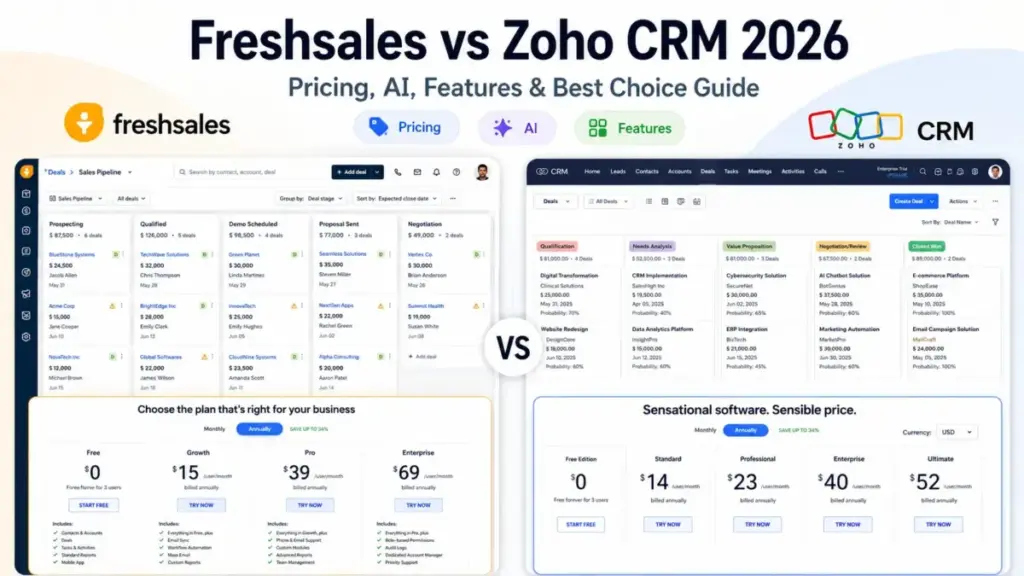
Freshsales vs Zoho CRM is not just a pricing comparison. Freshsales is easier to launch and better for small sales teams that want built-in phone, email, chat, and Freddy AI. Zoho CRM is stronger for teams that need deeper customization, advanced workflows, and lower mid-tier pricing as they scale.
The numbers tell a more complicated story. Freshsales starts at $9/user/month on the Growth plan as of June 2026, undercutting Zoho CRM’s Standard tier at $14/user/month. But the moment a 10-person sales team needs AI scoring, advanced workflows, and custom reports, Freshsales Pro costs $39/user/month, while Zoho CRM Professional charges $23/user/month. The annual gap at 10 users: $1,920. That cost reversal is where most comparison articles stop being useful.
Choose Freshsales if your team needs a CRM that works on day one without a dedicated admin. Choose Zoho CRM if your team needs custom modules, a broader app ecosystem, and lower per-user costs once you pass the Growth tier. I will break down exactly where each CRM wins and where the real tradeoffs show up across pricing, features, AI, automation, and migration, including a cost surprise at the 25-user mark that most best CRM software lists ignore.
Quick Verdict: Freshsales vs Zoho CRM
| Category | Winner | Why |
|---|---|---|
| Entry pricing (1-3 users) | Freshsales | Free plan plus 9/userGrowthtierundercutsZohoStandardat14 |
| Cost at 10+ users | Zoho CRM | Zoho Professional at 23/useris16/user cheaper than Freshsales Pro |
| Ease of use and rep adoption | Freshsales | G2 scores Freshsales higher on ease of use, setup, and admin |
| Customization and process control | Zoho CRM | Canvas, Blueprint, custom modules, and broader API credit limits |
| AI for sales teams | Depends | Freddy AI is faster to deploy; Zia AI is more configurable once set up |
| Integrations and ecosystem | Zoho CRM | 69 listed integrations on Capterra versus 20 for Freshsales |
| Security and governance | Tie | Both publish trust resources; governance features are tier-gated on both |
| Migration and data portability | Tie | Both support import/export paths; workflow logic does not transfer cleanly |
What this means: Freshsales wins the first impression. Zoho CRM wins the long game. The deciding factor is not which CRM has more features. It is whether your team has the admin capacity to configure a more complex system, or whether you need reps closing deals inside the tool within a week.
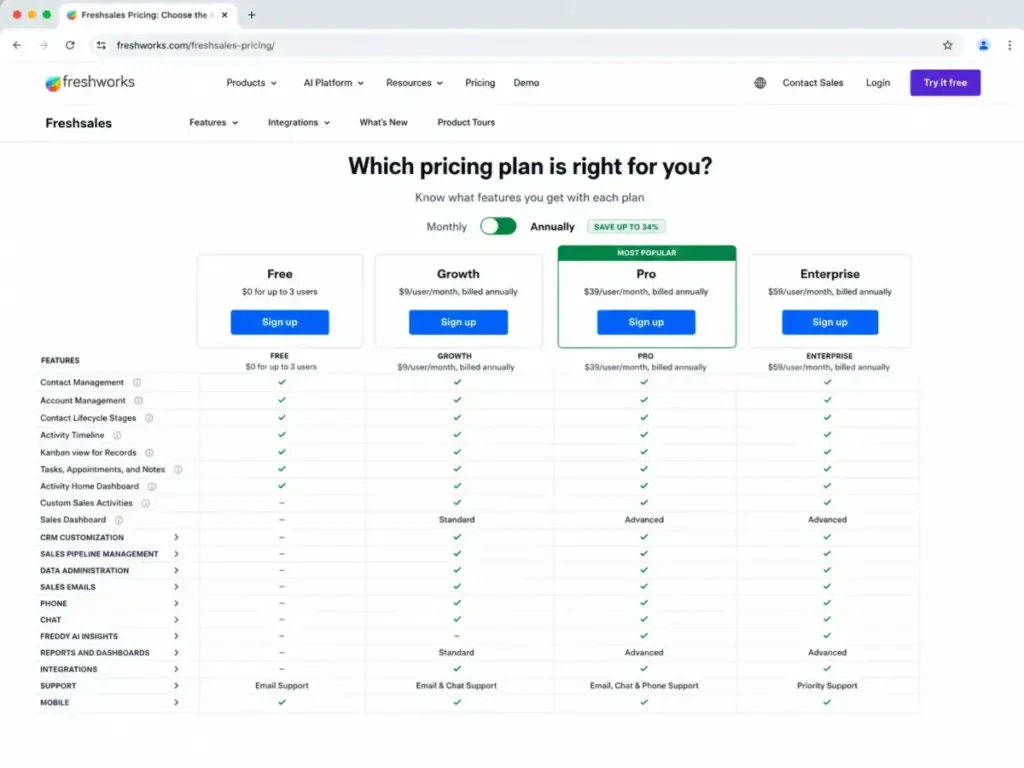
Freshsales vs Zoho CRM at a Glance
| Detail | Freshsales | Zoho CRM |
|---|---|---|
| Best for | Sales-led SMBs wanting fast adoption, built-in communication, and Freddy AI | Teams needing deep customization, Zoho app integrations, and process automation |
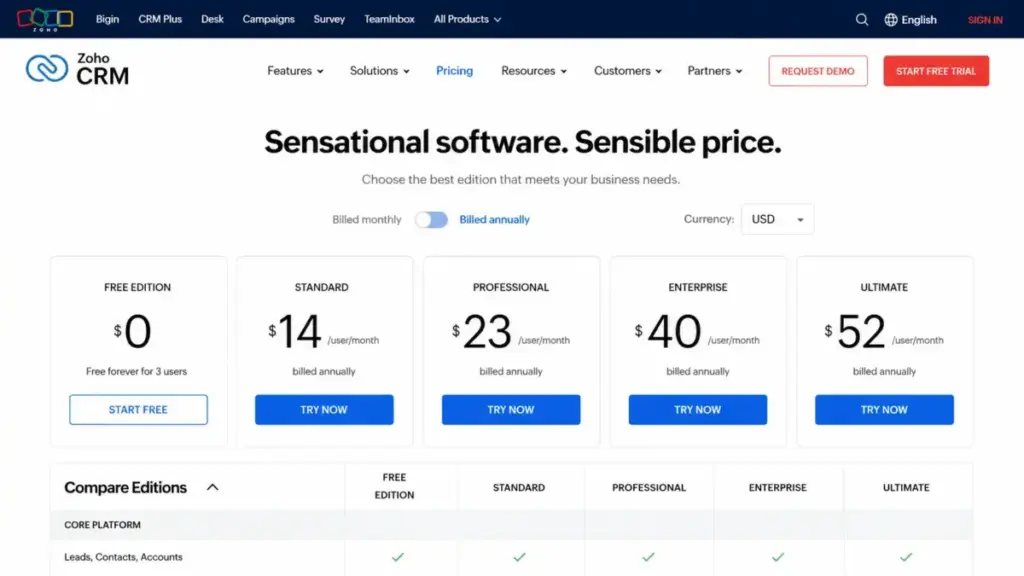
| Starting price | $9/user/month (Growth, annual) | $14/user/month (Standard, annual) |
| Practical sales-ready tier | Pro at $39/user/month | Professional at $23/user/month |
| Free plan | Yes, up to 3 users | Yes, up to 3 users |
| Setup difficulty | Low to Medium | Medium to High |
| Main strength | Built-in phone, email, chat, and Freddy AI in one interface | Customization depth, Canvas design, Blueprint process management |
| Main weakness | Price jump from Growth to Pro; limited customization on lower tiers | Steeper learning curve; deeper setup requires admin time or partner help |
What this means: Both CRMs offer a free entry point for 3 users. The practical cost gap appears at the mid-tier. A 10-person team on Freshsales Pro pays 390/month.ThesameteamonZohoCRMProfessionalpays230/month. That 160/monthdifferenceaddsupto1,920/year, and it widens as the team grows. Understanding what CRM software actually does for your sales process is more important than comparing feature lists.
How Alex Morrison Compared These Two CRMs
After evaluating 40+ CRM platforms, I can tell you that the pricing page rarely reflects what a 10-person team pays month over month. For this Freshsales vs Zoho CRM comparison, I used a consistent methodology:
- Data sources: Official pricing pages, feature lists, trust and compliance pages, developer documentation, and migration guides for both Freshsales and Zoho CRM, verified as of June 2026.
- Third-party validation: Capterra comparison data, G2 review patterns, Gartner Peer Insights ratings, and Software Advice independent research.
- Testing level: Third-party validated. I did not perform direct product testing for this comparison. All claims are sourced from official documentation and verified review platforms.
- Cost modeling: I calculated real costs at 5, 10, 25, and 50 users using comparable mid-tier plans (Freshsales Pro vs Zoho CRM Professional), including hidden costs and add-on fees.
- Limitation: Zoho CRM’s USD pricing was not fully rendered on the official pricing page from my crawler region. I corroborated the widely reported US pricing through current third-party pricing sources. Always verify directly on Zoho’s official pricing page for your region.
Workflow 1: Pipeline Setup and Daily Sales Execution
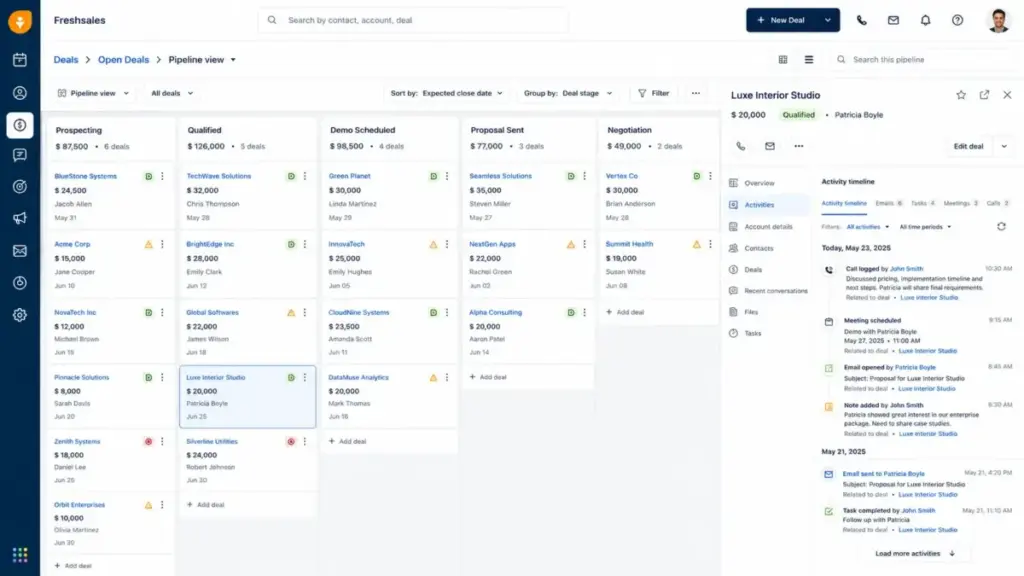
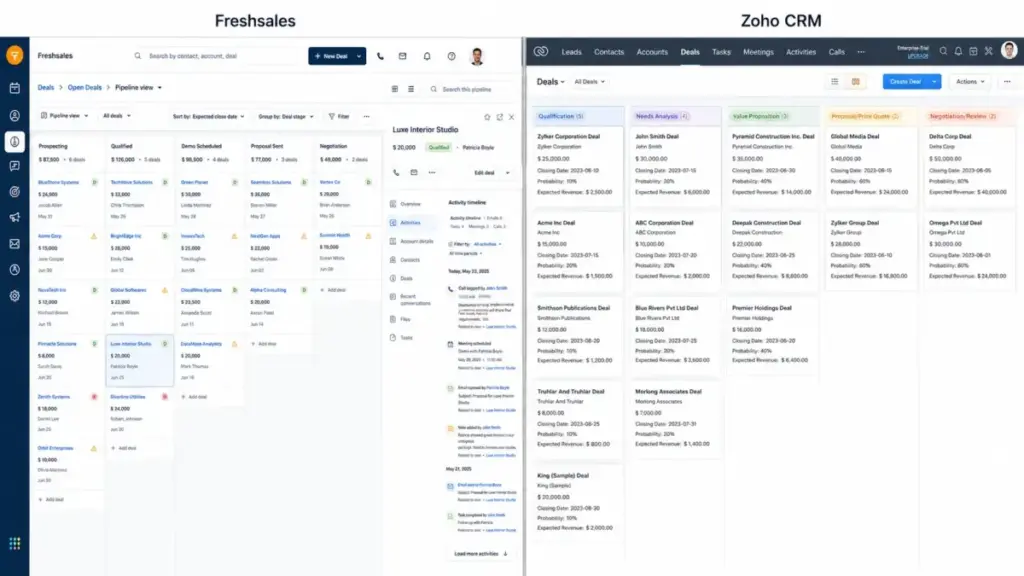
Freshsales CRM wins pipeline setup speed for sales teams under 10 reps who need to start tracking deals within a day. The CRM bundles Kanban pipeline views, email templates, a built-in phone dialer, live chat, and a mobile app on the free plan. Growth at $9/user/month adds contact lifecycle stages, basic workflows, and a product catalog. A 5-person outbound sales team can be logging calls, emailing leads, and moving deals through a visual funnel within hours.
Zoho CRM approaches pipeline management differently. The free edition covers leads, deals, workflows, reports, and a mobile app for up to 3 users. Standard at $14/user/month adds scoring rules, custom fields, and basic automation. But Zoho’s strength shows up when sales processes get complex. Blueprint process management lets admins define exact stage transitions with required fields and approval gates. Canvas lets teams redesign the entire CRM interface to match their workflow.
The tradeoff is configuration time. Freshsales delivers a working pipeline with less setup. Zoho CRM delivers a more customized pipeline after more admin work.
One Capterra reviewer noted that Freshsales’ “intuitive lead scoring and automated follow-up system helped prioritize high-potential leads and keep communication consistent with less manual work” (paraphrased, SooHoon C., Co-Founder, Computer Software, via Capterra).
Winner for this workflow: Freshsales for teams under 10 reps wanting speed. Zoho CRM for teams above 10 that need process-controlled pipelines.
Workflow 2: Automation, Sequences, and Scaling Sales Processes
Zoho CRM wins on automation depth and cost-efficiency once a team moves beyond basic workflows. Freshsales gates most advanced automation behind the Pro plan at 39/user/month.Growthplanworkflowsarebasic:simpletrigger−actionruleswithoutmulti−stepbranching.Salessequences,multiplepipelines,customactivities,andadvancedworkflowsallrequirePro.Thejumpfrom9 to $39 per user per month is a 333% increase, and that price wall hits exactly when a growing team needs automation most.
Zoho CRM spreads automation across more accessible tiers. Professional at 23/user/monthincludesmoreadvancedautomationandprocesstools.Enterpriseat40/user/month adds Zia AI, advanced customization, portals, and higher automation limits. The per-user cost for comparable automation features is consistently lower on Zoho CRM.
Here is the feature-to-plan gate comparison that most Freshsales vs Zoho CRM articles skip:
| Feature | Freshsales Plan Gate | Zoho CRM Plan Gate | Buyer Implication |
|---|---|---|---|
| Basic workflows | Growth ($9) | Standard ($14) | Freshsales cheaper for entry automation |
| Advanced multi-step workflows | Pro ($39) | Professional ($23) | Zoho CRM saves $16/user/month |
| AI lead/deal scoring | Pro ($39) | Enterprise ($40) | Similar price point for AI scoring |
| Sales sequences | Pro ($39) | Professional ($23) | Zoho CRM enables sequences at a lower tier |
| Custom modules | Enterprise ($59) | Enterprise ($40) | Zoho CRM saves $19/user/month |
| Field-level permissions | Enterprise ($59) | Enterprise ($40) | Zoho CRM cheaper for governance |
| Sandbox testing | Enterprise ($59) | Enterprise ($40) | Zoho CRM cheaper for safe deployment |
| Audit logs | Enterprise ($59) | Enterprise ($40) | Both gate governance at top tier |
| API request limits | 1,000/hour per account | 5,000+ credits scaling by edition | Zoho CRM more generous for integration-heavy teams |
What this means: If your 10-person sales team needs advanced workflows, sales sequences, and custom reports, Freshsales Pro costs 390/month.ZohoCRMProfessionalcosts230/month for comparable workflow depth. The $160/month gap is not about missing features. It is about which tier includes them. Understanding how sales automation works helps you evaluate whether you need the Pro-tier gates or can operate on lower plans.
Winner for this workflow: Zoho CRM for automation at scale. Freshsales only if you need Freddy AI specifically and your team is under 5 users.
Workflow 3: AI-Assisted Selling and Lead Intelligence
This is where the Freshsales vs Zoho CRM comparison gets nuanced, because each CRM approaches AI from a different angle.
Freshsales bundles Freddy AI as a sales assistant focused on immediate rep productivity. Freddy AI contact scoring on the Pro plan analyzes engagement signals and ranks leads. Freddy AI deal insights surface risk flags and suggest next actions. The experience is more “assistant in the sidebar” than “platform you configure.”
Zoho CRM deploys Zia AI as a configurable engine across the platform. Zia handles lead and deal predictions, anomaly detection, email sentiment analysis, and workflow suggestions. But Zia’s deeper capabilities require Enterprise at $40/user/month, and the system rewards teams that invest setup time into training the model on their specific data.
The practical difference: a 5-person startup gets more value from Freddy AI on day one. A 25-person sales org with a CRM admin gets more value from Zia AI after 2-3 months of configuration.
I built a cost comparison for AI-ready CRM tiers at scale:
| Users | Freshsales Pro (annual) | Zoho CRM Enterprise (annual) | Monthly Difference |
|---|---|---|---|
| 5 | $195/month | $200/month | Zoho $5 more |
| 10 | $390/month | $400/month | Zoho $10 more |
| 25 | $975/month | $1,000/month | Zoho $25 more |
What this means: For AI-ready tiers, pricing is nearly identical. The decision is not about cost. It is about whether your team wants AI that works immediately with minimal setup (Freshsales Freddy) or AI that improves over time with dedicated configuration (Zoho Zia). The Freshsales pricing breakdown covers every Freshsales tier in detail.
For Zoho CRM tier-by-tier cost comparisons, the Zoho CRM cost analysis breaks down what each plan includes.
Winner for this workflow: Depends on team size and admin capacity. Freshsales for under 10 users with no CRM admin. Zoho CRM for 10+ users with someone managing the CRM.
Freshsales vs Zoho CRM Pricing at Every Scale
The entry-price comparison favors Freshsales. The mid-tier comparison favors Zoho CRM. Most articles show starting prices. Here is what your team pays at realistic headcounts on the practical sales-ready tier:
| Team Size | Freshsales Pro (annual) | Zoho CRM Professional (annual) | Annual Savings with Zoho | Winner |
|---|---|---|---|---|
| 5 users | 195/month(2,340/year) | 115/month(1,380/year) | $960/year | Zoho CRM |
| 10 users | 390/month(4,680/year) | 230/month(2,760/year) | $1,920/year | Zoho CRM |
| 25 users | 975/month(11,700/year) | 575/month(6,900/year) | $4,800/year | Zoho CRM |
| 50 users | 1,950/month(23,400/year) | 1,150/month(13,800/year) | $9,600/year | Zoho CRM |
What this means: At 25 users, a team on Freshsales Pro pays 4,800moreperyearthanthesameteamonZohoCRMProfessional.Thatisthepriceofapart−timeCRMadminwhocouldmanageZoho′sdeeperconfiguration.At50users,thegapreaches9,600/year. The cost math alone does not make the decision, but it changes the calculation for any budget-conscious sales leader.
Pricing note: Freshsales pricing verified via the official Freshworks pricing comparison page. Zoho CRM USD pricing corroborated through current third-party sources due to regional rendering variation on the official page. Always confirm current rates on each vendor’s pricing page.
Hidden Costs to Watch
Freshsales hidden costs:
- Freddy AI Agent session packs after included trial sessions
- CPQ and add-on modules
- Pro or Enterprise upgrade required for advanced automation, reporting, AI, field-level permissions, sandbox, and audit logs
- Possible implementation or integration work for complex tech stacks
Zoho CRM hidden costs:
- Premium or Enterprise support may cost extra
- WhatsApp Business requires purchased credits
- Deeper customization may require admin time or partner implementation
- Expanding into Zoho marketing, support, finance, or analytics apps increases total spend
Integrations, Ecosystem, and API Limits
Zoho CRM wins on integration breadth. Capterra lists 69 integrations for Zoho CRM versus 20 for Freshsales on its comparison page. Zoho CRM connects natively with Zoho Desk, Zoho Books, Zoho Campaigns, Zoho Forms, Zoho Projects, Zoho Analytics, Google Workspace, Microsoft 365, Slack, Mailchimp, Zapier, Xero, QuickBooks, WhatsApp Business, and LinkedIn Sales Navigator, plus marketplace extensions.
Freshsales integrates through the Freshworks Marketplace with Freshdesk, Mailchimp, PandaDoc, HubSpot sync, QuickBooks, Xero, Stripe, and third-party connectors via Zapier and Make. The ecosystem is tighter but shallower.
API limits tell a different story for integration-heavy teams. Freshsales documentation indicates 1,000 API requests per hour per account. Zoho CRM scales API credits by edition, starting from 5,000 credits on the free plan and increasing with edition and user license count. For a 20-person team running automated data syncs with accounting, support, and marketing tools, Zoho’s API ceiling is materially higher.
But here is the catch. Freshworks keeps integrations within a focused sales-support-marketing stack. Teams that only need CRM plus help desk plus marketing get a clean, pre-connected experience through Freshworks Suite. Zoho’s broader ecosystem means more options but also more decisions about which apps to connect and configure.
Winner: Zoho CRM for integration volume and API headroom. Freshsales if your stack stays within the Freshworks family.
Support, Security, and Admin Controls
Both Freshsales and Zoho CRM publish trust and compliance resources. Freshworks maintains a Trust Center covering security, privacy, compliance artifacts, certifications, and third-party attestations. Zoho’s trust and compliance pages list ISO 27001, ISO 27017, ISO 27018, SOC 2 Type II, and GDPR resources across Zoho cloud services.
Support quality depends on plan and issue type. Freshsales includes 24×5 support on the free plan. Capterra lists email, help desk, knowledge base, phone support, chat, and 24/7 live representative availability, though experiences vary by plan and issue. Zoho CRM support plans include documented resources and developer guides, with Premium and Enterprise support offering multichannel access, remote assistance, and faster response times.
Admin controls are tier-gated on both platforms. Freshsales gates field-level permissions, custom modules, sandbox, and audit logs behind Enterprise at 59/user/month.ZohoCRMgatesadvancedcustomization,AI,portals,andgovernancebehindEnterpriseat40/user/month. For a 10-person team needing governance controls, Zoho CRM Enterprise saves $190/month over Freshsales Enterprise.
Winner: Tie on security credentials. Zoho CRM on governance cost-efficiency.
Switching Between Freshsales and Zoho CRM
Migration between these two CRMs is a medium-difficulty project in both directions. The data moves. The workflows do not.
Freshsales to Zoho CRM: Zoho supports a migration flow with Freshsales as the source, using an API token and instance URL. Zoho’s migration tool handles contacts, leads, and deals. Field mapping, user mapping, and custom field review are manual steps. Workflow logic, reports, automations, and historical activity logs require rebuilding inside Zoho.
Zoho CRM to Freshsales: Freshsales requires exporting Zoho data into ZIP format and importing through the Freshsales data import tool. The same caveats apply: field mapping, user assignment, and workflow reconstruction are manual. One Capterra reviewer flagged difficulty with Freshsales export, noting “daily export limits and limited filtering during export” (paraphrased, Gina C., COO, Information Technology and Services, via Capterra).
Both migrations require 1-3 weeks for a 10-person team, depending on custom field complexity and automation count. Budget for parallel running of both systems during transition. Understanding CRM migration best practices before starting reduces the risk of data loss or workflow gaps.
| Migration Direction | Difficulty | Main Risk | Typical Timeline |
|---|---|---|---|
| Freshsales to Zoho CRM | Medium | Custom field mapping, workflow rebuild | 1-3 weeks |
| Zoho CRM to Freshsales | Medium | Export limits, activity history gaps | 1-3 weeks |
What this means: Neither CRM locks you in permanently, but switching costs include admin time, workflow recreation, and a learning curve for your team. The cost of switching is roughly equivalent in both directions, so make your initial choice based on long-term fit, not trial convenience.
Where Freshsales Wins
Freshsales is the better choice in these scenarios:
- 5-person startup choosing a first CRM. Lower entry paid price at $9/user/month, simple visual pipeline, built-in phone and email, and minimal configuration required. A first-time CRM team can be productive within a day.
- 10-person sales team upgrading from spreadsheets. Freshsales prioritizes rep adoption over admin control. The interface is clean, the pipeline is visual, and the learning curve is shallow. G2 review patterns confirm Freshsales scores higher than Zoho CRM on ease of use, setup, and admin.
- Teams relying on built-in phone, chat, and email. Freshsales bundles communication channels into the CRM without requiring third-party integrations. Reps make calls, send emails, and manage chat from one screen.
- Sales teams wanting Freddy AI without configuration. Freddy AI contact scoring and deal insights work on Pro with minimal setup. No model training or admin configuration required.
- Organizations already using Freshdesk or Freshmarketer. The Freshworks ecosystem connects sales, support, and marketing with shared data. Cross-product syncing is tighter than connecting Freshsales to non-Freshworks tools.
Where Zoho CRM Wins
Zoho CRM is the better choice in these scenarios:
- 25-person sales team needing workflows, custom reports, and app integrations. Zoho CRM Professional at 23/user/monthdeliversadvancedautomation,processtools,andbroaderintegrationsat16/user/month less than Freshsales Pro.
- Teams needing custom modules, Canvas design, and Blueprint process management. Zoho CRM’s customization tools let admins reshape the CRM to match their sales process, not the other way around. Review patterns confirm Zoho CRM’s strength in “customizing modules, fields, layouts, workflows, and dashboards to match business processes” (paraphrased, Alan S., IT Project Manager, via Capterra).
- Organizations already using Zoho Desk, Zoho Books, or Zoho Campaigns. The Zoho ecosystem connects CRM to support, accounting, marketing, forms, projects, and analytics with native integrations. Expanding business operations within one vendor ecosystem reduces integration complexity.
- 50-person sales org with governance and compliance needs. Zoho CRM Enterprise at 40/user/monthincludesportals,advancedgovernance,andhigherAPIlimitsat19/user/month less than Freshsales Enterprise.
- Budget-constrained teams scaling from 10 to 50 users. The cost gap between Freshsales Pro and Zoho CRM Professional compounds as headcount grows. At 50 users, the annual difference reaches $9,600.
Who Should Choose Freshsales
Choose Freshsales if:
- Your sales team is under 10 reps and needs a CRM that works without a dedicated admin
- Built-in phone, email, and chat are more important than deep customization
- You want Freddy AI scoring and insights without configuring an AI engine
- Your tech stack stays within the Freshworks family (Freshdesk, Freshmarketer)
- Fast rep adoption matters more than process control depth
The Freshsales CRM evaluation covers the full feature set, limitations, and verdict by team size.
Who Should Choose Zoho CRM
Choose Zoho CRM if:
- Your team needs custom modules, Blueprint process management, and Canvas interface design
- You plan to scale past 10 users and want lower per-user costs at the mid-tier
- Your organization uses Zoho Desk, Zoho Books, Zoho Analytics, or other Zoho apps
- You have a CRM admin who can invest setup time into configuration and automation
- API-heavy integrations with accounting, marketing, or support tools are part of your workflow
The Zoho CRM analysis breaks down each plan tier, feature gate, and limitation in detail.
Who Should Skip Both Freshsales and Zoho CRM
Neither CRM is the right fit in these situations:
- Enterprise teams needing deep ecosystem extensibility. Both Freshsales and Zoho CRM top out before Salesforce-level customization, AppExchange, and enterprise governance depth. Consider Salesforce CRM evaluation.
- Marketing-first teams wanting CRM plus content, ads, and lead capture in one tool. HubSpot CRM bundles marketing, sales, and service under one platform with a free CRM entry point. Explore the HubSpot vs Zoho CRM comparison for that use case.
- Small teams wanting the simplest visual pipeline with no learning curve. Pipedrive is purpose-built for visual deal tracking. If Freshsales still feels like too much, Pipedrive offers a simpler alternative.
Alternatives to Freshsales and Zoho CRM
| Alternative | Best For | Starting Price | Why Consider |
|---|---|---|---|
| HubSpot CRM | Marketing-sales alignment and free CRM entry | Free, paid from $20/seat/month | Strong free CRM with content, email, and lead capture tools |
| Pipedrive | Simple visual pipeline management | From $14/seat/month | Best fit when Freshsales feels too broad and Zoho feels too complex |
| Salesforce Sales Cloud | Large enterprises needing deep extensibility | From $25/user/month | The option when both Freshsales and Zoho CRM are not enterprise enough |
What this means: If your team needs a CRM focused on sales execution, both Freshsales and Zoho CRM are strong contenders. The alternatives above fill gaps that neither covers well.
Final Verdict: Freshsales vs Zoho CRM in 2026
The Freshsales vs Zoho CRM decision is not about which CRM has more features. It is about adoption speed versus customization depth.
Choose Freshsales if your team is under 10 reps, you have no dedicated CRM admin, and you need built-in communication channels with Freddy AI working on day one. The Growth plan at 9/user/monthisthecheapestwaytogetarealsalesCRMrunning.Acceptthatyouwillpay39/user/month the moment you need advanced automation.
Choose Zoho CRM if your team is 10+ users, you have someone managing the CRM, and you need custom modules, Blueprint workflows, broad integrations, and lower mid-tier per-user costs. Professional at $23/user/month delivers more automation depth than Freshsales Pro at a lower price. Accept that setup takes longer and the learning curve is steeper.
The cost math at 25 users decides it for many teams: Freshsales Pro at 975/monthversusZohoCRMProfessionalat575/month. That 400/monthgapis4,800 per year. For a growing sales org, that is the price difference between hiring an SDR or paying more for CRM seats.
| Scenario | Better Choice | Why | Watch-out |
|---|---|---|---|
| 5-person startup, first CRM | Freshsales | Cheapest entry, fastest setup, built-in communication | Growth plan lacks advanced automation |
| 10-person team upgrading from spreadsheets | Freshsales | Prioritizes rep adoption over admin control | Price jumps 333% when you need Pro features |
| 25-person team needing workflows and reports | Zoho CRM | Deeper automation at $16/user/month less than Freshsales Pro | Requires dedicated admin time for setup |
| 50-person org with governance needs | Zoho CRM | Better admin, API, and process management at lower per-user cost | Steeper learning curve for new reps |
| Team needing built-in phone, chat, and AI | Freshsales | Freddy AI and communication channels in one interface | AI scoring requires Pro plan |
What this means: There is no universal winner. The right CRM depends on your team size, admin capacity, automation needs, and how much you are willing to pay per user for the features that matter. For teams weighing Freshsales alternatives, the buyer scenario matrix above narrows the decision faster than any feature checklist.
Teams considering moving away from Zoho CRM can explore Zoho CRM replacement options for a broader set of alternatives.
Frequently Asked Questions
Is Freshsales easier to use than Zoho CRM?
Yes, for most sales teams. G2 review patterns score Freshsales higher than Zoho CRM on ease of use, setup, and admin. Freshsales bundles pipeline views, email, phone, and chat into a single interface with minimal configuration. Zoho CRM offers more customization, but that depth comes with a steeper learning curve and more admin decisions. A 5-person team with no CRM experience will be productive on Freshsales faster.
Is Zoho CRM cheaper than Freshsales at 25 users?
Yes, at comparable tiers. Zoho CRM Professional costs 575/monthfor25users(billedannually).FreshsalesProcosts975/month for the same team size. That is a 400/monthdifference,saving4,800 per year on Zoho CRM. The entry tier favors Freshsales (Growth at 9versusStandardat14), but the mid-tier cost reversal makes Zoho CRM cheaper for scaling teams.
Does Freshsales have better AI features than Zoho CRM?
It depends on what “better” means. Freddy AI on Freshsales Pro provides contact scoring and deal insights that work with minimal setup. Zia AI on Zoho CRM Enterprise offers broader AI capabilities including predictions, anomaly detection, and email sentiment analysis, but requires more configuration time. Teams wanting AI that works immediately prefer Freshsales. Teams willing to invest setup time for deeper AI analytics prefer Zoho CRM.
Can I migrate from Freshsales to Zoho CRM?
Yes. Zoho CRM supports a migration flow using Freshsales as the source with an API token and instance URL. Contacts, leads, and deals transfer through the tool. Custom fields, workflow logic, reports, and historical activities require manual field mapping and rebuilding. Budget 1-3 weeks for a 10-person team. Run both systems in parallel during the transition.
Can I migrate from Zoho CRM to Freshsales?
Yes, but with caveats. The process requires exporting Zoho data as a ZIP file and importing through Freshsales. Daily export limits and limited export filtering have been flagged in user reviews. Custom fields, workflows, and activity history need manual mapping. Budget 1-3 weeks and test data integrity before switching off Zoho CRM.
Which CRM is better for a 5-person startup?
Freshsales. The free plan supports up to 3 users with basic CRM tools. Growth at $9/user/month adds paid CRM features, basic workflows, and a product catalog. The setup is fast, the interface is simple, and built-in communication channels mean fewer integrations to manage. Zoho CRM’s free edition also covers 3 users, but the deeper configuration makes it harder to get value from quickly without CRM experience.
Which CRM has better integrations?
Zoho CRM. Capterra lists 69 integrations for Zoho CRM compared to 20 for Freshsales. Zoho CRM connects natively with the full Zoho app ecosystem plus Google Workspace, Microsoft 365, Slack, and major third-party tools. Freshsales integrates through the Freshworks Marketplace with a tighter but shallower set of connections. For teams running complex multi-tool stacks, Zoho CRM provides more native options.
Does Zoho CRM require a dedicated admin?
Not on the free or Standard plan. But once a team moves to Professional or Enterprise and starts using Blueprint workflows, custom modules, Canvas design, and API integrations, having someone who owns CRM configuration becomes important. G2 review patterns note Zoho CRM has broader features and scalability but a lower ease-of-use score than Freshsales. The admin question comes down to how much customization depth your team plans to use.
Which CRM should I avoid if I want the simplest sales tool?
Both Freshsales and Zoho CRM may be more than you need. If you want visual pipeline management with almost zero learning curve, Pipedrive is purpose-built for that workflow. If you want a free CRM with marketing tools included, HubSpot CRM offers a broader free tier. The right CRM for simple sales is often the one with the fewest features you will never touch.