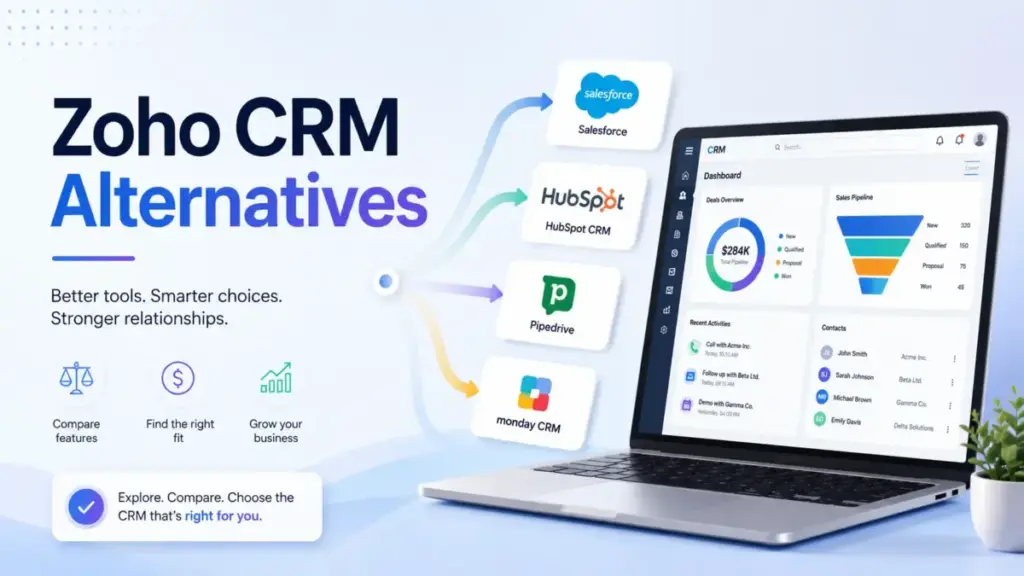
Zoho CRM alternatives become worth researching the moment your sales team stops updating records. The platform is not broken. It is deep, flexible, and priced well. But depth creates drag when your team only needs 30% of the features. If your reps treat the CRM like a chore instead of a selling tool, the problem is fit, not software quality.
This guide ranks 10 alternatives to Zoho CRM by the exact reason teams leave, not by popularity. Every recommendation includes migration difficulty, pricing reality, and honest “not for” warnings. Before switching, read the full list of best CRM software options and understand what CRM software actually needs to do for your team size.
TL;DR: Best Zoho CRM Alternatives
The right Zoho CRM replacement depends on why you are leaving. Here are the top three picks by exit reason.
- Pipeline adoption is the problem? Switch to Pipedrive. Reps adopt it faster because it removes the module sprawl.
- Need a free CRM with marketing alignment? Start with HubSpot CRM. The free tier is stronger, and the inbound ecosystem is better.
- Want sales AI and calling without suite bloat? Try Freshsales. Freddy AI, built-in phone, and lead scoring start at $9/user/month.
| CRM | Best For | Starting Price | Migration Difficulty | Score |
|---|---|---|---|---|
| Pipedrive | Pipeline-focused teams | ~$14/seat/mo (annual) | Easy to Medium | 9.1/10 |
| HubSpot CRM | Free-to-paid CRM | Free / ~$15/seat/mo Starter | Medium | 8.9/10 |
| Freshsales | AI sales CRM value | Free / $9/user/mo | Medium | 8.7/10 |
| Salesforce | Enterprise migration | ~$25/user/mo | Hard | 8.6/10 |
| monday CRM | Visual workflow CRM | $12/seat/mo | Medium | 8.5/10 |
| Copper | Google Workspace CRM | $9/seat/mo | Easy to Medium | 8.3/10 |
| Close | Outbound sales teams | $9/mo Solo | Medium | 8.2/10 |
| Insightly | Sales-to-project handoff | $29/user/mo | Medium to Hard | 8.0/10 |
| Capsule CRM | Lightweight SMB CRM | Free / ~$18/user/mo | Easy | 7.9/10 |
| Less Annoying CRM | Predictable pricing | $15/user/mo | Easy | 7.8/10 |
Pricing verified April 2026. Exact prices may vary by region and billing cycle.
Why Are Users Leaving Zoho CRM?
Zoho CRM scores 4.3/5 on Capterra from nearly 7,000 reviews. That is a solid rating. But the exit pattern is consistent: teams sign up for value and leave because of operational weight.
The core tension is between power and usability. Zoho CRM integrates with 1,000+ applications, offers deep customization, and covers everything from sales automation to AI forecasting. That same depth creates friction for teams without a dedicated admin.
Here is what drives the exits:
Setup takes longer than expected. New users underestimate how many modules, fields, and workflows need configuration before the CRM feels useful. A TechRadar 2026 review confirmed that advanced customizations and reporting carry a steep learning curve.
Module sprawl overwhelms small teams. Zoho CRM has modules for leads, contacts, accounts, deals, activities, campaigns, analytics, social, and more. A 5-person sales team rarely needs all of them, but they all appear in the sidebar.
Support quality is inconsistent. Capterra reviewers flag slow response times for complex issues. One verified reviewer wrote:
“Customer support is slow to respond and the initial learning curve is strenuous.”
Zia AI and advanced features sit behind higher tiers. Free and Standard users miss out on AI predictions, lead scoring depth, and advanced automation. The Zoho CRM pricing ladder creates pressure to upgrade before the team has adopted the basics.
The paradox of choice. A verified G2 reviewer captured this well:
“Because you can customize almost everything, it’s easy to over engineer your processes.”
Reporting complexity. Building custom reports and dashboards requires understanding Zoho’s analytics module, which adds admin time for teams that just want pipeline visibility.
Match Your Zoho CRM Exit Reason
Not every Zoho CRM frustration points to the same alternative. Use this table to match your specific pain to the right CRM replacement.
| If Zoho CRM Feels Like This | Best Alternative | Why |
|---|---|---|
| Too many modules for my team size | Pipedrive | Focused pipeline view, fewer admin decisions |
| Setup is taking weeks, not days | Less Annoying CRM | One plan, simple fields, fast onboarding |
| Reps avoid logging activities | Pipedrive | Activity-driven design increases adoption |
| I need better marketing alignment | HubSpot CRM | Native inbound, email, and content tools |
| I want AI and calling without bloat | Freshsales | Freddy AI and built-in phone from $9/user |
| I live in Gmail and want CRM there | Copper | Built inside Google Workspace |
| I need outbound calling and SMS | Close | Power Dialer, SMS, and sequences built in |
| I manage projects after closing deals | Insightly | CRM-to-project handoff in one system |
| I want visual boards, not CRM modules | monday CRM | Board-based pipeline and workflow design |
| I need enterprise governance and scale | Salesforce | Territory management, permissions, AppExchange |
| My team is 1-3 people, Zoho is overkill | Capsule CRM or Bigin | Lighter CRM basics without suite weight |
| I want flat, predictable pricing | Less Annoying CRM | $15/user/month, no tiers, no contracts |
How We Ranked These Alternatives
Every Zoho CRM alternative in this list was scored against seven criteria weighted by what matters most when switching from an established CRM. I used public pricing pages, official feature lists, verified user reviews from Capterra and G2, and migration documentation from each vendor. Full scoring details are on the review methodology page.
| Criterion | Weight | What It Measures |
|---|---|---|
| Ease of adoption | 20% | Time from signup to first rep using the CRM daily |
| Sales pipeline usability | 20% | How fast reps manage deals, activities, and follow-ups |
| Feature parity with Zoho | 15% | Coverage of automation, reporting, email sync, and AI |
| Pricing realism | 15% | True cost at equivalent-feature tier, not entry price |
| Migration effort | 10% | Data export, workflow rebuild, and integration reconnection |
| Automation and AI | 10% | Workflow rules, sequences, AI features at accessible tiers |
| Support and ecosystem | 10% | Documentation quality, app marketplace, and support access |
Best Zoho CRM Alternatives Ranked
These 10 Zoho CRM competitors are ranked by overall score, but the right pick depends on your exit reason. Read the “Best for” and “Not for” lines before comparing scores.
Pipedrive – Best for Pipeline-Focused Teams

Score: 9.1/10 – Excellent
Pipedrive is the CRM I recommend first when sales reps say Zoho has too many places to click. It strips away module complexity and puts deals, activities, and pipeline stages at the center of every screen. For teams of 5 to 30 reps, this design difference translates into faster daily adoption.
Why this rank: Pipedrive is #1 because it solves the most common Zoho exit reason: rep adoption drag. When reps stop updating records because the CRM has too many modules, Pipedrive’s focused pipeline view fixes the root cause.
Best for: Sales teams that live in deals, activities, and follow-ups. Teams of 5-30 reps where pipeline velocity matters more than suite breadth.
Why switch from Zoho: Zoho CRM’s module-heavy layout creates friction for reps who only need pipeline views, activity reminders, and email sync. Pipedrive removes that friction by design.
Where it beats Zoho: Faster daily pipeline adoption. Reps open Pipedrive and see their deals. They do not click through modules to find their pipeline. The activity-based selling approach keeps reps focused on next actions instead of data entry.
Where Zoho still wins: Zoho offers broader business-suite coverage. If you use Zoho Books, Zoho Desk, or Zoho Campaigns alongside CRM, Pipedrive cannot replace that ecosystem. Zoho also offers a free plan for up to 3 users, while Pipedrive does not.
Pricing reality: Pipedrive Lite starts at about $14/seat/month billed annually, or about $24/seat/month on monthly billing. That puts the annual rate on par with Zoho Standard (~$14/user/month annual). But the comparison shifts if your Zoho team needs Professional or Enterprise features to get equivalent pipeline usability. Check the Pipedrive pricing page for current tiers.
Migration difficulty: Easy to Medium. Contacts, organizations, deals, and activities export from Zoho and import cleanly into Pipedrive. Custom fields map with some manual work. Workflows and reports need rebuilding. Email sync reconnects quickly.
Not for: Teams that need finance, help desk, email marketing, and CRM in one suite. Teams with 50+ users needing enterprise permissions and territory management.
Switching risk: Pipedrive does not replace Zoho’s suite breadth. Teams that rely on Zoho Books, Desk, or Campaigns will need separate tools for those functions, adding integration overhead.
Alex Morrison’s quick take: Pipedrive is the answer when your CRM is powerful but your reps are not using it. Adoption wins over features every time for small and mid-size sales teams. Read the full Pipedrive CRM review and see how they compare in Pipedrive vs Zoho CRM.
HubSpot CRM – Best Free-to-Paid CRM

Score: 8.9/10 – Excellent
HubSpot CRM gives teams a cleaner free-to-paid growth path than Zoho’s free edition. The free tier includes contact management, deal tracking, email tracking, and live chat. For startups and inbound-led teams, the upgrade to Sales Hub aligns marketing and sales without the module juggling Zoho requires.
Why this rank: HubSpot is #2 because its free CRM is stronger than Zoho’s free edition, and the marketing ecosystem is the best among all alternatives listed. It loses the top spot to Pipedrive because cost creep at Professional tier is a real risk.
Best for: Startups, content-led companies, inbound sales teams, and SMBs that need CRM plus marketing in one platform.
Why switch from Zoho: Teams that outgrow Zoho’s free plan or struggle with its marketing-to-sales alignment often find HubSpot’s ecosystem more intuitive. Non-technical users can manage contacts, pipelines, and email campaigns without admin help.
Where it beats Zoho: Better inbound marketing ecosystem. Easier onboarding for non-technical teams. The free CRM is more polished and includes more features at the entry level. Content management, forms, and email marketing connect natively.
Where Zoho still wins: Zoho is much cheaper at mid-tier and above. HubSpot Professional and Enterprise pricing can reach $100+/user/month when you add Sales Hub seats, Marketing Hub, and extra contacts. Zoho’s pay-as-you-go model is more predictable for budget-conscious teams.
Pricing reality: HubSpot free tools are genuinely useful. Sales Hub Starter starts around $15/seat/month billed annually, while the Starter Customer Platform bundle starts around $20/month. But the jump to Professional is steep. Teams that need advanced automation, custom reporting, or multiple pipelines will hit upgrade pressure. Check HubSpot Sales pricing carefully before committing.
Migration difficulty: Medium. Core records (contacts, companies, deals) import well through CSV or native migration tools. Lifecycle stages, lists, workflows, and custom reporting need careful mapping. Email template migration requires manual recreation.
Not for: Teams leaving Zoho only because of complexity but unwilling to monitor future HubSpot upgrade costs. Budget-sensitive teams with 20+ users.
Switching risk: Cost creep. HubSpot feels free at the start, but Professional and Enterprise tiers can cost 3-5x more than equivalent Zoho plans. Model your 12-month and 24-month cost before committing.
Alex Morrison’s quick take: HubSpot feels lighter than Zoho at the start. But it becomes a platform decision, not just a CRM decision. Make sure you model the 12-month cost before switching. Full analysis in the HubSpot CRM review.
Freshsales – Best AI Sales CRM Value

Score: 8.7/10 – Excellent
Freshsales delivers sales automation, AI lead scoring, and built-in phone at price points that beat Zoho on sales-specific value. The free plan supports 3 users. Paid plans start from $9/user/month. For teams that used 30% of Zoho CRM but wanted that 30% to work better, Freshsales is the practical pick.
Why this rank: Freshsales is #3 because it matches Zoho’s sales-specific features at lower tiers while keeping the interface focused. It ranks below HubSpot because HubSpot’s marketing ecosystem and free CRM are harder to match.
Best for: Teams needing phone, lead scoring, and AI assistance without buying into a larger business suite.
Why switch from Zoho: Zoho CRM’s Zia AI and deeper sales engagement features sit behind Enterprise and Ultimate tiers. Freshsales surfaces Freddy AI, built-in calling, and sales sequences at lower price points. The interface focuses on sales workflows instead of business-suite breadth.
Where it beats Zoho: Stronger native sales engagement value at lower tiers. Built-in phone and live chat without third-party add-ons. Freddy AI contact scoring and deal insights are accessible earlier in the pricing ladder.
Where Zoho still wins: Zoho’s ecosystem depth is wider. If you need CRM plus accounting, help desk, project management, and email marketing under one vendor, Zoho One is hard to match. Zoho also has a larger marketplace with 1,000+ integrations.
Pricing reality: Freshsales free plan supports 3 users with basic CRM features. Growth starts at $9/user/month billed annually. Pro at $39/user/month adds AI-powered forecasting and multiple sales pipelines. Review Freddy AI session limits on each tier at the Freshsales pricing page. Full breakdown in the Freshsales review.
Migration difficulty: Medium. Lead, contact, account, and deal migration is manageable through CSV import. Lead scoring rules, automations, phone workflows, and email sequences need rebuilding. Territory and routing rules require fresh setup.
Not for: Businesses deeply dependent on Zoho Books, Zoho Desk, Zoho Campaigns, or Zoho Creator. Teams needing 50+ native integrations beyond what Freshworks Marketplace offers.
Switching risk: Integration depth. Freshworks Marketplace is smaller than Zoho’s 1,000+ app ecosystem. Verify that your critical third-party tools have native Freshsales connectors before migrating.
Alex Morrison’s quick take: Freshsales is what happens when a CRM decides to be a sales tool first and a platform second. If Zoho’s power was real but your team only touched a fraction of it, Freshsales puts that fraction front and center.
Salesforce Sales Cloud – Best Enterprise Migration

Score: 8.6/10 – Very Good
Salesforce Sales Cloud is not a cheaper Zoho alternative. It is a governance and scale upgrade. Teams move to Salesforce when Zoho’s customization ceiling, permission structures, or reporting depth cannot support multi-team, multi-territory sales operations. If Zoho feels too heavy for your small team, Salesforce is the wrong direction.
Why this rank: Salesforce is #4 because it only fits teams that have outgrown Zoho’s enterprise ceiling. It ranks lower because it solves a narrower exit reason: governance gaps. Most teams leaving Zoho want simpler, not bigger.
Best for: Mid-market and enterprise teams with RevOps ownership, complex roles, territory management, and multi-team sales processes.
Why switch from Zoho: Zoho CRM Enterprise offers strong customization, but teams with 50+ users, multiple business units, or strict data governance often need Salesforce-level architecture. AppExchange has 7,000+ integrations. Agentforce adds AI agents for sales workflows.
Where it beats Zoho: Stronger enterprise architecture, permission models, forecasting, and partner ecosystem. Territory management, CPQ, and advanced analytics are more mature. The admin and developer community is larger.
Where Zoho still wins: Price. Zoho Enterprise costs about $40/user/month billed annually. Salesforce Enterprise costs substantially more, plus implementation, admin, and add-on expenses. Zoho also wins on speed to value for teams under 20 users.
Pricing reality: Salesforce Starter Suite begins around $25/user/month. But most Zoho CRM migrants need Pro Suite or Enterprise, which cost substantially more. Budget for implementation consulting, data migration services, and ongoing admin. Review Salesforce Sales pricing and compare with the Salesforce CRM review. For a direct comparison, see Zoho CRM vs Salesforce.
Migration difficulty: Hard. Data model design, custom objects, permission sets, reports, dashboards, integrations, and user training all require planning. Budget 4-12 weeks for a mid-market migration. Enterprise migrations can take months.
Not for: Small teams leaving Zoho because they want less configuration. Budget-conscious teams under 15 users. Teams without a dedicated admin or RevOps resource.
Switching risk: Admin burden. Salesforce requires ongoing admin investment. If Zoho’s configuration load was the exit reason, Salesforce will recreate that problem at higher cost.
Alex Morrison’s quick take: Salesforce only makes sense if Zoho’s ceiling is the problem. If Zoho already feels too heavy, Salesforce will feel heavier. But if you need enterprise-grade governance and your revenue justifies the investment, it is the industry standard for a reason.
monday CRM – Best Visual Workflow CRM

Score: 8.5/10 – Very Good
monday CRM replaces traditional CRM module navigation with visual boards, color-coded pipelines, and drag-and-drop automations. Teams that find Zoho’s interface too menu-driven often prefer monday’s board-based approach. It works especially well when sales and operations share the same workspace.
Why this rank: monday CRM is #5 because it appeals to cross-functional teams that need visual workflows, not traditional CRM modules. It ranks below Salesforce because its CRM-native governance is weaker for pure sales organizations.
Best for: Agencies, service teams, and revenue teams that manage work after the sale. Teams that want visual pipeline management without CRM-specific terminology.
Why switch from Zoho: Zoho CRM organizes data by modules: Leads, Contacts, Accounts, Deals. monday CRM organizes data by visual boards that business users understand without CRM training. The learning curve drops fast.
Where it beats Zoho: Visual pipeline and workflow customization that non-CRM users can build and modify. The AI email generator, quotes, and invoices add sales utility without module sprawl. Dashboards are visual-first.
Where Zoho still wins: Zoho is more CRM-native for advanced sales governance. Territory logic, lead assignment rules, advanced scoring, and multi-pipeline permissions are stronger in Zoho. monday CRM Standard includes 250 custom automation actions per month, which active teams can exhaust. If Zoho feels too governed but monday feels too board-driven, use monday CRM alternatives to compare simpler sales pipelines, pricing models, and post-sale workflow coverage side by side.
Pricing reality: monday CRM Basic starts at $12/seat/month billed annually. Standard at $17/seat/month adds automations and integrations. Pro at $28/seat/month adds advanced analytics. Minimum seat requirements may apply. Verify at the monday CRM pricing breakdown and official pricing page.
Migration difficulty: Medium. Pipeline data imports well through CSV. But CRM logic (lead stages, assignment rules, scoring) must be rebuilt as boards and automations. This is not a lift-and-shift migration. It is a redesign.
Not for: Teams needing strict CRM governance, advanced territory logic, or complex sales hierarchy. Enterprise teams with 100+ reps and compliance requirements.
Switching risk: CRM governance gaps. monday CRM is visual and flexible, but it lacks advanced lead routing, territory management, and multi-pipeline permissions that Zoho Enterprise provides.
Alex Morrison’s quick take: monday CRM works best when the sales process is also an operations workflow. If your team needs to track a deal from prospect to project delivery, the board-based model makes that handoff visible.
Copper CRM – Best Google Workspace CRM

Score: 8.3/10 – Very Good
Copper is built inside Google Workspace. Contacts, emails, calendar events, and drive files sync natively. For teams that live in Gmail and find Zoho’s separate interface disruptive, Copper removes the context-switching problem.
Why this rank: Copper is #6 because its value is narrow but strong. It is the clear winner for Google Workspace teams, but it drops below broader CRM tools because that advantage disappears for non-Google shops.
Best for: Google Workspace teams, agencies, consultants, and relationship-led sales teams that manage deals through email conversations.
Why switch from Zoho: Zoho CRM syncs with Gmail, but it is a separate app. Copper lives inside Gmail as a sidebar and Chrome extension. Reps log activities and update deals without leaving their inbox. That proximity drives adoption for email-heavy sales teams.
Where it beats Zoho: Tighter Google Workspace experience. Contact enrichment pulls data from Google interactions automatically. Calendar sync, Drive file linking, and task management happen inside the tools your team already uses.
Where Zoho still wins: Zoho offers broader CRM depth, more automation options, and wider integration coverage. Copper Professional includes 15,000 contacts and workflow automation, but teams needing advanced reporting, AI, or multi-pipeline governance will find Zoho more capable.
Pricing reality: Basic jumps to $23, Professional to $59, and Business to $99. Serious pipeline work often requires Basic or Professional. Verify at the Copper pricing page and read the full Copper CRM review.
Migration difficulty: Easy to Medium. Contact and activity migration is straightforward via CSV. Gmail sync rules, pipeline stages, and custom fields need manual configuration. Google Calendar and Drive integrations reconnect quickly.
Not for: Microsoft-centric teams. Teams needing broad business-suite breadth beyond CRM. Organizations with 50+ users needing enterprise permission structures.
Switching risk: Tier pressure. Copper Starter is cheap, but serious deal tracking often pushes teams to Basic ($23) or Professional ($59), where the price gap versus Zoho widens fast.
Alex Morrison’s quick take: Copper is less attractive as a generic CRM. But when Gmail is your sales workspace, having the CRM inside that workspace changes daily adoption. The value is proximity, not feature count.
Close CRM – Best for Outbound Sales

Score: 8.2/10 – Very Good
Close is built for outbound sales teams that need calling, SMS, and email inside their CRM. Where Zoho CRM requires third-party dialers and integration configuration, Close includes Power Dialer, predictive dialing, SMS, and email sequences natively.
Why this rank: Close is #7 because it solves a specific exit reason better than any other tool on this list: outbound execution. It ranks lower overall because its value drops sharply for teams that do not run high-volume outbound.
Best for: SDR teams, outbound agencies, lead generation firms, and high-velocity sales teams running 50+ calls per day.
Why switch from Zoho: Zoho CRM stores customer data well but does not drive daily outbound execution. Reps using Zoho for outbound typically bolt on separate dialer tools, creating data sync gaps and workflow friction. Close eliminates that gap.
Where it beats Zoho: Close Growth includes workflows, Power Dialer, and AI Email Assistant in one subscription. Outbound reps can call, text, email, and track leads without switching tools. The centralized inbox keeps all communication threads visible.
Where Zoho still wins: Zoho offers broader CRM customization, cross-department apps, and a wider integration marketplace. Close is purpose-built for outbound velocity, not account management, project delivery, or business operations.
Pricing reality: Close Solo starts at $9/month for individual users. Essentials costs $35/seat/month billed annually. Growth at $99 and Scale at $139 add calling minutes, workflows, and advanced features. Close can replace separate dialer and sales engagement subscriptions, so calculate total tool cost, not just CRM cost. Check the Close pricing page and the full Close CRM review.
Migration difficulty: Medium. Lead lists and contacts migrate cleanly via CSV. Calling numbers need porting or provisioning. Sequences, dispositions, and call workflows need fresh setup. Email template migration is manual.
Not for: Teams focused on account management, project delivery, or finance integration. Inbound-led teams. Companies that need CRM plus marketing automation in one tool.
Switching risk: Narrow focus. Close is purpose-built for outbound. If your team also handles inbound leads, account management, or post-sale delivery, you will need a second system.
Alex Morrison’s quick take: Close is the alternative when your team’s job is to make calls, send follow-ups, and close deals. If outbound is the workflow, every other CRM on this list will feel like it is missing something Close includes by default.
Insightly CRM – Best Sales-to-Project Handoff

Score: 8.0/10 – Good
Insightly connects sales pipeline management with project delivery in one system. For agencies, consultants, and B2B service teams that find Zoho’s CRM-to-project handoff clunky, Insightly makes closed-won the starting point of the next workflow. If that closed-won-to-delivery workflow is the real buying criterion, reviewing Insightly CRM alternatives helps separate tools that merely track deals from platforms that can carry customer context into delivery.
Why this rank: Insightly is #8 because it serves a niche that no other tool on this list covers well: sales-to-project handoff. It ranks lower because its base pricing is higher than Zoho, and the add-on cost structure adds complexity.
Best for: Agencies, consultants, implementation firms, and B2B service teams that need to track work after closing deals.
Why switch from Zoho: Zoho CRM and Zoho Projects are separate apps. Getting deal data into project workflows requires configuration and cross-app navigation. Insightly connects the deal record directly to project tasks, milestones, and delivery tracking.
Where it beats Zoho: Stronger sales-to-project handoff. When a deal closes, Insightly can automatically create a project record with relevant data carried over. AppConnect provides integration automation between Insightly and other business tools.
Where Zoho still wins: Zoho offers deeper CRM customization, broader ecosystem apps, and lower entry pricing. Insightly Plus starts at $29/user/month billed annually, which is double Zoho Standard. Zoho’s reporting and automation at Enterprise tier are more advanced.
Pricing reality: Insightly Plus starts at $29/user/month billed annually. Professional at $49 and Enterprise at $99 add workflow automation, custom dashboards, and advanced permissions. Marketing automation, AppConnect, and advanced support packages are separate costs that can push the total bill well above the base CRM price. Review the Insightly pricing page.
Migration difficulty: Medium to Hard. Sales objects (contacts, leads, opportunities) and project objects (tasks, milestones) need clean mapping. Custom fields, workflow rules, and reporting require rebuilding. Plan 3-6 weeks for a team of 10-30 users.
Not for: Pure sales teams that only need pipeline velocity. Small teams under 5 users who find Insightly’s pricing steep. Teams that do not deliver projects or services after closing deals.
Switching risk: Add-on creep. Insightly’s base CRM price is only the starting point. Marketing, AppConnect, and support packages are separate purchases that can push the total cost well above Zoho.
Alex Morrison’s quick take: Insightly is not the simplest Zoho CRM alternative. But it makes sense when closed-won is just the start of the work. If your team’s frustration is that Zoho separates selling from delivering, Insightly keeps them in one flow.
Capsule CRM – Best Lightweight SMB CRM

Score: 7.9/10 – Good
Capsule CRM is a focused CRM for small teams that need contacts, deals, and tasks without admin overhead. Where Zoho CRM offers depth, Capsule offers speed. Setup takes hours, not weeks. If speed is the appeal but Zoho-level depth may still be needed later, compare Capsule CRM alternatives by setup effort, automation headroom, reporting depth, customization needs, and the risk of outgrowing a lightweight CRM.
Why this rank: Capsule is #9 because it solves the “Zoho is overkill” problem for very small teams. It ranks lower than broader alternatives because its feature ceiling is low, and growing teams will outgrow it within 12-18 months.
Best for: Small B2B teams, consultants, agencies, and founders who want reliable CRM basics. Teams of 1-15 users.
Why switch from Zoho: Zoho CRM’s free plan supports 3 users, but the interface assumes you will grow into its module system. Capsule assumes you want less. Fewer modules, fewer decisions, faster daily use.
Where it beats Zoho: Less clutter and faster onboarding. The interface is clean. Pipelines are visual. Task management is simple. Higher tiers add AI content assistant and data enrichment. Integrations with Xero, Mailchimp, and Zapier cover common SMB needs.
Where Zoho still wins: Zoho offers far deeper automation, analytics, and customization. Capsule lacks advanced workflow rules, complex reporting, and AI-powered lead scoring. Teams that need enterprise features will outgrow Capsule quickly.
Pricing reality: Capsule offers a free tier, but it is limited in contacts, storage, and integrations. Paid plans start around $18/user/month, with Growth, Advanced, and Ultimate (up to $72/user/month) tiers adding more contacts, custom fields, and AI features. Check Capsule pricing for current options.
Migration difficulty: Easy. CSV imports and simple data structures make the move manageable. Contacts, deals, tasks, and notes transfer cleanly. No complex workflow migration required because Capsule does not have complex workflows.
Not for: Teams needing deep automation, complex reporting, large-scale customization, or enterprise governance. Teams over 20 users that need territory management or advanced permissions.
Switching risk: Low ceiling. Capsule works well for simple sales processes, but if your team grows past 15 users or needs multi-step automation, you may face a second migration within a year.
Alex Morrison’s quick take: Capsule is strongest when CRM adoption matters more than CRM depth. If your Zoho CRM instance is 80% unused features, Capsule gives you the 20% that matters and removes the rest.
Less Annoying CRM – Best Predictable Pricing

Score: 7.8/10 – Good
Less Annoying CRM costs $15/user/month. One plan. No tiers. No annual contracts. No upgrade pressure. For small teams that left Zoho because pricing decisions created more friction than the CRM itself, Less Annoying CRM removes the entire tier conversation.
Why this rank: Less Annoying CRM is #10 because it trades features for clarity. It ranks last not because it is bad, but because it deliberately does less. For the right team, that is the entire point.
Best for: 1-20 person small businesses that want predictable CRM basics: contacts, companies, pipelines, tasks, and email logging.
Why switch from Zoho: Zoho CRM has five paid tiers, each with different feature gates. Teams waste time comparing Standard vs Professional vs Enterprise instead of selling. Less Annoying CRM eliminates that decision.
Where it beats Zoho: Simpler pricing, lower onboarding burden, and faster time to first use. Unlimited contacts, unlimited pipelines, custom fields, email logging, task management, mobile access, and file storage are all included in one plan.
Where Zoho still wins: Almost everything beyond basics. Zoho has AI, advanced automation, complex reporting, a large integration marketplace, and a full business suite. Less Annoying CRM does not compete on features. It competes on clarity.
Pricing reality: $15/user/month, no contracts, 30-day free trial. Slightly above Zoho Standard annual pricing (~$14/user/month). But there are no surprise tier jumps, no feature gates, and no annual commitment requirements. See the Less Annoying CRM pricing page.
Migration difficulty: Easy. Best fit for teams moving contacts, companies, notes, tasks, and simple pipelines. CSV import handles the basics. There are no complex workflows to rebuild because the tool does not have complex workflows.
Not for: Teams that need marketing automation, AI, native calling, complex reporting, or enterprise RevOps. Growing teams that will need advanced CRM features within 12 months.
Switching risk: Feature ceiling. Less Annoying CRM has no AI, no native calling, no advanced automation, and limited integrations. If your needs grow, you will outgrow this tool and face another migration. Before that second migration becomes urgent, compare Less Annoying CRM alternatives guide by AI needs, calling, automation, integrations, and long-term scalability.
Alex Morrison’s quick take: Less Annoying CRM is not trying to beat Zoho feature by feature. That is exactly why some teams prefer it. When a Reddit user wrote that “Zoho CRM was probably the wrong product for your team size,” Less Annoying CRM is often what they meant instead.
Zoho CRM vs Top Alternatives
This matrix compares each Zoho CRM alternative at the feature level. Use it to verify that your chosen replacement covers what matters to your team.
| CRM | Starting Price | Best For | Beats Zoho On | Zoho Still Wins On | Migration Difficulty |
|---|---|---|---|---|---|
| Pipedrive | ~$14/seat/mo (annual) | Pipeline adoption | Daily rep usability | Suite breadth, free tier | Easy to Medium |
| HubSpot CRM | Free | Inbound + marketing | Free CRM polish, content tools | Mid-tier pricing, pay flexibility | Medium |
| Freshsales | Free / $9/user/mo | AI + built-in phone | Sales engagement at low tiers | Ecosystem breadth, integrations | Medium |
| Salesforce | ~$25/user/mo | Enterprise scale | Governance, AppExchange, AI | Price, speed to value | Hard |
| monday CRM | $12/seat/mo | Visual workflows | Board-based UX, cross-team use | CRM-native governance | Medium |
| Copper | $9/seat/mo | Google Workspace teams | Gmail proximity, auto-enrichment | CRM depth, pricing at scale | Easy to Medium |
| Close | $9/mo Solo | Outbound calling + SMS | Built-in dialer, sequences | Customization, suite apps | Medium |
| Insightly | $29/user/mo | Sales + project delivery | CRM-to-project handoff | Entry pricing, automation depth | Medium to Hard |
| Capsule CRM | Free / ~$18/user/mo | Lightweight SMB CRM | Onboarding speed, simplicity | Automation, reporting, AI | Easy |
| Less Annoying CRM | $15/user/mo | Predictable pricing | Pricing clarity, zero bloat | Features, AI, integrations | Easy |
Zoho CRM Standard: ~$14/user/month billed annually. Free plan: 3 users. Prices verified April 2026.
Real Switching Cost From Zoho CRM
Subscription price is only one part of the switching cost. Here is what the full migration actually involves for a 10-person sales team moving from Zoho CRM.
| Cost Category | Estimated Impact | Details |
|---|---|---|
| Subscription difference | Varies by tier | Compare equivalent-feature tiers, not entry prices |
| Admin rebuild time | 10-40 hours | Custom fields, layouts, permissions, and settings |
| Workflow recreation | 5-20 hours | Automation rules, assignment logic, notification triggers |
| Reporting recreation | 5-15 hours | Dashboards, scheduled reports, pipeline forecasts |
| User retraining | 4-8 hours per user | New interface, new workflows, new daily habits |
| Integration testing | 5-15 hours | Email sync, calendar, forms, Zapier or native connectors |
| Data cleanup | 5-20 hours | Duplicate removal, field normalization, archive old records |
Total estimated admin investment: 35-120 hours depending on CRM complexity.
The hidden cost is adoption lag. Even the best migration loses 2-4 weeks of pipeline momentum while reps adjust. Factor this into your timeline. If your team needs help connecting tools during migration, see Zapier alternatives for integration options.
Do Not Switch Until You Audit These 5 Things
Before migrating from Zoho CRM, check these items. Skipping this audit creates problems in any new CRM.
- Data quality. Export your Zoho CRM contacts and run a duplicate check. Moving dirty data into a new CRM just recreates the problem.
- Custom fields. List every custom field your team actually uses. Most Zoho instances have 20-50 custom fields, and half may be unused.
- Workflow ownership. Identify who built your Zoho workflows and whether they documented the logic. Without documentation, you cannot rebuild them accurately.
- Active integrations. Check Zoho Marketplace connections, Zapier zaps, and API integrations. Each one needs reconnection or replacement in the new CRM.
- Report dependencies. List reports your team checks weekly. If a report drives a management decision, it must exist on day one of the new CRM.
30-Day Zoho CRM Switch Plan
This plan assumes a team of 5-15 users moving from Zoho CRM to a mid-complexity alternative like Pipedrive, HubSpot, or Freshsales. Adjust timelines for simpler or more complex targets.
Week 1: Audit and Export
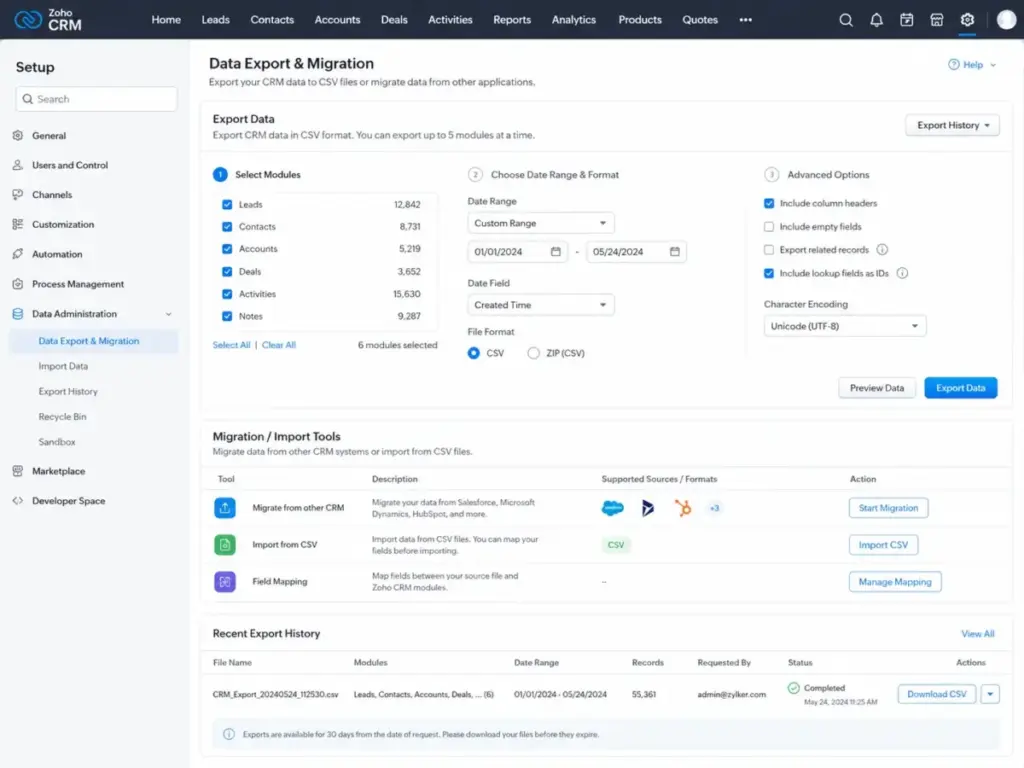
- Export all Zoho CRM contacts, accounts, deals, activities, and notes to CSV.
- Document custom fields, pipeline stages, deal sources, and tags.
- List active workflows, automations, and assignment rules.
- Identify integrations that need reconnection.
- Run a duplicate check on exported data.
Week 2: Import and Map
- Import cleaned records into the new CRM.
- Map custom fields to equivalent fields in the target system.
- Configure pipeline stages to match your current sales process.
- Set up email sync, calendar integration, and basic permissions.
- Verify contact and deal counts match export totals.
Week 3: Rebuild Workflows and Reports
- Recreate critical automation rules in the new CRM.
- Build replacement dashboards and pipeline reports.
- Reconnect third-party integrations (email marketing, forms, accounting).
- Test one complete deal cycle from lead to close.
- Document new processes for the sales team.
Week 4: Train and Run Parallel
- Train all users on the new interface and daily workflows.
- Run parallel operation: log activities in both CRMs for 3-5 days.
- Identify gaps, missing data, or broken workflows.
- Confirm reporting accuracy against Zoho baselines.
- Set the cutover date and archive Zoho CRM access (do not delete immediately).
When to Stay with Zoho CRM
Not every frustrated Zoho CRM user should switch. Sometimes the problem is process design, not the software. Here are honest cases where staying makes more sense than migrating.
Stay if you already use the Zoho ecosystem. If Zoho Books, Zoho Desk, Zoho Campaigns, or Zoho One are running your operations, replacing just the CRM breaks those connections. The integration value of the full Zoho suite is hard to replicate with a standalone CRM.
Stay if you have a sales ops person. Zoho CRM’s complexity becomes manageable when someone owns the configuration. A dedicated admin who maintains fields, workflows, and reports turns Zoho from confusing into powerful.
Stay if you need broad customization at a lower price than Salesforce. Zoho Enterprise costs about $40/user/month billed annually. Salesforce Enterprise costs substantially more. If you need custom modules, advanced workflow rules, and API access, Zoho delivers strong value per dollar.
Stay if you want pay-as-you-go flexibility. Zoho offers monthly billing on all tiers. Many competitors require annual commitments or charge premium rates for monthly plans.
Consider downgrading to Bigin instead of leaving. Bigin by Zoho CRM is built for small businesses moving from spreadsheets. If Zoho CRM feels too heavy for your 1-5 person team, Bigin offers simpler pipelines, a free plan, and single-click migration from Zoho CRM. You stay in the Zoho ecosystem without the module overhead.
The contrarian take: A cheaper CRM subscription can still cost more if migration and retraining destroy adoption for 4-8 weeks. Before switching, ask whether the real problem is the tool or the process built inside it.
Final Verdict: Which Zoho CRM Alternative Should You Choose?
Zoho CRM is a strong product. Capterra’s 4.3/5 rating from nearly 7,000 reviews confirms that. The problem is not quality. It is fit. When the CRM becomes more system than selling tool, it is time to evaluate Zoho CRM alternatives that match how your team actually works.
Here are the clear winners by category:
| Need | Best Zoho CRM Alternative | Why |
|---|---|---|
| Best overall for sales teams | Pipedrive | Fastest pipeline adoption, activity-driven selling |
| Best free-to-paid CRM | HubSpot CRM | Strongest free tier with marketing ecosystem |
| Best value with AI | Freshsales | Freddy AI, built-in phone, $9/user/month entry |
| Best enterprise upgrade | Salesforce Sales Cloud | Governance, scale, AppExchange depth |
| Best visual workflow CRM | monday CRM | Board-based pipeline for sales + operations |
| Best Google Workspace CRM | Copper | Gmail-native CRM experience |
| Best outbound CRM | Close | Built-in calling, SMS, and sequences |
| Best sales-to-project handoff | Insightly | CRM to project delivery in one system |
| Best small business simplicity | Capsule CRM | Clean CRM basics without overhead |
| Best predictable pricing | Less Annoying CRM | $15/user/month, one plan, no contracts |
The most important step before switching is clarity on your exit reason. If you know exactly why Zoho CRM does not fit, every recommendation above will guide you to the right replacement. If you are not sure, start with the Zoho CRM review to assess whether the problem is the tool or the implementation.
FAQ
What is the best Zoho CRM alternative?
Pipedrive is the best overall Zoho CRM alternative for sales teams that need faster pipeline adoption with less admin overhead. It scores 9.1/10 in this analysis and solves the most common exit reason: Zoho CRM’s module sprawl slowing down daily rep activity. For teams needing marketing alignment, HubSpot CRM is the better fit. For outbound teams, Close is the stronger pick.
Is there a free Zoho CRM alternative?
Yes. HubSpot CRM offers a free tier with contact management, deal tracking, email tracking, and live chat. Freshsales also provides a free plan for 3 users with basic CRM features. Capsule CRM has a free tier for light usage. Zoho CRM itself offers a free edition for up to 3 users, so compare free feature sets before switching.
Is Pipedrive better than Zoho CRM?
Pipedrive is better than Zoho CRM for daily pipeline usability and rep adoption in teams of 5-30 users. Zoho CRM is better for teams that need broad business-suite coverage, advanced customization, and lower pricing at higher tiers. The right choice depends on whether your priority is selling speed or platform depth.
Is HubSpot better than Zoho CRM?
HubSpot is better than Zoho CRM for inbound-led sales teams and companies that need marketing, content, and CRM in one ecosystem. Zoho CRM is better for budget-conscious teams, pay-as-you-go flexibility, and deep customization at mid-tier pricing. HubSpot’s Professional and Enterprise tiers can cost far more than equivalent Zoho plans.
What is cheaper than Zoho CRM?
Freshsales paid plans start from $9/user/month billed annually, below Zoho Standard’s ~$14/user/month. Less Annoying CRM costs $15/user/month with no tiers and no contracts. Copper Basic costs $23/seat/month. monday CRM Basic starts at $12/seat/month. However, compare equivalent feature tiers, not just entry prices. A cheaper subscription that lacks critical features creates hidden costs.
Which Zoho CRM alternative is easiest to use?
Less Annoying CRM and Capsule CRM are the easiest Zoho CRM alternatives to learn and use. Both focus on core CRM tasks without module sprawl or complex configuration. Pipedrive is the easiest option that still offers meaningful sales automation and reporting. monday CRM is easy for teams familiar with visual board-based project tools.
What is the best Zoho CRM alternative for Google Workspace?
Copper is the best Zoho CRM alternative for Google Workspace teams. It operates inside Gmail as a sidebar, syncs contacts and calendar events natively, and links Google Drive files to deal records. Streak CRM is another Gmail-native option for lighter CRM needs, though it was not included in this top 10 ranking. Teams considering that lighter Gmail-native path should compare Streak CRM alternatives by Google Workspace fit, automation requirements, reporting depth, and the point where a sidebar CRM stops being enough.
Can I migrate from Zoho CRM to another CRM?
Yes. Zoho CRM supports data export to CSV for contacts, accounts, deals, activities, notes, and custom module records. Most alternatives on this list accept CSV imports. The harder part is rebuilding workflows, automations, reports, and integrations. Budget 2-4 weeks for a 10-person team migration. Use the 30-Day Switch Plan in this article as a starting framework.
Should small teams use Bigin instead of Zoho CRM?
Small teams of 1-5 users who find Zoho CRM overwhelming should evaluate Bigin before leaving the Zoho ecosystem entirely. Bigin is built for small businesses, offers a free plan, and supports single-click migration from Zoho CRM. It keeps the Zoho data structure but removes module complexity. If the problem is CRM weight, not the Zoho platform itself, Bigin is the simpler path.
When should I stay with Zoho CRM?
Stay with Zoho CRM if you already use Zoho Books, Desk, Campaigns, or Zoho One. Stay if you have a dedicated admin who maintains fields, workflows, and reports. Stay if you need broad customization at a price below Salesforce. And stay if the real problem is process design, not the software. Switching CRMs does not fix a broken sales process. It just moves the broken process to a different interface.