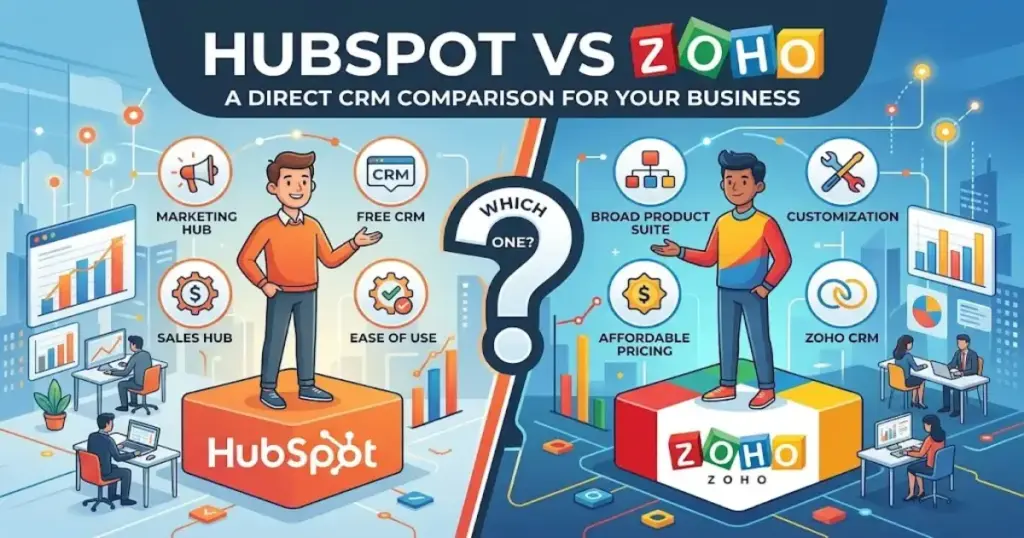
Most small businesses pick their first CRM software based on a blog post and a free trial. Then six months later, the team stops updating it. The HubSpot vs Zoho decision matters because these two platforms solve different problems for different teams. HubSpot gets your team using the CRM in days.
Zoho gives you deeper control over how the CRM works, at a lower per-seat cost. This guide breaks down pricing at 1, 5, 10, and 25 users, declares a winner for every comparison dimension, and tells you exactly which tool fits your team size, budget, and sales process. If you are comparing the best CRM software for a small business in 2026, start here.
TL;DR: Which CRM Wins?
HubSpot wins for most small businesses that need fast adoption and sales-marketing visibility. Zoho CRM wins for teams that can invest in setup and want lower per-user cost with deeper customization. Here is how the verdict breaks down by team type.
| Use Case | Winner | Why |
|---|---|---|
| Solo founder, needs CRM today | HubSpot Free | Broader free plan, zero setup friction |
| 3-person startup, no CRM admin | HubSpot Starter | Faster onboarding, cleaner UI |
| 5-person sales team, budget-first | Zoho Professional | $115/month vs HubSpot’s $250/month |
| 10-person team, custom sales process | Zoho Enterprise | Territories, custom functions, lower cost |
| 25-person sales ops team | Zoho Enterprise | $1,000/month vs HubSpot’s $1,875/month |
| Marketing-led SMB, forms + email + sales | HubSpot Professional | Native marketing-sales alignment |
| Zoho ecosystem user (Books, Desk, Campaigns) | Zoho CRM | Tighter ecosystem integration |
| Team moving from spreadsheets, no admin | HubSpot Starter | Lowest adoption risk |
For the full best CRM for small business breakdown, see our ranked guide.
Find Your Match in 30 Seconds
You do not need to read 4,000 words if your situation is clear. Answer these questions and skip to your match.
- Choose HubSpot if your team has no CRM admin, you want the CRM running in under a week, you need marketing and sales in one system, or you are a 1-5 person team moving from spreadsheets.
- Choose Zoho CRM if you have someone who will own CRM configuration, your sales process needs custom stages, fields, or modules, you need paid-tier features at a lower per-seat cost, or you already use Zoho Books, Zoho Desk, or Zoho Campaigns.
- Skip both if you only need a visual pipeline with no marketing (consider Pipedrive), you need enterprise-grade governance and compliance workflows (consider Salesforce), or you want a workflow-first tool that happens to include CRM (consider monday CRM).
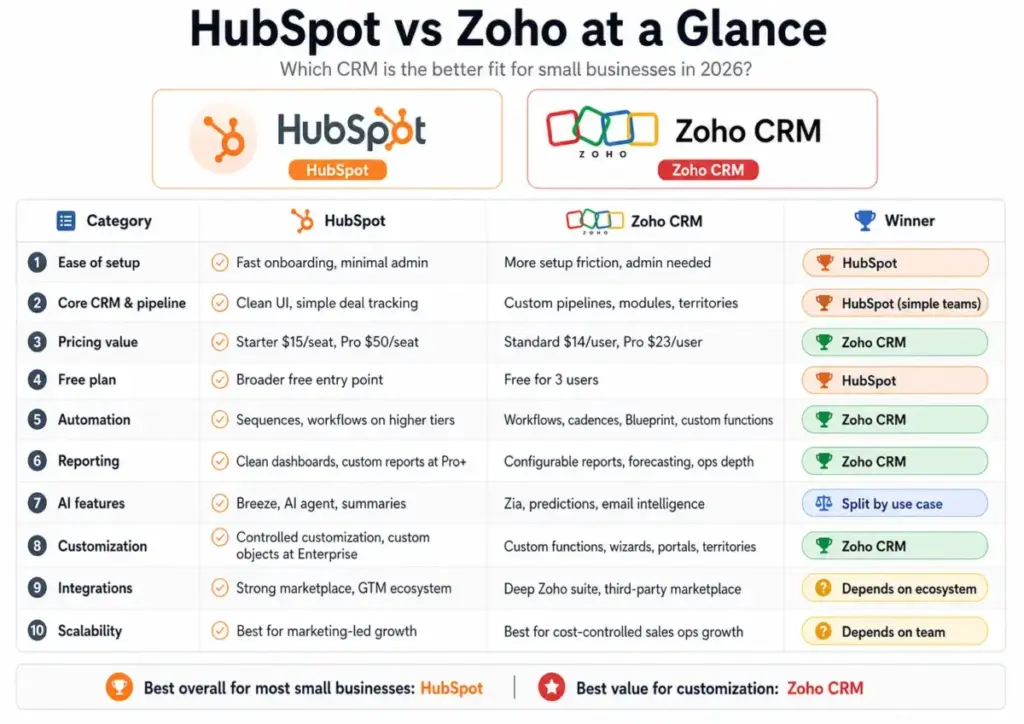
HubSpot vs Zoho at a Glance
HubSpot leads on adoption speed and UI clarity; Zoho leads on pricing value and customization depth. The table below covers 10 comparison dimensions with a winner declared for each. No ties except where I split AI by use case.
| Category | HubSpot | Zoho CRM | Winner |
|---|---|---|---|
| Ease of setup | Fastest onboarding, minimal admin | More setup friction, needs admin ownership | HubSpot |
| Core CRM and pipeline | Clean pipeline UI, simple deal tracking | Custom pipelines, modules, territories | HubSpot (simple teams) |
| Pricing value | Starter $15/seat, Pro $50/seat | Standard $14/user, Pro $23/user | Zoho CRM |
| Free plan | Unlimited users, limited features | 3 users, core CRM included | HubSpot |
| Automation | Sequences, workflows (higher tiers) | Workflows, cadences, Blueprint, custom functions | Zoho CRM |
| Reporting | Clean dashboards, custom reports at Pro+ | Configurable reports, forecasting, operations modeling | Zoho CRM (with admin) |
| AI features | Breeze, AI agent, summaries | Zia, email intelligence, predictions, custom AI/ML | Split by use case |
| Customization | Controlled customization, custom objects at Enterprise | Custom functions, wizards, portals, territories | Zoho CRM |
| Integrations | Strong marketplace, go-to-market ecosystem | Deep Zoho suite, third-party via marketplace | Ecosystem-dependent |
| Scalability | Best for marketing-led growth | Best for cost-controlled sales ops growth | Team-dependent |
How We Compared HubSpot and Zoho
Every claim in this article is sourced from official pricing pages, official feature lists, and verified review patterns. I did not fabricate test results or invent proprietary benchmarks. You can read our full review methodology for details on how we evaluate CRM software.
Here is what I used:
- HubSpot CRM pricing and the HubSpot product and services catalog for seat costs, feature gates, and credit limits.
- Zoho CRM pricing and the Zoho CRM feature list for tier-by-tier feature data.
- Pricing scenarios calculated at 1, 5, 10, and 25 users using annual plan rates.
- Verified review patterns from Capterra and G2 for user sentiment on adoption, usability, and customization.
- Small business buyer scenarios for teams of 1, 3, 5, 10, and 25 people.
I compared both CRMs as a small business buyer, not as a vendor partner.
HubSpot CRM Overview
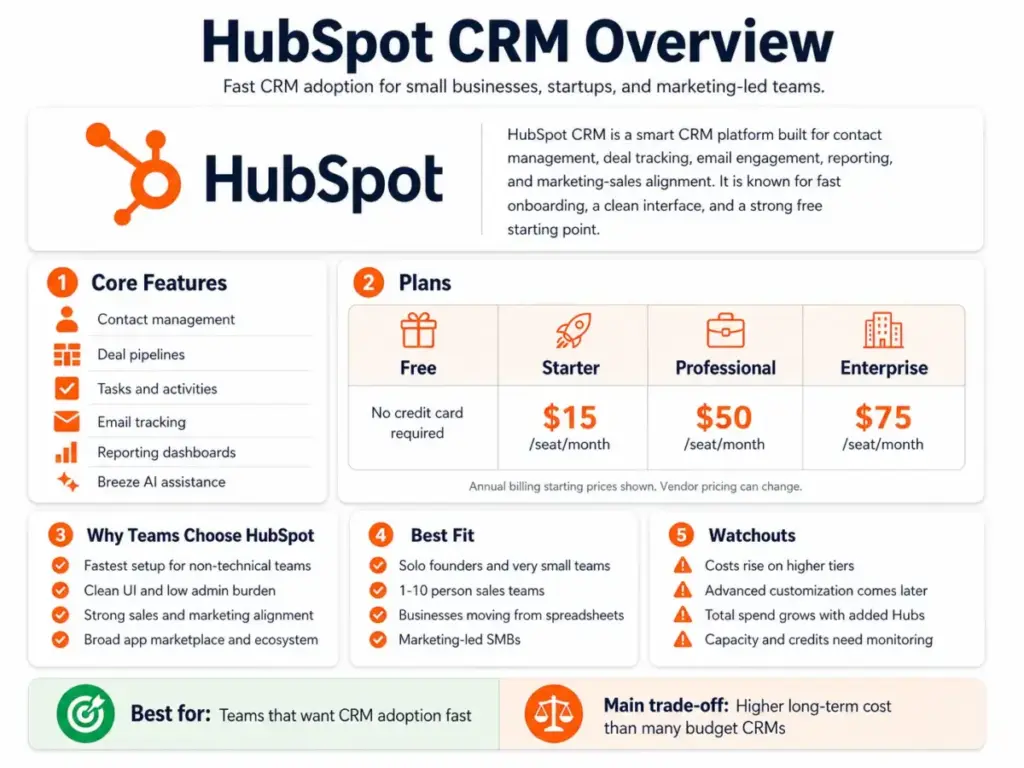
HubSpot Smart CRM is the fastest path from “no CRM” to “CRM the team actually uses.” It combines contact management, deal pipelines, email tracking, reporting, and marketing tools into a single platform with one of the cleanest interfaces in the CRM market.
For a deeper breakdown, read our full HubSpot CRM review.
HubSpot offers four CRM tiers: Free (no credit card), Starter ($15/seat/month), Professional ($50/seat/month), and Enterprise ($75/seat/month). The free plan is genuinely usable for solo founders and very small teams. Starter removes branding and adds required fields, permission sets, and multi-currency support. Professional unlocks custom reporting, contact scoring, duplicate management, and the AI customer agent. Enterprise adds custom objects, teams, SSO, and field-level permissions.
HubSpot also includes Breeze, its AI assistant, across tiers for summaries and automation help. As a verified Capterra reviewer noted: “Hubspot had great features even on a free plan.”
The main limitation: HubSpot becomes expensive when you need Marketing Hub, Service Hub, Content Hub, or Data Hub alongside CRM. The platform uses seats and HubSpot Credits for capacity, which requires cost monitoring as you scale. Teams often outgrow Free or Starter once they need scoring, calculated properties, advanced permissions, or custom objects.
Best fit: 1-10 person teams that want fast adoption, clean UI, and native marketing-sales alignment.
Zoho CRM Overview
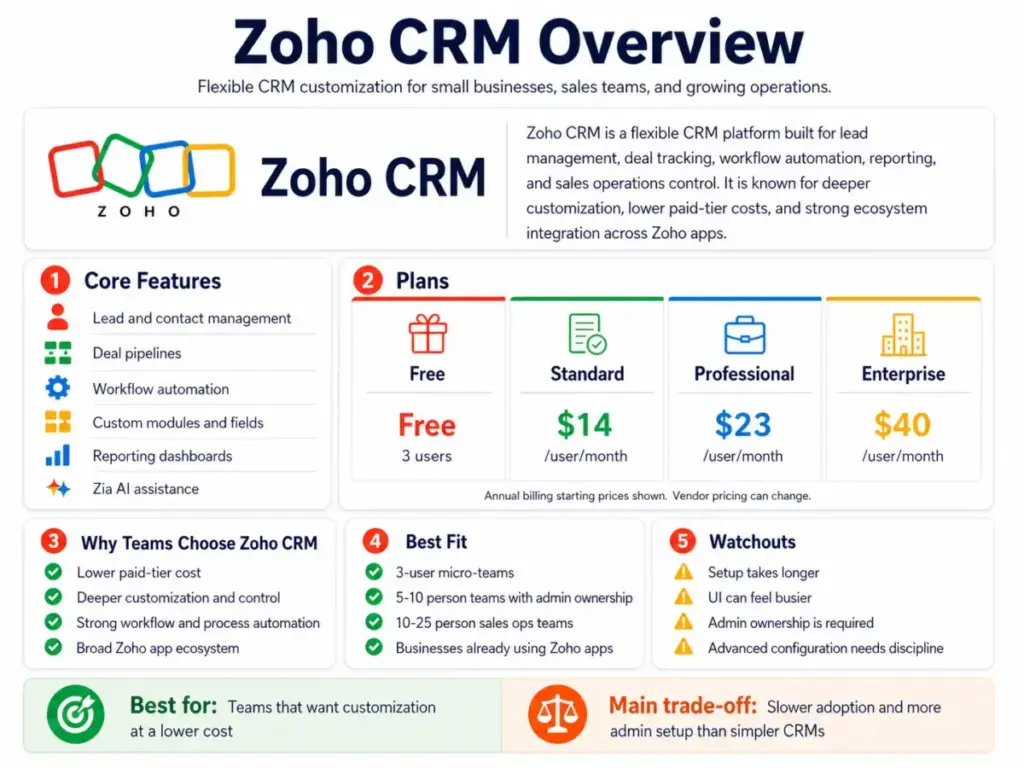
Zoho CRM gives small businesses more configuration depth per dollar than any mainstream CRM. It is built for teams that want control over their sales process, custom modules, workflow automation, and sales operations modeling, without paying enterprise prices.
For a deeper breakdown, read our full Zoho CRM review.
Zoho CRM offers five tiers: Free (3 users), Standard ($14/user/month), Professional ($23/user/month), Enterprise ($40/user/month), and Ultimate ($52/user/month). As one Capterra reviewer put it: “ZOHO’s a swiss army knife.” Standard includes workflows, assignment rules, AI agents, cadences, reports, dashboards, and sales forecasting. Professional adds CPQ, email intelligence, process automation, and inventory management. Enterprise adds Zia (AI sales assistant), journey orchestration, territory management, custom functions, wizards, and customer portals. Ultimate expands limits and adds custom AI/ML and data preparation.
A Reddit user in r/CRM observed that Zoho “has a ton of apps on the Zoho Suite,” and that ecosystem fit matters. If your business already runs Zoho Books, Zoho Desk, Zoho Campaigns, Zoho Forms, or Zoho Projects, Zoho CRM connects natively.
The main limitation: Zoho requires more admin discipline. UI complexity can slow adoption. Some teams need a trained CRM admin or a consulting partner to get full value from the platform.
Best fit: 5-25 person sales teams that have admin ownership and want lower cost with deeper customization.
Feature-by-Feature Comparison
I scored HubSpot and Zoho CRM across 10 dimensions and declared a winner in each. No dimension got a lazy “it depends.” Where the answer varies by team type, I named the specific micro-cohort.
HubSpot Wins on Setup and Adoption
HubSpot is the easier CRM to get running. A non-technical founder can sign up, import contacts, build a sales pipeline, and start tracking deals in one sitting. There is no admin setup required for the free or Starter tier. The UI is consistent across contacts, deals, tasks, email tracking, and reporting. As one Reddit user noted: “Hubspot has a great interface and easy for sales team to use.” Zoho CRM requires more upfront configuration: field customization, workflow setup, and layout decisions. For teams with no CRM admin, that friction kills adoption.
Winner: HubSpot. If your team has never used a CRM, HubSpot reduces the chance they stop updating it.
HubSpot Wins Core CRM for Simple Teams
For standard B2B sales pipelines, HubSpot’s default CRM setup works out of the box. Contact records, deal stages, task management, and email logging require minimal configuration. Zoho CRM is stronger for non-standard sales processes that need custom modules, multi-pipeline setups, or territory-based routing. If your pipeline has 4-7 stages and your deals follow a linear path, HubSpot is the better default. If your sales process has branches, approvals, or regional splits, Zoho gives you more modeling tools.
Winner: HubSpot for most small businesses. Zoho wins for teams with complex, non-linear sales processes.
Zoho CRM Wins on Pricing Value
Zoho CRM costs less per seat at every paid tier. At 10 users on Professional plans, Zoho costs $230/month. HubSpot costs $500/month. That is a $270/month difference, or $3,240/year. At 25 users on Enterprise, Zoho costs $1,000/month vs HubSpot’s $1,875/month, a gap of $10,500/year. Zoho’s pricing advantage grows as teams add seats. For the full pricing math, see the pricing section below.
Winner: Zoho CRM. The per-seat cost advantage is real and grows with team size.
HubSpot Wins the Free Plan for Growth
HubSpot’s free CRM supports unlimited users with limited features. Zoho’s free plan caps at 3 users with core CRM features. For a solo founder or a 2-person team testing CRM for the first time, HubSpot Free is the broader entry point. It includes contact management, deal pipelines, reporting dashboards, and Breeze AI assistant (beta). Zoho Free is cleaner for a fixed 3-person micro-team that needs leads, deals, workflows, and mobile access, but it locks out growth past 3 users.
Winner: HubSpot. The free plan scales further before requiring a paid upgrade. Zoho Free is better for a fixed 3-user team that wants more CRM depth at no cost.
Zoho CRM Wins on Automation Depth
Zoho CRM offers more automation tools at lower price points. Standard includes workflows, assignment rules, and cadences. Professional adds Blueprint process automation and custom widgets. Enterprise adds custom functions, journey orchestration, and advanced workflow logic. HubSpot offers sequences and basic workflows in Starter, but custom reporting, contact scoring, and deeper automation require Professional ($50/seat/month). Zoho Professional ($23/user/month) includes CPQ, process automation, and email intelligence, features that cost more on HubSpot.
Winner: Zoho CRM. More automation depth per dollar, especially at the Professional tier.
Zoho CRM Wins on Customization
Zoho CRM allows deeper data model customization than HubSpot at comparable price points. Zoho Enterprise ($40/user/month) includes custom functions, wizards, customer portals, territory management, and custom modules. HubSpot requires Enterprise ($75/seat/month) for custom objects and field-level permissions. If your sales process needs custom record types, approval workflows, or territory-based access, Zoho gives you those tools at a lower tier cost.
Winner: Zoho CRM. Deeper customization at a lower price. HubSpot’s customization is more controlled, which helps non-technical teams but limits power users.
HubSpot Wins for Marketing-Sales Alignment
HubSpot was built as a marketing-first platform that added CRM. Forms, landing pages, email marketing, and sales follow-up live in the same system. Lead sources, campaign attribution, and marketing contact tracking are native. Zoho CRM connects to Zoho Campaigns, Zoho Forms, and Zoho Social, but the marketing-sales connection requires configuration across separate Zoho apps. If your growth model depends on inbound marketing feeding the sales pipeline, HubSpot’s single-platform approach reduces data gaps.
Winner: HubSpot. For marketing-led SMBs, the native alignment saves setup time and reduces data fragmentation.
Zoho CRM Wins for Sales Operations Control
Zoho CRM gives operations teams more granular control over sales process modeling. Territory management, custom functions, Blueprint process automation, and configurable forecasting are available at Enterprise ($40/user/month). HubSpot provides clean forecasting and pipeline reporting, but deep operations modeling (custom calculated properties, advanced permissions, teams) requires Professional or Enterprise. For a 10-25 person sales team with a dedicated operations owner, Zoho provides more configuration power at a lower cost.
Winner: Zoho CRM. Better fit for sales ops teams that need granular control and have admin capacity.
HubSpot and Zoho Split AI Use Cases
Neither platform has a clear AI advantage across all scenarios. HubSpot offers Breeze (AI assistant), AI customer agent (Professional+), email summaries, and automation suggestions. Zoho offers Zia (AI sales assistant, Enterprise+), email intelligence (Professional+), predictions, and custom AI/ML models (Ultimate). HubSpot’s AI is easier to access and use. Zoho’s AI is deeper for teams that configure it.
Winner by scenario: HubSpot for teams that want AI out of the box with zero configuration. Zoho for teams that will train Zia, use email intelligence, and build custom AI models.
HubSpot Wins for Low-Admin Teams
If no one on your team will own CRM administration, HubSpot is the safer choice. Zoho CRM’s value depends on someone configuring workflows, managing layouts, and maintaining data quality. HubSpot’s defaults work with less maintenance. This is not a feature comparison; it is an operational reality. The best CRM is the one your team updates every day, and that requires low friction for low-admin teams.
Winner: HubSpot. Adoption beats feature depth when no one owns CRM administration.
How Does HubSpot Pricing Compare to Zoho?
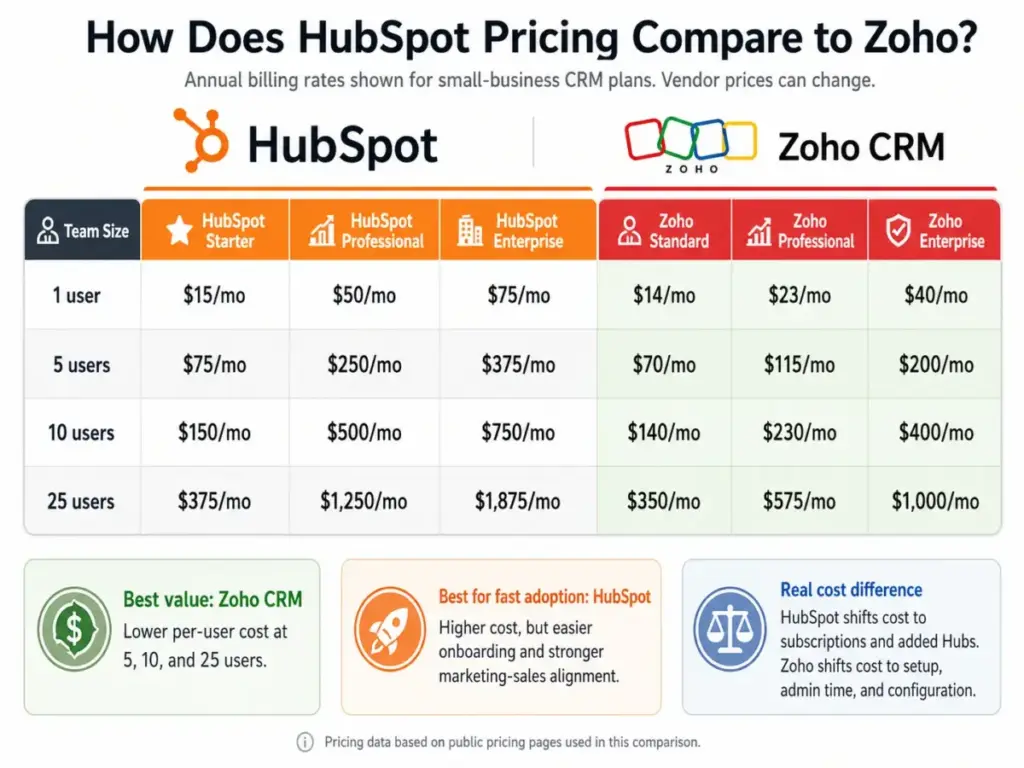
Zoho CRM is the cheaper CRM at every paid tier, but HubSpot can justify higher cost when adoption speed and marketing alignment matter more than per-seat savings. Below is the pricing math at 1, 5, 10, and 25 users. For detailed tier breakdowns, see our HubSpot pricing and Zoho CRM pricing guides.
Pricing verified from public pricing pages, April 2026. Vendor prices can change. Annual billing rates shown.
| Team Size | HubSpot Starter | HubSpot Pro | Zoho Standard | Zoho Pro | Zoho Enterprise |
|---|---|---|---|---|---|
| 1 user | $15/mo | $50/mo | $14/mo | $23/mo | $40/mo |
| 5 users | $75/mo | $250/mo | $70/mo | $115/mo | $200/mo |
| 10 users | $150/mo | $500/mo | $140/mo | $230/mo | $400/mo |
| 25 users | $375/mo | $1,250/mo | $350/mo | $575/mo | $1,000/mo |
At 1 user, both tools are affordable. HubSpot wins if free CRM speed matters. At 5 users, Zoho Professional at $115/month costs less than HubSpot Professional at $250/month. At 10 users, the gap widens: $230/month vs $500/month. At 25 users, Zoho Enterprise at $1,000/month costs $875/month less than HubSpot Enterprise at $1,875/month.
The Real Cost Difference
Subscription price is not total cost. The real cost comparison is more nuanced.
HubSpot’s total cost expands when you add Marketing Hub, Service Hub, Content Hub, or Data Hub alongside CRM. The platform uses seats and HubSpot Credits for certain features and capacity. Teams that start on Free or Starter often upgrade to Professional once they need contact scoring, custom reporting, or duplicate management. Each Hub adds its own seat cost. Monitor the HubSpot product catalog for current limits.
Zoho’s total cost expands through implementation complexity, admin time, partner setup, internal training, and support plan upgrades. The subscription is lower, but the operational investment is higher. Teams without a trained CRM admin may need consulting to configure workflows, Blueprint automation, and custom modules properly.
Important Zoho note on team users: Zoho CRM offers “team users” at a lower cost, but team users cannot own records, access reports and dashboards, initiate calls or meetings, create automation, access Zia features, or access Google/Microsoft integrations. Factor this into your seat-cost calculation. Not every user needs a full license, but team user limitations are real.
HubSpot shifts cost to subscription. Zoho shifts cost to setup, administration, and configuration. Neither is simply “cheaper.”
Migration Reality Check
Switching CRMs is harder than vendors admit. Whether you are moving from spreadsheets, switching from HubSpot to Zoho, or going the other direction, expect 2-6 weeks of cleanup work. Here is what each migration task looks like on both platforms.
| Migration Task | HubSpot Difficulty | Zoho Difficulty | Risk |
|---|---|---|---|
| Contact/lead import | Easy (CSV, native import) | Easy (CSV, migration assistant in Ultimate) | Low |
| Field mapping | Easy (standard fields) | Medium (custom fields, modules) | Medium |
| Duplicate cleanup | Pro+ (duplicate management) | Standard+ (dedup tools) | Medium |
| Pipeline stage rebuild | Easy (drag-and-drop) | Medium (custom stages, Blueprint) | Medium |
| Workflow/automation rebuild | Medium (rebuild sequences) | Medium-High (rebuild workflows, rules, cadences) | High |
| Permission setup | Starter+ (permission sets) | Standard+ (roles, profiles, territories) | Medium |
| Reporting rebuild | Medium (rebuild dashboards) | Medium-High (rebuild reports, forecasts) | Medium |
| Staff training | Low (clean UI, fast ramp) | Medium (more screens, more configuration) | High |
| Integration reconnection | Medium (reconnect marketplace apps) | Medium (reconnect Zoho apps, third-party) | Medium |
| Billing review | Low (check seat count and Hubs) | Low (check user count and tier) | Low |
The biggest migration risk is not data import. It is automation rebuild and staff training. Workflows, sequences, assignment rules, and reporting logic do not transfer between platforms. Budget time for rebuilding these from scratch.
Who Should Choose HubSpot?
HubSpot is the right CRM when your team needs to start using it this week, not this quarter. It is designed for teams that value adoption speed over configuration depth.
- 1-person founder who wants free CRM running today with zero setup.
- 3-person startup with no dedicated CRM admin and no time for configuration.
- 5-person sales team that needs pipeline visibility and email tracking within one week.
- Marketing-led SMB using forms, email campaigns, landing pages, and sales follow-up in one platform.
- Teams willing to pay more to reduce adoption friction and get faster time-to-value.
If HubSpot does not fit, check our HubSpot CRM alternatives guide for options.
Who Should Choose Zoho CRM?
Zoho CRM is the right choice when you have someone who will own the system and configure it properly. It rewards discipline with lower cost and deeper capability.
- 3-user micro-team that fits inside Zoho’s free plan and needs core CRM without paying anything.
- 5-10 person sales team with a team lead or operations person who will manage CRM configuration.
- 10-25 person sales operations team needing territory management, custom functions, and configurable forecasting.
- Businesses already using Zoho Books, Zoho Desk, Zoho Campaigns, Zoho Forms, or Zoho Projects where ecosystem integration matters.
- Budget-sensitive teams with complex sales pipelines that need more than a standard 5-stage deal flow.
If Zoho CRM does not fit, check our Zoho CRM alternatives guide.
What Both Products Lack
No CRM solves every sales problem, and both HubSpot and Zoho have shared blind spots.
Neither platform is the best choice for ultra-simple, pipeline-only sales teams that do not need marketing, automation, or reporting. A tool like Pipedrive is often simpler and faster for those teams.
Neither CRM fixes broken data quality. If your contacts are messy, duplicated, or outdated, the CRM will reflect that. Both platforms offer dedup tools, but data hygiene is your team’s responsibility, not the software’s.
Neither CRM removes the need for CRM ownership. Someone on your team must own the system: update deal stages, clean stale records, maintain reports, and enforce data entry. HubSpot reduces the admin burden; Zoho requires more of it. But neither tool runs itself.
Neither CRM designs your sales process for you. Pipeline stages, lead qualification criteria, and deal progression rules are decisions your team makes. The CRM enforces them.
Both can get expensive in different ways. HubSpot through subscription expansion across Hubs and Credits. Zoho through implementation time, admin overhead, and consulting fees for complex setups.
When Neither CRM Is Right
Some teams should skip both HubSpot and Zoho entirely. Here is when another tool is the better fit.
- Pipeline-first teams with no marketing needs: our HubSpot vs Pipedrive or Pipedrive vs Zoho CRM comparisons are worth reviewing. Pipedrive is simpler, cheaper, and faster for visual deal management.
- Value-focused AI CRM buyers: Freshsales offers built-in AI at lower entry pricing. It is a reasonable option for teams that want AI-first CRM without Zoho’s setup complexity or HubSpot’s tier gating.
- Workflow-first teams: monday CRM works for teams that think in workflows, boards, and automations first, with CRM features layered on top.
- Enterprise governance requirements: If your team needs audit trails, compliance workflows, advanced territory rules, and multi-org control, HubSpot vs Salesforce or Zoho CRM vs Salesforce is the comparison to make.
FAQ
Here are the most common questions buyers ask when comparing HubSpot vs Zoho CRM.
Is HubSpot better than Zoho?
HubSpot is better for teams that need fast CRM adoption, clean UI, and native marketing-sales alignment. Zoho CRM is better for teams that want deeper customization, lower per-seat cost, and more granular control over sales operations. For most small businesses without a dedicated CRM admin, HubSpot is the safer choice. For teams with admin capacity and budget sensitivity, Zoho wins on value.
Is Zoho CRM cheaper than HubSpot?
Yes, Zoho CRM has lower per-seat pricing at every paid tier. At 10 users on Professional plans, Zoho costs $230/month vs HubSpot’s $500/month. But “cheaper” depends on total cost. HubSpot’s cost grows through Hub expansion and Credits. Zoho’s cost grows through setup time, admin overhead, and consulting. Compare total cost, not just seat price.
Which CRM is easier to use?
HubSpot. The interface is cleaner, onboarding is faster, and non-technical sales reps can start tracking deals with minimal training. Zoho CRM is more configurable, but that configuration adds complexity. Teams without admin support often struggle with Zoho’s UI and workflow setup.
Which CRM has better automation?
Zoho CRM offers more automation tools at lower price points. Workflows, assignment rules, cadences, Blueprint process automation, and custom functions are available from Standard through Enterprise. HubSpot’s automation is cleaner but gated behind higher tiers for features like contact scoring, custom reporting, and advanced workflows.
Which CRM is better for a 5-person sales team?
It depends on admin capacity. If the team has no CRM admin and needs fast adoption, HubSpot Starter at $75/month is the better choice. If the team has someone to configure the system and wants more features per dollar, Zoho Professional at $115/month offers better value with deeper automation and customization.
Which CRM is better for a 10-person sales team?
Zoho CRM is the better value at 10 users. Zoho Professional costs $230/month vs HubSpot Professional at $500/month. If the team needs territory management, custom functions, or process automation, Zoho Enterprise at $400/month still costs less than HubSpot Professional. HubSpot justifies the premium only if native marketing-sales alignment is critical to the growth model.
Does HubSpot or Zoho have the better free plan?
HubSpot’s free plan supports unlimited users with limited features. Zoho’s free plan supports 3 users with core CRM features including leads, deals, workflows, and reports. HubSpot Free is better for growth and testing. Zoho Free is better for a fixed 3-person team that wants more CRM depth at no cost.
Can I migrate from HubSpot to Zoho CRM?
Yes, but expect 2-6 weeks of work. Contact data imports are straightforward. The hard parts are rebuilding workflows, automation sequences, and reporting from scratch. Permission structures and pipeline stages need manual reconfiguration. Staff training on Zoho’s interface adds time. Zoho Ultimate includes migration assistance.
Is Zoho CRM too complicated for small businesses?
Not inherently, but it requires more setup discipline than HubSpot. Small businesses with someone who will own CRM configuration, even part-time, can get strong value from Zoho. Teams with no admin capacity and no willingness to learn the configuration layer will find Zoho frustrating. That is an adoption problem, not a product problem.
What is the biggest mistake when choosing between HubSpot and Zoho?
Choosing based on feature lists instead of team behavior. The CRM with the longest feature list is irrelevant if your team stops updating it after month two. Pick HubSpot if adoption risk is your biggest concern. Pick Zoho if you have the admin discipline to configure and maintain a more complex system. The best CRM is the one your team uses every day.
Final Verdict
HubSpot is my pick for most small businesses in 2026 because adoption beats feature depth when no one owns CRM administration. Zoho CRM is the better value for teams that can configure, govern, and maintain the system.
If you are a solo founder or a team under 5 people with no CRM admin, start with HubSpot Free or Starter. The speed-to-value is unmatched. If you are a 10-25 person sales team with admin capacity, custom sales processes, and budget sensitivity, Zoho CRM Professional or Enterprise gives you more control at lower cost.
HubSpot is not expensive for every small business. It becomes expensive when the CRM becomes a customer platform and you add Hubs, Credits, and seats across marketing, service, and content. Zoho is not simply cheaper. It shifts cost from subscription to setup, admin discipline, and configuration.
The right CRM is not the longest feature list. It is the one your team updates every day.