Omnisend charges by billable contacts, not by emails sent. That distinction matters because billable contacts include more than your newsletter subscribers. Abandoned cart recipients, checkout dropoffs, and anyone who can receive an automated or order-related message counts toward your bill, even if they never opted into your marketing list.
I have watched ecommerce store owners wonder why their Omnisend invoice climbed $30 in a month when their subscriber count stayed flat. The answer is almost always non-subscriber billing.
This review evaluates Omnisend as an email marketing platform for ecommerce stores in 2026, covering pricing, plan gates, automation, SMS changes, limitations, and who should pick a different tool. The evaluation is based on official documentation, pricing pages, help center articles, and cross-referenced user sentiment from G2, Capterra, and TrustRadius.
Omnisend is a strong pick for Shopify, WooCommerce, and BigCommerce stores that want email, SMS, push, forms, and automation in one place, but the real cost depends on your contact growth rate and whether you need SMS after the May 2026 pricing change.
| Category | Verdict |
|---|---|
| Best for | Small-to-mid ecommerce stores on Shopify, WooCommerce, or BigCommerce that want multichannel automation without developer setup |
| Not ideal for | Non-ecommerce teams, CRM-first workflows, stores needing advanced predictive CLV modeling or deep retention analytics |
| Starting price | Free ($0/month, up to 250 contacts); Standard from $16/month; Pro from $59/month (as of June 2026) |
| Best practical plan | Standard at $16/month for email-focused stores; Pro at $59/month if you need unlimited emails and SMS |
| Free plan | Yes, all features included, 250 contacts, 500 emails/month, 500 web push |
| Setup difficulty | Low for Shopify/WooCommerce/BigCommerce; Medium-to-High for custom platforms |
| Main strength | All core features available on every plan, including Free, with ecommerce-native automation workflows |
| Main limitation | Billable contacts include non-subscribers, pricing auto-adjusts monthly, and SMS is now a separate add-on |
| Best alternative | Klaviyo for advanced retention analytics; Brevo for sends-based pricing |
How We Reviewed Omnisend
We evaluated Omnisend using official pricing pages, product documentation, help center articles, integration guides, API documentation, and the 2026 pricing update announcement. User sentiment patterns were cross-referenced across G2, Capterra, TrustRadius, and Shopify App Store reviews.
Testing level: third-party validated. This review is based on official research and public user review patterns, not hands-on product testing. Pricing was verified from Omnisend’s official pricing page in June 2026.
What this review does not cover: We did not test email deliverability rates, perform A/B tests inside the platform, or evaluate the mobile management experience (Omnisend does not have a verified standalone mobile app).
Our review methodology explains how we evaluate and score products across all SaaSZap reviews.
The 3 Problems Omnisend Solves
Problem 1: Ecommerce Stores Need Multichannel Automation Without Stitching Together 4 Tools
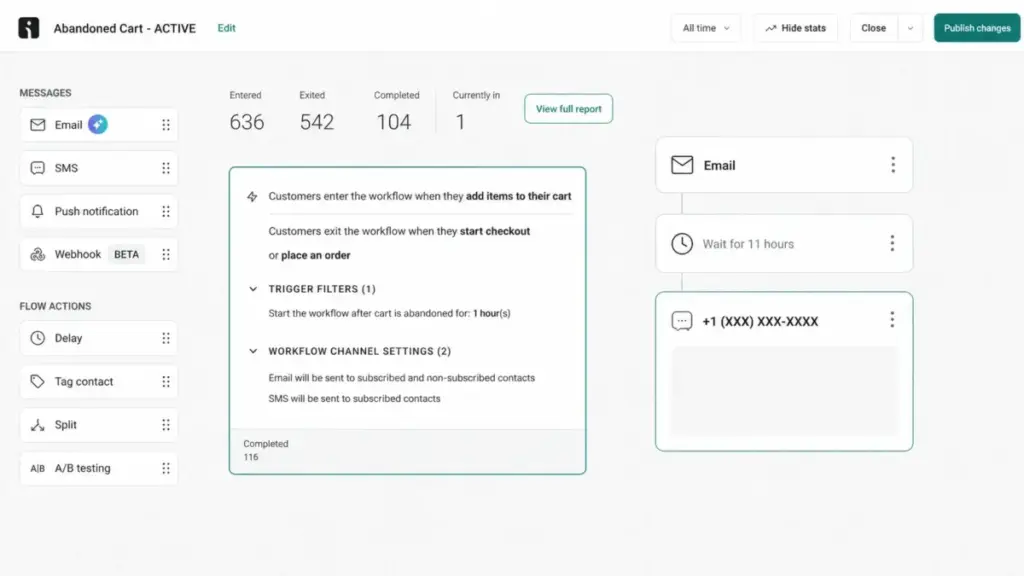
Most ecommerce marketing stacks end up as a patchwork: one tool for email, another for SMS, a third for popups, and a Zapier workflow holding everything together. Omnisend consolidates email campaigns, SMS marketing, web push notifications, signup forms, popups, and product recommendations into a single platform with shared contact data.
The pre-built ecommerce automations are where most stores get the fastest return. Abandoned cart, checkout abandonment, welcome series, browse abandonment, and post-purchase flows are available as templates with ecommerce product data baked in. The product picker pulls items from your store catalog directly into email templates, and the product recommender uses purchase history to suggest related items.
For Shopify, WooCommerce, and BigCommerce stores, the native integrations connect through app marketplaces without coding. That means a Shopify store owner can go from install to a working abandoned cart flow in under an hour. Custom platform stores need REST API or JavaScript API setup, which is a different experience entirely (more on that in the setup section).
The practical value: instead of paying for Mailchimp plus an SMS tool plus a popup builder plus a push notification service, Omnisend handles all four channels from one dashboard with one contact list.
Problem 2: Small Teams Need AI-Powered Segmentation Without Data Science Resources
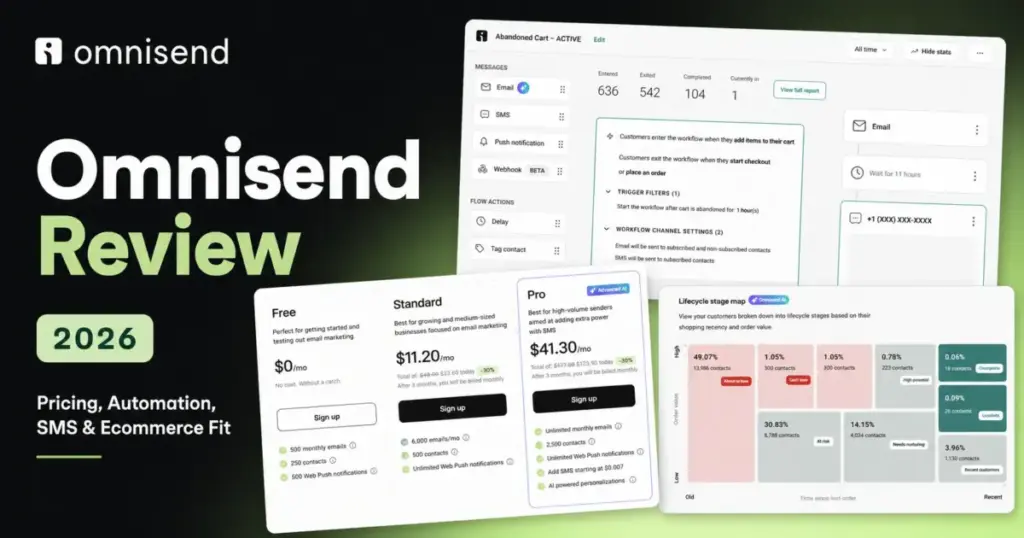
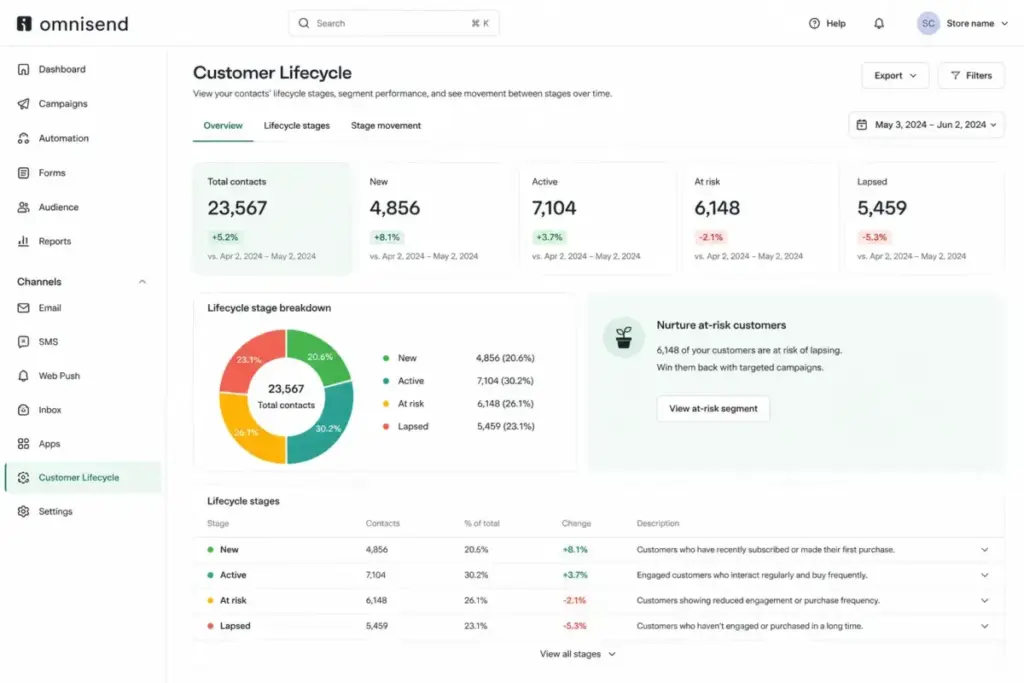
Omnisend added several AI features that address a real gap for small teams: the AI Segment Builder, Forms AI, Dynamic Content AI, and a personalized product recommender. The Customer Lifecycle Map is the standout here. It classifies contacts into lifecycle stages (new, active, at-risk, lapsed) based on ecommerce activity, giving store owners a retention dashboard without setting up custom analytics.
The AI Segment Builder lets you describe a segment in plain language (“customers who bought running shoes in the last 90 days but have not purchased since”) and Omnisend creates the segment rules. For a 3-person ecommerce team that does not have a data analyst, this is a meaningful time saver.
Campaign Booster is another feature worth noting: it automatically resends campaigns to contacts who did not open the first send, using a different subject line. It is a simple concept, but it captures incremental opens that would otherwise be lost.
The caveat: these AI features are not predictive analytics. Omnisend does not offer CLV modeling, send-time optimization at the individual level, or the depth of retention analytics that Klaviyo provides. If your store is past $1M in annual revenue and you need advanced retention modeling, Omnisend’s AI is helpful but not sufficient.
Problem 3: Budget-Conscious Stores Need a Real Free Plan, Not a Trial With a Deadline
Omnisend’s Free plan is genuinely useful, not just a lead capture tool. All core features are available, including automation workflows, signup forms, popups, web push, the product picker, and segmentation. The limits are 250 contacts, 500 emails per month, and 500 web push notifications.
That is enough for a new Shopify store to set up its entire email automation stack, including welcome series, abandoned cart, and post-purchase flows, and run it for free while the store builds its list. No credit card required, no time limit.
Compare that to Klaviyo, which offers a free tier but gates some automation features and has different contact thresholds. Or Mailchimp, where free plan limitations have tightened considerably over the past two years. Omnisend’s “all features, low limits” approach is the most ecommerce-friendly free plan in this category.
The trap to watch: once your list crosses 250 contacts, you move to Standard at $16/month. And because Omnisend counts billable contacts (not just subscribers), you can cross that threshold faster than expected.
The 2 Problems Omnisend Creates
Problem 1: The Billing Math Gets Complicated Once You Grow
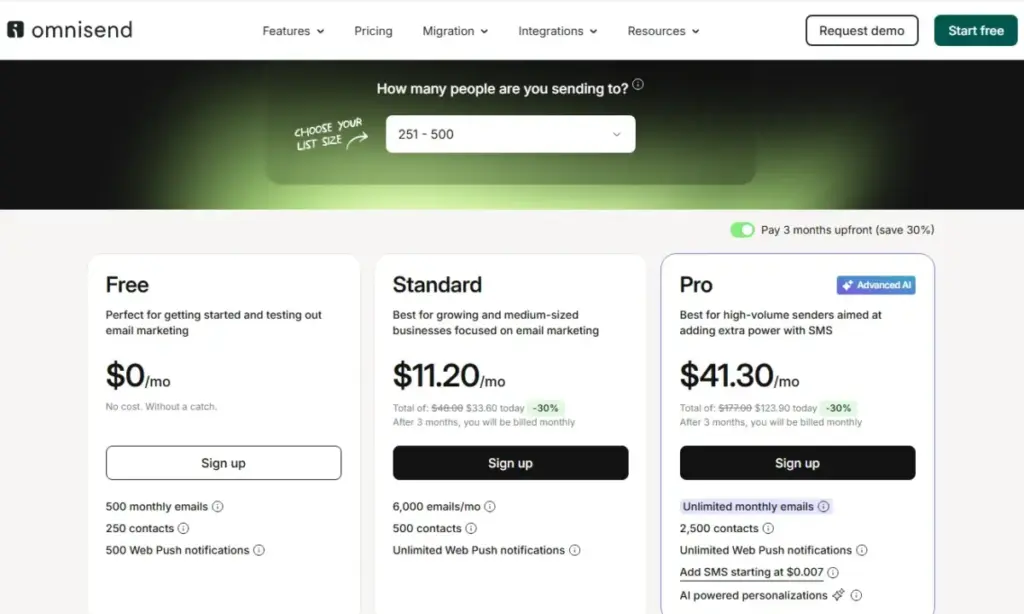
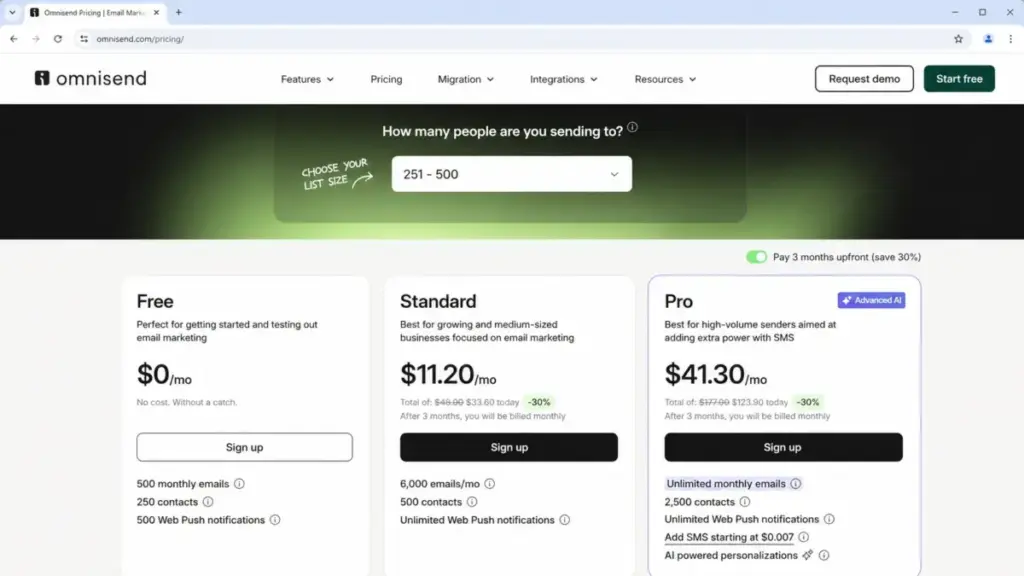
Omnisend’s pricing looks simple on the surface:
| Plan | Starting Price | Contact Tier | Email Credits | Web Push | SMS |
|---|---|---|---|---|---|
| Free | $0/month | Up to 250 | 500/month | 500/month | Not included |
| Standard | $16/month | Starts at 500 | Contact count x 12/billing cycle | Unlimited | Not included |
| Pro | $59/month | Starts at 2,500 | Unlimited | Unlimited | Add-on, from $0.007/SMS |
| Custom | Contact sales | Custom | Unlimited | Unlimited | Leading rates |
Pricing verified from Omnisend’s official pricing page as of June 2026. A one-time starter discount (30% off for the first 3 months when paying 3 months upfront) is available for first-time upgrades: Standard at $11.20/month and Pro at $41.30/month for the initial period.
What this means: The starting prices are real, but three billing mechanics make the actual cost harder to predict:
- Billable contacts include non-subscribers. Anyone who can receive an automated or transactional message counts. If your store processes 2,000 orders per month and 800 of those customers are not newsletter subscribers, those 800 still count as billable contacts.
- Pricing tiers auto-adjust monthly. Your bill goes up automatically as your billable contact count grows. There is no “lock in your rate” option. A store that starts at the 500-contact Standard tier ($16/month) can drift to a higher tier without realizing it.
- SMS is now a separate add-on for Pro subscribers who signed up on or after May 4, 2026. Under current pricing, Pro users get SMS rates starting at $0.007 per message, but there are no default included SMS credits. Legacy Pro subscribers (before May 4, 2026) may still have SMS credits bundled with their plan cost. Many competing reviews on Google still describe SMS as “included in Pro,” which is no longer accurate for new subscribers.
Paraphrased user sentiment from Capterra: users like email and SMS automation, templates, and integration, but recurring criticism centers on limited design flexibility and rising costs as lists grow. (Source)
Problem 2: Product Reviews Are Gone, and Consent Management Is Shopify-Only
Two under-discussed limitations affect specific buyer segments:
Product Reviews were discontinued on January 5, 2026. If your store relied on Omnisend’s native Product Reviews feature for collecting and displaying customer reviews, that functionality no longer exists. Automations using the “submitted product review” event can become report-only or need rebuilding. Stores affected by this need to migrate to third-party review apps such as Yotpo, Judge.me, or Loox, and reconnect their review request workflows.
Migration checklist for stores that used Omnisend Product Reviews:
- Identify all automation workflows that use the “submitted product review” trigger event
- Select and install a third-party review app (Yotpo, Judge.me, or Loox are common choices)
- Rebuild review request automations using the new app’s trigger events
- Test that existing review data displays correctly on product pages
- Remove or archive deprecated Omnisend review workflows
Consent Management is currently Shopify-only. Omnisend supports GDPR-ready consent workflows, re-consent campaigns, data export, and right-to-be-forgotten requests. But the specific Consent Management settings page in the Omnisend dashboard is available only for Shopify stores, according to official help documentation. WooCommerce, BigCommerce, and custom platform users should verify their consent tooling independently and not assume Omnisend handles it the same way across all platforms.
Key Features with Plan Gates
| Feature | Free | Standard | Pro | Custom |
|---|---|---|---|---|
| Email campaigns | ✅ (500/month) | ✅ (12x contacts/cycle) | ✅ (Unlimited) | ✅ (Unlimited) |
| Automation workflows | ✅ | ✅ | ✅ | ✅ |
| Signup forms and popups | ✅ | ✅ | ✅ | ✅ |
| Web push notifications | ✅ (500/month) | ✅ (Unlimited) | ✅ (Unlimited) | ✅ (Unlimited) |
| SMS campaigns | Not included | Not included | Add-on | Leading rates |
| Product recommender AI | ✅ | ✅ | ✅ | ✅ |
| AI Segment Builder | ✅ | ✅ | ✅ | ✅ |
| Customer Lifecycle Map | ✅ | ✅ | ✅ | ✅ |
| Advanced reporting | Limited | Limited | ✅ | ✅ |
| Facebook Custom Audiences | ✅ | ✅ | ✅ | ✅ |
| Google Customer Match | ✅ | ✅ | ✅ | ✅ |
| 24/7 live chat and email support | ✅ | ✅ | ✅ | ✅ |
| Account Expert | Not available | From $400/month spend | From $400/month spend | From $400/month spend |
What this means: Omnisend’s plan gating is unusually generous. Most features are available on Free. The main reasons to upgrade are contact limits (Free caps at 250), email volume (Standard gives 12x your contact count per billing cycle), unlimited sends (Pro), and SMS access (Pro add-on). Advanced reporting and the AI/personalization emphasis are Pro-tier advantages, but the core email, automation, and form features are not paywalled.
The Account Expert threshold is worth understanding: dedicated account management is available only when your monthly spend reaches at least $400. For most small-to-mid stores, this means you will work with 24/7 live chat and email support, which users across G2 and TrustRadius consistently praise as responsive.
Ease of Use, Integrations, and Support
Setup Complexity by Platform
| Platform | Setup Difficulty | Notes |
|---|---|---|
| Shopify | Low | Native app marketplace integration, no coding, connects in minutes |
| WooCommerce | Low | Native plugin, no coding, marketplace install |
| BigCommerce | Low | Native app, marketplace install |
| Wix | Low | Native integration through Wix marketplace |
| Magento / OpenCart | Medium-High | Requires JavaScript snippet or REST API setup, developer recommended |
| Custom platform | High | REST API and JavaScript API knowledge required, custom event configuration |
| CRM sync | Medium-High | API work or third-party connector needed |
What this means: If your store runs on Shopify, WooCommerce, BigCommerce, or Wix, Omnisend is one of the easiest marketing automation platforms to set up. If your store runs on Magento, OpenCart, or a custom-built platform, expect to involve a developer and plan for API configuration time.
Omnisend claims 200+ integrations through its Shopify App Store listing. Native ecommerce integrations handle product sync, order data, and customer activity automatically. For everything else, the REST API handles contacts, orders, products, and events, while the JavaScript API tracks page views, product views, and cart additions on your website.
Support
All customers, including Free plan users, get 24/7 live chat and email support. Omnisend also offers a Help Center, Academy, and in-app chat. The $400/month Account Expert threshold is the main gate: below that, you rely on self-service support resources and the 24/7 chat team.
Paraphrased user sentiment from TrustRadius: users frequently highlight responsive support, ecommerce suitability, and ease of email setup; some mention OpenCart/module and tag/segment limitations. (Source)
Security and Compliance
Omnisend’s Data Processing Agreement describes access controls, SSO support, MFA, role-based access controls, event logging, SIEM/EDR, a bug bounty program, annual third-party penetration testing, quarterly vulnerability scans, and Google Cloud Platform hosting. GDPR support includes consent workflows, re-consent, data export, and right-to-be-forgotten.
One caveat: the Consent Management settings feature is Shopify-only as of June 2026. WooCommerce and BigCommerce stores should independently verify that their consent capture meets GDPR requirements.
Who Wins and Who Loses
Use Omnisend if:
- You run a Shopify, WooCommerce, or BigCommerce store with fewer than 10,000 contacts and want email, SMS, push, forms, and automation in one tool without stitching together multiple services.
- You want a free plan that includes automation. Omnisend’s Free tier gives you the full feature set at 250 contacts, which is more generous than most competitors.
- Your team is small (1-5 people) and does not have a dedicated marketing ops person. The pre-built ecommerce workflows and AI Segment Builder reduce setup time.
- You prioritize abandoned cart and post-purchase recovery. These are Omnisend’s strongest workflows, and they work out of the box with Shopify and WooCommerce data.
- You need 24/7 support without paying for an enterprise tier. Omnisend provides live chat and email support on all plans, including Free.
Avoid Omnisend if:
- You are not running an ecommerce store. Omnisend is built for ecommerce workflows. Non-ecommerce teams, B2B SaaS companies, and content creators will find the platform features skewed toward product-based selling.
- You need advanced predictive retention analytics. Omnisend’s AI features are useful but do not match Klaviyo’s predictive CLV modeling, expected date of next order, or churn risk scoring.
- You need a CRM-first platform. Omnisend is a marketing execution tool, not a CRM. It does not replace Salesforce, HubSpot, or Pipedrive for pipeline management.
- You relied on Omnisend’s native Product Reviews. That feature was discontinued in January 2026. You now need a third-party review app.
- Your store runs on a custom platform without developer resources. The API setup for non-native platforms is not trivial, and you will need JavaScript/REST API expertise.
Better Alternatives for the Losers
| Alternative | Choose if | Starting price | Key differentiator |
|---|---|---|---|
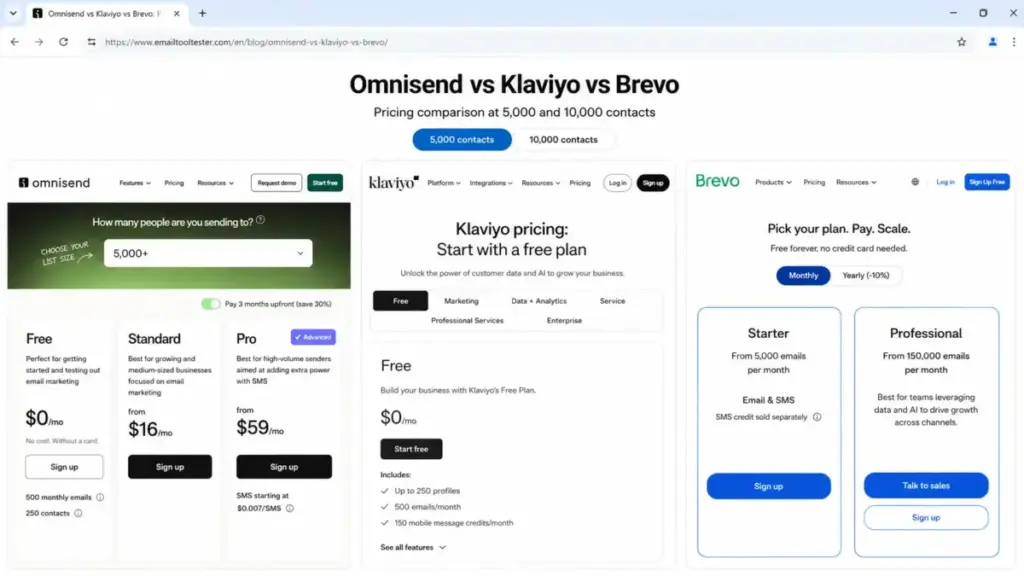
| Klaviyo | You need advanced retention analytics, predictive CLV, and deeper segmentation for mid-to-large ecommerce | Free up to 250 contacts; paid plans from $20/month | Predictive analytics, advanced flows, and ecommerce data depth |
| Brevo | You want sends-based pricing instead of contact-based, or run a high-volume newsletter alongside ecommerce | Free plan available; paid from $9/month | Charges by emails sent, not contacts stored |
| Mailchimp | You need a general-purpose email marketing tool with a broader template library and non-ecommerce workflows | Free plan available; paid from $13/month | Wider template variety, broader use-case fit beyond ecommerce |
| ActiveCampaign | You need CRM-integrated marketing automation with advanced conditional workflows | From $15/month | CRM + marketing automation in one, stronger conditional logic |
| ConvertKit | You are a creator or content-driven business, not a product-based ecommerce store | Free up to 10,000 subscribers; paid from $25/month | Built for creators, newsletter-first, simple automation |
What this means: Omnisend wins for ecommerce stores that want multichannel simplicity. Klaviyo wins for stores that have outgrown basic segmentation and need predictive analytics. Brevo wins for stores where contact count is high but send volume is moderate. Mailchimp is the generalist choice. ActiveCampaign is the pick when marketing automation complexity matters more than ecommerce-native features.
Final Verdict: Is Omnisend Worth It?
Omnisend is worth it for ecommerce stores on Shopify, WooCommerce, BigCommerce, or Wix that want email, SMS, web push, forms, automation, and AI segmentation in a single platform without a complex setup. The Free plan is one of the best in the category, and Standard at $16/month covers most small-store needs.
It is not worth it for non-ecommerce teams, stores needing advanced predictive analytics, or anyone who needs a CRM. And if you are evaluating Omnisend for SMS in 2026, understand that current Pro subscribers (signed up on or after May 4, 2026) get SMS as a separate add-on, not bundled credits.
My recommendation by store stage:
- New store, under 250 contacts: Start with Free. Set up welcome, abandoned cart, and post-purchase flows. Upgrade when you hit the contact limit.
- Growing store, 500-5,000 contacts, email-focused: Standard at $16/month. The 12x contact email credits are sufficient for most campaign frequencies.
- Scaling store, 2,500+ contacts, adding SMS: Pro at $59/month. Budget SMS separately as an add-on. Run the numbers on your expected SMS volume before committing.
- High-volume store needing advanced analytics: Evaluate Klaviyo alongside Omnisend. If predictive CLV modeling and send-time optimization matter to your retention strategy, Klaviyo is the stronger tool despite the higher price.
Omnisend is one of the strongest value picks in ecommerce email marketing for 2026. The buying decision comes down to whether your growth rate will push billable contacts (and your bill) faster than your revenue can justify, and whether you need the analytical depth that Omnisend’s AI does not yet provide.
For more best email marketing tools, see our full category guide.
FAQ
Is Omnisend worth it in 2026?
Yes, if you run an ecommerce store on Shopify, WooCommerce, BigCommerce, or Wix and want email, SMS, push, and automation in one platform. It is not worth it for non-ecommerce teams or stores needing advanced predictive retention analytics. The Free plan is a strong starting point, and Standard at $16/month covers most small-store needs.
How much does Omnisend cost?
Free plan: $0/month for up to 250 contacts and 500 emails. Standard starts at $16/month (500 contacts, 6,000 emails). Pro starts at $59/month (2,500 contacts, unlimited emails). Pricing auto-adjusts monthly based on your billable contact count. A one-time starter discount of 30% is available for the first 3 months when paying upfront. Check the official pricing page for current rates.
Does Omnisend include SMS credits on Pro?
Not for new Pro subscribers who signed up on or after May 4, 2026. Under current pricing, SMS is a separate add-on with rates starting at $0.007 per SMS. Legacy Pro users (before May 4, 2026) may still have SMS credits matching their monthly plan cost. Budget SMS as a separate line item.
Does Omnisend charge for non-subscribers?
Yes. Billable contacts include subscribers plus non-subscribers who can receive automated or order-related messages. This means checkout customers and abandoned cart contacts can count toward your bill even if they did not subscribe to your newsletter. Your plan tier auto-adjusts monthly based on this count.
Is Omnisend good for Shopify stores?
Yes. Omnisend integrates natively through the Shopify App Store with no coding required. Product data, order history, and customer activity sync automatically. Pre-built ecommerce automations like abandoned cart and welcome series work immediately after install. Consent Management settings are also available for Shopify stores.
Is Omnisend better than Klaviyo?
Omnisend is the better pick for small-to-mid ecommerce stores that want fast setup, lower cost, and multichannel basics (email, SMS, push, forms) in one tool. Klaviyo is the better pick for stores past $500K in annual revenue that need predictive CLV modeling, advanced retention flows, and deeper analytics. The decision depends on your store’s revenue stage and analytical needs.
What happened to Omnisend Product Reviews?
Omnisend discontinued its native Product Reviews feature on January 5, 2026. Stores that relied on this feature need to migrate to third-party review apps such as Yotpo, Judge.me, or Loox. Automation workflows using the “submitted product review” trigger event can become report-only and need rebuilding with the new review app’s events.
Does Omnisend have a free plan?
Yes. The Free plan includes all core Omnisend features (automation, forms, popups, web push, segmentation, AI tools) with limits of 250 contacts, 500 emails per month, and 500 web push notifications. No credit card required, no time limit. It is one of the most feature-complete free plans in ecommerce email marketing.
Is Omnisend hard to set up on a custom ecommerce platform?
Yes, compared to Shopify or WooCommerce. Custom platforms require REST API or JavaScript API configuration, which means developer involvement. Official documentation recommends API setup for Magento, OpenCart, and custom-built stores. If your team does not have API experience, plan for developer help or choose a platform with native Omnisend integration.
Does Omnisend have good customer support?
Yes. All plans, including Free, get 24/7 live chat and email support. User reviews across G2, Capterra, and TrustRadius consistently highlight responsive support as a strength. Dedicated Account Expert access requires a monthly spend of at least $400. For most small-to-mid stores, the 24/7 chat and Help Center are sufficient.