Small business owners need simple tools. They want to send newsletters without coding. They also need to manage client lists.
Finding the right system is difficult. Many buyers look for the best email marketing platforms to help them grow.
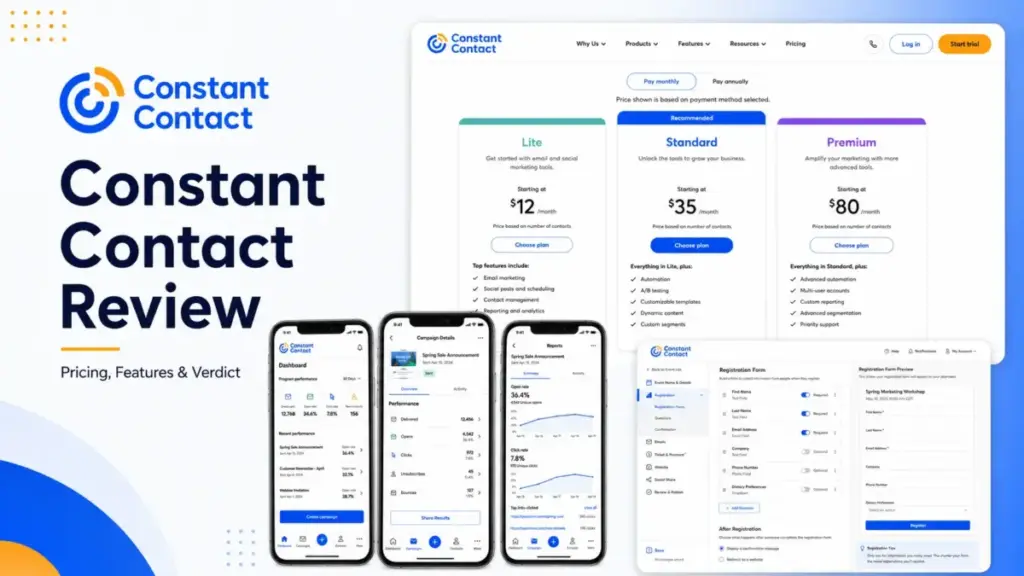
Constant Contact is a popular choice for US small businesses. The software offers templates and phone support.
It helps users understand what email marketing means for their growth. But its costs scale quickly. Send limits and gated features can surprise you. This review analyzes whether it fits your budget.
Quick Verdict: Is Constant Contact Worth It?
Choosing an email platform involves tradeoffs. Constant Contact prioritizes support over advanced automation.
The platform is designed for beginners. It works well for simple campaigns. But larger lists face high costs.
Here is the quick verdict on Constant Contact for 2026.
| Metric | Detail |
|---|---|
| Best for | Local service businesses, small nonprofits, and event organizers who need phone support. |
| Not ideal for | Fast-growing ecommerce brands, SaaS marketers, and teams needing advanced automation. |
| Starting price | $12/month (Lite plan) |
| Practical plan | Standard plan (starts at $35/month, unlocks A/B testing and custom segments) |
| Free plan/trial | No permanent free plan; 30-day free trial (up to 100 emails) |
| Setup difficulty | Low for newsletters; Medium for integrations and DNS authentication |
| Main strength | Direct live phone support and native event management tools |
| Main limitation | Strict monthly send allowances (10x to 24x contact count) with overage fees |
| Best alternative | Mailchimp (detailed below) |
What this means:
Constant Contact is a safe choice if you value guided onboarding and phone support. If you need complex automated flows or low scaling costs, look elsewhere.
How We Reviewed Constant Contact
Reviewing business software requires clear standards. As Sarah Chen from SaaSZap, I have evaluated 35+ email marketing platforms since 2022. I build segment-specific recommendation matrices for marketing teams.
This Constant Contact review uses a third-party validated testing level. No hands-on product testing was performed by SaaSZap for this review.
Instead, I analyzed official documentation and pricing pages. I also validated user sentiment patterns. These patterns come from G2, Capterra, and TrustRadius reviews.
I reviewed user sentiment patterns from G2, Capterra, and TrustRadius. This helps identify real-world feedback on onboarding and pricing.
Reviewers frequently mention ease of use and support quality. They also express concern over scaling costs.
All details and prices are verified as of June 22, 2026. This approach ensures factual accuracy for your buying decision.
Constant Contact Pros and Cons
Every tool has strengths and weaknesses. Constant Contact offers a simple editor but gates key features.
The table below outlines the core pros and cons.
| Pros | Cons |
|---|---|
| Direct phone support is included in all plans. | Monthly email sends are limited by contact tier. |
| Native event registration and payment collection. | Lite plan gates automated email scheduling. |
| AI content generator simplifies copy writing. | Bounced emails count toward send allowances. |
| Clean templates for quick newsletter creation. | Cancellation requires a phone call to support. |
| Social posting and scheduling are built in. | Custom segments are capped on lower plans. |
What this means:
Constant Contact is built for simplicity and support. If you want deep automation or lower fees, you will find these limits frustrating.
What Is Constant Contact?
Constant Contact is an email marketing and digital marketing platform. The platform is owned by Constant Contact, Inc.
It helps users manage contacts, send campaigns, and track results. The platform targets US small businesses, local services, and nonprofits.
It combines email campaigns with social posting and SMS marketing tools. It also includes event registration.
Unlike most competitors, it focuses heavily on phone support. This makes it popular with less technical users.
The system is not designed to be an enterprise CRM. It is a communication tool for growing audiences.
The platform helps you reach people across channels from one dashboard. It handles audience growth and template design in one system.
It maintains email deliverability standards for small senders. This helps your campaigns avoid spam filters.
The 3 Problems Constant Contact Solves
Constant Contact targets specific operational pain points. Here are the three primary problems the platform resolves.
Problem 1: Lack of Technical Expertise
Many small businesses do not have web developers. Creating professional emails from scratch takes time.
Constant Contact resolves this with a drag-and-drop editor. The editor has pre-designed templates. It also features a BrandKit tool. This tool imports your logo and colors from your website.
The setup wizard scans your homepage automatically. It extracts your colors, logo, and brand styles. This lets you build styled campaigns in minutes.
Review patterns suggest the AI content generator is helpful. It recommends email copy based on short prompts. This reduces the time spent writing newsletters.
Small teams can build clean layouts quickly. You do not need coding knowledge to launch campaign drafts.
Problem 2: Managing Event Registration and Payments
Organizing events usually requires separate tools. You have to send invites, collect RSVPs, and process payments.
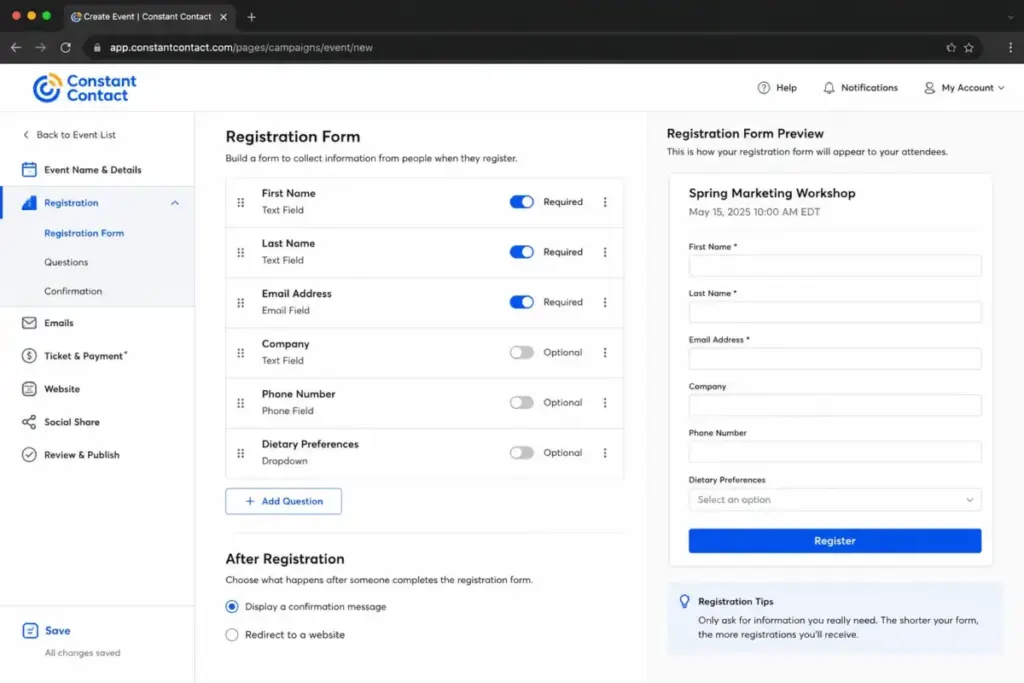
Constant Contact builds event management directly into the platform. Users can create event pages. They can track registrations and check RSVPs.
You can set up custom registration forms for guests. This helps gather dietary preferences or workshop selections.
It also integrates with payment gateways. This lets you collect ticket fees directly. You do not need to buy a separate ticketing tool.
This is a major benefit for local organizations. It keeps your event data and email list in one database. It avoids exporting list files between platforms.
Problem 3: Getting Immediate Human Support
Most email platforms gate human support. They force you to use chatbots or submit email tickets.
Constant Contact provides phone support on all plans. Live chat is also available.
Having a real person on the line reduces setup frustration. Phone agents can walk you through DNS changes.
This is a major benefit for local businesses. If a campaign fails, you can call a real person.
Onboarding assistance is also provided. This helps new users set up their accounts quickly. It reduces the stress of initial domain setup and verification.
The 2 Problems Constant Contact Creates
While the platform solves support issues, it introduces new friction. Here are the two main problems the platform creates.
Problem 1: Hidden Costs and Send Limits
Constant Contact looks affordable at first. But the pricing model contains traps.
Plan costs scale by contact count. Monthly email sends are capped as well.
Lite allows 10x your contact tier. Standard allows 12x. Premium allows 24x.
If you exceed these limits, you face overage fees. The fee is $0.002 per email.
This cost adds up during peak holiday seasons. Sending weekly campaigns to a list of 5,000 can trigger overages.
Bounced emails also count toward your monthly allowance. This penalizes lists with poor hygiene. You pay for invalid addresses until you prune them.
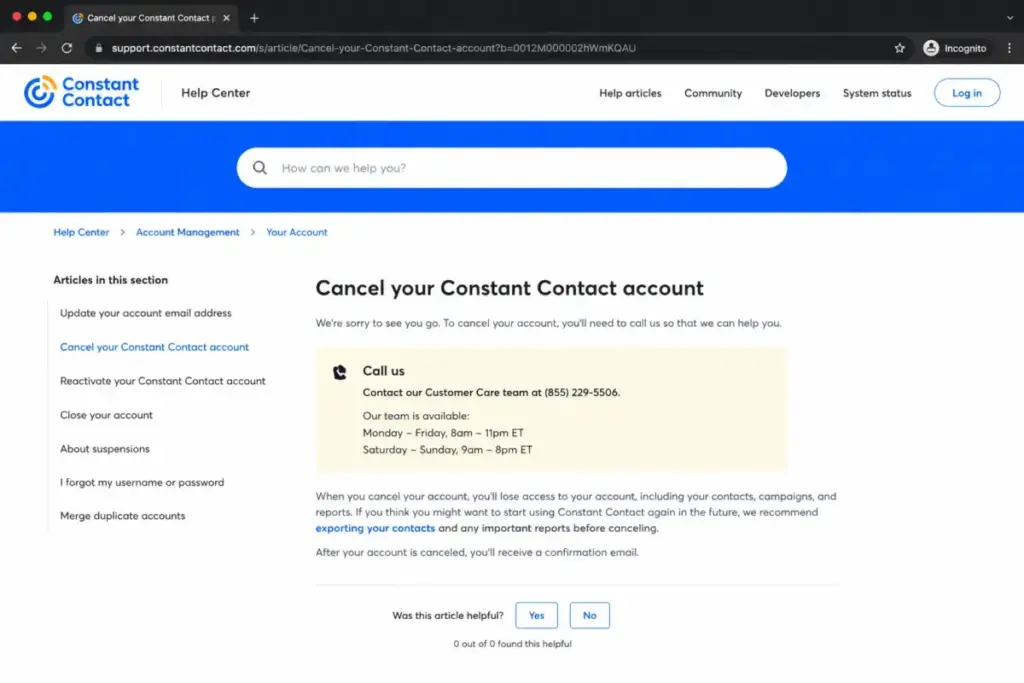
Cancellation is also difficult. The official cancellation page does not let you cancel online.
You must call a support representative by phone. This process causes user friction when switching providers. Phone agents will try to retain your account.
Problem 2: Plan-Gated Features and Basic Automation
Many standard features require upgrading. This forces users to pay more.
On the Lite plan, you cannot schedule automated emails. You are limited to one automation template. You also get only one custom segment.
Small teams outgrow the Lite tier within a few weeks. You must upgrade to access scheduled campaign sends.
To get A/B testing or scheduled sends, you must buy Standard. Custom automations require the Premium plan.
The automation builder is also basic. It lacks deep behavioral triggers.
You cannot build complex branching paths. You cannot split paths based on purchase value or click categories.
Growing teams will outgrow these features quickly. You will need external tools to build advanced marketing sequences.
The Pricing Model That Matters: The True Cost of Constant Contact
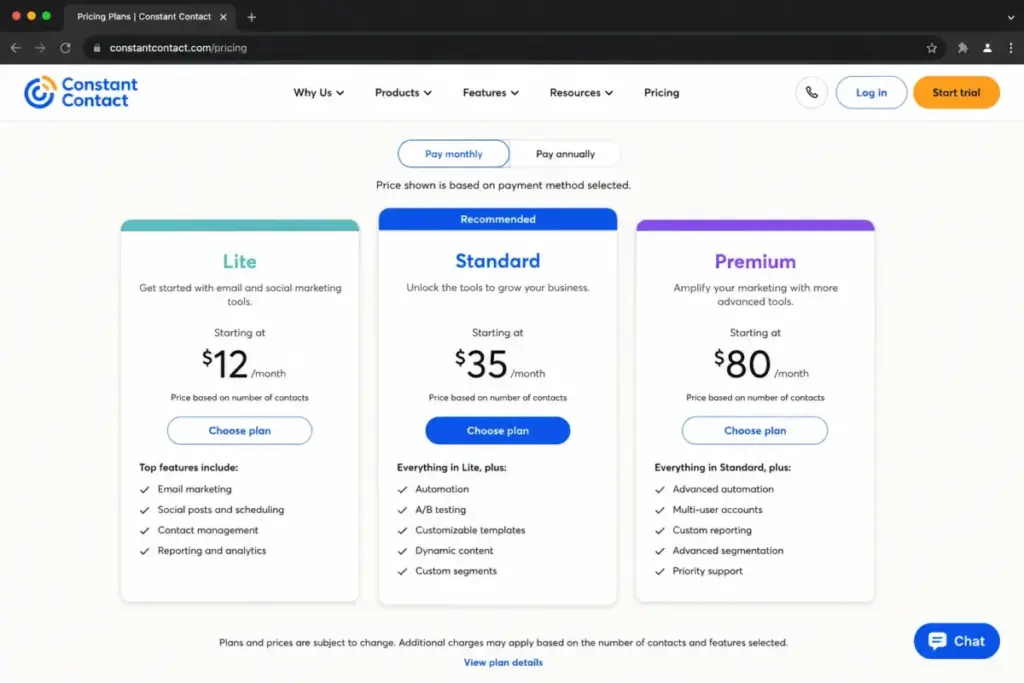
Constant Contact uses a contact-based pricing model. Your monthly bill increases as your subscriber list grows.
Here is the verified pricing structure.
Starting price: $12/month. Official pricing page
| Plan | Starting Price | Annual Price | Monthly Email Send Limit | Key Limits |
|---|---|---|---|---|
| Lite | $12/month | Up to 15% off | 10x contact tier | 1 user, 1 automation, 1 segment |
| Standard | $35/month | Up to 15% off | 12x contact tier | 3 users, 3 automations, 10 segments |
| Premium | $80/month | Up to 15% off | 24x contact tier | Unlimited users, unlimited automations |
| Teams | Custom pricing | Not disclosed | Custom limit | Custom options for large groups |
Analyzing the 10-User Cost
Many buyers compare entry-level prices. But total seat costs matter.
If you have 10 users on Lite, you cannot share accounts. The plan only permits one user.
You must upgrade to Standard or Premium. Standard only allows three users.
Premium offers unlimited seats. For a 10-user team, the Premium plan costs at least $80/month. The final price depends on your contact count.
If your list grows to 5,000 contacts, the cost increases by a large margin. This is why planning seats matters. Sharing accounts can trigger security alerts.
Exposing the Hidden Costs
The advertised price is rarely the final bill. Here are the hidden costs:
- Email Overage Fees: Going over your send limit costs $0.002 per email.
- Bounced Emails: Undelivered messages still count as sends.
- Inbox Preview Add-On: This feature costs an extra $10/month.
- SMS Add-Ons: Text marketing starts at $10/month for 500 messages on Lite and Standard.
What this means:
Constant Contact is a poor choice for high-volume senders. A growing list will quickly drive up your monthly bill. Overage fees can make budgeting unpredictable.
Feature Gates: What Each Plan Unlocks
Features are strictly divided by tier. You must select your plan based on required capabilities.
Here is the feature gate comparison.
| Feature Area | Lite Plan | Standard Plan | Premium Plan |
|---|---|---|---|
| Email Scheduling | Drag-and-drop only | Scheduled sends allowed | Scheduled sends allowed |
| A/B Testing | Not available | Subject line testing only | Subject line testing only |
| Automations | 1 template, no scheduling | 3 templates | Unlimited templates |
| Custom Segments | Capped at 1 | Capped at 10 | Unlimited segments |
| SMS Marketing | Paid add-on ($10+/mo) | Paid add-on ($10+/mo) | 500 free texts/mo |
| Dynamic Content | Not available | Not available | Full dynamic blocks |
| Google & Social Ads | Social posting only | Scheduled social posts | Ad manager + lookalikes |
| Reporting | Basic metrics | Advanced reports | Heat maps + revenue reports |
What this means:
Lite is too limited for active marketing. Standard is the practical minimum for scheduled campaigns. Premium is required for advanced reporting and ecommerce tools.
Key Features with Plan Gates
Understanding key platform tools helps you assess fit. Here is the feature breakdown.
1. Drag-and-Drop Email Editor
Use case:
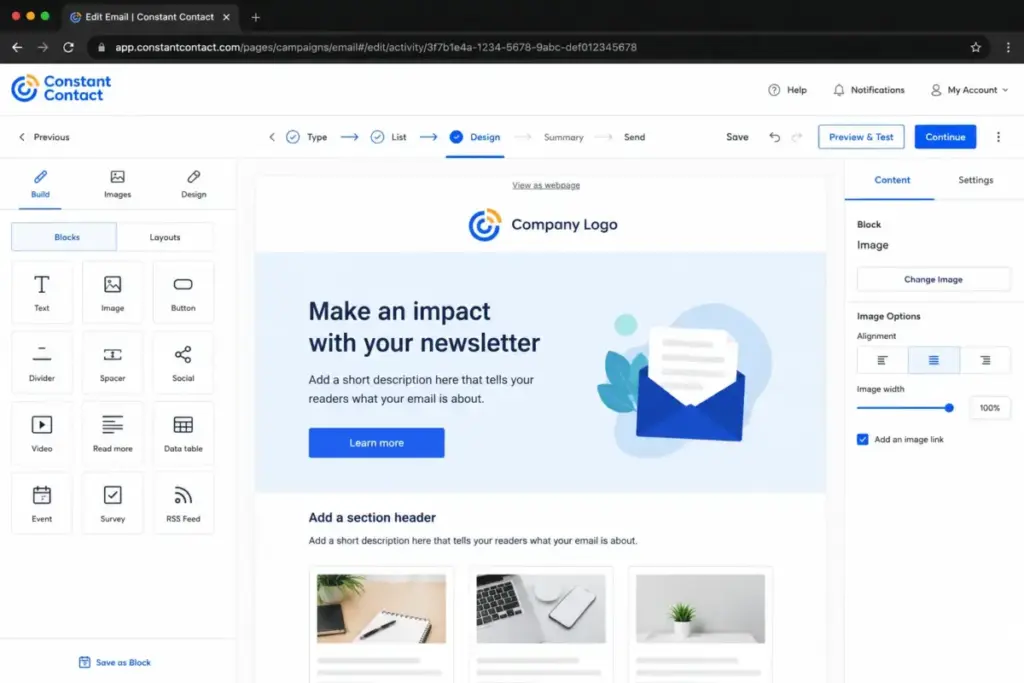
Users can create marketing newsletters without coding. You can drag images, text, and buttons into your layout.
Plan gate:
Available on all plans, including Lite.
Limitation:
The email designer is less flexible than modern builders. Block editing can feel stiff. Placing images sometimes causes layout formatting issues.
2. Contact Management and Segmentation
Use case:
This tool organizes your subscriber list. You can tag contacts and filter them for targeted sends.
Plan gate:
Lite allows one custom segment. Standard allows 10. Premium unlocks unlimited segments.
Limitation:
Basic filters cannot run deep behavioral rules. If you need complex queries, the system feels limited.
3. Event Registration and Payments
Use case:
This feature manages local events. You can create invitations, collect RSVPs, and sell tickets.
Plan gate:
Available on all plans.
Limitation:
The tool is built for basic events. It lacks advanced ticketing rules. It is not a replacement for dedicated event platforms.
4. Social Media Posting and Ads Tools
Use case:
Users can draft and post social updates. You can also run ads from the dashboard.
Plan gate:
Lite allows basic posting. Standard adds social scheduling. Premium adds ad campaign management.
Limitation:
The analytics are basic. Dedicated social managers will still need external tools.
5. SMS Marketing for US Customers
Use case:
This tool sends text messages to subscribers. It helps reach customers directly on their mobile devices.
Plan gate:
Lite and Standard require a $10/month add-on. Premium includes 500 texts per month.
Limitation:
This service is restricted to US customers. You cannot send international messages.
6. Email Automation and Welcome Flows
Use case:
This tool triggers automated campaigns. For example, it sends a welcome sequence to new subscribers.
Plan gate:
Lite allows one automation template. Standard allows three. Premium removes automation limits.
Limitation:
The visual builder is simple. You cannot build multi-step branching workflows based on user behavior.
Ease of Use and Setup
Constant Contact has a low learning curve for newsletters. The onboarding assistant guides new users. Templates and AI writing tools make setup simple.
But advanced tasks require more effort. Setting up domain authentication takes time. Connecting APIs or ecommerce stores requires plan selection.
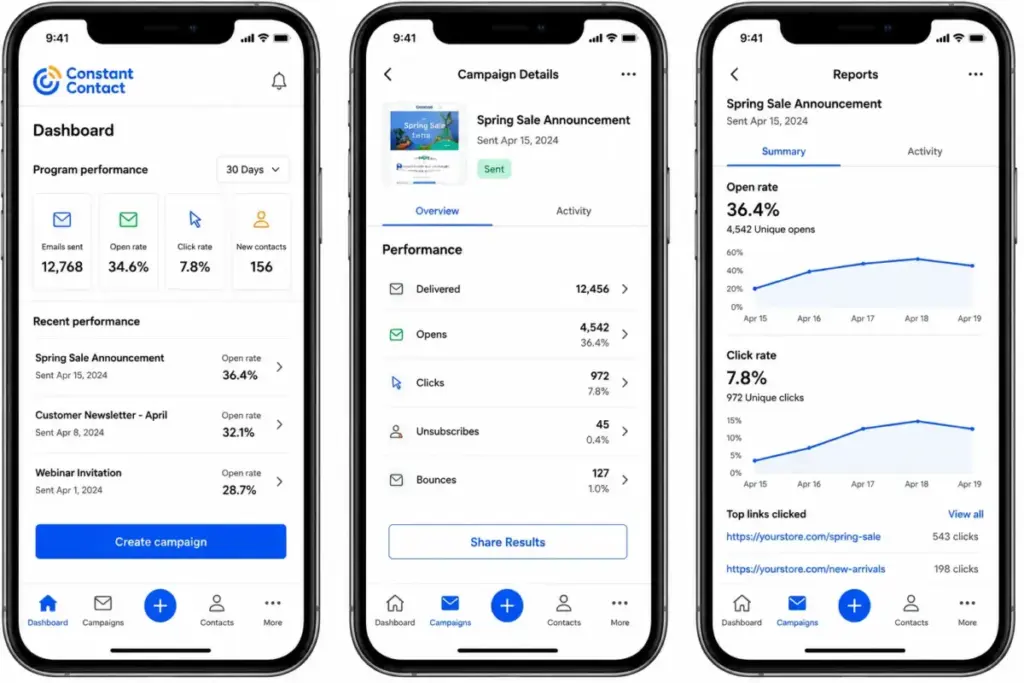
The mobile app is available for iOS and Android. It lets you manage contacts and track campaigns. You can draft rich-text emails.
However, the drag-and-drop editor is desktop-only. You cannot edit layouts from the mobile app. Android editing capabilities are also limited.
Integrations and Ecosystem
Constant Contact lists over 300 integrations. Key options include Google, Canva, LinkedIn, and Eventbrite. It also connects with Shopify and Zapier.
For technical teams, the V3 API uses OAuth2 authentication. You can sync contacts and track campaign reporting. Webhooks support event-driven workflows.
But custom setups have limitations. Support for custom API development is self-service only. Refresh tokens have strict lifetimes. Do not expect deep real-time automation beyond documented capabilities.
Automation, AI, and Reporting
Constant Contact includes basic automation, an AI writing assistant, and performance dashboards. These capabilities are gated by plan tier.
Basic Email Automation
The automation builder uses a simple linear setup. You can trigger emails based on list joins, contact dates, or link clicks.
However, you cannot build branching paths. For example, you cannot split a path based on purchase history or cart value.
Lite is capped at one automation template without scheduling. Standard permits three templates. Premium offers unlimited templates.
AI Content Generator
The AI writer helps draft email copy, subject lines, and social updates. You enter a short prompt describing your campaign goals.
The system then suggests three layout copy variations. While helpful for overcoming writer’s block, the output requires editing to match your brand’s unique voice.
Reporting and Analytics
Reporting tools track standard metrics like open rates, click rates, and bounces.
Lite plans only show these basic counts. Standard unlocks advanced reporting, including historical trends. Premium adds visual click maps and direct revenue attribution dashboards.
Security, Support, and Admin Controls
All plans include phone support. Onboarding assistance is also standard.
Live chat is available Monday through Friday. Support hours are 3am to 8pm Eastern Time. Phone support is available on weekends.
Premium users get priority onboarding and support. The platform complies with GDPR and CAN-SPAM regulations.
A SOC 2 report is available for compliance auditing. But it is not publicly downloadable. You must request it and sign an NDA.
Standalone Limitations
When choosing Constant Contact, keep these five limitations in mind.
First, monthly sends are capped at 10x to 24x your contact count. Overage fees apply.
Second, scheduled sends and A/B testing require the Standard plan. Lite restricts growth tools.
Third, you cannot cancel your account online. The process requires a phone call to support.
Fourth, Lite allows only one user. Small teams must upgrade to Standard for multiple seats.
Fifth, the SOC 2 report requires an NDA request. You cannot download it directly.
Who Constant Contact Is For: Winners and Loser Scenarios
Constant Contact fits some businesses better than others. Here is how it performs across four scenarios.
Scenario 1: Local Service Business (Under 500 Contacts)
Verdict: Winner.
If you have a small list, Lite is sufficient. It covers basic newsletters and social posting. You get phone support if campaigns fail. The starting price of $12/month is easy to justify.
Scenario 2: Nonprofit with Frequent Events
Verdict: Winner.
Event tools and email templates are practical. Prepay discounts save up to 30% for nonprofits. The system simplifies event invitations and payment collection.
Scenario 3: Growing eCommerce Brand
Verdict: Loser.
High-frequency campaigns trigger overage fees. Gated automation templates limit cart recovery flows. You will get better value from specialized tools.
Scenario 4: Three-Person Marketing Team
Verdict: Conditional Winner.
You will outgrow the Lite plan immediately due to user limits. Standard unlocks scheduled sends and custom segments. But automation remains basic. It only works if you prioritize phone support over workflow depth.
Alternatives to Constant Contact Comparison
Evaluating competitors helps you understand the value gap.
Here is a summary of the top alternatives for different scenarios.
| Provider | Key Use Case | Starting Cost | Primary Limitation |
|---|---|---|---|
| Mailchimp | Multi-channel campaigns | $20/month | Gated templates on basic plans |
| Brevo | High-volume sends | $25/month | Interface has a learning curve |
| Klaviyo | Advanced ecommerce | $20/month | Steep price at higher list sizes |
| ActiveCampaign | Complex automation | $29/month | High setup complexity for beginners |
What this means:
Each alternative targets a specific pain point. Brevo saves money for large lists, while ActiveCampaign provides deeper logic.
Mailchimp: A Multi-Channel Option
If Constant Contact does not fit your workflow, check Mailchimp.
You need scheduled campaigns and A/B testing on lower plans. Mailchimp is better for multi-channel templates.
To learn more, read the Mailchimp review and analysis.
Paid plans start at $20/month. For details, see the Mailchimp pricing plans.
Brevo: A Sends-Based Alternative
If you want to avoid contact-based billing, look at Brevo.
Brevo charges by email sends, not list size. This saves money for large lists.
Read the details in the Brevo review and comparison.
It includes what SMS marketing is as standard communication. Paid plans start at $25/month with unlimited contacts.
Klaviyo: eCommerce Email Alternative
Shopify and WooCommerce stores need specialized workflows.
Klaviyo offers deep revenue tracking and automated cart recovery.
To learn more, check the Klaviyo review and evaluation.
Paid plans start at $20/month. It fits ecommerce marketing needs well.
ActiveCampaign: Deeper Automation Alternative
Your marketing team might need complex workflows.
ActiveCampaign offers deep automation logic and lead scoring.
Read the ActiveCampaign CRM review for feature details.
It helps users understand what email automation does to convert leads. Paid plans start at $29/month.
Final Verdict: Is Constant Contact Worth It?
Constant Contact is still a safe option for small businesses. It succeeds if you need event tools and phone support.
But it is not a budget choice. As your list grows, contact-based pricing gets expensive. Send limits and overage fees add cost pressure.
If you are a local service business or small nonprofit, the support justifies the price. Lite or Standard will serve you well.
If you are an ecommerce store or high-volume sender, switch to an alternative. You will get more flexibility elsewhere.
Focus on improving what email deliverability is for your business before migrating. This will help you transition smoothly.
FAQ
What is Constant Contact best used for?
Constant Contact is best for small businesses, nonprofits, and local services. It is designed for newsletters and event registration.
How much does Constant Contact cost in 2026?
Lite plans start at $12/month. Standard starts at $35/month. Premium starts at $80/month. Costs increase with your contact count.
Does Constant Contact have a free plan?
No, the platform does not offer a permanent free plan. It provides a 30-day free trial capped at 100 emails.
Does Constant Contact charge overage fees?
Yes, Lite, Standard, and Premium plans cap monthly email sends. Exceeding your send allowance costs $0.002 per email.
Can I cancel Constant Contact online?
No, the official cancellation process requires a phone call. You must contact support to cancel your account.
Does Constant Contact have email automation?
Yes, but features are plan-gated. Lite limits you to one automation template. Custom automations require Premium.
Does Constant Contact support GDPR and CAN-SPAM?
Yes, the platform includes compliance controls. You can request a SOC 2 security report by signing an NDA.
Does Constant Contact have a mobile app?
Yes, the app is available for iOS and Android. It monitors campaigns and contacts. But email layout editing is desktop-only.
Does Constant Contact offer a nonprofit discount?
Yes, nonprofits can receive up to 30% off when prepaying. Prepaying for six months provides a 20% discount. Prepaying for 12 months increases the savings to 30%. You must verify your nonprofit status with support to apply this discount.
Can I use Constant Contact for ecommerce abandoned cart emails?
Yes, but the capability is plan-gated. Lite allows basic welcome series. Standard supports simple ecommerce flows. Premium unlocks custom abandoned cart sequences and integrations with Shopify or WooCommerce.