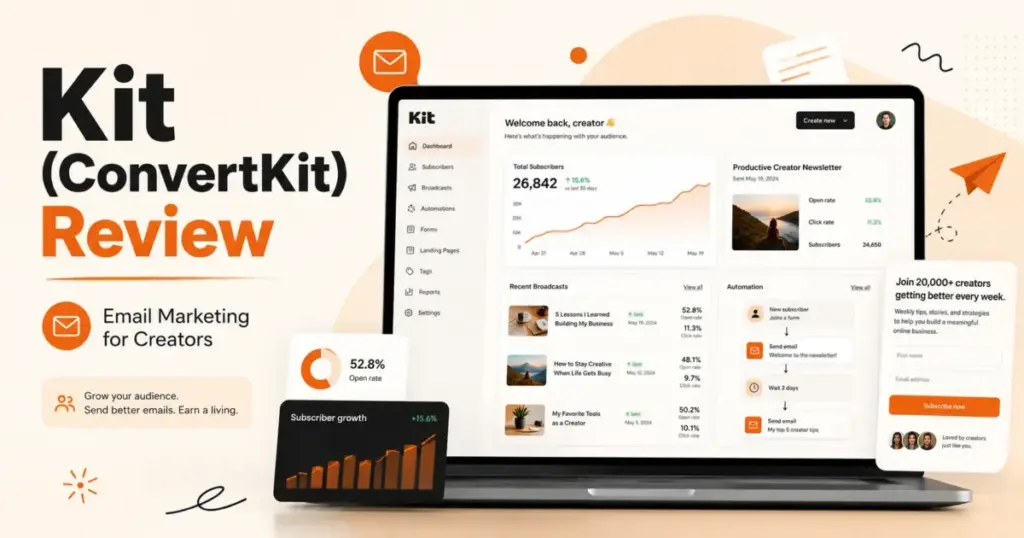
Most creators pick an email platform, build a list, and then discover their tool cannot sell a $29 template or split subscribers into two different welcome sequences without an upgrade. That friction matters. Kit, formerly ConvertKit, has spent years positioning itself as the email platform that solves those exact problems for audience-first businesses.
This Kit (ConvertKit) review examines whether the platform earns that reputation in 2026, or whether creators are paying for a brand story instead of a better tool. I evaluated Kit’s free plan, automation builder, monetization features, pricing pressure at different list sizes, and competitive gaps against tools like Mailchimp, ActiveCampaign, and beehiiv.
If you are building a creator business and comparing SaaS tools for email, this is the breakdown you need before committing. For a broader comparison across 20 platforms including Kit, see our best email marketing platforms ranking.
Quick Verdict
Score: 8.6 / 10
Best for: Creators selling knowledge, courses, newsletters, and digital products through email-first funnels.
Not for: E-commerce stores needing behavior-based flows, CRM-heavy teams, visual-email design teams, or complex multi-branch automation teams.
Starting price: $0 free plan (up to 10,000 subscribers); Creator $33/month billed yearly; Pro $66/month billed yearly.
Standout feature: Free plan up to 10,000 subscribers with creator monetization built in.
Main drawback: Upgrade pressure starts the moment you need more than 1 automation sequence.
What Is Kit?
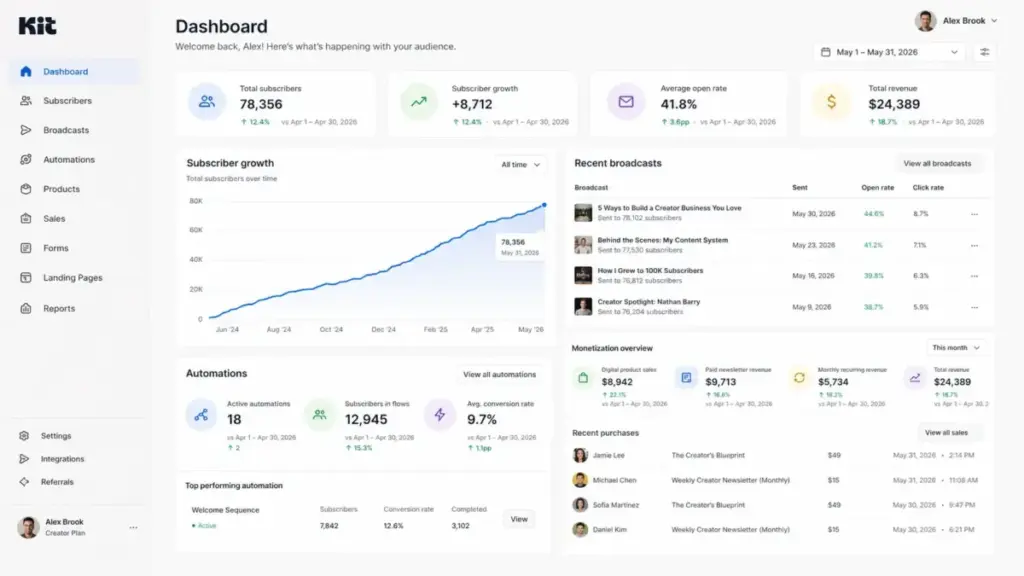
Kit is the email marketing and monetization platform built specifically for creators who earn from audiences, not from storefronts. The company rebranded from ConvertKit to Kit in 2024, shifting its identity from “email marketing tool” to what it now calls an “email-first operating system for serious creators.” The core audience includes bloggers, YouTubers, podcasters, coaches, course creators, and newsletter writers who want to grow a subscriber list, automate nurture sequences, and sell digital products or paid subscriptions, all from one platform.
Kit is not a general marketing suite. It does not try to be Mailchimp’s visual template library or ActiveCampaign’s CRM-adjacent automation engine. That focus is both Kit’s strongest advantage and its most obvious constraint. For creators new to the channel, our guide to email marketing fundamentals explains how permission-based list building, segmentation, and campaign types work before you commit to a platform.
How We Evaluated Kit
I scored Kit across six weighted categories designed to reflect how real creators buy and use email platforms. Each category carries a specific weight based on its impact on a creator’s day-to-day workflow and long-term business growth. The full scoring framework follows the SaaSZap review methodology.
| Category | Weight |
|---|---|
| Creator fit | 20% |
| Email and newsletter workflow | 20% |
| Automation and segmentation | 20% |
| Pricing and scalability | 15% |
| Monetization | 15% |
| Integrations, trust, and support | 10% |
This is not a checkbox review. I weighted monetization at 15% because Kit markets itself as a commerce-ready creator platform. If that promise breaks down, the score should reflect it.
The 60-Second Kit Verdict
Kit earns an 8.6 out of 10 because it delivers the strongest creator-specific feature set in its price range, while falling short on visual design flexibility and scaling cost predictability. The platform excels where solo creators and small teams need it most: simple tagging, visual automations, and a direct path from “free subscriber” to “paying customer.” It loses points where businesses outgrow the creator mold.
| Category | Score | Finding | Buyer Impact |
|---|---|---|---|
| Creator fit | 9.0 | Purpose-built for audience-first businesses | High for solo creators, low for e-commerce teams |
| Email and newsletter workflow | 8.5 | Clean broadcast editor, limited visual design | Adequate for text-heavy creators, weak for brand-design teams |
| Automation and segmentation | 8.5 | Visual builder is strong, but Pro unlocks full value | Free plan users hit a ceiling fast |
| Pricing and scalability | 7.5 | Free plan is generous, but costs rise sharply above 10K | Creators scaling past 10K need to budget carefully |
| Monetization | 9.0 | Built-in commerce, paid newsletters, paid recommendations | Rare in this price tier |
| Integrations, trust, and support | 8.5 | App Store, API 4.0, GDPR tools, 24/7 support on paid plans | Solid for creators, not enterprise-grade |
The scores above reflect a practical workflow analysis of Kit’s current feature set, pricing structure, and competitive positioning. I did not fabricate test data. Where I reference specific capabilities, I cite Kit’s official documentation.
Kit Features That Matter
Kit’s feature set is intentionally narrow compared to broad marketing platforms, and that narrowness is the product strategy. Every feature points toward one workflow: grow a list, nurture subscribers, sell something. I evaluated the six feature groups that matter most for the creator buying decision.
Kit Email Broadcasts and Newsletters
Kit’s broadcast editor lets you send one-time emails to your full list or filtered segments. The editor is text-focused with inline formatting, image blocks, and button elements. It is not a drag-and-drop visual builder like Mailchimp’s. For creators who write content-driven newsletters (think weekly essays, link roundups, curated insights), this is an advantage: less design overhead, faster sends.
Kit also offers a newsletter feed and creator profile page, giving subscribers a web-based archive of past issues. This positions Kit closer to Substack’s reading experience, except you keep full control of your subscriber data and monetization stack.
The limitation here is real. If your brand depends on polished visual layouts with custom columns, branded headers, and styled product cards, Kit’s editor will frustrate you. You will spend time fighting the template system instead of writing.
Kit Visual Automations
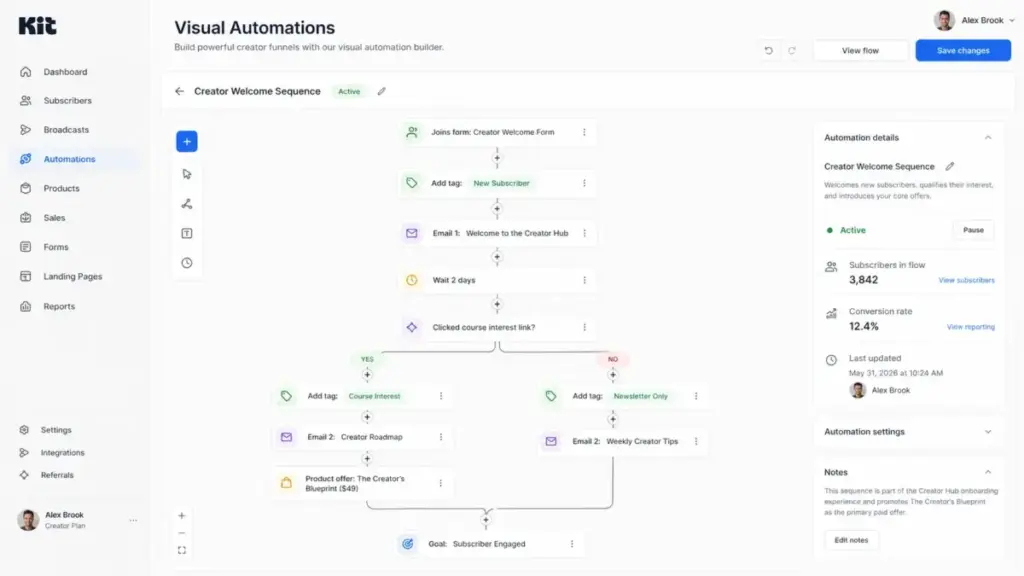
Kit’s Visual Automations builder is a no-code journey editor where you connect triggers, actions, conditions, and events into subscriber flows. Common use cases include welcome sequences triggered by a form submission, product launch funnels gated by tag, and re-engagement flows based on subscriber inactivity.
The builder is clear. You can see the full subscriber path on screen, add conditional branches, and insert wait steps. For a solo creator running two or three funnels, this is enough.
Here is the constraint that matters: the free Newsletter plan includes only 1 basic Visual Automation. If you run one lead magnet with one welcome sequence, you are fine. The moment you add a second product, a second opt-in, or a separate nurture path, you need the Creator plan.
Kit Forms and Landing Pages
Kit offers unlimited forms and landing pages across all plans, including the free tier. Forms can be embedded as inline, modal, sticky bar, or slide-in elements. Landing pages are standalone and hosted on Kit’s domain or connected to a custom domain.
For a YouTuber who needs a lead magnet download page or a blogger who wants an opt-in form in a sidebar, this covers the basics without a third-party tool. The templates are functional but not design-forward. If you compare Kit’s landing page templates against Leadpages or even Mailchimp’s builder, the visual gap is noticeable.
Kit Tags and Segments
Tagging is where Kit’s creator-first philosophy shows its value. Every subscriber can carry multiple tags based on source, interest, purchase behavior, or engagement. Segments let you build dynamic filtered views combining tags, subscription dates, and activity data.
For example, a coach could tag subscribers as “downloaded pricing guide,” “attended webinar,” and “purchased 1-on-1 package,” then send targeted follow-ups to each group. This is standard in tools like ActiveCampaign, but Kit makes it accessible without CRM complexity.
Kit Creator Network and Recommendations
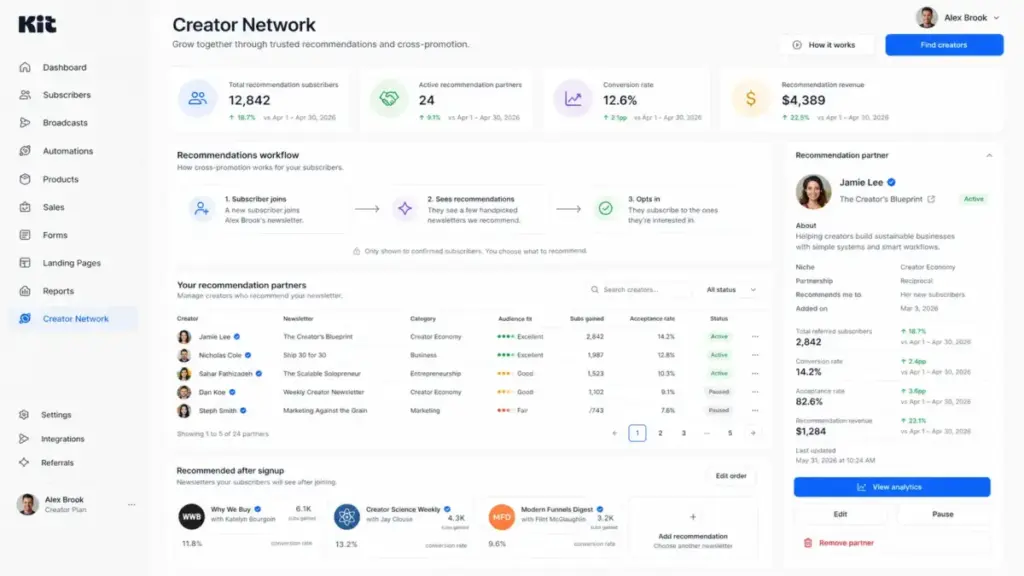
Kit’s Creator Network and Recommendations feature lets creators cross-promote each other’s newsletters. When a subscriber signs up through your form, Kit can recommend other newsletters. The subscriber opts in, and both creators grow.
This is a genuine growth channel. Official creator testimonials on Kit’s homepage support the value: “22,000 subscribers have come from Recommendations and it is one of the best things that has ever happened to my newsletter,” says Katelyn Bourgoin, Founder of the Why We Buy newsletter (Kit official homepage).
The quality depends entirely on audience fit. If Kit’s network includes creators in your niche, recommendations work. If the network skews toward unrelated topics, your new subscribers may never open an email.
Kit Commerce and Paid Newsletters
Kit Commerce lets creators sell digital products, paid newsletter subscriptions, recurring memberships, and accept tips, all without a separate e-commerce platform. This is the feature that separates Kit from most email marketing tools.
A course creator can sell a $97 video course, a writer can charge $7/month for a premium newsletter, and a coach can offer recurring $49/month membership access, all from the same Kit account. The transaction fee is 3.5% + $0.30 per sale.
For creators earning under $5,000/month from digital sales, this built-in commerce is simpler and cheaper than connecting Stripe + Gumroad + a separate email tool. For creators earning significantly more, the 3.5% fee starts to compete with standalone options like Lemon Squeezy or direct Stripe integrations with lower per-transaction costs.
What Kit’s Free Plan Really Limits
Kit’s free Newsletter plan is genuinely generous for list building, but it creates a hard ceiling for business-building. The plan supports up to 10,000 subscribers with unlimited broadcasts, unlimited forms, unlimited landing pages, and the ability to sell digital products. That sounds like a complete package.
The real limit is 1 basic Visual Automation.
One automation means one triggered workflow. If you want a single welcome sequence for your main lead magnet, the free plan works. But creators rarely stay in that single-funnel reality. The moment you add a second product, a second opt-in offer, or a separate nurture sequence for a different audience segment, you need the Creator plan at $33/month.
| Creator Scenario | Free Plan Enough? | Why |
|---|---|---|
| Blogger with 1 lead magnet and weekly newsletter | Yes | 1 automation covers the welcome sequence |
| YouTuber with 2 lead magnets for different video topics | No | Needs 2 automations for 2 welcome paths |
| Coach with a free guide and a paid consultation funnel | No | Needs separate sequences for free and paid subscribers |
| Course creator with evergreen launch and a waitlist | No | Needs parallel automations for launch and nurture |
| Newsletter writer with no products | Yes | Broadcasts only, no automation required |
This is not a flaw in the product. It is an upgrade trigger by design. Kit knows that serious creators outgrow 1 automation quickly, and the pricing reflects that expectation.
Kit Pricing and Plans
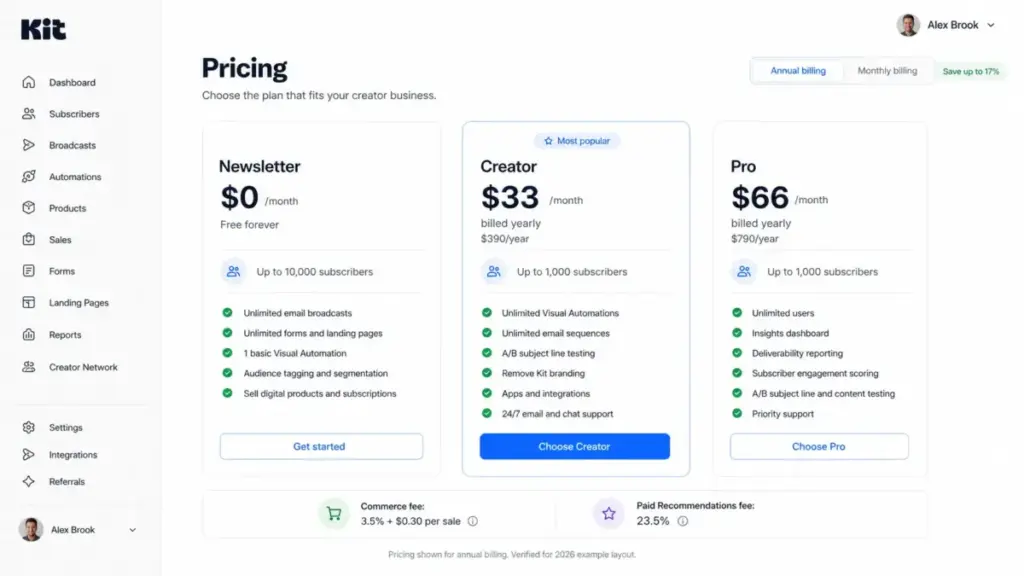
Kit uses subscriber-based pricing with three plan tiers, and the real cost depends on your list size and your need for automations. The pricing below reflects the annual billing option verified from Kit’s pricing page.
| Plan | Verified Price (Yearly Billing) | Subscriber Tier | Best For | Main Limit |
|---|---|---|---|---|
| Newsletter | $0/month | Up to 10,000 | Testing an audience or newsletter idea | 1 basic Visual Automation |
| Creator | $33/month ($390/year) | Up to 1,000 | Creators needing sequences, funnels, brand control | No engagement scoring, no deliverability reporting |
| Pro | $66/month ($790/year) | Up to 1,000 | Teams, sponsors, paid acquisition, analytics | Cost scales with subscriber count |
Pricing verified April 27, 2026 from Kit’s pricing page. Check the pricing page before making a decision because pricing changes by subscriber count and billing cycle.
Notice the jump: the free plan covers up to 10,000 subscribers, but the moment you need Creator features (unlimited automations, sequences, integrations, branding removal), you start paying at the 1,000-subscriber tier and the price scales with your list.
Commerce fees: Kit charges 3.5% + $0.30 per transaction on digital product and subscription sales. On a $50 course sale, that is $2.05 per transaction. On 100 sales per month, you pay $205 in transaction fees alone.
Paid Recommendations fee: Kit takes 23.5% of earnings from Paid Recommendations. If you earn $1,000 from recommending another creator’s newsletter, Kit keeps $235. This is a meaningful cost that most pricing breakdowns omit.
For comparison, Mailchimp’s pricing follows a different model with contact-based tiers and no built-in commerce, so direct price comparisons require matching feature sets rather than headline numbers.
What Kit Does Not Tell You
Every platform has gaps it does not advertise, and Kit is no exception. These are the constraints I identified that you will not find on the Kit features page but will encounter once you are building inside the platform.
Kit Becomes Paid Before 10,000 Subscribers for Serious Funnels
The marketing says “free up to 10,000 subscribers.” The reality is that most creators who sell products or run multiple opt-in funnels will upgrade to Creator well before hitting 10,000 subscribers. The 1-automation limit is the trigger, not the subscriber count.
Kit Is Not a Visual Email Design Tool
Kit’s email editor prioritizes text-based, content-first emails. If you need magazine-style layouts with multiple columns, branded product grids, or heavy visual storytelling, Kit is the wrong tool. Mailchimp and Flodesk offer significantly more design flexibility.
Kit Is Not a Full CRM
Kit tracks subscribers, tags, and purchases. It does not track deals, pipeline stages, call logs, or company-level accounts. If your business needs CRM for marketing automation, you need a different platform. Kit is an email and audience tool, not a sales tool.
Kit Is Not Built for Deep E-commerce Automation
Kit does not offer abandoned cart recovery, product browse tracking, purchase event-based flows, or dynamic product recommendation emails. Shopify store owners and e-commerce brands should evaluate Klaviyo instead. Kit’s commerce features are built for creators selling digital products, not for stores managing SKUs.
Kit’s Creator Network Depends on Audience Fit
The Creator Network and Recommendations feature is a growth channel, not a growth guarantee. If few creators in your specific niche participate, the recommendations you receive may attract low-engagement subscribers who never open your emails. The feature works best in well-populated niches like personal finance, productivity, and marketing.
The First 30 Days With Kit
A creator’s first month with Kit follows a predictable path from signup to the first real business decision: upgrade or stay free. This timeline is a practical workflow model based on Kit’s feature set, not a claim from Kit’s marketing.
Day 1: Foundation
Create your Kit account. Set up your creator profile. Import an existing list if migrating (Kit offers free migration support). Build your first inline or modal form and connect it to a landing page.
Days 2 to 7: First Content
Design your lead magnet delivery system. Publish a landing page for your primary opt-in. Send your first broadcast to existing subscribers or a test group. Explore the email editor and settle on a template style.
Week 2: Automation and Organization
Build your first (and on the free plan, only) Visual Automation: a welcome sequence triggered by your primary form. Set up tags for subscriber source, interest, and engagement. Create your first segment for targeted sends.
Week 3: Monetization Setup
If selling digital products, configure Kit Commerce with Stripe. Set up a paid newsletter or recurring subscription if applicable. Explore the Creator Network and toggle Recommendations on.
Week 4: Evaluation
Review your first broadcast open rates and click rates against Kit’s reported 40% average open rate (this is a vendor-reported number, not an independent benchmark). Decide whether you need a second automation sequence. If yes, the free plan has reached its limit. Budget for Creator at $33/month.
This 30-day arc is where most creators discover whether Kit fits their workflow or whether they need more design flexibility, deeper automation, or a different pricing model.
Kit Pros and Cons
Kit’s strengths cluster around creator-specific workflows, while its weaknesses appear when businesses outgrow the creator mold. Here is the specific breakdown.
- Free plan supports up to 10,000 subscribers with unlimited broadcasts, forms, and landing pages.
- Built-in commerce lets creators sell digital products, paid newsletters, and subscriptions without external tools.
- Visual Automations builder is clear and functional for creators running 2 to 5 subscriber journeys.
- Tagging and segmentation is simple to set up and powerful enough for most creator use cases.
- Creator Network and Recommendations provide a genuine growth channel that competitors like Mailchimp and ActiveCampaign do not offer.
- Free migration from other platforms reduces switching costs.
- API 4.0 supports custom integrations, and the Kit App Store covers common tools like Zapier, Shopify, WordPress, and Canva.
- Free plan includes only 1 basic Visual Automation, forcing upgrade pressure before the subscriber limit matters.
- Email editor lacks visual design flexibility compared to Mailchimp, Flodesk, or even MailerLite.
- Pricing scales steeply as subscriber counts grow beyond 10,000, creating budget pressure for scaling creators.
- No CRM capabilities. Kit does not track deals, pipelines, or company accounts.
- No advanced e-commerce automation. No abandoned cart, browse behavior triggers, or product recommendation flows.
- Commerce transaction fee of 3.5% + $0.30 adds up for creators with high sales volume.
- Paid Recommendations fee of 23.5% is a significant cut that limits monetization upside.
Kit vs Alternatives
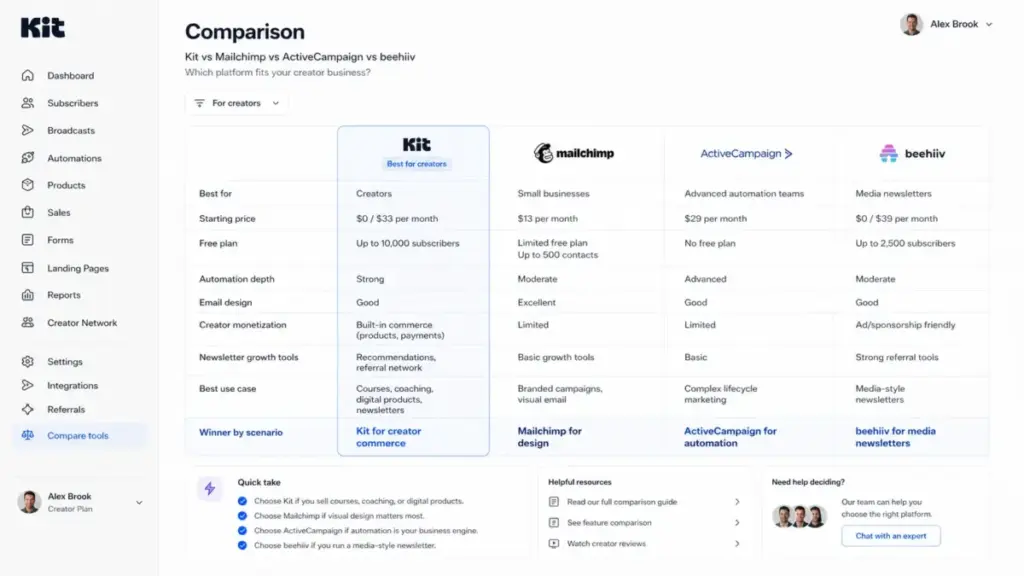
Kit wins for creator-specific funnels and monetization, but it loses when a business needs visual design, deep automation, or e-commerce behavior tracking. I compared Kit against five alternatives across the scenarios that drive real buying decisions. For a broader view, see the best sales and marketing software guide.
Kit vs Mailchimp
Mailchimp offers significantly more email design flexibility with its drag-and-drop template builder, pre-built campaign layouts, and broader brand customization. For small businesses that need polished email design and multichannel marketing (social ads, postcards, website builder), Mailchimp is the better fit.
Kit wins when the priority is creator-specific monetization, simple tagging, and a free plan that scales to 10,000 subscribers without paying. Mailchimp’s free plan caps at 500 contacts with limited sends. Read the full Mailchimp review for the detailed comparison.
Kit vs MailerLite
MailerLite is the budget alternative for creators who need clean templates and basic automation at a lower cost. Its free plan supports 1,000 subscribers with basic automation and a decent email editor.
Kit wins when creators need built-in recommendations, Creator Network growth, or native commerce for digital products. MailerLite does not offer cross-promotion or built-in product sales.
Kit vs ActiveCampaign
ActiveCampaign is the stronger platform for businesses that need advanced automation logic: conditional branching, lead scoring, CRM-like contact management, and complex lifecycle campaigns. If your email workflows involve 10+ branches with behavioral triggers, ActiveCampaign is the better engine.
Kit wins when a solo creator wants simpler setup, faster execution, and fewer CRM layers. Kit’s learning curve is lower, and most creators will never need ActiveCampaign’s depth. See the full ActiveCampaign review for automation details.
Kit vs beehiiv
beehiiv is the stronger choice for newsletter publishers building a media brand. It offers ad network monetization, sponsor management, referral programs, and SEO-optimized web hosting for newsletter archives. If your primary business model is newsletter sponsorships and ad revenue, beehiiv is purpose-built for that.
Kit wins when creators sell their own products: courses, coaching, digital downloads, paid subscriptions. Kit’s commerce layer, automation sequences, and tag-based funnels serve the “creator selling knowledge” model better than beehiiv’s media-publisher approach.
Kit vs Klaviyo
Klaviyo is built for e-commerce. It offers product catalog integration, abandoned cart flows, purchase behavior triggers, revenue attribution, and deep Shopify/WooCommerce data sync. If you run an online store, Klaviyo is the correct tool.
Kit is not competing with Klaviyo in the e-commerce space. Kit serves creators; Klaviyo serves stores. If you sell physical products, read the Klaviyo review instead.
| Alternative | Choose Kit If | Choose Alternative If | Winner by Scenario |
|---|---|---|---|
| Mailchimp | You want creator monetization and a 10K free plan | You need visual email design and multichannel marketing | Kit for creators; Mailchimp for visual brands |
| MailerLite | You need recommendations and built-in commerce | You want a budget tool with clean design and basic automation | Kit for growth tools; MailerLite for budget simplicity |
| ActiveCampaign | You want simple setup and creator workflows | You need 10+ automation branches and lead scoring | Kit for solo creators; ActiveCampaign for automation depth |
| beehiiv | You sell courses, coaching, or digital products | You monetize through newsletter ads and sponsorships | Kit for creator commerce; beehiiv for media newsletters |
| Klaviyo | You are a creator, not an e-commerce store | You run a Shopify store with product-based email flows | Kit for creators; Klaviyo for e-commerce |
Security, Privacy, and Compliance
Kit provides standard privacy and compliance resources for creators handling subscriber data in the US and EU. This is not an enterprise-grade compliance platform, but it covers the essentials for small creator businesses.
Kit offers GDPR and CCPA resources including consent management tools, subscriber data export, and deletion capabilities. A Data Processing Addendum is available for EU-based data controllers. Kit’s privacy policy outlines data collection, storage, and third-party sharing practices.
The Kit API 4.0 supports account, broadcast, form, subscriber, tag, template, and webhook endpoints. This is relevant for creators who connect Kit to external tools through custom integrations.
One caution: the Kit App Store includes third-party integrations across analytics, CRM, e-commerce, and scheduling categories. Each integration may introduce its own data-sharing terms. Review the privacy policies of connected apps independently; Kit’s compliance does not extend to third-party data handling.
Who Should Use Kit?
Kit fits best when the business model is “creator builds an audience and sells knowledge.” Not every creator matches that profile, so here are the five specific cohorts where Kit delivers the most value.
- Solo blogger with 0 to 5,000 subscribers and one digital product. Kit’s free plan covers the list, the landing page, the form, and one welcome automation. Commerce handles the product sale. No other tool matches this at $0/month.
- YouTuber using lead magnets to sell templates or courses. A YouTuber can link a Kit landing page in video descriptions, capture subscribers with a free resource, nurture them through a sequence, and sell a $49 template, all within Kit.
- Coach selling calls, memberships, or recurring offers. Kit’s tagging system lets a coach segment subscribers by service interest, and Commerce handles recurring payments. The automation builder can move subscribers from “interested” to “booked” with conditional sequences.
- Course creator with 2 to 4 evergreen sequences. The Creator plan’s unlimited automations support parallel evergreen funnels: one for a free mini-course, one for the main paid course, one for an upsell sequence. This is where Kit’s automation design shines.
- Newsletter creator who wants simple monetization without a media-stack setup. If you write a weekly newsletter and want to charge $5/month for a premium tier, Kit handles that without the overhead of beehiiv’s publisher tools or Substack’s platform lock-in.
Who Should Not Use Kit?
Kit is the wrong tool when the business model, technical requirements, or design expectations exceed its creator-first scope. Here are the five cohorts that should look elsewhere.
- Shopify store needing abandoned cart and revenue attribution. Kit does not track product browse behavior, cart abandonment, or purchase-event flows. Choose Klaviyo for e-commerce email automation.
- SaaS team needing complex lifecycle automation. If your email workflows require 10+ conditional branches, lead scoring, deal tracking, and CRM integration, Kit cannot match ActiveCampaign’s depth.
- Budget newsletter with basic sends only. If you send a simple weekly email to under 1,000 subscribers and need nothing else, MailerLite or Brevo offer lower-cost or free alternatives with more design options.
- Visual brand team needing high-design templates. If your emails need magazine-style layouts, custom columns, branded product grids, and pixel-level design control, Mailchimp or Flodesk are better fits. Kit’s editor is text-first.
- Media newsletter scaling ads and sponsors. If your revenue model depends on newsletter ad sales, sponsor management, and audience analytics for advertisers, beehiiv is built for that. Kit’s monetization is creator commerce, not media advertising.
Final Verdict
Kit earns an 8.6 out of 10 in this review because it delivers the most focused, creator-specific email and monetization platform available in 2026. No other tool in this price range combines a free 10,000-subscriber plan, visual automations, tag-based segmentation, landing pages, commerce, and a creator growth network in one product.
The platform’s constraints are real: limited email design flexibility, a free plan that caps at 1 automation, steep pricing as lists grow, no CRM, and no e-commerce behavior flows. Those constraints disqualify Kit for specific business types, and I named them directly in this article.
Here is how I would frame the buying decision:
Choose Kit if you are a solo creator or small team that earns from courses, coaching, digital products, paid newsletters, or knowledge-based offers, and you want one platform for email, automation, and sales.
Choose a competitor if your business needs visual email design (Mailchimp), deep automation logic (ActiveCampaign), e-commerce behavior flows (Klaviyo), media-newsletter monetization (beehiiv), or the lowest possible cost for simple sends (MailerLite or Brevo).
Kit is not perfect. But for the creator who writes, teaches, coaches, or builds courses, it remains one of the most practical choices in the category. This Kit review reflects the platform’s current state as of April 2026, and I recommend verifying pricing and feature availability on Kit’s official site before making your final decision.
Kit FAQ
Here are the most common questions creators ask about Kit, answered directly.
Is Kit the same as ConvertKit?
Yes. Kit rebranded from ConvertKit in 2024. The product, team, and feature set are the same. Only the name changed.
Is Kit worth it in 2026?
For creators who sell knowledge-based products through email, yes. Kit’s combination of a free plan, automations, commerce, and the Creator Network makes it one of the strongest options in its category. It is not worth it for e-commerce stores, visual-design-heavy brands, or businesses that need CRM functionality.
How much does Kit cost?
Kit’s Newsletter plan is free for up to 10,000 subscribers. The Creator plan starts at $33/month billed yearly for up to 1,000 subscribers. The Pro plan starts at $66/month billed yearly for up to 1,000 subscribers. Prices increase with subscriber count. Verify current pricing at Kit’s pricing page.
Is Kit free forever?
The Newsletter plan at $0/month is available as long as you stay within its limits: up to 10,000 subscribers and 1 basic Visual Automation. There is no stated expiration, but the feature restrictions make upgrading likely for serious creators.
What is Kit best for?
Kit is best for solo creators and small teams who build email lists from blogs, YouTube, podcasts, or social media, and who earn revenue from courses, digital products, coaching, or paid newsletters.
What are Kit's biggest limitations?
Four specific limitations: (1) the free plan includes only 1 basic Visual Automation, (2) the email editor offers limited visual design flexibility, (3) pricing scales steeply as subscriber counts grow past 10,000, and (4) Kit does not support e-commerce behavior-based automation like abandoned cart or product browse flows.
Is Kit better than Mailchimp?
Kit is better for creator monetization, tagging simplicity, and the free 10,000-subscriber plan. Mailchimp is better for visual email design, multichannel marketing, and businesses that need polished brand templates.
Is Kit better than beehiiv?
Kit is better for creators who sell their own products (courses, coaching, digital downloads). beehiiv is better for newsletter publishers who monetize through advertising, sponsorships, and media-brand growth.
Can Kit replace ActiveCampaign?
Not for automation-heavy businesses. Kit’s visual automation builder is simpler and covers most solo-creator workflows, but it lacks ActiveCampaign’s conditional logic depth, lead scoring, CRM, and multi-branch campaign complexity.
Is Kit good for course creators?
Yes. Course creators benefit from Kit’s sequences (for evergreen launches), tagging (for buyer segmentation), commerce (for direct sales), and landing pages (for lead magnets). The Creator plan at $33/month gives access to unlimited automations, which course creators typically need for multiple product funnels.