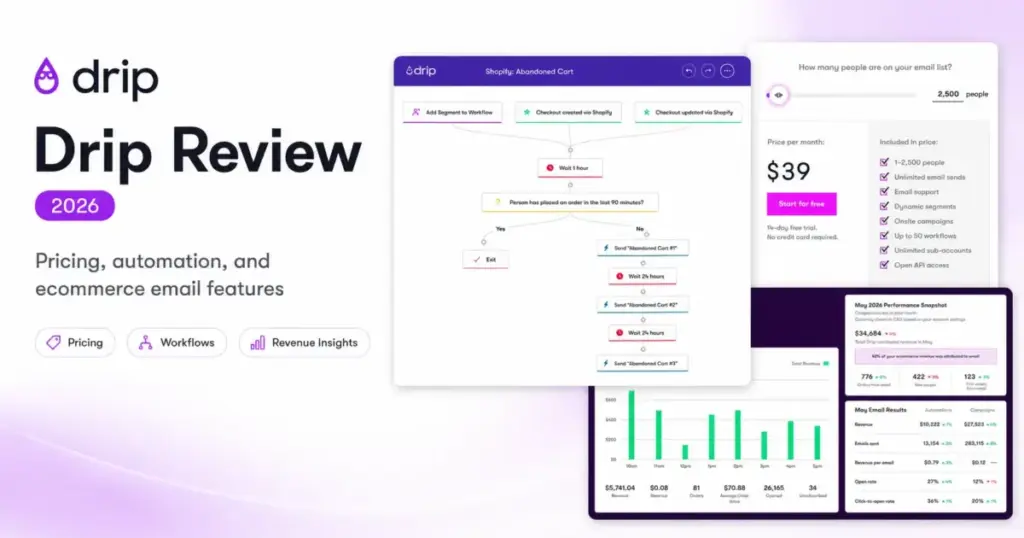
Drip pricing is based on your list size and send volume, and that billing model shapes who benefits and who overpays. For a Shopify or WooCommerce store running abandoned cart, welcome, and post-purchase sequences, Drip’s behavior-based automation is built exactly for this workflow.
For a newsletter-only creator or a B2B SaaS team, Drip is the wrong tool at the wrong price. This Drip review breaks down what the $39/month entry point actually includes, why costs can rise as your list grows, where the support threshold gates live chat behind a higher spend, and which email marketing platforms offer a better fit if your use case does not match Drip’s ecommerce DNA.
| Category | Verdict |
|---|---|
| Best for | B2C online sellers (Shopify, WooCommerce, BigCommerce) running lifecycle automation |
| Not ideal for | B2B sales teams, newsletter-only creators, SMS-first brands, brick-and-mortar-only |
| Starting price | $39/month for 1-2,500 active people |
| Best practical plan | $39/month default tier (unlimited email sends, up to 50 workflows) |
| Free plan/trial | 14-day free trial, no credit card required. No permanent free plan. |
| Setup difficulty | Medium |
| Main strength | Behavior-based ecommerce automation tied to real store events |
| Main limitation | Revenue reports cannot be exported; live chat support gated to $99+/month plans |
| Best alternative | Klaviyo (deeper ecommerce analytics), Omnisend (SMS-first omnichannel) |
What this means: Drip positions itself for one audience and does not pretend otherwise. If you sell products online and want automated email sequences triggered by what shoppers actually do on your site, Drip delivers. If your marketing needs sit outside B2C ecommerce, the platform tells you to look elsewhere, and I agree with that guidance.
Final Verdict and Score: Is Drip Worth It in 2026?
Drip earns 7.8/10. It is a focused tool that does ecommerce lifecycle email automation well, and it is honest about what it does not do.
Choose Drip if you run a Shopify, WooCommerce, or BigCommerce store with 1,000 to 10,000 active contacts and need abandoned cart recovery, browse abandonment, welcome series, post-purchase flows, and revenue attribution without hiring a dedicated marketing ops person.
Skip Drip if you are a B2B SaaS company, a brick-and-mortar-only business, a creator who only sends newsletters, or a team that needs SMS as the primary channel. Drip’s own documentation says it is not built for these use cases, and the pricing model penalizes inactive contacts regardless.
The plan recommendation is straightforward: the $39/month default tier covers unlimited email sends, up to 50 workflows, dynamic segments, onsite campaigns, and open API access. Most small to mid-size ecommerce teams will not outgrow that feature set quickly. The real cost question is how fast your active people count grows, because the bill scales with it.
For teams that outgrow Drip or need deeper multi-brand analytics, Klaviyo is the closer competitor at the upper end. For teams where SMS is the priority channel, Omnisend offers self-serve SMS activation that Drip does not match.
Who Should Use Drip
- Shopify store owners with 1,000-5,000 active contacts who want set-and-forget abandoned cart, welcome, and win-back sequences
- WooCommerce and BigCommerce sellers who need native ecommerce integrations without third-party middleware
- Creator-commerce, course, event, and tour businesses using platforms like ThriveCart, Ticket Sauce, Peek Pro, or FareHarbor
- Small ecommerce teams that want onsite popups, quizzes, and embedded forms for zero-party data collection without paying for a separate tool
- Stores that already have clean customer data and want revenue attribution tied to email campaigns
Who Should Avoid Drip
- B2B SaaS teams needing lead scoring, account-based nurture, or sales pipeline integration. Drip says this directly.
- Newsletter-only creators with small lists who send 2-3 campaigns per month and do not need ecommerce automation
- SMS-first brands that want self-serve SMS setup. Drip requires contacting support to enable SMS.
- Brick-and-mortar-only businesses with no online store data to feed into automation triggers
- Large multi-brand enterprises that need advanced multi-region compliance and deep BI integrations
Drip Pros and Cons
- Behavior-based automation tied to real ecommerce events. Abandoned cart, browse abandonment, and post-purchase triggers fire based on actual shopper activity, not manual tags.
- Unlimited email sends on all paid plans. No per-email charges at the entry tier. The cost driver is active people count, not send volume.
- Up to 50 workflows included at the $39/month entry tier. Most small stores will not exhaust this limit.
- Native onsite campaigns (popups, quizzes, slide-ins, sticky bars, embedded forms) included. No separate tool needed for list-building and zero-party data collection.
- Revenue dashboards with click and on-site attribution. Ties email revenue directly to campaigns for stores with supported ecommerce integrations.
- Revenue reports cannot be exported according to official Insights FAQ. If your finance or BI team needs revenue data outside Drip, this is a workflow gap.
- Live chat support is gated to $99+/month plans. All paying customers get weekday email support, but teams on the $39 tier should not expect instant help.
- SMS requires contacting Drip support to enable. SMS is not a self-serve, default feature. Teams expecting Omnisend-style SMS activation will hit friction.
- Pricing scales with active people and email volume. A growing contact list pushes costs up whether those contacts engage or not.
- No verified native mobile app from official sources. Capterra lists mobile deployment, but official Drip sources retrieved for this review only confirm web and API access.
How We Reviewed Drip
This evaluation is based on independent editorial research, analyzing official product documentation, feature specifications, and verified customer feedback. I did not run a live multi-week ecommerce deployment of Drip.
Data sources: Official Drip pricing page, official feature pages, Drip help center and Insights FAQ, Drip GDPR compliance documentation, Drip’s AI-generated product information page. Third-party sentiment from G2, Capterra, GetApp, and TrustRadius.
Pricing verified: June 2026, from Drip’s official pricing page.
Testing level: Third-party validated. I cross-referenced official product claims against verified user review patterns across four review platforms. I did not sign up for a Drip trial account for this review.
Review limitation: Revenue reporting prerequisites, SMS billing details, and exact contact-tier pricing above the default 2,500-people view should be confirmed directly with Drip before committing. I did not test deliverability rates or run live automation sequences.
Drip Pricing Reality in 2026
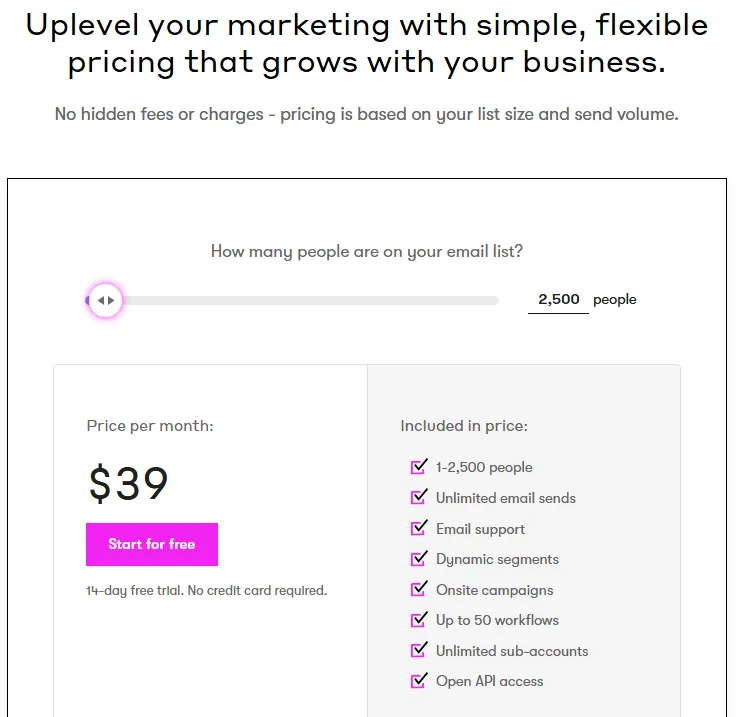
Drip’s official pricing page shows one public price: $39/month for 1-2,500 active people (as of June 2026). The page states pricing scales by active people and monthly email volume, but the public calculator only exposed a default 1-2,500 people view during this research.
| What You Get at $39/Month | Details |
|---|---|
| Active people | 1-2,500 |
| Email sends | Unlimited |
| Workflows | Up to 50 |
| Dynamic segments | Included |
| Onsite campaigns | Included |
| Sub-accounts | Unlimited |
| API access | Open (REST API + Shopper Activity API) |
| Free migration | Listed as included |
| Personalized onboarding | Listed as included |
| Free trial | 14 days, no credit card required |
What this means: the $39 entry is genuinely inclusive for a small store. Unlimited sends, 50 workflows, dynamic segments, onsite tools, and API access at that price point is competitive. The catch is that this price is tied to a contact count. Once your active people exceed 2,500, the bill moves up. Verify higher tiers in Drip’s pricing calculator before assuming a specific number.
Where Pricing Starts to Pinch
I ran two scenarios to illustrate the cost trajectory:
Scenario 1: Shopify store with 2,000 active contacts. You pay $39/month and get everything listed above. This is the sweet spot for Drip’s pricing model. You send unlimited emails, run up to 50 workflows, and get onsite campaigns and revenue dashboards.
Scenario 2: Growing ecommerce team with 5,000+ contacts who needs live chat support. The exact price for 5,000+ contacts is not published on the public pricing page, but you need to reach the $99/month threshold to unlock weekday live chat support. Below that, you are limited to weekday email support. For a team scaling past launch phase and needing faster response times, this support gate matters.
What the Pricing Page Does Not Make Obvious
Three things Drip’s pricing page does not surface clearly:
- Annual pricing is not confirmed on the retrieved public page. If you expect a discount for annual billing, verify this directly.
- SMS billing details are not visible. SMS exists as a feature, but exact SMS credit costs and billing mechanics require contacting support.
- The $99/month support threshold is not prominently displayed. You discover it in the support section, not the pricing section.
Feature Deep-Dive
Visual Workflow Builder
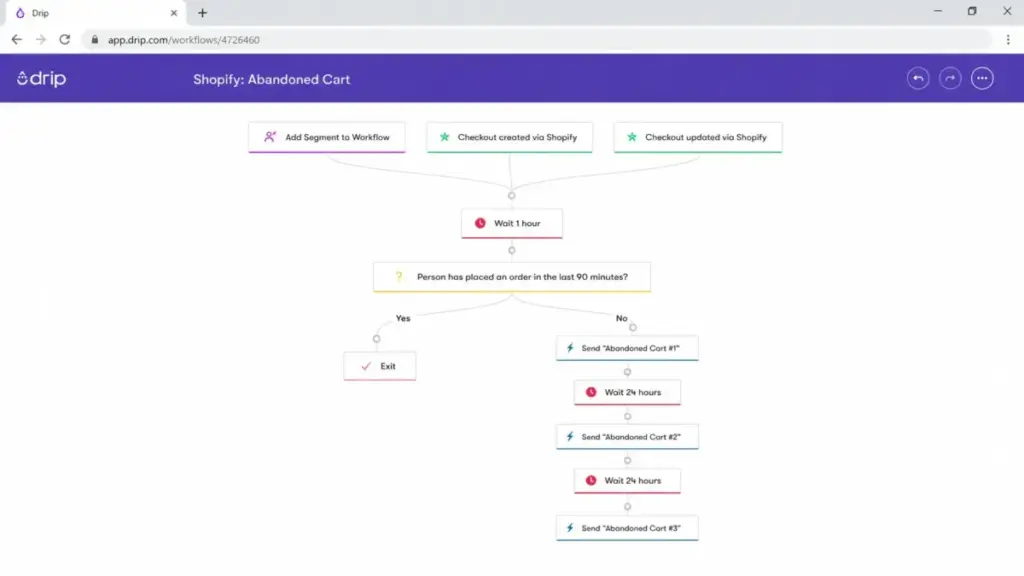
Drip’s visual workflow builder is the core of the platform. You build automation sequences using a drag-and-drop canvas that triggers off ecommerce events: abandoned cart, product viewed, order placed, subscription started, tag applied. The $39/month tier includes up to 50 workflows.
For a store running a standard lifecycle stack (welcome series, abandoned cart, post-purchase, win-back, browse abandonment), 50 workflows is more than enough. I suspect most stores with fewer than 5,000 contacts use 8-12 active workflows at any given time. The 50-workflow cap becomes relevant only for teams building complex multi-segment, multi-product sequences.
Dynamic Segmentation
Drip segments update in real time based on shopper behavior, purchase history, and custom field data. This is not batch segmentation where you export a list and import it back. Segments recalculate as events happen.
The practical value: a customer who abandons a cart at 10am is in the “cart abandoner” segment by 10:01am and receives the recovery email within your configured delay. When they purchase, the segment updates and the post-purchase flow activates. This is standard for dedicated ecommerce email tools, but it distinguishes Drip from general-purpose marketing automation platforms that require manual segment refreshes.
Onsite Campaigns: More Than Email Capture
Drip’s Onsite module includes popups, quizzes, slide-ins, sticky bars, and embedded forms. All included on paid plans. No separate tool needed.
Here is what most reviews do not connect: the onsite quiz captures preference data (product interest, skin type, budget range), saves it as a custom field, updates the dynamic segment, and the welcome or post-purchase sequence changes its content based on that zero-party data. This is a lifecycle strategy, not just a popup. If your store collects preference data at signup and uses it to personalize automated sequences, Drip handles this natively without Zapier middleware.
The embedded forms include GDPR consent checkboxes, custom data fields, and reCAPTCHA v3 for compliance-ready list building.
Revenue Attribution and Reporting
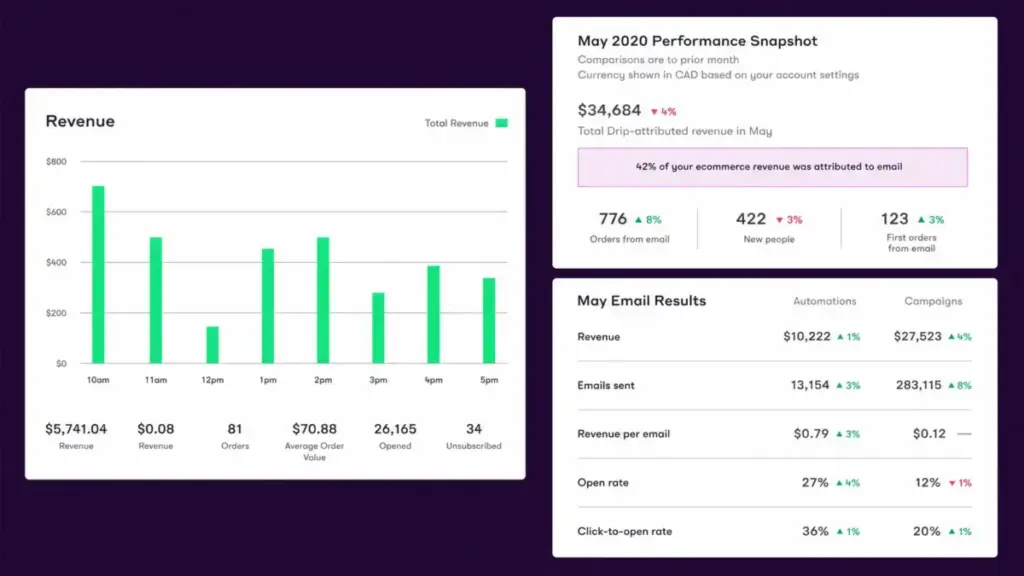
Drip’s revenue dashboards show click attribution and on-site attribution for email campaigns. This answers the question every ecommerce marketer asks: “How much revenue did this email generate?”
The prerequisite most reviews skip: revenue reporting requires a supported ecommerce integration (Shopify, WooCommerce, BigCommerce, Magento, FareHarbor, Peek Pro) or the Shopper Activity API with order data connected. If you run a custom-built store without one of these integrations, you need developer work to pipe order data into Drip through the REST API or Shopper Activity API before revenue reports populate.
The export caveat: According to Drip’s official Insights FAQ, several metrics and event reports can be exported. Revenue reports, at the time of this research, could not be exported. If your finance team or BI workflow depends on pulling revenue-by-email data into a spreadsheet or dashboard tool, verify export options before committing.
A/B Testing
Drip supports A/B testing up to four email variations. This covers subject line testing, content variations, and send-time optimization for stores that want data-driven campaign decisions.
API and Custom Integrations
The REST API and Shopper Activity API support custom store integrations. The API handles subscriber management, campaign activation, workflow actions, events, webhooks, orders, cart data, and product activity. For stores on custom platforms (not Shopify, WooCommerce, or BigCommerce), the API is the path to full functionality, but it requires developer resources.
Make lists Drip modules for campaign activation, subscriber updates, workflow actions, events, webhooks, and orders, which extends automation options beyond native integrations.
Ease of Use, Integrations, Support, and Security
Ease of Use and Setup
Drip frames onboarding as a three-step process: connect your ecommerce store, import your list, activate a campaign or workflow. For Shopify stores, this is close to accurate. The native integration handles the data connection, and pre-built workflow templates reduce setup time.
Complexity increases when you need advanced segmentation using Liquid dynamic content, custom API events, SMS compliance setup, multiple sub-accounts, or revenue attribution configuration for non-standard ecommerce platforms. I would rate setup difficulty as Medium overall: straightforward for standard Shopify use cases, more involved for custom implementations.
According to paraphrased G2 sentiment, users praise Drip’s interface and automation power, while beginners mention a learning curve. On Capterra, reviewers rate Drip highly overall but note scaling limitations and contact search constraints.
Integrations
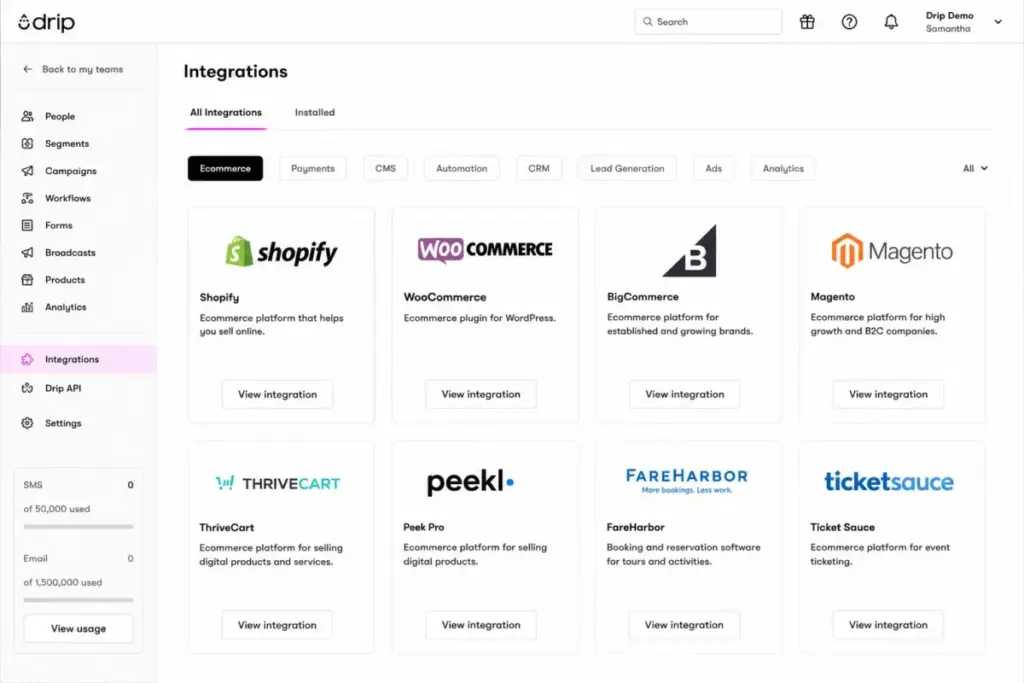
Drip integrates natively with Shopify, Shopify Plus, WooCommerce, BigCommerce, and Magento for ecommerce. Beyond the core ecommerce stack: Stripe, Typeform, Zapier, Facebook Custom Audiences, Judge.me, Sleeknote, ThriveCart, Pipedrive, Close, ClickFunnels, Calendly, and WebinarJam are listed.
For events and tours: Ticket Sauce, TourAdvantage, Peek Pro, and FareHarbor are supported. This is a niche strength that general-purpose email tools rarely match.
Support
All paying customers get weekday email support. Plans at $99/month or above get weekday live chat support. Phone support is not confirmed from official Drip sources.
This is the support gap most reviews miss: a store paying $39/month for 2,000 contacts should not expect live chat. If response time matters to your team, budget for the $99+ threshold or plan to rely on Drip’s help center documentation and onboarding resources.
Security and Compliance
Drip states it follows GDPR, CAN-SPAM, and other compliance standards. The GDPR help center explains GDPR obligations, embedded forms include consent checkboxes, and reCAPTCHA v3 is available. Drip’s terms reference commercially reasonable physical, managerial, and technical safeguards. No SOC 2 certification was verified in this research.
Deliverability and Compliance
Drip is not a shortcut for cold lists. High spam complaint rates can trigger account sending blocks. Opt-in quality and list hygiene matter. If you are importing a purchased list or a list with high bounce rates, Drip’s compliance enforcement will catch up with you. This is a feature, not a bug, but buyers with messy contact data should clean their lists before migration.
Drip Limitations
- Revenue reports cannot be exported. Revenue dashboards are view-only within Drip according to the official Insights FAQ. Analytics-heavy teams that pipe data into external BI tools face a workflow gap.
- Live chat support gated to $99+/month plans. Small stores on the entry tier get email support only. For teams accustomed to instant help from competitors like Mailchimp, this is a notable gap.
- SMS requires support activation. Unlike Omnisend or Klaviyo, Drip does not offer self-serve SMS setup. You contact support, request activation, and handle SMS consent collection. For teams expecting to launch SMS campaigns on day one, this adds friction and delay.
- Native mobile app not verified. Capterra lists Android and iPhone/iPad deployment, but official Drip sources retrieved here only confirm web and API access. Evaluate Drip as a web-first platform unless your account manager confirms native app availability.
- Active people billing means unengaged contacts cost money. If 30% of your list has not opened an email in 90 days, you are paying for those contacts. Brevo charges by sends instead of contacts, which may be cheaper for stores with large but partially inactive lists.
- Not built for B2B. Drip’s own guidance says it is not for B2B companies, large enterprises, or brick-and-mortar-only businesses. If you need lead scoring, deal pipeline, or account-based nurture, ActiveCampaign or HubSpot is the better path.
Drip Alternatives
| Alternative | Choose If | Starting Price |
|---|---|---|
| Klaviyo | You need deeper ecommerce analytics, predictive segmentation, and SMS self-serve | Free up to 250 contacts |
| Omnisend | SMS-first omnichannel is your priority, and you want self-serve SMS setup | Free plan available |
| Mailchimp | You need a general-purpose email tool with a large template library and broader integrations | Free up to 500 contacts |
| ActiveCampaign | You need CRM-integrated email automation for B2B or mixed B2B/B2C workflows | $15/month |
| Brevo | You want sends-based pricing to avoid paying for inactive contacts | Free up to 300 emails/day |
What this means: Drip’s closest competitor is Klaviyo. Both focus on ecommerce lifecycle automation. Klaviyo offers deeper predictive analytics and self-serve SMS but becomes more expensive at scale. Omnisend is the pick for teams that prioritize SMS as a primary channel. ConvertKit (now Kit) fits creators who do not sell physical products. Mailchimp fits newsletter-first senders who do not need ecommerce-depth automation.
Questions I Would Ask Drip Before Buying
Before committing to Drip, ask:
- What does the monthly cost look like at 5,000, 10,000, and 25,000 active people?
- How long does SMS activation take after contacting support, and what are the SMS credit costs?
- Can revenue reports be exported in any format, or is the dashboard the only option?
- Does the personalized onboarding include migration from my current email tool, and what is the migration scope?
- Is there an annual billing discount, and what are the contract terms?
FAQ
Is Drip worth it in 2026 for ecommerce stores?
Yes, if you run a Shopify, WooCommerce, or BigCommerce store with at least 1,000 active contacts and want behavior-triggered email automation. The $39/month entry covers unlimited sends, 50 workflows, and onsite campaigns. No, if you only send newsletters and do not use ecommerce triggers. Cheaper tools like Brevo or MailerLite handle that better.
How much does Drip actually cost?
Drip starts at $39/month for 1-2,500 active people with unlimited email sends. Pricing scales by active people count and email volume. Higher-tier pricing is not publicly displayed on a static table, so use Drip’s pricing calculator for exact costs above 2,500 contacts. Annual pricing was not confirmed on the retrieved public page.
Does Drip have a free plan?
No. Drip offers a 14-day free trial with no credit card required. After the trial, accounts become inactive and active forms and campaigns pause. There is no permanent free tier.
Can Drip do SMS marketing?
Yes, but not out of the box. SMS requires contacting Drip support to enable. SMS consent collection and compliance are your responsibility. If self-serve SMS activation matters, Omnisend or Klaviyo are better options.
Is Drip good for beginners?
It depends on what “beginner” means. If you have a Shopify store and want to set up abandoned cart emails, the workflow templates and native integration make this approachable. If you need advanced Liquid templating, API events, or multi-segment automation, the learning curve steepens. Paraphrased G2 reviews note beginners mention a learning curve.
Does Drip work with WooCommerce?
Yes. WooCommerce is a native integration. Drip pulls product, order, and customer data from WooCommerce to power ecommerce automation, segmentation, and revenue attribution.
Does Drip have live chat support?
Only if your plan costs $99/month or more. All paying customers receive weekday email support. Live chat support is gated behind the $99 threshold. Do not assume live chat at the $39 entry price.
Can Drip track revenue from email campaigns?
Yes, through revenue dashboards with click and on-site attribution. The prerequisite: you need a supported ecommerce integration (Shopify, WooCommerce, BigCommerce, Magento, FareHarbor, Peek Pro) or order data connected through the Shopper Activity API. Without this, revenue reports do not populate.
Is Drip better than Klaviyo for a small Shopify store?
For a store with fewer than 2,500 contacts, Drip’s $39/month unlimited-sends tier is straightforward. Klaviyo offers a free tier up to 250 contacts with deeper predictive analytics. If you need SMS self-serve and advanced segmentation predictions, Klaviyo wins. If you want simpler pricing at the 1,000-2,500 contact range with included onsite tools, Drip is competitive.
What are the main drawbacks of Drip?
Revenue reports are view-only (no export). Live chat support requires $99+/month plans. SMS requires support activation. Pricing scales with active people, including unengaged contacts. No verified native mobile app. Not built for B2B, brick-and-mortar-only, or SMS-first businesses.