Pipedrive starts at $14/seat/month. Freshsales starts at $9/user/month. On paper, Freshsales wins on price every time. The real Pipedrive vs Freshsales decision is harder than that, because the cheaper CRM is not always the cheaper operating cost. Pipedrive hides cost in add-ons and tier gates.
Freshsales hides cost in ecosystem depth and AI session limits. I evaluated both platforms across official documentation, verified pricing data, third-party review patterns, and workflow analysis to determine which sales CRM software fits which team, and where each platform creates budget surprises buyers do not expect.
This comparison uses 2026 pricing verified directly from each vendor’s official pricing page, feature-gate analysis from support documentation, and API limit data from developer docs. I did not score either product based on brand popularity alone.
Pipedrive vs Freshsales at a Glance
Before going deeper, here is where each CRM wins and where it falls short.
| Category | Winner | Why |
|---|---|---|
| Entry pricing and free plan | Freshsales | Free plan for 3 users; Growth at $9/user/month vs Pipedrive Lite at $14/seat/month |
| Sales pipeline adoption | Pipedrive | Visual drag-and-drop pipeline built for sales-first teams |
| Built-in communication | Freshsales | Native phone, chat, and email on paid plans without add-ons |
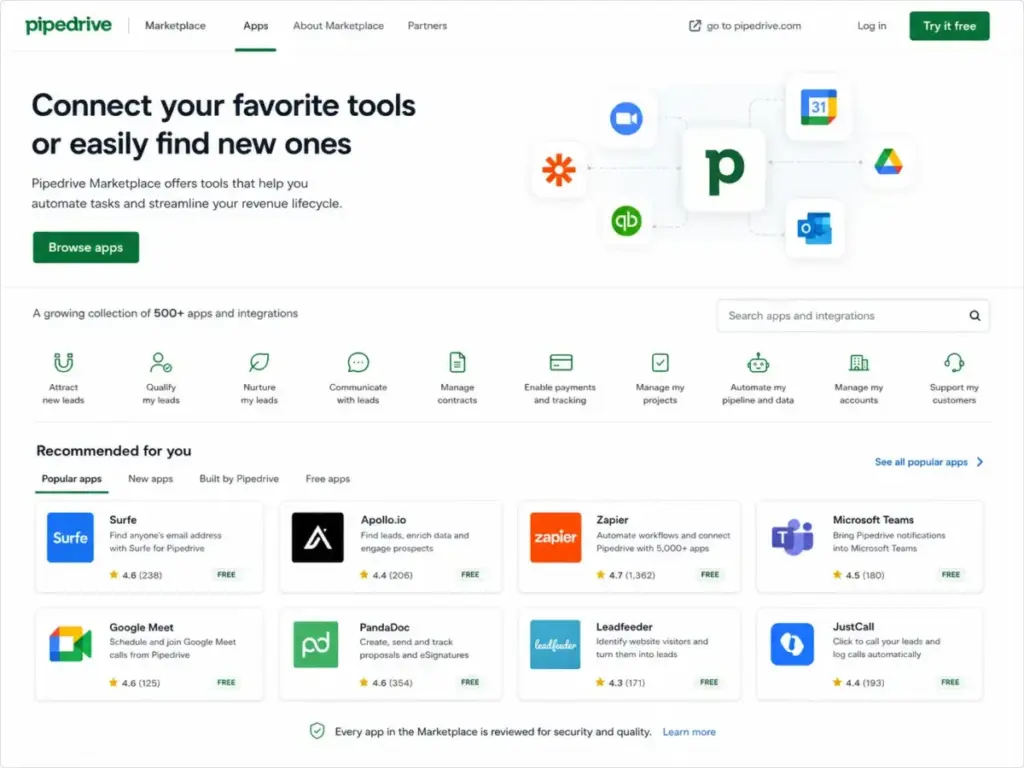
| Integration marketplace | Pipedrive | 500+ marketplace apps vs Freshworks Marketplace |
| Automation and AI | Tie | Different strengths: pipeline automation vs communication-driven AI |
| Security and governance | Tie | Both gate enterprise controls to top tiers |
| API scalability | Pipedrive | Per-token burst limits vs Freshsales account-level hourly caps |
Why Teams Switch from Pipedrive to Freshsales (and Vice Versa)
The switching patterns between these two CRMs reveal what each platform gets right, and what pushes teams out the door.
Why Pipedrive users consider Freshsales
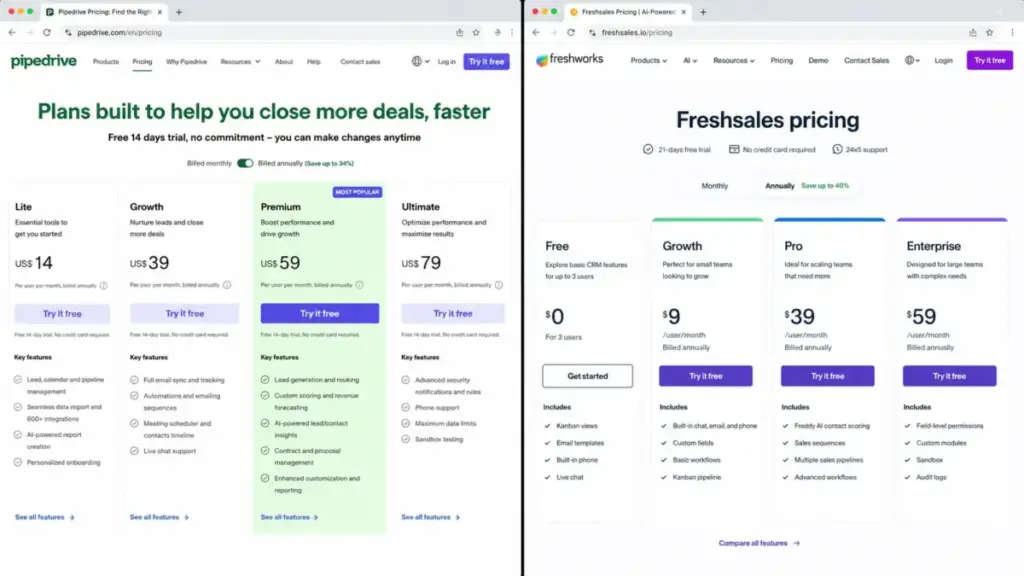
Three triggers drive Pipedrive-to-Freshsales migration conversations. First, the add-on tax. Pipedrive’s Lite plan does not include email sync, automations, sequences, or forecasting. Teams that need those features pay $39/seat/month on Growth, and LeadBooster requires Premium at $59/seat/month or a separate add-on purchase.
Second, built-in communication. Freshsales includes phone, chat, and email on its paid plans. Pipedrive requires integrations or add-ons for the same channels. Third, the free plan. Freshsales offers a permanent free tier for up to 3 users with Kanban views, email templates, built-in phone, and live chat. Pipedrive offers a 14-day trial, not a permanent free plan.
Why Freshsales users consider Pipedrive
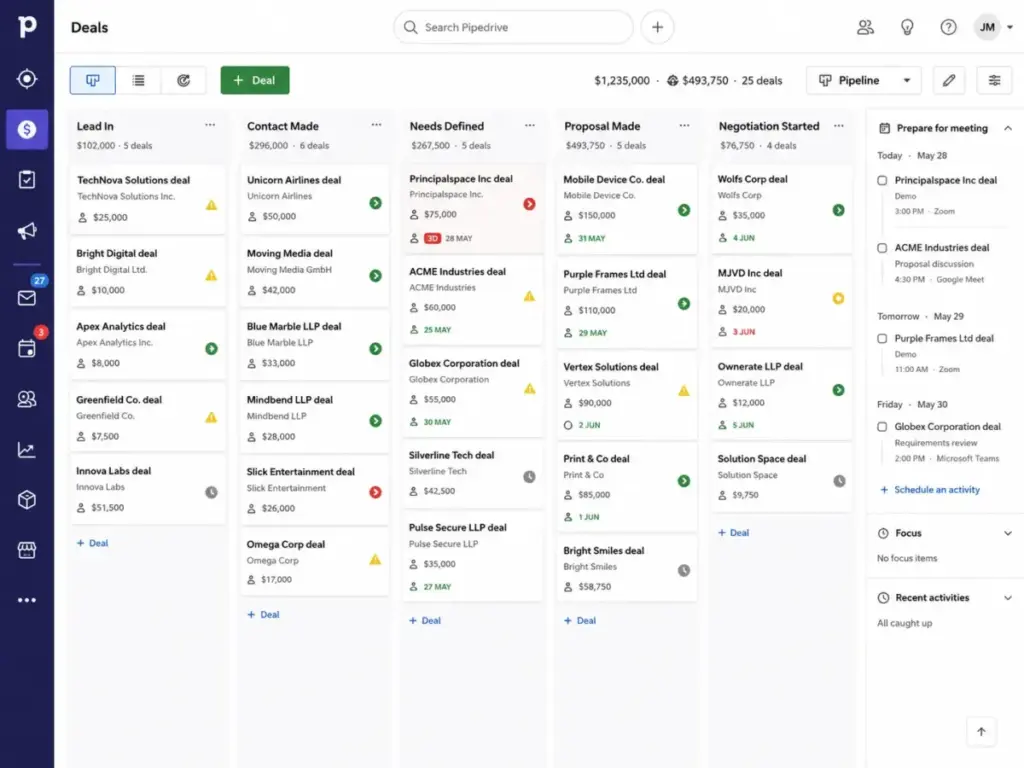
Two patterns push Freshsales teams toward Pipedrive. First, marketplace depth. According to Pipedrive’s official documentation, the platform lists 500+ marketplace integrations including Zapier, Zoom, Lemlist, Slack, Microsoft Teams, Gmail, Outlook, Xero, and Trello. Teams with specialized sales stacks find more connector options. Second, pipeline-first design.
Paraphrased sentiment from Capterra and G2 comparison data indicates Pipedrive users value efficient, customizable contact and lead management, visual pipeline tracking, and drag-and-drop deal movement. Freshsales is also approachable, but Pipedrive is more narrowly optimized for pipeline velocity.
Feature Comparison: What Each Plan Actually Includes
The feature question is not “which CRM has more features.” It is “which features are available on the plan you can afford.” Here is the plan-gate map that most comparisons skip.
| Feature | Pipedrive Plan Gate | Freshsales Plan Gate | Buyer Note |
|---|---|---|---|
| Visual pipeline management | Lite ($14) | Growth ($9) | Both include core pipeline on entry paid plans |
| Email sync and tracking | Growth ($39) | Growth ($9) | Pipedrive gates email sync behind a $25/seat premium |
| Workflow automations | Growth ($39) | Growth ($9) basic; Pro ($39) advanced | Basic workflows start earlier on Freshsales |
| Sales sequences | Growth ($39) | Pro ($39) | Same price tier for both |
| Built-in phone | Via integrations/add-ons | Free plan and above | Freshsales includes phone natively |
| Built-in chat | Via integrations/add-ons | Free plan and above | Freshsales includes chat natively |
| AI-powered scoring | Premium ($59) custom scoring | Pro ($39) Freddy AI contact scoring | Freshsales unlocks AI scoring $20/seat cheaper |
| LeadBooster / lead generation | Premium ($59) or add-on | Not directly comparable | Pipedrive-specific tool; starts from $32.50/company/month as add-on |
| Multiple sales pipelines | All plans | Pro ($39) | Pipedrive offers this on Lite; Freshsales gates to Pro |
| Custom modules | Not available | Enterprise ($59) | Freshsales-only feature |
| Sandbox testing | Ultimate ($79) | Enterprise ($59) | Both gate sandbox to top tier |
| Audit logs | Ultimate ($79) security dashboard | Enterprise ($59) | Freshsales includes audit logs $20/seat cheaper |
| Field-level permissions | Premium ($59) custom permission sets | Enterprise ($59) | Different tier names, similar price point |
This is the part most reviews skip. Pipedrive Lite and Freshsales Growth look like competing entry plans. They are not. Pipedrive Lite lacks email sync, automations, sequences, and forecasting. A sales team that needs those features compares Pipedrive Growth ($39/seat/month) against Freshsales Growth ($9/user/month) or Pro ($39/user/month). At that point, the price gap narrows or disappears depending on the feature set required.
Built-in communication vs. marketplace strategy
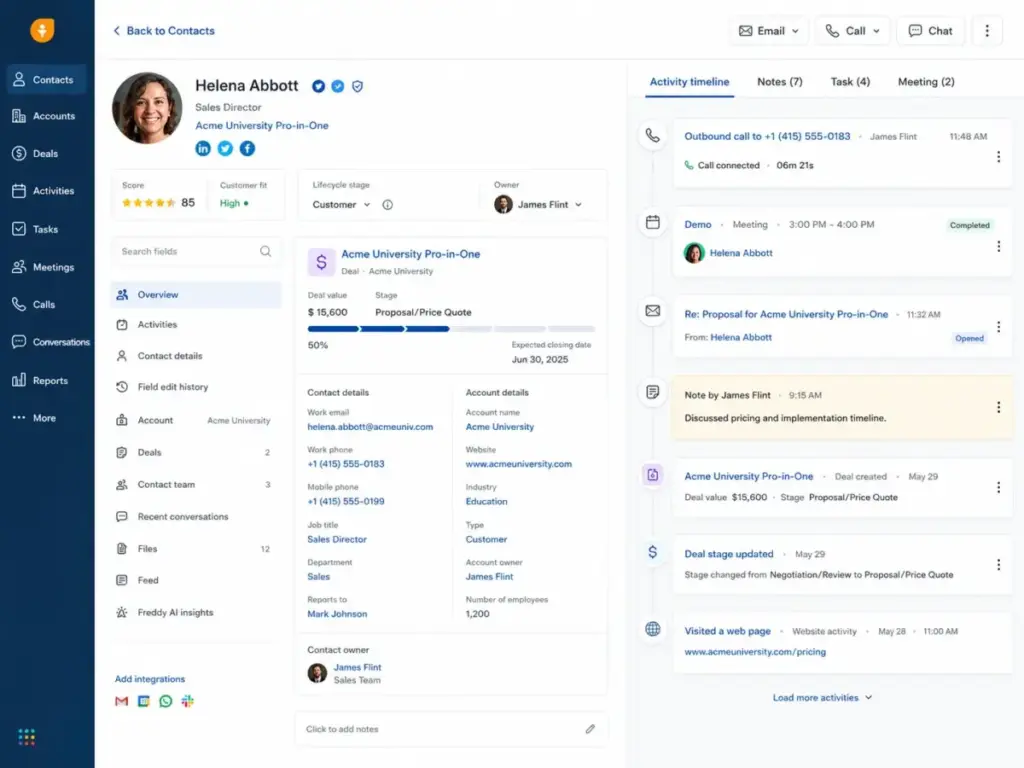
This is where the CRM philosophies diverge. Freshsales bundles communication channels natively. According to the Freshsales official pricing page, even the Growth plan includes built-in chat, email, and phone alongside Kanban views, custom fields, basic workflows, Slack collaboration, product catalog, and curated reports. TechRadar’s review confirms Freshsales is strong for built-in telephony and AI-driven sales workflows.
Pipedrive takes the opposite approach. It relies on a 500+ app marketplace to extend communication. According to Pipedrive’s feature documentation, the platform highlights integrations with Zapier, Zoom, Lemlist, Slack, Microsoft Teams, Gmail, Outlook, and dozens of other tools. TechRadar describes Pipedrive as highly intuitive for visual pipeline management with strong integrations, but notes it lacks native marketing automation and may require add-ons.
Which approach is better? If your reps need native phone, chat, and email without assembling multiple apps, choose Freshsales. If your team already uses specialized tools and values the flexibility to swap components, choose Pipedrive.
The Real Cost of Each CRM at Scale
According to Pipedrive’s official pricing page (as of May 2026), plans run Lite at $14/seat/month, Growth at $39/seat/month, Premium at $59/seat/month, and Ultimate at $79/seat/month, all billed annually, with a 14-day free trial. Pipedrive renamed its plans in 2025: Lite replaced Essential, Growth replaced Advanced, Premium replaced Professional/Power, and Ultimate replaced Enterprise.
According to the Freshsales official pricing page (as of May 2026), plans run Free at $0 for up to 3 users, Growth at $9/user/month, Pro at $39/user/month, and Enterprise at $59/user/month, billed annually.
Entry-plan cost at team size
| Users | Pipedrive Lite (annual) | Freshsales Growth (annual) | Winner | Caveat |
|---|---|---|---|---|
| 5 | $70/month | $45/month | Freshsales | Pipedrive Lite lacks email sync and automations |
| 10 | $140/month | $90/month | Freshsales | Same gap; Freshsales Growth includes basic workflows |
| 25 | $350/month | $225/month | Freshsales | $125/month difference grows with team size |
| 50 | $700/month | $450/month | Freshsales | $250/month savings, but Pro features cost more |
These numbers compare entry paid plans. Most sales teams need more than entry-level features.
The realistic comparison: Pipedrive Growth vs Freshsales Pro
When you compare plans with similar feature depth (email sync, automations, sequences, forecasting), both cost $39/user/month billed annually. At this tier, the price difference disappears. The decision shifts from “which is cheaper” to “which feature set matches your sales motion.”
Pipedrive Growth includes full email sync with tracking, automations, nurturing sequences, forecast reports, meeting scheduler, contact timeline, and live chat support during business hours. Freshsales Pro includes Freddy AI contact scoring, custom sales activities, advanced custom fields, auto-assignment rules, territory management, sales sequences, AI sales emails, multiple pipelines, deal insights, advanced workflows, and custom reports.
Costs that change the invoice
Both CRMs have add-on considerations that the marketing pages do not emphasize.
Pipedrive add-ons (as of May 2026): LeadBooster from $32.50/company/month, Projects from $6.67/company/month, Campaigns from $13.33/company/month, Web Visitors from $41/company/month, and Smart Docs from $32.50/company/month. These are billed per company, not per user. A team using LeadBooster, Campaigns, and Smart Docs adds roughly $78/month on top of seat costs regardless of team size.
Freshsales add-ons: Configure, Price, Quote (CPQ) and Freddy AI Agent sessions. Paid plans include 500 AI agent sessions once per account. After that, additional sessions require the AI agent add-on purchase. Teams that rely heavily on AI-assisted engagement should budget for session packs beyond the included 500.
Monthly billing exists for both platforms but exact monthly rates should be verified on each vendor’s pricing page before purchase.
Security, Compliance, and Governance Gates
Both platforms meet baseline CRM security expectations, but the governance features that enterprise buyers care about are locked behind top-tier plans on both sides.
According to Pipedrive’s security page, the platform complies with GDPR and adheres to SOC 2, SOC 3, EU-US Data Privacy Framework, ISO/IEC 27001:2013, and ISO 27701:2019. Security features include 2FA, SSO, security dashboard, user access and device logs, and custom permission sets. Security alerts, account lockdown, and security rules require Ultimate ($79/seat/month). Sandbox testing also requires Ultimate.
According to Freshworks’ GDPR page, all Freshworks products are GDPR compliant with GDPR-ready features available worldwide. The Freshworks Trust Center provides access to certifications, third-party attestations, and compliance reports. Freshsales Enterprise ($59/user/month) includes field-level permissions, custom modules, sandbox, and audit logs.
The governance gap: Pipedrive gates security alerts, rules, and sandbox to Ultimate at $79/seat/month. Freshsales gates field-level permissions, custom modules, sandbox, and audit logs to Enterprise at $59/user/month. For regulated teams, Freshsales Enterprise is $20/seat cheaper for comparable admin controls.
API Limits and Technical Scalability
Sales ops and RevOps teams building multi-app integrations need to compare API architectures before committing. This is the dimension most comparison articles ignore entirely.
| Technical Factor | Pipedrive | Freshsales | Risk for Scaling Teams |
|---|---|---|---|
| API limit model | Per-token burst limits by plan | Account-level hourly limits | Freshsales’ account model can throttle multi-app setups faster |
| Entry plan limits | Lite: 20 requests/2s (API token), 80/2s (OAuth) | Free/Growth: 1,000 requests/account/hour | Different models; hard to compare directly |
| Mid-tier limits | Growth: 40/2s (API), 160/2s (OAuth) | Pro: 2,000 requests/account/hour | Pipedrive scales per-token; Freshsales per-account |
| Top-tier limits | Ultimate: 120/2s (API), 480/2s (OAuth) | Enterprise: 5,000 requests/account/hour | Pipedrive’s per-token model is more flexible for multiple integrations |
| Search API | 10 requests/2s across all plans | Included in hourly account limit | Pipedrive has a separate search rate limit |
| Rate limit response | HTTP 429 | HTTP 429 | Both return standard rate-limit responses |
| Daily budgets | Token-based daily request budgets (verify exact limits in developer docs) | Not documented separately | Pipedrive adds a second throttle layer |
Source: Pipedrive API documentation and Freshsales API documentation (both verified May 2026).
Pipedrive’s per-token model lets teams run multiple integrations without competing for the same hourly budget. Freshsales’ account-level model means every connected app draws from the same pool. A 50-person sales org running Salesforce sync, marketing automation, enrichment tools, and custom dashboards will hit Freshsales’ account limits faster than Pipedrive’s per-token limits.
What You Gain and What You Lose (Each Direction)
Switching from Pipedrive to Freshsales
You gain: Lower entry cost (or free for 3 users), built-in phone/chat/email, Freddy AI contact scoring on Pro, territory management, and tighter fit with Freshdesk/Freshchat/Freshmarketer if your team uses Freshworks products.
You lose: Pipedrive’s larger integration marketplace (500+ apps), per-token API architecture, visual pipeline specialization, LeadBooster lead generation tools, and the established automation/sequence workflows your team has built.
Switching from Freshsales to Pipedrive
You gain: 500+ marketplace integrations, per-token API limits for multi-app environments, visual pipeline-first design, LeadBooster for lead generation (Premium or add-on), and broader third-party tool compatibility.
You lose: Free plan availability, built-in phone/chat/email without add-ons, Freddy AI scoring and deal insights, Freshworks ecosystem alignment, and lower entry pricing. Pipedrive also has no permanent free tier.
Migration difficulty: medium in both directions
Switching CRMs is not a CSV upload. Map these elements before migrating: contacts, accounts, deals, deal owners, pipelines, stages, activities, notes, custom fields, email history, automation rules, lead scores, products, user permissions, and reporting dashboards. Rebuild automations and integrations manually. According to Pipedrive’s comparison page, users can import Freshworks data using Excel .xls/.xlsx or CSV files with field mapping. Freshsales supports import workflows and API access, but verify historical email/activity export and custom module mapping before committing.
Pilot with one pipeline before full rollout. Migration errors compound across hundreds of deals.
Support: Plan-Gated Differently Than You Expect
Support access varies by plan on both platforms, and the differences matter for lean sales teams without dedicated CRM admins.
According to Pipedrive’s support documentation, live chat is available for Growth, Premium, and Ultimate users. Growth live chat runs Monday through Friday during business hours. Premium and Ultimate live chat runs 24/7. Phone support is available to account settings users on Premium and Ultimate, with longer phone support hours on Ultimate. Lite users get knowledge base and online help only.
According to the Freshsales pricing page, all plans (including Free) include 24×5 support. Freshworks lists crm-support@freshworks.com and sales@freshworks.com for questions. Support resources include knowledge base, training, certification, and community forums.
The gap: Pipedrive Lite users get no live chat support. Freshsales Free users get 24×5 support. That is a meaningful difference for small teams troubleshooting CRM setup without IT staff.
Who Should Choose Pipedrive
Choose Pipedrive if your sales team lives in pipeline views, needs strong deal discipline, prefers a focused sales CRM over an all-in-one suite, and depends on a wider third-party app marketplace. Pipedrive fits teams of 10 to 50 reps running outbound sales motions where pipeline velocity and deal tracking matter more than native communication channels.
Avoid Pipedrive if you need a permanent free CRM, built-in phone/chat on the lowest paid plan, or want marketing, support, and service features natively bundled without add-on decisions.
Who Should Choose Freshsales
Choose Freshsales if you want a lower entry price, a free plan for micro-teams, built-in phone/chat/email, Freddy AI sales features on Pro, and stronger alignment with Freshdesk and Freshchat workflows. Freshsales fits startups, 3-person teams moving off spreadsheets, and communication-heavy sales teams where reps call, chat, and email from one interface.
Avoid Freshsales if your CRM buying decision depends on the largest possible app marketplace, highly specialized sales stack integrations, or heavy API usage across many connected apps. Review the Freshsales alternatives guide if your team needs deeper third-party integration options.
Best-Fit Buyer Scenarios
| Scenario | Better Choice | Reason | Caveat |
|---|---|---|---|
| 3-person startup replacing spreadsheets | Freshsales | Free plan for up to 3 users with Kanban, phone, chat, and 24×5 support | Outgrows Free quickly if team expands |
| 10-person outbound sales team | Pipedrive | Visual pipeline, email sync from Growth, sequences, 500+ integrations | Requires Growth ($39/seat) for full email features |
| 25-person communication-heavy team | Freshsales | Built-in phone/chat/email, Freddy AI scoring on Pro, advanced workflows | Pro ($39/user) needed for AI and sequences |
| 50-person org with many connected apps | Pipedrive | 500+ integrations, per-token API limits, marketplace flexibility | Add-on costs (LeadBooster, Campaigns) add up |
| Sales and support team using Freshdesk | Freshsales | Freshworks ecosystem alignment, shared Marketplace, cross-product workflows | Less flexibility for non-Freshworks tools |
When Neither CRM Fits
If neither Pipedrive nor Freshsales matches your requirements, consider these alternatives:
HubSpot CRM fits teams that want a broader free CRM and marketing/sales/service/CMS ecosystem. Better when the buying question extends beyond sales pipeline into full growth platform territory. Read the HubSpot CRM evaluation for a detailed breakdown.
Zoho CRM fits budget-conscious teams that want deeper customization and are comfortable inside the Zoho ecosystem. Often a strong middle ground between Freshsales’ simplicity and enterprise CRM complexity. See the Zoho CRM analysis for pricing and feature details.
Salesforce Sales Cloud fits enterprise teams that require advanced governance, complex custom objects, deep reporting, and ecosystem scale. Better for organizations where CRM complexity and compliance outweigh speed of setup. Read the Salesforce review for enterprise-specific analysis.
The Decision Tree
- If you need the lowest entry cost or a free plan for up to 3 users, choose Freshsales.
- If your sales process is pipeline-first and adoption speed matters more than native omnichannel communication, choose Pipedrive.
- If your reps need built-in phone, chat, and email without assembling multiple apps, choose Freshsales.
- If your team depends on a broad marketplace of specialist tools, choose Pipedrive.
- If API usage is heavy across many connected systems, compare Pipedrive’s per-token burst limits with Freshsales’ account-level hourly limits before choosing.
- If neither fits because you need full marketing automation, customer service, CRM, and CMS in one ecosystem, consider HubSpot or Salesforce instead.
FAQ
Is Freshsales cheaper than Pipedrive?
On entry plans, yes. Freshsales Growth costs $9/user/month billed annually versus Pipedrive Lite at $14/seat/month. Freshsales also has a permanent free plan for up to 3 users. At the mid-tier comparison (Freshsales Pro vs Pipedrive Growth), both cost $39/user/month. The price advantage depends on which feature tier your team actually needs.
Does Pipedrive have a free plan?
No. Pipedrive offers a 14-day free trial with full access and no credit card required, but there is no permanent free plan. Freshsales offers a free plan for up to 3 users with core CRM, Kanban views, built-in phone, live chat, email templates, and 24×5 support.
Does Freshsales include built-in phone?
Yes. Freshsales includes built-in phone on the Free plan and all paid plans. Pipedrive does not include a native phone dialer and relies on integrations or marketplace apps for calling functionality.
Which CRM has better automation, Pipedrive or Freshsales?
Both platforms offer automation, but at different tiers. Pipedrive Growth ($39/seat/month) includes automations, sequences, and forecast reports. Freshsales Growth ($9/user/month) includes basic workflows, while Pro ($39/user/month) adds advanced workflows, sales sequences, Freddy AI scoring, and deal insights. The winner depends on whether you prioritize pipeline-focused automation or communication-driven AI engagement.
Which CRM has better integrations?
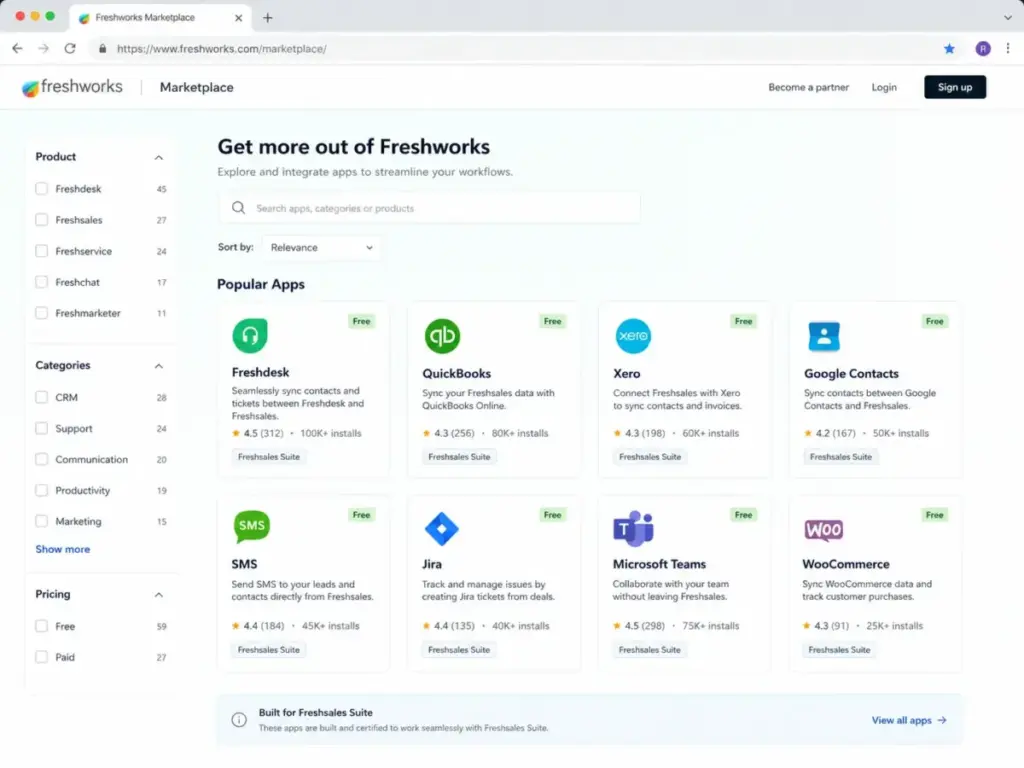
Pipedrive lists 500+ marketplace integrations. Freshworks Marketplace supports Freshsales integrations including Freshdesk, Mailchimp, QuickBooks, Xero, Jira, Microsoft Teams, Slack, and Zapier. For teams with complex, specialized sales stacks, Pipedrive’s broader marketplace is the stronger option. For teams already using Freshworks products, Freshsales’ ecosystem integrations reduce friction. See the Pipedrive alternatives comparison for marketplace analysis.
Can I migrate from Pipedrive to Freshsales?
Yes, but treat it as a medium-difficulty migration. Map contacts, accounts, deals, pipelines, stages, owners, custom fields, activities, notes, email history, automation rules, lead scores, products, permissions, and reporting dashboards. Rebuild automations and integrations manually. Pilot one pipeline before full rollout.
Can I migrate from Freshsales to Pipedrive?
Yes. Pipedrive supports data import from Excel .xls/.xlsx and CSV files with field mapping. It documents Freshworks data import specifically on its comparison page. Verify historical email and activity export from Freshsales and plan for manual automation rebuilds.
Which CRM is easier for sales reps to use?
G2 comparison data and Capterra review patterns consistently position Pipedrive as the stronger platform for sales adoption speed, visual deal tracking, and drag-and-drop pipeline management. Freshsales scores well on ease of setup and customization. Both are approachable for SMB teams, but Pipedrive is more narrowly optimized around the daily sales pipeline workflow.
Is Pipedrive good for small businesses?
Pipedrive fits small businesses with 5 to 25 users that prioritize pipeline management and deal tracking. The limitation: Lite ($14/seat/month) lacks email sync, automations, and sequences. Most small sales teams need Growth ($39/seat/month) to get the features they expect from a CRM. Budget accordingly. Check Pipedrive pricing details for a full tier breakdown.
Is Freshsales good for startups?
Freshsales is one of the strongest CRM options for startups. The free plan supports up to 3 users with core CRM, built-in phone, and live chat. Growth at $9/user/month adds pipeline management, basic workflows, and Freshworks Marketplace access. Startups outgrow Free quickly if they need automation, AI scoring, or multiple pipelines, which require Pro at $39/user/month. See the Freshsales pricing breakdown for tier analysis.