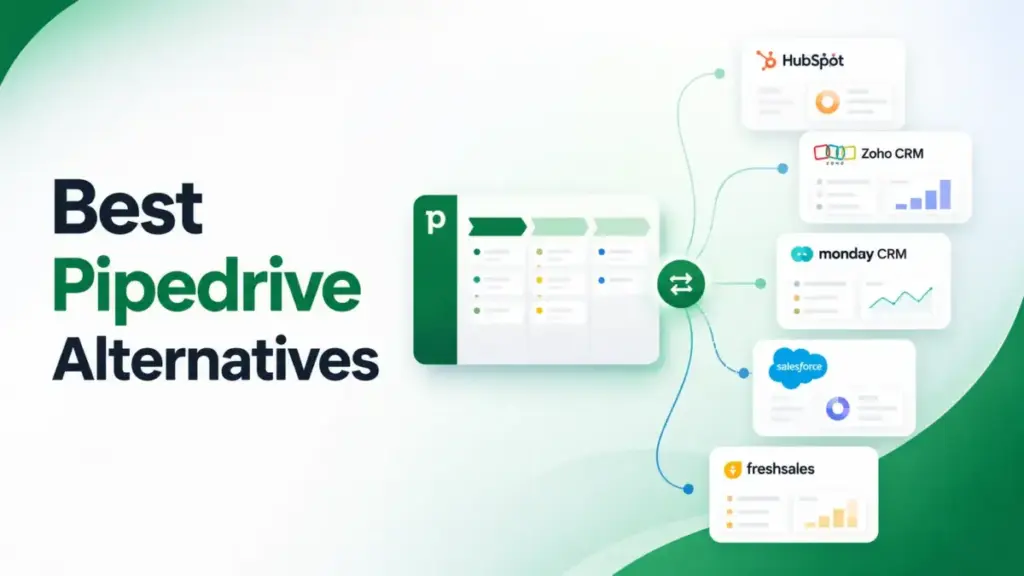
Pipedrive is a strong CRM software built for visual pipeline management, but not every sales team stays once costs climb or workflows outgrow it. If you are comparing Pipedrive alternatives because email sync pushed you from Lite at $14/seat/month to Growth at $39, or because add-ons inflated your bill past what you budgeted, you are not alone.
I spent weeks mapping 10 CRM replacements against the specific exit reasons that drive teams away from Pipedrive. This guide ranks each option by switching fit, migration difficulty, and real cost at equivalent feature tiers, not the cheapest advertised plan. If you want deeper context on Pipedrive’s own strengths, start there. For the full CRM ranking, I maintain a separate guide.
Quick Verdict
The best Pipedrive alternative depends on which limitation triggered your search, not which CRM has the longest feature list. Here are my top three picks by exit reason: HubSpot CRM if you need a free CRM and an all-in-one growth platform, Zoho CRM if you want deeper features per dollar without Salesforce-level complexity, and Close if your outbound team needs native calling and SMS inside the CRM.
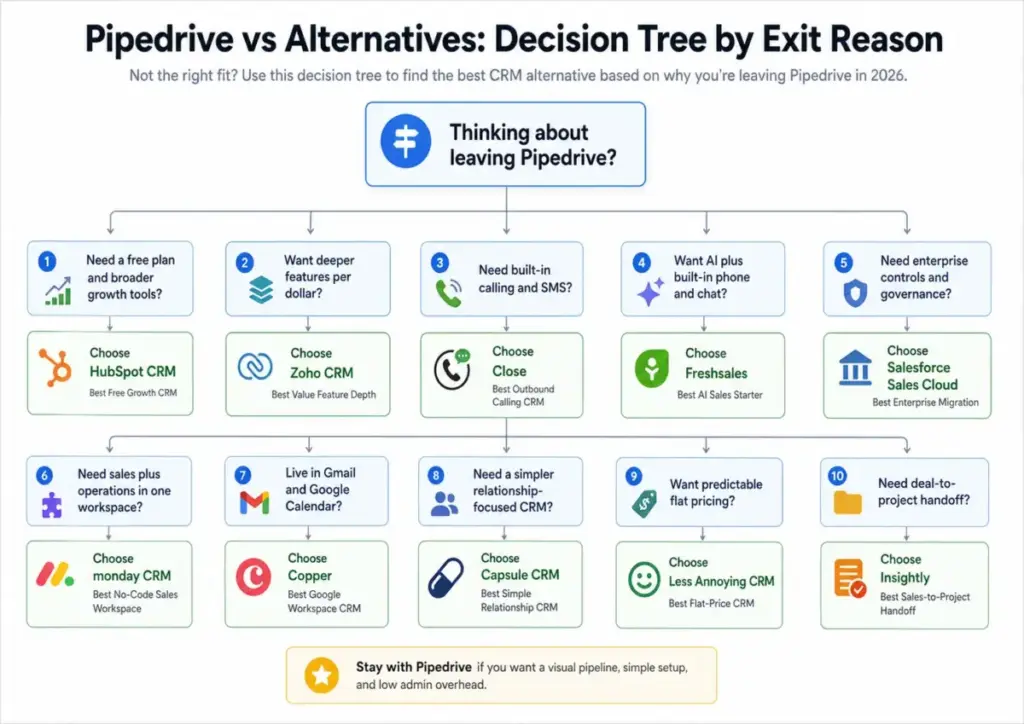
| Exit Reason | Best Alternative | Why It Wins | Watch-Out | Migration Difficulty |
|---|---|---|---|---|
| No permanent free plan | HubSpot CRM | Free CRM with deals, contacts, live chat, email tracking | Paid Sales Hub jumps to $100/seat at Professional | Medium |
| Add-on cost expansion | Zoho CRM | Broader features included at lower tiers | Heavier configuration than Pipedrive | Medium |
| Outbound calling gaps | Close | Built-in calling, SMS, Power Dialer, centralized inbox | Growth tier at $99/seat for Power Dialer | Medium |
| Email sync tier gating | Freshsales | Full email sync and AI on lower-cost plans | Suite product naming can confuse buyers | Easy-Medium |
| Enterprise governance | Salesforce Sales Cloud | Role hierarchy, territories, approvals, audit trails | Requires admin discipline and higher budget | Hard |
| Sales-plus-operations | monday CRM | No-code boards for sales, onboarding, delivery | CRM discipline breaks without structure | Medium |
| Google Workspace native | Copper | Lives inside Gmail and Google Calendar | Serious automation pushes you past Starter | Easy-Medium |
| Relationship-led selling | Capsule CRM | Calm interface for contacts, projects, tasks | Not built for high-velocity outbound | Easy |
| Pricing complexity | Less Annoying CRM | $15/user/month flat, no tiers, no contracts | No advanced automation or AI | Easy |
| Post-sale delivery gaps | Insightly | Deal-to-project handoff with relationship linking | Advanced features gated on higher plans | Medium |
Why Users Leave Pipedrive
Understanding why teams leave Pipedrive matters more than picking the shiniest replacement. Every exit reason maps to a different CRM, and switching to the wrong one wastes more money than staying.
1. No permanent free plan. Pipedrive offers a 14-day trial, but no free tier. Teams testing CRM adoption or bootstrapping on zero budget hit a wall on day 15. HubSpot and Freshsales both offer free plans for up to 3 users.
2. Email sync and automation tier jumps. Full email sync, tracking, and automation sequences appear on Growth at $39/seat/month. That is a 178% jump from Lite at $14. If email sync is your trigger, compare alternatives at the email-sync tier, not the cheapest advertised price.
3. Add-ons expand real cost. LeadBooster starts at $32.50/month. Projects costs $6.67. Campaigns costs $13.33. Web Visitors costs $41. A team on Growth with LeadBooster and Projects pays more per seat than many competitors charge for all-in plans. Check the full breakdown in our Pipedrive pricing analysis.
4. Reporting limits for advanced RevOps. Pipedrive’s reporting works well for deal velocity and pipeline conversion, but RevOps teams needing multi-touch attribution, territory analytics, or custom report builders often outgrow it before hitting 30 seats.
5. Native outbound calling gaps. Pipedrive supports calling through integrations, but it does not include a built-in dialer, SMS, or Power Dialer. Teams making 50+ daily calls per rep feel this gap immediately.
6. Marketing and service platform gap. Pipedrive is sales-first by design. Teams that need email marketing, landing pages, ticketing, and knowledge base in one platform end up stitching together Campaigns add-on, Mailchimp, and a separate help desk.
7. Enterprise governance gap. Pipedrive Ultimate adds security alerts and access restrictions, but it does not match Salesforce-grade role hierarchies, territory management, approval chains, or sandbox environments for large teams.
8. Post-sale project handoff gap. Closing a deal in Pipedrive does not automatically trigger a delivery workflow. The Projects add-on helps, but it is a bolt-on, not a native handoff system like Insightly offers.
Best Pipedrive Alternatives Ranked
I ranked these 10 Pipedrive competitors by exit-reason fit, feature parity at equivalent pricing tiers, migration difficulty, and long-term scalability. The comparison table below gives you the snapshot. The detailed reviews follow.
| Rank | Alternative | Badge | Starting Price | Best For | Migration Difficulty | Main Trade-Off |
|---|---|---|---|---|---|---|
| 1 | HubSpot CRM | Best Free Growth CRM | Free (Sales Hub Starter $15/seat/mo) | 2-20 person teams needing free CRM plus marketing | Medium | Professional tier jumps to $100/seat/mo |
| 2 | Zoho CRM | Best Value Feature Depth | Free for 3 users (paid tiers vary) | 5-50 person SMBs wanting more per dollar | Medium | Heavier configuration curve |
| 3 | Freshsales | Best AI Sales Starter | Free for 3 users (paid from $9/mo) | Small teams wanting AI and built-in comms | Easy-Medium | Suite product naming confusion |
| 4 | Close | Best Outbound Calling CRM | $35/seat/mo (Essentials) | 5-30 rep outbound teams | Medium | Growth at $99/seat for Power Dialer |
| 5 | Salesforce Sales Cloud | Best Enterprise Migration | $25/user/mo (Starter Suite) | 50+ person RevOps teams | Hard | Requires admin discipline |
| 6 | monday CRM | Best No-Code Sales Workspace | $12/seat/mo (Basic) | 5-40 person sales-plus-ops teams | Medium | CRM discipline needs structure |
| 7 | Copper | Best Google Workspace CRM | $9/seat/mo (Starter) | 3-25 person Gmail-native teams | Easy-Medium | Limited outside Google ecosystem |
| 8 | Capsule CRM | Best Simple Relationship CRM | Verify on pricing page | Consultants, agencies, service businesses | Easy | Not for high-velocity outbound |
| 9 | Less Annoying CRM | Best Flat-Price CRM | $15/user/mo flat | 1-10 person small businesses | Easy | No advanced automation or AI |
| 10 | Insightly | Best Sales-to-Project Handoff | $29/user/mo (Plus) | Agencies selling projects | Medium | Advanced features gated higher |
Pricing verified: April 2026. Check official pricing pages for current rates.
HubSpot CRM – Best Free Growth CRM

Score: 9.2/10 – Excellent
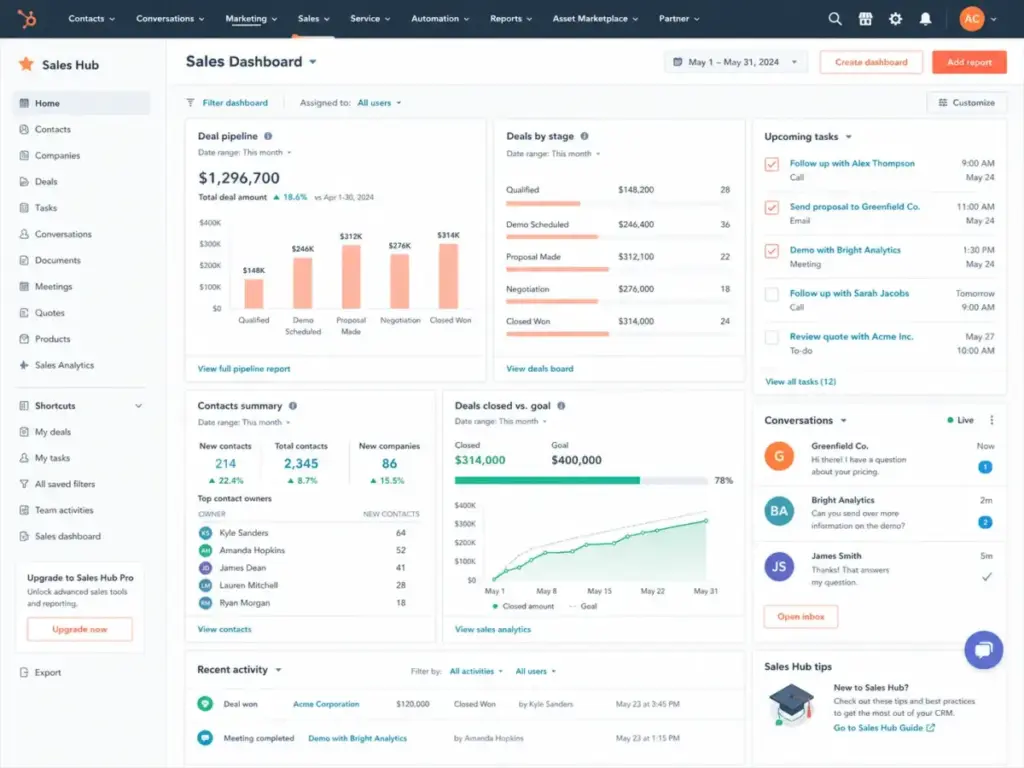
HubSpot CRM is the strongest Pipedrive alternative for teams that need a free starting point and a clear growth path into marketing, sales, and service on one platform. Where Pipedrive charges from day one, HubSpot gives you a free CRM with deal pipelines, contact management, live chat, meeting scheduling, and email tracking at zero cost.
Best for: 2-20 person teams needing free CRM plus marketing handoff, especially B2B SaaS companies where marketing owns pipeline creation.
Solves this Pipedrive exit reason: No permanent free plan; narrow sales-only focus when marketing context matters.
Starting price: Free CRM available. Sales Hub Starter at $15/seat/month. Professional at $100/seat/month. Enterprise at $150/seat/month.
Migration difficulty: Medium. Contact and deal import is manageable through CSV, but workflows, lifecycle stages, reporting dashboards, and list segmentation need careful rebuilding.
What it does better than Pipedrive:
- Free CRM tier with no time limit and no seat cap on core features
- Broader customer platform spanning marketing, sales, service, and 2,000+ integrations via HubSpot Marketplace
- Stronger marketing-to-sales handoff with lifecycle stages and lead scoring
Where Pipedrive still wins:
- Simpler, faster visual pipeline setup with less admin overhead at the sales-only level
Critical weakness:
Paid Sales Hub tiers escalate quickly. Professional at $100/seat/month exceeds Pipedrive Premium ($59) and Ultimate ($79). Teams that only need pipeline management end up paying for platform breadth they may not use.
“It used to consume a lot of my time finding all the relevant data for decision making. Now I can generate reports, access insights quicker, and improve our forecasting capabilities, resulting in considerable time savings.” – Mia Negru, Co-Founder, 2030 Builders
My take:
HubSpot feels like a growth platform first and a sales CRM second. That is a win when marketing owns pipeline creation. It is overkill when five reps just need a clean visual board. For a direct comparison, see my HubSpot vs Pipedrive breakdown. Full details in the HubSpot CRM review.
Zoho CRM – Best Value Feature Depth

Score: 9.0/10 – Excellent
Zoho CRM gives Pipedrive users more CRM depth per dollar than almost any competitor. Where Pipedrive gates email sync, advanced automation, and AI behind Growth and Premium tiers, Zoho bundles Zia AI, custom modules, multichannel engagement, and BI analytics at lower price points.
Best for: 5-50 person SMBs that want automation, AI, and customization without Salesforce-level cost or complexity.
Solves this Pipedrive exit reason: Add-on expansion and higher-tier gates make Pipedrive’s feature depth expensive.
Starting price: Free Edition for 3 users. Paid tiers vary by region; verify on the Zoho CRM pricing page.
Migration difficulty: Medium. Field mapping, module design, and workflow logic require deliberate setup. Zoho rewards teams willing to configure.
What it does better than Pipedrive:
- Broader CRM customization with custom modules, subforms, and layout rules
- Zia AI for lead scoring, deal predictions, and anomaly detection included at lower tiers
- Zoho ecosystem (Books, Desk, Campaigns, Projects) creates all-in-one value
Where Pipedrive still wins:
- Faster initial pipeline setup with less configuration overhead
Critical weakness:
Zoho can feel heavier and more configuration-heavy than Pipedrive. Teams that chose Pipedrive because they dislike software setup will face the same friction here, possibly more.
My take:
Zoho rewards teams that invest time in configuration. It punishes teams that want every decision made for them. If your exit reason is cost, Zoho delivers. If your exit reason is simplicity, look at Less Annoying CRM instead. I cover this in depth in the Zoho CRM review and the Pipedrive vs Zoho comparison.
Freshsales – Best AI Sales Starter

Score: 8.8/10 – Very Good
Freshsales combines AI lead scoring, built-in phone, email, and live chat into a single sales CRM that costs less than Pipedrive Growth for small teams. Freddy AI provides deal recommendations and contact scoring without requiring a Premium-tier upgrade.
Best for: Small sales teams (3-15 reps) wanting AI guidance and built-in communication tools without assembling add-ons.
Solves this Pipedrive exit reason: Pipedrive users want built-in AI and communication tools without paying for multiple add-ons.
Starting price: Free plan for 3 users. Paid plans from $9/month. See Freshsales pricing.
Migration difficulty: Easy to Medium. Pipeline import is straightforward, but Freddy scoring models and automation sequences need tuning after import.
What it does better than Pipedrive:
- Free plan with contact management, Kanban views, and built-in phone
- Freddy AI for lead scoring and deal insights on lower tiers
- Built-in phone, email, and chat reduce integration dependency
Where Pipedrive still wins:
- More mature visual pipeline interface and activity-based selling workflow
Critical weakness:
Deeper Freshworks suite decisions can become confusing. Mixing Freshsales, Freshmarketer, and Freshdesk creates product overlap that is harder to untangle than Pipedrive’s simpler add-on model.
My take:
Freshsales is strongest when the team wants a modern sales CRM with AI, not a whole enterprise architecture. Read the full Freshsales review and the Pipedrive vs Freshsales comparison.
Close – Best Outbound Calling CRM

Score: 8.7/10 – Very Good
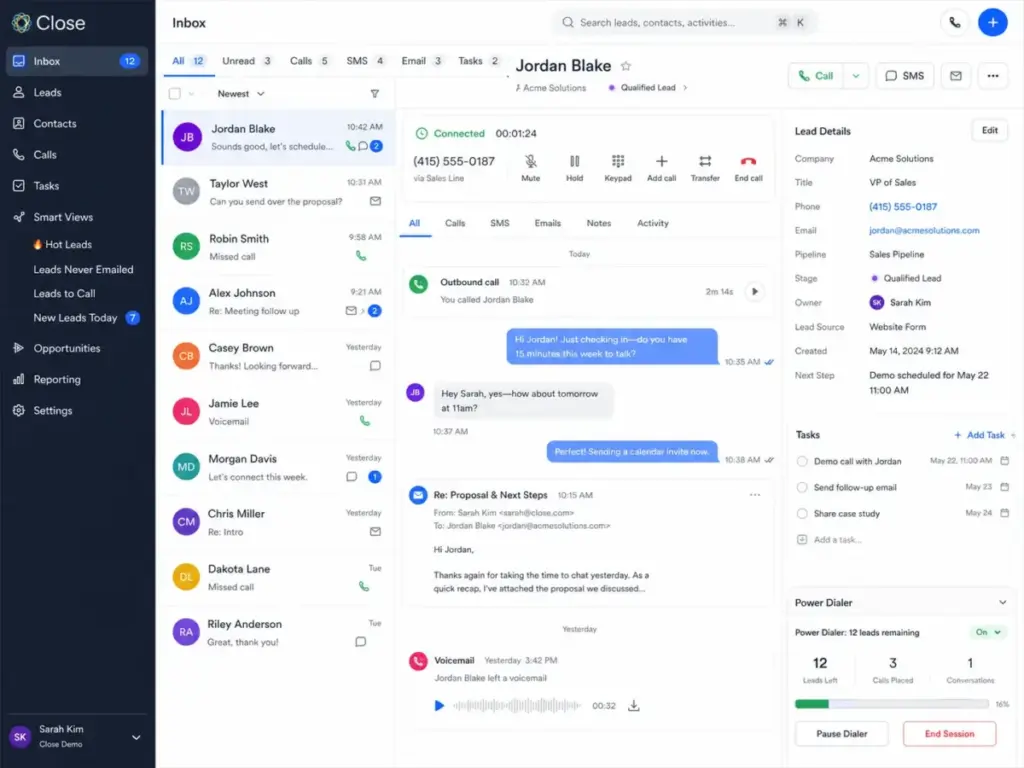
Close is not a prettier version of Pipedrive. It is a sales execution cockpit built for outbound teams that live on calls, SMS, and email sequences. Where Pipedrive requires third-party integrations for serious calling, Close makes dialing, texting, and lead follow-up first-class CRM actions.
If that outbound-first workflow is the main reason you are comparing tools, the Close alternatives guide narrows the shortlist to CRMs that can realistically replace Close’s calling, SMS, and sales-sequence stack.
Best for: 5-30 rep outbound SDR teams making 50+ daily calls per rep.
Solves this Pipedrive exit reason: Pipedrive lacks native calling, SMS, and Power Dialer capabilities.
Starting price: Essentials at $35/seat/month billed annually. Growth at $99/seat/month. See Close pricing.
Migration difficulty: Medium. Communication history, calling numbers, sequences, and lead filters need setup. Close’s data model differs from Pipedrive’s deal-centric structure.
What it does better than Pipedrive:
- Built-in calling with local numbers, call recording, and voicemail drop
- Power Dialer on Growth tier for high-volume outbound
- Centralized inbox combining calls, SMS, and email in one view
Where Pipedrive still wins:
- Better visual pipeline for relationship-led, lower-volume deal management
Critical weakness:
Close is less ideal for non-outbound teams. Relationship sellers, inbound-heavy teams, and account managers will find the interface optimized for a workflow they do not use. Growth at $99/seat/month is also a steep jump for Power Dialer access.
My take:
If your team dials for a living, Close replaces Pipedrive and your calling integration in one move. If your team sells through meetings and email, Pipedrive’s visual pipeline is still the better fit. Full analysis in the Close CRM review.
Salesforce Sales Cloud – Best Enterprise Migration

Score: 8.6/10 – Very Good
Salesforce Sales Cloud is the right switch when your CRM problem is architecture, not interface. Where Pipedrive serves 5-50 person sales teams well, Salesforce handles 50-5,000 person organizations with custom objects, territories, approval chains, role hierarchies, and Agentforce AI.
Best for: 50+ person teams with RevOps, territory management, compliance requirements, and complex reporting needs.
Solves this Pipedrive exit reason: Pipedrive lacks enterprise governance, multi-team operations, and deep customization.
Starting price: Starter Suite at $25/user/month. Pro Suite at $100/user/month. Enterprise at $175/user/month. See Salesforce pricing.
Migration difficulty: Hard. Data model design, role hierarchy, custom objects, automation flows, reports, and training all require planning. Budget 6-12 weeks for a clean migration with a team of 50+.
What it does better than Pipedrive:
- Enterprise-grade permissions, territories, and approval workflows
- AppExchange with thousands of certified integrations
- Agentforce AI and conversation intelligence for larger sales operations
Where Pipedrive still wins:
- Faster time-to-value for small teams that need a pipeline board running in 30 minutes
Critical weakness:
Salesforce can be overkill for teams under 30 seats. Without admin discipline, it becomes the CRM nobody wants to open. Implementation costs, consulting fees, and ongoing customization add operational weight that Pipedrive users rarely anticipate.
My take:
Do not switch to Salesforce because you think bigger is better. Switch because your sales process requires architecture that Pipedrive cannot support: territories, approvals, compliance audit trails, and multi-division reporting. See the full Salesforce CRM review and Pipedrive vs Salesforce comparison.
monday CRM – Best No-Code Sales Workspace

Score: 8.5/10 – Good
monday CRM fills a gap Pipedrive does not try to cover: combining sales pipeline management with project coordination, onboarding workflows, and operational tracking in one no-code workspace. Where Pipedrive is sales-only by design, monday CRM adapts to the full customer lifecycle. If that broader operating-system approach is attractive but Pipedrive’s sales focus still matters, compare monday CRM alternatives by pipeline discipline, project handoff needs, and setup risk.
Best for: 5-40 person teams that need sales workflow plus project coordination, client onboarding, or delivery tracking in one tool.
Solves this Pipedrive exit reason: Pipedrive feels too sales-only for teams that also manage operations, onboarding, or delivery.
Starting price: Basic at $12/seat/month. Standard and Pro tiers cost more. See monday CRM pricing.
Migration difficulty: Medium. Board structure must be designed before importing data. monday’s flexibility is its strength and its risk: without a clear board schema, data becomes messy fast.
What it does better than Pipedrive:
- No-code boards and automations adapt to sales, onboarding, and operations
- Visual dashboards pull data from sales, projects, and tasks in one view
- AI credits and email sequences on higher tiers
Where Pipedrive still wins:
- Deeper native CRM analytics and sales-specific reporting
Critical weakness:
CRM discipline can break if every team customizes boards differently. monday CRM needs a board owner who enforces structure, or it devolves into a collection of unrelated spreadsheets.
My take:
monday CRM is best when the CRM is part of a wider operating system. If your team already uses monday.com for project management, adding CRM boards is a natural extension. If you only need sales tracking, Pipedrive’s focused interface is simpler.
Copper – Best Google Workspace CRM

Score: 8.4/10 – Good
Copper sits closer to Gmail and Google Calendar than any other CRM I have evaluated. Where Pipedrive integrates with Google Workspace through plugins, Copper lives inside it. Contacts auto-populate from Gmail threads, calendar events sync natively, and the sidebar eliminates tab-switching for Google-first teams.
Best for: 3-25 person Google Workspace teams that sell through email-heavy relationship management.
Solves this Pipedrive exit reason: Pipedrive users living in Gmail want less tab switching and tighter Google integration.
Starting price: Starter at $9/seat/month. Basic at $23. Professional at $59. Business at $99. All billed annually. See Copper pricing.
Migration difficulty: Easy to Medium. Google account connection is simple, but pipeline cleanup and contact deduplication still matter.
What it does better than Pipedrive:
- Native Gmail sidebar for managing contacts, deals, and tasks without leaving the inbox
- Auto-capture of contacts and email threads from Google Workspace
- Google Calendar integration that syncs meeting context to deal records
Where Pipedrive still wins:
- Stronger visual pipeline and deal management for non-Google environments
Critical weakness:
Serious deal tracking and automation push users above Starter to Professional at $59/seat, which matches Pipedrive Premium pricing. Copper also offers little value for Microsoft 365 teams.
“I love the Google plugin. My business uses Google Workspace for just about everything we do, and the Copper + Google Workspace integration is fantastic.” – Daniel K., Copper customer
My take:
Copper works best when Gmail is the daily sales workspace. If your team already lives in Google Workspace and your Pipedrive exit reason is tab fatigue, Copper solves it. Read more in the Copper CRM review.
Capsule CRM – Best Simple Relationship CRM

Score: 8.2/10 – Good
Capsule CRM is more “small business memory” than “sales floor command center.” Where Pipedrive optimizes for deal velocity and pipeline conversion, Capsule focuses on contact relationships, project tracking, and task management for teams that sell through trust, not volume. If that relationship-led model fits but Capsule may be too light, compare Capsule CRM alternatives by client history depth, project tracking, automation ceilings, and whether sales velocity or relationship memory is the core CRM requirement.
Best for: Consultants, agencies, and service businesses (2-20 people) needing relationship history and light delivery tracking.
Solves this Pipedrive exit reason: Pipedrive feels too pipeline-centric for relationship-led small businesses that manage ongoing client work.
Starting price: Verify final paid tier pricing on the Capsule signup page.
Migration difficulty: Easy. Best when moving contacts, organizations, opportunities, and tasks. Capsule’s simpler data model means less mapping.
What it does better than Pipedrive:
- Calmer interface combining sales, projects, and customer details
- Contact-centric design with full relationship history
- Built-in project and task tracking without add-ons
Where Pipedrive still wins:
- Better visual pipeline for deal-stage management and sales forecasting
Critical weakness:
Not built for high-velocity sales teams or heavy outbound workflows. SDR teams, auto-dialer users, and teams with complex multi-stage pipelines will find Capsule too light.
“Since adopting Capsule, our revenue has tripled, reflecting both our growth journey and the role Capsule’s tools have played.” – Tom Stockton, Co-Founder
My take:
Capsule is the right switch when your “CRM” is really a client relationship tracker with a sales pipeline attached, not the other way around. Full details in the Capsule CRM review.
Less Annoying CRM – Best Flat-Price CRM

Score: 8.1/10 – Good
Less Annoying CRM charges $15/user/month plus tax with no tiers, no hidden fees, and no contracts. Where Pipedrive’s pricing requires calculating base tier plus add-ons plus annual commitment, Less Annoying CRM gives every user the same features at one price.
Best for: 1-10 person small businesses that want predictable CRM cost and zero pricing surprises.
Solves this Pipedrive exit reason: Pipedrive pricing tiers and add-on expansion feel too complicated for simple sales tracking.
Starting price: $15/user/month. No tiers. No contracts.
Migration difficulty: Easy. Good for contacts, companies, pipelines, tasks, and notes. Limited custom object complexity makes import straightforward.
What it does better than Pipedrive:
- One simple price with unlimited contacts, companies, and pipelines
- No tier confusion or feature gating
- 25GB storage per user included
Where Pipedrive still wins:
- More advanced automation, AI, reporting, and sales sequencing
Critical weakness:
Not built for advanced automation, AI, or complex RevOps. Teams needing sequences, lead scoring, or integrated calling will outgrow Less Annoying CRM quickly. When that outgrowth point arrives, compare Less Annoying CRM switching options by sales automation, calling needs, lead scoring, and migration complexity.
“Any sales team can figure this one out without lengthy training. Pipelines can be built within minutes.” – William Hammett, Hammett Marketing Group LLC
My take:
Less Annoying CRM is the anti-Pipedrive-switch option for users who want fewer decisions, not more features. If your problem is pricing complexity, this solves it. If your problem is missing features, this makes it worse. See the full Less Annoying CRM review.
Insightly – Best Sales-to-Project Handoff

Score: 8.0/10 – Good
Insightly bridges the gap between closing a deal and delivering the work. Where Pipedrive ends at “Won,” Insightly converts closed deals into project records with tasks, milestones, and relationship links. For agencies, consultancies, and implementation teams, this handoff eliminates the spreadsheet between sales and delivery.
Best for: Agencies, consultancies, and implementation teams (5-50 people) that sell projects and need to track delivery after the deal closes.
Solves this Pipedrive exit reason: Pipedrive lacks native post-sale project delivery. The Projects add-on at $6.67/month helps, but it is a bolt-on, not a built-in workflow.
Starting price: Plus at $29/user/month. Professional at $49/user/month. Enterprise at $99/user/month. All billed annually. See Insightly pricing.
Migration difficulty: Medium. Deal-to-project workflow design and relationship links need planning before import.
What it does better than Pipedrive:
- Native deal-to-project conversion with task tracking and milestones
- Relationship linking that connects contacts to organizations, projects, and opportunities
- AppConnect integration platform for workflow automation
Where Pipedrive still wins:
- Simpler, faster pipeline setup for teams that only track sales opportunities
Critical weakness:
Support quality and advanced features can become costly or gated on higher plans. Enterprise at $99/user/month exceeds Pipedrive Ultimate at $79.
My take:
Insightly makes sense when the closed-won deal starts another operational process. If your team tracks sales and delivery separately, and the handoff between them is a recurring pain point, Insightly closes that gap. Read the Insightly CRM review.
Pipedrive vs Top Alternatives: Feature Matrix
This matrix compares Pipedrive against all 10 alternatives across the features that matter most to switching teams. I compared each tool at the tier where the feature actually unlocks, not the cheapest plan.
| CRM | Visual Pipeline | Free Plan | Email Sync | Calling/SMS | Marketing Tools | AI | Reporting | Project Handoff | Enterprise Controls | Best Fit |
|---|---|---|---|---|---|---|---|---|---|---|
| Pipedrive | ★★★★★ | No | Growth+ | Add-on | Add-on | Premium+ | Good | Add-on | Limited | 5-50 sales teams |
| HubSpot CRM | ★★★★ | Yes | Free+ | Starter+ | Yes | Yes | Strong | No | Professional+ | Growth platform |
| Zoho CRM | ★★★★ | 3 users | Yes | Yes | Ecosystem | Zia | Strong | Ecosystem | Yes | Budget depth |
| Freshsales | ★★★★ | 3 users | Yes | Built-in | Limited | Freddy | Good | No | Limited | AI starter |
| Close | ★★★ | No | Yes | Built-in | No | Yes | Basic | No | Limited | Outbound SDR |
| Salesforce | ★★★★ | No | Yes | Add-on | Add-on | Agentforce | Advanced | Add-on | Advanced | Enterprise |
| monday CRM | ★★★★ | No | Yes | No | Limited | Credits | Good | Yes | Limited | Sales + ops |
| Copper | ★★★★ | No | Gmail native | No | No | Limited | Good | Basic | Limited | Google teams |
| Capsule | ★★★ | Limited | Yes | No | No | Capsule AI | Basic | Yes | Limited | Relationship CRM |
| Less Annoying | ★★★ | No | Logging | No | No | No | Basic | No | Basic | Flat pricing |
| Insightly | ★★★★ | No | Yes | No | Add-on | Limited | Good | Yes | Professional+ | Project handoff |
Real Switching Cost
Switching CRMs costs more than the subscription difference. A 5-seat sales team currently on Pipedrive Growth or Premium should budget for eight cost categories before committing to migration.
The subscription delta is only one line item. The hidden costs, like rebuilding automations, reconnecting email, and retraining reps, add up to 2-4 weeks of reduced productivity for most teams.
| Cost Category | What to Check | Why It Matters | Risk Level |
|---|---|---|---|
| Subscription delta | New CRM cost vs current Pipedrive bill (include add-ons) | Determines if the switch actually saves money at equivalent features | Medium |
| Add-ons replaced | LeadBooster, Projects, Campaigns, Web Visitors, Smart Docs | Some alternatives include these natively; others charge separately | Medium |
| Data cleanup | Duplicate contacts, dead leads, inconsistent fields | Migrating messy data into a new CRM multiplies problems | High |
| Workflow rebuild | Automation sequences, email templates, triggers, lead routing | Pipedrive automations do not export as portable files | High |
| Dashboard rebuild | Custom reports, pipeline views, forecasting dashboards | Every CRM has different reporting architecture | Medium |
| Email/calendar reconnection | Gmail, Outlook, IMAP sync, calendar integration | Broken email sync = missed follow-ups and lost context | High |
| Training time | Team adoption, new interface learning, process documentation | Budget 1-2 weeks of reduced selling time per rep | Medium |
| Productivity dip | Temporary slowdown during ramp-up period | Expect 15-25% productivity drop for 2-4 weeks post-switch | Medium |
30-Day Pipedrive Migration Plan
A clean CRM migration from Pipedrive takes about 30 days for a 5-20 person sales team. Rushing it creates data gaps that haunt pipeline accuracy for months. Here is the week-by-week plan I recommend.
Week 1: Audit. Map every custom field, pipeline stage, user role, dashboard, and active integration in Pipedrive. Document which automations run daily, which reports leadership reviews, and which integrations would break on day one. Export a list of all active deals, contacts, and organizations.
Week 2: Export and clean. Export all data from Pipedrive using CSV or the API. Clean duplicates, standardize field formats, remove dead leads, and map Pipedrive pipeline stages to the new CRM’s structure. Do not migrate messy data. Every duplicate or empty field you import becomes a problem your team blames on the new tool.
Week 3: Import and test. Import cleaned data into the new CRM. Rebuild automations, email templates, and sequences. Reconnect email sync and calendar integrations. Test deal creation, pipeline movement, email tracking, and reporting with 3-5 real deals before going live.
Week 4: Train and freeze. Train your team on the new CRM with role-specific sessions (reps, managers, admins). Freeze the old Pipedrive pipeline: no new deals, no updates. Monitor import errors, missing fields, and broken integrations daily. Keep Pipedrive active (read-only) for 30 days as a reference backup.
[!WARNING]
Do not migrate messy data. Clean your Pipedrive database before export. Every duplicate contact, empty custom field, and abandoned deal you import into the new CRM becomes a trust problem that slows team adoption.
When to Stay with Pipedrive
Not every Pipedrive user should switch. Pipedrive remains one of the best CRMs for sales teams that value visual pipeline clarity, fast onboarding, and minimal CRM administration overhead. Switching CRMs is expensive, disruptive, and only worth it when the destination solves a real limitation.
Stay with Pipedrive if:
- Your reps actually use it daily. High CRM adoption is rare. If your team logs activities, moves deals, and trusts the pipeline data, that is worth protecting.
- Your pipeline is simple. 3-7 stages, one product line, clear win/loss criteria. Pipedrive handles this better than most alternatives.
- Your add-on usage is limited. If you run Pipedrive Growth without LeadBooster, Projects, or Campaigns, your real cost is $39/seat with full email sync and automation. That is competitive.
- Your reporting needs are modest. Deal velocity, conversion rates, activity tracking, and pipeline value reports. If these cover your leadership reviews, Pipedrive’s reporting is sufficient.
- Your cost increase is smaller than migration disruption. If the annual price difference between Pipedrive and an alternative is less than the productivity cost of 4 weeks of migration disruption, stay put.
How We Ranked These Pipedrive Alternatives
I evaluated each alternative against Pipedrive using six weighted criteria designed to prioritize switching fit over raw feature counts. The goal is to answer “which CRM solves the problem that made you search,” not “which CRM has the most features.”
Full methodology details are available in the SaaSZap review methodology.
| Criteria | Weight | What It Measures |
|---|---|---|
| Exit-reason fit | 25% | How well the alternative solves a specific Pipedrive limitation |
| Feature parity | 20% | Coverage of visual pipeline, email sync, automation, reporting, AI |
| Real-world pricing | 20% | Cost at equivalent feature tiers, not cheapest advertised plan |
| Migration difficulty | 15% | Data export, workflow rebuild, email reconnection, team retraining |
| Adoption and usability | 10% | Time-to-value, interface clarity, onboarding friction |
| Long-term scalability | 10% | Growth path for teams that scale from 5 to 50+ seats |
FAQ
These are the most common questions I see from teams evaluating Pipedrive competitors.
What is the best Pipedrive alternative?
HubSpot CRM is the best overall Pipedrive alternative for most teams because it offers a free CRM, marketing tools, and a clear growth path. For budget-conscious SMBs, Zoho CRM provides the deepest feature set per dollar. For outbound teams, Close is the strongest fit with native calling and SMS.
Is HubSpot better than Pipedrive?
HubSpot is better when you need a free starting point, marketing-to-sales handoff, or platform breadth. Pipedrive is better when you want a focused visual pipeline with fast setup and low admin cost. At Professional tier ($100/seat), HubSpot costs more than Pipedrive Ultimate ($79/seat).
Is Zoho CRM cheaper than Pipedrive?
Yes, for equivalent feature depth. Zoho CRM’s paid tiers include AI, custom modules, and multichannel engagement at price points below Pipedrive Growth and Premium. Check the current Zoho CRM pricing for regional variations.
What is the best free Pipedrive alternative?
HubSpot CRM offers the most capable free CRM with no time limit. Freshsales and Zoho CRM both offer free plans for up to 3 users. Pipedrive does not have a permanent free plan.
Which Pipedrive alternative has built-in calling?
Close is the best Pipedrive alternative with built-in calling, SMS, and Power Dialer. Freshsales also includes a built-in phone. Pipedrive supports calling through integrations but does not include a native dialer.
Which Pipedrive alternative is best for Google Workspace?
Copper is the best CRM for Google Workspace teams. It lives inside Gmail and Google Calendar, auto-captures contacts from email threads, and eliminates tab-switching. Pipedrive integrates with Google Workspace but does not embed in Gmail the same way.
How hard is it to migrate from Pipedrive?
Migration difficulty depends on the destination CRM and your data complexity. Easy migrations (Less Annoying CRM, Capsule) take 1-2 weeks. Medium migrations (HubSpot, Zoho, Freshsales, Close, monday, Copper, Insightly) take 2-4 weeks. Hard migrations (Salesforce) can take 6-12 weeks for larger teams.
Should small businesses leave Pipedrive?
Not always. Pipedrive is one of the best CRMs for small business when the team needs visual pipeline management and fast setup. Leave if you need a free plan, built-in calling, broader marketing tools, or if add-on costs exceed what competitors charge all-in.
Which CRM is closest to Pipedrive?
Freshsales is the closest alternative in terms of interface feel, pipeline management, and sales focus. Copper is closest for Google Workspace teams. Less Annoying CRM is closest in simplicity but without advanced features.
When should I stay with Pipedrive?
Stay with Pipedrive if your team uses it daily, your pipeline is simple, your add-on usage is low, your reporting needs are modest, and the cost difference versus an alternative is smaller than the disruption of switching. A working CRM with high adoption beats a better CRM that nobody uses.
Final Thoughts
Pipedrive is not the wrong CRM. It is the wrong CRM when your sales process outgrows visual pipeline management and activity tracking. The best Pipedrive alternative is not the tool with the biggest feature list; it is the one that solves the specific limitation that triggered your search.
If you need a free CRM with growth potential, switch to HubSpot. If you need deeper features per dollar, switch to Zoho CRM. If your team dials for a living, switch to Close. If you need enterprise governance, switch to Salesforce. If you want flat, predictable pricing with zero complexity, switch to Less Annoying CRM.
And if your team still uses Pipedrive every day, your pipeline is clean, and your costs are manageable, the best move might be no move at all. CRM migration is a tool for solving real problems, not a response to feature envy.
Whatever you decide, compare at the tier where the feature you need actually unlocks. That is where the real pricing math lives. Good luck with the switch.
Alex Morrison covers CRM software for SaaSZap. Pricing verified April 2026. For methodology details, see the review methodology page.