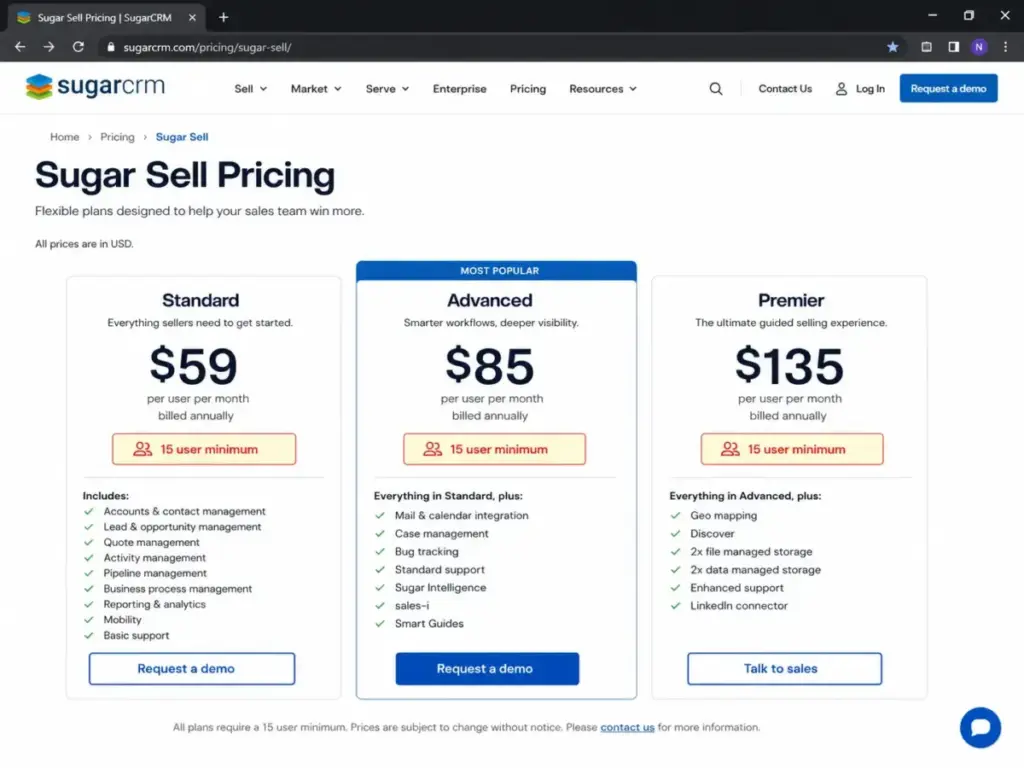
SugarCRM Sell Standard is advertised at $59/user/month. But if you are looking for SugarCRM alternatives for a 10-person sales team, you cannot pay $590/month.
The pricing page buries a critical constraint in the footnotes: a 15-user minimum. That single gate pushes your actual entry cost to $885/month billed annually before you buy a single add-on or pay for custom database setup.
During my years as a sales operations consultant, I have seen many growing businesses fall into this pricing trap, expecting a mid-market sales tool only to realize they are paying for empty seats.
Before committing your budget, you must check if your sales workflow warrants SugarCRM’s specialized database architecture or if a different platform fits your daily operations better.
In this guide, I will compare the 10 best CRM software options by switching trigger, practical cost, feature gates, and migration difficulty.
Quick Verdict: Best SugarCRM Alternatives by Switching Trigger
The table below maps the best alternatives to SugarCRM based on the exact reason you are leaving the platform.
| If you are leaving SugarCRM because… | Best alternative | Why |
|---|---|---|
| The 15-user minimum elevates entry costs | Freshsales | No seat minimums, starting at$9/user/month on the Growth tier. |
| Sales reps find the interface too heavy | Pipedrive | Kanban-first layout focused purely on visual sales pipeline tracking. |
| You need an all-in-one sales and marketing hub | HubSpot Sales Hub | Smart CRM that natively connects sales pipeline with marketing automation. |
| You already standardize on Microsoft 365 | Microsoft Dynamics 365 Sales | Deep native integration with Teams, Outlook, Azure, and Copilot AI. |
| You want lower-cost AI features | Zoho CRM | Low per-user cost with built-in Zia AI and workflow automation. |
| Closed deals must flow into delivery projects | Insightly CRM | Connects sales pipeline directly to project boards under one login. |
| You need no-code custom process design | Creatio CRM | Composable platform that allows business users to build custom workflows. |
| You want enterprise power without custom architecture | Salesforce Sales Cloud | Largest CRM ecosystem with deep custom object customization and analytics. |
| You manage sales and delivery in one workspace | monday sales CRM | Visual boards connect deals to operations. |
| Your team works inside Gmail | Copper CRM | Native Google Workspace workflow. |
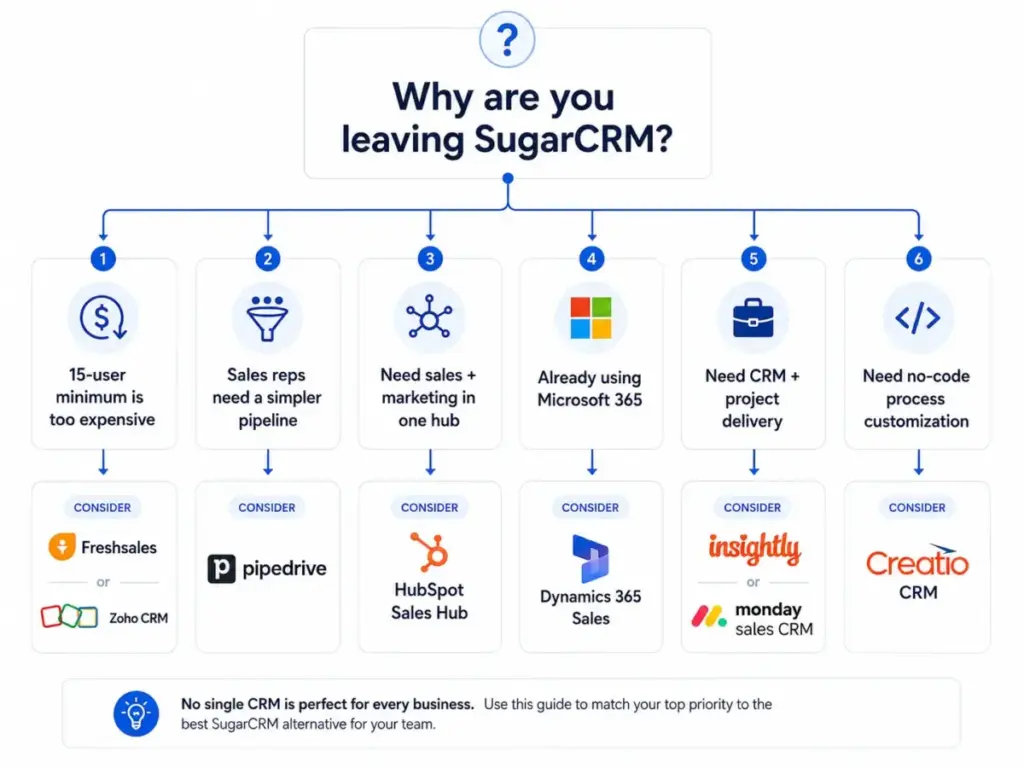
What this means: If you are escaping SugarCRM, do not just search for the most popular brand. Choose the alternative that directly addresses your primary operational friction. A 10-person sales team that only needs visual pipeline tracking will waste capital on a complex platform, while an enterprise Microsoft-centric company will hate a tool that lacks native Outlook synchronization.
The SugarCRM Problem Map: Why Teams Leave the Platform
SugarCRM is a powerful platform for B2B sales force automation. But after evaluating 40+ CRM platforms for SaaSZap, I have found that its system design creates recurring pain points for growing organizations. Understanding what CRM software does at an architectural level helps explain why teams look for alternatives.
First, the entry cost math is a major barrier for small and mid-sized teams. Sugar Sell Standard starts at $59/user/month billed annually. But the 15-user minimum means the lowest entry point is $885/month. If you have 8 reps, you are forced to pay for 7 empty seats. This pricing structure makes it hard to justify for teams under 15 users.
Second, the admin complexity is high. SugarCRM uses a highly customizable database structure that requires specialized admin knowledge to maintain. For teams without a dedicated developer, configuring basic pipelines, custom fields, and email tracking integrations can feel heavy. Read my full SugarCRM review to see how this admin burden impacts daily operations.
Third, key features are locked behind high tiers. For instance, email and calendar integrations are restricted in standard plans. The SugarCRM Advanced email calendar integration gate forces you to upgrade to the Advanced tier at $85/user/month or Premier tier at $135/user/month (both with 15-user minimums) to get standard operational tools. This makes the SugarAI rebrand SugarCRM alternative risk a real concern for teams seeking price predictability.
Finally, user feedback on G2 and Capterra highlights performance lag. Reviewers note that finding specific accounts or loading custom reports can take quite a long time. These micro-frictions accumulate, leading sales representatives to quietly abandon the system.
SugarCRM Strengths and Limitations at a Glance
The table below outlines what SugarCRM does well and where the platform creates operational friction.
| Strength | Impact | Limitation | Impact |
|---|---|---|---|
| B2B Sales Automation | Strong guided selling and opportunity tracking for complex accounts. | 15-User Minimum | Elevates entry cost to$885/month billed annually. |
| Guided Selling | Playbooks guide reps through multi-step sales processes. | Heavier Admin UI | Requires specialized support or external consultants to configure. |
| Account Management | Excellent contact database hierarchy for tracking parent-child companies. | Feature Gates | Restricts calendar sync and sales intelligence to premium tiers. |
| Higher-Tier Intelligence | Advanced forecasting and lead enrichment on Premier plans. | Performance Lag | Search latency and slow dashboard load times reported by users. |
What this means: SugarCRM is built for structured B2B sales teams that have the budget to support its 15-user minimum and the technical resources to manage its database. If your business model requires rapid pipeline updates and fast sales rep onboarding, the platform’s architectural weight is likely a liability.
Alternatives That Fix the 15-User Minimum and Per-Seat Price Escalation
These four CRM platforms are designed for small and growing teams that want to escape SugarCRM’s high entry floor. They charge strictly per-user with no minimum seat requirements on standard plans.
Zoho CRM: Best Lower-Cost Full CRM Replacement

Zoho CRM is the strongest SugarCRM alternative for teams leaving because they want strong CRM breadth, Zia AI, and suite expansion at a much lower starting cost.
Pricing starts at $14/user/month billed annually for the Standard plan. A free edition is available for up to 3 users. The practical tier for most switchers is the Professional plan at $23/user/month billed annually because it enables custom modules, workflow automation, and Zia AI.
It does better than SugarCRM in pricing scalability. You can access advanced features, automated rules, and reporting tools without paying for a 15-seat minimum package. The main tradeoff is user experience. The interface is crowded, and configuring Zia AI requires multiple manual steps.
Plus, Zoho’s free plan is a conversion trap. It is limited to 3 users and locks out automation, forcing growing teams to upgrade to paid tiers quickly. The SugarAI pricing vs Zoho CRM comparison highlights a massive value gap, saving small teams thousands in annual subscription fees. You can read my full Zoho CRM review to see how the pricing scales.
Best for:
- 5-to-15 person sales teams.
- Teams wanting Zoho suite integrations.
- Companies needing customizable databases on a budget.
Avoid if:
- Your reps need a highly polished interface with zero learning curve.
- You require rapid customer support response times on standard plans.
Migration difficulty: Medium
Verdict: Choose Zoho CRM if you want a complete database CRM with advanced features without the 15-user entry floor.
Pipedrive: Best for Sales Teams That Only Need Pipeline CRM

Pipedrive is the strongest SugarCRM alternative for teams leaving because their sales reps find Sugar’s interface too heavy for daily deal logging.
Pricing starts at $14/user/month billed annually for the Lite plan. There is no free plan, but a 14-day free trial is available. The practical tier for most switchers is the Advanced plan at $29/user/month billed annually because it enables automated email sequences and meeting scheduler links.
It does better than SugarCRM in sales representative adoption. The Kanban pipeline view is highly visual, and reps can move deals or schedule activities with fewer clicks. The main tradeoff is marketing automation. Pipedrive is a dedicated sales pipeline CRM. If you want to send bulk marketing emails, you must purchase the Campaigns add-on.
Running a SugarCRM vs Pipedrive pipeline CRM comparison reveals that Pipedrive eliminates the heavy admin workflows that slow down smaller B2B sales teams. Read my Pipedrive CRM evaluation to understand these marketing limitations.
Best for:
- 3-to-10 person outbound sales teams.
- Reps who want fast, visual pipeline management.
- Businesses migrating from basic spreadsheets.
Avoid if:
- You need a unified CRM that handles customer support ticketing.
- You require complex custom database objects and parent-child company hierarchies.
Migration difficulty: Low
Verdict: Choose Pipedrive if your sales reps need a simple pipeline tool to manage deals quickly without admin overhead.
Freshsales: Best Budget AI CRM for SMB Switchers

Freshsales is the strongest SugarCRM alternative for small and mid-sized teams leaving because they want built-in AI assistance and CPQ tools at a low starting cost.
Pricing starts at $9/user/month billed annually for the Growth plan, with a free plan for up to 3 users. The practical tier for most switchers is the Pro plan at $39/user/month billed annually because it enables multiple pipelines, sales sequences, and advanced Freddy AI features.
It does better than SugarCRM in built-in communication tools. Reps can dial phone numbers and send emails directly from the pipeline view. The main tradeoff is integration breadth. The Freshworks ecosystem has fewer third-party integrations than SugarCRM.
When evaluating SugarCRM vs Freshsales for SMB, Freshsales provides a much lower entry barrier. A team of 10 users can save significant budget by avoiding the Sugar Sell Standard vs Freshsales Growth hidden costs of paying for empty seats.
Best for:
- Startups needing built-in telephony.
- SMB sales teams doing outbound prospecting.
- Teams wanting automated AI lead scoring.
Avoid if:
- You require a large library of niche native integrations.
- Your sales workflow relies on highly complex custom coding.
Migration difficulty: Low
Verdict: Choose Freshsales if you want an affordable sales CRM with built-in phone lines and automated lead sequences.
Copper CRM: Best for Google Workspace Teams

Copper CRM is the strongest SugarCRM alternative for teams leaving because they want a CRM that lives inside their Gmail inbox.
Pricing starts at $9/seat/month billed annually for the Starter plan. No free plan is available, but you can sign up for a 14-day trial. The practical tier for most switchers is the Professional plan at $59/seat/month billed annually because it removes contact limits and enables workflow automation.
It does better than SugarCRM in data entry. It synchronizes automatically with Gmail, Calendar, and Google Contacts, logging emails and meetings without rep intervention. The main tradeoff is platform dependency. It is built exclusively for Google Workspace. If you use Microsoft 365, it will not function.
Evaluating SugarCRM vs Copper for Google Workspace sales teams shows that Copper replaces Sugar’s heavy browser tabs with a simple panel that slides out inside Gmail.
Best for:
- Small teams running operations inside Gmail.
- Agencies and consultants with relationship-based sales.
- Teams wanting zero manual data entry.
Avoid if:
- Your organization standardizes on Microsoft 365 or Outlook.
- You require advanced sales forecasting and custom database objects.
Migration difficulty: Low
Verdict: Choose Copper CRM if your team runs on Google Workspace and wants a CRM that fits inside Gmail.
Alternatives That Fix Onboarding Burden and Slow Sales Adoption
SugarCRM’s database customization is powerful, but setting it up takes weeks. These two CRM alternatives focus on rapid team onboarding and visual collaboration.
HubSpot Sales Hub: Best SugarCRM Alternative for Fast Adoption

HubSpot Sales Hub is the strongest SugarCRM alternative for teams leaving because they want an easy-to-use interface and a unified customer platform.
Pricing starts at $0/month for a basic free tier. The practical tier for switchers is Sales Hub Starter at $15/seat/month. Growing teams can choose the Professional plan at $90/seat/month to access automation.
It does better than SugarCRM in user experience. The interface is clean, modern, and requires almost no team training to start logging deals. The main tradeoff is cost at scale. While starting is cheap, upgrading to Professional or Enterprise tiers triggers steep price jumps.
Evaluating Sugar Sell vs HubSpot Sales Hub pricing shows that HubSpot offers a much lower entry barrier for small teams. However, scaling on HubSpot requires careful planning. Professional onboarding fees can add thousands of dollars to your first-year budget. Review my full HubSpot CRM review to understand this pricing trajectory.
Best for:
- Rapidly growing startups.
- Teams needing a unified sales-marketing-service platform.
- Businesses prioritizing a large integration marketplace.
Avoid if:
- You want advanced workflow automation at a low monthly price.
- Your finance team will reject steep price increases when you add seats.
Migration difficulty: Medium
Choose HubSpot Sales Hub if you want a clean database. You must be willing to pay a premium for ease of use.
monday sales CRM: Best Visual CRM for Cross-Functional Teams

monday sales CRM is the strongest SugarCRM alternative for teams leaving because closed-won deals must flow into project management boards.
Pricing starts around $10-$12/user/month billed annually depending on seat packages. The practical option is the Pro plan at $24/user/month billed annually. This tier enables integrations and email sequences.
It does better than SugarCRM in cross-functional work. You can transition a closed-won deal into a post-sale onboarding board under the same login. The main tradeoff is sales intelligence. The platform lacks mature B2B sales intelligence and advanced lead scoring.
A head-to-head comparison shows that monday CRM is built for visual task delegation. It avoids the rigid governance of SugarCRM. My monday.com CRM evaluation covers these database limitations in detail.
Best for:
- Project-based service businesses.
- Teams managing sales and delivery in one workspace.
- Growing teams wanting visual custom dashboards.
Avoid if:
- You need a dedicated sales CRM with advanced B2B forecasting.
- Your team has fewer than 3 users (monday CRM pricing uses seat packages).
Migration difficulty: Medium
Verdict: Choose monday sales CRM if you want to connect your sales pipeline to project boards. This requires zero custom developer help.
Alternatives That Fix Ecosystem Silos and Process Rigidity
For mid-market and enterprise organizations, leaving SugarCRM is often about aligning with existing company architecture or gaining deeper process controls. These four platforms serve enterprise scaling needs.
Salesforce Sales Cloud: Best Enterprise-Grade SugarCRM Replacement

Salesforce Sales Cloud is the strongest SugarCRM alternative for enterprise teams leaving because they want the largest CRM ecosystem and data platform extensions.
Pricing starts at $25/user/month billed annually for the Salesforce Starter Suite. The practical tier for enterprise switchers is the Enterprise plan at $165/user/month billed annually. It provides API access, custom objects, and automation.
It does better than SugarCRM in custom database customization. The Salesforce database can store highly complex data models, and its AppExchange marketplace offers thousands of native integrations. The main tradeoff is administration cost. Configuring Salesforce flows and custom objects requires a certified administrator or developer.
If your team is executing a SugarCRM migration to Salesforce, prepare for a multi-month database restructuring project. Compare SugarCRM vs Salesforce: Salesforce provides a larger partner network. However, your total cost of ownership will be much higher. Check my Salesforce CRM analysis to evaluate the technical overhead.
Best for:
- Mid-market and enterprise B2B sales teams.
- Companies needing to connect CRM data to external custom databases.
- Teams requiring strict data governance and compliance controls.
Avoid if:
- You do not have the technical resources to manage system configuration.
- Your implementation budget is under $10,000.
Migration difficulty: High
Verdict: Choose Salesforce Sales Cloud if you need an enterprise database. You must have resources to support a dedicated administrator.
Microsoft Dynamics 365 Sales: Best for Microsoft-Centric Organizations

Microsoft Dynamics 365 Sales is the strongest SugarCRM alternative for teams leaving because their organization standardizes on the Microsoft ecosystem.
Pricing starts at $65/user/month billed annually for the Sales Professional plan. The Enterprise plan costs $105/user/month annually.
It does better than SugarCRM in Microsoft 365 integration. It connects natively with Teams, Outlook, Excel, and Power BI, allowing reps to view CRM data inside their inbox. The main tradeoff is setup friction. The system is extremely heavy, and configuring it requires specialized Microsoft partners.
Dynamics 365 is the clear choice for Microsoft-centric IT departments. It offers native Active Directory security controls and Power Platform capabilities.
Best for:
- Companies already standardizing on Azure, Outlook, and Teams.
- Enterprise sales teams needing Power BI reporting.
- Organizations with in-house Microsoft developers.
Avoid if:
- Your team runs on Google Workspace instead of Microsoft 365.
- You want a simple, plug-and-play sales pipeline CRM.
Migration difficulty: High
Verdict: Choose Microsoft Dynamics 365 Sales if you are already a Microsoft shop. It embeds your CRM directly in Outlook and Teams.
Insightly CRM: Best for CRM Plus Project Delivery

Insightly CRM is the strongest SugarCRM alternative for teams leaving because closed sales must flow into project management workflows without data loss. When that handoff requirement matters more than replacing SugarCRM feature-for-feature, compare Insightly alternatives by how cleanly they preserve deal context after the sale closes.
Pricing starts at $29/user/month billed annually for the Plus plan. The practical tier is the Professional plan at $49/user/month billed annually to enable advanced custom fields and workflow rules.
It does better than SugarCRM in post-sale project execution. It includes native project management features, allowing you to convert opportunities into active project delivery tasks. The main tradeoff is sales intelligence. The platform lacks SugarCRM’s guided sales playbooks and advanced forecasting.
Comparing SugarCRM vs Insightly shows that Insightly bridges the gap between sales and operations. It requires no external integration middleware. You can read my full Insightly CRM review to understand these trade-offs.
Best for:
- Professional services teams and marketing agencies.
- Consultancies needing post-sale tracking.
- Growing businesses wanting a simple CRM and project tool combined.
Avoid if:
- Your sales team requires AI-assisted lead scoring or built-in CPQ tools.
- You require custom coding inside your CRM database.
Migration difficulty: Medium
Verdict: Choose Insightly CRM if you run a service business. It lets you manage sales and project delivery under a single login. If your team focuses on support rather than project delivery, look at alternative customer support platforms.
Creatio CRM: Best for No-Code Process Builders

Creatio CRM is the strongest SugarCRM alternative for teams leaving because they want to build custom business processes without writing code.
Pricing is composable, combining platform licenses (Growth starts around $40/user/month) with specific CRM modules.
It does better than SugarCRM in workflow design. Its Studio platform provides a drag-and-drop no-code builder to automate complex sales, marketing, and service processes. The main tradeoff is pricing transparency. The composable pricing structure is complex to parse, and AI action packages add significant annual costs.
Creatio is highly customizable. However, its composable platform licenses can make first-year budgeting complex for smaller organizations.
Best for:
- Mid-market teams wanting to automate custom business operations.
- Companies needing to build custom mobile apps.
- Operations managers wanting no-code workflow builders.
Avoid if:
- You want a basic sales CRM that requires zero configuration.
- Your budget cannot support platform fees and module add-ons.
Migration difficulty: High
Verdict: Choose Creatio CRM if you need to build custom workflows and want a composable, no-code platform.
Pricing Comparison: Starting Price vs Practical CRM Costs
Calculating the total cost of ownership for a CRM requires looking past the starting prices on marketing pages. SugarCRM’s 15-user minimum creates a high entry cost, but alternatives also carry hidden gates.
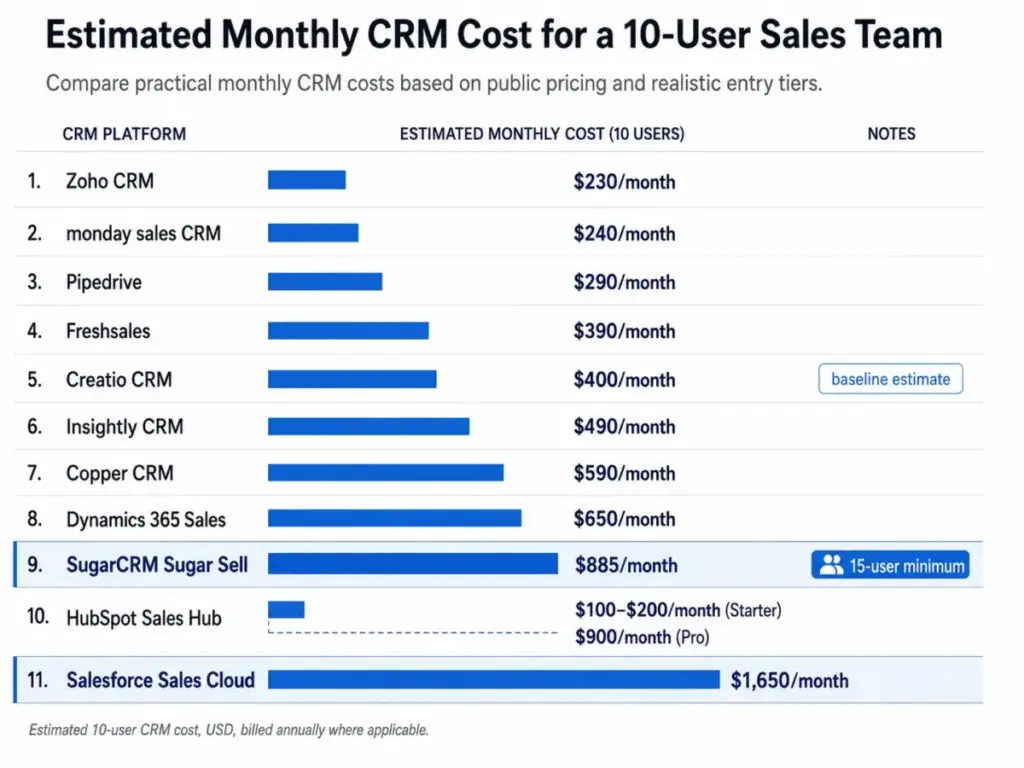
The table below normalizes CRM pricing for a 10-user team, comparing entry prices with the practical sales-ready plans.
| Product | Starting Price | Practical sales-ready tier | 10-user cost | Free plan | Trial |
|---|---|---|---|---|---|
| SugarCRM Sugar Sell | $59/user/month | Standard | $885/month (due to 15-user minimum) | None | Yes |
| HubSpot Sales Hub | $0/month | Starter | $100-$200/month (Starter) or $900/month (Pro) | Free CRM | Free trial |
| Zoho CRM | $14/user/month | Professional | $230/month (billed annually) | Free (3 users) | Free trial |
| Pipedrive | $14/user/month | Advanced | $290/month (billed annually) | None | 14-day trial |
| Freshsales | $9/user/month | Pro | $390/month (billed annually) | Free CRM | 21-day trial |
| monday sales CRM | $10/user/month | Pro | $240/month (billed annually) | None | Free trial |
| Salesforce Sales Cloud | $25/user/month | Enterprise | $1,650/month (billed annually) | None | Free trial |
| Dynamics 365 Sales | $65/user/month | Sales Professional | $650/month (billed annually) | None | Free trial |
| Insightly CRM | $29/user/month | Professional | $490/month (billed annually) | None | Free trial |
| Copper CRM | $9/seat/month | Professional | $590/month (billed annually) | None | Free trial |
| Creatio CRM | $40/user/month | Platform + Sales | $400/month (baseline estimate) | None | Free trial |
Pricing verified as of May 27, 2026. All prices are in USD. Rates are subject to change. Estimates do not include local taxes, implementation consulting, or data storage overages.
What this means: At 10 users, SugarCRM’s 15-user gate forces you to pay $885/month. This is more expensive than Zoho CRM, Pipedrive, monday sales CRM, and Freshsales combined. This is the core math behind SugarCRM 15 user minimum alternatives. However, if you scale and need Salesforce Enterprise capabilities, your monthly cost jumps to $1,650/month. This proves that the cheapest starting option can become the most expensive as feature gates trigger at scale. The SugarCRM hidden costs 2026 report shows that comparing 10-user costs is the only way to avoid budget surprises.
Feature Gate Comparison: Where Key CRM Features Become Available
Many CRM vendors advertise advanced features on their homepage but gate them behind premium plans. This table shows where each alternative enables key operational features.
| Product | Email & Calendar Sync Gates | Advanced Reporting Gates | API Access Gates | Custom Modules / Objects |
|---|---|---|---|---|
| SugarCRM Sugar Sell | Locked on Standard (Advanced tier) | Included on Standard | Included on Standard | Included on Standard |
| HubSpot Sales Hub | Included on Starter | Locked on Starter (Pro tier) | Included on Free | Locked on Starter (Pro tier) |
| Zoho CRM | Included on Standard | Locked on Standard (Pro tier) | Included on Standard | Locked on Pro (Enterprise tier) |
| Pipedrive | Included on Lite | Locked on Lite (Advanced tier) | Included on Lite | Included on Lite (custom fields) |
| Freshsales | Included on Growth | Locked on Growth (Pro tier) | Included on Growth | Locked on Growth (Pro tier) |
| monday sales CRM | Locked on Basic (Standard tier) | Locked on Standard (Pro tier) | Locked on Standard (Pro tier) | Included on Standard |
| Salesforce Sales Cloud | Included on Starter | Included on Starter | Locked on Pro (Enterprise tier) | Locked on Pro (Enterprise tier) |
| Dynamics 365 Sales | Included on Pro | Included on Pro | Included on Pro | Included on Pro (limited custom entities) |
| Insightly CRM | Included on Plus | Locked on Plus (Pro tier) | Locked on Plus (Pro tier) | Locked on Plus (Pro tier) |
| Copper CRM | Included on Starter | Locked on Starter (Pro tier) | Locked on Starter (Pro tier) | Locked on Starter (Pro tier) |
| Creatio CRM | Included on Growth | Included on Growth | Included on Growth | Included on Growth |
What this means: Feature gating is where most CRM budgets get busted. When comparing feature gates, HubSpot locks automation and reporting behind its Professional plan. SugarCRM Sell Standard includes custom reporting but gates email sync. For a 10-user team, these gates dictate whether you pay a low starter rate or get forced into enterprise pricing. Always identify where your must-have features are gated before committing to a migration.
How to Choose the Right SugarCRM Alternative
To select the correct CRM replacement, sales operations leaders should ask four diagnostic questions:
- What is your actual active user count? If your team has under 15 users, prioritize alternatives with no seat minimums. Freshsales, Pipedrive, and Zoho CRM let you pay strictly for active seats.
- Does your sales data flow into project delivery? If your reps hand off deals to project managers, Insightly or monday CRM connects pipeline data to active tasks natively.
- What is your administrative management capacity? Do not migrate to Salesforce or Dynamics 365 without in-house technical resources. You will end up paying for a complex platform that your team cannot configure.
- Where are your must-have integrations gated? If you rely on bulk email or SMS, check if these require add-ons or premium tiers. A cheap per-seat price can quickly escalate when adding campaigns or telephony credits.
Which SugarCRM Alternative Should You Avoid?
Avoid Salesforce Sales Cloud if you are a small business under 10 users without a developer. While it is the industry standard, configuring it requires significant setup time and admin expertise. I have seen small teams buy Salesforce expecting automation, only to abandon it. The data entry was too complex for daily workflows.
Similarly, avoid Microsoft Dynamics 365 Sales if your company does not standardize on Microsoft 365. The interface is heavy, and it relies on Azure and Power Platform architecture. If your team lives in Google Workspace, Copper CRM or HubSpot will serve you better with less integration friction. For teams rejecting Microsoft-stack dependency, compare Dynamics 365 alternatives by ecosystem mismatch, admin capacity, migration complexity, and the cost of rebuilding CRM workflows outside Azure.
Let’s summarize these warnings in the table below:
| Alternative to Avoid | Team Scenario | Main Risk | Alternative to Try |
|---|---|---|---|
| Salesforce Sales Cloud | Under 10 users, no admin | High setup complexity, low rep adoption. | Pipedrive CRM |
| Dynamics 365 Sales | Google Workspace users | High integration friction, ecosystem mismatch. | Copper CRM |
| Creatio CRM | Under 15 users, basic sales | Overkill features, complex pricing modules. | Freshsales CRM |
What this means: Anti-recommendations protect your capital. If you choose a CRM that mismatches your IT ecosystem, the migration will likely fail.
The Alternative Nobody Mentions
Creatio CRM is often overlooked in mainstream CRM discussions. But for mid-market teams wanting process automation without custom coding, it is a strong underdog pick.
It manages process automation through a visual, no-code interface rather than developer-heavy configuration. This allows business analysts to design sales playbooks and lead routing rules without writing code. The composable architecture means you only pay for the modules you use. This is a flexible alternative to Sugar’s packaging.
Migration Risk Assessment: Difficulty and Typical Timelines
Migrating your database out of SugarCRM carries operational risks. I built this difficulty matrix to help you estimate the complexity of the transition.
| Alternative | Migration Difficulty | Main Risk | Typical Timeline |
|---|---|---|---|
| Pipedrive | Low | Data formatting errors during import | 1 to 2 weeks |
| Freshsales | Low | Contact duplicate mapping failures | 1 to 2 weeks |
| Copper CRM | Low | Google Sync authorization latency | 1 to 2 weeks |
| monday sales CRM | Medium | Board layout configuration time | 2 to 4 weeks |
| Zoho CRM | Medium | Custom field limit caps on lower tiers | 2 to 4 weeks |
| HubSpot Sales Hub | Medium | Workflow transition and pipeline rebuilds | 3 to 5 weeks |
| Insightly CRM | Medium | Project board link breaks during import | 2 to 4 weeks |
| Salesforce Sales Cloud | High | Relational database schema breaks | 6 to 12 weeks |
| Dynamics 365 Sales | High | Active Directory permission lockouts | 6 to 12 weeks |
| Creatio CRM | High | Complex business process flow errors | 4 to 8 weeks |
Migration difficulty is an editorial estimate based on data model complexity, workflow rebuild effort, integration requirements, and setup depth. Before initiating a migration, sales operations should audit their active pipeline records.
What this means: A simple migration to Pipedrive or Freshsales can be completed quickly using CSV exports. However, migrating to Salesforce or Dynamics 365 requires mapping complex database schemas and rebuilding every workflow rule. If you have custom integrations connected to SugarCRM, budget for developer support to reconnect those APIs.
When to Stay with SugarCRM
Do not leave SugarCRM if your B2B sales cycles rely on its native guided selling playbooks and complex parent-child account databases. Rebuilding these custom relational models in a simpler CRM will cause database mapping errors.
SugarCRM also provides dedicated partner support and structured B2B forecasting models out of the box. Many cheaper alternatives do not offer this level of enterprise guidance on standard plans. If your organization has invested in custom Sugar integrations, staying with SugarCRM is the safer operational decision.
Final Verdict: Best SugarCRM Alternative for Most Teams
If your team is leaving SugarCRM because the 15-user minimum is too expensive, the right choice depends on your operational model:
- Choose Zoho CRM if you want a complete B2B sales CRM with workflow automation and AI features at a lower starting cost.
- Choose Pipedrive if your sales representatives need a clean visual tool focused purely on pipeline tracking.
- Choose Freshsales if you are a small team that needs built-in phone lines and automated AI lead sequences.
- Choose HubSpot Sales Hub if you want an easy onboarding experience and room to scale your sales, marketing, and support tools.
- Choose Salesforce Sales Cloud if you require enterprise-grade system customization and have a dedicated administrator.
Before starting your transition, review the CRM migration guide to plan your database export and minimize sales downtime.
FAQ
Is SugarCRM too expensive for a 10 person sales team?
Yes, SugarCRM Sell Standard is expensive for a 10-person sales team. The advertised price is $59/user/month, but the platform enforces a 15-user minimum. This means you must pay $885/month billed annually, even if you only have 10 active reps. You pay for 5 empty seats.
What CRM should we use instead of SugarCRM?
The best alternative depends on your sales model. Zoho CRM Professional is the safest lower-cost replacement for growing teams. Pipedrive is the best choice if you only need visual pipeline tracking. HubSpot Sales Hub fits teams wanting a unified sales and marketing platform.
Is HubSpot easier to use than SugarCRM?
Yes. HubSpot Sales Hub is much easier to use than SugarCRM. The interface is modern, and onboarding requires almost no technical training. However, HubSpot’s advanced features are gated behind Professional plans. These can become more expensive than SugarCRM at scale.
Should we switch from SugarCRM to Zoho CRM?
Yes, if you want to lower your monthly CRM bill while keeping broad database customization. Zoho CRM Standard starts at $14/user/month with no seat minimums. It provides workflow automation and custom fields at a fraction of SugarCRM’s cost.
Which SugarCRM alternative has the easiest migration?
Pipedrive and Freshsales have the easiest migration paths. Both tools allow you to import contact data via CSV files in a few hours. However, you must rebuild your custom workflow automations and email campaigns from scratch in any new system.
What is the best cheaper alternative to Sugar Sell?
Freshsales is the best cheaper alternative. Its Growth plan starts at $9/user/month billed annually and includes built-in phone lines, email tracking, and basic sales pipelines. This makes it an excellent value for small B2B sales teams.
Is Pipedrive enough if we only need sales pipeline?
Yes. If your sales reps only need visual pipeline stages and activity reminders, Pipedrive Advanced at $29/user/month is more than enough. It eliminates SugarCRM’s admin overhead and provides a cleaner daily workflow.
Is Dynamics 365 better than SugarCRM for Microsoft users?
Yes. Microsoft Dynamics 365 Sales Professional at $65/user/month is better if your organization already standardizes on Teams, Outlook, and Azure. It connects your sales database natively with Microsoft 365, although it requires significant setup partner assistance.
What CRM replaces SugarCRM for project-based services teams?
Insightly CRM is the clearest replacement for project-based teams because it connects sales pipelines directly to project delivery boards. If your team focuses on support rather than project delivery, look at the best help desk software options instead.