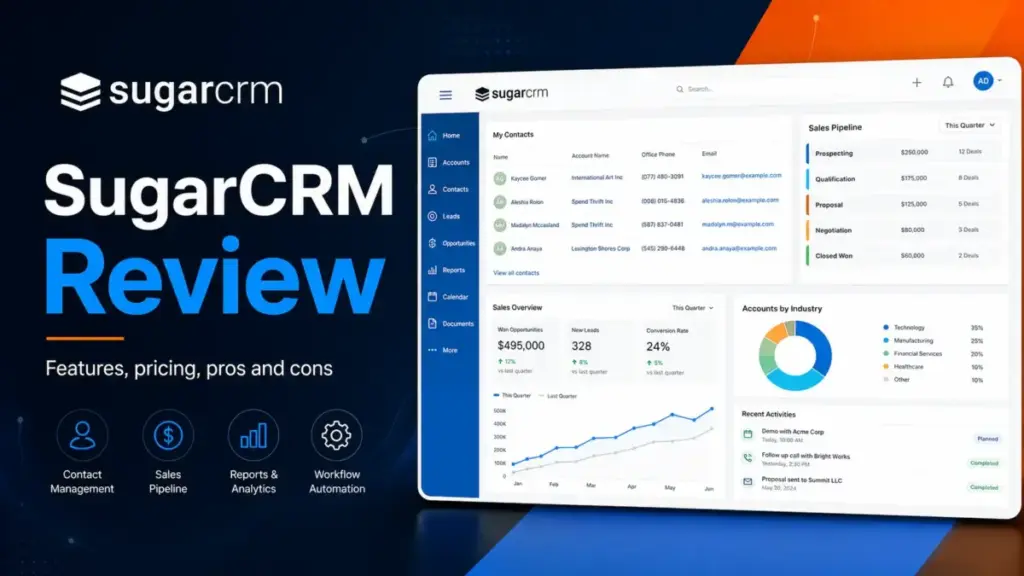
Most buyers get SugarCRM wrong before they ever open the pricing page. This SugarCRM review exists because the product many people remember, a low-cost open-source CRM, is not what the company offers today under the SugarAI brand.
The current platform is a commercial B2B sales system with a 15-user minimum, annual billing, and a starting cost floor of $10,620 per year on the Standard plan. That is not a typo. If you have fewer than 15 users, you still pay for 15.
SugarCRM, now officially branded as SugarAI on its current product and pricing pages, targets mid-market and enterprise B2B sales teams, especially those in manufacturing, wholesale, and distribution where ERP data, large product catalogs, and repeat account management define the selling motion.
It is not the best CRM software for solo founders or five-person startups looking for a plug-and-play system. This review breaks down exactly what SugarCRM costs at different team sizes, what each plan actually includes, where the product fits, and where it does not.
How I evaluated this product: I evaluated SugarCRM using current official pricing, product pages, feature comparison documents, public review data, and scenario-based CRM workflows for account management, pipeline review, forecasting, ERP-connected selling, and admin setup. I did not treat vendor claims as proof unless they matched official documentation, pricing data, or consistent third-party review signals. You can read more about how SaaSZap rates products in our review methodology.
Quick Verdict by Team Size
Before diving into features and architecture, here is the direct buying guidance based on team size. SugarCRM is not built for every buyer, and I want to save you time if it is not your fit.
| Team size | Verdict | Better alternatives |
|---|---|---|
| Solo or 1-5 users | Do not buy. You pay for 15 seats you will not use. Cost multiplier is 3x to 15x simple seat math. | HubSpot Free, Pipedrive Lite, Zoho CRM Free |
| 6-14 users | Do not buy unless you have a specific ERP or enterprise constraint. The 15-user minimum means you overpay on every plan. | HubSpot Starter, Pipedrive Growth, Zoho CRM Professional |
| 15-50 B2B sales team | Best fit. This is the team size SugarCRM is designed for, especially with account-based selling, long cycles, and ERP data needs. | Salesforce Pro Suite, HubSpot Professional |
| 50+ enterprise | Strong fit if you need ERP integration and B2B revenue intelligence. Compare closely against Salesforce Enterprise. | Salesforce Enterprise, Microsoft Dynamics 365 Sales |
| Manufacturing or distribution | Strong fit. Sugar Sell plus sales-i plus ERP data is purpose-built for this. | Salesforce with industry cloud, Microsoft Dynamics 365 |
| Teams with no CRM admin | Risky. SugarCRM requires admin capacity for setup, customization, and ongoing configuration. | HubSpot, Pipedrive |
What This Actually Costs
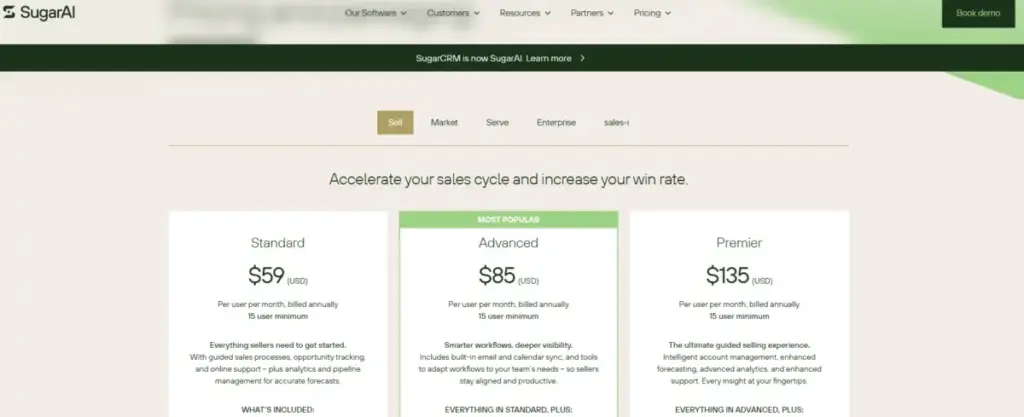
SugarCRM pricing is where most buyers hit their first surprise. The per-user prices look competitive until you factor in the 15-user minimum and annual billing requirement.
A note on branding: The official pricing page at sugarai.com/pricing now uses the SugarAI name. The footer reads “SugarCRM is now SugarAI.” I use both names in this review because most buyers still search for SugarCRM.
Current Official Sugar Sell Pricing
| Plan | Price per user per month | Billing | User minimum | Annual cost at minimum |
|---|---|---|---|---|
| Standard | $59 | Annual | 15 users | $10,620 |
| Advanced | $85 | Annual | 15 users | $15,300 |
| Premier | $135 | Annual | 15 users | $24,300 |
Date verified: May 11, 2026. Source: official SugarAI pricing page.
The Hidden Math: What 10, 15, and 50 Users Actually Pay
This is the table most SugarCRM reviews skip. The 15-user minimum means smaller teams pay a surcharge that does not appear on the marketing page.
| Scenario | Standard | Advanced | Premier |
|---|---|---|---|
| 10 users, expected simple math | $590/mo | $850/mo | $1,350/mo |
| 10 users, actual minimum bill | $885/mo | $1,275/mo | $2,025/mo |
| 10-user cost multiplier | 1.5x | 1.5x | 1.5x |
| 15 users, actual bill | $885/mo | $1,275/mo | $2,025/mo |
| 15 users, annual total | $10,620 | $15,300 | $24,300 |
| 50 users, monthly bill | $2,950/mo | $4,250/mo | $6,750/mo |
| 50 users, annual total | $35,400 | $51,000 | $81,000 |
Date verified: May 11, 2026.
A 10-person sales team on Standard expects to pay $590 per month. The actual bill is $885 per month because you must purchase at least 15 seats. That is a 50% surcharge for five empty licenses. On Premier, the gap widens to $675 per month in unused seats.
The $19 Essentials Pricing Discrepancy
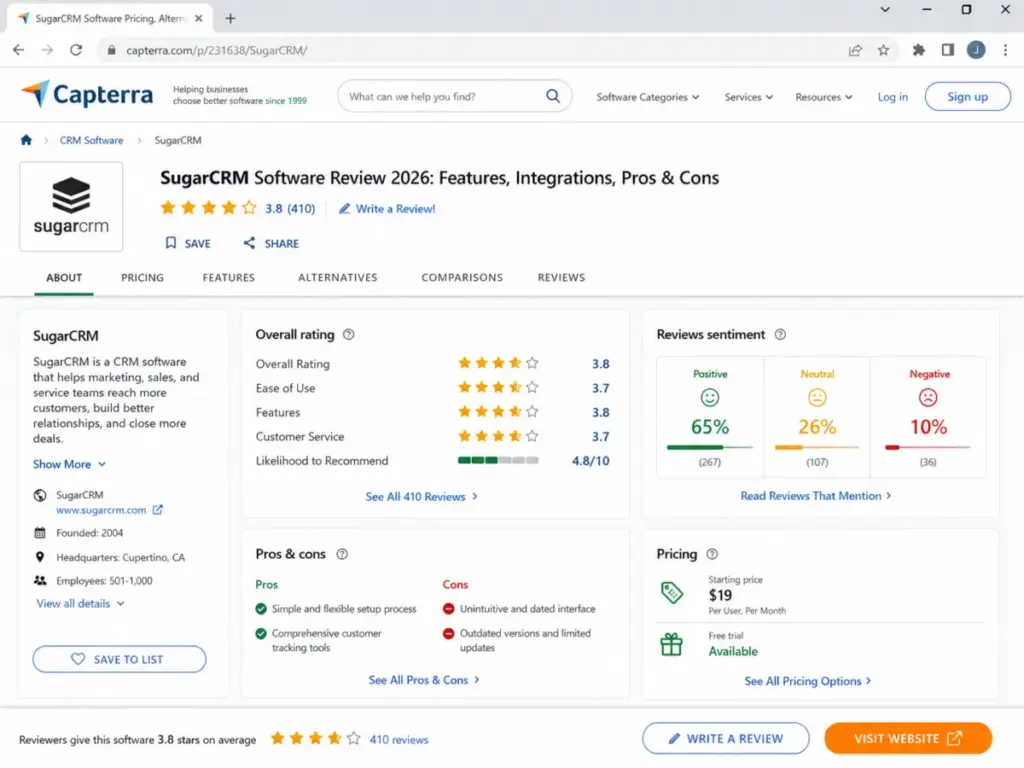
Some third-party review profiles, including listings on Capterra and Software Advice, still show an Essentials tier at $19 per user per month. Do not treat that as the current official entry plan. The current official pricing page starts Sugar Sell at Standard, $59 per user per month, billed annually, with a 15-user minimum. If you see $19 pricing elsewhere, it may reflect a legacy tier, a regional offer, or outdated directory data.
Platform Architecture
Before listing features, it helps to understand how SugarCRM is built. This is not a single-product CRM. It is a connected ecosystem of sales, marketing, service, and intelligence tools that share data across the revenue cycle.
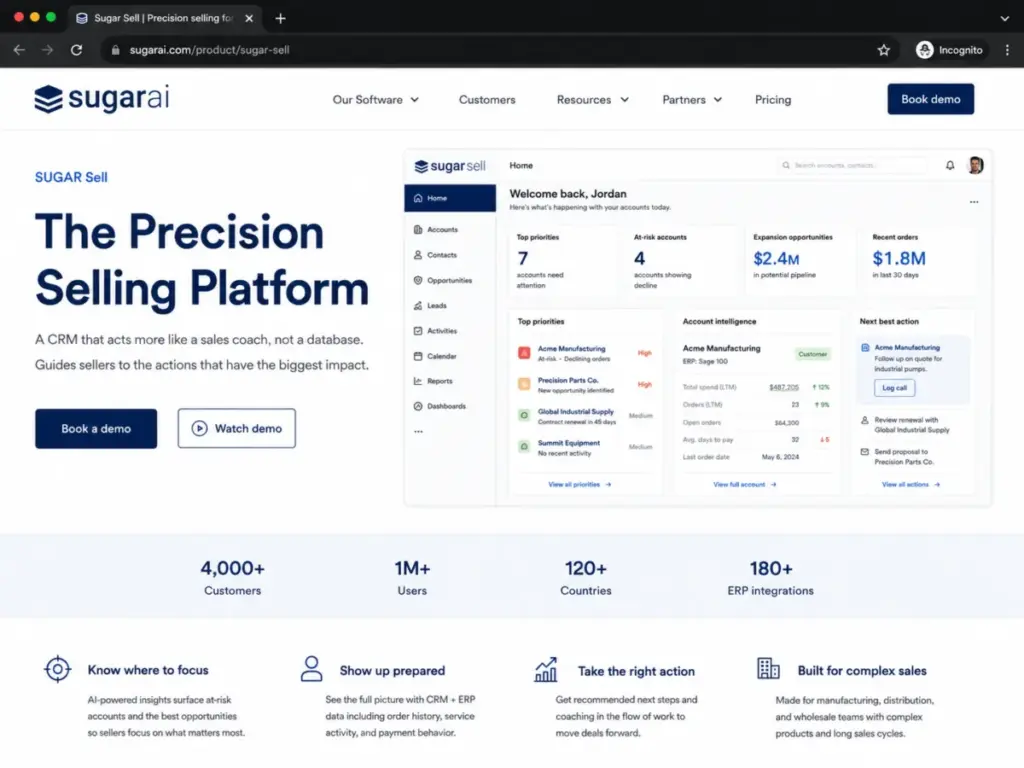
The SugarAI Product Ecosystem
Sugar Sell is the core sales CRM: accounts, contacts, leads, opportunities, quotes, pipeline, forecasting, and sales automation. This is what most buyers evaluate first.
Sugar Market is the B2B marketing automation platform: email campaigns, lead nurturing, landing pages, and marketing analytics. It connects to Sugar Sell so marketing-qualified leads flow into the sales pipeline.
Sugar Serve is the customer support module: case management, knowledge base, SLA tracking, and customer satisfaction tools. It shares the same account and contact data as Sugar Sell.
sales-i is the revenue intelligence layer. It analyzes transaction data, buying patterns, and account activity to surface cross-sell opportunities, churn risk, and revenue trends. This is especially relevant for manufacturing and distribution teams that track repeat purchase behavior.
Sugar Intelligence adds AI capabilities: predictive lead scoring, account risk signals, opportunity prioritization, meeting summaries, and next-action recommendations. On the current pricing page, Sugar Intelligence is marked with an asterisk on the Advanced plan, meaning it may be a limited or add-on feature at that tier.
Sugar Marketplace is the third-party app directory: connectors for ERP systems, email platforms, telephony, document management, and other business tools. Sugar cites 180+ ERP integrations on its current product pages.
How Data Flows
The architecture matters because SugarCRM positions itself as a platform where sales data, ERP data (order history, shipment status, product catalogs), marketing engagement, and service interactions all connect inside a single account record. For a manufacturing sales rep, this means seeing a customer’s CRM pipeline, their last 12 months of purchase orders from the ERP, open support tickets from Sugar Serve, and AI-generated account health signals, all without switching systems.
This is different from a standalone pipeline tool like Pipedrive, which focuses on deal flow rather than full account intelligence. Understanding this distinction is important: SugarCRM is built for complexity, not simplicity.
For 1-14 Users
If your team has fewer than 15 users, SugarCRM creates a math problem that no feature list can solve. The 15-user minimum means every plan carries a cost floor that disconnects from your actual headcount.
A 5-person sales team on Standard pays $885 per month, the same as a 15-person team. That works out to $177 per user per month in real cost, not the $59 listed on the pricing page. On Advanced, the real per-user cost for a 5-person team is $255 per month. On Premier, it is $405 per month.
Who this affects most:
- Startups with 3-8 sales reps
- Small agencies and consultancies
- Regional sales teams inside larger organizations that want a separate CRM
- Solo founders evaluating CRM options
What to Buy Instead
If you have under 15 users and no specific ERP or enterprise compliance requirement that forces you toward SugarCRM:
- HubSpot Sales Hub starts with a free CRM and a Starter plan at $15 per seat per month. No user minimum. Self-serve setup. Read the full HubSpot CRM review.
- Pipedrive starts at $14 per seat per month on the Lite plan with a 14-day free trial. Pipeline-first design with minimal admin overhead. Read the full Pipedrive CRM review.
- Zoho CRM offers a free edition for up to 3 users and paid plans starting around $14 per user per month. Broad app ecosystem at lower cost. Read the full Zoho CRM review.
I cannot recommend SugarCRM for teams under 15 users unless you have an unusual constraint, like an existing SugarCRM enterprise license, a parent company mandate, or a specific ERP integration that only Sugar supports.
For 15-50 User B2B Teams
This is where SugarCRM earns its position. If you have 15 or more B2B sales reps and your selling motion involves account management, long sales cycles, multiple product lines, and repeat purchase tracking, Sugar Sell is built for your workflow.
The Ideal SugarCRM Buyer Profile
- Account-based selling: Your reps manage dozens to hundreds of named accounts, not thousands of inbound leads.
- Long sales cycles: Deals take weeks or months, not hours. You need activity tracking, stage progression, and sales forecasting across quarters.
- Multiple product lines and catalogs: Your quoting process involves hundreds or thousands of SKUs, bundled pricing, and volume-based discounts.
- ERP order history: You need to see what a customer has already purchased (from the ERP) alongside what they might purchase next (from the CRM pipeline). This is the CRM vs ERP integration that Sugar markets heavily.
- Repeat purchase patterns: Manufacturing, wholesale, and distribution teams where customer lifetime value depends on reorder frequency and product mix changes.
- Sales operations support: You have at least one person, ideally a dedicated CRM admin or sales ops manager, who can configure workflows, build reports, and manage user permissions.
- Process control: You want workflow automation that enforces sales stages, approval rules, and data entry standards across the team.
Sugar cites 4,000+ customers, 1M+ users, and 120+ countries on its current product pages. The company specifically highlights manufacturing, distribution, and wholesale as common industry fits.
“We live in Sugar,” says Alice Blade, a sales operations and renewals manager, quoted on the official SugarAI pricing page. That sentiment tracks with the platform’s design: it is built for teams that spend all day inside the CRM managing complex accounts, not teams that check in once a week to update a deal stage.
What Standard, Advanced, and Premier Mean at This Scale
At 25 users on Standard, the annual bill is $17,700. At 25 users on Advanced, it is $25,500. At 25 users on Premier, $40,500. The jump from Standard to Advanced adds mail and calendar integration, case management, bug tracking, standard support (up from basic), and gated access to Sugar Intelligence and sales-i. The jump to Premier adds geo mapping, Discover, doubled storage, enhanced support, and a LinkedIn connector.
For most 15-50 user B2B teams, I recommend starting the evaluation at Advanced. Standard lacks integrated mail and calendar, which most modern sales teams consider a baseline, and the limited support tier may slow down onboarding.
For Enterprise Teams With ERP Data
Enterprise buyers evaluating SugarCRM at 50+ users face a different set of questions than mid-market teams. The per-user cost becomes more predictable (no minimum surcharge), but the evaluation shifts to architecture fit, security, compliance, and ecosystem comparison against Salesforce and Microsoft Dynamics 365.
ERP Integration Depth
Sugar’s positioning around ERP-connected selling is its strongest enterprise differentiator. The platform claims 180+ ERP integrations, and the sales-i revenue intelligence module is designed to ingest transactional data (orders, invoices, shipments) and surface account-level buying patterns. For a 200-person manufacturing sales team, this means reps can see which accounts are ordering less frequently, which product categories are declining, and where expansion opportunities exist, all inside the CRM.
This is not a generic “we have an API” claim. Sugar has built specific ERP data flows into the product architecture. If your enterprise runs SAP, Oracle, NetSuite, or a mid-market ERP and your sales team needs that data alongside CRM pipeline data, Sugar Sell plus sales-i is one of the few CRM platforms that treats this as a core use case rather than a custom integration project.
Security and Compliance
For enterprise procurement, the security and trust page lists:
- SOC 2 Type II
- ISO/IEC 27001:2022
- GDPR
- CCPA
- Data Privacy Framework
- STAR Registry
- EcoVadis
SugarCloud runs on AWS, and the company states that clients choose the region where their data is held. Data is encrypted in transit and at rest. Customer data is available for up to 120 days after a customer leaves, unless otherwise requested.
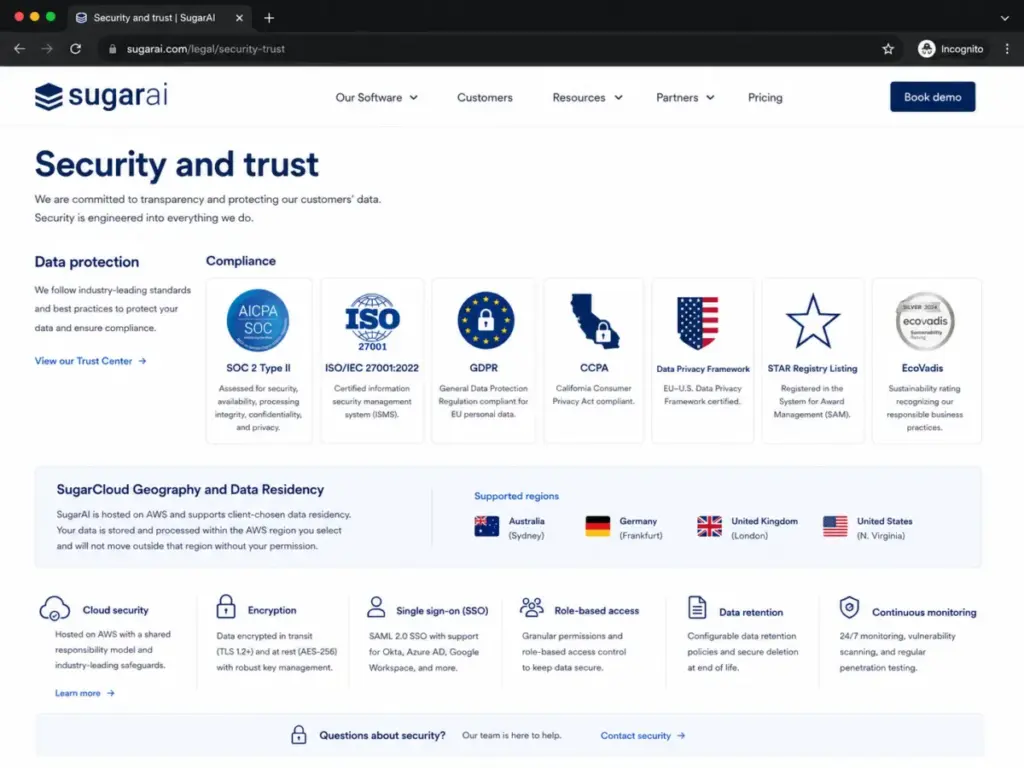
One caveat worth noting: The SugarCRM Cloud Platform Information Security Datasheet indicates that Sales-AI features were still being worked into ISO 27001 and SOC 2 scopes at the time of that document. If your compliance team requires every AI feature to fall under audited security controls, ask SugarCRM directly about the current certification scope for Sales-AI and Sugar Intelligence.
Enterprise Cost vs Salesforce
At 50 users on Sugar Sell Premier ($135/user/month), the annual bill is $81,000. At 50 users on Salesforce Enterprise ($175/user/month), the annual bill is $105,000. That is a $24,000 per year difference before add-ons. However, Salesforce brings a larger app marketplace, deeper admin tooling, and broader ecosystem support. The cost comparison only matters if both platforms meet your functional requirements. See the full Salesforce CRM review and Salesforce pricing breakdown.
Feature Deep Dive
SugarCRM gates features by plan. This section maps what you actually get at each tier, because the pricing page uses asterisks and add-on labels that can obscure the real access level.
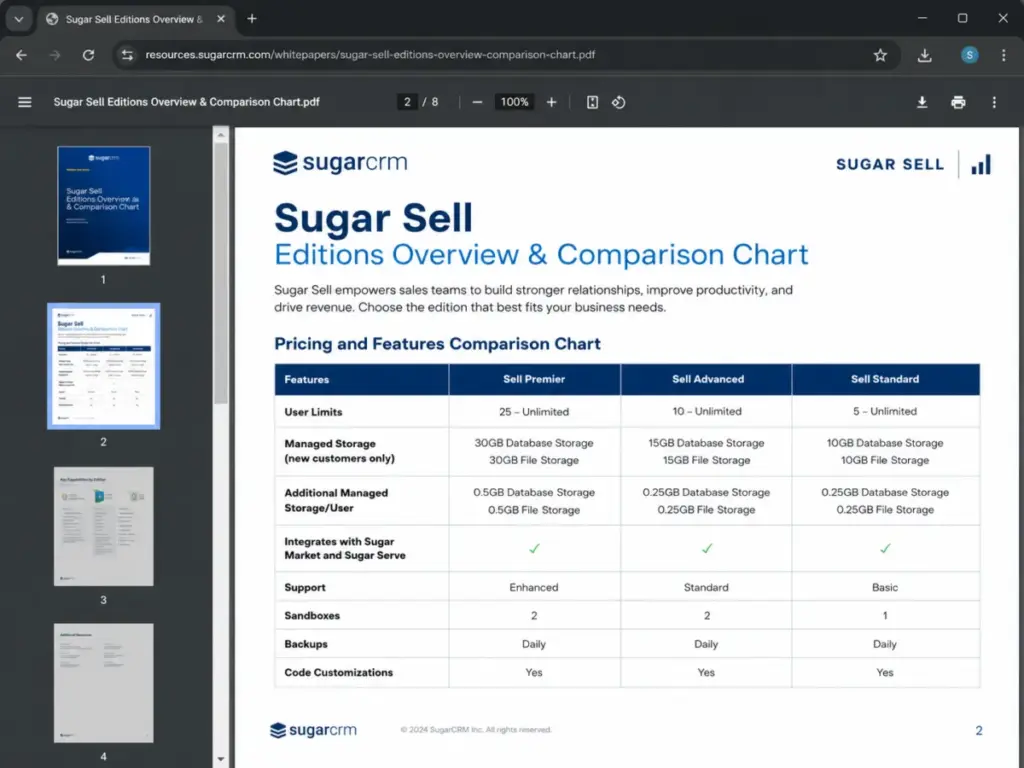
Feature-to-Plan Map
| Feature | Standard ($59) | Advanced ($85) | Premier ($135) |
|---|---|---|---|
| Accounts and contacts | Yes | Yes | Yes |
| Leads and opportunities | Yes | Yes | Yes |
| Quote management | Yes | Yes | Yes |
| Pipeline management | Yes | Yes | Yes |
| Activity management | Yes | Yes | Yes |
| Business process management | Yes | Yes | Yes |
| Reporting and analytics | Yes | Yes | Yes |
| Mobility | Yes | Yes | Yes |
| Mail and calendar integration | Add-on or limited | Yes | Yes |
| Case management | No | Yes | Yes |
| Bug tracking | No | Yes | Yes |
| Sugar Intelligence | No | Asterisk (gated) | Yes |
| sales-i | No | Asterisk (gated) | Yes |
| Smart Guides | No | Asterisk (gated) | Yes |
| Geo mapping | No | No | Yes |
| Discover | No | No | Yes |
| LinkedIn connector | No | No | Yes |
| Database storage | 10 GB | 15 GB | 30 GB |
| File storage | 10 GB | 15 GB | 30 GB |
| Additional storage per user | 0.25 GB each | 0.25 GB each | 0.5 GB each |
| Support tier | Basic | Standard | Enhanced |
| Sandboxes | 1 | 2 | 2 |
| Backups | Daily | Daily | Daily |
Date verified: May 11, 2026. Source: Sugar Sell editions comparison.
SugarCRM Pipeline and Opportunities
Sugar Sell handles pipeline management through a structured account-to-opportunity-to-quote workflow. Reps track deal stages, expected close dates, revenue amounts, and product line items within each opportunity. The pipeline view supports filtering by rep, team, region, product line, and time period.
For B2B teams managing complex deals with multiple stakeholders, Sugar’s pipeline connects to the full account record: contacts, related opportunities, activity history, ERP order data (if connected), and support tickets. This is deeper than a Kanban-style deal board, which is why setup takes more time but delivers more context per deal.
SugarCRM Forecasting and Analytics
Forecasting in Sugar Sell uses pipeline data to generate revenue projections by rep, team, and time period. Managers can view committed versus best-case versus pipeline totals. The reporting engine supports custom reports and dashboards, though users on public review platforms note that advanced reporting may require admin configuration.
At the Advanced and Premier tiers, Sugar Intelligence adds predictive signals to forecasting: which deals are likely to close, which accounts show declining engagement, and where pipeline gaps exist. These AI-driven insights layer on top of the standard reporting engine.
SugarCRM AI and Revenue Intelligence
Sugar Intelligence and sales-i represent the AI layer. Key capabilities based on official product pages include:
- Predictive lead scoring: Prioritizing leads based on engagement patterns and fit signals.
- Account risk detection: Flagging accounts with declining purchase frequency or engagement drops.
- Opportunity prioritization: Ranking deals by likelihood to close and revenue impact.
- Meeting summaries and next actions: AI-generated recaps and follow-up suggestions.
- Buying pattern analysis via sales-i: Identifying cross-sell and upsell opportunities based on ERP transaction data.
The important caveat: on the current pricing page, Sugar Intelligence and sales-i are marked with asterisks on the Advanced plan. This typically means limited access, add-on pricing, or feature restrictions compared to Premier. If AI-driven selling is central to your buying decision, confirm the exact access level on Advanced before signing.
SugarCRM Workflow Automation
Business process management is available across all three plans. Sugar’s workflow engine supports automated lead routing, deal stage progression, approval chains, notification triggers, and data validation rules. For sales operations teams, this means enforcing consistent data entry, automating handoffs between sales stages, and triggering alerts when deals stall.
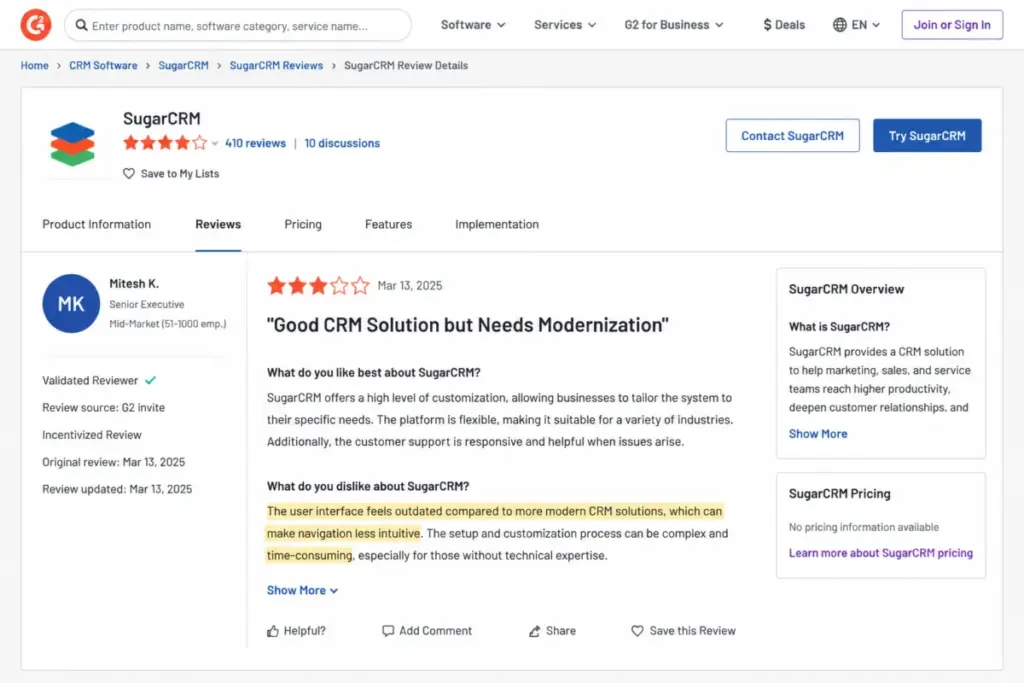
The depth of workflow automation is a strength for process-heavy B2B teams, but it also means more admin work to configure and maintain. Teams without a dedicated CRM administrator may find the setup burden heavier than expected. This matches the signal from G2 reviewers: “Flexible and Efficient, But Setup Takes Time,” as one G2 review title puts it.
SugarCRM Integrations and Marketplace
The Sugar Marketplace hosts third-party apps and connectors for ERP systems, telephony, email, document management, and more. Sugar’s claim of 180+ ERP integrations is significant for manufacturing and distribution buyers who need CRM and ERP data to coexist.
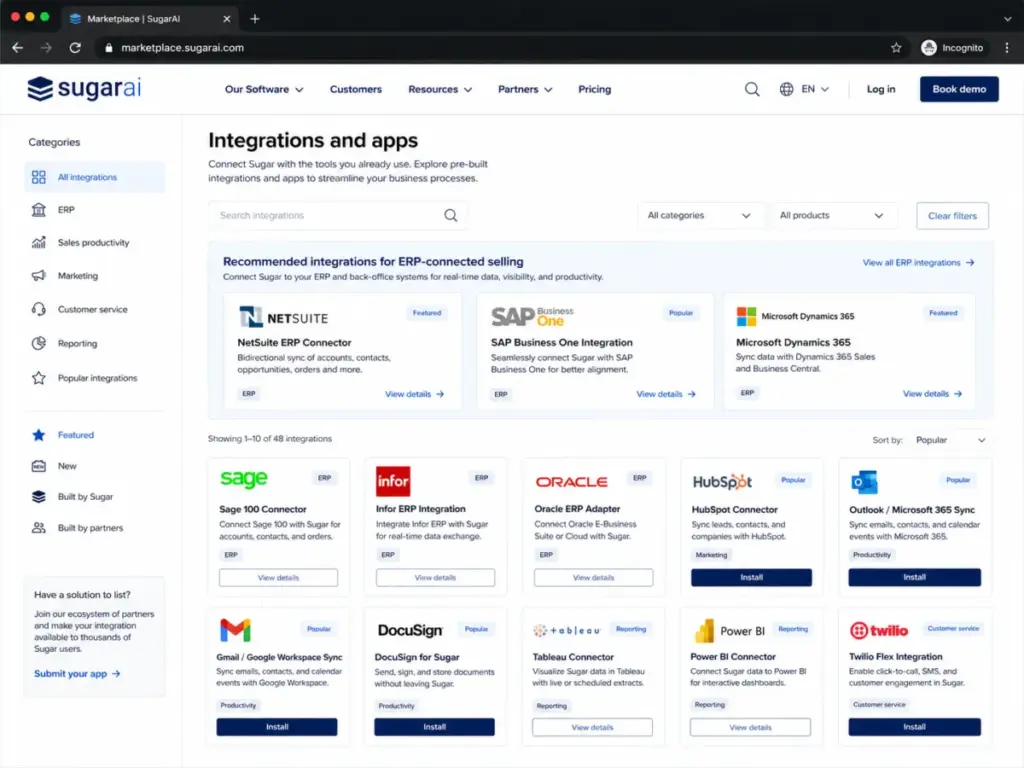
Common integration categories include:
- ERP connectors (SAP, Oracle, NetSuite, Sage, Infor, and others)
- Email and calendar (Microsoft 365, Google Workspace)
- Telephony and calling (RingCentral, Twilio, and others)
- Document and e-signature tools
- Marketing platforms
- BI and reporting tools
For teams already running HubSpot or Salesforce, note that Sugar’s marketplace is smaller than Salesforce’s AppExchange but more focused on ERP-adjacent use cases.
SugarCRM Mobile and Field Sales
Sugar Sell includes mobile apps for iOS and Android across all plans. Field sales teams can access account data, update opportunities, log calls and meetings, and check dashboards from mobile devices. The geo mapping feature on Premier adds location-based account visualization, useful for territory-based field sales in manufacturing and distribution.
SugarCRM Security and Compliance
As covered in the enterprise section, SugarCRM meets SOC 2 Type II, ISO/IEC 27001:2022, GDPR, CCPA, and Data Privacy Framework requirements. Encryption covers data in transit and at rest. AWS-hosted SugarCloud lets clients select their data region. Enterprise buyers should request current audit reports and confirm the Sales-AI certification scope directly with SugarCRM.
The Problems SugarCRM Creates
Every CRM creates friction. SugarCRM’s friction points are specific, and understanding them before you buy is more useful than a generic pros-and-cons list.
The 15-User Minimum Locks Out Small Teams
This is the single biggest limitation. Any team under 15 users pays for seats it does not use. A 10-user team on Advanced pays $1,275 per month, the same as a 15-user team. There is no way around this on the current official pricing page. For comparison, HubSpot Starter has no user minimum. Pipedrive has no user minimum. Zoho CRM has no user minimum.
Setup Takes Real Time and Admin Capacity
Across Capterra, G2, and Software Advice, setup time and admin dependency are consistent friction points. One G2 reviewer wrote: “The interface feels a bit outdated, and setup can be time-consuming without guidance” (G2 review, Sagar K., Risk Analyst, Small-Business, October 29, 2025). This matches the pattern I see in evaluation: Sugar’s workflow engine, custom modules, and reporting tools are powerful, but they require someone who knows how to configure them.
If you do not have a dedicated CRM administrator or at least a technically capable sales ops lead, expect the initial setup to take longer than platforms like Pipedrive or HubSpot. Budget for CRM implementation time and potentially professional services.
The Interface Draws Consistent Criticism
Capterra’s sentiment data shows 26% neutral and 10% negative reviews, with “unintuitive and dated interface” and “outdated versions and limited updates” among noted cons. G2 reviewers echo this with comments about the UI feeling older than competitors. Software Advice rates ease of use at 3.7 out of 5, the lowest of its four secondary ratings.
This does not mean the interface is non-functional. It means buyers should not expect the polished, consumer-grade UX of HubSpot or the visual pipeline clarity of Pipedrive. SugarCRM’s interface prioritizes data density and configurability over visual polish.
Review Platform Sentiment Summary
| Platform | Rating | Reviews | Key positive signals | Key friction signals |
|---|---|---|---|---|
| Capterra | 3.8/5 | 410 | Flexible setup, customer tracking | Dated interface, limited updates |
| Software Advice | 3.8/5 | N/A | Functionality 3.8, value 3.8 | Ease of use 3.7, support 3.7 |
| G2 | Varies | Active | Customization depth, flexibility | UI feels outdated, setup time |
| Gartner Peer Insights | 4.2/5 | 402 | Strong enterprise trust signal | Minimal product detail on profile |
Sources: Capterra, Software Advice, G2, Gartner.
Pricing Ambiguity Around Add-Ons and Asterisks
The pricing page uses asterisks next to Sugar Intelligence, sales-i, and Smart Guides on the Advanced plan. This signals that access may be limited, require an add-on purchase, or come with usage caps compared to Premier. The pricing page does not fully clarify what the asterisks mean, and that creates a procurement risk: you may budget for Advanced thinking you get full AI and revenue intelligence, only to discover you need Premier or an add-on.
Support Tier Differences Matter More Than They Look
Standard includes Basic support. Advanced includes Standard support. Premier includes Enhanced support. The naming is confusing, but the practical difference is response time, channel access, and escalation priority. For a 30-user team deploying SugarCRM for the first time, Basic support on Standard may not provide the onboarding velocity you need. Factor support tier into your plan selection, not just features.
Do Not Buy SugarCRM If…
- You have fewer than 15 users and no enterprise mandate.
- You have no CRM administrator and no plan to hire or assign one.
- You need a free CRM to get started.
- You need plug-and-play pipeline tracking with minimal configuration.
- You only need Gmail-based sales tracking for a small team.
- You have no ERP integration needs and no account complexity beyond basic deal tracking.
- You want a consumer-grade UI out of the box.
SugarCRM Alternatives
Each alternative addresses a specific failure mode in SugarCRM’s fit. I am not listing these as generically “similar” products. Each one solves a problem that SugarCRM either cannot solve or solves at a cost that does not match the buyer. For a structured switching framework, compare SugarCRM alternatives by user minimum, migration friction, sales workflow depth, and the operational problem each replacement actually solves.
SugarCRM vs Salesforce
Salesforce Sales Cloud is the most direct enterprise competitor. Current pricing starts at $0 for a Free Suite, $25 for Starter Suite, $100 for Pro Suite, $175 for Enterprise, $350 for Unlimited, and $550 for Agentforce 1 Sales, all per user per month billed annually. Salesforce has no 15-user minimum on most plans.
Where Salesforce wins: Larger app marketplace (AppExchange), deeper admin and developer tooling, broader industry coverage, stronger brand recognition in enterprise procurement, and more third-party implementation partners.
Where SugarCRM wins: Lower per-user cost at the Enterprise comparison point ($135 vs $175), stronger native ERP integration story, purpose-built revenue intelligence via sales-i, and less platform complexity for B2B account-based selling.
Where both struggle: Both require admin capacity. Both carry significant annual commitments. Neither is a quick-start CRM.
If you need enterprise ecosystem depth, a massive app marketplace, and industry-specific clouds, Salesforce is the better pick. If you need ERP-connected B2B selling at a lower per-user cost and your team fits the manufacturing or distribution profile, SugarCRM is worth evaluating against Salesforce. See the full Salesforce CRM alternatives guide for more options.
SugarCRM vs HubSpot
HubSpot Sales Hub starts with a free CRM, Starter at $15 per seat per month, Professional at $100 per seat per month, and Enterprise at $150 per seat per month. No user minimum on Starter. Self-serve setup. Strong marketing-sales alignment.
Where HubSpot wins: Faster onboarding, better UI, free tier for evaluation, no user minimum on lower plans, stronger content marketing and inbound sales tools, and broader usability for non-technical teams.
Where SugarCRM wins: Deeper ERP integration, stronger account-based B2B selling workflow, more granular business process management, and purpose-built revenue intelligence for manufacturing and distribution.
Where both struggle: HubSpot Enterprise ($150/seat) approaches SugarCRM Premier ($135/seat) in cost, so the price advantage narrows at scale. Both require annual contracts at higher tiers.
If you need self-serve CRM setup, marketing-sales alignment, and broad CRM usability without a dedicated admin, HubSpot is the better pick.
SugarCRM vs Pipedrive
Pipedrive pricing starts at $14 per seat per month (Lite), $39 (Growth), $59 (Premium), and $79 (Ultimate), all billed annually. 14-day free trial. No user minimum. Add-ons for LeadBooster ($32.50), Projects ($6.67), Campaigns ($13.33), Web Visitors ($41), and Smart Docs ($32.50).
Where Pipedrive wins: Fastest setup of any CRM on this list, visual pipeline management, lowest entry cost, no user minimum, minimal admin overhead, and strong fit for deal-velocity sales teams.
Where SugarCRM wins: Account-based selling depth, ERP integration, revenue intelligence, multi-product quoting, and workflow automation for complex B2B processes.
Where both struggle: Pipedrive lacks enterprise compliance certifications and deep ERP connectivity. SugarCRM lacks Pipedrive’s speed and simplicity.
If you need pipeline-driven sales tracking with minimal setup and your team is under 50 users with no ERP data needs, Pipedrive is the better pick.
SugarCRM vs Zoho CRM
Zoho CRM offers a free edition for up to 3 users. Paid plans start around $14 per user per month (Standard), $23 (Professional), $40 (Enterprise), and $52 (Ultimate), all billed annually. No user minimum.
Where Zoho CRM wins: Lower cost at every tier, free plan for micro-teams, broader business app ecosystem (Zoho One), no user minimum, and strong fit for budget-sensitive SMBs already using Zoho apps.
Where SugarCRM wins: Deeper B2B account management, stronger ERP integration, purpose-built revenue intelligence via sales-i, and better fit for manufacturing and distribution selling motions.
Where both struggle: Zoho’s breadth can create integration complexity across its own app ecosystem. SugarCRM’s cost floor prices out the SMBs that Zoho serves well.
If you need low-cost CRM with broad business apps and your team is price-sensitive, Zoho CRM is the better pick.
SugarCRM vs Freshsales
Freshsales targets small to mid-size sales teams with built-in calling, AI assistance (Freddy AI), and a lower starting cost than SugarCRM. Read the full Freshsales review for current pricing and feature details.
Where Freshsales wins: Built-in phone and email, AI assistant on lower tiers, simpler setup, lower entry cost, and better fit for small sales teams that want calling and CRM in one tool.
Where SugarCRM wins: Account-based B2B selling depth, ERP integration, revenue intelligence, manufacturing and distribution fit, and enterprise compliance certifications.
If your team is under 20 users and you want built-in calling with AI assistance at a lower cost, Freshsales is the better pick.
Alternatives Comparison Table
| CRM | Entry price | User minimum | Free plan | Best for | Weakest fit |
|---|---|---|---|---|---|
| SugarCRM | $59/user/mo | 15 users | No | B2B account selling, ERP teams, manufacturing | Small teams, solo users, quick setup |
| Salesforce | $25/user/mo | No | Yes (limited) | Enterprise ecosystem, large orgs | Budget SMBs, non-technical teams |
| HubSpot | $15/seat/mo | No | Yes | Self-serve setup, marketing alignment | Deep ERP integration, complex B2B |
| Pipedrive | $14/seat/mo | No | No (14-day trial) | Pipeline SMBs, fast setup | Enterprise compliance, ERP data |
| Zoho CRM | ~$14/user/mo | No | Yes (3 users) | Budget SMBs, Zoho ecosystem | Enterprise ERP, manufacturing |
| Freshsales | Varies | No | Check current | Small teams, built-in calling | Complex B2B, ERP integration |
Date verified: May 11, 2026.
Final Verdict
SugarCRM is not the open-source underdog it once was. It is a commercial B2B sales platform built for mid-market and enterprise teams that manage complex accounts, long sales cycles, and ERP-connected selling motions. The 15-user minimum and annual billing create a real cost floor that prices out small teams, and the admin-dependent setup creates friction that lighter CRMs avoid.
But for the right buyer, specifically 15+ user B2B sales teams in manufacturing, distribution, wholesale, or any industry where account intelligence, ERP data, and revenue pattern analysis drive the selling motion, SugarCRM delivers a connected ecosystem that few competitors match at its price point. At $135 per user per month on Premier, it undercuts Salesforce Enterprise by $40 per user while offering native ERP integration and revenue intelligence through sales-i.
SugarCRM Review Scorecard
| Category | Score |
|---|---|
| B2B account management fit | 9/10 |
| ERP integration depth | 9/10 |
| Pricing transparency | 6/10 |
| Small-team value | 3/10 |
| Ease of setup | 6/10 |
| UI and user experience | 6/10 |
| AI and revenue intelligence | 7.5/10 |
| Enterprise security and compliance | 8.5/10 |
| Marketplace and integrations | 7/10 |
| Overall | 8.1/10 |
Best for: B2B sales teams with 15+ users, manufacturing and distribution companies, ERP-connected selling, account-based revenue management, and organizations with dedicated CRM admin capacity.
Not for: Teams under 15 users, solo founders, companies needing free or low-cost CRM, teams without CRM admin capacity, and buyers who need plug-and-play pipeline tracking.
Bottom line: SugarCRM earns an 8.1 out of 10 for its target market. It is a strong mid-market B2B CRM with real ERP integration depth, but the 15-user minimum, setup complexity, and dated UI limit its appeal outside that core buyer profile. If you fit the profile, get a demo and run the cost math for your exact team size. If you do not fit the profile, HubSpot, Pipedrive, or Zoho CRM will serve you better and cost you less.
FAQ
Is SugarCRM worth it in 2026?
Yes, for the right buyer. SugarCRM is worth it if you have 15 or more B2B sales users, need ERP-connected account management, and have CRM admin capacity. At $59 to $135 per user per month with a 15-user minimum, the annual cost starts at $10,620. Teams under 15 users or without complex account-selling needs will find better value in HubSpot, Pipedrive, or Zoho CRM.
How much does SugarCRM cost?
Sugar Sell pricing is $59 per user per month (Standard), $85 (Advanced), or $135 (Premier), all billed annually with a 15-user minimum. The minimum annual commitment is $10,620 on Standard, $15,300 on Advanced, and $24,300 on Premier. A 10-user team still pays the 15-user minimum, creating a 1.5x cost multiplier. Date verified: May 11, 2026.
Does SugarCRM have a free plan?
No. The current official SugarAI pricing page does not offer a permanent free plan for Sugar Sell. The entry plan is Standard at $59 per user per month, billed annually, with a 15-user minimum. Some third-party sites may show older pricing or legacy tiers, but the current official pricing starts at $59.
Why is SugarCRM now called SugarAI?
SugarCRM rebranded its official web presence to SugarAI. The footer on the current pricing page states “SugarCRM is now SugarAI.” The product names remain Sugar Sell, Sugar Market, and Sugar Serve. Most buyers still search for SugarCRM, and the brand transition is ongoing across review sites and directories.
Is SugarCRM good for small business?
Not in most cases. The 15-user minimum means a 5-person team on Standard pays $885 per month, which is $177 per user in real cost, not the listed $59. Small businesses with under 15 users will overpay for unused seats. HubSpot, Pipedrive, and Zoho CRM all offer lower entry points with no user minimum.
What is Sugar Sell?
Sugar Sell is the core sales CRM within the SugarAI product ecosystem. It includes accounts, contacts, leads, opportunities, quote management, pipeline tracking, forecasting, reporting, and sales automation. Sugar Sell connects with Sugar Market (marketing automation), Sugar Serve (customer support), and sales-i (revenue intelligence) to create a connected B2B selling platform.
Is SugarCRM better than Salesforce?
It depends on your needs. SugarCRM is less expensive per user at comparable tiers ($135 vs $175 at the enterprise level) and offers stronger native ERP integration. Salesforce has a larger app marketplace, more implementation partners, and broader industry coverage. For B2B manufacturing and distribution teams with ERP data needs, SugarCRM competes well. For enterprise ecosystem depth and admin tooling, Salesforce leads.
Is SugarCRM better than HubSpot?
For different buyers, yes. SugarCRM is better for B2B account-based selling with ERP integration, complex quoting, and revenue intelligence. HubSpot is better for self-serve CRM setup, marketing-sales alignment, and teams that need fast onboarding without a dedicated CRM admin. HubSpot starts with a free CRM and has no user minimum on Starter.
What are the best SugarCRM alternatives?
The top alternatives depend on why SugarCRM does not fit. For enterprise ecosystem depth: Salesforce Sales Cloud. For self-serve setup and marketing alignment: HubSpot Sales Hub. For pipeline-driven SMBs: Pipedrive. For budget-sensitive teams: Zoho CRM. For small teams wanting built-in calling: Freshsales. For Microsoft-ecosystem enterprises: Microsoft Dynamics 365 Sales.
Does SugarCRM integrate with ERP systems?
Yes. SugarCRM cites 180+ ERP integrations on its current product pages. The sales-i module is specifically designed to ingest ERP transaction data, including order history, shipment status, and product catalogs, and surface revenue intelligence inside the CRM. This makes SugarCRM a strong fit for manufacturing, distribution, and wholesale teams that need CRM and ERP data in one platform.