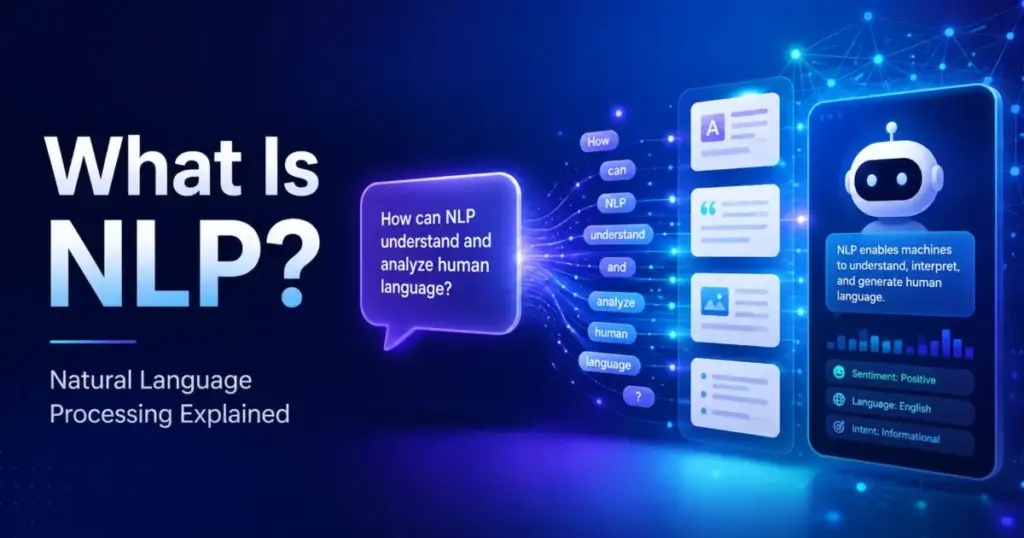
Most AI tools look magical until you ask why they misunderstood a customer, routed a ticket to the wrong team, or summarized a contract badly. NLP, or natural language processing, is the branch of artificial intelligence that helps software read, interpret, classify, and generate human language.
It is the reason your chatbot understands “I need a refund” and your help desk tags tickets by urgency. This guide explains how NLP works, where it helps SaaS teams, where it fails, and how to evaluate tools that claim to understand language. If you have been told that an AI product “understands” your customers, this article gives you the knowledge to test that claim.
What Is NLP?
Natural language processing is a field of artificial intelligence that gives machines the ability to read, interpret, and act on human language in text or speech form. NLP combines computational linguistics, machine learning, and deep learning to convert messy, unstructured language into structured data that software can use.
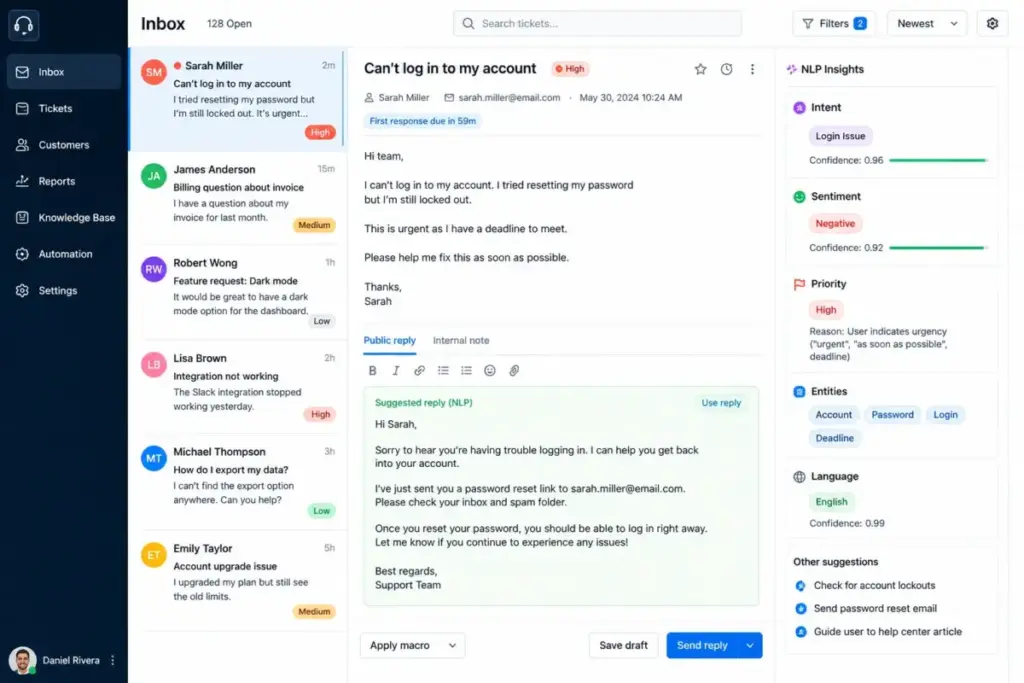
Think of NLP as a translation layer. Humans communicate with ambiguity, slang, typos, sarcasm, and context. Machines need clean categories, labels, and numbers. NLP bridges that gap. When a customer writes “this is broken, fix it NOW,” NLP determines the intent (complaint), the sentiment (negative), and the priority (urgent) so a help desk can route the ticket without a human reading it first.
NLP is not one technique. It is a collection of language-processing tasks. Some tasks classify text into categories. Others extract names, dates, or dollar amounts from documents. Others generate new text. The type of NLP your tool uses determines its accuracy, cost, and failure modes.
How Does NLP Work?
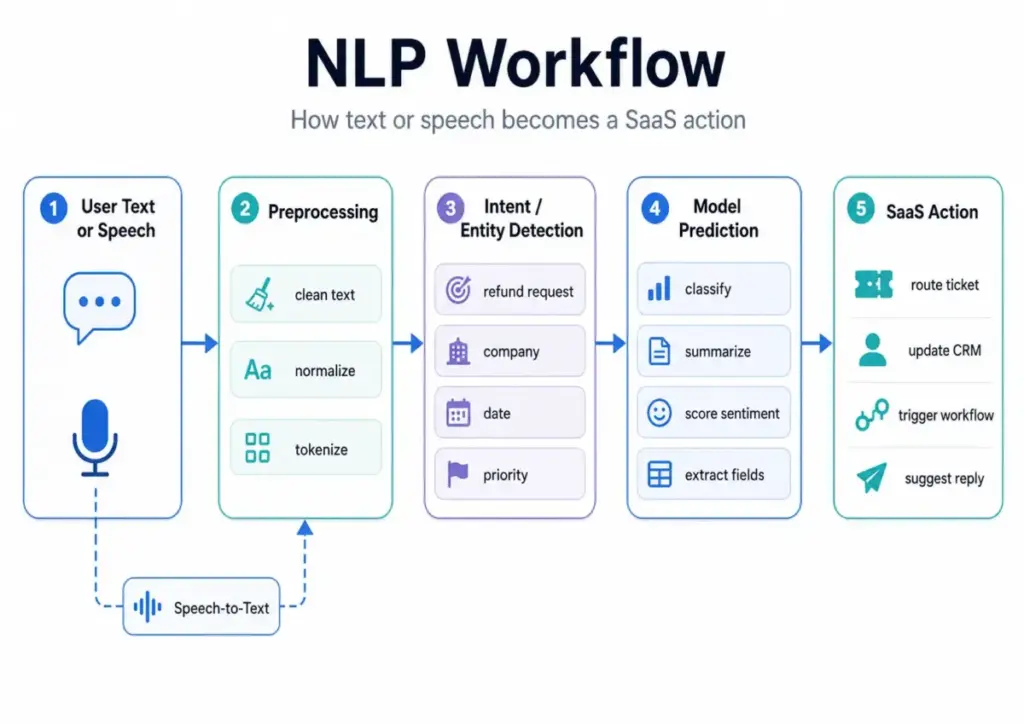
NLP works by converting raw human language into structured representations that machines can process, classify, or generate from. The exact method depends on the task and the model, but every NLP system follows a similar pipeline.
Here is a simplified 5-step pipeline:
- Input collection. The system receives text or speech. Text comes from emails, chat messages, support tickets, survey responses, or documents. Speech is first converted to text through automatic speech recognition.
- Text cleanup. The system removes noise: extra whitespace, HTML tags, special characters. It normalizes case, expands abbreviations, and corrects encoding issues.
- Tokenization and structure detection. The system breaks text into tokens (words, subwords, or characters). It detects sentence boundaries, parts of speech, and syntactic relationships. This step also handles stemming and lemmatization, which reduce words like “running,” “ran,” and “runs” to a shared root.
- Meaning extraction or prediction. This is the core step. Depending on the task, the system classifies the text (spam vs. not spam), extracts entities (company names, dollar amounts), detects intent (refund request vs. billing question), measures sentiment (positive, negative, neutral), or generates a response.
- Output or action. The system delivers a result: a label, a score, an extracted value, a generated reply, or a trigger for a downstream workflow. In SaaS, this step often connects to a CRM, help desk, or automation platform like Zapier.
NLP Tasks Mapped to SaaS Workflows
The table below maps specific NLP tasks to the SaaS workflows where they appear. This is the part most competitors skip: connecting academic NLP categories to real buying decisions.
| NLP Task | What It Does | SaaS Workflow | Common Risk |
|---|---|---|---|
| Text Classification | Assigns a category label to text | Support ticket routing, email triage | Misroutes tickets if categories overlap |
| Sentiment Analysis | Scores emotional tone (positive, negative, neutral) | CSAT monitoring, review analysis | Misreads sarcasm, irony, mixed sentiment |
| Named Entity Recognition | Extracts names, dates, companies, amounts | CRM enrichment, contract review | Misidentifies entities in domain jargon |
| Intent Detection | Identifies the user’s goal from a message | Chatbot routing, IVR systems | Confuses similar intents without enough training data |
| Summarization | Condenses long text into a shorter version | Sales call notes, meeting summaries | Omits critical details or invents facts |
| Semantic Search | Retrieves results by meaning, not just keywords | Knowledge base search, help center | Returns plausible but irrelevant results |
| Machine Translation | Converts text from one language to another | Multilingual support, global content | Loses nuance in domain-specific language |
| Information Extraction | Pulls structured fields from unstructured text | Invoice processing, compliance scanning | Fails on inconsistent document layouts |
Types of NLP
NLP is not one technology. It is a family of related tasks, each solving a different language problem. Understanding these types helps you match vendor claims to actual capabilities.
Natural Language Understanding
Natural language understanding (NLU) is the subset of NLP focused on interpreting meaning. NLU handles intent detection, entity recognition, and semantic parsing. When a chatbot understands that “cancel my account” and “I want to stop paying” mean the same thing, that is NLU at work. Intercom and Zendesk both use NLU in their AI-powered ticket and chat routing.
Natural Language Generation
Natural language generation (NLG) is the subset of NLP focused on producing human-readable text from data or instructions. NLG powers auto-replies, report narratives, email drafts, and AI writing assistants. Large language models like GPT and Claude are the most visible NLG systems in 2026, but NLG also includes simpler template-based generation used in automated emails and dashboard summaries.
Text Classification
Text classification assigns predefined labels to text. Spam filtering is the oldest example. In SaaS, text classification powers ticket categorization, lead scoring from form responses, and content moderation. A support team processing 5,000 tickets per month uses text classification to tag each ticket as billing, bug, feature request, or cancellation.
Named Entity Recognition
Named entity recognition (NER) extracts structured entities from text: person names, company names, dates, monetary values, product names, locations. CRM teams use NER to auto-populate contact records from email signatures or call transcripts. Compliance teams use NER to find personally identifiable information (PII) in contracts and support logs.
Sentiment Analysis
Sentiment analysis classifies the emotional tone of text. It assigns scores like positive, negative, or neutral, sometimes with a confidence percentage. Marketing ops teams use sentiment analysis to process survey responses or social media mentions. The common failure point: sentiment models struggle with sarcasm. “Great, another broken update” reads as positive to many sentiment classifiers because it contains the word “great.”
Semantic Search
Semantic search retrieves results based on meaning rather than exact keyword matches. A customer searching for “how to connect my email” should find articles about email integration, even if the article title says “SMTP configuration.” Semantic search powers knowledge bases, help centers, and internal documentation tools.
Speech Recognition
Speech recognition converts spoken language to text. It is the first step in processing voice data for NLP tasks. Sales teams use speech recognition to transcribe calls. Support teams use it for voicemail-to-ticket workflows. Speech recognition accuracy drops with accents, background noise, and domain-specific vocabulary.
Machine Translation
Machine translation converts text from one language to another. In SaaS, it enables multilingual support queues and localized help documentation. Google Translate and DeepL are consumer examples. Enterprise NLP APIs from Google, AWS, and Azure offer translation with custom glossaries for domain-specific accuracy.
NLP Examples in Business
NLP is already embedded in most SaaS workflows, often invisibly. Here are specific examples mapped to exact teams and scale.
Support ticket routing. A SaaS company receiving 5,000+ support tickets per month uses NLP-based text classification to auto-tag tickets by category (billing, bug, feature request) and priority (urgent, normal, low). This replaces manual triage that takes 30-60 seconds per ticket.
Chatbot conversations. AI chatbots use NLU to interpret customer messages and NLG to produce replies. A chatbot on a help desk tool like Intercom uses intent detection to decide whether to answer directly, escalate to an agent, or ask a clarifying question.
Sales call summaries. RevOps teams summarizing 200+ sales calls per month use speech recognition to transcribe calls, then NLP summarization to extract key points: objections raised, competitors mentioned, next steps agreed. The risk: summarization models sometimes omit critical details or merge separate topics.
CRM enrichment. NER extracts company names, job titles, and phone numbers from email threads and pastes them into CRM contact fields. A team using CRM software can reduce manual data entry by an estimated 40-60% with NER-based auto-population (results vary by email formatting consistency).
Survey analysis. A marketing ops team analyzing 10,000 open-ended survey responses uses sentiment analysis and topic classification to surface the top 10 themes and their sentiment distribution, without reading every response manually.
Contract review. Legal and compliance teams use information extraction to find specific clauses, liability caps, renewal dates, and PII across hundreds of contracts. NLP scans documents in seconds; a paralegal takes hours.
Knowledge base search. Semantic search powers help center search bars. Instead of matching exact keywords, it matches meaning. A customer typing “I forgot my password” finds the article titled “Account Access Recovery.”
Email intent detection. NLP classifies inbound emails by intent: purchase inquiry, support request, partnership pitch, spam. This allows routing rules that send emails to the right team before a human reads them.
NLP vs NLU vs NLG vs LLM
These four terms are related but not interchangeable. Confusing them leads to buying the wrong tool for the job. Here is a direct comparison.
| Term | Full Name | What It Does | Example | Relationship to NLP |
|---|---|---|---|---|
| NLP | Natural Language Processing | Umbrella field for all language tasks | Ticket classification, translation, search | The parent category |
| NLU | Natural Language Understanding | Interprets meaning from text | Intent detection, entity recognition | A subset of NLP |
| NLG | Natural Language Generation | Produces text from data or prompts | Auto-replies, report narratives, AI drafts | A subset of NLP |
| LLM | Large Language Model | A deep learning model trained on massive text data | ChatGPT, Claude, Gemini | A technology used for NLP tasks |
The key distinction: NLP is the field. NLU and NLG are subfields within it. An LLM is a specific type of model that performs many NLP tasks. Not all NLP uses LLMs. A rule-based email filter is NLP. A regex pattern that extracts phone numbers from text is NLP. Neither uses a language model.
In 2026, LLMs dominate the conversation, but a large portion of production NLP still runs on smaller classification models, keyword rules, and statistical methods. These older approaches are cheaper, faster, and more predictable for high-volume, repetitive tasks.
Benefits of NLP
NLP reduces the time humans spend reading, categorizing, and responding to text. That is the core value proposition.
- Faster ticket routing. NLP classification tags and routes support tickets in milliseconds. A 10-person support team processing 5,000 tickets per month recovers hours of manual triage time.
- Better search. Semantic search returns relevant results even when customers use different words than your documentation. This reduces repeat tickets and support volume.
- Lower manual tagging workload. Auto-classification replaces manual labeling for tickets, leads, emails, and survey responses.
- Actionable customer feedback. Sentiment analysis and topic extraction turn thousands of open-text responses into ranked theme lists.
- Accessible unstructured data. NLP makes emails, call transcripts, chat logs, and documents searchable, sortable, and reportable.
- Multilingual workflows. Machine translation lets small teams support customers across languages without hiring native speakers for every language.
- Stronger AI assistants. Chatbots, copilots, and AI agents perform better when their NLU layer accurately interprets user intent.
Challenges and Limitations of NLP
NLP fails in predictable ways, and understanding those failure modes is essential before you buy or build. Here are the most common problems.
Ambiguity. “I love the new update” could be genuine or sarcastic. “Bank” could mean a financial institution or a riverbank. NLP models resolve ambiguity through context, but context is not always sufficient.
Sarcasm and irony. Sentiment classifiers misread sarcasm at high rates. “Wow, what an amazing bug” registers as positive sentiment in many models because of the word “amazing.”
Domain jargon. A general NLP model does not understand your industry’s abbreviations, acronyms, or specialized terms. A model trained on general English will not correctly parse “the SOW specifies a 30-day NET payment term with 2/10 incentive.”
Data quality. NLP accuracy depends directly on input quality. Misspelled text, OCR errors from scanned documents, and noisy voice transcriptions all degrade results.
Bias. NLP models inherit biases from their training data. A sentiment model trained mostly on American English reviews will perform worse on British English, Indian English, or code-switched text.
Privacy and compliance. Processing customer text through external NLP APIs means sending data to third-party servers. For healthcare, legal, and financial data, this creates regulatory risk under GDPR, HIPAA, and SOC 2 requirements.
Hallucination in generative systems. LLM-based NLP (summarization, generation, Q&A) can produce text that sounds correct but contains invented facts. This is especially dangerous in contract review, compliance, and customer-facing replies.
Cost at scale. Cloud NLP APIs charge per request or per character. A team processing 100,000 documents per month faces real cost pressure, especially with LLM-based processing.
When NLP Does Not Work
Not every language problem benefits from NLP automation. I see teams deploy NLP for workflows where a simpler solution, or even manual review, produces better outcomes. Here are the cases where NLP is the wrong tool.
Low-volume workflows. If your team handles 50 support tickets per day and has 3 agents, the time saved by NLP routing is minimal. The cost of setting up, testing, and maintaining an NLP pipeline exceeds the benefit. Manual triage with saved replies works better below a certain volume threshold.
Regulated decisions requiring auditability. In healthcare, legal, and financial contexts, automated decisions need audit trails. A black-box NLP model that classified a medical record or flagged a transaction as suspicious is hard to explain in a regulatory review. Rule-based systems with explicit logic are easier to audit.
Poor transcripts. NLP on voice data depends entirely on transcription quality. If your call recording system produces transcripts with 70% accuracy because of accents, crosstalk, or poor audio, every downstream NLP task (entity extraction, summarization, sentiment) inherits those errors.
Mixed-language support queues. A support team receiving tickets in English, Spanish, Portuguese, and French within the same queue needs language detection before NLP processing. Many NLP APIs default to English. Running English-trained sentiment analysis on Portuguese text produces garbage results.
High-stakes interpretation. NLP should not be the sole decision-maker for legal contract interpretation, medical diagnosis, or financial risk assessment. The error cost is too high. NLP works as a screening layer (flag potential issues for human review), not as the final authority.
Companies without clean taxonomy. NLP classification requires well-defined output categories. If your team has not agreed on what “billing issue” vs. “payment problem” vs. “invoice question” means, NLP will not fix that organizational ambiguity. Define your categories first; then automate.
Best Tools for NLP
The right NLP tool depends on the task, your technical team, your data volume, and your infrastructure. No single tool is best for every NLP need. Here is a breakdown by use case.
ChatGPT
ChatGPT is a general-purpose LLM from OpenAI. Use it for summarization, drafting, extraction, classification prototyping, and internal assistants. ChatGPT Plus costs $20/month per user. API pricing is token-based: input and output tokens are priced separately, with rates varying by model (GPT-4o, GPT-4.5, o3). Best for teams that need flexible language processing across multiple tasks without building custom models.
Claude
Claude from Anthropic handles long-context document review, policy summarization, and analysis-heavy language tasks. Claude offers Free, Pro ($20/month), and Max ($100-200/month) tiers. Its 200K-token context window makes it effective for processing long contracts, research papers, and multi-page support transcripts. API pricing is token-based with separate input and output rates.
Google Cloud Natural Language
Google Cloud Natural Language provides API-based NLP for entity analysis, sentiment analysis, syntax parsing, and content classification. Pricing is based on 1,000-character units with different rates for each feature. This is a focused, task-specific NLP API, not a general-purpose chatbot. Best for teams that need structured extraction at scale on Google Cloud infrastructure.
Amazon Comprehend
Amazon Comprehend is a managed NLP service on AWS for entity extraction, key phrase detection, language detection, sentiment analysis, PII detection, and custom classification. Custom model training incurs separate charges. Best for teams already on AWS who need managed NLP without building models from scratch.
Azure AI Language
Azure AI Language offers entity extraction, sentiment analysis, PII detection, text classification, summarization, and healthcare text analysis. Pricing tiers vary by feature and volume. Best for teams in the Microsoft ecosystem or those with healthcare text processing needs.
Hugging Face Transformers
Hugging Face Transformers is an open-source framework for text, vision, and audio models. It gives developers full control over model selection, fine-tuning, and deployment. No per-API-call pricing; you pay for your own compute infrastructure. Best for engineering teams that need custom models or want to avoid vendor lock-in.
Tool Selection Matrix
| Need | Best Tool Category | Why | Watch Out |
|---|---|---|---|
| Quick prototyping of NLP tasks | LLM (ChatGPT, Claude) | Flexible, no training needed | Token costs scale with volume |
| High-volume text classification | Cloud NLP API (Comprehend, Azure) | Managed, cost-effective at scale | Custom models need labeled data |
| Entity extraction from documents | Cloud NLP API or LLM | Structured output, API integration | Document format consistency matters |
| Long document summarization | LLM (Claude, ChatGPT) | Large context windows | Hallucination risk on details |
| Custom model for specific domain | Open-source (Hugging Face) | Full control, no vendor lock-in | Requires ML engineering resources |
| Sentiment at scale | Cloud NLP API (Google, Azure) | Low cost per unit, fast | Sarcasm and context limitations |
| Multilingual support triage | Cloud NLP API + LLM | Language detection + processing | Accuracy varies by language pair |
NLP Cost Reality Check
NLP is not free, and the pricing model changes depending on the approach. Here is how costs break down in practice.
Character-based cloud NLP pricing. Google Cloud Natural Language pricing charges per 1,000-character unit. Rates differ for sentiment analysis, entity analysis, syntax analysis, and content classification. A team processing 100,000 short customer reviews (averaging 500 characters each) would use 50,000 units per run.
Token-based LLM pricing. ChatGPT and Claude API pricing is based on input and output tokens. A 500-word support ticket is roughly 700 tokens. Processing 10,000 tickets through an LLM for classification and summarization costs more than running the same tickets through a lightweight classification API.
Custom model training. Amazon Comprehend custom model training incurs separate charges for training time, model hosting, and inference. Azure AI Language custom text classification has similar cost layers.
Internal engineering time. Building and maintaining NLP pipelines requires data labeling, model evaluation, prompt engineering, and integration work. For a 3-person engineering team, a custom NLP project absorbs 2-4 weeks of capacity.
Data labeling and evaluation. Supervised NLP models need labeled training data. Labeling 5,000 support tickets with correct categories costs either internal staff time or outsourced annotation fees.
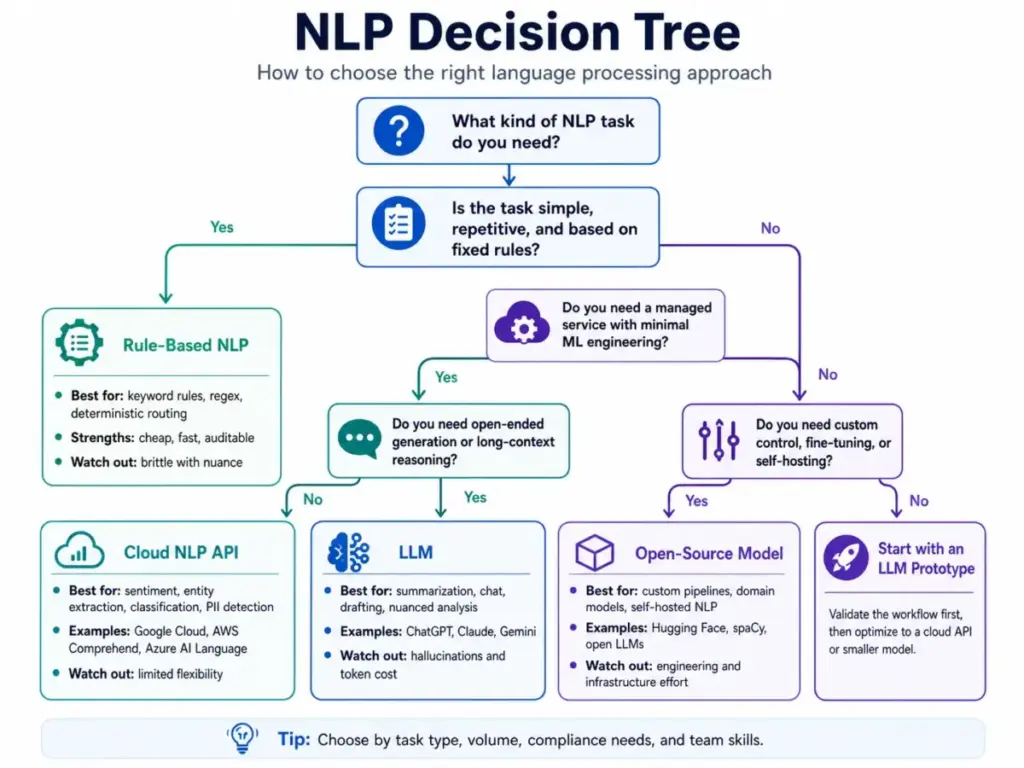
My recommendation: start with an LLM for prototyping and testing. Once you validate the task and define your categories, move high-volume, repetitive classification to a cloud NLP API or a fine-tuned smaller model. Reserve LLMs for tasks that need flexibility, generation, or long-context processing.
Daniel Rivera’s Quick Take
The biggest NLP mistake I see is using a large language model for every language task. LLMs are extraordinary for generation, summarization, and open-ended analysis. But for predictable classification, entity extraction, and deterministic routing, older NLP methods are cheaper, easier to audit, and less likely to invent an answer.
A support team that needs to classify 10,000 tickets into 8 categories does not need GPT-4o. A fine-tuned text classifier running on a cloud NLP API handles that task at a fraction of the cost, with consistent results and no hallucination risk.
The reverse is also true. If your task requires understanding nuance across a 20-page legal document, a keyword-based system will miss critical context. That is where an LLM earns its cost.
The decision framework is simple: if the task is repeatable and the output categories are fixed, use a smaller model or rule-based NLP. If the task requires flexibility, context, or generation, use an LLM. If you are not sure, prototype with an LLM first, measure the results, then decide whether to optimize with a lighter system.
NLP is not magic. It is a set of engineering tradeoffs: accuracy vs. cost, speed vs. flexibility, determinism vs. generalization. The best NLP strategy matches the right technique to each task, not the most expensive model to every problem.
Best Practices for Using NLP
Start small, measure everything, and keep humans in the loop. These practices apply whether you are using a cloud API, an LLM, or an open-source model.
- Start with one task. Do not try to deploy NLP for ticket routing, sentiment analysis, and summarization at the same time. Pick the highest-value, lowest-risk task first.
- Define output categories before choosing tools. If you want NLP to classify tickets, agree on your category taxonomy first. Garbage categories produce garbage classification.
- Create a human review loop. Route low-confidence NLP results to a human for review. Set a confidence threshold (e.g., below 80%) and track how often the model falls below it.
- Test on messy real data. Do not evaluate NLP on clean sample text. Feed it actual customer emails with typos, abbreviations, and mixed languages. That is the data it will process in production.
- Track false positives and false negatives. A model that misclassifies 5% of urgent tickets as low priority is more dangerous than one that misclassifies 10% of low-priority tickets as normal.
- Separate low-risk automation from high-risk decisions. Auto-tagging a ticket with a suggested category (low risk) is different from auto-closing a ticket based on NLP classification (high risk).
- Re-test after product, support, or policy changes. If your product adds a new feature, your support ticket language will change. NLP models trained on old data drift in accuracy when the input distribution shifts.
FAQ
What is NLP in simple terms?
NLP is a branch of AI that helps computers read and process human language. It powers features like chatbot conversations, email classification, sentiment scoring, and document search by converting text and speech into structured data that software can act on.
What is NLP used for?
NLP is used for text classification, sentiment analysis, entity extraction, intent detection, summarization, translation, semantic search, and speech recognition. In SaaS, the most common applications are support ticket routing, chatbot responses, CRM data enrichment, and customer feedback analysis.
Is NLP the same as AI?
No. NLP is a subfield of AI. AI is the broader category that includes computer vision, robotics, recommendation systems, and more. NLP focuses specifically on language: text and speech processing.
Is ChatGPT an NLP tool?
Yes. ChatGPT is a large language model that performs multiple NLP tasks: text generation, summarization, classification, translation, and question answering. It is one type of NLP tool, but NLP also includes non-LLM methods like rule-based classifiers and statistical models.
What is the difference between NLP and NLU?
NLU (natural language understanding) is a subset of NLP. NLP is the full field covering reading, interpreting, classifying, and generating language. NLU focuses specifically on interpreting meaning: detecting intent, recognizing entities, and understanding context.
What is the difference between NLP and LLM?
NLP is a field of study and engineering. An LLM (large language model) is a specific type of deep learning model used for NLP tasks. NLP existed for decades before LLMs. Many NLP tasks still run on smaller models, statistical methods, or rule-based systems.
How does NLP work?
NLP works through a pipeline: input collection, text cleanup, tokenization, meaning extraction (classification, entity recognition, sentiment scoring), and output delivery. Modern NLP systems use transformer-based neural networks for meaning extraction, while simpler systems use statistical methods or handwritten rules.
What are the limitations of NLP?
NLP struggles with sarcasm, ambiguity, domain-specific jargon, low-quality input text, multilingual content, and bias inherited from training data. Generative NLP systems (LLMs) also carry hallucination risk, producing text that sounds correct but contains invented information.
Which tools use NLP?
Cloud NLP APIs include Google Cloud Natural Language, Amazon Comprehend, and Azure AI Language. LLM-based tools include ChatGPT, Claude, and Gemini. Open-source frameworks include Hugging Face Transformers. SaaS products like Zendesk, Intercom, and Salesforce embed NLP in their features.
Can NLP understand sarcasm?
Not reliably. Sarcasm depends on tone, context, shared knowledge, and cultural norms that are hard to encode in a model. A sentence like “Sure, I love waiting 3 hours for a reply” is sarcastic to a human but reads as positive sentiment to many NLP classifiers. Some research models show improved sarcasm detection, but production-grade accuracy remains low.
Do I need an LLM for sentiment analysis?
No. Sentiment analysis is a classification task that smaller, dedicated models handle efficiently. Cloud NLP APIs from Google, AWS, and Azure offer sentiment analysis at lower cost and faster speed than running the same task through an LLM. Use an LLM for sentiment analysis only if you also need nuanced explanation or aspect-level sentiment breakdown.
When should I use AWS Comprehend instead of building my own model?
Use Amazon Comprehend when you need managed NLP on AWS, want to avoid model training infrastructure, and your task fits its built-in capabilities (entity extraction, sentiment, classification, PII detection). Build your own model when you need custom entity types, domain-specific accuracy, or control over model architecture. The break-even point depends on volume: Comprehend is cost-effective at moderate scale, while custom models save money at very high volumes with stable requirements.
Key Takeaways
- NLP is a branch of AI that processes human language in text and speech form. It is not a single tool or technique; it is a family of tasks including classification, extraction, sentiment analysis, search, translation, and generation.
- NLU interprets meaning. NLG generates language. LLMs are a type of model used for NLP tasks. These terms are related, not interchangeable.
- NLP powers real SaaS workflows: ticket routing, chatbot intent detection, CRM enrichment, survey analysis, contract scanning, and knowledge base search.
- NLP fails on sarcasm, ambiguity, poor data quality, domain jargon, and mixed-language input. Generative NLP adds hallucination risk.
- Not every language task needs an LLM. High-volume, repeatable classification and extraction tasks run cheaper and more reliably on smaller models or cloud NLP APIs.
- Start with one NLP task, define your output categories, test on real data, and keep a human review loop for low-confidence results.
- The best NLP strategy matches the right technique to each task, balancing accuracy, cost, speed, and auditability.