Your team’s workspace is cluttered with folders, task cards take several seconds to load under heavy volume, and your monthly software bill is creeping upward. While ClickUp is popular for its feature density, teams frequently seek alternatives when the learning curve stalls daily adoption. Unlimited paid seats start at $7 per user/month in the US market when billed annually (as of May 2026), but the total cost scales quickly when you add AI add-ons.
Finding the right best project management software options is not about chasing the longest feature list. It is about identifying the exact tool that removes the specific friction that makes your team want to switch. This guide compares 10 alternatives by US pricing, switching triggers, practical tiers, and migration difficulty.
We will examine how one flat-rate option can stabilize your software costs, and how another tool simplifies task layouts to speed up daily execution.
Based on independent editorial research, analyzing official product documentation, feature specifications, and verified customer feedback, this analysis outlines the practical tradeoffs of each system. Under the byline of James Carter, who has reviewed 35+ project management tools, this guide outlines the practical trade-offs of each system. Before making a switch, understanding what project management actually involves can help you map your team’s specific workflow requirements.
Quick Verdict: Best ClickUp Alternatives by Switching Trigger
The table below maps the best ClickUp replacement to the primary reason your team is leaving.
| If you are leaving ClickUp because… | Best alternative | Why |
|---|---|---|
| The interface gets too complex | Asana | Cleaner task ownership and structured portfolio dashboards |
| Visual customization is too hard | monday work management | More intuitive board layouts and dashboard widgets |
| The workspace experience is slow | Trello | Lightweight Kanban boards with faster loading times |
| Client workflows are not native | Teamwork.com | Native client billing, time tracking, and free client seats |
| You want a doc-first workspace | Notion | Unified database pages and central company wiki layout |
| Developers need sprint tools | Jira | Dedicated Scrum backlog tracking and code connections |
| Per-user billing is unpredictable | Basecamp | Flat-rate annual pricing for unlimited users and projects |
What this means:
If you are moving away from ClickUp, your choice should align with your primary operational bottleneck. Teams seeking pure cost relief often look to Trello or Basecamp, while agencies focus on Teamwork.com for client-facing features. If you struggle with coordination across departments, monday work management provides the most flexible visual workspace.
The ClickUp Problem Map
While ClickUp remains a popular choice for teams that want one workspace for tasks, docs, and goals under one login, teams often look for alternatives when they hit these major friction points:
- Feature Overload and Onboarding Friction: ClickUp centralizes many work types, but Capterra review patterns repeatedly cite setup complexity, feature overwhelm, and onboarding friction.
- Workspace Performance Sluggishness: G2 review patterns include performance complaints such as lag, freezing, and slower use on larger projects. Teams wanting lighter task boards prefer simpler systems.
- AI and Add-on Cost Escalation: ClickUp Brain AI costs an extra $9 per user/month, while Everything AI costs $28 per user/month. This increases the total monthly bill.
- Outgrowing Free Plan Limits: The Free Forever plan is capped at 100MB of storage and restricts dashboard widgets, forcing small teams to upgrade quickly.
- Governance Difficulty: Large workspaces with multiple teams often struggle with cluttered task folders, custom status lists, and inconsistent dashboards.
For a deeper look at these limitations, you can check our ClickUp review which breaks down the platform’s core task structure.
ClickUp Strengths and Limitations
The table below summarizes the core pros and cons of ClickUp based on technical specifications.
| ClickUp Strengths | ClickUp Limitations |
|---|---|
| Consolidated Workspace: Combines tasks, docs, whiteboards, goals, forms, and time tracking under one login | Workspace Lag: Large setups with thousands of tasks frequently experience lag and frozen screens |
| View Flexibility: Offers 15+ views including List, Board, Gantt, Calendar, and Box view on paid plans | Steep Learning Curve: The volume of customization toggles creates onboarding friction for non-technical users |
| Low Entry Price: Billed at $7 per user/month on Unlimited, which is cheaper than Asana or monday.com | AI Add-on Tax: Brain AI and Everything AI are sold as separate monthly upgrades, increasing the total bill |
Alternatives for Teams Facing Setup Complexity
These tools are built for teams that find ClickUp’s interface too cluttered and want to prioritize clean task execution or visual workflows.
Asana: Best for structured project execution

Asana is built around structured task lists, portfolio dashboards, and clear user workloads. For teams leaving ClickUp, the primary draw is the clean interface that keeps task ownership clear. You can read our detailed Asana review to assess its usability under daily load.
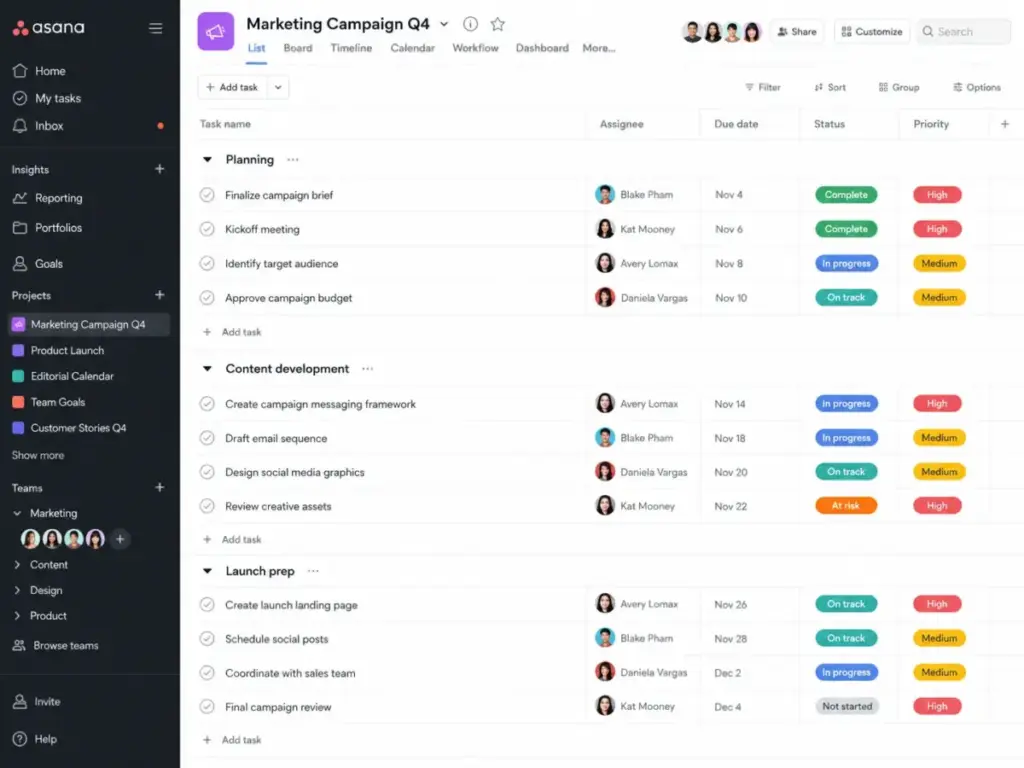
Asana’s Starter plan costs $10.99 per user/month when billed annually in the US. The Starter tier includes timeline views, custom fields, and basic workflow rules. However, the price is higher than ClickUp’s Unlimited plan ($10.99/month versus $7/month). Paid plans start at a minimum of two seats. If you are planning a migration, our Asana pricing guide details the costs you will face.
- What it does better than ClickUp: The interface loads faster under heavy task volume, and the layout makes it easier for new users to find their assigned tasks.
- What it does worse than ClickUp: Lacks native document management, whiteboards, and built-in time tracking, requiring external integrations.
- Avoid if: Your team requires native client invoicing, budget tracking, or free guest access for clients.
- Migration difficulty: Medium. The built-in Asana importer handles ClickUp tasks, but folder structures and custom statuses must be rebuilt.
Verdict: Choose Asana if you want a reliable, structured project manager that requires less administrative configuration than ClickUp.
monday work management: Best for visual workflow customization

monday.com uses highly customizable grid boards that let you define different column types, status markers, and board integrations. For teams leaving ClickUp, it provides a more visual approach to project tracking.
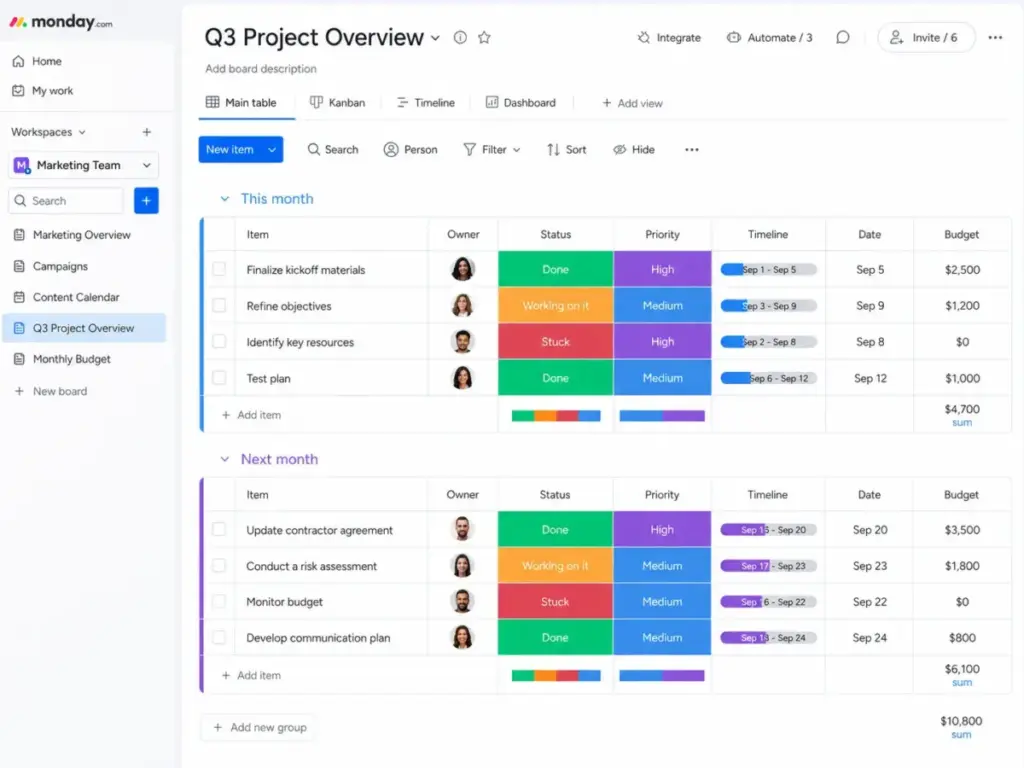
The Standard plan costs $12 per seat/month billed annually. This plan unlocks timeline views, calendar views, and up to 250 automation actions per month. The main drawback is that monday.com sells seats in groups (minimum 3 seats, then buckets of 5, 10, 15, etc.), meaning a 4-person team must pay for 5 seats. Product bundling rules can also change the real cost.
- What it does better than ClickUp: Visual dashboard widgets are easier to build, and the board templates are simpler to adopt.
- What it does worse than ClickUp: Seat-purchasing groups make it expensive for small teams, and automation limits require careful management.
- Avoid if: You want a flat-rate pricing model or have a team size that falls between seat bucket thresholds.
- Migration difficulty: Medium. The importer brings over most ClickUp fields, but complex dependency paths must be remapped.
Verdict: Choose monday work management if your projects require custom database fields, visual dashboard metrics, and automation rules that are easy to build.
Alternatives for Teams Needing Structured Operations
These options serve mid-market and enterprise operations that need detailed request forms, resource management, and spreadsheet calculations.
Wrike: Best for complex cross-functional operations

Wrike is designed for creative, marketing, and operations departments that require structured intake forms, Gantt charts, and custom dashboards. It focuses on operational visibility across multiple teams.
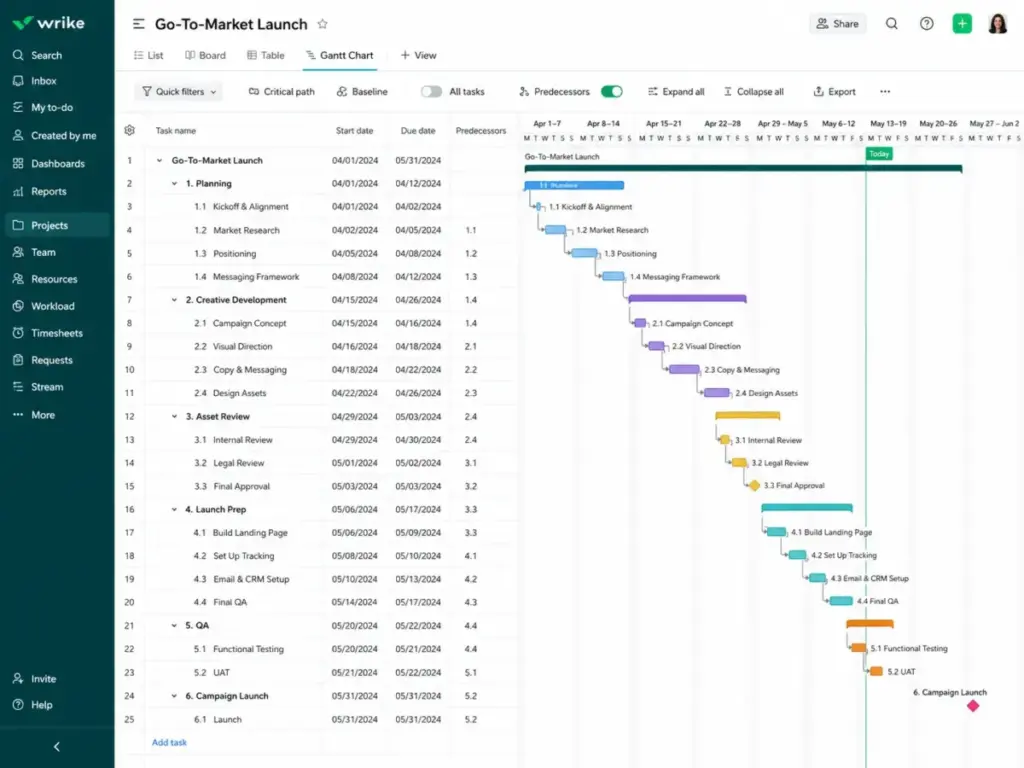
The Team plan starts at $10 per user/month, while the Business plan costs $25 per user/month. Wrike locks its advanced resource management and custom fields behind the Business plan, which makes it an expensive option. Wrike sells subscriptions in seat groups.
- What it does better than ClickUp: Stronger cross-project resource allocation reports and detailed request forms that auto-create tasks.
- What it does worse than ClickUp: The interface feels corporate and requires a dedicated system administrator for larger setups.
- Avoid if: Your team consists of less than 10 people who need a simple, self-serve project manager.
- Migration difficulty: High. Due to Wrike’s deep folder structure, migration requires careful field mapping and staff retraining.
Verdict: Choose Wrike if you have a marketing or creative operations department of 20+ people who need to manage incoming requests and workload allocation.
Smartsheet: Best for spreadsheet-first PMO teams

Smartsheet uses a grid interface that mimics Microsoft Excel but includes project views, card layouts, and automations. It is built for operations teams that manage projects via data rows.
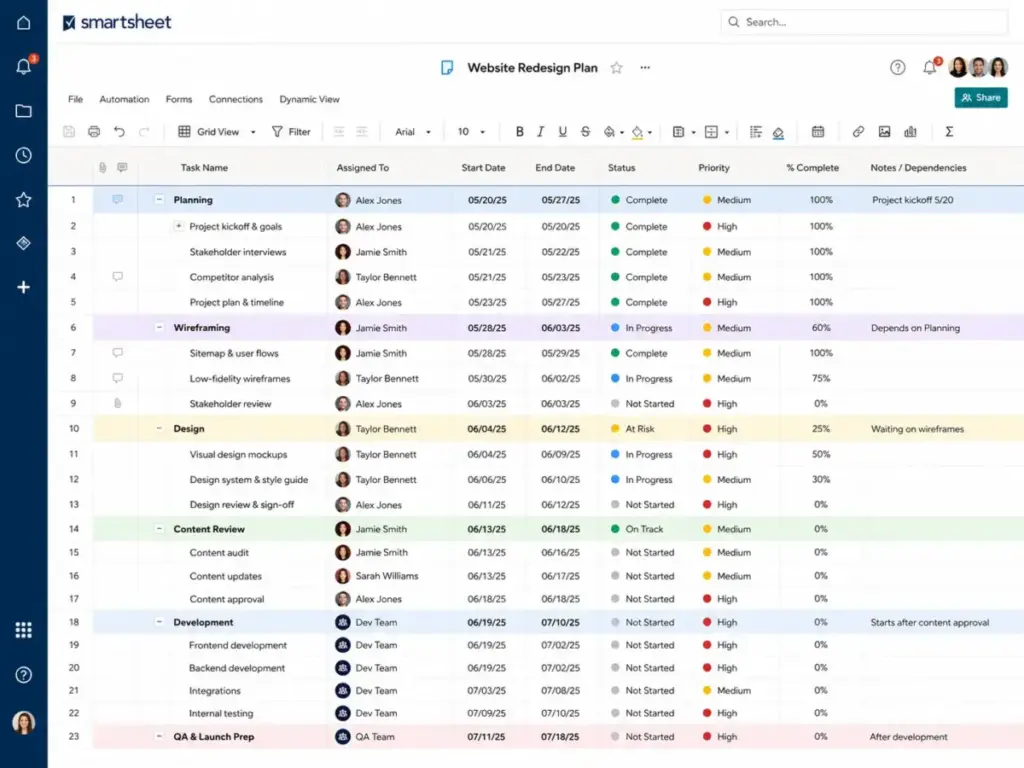
The Pro plan starts at $9 per member/month billed annually. Smartsheet allows new customers to buy the Pro plan, but it is capped at 10 members. Smartsheet allows unlimited free collaborators to view sheets, which helps control costs. The grid handles complex formulas, but it lacks the modern look of ClickUp’s task lists.
- What it does better than ClickUp: Advanced formulas, cell linking, and spreadsheet calculations that sync across multiple projects.
- What it does worse than ClickUp: Lacks a simple task-first interface, making it harder for non-technical users to adopt.
- Avoid if: Your team wants a simple drag-and-drop Kanban board for daily tasks.
- Migration difficulty: High. Moving ClickUp task lists into a grid requires redesigning your sheets and manual field alignment.
Verdict: Choose Smartsheet if your project management is led by PMO managers who rely on spreadsheet formulas, grids, and budget sheets.
Alternatives for Teams Needing Doc-First Customization
These options focus on wikis, docs, and custom databases for teams that want to store all company knowledge alongside tasks.
Notion: Best docs and wiki-first alternative

Notion connects documents, wikis, meeting notes, and project databases in a single workspace. It is the best alternative for teams that want to store all company knowledge alongside tasks. Check out our our Notion evaluation to see how its databases behave under load.
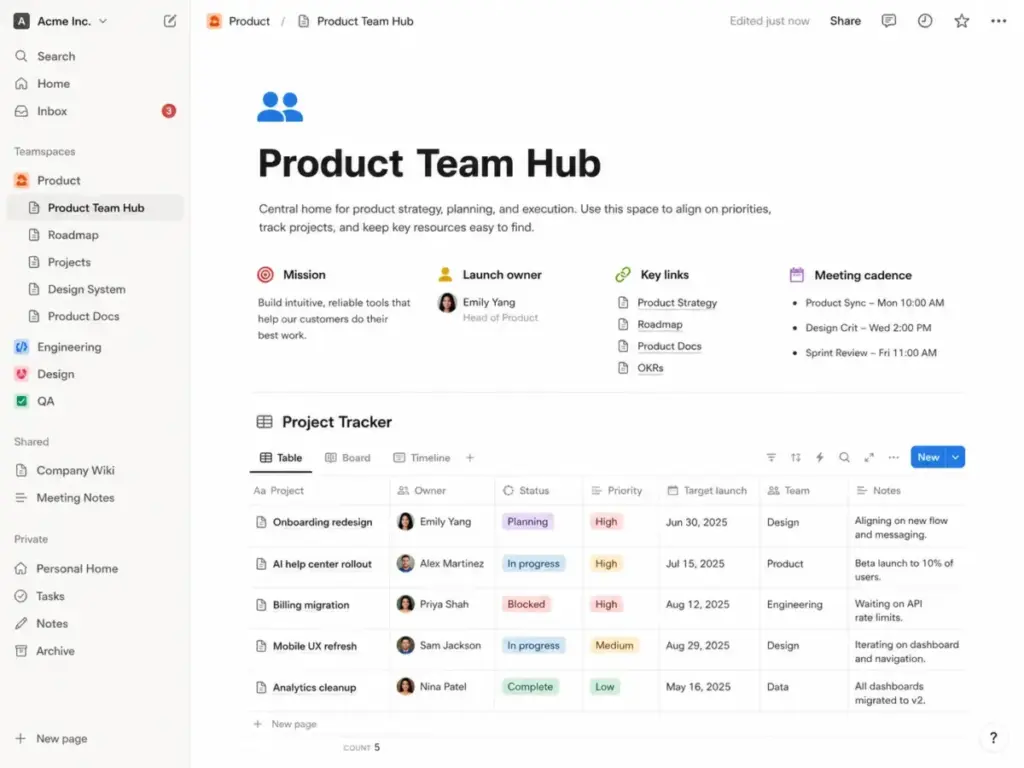
The Plus plan starts at $10 per member/month billed annually. It unlocks unlimited database rows, custom templates, and page history. Notion includes AI assistants, but custom agents require credits, listed at $10 per 1,000 monthly credits. If you are evaluating costs, our Notion pricing guide explains the plan structures in detail.
- What it does better than ClickUp: Combines company wikis and notes directly with project databases, reducing the need for separate doc editors.
- What it does worse than ClickUp: Lacks out-of-the-box task dependencies, portfolio management tools, and structured alert queues.
- Avoid if: Your team requires automated reminders and strict task due-date controls.
- Migration difficulty: Medium. Notion can import ClickUp boards, but the resulting pages require formatting cleanup to align with your wiki layout.
Verdict: Choose Notion if you want to build a central knowledge base where tasks are linked directly to project briefs and meeting notes.
Alternatives for Agile and Simple Task Boards
These options serve developers who require sprint tracking, and small teams that want simple Kanban boards.
Jira: Best for software teams

Jira is the standard tool for software engineering teams that use Scrum or Kanban frameworks. It focuses on sprint cycles, backlog grooming, and code deployments.
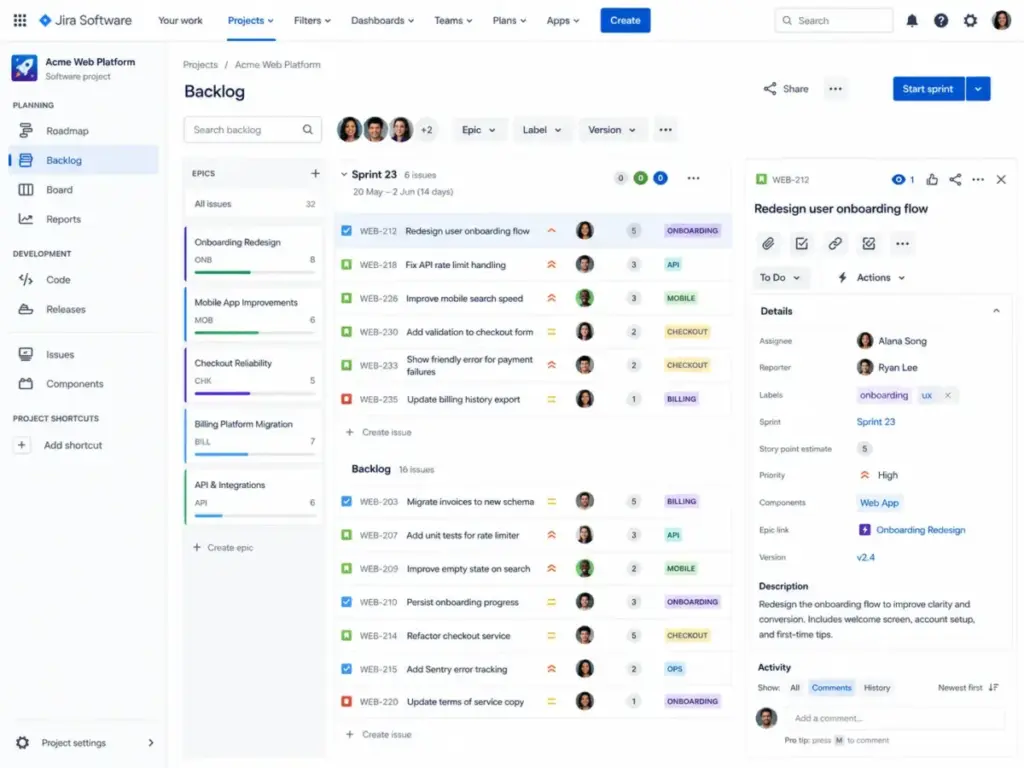
Jira’s Standard plan is available via Atlassian’s pricing calculator, starting around $8.15 to $8.60 per user/month depending on seat tier. Jira includes sprint reports, burn-down charts, and direct integrations with GitHub and GitLab. However, the interface is highly technical and often feels overwhelming for marketing or sales teams.
- What it does better than ClickUp: Dedicated sprint planning tools, release management, and issue tracking built for software developers.
- What it does worse than ClickUp: The complex interface makes it difficult for non-technical departments to collaborate.
- Avoid if: You are a general operations, creative, or marketing team with no software development workflows.
- Migration difficulty: High. Software teams must map development fields, sprint histories, and epic structures, which requires technical planning.
Verdict: Choose Jira if you are a software development team that needs to manage sprints, releases, and codebase issues. For more details on licensing, check our Jira pricing guide.
Trello: Best simple Kanban alternative

Trello uses simple board, list, and card structures to manage work. It is the closest match for teams that only use ClickUp’s board view and want to skip the complex task hierarchies.
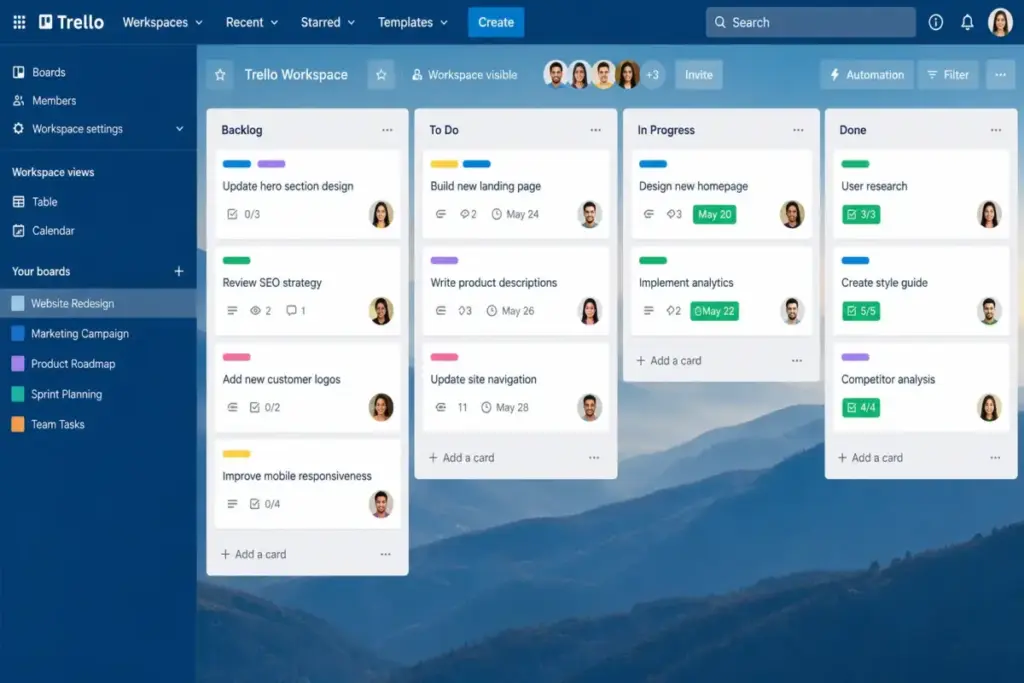
The Standard plan starts at $5 per user/month billed annually. It unlocks unlimited boards, custom fields, and advanced checklists. Trello uses Power-Ups to connect with other services, which keeps the core interface simple. If your team needs to track task dependencies, Trello’s simple cards will feel too limited. Read our Trello software review for a complete breakdown of its board capabilities.
- What it does better than ClickUp: Faster loading times and a simpler board view that requires almost zero user training.
- What it does worse than ClickUp: Lacks built-in Gantt charts, workload views, and native portfolio dashboards on Standard.
- Avoid if: Your projects require multi-step task dependencies or cross-project resource planning.
- Migration difficulty: Low. You can export ClickUp files and upload them to Trello, though card descriptions may lose some formatting.
Verdict: Choose Trello if your team consists of 5 to 10 people who only need simple visual stages to track their daily tasks.
Alternatives for Client-Facing Work
These options serve agencies and consulting firms that require client portals, billing tools, or flat-fee licensing.
Basecamp: Best simple flat-fee collaboration alternative

Basecamp avoids per-user pricing entirely with its Pro Unlimited plan, which costs $299/month flat (billed annually) for unlimited users. This makes it a popular choice for teams with 20+ users who want predictable software costs.
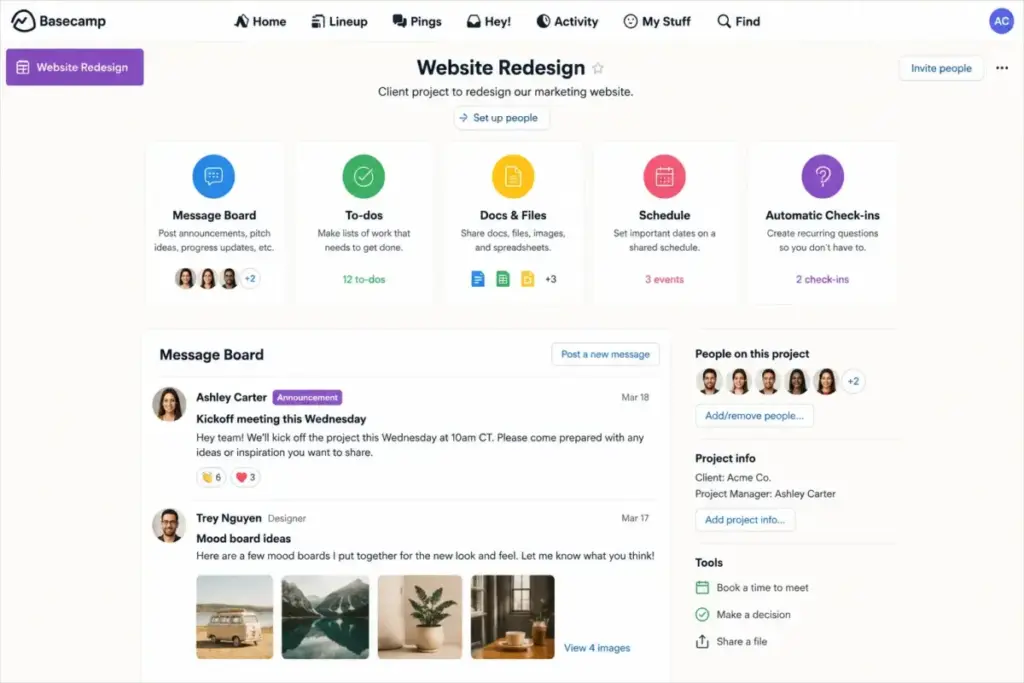
Basecamp consolidates messages, to-do lists, schedules, files, and chat. It is designed around project communication rather than complex database fields. The tradeoff is that you lose the custom fields, table calculations, and Gantt charts that ClickUp provides.
- What it does better than ClickUp: Predictable flat-rate pricing for large teams and a unified workspace that includes client communication tools.
- What it does worse than ClickUp: No native Kanban view adjustments, no custom fields, and very basic task dependency settings.
- Avoid if: Your managers depend on Gantt charts, resource allocation reports, or automated task rules.
- Migration difficulty: Low. The text-first structure makes importing files simple, but you will have to rebuild task hierarchies from scratch.
Verdict: Choose Basecamp if your team has more than 15 members and is tired of fluctuating per-user bills.
Teamwork.com: Best alternative for agencies and professional services

Teamwork.com is built specifically for client services, agencies, and professional services teams. It focuses on billable hours, project margins, and client access.
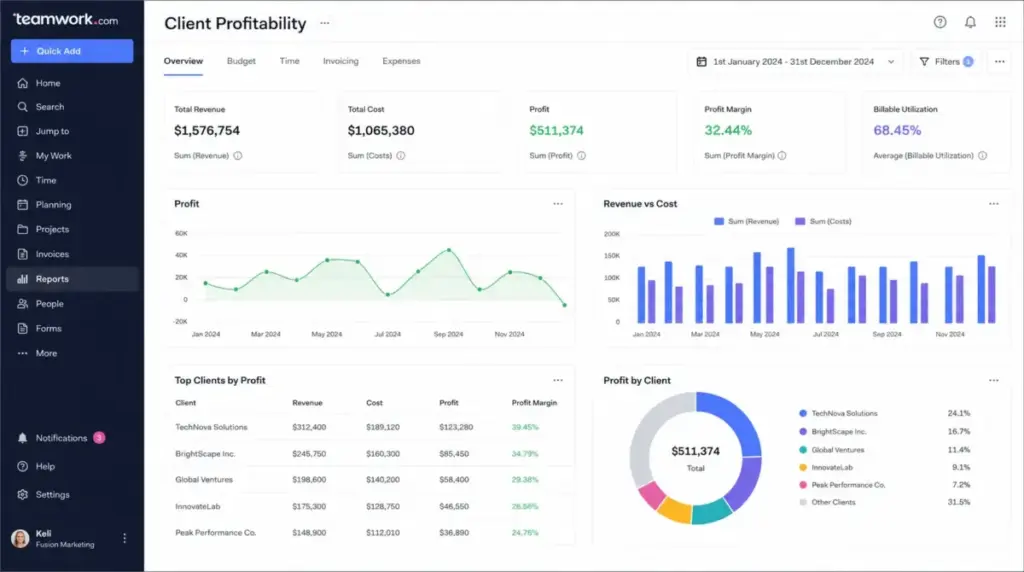
The Basics plan starts at $9.99 per user/month billed annually. Teamwork.com allows you to invite clients to view projects for free, which saves you from purchasing extra user seats. The interface includes native time tracking, billing integrations, and project profitability metrics. Internal teams may prefer Teamwork software alternatives without that billing layer.
- What it does better than ClickUp: Native time tracking, project budgeting, invoicing, and free guest client users who can write comments.
- What it does worse than ClickUp: Less visual simplicity and a steeper learning curve for teams that do not manage client projects.
- Avoid if: Your team only works on internal projects and does not need to track time or client budgets.
- Migration difficulty: Medium. Task lists and files import easily, but you must manually configure client permission profiles.
Verdict: Choose Teamwork.com if you run an agency or consulting firm and need to verify project profitability alongside task deadlines.
Alternatives for Teams Needing Relational Databases
These options serve operations teams that need to model complex workflows, track inventories, or build custom business applications.
Airtable: Best relational database alternative

Airtable is a relational database that lets teams build custom apps, content pipelines, and inventory trackers. It is designed for operations departments that need structured data.
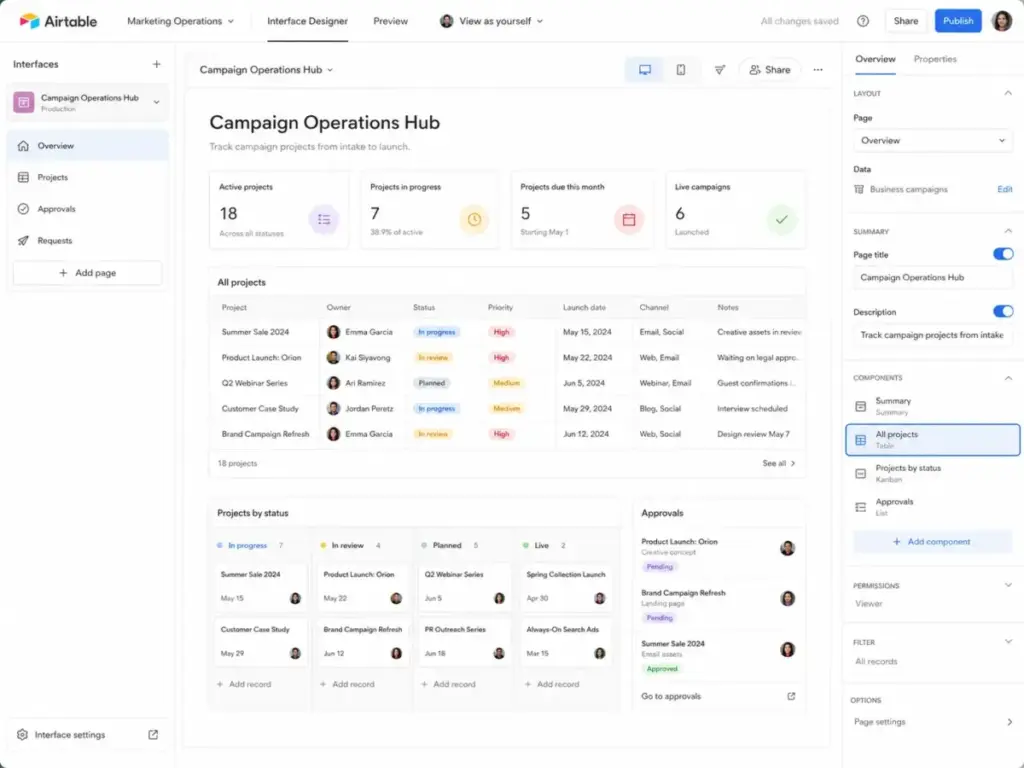
The Team plan costs $20 per seat/month billed annually, which is more expensive than ClickUp’s entry plans. Airtable’s power lies in its relational database structure. You can link client records directly to tasks, campaigns, and assets. The main tradeoff is that the pricing scale can escalate quickly as your database grows.
- What it does better than ClickUp: Relational databases that allow you to link records across different tables without duplicating data.
- What it does worse than ClickUp: The per-seat pricing is high, and the platform has strict record limits per workspace.
- Avoid if: You want a simple to-do list manager that is ready to use right after signing up.
- Migration difficulty: High. Rebuilding a task list into a relational database requires structuring tables and links from scratch.
Verdict: Choose Airtable if your team manages marketing campaigns, content calendars, or product inventory that requires structured relational databases.
Pricing Comparison: Starting Price vs Practical Tier
The table below shows the starting prices, the practical tiers for teams, and the estimated cost for a 10-user team in the US market.
| Product | Starting Price | Practical Tier for Teams | Cost for 10 Users | Free Plan | Trial Details |
|---|---|---|---|---|---|
| ClickUp | Free | Unlimited ($7/user/month) | $70.00/month | Yes (100MB storage) | Free Forever plan |
| Asana | Free | Starter ($10.99/user/month) | $109.90/month | Yes (10 users) | 30-day trial |
| monday.com | Free | Standard ($12/seat/month) | $120.00/month | Yes (2 seats) | 14-day trial |
| Wrike | Free | Team ($10/user/month) | $100.00/month | Yes | 14-day trial |
| Smartsheet | Paid | Pro ($9/member/month) | $90.00/month | No | 30-day trial |
| Notion | Free | Plus ($10/member/month) | $100.00/month | Yes | Free Forever plan |
| Jira | Free | Standard (approx. $8.15/user/month) | ~$81.50/month | Yes (10 users) | 14-day trial |
| Trello | Free | Standard ($5/user/month) | $50.00/month | Yes (10 boards) | Free Forever plan |
| Basecamp | Free | Pro ($15/user/month) | $150.00/month | Yes (1 project) | 30-day trial |
| Teamwork.com | Paid | Basics ($9.99/user/month) | $99.90/month | No | 30-day trial |
| Airtable | Free | Team ($20/seat/month) | $200.00/month | Yes (1,000 records) | 14-day trial |
Note: Pricing is verified as of May 29, 2026, and is subject to change. Check official pricing pages for current US rates.
What this means:
While starting prices look close, the cost gap widens at 10 seats. ClickUp and Trello offer the lowest paid entry tiers, while Airtable sits at the top. For teams of 20 or more, Basecamp Pro Unlimited’s flat-fee billing becomes a highly cost-effective option, avoiding the seat-by-seat cost scale of ClickUp.
Feature Gate Comparison
This comparison maps where core project capabilities are unlocked across plans.
| Feature Gate | Asana | monday.com | Notion | Trello | Basecamp |
|---|---|---|---|---|---|
| Timeline/Gantt | Locked at Starter | Locked at Standard | Included on Plus | Locked at Premium | Not Included |
| Custom Fields | Locked at Starter | Included on Basic | Included on Plus | Included on Standard | Not Included |
| Automations | Locked at Starter | Action limits by tier | Action credits | Limit runs by tier | Basic settings |
| Time Tracking | Add-on | Locked at Pro | Locked at Business | Locked at Premium | Not Included |
| Client Portals | Guest access only | Locked at Standard | Guest access only | Guest access only | Included on Pro |
What this means:
Asana gates custom fields and timeline views behind the Starter tier, making the free plan very limited for teams. Notion includes custom fields and time tracking on its lowest paid plan (Plus). Trello requires the Premium plan for timeline views, while Basecamp includes portals on the Pro level.
Setup and Migration Difficulty
Transitioning your project database requires rebuilding workflows and re-linking tools.
| Alternative | Migration Level | Typical Timeline | Primary Setup Risk |
|---|---|---|---|
| Trello | Low | 1–3 Days | Rebuilding task dependencies manually |
| Basecamp | Low | 1–3 Days | Rebuilding folder hierarchies from scratch |
| ClickUp | Medium | 1–2 Weeks | Remapping custom fields and dashboard widgets |
| monday.com | Medium | 1–2 Weeks | Reconfiguring visual automation triggers |
| Teamwork.com | Medium | 1–2 Weeks | Mapping client access permission levels |
| Notion | Medium | 2–3 Weeks | Reformatting task tables to match wiki databases |
| Jira | High | 3–4 Weeks | Reconfiguring epic workflows and sprint tracking |
| Smartsheet | High | 3–4 Weeks | Rebuilding cell formulas and reports |
| Airtable | High | 3–4 Weeks | Redesigning relational databases from scratch |
| Wrike | High | 4–6 Weeks | Administrative training and request forms |
Disclaimer: Migration difficulty is an editorial estimate based on database models, custom configurations, and team training requirements.
What this means:
Simple tools like Trello and Basecamp can be set up in a few days. High-difficulty databases like Airtable or Smartsheet require several weeks to map fields, test links, and train team members. Plan for a transitional period where both services are running to prevent data loss.
Which ClickUp Alternative Should You Avoid?
Not every alternative is a safe fit for your specific business structure.
| Product | Who should avoid | Why |
|---|---|---|
| Jira | Non-technical marketing or sales teams | Highly technical interface that creates user friction |
| Airtable | Teams needing simple checklist templates | Rebuilding simple checklists in a database is over-engineered |
| Trello | Large teams with multi-project dependencies | Simple boards get cluttered when projects scale past 15 people |
| Basecamp | Teams that rely on visual Gantt reports | Lacks custom fields and visual timeline views |
| Wrike | Small teams with under 5 members | High cost and administrative overhead are unnecessary |
What this means:
Avoid switching to a tool that duplicates the exact problems you are leaving behind. A small team leaving ClickUp because of high costs should avoid Wrike or Airtable. A creative team frustrated by ClickUp’s task structure should avoid the developer-focused Jira workspace.
The Alternative Nobody Mentions
While Asana and monday.com dominate search results, Teamwork.com is often overlooked.
For agencies and client-facing teams, the true cost of project software includes the guest seats you must purchase for external clients. In ClickUp, client access is limited unless you assign them a paid seat or adjust complex permission menus.
Teamwork.com resolves this by offering free client users who can view progress, assign tasks, and log comments. It also includes native time tracking, billing integrations, and project profitability metrics. If your business depends on billable hours, Teamwork.com is the most direct way to track whether your projects are profitable. You can check our ClickUp pricing breakdown to see how licensing costs compare.
When to Stay with ClickUp
Before migrating your database, consider whether staying with ClickUp makes the most business sense:
- Deep Integration Dependency: If your workflows are tied to ClickUp’s API, Salesforce integration, or Slack automations, rebuilding these connections can cost more than the annual subscription savings.
- Cross-Project Portfolios: ClickUp’s Everything view is highly efficient at summarizing progress across 20+ different projects. Few tools, other than Wrike or Smartsheet, handle this without complex setups.
- Low Administrative Capacity: If your team lacks the time to build a custom monday.com board or configure an Asana workspace, ClickUp’s out-of-the-box task structure is the safest path.
If your team is happy with the interface but concerned about costs, cleaning up inactive user seats is often cheaper than retraining your staff on a new system.
Final Verdict: Best ClickUp Alternative for Most Teams
Your best path forward depends on your specific organizational size and workload structure:
- For 5-person creative teams: monday work management is the best option due to its visual templates and flexible columns.
- For budget-conscious teams under 10: Trello provides the most features at a lower entry cost on its Standard tier.
- For teams of 20+ seeking cost control: Basecamp Pro Unlimited’s flat-fee billing provides the most predictable software costs.
- For client services and agencies: Teamwork.com is the clearest fit for tracking billable hours and managing client access.
- For software engineering teams: Jira is the standard for Scrum sprints and issue tracking.
FAQs
What is the cheapest ClickUp alternative for 10 users?
Trello Standard is the cheapest option for 10 users, costing $50 per month when billed annually in the US. ClickUp Unlimited is another budget option at $70 per month. Both plans include custom fields and task tracking at a lower cost than Asana Starter.
Which ClickUp alternative includes native time tracking?
Teamwork.com includes native time tracking. Teamwork.com includes time tracking on its Basics tier, which starts at $9.99 per user/month. monday work management locks time tracking behind the Pro tier.
Is Trello a good replacement for ClickUp?
Trello is a good replacement for small teams that only use ClickUp’s Kanban board view. It starts at $5 per user/month and requires very little training. However, it lacks the Gantt charts and portfolios needed for complex projects.
Can Notion replace ClickUp?
Notion can replace ClickUp if your team wants a wiki-first database workspace. It connects documents, meeting notes, and tasks in one tool. But it lacks out-of-the-box task alerts, so your team must configure notification databases.
Which alternative is best for client collaboration?
Teamwork.com is the best alternative for client work. It allows you to invite external clients to view and edit projects for free. It also includes native time tracking, budgets, and billing features to manage client campaigns.
Is monday.com better than ClickUp?
monday.com is better if you need highly visual boards, custom database columns, and visual dashboards. ClickUp is better if you prefer a task-first interface with clean task dependencies. Both cost roughly the same for a 10-person team.
How hard is it to migrate from ClickUp to Asana?
Migrating from ClickUp to Asana is of medium difficulty and typically takes one to two weeks. Asana’s built-in importer handles tasks, descriptions, and assignees, but custom fields and folder permissions must be reconfigured.
Which ClickUp alternative has the best free plan?
Trello has the best free plan among the alternatives. It includes unlimited cards, up to 10 boards per workspace, and 250 workspace command runs per month. This is suitable for small teams that do not need list hierarchies.
What ClickUp alternative has the best dashboards?
monday work management has the best dashboards among the alternatives. It includes customizable widgets for workload tracking, timeline progress, and budget summaries. These are easier to configure than ClickUp’s dashboards.
Does Basecamp have a free plan?
Basecamp offers a limited free plan that allows one active project, up to three users, and 1GB of storage. This is suitable for personal use or very small projects. Larger teams must use the paid tiers. Larger teams should price Basecamp alternative tools against that upgrade step.