Your operations team built an entire inventory tracker in Airtable. Forms, automations, linked records, the works. Then the invoice arrived: $200/month for 10 users on Team, and the base just hit its record cap.
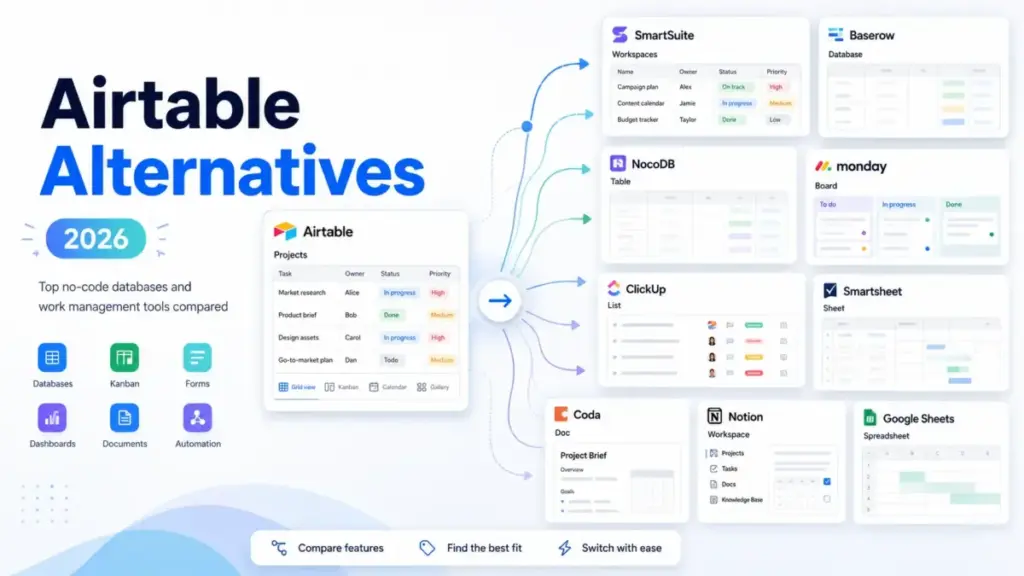
That moment, when the tool stops scaling before the team does, is why most Airtable alternatives searches start. After ranking 10+ tools for the best project management software options list, I mapped each alternative to the exact Airtable frustration it solves. This guide compares them by US pricing at 10 users, migration difficulty, and buyer fit so you can pick the right replacement without rebuilding from scratch.
Here is something most ranking pages skip: not every tool on this list is a real Airtable replacement. Some are project managers wearing a database hat. Others are docs-first workspaces with table blocks bolted on.
I mapped each alternative to the exact Airtable pain point it solves, because switching to the wrong category wastes more time than staying put.
One finding that surprised me during research: NocoDB caps paid editors at nine on its Plus and Business plans, which means a 15-person team pays the same as a 9-person team. That pricing model alone changes the math for growing operations teams.
After reviewing 35+ project management and collaboration tools, James Carter has tracked 20+ tool migrations across teams of 3 to 25. If you want a detailed breakdown of Airtable itself, read the full Airtable review and evaluation first.
This guide is based on official pricing pages, product documentation, feature comparison, and verified user reviews, not hands-on testing. Pricing was verified as of June 2026. Every claim references official sources. Where data is undisclosed, the article says so.
Quick Verdict: Best Airtable Alternatives by Switching Trigger
| If you are leaving Airtable because… | Best alternative | Why |
|---|---|---|
| Seat cost gets expensive at 10+ users | Stackby | Economy plan starts at$4.20/user/month annual promotional pricing |
| Record or API limits constrain growing bases | Baserow | Unlimited databases on paid plans with self-hosted option |
| You need self-hosting or stronger data control | NocoDB | Open-source with external database connections on Business and above |
| Airtable is too database-heavy for project execution | monday work management | Boards, dashboards, automations, and workload views for guided execution |
| You need docs, wiki, and databases in one workspace | Notion | Pages, databases, forms, and templates in one flexible workspace |
| Billing model charges every collaborator | Coda | Doc Maker billing means only creators pay, editors and viewers are free |
What this means: The right Airtable alternative depends on whether the team is escaping seat cost, record limits, missing project execution, governance gaps, or billing structure. Picking a tool that solves a different problem leads to a second migration within 12 months.
How This Guide Was Built
This guide covers 10 Airtable alternatives ranked by switching-trigger fit, not popularity. Every pricing figure comes from the official pricing page of each product, verified in June 2026. Feature claims reference official documentation. User sentiment references verified Capterra and G2 reviewers.
Testing level: official research only. I did not test these products hands-on for this article. Where a claim could not be verified against official sources, I used caveated language or omitted the claim. Migration difficulty ratings are editorial estimates based on data model complexity, workflow rebuild effort, and setup depth.
The Airtable Problem Map
Airtable is a strong tool for teams that need what project management software does crossed with relational database structure. It combines spreadsheet-style views, forms, interfaces, automations, and app-building workflows. But the problems show up at scale.
Pain 1: Seat Cost Climbs Fast
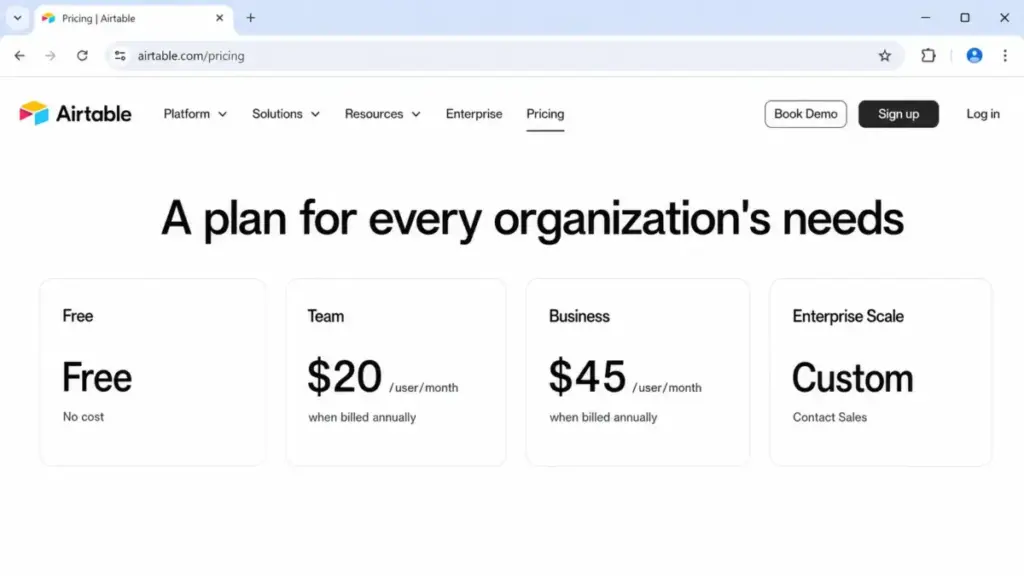
Airtable Team starts at $20/user/month billed annually (as of June 2026). Business starts at $45/user/month billed annually. For 10 active collaborators, that is $200/month on Team or $450/month on Business. A verified Capterra reviewer put it plainly: “the pricing is terrible.”
The cost issue compounds when teams need Business-tier features like advanced permissions, higher API limits, or extended revision history. And Enterprise Scale is custom, contact-sales pricing with no published rates.
Pain 2: Record, API, and Storage Limits Hit Ceilings
Free and Team workspaces have published limits on records per base, API calls, attachment storage, and automation runs. Teams with growing operational data hit these caps before they outgrow the feature set. A verified G2 reviewer noted that “paid plans increase per user and can get expensive,” and that cost pressure often arrives alongside limit pressure.
Pain 3: Airtable Is Not a Project Execution Tool
Some teams adopted Airtable because they needed structure beyond a spreadsheet. But when the real need is tasks, dashboards, workload tracking, timelines, and cross-project dependencies, Airtable feels overbuilt in the wrong direction. It is a relational database that can mimic project management, not a project execution system.
Pain 4: Billing Model Charges Every Collaborator
Airtable bills collaborators by permission level on paid plans. Teams with many viewers, commenters, or part-time contributors end up paying per seat for people who barely touch the tool. Some alternatives offer maker-only billing, free commenter seats, or flat-rate access models that reduce this friction.
Pain 5: Missing Self-Hosting and Data Control
For teams that want to own their data, deploy on their own infrastructure, or comply with strict data residency policies, Airtable is a closed SaaS platform with no self-hosted option.
Pain 6: Docs and Database Live in Separate Tools
Teams that use Airtable partly as a content hub, knowledge base, or project wiki end up maintaining Airtable plus a separate docs tool. Alternatives that merge databases and documents into one workspace reduce tool sprawl.
| Airtable pain point | Who it affects most | Severity |
|---|---|---|
| Seat cost at 10+ users | Growing operations teams with tight budgets | High |
| Record and API caps | Data-heavy teams with 20,000+ records | High |
| Missing project execution | Marketing teams, agencies, PMOs | Medium |
| Billing every collaborator | Teams with many viewers or commenters | Medium |
| No self-hosting | Compliance-sensitive and technical teams | Medium |
| Docs and database in separate tools | Content teams, knowledge-first orgs | Low to Medium |
What this means: If your frustration is cost, look at Stackby, NocoDB, Baserow, ClickUp, or Google Sheets. If the frustration is limits, look at Baserow, NocoDB, or SmartSuite. If you need execution, look at monday work management, ClickUp, or Smartsheet. If the billing model is the problem, look at Coda, NocoDB, or Google Sheets.
Alternatives That Fix the Cost and Limits Problem
SmartSuite: Best Airtable-Like Workflow Database

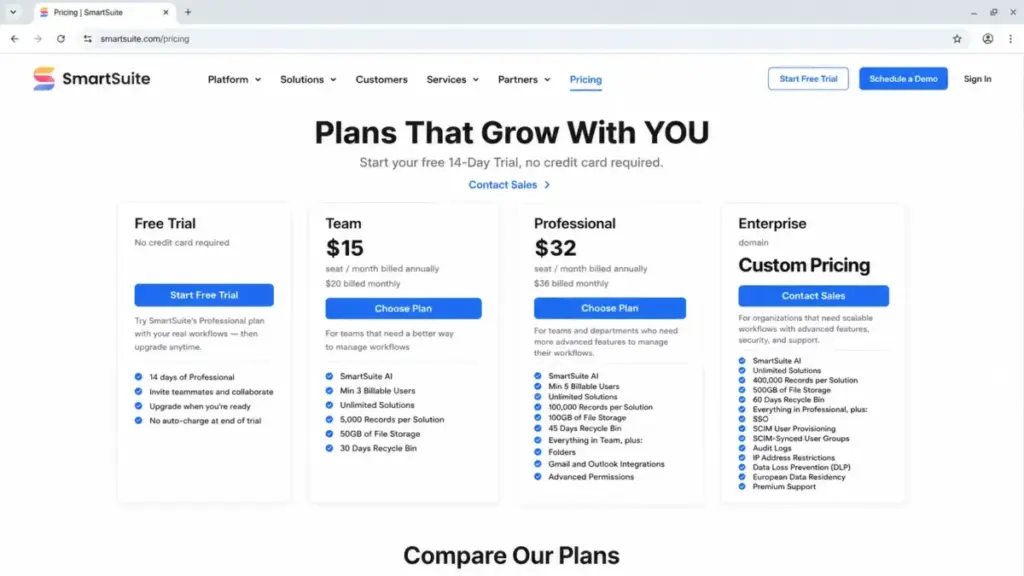
SmartSuite is the closest Airtable alternative for teams that like structured records with operational workflow features. It combines database-style tables with dashboards, automations, permissions, and solution templates.
Pricing starts at $15/seat/month billed annually for Team (as of June 2026). Monthly billing is $20/seat/month. A free plan and 14-day Professional trial are available. For 10 users on Team annual billing, the cost is $150/month, which is $50/month less than Airtable Team.
SmartSuite does better than Airtable in built-in workflow management, richer solution templates, and operational process structure. The tradeoff: Airtable has broader ecosystem recognition and marketplace momentum.
Best for:
- 8-15 person operations teams that want Airtable-style structure with more built-in workflow management
- Teams running intake forms, approvals, and process tracking
Avoid if: Your team only needs a lightweight spreadsheet-database without workflow features. The minimum billable user counts on paid plans add a floor to cost.
Migration difficulty: Medium. Record structure translates well, but automations and interface configurations need rebuilding.
Limitation: Team plan has 5,000 records per solution and 50 GB storage. Teams with large operational datasets need to check these caps against current Airtable usage.
Baserow: Best Open-Source Airtable Alternative

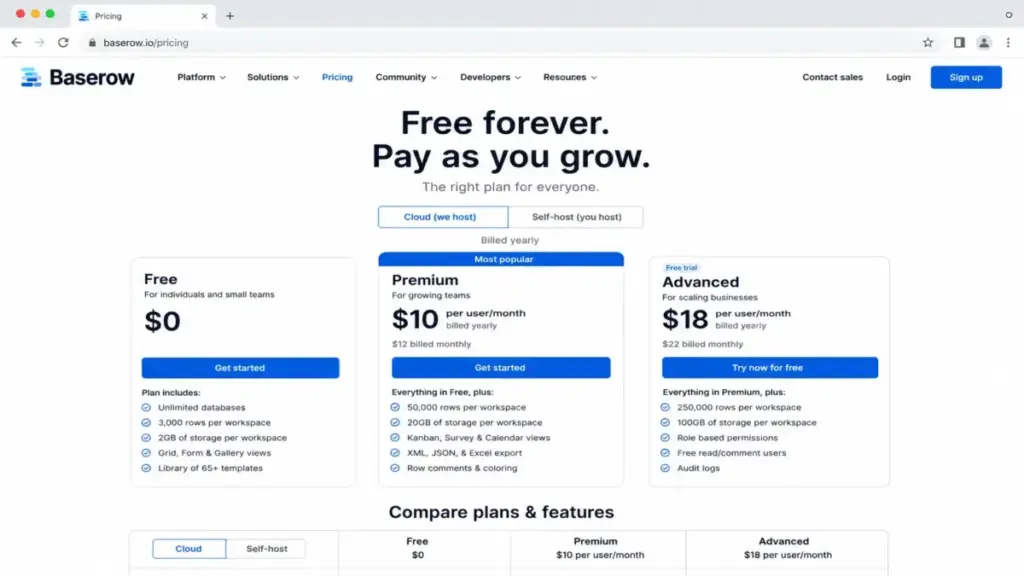
Baserow is the strongest pick for technical teams and privacy-sensitive organizations that want an Airtable-like interface with open-source code and self-hosted deployment.
Pricing starts at $10/user/month billed yearly for Premium (as of June 2026). Monthly billing is $12/user/month. A free plan is available. For 10 users on Premium annual billing, the cost is $100/month, exactly half of Airtable Team.
Baserow does better than Airtable in data ownership, self-hosting flexibility, and unlimited database count on paid plans. The tradeoff: less polished for nontechnical teams, and advanced app-building depth requires more setup than Airtable or SmartSuite.
Best for:
- 3-10 person technical teams comfortable with self-hosted infrastructure
- Organizations with data residency requirements
Avoid if: Your team lacks technical capacity for self-hosting and needs a fully managed experience. Cloud Free has 3,000 rows per workspace and basic views only.
Migration difficulty: Medium. CSV import covers basic data, but relational links, views, and automations need manual configuration.
NocoDB: Best Database-Backed Alternative With Capped Editor Pricing
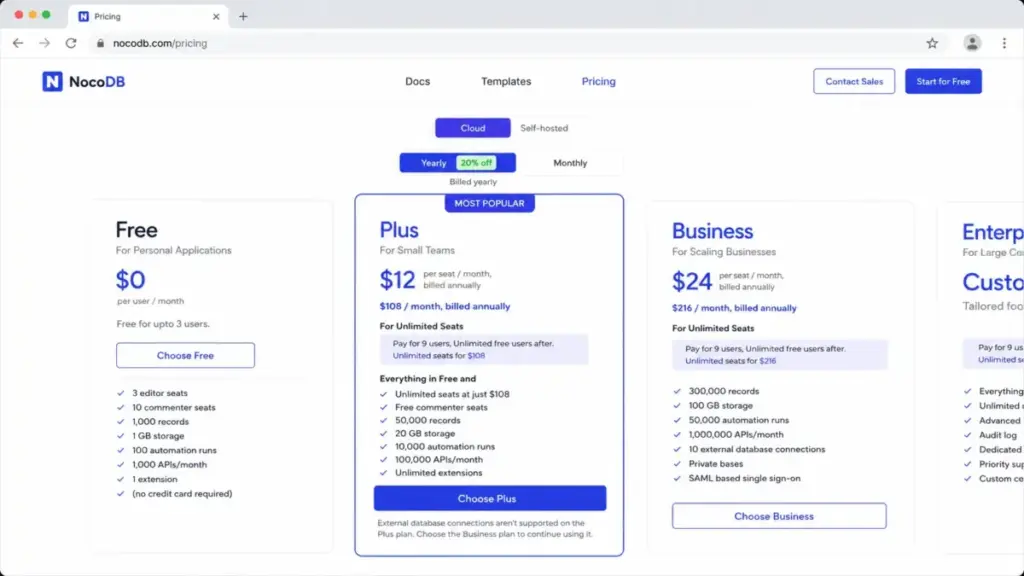
NocoDB turns existing databases into spreadsheet-style collaborative interfaces. The standout feature: Plus and Business plans cap paid editors at nine. A 15-person editing team pays the same as a 9-person team.
Pricing starts at $12/seat/month billed annually for Plus (as of June 2026). Monthly billing is $15/seat/month. A free plan is available. For 10 users on Plus annual billing, cost is $108/month because the tenth editor is free under the pay-for-9 rule.
NocoDB does better than Airtable in database-backed workflows and editor pricing structure. The tradeoff: Plus does not support external database connections (Business and above required), and nontechnical users face more configuration complexity.
Best for:
- 10-25 person teams where editor count exceeds 9 and per-seat billing is the main cost concern
- Technical teams with existing MySQL or PostgreSQL databases that need a collaborative front end
Avoid if: Your team is nontechnical and needs plug-and-play simplicity. Plus has 50,000 records and lacks external database connections.
Migration difficulty: Medium to High. Data import is straightforward, but connecting existing databases and configuring views takes technical setup.
Stackby: Best Budget Spreadsheet-Database Alternative

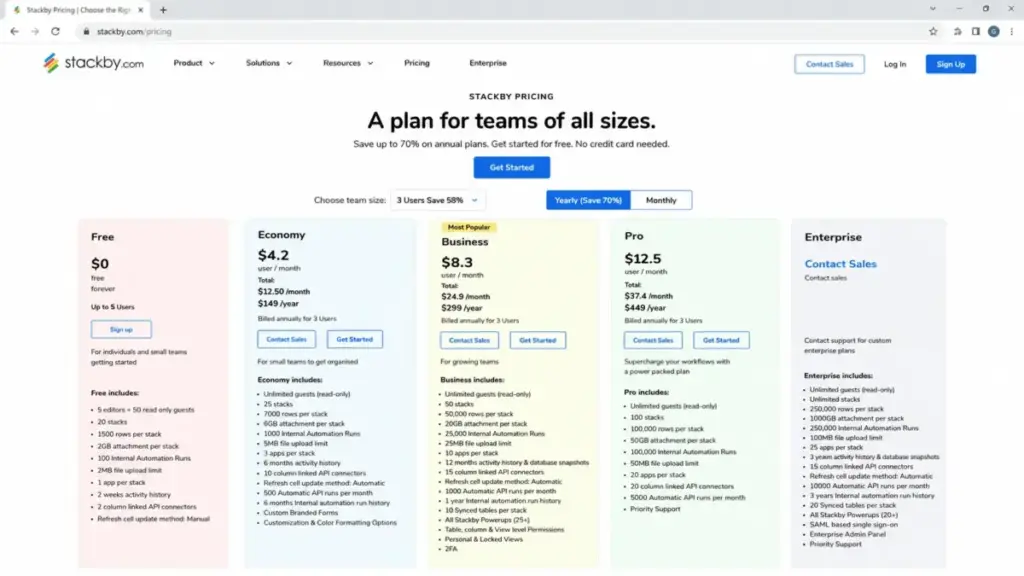
Stackby is the most affordable Airtable alternative for small teams that want spreadsheet-database workflows plus native API connector columns.
Pricing: the official pricing page shows an annual promotional Economy rate of $4.20/user/month (as of June 2026). The billing FAQ separately notes that monthly paid plans start at $10/user/month. A free plan is available. For 10 users at the promotional annual Economy rate, cost is approximately $42/month, roughly one-fifth of Airtable Team.
Stackby does better than Airtable in entry cost and API connector columns that pull third-party data directly into table views. The tradeoff: smaller ecosystem, lower plan limits, and the pricing presentation requires careful reading.
Best for:
- 3-8 person teams with tight budgets that need structured data with API connectors
- Solo operators or freelancers who want Airtable-like tables under $50/month for a small team
Avoid if: You need enterprise-grade permissions, high row limits, or broad third-party integration marketplace. Free has 1,500 rows per stack and manual API refresh.
Migration difficulty: Low to Medium. Basic table data imports via CSV. API connector setup is separate work.
Alternatives That Fix the Execution Problem
monday work management: Best Execution-First Work Management Alternative

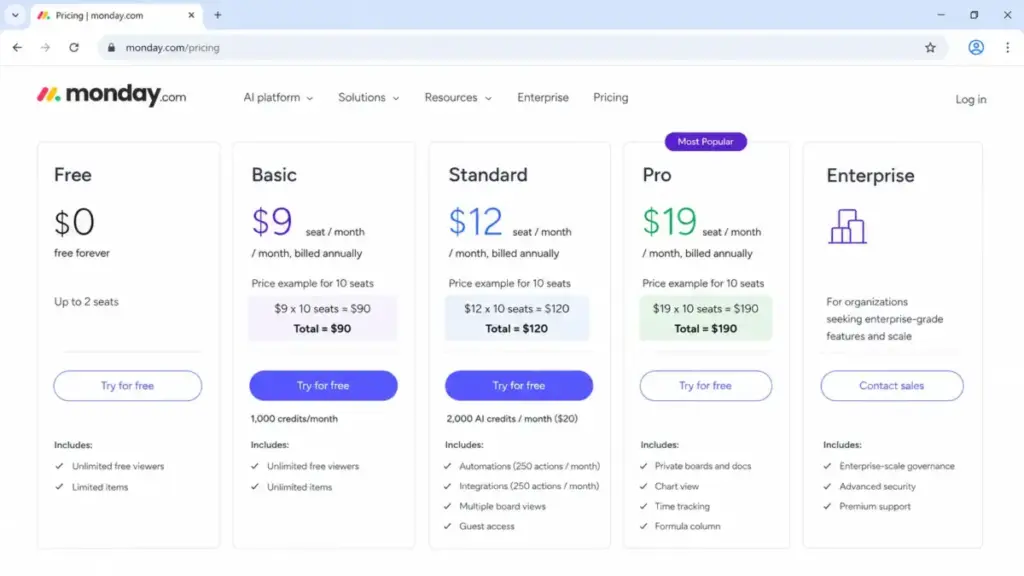
monday work management replaces Airtable when the real need is project execution, not relational database design. Boards, dashboards, automations, timelines, and workload views provide a more guided workflow than Airtable’s flexible grid.
Pricing starts at $9/seat/month billed annually for Basic (as of June 2026). Standard starts at $12/seat/month billed annually. A free plan is available. For 10 users on Basic annual billing, cost is $90/month. On Standard, $120/month.
monday work management does better than Airtable in structured project tracking, visual dashboards, and cross-team work management. The tradeoff: much less flexible as a relational database builder.
Best for:
- 10-25 person marketing, operations, or project teams that used Airtable to run campaigns, approvals, and workflows
- Teams that need workload, timeline, and dashboard views without building them from scratch
Avoid if: Your core need is relational database design, record linking, or app-building interfaces. Basic lacks automations and integrations entirely.
Migration difficulty: Medium. Board structure translates from Airtable grids, but relational links and database-style views do not map directly.
Here is the thing: I have seen teams switch from Airtable to monday and immediately feel more productive because the execution features are built in rather than configured from a blank database. But I have also seen teams switch back because they missed linked records and flexible field types. Know which camp you fall into before committing.
ClickUp: Best Task and Project Management Workspace

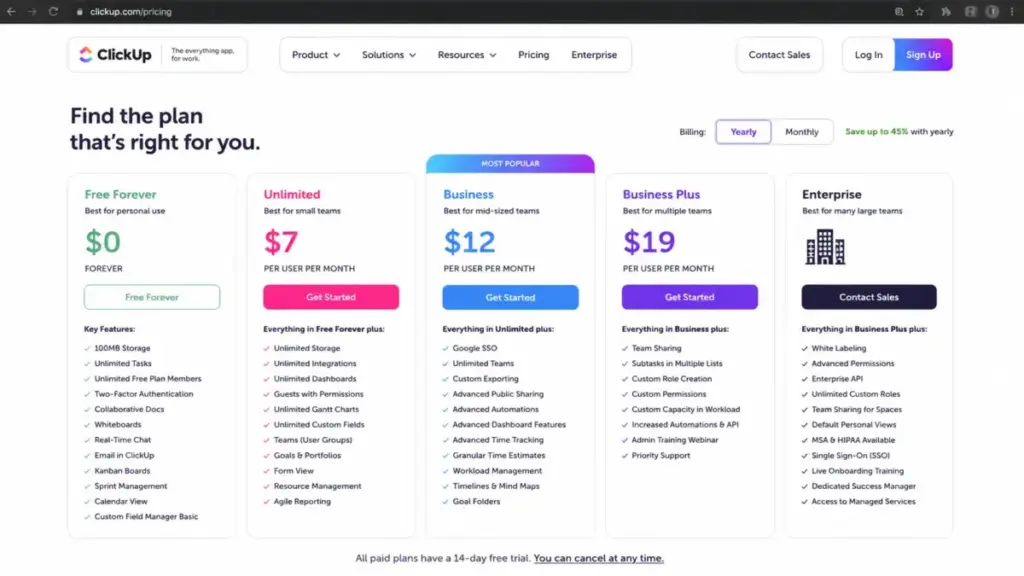
ClickUp replaces Airtable when the team needs tasks, docs, goals, time tracking, dashboards, and project portfolio execution in one workspace, at a lower starting price than most competitors.
Pricing starts at $7/user/month billed yearly for Unlimited (as of June 2026). Business starts at $12/user/month billed yearly. A free forever plan is available. For 10 users on Unlimited, cost is $70/month, which is $130/month less than Airtable Team.
ClickUp does better than Airtable in breadth of project management features at a low price. The tradeoff: ClickUp is not designed for relational database-style app building. If you need linked records, interfaces, and relational views, ClickUp will not match Airtable depth.
Best for:
- 5-20 person teams leaving Airtable because they need task management, goals, time tracking, and portfolio execution
- Budget-conscious teams that want the broadest feature set per dollar
Avoid if: Your use case is relational database workflows, inventory tracking, or custom app building. AI is separately priced.
Migration difficulty: Medium. Task and project data imports are supported, but Airtable’s relational data model does not translate to ClickUp’s hierarchy of Spaces, Folders, and Tasks.
I keep coming back to one observation after reviewing the ClickUp platform analysis: ClickUp tries to do everything. For teams leaving Airtable because of missing project execution features, that breadth is the point. For teams leaving Airtable because of database complexity, ClickUp adds a different kind of complexity.
Smartsheet: Best Spreadsheet-Style Portfolio Management Alternative

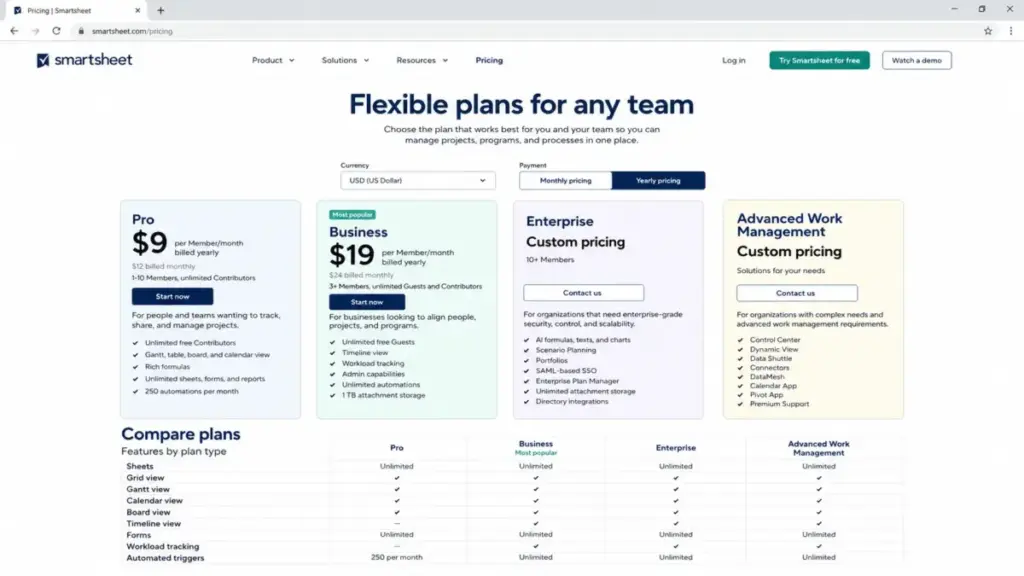
Smartsheet replaces Airtable for operations, PMO, and portfolio teams that want spreadsheet-style views with enterprise project controls, workload management, and governance. For a deeper look at the full platform, see the Smartsheet review and analysis.
Pricing starts at $9/member/month billed annually for Pro (as of June 2026). Business starts at $19/member/month billed annually. A free trial is available. For 10 users on Pro, cost is $90/month. On Business, $190/month.
Smartsheet does better than Airtable in enterprise governance, portfolio management, Gantt charts, and compliance controls. The tradeoff: less natural for relational, app-like databases.
Best for:
- 15-50 person PMO or operations teams that need portfolio reporting, workload tracking, and admin governance
- Enterprise teams with compliance requirements
Avoid if: Your team is under 10 people and does not need portfolio-level features. Data Shuttle, Calendar App, DataMesh, Pivot App, and connectors are add-ons or plan-gated, which adds hidden cost.
Migration difficulty: Medium to High. Spreadsheet data transfers easily, but relational database structures, interfaces, and automations need reconfiguration. Pro is limited to 1-10 members.
Alternatives That Fix the Docs-Plus-Database Problem
Coda: Best Docs Plus Databases Replacement

Coda replaces Airtable when the use case is part database, part doc, part lightweight app, and the team wants fewer paid seats than total collaborators.
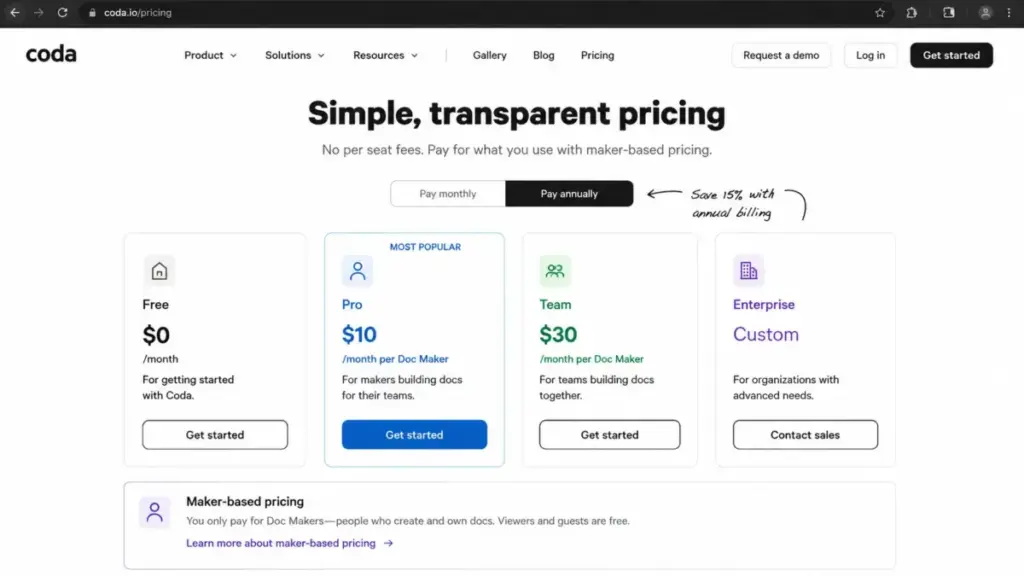
Pricing: Pro starts at $10/month per Doc Maker (as of June 2026). Team starts at $30/month per Doc Maker. A free plan is available. For 10 users where all 10 are Doc Makers, the Pro cost is $100/month. If only 1 user is a Doc Maker and 9 are editors or viewers, the cost drops to $10/month.
Coda does better than Airtable in maker-based billing, which can dramatically reduce cost when many people view or edit but few people create. The tradeoff: Coda is docs-first, so highly relational Airtable databases need restructuring to fit the Coda model.
Best for:
- 10-20 person content or operations teams where 2-3 people build docs and databases, and the rest use them
- Teams that want docs, tables, buttons, formulas, and automations in one workspace
Avoid if: Your team has 10+ Doc Makers. At that point, Coda’s per-maker pricing advantage disappears. Advanced Packs add cost per Doc Maker.
Migration difficulty: Medium. Table data can be imported, but Airtable’s relational model needs rethinking around Coda’s doc-centric structure.
Notion: Best Wiki and Lightweight Database Workspace

Notion replaces Airtable for teams moving to a combined wiki, docs, project pages, and simple database workspace. It is not a full relational database replacement, but for teams whose Airtable usage is lightweight, Notion consolidates multiple tools.
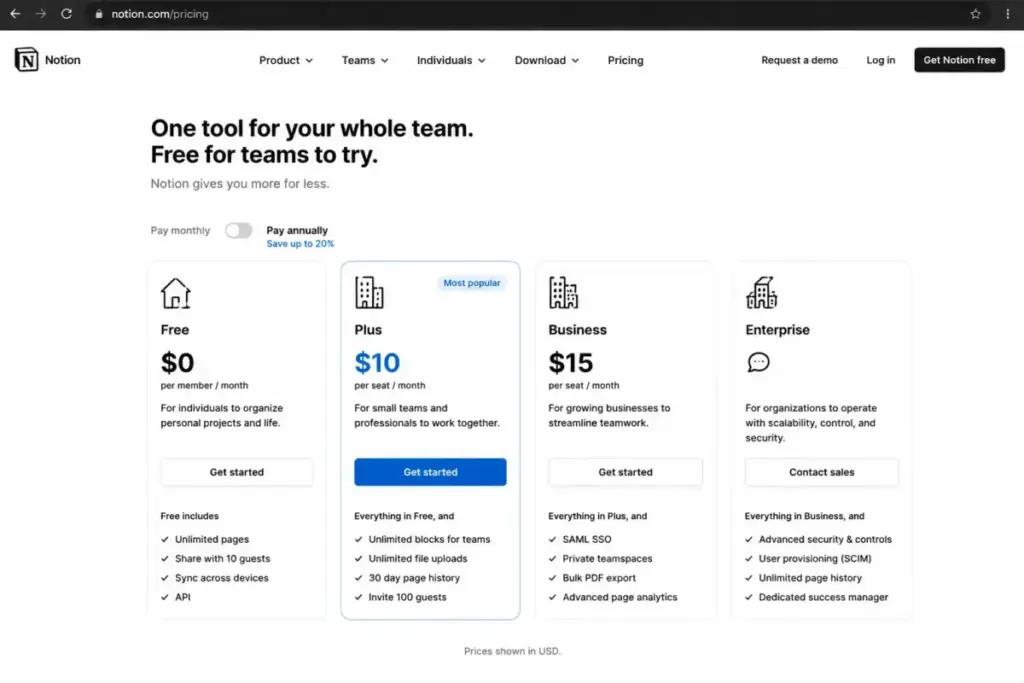
Pricing: Plus is listed at $10/seat/month in US pricing results (as of June 2026). Business is $20/seat/month. A free plan is available. For 10 users on Plus, cost is $100/month.
Notion does better than Airtable in docs, wiki pages, and flexible workspace design. The tradeoff: Notion databases are not a replacement for complex relational Airtable apps with multiple linked tables and calculated fields.
I reviewed the Notion platform in our full evaluation and found the same pattern: Notion works well until the database gets complex. If your Airtable base has five or more linked tables with rollup fields, Notion will not replace it. If your Airtable base is mostly flat tables with views and forms, Notion handles that and adds docs on top.
Best for:
- 5-15 person teams that use Airtable for simple lists, trackers, and wikis rather than complex relational apps
- Teams consolidating docs, databases, and project pages into one tool
Avoid if: You rely on complex relational structures, calculated fields, or Airtable’s interface builder. Free uploads are limited to 5 MB per file. Advanced governance requires paid plans.
Migration difficulty: Low to Medium. CSV import handles flat data well. Relational links need manual rebuild.
Google Sheets: Best Free Familiar Spreadsheet Fallback

Google Sheets is not an Airtable replacement in the database sense. It is a spreadsheet. But for small teams that do not need relational databases and mainly want fast collaboration and familiar formulas, Google Sheets is the lowest-friction option.
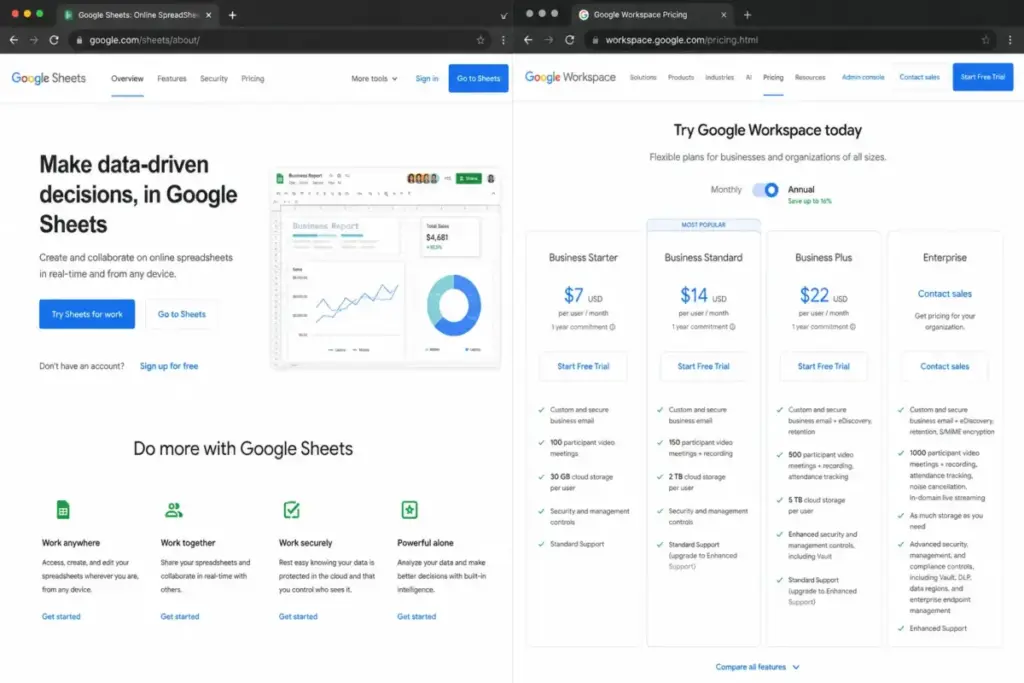
Pricing: Free with a Google Account (as of June 2026). Google Workspace Business Starter is $7/user/month on annual plan for managed business accounts. For 10 users, cost is $0 on free consumer accounts or $70/month on Workspace Business Starter.
Google Sheets does better than Airtable in adoption friction and broad familiarity. Everyone already knows how to use it. The tradeoff: Google Sheets is not a structured relational database, does not have built-in forms with record linking, and lacks automation patterns without add-ons or custom development.
Best for:
- 2-5 person teams that do not need Airtable’s relational database features and want zero learning curve
- Teams already on Google Workspace that need basic collaborative data tracking
Avoid if: Your workflow depends on relational record linking, views beyond grid, or automation. Workspace billing applies for business account management. Database-style features need add-ons.
Migration difficulty: Low. Airtable exports to CSV. Google Sheets imports CSV natively.
Airtable Alternatives Pricing Comparison at 10 Users
| Product | Starting price | 10-user cost (annual billing) | 10-user cost (monthly billing) | Free plan | Billing basis |
|---|---|---|---|---|---|
| Airtable | $20/user/month (Team annual) | $200/month | $240/month | Yes | Per user |
| SmartSuite | $15/seat/month (Team annual) | $150/month | $200/month | Yes | Per seat |
| Baserow | $10/user/month (Premium yearly) | $100/month | $120/month | Yes | Per user |
| NocoDB | $12/seat/month (Plus annual) | $108/month (pay-for-9 cap) | $135/month | Yes | Per editor, 9-cap on Plus/Business |
| Stackby | $4.20/user/month (Economy annual promo) | $42/month (promotional) | $100/month (FAQ monthly rate) | Yes | Per editor/creator |
| Coda | $10/month per Doc Maker (Pro) | $100/month (all 10 as Makers) | Varies | Yes | Per Doc Maker |
| Notion | $10/seat/month (Plus US) | $100/month | Varies | Yes | Per seat |
| monday work management | $9/seat/month (Basic annual) | $90/month | Varies | Yes | Per seat |
| ClickUp | $7/user/month (Unlimited yearly) | $70/month | Varies | Yes | Per user |
| Smartsheet | $9/member/month (Pro annual) | $90/month | $120/month | Trial only | Per member |
| Google Sheets | Free / $7/user/month (Workspace) | $0 or $70/month | $84/month (flexible) | Yes (consumer) | Free consumer or per user |
What this means: At 10 users on the lowest paid plan, Airtable is the most expensive database-first option at $200/month. ClickUp ($70/month) and Google Sheets ($0-$70) are the cheapest. For a detailed cost breakdown, see the ClickUp pricing and plan comparison. NocoDB’s pay-for-9 cap makes it the best value for teams with 10+ editors at $108/month. Stackby’s promotional annual rate of $42/month is the lowest, but the monthly rate is higher and the promotional pricing needs verification at purchase.
Pricing verified June 2026. Check each product’s official pricing page for current rates, as plans and pricing change.
Key Feature Differences at a Glance
| Alternative | Relational database | Self-hosted option | Built-in docs/wiki | Project execution | Maker-only billing |
|---|---|---|---|---|---|
| SmartSuite | Yes | No | No | Partial | No |
| Baserow | Yes | Yes | No | No | No |
| NocoDB | Yes | Yes | No | No | Yes (9-cap) |
| Stackby | Partial | No | No | No | No |
| monday work management | No | No | Partial | Yes | No |
| ClickUp | No | No | Yes | Yes | No |
| Smartsheet | No | No | No | Yes | No |
| Coda | Partial | No | Yes | Partial | Yes |
| Notion | Partial | No | Yes | Partial | No |
| Google Sheets | No | No | No | No | N/A |
Feature Gate Summary by Lowest Paid Plan
| Alternative | Automations included | API access | Admin/permissions | Row/record limits (lowest paid) |
|---|---|---|---|---|
| SmartSuite | Team: 5,000 actions/month | Team and above | Team and above | 5,000 per solution (Team) |
| Baserow | Premium and above | Premium and above | Premium and above | Unlimited databases (Premium) |
| NocoDB | Plus and above | Plus and above | Plus and above | 50,000 records (Plus) |
| Stackby | Economy and above | Economy and above | Business and above | Per plan, check official page |
| monday work management | Standard and above (not Basic) | Standard and above | Standard and above | Unlimited items |
| ClickUp | Unlimited and above | Unlimited and above | Unlimited and above | Unlimited tasks |
| Smartsheet | Pro and above | Business and above | Business and above | 20,000 rows/sheet (Pro) |
| Coda | Pro and above | Pro and above | Team and above | 10,000 rows (Pro) |
| Notion | Plus and above | Plus and above | Business and above | Unlimited blocks (Plus) |
| Google Sheets | Via Apps Script | Via Apps Script | Workspace plans | 10 million cells/spreadsheet |
How to Choose the Right Airtable Alternative
Start with the reason you are leaving. That single decision filters the list from ten options to two or three.
If cost is the driver: Compare the 10-user cost column above. ClickUp, Stackby, and Google Sheets offer the lowest entry points. NocoDB’s editor cap benefits teams above 9 editors.
If record or API limits are the problem: Baserow (unlimited databases on paid), NocoDB (50,000 records on Plus), and SmartSuite (5,000 per solution on Team, more on higher plans) address this directly.
If you need self-hosting or data control: Only Baserow and NocoDB offer self-hosted deployment. No other tool on this list does.
If Airtable feels like the wrong tool category: monday work management, ClickUp, and Smartsheet are project execution tools. Notion and Coda are docs-first workspaces. Pick the category that matches your actual workflow. If you are specifically looking for monday.com alternatives and options, that is a separate comparison.
If the billing model is wrong: Coda’s Doc Maker billing, NocoDB’s pay-for-9 cap, and Google Sheets’ free access each solve the “too many seats” problem in different ways.
I call this the Category-First Filter: decide whether you need a database replacement, a project execution tool, or a docs workspace before comparing features. Comparing SmartSuite to monday work management is like comparing a spreadsheet to a task board. Both work, but they solve different problems.
Which Airtable Alternative Should You Avoid?
Every tool on this list has a scenario where it is the wrong pick. Here is where each one fails.
| Alternative | Avoid if… |
|---|---|
| SmartSuite | You only need a simple spreadsheet-database without workflow features, or your data exceeds 5,000 records per solution on Team |
| Baserow | Your team is nontechnical and needs a fully managed, polished experience without self-hosting complexity |
| NocoDB | You are nontechnical and need plug-and-play simplicity, or you need external database connections but only want the Plus plan |
| Stackby | You need enterprise permissions, high row counts, or a large integration marketplace |
| Coda | All 10+ team members build docs and databases (Doc Maker billing loses its advantage when everyone is a maker) |
| Notion | Your Airtable base has 5+ linked tables with rollups and calculated fields that require true relational database depth |
| monday work management | Your core need is relational database design and flexible schema, not project tracking |
| ClickUp | You need Airtable-style relational data modeling, not task and project management |
| Smartsheet | Your team is under 10 and does not need portfolio management, governance, or enterprise controls |
| Google Sheets | Your workflow depends on relational record linking, views beyond grid, automation, or built-in forms with database structure |
What this means: No single tool replaces Airtable for every use case. The worst migration is switching to a tool that solves a problem you do not have while ignoring the one you do.
The Alternative Nobody Mentions: Staying Put
Airtable is still the right choice for some teams. Consider staying if:
- Your team already has complex relational bases with linked records, rollups, interfaces, and automations that work. Rebuilding that structure in another tool costs weeks of configuration time and carries data migration risk.
- You are on the Business plan and use advanced permissions, sync features, or enterprise controls. Most alternatives on this list do not match Airtable’s permission granularity until their higher tiers.
- Your team’s Airtable usage is genuinely database-first, not project-management-first or docs-first. Switching to a project management tool because it is cheaper means losing the relational data model that Airtable handles best.
- You rely on the Airtable marketplace, extensions, or third-party integrations that do not exist on smaller platforms.
The honest question: is the frustration about price, limits, or fit? If it is price, compare 10-user costs. If it is limits, check whether the alternative raises those limits. If it is fit, switch categories entirely. Some tools on this list are closer to top team collaboration tools than database replacements, and knowing the category saves a bad migration.
A verified Capterra reviewer wrote, “There is no customer service at all!” If support responsiveness is the trigger, verify support channels and SLA commitments for any alternative before migrating.
Migration Risk Assessment
| Alternative | Difficulty | Main risk | What transfers easily | What needs rebuilding |
|---|---|---|---|---|
| SmartSuite | Medium | Automation and interface reconfiguration | Table structures, record data | Automations, views, permissions |
| Baserow | Medium | Self-hosted setup complexity | Table data via CSV | Relational links, views, advanced sharing |
| NocoDB | Medium to High | External database connection setup | CSV data, basic table structure | Database connections, views, automations |
| Stackby | Low to Medium | Lower plan limits than Airtable | Basic table data, CSV import | API connector setup, automation rules |
| Coda | Medium | Restructuring relational model to docs-first | Table data import | Relational links, Airtable-style views |
| Notion | Low to Medium | Limited relational database depth | CSV flat data, wiki content | Linked records, rollups, calculated fields |
| monday work management | Medium | Loss of relational data model | Board structure from grids | Database relationships, relational views |
| ClickUp | Medium | Different data hierarchy (Spaces/Folders/Tasks) | Task and project data | Relational data model, database views |
| Smartsheet | Medium to High | Add-on cost for advanced features | Spreadsheet data, Gantt charts | Relational structures, Airtable interfaces |
| Google Sheets | Low | No database features at all | CSV export/import | Everything database-related |
What this means: No Airtable migration is zero-effort unless you are moving to Google Sheets with flat data. Teams that rely heavily on automations should understand what workflow automation involves before comparing automation features across tools. For any database-first alternative (SmartSuite, Baserow, NocoDB), budget 2-4 weeks for a 10-person team to rebuild automations, views, and permissions. For project execution tools (monday, ClickUp, Smartsheet), accept that the relational data model will not transfer.
Migration difficulty is an editorial estimate based on data model complexity, workflow rebuild effort, integration requirements, and setup depth. Teams with fewer than five connected automations will have an easier time. Teams with 20+ automations and multiple linked bases should budget extra configuration weeks regardless of the destination tool.
Final Verdict: Best Airtable Alternative for Most Teams
SmartSuite is the safest Airtable alternative for most teams. It is the closest replacement in structure, preserves the database-first model, adds workflow management on top, and costs $50/month less at 10 users on the Team plan. Teams that liked Airtable’s approach but outgrew its limits or pricing will feel most at home in SmartSuite.
If cost is the primary driver and the team does not need deep relational features, ClickUp at $70/month for 10 users delivers the broadest feature set per dollar.
If self-hosting and data control matter, Baserow is the only viable open-source Airtable alternative at $100/month for 10 users.
If the team has 10+ editors and per-seat pricing is the blocker, NocoDB with its pay-for-9 editor cap changes the math at scale.
If the team needs docs and databases in one place and only a few people build the structure, Coda at $10/month per Doc Maker can be the cheapest option on this list.
Stay with Airtable if: the relational database is already built, working, and integrated. The cost of switching often exceeds the cost of staying.
Airtable Alternatives FAQ
What is the best alternative to Airtable?
SmartSuite is the best Airtable alternative for teams that want a similar database-first structure with more built-in workflow management. For 10 users on the Team plan, SmartSuite costs $150/month billed annually compared to Airtable’s $200/month. The right pick depends on whether the switching trigger is cost, limits, execution, or data control.
Is there a free alternative to Airtable?
Yes. Baserow, NocoDB, Stackby, Coda, Notion, monday work management, ClickUp, and Google Sheets all offer free plans. Free plans have limits on rows, records, storage, or features. Google Sheets is the most generous free option for basic spreadsheet workflows, but it lacks Airtable’s relational database structure.
What is the cheapest Airtable alternative for 10 users?
Google Sheets is free with a Google Account. Among database-style alternatives, Stackby’s promotional Economy annual rate puts 10 users at approximately $42/month. ClickUp Unlimited costs $70/month for 10 users billed yearly. NocoDB Plus costs $108/month with the pay-for-9 editor cap.
Is Baserow good enough to replace Airtable?
Baserow replaces Airtable well for technical teams that want an open-source, self-hosted database with an Airtable-like interface. It costs $100/month for 10 users on Premium. The gap is in polish for nontechnical users and advanced app-building depth. If your team can handle self-hosted setup, Baserow is a strong option.
Can Notion replace Airtable?
Notion can replace Airtable for lightweight database use cases like simple trackers, content calendars, and wiki-style knowledge bases. It cannot replace Airtable for complex relational databases with five or more linked tables, rollups, and calculated fields. Notion is docs-first with database blocks, not database-first.
Is monday.com similar to Airtable?
monday work management shares some visual similarities with Airtable, including board views and column-based data entry. The core difference: monday is built for project execution (tasks, timelines, workload, dashboards), while Airtable is built for relational database design. monday is a better choice for teams that need guided project tracking.
Which Airtable alternative has self-hosting?
Baserow and NocoDB are the only alternatives on this list that offer self-hosted deployment. Baserow is fully open-source with cloud and self-hosting options. NocoDB offers open-source deployment and connects to existing databases on its Business plan and above. No other tool on this list provides self-hosted options.
What should I use instead of Airtable in 2026?
Use SmartSuite if you want the closest Airtable replacement with better workflow features. Use Baserow or NocoDB if you need open-source or self-hosting. Use ClickUp or monday work management if you need project execution. Use Coda or Notion if you need docs and databases together. Use Google Sheets if you need the simplest, cheapest option for flat data.
Why do people leave Airtable?
Teams leave Airtable because of rising seat costs at scale, record and API limits on Free and Team plans, billing models that charge every collaborator, missing project execution features, limited self-hosting options, and the need to combine docs and databases in one workspace. The most common trigger for 10-person teams is the $200/month Team plan cost.
How much does Airtable cost for 10 users?
Airtable Team costs $200/month for 10 users billed annually, or $240/month billed monthly (as of June 2026). Airtable Business costs $450/month for 10 users billed annually. Enterprise Scale pricing is custom. Business features like advanced permissions and higher limits require the $45/user/month Business plan.