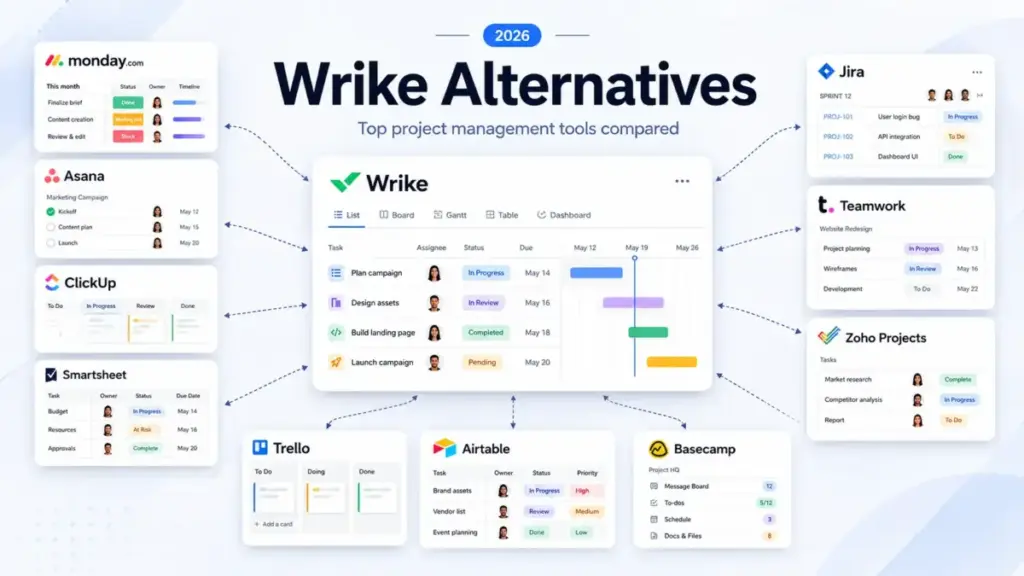
Your project manager just asked the same status update question for the third time today. That is the typical friction that drives growing teams to search for Wrike alternatives.
While Wrike is a mature, high-scale work management system, its complex configuration interfaces, steep learning curves, and sudden seat-pricing adjustments often make it hard to keep.
For teams trying to simplify their daily workflows, finding the right replacement means looking at best project management software options that match your actual scale.
Before you invest weeks into another platform migration, you must understand what project management actually involves for your specific business.
Switching tools will not solve your team’s workflow blockages if you replace Wrike with a system that has the same administrative burden.
This comparative guide breaks down the ten best alternatives for 2026 by practical cost, feature gates, and setup complexity.
Quick Verdict: Best Wrike Alternatives by Switching Trigger
Selecting a replacement depends on the specific frustration that made Wrike hard to use for your daily tasks.
| If you are leaving Wrike because… | Best alternative | Why |
|---|---|---|
| The learning curve is too steep | Asana | Visual timelines and clear task ownership structures |
| Cost predictability is a concern | ClickUp | Lower entry rates and unlimited task limits |
| The free plan is too restrictive | Trello | Generous Kanban board limits and simpler workflows |
| Client billing and retainers are key | Teamwork.com | Built-in utilization reports and time tracking tools |
| Software backlog planning is required | Jira | Native agile sprints, issue logs, and release boards |
| Spreadsheet-style grids are preferred | Smartsheet | Sheet-native calculations and portfolio dashboards |
| Advanced resource planning is needed | Smartsheet | Workload tracking grids and allocation planning sheets |
What this means: Do not switch to a tool just because it is popular in your industry. Choose your next platform based on the exact bottleneck, whether that is pricing, setup complexity, or specialized workflow needs.
The Wrike Problem Map
Teams look for alternatives when Wrike’s configuration overhead outweighs its performance. While Wrike is excellent for enterprise portfolio governance, its multi-layered database hierarchy requires constant admin management.
Reviewers on G2 and Capterra frequently note that Wrike is powerful but difficult to learn, offering too many configuration options for simpler teams. Onboarding a new team member often takes weeks of guided training. Plus, lower paid tiers block critical tools like custom fields, calendar views, and simple automation templates. This forces teams to upgrade to the expensive Business tier just to get standard project tracking.
| Wrike Core Strengths | Wrike Core Limitations |
|---|---|
| Strong Gantt chart planners and task dependency paths | Steep learning curve and complex setup interfaces |
| Built-in document approvals and proofing tools | Custom fields and automation are gated behind high tiers |
| Advanced resource management sheets on custom tiers | Rigid annual seat packages and minimum user blocks |
| Secure enterprise administration controls | High implementation fees for larger team deployments |
What this means: Wrike is built for large organizations with dedicated project management offices. If your team wants fast onboarding and simpler daily tracking, you will likely find Wrike’s administrative load too heavy. Read our detailed Wrike review to analyze its feature structures.
Alternatives That Fix Pain 1: Adoption Barriers and High Learning Curves
If your team is struggling to adopt Wrike, you need a visual tool that minimizes configuration time. These three alternatives prioritize clean user interfaces and fast setup.
monday work management: Best Wrike alternative for flexible operations teams

monday work management is the strongest alternative for teams that want a visual, flexible project workspace for marketing, operations, and cross-functional teams.
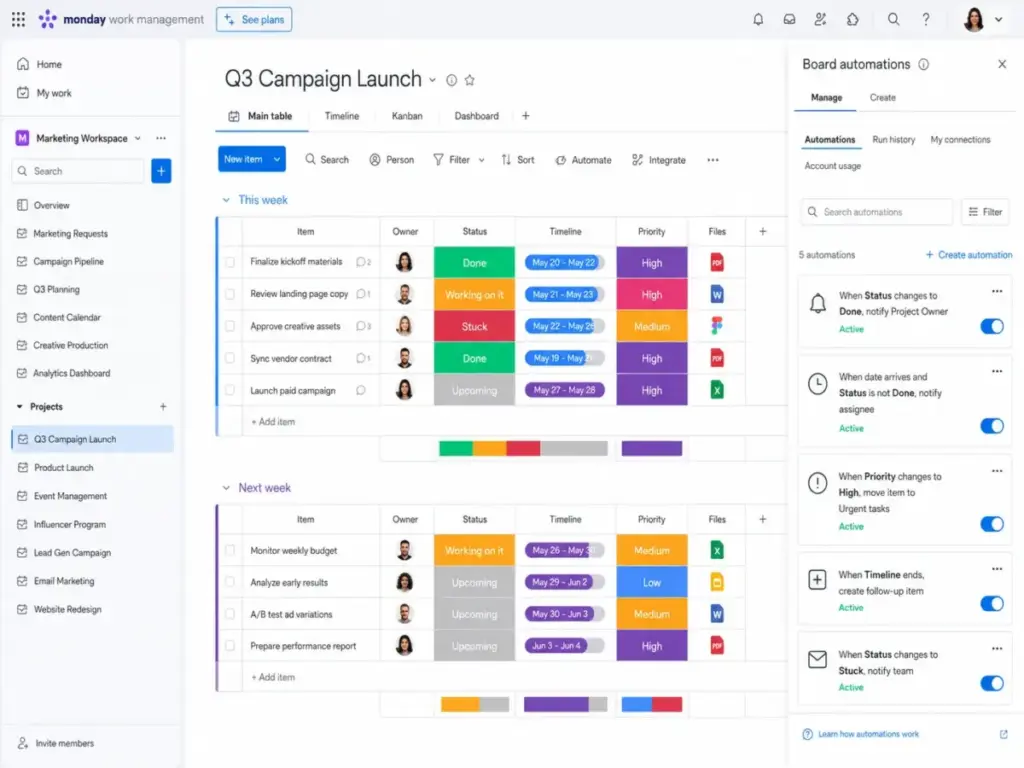
Based on the official monday.com cost analysis, pricing starts with a Free plan limited to two seats. The practical tier for growing teams is the Basic plan, which is priced at $9 per seat monthly billed annually (as of June 2026). Standard and Pro plans are commonly needed for automations and cross-board dashboards.
monday.com does better than Wrike by offering highly visual board views, customizable status labels, and a drag-and-drop workflow builder. Onboarding a team of ten takes less than a afternoon, as the interface feels like an interactive spreadsheet rather than a complex database.
The main tradeoff is that Wrike remains stronger for structured enterprise hierarchies and advanced portfolio governance. monday.com’s dashboards can feel cluttered when tracking hundreds of projects simultaneously. If that portfolio-governance tradeoff matters, compare monday.com alternatives by hierarchy depth, dashboard clarity at scale, resource governance, PMO reporting, and whether visual boards stay usable across hundreds of projects.
- Best for: 10-person operations teams that need visual task tracking and fast setup.
- Avoid if: You require deep Gantt chart dependencies and portfolio-wide resource balancing sheets.
- Migration difficulty: Medium. Importing spreadsheets is fast, but complex task hierarchies must be rebuilt.
Verdict: Choose monday work management if you want a visual workspace that team members can configure without admin support.
Asana: Best Wrike alternative for clean team adoption

Asana is the best choice for teams that like Wrike’s task structure but want a cleaner interface that encourages daily adoption.
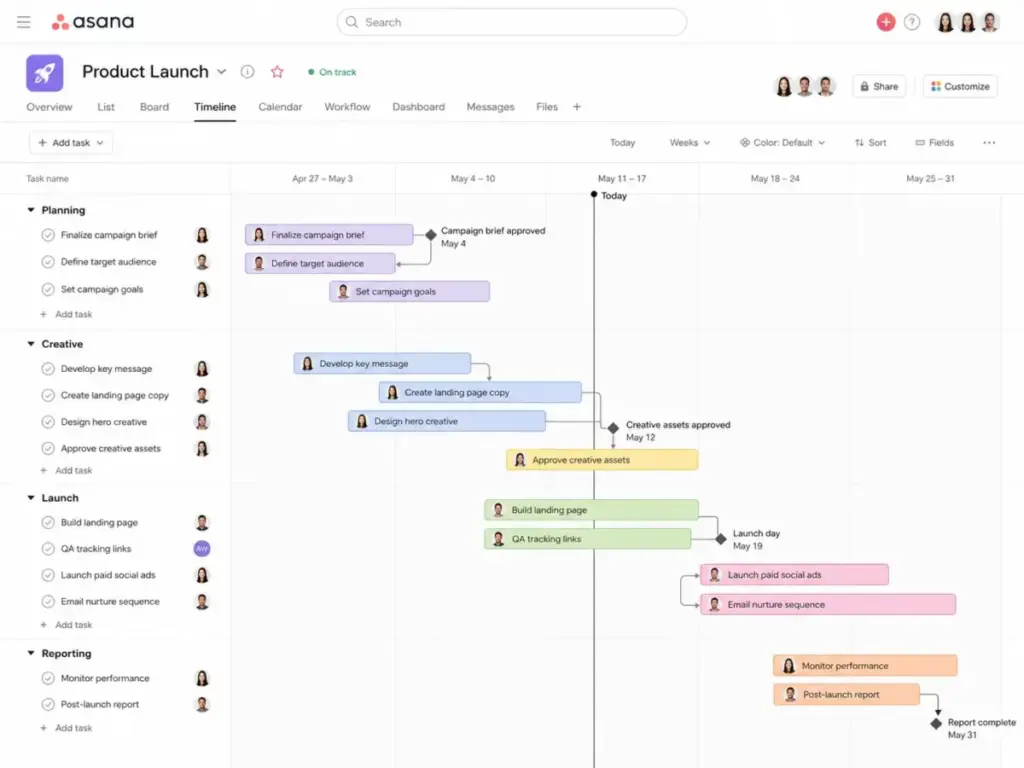
According to the official Asana pricing table, Asana offers a Personal free plan for up to two users. The practical tier for growing teams is the Starter plan, which costs $10.99 per user monthly billed annually (as of June 2026), or $13.49 monthly.
Asana does better than Wrike by focusing on clear task ownership, clean timelines, and simple goals. Its interface is designed to reduce notification noise, allowing team members to focus on their assigned tasks.
The tradeoff is that advanced budgeting and detailed resource planning require paid add-ons or custom enterprise packages. Asana can also become expensive as you scale past twenty users.
- Best for: Mid-sized creative teams that prioritize task ownership and clean timelines.
- Avoid if: Your team requires built-in financial budgeting and complex portfolio calculations.
- Migration difficulty: Low to Medium. Asana offers a direct Wrike importer tool that preserves basic task details.
Verdict: Choose Asana if your primary goal is to get your team to actually use the software daily. Check our Asana evaluation for detail.
ClickUp: Best Wrike alternative for feature depth on a lower starting price

ClickUp is the best option for budget-conscious teams that want all of Wrike’s advanced features at a fraction of the cost.
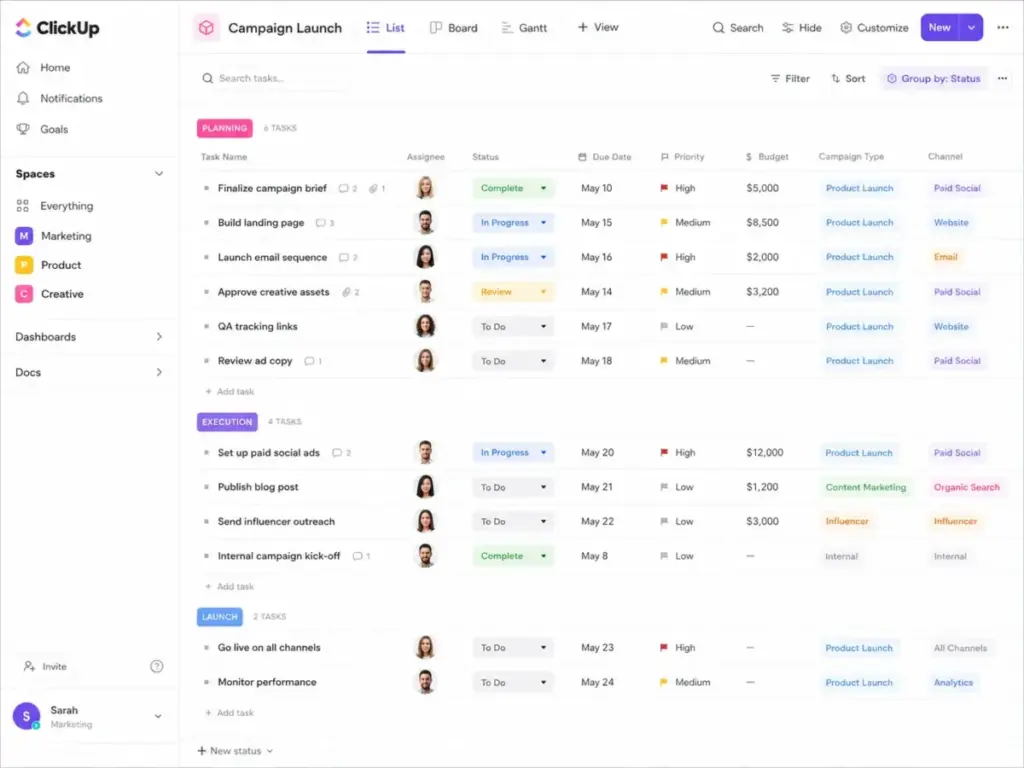
Based on the official ClickUp pricing plans, the practical tier is the Unlimited plan, which is listed at $7 per user monthly billed annually (as of June 2026). The Business plan costs $12 per user monthly billed annually.
ClickUp does better than Wrike by packaging document storage, goal tracking, dashboards, time tracking, and chat within a single platform. It offers many of Wrike’s advanced views without charging premium fees.
The main tradeoff is complexity. ClickUp’s vast feature list can make the interface feel dense. If you do not set up clear workspace rules, your team can easily get lost in custom options.
- Best for: Growing startups that need advanced task management tools on a strict budget.
- Avoid if: You want a simple, single-purpose checklist tool with zero configuration.
- Migration difficulty: Medium. Rebuilding complex automation rules and custom fields takes time.
Verdict: Choose ClickUp if you need enterprise-level features but want to control your software bill. Read our ClickUp pricing breakdown to compare tiers. Teams choosing ClickUp mainly for lower Wrike-like feature depth should also compare ClickUp alternatives by customization load, migration complexity, dashboard needs, and whether another tool controls cost with less workspace sprawl.
Alternatives That Fix Pain 2: Rigid Project Hierarchies and Spreadsheet Limits
If Wrike’s database structures feel too rigid or do not fit your specialized workflows, these three alternatives provide flexible, spreadsheet-style, or development-focused designs.
Smartsheet: Best Wrike alternative for spreadsheet-style project operations

Smartsheet is the best alternative for teams that manage projects as structured data and prefer a spreadsheet interface over task lists.
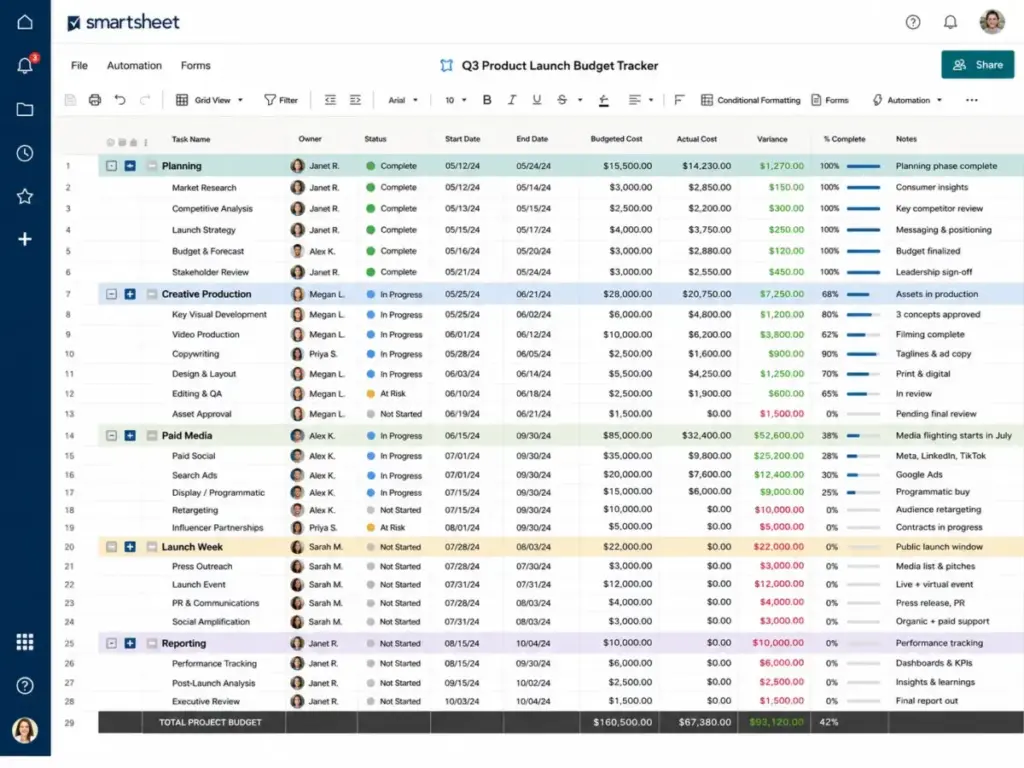
According to the official Smartsheet pricing page, the Pro plan is priced at $9 per member monthly billed annually (as of June 2026). The Business plan, which enables broader collaboration, is $19 per member monthly billed annually.
Smartsheet does better than Wrike by using a spreadsheet interface that supports formulas, cell links, and conditional formatting. It handles portfolio reporting, resource allocation, and budget tracking with high computational depth. If that spreadsheet depth is the draw, compare Smartsheet alternatives before replacing Wrike.
The main tradeoff is that Smartsheet has a high learning curve for non-spreadsheet users. It lacks the modern visual styling of visual-first project tools.
- Best for: PMO offices and operations teams that manage large budgets and complex data sheets.
- Avoid if: You want a visual task board that creative designers can easily use.
- Migration difficulty: High. Moving spreadsheets is simple, but rebuilding sheet formulas and automations requires design time.
Verdict: Choose Smartsheet if you want Wrike’s advanced reporting power but prefer a spreadsheet-based workspace. Check our Smartsheet review for detail.
Jira: Best Wrike alternative for software teams

Jira is the best choice for product and engineering teams that need a dedicated development workspace instead of a general project tracker.
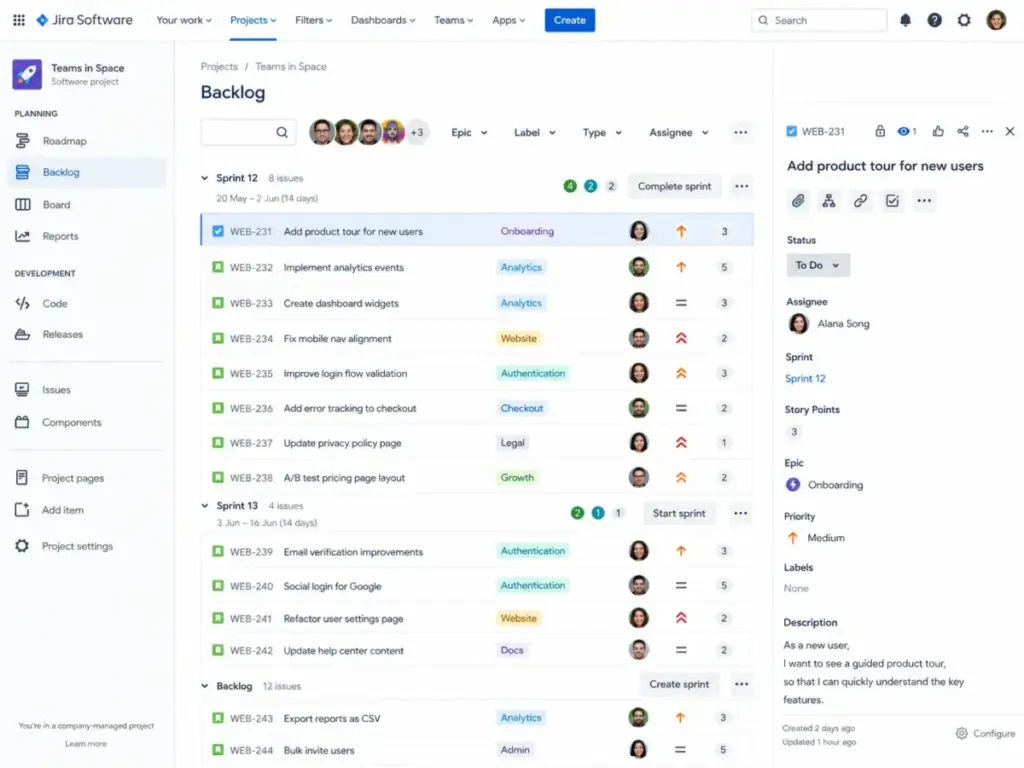
According to the official Jira pricing table, Jira offers a Free plan for up to ten users. Paid Standard pricing varies by seat count and should be confirmed using the Atlassian pricing calculator (as of June 2026).
Jira does better than Wrike by offering native agile workflows, sprint boards, bug tracking, and release planners. It integrates directly with developer repositories like GitHub and GitLab, linking code commits to specific tasks.
The main tradeoff is usability for non-technical departments. Jira is built for engineers. Marketing and sales teams often find its terminology and configuration options frustrating. If that usability gap matters, compare Jira alternatives by engineering depth, cross-department adoption, sprint planning, terminology load, and how much configuration each team can realistically own.
- Best for: Software development teams that run agile sprints and manage code releases.
- Avoid if: You are coordinating creative campaigns or general agency client work.
- Migration difficulty: High. Data mapping and sprint configurations require technical setup.
Verdict: Choose Jira if you are managing a software team and need to link project tasks to code commits. Read our detailed Jira review for setup advice.
Teamwork.com: Best Wrike alternative for client services

Teamwork.com is the best option for agencies, consultancies, and professional service teams that need to track time, budgets, and client profitability.
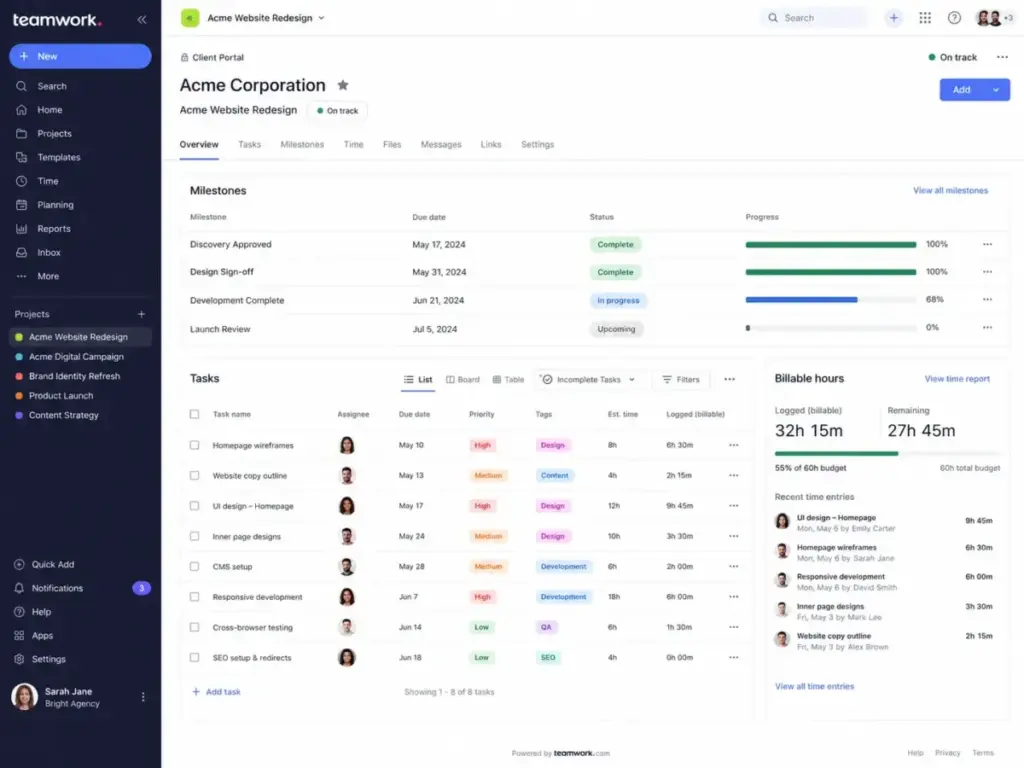
According to public pricing details, the entry-level Basics plan costs $9.99 per user monthly billed annually (as of June 2026). The Accelerate plan, which includes custom fields and retainers, costs $24.99 per user monthly billed annually.
Teamwork.com does better than Wrike by placing time tracking, client portals, billing rates, and retainer management at the center of the workspace. You can invite clients to collaborate on specific tasks at no additional cost. If client billing is not the priority, alternatives to Teamwork may fit better.
The main tradeoff is that Wrike fits general enterprise operations and internal PMOs better. Teamwork.com’s interface is specifically optimized for billable client work.
- Best for: 10-person agencies that need to track billable hours and share task lists with clients.
- Avoid if: Your team only manages internal projects and does not bill clients by the hour.
- Migration difficulty: Medium. Exporting spreadsheets is straightforward, but client permissions must be configured.
Verdict: Choose Teamwork.com if you want to track project profitability and collaborate directly with clients.
Alternatives That Fix Pain 3: Complex Pricing Tiers and Budget Unpredictability
Wrike’s annual commitments, user-seat packaging, and high pricing for custom fields can strain small business budgets. These three alternatives focus on transparent, simple, or low-cost pricing.
Zoho Projects: Best budget Wrike alternative
Zoho Projects is the best option for small teams that need Gantt charts, timesheets, and basic automation at a very low cost.
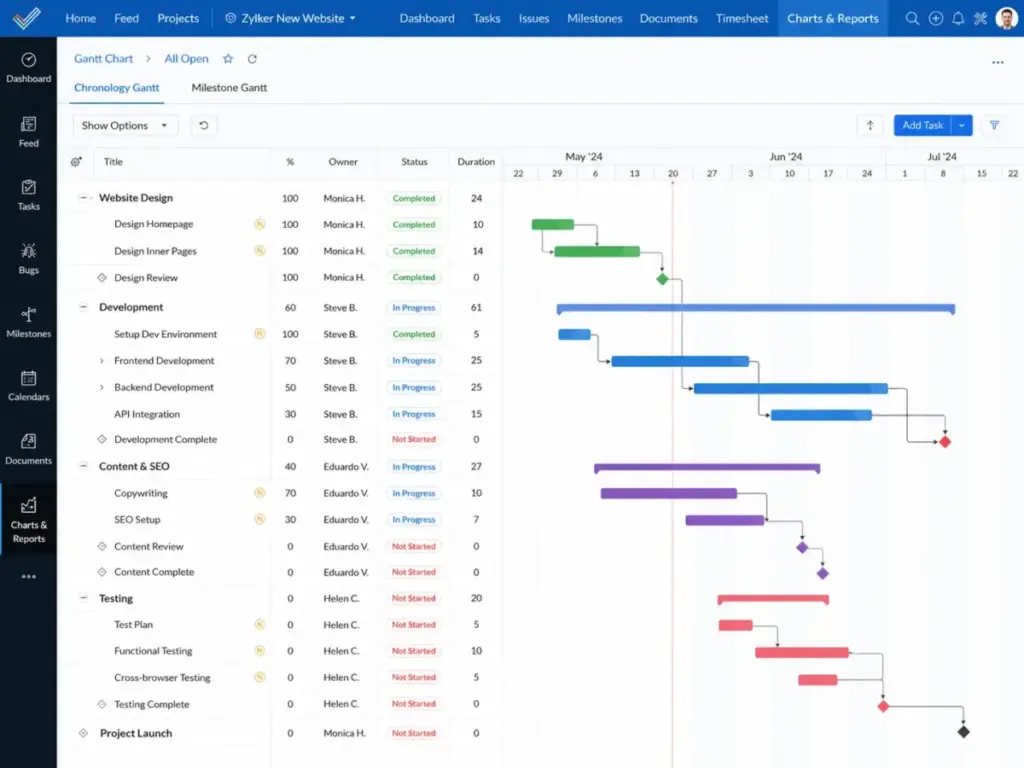
According to the official Zoho Projects pricing page, Zoho Projects offers a Free plan for up to five users. The practical tier is the Premium plan, which is commonly listed around $4 per user monthly billed annually (as of June 2026).
Zoho Projects does better than Wrike by providing Gantt charts, time tracking, custom fields, and task status rules on its entry plan. It offers a solid project management suite without expensive upgrades.
The main tradeoff is interface design. The user interface feels dated, and configuring workflow templates takes longer than in visual-first alternatives.
- Best for: Small teams that want timesheets and Gantt charts without a large monthly bill.
- Avoid if: You prioritize a modern visual interface and fast onboarding.
- Migration difficulty: Medium. Data imports are simple, but custom field rules require configuration.
Verdict: Choose Zoho Projects if you need Gantt charts and time logs on a tight budget.
Basecamp: Best Wrike alternative for simple team coordination

Basecamp is the best alternative for teams that want flat-rate pricing and a simple coordinate-and-chat space instead of complex project tracking tables.
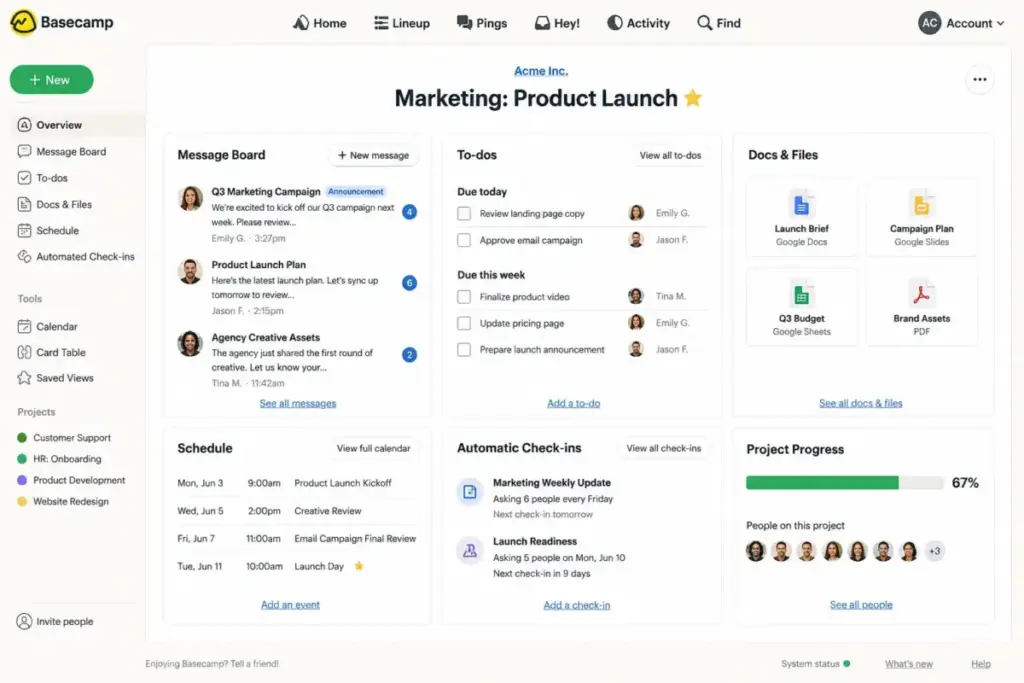
According to official Basecamp pricing, Basecamp Pro costs $15 per user monthly (as of June 2026), while the Pro Unlimited plan costs $299 monthly flat billed annually, covering unlimited users. A Free plan is available for one project.
Basecamp does better than Wrike by simplifying project communication. It replaces separate chats, files, and calendars with message boards, to-do lists, and document storage inside a single dashboard.
The main tradeoff is functionality. Basecamp lacks visual Gantt charts, workload balancing sheets, custom field calculations, and complex automations. If those features matter, compare Basecamp alternative tools before choosing simplicity.
- Best for: Distributed teams of 20+ people that want flat-rate pricing and simple coordination.
- Avoid if: You require custom database tables, task dependency tracking, or resource charts.
- Migration difficulty: Low. Rebuilding task lists is fast, as there are no complex fields to map.
Verdict: Choose Basecamp if you want to eliminate subscription escalations and only need simple task lists. Check our Basecamp evaluation for detail.
Trello: Best lightweight Kanban Wrike alternative

Trello is the best choice for small teams that want to replace Wrike’s complex project structures with simple Kanban boards.
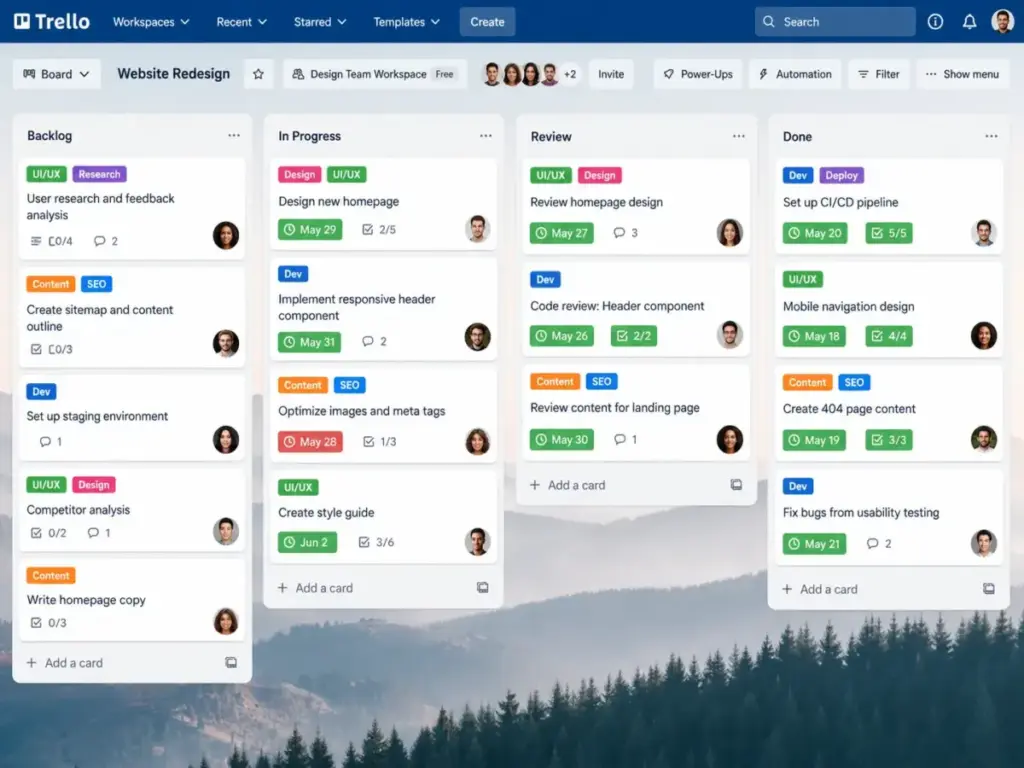
Based on official Trello pricing, Trello offers a Free plan with basic board limits. The practical tier for growing teams is the Standard plan, which is listed at $5 per user monthly billed annually (as of June 2026).
Trello does better than Wrike by focusing on drag-and-drop Kanban boards. It requires zero configuration, allowing team members to begin tracking tasks immediately without onboarding pipelines.
The tradeoff is reporting and scalability. Trello is built for task tracking. It lacks visual Gantt charts, workload sheets, and portfolio dashboards. Teams replacing Wrike with Trello should compare Trello alternatives before committing if the real requirement includes stakeholder reporting, workload visibility, or multi-project portfolio control.
- Best for: 5-person teams that only need to track tasks through simple Kanban stages.
- Avoid if: You manage complex dependencies, project budgets, or portfolio-wide resources.
- Migration difficulty: Low. Importing tasks to boards is quick and simple.
Verdict: Choose Trello if you want a simple task board that requires zero training. Read our Trello pricing breakdown to compare tiers.
Best Database-Driven Wrike Alternative: Airtable
If traditional project hierarchies feel too restrictive, a relational database tool might be the right fit.
Airtable: Best Wrike alternative for database-driven workflows

Airtable is the best alternative for operations teams that want to build custom database apps instead of using a standard task manager.
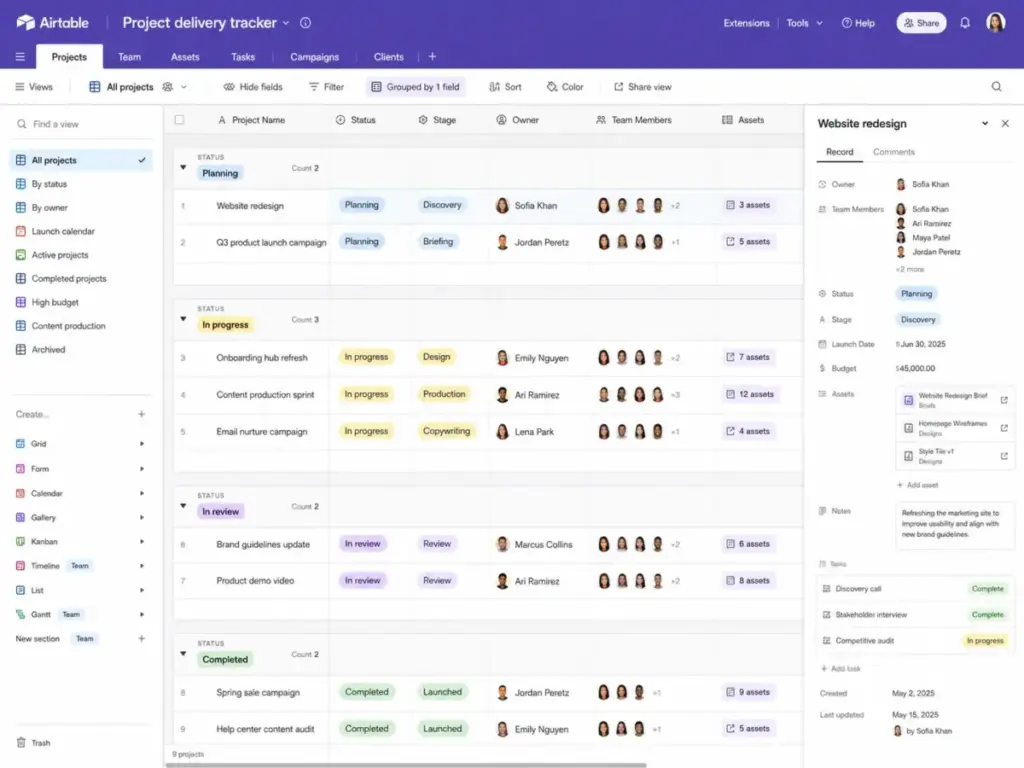
Based on the official Airtable pricing table, the Team plan is priced at $20 per user monthly billed annually (as of June 2026). A Free plan is available for basic bases.
Airtable does better than Wrike by allowing you to build custom relational databases. You can link tables, design custom input forms, configure automated email triggers, and build custom workspaces.
The main tradeoff is that Airtable requires manual design. It does not come with prebuilt task hierarchies, meaning you must build your project dashboards from scratch.
- Best for: Product and operations teams that manage content calendars, inventory, or custom data.
- Avoid if: You want a ready-to-use task manager that works immediately without database design.
- Migration difficulty: High. Mapping relational tables and rebuilding custom scripts requires design planning.
Verdict: Choose Airtable if your project management is actually a custom database workflow. Read our Airtable evaluation for details.
Pricing Comparison: Starting Price vs. Practical Tier
Sticker prices can be misleading. While many project tools advertise low entry rates, the plan that provides custom fields and automation often costs double or triple that starting price.
| Product | Starting Price | Practical Tier | 10-User Cost (Monthly) | Free Plan | Trial |
|---|---|---|---|---|---|
| Wrike | $10.00/user/month | Business ($25.00) | $250 | Yes | 14 days |
| monday.com | $9.00/seat/month | Standard ($12.00) | $120 | Yes | 14 days |
| Asana | $10.99/user/month | Starter ($10.99) | $109.90 | Yes | 30 days |
| ClickUp | $7.00/user/month | Unlimited ($7.00) | $70 | Yes | No |
| Smartsheet | $9.00/member/month | Pro ($9.00) | $90 | No | 30 days |
| Jira | Free (10 users) | Standard (Calculator) | Calculator | Yes | 7 days |
| Teamwork.com | $9.99/user/month | Basics ($9.99) | $99.90 | No | 30 days |
| Zoho Projects | Free (5 users) | Premium ($4.00) | $40 | Yes | 15 days |
| Basecamp | $15.00/user/month | Pro ($15.00) | $150 | Yes | 30 days |
| Trello | Free | Standard ($5.00) | $50 | Yes | No |
| Airtable | Free | Team ($20.00) | $200 | Yes | No |
Note: Pricing verified on June 1, 2026. Paid Jira Standard pricing requires official Atlassian calculator confirmation. Zoho Projects Premium cost is an estimate based on industry references.
What this means: At ten users, ClickUp ($70 monthly) and Trello ($50 monthly) offer significant savings compared to Wrike’s Business tier ($250 monthly). If you require advanced resource planning, Smartsheet ($90 monthly) provides strong features without premium pricing.
Feature Gate Comparison
Understanding where feature gates sit is key to choosing a budget-friendly alternative that still meets your workflow requirements.
| Product | Custom Workflows | Custom Fields | API Access | Multi-Pipelines | Gantt Charts |
|---|---|---|---|---|---|
| Wrike | Business | Business | Enterprise | Business | Team |
| monday.com | Standard | Basic | Basic | Basic | Standard |
| Asana | Starter | Starter | Starter | Starter | Starter |
| ClickUp | Unlimited | Unlimited | Unlimited | Unlimited | Unlimited |
| Smartsheet | Pro | Pro | Pro | Pro | Pro |
| Jira | Standard | Standard | Standard | Standard | Standard |
| Teamwork.com | Basics | Basics | Basics | Basics | Basics |
| Zoho Projects | Premium | Premium | Enterprise | Premium | Premium |
| Basecamp | No | No | Basic | No | No |
| Trello | Standard | Standard | Standard | Standard | Standard |
| Airtable | Team | Team | Team | Team | Team |
What this means: While ClickUp and Smartsheet provide custom fields on their entry paid tiers, Wrike restricts these essential tools to the $25 per user monthly Business plan. If your team relies on custom tracking fields, switching to ClickUp or Smartsheet can lower your subscription bill.
Migration Difficulty and Risk Assessment
Moving your project database is an operational risk. Rebuilding task templates and retraining team members requires planned timelines.
| Alternative | Migration Difficulty | Primary Technical Risk | Typical Timeline |
|---|---|---|---|
| monday.com | Medium | Dependency link breaks | 2–4 weeks |
| Asana | Low to Medium | Subtask mapping errors | 1–3 weeks |
| ClickUp | Medium | Custom field format loss | 2–4 weeks |
| Smartsheet | High | Grid calculation mismatches | 3–6 weeks |
| Jira | High | Agile workflow mismatches | 4–8 weeks |
| Teamwork.com | Medium | Client portal access loops | 2–4 weeks |
| Zoho Projects | Medium | Gantt dependency shifts | 2–4 weeks |
| Basecamp | Low | Custom field data loss | 1 week |
| Trello | Low | Board card card limits | 1 week |
| Airtable | High | Relational table breaks | 3–6 weeks |
Disclaimer: Migration difficulty is an editorial estimate based on data model complexity, workflow rebuild effort, integration requirements, and setup depth.
What this means: Migrating to Basecamp or Trello presents low technical risk but reduces your reporting power. Moving to Jira or Airtable requires a detailed data-mapping plan.
Which Wrike Alternative Should You Avoid?
Not every popular project tracker will fit your team’s workflow. Choosing the wrong tool can lead to low adoption rates and configuration errors.
- Avoid Smartsheet if your team members struggle with Excel. If they prefer visual boards, they will likely find Smartsheet’s grid interface frustrating.
- Avoid clickUp if you do not have dedicated workspace guidelines. Without rules, your team will likely create duplicate dashboards and custom fields, slowing down performance.
- Avoid Asana if you require heavy financial budgeting. Asana is built for task tracking, not balance sheet management.
- Avoid Zoho Projects if you want a polished interface. Zoho’s configuration options are deep, but its dated design can slow down daily adoption.
When to Stay with Wrike
You should not leave Wrike if you are managing a large enterprise PMO and rely on structured portfolio governance.
If your team is over fifty users, uses advanced Gantt chart dependencies, and requires custom workload balancing sheets, Wrike’s database is highly efficient. The platform handles complex, cross-project dependencies that break simpler tools. If you have already built custom approval integrations, the administrative time required to rebuild these in another platform will likely exceed any monthly subscription savings.
How to Choose the Right Alternative
To select your next work management tool, ask your team three clarifying questions:
- Who will configure the workspaces? If you do not have a dedicated admin, choose Asana or Trello to simplify setup.
- What is our budget limit? If you need to keep costs low, ClickUp Unlimited ($7/user/month) or Trello Standard ($5/user/month) provide the best value.
- Do we bill clients by the hour? If yes, choose Teamwork.com to get built-in time logs, client portals, and retainer management tools.
One thing I learned: review your custom statuses every quarter. Teams pile them up and forget, which breaks visual tracking and clutters pipelines.
Final Verdict: Best Wrike Alternative for Most Teams
For the majority of teams leaving Wrike because of complexity, Asana is the most balanced alternative. It simplifies task tracking, offers visual timelines, and speeds up daily onboarding.
- For budget-conscious teams: Choose ClickUp to get deep features for $7 per user monthly.
- For spreadsheet-heavy teams: Choose Smartsheet to manage projects as custom data grids.
- For software engineering teams: Choose Jira to run agile sprints and track code releases.
- For flat-rate pricing simplicity: Choose Basecamp to avoid user-seat pricing changes.
FAQs
What is the best alternative to Wrike?
Asana is the best alternative for most growing teams because it provides visual task management, clear timelines, and a clean interface that encourages team adoption.
What is the cheapest alternative to Wrike?
Trello Standard is the cheapest option, starting at $5 per user monthly when billed annually. It includes simple Kanban boards, checklists, and basic automation rules.
Does Wrike have a free plan?
Yes, Wrike offers a basic Free plan with limited task management, search filters, and file storage limits. Paid plans start at $10 per user monthly for the Team tier.
Can I migrate Wrike tasks to Asana?
Yes, Asana provides a direct importer tool that allows you to move Wrike projects, tasks, and descriptions into Asana projects using standard CSV files.
Why do teams switch from Wrike?
Most teams leave Wrike because of its high configuration complexity, steep learning curve, and the cost of upgrading to the Business tier just to get custom fields.
Is monday.com better than Wrike?
monday.com is better for creative and marketing teams that need visual task boards. Wrike is better for structured PMO offices that require complex portfolio calculations.
Which Wrike alternative has the best resource management?
Smartsheet has the best resource management tools, offering detailed workload grids, sheet formulas, and allocation sheets on its Pro and Business plans. If Smartsheet is your top pick for resource planning, compare alternatives to Smartsheet before making the switch.