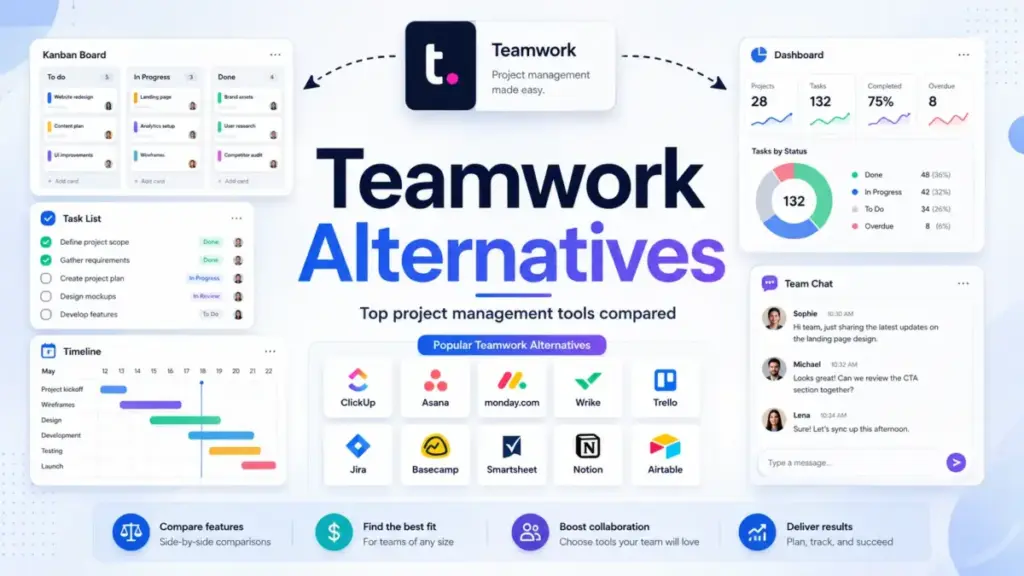
Teamwork.com handles client projects, time tracking, and profitability reporting in one place. It is still one of the strongest platforms for agencies that bill by the hour and manage retainers.
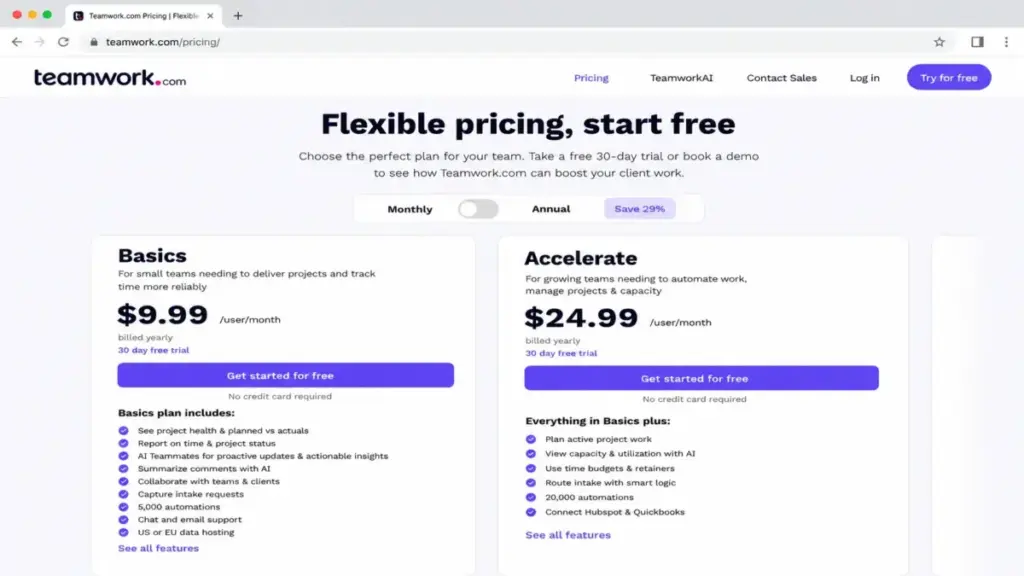
But the teams reaching out for best project management tools keep citing the same frustrations: setup takes too long, the interface buries simple tasks under layers of menus, and the jump from Basics at $9.99/user/month (as of June 2026) to Accelerate at $24.99/user/month hits harder than most agencies expect.
This guide compares 10 Teamwork alternatives by the exact reason you want to leave, not by which tool has the longest feature list.
I mapped each alternative to a specific switching trigger, verified pricing on official pages, calculated the real 10-user cost, and flagged hidden fees and migration difficulty so you can make a decision without a second round of research.
One finding stood out: the cheapest Teamwork alternative for 10 users costs $50/month. The most expensive costs $299/month. The gap between them is not about features. It is about what your team needs to replace.
Quick Verdict: Best Teamwork Alternatives by Switching Trigger
| If you are leaving Teamwork because… | Best alternative | Why |
|---|---|---|
| You want lower per-user pricing | ClickUp | Paid plans start at $7/user/month billed yearly, $30/month less than Teamwork Basics for 10 users |
| The interface feels too dense for daily tasks | Asana | Cleaner task management with stronger goal-to-task alignment and simpler onboarding |
| You need more configurable workflows | monday work management | Visual board-based workflow builder with more customization than Teamwork’s project structure |
| You need stronger reporting and PMO oversight | Smartsheet | Spreadsheet-style dashboards, portfolio rollups, and cross-team reporting |
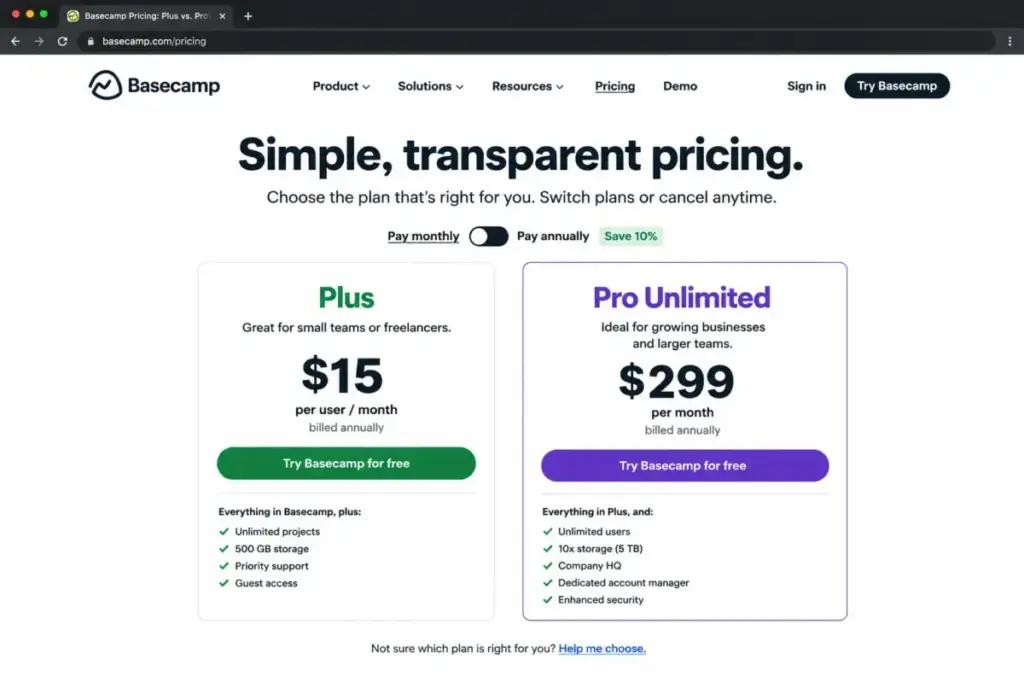
| You want flat pricing for many users | Basecamp | Pro Unlimited charges $299/month billed annually for unlimited users |
| Your team runs agile sprints, not client projects | Jira | Purpose-built agile boards, sprint planning, and cross-team dependency tracking on Premium |
| You mainly need docs, wikis, and lightweight tasks | Notion | Combines pages, databases, and forms in a flexible workspace without Teamwork’s service-delivery depth |
What this means: there is no single “best” Teamwork alternative. The right pick depends on whether you are leaving because of cost, complexity, reporting gaps, or a mismatch between Teamwork’s agency focus and your team’s actual workflows. I break down each scenario below.
How James Carter Evaluated These Alternatives
Every alternative in this guide was evaluated using official pricing pages, product documentation, and verified user review signals from G2 and Capterra. I did not hand-test each tool for this article, so I will not claim otherwise. What I did: cross-referenced pricing at the 10-user level, mapped feature gates by plan, assessed migration difficulty based on data model complexity and workflow rebuild effort, and checked where each alternative falls short compared to Teamwork’s client-delivery depth.
Pricing was verified on June 4, 2026. Plans, tiers, and add-on costs change, so check each official pricing page before committing.
After reviewing 35+ project management and collaboration tools, I have learned that the tool your team actually uses daily matters more than the tool with the longest feature list.
The Teamwork Problem Map
Teamwork is not a bad product. It is a product built for a specific workflow: agencies and service businesses that need time tracking, resource planning, client collaboration, and project profitability in one platform. The problems start when your team does not fit that profile, or when Teamwork’s depth becomes friction instead of value.
Problem 1: Cost Climbs Fast Beyond Basics
Teamwork’s free plan supports 5 users and 5 projects. The Basics plan starts at $9.99/user/month billed yearly, which puts a 10-person team at $99.90/month. That is reasonable.
But Basics lacks resource scheduling, retainer management, and capacity planning. Teams that need those features jump to Accelerate at $24.99/user/month, which costs $249.90/month for 10 users. The jump is $150/month for features that many service teams consider essential.
“the interface can feel slightly overwhelming at first due to the number of features packed into it.” — Verified Teamwork.com reviewer, G2
Problem 2: Interface Density Slows Down Simple Tasks
Teamwork packs project management, time tracking, budgets, client access, and reporting into one screen. For a project manager running a 20-person agency, that density is useful. For a 5-person marketing team that just needs task boards and deadlines, it is overhead.
“it might be very overwhelming to new users since it consists of so many features and settings.” — Verified Teamwork.com reviewer, G2
The setup and onboarding effort is a recurring complaint. Teams report spending more time configuring Teamwork than using it during the first two weeks.
Problem 3: Reporting Flexibility and Workflow Customization Gaps
Teamwork’s reporting is built around project health, time budgets, and profitability. That works for client-service delivery. But teams that need cross-functional dashboards, configurable workflow automations, or spreadsheet-style rollups hit a ceiling.
Operations teams, PMOs, and cross-departmental groups often outgrow Teamwork’s reporting before they outgrow its task management.
“the constant glitches got annoying and there were even days where it went down for long periods of time or commenting functions wouldn’t work” — Kayla R., Web Development Intern, Capterra
Alternatives That Fix the Cost Problem
ClickUp: Best Lower-Cost All-in-One Replacement

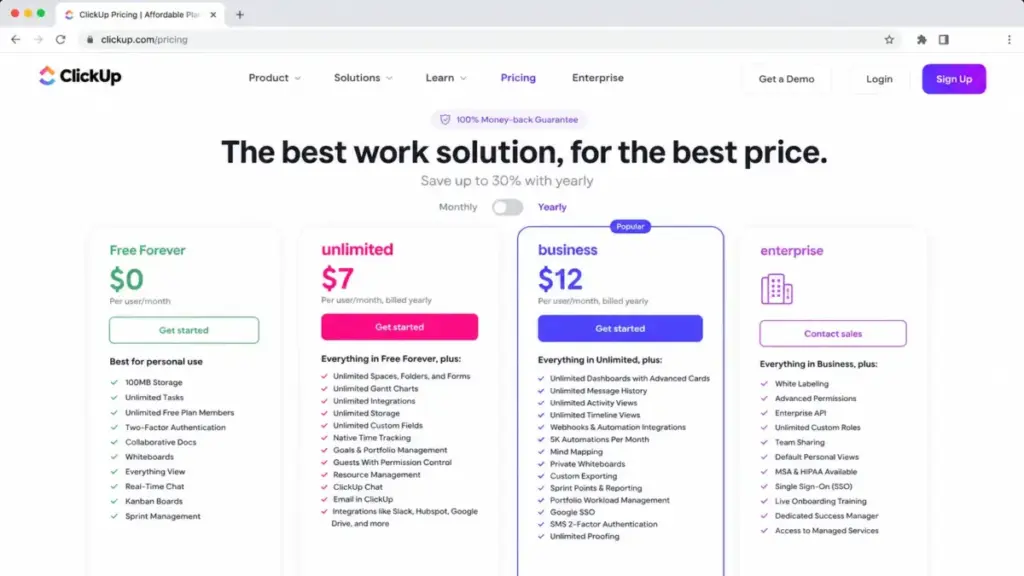
ClickUp is the strongest Teamwork alternative for teams leaving because they want more features at a lower per-user price.
ClickUp’s Unlimited plan costs $7/user/month billed yearly. For 10 users, that is $70/month, compared to Teamwork Basics at $99.90/month. The Business plan at $12/user/month ($120/month for 10 users) adds advanced automations, time tracking, and workload management.
ClickUp covers tasks, docs, dashboards, goals, native time tracking, forms, Gantt charts, and custom fields. The workspace structure (Spaces, Folders, Lists) gives more flexibility than Teamwork’s project hierarchy.
The tradeoff: ClickUp’s broad feature set creates its own setup complexity. Agencies that depend on Teamwork-style client profitability, retainers, and billable utilization tracking will need extra configuration or workarounds. AI features (ClickUp AI and Everything AI) are priced separately from the base plans.
Best for:
- 10-person cross-functional teams that want tasks, docs, and dashboards in one workspace
- Teams leaving Teamwork because of per-user cost
- Groups that value customization over simplicity
Avoid if:
- Your agency relies on native retainer management and billable-hour profitability reports
Migration difficulty: Medium. ClickUp supports CSV import and has integrations for common PM tools. Rebuilding custom workflows, automations, and folder structures takes planning.
Verdict: Choose ClickUp if you need more workspace flexibility at a lower price. The cost gap widens as teams scale. The ClickUp project management review covers the full feature breakdown.
Trello: Best Low-Cost Kanban Alternative

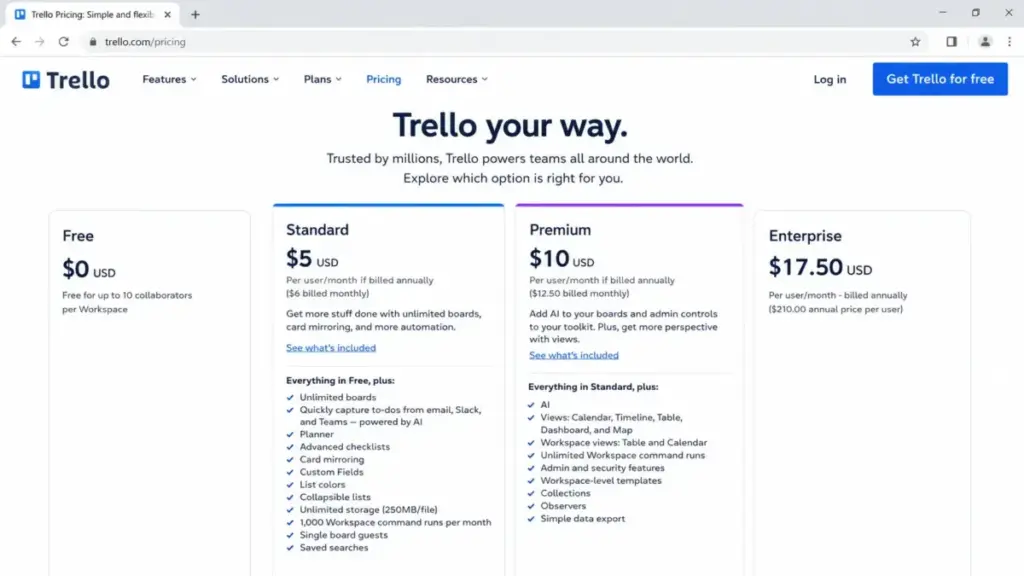
Trello is the simplest, cheapest Teamwork alternative for teams that mainly use task boards and want fast onboarding with minimal setup.
Trello’s Standard plan costs $5/user/month billed annually. For 10 users, that is $50/month, the lowest in this list. The free plan supports up to 10 collaborators per Workspace with unlimited cards but caps boards at 10 per Workspace.
Trello works for teams that manage simple task workflows through Kanban boards, checklists, and Power-Ups. The learning curve is close to zero.
The tradeoff: Trello is too basic for complex client projects, financial tracking, resource management, and delivery reporting. Premium at $10/user/month is needed for Timeline, Table, Dashboard, Map views, and AI features.
Best for:
- 5-person teams managing simple to-do lists and Kanban workflows
- Teams that find Teamwork too complex for their actual work
- Groups with a budget under $100/month for project management
Avoid if:
- You need time tracking, resource scheduling, or client-facing project portals
Migration difficulty: Low. Trello’s simple card-based system means less data to migrate, but you lose Teamwork’s project depth entirely. The Trello board-based task management review explains where it fits and where it falls short.
Jira: Best for Software and Agile Teams

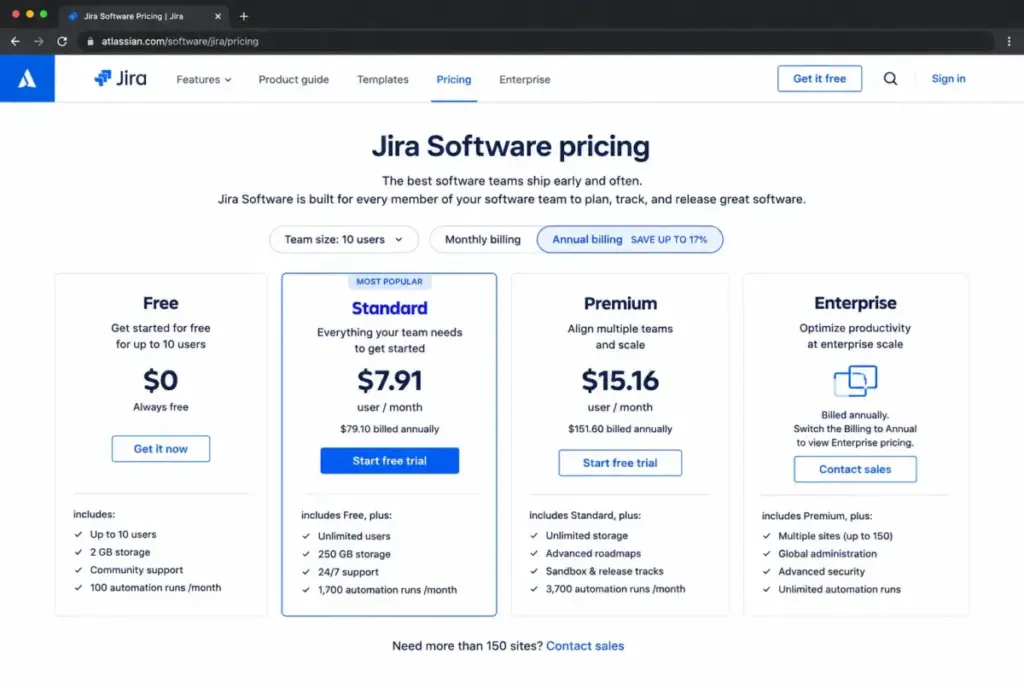
Jira is the best Teamwork alternative for software, product, and IT teams that need agile boards, sprint planning, and Atlassian ecosystem alignment.
Jira’s free plan covers up to 10 users with core agile features. The Standard plan costs $7.91/user/month, putting a 10-user team at $79.10/month (or $0 on the free tier if feature limits are acceptable).
Jira is purpose-built for agile delivery: Scrum boards, Kanban boards, backlogs, sprint planning, story points, epics, and Rovo AI features. Cross-team planning and dependency management are available on Premium at $14.54/user/month.
The tradeoff: Jira is designed for software workflows. Non-technical agency teams managing client deliverables, time budgets, and project profitability will find Jira unfamiliar and overly technical.
Best for:
- 10-person engineering teams running sprints and managing backlogs
- Product teams that need Confluence, Bitbucket, and Jira aligned
- Tech companies where developers are the primary users
Avoid if:
- Your team runs client-service projects, not software development
Migration difficulty: High. Jira’s data model (issues, epics, sprints, story points) is fundamentally different from Teamwork’s project-task-milestone structure. Rebuilding workflows, permissions, and reporting takes significant effort.
Alternatives That Fix the Complexity Problem
Asana: Best for Simpler Cross-Functional Task Clarity

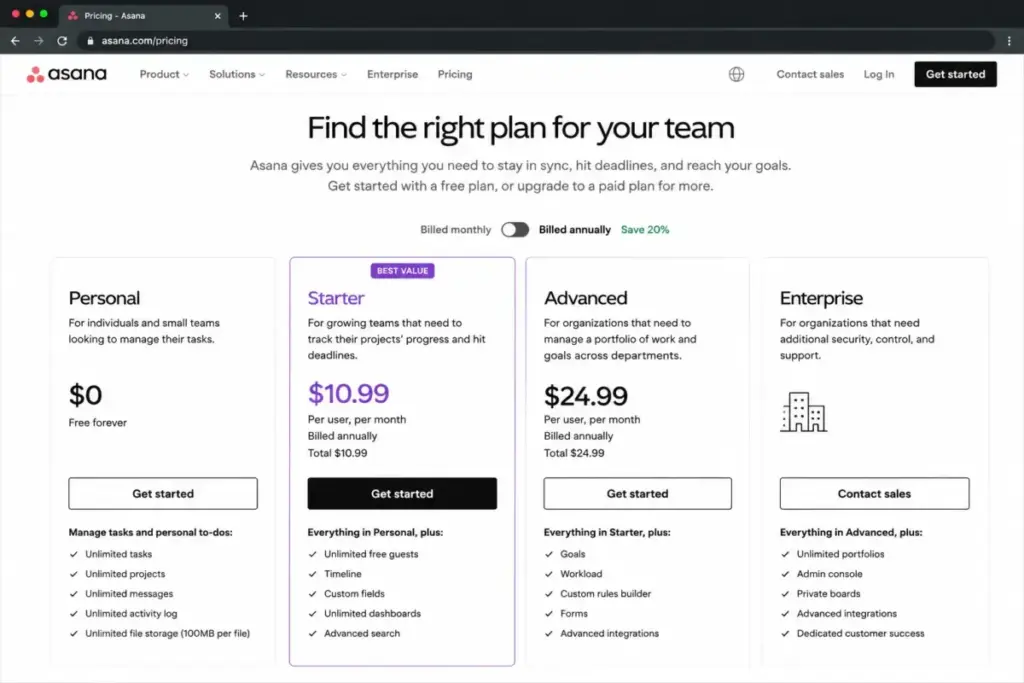
Asana is the strongest Teamwork alternative for teams that find Teamwork’s interface too dense and want cleaner task ownership, timelines, and cross-functional coordination.
Asana’s Personal plan is free. The Starter plan costs $10.99/user/month billed annually, putting 10 users at $109.90/month. That is $10/month more than Teamwork Basics, but Asana’s cleaner interface often means faster adoption.
Asana gives you projects, timelines, dependencies, custom fields, dashboards, and automation rules. Goal tracking aligns individual tasks to team objectives. The interface prioritizes clarity over density.
The tradeoff: Asana does not match Teamwork’s native client-service depth. Time tracking and budgets require the Timesheets and Budgets add-on at $5.99/user/month billed annually. That add-on brings the real 10-user cost to $169.80/month for task management plus time tracking, which is more expensive than Teamwork Basics.
Best for:
- 10-15 person marketing or operations teams that need task clarity without PM overhead
- Teams leaving Teamwork because the interface feels overwhelming
- Groups that prioritize clean UI and fast onboarding over financial reporting
Avoid if:
- Your agency bills clients by the hour and needs native time-to-invoice workflows
Migration difficulty: Low to Medium. Asana supports CSV import and has a clean project structure. The main rebuild effort is automation rules and custom fields. The Asana project management analysis explains where it wins and where it falls short compared to Teamwork.
Basecamp: Best Flat-Price Simple Collaboration

Basecamp is the best Teamwork alternative for teams that want fewer dashboards, fewer settings, and more straightforward project communication.
Basecamp Plus costs $15/user/month billed monthly. For 10 users, that is $150/month. But the Pro Unlimited plan charges a flat $299/month billed annually for unlimited users, no per-user fees.
For a 20-person team, Pro Unlimited drops the per-user cost to $14.95/month. At 30 users, it drops to $9.97. The flat pricing model is Basecamp’s strongest differentiator.
Basecamp gives you message boards, to-dos, Card Tables, Campfires (group chat), Pings (direct messages), scheduling, docs, and automatic check-ins. It is communication-first, not project-management-first.
The tradeoff: Basecamp is far less capable than Teamwork for resource planning, profitability tracking, automation, and granular project controls. Timesheet and Admin Pro Pack add-ons cost $50/month each on Plus. The free plan is limited to one project.
Best for:
- 15-30 person teams that want simple communication and task tracking with predictable monthly costs
- Async-first agencies that communicate through message boards, not Gantt charts
- Teams where per-seat pricing is a budget concern
Avoid if:
- You need resource scheduling, billable utilization tracking, or client-facing portals
Migration difficulty: Low. Basecamp’s simple structure means less data to move. The bigger adjustment is workflow: moving from Teamwork’s structured project management to Basecamp’s flat, conversation-centered approach. Read the Basecamp collaboration review for the tradeoffs.
Alternatives That Fix the Reporting and Workflow Flexibility Problem
monday work management: Best for Visual Workflow Customization

monday work management is the strongest Teamwork alternative for marketing, operations, and cross-functional teams that want highly visual boards, configurable automations, and dashboard-driven workflows.
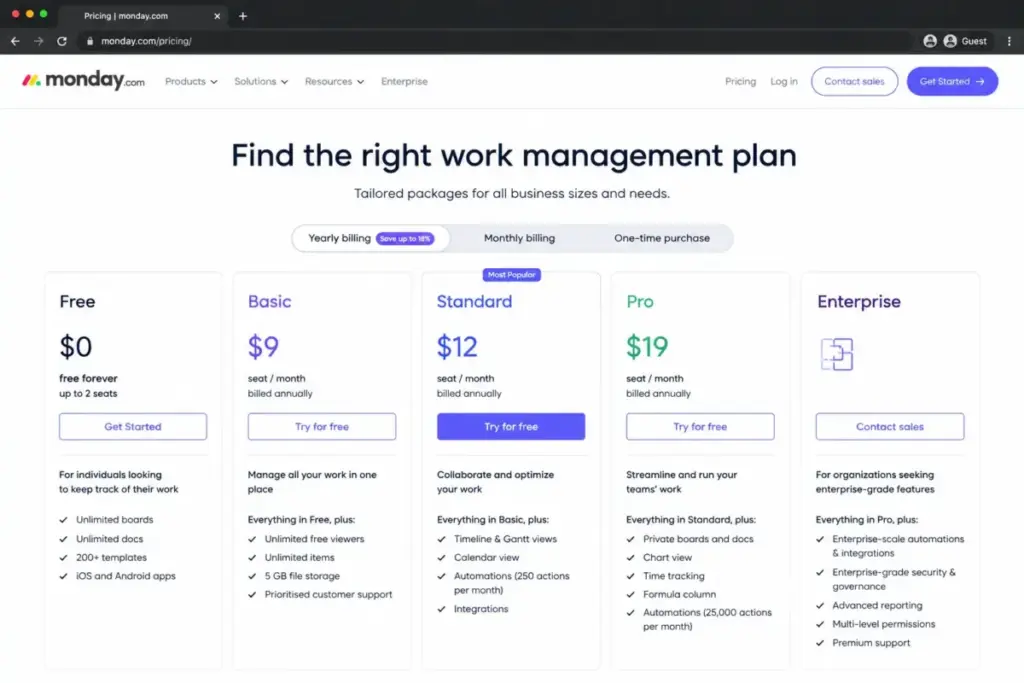
monday’s Basic plan starts at $9/seat/month billed annually. For 10 seats, that is $90/month. The Standard plan at $12/seat/month ($120/month for 10 seats) adds timeline, Gantt, and calendar views. The free plan covers up to 2 seats.
monday gives you boards, dashboards, Gantt, Kanban, timeline, calendar, automations, integrations, AI credits, forms, and templates. The visual workflow builder is more intuitive than Teamwork’s project setup for non-PM teams.
The tradeoff: paid plans enforce seat minimums that can raise the real entry cost. Time tracking, automation runs, and integration limits depend on your plan tier. monday is not built for agency-style client profitability the way Teamwork is.
Best for:
- 10-person marketing or operations teams that need visual workflow boards
- Teams leaving Teamwork because they want more configurable automations and dashboards
- Cross-functional groups managing multiple project types beyond client delivery
Avoid if:
- You need native time-to-invoice and retainer management for client services
Migration difficulty: Medium. monday supports CSV and template imports. Rebuilding Teamwork’s project structure into monday’s board-based system requires rethinking your workflow hierarchy. Teams weighing similar platforms can check the monday.com alternatives breakdown for a side-by-side evaluation.
Wrike: Best for Structured Enterprise Workflows

Wrike is the best Teamwork alternative for PMOs, marketing operations, and larger agencies that need stronger workflow structure, dashboards, Gantt charts, approvals, proofing, and enterprise controls.
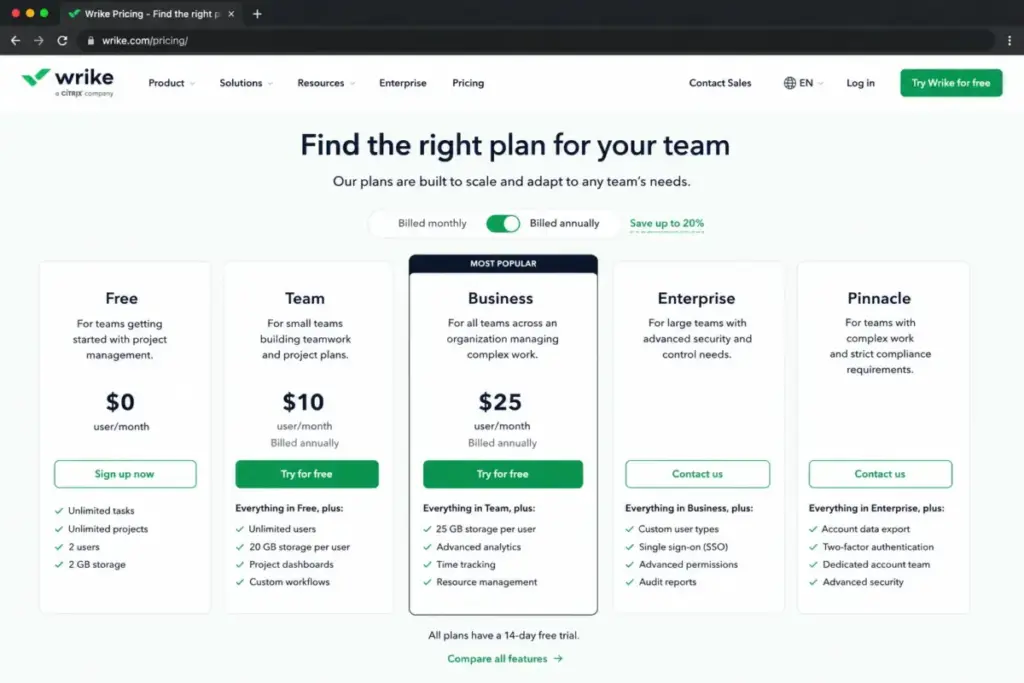
Wrike’s Team plan starts at $10/user/month, putting 10 users at $100/month. The Business plan at $25/user/month ($250/month for 10 users) adds custom workflows, branded workspaces, and advanced integrations.
Wrike excels at structured workflow management: task dependencies, Gantt charts, shareable dashboards, approval workflows, proofing, and AI Essentials. Enterprise tiers add permissions, audit logs, and advanced security.
The tradeoff: Wrike’s Team plan is limited to 2 to 15 users. The interface learning curve can be high for smaller agencies without a dedicated project manager. Wrike can feel heavier than Teamwork for teams under 10 people.
Best for:
- 15-50 person PMO or marketing operations teams that need structured workflow management
- Agencies outgrowing Teamwork’s reporting and dashboard capabilities
- Teams that need proofing, approvals, and enterprise security controls
Avoid if:
- Your team is under 10 people and wants lightweight task management
Migration difficulty: High. Wrike’s data model includes folders, projects, tasks, and custom workflows. Migrating from Teamwork requires mapping your project hierarchy, rebuilding automations, and reconnecting integrations. The Wrike enterprise workflow review covers where it fits.
Smartsheet: Best for Spreadsheet-Style PMO Reporting

Smartsheet is the best Teamwork alternative for operations and PMO teams that want spreadsheet familiarity with dashboards, forms, reports, portfolio rollups, and stronger structured reporting.
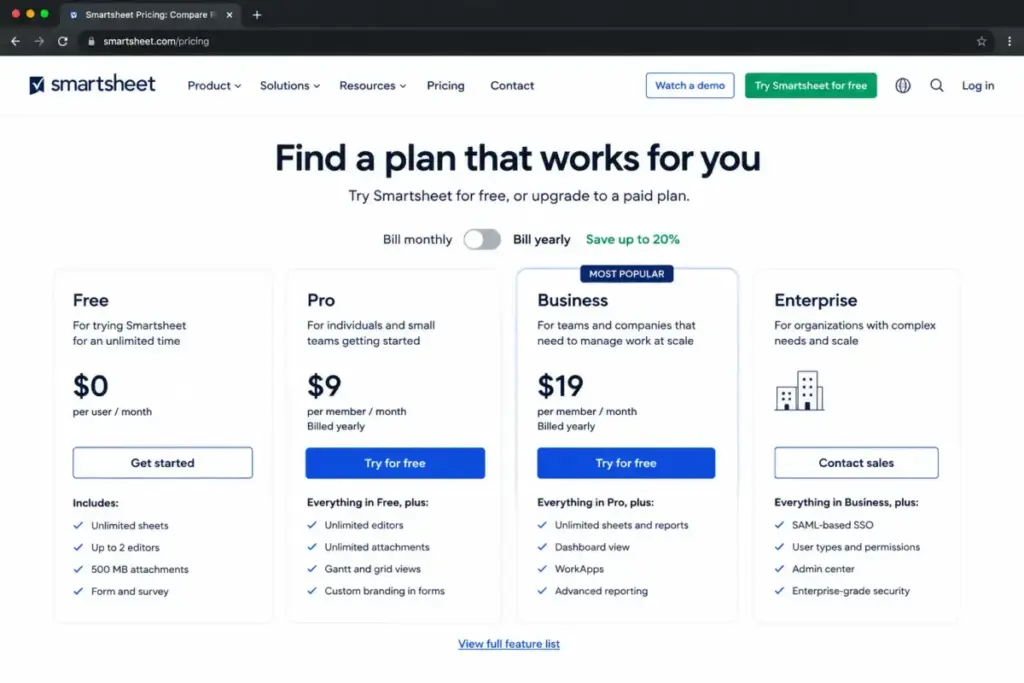
Smartsheet Pro starts at $9/member/month billed yearly. For 10 members, that is $90/month. The Business plan at $19/member/month ($190/month for 10 members) adds unlimited automations, document builder, and group administration.
Smartsheet combines grid, Gantt, board, calendar, and card views with formulas, conditional formatting, and cross-sheet references. It feels like Excel with project management built in.
The tradeoff: Smartsheet is less natural than Teamwork for day-to-day agency client collaboration and built-in service-delivery financial context. Pro is limited to 1-10 members and 250 automations per month. Advanced features like Dynamic View (starting at $125/month) and Data Shuttle (starting at $100/month) are paid add-ons.
Best for:
- 10-25 person operations teams that think in spreadsheets and need dashboard-style reporting
- PMOs managing portfolio rollups across multiple projects and teams
- Teams that outgrew Teamwork’s reporting but do not need a full Work OS
Avoid if:
- Your team prefers visual boards over grids and does not use spreadsheet-style formulas
Migration difficulty: Medium to High. Smartsheet’s grid-based structure is fundamentally different from Teamwork’s project view. Custom field mapping, automation rebuilds, and report recreation require dedicated setup time.
Notion: Best Docs-First Lightweight Replacement

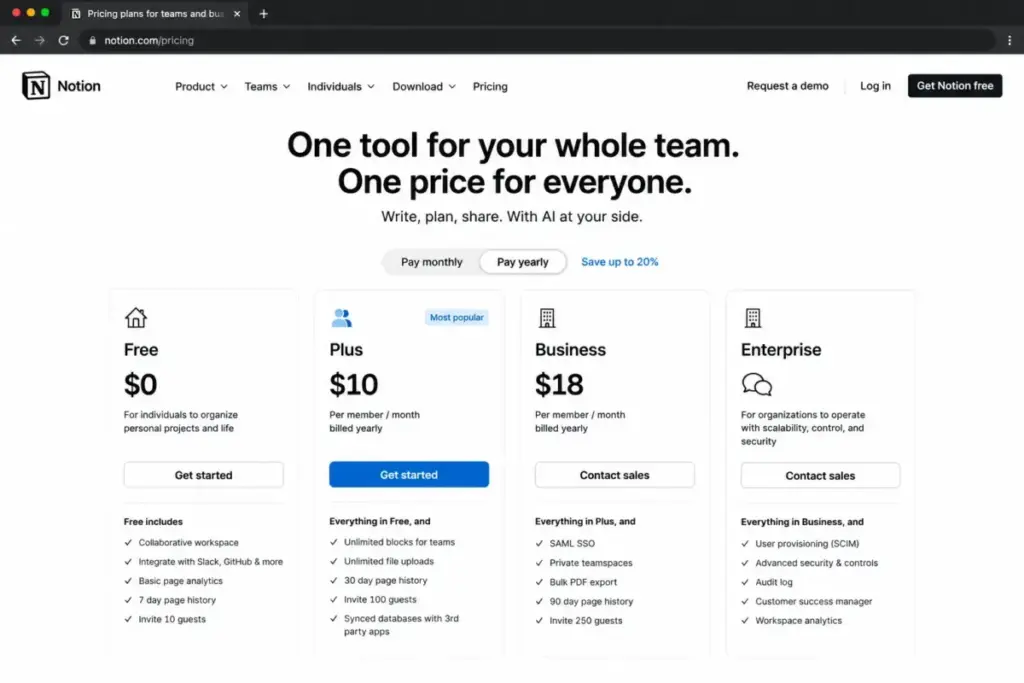
Notion is the best Teamwork alternative for teams that want to replace project management with a docs, wiki, and lightweight database workspace rather than another full PM system.
Notion’s free plan covers unlimited pages for individuals. The Plus plan costs $10/member/month. For 10 members, that is $100/month. Business at $20/member/month adds advanced permissions, bulk export, and SAML SSO.
Notion combines pages, blocks, databases, custom forms, sites, and guests. You can build lightweight task trackers, knowledge bases, meeting notes, and team wikis in one workspace. Notion Agent and AI Meeting Notes are available on paid plans, with Custom Agents requiring Notion credits after trial.
The tradeoff: Notion is not a like-for-like replacement for Teamwork’s resource management, billable time tracking, profitability tracking, and client-service delivery workflows. The free plan has block limitations for teams with 2+ members.
Best for:
- 5-10 person teams that need documentation, wikis, and basic task tracking in one place
- Teams that use Teamwork mainly for notes, meeting records, and simple project lists
- Groups where knowledge management is more important than project scheduling
Avoid if:
- You need Gantt charts, resource scheduling, or time-to-invoice workflows
Migration difficulty: Medium. Notion supports Markdown, CSV, and HTML imports. The challenge is restructuring Teamwork’s project hierarchy into Notion’s flexible page-and-database model.
Airtable: Best Database-Style Operations Alternative

Airtable is the best Teamwork alternative for operations teams that want flexible databases, structured intake processes, and app-like workflows rather than traditional project management.
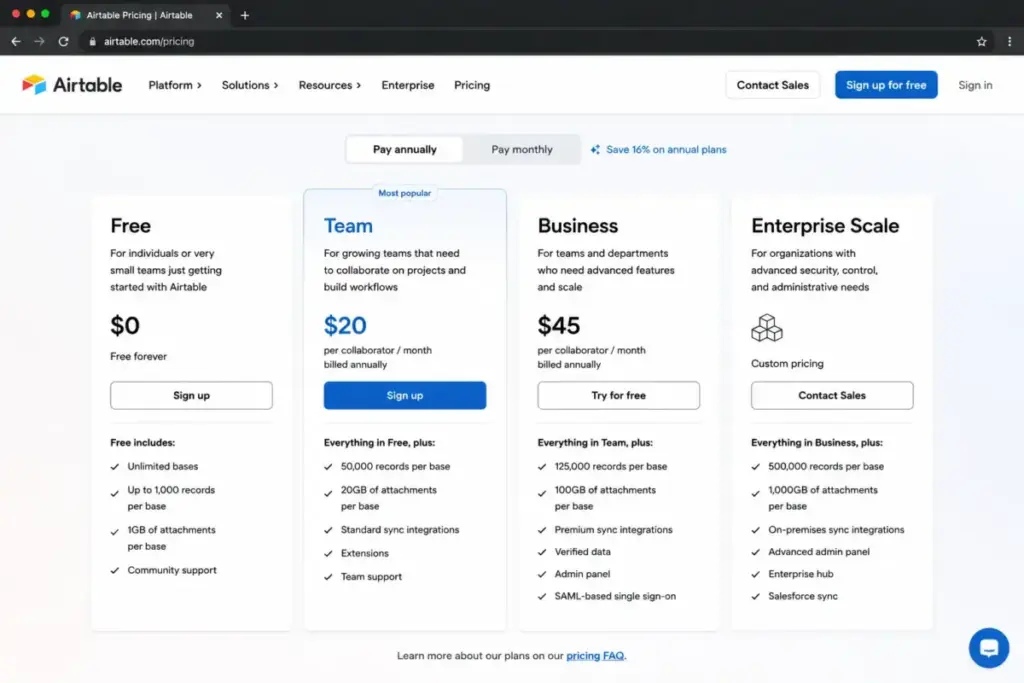
Airtable’s free plan includes limited records and bases. The Team plan costs $20/collaborator/month billed annually. For 10 collaborators, that is $200/month, the highest 10-user cost on this list.
Airtable gives you flexible databases with records, views, forms, automations, and custom work apps. You can build intake forms, project trackers, CRM-like systems, and operational dashboards from structured data.
The tradeoff: Airtable is less native than Teamwork for task dependencies, time budgets, client delivery, and project profitability. The Team plan charges only collaborators with edit permissions but limits each base to 50,000 records and each workspace to 100,000 API calls per month. Business at $45/collaborator/month ($450/month for 10 users) adds more capacity but at a steep price.
Best for:
- 10-person operations teams building custom workflows, intake processes, and structured data tracking
- Teams leaving Teamwork because they need database-style flexibility, not project management structure
- Groups that want to build custom apps without code
Avoid if:
- You need traditional project management with Gantt charts, time tracking, and client portals
Migration difficulty: Medium to High. Airtable’s database-first model is fundamentally different from Teamwork’s task-project structure. Migrating requires rethinking how you organize work, not just importing data.
Pricing Comparison: 10-User Real Cost
| Product | Starting price | 10-user cost | Billing basis | Free plan | Hidden costs |
|---|---|---|---|---|---|
| Teamwork.com | $9.99/user/month | $99.90/month | Per user | Yes (5 users, 5 projects) | Accelerate at $24.99/user/month for resource planning; Optimize and Enterprise are custom |
| ClickUp | $7/user/month | $70/month | Per user | Yes (Forever) | Business at $12/user/month; AI add-ons separate |
| Asana | $10.99/user/month | $109.90/month | Per user | Yes (Personal) | Timesheets and Budgets add-on at $5.99/user/month; Advanced plan for portfolio depth |
| monday work management | $9/seat/month | $90/month | Per seat | Yes (2 seats) | Seat minimums on paid plans; time tracking and automation depend on tier |
| Wrike | $10/user/month | $100/month | Per user | Yes | Business at $25/user/month; Team plan capped at 2-15 users |
| Smartsheet | $9/member/month | $90/month | Per member | Trial only | Dynamic View at $125/month; Data Shuttle at $100/month; Pro capped at 1-10 members |
| Basecamp | $15/user/month | $150/month (Plus) or $299/month (Pro Unlimited) | Per user or flat | Yes (1 project) | Timesheet and Admin Pro Pack at $50/month each on Plus |
| Trello | $5/user/month | $50/month | Per user | Yes (10 collaborators) | Premium at $10/user/month for AI, Timeline, Dashboard views |
| Jira | $7.91/user/month | $0 (Free) or $79.10/month (Standard) | Per user | Yes (10 users) | Premium at $14.54/user/month for cross-team planning |
| Notion | $10/member/month | $100/month | Per member | Yes | Business at $20/member/month; Custom Agents use credits after trial |
| Airtable | $20/collaborator/month | $200/month | Per collaborator | Yes | Business at $45/collaborator/month; record and API limits force upgrades |
What this means: Trello is the cheapest at $50/month for 10 users, but it is also the most basic. Jira’s free tier covers 10 users at $0, but only if your team runs software development workflows. ClickUp at $70/month offers the best balance of features and cost for general project management. Basecamp Pro Unlimited at $299/month becomes the cheapest option for teams above 20 users because of its flat pricing. Airtable’s $200/month for 10 users is the highest on this list and only makes sense if you need database-style operations, not traditional project management.
The gap between Teamwork and these alternatives depends on which problem you are solving. If cost is the only issue, ClickUp or Trello save you money immediately. If you need to preserve Teamwork’s client-delivery depth, the savings shrink because alternatives require higher tiers or add-ons to match.
Feature Gates: How the Closest Teamwork Replacements Compare
The pricing table shows starting costs. This table shows what you actually get at those prices and what requires a higher tier.
| Feature | Teamwork (Basics) | ClickUp (Unlimited) | Asana (Starter) | monday (Standard) | Wrike (Team) | Smartsheet (Pro) |
|---|---|---|---|---|---|---|
| Task management | ✅ | ✅ | ✅ | ✅ | ✅ | ✅ |
| Time tracking | ✅ Native | ✅ Native | ❌ Add-on $5.99/user/month | ❌ Pro+ tier | ✅ Native | ❌ Not native |
| Gantt charts | ✅ | ✅ | ✅ Timeline | ✅ | ✅ | ✅ |
| Resource scheduling | ❌ Accelerate tier | ❌ Business tier | ❌ Advanced tier | ❌ Pro+ tier | ❌ Business tier | ❌ Business tier |
| Automations | Limited | ✅ | ✅ Rules | ✅ 250/month | ✅ 50/user/month | ✅ 250/month |
| Reporting dashboards | Basic | ✅ | ✅ | ✅ | ✅ | ✅ |
| Client/guest access | ✅ | ✅ Guests | ❌ Advanced tier | ✅ Viewers free | ✅ Collaborators | ✅ |
| AI features | ❌ Higher tiers | ❌ Separate add-on | ❌ Advanced tier | ✅ AI credits included | ✅ AI Essentials | ❌ Add-on |
What this means: Teamwork includes native time tracking on Basics, which is its biggest advantage over alternatives at the starting tier. ClickUp matches most features at a lower price but locks resource scheduling behind Business. Asana’s starting tier lacks time tracking entirely, requiring a $5.99/user/month add-on. monday includes AI credits on Standard but gates time tracking behind Pro. The feature gap narrows at higher tiers when you compare practical plans (Teamwork Accelerate vs. ClickUp Business vs. Asana Advanced), where costs converge around $20-25/user/month.
How to Choose the Right Teamwork Alternative
The switching trigger determines the shortlist. Ask these five questions before evaluating any tool.
1. Are you leaving because of cost, complexity, or missing capabilities?
Cost switchers should compare ClickUp and Trello. Complexity switchers should compare Asana and Basecamp. Capability switchers should compare monday, Wrike, and Smartsheet.
2. Does your team bill clients by the hour?
If yes, you need native time tracking, budgets, and profitability reporting. ClickUp, Asana (with add-on), and Wrike cover this. Basecamp, Trello, Notion, and Airtable do not.
3. How many guest or client users do you need?
Teamwork handles client collaboration with guest roles. Check whether your alternative charges per guest or caps guest access. Basecamp Pro Unlimited includes unlimited guests at the flat rate.
4. Is your team running software development sprints?
If yes, Jira is the only tool on this list built for agile workflows. ClickUp supports sprints but is not purpose-built for engineering teams.
5. Can your team absorb a medium-to-high migration effort?
Wrike, Smartsheet, Jira, and Airtable all require significant setup. If your team cannot dedicate 2-4 weeks to migration, Trello, Basecamp, or Asana are safer starting points. The Smartsheet review for PM teams covers setup depth and feature breakdown for reporting-focused teams.
Which Teamwork Alternative Should You Avoid?
Every tool on this list is strong for a specific use case. The problems start when you pick a tool that does not match your switching trigger.
| Avoid this tool | If your situation is… |
|---|---|
| Trello | You need resource management, time tracking, or project profitability. Trello does none of these. |
| Notion | You need structured project management with Gantt charts, dependencies, and deadlines. Notion is a docs platform, not a PM tool. |
| Airtable | You manage simple projects and want quick onboarding. Airtable’s database model adds complexity without PM-specific value. |
| Jira | Your team runs client-service projects, not software development. Jira’s agile focus will frustrate non-technical teams. |
| Basecamp | You need advanced reporting, automations, or granular permission controls. Basecamp prioritizes simplicity over power. |
What this means: the worst Teamwork alternative is the one that solves a problem you do not have. Trello is excellent for simple tasks but terrible for agency workflows. Jira is excellent for engineering sprints but confusing for marketing teams. Match the tool to the trigger.
The Alternative Nobody Mentions
Wrike gets overlooked in most Teamwork alternative lists because it is positioned for enterprise teams. But for 15-50 person agencies that outgrow Teamwork’s reporting, Wrike’s structured workflow management, proofing, approvals, and Gantt charts are a genuine upgrade. The Team plan at $10/user/month starts at the same price point as Teamwork Basics, and the Business plan at $25/user/month delivers more reporting depth than Teamwork Accelerate at a similar cost.
The catch: Wrike’s learning curve is steep. This is a tool for agencies with a dedicated project manager, not for 5-person teams that want quick setup. But if your frustration with Teamwork is reporting flexibility, not simplicity, Wrike deserves a closer look. James Carter has tracked 20+ tool migrations across project management platforms, and Wrike consistently ranks among the smoothest transitions for structured teams, despite the higher initial setup effort.
Migration Risk Assessment
| Alternative | Difficulty | Main risk | Key consideration |
|---|---|---|---|
| ClickUp | Medium | Workspace structure rebuild; automation mapping | Import tools available; plan for 1-2 weeks of configuration |
| Asana | Low to Medium | Custom field mapping; automation rule recreation | Clean CSV import; simpler data model than Teamwork |
| monday work management | Medium | Board structure differs from projects; seat minimums | Template library helps; rethink project hierarchy |
| Wrike | High | Complex data model; folder/project mapping; integration reconnects | Plan 3-4 weeks; assign a dedicated admin |
| Smartsheet | Medium to High | Grid-based system vs project view; formula migration | Spreadsheet users adapt faster; report recreation needed |
| Basecamp | Low | Loss of structured PM features; workflow simplification | Fast setup; bigger adjustment is mindset, not data |
| Trello | Low | Feature loss; oversimplification of complex workflows | Quick migration; risk is outgrowing Trello within months |
| Jira | High | Fundamentally different data model (issues, sprints, epics) | Plan 4+ weeks; requires engineering team buy-in |
| Notion | Medium | Restructuring from projects to pages and databases | Flexible but unstructured; needs template design |
| Airtable | Medium to High | Database model requires workflow redesign | API-friendly but requires custom setup |
What this means: migration difficulty is an editorial estimate based on data model complexity, workflow rebuild effort, integration requirements, and setup depth. The fastest switches are Trello and Basecamp, but they sacrifice the most Teamwork functionality. Wrike and Jira require the most effort but deliver the deepest capability upgrades.
When to Stay with Teamwork
Teamwork is still the right tool if:
- Your agency bills clients by the hour and needs native time tracking, budgets, retainers, and profitability reporting in one platform
- You use Teamwork’s client portal for external collaboration and approval workflows
- Your team has already invested in Teamwork setup, automations, and integrations that would take months to rebuild
- You need Teamwork’s project health dashboards and resource planning features that alternatives either lack or charge extra for
- Your workflow is client-service delivery, not internal operations or software development
Switching from Teamwork makes sense if:
- You are paying for Accelerate but only using Basics-level features
- Your team finds the interface too complex for their actual daily work
- You need reporting and automation capabilities that Teamwork does not offer at your current plan
- Your work is not client-service focused, and Teamwork’s agency features add overhead
- You need flat pricing because your user count is growing past 20
Here is the thing. Many teams switch from Teamwork because they assume a cheaper tool will do the same job. It often does not. The best migration happens when you know exactly which Teamwork feature you cannot live without and verify that your alternative delivers it before committing.
Final Verdict: Best Teamwork Alternative for Most Teams
For most 10-person teams leaving Teamwork in 2026, ClickUp is the safest starting point. It costs $70/month on the Unlimited plan (vs. Teamwork Basics at $99.90/month), covers tasks, docs, dashboards, goals, time tracking, and custom fields, and offers enough flexibility to adapt to different workflows.
If you are leaving because of interface complexity and want the cleanest task management experience, Asana is the better pick. The Starter plan at $10.99/user/month costs slightly more than Teamwork Basics, but faster adoption and cleaner task ownership offset the price difference for most marketing and operations teams.
If your team runs software sprints and Teamwork’s client-delivery focus does not match, Jira is purpose-built for that workflow. The free plan covers 10 users at $0, making it the lowest-risk switch on this list.
If you want predictable monthly costs regardless of user count, Basecamp Pro Unlimited at $299/month for unlimited users is the only flat-price option on this list. It works for teams above 20 users where per-seat pricing becomes a budget problem.
For teams that need spreadsheet-style reporting and PMO oversight, Smartsheet replaces Teamwork’s reporting gaps at $9/member/month. Wrike is the stronger pick for agencies that need structured workflow management with proofing, approvals, and enterprise controls at $10/user/month.
For lightweight docs-and-tasks use cases, Notion works at $10/member/month but does not replace Teamwork’s project management depth. Trello at $5/user/month works best as a starter tool, not a Teamwork replacement for agencies. Airtable at $20/collaborator/month only makes sense if you need database-style operations.
If you are deciding between Asana and monday specifically, the Asana vs monday.com comparison breaks down pricing, features, and workflow differences.
FAQ
What is the best free alternative to Teamwork?
Jira’s free plan supports up to 10 users with agile project management features, making it the strongest free Teamwork alternative for software teams. ClickUp’s Free Forever plan works for general project management but caps storage and features. Trello’s free plan supports 10 collaborators per Workspace with basic Kanban boards. None of these free plans match Teamwork’s client-delivery depth on the free tier, so teams managing billable projects should budget for a paid plan.
Is ClickUp cheaper than Teamwork for 10 users?
Yes. ClickUp Unlimited costs $70/month for 10 users billed yearly. Teamwork Basics costs $99.90/month for 10 users billed yearly. That is a $29.90/month difference. If you need Business-tier features on ClickUp, the cost rises to $120/month, which is still lower than Teamwork Accelerate at $249.90/month for 10 users.
Does Asana replace Teamwork time tracking?
Not natively on the base plan. Asana offers a Timesheets and Budgets add-on at $5.99/user/month billed annually. For 10 users, that adds $59.90/month on top of the Starter plan, bringing the total to $169.80/month. Teamwork includes time tracking in its Basics plan at $99.90/month for 10 users. Asana’s time tracking is functional but less native than Teamwork’s built-in approach.
Is Basecamp enough for an agency leaving Teamwork?
It depends on what your agency does with Teamwork. If you mainly use message boards, to-dos, and file sharing, Basecamp Pro Unlimited at $299/month covers unlimited users with no per-seat fees. If you depend on resource scheduling, profitability reports, and client-level permission controls, Basecamp lacks those features. Basecamp works for agencies that prioritize communication over project financial management.
How hard is it to migrate from Teamwork to ClickUp?
Migration difficulty is medium. ClickUp supports CSV imports and offers integrations for common PM tools. The main effort is rebuilding your workspace structure (Spaces, Folders, Lists), recreating automations, and mapping custom fields. Plan for 1-2 weeks of setup and testing before switching your team. Data loss risk is low, but workflow differences require adjustment.
Which Teamwork alternative has the best reporting?
Smartsheet and Wrike offer the strongest reporting among Teamwork alternatives. Smartsheet excels at spreadsheet-style dashboards, cross-sheet formulas, and portfolio-level rollups. Wrike provides structured Gantt charts, shareable dashboards, and enterprise reporting tiers. monday work management’s dashboard builder is strong for visual reporting. ClickUp’s dashboards cover most needs but lack the depth of Smartsheet’s portfolio reporting.
Should a software team use Jira instead of Teamwork?
Yes, if your team runs agile sprints, manages backlogs, and needs Atlassian ecosystem alignment. Jira is purpose-built for software development workflows. Teamwork is purpose-built for client-service delivery. The overlap is minimal. Software teams that stay on Teamwork because “it works” are typically underusing both platforms. Jira’s free plan for 10 users makes the switch low-risk. The Jira review for development teams covers the full evaluation.
What is the easiest Teamwork alternative to set up?
Trello and Basecamp are the easiest Teamwork alternatives to set up. Trello’s Kanban boards take minutes to configure. Basecamp’s project structure is intentionally flat, so there are fewer settings to manage. Asana is slightly more complex but still faster to onboard than Teamwork. Wrike, Jira, and Smartsheet require the most setup effort due to their deeper workflow structures.
Is monday.com better than Teamwork for visual workflows?
monday work management is better than Teamwork for teams that want highly visual, board-based workflow management with configurable automations and dashboards. Teamwork is better for client-service teams that need time tracking, budgets, and resource planning. The choice depends on whether your work is internal operations (monday wins) or client delivery (Teamwork wins).
Can Notion replace Teamwork for project management?
Notion can replace Teamwork only for teams that use project management lightly. If your workflow is mostly documentation, meeting notes, and simple task lists, Notion’s pages, databases, and forms handle that well. If you depend on Gantt charts, resource scheduling, time tracking, or client portals, Notion does not offer those features natively. The Notion workspace evaluation covers where it fits and where it falls short.