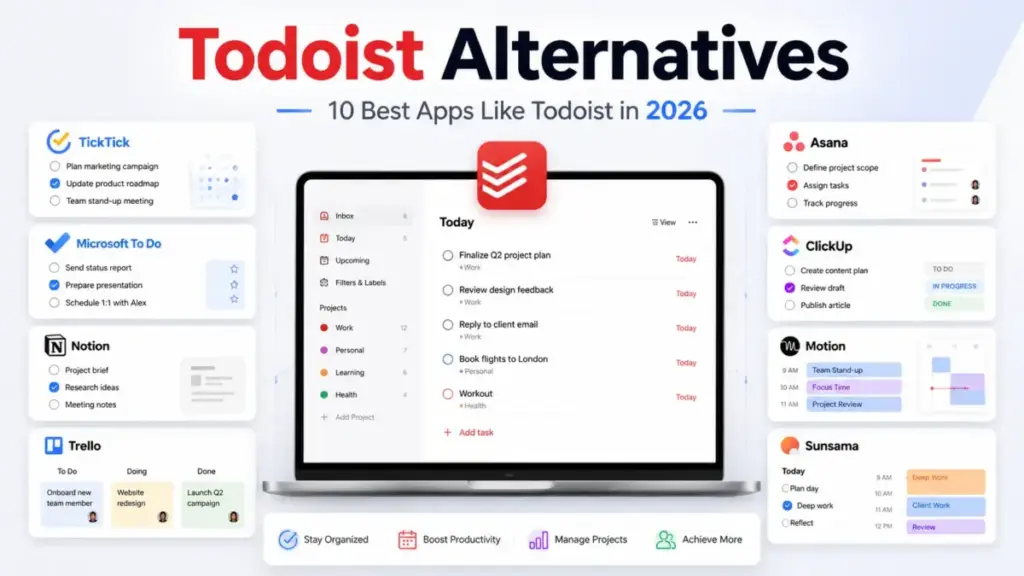
Todoist is still a solid personal task manager (see the full Todoist analysis and review), but the free plan caps you at 5 projects and 3 filters. That limit hits fast. And the recent price increase to $7/month on Pro (or $5/month billed annually) has pushed solo users and small teams to look elsewhere.
I reviewed 10 Todoist alternatives by mapping each one to a specific reason people leave, not just listing apps that happen to manage tasks.
One finding that stood out: the cheapest Todoist alternative for a 10-person team is not the one most articles recommend.
If you are comparing best project management tools for your team, this guide breaks down which Todoist alternative fits each switching trigger, what each tool costs at 10 users, and where Todoist still wins.
Quick Verdict: Best Todoist Alternatives by Switching Trigger
| If you are leaving Todoist because… | Best alternative | Why |
|---|---|---|
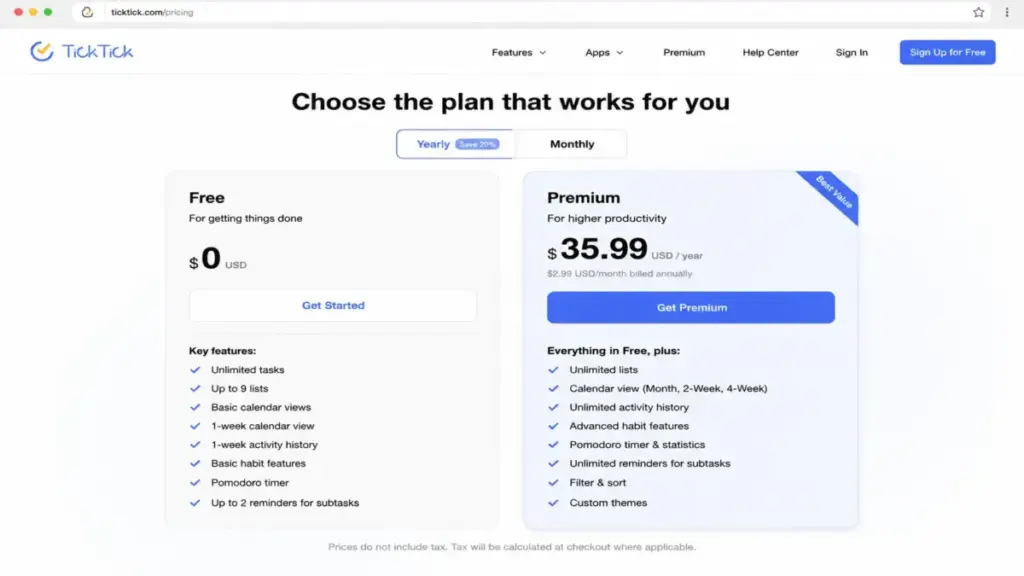
| You want similar features at lower annual cost | TickTick | Premium costs $35.99/year with calendar, Pomodoro, and habits built in |
| You need a free task app for Microsoft/Outlook | Microsoft To Do | $0/month with My Day, shared lists, and Outlook integration |
| You are Apple-only and want no subscription | Things 3 | One-time purchase, no recurring fee, polished GTD workflow |
| You need time blocking and a universal inbox | Akiflow | Command-bar planning with unlimited integrations at $34/month |
| You want guided daily planning and burnout rituals | Sunsama | Daily planning, workload limits, and shutdown routines at $20/month yearly |
| You want AI to schedule your tasks automatically | Motion | AI auto-scheduling, replanning, and calendar management at $19/seat/month yearly |
| You need docs, databases, and tasks in one workspace | Notion | Free plan available, Plus from $10/member/month for teams |
| You want visual Kanban boards for team projects | Trello | Free plan with boards, Standard from $5/user/month yearly |
| Your team needs Gantt charts, dashboards, and forms | Asana | Starter from $10.99/user/month yearly with Timeline and automations |
| You want tasks, docs, chat, and goals in one platform | ClickUp | Free Forever plan, Unlimited from $7/user/month yearly |
What this means: No single Todoist alternative beats Todoist at everything. Each tool wins when it solves a specific frustration. If you just want faster task capture with a lower price, TickTick is the swap. If your workflow problem is deeper (scheduling, team reporting, or knowledge work), the right pick depends on the exact friction you hit.
How James Carter Reviewed These Alternatives
This guide is based on official product pages, published pricing (verified June 2026), user reviews from Capterra and G2, and feature documentation from each tool. I did not test every app hands-on for this article, so I will not claim otherwise. All testing levels are marked as official research only.
I evaluated each alternative against Todoist on five dimensions: pricing at scale, workflow fit, migration difficulty, hidden costs, and what each tool does worse than Todoist. After reviewing 35+ project management and collaboration tools for SaaSZap, I have learned the tool your team actually uses matters more than the one with the longest feature list.
Prices are verified as of June 2026. Check each product’s official pricing page for current rates.
The Todoist Problem Map
Todoist is fast, clean, and cross-platform. Those strengths are real. But if your work has grown beyond simple task management and project management, five frustrations push users to switch.
| Todoist strength | Todoist limitation |
|---|---|
| Fast natural-language task capture | Free plan capped at 5 projects, 3 filters |
| Cross-platform (iOS, Android, Windows, Mac, Linux, web) | No built-in time tracking or Gantt charts |
| Clean, minimal interface | No habit tracking, Pomodoro, or Eisenhower Matrix |
| Natural language date parsing | Limited team reporting and dashboards |
| Affordable Pro plan at $5/month yearly | No calendar-first daily planning or time blocking |
What this means: Todoist excels at personal task capture across devices. It falls short when users need calendar planning, team project management, or built-in productivity tools beyond task lists.
The Free Plan Ceiling
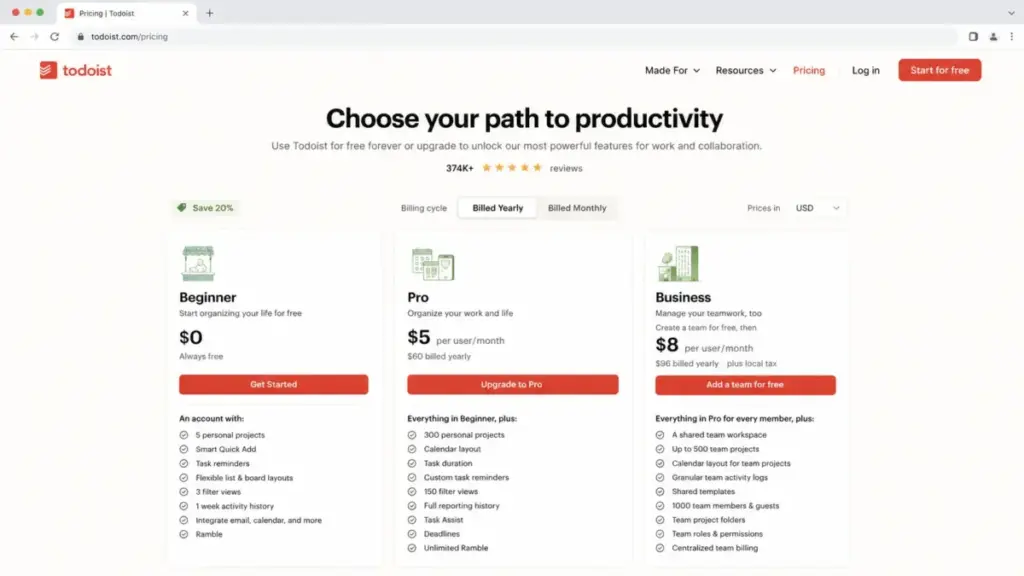
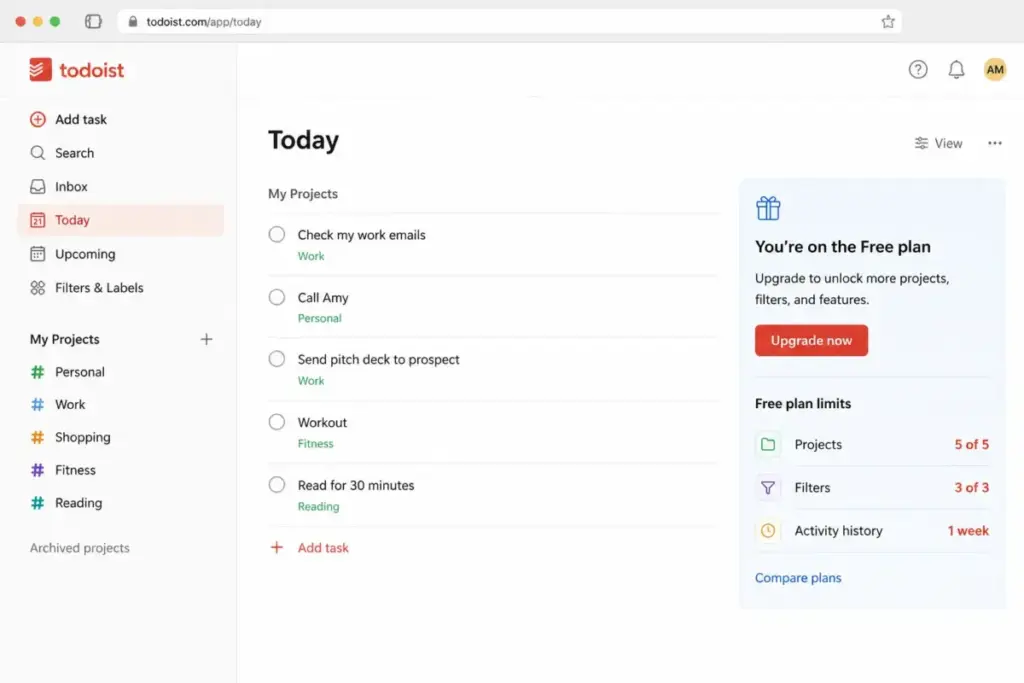
Todoist Beginner limits you to 5 personal projects, 3 filter views, and 1 week of activity history. File uploads are capped at small sizes. One Capterra reviewer noted: “project limit on the free version…felt pretty restrictive.” For users who only need basic lists, this ceiling forces an upgrade that not everyone wants to pay.
The Pricing Increase
Todoist Pro increased to $7/month (or $5/month billed yearly) and Business moved to $10/month (or $8/user/month billed yearly) as of December 2025. A 10-person team on Business annual billing pays $80/month. That is $960/year for a tool that still lacks built-in time tracking, Gantt views, or advanced reporting.
No Real Calendar Planning or Time Blocking
Todoist added a calendar layout and task duration on paid tiers. But it does not replace a daily planning workflow with time-blocking rituals, shutdown routines, or automatic schedule optimization. For users who want their calendar to drive their task list, Todoist falls short.
Missing Habits, Pomodoro, and Focus Tools
Todoist is task-first. It does not bundle habit tracking, Pomodoro timers, or an Eisenhower Matrix. Users who want personal productivity beyond task capture need a second app or a different tool.
Limited Team Project Management
Todoist Business adds shared workspaces and roles. But teams needing dashboards, Gantt/timeline views, workload tracking, portfolios, automations, or richer reporting will outgrow Todoist fast. Another Capterra reviewer mentioned: “quick edits took more taps or clicks than I’d like.”
Alternatives That Fix Price and Feature Gaps
These three Todoist alternatives solve the two most common switching triggers: the free plan ceiling and the price increase. Each one offers a different cost structure.
TickTick: Best Like-for-Like Todoist Swap

TickTick is the closest Todoist alternative for users who want a familiar task manager with more built-in tools and lower annual pricing.
Pricing starts at $0 on the free plan. Premium costs $35.99/year (as of June 2026), roughly $3/month. That is less than half the cost of Todoist Pro yearly.
TickTick bundles tasks, calendar views, a Pomodoro timer, habit tracker, Eisenhower Matrix, and recurring reminders in one app. For a solo user who left Todoist because of the free plan limit or the price increase, TickTick delivers more at a lower annual cost.
The tradeoff: TickTick is weaker for team-scale collaboration. If you manage a 10-person project team, TickTick does not match Asana, ClickUp, or Trello on shared workflows. Customer support depth is also a known caveat in third-party reviews.
Best for:
- Solo productivity users switching from Todoist Pro
- Users who want Pomodoro and habit tracking without a separate app
- Budget-conscious users under $36/year
Avoid if:
- You need team dashboards, Gantt charts, or workload management
- Your team has 10+ members managing shared projects
Migration difficulty: Low
Microsoft To Do: Best Free Alternative for Microsoft Users
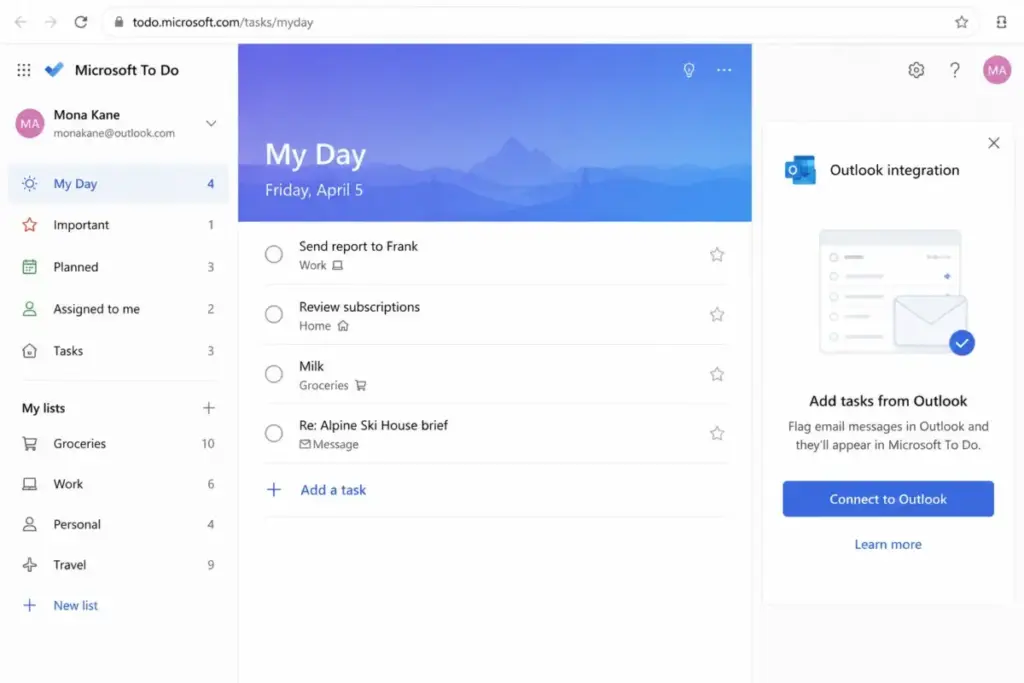
Microsoft To Do costs $0 (as of June 2026). Zero per-user fees, zero premium tiers for core task management.
It syncs across web, iOS, Android, and Windows with a Microsoft account. My Day, list sharing, reminders, steps, and Outlook Tasks integration make it a natural fit if your team already lives in Microsoft 365.
The tradeoff: Microsoft To Do is less powerful than Todoist for advanced filters, project organization, task views, and productivity workflows. It is a task list, not a project management platform. Reminders and shared-list behavior can feel limited for delegated recurring workflows.
Best for:
- Solo users and families who want a free task list
- Microsoft 365 or Outlook users who need zero-cost task sync
- Teams that need basic shared lists without another subscription
Avoid if:
- You need project views, filters, labels, or productivity workflows beyond lists
- You work outside the Microsoft ecosystem
Migration difficulty: Low
Things 3: Best for Apple-Only GTD Users
Things 3 is a one-time purchase, not a subscription. Pricing: $9.99 for iPhone and Watch, $19.99 for iPad, and $49.99 for Mac (as of June 2026). Each Apple platform is sold separately.
For a user who owns a Mac and iPhone, the total cost is roughly $60 once. Compare that to Todoist Pro at $60/year (annual billing). Things 3 pays for itself in the first year.
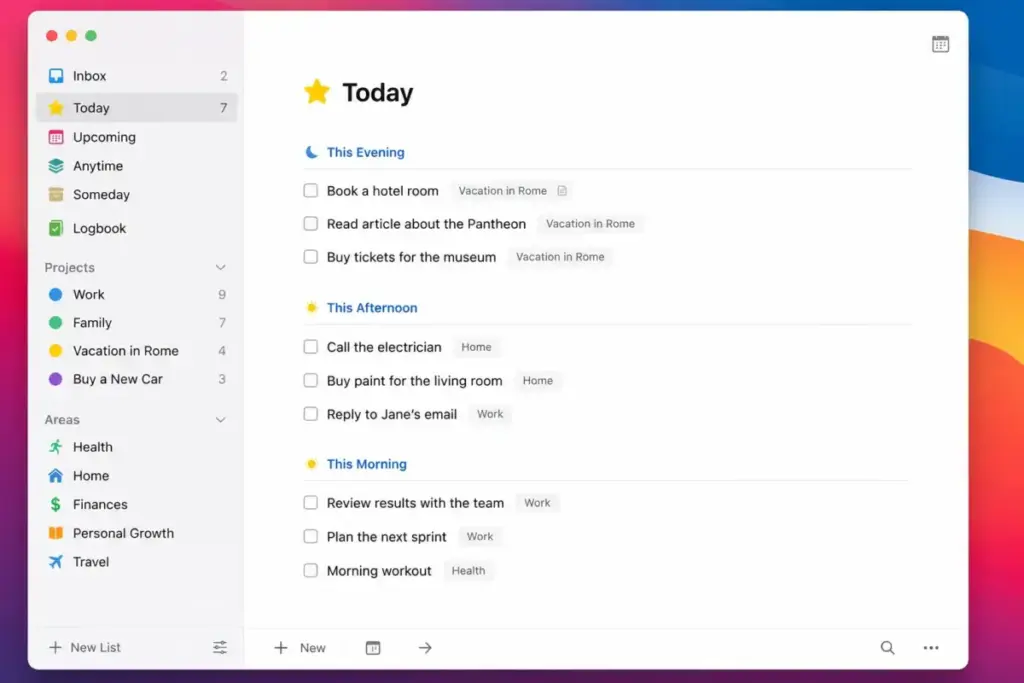
The design is polished. Inbox, Today, Upcoming, Projects, Areas, tags, and Things Cloud sync create a calm GTD workflow. I understand why Apple-focused users prefer it over subscription apps.
The tradeoff: no Windows, no Android, no web app, and no real team collaboration. Things 3 is a personal productivity tool. If even one team member uses Windows, Things 3 is not an option.
Best for:
- Apple-only users who value design and fast personal planning
- Users who want to avoid recurring subscriptions entirely
- GTD practitioners who prefer Inbox-Today-Upcoming structure
Avoid if:
- Anyone on your team uses Windows or Android
- You need shared team projects or collaboration
Migration difficulty: Medium
Alternatives That Fix Calendar and Scheduling Gaps
Todoist captures tasks. These three alternatives plan your day around them. Each one takes a different approach to time blocking, daily rituals, or AI-driven scheduling.
Akiflow: Best for Time-Blocking Power Users

Akiflow costs $34/month on monthly billing (as of June 2026). That is nearly 5x the cost of Todoist Pro. The price is justified only if your bottleneck is scattered tasks across multiple apps and no time-blocking system.
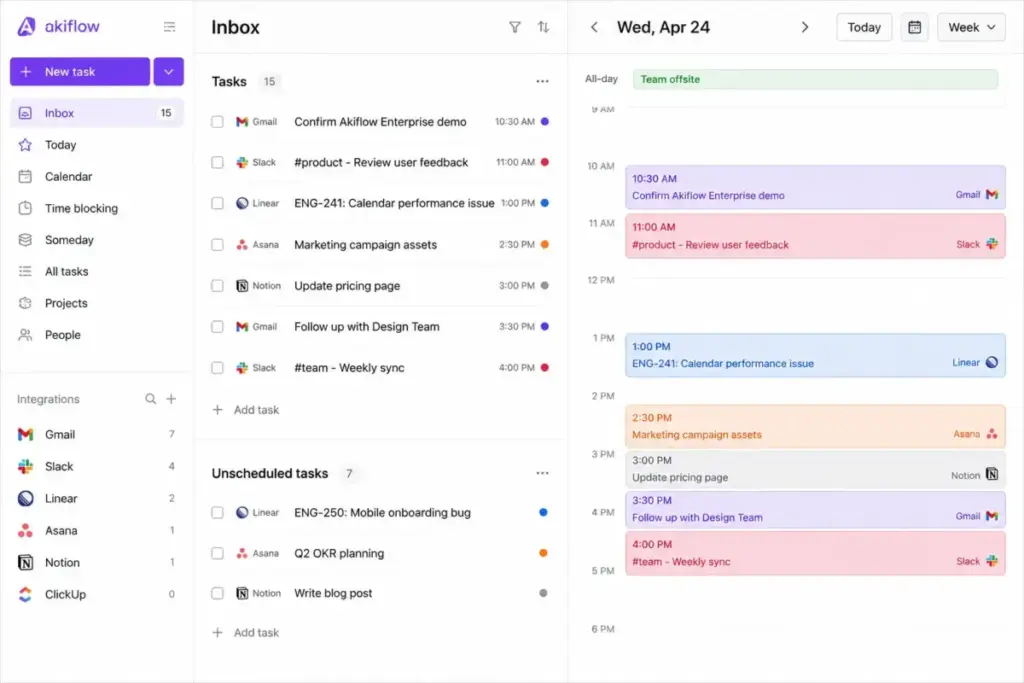
Akiflow pulls tasks from multiple sources into a universal inbox, then lets you drag them onto your calendar. Command-bar style planning, unlimited integrations, unlimited tasks, and an AI executive assistant separate it from Todoist’s approach.
The tradeoff: no permanent free plan. The 7-day free trial is your only window. For users who just need a to-do list, $34/month is hard to justify. Akiflow makes sense for busy professionals juggling email, calendars, multiple PM tools, and meeting overload.
Best for:
- Professionals managing 4+ task sources (email, Slack, Jira, calendar)
- Time-blocking practitioners who need everything in one view
- Users willing to pay premium for a command-center workflow
Avoid if:
- You only need simple task capture and lists
- Your budget is under $15/month for task management
Migration difficulty: Medium
Sunsama: Best for Guided Daily Planning

Sunsama costs $20/month on yearly billing or $25/month monthly (as of June 2026). A 14-day free trial requires no credit card.
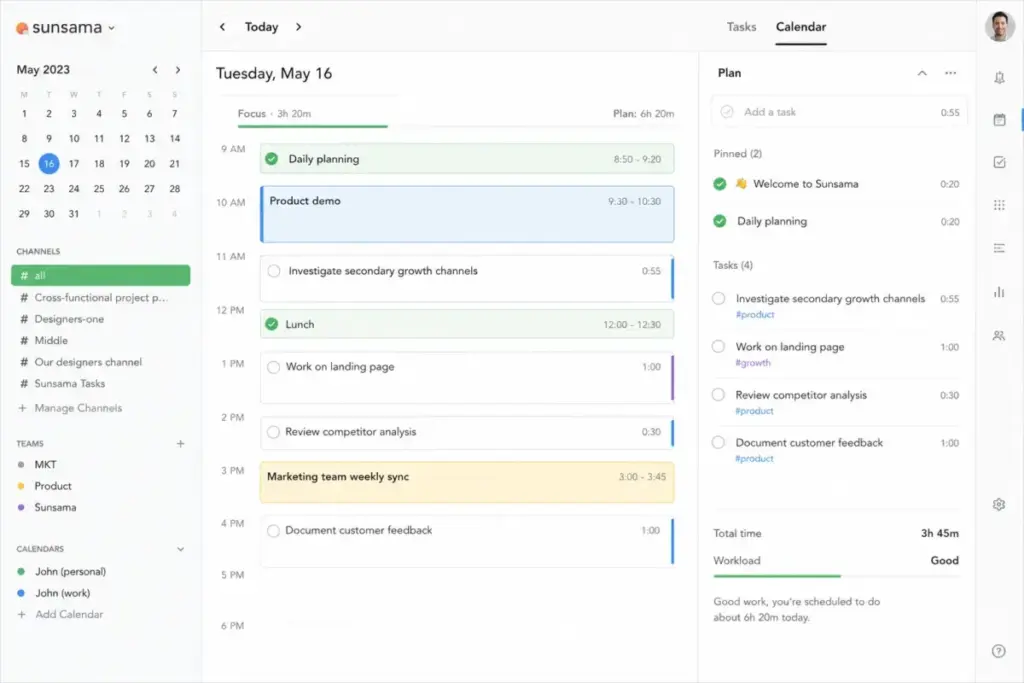
The core idea: Todoist encourages endless task capture. Sunsama forces you to plan realistically. You get daily planning rituals, weekly reviews, task-to-calendar timeboxing, workload realism checks, and guided shutdown routines designed to reduce burnout.
The tradeoff: Sunsama is not a fast capture tool. If you want to dump 20 tasks into an inbox and sort later, Sunsama will feel slow. The mobile app is described as a companion rather than a standalone replacement. At $200/month for 10 users (annual), Sunsama is among the most expensive options on this list.
Best for:
- Professionals who feel overwhelmed by endless Todoist lists
- Users who want daily planning rituals and workload boundaries
- Solo users or 2-3 person teams willing to invest in planning discipline
Avoid if:
- You prefer fast, lightweight task capture
- Your team has 10+ people (per-person cost scales fast)
Migration difficulty: Medium
Motion: Best AI Scheduling Alternative

Motion costs $19/seat/month on annual billing (as of June 2026) with a free trial available.
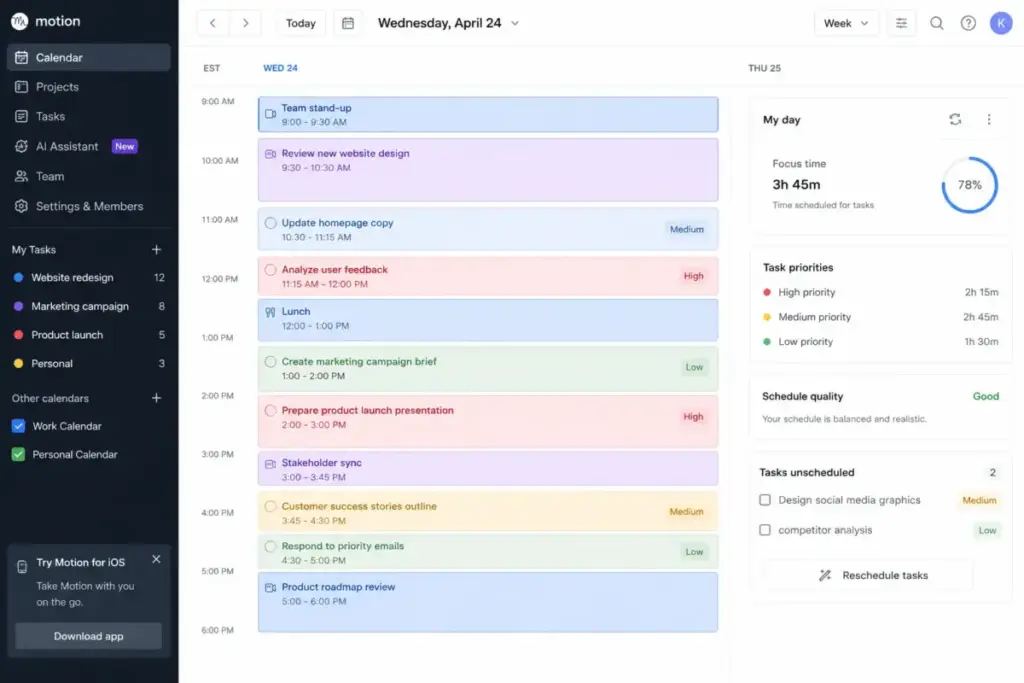
Motion uses AI to automatically prioritize tasks, timeblock your calendar, and replan when work changes. It also combines docs, projects, tasks, and calendars. The official product page describes AI calendar, AI task planner, AI docs, and AI project/workflow features.
Here is the thing. Motion replaces manual task sorting. You add tasks with deadlines and priorities, and the AI builds your schedule. If your problem with Todoist is spending 20 minutes each morning dragging tasks around, Motion removes that step.
The tradeoff: more expensive and heavier than Todoist for simple list management. AI scheduling requires a workflow adjustment. Teams that prefer manual control will find it frustrating.
Best for:
- Users who want AI to handle scheduling and replanning
- Calendar-driven professionals with heavy meeting loads
- Small teams (3-10 people) who want automated project timelines
Avoid if:
- You want a simple, manual task list
- You are not comfortable with AI making scheduling decisions
Migration difficulty: Medium
Alternatives That Fix Team and Workspace Gaps
Todoist works for personal tasks and small shared projects. These four alternatives serve teams that need docs, boards, dashboards, or all-in-one platforms alongside their task lists.
Notion: Best for Docs, Notes, and Tasks Together

Notion starts free. Plus costs $10/member/month and Business runs $20/member/month (as of June 2026). Some AI agent features require separate credits at $10 per 1,000 credits.
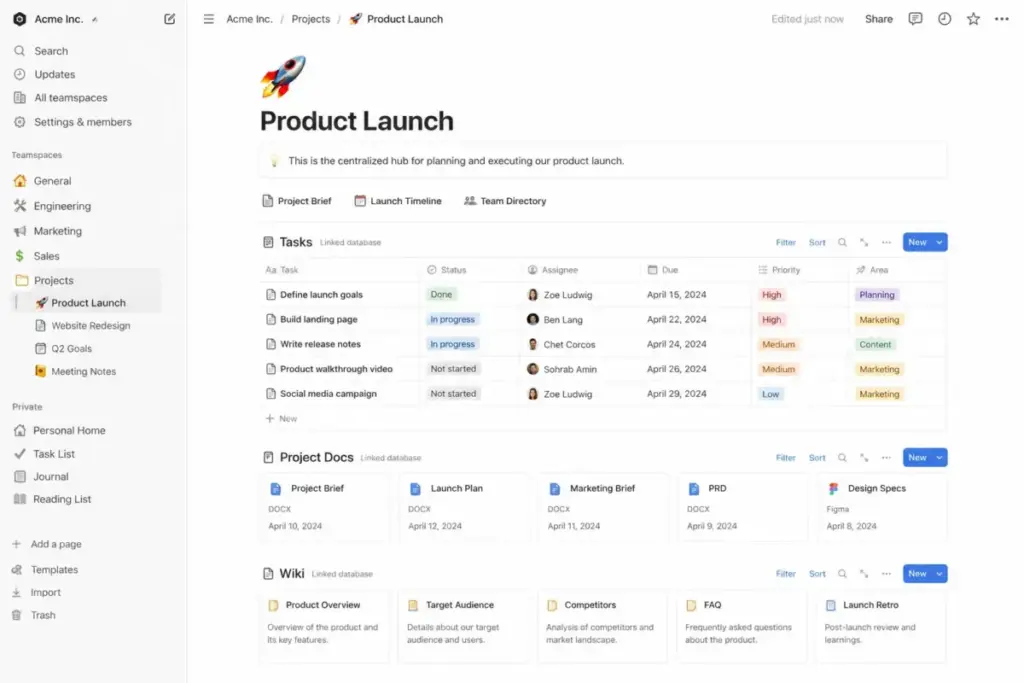
Notion turns tasks into part of a broader workspace. Docs, databases, knowledge bases, projects, forms, calendar, and Notion AI coexist in one tool. If your work involves writing specs, maintaining wikis, building lightweight databases, and tracking tasks, Notion replaces both Todoist and your notes app.
The tradeoff: Notion is slower and less frictionless than Todoist for pure personal task capture. Opening Notion to add a quick task feels heavier than opening Todoist. For teams, the flexibility can become complexity. Template setup and governance take time.
In a typical 5-person content workflow, moving from Todoist to Notion usually slows task capture at first because the team must set up databases, templates, and project pages. The upside is that Notion can reduce tool switching once docs, tasks, and wiki pages live in one workspace.
Best for:
- Teams that need tasks connected to docs, wikis, and databases
- Content teams, product teams, and knowledge workers
- Users who want one workspace instead of 4-5 separate apps
Avoid if:
- You only need fast personal task capture
- Your team does not use docs or databases alongside tasks
Migration difficulty: High
Trello: Best Visual Kanban Alternative

Trello starts free. Standard costs $5/user/month billed annually, and Premium runs $10/user/month billed annually (as of June 2026).
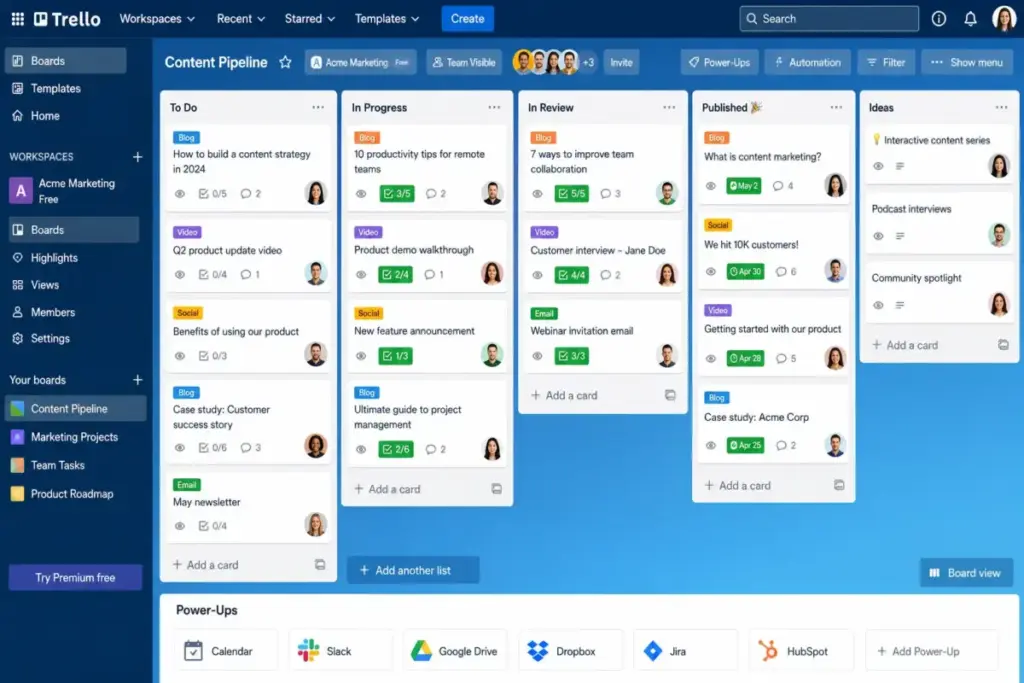
Trello is board-first. Cards, checklists, Power-Ups, automation, templates, Planner, and Inbox create a visual workflow that Todoist’s list view cannot match. For content pipelines, client projects, or lightweight team planning, Trello’s drag-and-drop boards feel more natural.
A 10-person team on Trello Standard pays $50/month (annual). On Trello Premium, that rises to $100/month. Compare that to Todoist Business at $80/month (annual). Trello pricing is competitive, and the free plan is generous for small teams.
The tradeoff: Trello is less natural than Todoist for fast personal text-based task capture. Board sprawl becomes a management issue at scale. For structured project portfolios, Asana or ClickUp offer more depth.
Best for:
- Teams who prefer visual board-based workflows
- Content pipelines, marketing sprints, and client project tracking
- Small teams (3-10 people) who want simple collaboration
Avoid if:
- You prefer text-based task lists over visual boards
- You need advanced portfolio views or complex project dependencies
Migration difficulty: Medium
Asana: Best for Structured Team Projects

Asana Personal is free for up to 10 users. Starter costs $10.99/user/month billed annually (or $13.49 monthly), with a two-seat minimum for paid plans (as of June 2026).
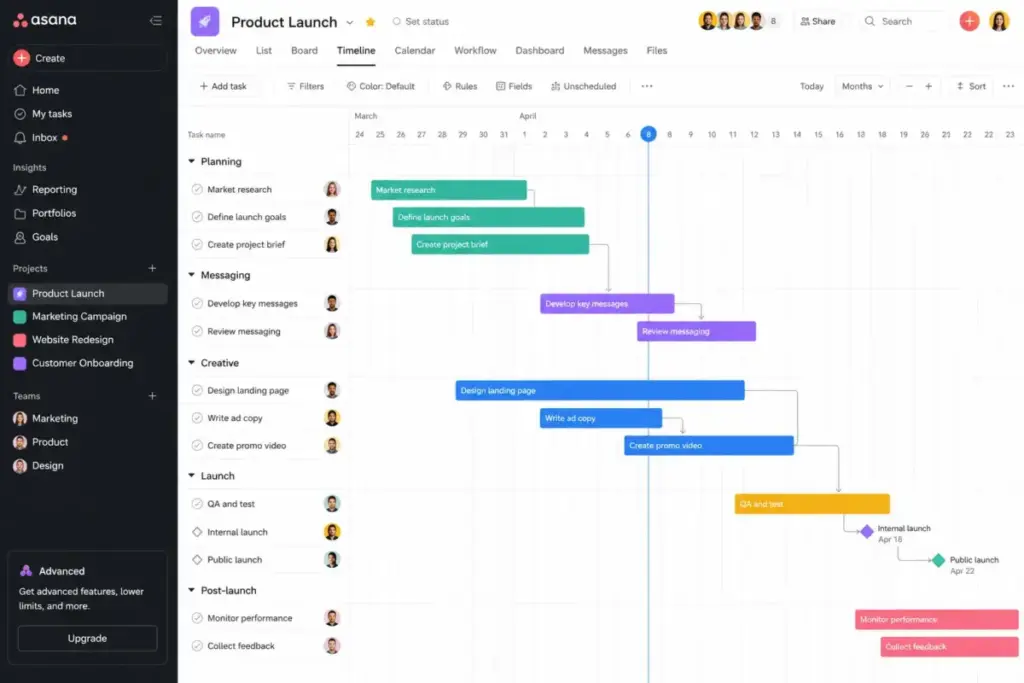
Asana is where you go when Todoist Business is not enough. Timeline, Gantt views, reporting dashboards, forms, custom fields, automations, and AI Studio Basic on Starter give teams the structure Todoist lacks.Todoist-to-Asana is a common upgrade path for teams that outgrow simple shared task lists and need timeline views, dashboards, forms, and automations.
A 10-person team on Asana Starter pays $109.90/month (annual), as detailed in the Asana pricing breakdown. That is $29.90 more than Todoist Business at $80/month. The premium buys you Timeline views, dashboards, custom fields, and forms that Todoist does not offer.
The tradeoff: Asana is heavier. Solo users and very small teams will find it overkill. The two-seat minimum on paid plans means you cannot buy just one Starter license.
Best for:
- Teams of 10-50 who need Gantt/timeline planning and dashboards
- Project managers who need forms, custom fields, and automations
- Organizations switching from Todoist because team reporting is too limited
Avoid if:
- You are a solo user who just needs personal task lists
- Your team has fewer than 5 people and does not need advanced views
Migration difficulty: High
ClickUp: Best All-in-One Work Platform

ClickUp Free Forever includes 100MB of storage. Unlimited costs $7/user/month billed yearly, and Business runs $12/user/month billed yearly (as of June 2026).
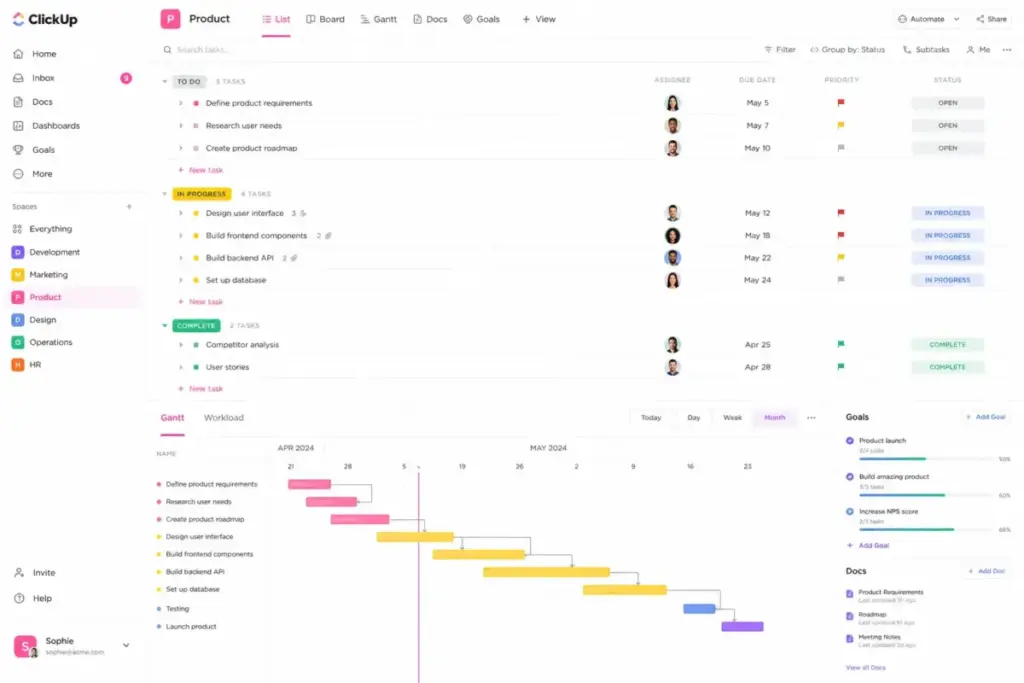
ClickUp combines task management with docs, goals, portfolios, time tracking, Gantt, integrations, chat, dashboards, and workflow management. It replaces Todoist plus 3-4 other tools. For teams that want one platform for project management and everything else, ClickUp offers the broadest feature set on this list.
A 10-person team on ClickUp Unlimited pays $70/month (annual). That is $10 less than Todoist Business at $80/month, and you get native time tracking, docs, goals, and Gantt charts included.
The tradeoff: ClickUp can feel heavy and complex for personal productivity. The platform’s breadth means a steeper learning curve. Some features have plan-based usage limits. Implementation complexity is a hidden adoption cost.
Best for:
- Teams that want tasks, docs, chat, goals, and time tracking in one tool
- Growing teams (10-50 people) replacing Todoist plus multiple other apps
- Budget-conscious teams who want more features per dollar
Avoid if:
- You need a simple, fast personal task app
- Your team prefers focused tools over all-in-one platforms
Migration difficulty: High
Todoist Alternatives Pricing Comparison
All prices verified as of June 2026. Check each product’s official pricing page for current rates.
| Product | Starting price | 10-user cost (annual equivalent) | Billing basis | Free plan/trial |
|---|---|---|---|---|
| Todoist | Free; Pro from $5/user/month yearly | $80/month (Business) | Per user | Yes |
| TickTick | Free; Premium $35.99/year | ~$30/month (10 users) | Per user annual | Yes |
| Microsoft To Do | Free | $0/month | Free | Yes |
| Things 3 | $9.99 iPhone; $49.99 Mac | ~$800 one-time (Mac+iPhone+iPad) | One-time per platform | No (Mac trial) |
| Akiflow | $34/month | $340/month | Per user monthly | 7-day trial |
| Sunsama | $20/month yearly | $200/month | Per person | 14-day trial |
| Motion | $19/seat/month yearly | $190/month | Per seat annual | Free trial |
| Notion | Free; Plus $10/member/month | $100/month (Plus) | Per member | Yes |
| Trello | Free; Standard $5/user/month yearly | $50/month (Standard) | Per user | Yes |
| Asana | Free; Starter $10.99/user/month yearly | $109.90/month (Starter) | Per user (2-seat min) | Yes |
| ClickUp | Free Forever; Unlimited $7/user/month yearly | $70/month (Unlimited) | Per user | Yes |
What this means: Microsoft To Do is the only truly free option for 10 users. TickTick is the cheapest paid alternative at roughly $30/month for 10 Premium users. ClickUp Unlimited at $70/month is $10 cheaper than Todoist Business at $80/month and includes time tracking, docs, and Gantt charts. The premium options (Akiflow at $340/month, Sunsama at $200/month) make sense only if your workflow problem is scheduling, not task capture.
Here is the cost calculation most articles skip: a 10-person team choosing between Todoist Business ($960/year) and ClickUp Unlimited ($840/year) saves $120/year on ClickUp while gaining native time tracking, docs, goals, and dashboards. That is the clearest value swap in this comparison.
Feature Gate Comparison: What Each Plan Actually Includes
Pricing tables show the starting price. Feature gates show what you actually get. Here is where each Todoist alternative locks its most useful features behind higher tiers.
| Product | Free plan gate | Paid plan unlocks | Key features locked behind higher tiers |
|---|---|---|---|
| Todoist | 5 projects, 3 filters, 1-week history | Pro ($5/mo yearly): reminders, calendar, 150+ filters | No plan includes time tracking, Gantt, or dashboards |
| TickTick | 9 lists, 99 tasks/list | Premium ($35.99/yr): calendar, custom lists, full habits | Pomodoro and habits fully unlock on Premium |
| Microsoft To Do | All features included | No paid tier | Feature ceiling lower than Todoist |
| Things 3 | No free plan | One-time purchase: all features | Gate is platform: Mac, iPhone, iPad sold separately |
| Akiflow | No free plan | Single plan ($34/mo): all features | No feature progression, full price or nothing |
| Sunsama | No free plan | Single plan ($20/mo yearly): all features | 14-day trial is the only test window |
| Motion | No free plan | Individual ($19/seat/mo yearly): AI scheduling, docs | Team plan ($12/seat/mo) adds team scheduling, manager views |
| Notion | Limited blocks for teams | Plus ($10/member/mo): unlimited uploads, 30-day history | AI credits ($10/1,000) separate from plan |
| Trello | 1 Power-Up/board, 10MB attachments | Standard ($5/user/mo): custom fields, most Power-Ups | Premium ($10/user/mo): Dashboard, Timeline, Calendar views |
| Asana | Basic list and board views (up to 10 users) | Starter ($10.99/user/mo): Timeline, Gantt, forms, rules | Advanced ($24.99/user/mo): portfolios, goals, workload |
| ClickUp | 100MB storage, limited views | Unlimited ($7/user/mo): Gantt, custom fields, integrations | Business ($12/user/mo): goals, automations, timesheets |
What this means: the real cost gap between Todoist alternatives shows up at the feature level, not the price level. Todoist Pro at $5/month lacks features that ClickUp Unlimited includes at $7/month. That $2 difference buys you time tracking, docs, goals, and Gantt charts. When comparing alternatives, check what your target plan actually unlocks before comparing sticker prices.
Migration Risk Assessment
| Alternative | Difficulty | Main risk | Notes |
|---|---|---|---|
| TickTick | Low | Minimal workflow rebuild | Similar task structure to Todoist |
| Microsoft To Do | Low | Feature downgrade | Fewer filters and views than Todoist |
| Things 3 | Medium | Apple ecosystem lock-in | No cross-platform if team uses Windows |
| Akiflow | Medium | Workflow change | Shift from task-first to calendar-first |
| Sunsama | Medium | Daily planning habit change | Requires committing to planning rituals |
| Motion | Medium | AI scheduling adjustment | Giving up manual control takes trust |
| Notion | High | Template setup and governance | 2-4 weeks to build workspace properly |
| Trello | Medium | Task-to-board mental model shift | Different approach from list-based tasks |
| Asana | High | Structured project setup | Needs admin time for custom fields and automations |
| ClickUp | High | Feature overload during onboarding | Plan which features to adopt incrementally |
What this means: Migration difficulty estimates are editorial, based on data model complexity, workflow rebuild effort, and setup depth. TickTick and Microsoft To Do are the easiest swaps. Notion, Asana, and ClickUp require dedicated setup time and a phased rollout. Do not try to migrate a 10-person team to ClickUp over a weekend.
Migration difficulty is an editorial estimate based on data model complexity, workflow rebuild effort, integration requirements, and setup depth.
How to Choose the Right Todoist Alternative
The decision depends on your switching trigger, not a generic “best overall” label.
Step 1: Identify your exit reason. Are you leaving because of price, missing features, team scale, or workflow mismatch?
Step 2: Match your budget. If free is non-negotiable, your options are Microsoft To Do, TickTick (free tier), Notion (free tier), Trello (free tier), ClickUp (Free Forever), or Asana (free for up to 10). If you can spend under $10/user/month, TickTick Premium, Trello Standard, or ClickUp Unlimited fit.
Step 3: Check your platform. Apple-only? Things 3. Microsoft ecosystem? Microsoft To Do. Cross-platform team? Most other options work.
Step 4: Decide personal vs. team. Solo users should look at TickTick, Things 3, or Microsoft To Do. Teams of 5+ should evaluate Trello, Asana, ClickUp, or Notion.
Step 5: Test migration difficulty. Start with Low-difficulty swaps (TickTick, Microsoft To Do) if you want a fast transition. Budget 2-4 weeks for High-difficulty tools (Notion, Asana, ClickUp).
Step 6: Run a parallel test before committing. Use both Todoist and your shortlisted alternative for one week. Capture tasks in both apps and see which one your team actually opens more often. The tool that wins daily usage wins the decision. I have seen teams pick the “better” tool on paper and abandon it within a month because the daily friction was higher than expected.
Step 7: Factor in what you are already paying for. If your team uses Microsoft 365, Microsoft To Do is free and already installed. If you pay for Notion for docs and wikis, adding tasks inside Notion costs nothing extra. The cheapest Todoist alternative might be the one you are already subscribed to.
The most common mistake I see: teams spend three weeks evaluating task managers instead of doing the work. If your Todoist frustration is mild (one missing feature, slightly high price), the switching cost may outweigh the gain. Switch only when the pain is concrete and recurring.
Which Todoist Alternative Should You Avoid?
Every tool on this list has a buyer it does not serve well. For a deeper look at the trade-offs, see the full Trello review and evaluation as one example of how feature depth varies.
| Alternative | Avoid if | Why |
|---|---|---|
| Things 3 | Anyone on your team uses Windows or Android | No cross-platform option, no workaround |
| Akiflow | You only need a simple to-do list | $34/month is hard to justify for task capture alone |
| Sunsama | Your team has more than 5 people | At $25/month per person, a 10-person team pays $250/month for a daily planner |
| Notion | Your team just needs fast task capture | Flexibility becomes complexity without governance |
| ClickUp | Your team wants a focused, simple tool | Feature breadth overwhelms small teams; staying with Todoist is simpler |
What this means: every Todoist alternative on this list has a buyer it does not serve. Matching the tool to your switching trigger avoids paying for features your team will never use.
When to Stay with Todoist
Todoist still wins in three scenarios.
Fast personal capture. No tool on this list matches Todoist’s speed for typing a task in natural language, assigning a date, and moving on. If that is your primary workflow, switching adds friction.
Cross-platform simplicity. Todoist runs on iOS, Android, Windows, Mac, Linux, and web. Things 3 is Apple-only. Microsoft To Do is weakest on Mac. Todoist covers every platform without compromise.
Lightweight team collaboration. If your team of 3-5 people just needs shared projects, task assignments, and reminders without Gantt charts, dashboards, or docs, Todoist Business at $8/user/month (annual) is enough. The alternatives that offer more (Asana, ClickUp) also demand more setup and admin time.
Stay with Todoist if your frustration is mild. Switch only if you have hit a genuine ceiling: the free plan limit, the missing calendar planning, or the need for team project management features that Todoist does not have.
Final Verdict: Best Todoist Alternative for Most Users
For most individual users leaving Todoist, TickTick is the best swap. It mirrors Todoist’s task capture speed, adds calendar, Pomodoro, and habits, and costs less per year. Migration is low-friction.
For 10-person teams, ClickUp Unlimited offers the best value. At $70/month versus Todoist Business at $80/month, you pay less and get time tracking, docs, Gantt, and dashboards included.
For Microsoft users who just want free, Microsoft To Do is the obvious pick. It costs nothing and integrates with Outlook.
For Apple-only GTD users, Things 3 is the one-time purchase that ends the subscription cycle.
For professionals who need calendar-first planning, choose between Akiflow (universal inbox), Sunsama (guided daily planning), or Motion (AI scheduling) based on whether your bottleneck is task aggregation, daily focus, or calendar chaos.
For teams that need structured project management with Asana or docs-first collaboration, Asana and Notion serve those needs better than Todoist ever will.
FAQ
What is the best free Todoist alternative?
Microsoft To Do is the best free Todoist alternative for users in the Microsoft ecosystem. It costs $0, syncs across devices, and integrates with Outlook Tasks. For non-Microsoft users, TickTick’s free plan and ClickUp’s Free Forever plan offer more features, though both have limitations compared to their paid tiers.
Is TickTick better than Todoist in 2026?
TickTick matches Todoist on core task management and adds calendar views, a Pomodoro timer, habit tracking, and an Eisenhower Matrix. At $35.99/year versus Todoist Pro at $60/year, TickTick costs less for solo users. Todoist still wins on cross-platform polish and natural language input speed. Choose TickTick if you want built-in productivity tools at a lower price.
What is the cheapest Todoist alternative for a 10-person team?
Microsoft To Do is free for any number of users. Among paid options, TickTick Premium at roughly $30/month for 10 users is the cheapest. Trello Standard at $50/month and ClickUp Unlimited at $70/month add team collaboration features. Todoist Business at $80/month is more expensive than both ClickUp and Trello at their entry paid tiers.
Is Things 3 worth it over Todoist for Apple users?
Yes, if you work exclusively on Apple devices and prefer a one-time purchase. Things 3 costs roughly $60 total for Mac and iPhone versus Todoist Pro at $60/year. It pays for itself in the first year. The limitation: no Windows, no Android, and no real team collaboration. Solo Apple users benefit most.
Should I switch from Todoist to Notion?
Switch to Notion if your tasks belong next to notes, project specs, wikis, and databases (read the full Notion review and analysis for feature details). Stay with Todoist if you want fast, lightweight task capture without workspace setup. A 5-person content or product team typically gains more from Notion’s integrated workspace. A solo user focused on personal to-do lists will find Notion slower for quick task entry.
How hard is it to migrate from Todoist?
Migration difficulty ranges from Low (TickTick, Microsoft To Do) to High (Notion, Asana, ClickUp). Low-difficulty swaps take under a day. High-difficulty migrations require 2-4 weeks for workspace setup, data import, workflow configuration, and team training. Start with a parallel run before fully switching.
Which Todoist alternative has habit tracking and Pomodoro?
TickTick is the only Todoist alternative on this list with built-in habit tracking, Pomodoro timer, and Eisenhower Matrix. These features are included on the free plan, with expanded limits on Premium at $35.99/year. No other alternative on this list bundles all three in one app.
Is ClickUp too complex to replace Todoist?
ClickUp can feel overwhelming if you adopt every feature at once. The fix: start with tasks and lists only, then add docs, goals, or time tracking one feature at a time over 2-3 weeks. A 10-person team that phases the rollout avoids the complexity trap. ClickUp Unlimited at $7/user/month yearly is also $1/user/month cheaper than Todoist Business.
What Todoist alternative works best with Outlook?
Microsoft To Do integrates directly with Outlook Tasks and is free. For a more advanced option, Akiflow pulls tasks from Outlook (along with other sources) into a universal inbox for time blocking. If Outlook integration is your primary switching trigger, Microsoft To Do is the simplest choice.
Is Todoist still worth paying for in 2026?
Todoist is worth paying for if you value fast cross-platform task capture, natural language input, and lightweight shared projects. It is not worth paying for if you need calendar-first planning, team dashboards, built-in time tracking, or docs alongside tasks. The Pro plan at $5/month yearly remains reasonable for solo users who use Todoist daily.
The Business plan at $8/user/month yearly faces stiffer competition from ClickUp’s pricing tiers and Trello’s free and paid plans.