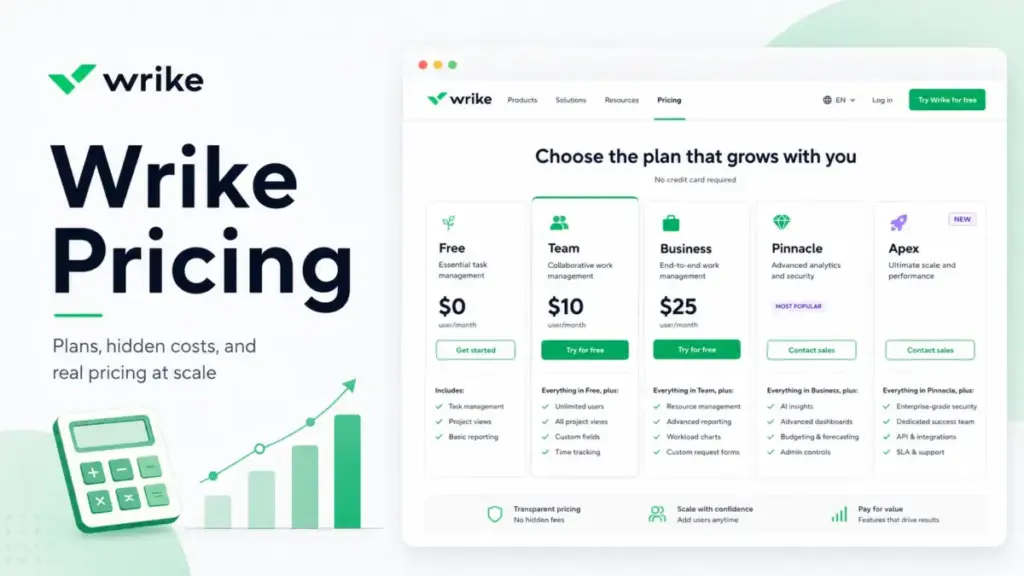
Wrike lists $10/user/month on Team. That is not the number most teams pay.
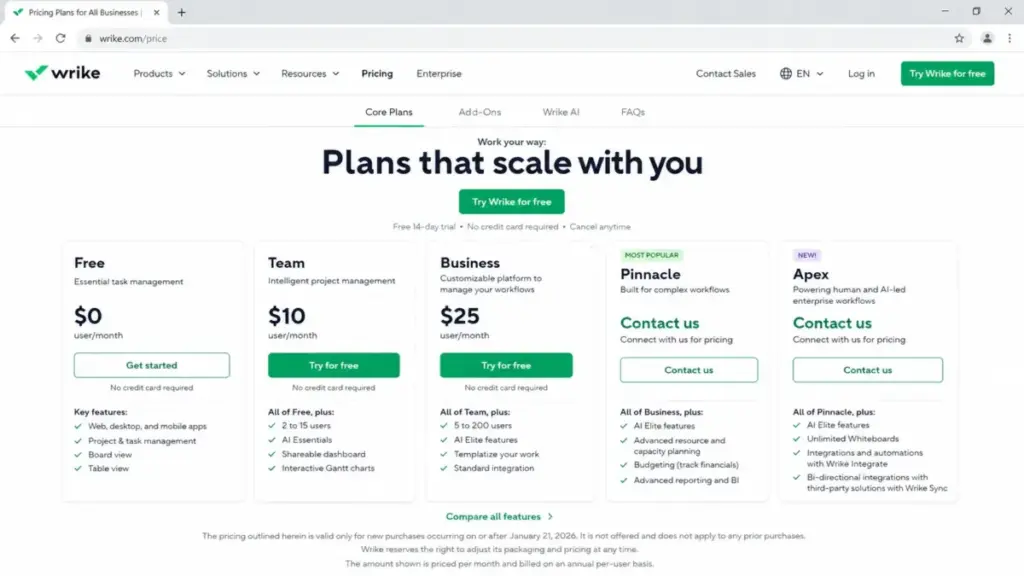
The $10 rate covers 2 to 15 users, billed annually, with no request forms, no approvals, and no time tracking. The moment your team hits 16 people or needs any of those workflow features, you jump to Business at $25/user/month with a 5-seat minimum. That is a $125/month floor before anyone configures a single project.
I have reviewed top project management tools across every pricing tier. Wrike pricing in 2026 looks simple on the surface. The plan gates, annual billing, add-on stack, and AI allowances underneath tell a different story.
This guide breaks down every Wrike plan, the costs that do not appear on the pricing page, what you pay at 5, 10, 25, 50, and 100 users, and whether Wrike is worth it for your team.
Pricing verified on June 12, 2026 from the official Wrike pricing page. All prices in USD, billed annually unless noted.
Quick Pricing Verdict
| Item | Detail |
|---|---|
| Starting price | $10/user/month (Team, billed annually) |
| Free plan | Yes, unlimited users, limited features |
| Free trial | 14 days, no credit card required |
| Best plan for most teams | Business ($25/user/month, billed annually) |
| Plan to avoid | Team if your team will grow past 15 users |
| Biggest hidden cost | Business 5-seat minimum ($125/month floor) + custom add-ons |
| Best alternative if too expensive | ClickUp at $7/user/month |
| Pricing verified | June 12, 2026 |
What this means: The quick answer is $10 to $25 per user per month. The real answer depends on your team size, which project management features you need, and whether you can avoid the add-on stack.
The Advertised Price vs the Real Price
The Wrike pricing page shows clean numbers. Here is what happens when you apply them to actual teams.
| Metric | Advertised | Real cost |
|---|---|---|
| Team plan, 10 users | $100/month | $100/month (if you only need Gantt charts and dashboards) |
| Business plan, 5 users | $125/month | $125/month minimum (5-seat floor, even for 3 people) |
| Business plan, 25 users | $625/month | $625/month + custom add-ons for Integrate, Sync, AI packs |
| Pinnacle, any size | “Custom” | Undisclosed. Sales call required. |
| Apex, any size | “Custom” | Undisclosed. Sales call required. |
| Month-to-month billing | Not shown | Not publicly available. Wrike only publishes annual rates. |
What this means: For Team and Business, the per-user math is straightforward. The cost gap shows up in three places: the 5-seat Business floor that penalizes small teams, the Team-to-Business forced upgrade at 16 users, and the custom-priced add-ons that Wrike does not list in USD on the pricing page.
Wrike Hidden Costs: 5 Fees and Upgrade Triggers to Watch
The Business 5-Seat Floor
Business requires a minimum of 5 users. If your team has 3 people who need request forms or time tracking, you still pay for 5 seats. That is $125/month or $1,500/year for features 2 users will never touch.
The 15-User Team Cliff
Team supports a maximum of 15 users. User 16 forces the entire account to Business at $25/user/month. A team that was paying $150/month on Team suddenly pays $400/month on Business (16 users). That is a 167% price increase for adding one person.
Collaborator and Contributor Licensing
Wrike includes collaborator invitations (20 or 15% of license count, whichever is greater). Exceeding that quota costs extra, but the price is not public. Contributors on Business, Pinnacle, or Apex are paid licenses. Overdraft allows extra contributors above the purchased limit, but the cost is not disclosed.
External users are also charged as regular or external user licenses. If your team works with clients, vendors, or reviewers, budget for these seats.
Custom Add-Ons with No Public Pricing
Six add-ons require a sales call for pricing:
| Add-on | Public price | What it does |
|---|---|---|
| Wrike Whiteboard | $15/user/month | Visual collaboration (included in Apex) |
| Wrike Integrate | Custom | 400+ app connectors (included in Apex) |
| Wrike Two-Way Sync | Custom | Jira, GitHub, Salesforce, HubSpot sync (included in Apex) |
| Wrike Datahub | Custom | Structured data storage (10K records on Pinnacle, 30M on Apex) |
| Wrike Lock | Custom | Customer-managed encryption keys (not included in Apex) |
| AI Elite Action Pack | Custom | Extra AI actions for Business, Pinnacle, Apex |
| Additional storage | Custom | 500 GB or 1 TB increments |
What this means: Whiteboard is the only add-on with a public price. Everything else requires a quote. If your team needs Integrate or Sync on Business or Pinnacle, expect the total bill to exceed the per-user rate by an undisclosed amount.
AI Usage Is Not Unlimited
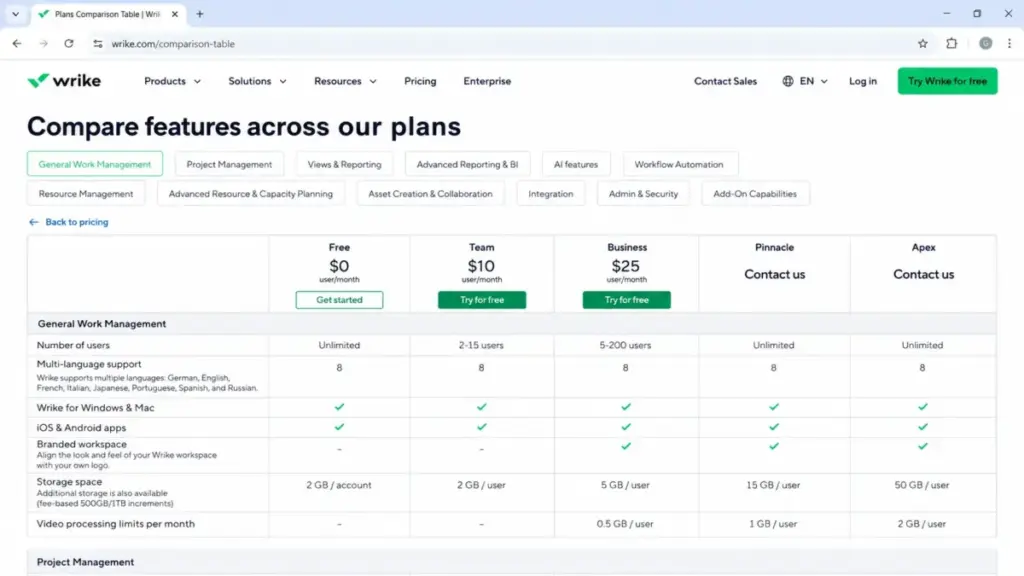
Wrike includes AI Essentials on all plans. AI Elite is available starting on Business, but it comes with a per-seat monthly action allowance. Team gets 50 automation actions/seat/month. Business gets 200. Pinnacle gets 1,500. Apex gets 3,000 plus 10x more AI Elite actions than Pinnacle.
If your team burns through the included allowance, extra AI Elite action packs are custom-priced. Wrike does not publish these rates.
Plan-by-Plan Breakdown
Free: Good for Solo Testing
Wrike Free costs $0 with unlimited users. It includes project and task management, board view, table view, and web, desktop, and mobile apps.
Missing: Gantt charts, dashboards, automations, custom fields, request forms, approvals, time tracking, resource management, SSO, and all advanced features.
Skip Free if your team needs anything beyond basic task lists. It works for personal task tracking or evaluating the interface before committing to a paid plan.
Team: Best for 2 to 15 Users Who Need Gantt Charts
Team costs $10/user/month billed annually ($120/user/year). It covers 2 to 15 users with 2 GB storage per user, 50 automation actions per seat/month, shareable dashboards, interactive Gantt charts, and AI Essentials.
Missing: Request forms, approvals, time tracking, workload management, resource views, custom templates, SSO, and advanced analytics.
Avoid Team if you need intake forms, time logs, or workload charts. Those features require Business.
Business: The Practical Plan for Growing Teams
Business costs $25/user/month billed annually ($300/user/year) with a 5-seat minimum and support for 5 to 200 users. It includes 5 GB storage per user, 200 automation actions per seat/month, request forms, dynamic request forms, approvals, custom templates, time tracking, workload views, resource charts, AI Elite, and standard integrations.
Missing: Budgeting, job roles, resource bookings, utilization dashboards, Tableau/BI API, SAML SSO, IP allowlist, and advanced security controls.
Business is where most teams land. The workflow gates it opens (request forms, approvals, time tracking, resource views) are the features that justify Wrike over simpler tools.
Pinnacle: Custom Pricing for Enterprise Ops
Pinnacle pricing is not publicly disclosed. It adds unlimited users, 15 GB storage per user, 1,500 automation actions per seat/month, advanced resource and capacity planning, budgeting, job roles, resource bookings, utilization dashboards, Tableau integration, BI API, SAML SSO, IP allowlist, and advanced analytics.
Pinnacle makes sense only for teams that need budgeting, BI, or enterprise security. If you do not need those features, Business covers you.
Apex: Custom Pricing, Maximum Feature Access
Apex pricing is not publicly disclosed. It includes 50 GB storage per user, 3,000 automation actions per seat/month, 10x more AI Elite actions than Pinnacle, unlimited Whiteboards, Wrike Integrate, and Wrike Sync.
Wrike Lock and AI Elite action packs are not included in Apex and require separate custom pricing.
Apex is the ceiling. It bundles add-ons that other plans charge separately for. But the custom pricing means you cannot model the total cost without a sales conversation.
Feature Gates: What Forces Your Upgrade
| Feature | Free | Team | Business | Pinnacle | Apex |
|---|---|---|---|---|---|
| AI Essentials | Yes | Yes | Yes | Yes | Yes |
| AI Elite | No | No | Yes | Yes | Yes |
| Gantt charts | No | Yes | Yes | Yes | Yes |
| Custom fields and workflows | No | Yes | Yes | Yes | Yes |
| Request forms | No | No | Yes | Yes | Yes |
| Approvals | No | No | Yes | Yes | Yes |
| Time tracking | No | No | Yes | Yes | Yes |
| Resource views and workload | No | No | Yes | Yes | Yes |
| Budgeting and job roles | No | No | No | Yes | Yes |
| Tableau/BI API | No | No | No | Yes | Yes |
| SAML SSO | No | No | No | Yes | Yes |
| Wrike Integrate and Sync included | No | No | No | No | Yes |
What this means: The three features that most often force teams from Team to Business are request forms, time tracking, and approvals. If you need any one of those, you need Business. The features that force Business to Pinnacle are budgeting, SSO, and BI. If you do not need enterprise security or financial planning, Business is your ceiling.
When the Free Plan Stops Working
Free works until your team needs structure. The upgrade triggers are clear:
Free to Team: You need Gantt charts, dashboards, custom fields, or automations. Any planning beyond basic task boards requires Team.
Team to Business: You need request forms, approvals, time tracking, workload management, or custom templates. These are operational workflow features that Team excludes entirely.
Business to Pinnacle/Apex: You need budgeting, resource bookings, utilization dashboards, SAML SSO, BI API, or Tableau integration. These are enterprise planning and security features.
One thing I learned reviewing Wrike against our full Wrike review: the Free-to-Team gap is manageable. The Team-to-Business gap is where most teams feel the pinch. You go from $10 to $25 per user and gain features that many teams expect in Team.
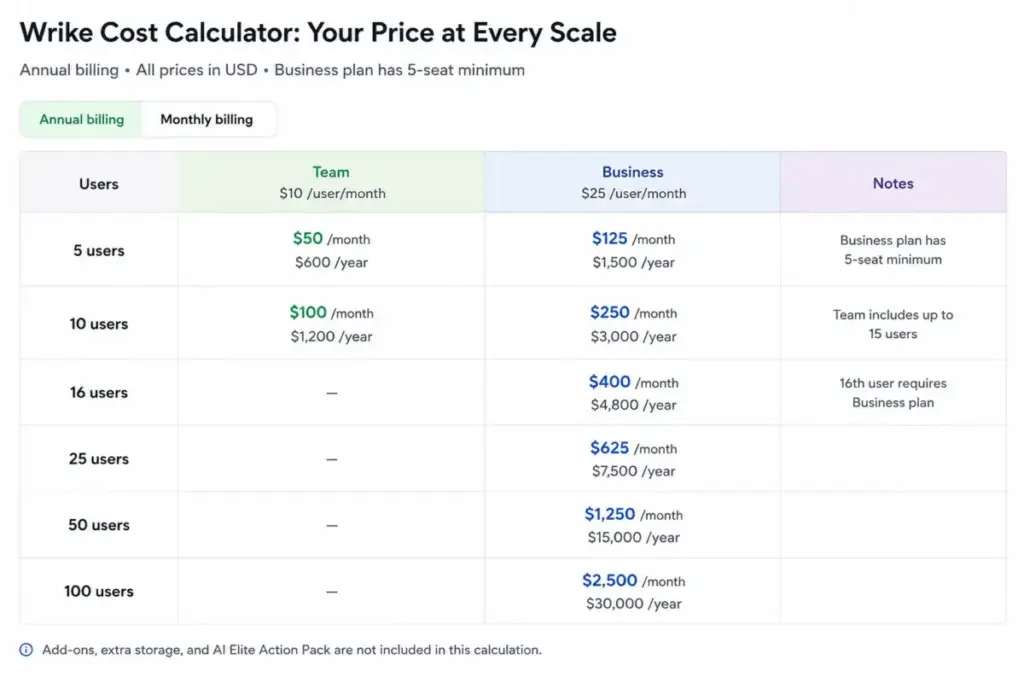
Real Cost Scenarios: 5, 10, 25, 50, and 100 Users
| Team size | Plan | Monthly cost (annual rate) | Annual cost | Notes |
|---|---|---|---|---|
| 5 users | Team | $50/month | $600/year | If only Gantt and dashboards are needed |
| 5 users | Business | $125/month | $1,500/year | 5-seat minimum; required for request forms, time tracking |
| 10 users | Team | $100/month | $1,200/year | Within Team’s 2-15 user range |
| 10 users | Business | $250/month | $3,000/year | If Business features are needed |
| 25 users | Business | $625/month | $7,500/year | Team maxes at 15; Business required |
| 50 users | Business | $1,250/month | $15,000/year | Add-ons, AI packs, and storage not included |
| 100 users | Business | $2,500/month | $30,000/year | SSO, BI, and procurement likely push to Pinnacle/Apex |
What this means: At 5 to 10 users, the Team-vs-Business decision is purely about feature gates. At 25+ users, there is no Team option. At 100 users, the $30,000/year base is just the starting point. Add-ons, storage, AI action packs, and SSO requirements will push the total higher, potentially into custom Pinnacle or Apex territory.
Which Plan Should You Avoid?
Avoid Team if your team will grow past 15 users within a year. The forced migration to Business at user 16 reprices your entire account. Budget for Business from the start if growth is likely.
Avoid Business if you have fewer than 5 users and only need Gantt charts. The 5-seat minimum means you are paying for empty seats. Team at $10/user covers small teams that do not need intake, approvals, or time tracking.
Avoid Pinnacle or Apex unless you can justify budgeting, BI, SSO, or large-scale AI. These tiers solve enterprise governance problems. If your team does not have those problems, Business gives you what you need at a public price.
Which Plan Should You Choose?
Solo users and freelancers: Start with Free. It covers basic project and task management with no cost.
Small teams (2 to 10 users) needing structured planning: Team at $10/user/month. Good for Gantt charts, dashboards, and basic automations.
Cross-functional teams needing operational workflows: Business at $25/user/month. This is the plan PMOs, agencies, and marketing ops teams should default to. Request forms, approvals, time tracking, and workload views are the features that make Wrike worth paying for.
Enterprise teams needing budgeting, SSO, or BI: Contact sales for Pinnacle or Apex. Do not commit without a custom quote that includes all add-ons.
Wrike Pricing vs Competitors
| Tool | Starting paid price | 10-user monthly cost (annual) | Free plan | Best for |
|---|---|---|---|---|
| Wrike Team | $10/user/month | $100/month | Yes | Structured planning with Gantt |
| Wrike Business | $25/user/month | $250/month | Yes | Ops teams needing intake, approvals, time tracking |
| Asana Starter | $10.99/user/month | $109.90/month | Yes | Clean workflow automation |
| monday.com Basic | $9/seat/month | $90/month | Yes (2 seats) | Visual boards and quick setup |
| ClickUp Unlimited | $7/user/month | $70/month | Yes | Budget-conscious teams wanting all-in-one |
| Smartsheet Pro | $9/member/month | $90/month | No (trial only) | Spreadsheet-style project tracking |
What this means: Wrike Team is priced in line with Asana and monday.com. Wrike Business at $25/user/month is more expensive than most competitors’ mid-tier plans, but it bundles request forms, approvals, and resource views that competitors gate at similar or higher price points. The value question is whether your team uses those features daily.
For a detailed cost breakdown, see our Asana pricing analysis.
For the budget option, see our ClickUp pricing breakdown.
Is Wrike Worth the Price?
Wrike is worth it if:
- Your team of 10 or more uses request forms, approvals, and time tracking daily
- You need portfolio-level views across multiple projects with workload charts
- Your PMO or operations team needs structured intake and resource planning
- You are willing to commit to annual billing for the public rates
Wrike is not worth it if:
- You have fewer than 5 users and only need basic task management (ClickUp or Trello are cheaper)
- You want month-to-month billing flexibility (Wrike does not publish monthly USD rates)
- Your team only needs Kanban boards and simple task lists (Trello or Todoist cost less)
- You need SSO or BI on a public, transparent price (those are custom-priced on Pinnacle and Apex)
James Carter, Productivity and Collaboration Software Analyst at SaaS Zap, has reviewed 35+ project management tools. For teams that use Wrike’s operational workflow gates daily, Business at $25/user/month is defensible. For teams shopping for the lowest per-user project management tool, check our ClickUp review for better entry-level value.
For a workflow-focused alternative, read our Asana review.
How to Avoid Overpaying for Wrike
For a deeper look at switching options, see our Wrike alternatives analysis.
Teams that need spreadsheet-style project tracking should also consider our Smartsheet analysis.
- Start with Team if your team is under 15. Do not buy Business until you hit a feature gate. Gantt charts and dashboards are enough for many teams.
- Count your actual users before choosing Business. The 5-seat minimum means teams of 3 or 4 pay for empty seats. Make sure you have at least 5 active users who need Business features.
- Map your feature needs to plan gates. If nobody uses request forms, approvals, or time tracking, Team saves you $15/user/month.
- Commit to annual billing. Wrike’s published USD prices are annual rates. Month-to-month pricing is not publicly available, which likely means it is higher.
- Audit your collaborator and contributor count. Collaborators above the included quota and contributors beyond the purchased limit generate extra costs. Track these before renewal.
- Ask for add-on pricing before signing. If you need Integrate, Sync, Datahub, or Lock, get the custom quote in writing. These can change your total cost by a meaningful amount.
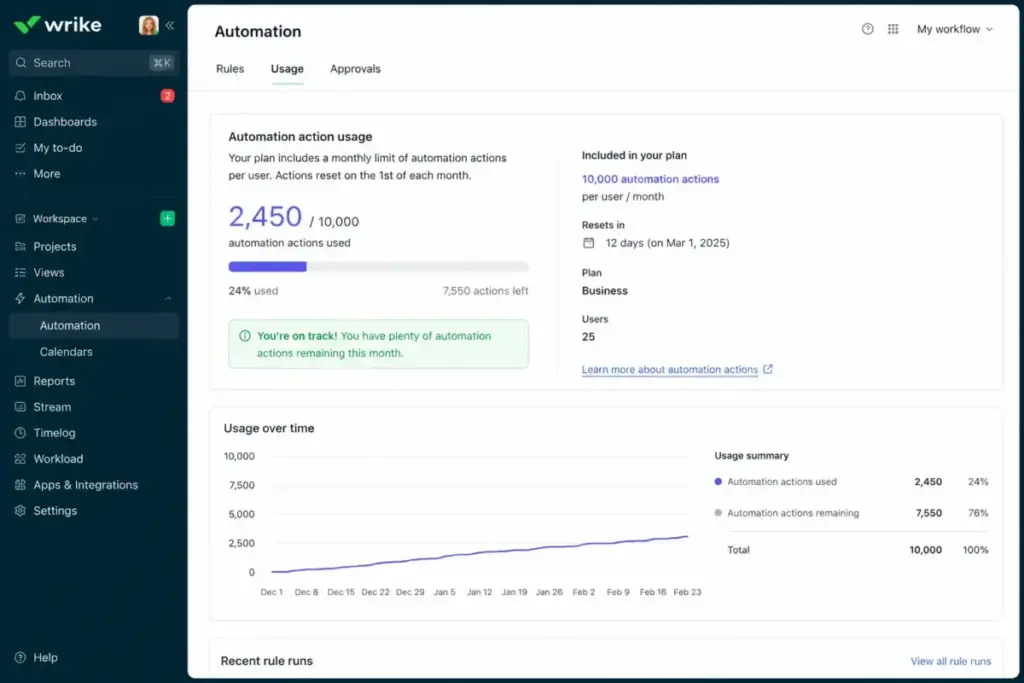
- Review your automation action usage quarterly. Teams pile up automations and forget. If you are approaching your per-seat monthly limit (50 on Team, 200 on Business), either clean up unused automations or budget for the upgrade.
Frequently Asked Questions
How much does Wrike cost per month?
Wrike Team costs $10/user/month and Business costs $25/user/month, both billed annually. Pinnacle and Apex require custom quotes. Wrike does not publish separate month-to-month USD rates.
Is Wrike free to use?
Yes. Wrike Free supports unlimited users with basic project and task management, board view, and table view. It does not include Gantt charts, automations, request forms, approvals, or time tracking.
Does Wrike have a free trial?
Yes. Wrike offers a 14-day free trial with no credit card required.
What Wrike plan do I need for request forms?
Request forms are available starting on the Business plan at $25/user/month. Team and Free do not include request forms.
Can I buy Wrike Business with fewer than 5 users?
Business has a 5-user minimum. If you have fewer than 5 users, you still pay for 5 seats ($125/month billed annually).
What happens when my team grows past 15 users on Team?
Team supports a maximum of 15 users. At user 16, you must upgrade the entire account to Business at $25/user/month. There is no way to add a single Business seat to a Team plan.
Does Wrike charge for external users?
Yes. Regular and external users are charged. Collaborators are included up to 20 or 15% of license count (whichever is greater). Exceeding the collaborator quota costs extra, but the rate is not public.
Is Wrike cheaper than Asana?
Wrike Team at $10/user/month is slightly cheaper than Asana Starter at $10.99/user/month. At the mid-tier, Wrike Business at $25/user/month and Asana Advanced at similar pricing are competitive. The cost difference is small. The feature fit matters more.
Is Wrike cheaper than monday.com?
Wrike Team at $10/user/month is slightly more than monday.com Basic at $9/seat/month. At 10 users, the annual gap is about $120. Both tools gate their operational features behind mid-tier plans. For a closer look, read our monday.com review.
Does Wrike AI cost extra?
AI Essentials is included on all plans. AI Elite is included starting on Business, with a per-seat action allowance. Extra AI Elite action packs are custom-priced and not included in any plan by default.