On paper, Trello starts at $0/month for small teams, with Standard costing just $5/user/month on an annual cycle. However, hidden rules around multi-board guests and duplicate Workspace billing can double your invoice without warning.
Before committing, check our guide to the best project management software options to compare Trello to other systems.
This evaluation is based on independent editorial research, analyzing official product documentation, feature specifications, and verified customer feedback. I broke down every tier, add-on, and seat scenario so you know exactly what your team will pay.
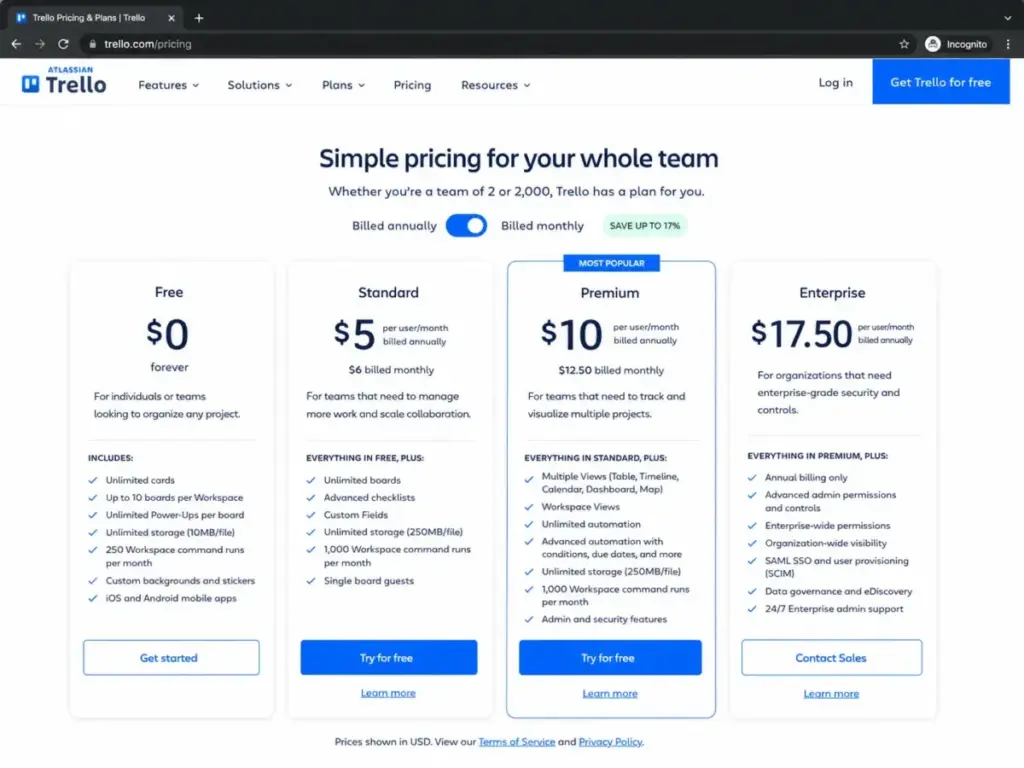
Understanding the base rates helps, but selecting a tier requires exposing the hidden billing rules. The table below summarizes the key cost dimensions and plan decisions for Trello.
| Pricing Dimension | Quick Verdict |
|---|---|
| Starting Price | $0/month (up to 10 collaborators per Workspace) |
| Free Plan / Trial | Free plan available; 14-day Premium trial (no credit card required) |
| Best Plan for Most Teams | Standard plan ($5/user/month billed annually) |
| Plan to Avoid | Premium plan (unless you require timeline or dashboard views) |
| Biggest Hidden Cost | Multi-board guest billing (charged at full member rates) |
| Best Alternative | ClickUp (Unlimited at$7/user/month billed annually) |
| Pricing Verified Date | May 25, 2026 |
What this means: Trello is cost-effective for basic Kanban tracking. However, scaling users or adding complex views changes your invoice. If your workflow requires tracking project dates in a timeline, your cost doubles immediately as you upgrade to Premium. If the Premium jump is driven by timeline or reporting needs, compare Trello alternatives by view access, automation caps, guest billing, and the monthly cost at your real team size.
Small teams should manage Free plan boundaries carefully. Larger teams must consolidate boards into a single paid Workspace to avoid double-billing.
The Advertised Price vs The Real Price
On paper, Trello is one of the most affordable collaboration tools on the market. Standard costs $5/user/month on annual billing, which is lower than most competitors. In practice, that per-user rate is only a baseline. Your final bill can increase due to guest policies, duplicate memberships, and third-party integrations.
The base seat price does not include identity provisioning or custom integrations. If your company enforces SAML SSO, your true base rate rises. You must pay for Atlassian Guard Standard as an extra license. This addition turns Trello into a more expensive platform for medium-sized teams.
Before upgrading, you should understand what project management actually is to determine which features your workflow requires.
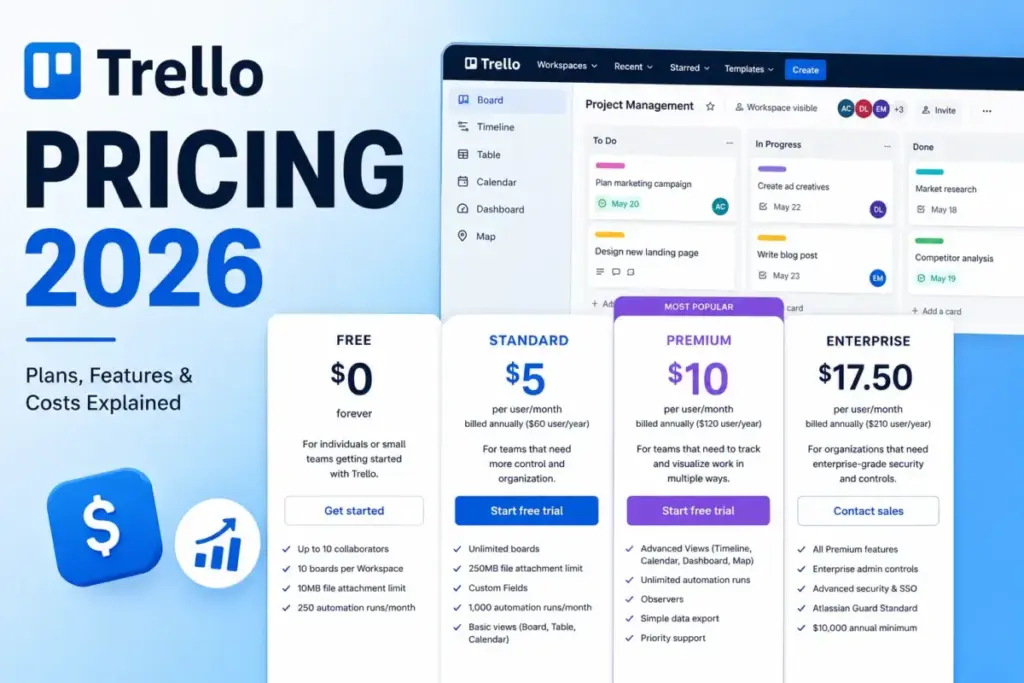
The table below compares the official rates and limits for each tier, based on Trello’s published rates.
| Trello Plan | Monthly Price | Annual Price | Billing Basis | Best For | Key Limits |
|---|---|---|---|---|---|
| Free | $0 | $0 | Per collaborator | Solo users and small teams | 10 collaborators, 10 boards, 10MB file cap, 250 automation runs/month |
| Standard | $6/user/month | $5/user/month ($60/user/year) | Per Workspace member and multi-board guest | Growing teams | Unlimited boards, 250MB file cap, 1,000 automation runs/month |
| Premium | $12.50/user/month | $10/user/month ($120/user/year) | Per Workspace member and multi-board guest | Multi-project tracking | Unlimited automation runs, advanced views, observers, simple data export |
| Enterprise | Not available | $17.50/user/month ($210/user/year) | Per user (annual billing, $10,000 minimum spend) | Organizations with 50+ seats | Annual-only billing, Atlassian Guard included, organization-wide controls |
What this means: Upgrading to Premium doubles your subscription cost from Standard. Teams should only pay for Premium if they require specific view formats like timeline or calendar grids. If you only need to manage basic Kanban boards, the Standard plan provides unlimited boards at a lower rate.
The 6 Hidden Costs Nobody Mentions
The advertised per-seat rate does not tell the full story of Trello’s total cost of ownership. Several billing policies can cause unexpected charges on your credit card. Exposing these hidden billing mechanics helps you budget accurately before upgrading your Workspace.
Multi-Board Guest Billing
Trello allows you to add guests to single boards for free in paid Workspaces. However, inviting a guest to two boards within the same upgraded Workspace makes them a multi-board guest. Trello immediately charges for them at the same rate as a full Workspace member. You must monitor guest access to prevent these unexpected charges.
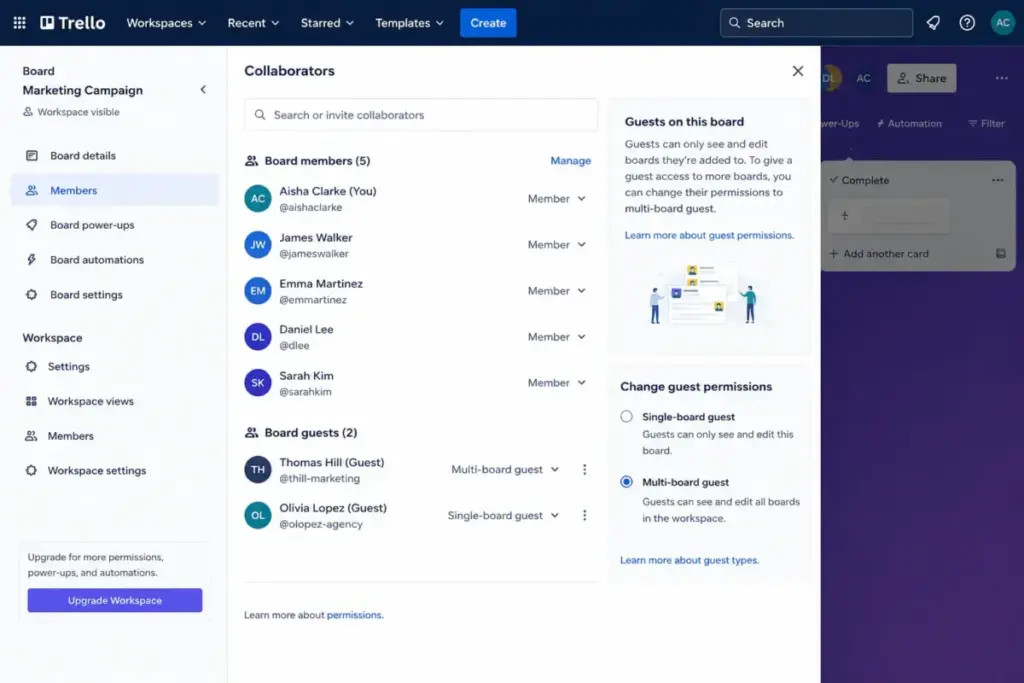
For example, a freelancer needing access to both your design and feedback boards is billed at full price. To avoid this, combine their tasks onto a single board.
Duplicate Paid Workspace Billing
Trello bills subscriptions at the Workspace level, not the user account level. If the same user belongs to two upgraded Workspaces, you pay for them twice. For instance, if five team members belong to two upgraded Workspaces, you pay ten subscription fees. You must consolidate your boards into a single paid Workspace to avoid paying duplicate seat fees.
Prorated Added Seats
When you add a new Workspace member or a billable multi-board guest, Trello calculates the cost immediately. The system bills you for the new user prorated to the remaining time in your active billing period. This prorated charge appears on your next invoice, which can make your mid-cycle bills look higher than expected. Deactivating a user mid-month stops future billing but does not generate a refund for the current period.
Atlassian Guard outside Enterprise
If your company enforces single sign-on (SSO) or centralized identity management, you need Atlassian Guard. While Guard is included with the Enterprise plan, it is a separate subscription for Standard and Premium users. According to Atlassian’s product documentation, Guard starts at $4/user/month across your Atlassian tools. This adds a significant surcharge if you want secure directory sync without upgrading to the Enterprise tier.
Third-Party Power-Up Subscriptions
Trello supports unlimited Power-Ups on all plans, but Trello does not pay for them. Many third-party integrations require their own paid subscriptions to access advanced features. If your team relies on external power-ups for time tracking, those providers bill you separately. These separate charges can quickly exceed your core Trello licensing costs.
API Rate-Limit Engineering Cost
Trello does not charge overage fees for high API usage. However, heavy custom integrations will hit rate limits. Trello caps developer requests at 300 per 10 seconds per API key and 100 per token. The real cost here is the engineering hours required to build queuing systems that handle these limits.
The table below outlines the hidden costs and add-ons you should factor into your Trello budget.
| Hidden Cost / Add-on | Price | Billing Trigger |
|---|---|---|
| Multi-board guest | Same rate as Workspace member ($5–$6/user/month) | A guest is added to two or more boards in a paid Workspace |
| Duplicate Workspace seat | Same rate as Workspace member ($5–$6/user/month) | A user belongs to more than one upgraded Workspace |
| Atlassian Guard Standard | Starts at$4/user/month | Needed for SAML SSO and SCIM outside the Enterprise plan |
| Third-party Power-Ups | Varies by provider | App-specific subscription fees for advanced integrations |
| API Rate Limit | Engineering time (no direct Trello fee) | Integrations exceed 300 requests per 10 seconds |
What this means: Managing guest permissions is the easiest way to control your Trello bill. Keep clients on a single board to prevent them from converting into paid seats. If you have multiple departments, keeping everyone in one Workspace avoids paying double fees.
Plan-by-Plan Breakdown
Trello pricing is structured across four main plan tiers. Each plan offers a different balance of user limits, board quantities, and views. The pricing verified date for all plans is May 25, 2026, as checked on Trello’s official pricing page.
Trello Free Plan
The Free plan is a basic entry point for solo users and small teams. It allows you to build simple Kanban boards without paying a fee. However, it restricts your collaborators and board quantities.
- Includes: Up to 10 boards per Workspace, 10 collaborators per Workspace, unlimited cards, unlimited Power-Ups, and 250 Workspace command runs per month.
- Missing: Unlimited boards, Custom Fields, advanced checklists, card mirroring, 250MB attachments, and Premium views.
- Avoid-if: Your team has more than 10 members or needs custom database fields to track task metadata.
- Mini Verdict: Perfect for personal task tracking and tiny teams, but commercial teams will outgrow its limits quickly.
Trello Standard Plan
The Standard plan is the most popular choice for growing teams. It costs $5/user/month billed annually and removes the board quantity restrictions. It also provides Custom Fields and advanced checklists.
For a deeper look at features, see our detailed Trello review to understand the core product workflow.
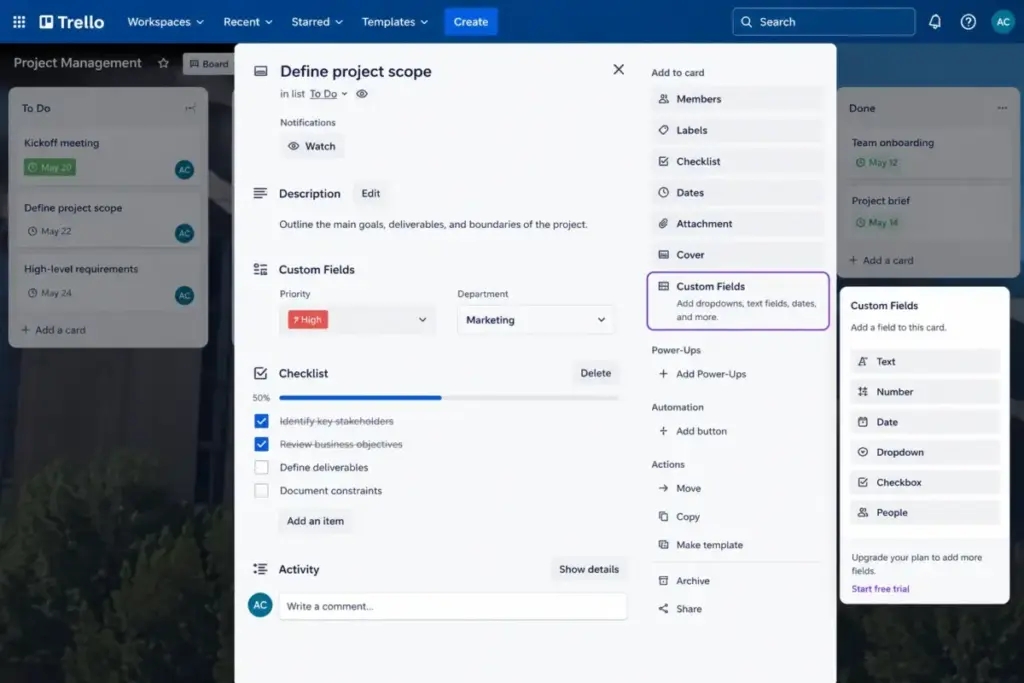
- Includes: Unlimited boards, 250MB file attachments, Custom Fields, advanced checklists, card mirroring, and 1,000 Workspace command runs per month.
- Missing: Calendar, Timeline, Table, Dashboard, Map, and Workspace views, observers, and simple data export.
- Avoid-if: You need visual timeline planning or manage workflows that trigger more than 1,000 automations per month.
- Mini Verdict: This tier offers the best value for teams that need standard Kanban tracking without complex project reporting.
Trello Premium Plan
The Premium plan targets teams managing multiple projects across deadlines. It costs $10/user/month billed annually and introduces advanced project views. It also provides unlimited automation runs.
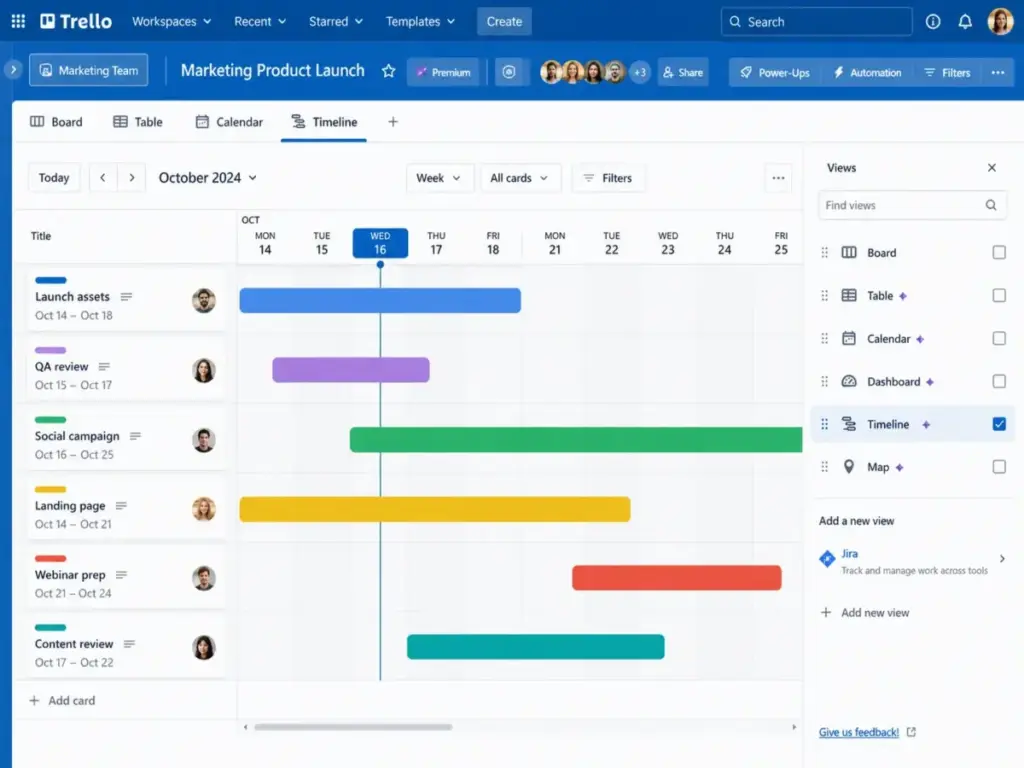
- Includes: Timeline, Calendar, Table, Dashboard, Map views, Workspace-level views, observers, simple data export, and unlimited Workspace command runs.
- Missing: Unlimited Workspaces, organization-wide permissions, Atlassian Guard Standard, and Power-Up admin controls.
- Avoid-if: Your team works in silos and only uses the standard Kanban board layout.
- Mini Verdict: Premium is expensive but necessary if your project managers spend their day managing project timelines and deadline calendars.
Trello Enterprise Plan
The Enterprise plan is designed for large companies requiring centralized security and administration. It costs $17.50/user/month billed annually, but is subject to a $10,000 minimum spend threshold.
- Includes: Organization-wide permissions, organization-visible boards, public board management, attachment restrictions, Power-Up administration, and Atlassian Guard Standard.
- Missing: Monthly billing option, as Atlassian requires annual contracts for this tier.
- Avoid-if: Your company has fewer than 50 active seats or does not require centralized identity management.
- Mini Verdict: The right choice for compliance-driven enterprises, but smaller teams will find the entry threshold too high.
When to Upgrade from Standard to Premium
The Standard-to-Premium jump doubles your annual cost from $60/user/year to $120/user/year. Pay for Premium only if your team requires:
- Project views: You need Timeline, Calendar, Table, Dashboard, or Map views to manage deadlines.
- Cross-project reporting: You need Workspace Table and Workspace Calendar views to see tasks across multiple boards.
- High automation volume: You exceed the 1,000 command runs per month limit on Standard.
- External observers: You need clients to view boards without editing card details.
- Data backup: You require simple data export to download your boards in CSV or JSON format.
When the Free Plan Stops Working
Trello’s Free plan is generous, but its boundaries are rigid. Hitting any of the key limits will trigger an upgrade prompt for the entire Workspace. Understanding these upgrade triggers helps you anticipate when your team will transition to paid licensing.
The most obvious upgrade trigger is the 10-collaborator limit. If you add an eleventh member to your Workspace, Trello forces you to upgrade. You cannot select which users to pay for. The entire Workspace upgrades to the paid Standard tier.
Another common trigger is the 10-board limit. If you need an eleventh board to organize your tasks, you must upgrade. You can work around this by archiving old boards, but that ruins historical tracking.
Finally, files and Custom Fields force upgrades. Trello Free limits attachments to 10MB per file. Standard increases this to 250MB.
If your marketing team attaches design assets, you will hit the 10MB cap immediately. You also need Custom Fields to add dates or text fields to your cards.
If your team manages custom agile workflows, check what Kanban actually represents to structure your boards efficiently before upgrading.
To help you evaluate these paid features, Trello offers a 14-day Premium free trial. The trial does not require a credit card, so you can test the advanced views risk-free.
Trello Real Cost Scenarios: How the Bill Scales
Calculating your software budget requires analyzing total cost at scale. Because Trello bills per seat, your headcount directly determines your annual expenditure. The table below calculates the real cost of Trello at common team sizes.
| User Count | Recommended Plan | Monthly Cost (Monthly Billing) | Annual Cost (Annual Billing) | Key Notes |
|---|---|---|---|---|
| 5 Users | Standard | $30/month on Standard (or $62.50/month on Premium) | $300/year on Standard (or $600/year on Premium) | Standard is the baseline. 5-person team can stay Free only if it remains within Free limits. |
| 10 Users | Standard | $60/month on Standard (or $125/month on Premium) | $600/year on Standard (or $1,200/year on Premium) | Free becomes fragile here because it caps collaborators and boards per Workspace. |
| 25 Users | Premium (conditional) | $150/month on Standard (or $312.50/month on Premium) | $1,500/year on Standard (or $3,000/year on Premium) | Standard works for basic tracking. Jump to Premium must be justified by views and automation. |
| 50 Users | Premium (conditional) | $300/month on Standard (or $625/month on Premium) | $3,000/year on Standard (or $6,000/year on Premium) | Enterprise is$875/month (effective rate) or $10,500/year (Enterprise calculator minimum). |
| 100 Users | Enterprise (conditional) | $600/month on Standard (or $1,250/month on Premium) | $6,000/year on Standard (or $12,000/year on Premium) | Enterprise costs$21,000/year. Decision depends on compliance and SSO needs. |
What this means: Trello’s per-user pricing scales linearly. For a team of 50 users, upgrading to Premium increases your annual cost from $3,000 to $6,000.
A 50-user team spends $10,500/year on Enterprise due to the minimum spend threshold. Confirm your security needs before contacting sales.
Monthly vs Annual Billing Savings
Trello offers discounts for annual billing. Standard monthly billing is $6/user/month, while annual billing is $5/user/month. This represents a 16.7 percent discount. A 10-user team saves $120/year by paying annually.
Premium monthly billing is $12.50/user/month, while annual billing is $10/user/month. This represents a 20 percent discount. A 10-user team saves $300/year on Premium by choosing the annual contract.
I recommend annual billing for established teams with stable headcounts. If your team size changes frequently, monthly billing provides the flexibility to deactivate users without wasting money.
Which Trello Plan Should You Choose?
Selecting a Trello plan requires matching your team’s workflow complexity with the appropriate tier. Paying for features your team will not use is a waste of budget. The guidance below outlines the best plan choice by buyer type.
- Solo Users and Freelancers: Stick to Trello Free. You can manage tasks across 10 boards and invite up to 10 collaborators without paying.
- Small Teams (2-10 users): Standard is the best value choice. It provides unlimited boards and Custom Fields for just $5/user/month annually.
- Growing Teams (10-50 users): Select Premium if your managers need timeline and calendar views to coordinate deadlines. If you only need Kanban tracking, stay on Standard to save $60/user/year per seat.
- Enterprise Teams (50+ users): Choose Enterprise if your security team requires SAML SSO and organization-wide board permissions. Smaller teams are directed to Premium because of the $10,000 Enterprise minimum spend.
To evaluate the core product before buying, read our detailed Trello review for a complete breakdown of its usability.
Which Trello Plan Should You Avoid?
Avoid paying for Premium just because it is the most advertised paid option. Many teams upgrade to Premium for timelines but continue using standard Kanban boards. If you do not use the advanced views, you are paying a 100% markup over Standard for nothing.
You should also avoid Standard if you manage multiple business units with separate Workspaces. Standard does not support centralized administration, which can lead to duplicate seat billing across Workspaces. In this case, consolidating your team into a single Premium Workspace is the more cost-effective choice.
Trello Pricing vs Competitors
Trello is often positioned as the budget-friendly choice in the project management space. To verify this, we compared Trello’s pricing to four popular alternatives at a 10-user scale. The competitor rates are based on the latest published annual rates.
| Competitor | Starting Price | Practical Tier | 10-User Monthly Cost (Annual Rate) | Best For |
|---|---|---|---|---|
| Trello | $0/month | Standard ($5/user/month) | $50/month | Simple Kanban boards |
| ClickUp | $0/month | Unlimited ($7/user/month) | $70/month | Feature-rich task management |
| Asana | $0/month | Starter ($10.99/user/month) | $109.90/month | Non-technical collaboration |
| monday.com | $0/month | Basic ($9/seat/month) | $90/month | Custom project workflows |
| Notion | $0/month | Plus ($10/member/month) | $100/month | Docs and project wikis |
What this means: Trello Standard is the cheapest paid tier in this comparison. It costs half the price of Notion Plus.
However, general project tools like ClickUp include timeline and calendar views in their entry tier. If you need those views, ClickUp Unlimited is cheaper than Trello Premium.
For a detailed comparison of features and plan gates, check the ClickUp pricing structure. You should also check Asana pricing plans and Notion pricing plans to see their feature gates. If you manage software development, check Jira pricing plans to see if a developer tool fits your team.
Is Trello Worth the Price?
Trello scores 8.0/10 for value. While it is inexpensive for basic tracking, its value decreases if you require advanced view formats or enterprise security. The final purchasing decision depends on your team’s specific workflow requirements.
- Worth it if: You need simple Kanban board layouts, want unlimited boards, require custom fields, and are a small team that can manage without SSO or advanced database views.
- Not worth it if: Your team requires deep resource planning, native time tracking, or complex dependencies. At that point, you will outgrow Trello Premium and should evaluate ClickUp or Asana instead.
Review limitation: This pricing evaluation is based on official Trello documentation and verified customer feedback. I did not deploy Trello with a live team for a multi-week workflow test. You should confirm custom Enterprise quotes with Trello directly.
How to Avoid Overpaying for Trello
SaaS bills can quickly escalate if you do not actively manage your licenses. Implementing a few operational rules can help you reduce your monthly Trello expenditures. These actionable tips will protect your team from unexpected charges.
- Consolidate Workspaces: Move all team boards into a single paid Workspace. This prevents paying duplicate seat fees for users who belong to multiple departments.
- Audit Board Guests: Review your board guest list monthly. Keep clients on a single board to prevent Trello from billing them as multi-board guests.
- Monitor Automation Runs: Check your command run dashboard quarterly. Standard is capped at 1,000 runs, and exceeding this cap forces upgrade pressure.
- Audit Power-Up Subscriptions: Review third-party Power-Up charges separately. Cancel unused apps to prevent subscription creep.
- Use Free Account Limits: If your team has exactly 10 members and fewer than 10 boards, stay on the Free plan and manage board archives manually to save $600/year on Standard.
- Consolidate User Directory: If you need SAML SSO, purchase Trello Enterprise instead of buying Premium and Atlassian Guard separately. At 50 users, Enterprise includes Guard and is more cost-effective.
Frequently Asked Questions (FAQ)
We compiled the most common questions buyers ask about Trello plans and billing rules. The answers below provide direct, conditional guidance to help you evaluate Trello’s licensing system.
Is Trello Standard worth it for a small team?
Yes, if your team only needs basic Kanban boards to track daily tasks. Standard provides unlimited boards and Custom Fields for a low per-user rate. However, if your managers need timeline planning or cross-project views, Standard is not enough. You will need to upgrade to Premium or use a competitor.
Why did Trello bill me for a guest user?
This happens because you added the guest to two boards within the same paid Workspace. Trello treats single-board guests as free collaborators. However, inviting a guest to a second board triggers a full seat charge. Trello bills them as a regular member.
Is Trello Premium too expensive for visual planning?
Yes, if you only need the Calendar view. ClickUp and monday.com provide visual timelines at a lower price point. However, if your team already has many Trello boards, upgrading avoids the hassle of data migration. The value depends on your switching costs.
Can I use Trello for free with clients?
Yes, if you restrict each client to a single board. Single-board guests are free in Trello. But if you invite the same client to a second board, Trello will charge for them. Keep client collaboration consolidated to a single board to prevent surprise billing.
Why is my Trello Workspace charged twice?
This happens when the same user belongs to multiple upgraded Workspaces. Trello bills memberships at the Workspace level rather than the user account level. To stop this duplicate billing, you must consolidate your boards and team members into a single paid Workspace.
Will I outgrow Trello's Free plan limits?
Yes, if your team grows past 10 collaborators or needs more than 10 boards. You will also outgrow Free if you require larger file attachments or more than 250 monthly automations. Standard is the next logical step when you hit these caps.
Do I need Atlassian Guard for Trello SSO?
Yes, unless you upgrade to the Enterprise plan. Standard and Premium subscriptions do not include native SAML SSO or directory sync. You must purchase Atlassian Guard Standard for $4/user/month to connect Trello to your identity provider.
What is the difference between Trello automation quotas and API limits?
Trello automation runs are monthly caps set by your plan. Standard includes 1,000 runs, while Premium is unlimited. API rate limits are developer constraints that restrict request volume to 300 per 10 seconds. To coordinate tasks across other channels, check the best team collaboration tools for more messaging options.