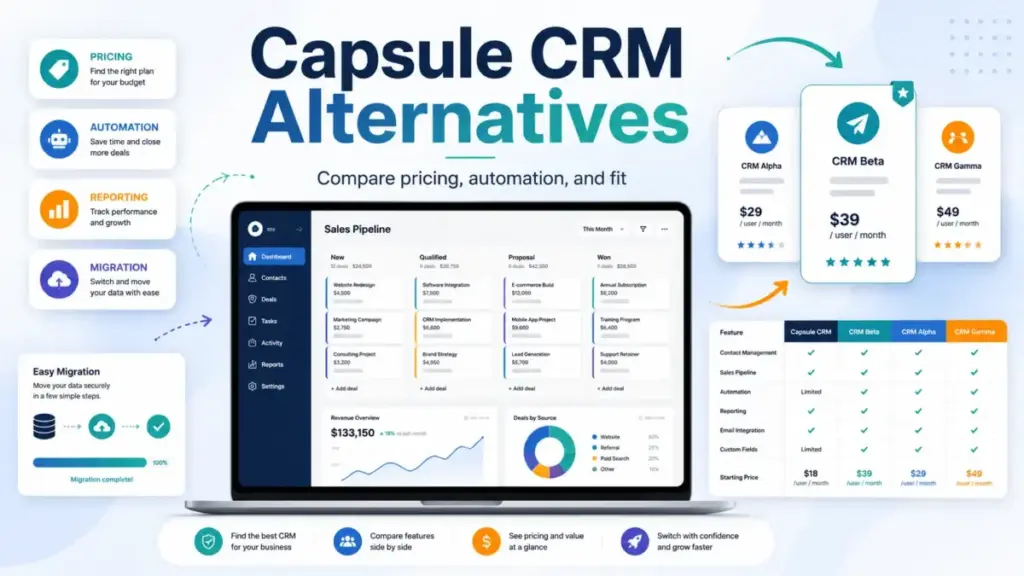
Capsule CRM starts at $18/user/month billed annually on Starter. That is a fair price for clean contact management and a simple sales pipeline. The problem surfaces when you need workflow automation, because that requires Growth at $36/user/month, doubling the per-seat cost. A 10-user team on Starter pays $180/month for pipeline basics. The same team on Growth pays $360/month just to unlock automations that most competing CRMs include at lower tiers (as of May 2026).
Capsule is not broken. It is a lightweight CRM that does contact management and simple pipeline tracking well. But the moment you need automation, multiple pipelines on lower tiers, deeper reporting, native email marketing, or a built-in dialer, you hit a ceiling that Capsule’s architecture was not designed to raise. This guide maps 10 Capsule CRM alternatives to the specific limitation driving your search, compares what each costs for a real 10-user team, and flags where migration gets complicated. If you are evaluating best CRM software options beyond Capsule, the right pick depends on which ceiling you hit first.
Understanding what CRM software actually does beyond contact storage helps frame why these alternatives exist. Capsule is a relationship-tracking layer with light pipeline features. The alternatives below trade some of that simplicity for capabilities Capsule gates or omits entirely.
Quick Verdict: Best Capsule CRM Alternatives by Switching Trigger
| If you are leaving Capsule because… | Best alternative | Why |
|---|---|---|
| Workflow automation is gated to Growth | Pipedrive | Visual pipeline CRM with automation on lower tiers and 500+ integrations |
| Reporting feels too basic for sales ops | HubSpot Sales Hub | Free CRM tools, sales analytics, forecasting, and a broad reporting upgrade path |
| Marketing and sales need to live together | Freshsales | Built-in phone, chat, email, and workflow tools from $9/user/month |
| You want a Gmail-native CRM experience | Copper CRM | Google Workspace-embedded CRM with pipelines and contact enrichment |
| You need enterprise-grade scale | Salesforce Starter Suite | Enterprise CRM foundation with upgrade path to the full Salesforce platform |
| You need configurable boards and automations | monday sales CRM | Board-based CRM with dashboards, quotes, and customizable workflows |
| You want a simple CRM with guided selling | Nutshell | Straightforward CRM with webchat, forms, landing pages, and AI features included |
| You want predictable, no-tier pricing | Less Annoying CRM | One plan at $15/user/month, all features, no contracts |
| You need CRM plus project handoff | Insightly CRM | CRM combined with project management and structured post-sale operations |
| You need more depth at a lower price | Zoho CRM | Configurable modules, forecasting, and automation from $14/user/month |
What this means: There is no single best Capsule replacement. The right alternative depends on whether you hit an automation wall, a reporting ceiling, an outbound gap, or a pricing inflection. Most listing pages rank alternatives by popularity. This guide ranks by the specific problem each tool solves for Capsule switchers.
How We Evaluated These Alternatives
This is not a hands-on testing article. Every product was evaluated using official pricing pages, published feature documentation, verified plan comparisons, and public review-pattern signals from platforms like G2 and Capterra (as of May 2026). Pricing was verified against each vendor’s official page on the date noted. I did not sign up for trials or conduct workflow testing, so any claims about user experience come from public documentation and review-pattern synthesis, not direct usage.
Limitation: Pricing and feature availability change. Always verify current rates on the vendor’s official pricing page before making a purchase decision.
Best Alternatives for Small Teams (1 to 10 Users)
Small teams leaving Capsule typically need more automation at the current price point, a broader communication stack, or simpler pricing without tier surprises. These four alternatives fit that profile.
Pipedrive: Best for Visual Sales Pipelines

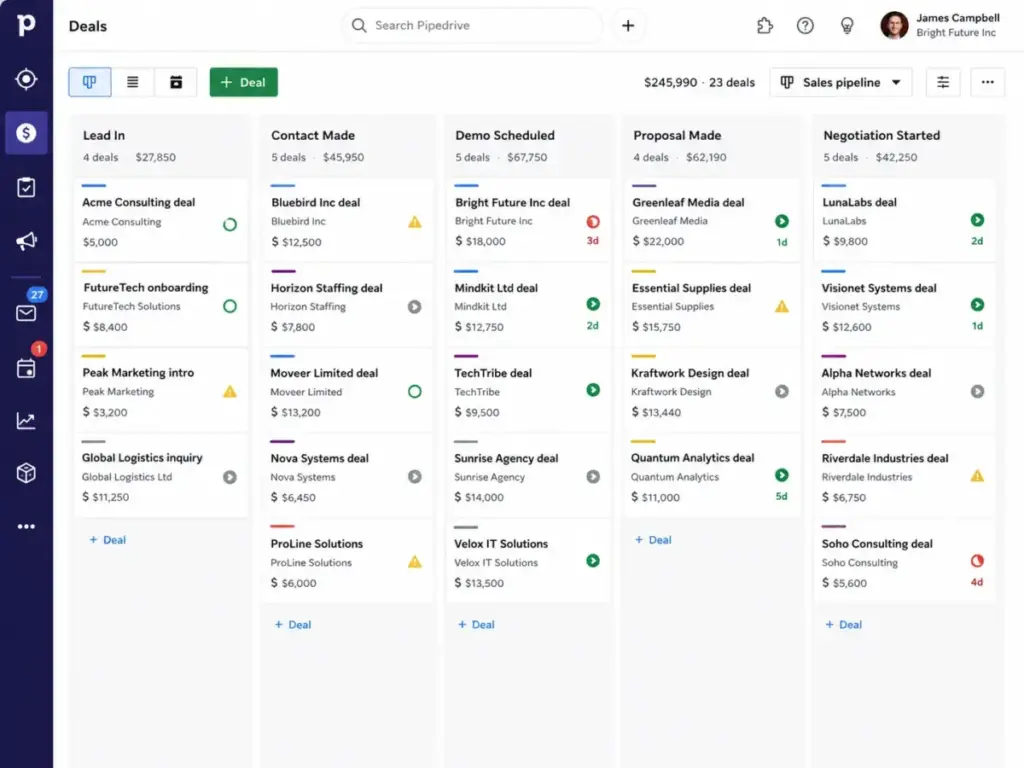
Pipedrive is the strongest Capsule alternative for teams that think in deals, stages, and follow-ups rather than relationship notes and want automation without paying Capsule Growth prices.
Pricing: Lite starts at $14/seat/month billed annually with a 14-day free trial. A 10-user team on Lite pays $140/month, which is $40/month less than Capsule Starter while offering more pipeline depth.
Pipedrive’s core experience is built around visual deal tracking: drag-and-drop stages, activity scheduling, deal rotting indicators, and workflow automation that starts on lower tiers than Capsule. The marketplace has 500+ integrations, covering email, calling, and marketing tools that Capsule users typically add through Zapier.
What it does better than Capsule: Stronger sales pipeline mechanics, automation at a lower price point, and broader integration options without relying on third-party connectors.
What it does worse: Optional add-ons for lead generation, campaigns, and advanced reporting can increase total cost. Pipedrive is less attractive for teams that need native marketing automation in the same tool.
Best for: Sales teams that outgrew Capsule’s pipeline view and want deal-focused CRM with more automation.
Avoid if: You need native marketing automation or project management inside the CRM. Pipedrive is a sales tool, not a marketing suite.
Migration difficulty: Medium
Verdict: Choose Pipedrive if Capsule’s automation gate at Growth pricing was your switching trigger. The Pipedrive CRM analysis breaks down what each tier unlocks, and the Pipedrive pricing breakdown maps the add-on costs.
Freshsales: Best Value for Built-in Communication

Freshsales is the best Capsule alternative for teams that want CRM, email, chat, phone, and workflows in one package at a lower starting price than Capsule.
Pricing: Free plan for up to 3 users. Growth starts at $9/user/month billed annually with a 21-day trial. A 10-user Growth team costs $90/month, half of what Capsule Starter charges for the same headcount.
Growth includes Kanban views, contact lifecycle stages, built-in chat, email, and phone channels, basic workflows, and a product catalog. The savings versus Capsule are real: $90/month less at 10 users, with more communication channels included. CPQ and Freddy AI Agent sessions are add-ons, and advanced features like multiple pipelines require Pro.
What it does better than Capsule: Built-in multi-channel communication, lifecycle tracking, and workflow automation at a lower entry price.
What it does worse: The Freshworks ecosystem can add complexity for teams that only want simple relationship tracking. Advanced AI and reporting are gated to higher tiers.
Best for: Budget-conscious teams that need CRM plus phone, chat, and email in one tool.
Avoid if: You want the simplest possible CRM interface. Freshsales has more moving parts than Capsule by design.
Migration difficulty: Medium
Verdict: Choose Freshsales if cost and communication depth are the primary triggers. The Freshsales review covers feature gates in detail.
Less Annoying CRM: Best for Predictable Small-Business Pricing

Less Annoying CRM is the Capsule alternative for small teams and solo operators that want to escape tier-gated features entirely.
Pricing: One plan at $15/user/month plus applicable tax, with a 30-day free trial and no credit card required. A 10-user team costs $150/month. No tiers, no contracts, no features locked behind upgrades.
The feature set includes unlimited contacts, unlimited pipelines, 25 GB file storage per user, task management, email logging, and free human support. There is no automation engine, no AI, and no marketing suite. The trade-off is capability depth, not pricing complexity.
What it does better than Capsule: Transparent one-tier pricing with unlimited pipelines (Capsule gates multiple pipelines to higher tiers). Free human support without a tiered support model.
What it does worse: No workflow automation, no AI features, no marketing tools, and no advanced analytics. Less Annoying CRM trades depth for predictability. If that trade-off feels too restrictive after leaving Capsule, compare Less Annoying CRM options by workflow automation, marketing tools, analytics, and pricing predictability.
Best for: Teams under 10 users that value pricing transparency and do not need automation or marketing integration.
Avoid if: Your team needs workflow automation, custom reporting, or email marketing. This CRM is intentionally simple.
Migration difficulty: Low
Verdict: Choose Less Annoying CRM if Capsule’s tier-gated features frustrated you but your actual CRM needs are straightforward. The Less Annoying CRM review covers the simplicity trade-off.
Nutshell: Best Simple Automation Upgrade

Nutshell is the closest structural replacement for Capsule: a simple CRM that offers more guided selling, reporting, and automation depth without jumping to enterprise complexity.
Pricing: Foundation starts at $13/user/month billed annually with a 14-day free trial (no credit card required). A 10-user Foundation team costs $130/month. Growth is $25/user/month, and Pro (for sales automation and advanced reporting) is $42/user/month.
Foundation includes unlimited contacts and storage, email and calendar sync, a form builder, landing pages, and AI outcomes by plan. That is more than Capsule Starter offers at a lower price point. Marketing, engagement, SMS, and prospecting add-ons can increase total cost on higher tiers.
What it does better than Capsule: More features at the entry tier, including webchat, forms, and landing pages. Automation is available on lower tiers than Capsule’s Growth requirement.
What it does worse: Smaller enterprise ecosystem than HubSpot, Salesforce, or Zoho. Advanced automation and reporting still require higher tiers.
Best for: Capsule users who like simplicity but need guided selling, better reporting, and more entry-tier features.
Avoid if: You need enterprise-scale integrations or a broad marketing automation suite. Nutshell is built for small to mid-size teams.
Migration difficulty: Low
Best Alternatives for Growing Teams (10 to 50 Users)
Growing teams leaving Capsule need CRM depth that scales with headcount, automation that justifies the per-seat investment, and reporting that supports sales management. These three alternatives serve that profile.
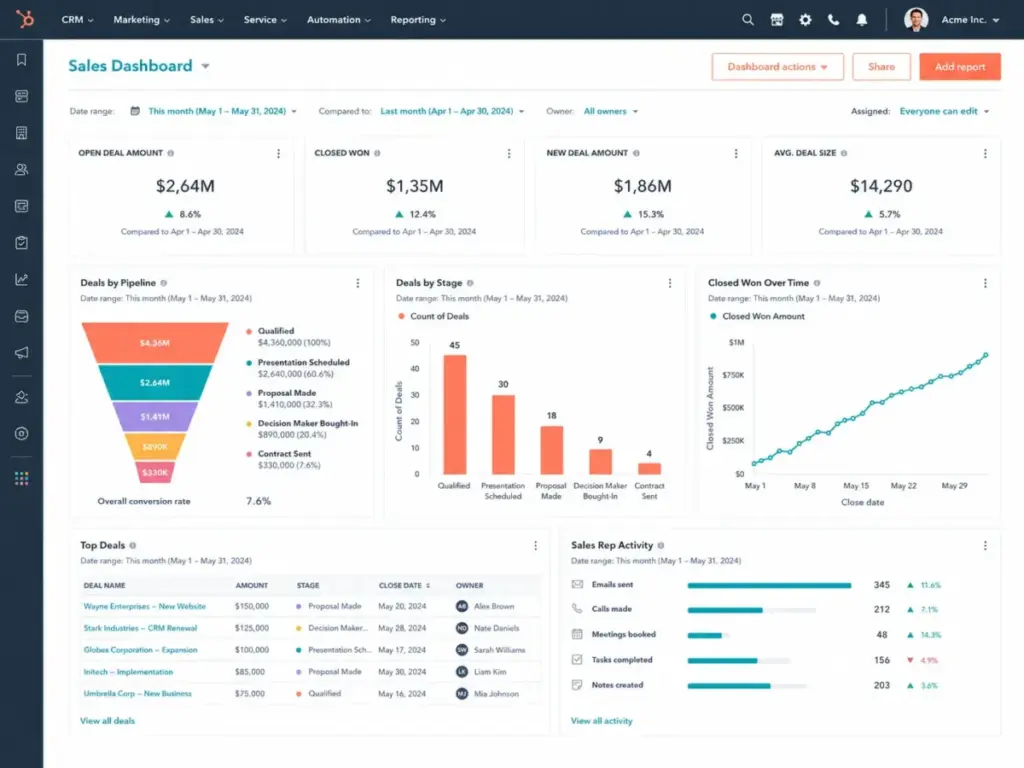
HubSpot Sales Hub: Best Free CRM Starting Point

HubSpot Sales Hub is the strongest Capsule alternative for teams that want a broader CRM, marketing, and reporting ecosystem they can start for free and scale into.
Pricing: Free CRM tools available with no user limit. Paid Sales Hub Starter listed at $20/month per seat (promotional pricing of $10 may appear at checkout). A 10-user Starter team costs approximately $200/month at list price before promotions.
HubSpot’s free tier includes contact management, deal tracking, live chat, meeting scheduling, and basic reporting. That alone covers what many teams use on Capsule Starter. The gap is that advanced automation, forecasting, and custom reporting require Professional, where costs climb sharply.
What it does better than Capsule: Free CRM starting point, deeper sales analytics, live chat, meeting scheduling, and ecosystem expansion into marketing and service hubs.
What it does worse: Professional tier pricing can escalate significantly. Capsule is simpler for teams that only need lightweight contact and pipeline management.
Best for: Growing teams that want free CRM tools now and platform expansion later without switching platforms again.
Avoid if: Your team needs a low-cost CRM and cannot absorb a potential jump to Professional pricing. HubSpot’s free-to-paid escalation is real.
Migration difficulty: Medium
Verdict: Choose HubSpot if reporting and platform breadth are the switching triggers. The HubSpot CRM review covers pricing tiers and feature gates.
Zoho CRM: Best Budget Feature Depth

Zoho CRM is the best Capsule alternative for cost-sensitive teams that need more automation, customization, reporting, and platform breadth without jumping to enterprise pricing.
Pricing: Free edition for up to 3 users. Standard commonly starts at $14/user/month billed annually. A 10-user Standard team costs approximately $140/month.
Zoho includes lead and deal management, workflows, reports and dashboards, forecasting, and deep integration with the Zoho ecosystem (Zoho Books, Zoho Desk, Zoho Projects). The breadth of customization at the Standard price point exceeds what Capsule offers even on Growth.
What it does better than Capsule: Broader feature set, more customization, forecasting, automation, and a larger adjacent app ecosystem at a competitive price.
What it does worse: More complex interface and higher configuration burden. Capsule is faster to set up and easier for teams that want minimal CRM administration.
Best for: Growing teams that need automation, reporting depth, and ecosystem breadth at a budget price.
Avoid if: Your team does not have time for CRM configuration. Zoho’s flexibility requires upfront setup investment that Capsule does not.
Migration difficulty: High
Verdict: Choose Zoho CRM if you need Capsule-level pricing with significantly more depth. The Zoho CRM review covers the tier structure.
monday sales CRM: Best Configurable CRM Workspace

monday sales CRM is the Capsule alternative for teams that want CRM workflows combined with visual boards, dashboards, and cross-functional automations.
Pricing: Plans start at about $10/user/month with a 3-user minimum and a 14-day trial. A 10-user team on the entry plan costs approximately $100/month before taxes and plan upgrades.
monday CRM’s board-based approach feels more visual and operational than traditional CRM tables. Teams that want Capsule’s project board capability with more reporting depth will find monday’s dashboard and automation layer more capable, though it requires configuration discipline.
What it does better than Capsule: More configurable boards, stronger dashboards, quote and invoice workflows, and cross-functional automations.
What it does worse: Requires more setup than Capsule. 3-user minimum. Contact, deal, and automation limits exist on lower tiers. May not feel like a traditional CRM out of the box.
Best for: Teams that want visual CRM boards with project-style handoffs and collaborative workflows.
Avoid if: You want a plug-and-play CRM. monday requires configuration to match traditional CRM workflows.
Migration difficulty: Medium
Verdict: Choose monday if you need Capsule’s project boards replaced with something more powerful. The monday.com CRM review covers the tier limits and automation caps.
Best Alternatives for Specialized Needs
These three alternatives serve specific use cases that generic CRM recommendations often miss: Google Workspace teams, enterprise scaling, and post-sale project delivery.
Copper CRM: Best Google Workspace CRM

Copper CRM is the best Capsule alternative for teams that live in Gmail and Google Workspace and want CRM data surfaced directly inside the inbox.
Pricing: Basic starts at $23/seat/month paid annually. Professional is $59/seat/month and Business is $99/seat/month. A 10-user Basic team costs $230/month. Free trial available with no credit card required.
Copper’s Google Workspace integration is its core differentiator. Contact, pipeline, and activity data surfaces inside Gmail and Google Calendar rather than requiring a separate CRM tab. Higher tiers add workflow automation, bulk email, advanced reporting, and deeper integrations.
What it does better than Capsule: Google Workspace-native CRM experience. Contact enrichment. Relationship-centric workflows embedded in the inbox.
What it does worse: Basic has a 2,500-contact limit. Workflow automation, bulk email, and reporting require Professional at $59/seat/month, which is more expensive than Capsule Growth. Less ideal outside the Google ecosystem.
Best for: Gmail-first teams that want CRM activity inside the inbox without context switching.
Avoid if: Your team does not use Google Workspace, or you need affordable automation. Copper’s Professional pricing exceeds Capsule Growth.
Migration difficulty: Medium
Verdict: Choose Copper if Gmail workflow is the primary driver. The Copper CRM review covers the contact limits and tier gates.
Salesforce Starter Suite: Best Scalable CRM Ecosystem

Salesforce Starter Suite is the Capsule alternative for teams planning to scale into a broader sales, service, marketing, and AI ecosystem that they will not outgrow.
Pricing: Starter Suite at $25/user/month with a 30-day free trial. A 10-user team costs $250/month. Higher Sales Cloud tiers, add-ons, apps, support packages, and implementation can increase total cost materially.
Salesforce includes lead, contact, and opportunity management, marketing and service tools, Slack integration, and an upgrade path into the full Salesforce platform. The depth of customization, governance, and the AppExchange marketplace is unmatched.
What it does better than Capsule: Enterprise-grade customization, ecosystem breadth, forecasting, and long-term scalability. Capsule users will never outgrow Salesforce.
What it does worse: Far more complex than Capsule. Implementation overhead is significant. Likely overkill for teams under 15 people that only need lightweight CRM.
Best for: Teams that outgrew Capsule and expect continued growth into enterprise CRM needs.
Avoid if: Your team is under 10 people and no one has admin experience. Salesforce implementation complexity can create more friction than Capsule’s limitations.
Migration difficulty: High
Verdict: Choose Salesforce if you are leaving Capsule because you have outgrown it, not because it is too expensive. The Salesforce CRM review covers the full platform.
Insightly CRM: Best for CRM Plus Project Handoff

Insightly CRM is the Capsule alternative for teams that use Capsule’s Projects feature heavily and need stronger lead routing, workflow automation, and CRM-to-delivery tracking.
Pricing: Plus at $29/user/month billed annually, Professional at $49/user/month, Enterprise at $99/user/month. A 10-user Plus team costs $290/month. AppConnect and marketing automation are separate account-priced products.
Insightly combines CRM with project management, advanced reports, dashboards, and lead assignment. Teams that rely on Capsule’s project boards but need more structured post-sale operations will find Insightly’s architecture a closer fit than most sales-only CRMs.
What it does better than Capsule: Deeper project management linked to CRM data. Lead routing and workflow automation on Professional. More structured post-sale operations.
What it does worse: Heavier and pricier than Capsule. Workflow automation requires Professional at $49/user/month. Annual billing only. AppConnect adds separate costs.
Best for: Teams that need CRM plus project delivery tracking and more structured lead routing.
Avoid if: You need a lightweight CRM without project management overhead. Insightly’s breadth adds cost and setup depth.
Migration difficulty: Medium
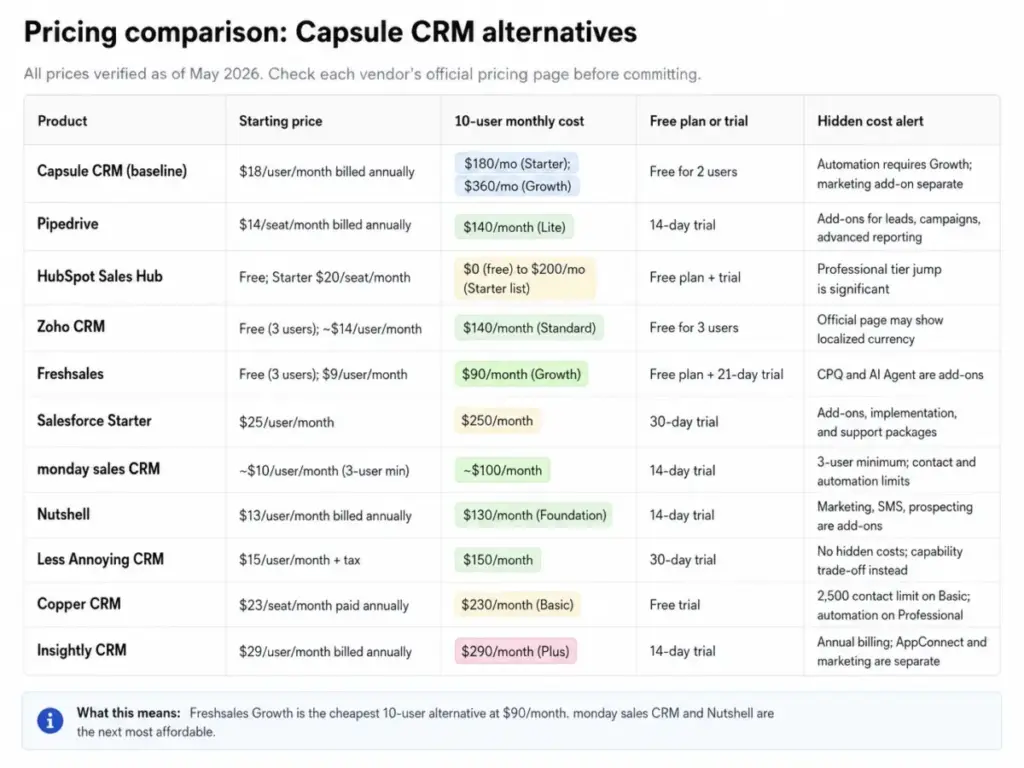
Full Pricing Comparison: What 10 Users Actually Costs
All prices verified as of May 2026. Check each vendor’s official pricing page before committing.
| Product | Starting price | 10-user monthly cost | Free plan or trial | Hidden cost alert |
|---|---|---|---|---|
| Capsule CRM (baseline) | $18/user/month billed annually | $180/mo (Starter); $360/mo (Growth) | Free for 2 users | Automation requires Growth; marketing add-on separate |
| Pipedrive | $14/seat/month billed annually | $140/month (Lite) | 14-day trial | Add-ons for leads, campaigns, advanced reporting |
| HubSpot Sales Hub | Free; Starter $20/seat/month | $0 (free) to $200/mo (Starter list) | Free plan + trial | Professional tier jump is significant |
| Zoho CRM | Free (3 users); ~$14/user/month | $140/month (Standard) | Free for 3 users | Official page may show localized currency |
| Freshsales | Free (3 users); $9/user/month | $90/month (Growth) | Free plan + 21-day trial | CPQ and AI Agent are add-ons |
| Salesforce Starter | $25/user/month | $250/month | 30-day trial | Add-ons, implementation, and support packages |
| monday sales CRM | ~$10/user/month (3-user min) | ~$100/month | 14-day trial | 3-user minimum; contact and automation limits |
| Nutshell | $13/user/month billed annually | $130/month (Foundation) | 14-day trial | Marketing, SMS, prospecting are add-ons |
| Less Annoying CRM | $15/user/month + tax | $150/month | 30-day trial | No hidden costs; capability trade-off instead |
| Copper CRM | $23/seat/month paid annually | $230/month (Basic) | Free trial | 2,500 contact limit on Basic; automation on Professional |
| Insightly CRM | $29/user/month billed annually | $290/month (Plus) | 14-day trial | Annual billing; AppConnect and marketing are separate |
What this means: The cheapest 10-user alternative is Freshsales Growth at $90/month, saving $90/month versus Capsule Starter and $270/month versus Capsule Growth. monday sales CRM at $100/month and Nutshell at $130/month are the next most affordable. If Capsule Growth at $360/month triggered your search, most alternatives on this list cost less for comparable or broader feature sets.
Migration Difficulty Matrix
| Alternative | Difficulty | Main risk | Key consideration |
|---|---|---|---|
| Pipedrive | Medium | Pipeline structure differences | Straightforward import; add-on decisions needed |
| HubSpot Sales Hub | Medium | Workflow rebuild, platform learning curve | Free tier allows parallel testing before full migration |
| Zoho CRM | High | Configuration complexity | Powerful but requires upfront setup investment |
| Freshsales | Medium | Communication channel setup | Setting up phone, chat, and email channels adds steps |
| Salesforce Starter | High | Implementation overhead and admin needs | Budget 4 to 12 weeks; consider professional onboarding |
| monday sales CRM | Medium | Board structure differs from pipeline CRM | Visual, but CRM logic differs from traditional tools |
| Nutshell | Low | Limited ecosystem versus larger platforms | Closest structural match to Capsule; easiest migration |
| Less Annoying CRM | Low | Capability trade-off for simplicity | Simplest migration path; limited fields to map |
| Copper CRM | Medium | Contact limits on Basic; Google dependency | Google Workspace teams migrate fastest |
| Insightly CRM | Medium | Project plus CRM dual setup | Setting up both CRM and project modules takes planning |
Migration difficulty is an editorial estimate based on data model complexity, workflow rebuild effort, integration requirements, and setup depth. Actual migration timelines vary by team size and data volume.
For teams planning a CRM platform change, the CRM migration planning guide covers data export best practices, field mapping strategies, and common migration mistakes.
Which Capsule Alternative Should You Avoid?
Not every alternative fits every team. Here are the honest avoid-if signals:
- Avoid Salesforce if your team is under 10 people and no one has admin experience. The implementation overhead will cost more in lost productivity than Capsule’s limitations.
- Avoid Zoho CRM if your team does not have time for configuration. Zoho’s flexibility comes with a learning curve that Capsule users specifically chose to avoid.
- Avoid Copper CRM Basic if you are growing beyond 2,500 contacts. The contact limit pushes you into Professional at $59/seat/month, which exceeds Capsule Growth pricing.
- Avoid Insightly CRM if you do not use project management. You would be paying for delivery tracking capabilities you never touch.
- Avoid Less Annoying CRM if you need sales pipeline automation or marketing tools. It trades every advanced capability for simplicity.
- Avoid monday sales CRM Basic if you expect full CRM governance out of the box. Contact limits, automation caps, and dashboard restrictions on lower tiers may frustrate growing teams.
When to Stay with Capsule
Capsule is still the right choice if:
- Your team values a clean, fast CRM that stays out of the way. Capsule’s interface is one of the simplest in the category.
- You are under 10 users and the Starter tier covers your contact management and pipeline needs.
- You use Capsule’s project boards for lightweight post-sale tracking and do not need deeper project management.
- Your automation needs are minimal and the Growth upgrade is within budget when you need it.
- You value fast adoption. Capsule’s low learning curve means new team members can be productive on day one.
Switch if: Workflow automation at Growth pricing is blocking capabilities your team needs daily, reporting depth is insufficient for sales management, you need native marketing or communication tools in the CRM, or your 10-user cost on Growth exceeds what alternatives charge for more features.
Final Verdict: Best Capsule CRM Alternative for Most Teams
For most teams leaving Capsule, Pipedrive is the strongest overall alternative. It preserves the pipeline-focused selling experience that Capsule users value, adds automation at a lower price point, offers 500+ integrations, and costs $140/month for 10 users, which is $40/month less than Capsule Starter with more depth.
But “most teams” is not every team:
- Best for lowest 10-user cost: Freshsales Growth at $90/month with built-in phone, chat, and email
- Best free starting point: HubSpot Sales Hub with free CRM tools and an upgrade path
- Best for budget feature depth: Zoho CRM at $140/month with automation, forecasting, and customization
- Best for predictable pricing: Less Annoying CRM at $150/month with no tiers and no surprises
- Best for simple automation upgrade: Nutshell at $130/month with webchat, forms, and AI included
- Best for visual workflow teams: monday sales CRM at $100/month with configurable boards
- Best for Google Workspace: Copper CRM at $230/month embedded in Gmail
- Best for enterprise scale: Salesforce Starter Suite at $250/month with the deepest CRM platform
- Best for project handoff: Insightly CRM at $290/month with CRM plus project management
The right alternative matches your switching trigger, not the highest feature count. Identify which Capsule ceiling you hit first, then pick the tool that raises it.
FAQ
What is the best alternative to Capsule CRM?
Pipedrive is the best overall Capsule alternative for most teams because it preserves pipeline-focused selling with more automation at a lower price point. However, the best pick depends on your exit reason. Freshsales is better for built-in communication tools, HubSpot is better for ecosystem breadth, and Less Annoying CRM is better for teams that want zero pricing complexity.
Is Capsule CRM good for small businesses?
Yes, for teams under 10 users that need clean contact management and simple pipeline tracking. Capsule’s low learning curve and affordable Starter tier make it a strong fit for early-stage teams. The limitations show up when teams need automation, deeper reporting, or native marketing tools.
What CRM is cheaper than Capsule with automation?
Freshsales Growth at $9/user/month includes basic workflows with built-in phone, chat, and email. Nutshell Foundation at $13/user/month includes more entry-level features than Capsule Starter. Both are cheaper than Capsule Starter at $18/user/month and significantly cheaper than Capsule Growth at $36/user/month where automation unlocks.
Which Capsule alternative has a free plan?
HubSpot Sales Hub (free CRM tools, no user limit), Zoho CRM (free for 3 users), and Freshsales (free for 3 users) all offer free tiers. Capsule offers a free plan for up to 2 users with 250 contacts, which is more limited than these alternatives.
Which Capsule alternative is best for Gmail users?
Copper CRM is the best Gmail-native alternative. It embeds CRM data directly inside Gmail and Google Calendar. The trade-off is that Copper Basic starts at $23/seat/month and limits contacts to 2,500. Automation and reporting require Professional at $59/seat/month.
How much does Capsule CRM cost for 10 users?
Capsule Starter costs $180/month for 10 users billed annually. Growth, which adds workflow automation, costs $360/month for 10 users. The gap between Starter and Growth is a 2x multiplier, and that gap is the primary reason teams evaluate alternatives.
Which CRM is easiest to migrate to from Capsule?
Nutshell and Less Annoying CRM have the lowest migration difficulty. Both have simple data models with straightforward import tools. Nutshell is the closest structural match to Capsule’s CRM approach. Zoho CRM and Salesforce require the most setup investment.
Does Capsule CRM support email marketing?
Capsule does not include native email marketing. Teams that need email campaigns typically use Transpond or another third-party integration. Alternatives like Freshsales, HubSpot, and Zoho CRM include native or closely integrated marketing tools.
Is HubSpot better than Capsule CRM?
HubSpot offers a broader ecosystem with free CRM tools, marketing integration, sales automation, and reporting depth that exceeds Capsule. The trade-off is complexity and potential cost escalation on higher tiers. Capsule is better for teams that want a minimal CRM with fast adoption and low admin overhead.
What should I check before switching from Capsule CRM?
Export your contact, deal, and project data before canceling. Map custom fields to the target CRM. Note which integrations need replacement. Check that historical notes and email logs transfer cleanly (Capsule users have reported formatting issues during export). Test the new CRM with a small team before full migration.