Your team picked a project management tool six months ago. Now half the team ignores it, two people built workarounds in spreadsheets, and your PM spends Friday afternoons manually updating status boards. That is not a tool problem. That is a fit problem.
ClickUp is better for teams that want deeper customization, all-in-one work management, and lower cost at scale. monday.com is better for teams that want faster adoption, visual boards, and executive dashboards without weeks of workspace architecture decisions. The real difference between ClickUp vs monday.com is not which has more features. It is whether your team values configurable depth or visual simplicity, because that choice determines whether the tool gets used or abandoned.
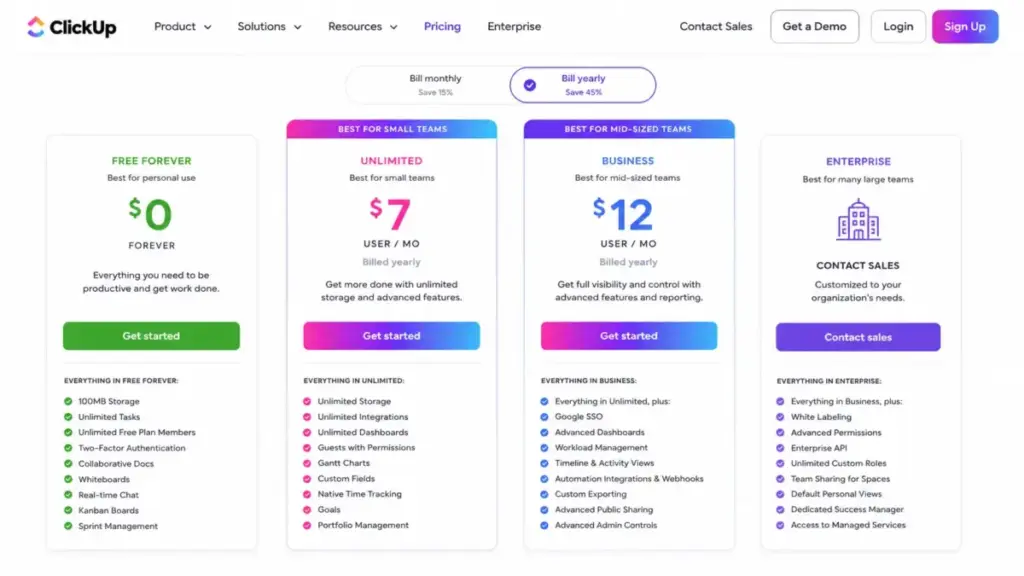
I will show you the exact plan gates, automation caps, cost-at-scale math, and seat-bucket traps that most top project management tool comparisons skip. One finding that surprised me: ClickUp Business at $12/user/month (billed yearly) includes 5,000 automation actions, while monday.com Standard at the same $12/seat/month includes only 250 automation actions. That 20x gap changes the buying calculus for any team running more than a handful of automated workflows.
Quick Verdict: ClickUp vs Monday.com
| Category | Winner | Why |
|---|---|---|
| Pricing and functional cost | ClickUp | ClickUp Business at $12/user/month billed yearly costs less than monday.com Pro at $19/seat/month for comparable features |
| Ease of setup and adoption | monday.com | Faster onboarding, visual board interface, lower training burden for non-technical teams |
| Feature depth and customization | ClickUp | Deeper hierarchy (Spaces, Folders, Lists), native Docs, Whiteboards, Chat, goals, and sprint workflows at lower tiers |
| Automation limits at mid-tier | ClickUp | ClickUp Business includes 5,000 monthly actions vs monday.com Standard at 250 actions |
| Visual dashboards and executive reporting | monday.com | Cleaner board-centric dashboards, easier stakeholder visibility, faster Chart and Workload views |
| Security and enterprise governance | Tie | Both publish SOC 2, ISO 27001, SAML SSO, SCIM, HIPAA availability on Enterprise |
| API and developer integrations | Depends | ClickUp uses per-token per-minute limits. monday.com uses GraphQL with complexity, daily, and concurrency limits |
What this means: ClickUp wins on cost and depth. monday.com wins on speed and visual simplicity. There is no universal winner here, but there is a clear winner for your specific team size, budget, and workflow complexity. The sections below break that down.
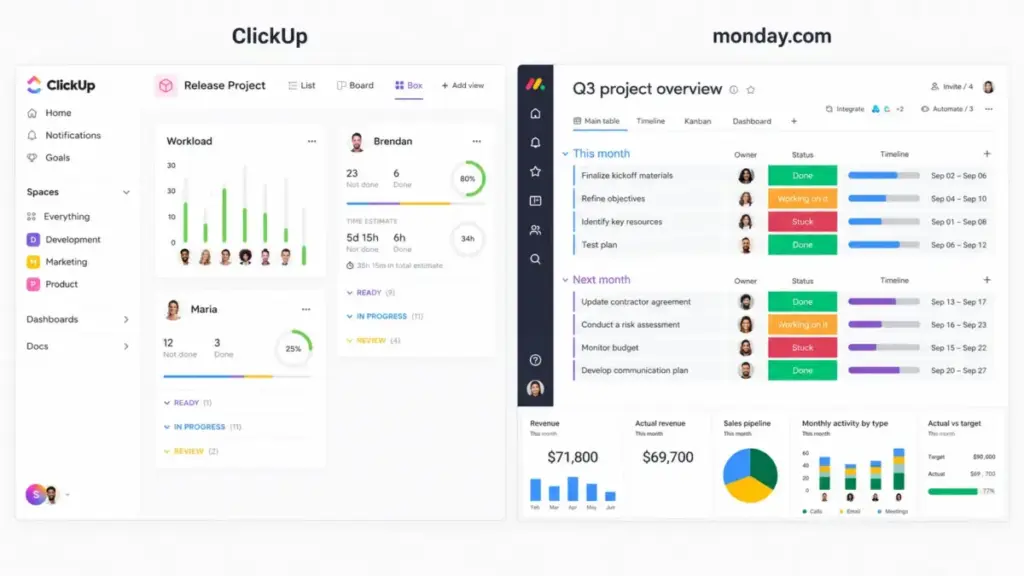
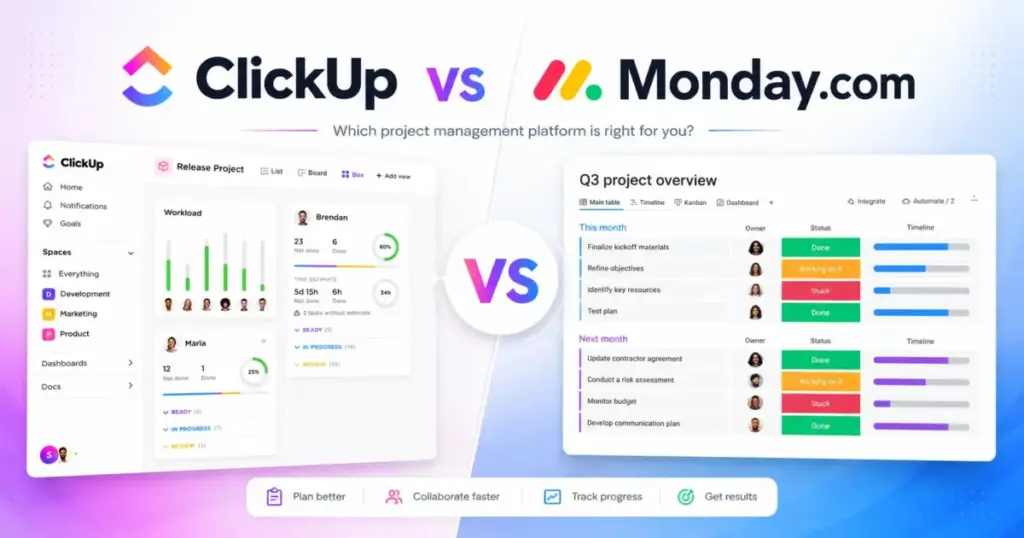
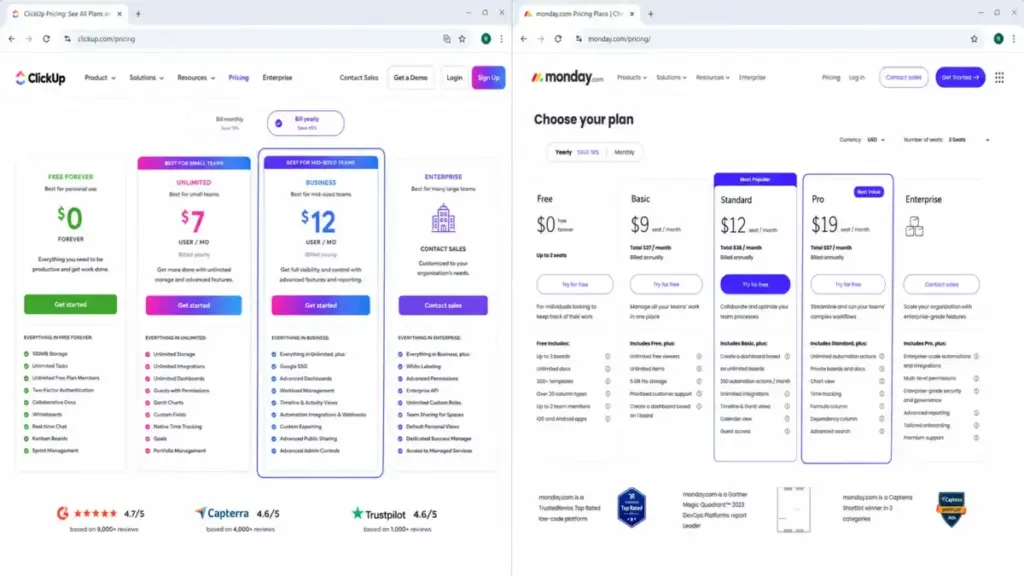
ClickUp uses a more modular dashboard layout, while monday.com presents work in a cleaner, board-first project view.
How We Compared ClickUp and Monday.com
James Carter here. I have reviewed 35+ project management and collaboration tools for SaaSZap, including deep evaluations of both ClickUp and monday.com across multiple team scenarios.
This comparison uses official pricing pages, product documentation, plan feature gates, and third-party review patterns from G2 and Capterra. Both products are classified as third_party_validated, meaning I relied on official documentation, published feature lists, and verified user review sentiment rather than hands-on testing for this specific comparison.
What I compared:
- Official pricing at every tier (verified June 2026)
- Feature gates: which capabilities require which plan
- Automation and integration action limits per plan
- API rate limits and integration architecture
- Security certifications and enterprise governance
- User review sentiment patterns from G2 and Capterra
- Setup complexity and migration difficulty
- Cost-at-scale calculations for 5, 10, 25, and 50 users
Review limitation: Pricing was verified from official USD annual billing pages. Monthly billing amounts, regional pricing variations, and exact AI add-on costs for monday.com were not fully captured. Enterprise pricing for both products requires direct sales contact.
Workflow 1: Task Management and Project Setup
ClickUp gives teams a five-level hierarchy: Workspace, Spaces, Folders, Lists, and Tasks with subtasks. That granularity is the point. A 15-person product team can separate engineering sprints, design reviews, and marketing campaigns into distinct Spaces with unique views, custom fields, and permission sets.
monday.com organizes work into Workspaces, Boards, Groups, and Items. Flatter structure. Faster to set up. A marketing coordinator can create a campaign board in under 5 minutes with pre-built templates, drag items between status columns, and have the team running on it by lunch.
The tradeoff shows up at scale.
ClickUp’s hierarchy supports custom fields, multiple views (Kanban, Calendar, Timeline, Gantt, Mind Maps, Workload), and granular permissions starting on the Unlimited plan at $7/user/month billed yearly (as of June 2026). That Unlimited tier also includes native time tracking, goals, and portfolio management.
monday.com unlocks Timeline, Gantt, and Calendar views at the Standard tier ($12/seat/month billed yearly). Workload and Chart views require Pro at $19/seat/month. So the functional comparison for teams needing multi-view project management starts at monday.com Standard or Pro, not Basic.
Winner: ClickUp, for teams that need deep hierarchy and multi-view management. monday.com wins if the team needs a visual board running in minutes with minimal configuration.
| Feature | ClickUp (plan gate) | monday.com (plan gate) | Buyer implication |
|---|---|---|---|
| Kanban boards | Free Forever | Free | Both available on free tiers |
| Gantt charts | Unlimited ($7/user/mo) | Standard ($12/seat/mo) | ClickUp unlocks Gantt $5/user cheaper |
| Timeline view | Unlimited ($7/user/mo) | Standard ($12/seat/mo) | Same pattern: lower cost on ClickUp |
| Workload view | Business ($12/user/mo) | Pro ($19/seat/mo) | ClickUp saves $7/seat for workload |
| Custom fields | Unlimited ($7/user/mo) | Standard ($12/seat/mo) | ClickUp offers earlier access |
| Time tracking | Unlimited ($7/user/mo) | Pro ($19/seat/mo) | monday.com locks time tracking behind Pro |
| Sprint management | Business ($12/user/mo) | N/A (use boards) | ClickUp has native sprint points and reporting |
| Private boards/docs | Business ($12/user/mo) | Pro ($19/seat/mo) | Privacy controls cost more on monday.com |
What this means: Teams that need Gantt charts, time tracking, workload views, and custom fields pay less on ClickUp at every tier. monday.com locks several of these behind Pro at $19/seat/month. A 10-person team needing time tracking pays $120/month on ClickUp Business vs $190/month on monday.com Pro.
Workflow 2: Automation and Integration Limits
This is where most ClickUp vs monday.com comparisons fall apart. They say “both have automations” and move on. The action limits tell a different story.
ClickUp automation actions per month by plan:
- Free Forever: 100 actions
- Unlimited: 1,000 actions
- Business: 5,000 actions
- Enterprise: 250,000 actions
monday.com automation and integration actions per month:
- Free: 0 actions (automations excluded)
- Basic: 0 actions (automations excluded)
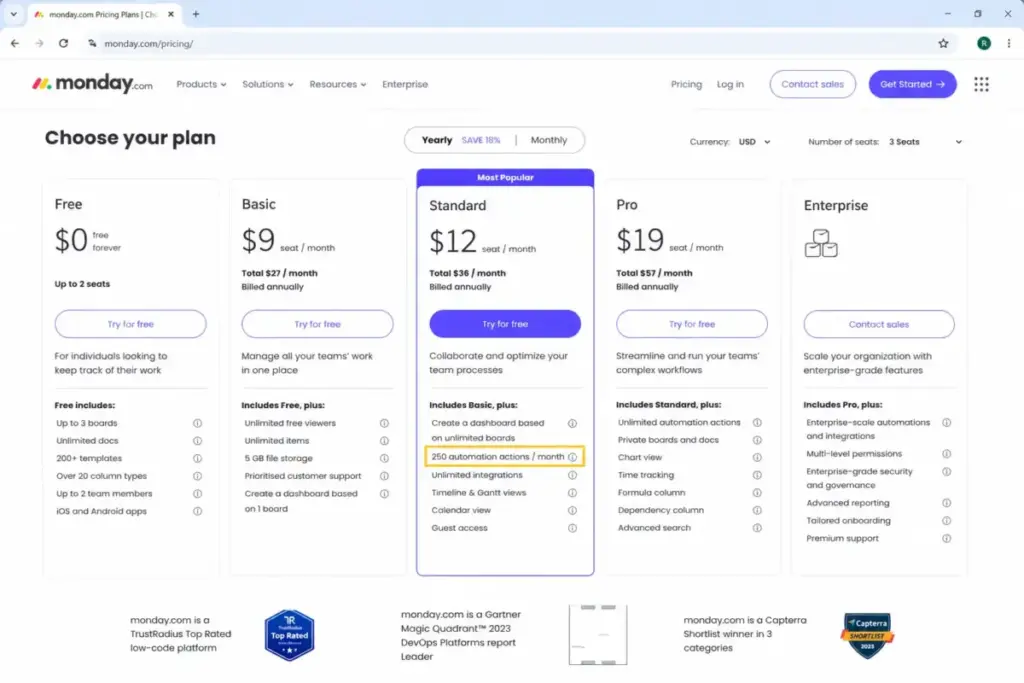
- Standard: 250 automation + 250 integration actions
- Pro: 25,000 automation + 25,000 integration actions
- Enterprise: 250,000 automation + 250,000 integration actions
Read those numbers again. monday.com Basic at $9/seat/month includes zero automations and zero integrations. The real automation comparison starts at monday.com Standard or Pro, not Basic.
At the mid-tier price point of $12/seat/month, ClickUp Business delivers 5,000 monthly automation actions. monday.com Standard delivers 250. That is a 20x difference at the same per-seat price. For a 10-person operations team running daily status updates, assignment automations, and notification triggers, 250 actions can run out in the first week.
| Limit type | ClickUp | monday.com | Why it matters |
|---|---|---|---|
| Automation actions (mid-tier) | 5,000/month (Business) | 250/month (Standard) | Teams with active automations will exceed monday.com Standard quickly |
| Automation actions (advanced) | 25,000/month (Business Plus) | 25,000/month (Pro) | Parity, but monday.com Pro costs $19/seat vs ClickUp Business Plus |
| Automation actions (enterprise) | 250,000/month | 250,000/month | Both match at the top tier |
| API rate limit (mid-tier) | 100 requests/min per token | 1,000 daily calls (Standard) | Different limit models: per-minute vs daily calls |
| API rate limit (enterprise) | 10,000 requests/min | 25,000 daily calls (soft limit) | ClickUp is per-minute burst. monday.com is daily aggregate |
| What happens at limit | Automations pause until next monthly reset | Actions stop until next billing cycle | Both create workflow disruption |
What this means: If your team runs more than a few automated workflows per week, ClickUp Business gives you 20x the action budget at the same price as monday.com Standard. monday.com Pro closes the gap at $19/seat/month, but that is a 58% price increase over ClickUp Business.
One thing I have learned reviewing project management tools: teams pile up automation rules and forget about them. Review your automation rules quarterly. On ClickUp, if your Workspace exceeds its monthly action limit, automations pause until the next reset. That means missed notifications, stalled workflows, and confused team members wondering why their triggers stopped firing.
Winner: ClickUp, for automation volume per dollar. monday.com Pro matches on action count but costs more per seat.
Workflow 3: Dashboards, Reporting, and Stakeholder Visibility
monday.com’s strength is visual clarity. The board interface makes status tracking intuitive for non-technical stakeholders. Charts, Workload views, and dashboards display project health without requiring anyone to learn a query language or build custom reports.
ClickUp offers dashboards with advanced cards on the Business plan, including custom reporting, sprint points, and portfolio workload management. The depth is real. But the setup requires architectural decisions: which Spaces feed into which dashboards, how custom fields map to reports, and how permissions control who sees what.
Here is the catch with monday.com dashboards. The Pro plan officially supports dashboards pulling from up to 20 boards according to support documentation (though one official pricing article mentions 50 boards). Standard limits dashboards to 5 boards. For a PMO managing 30+ projects across departments, that 20-board limit on Pro can force workarounds or an Enterprise upgrade.
ClickUp does not publish the same board-count dashboard limit. The Business plan unlocks advanced dashboard cards, unlimited message history, and custom exporting. For teams that need deep reporting tied to sprints, goals, and portfolios, ClickUp provides more data surface per dollar.
But here is where monday.com earns its wins: speed of comprehension. I have tracked 20+ tool migrations at SaaSZap, and monday.com boards consistently get adopted faster by non-technical teams. The visual column layout, color-coded statuses, and drag-and-drop simplicity mean your VP does not need a training session to read a project dashboard.
Winner: monday.com, for stakeholder-facing dashboards and visual portfolio tracking. ClickUp wins for teams that need deeper data, sprint reporting, and custom analytics.
ClickUp vs Monday.com Pricing: The Real Cost at Scale
The pricing comparison below uses official annual monthly-equivalent USD prices verified in June 2026. This is where the ClickUp vs monday.com decision gets concrete.
ClickUp Plans
| Plan | Price | Key gates |
|---|---|---|
| Free Forever | Free | 60MB storage, 100 automation actions, Kanban, basic calendar, 1 Form |
| Unlimited | $7/user/month (billed yearly) | Unlimited storage, Gantt, integrations, custom fields, time tracking, goals, 1,000 automations |
| Business | $12/user/month (billed yearly) | Advanced dashboards, 5,000 automations, webhooks, sprint reporting, Google SSO, private Whiteboards |
| Enterprise | Custom | SAML SSO, SCIM, audit log, 250,000 automations, HIPAA availability, data residency |
monday.com Plans
| Plan | Price | Key gates |
|---|---|---|
| Free | Free | 2 users max, 3 boards, 500MB storage, no automations, no integrations |
| Basic | $9/seat/month (billed yearly) | Unlimited boards and items, 5GB storage, no automations, no integrations |
| Standard | $12/seat/month (billed yearly) | Timeline, Gantt, Calendar, 250 automations, 250 integrations, 5-board dashboards |
| Pro | $19/seat/month (billed yearly) | Private boards, Workload, Chart, time tracking, 25,000 automations, 25,000 integrations |
| Enterprise | Custom | Enterprise governance, 250,000 automations, 250,000 integrations, 99.9% SLA |
Cost at Scale (ClickUp Business vs monday.com Pro)
| Team size | ClickUp Business (annual) | monday.com Pro (annual) | Monthly savings with ClickUp | Caveat |
|---|---|---|---|---|
| 5 users | $60/month | $95/month | $35/month | monday.com seat buckets may require buying more seats than active users |
| 10 users | $120/month | $190/month | $70/month | Both include time tracking and advanced permissions at these tiers |
| 25 users | $300/month | $475/month | $175/month | ClickUp has 5,000 automations. monday.com Pro has 25,000. |
| 50 users | $600/month | $950/month | $350/month | Enterprise pricing may narrow the gap for large deployments |
What this means: At functionally comparable tiers (ClickUp Business vs monday.com Pro), ClickUp saves $70/month for a 10-person team and $350/month for a 50-person team. The gap is not trivial. Over 12 months, a 25-person team saves $2,100 by choosing ClickUp Business over monday.com Pro.
But the comparison is not purely about seat price. There are hidden costs on both sides.
Hidden Costs: ClickUp
- ClickUp Brain AI costs $9/user/month. Everything AI costs $28/user/month.
- AI Super Credits cost $10 per 10,000 credits.
- Permission-controlled guest seats can create paid-seat costs when included allowances are exceeded.
- Some feature usage limits do not reset. Once reached, the Workspace must upgrade.
Hidden Costs: monday.com
- Seat-bucket pricing means you buy in bundles (3, 5, 10, 15 seats). A 6-person team pays for 10 seats.
- Basic lacks automations and integrations entirely. Most teams need Standard or Pro.
- Standard includes only 250 automation actions per month, which active teams can exhaust quickly.
- Separate product lines (work management, CRM, dev, service) can create billing complexity.
Winner: ClickUp, on pricing and total functional cost. monday.com is not overpriced for what it delivers, but ClickUp provides comparable or better functionality at a lower per-user cost across every tier.
Setup, Migration, and the Adoption Question
| Factor | ClickUp | monday.com |
|---|---|---|
| Setup difficulty | Medium to High | Low to Medium |
| Time to first project | 20-40 minutes (workspace architecture decisions) | 5-15 minutes (pick template, invite team) |
| Learning curve | Steeper. Feature density requires training. | Moderate. Visual interface is self-explanatory for basic use. |
| Migration from other tools | Medium. Import via CSV, API, or Zapier. Careful hierarchy mapping needed. | Medium. Import via CSV, API, or integrations. Simpler structure to map into. |
| Migration between each other (ClickUp to monday.com) | Medium. Simplify hierarchy, custom fields, Docs, and automations into boards. | N/A |
| Migration between each other (monday.com to ClickUp) | Medium to High. Map boards into Spaces/Folders/Lists. Rebuild permissions. | N/A |
| Admin governance at scale | Requires naming conventions, workspace architecture, and user training | Requires dashboard governance and multi-product bundle planning |
What this means: monday.com gets teams running faster. ClickUp gets teams running deeper. If your 8-person marketing team needs a campaign board by Friday, monday.com is the safer bet. If your 20-person product team needs custom sprints, Docs, Whiteboards, and cross-project dependencies, ClickUp is worth the setup investment.
Does ClickUp scale past 15 users the same way it works at 5? Yes, but it requires admin decisions. Naming conventions, folder structures, permission hierarchies, and automation governance all need planning. I have seen teams let their ClickUp Workspace grow organically and end up with 47 Spaces, 200 Folders, and no one knowing where anything lives.
monday.com scales visually well but can hit dashboard limits and automation caps faster. The board-centric model stays clean for individual projects but gets complicated when a PMO needs cross-board visibility across 30+ active projects.
Security, Compliance, and Enterprise Controls
| Control | ClickUp | monday.com | Plan caveat |
|---|---|---|---|
| SOC 2 Type II | Yes | Yes (SOC 1, 2, 3) | Available across plans |
| ISO 27001 | Yes | Yes | Available across plans |
| ISO 27017 / 27018 | Yes | Yes | Available across plans |
| SAML SSO | Enterprise only | Enterprise only | Both require top tier |
| SCIM provisioning | Enterprise only | Enterprise only | Both require top tier |
| HIPAA availability | Enterprise only | Enterprise only | Both require custom agreement |
| Data residency | Enterprise only | Not specified at this level | ClickUp Enterprise mentions data residency |
| Encryption at rest | AES-256 | Not specified in pricing docs | Verify with vendor |
| Encryption in transit | TLS 1.2+ | Standard practice | Verify with vendor |
| Audit log | Enterprise only | Enterprise only | Both require top tier |
| Uptime SLA | Not publicly listed by tier | 99.9% on Enterprise (trust docs) | monday.com publishes SLA commitment |
What this means: Both platforms check the boxes that enterprise procurement teams care about. monday.com publishes a broader trust portfolio including SOC 1, SOC 3, GDPR, and CCPA alongside the standard ISO certifications. ClickUp publishes ISO 42001 (AI management) and PCI DSS, which monday.com does not highlight in the same documentation. If SAML SSO, SCIM, HIPAA, or data residency drive your decision, compare Enterprise contracts directly. Neither gives you these on a self-serve plan.
Where ClickUp Wins
- Lower functional cost at every team size. ClickUp Business at $12/user/month costs less than monday.com Pro at $19/seat/month for comparable features including time tracking, advanced permissions, and private work.
- More automation actions per dollar. ClickUp Business delivers 5,000 monthly actions at $12/user/month. monday.com Standard delivers 250 at the same price. That 20x gap matters for any team with active automations.
- All-in-one workspace depth. ClickUp combines tasks, Docs, Whiteboards, Chat, goals, portfolios, time tracking, sprint management, and custom forms in a single platform. monday.com separates work management, CRM, dev, and service into distinct products.
- Native sprint management. ClickUp Business includes sprint points, sprint reporting, and velocity tracking. monday.com handles sprints through board configurations, not a dedicated sprint engine.
- Earlier feature access on lower tiers. Gantt charts, custom fields, integrations, and time tracking all become available earlier and cheaper on ClickUp compared to monday.com.
Where Monday.com Wins
- Faster team adoption. Visual boards, drag-and-drop columns, and pre-built templates get non-technical teams running in minutes. G2 and Capterra review patterns consistently cite monday.com as easier to adopt than ClickUp.
- Cleaner stakeholder dashboards. monday.com’s Chart, Workload, and dashboard views are designed for business users who want project visibility without learning a configuration system.
- Lower setup friction. A marketing team can go from sign-up to a working campaign board in under 10 minutes. ClickUp’s equivalent requires workspace architecture decisions.
- Simpler tool structure for non-PM teams. Operations teams, HR teams, and cross-functional business teams benefit from monday.com’s board-centric model. ClickUp’s Spaces, Folders, Lists hierarchy can overwhelm teams that want a simple visual tracker.
- Separate product lines for CRM, dev, and service. monday.com offers dedicated CRM, dev, and service products under one billing umbrella. ClickUp handles everything in a single workspace, which can create feature sprawl.
Who Should Choose ClickUp
Choose ClickUp if your team matches these profiles:
- Process-mature startups (5-15 people) that need task management, Docs, Chat, goals, and time tracking in one platform without paying for separate tools. ClickUp Unlimited at $7/user/month covers this.
- Agencies managing complex client workflows that need custom hierarchy, Forms, proofing, time tracking, and white-label options. ClickUp’s combination of features at the ClickUp pricing tiers makes it cost-effective for multi-client operations.
- Product and engineering teams that need sprint management, sprint points, velocity reporting, and integration with dev workflows. The ClickUp review details how sprint features compare to dedicated tools.
- Teams with high automation volume that cannot afford to hit action limits every month. ClickUp Business gives you 5,000 actions. monday.com Standard gives you 250.
- Budget-conscious teams at 10+ users where the $70/month savings (Business vs Pro) compounds into $840/year.
Who Should Choose Monday.com
Choose monday.com if your team matches these profiles:
- Non-technical business teams that want visual project tracking without training. Marketing teams, HR teams, and operations departments consistently adopt monday.com faster.
- PMOs and department leads that need executive dashboards showing project health across multiple teams. monday.com’s dashboard interface requires less configuration than ClickUp.
- Teams that value simplicity over customization. If your team’s reaction to a tool with 47 features is “this is overwhelming,” monday.com’s focused board model is the better fit. See how it compares in our monday.com alternatives analysis for teams exploring options.
- Cross-functional organizations running work management, CRM, and service operations under one vendor. monday.com’s separate product lines (work management, CRM, dev, service) give each team a purpose-built interface.
- Stakeholder-heavy environments where leadership needs to check project status without asking the PM. monday.com boards are self-explanatory in ways that ClickUp dashboards are not.
Who Should Avoid Both
Neither ClickUp nor monday.com is the right choice in every scenario:
- Teams needing a lightweight Kanban-only tool. If you want a simple board with cards, columns, and nothing else, both platforms are overkill. Look at Trello or Todoist. Our ClickUp alternatives roundup covers simpler options.
- Engineering teams needing a pure issue tracker. Jira and Linear are purpose-built for software development workflows with sprint ceremonies, backlog grooming, and code integration. ClickUp can do this, but not as natively as dedicated dev tools.
- Teams needing an enterprise PSA (Professional Services Automation). If time tracking, resource allocation, and client billing are your core needs, consider Wrike or Teamwork. Our Wrike review and evaluation covers this use case.
- Solo users who need a personal task list. Both tools are built for teams. For individual productivity, Todoist or Notion is a better fit.
Alternatives if Neither ClickUp Nor Monday.com Fits
| Alternative | Best for | Why consider | Starting price |
|---|---|---|---|
| Asana | Polished task management with portfolio visibility and less configuration than ClickUp | Middle ground between monday.com simplicity and ClickUp depth | Free for up to 10 users |
| Notion | Docs-first teams that prioritize knowledge management over formal project management | Better if your core problem is documentation and databases, not automation-heavy execution | Free for individuals |
| Wrike | Enterprise and agency teams needing structured project controls and approvals | Stronger for traditional project governance, approval workflows, and professional services tracking | $9.80/user/month |
What this means: Asana fills the gap between monday.com’s simplicity and ClickUp’s depth. Read our Asana vs Monday.com comparison for a head-to-head breakdown.
If documentation is your primary need, our Notion workspace review covers how Notion handles project tracking differently than ClickUp or monday.com.
Final Verdict: ClickUp vs Monday.com in 2026
There is no universal winner. But there is a clear winner for specific team profiles.
Choose ClickUp if your team needs deeper customization, all-in-one work management, stronger feature depth per dollar, sprint workflows, Docs, Whiteboards, Chat, and lower cost at 10+ users. ClickUp Business at $12/user/month delivers more functional capability than monday.com Pro at $19/seat/month.
Choose monday.com if your team needs faster adoption, visual project tracking, business-friendly dashboards, and stakeholder visibility without heavy workspace architecture. monday.com gets teams running in minutes, not days.
Compare Enterprise contracts directly if SAML SSO, SCIM, HIPAA, data residency, or API volume limits drive the decision. Both platforms match on certifications, but contract terms, support SLAs, and custom pricing vary.
After reviewing 35+ project management tools, the mistake I see most often is teams choosing by feature list length. The tool your team uses every day matters more than the tool with the longest feature list. ClickUp is the more capable platform. monday.com is the more adopted one.
FAQ
Is ClickUp cheaper than monday.com for 10 users?
Yes, at functionally comparable tiers. ClickUp Business costs $120/month for 10 users (billed yearly). monday.com Pro costs $190/month for 10 users. That is a $70/month difference, or $840/year. monday.com Standard matches ClickUp Business on price at $12/seat, but Standard includes only 250 automation actions and lacks time tracking, private boards, and advanced permissions.
Does monday.com Basic include automations?
No. monday.com Basic at $9/seat/month billed yearly excludes both automations and integrations. Teams that need workflow automation capabilities must upgrade to Standard ($12/seat/month) for 250 actions or Pro ($19/seat/month) for 25,000 actions. This is the most under-discussed limitation in monday.com pricing.
Is monday.com easier to use than ClickUp?
For non-technical teams, yes. monday.com’s visual board interface, drag-and-drop columns, and pre-built templates require less training than ClickUp’s multi-level hierarchy. G2 and Capterra user review patterns consistently describe monday.com as faster to adopt. ClickUp is more configurable, but that configuration requires admin planning.
Which is better for agencies, ClickUp or monday.com?
ClickUp is the stronger fit for agencies managing multiple client workflows. ClickUp combines custom hierarchy, Docs, Whiteboards, Chat, Forms, custom fields, time tracking, and proofing at lower functional cost. Agencies that need visual client-facing boards may prefer monday.com, but ClickUp’s feature density per dollar favors agency operations at scale.
Which has better automations, ClickUp or monday.com?
ClickUp delivers more automation actions at lower cost. ClickUp Business includes 5,000 monthly actions at $12/user/month. monday.com Pro includes 25,000 actions but costs $19/seat/month. At the same $12 price point, ClickUp gives you 20x the automation budget compared to monday.com Standard’s 250 actions. monday.com Pro has a higher absolute cap, but the per-seat cost is higher.
Can I migrate from monday.com to ClickUp?
Yes, but the migration difficulty is medium to high. You need to map monday.com boards, groups, items, and columns into ClickUp’s Spaces, Folders, Lists, and custom fields. Automations need to be rebuilt. Plan for 1-2 weeks of architecture planning and testing before migrating a team of 10+ users.
Can I migrate from ClickUp to monday.com?
Yes, with medium difficulty. The main challenge is simplifying ClickUp’s deeper hierarchy (Spaces, Folders, Lists, subtasks, custom fields, Docs) into monday.com’s flatter board structure. Complex automations with more than 250 monthly actions may exceed monday.com Standard limits. Test with a pilot project before committing to a full migration.
Which is better for enterprise teams in 2026?
It depends on the enterprise priority. ClickUp Enterprise offers SAML SSO, SCIM, audit logs, 250,000 automation actions, HIPAA availability, and data residency. monday.com Enterprise offers similar governance plus a published 99.9% SLA. Compare Enterprise contracts directly. Neither publishes Enterprise pricing, so the cost comparison requires sales conversations on both sides.
Does ClickUp have a free plan?
Yes. ClickUp Free Forever includes unlimited tasks, free plan members, 60MB of storage, collaborative Docs, Kanban boards, a basic calendar view, 1 Form, and 100 automation actions per month. It is more generous than monday.com’s free plan, which caps at 2 users and 3 boards with no automations.
Which is better for sprint planning, ClickUp or monday.com?
ClickUp is better for formal sprint planning. ClickUp Business includes native sprint points, sprint reporting, and velocity tracking. monday.com handles sprint-like workflows through board configurations and column setups, but does not offer a dedicated sprint engine. For a detailed look at PM tools, see our Asana review and analysis.