Close CRM bills $35/seat/month on Essentials for a team plan, but that is not the number that triggers the search for alternatives. It is the calling usage charges, the communication add-ons, and the custom pricing wall that appears once your team passes 10 users. By the time you calculate calling costs, SMS fees, and the gap between Solo and Scale, the real monthly bill for a 10-person outbound team is a conversation with sales, not a pricing page number.
I evaluated 10 Close CRM alternatives based on the specific reasons sales teams leave Close: lower multi-seat cost, broader marketing automation, enterprise governance, Google Workspace native workflows, visual process management, post-sale project tracking, and simpler CRM administration. Each alternative maps to a switching trigger, not a generic popularity ranking. For teams evaluating best CRM software options beyond Close, this guide breaks down what each tool does better, what it does worse, and what it actually costs for 10 users.
Close is still a strong CRM for high-velocity outbound sales teams that need a dialer, SMS, and email inside one workspace. If that is your motion and your team is under 10 users, the alternatives below may not improve your workflow. But if you are hitting the pain points above, at least one of these tools solves them.
Quick Verdict: Best Close CRM Alternatives by Switching Trigger
| If you are leaving Close because… | Best alternative | Why |
|---|---|---|
| Multi-seat cost is too high | Pipedrive | 10 users at$140/month on Lite vs. Close custom pricing |
| You need marketing automation and CRM in one platform | HubSpot Sales Hub | Free CRM available; marketing, service, and sales in one ecosystem |
| You need enterprise reporting and governance | Salesforce Sales Cloud | Deepest customization, forecasting, and enterprise admin controls |
| You want a cheaper CRM with built-in calling and AI | Freshsales | $90/month for 10 users on Growth with phone, chat, and Freddy AI |
| You need visual, no-code workflow management | monday CRM | Board-based CRM with custom workflows, dashboards, and automations |
| You work in Google Workspace and want CRM inside Gmail | Copper CRM | Native Gmail and Google Calendar integration with pipeline management |
| You need post-sale project tracking after deals close | Insightly CRM | CRM-to-project handoff that eliminates the sales-delivery gap |
| You want the simplest CRM with no tiers to manage | Less Annoying CRM | $15/user/month, one plan, no contracts, no hidden fees |
What this means: Close alternatives are not about finding a “better CRM.” They are about matching your switching trigger to the tool built to solve it. A team leaving Close for cost reasons needs a different answer than a team leaving for enterprise governance. The table above maps each exit reason to the strongest match.
The Close CRM Problem Map
Close CRM is purpose-built for sales engagement. Built-in calling, SMS, email sequences, lead management, pipelines, and a sales inbox make it one of the strongest outbound execution tools available. But that tight focus creates specific friction points that push teams toward alternatives.
Problem 1: Multi-Seat Cost Climbs Fast
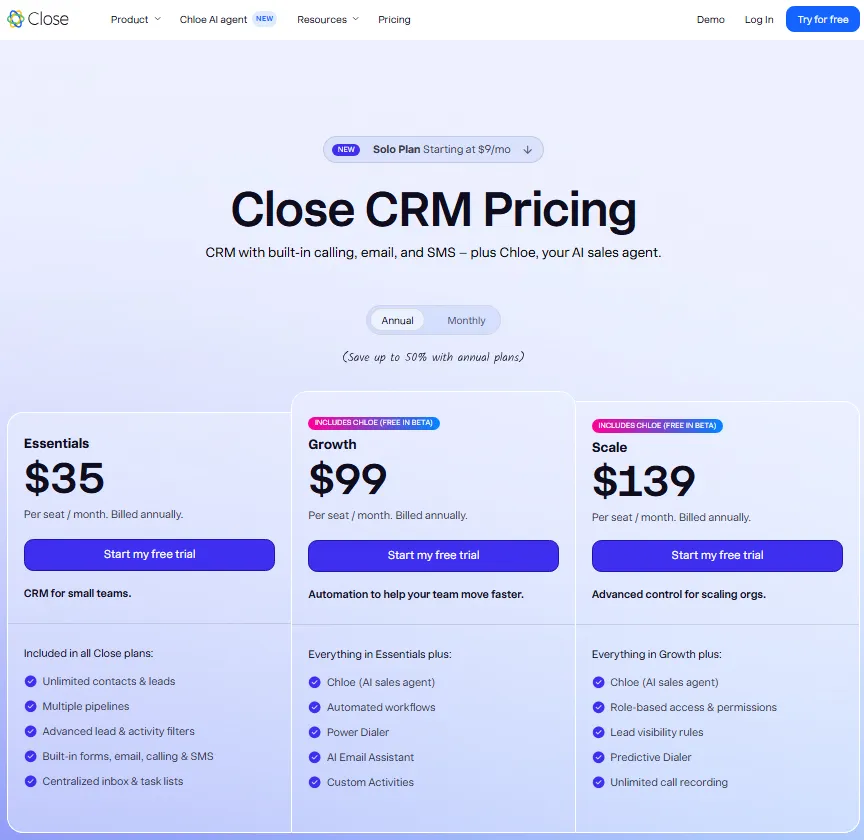
Close Solo starts at $9/month for a single user with 10,000 leads and no workflows. That plan is a demo, not a team CRM. The real team product starts at Essentials ($35/seat/month billed annually), and communication usage (calling minutes, SMS) adds variable costs on top. For 10 users on Essentials, the list-price equivalent is $350/month before any calling charges. For teams above 10 users, Close prompts a sales conversation rather than showing a fixed price.
Verified reviewer sentiment on G2 indicates Close is strong for sales engagement but less flexible for customization than broader CRM platforms, with reporting and marketing automation depth cited as weaker areas.
Problem 2: Marketing Automation and Broader Platform Coverage Are Missing
Close is a sales execution tool. It does not include native marketing automation, customer service workflows, commerce features, or lifecycle management. Teams that want to run email marketing campaigns, build landing pages, manage support tickets, or track post-sale customer health inside the same platform will need to bolt on separate tools or switch to an all-in-one CRM suite.
Verified reviewer sentiment on Capterra notes that integrations can create duplicate or unclear profiles, making it harder to know which record is the correct one.
Problem 3: Enterprise Governance, Reporting, and Customization Hit a Ceiling
Close is optimized for speed, not governance. Sales teams that need territory management, advanced permissioning, multi-layer forecasting, sandbox environments, or deep custom process design will find Close’s architecture focused on outbound engagement rather than enterprise CRM administration. Larger organizations that require SOC 2 audit trails, role hierarchies, or complex approval workflows often outgrow Close’s administrative depth.
Problem 4: No Native Google Workspace CRM Experience
Close integrates with Gmail and Google Calendar, but it is not built inside them. Teams that want CRM activity to live natively in Gmail, with contacts, deals, and activities syncing automatically from Google Workspace, need a Google-native CRM rather than a standalone tool with a sync connector.
Problem 5: No Post-Sale Project or Delivery Tracking
Close focuses on pipeline execution. When the deal closes, the workflow ends. Teams in consulting, agencies, or service delivery that need to hand off won deals to project implementation, customer onboarding, or delivery tracking need a CRM that extends beyond the sales close.
Alternatives That Solve the Cost Problem
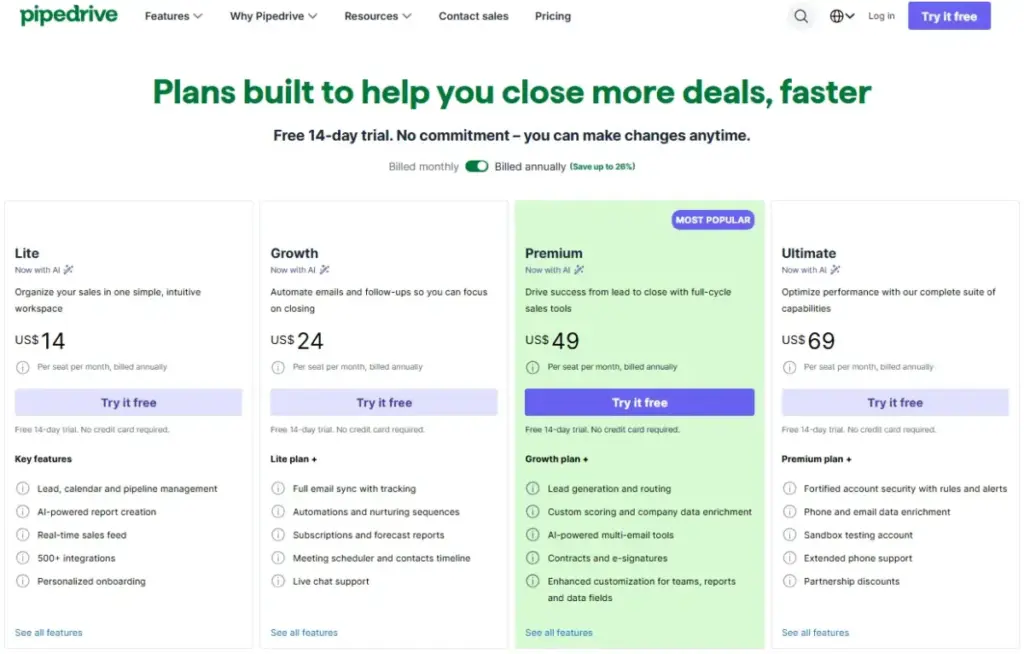
Pipedrive: Best Pipeline-First Close Alternative

Pipedrive is the strongest Close alternative for sales teams that want a cheaper, visual pipeline CRM with less admin overhead.
Pricing starts at US$14/seat/month billed annually on Lite. For 10 users, that is $140/month on Lite, compared to Close’s $350/month Essentials list price (before calling usage). Pipedrive offers a 14-day free trial.
It does better than Close in visual pipeline management. The deal tracking interface, drag-and-drop pipeline, and workflow automations are built for reps who think in deal stages. Over 500 integrations extend the platform without leaving the core CRM. AI sales assistance and email sync are included on higher tiers.
The main tradeoff is outbound communication tooling. Close remains stronger for built-in calling, SMS, and dialer-led sales engagement. Pipedrive does not include a native power dialer or SMS inbox.
Best for:
- Sales teams that want visual deal tracking and lower per-seat cost
- Teams under 20 users that prioritize pipeline clarity over calling volume
- Organizations that already use separate calling tools (like Aircall or RingCentral)
Avoid if: Your sales motion depends on high-volume cold calling and SMS sequences inside the CRM. You will need to add a separate dialer tool on Pipedrive.
Hidden costs: LeadBooster, Campaigns, Web Visitors, and Smart Docs are paid add-ons that can increase the total cost beyond the base seat price.
Migration difficulty: Low-Medium
For a deeper evaluation, see our Pipedrive CRM review.
Freshsales: Best Low-Cost CRM with Built-In Communication Tools

Freshsales is the best Close alternative for small and mid-sized sales teams that want CRM, email, phone, chat, workflows, and AI options at a lower total cost.
A free plan is available for up to 3 users. Growth starts at $9/user/month billed annually, Pro at $39/user/month, and Enterprise at $59/user/month. A 21-day free trial is also available. For 10 users on Growth, the cost is $90/month billed annually.
It does better than Close in breadth of communication channels at entry-level pricing. Built-in chat, email, and phone are available across plans, with Freddy AI, sales sequences, and contact lifecycle stages on higher tiers. The Freshworks ecosystem also offers service, marketing, and IT tools.
The main tradeoff is feature gating. Advanced workflows, custom reports, sales sequences, and deeper Freddy AI capabilities require Pro or Enterprise plans. Bot sessions may have account-level limits.
Best for:
- Teams under 15 users that need phone and email inside CRM without third-party tools
- Organizations exploring the Freshworks ecosystem for service or marketing
- Budget-conscious teams replacing Close at less than half the per-seat cost
Avoid if: You need advanced AI, deep custom reporting, or unlimited bot sessions on a low-cost plan. Those features are gated behind Pro ($39) or Enterprise ($59).
Hidden costs: Freddy AI depth, additional bot sessions, and CPQ are add-on or higher-tier features.
Migration difficulty: Low-Medium
Our Freshsales review covers the feature gates in detail.
Less Annoying CRM: Best Simple No-Tier Close Alternative

Less Annoying CRM is the best Close alternative for very small teams that want simpler pricing, fewer features to manage, and an easy-to-adopt sales CRM.
Pricing is $15/user/month after a 30-day free trial. One plan. No tiers, no contracts, no additional fees. For 10 users, the cost is $150/month flat.
It does better than Close in pricing transparency and simplicity. There is no upgrade pressure, no confusing tier structure, and no variable communication charges. Contact management, pipeline tracking, task management, calendar integration, and email logging cover the essentials without the complexity of a sales engagement platform.
The main tradeoff is depth. Less Annoying CRM does not include advanced AI, marketing automation, analytics, power dialer workflows, or native SMS. It is intentionally simple. If intentional simplicity removes capabilities your sales process depends on, compare Less Annoying CRM alternatives guide by calling workflows, automation depth, analytics, and total CRM complexity.
Best for:
- Teams under 10 users that want predictable monthly billing
- Organizations that do not need outbound calling sequences or AI lead scoring
- Teams switching from Close because they want less configuration, not more features
Avoid if: You need workflow automation, lead scoring, forecasting, or any feature beyond basic contact and pipeline management.
Hidden costs: The official billing page states no additional fees, no contracts, and no tiers.
Migration difficulty: Low
Our Less Annoying CRM review covers the full scope of what this CRM does and does not do.
Nutshell: Best Transparent SMB Sales CRM Alternative

Nutshell is the best Close alternative for small sales teams that want CRM plus email and SMS marketing, AI features, strong support, and clearer pricing than enterprise suites.
Pricing starts at $13/user/month billed annually on Foundation. Pro is $25, Power AI is $42, Business is $59, and Enterprise is $79. A 14-day free trial is available. For 10 users on Foundation, the cost is $130/month billed annually.
It does better than Close in transparent multi-tier pricing with marketing tools built in. Nutshell includes automation, AI summaries, predictive scoring, email and SMS marketing tools, a scheduler, web forms, and integrations. Free support and migration assistance are offered.
The main tradeoff is outbound calling intensity. Close remains stronger for teams that need native high-volume calling, SMS, and dialer-led outbound workflows.
Best for:
- Small sales teams that want CRM and marketing in one tool
- Organizations that value transparent pricing without sales-led pricing walls
- Teams that want AI summaries and predictive scoring without enterprise complexity
Avoid if: Your outbound motion is calling-first. Nutshell does not include a native power dialer or predictive dialer comparable to Close.
Hidden costs: Quotes/invoices, paid AI tiers, and advisor services are add-ons rather than included in every plan.
Migration difficulty: Low-Medium
Alternatives That Solve the Marketing Automation Gap
HubSpot Sales Hub: Best All-in-One Revenue Platform Alternative

HubSpot Sales Hub is the best Close alternative for teams leaving because they need CRM, marketing, service, reporting, and sales automation in one ecosystem.
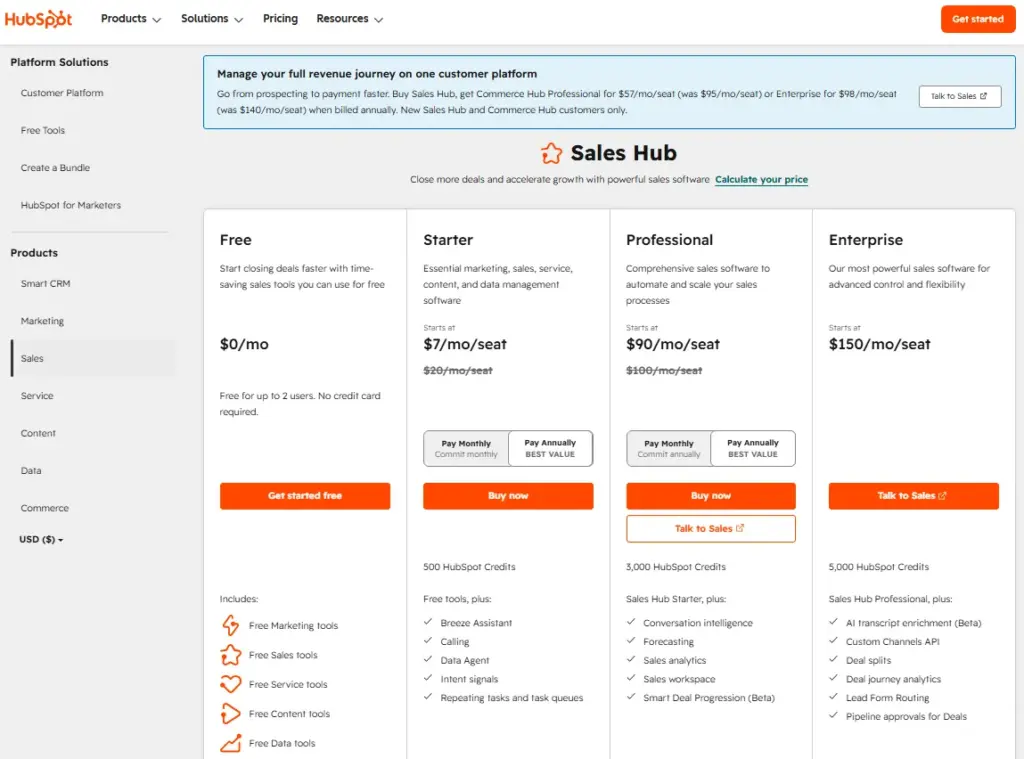
Free CRM tools are available at $0/month. Paid Sales Hub Starter was listed from $10/seat/month during a May 2026 promotion (with $20/seat/month shown as the non-promotional reference). Professional is $100/seat/month and Enterprise is $150/seat/month. For 10 users on Starter during the observed promotion, the cost is $100/month (or $200/month at the non-promotional rate).
It does better than Close in platform breadth. HubSpot connects sales automation, lead management, forecasting, reporting, calling, CPQ, and more than 2,000 app integrations. Marketing Hub, Service Hub, and Commerce Hub extend the platform far beyond sales engagement.
The main tradeoff is cost at scale. HubSpot becomes more expensive and more complex as teams move into Professional or Enterprise tiers. Advanced sales workflows, reporting, and revenue operations depth require higher-tier plans. For a narrower head-to-head, compare HubSpot versus Close on platform breadth, calling workflow, and cost.
Best for:
- Teams that want sales, marketing, and service under one vendor
- Organizations planning to scale from free CRM to full revenue operations
- Teams that need deeper reporting and marketing automation capabilities than Close provides
Avoid if: Your budget cannot handle the free-to-Professional jump. Automation, custom reporting, and sequences require Professional at $100/seat/month, which means a 10-person team would pay $1,000/month before marketing contacts or onboarding fees.
Hidden costs: Costs rise sharply on Professional and Enterprise tiers. Advanced automation, reporting, forecasting, and revenue operations depth require higher plans. Mandatory onboarding fees may apply.
Migration difficulty: Medium
See our HubSpot CRM review for the full pricing and feature gate breakdown.
Zoho CRM: Best Budget Customization Alternative

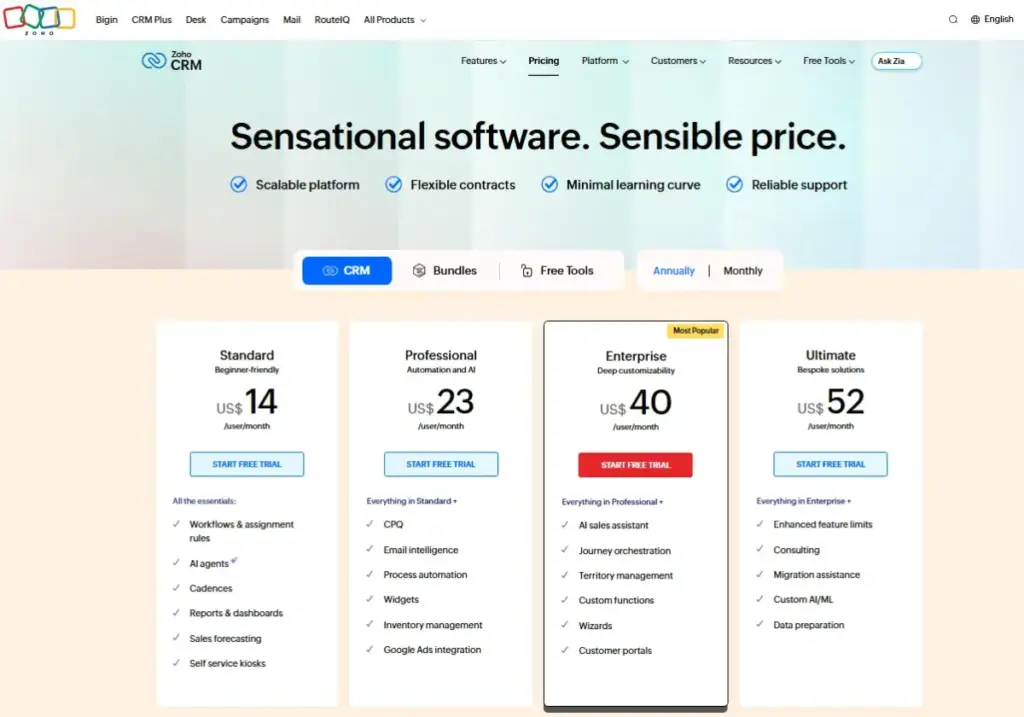
Zoho CRM is the best Close alternative for teams that want stronger customization, automation, AI, and lower advertised entry pricing.
A free edition is available for up to 3 users. Paid USD pricing is commonly listed from $14/user/month billed annually. For 10 users on Standard at the commonly listed US price, the cost is approximately $140/month billed annually (caveat: official pricing may render regional currency; confirm live USD pricing on the Zoho page before purchase).
It does better than Close in customization depth. Workflow automation, Blueprint process design, Zia AI assistant, analytics, and the broader Zoho ecosystem (40+ apps) give teams far more configuration control than Close’s sales engagement focus.
The main tradeoff is complexity. Zoho can feel dense for outbound teams that mainly need calling, email, and sales engagement speed. Configuration takes time to unlock Zoho’s full value.
Best for:
- Teams that want enterprise-grade customization at SMB pricing
- Organizations that value the Zoho ecosystem (Projects, Desk, Analytics, Campaigns)
- Teams that need CRM software flexibility beyond sales engagement
Avoid if: You want a CRM that works out of the box in under an hour. Zoho rewards configuration patience but penalizes teams that skip setup.
Hidden costs: Official pricing can render differently by region. Confirm USD pricing on the live page before purchase.
Migration difficulty: Medium
Our Zoho CRM review covers the plan gates and ecosystem depth.
Alternatives That Solve the Enterprise Governance Gap
Salesforce Sales Cloud: Best Enterprise Close Alternative

Salesforce Sales Cloud is the best Close alternative for organizations leaving because they need enterprise governance, complex customization, AI-assisted selling, advanced reporting, and scalability.
Pricing starts at $25 USD/user/month for Starter Suite. For 10 users, the base cost is $250/month before add-ons, implementation, or higher editions. Trial availability varies by edition and campaign.
It does better than Close in every enterprise dimension: customizable sales processes, forecasting, territory management, sandbox environments, role hierarchies, audit trails, and the AppExchange ecosystem. AI assistance through Agentforce extends the platform for teams ready to invest.
The main tradeoff is complexity. Salesforce is significantly more complex to implement and administer than Close for small outbound teams. You need admin capacity, and often a consultant, to build workflows and maintain the system.
Best for:
- Organizations with 25+ users that need governance, compliance, and deep customization
- Teams that require territory management, multi-layer forecasting, and role hierarchies
- Companies that can invest in administration and implementation
Avoid if: Your team is under 10 users and you have no dedicated CRM administrator. The power comes with proportional administrative overhead.
Hidden costs: Implementation, administration, higher editions, and paid add-ons (Agentforce, Data Cloud, CPQ) can materially increase total cost beyond the Starter Suite price.
Migration difficulty: High
Our Salesforce CRM review provides the full breakdown of pricing tiers and feature gates.
Alternatives That Solve the Workflow and Post-Sale Gaps
monday CRM: Best Visual Workflow Alternative

monday CRM is the best Close alternative for teams that want visual sales workflows, sales operations, customer handoffs, and no-code process customization.
Pricing starts at $12/seat/month billed annually on Basic, with Standard at $17, Pro at $28, and Ultimate on custom pricing. Plans start from 3 users, so the minimum cost is $36/month. For 10 users on Basic, the cost is $120/month billed annually. A trial is available.
It does better than Close in visual process management. Custom boards, dashboards, automations, email sequences, quotes and invoices, and a communication hub let teams design workflows that extend beyond traditional sales pipeline stages.
The main tradeoff is sales engagement depth. monday CRM is not dialer-first like Close, and CRM-specific analytics or calling features lag dedicated sales CRMs.
Best for:
- Teams that manage non-standard sales processes with custom statuses and handoffs
- Organizations that need sales, onboarding, and delivery workflows in one visual workspace
- Teams that want no-code automation without developer resources
Avoid if: Your primary workflow is high-volume outbound calling and SMS. monday CRM does not include a native power dialer.
Hidden costs: Lower plans include active contact/deal limits, dashboard limits, column limits, workspace limits, and automation limits. Tax, country, and currency factors may affect pricing.
Migration difficulty: Medium
Our monday CRM evaluation covers the board-based CRM approach in detail.
Copper CRM: Best Google Workspace Alternative

Copper CRM is the best Close alternative for Google Workspace teams that want CRM activity embedded into Gmail, Google Calendar, and Google workflows.
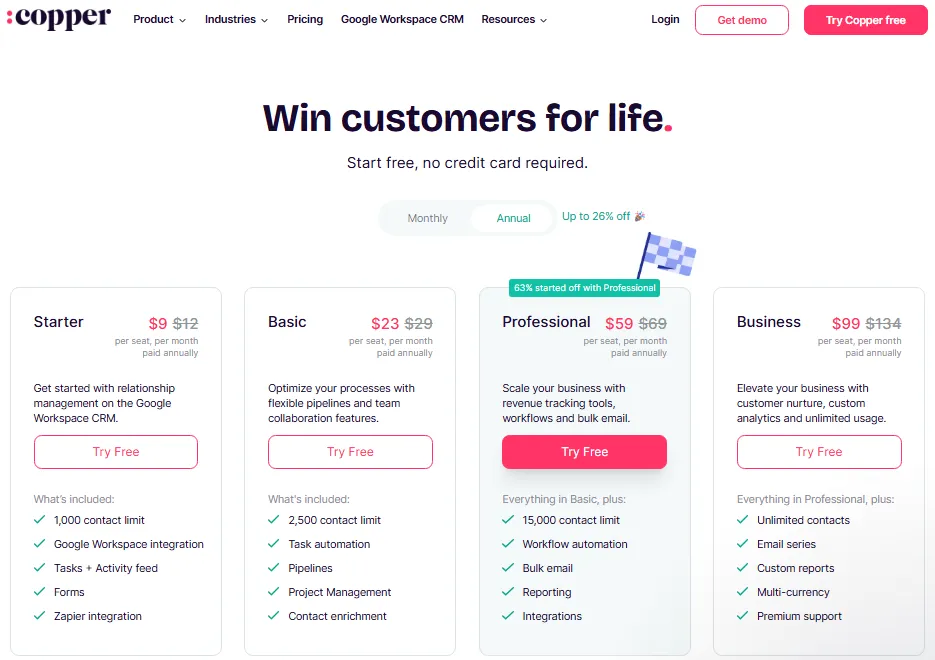
Pricing starts at $9/seat/month billed annually on Starter. Basic is $23, Professional is $59, and Business is $99. For 10 users on Starter, the cost is $90/month billed annually. A free trial is available.
It does better than Close in Google Workspace native integration. Contacts, deals, and activities sync automatically from Gmail and Google Calendar without manual data entry. Pipeline management, task automation, project features, and email series are built on top of Google’s ecosystem.
The main tradeoff is sales engagement intensity. Close is stronger for built-in calling, SMS, and outbound sequence volume. Copper is a relationship CRM, not a dialer-first platform.
Best for:
- Teams that live in Gmail and Google Calendar daily
- Organizations that want CRM data to appear automatically from email interactions
- Service businesses that need pipeline plus project management in a Google-native tool
Avoid if: You use Microsoft 365, or your sales motion depends on high-volume cold calling. Copper’s value is ecosystem depth, not standalone outbound tooling.
Hidden costs: Starter has a 1,000-contact limit and does not include Sales Opportunities and Leads. Higher tiers are needed for workflows, bulk email, reporting, and larger contact limits.
Migration difficulty: Low for Google Workspace teams; Medium otherwise
Our Copper CRM review covers the Google Workspace integration depth and feature gates.
Insightly CRM: Best Close Alternative for Post-Sale Project Delivery

Insightly CRM is the best Close alternative for teams that want CRM plus project delivery, customer onboarding, and operational workflow tracking after deals close.
Pricing starts at $29/user/month billed annually on CRM Plus. Professional is $49 and Enterprise is $99. A 14-day trial is available. For 10 users on CRM Plus, the cost is $290/month billed annually.
It does better than Close in post-sale workflow. When a deal closes in Insightly, it can trigger a project in the same platform, connecting sales and delivery in a way that standalone sales CRMs do not support. Workflow automation, lead assignment, relationship linking, AI Copilot, and AppConnect integration automation extend the CRM beyond pipeline management.
The main tradeoff is entry pricing and complexity. Insightly starts higher than many SMB alternatives and can require additional paid automation or setup for complex integration use cases.
Best for:
- Consulting firms, agencies, and service businesses that hand off won deals to delivery teams
- Teams that need CRM and project management in one platform
- Organizations that want pipeline management to extend through implementation
Avoid if: You only need sales pipeline management without project delivery features. The project handoff is the reason to choose Insightly, not the CRM depth alone.
Hidden costs: AppConnect can add task overage pricing and a technical setup fee for some integration automation use cases. Support and setup complexity may be higher than simpler CRMs.
Migration difficulty: Medium-High
Our Insightly CRM review covers the CRM-to-project workflow in detail.
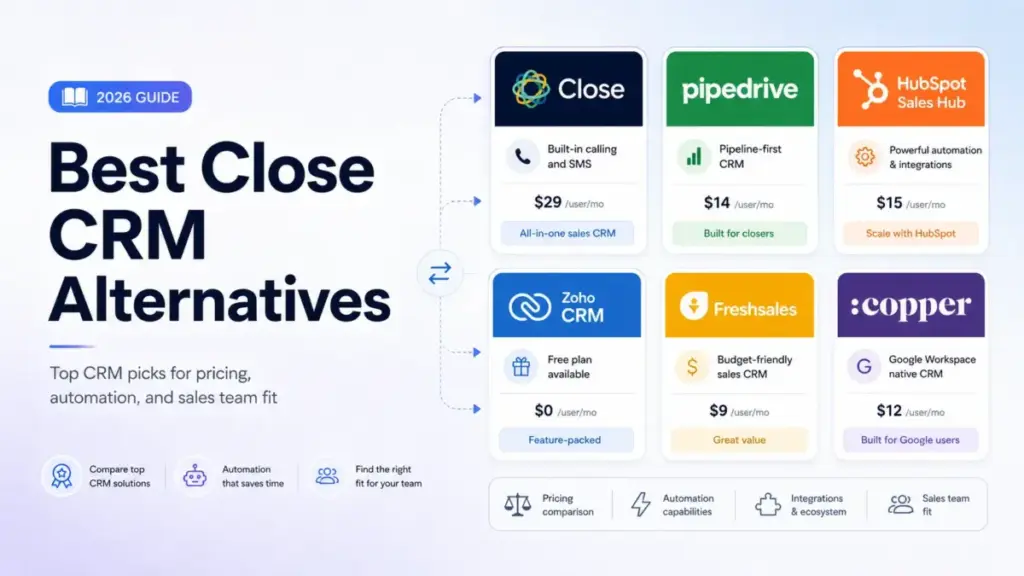
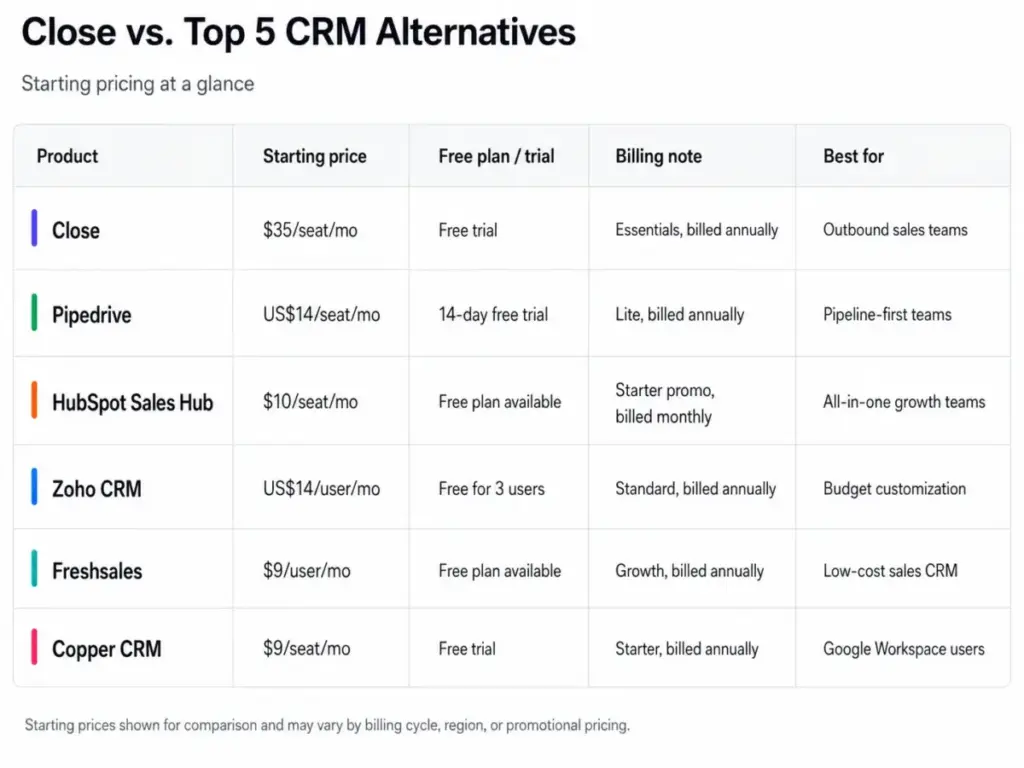
Pricing Comparison: Close vs. 10 Alternatives
Pricing was verified on May 24, 2026 from official pricing pages. All prices shown are per user, billed annually unless stated otherwise.
| CRM | Starting price | 10-user cost | Free plan | Trial | Hidden cost flag |
|---|---|---|---|---|---|
| Close CRM | $9/mo Solo; $35/seat/mo Essentials | Custom / contact sales for 10+ | No | Yes | Calling usage, SMS charges, dialer tier gates |
| Pipedrive | $14/seat/mo | $140/mo (Lite) | No | 14 days | LeadBooster, Campaigns, Web Visitors, Smart Docs |
| HubSpot Sales Hub | Free; Starter from $10/seat/mo promo | $100/mo (Starter promo) | Yes | Free tools | Professional jump, marketing contacts, onboarding |
| Zoho CRM | Free; ~$14/user/mo | ~$140/mo (Standard) | Yes (3 users) | Yes | Regional pricing, confirm live USD |
| Salesforce Sales Cloud | $25/user/mo | $250/mo (Starter Suite) | No | Varies | Implementation, add-ons, higher editions |
| Freshsales | Free; $9/user/mo Growth | $90/mo (Growth) | Yes (3 users) | 21 days | AI sessions, CPQ, advanced workflows |
| monday CRM | $12/seat/mo (3 min) | $120/mo (Basic) | No | Yes | Automation limits, contact/deal limits |
| Copper CRM | $9/seat/mo | $90/mo (Starter) | No | Yes | 1,000-contact limit on Starter, feature gates |
| Insightly CRM | $29/user/mo | $290/mo (Plus) | No | 14 days | AppConnect setup $3K, AI query limits |
| Nutshell | $13/user/mo | $130/mo (Foundation) | No | 14 days | Quotes, AI tiers, advisor add-ons |
| Less Annoying CRM | $15/user/mo | $150/mo | No | 30 days | No hidden fees (official statement) |
What this means: Close’s 10-user cost is not publicly fixed for team accounts. At Essentials list price, 10 users cost $350/month before calling charges. Every alternative on this list has a publicly listed 10-user cost. Freshsales ($90/month), Copper ($90/month), and monday CRM ($120/month) offer the lowest entry points. Less Annoying CRM ($150/month) offers the most predictable total cost with zero hidden fees. HubSpot offers the strongest free starting point but costs $1,000/month at Professional for 10 users.
Migration Difficulty Matrix
Migration difficulty is an editorial estimate based on data model complexity, workflow rebuild effort, integration requirements, and setup depth (as of May 2026).
| Alternative | Difficulty | Main risk | What to plan for |
|---|---|---|---|
| Pipedrive | Low-Medium | Workflow rebuild | Rebuild email sequences; dialer needs separate tool |
| HubSpot Sales Hub | Medium | Data mapping + cost escalation | Map contact fields; budget for Professional if you need automation |
| Zoho CRM | Medium | Configuration time | Invest setup time; verify regional pricing |
| Salesforce Sales Cloud | High | Admin capacity | Hire admin or consultant; plan 4-8 week implementation |
| Freshsales | Low-Medium | Feature gate verification | Confirm AI sessions and phone usage fit before committing |
| monday CRM | Medium | Non-standard CRM model | Learn board-based structure; rebuild pipelines as boards |
| Copper CRM | Low (Google); Medium (other) | Google Workspace dependency | Only migrate if your team lives in Gmail |
| Insightly CRM | Medium-High | AppConnect costs | Budget for integration setup fees if using automation connectors |
| Nutshell | Low-Medium | Marketing tool migration | Move email marketing workflows; test SMS marketing limits |
| Less Annoying CRM | Low | Feature ceiling | Accept feature limitations in exchange for simplicity |
Before migrating from Close, export your leads, contacts, deals, activities, email templates, and sequences. Map custom fields between Close and your target CRM. Rebuild calling workflows in a separate tool if the new CRM does not include a native dialer. For a step-by-step migration framework, our CRM migration guide covers the full process.
How to Choose the Right Close CRM Alternative
The right alternative depends on why you are leaving, not on which CRM has the longest feature list.
If cost is the primary driver: Calculate the 10-user cost on the plan you actually need, not the starting price. Freshsales Growth ($90/month), Copper Starter ($90/month), and monday CRM Basic ($120/month) are the cheapest options. But verify what each entry plan excludes before committing. Copper Starter has a 1,000-contact limit. monday Basic has automation caps.
If you need marketing automation: HubSpot or Zoho CRM. Both connect sales and marketing in ways Close cannot. HubSpot has a broader ecosystem. Zoho has better per-dollar value. Budget for the practical tier, not the starting price.
If you need enterprise governance: Salesforce. Nothing else on this list matches its customization depth, reporting, or ecosystem scale. Verify you have the admin resources before committing.
If you need Google Workspace native CRM: Copper. It is the only CRM on this list built inside Gmail and Google Workspace.
If you need post-sale project tracking: Insightly. The CRM-to-project handoff is unique on this list.
If you need the simplest possible CRM: Less Annoying CRM. One price. One plan. No surprises.
If you need visual workflow management: monday CRM. The board-based approach works for teams with non-standard sales processes.
The decision tree looks like this: (1) identify your switching trigger, (2) verify the alternative solves it, (3) calculate 10-user cost on the practical tier, (4) check migration difficulty. Understanding what CRM integration involves will also help you assess how each alternative connects to your existing tools.
Which Close CRM Alternative Should You Avoid?
Every tool on this list has a strong use case, but each becomes the wrong choice for specific buyer types.
Avoid Salesforce if your team is under 10 users and you have no CRM administrator. The governance depth that makes Salesforce powerful also makes it heavy for small outbound teams.
Avoid HubSpot Professional if your budget cannot handle $100/seat/month. The free tier is genuinely useful, but the jump to Professional is one of the steepest in the CRM market.
Avoid Copper Starter if you have more than 1,000 contacts. The Starter plan is a contact manager, not a full CRM. Meaningful sales features start at Professional ($59/seat/month).
Avoid Insightly if you only need sales pipeline management. The project delivery features are the reason to choose Insightly. Without them, you are overpaying for CRM depth available at lower prices elsewhere.
Avoid Less Annoying CRM if you need workflow automation, AI lead scoring, or advanced analytics. The simplicity is the product, and the ceiling is part of the design.
Avoid monday CRM if your workflow is calling-first. The board-based CRM does not include a native dialer and is not optimized for high-volume outbound calling sequences.
When to Stay with Close CRM
Close is still the right choice for specific teams. Do not switch just because cheaper options exist.
Stay with Close if:
- Your sales motion is high-volume outbound calling, SMS, and email sequences
- Your team is under 10 reps and the communication charges are manageable
- You value having calling, SMS, email, and CRM in a single workspace without integrations
- You use the power dialer or predictive dialer features on Growth or Scale plans
- Your team’s productivity depends on sales pipeline speed, not CRM breadth
Switch if:
- Your 10-user cost exceeds what you can get from Freshsales, Pipedrive, or Copper
- You need marketing automation, service tools, or lifecycle management
- You need enterprise governance and reporting that Close does not offer
- Your team works in Google Workspace and wants CRM embedded in Gmail
- You need post-sale project delivery tracking
- You want simpler pricing with no usage-based charges
The honest answer is that Close does one thing exceptionally well: outbound sales engagement. If your pain point is not related to that core strength, the alternatives above are better answers to your specific switching trigger.
Final Verdict: Best Close CRM Alternative for Most Teams
For most teams leaving Close CRM, Pipedrive is the safest first choice. It offers visual pipeline management, lower per-seat cost, strong automations, and a broad integration ecosystem. The main tradeoff is losing Close’s native dialer, which means adding a separate calling tool if outbound volume is high.
Best free starting point: HubSpot Sales Hub. Free CRM with a clear upgrade path, but budget for the Professional tier jump.
Best budget option with phone and AI: Freshsales at $9/user/month. The closest to Close’s communication-first approach at a fraction of the cost.
Best for enterprise scale: Salesforce Sales Cloud. The governance, customization, and ecosystem depth that Close does not offer.
Best for Google Workspace teams: Copper CRM. Native Gmail integration that no other CRM on this list matches.
Best for simplicity: Less Annoying CRM at $15/user/month. One plan, no surprises, no confusion.
Best for post-sale delivery: Insightly CRM. The CRM-to-project handoff that dedicated sales CRM alternatives do not provide.
The right Close alternative is not the one with the highest review score. It is the one that solves the specific problem that made you search for alternatives in the first place.
FAQ
What is the best alternative to Close CRM?
Pipedrive is the best overall alternative for most teams. It offers visual pipeline management at $14/seat/month billed annually, lower 10-user costs, and strong automations. If you need marketing automation, choose HubSpot. If you need enterprise governance, choose Salesforce. The best alternative depends on your switching trigger, not a generic ranking.
Is Close CRM better than Pipedrive?
Close is better for teams whose primary workflow is high-volume outbound calling, SMS, and email sequences inside the CRM. Pipedrive is better for teams that prioritize visual pipeline management, lower per-seat cost, and a broader integration ecosystem. If your sales motion is calling-first, Close wins. If your sales motion is deal-tracking-first, Pipedrive wins.
What is cheaper than Close CRM for 10 users?
Freshsales Growth at $90/month for 10 users, Copper Starter at $90/month, monday CRM Basic at $120/month, Nutshell Foundation at $130/month, and Pipedrive Lite at $140/month are all cheaper than Close Essentials at $350/month list price. Less Annoying CRM is $150/month with no hidden fees.
Does Close CRM have a free plan?
No. Close offers a Solo plan at $9/month (billed annually) for a single user with limited features, but there is no free plan. HubSpot, Freshsales, and Zoho CRM all offer free plans with varying contact and feature limits.
Which Close alternative is best for small business?
Less Annoying CRM at $15/user/month is the simplest option for very small teams. Nutshell at $13/user/month adds marketing tools and AI features. Freshsales offers a free plan for up to 3 users. The best fit depends on whether you need calling (Freshsales), simplicity (Less Annoying), or marketing tools (Nutshell).
Which Close alternative has built-in calling?
Freshsales includes built-in phone capabilities across paid plans. HubSpot offers a power dialer on Sales Hub Professional and above. Most other alternatives on this list require a third-party calling integration. No alternative on this list matches Close’s depth in native calling, SMS, and dialer features.
Which Close alternative is best for Google Workspace?
Copper CRM is the only CRM on this list built natively for Google Workspace. Contacts, deals, and activities sync automatically from Gmail and Google Calendar. HubSpot also integrates well with Gmail, but it is not built inside the Google Workspace interface.
How much does Close CRM cost for 10 users?
Close prompts a sales conversation for teams with 10 or more users. At the Essentials list price of $35/seat/month billed annually, 10 users would cost $350/month before calling usage charges and SMS fees. Actual team pricing may differ based on the sales conversation.
What should I check before migrating from Close CRM?
Export your leads, contacts, deals, activities, call logs, email templates, and sequences. Map custom fields to the target CRM. Plan to rebuild calling workflows if the new CRM lacks a native dialer. Budget 2-6 weeks for data migration, workflow setup, and team retraining. Test the new CRM with a small group before full migration.
Which Close alternative has the easiest setup?
Less Annoying CRM has the simplest setup on this list. Copper CRM is the easiest for Google Workspace teams because it auto-syncs contacts from Gmail. Pipedrive offers fast visual pipeline setup. Salesforce has the most complex setup and typically requires admin or consultant support.